
How Users get Access to Cisco Services Instructions


- Slides: 6
How Users get Access to Cisco Services Instructions for Navigating in the Training Module This training module is best viewed in Slide Show mode. Click on the Power. Point slide show icon at the bottom of the screen. To proceed to the next step, click the mouse, or use the “Pg. Dn” or Down Arrow key on your keyboard. To return to the previous step, right click and select “Previous” from the menu, or use the “Pg. Up” or Up Arrow key on your keyboard. The demonstration portion of the training module will run automatically. You should not click or use the keyboard during the demonstration. To end the presentation, right click and select “End Show” from the menu, or use the “Esc” key on your keyboard. © 2014 Cisco and/or its affiliates. All rights reserved. Cisco Confidential 1
How Users get Access to Cisco Services Before a customer or partner user wants to obtain contracted services, they must request access via Cisco. com Profile Manager. Beginning in early 2016, all requests will be systematically evaluated to determine whether the user is authorized to the service. If all validations pass, the user will be automatically granted access. The following visual demonstration describes how requests are submitted, validated, routed for review (as needed), and fulfilled. © 2014 Cisco and/or its affiliates. All rights reserved. Cisco Confidential 2
Visual Demonstration © 2014 Cisco and/or its affiliates. All rights reserved. Cisco Confidential 3
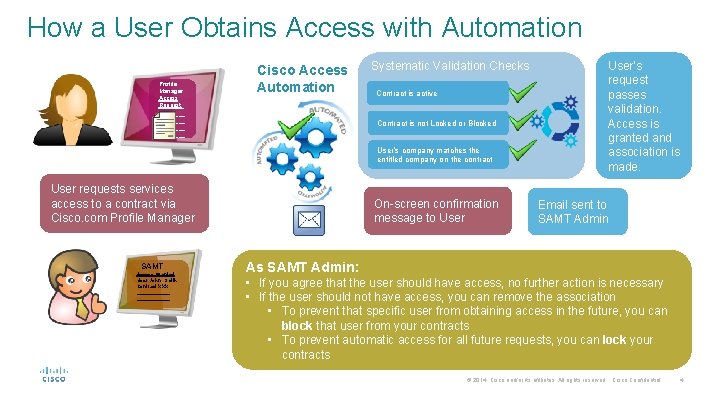
How a User Obtains Access with Automation Profile Manager Access Request_ ________ Cisco Access Automation Systematic Validation Checks Contract is active Contract is not Locked or Blocked User’s company matches the entitled company on the contract User requests services access to a contract via Cisco. com Profile Manager SAMT Access Granted User John Smith Contract XXX ____________ On-screen confirmation message to User’s request passes validation. Access is granted and association is made. Email sent to SAMT Admin As SAMT Admin: • If you agree that the user should have access, no further action is necessary • If the user should not have access, you can remove the association • To prevent that specific user from obtaining access in the future, you can block that user from your contracts • To prevent automatic access for all future requests, you can lock your contracts © 2014 Cisco and/or its affiliates. All rights reserved. Cisco Confidential 4
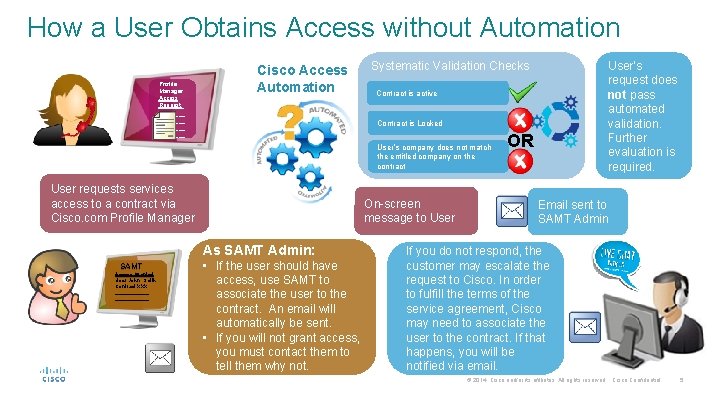
How a User Obtains Access without Automation Profile Manager Access Request_ ________ Cisco Access Automation Contract is active Contract is Locked User’s company does not match the entitled company on the contract User requests services access to a contract via Cisco. com Profile Manager On-screen message to User As SAMT Admin: SAMT Access Granted Request User John Smith Contract XXX ____________ User’s request does not pass automated validation. Further evaluation is required. Systematic Validation Checks • If the user should have access, use SAMT to associate the user to the contract. An email will automatically be sent. • If you will not grant access, you must contact them to tell them why not. OR Email sent to SAMT Admin If you do not respond, the customer may escalate the request to Cisco. In order to fulfill the terms of the service agreement, Cisco may need to associate the user to the contract. If that happens, you will be notified via email. © 2014 Cisco and/or its affiliates. All rights reserved. Cisco Confidential 5