
How TSAPI works with SDB Yanli Copyright 2003
How TSAPI works with SDB Yanli Copyright© 2003 Avaya Inc. All rights reserved Avaya – Proprietary Use pursuant to Company instructions
3 classes of Users on AE Services: AE Services Management Console Administrators This is used to manage the AES service, the administrator is authenticated against the Linux platform or Enterprise Directory (Active Directory, Domino, Open. LDAP, etc…) using the LDAP or LDAP-S (Secure LDAP) protocol User Management Administrators----provided via OAM This is used to manage all AE Services users (add, change or delete users). Client Application Users This is used to authenticated the applications which using TSAPI, JTAPI, DMCC and Telephony Web Service applications. Copyright© 2003 Avaya Inc. All rights reserved 2 Avaya – Proprietary Use pursuant to Company instructions
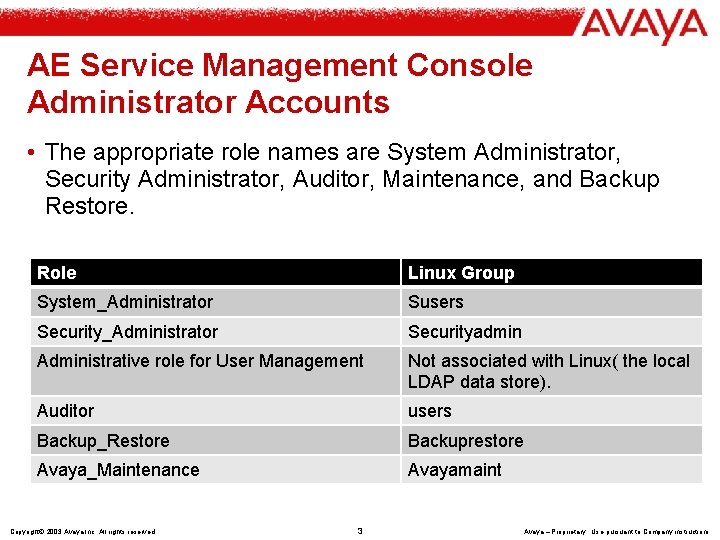
AE Service Management Console Administrator Accounts • The appropriate role names are System Administrator, Security Administrator, Auditor, Maintenance, and Backup Restore. Role Linux Group System_Administrator Susers Security_Administrator Securityadmin Administrative role for User Management Not associated with Linux( the local LDAP data store). Auditor users Backup_Restore Backuprestore Avaya_Maintenance Avayamaint Copyright© 2003 Avaya Inc. All rights reserved 3 Avaya – Proprietary Use pursuant to Company instructions
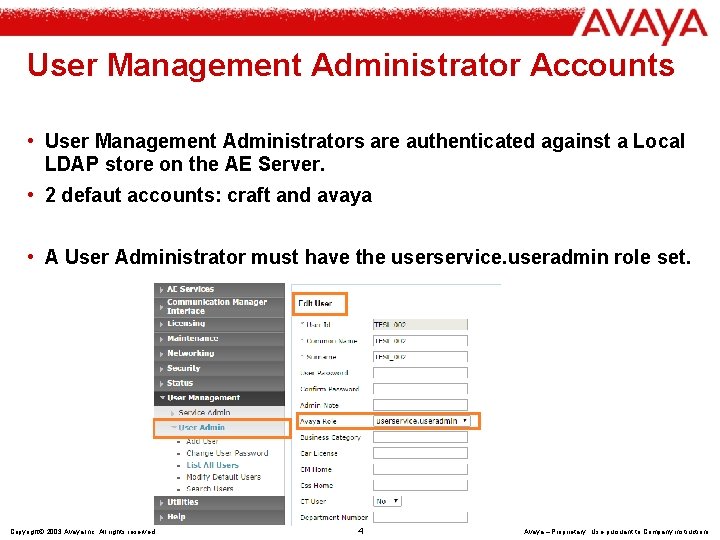
User Management Administrator Accounts • User Management Administrators are authenticated against a Local LDAP store on the AE Server. • 2 defaut accounts: craft and avaya • A User Administrator must have the userservice. useradmin role set. Copyright© 2003 Avaya Inc. All rights reserved 4 Avaya – Proprietary Use pursuant to Company instructions

Client Application User Accounts(Usage of the Security Database) • The AE Services TSAPI, JTAPI, Telephony Web Service and DMCC each authenticate a connecting client application and authorize the control of devices by the client application. • For a CTI user which is associated with the client application: - Authenticated by LDAP - Authorized by SDB Copyright© 2003 Avaya Inc. All rights reserved 5 Avaya – Proprietary Use pursuant to Company instructions
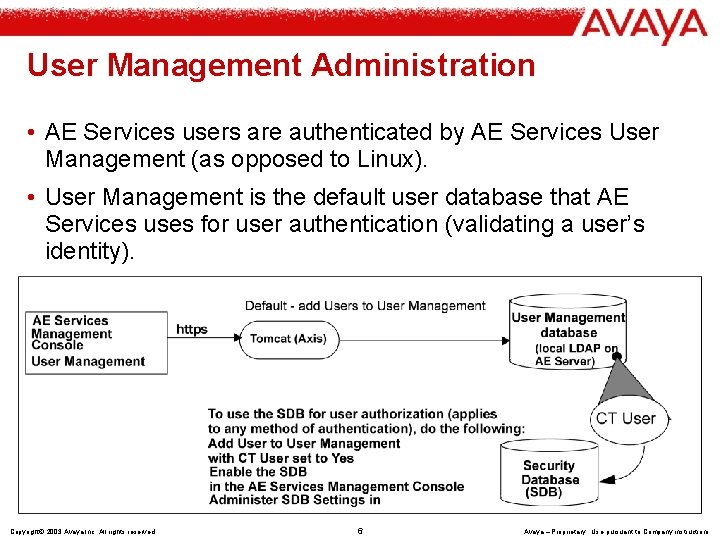
User Management Administration • AE Services users are authenticated by AE Services User Management (as opposed to Linux). • User Management is the default user database that AE Services uses for user authentication (validating a user’s identity). Copyright© 2003 Avaya Inc. All rights reserved 6 Avaya – Proprietary Use pursuant to Company instructions
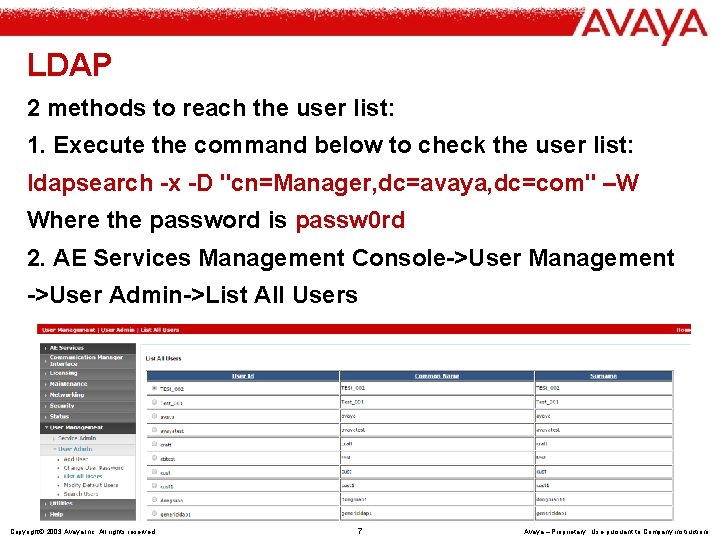
LDAP 2 methods to reach the user list: 1. Execute the command below to check the user list: ldapsearch -x -D "cn=Manager, dc=avaya, dc=com" –W Where the password is passw 0 rd 2. AE Services Management Console->User Management ->User Admin->List All Users Copyright© 2003 Avaya Inc. All rights reserved 7 Avaya – Proprietary Use pursuant to Company instructions
What’s SDB • The Application Enablement Services (AE Services) Security Database (SDB) provides the ability to control a user’s access privileges. • The SDB stores information about Computer Telephony (CT) users and the devices they control. • The DMCC service, the TSAPI service, and Telephony Web Services use this information for permission checking. Copyright© 2003 Avaya Inc. All rights reserved 8 Avaya – Proprietary Use pursuant to Company instructions
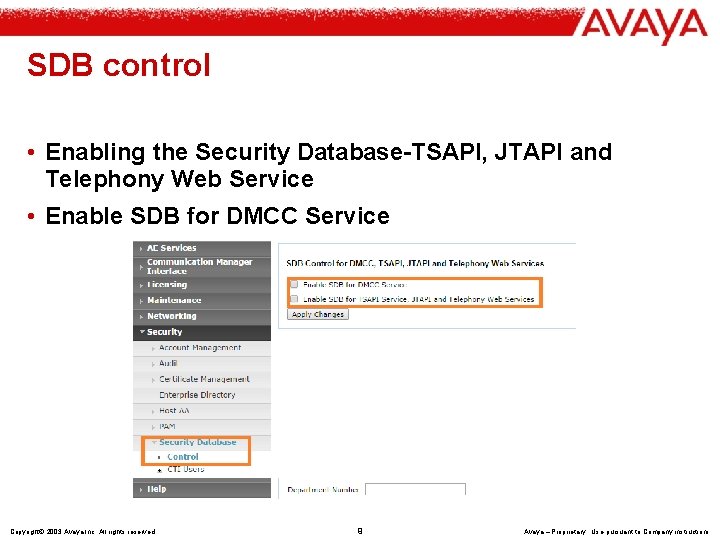
SDB control • Enabling the Security Database-TSAPI, JTAPI and Telephony Web Service • Enable SDB for DMCC Service Copyright© 2003 Avaya Inc. All rights reserved 9 Avaya – Proprietary Use pursuant to Company instructions
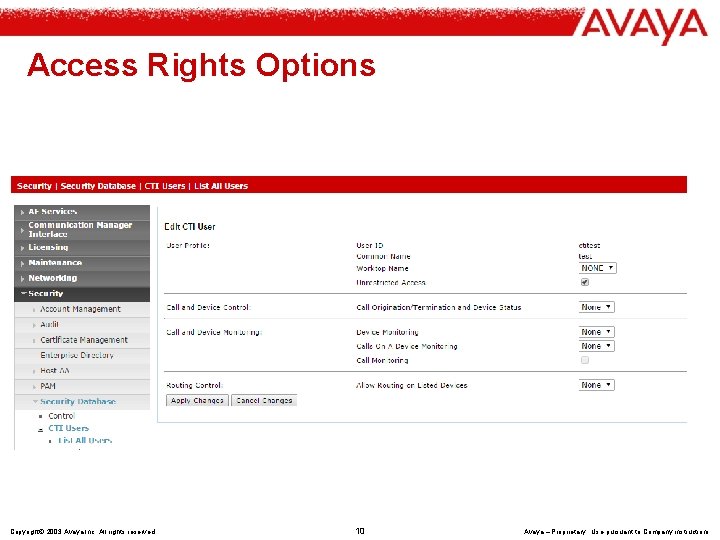
Access Rights Options Copyright© 2003 Avaya Inc. All rights reserved 10 Avaya – Proprietary Use pursuant to Company instructions
Security Database objects Some additional TSAPI tests about these concepts in Slide 17 to 21 • Tlinks:TSAPI links (Tlinks) are service identifiers (names) dynamically created by the TSAPI service. • Tlink groups:A Tlink group is a name you assign to one or more Tlinks. • Devices:A device can be a telephone, a fax machine, a modem, an ACD, a VDN, or an agent ID that CM controls. • Device groups:A device group refers to the name of a group and the devices that make up the group. • Worktops:A worktop refers to a collection of devices. • CTI Users:A CTI user is a person (or an application) administered as a CT user in the AE Services User Management database who logs in and uses the TSAPI service. Copyright© 2003 Avaya Inc. All rights reserved 11 Avaya – Proprietary Use pursuant to Company instructions
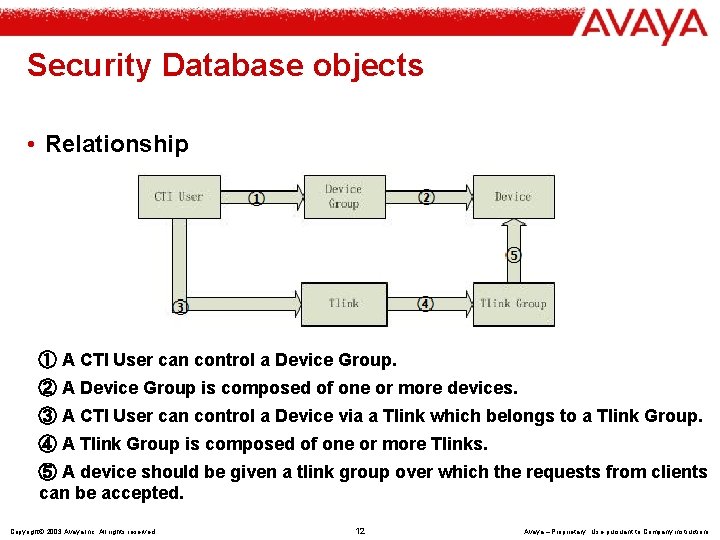
Security Database objects • Relationship ① A CTI User can control a Device Group. ② A Device Group is composed of one or more devices. ③ A CTI User can control a Device via a Tlink which belongs to a Tlink Group. ④ A Tlink Group is composed of one or more Tlinks. ⑤ A device should be given a tlink group over which the requests from clients can be accepted. Copyright© 2003 Avaya Inc. All rights reserved 12 Avaya – Proprietary Use pursuant to Company instructions
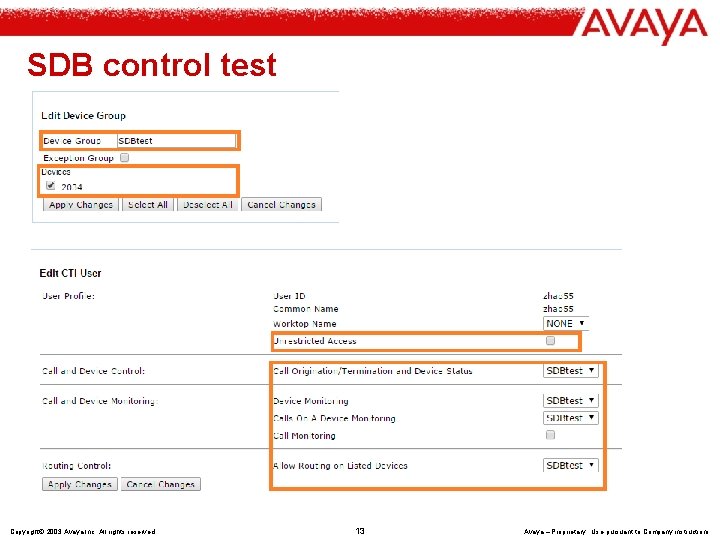
SDB control test Copyright© 2003 Avaya Inc. All rights reserved 13 Avaya – Proprietary Use pursuant to Company instructions
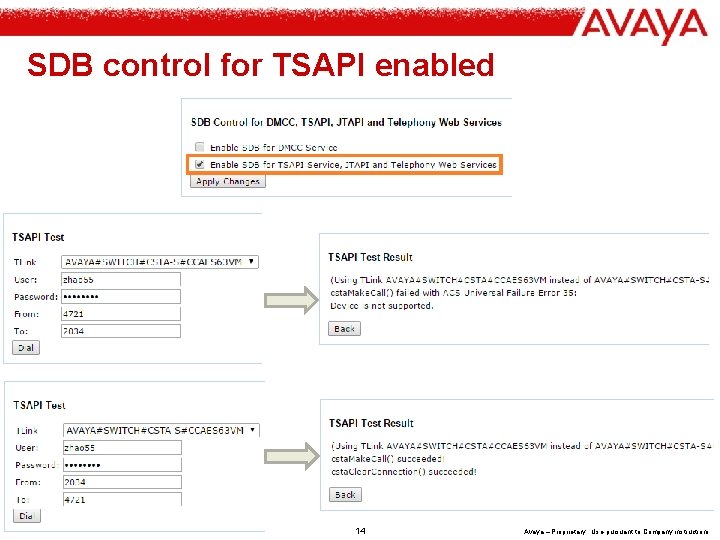
SDB control for TSAPI enabled Copyright© 2003 Avaya Inc. All rights reserved 14 Avaya – Proprietary Use pursuant to Company instructions
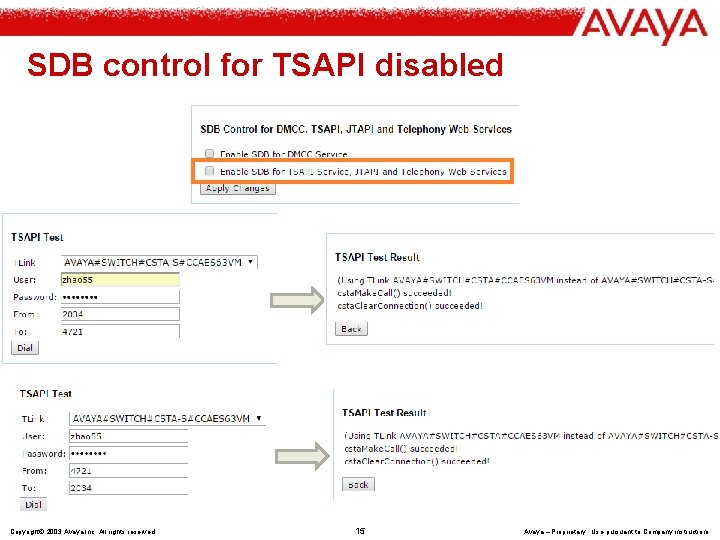
SDB control for TSAPI disabled Copyright© 2003 Avaya Inc. All rights reserved 15 Avaya – Proprietary Use pursuant to Company instructions
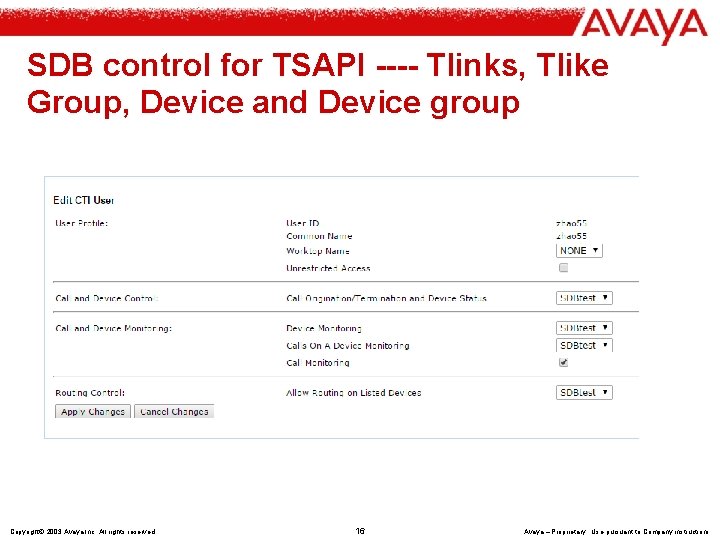
SDB control for TSAPI ---- Tlinks, Tlike Group, Device and Device group Copyright© 2003 Avaya Inc. All rights reserved 16 Avaya – Proprietary Use pursuant to Company instructions
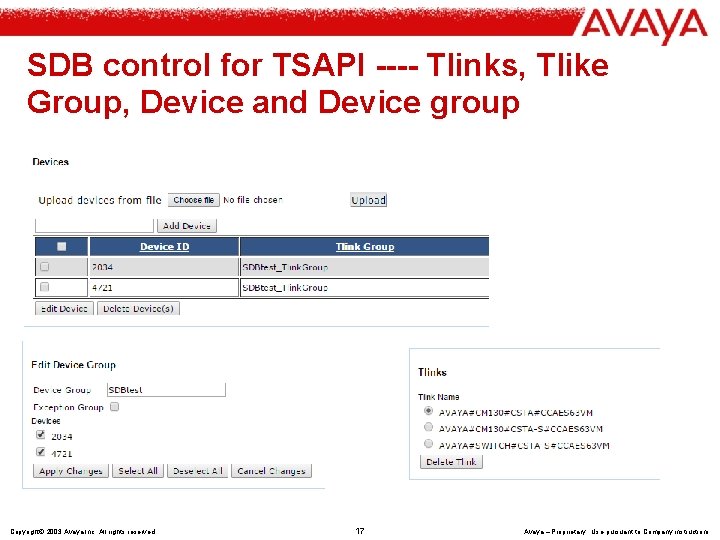
SDB control for TSAPI ---- Tlinks, Tlike Group, Device and Device group Copyright© 2003 Avaya Inc. All rights reserved 17 Avaya – Proprietary Use pursuant to Company instructions
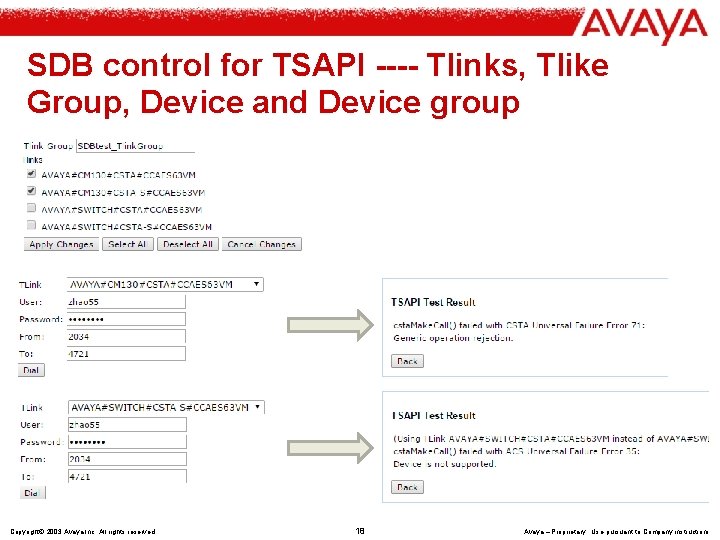
SDB control for TSAPI ---- Tlinks, Tlike Group, Device and Device group Copyright© 2003 Avaya Inc. All rights reserved 18 Avaya – Proprietary Use pursuant to Company instructions
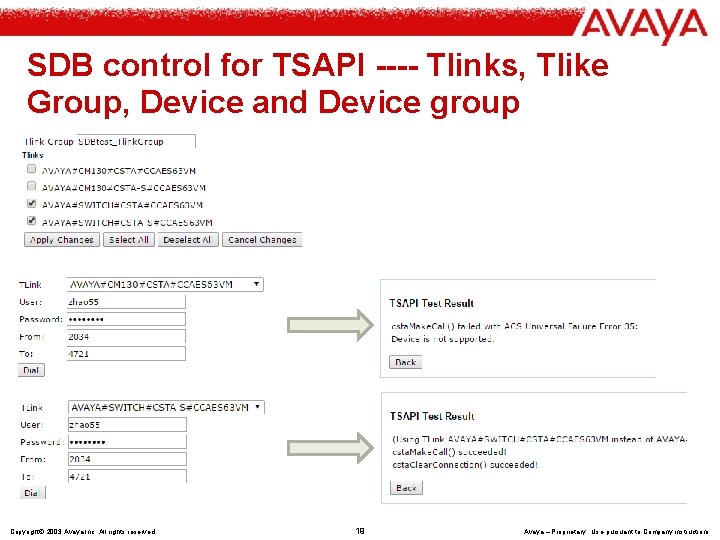
SDB control for TSAPI ---- Tlinks, Tlike Group, Device and Device group Copyright© 2003 Avaya Inc. All rights reserved 19 Avaya – Proprietary Use pursuant to Company instructions
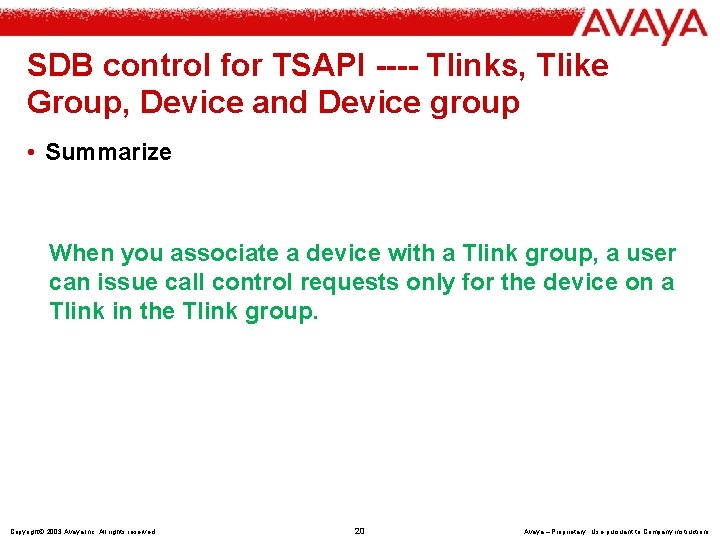
SDB control for TSAPI ---- Tlinks, Tlike Group, Device and Device group • Summarize When you associate a device with a Tlink group, a user can issue call control requests only for the device on a Tlink in the Tlink group. Copyright© 2003 Avaya Inc. All rights reserved 20 Avaya – Proprietary Use pursuant to Company instructions
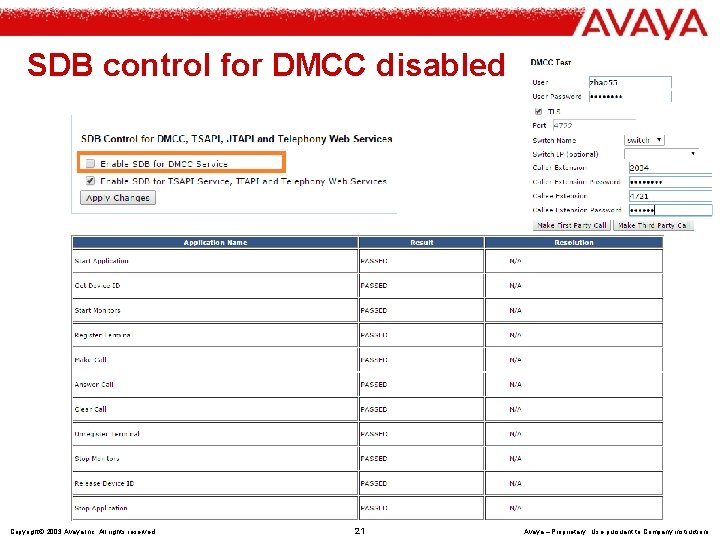
SDB control for DMCC disabled Copyright© 2003 Avaya Inc. All rights reserved 21 Avaya – Proprietary Use pursuant to Company instructions
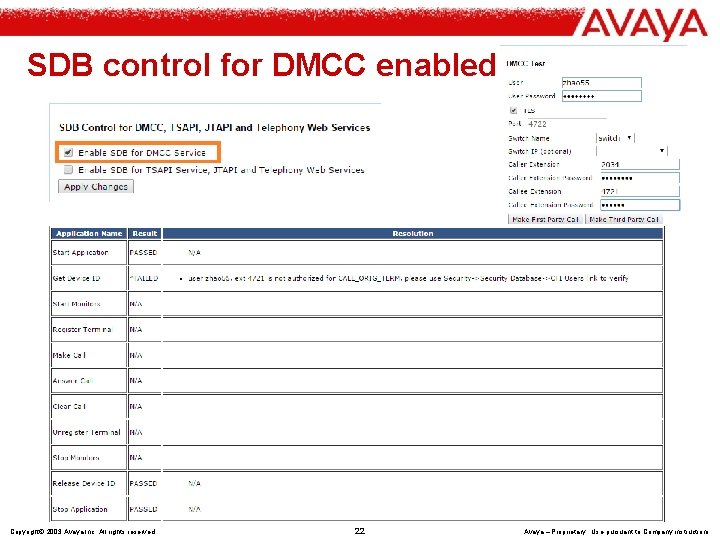
SDB control for DMCC enabled Copyright© 2003 Avaya Inc. All rights reserved 22 Avaya – Proprietary Use pursuant to Company instructions
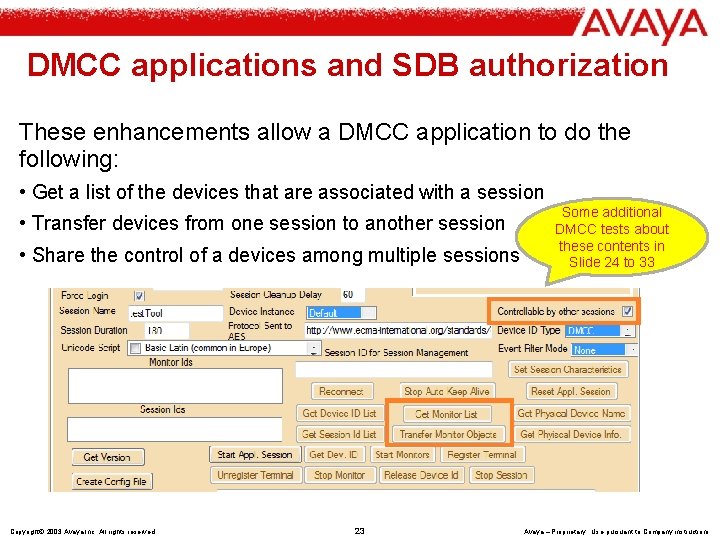
DMCC applications and SDB authorization These enhancements allow a DMCC application to do the following: • Get a list of the devices that are associated with a session • Transfer devices from one session to another session • Share the control of a devices among multiple sessions Copyright© 2003 Avaya Inc. All rights reserved 23 Some additional DMCC tests about these contents in Slide 24 to 33 Avaya – Proprietary Use pursuant to Company instructions
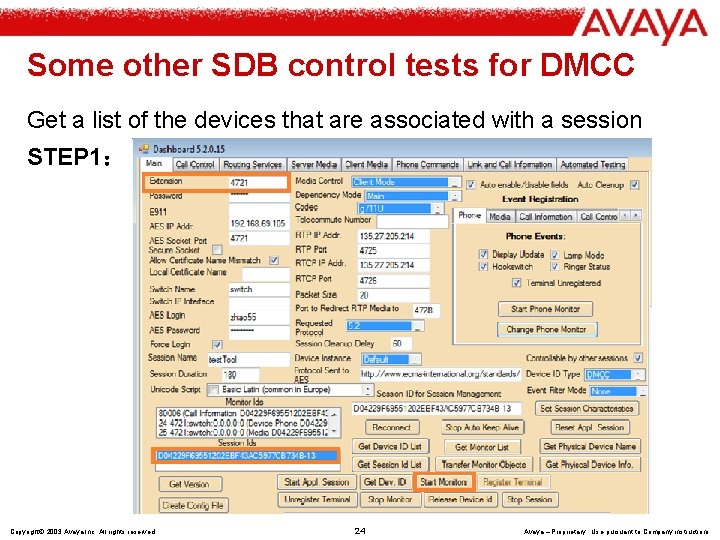
Some other SDB control tests for DMCC Get a list of the devices that are associated with a session STEP 1: Copyright© 2003 Avaya Inc. All rights reserved 24 Avaya – Proprietary Use pursuant to Company instructions
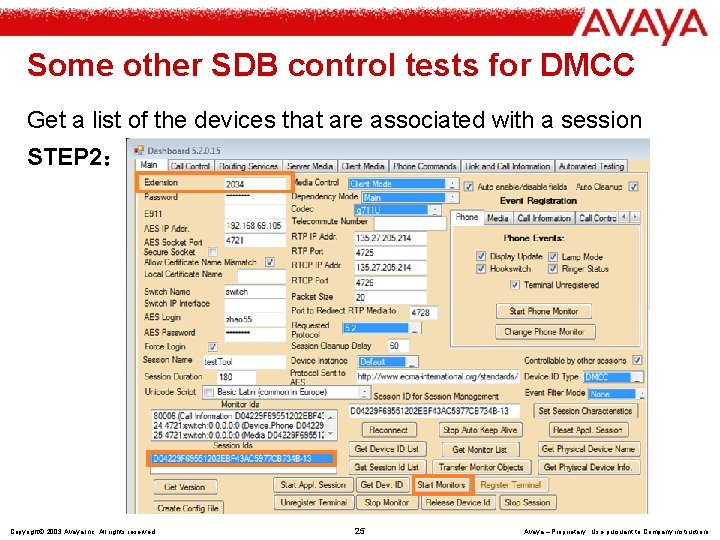
Some other SDB control tests for DMCC Get a list of the devices that are associated with a session STEP 2: Copyright© 2003 Avaya Inc. All rights reserved 25 Avaya – Proprietary Use pursuant to Company instructions
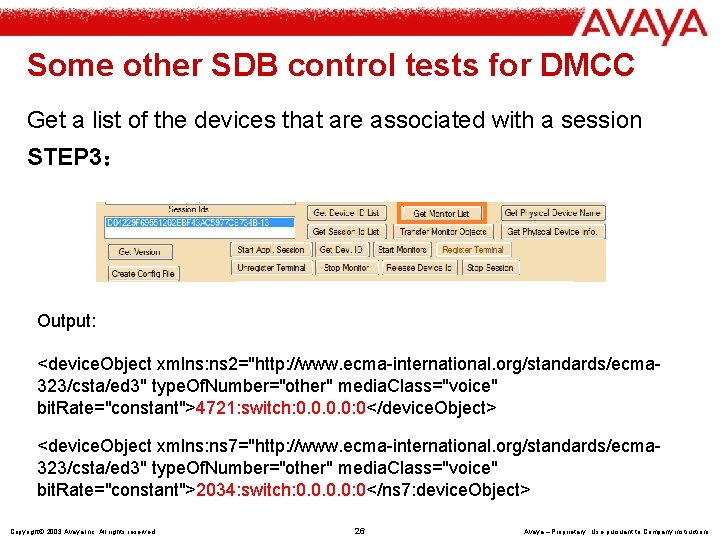
Some other SDB control tests for DMCC Get a list of the devices that are associated with a session STEP 3: Output: <device. Object xmlns: ns 2="http: //www. ecma-international. org/standards/ecma 323/csta/ed 3" type. Of. Number="other" media. Class="voice" bit. Rate="constant">4721: switch: 0. 0: 0</device. Object> <device. Object xmlns: ns 7="http: //www. ecma-international. org/standards/ecma 323/csta/ed 3" type. Of. Number="other" media. Class="voice" bit. Rate="constant">2034: switch: 0. 0: 0</ns 7: device. Object> Copyright© 2003 Avaya Inc. All rights reserved 26 Avaya – Proprietary Use pursuant to Company instructions
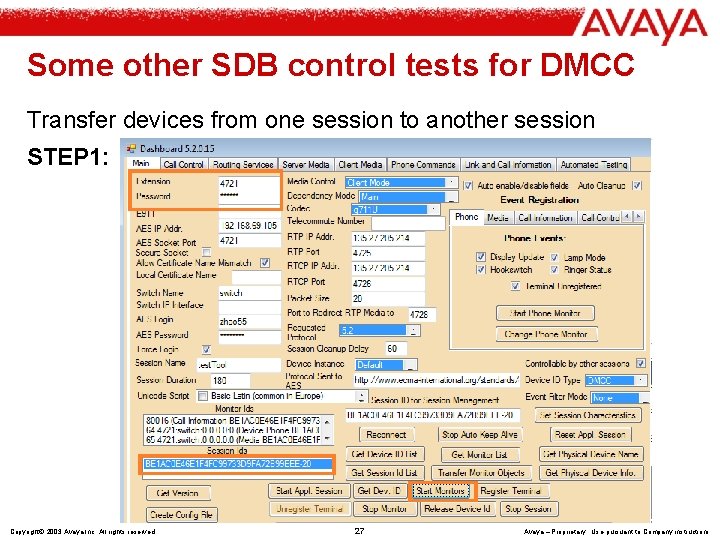
Some other SDB control tests for DMCC Transfer devices from one session to another session STEP 1: Copyright© 2003 Avaya Inc. All rights reserved 27 Avaya – Proprietary Use pursuant to Company instructions
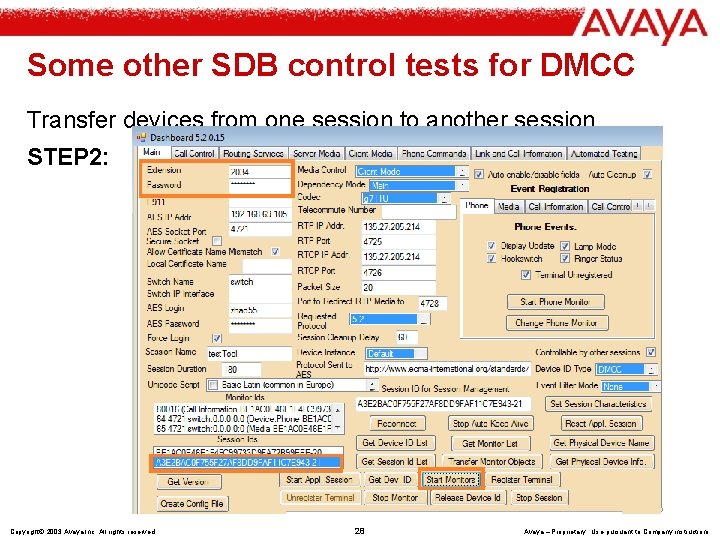
Some other SDB control tests for DMCC Transfer devices from one session to another session STEP 2: Copyright© 2003 Avaya Inc. All rights reserved 28 Avaya – Proprietary Use pursuant to Company instructions
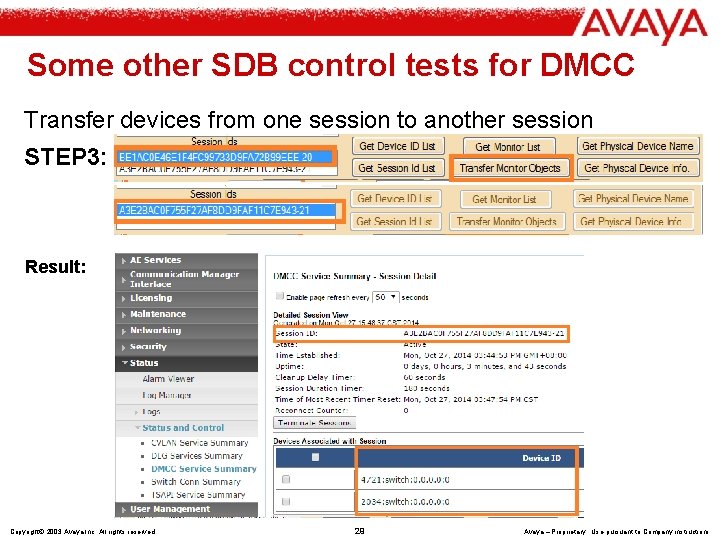
Some other SDB control tests for DMCC Transfer devices from one session to another session STEP 3: Result: Copyright© 2003 Avaya Inc. All rights reserved 29 Avaya – Proprietary Use pursuant to Company instructions
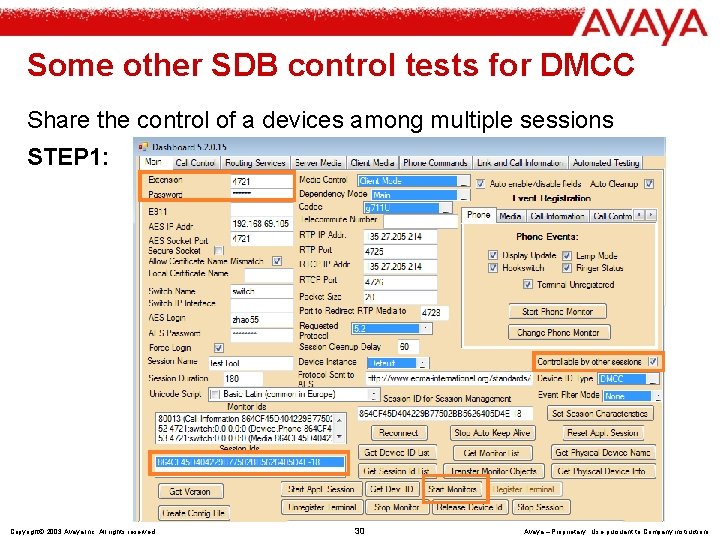
Some other SDB control tests for DMCC Share the control of a devices among multiple sessions STEP 1: Copyright© 2003 Avaya Inc. All rights reserved 30 Avaya – Proprietary Use pursuant to Company instructions
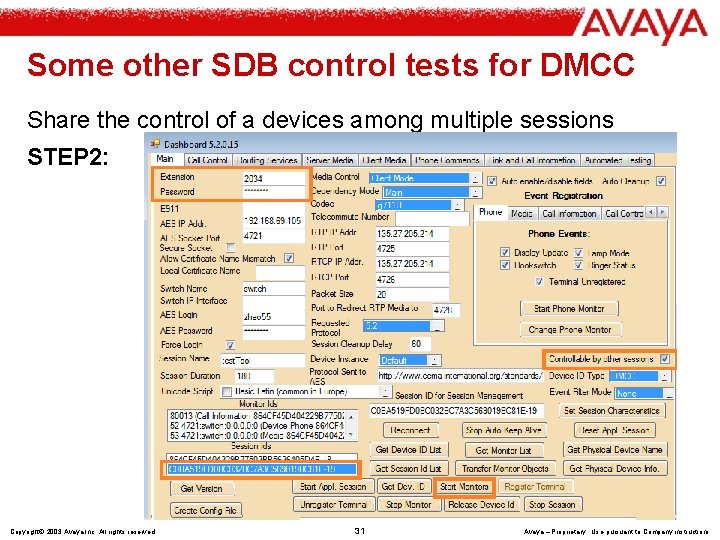
Some other SDB control tests for DMCC Share the control of a devices among multiple sessions STEP 2: Copyright© 2003 Avaya Inc. All rights reserved 31 Avaya – Proprietary Use pursuant to Company instructions
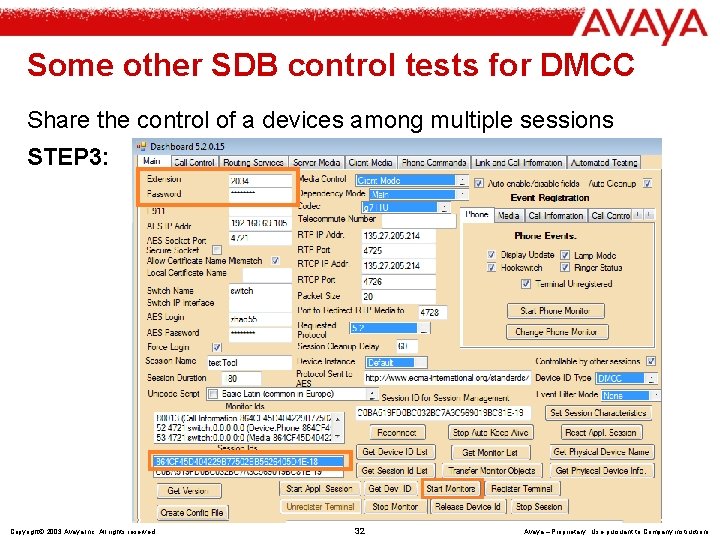
Some other SDB control tests for DMCC Share the control of a devices among multiple sessions STEP 3: Copyright© 2003 Avaya Inc. All rights reserved 32 Avaya – Proprietary Use pursuant to Company instructions
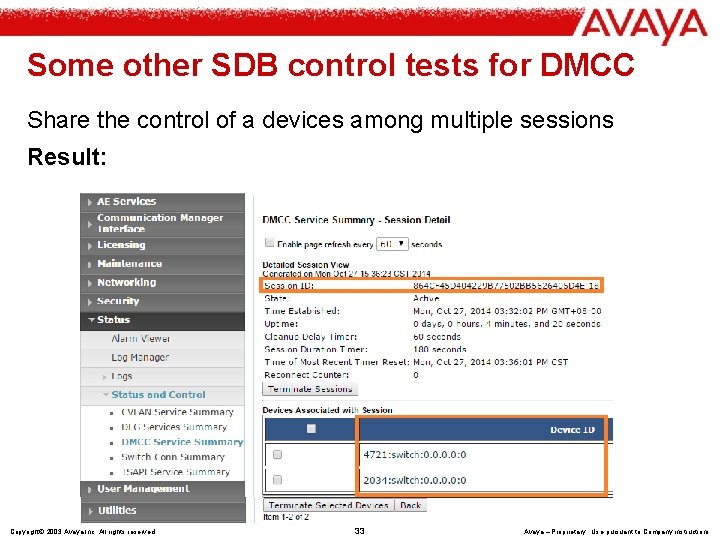
Some other SDB control tests for DMCC Share the control of a devices among multiple sessions Result: Copyright© 2003 Avaya Inc. All rights reserved 33 Avaya – Proprietary Use pursuant to Company instructions
END Thank you! Copyright© 2003 Avaya Inc. All rights reserved 34 Avaya – Proprietary Use pursuant to Company instructions
- Slides: 34