
How to Open a TRACcess BT Smart Device
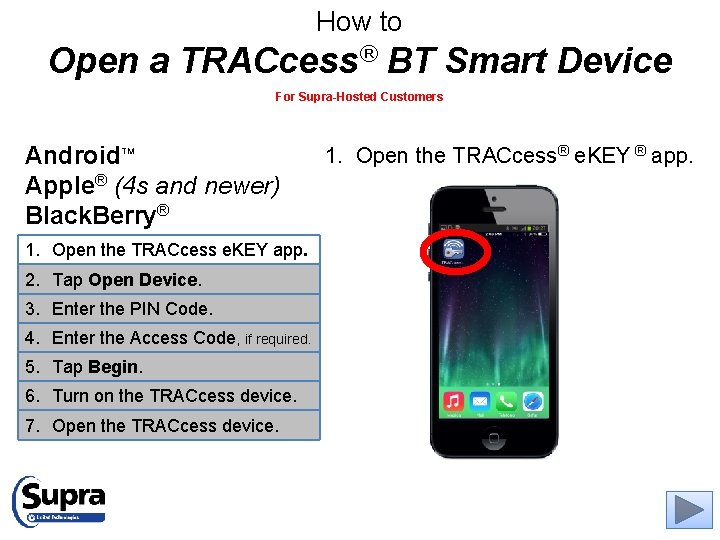
How to Open a TRACcess® BT Smart Device For Supra-Hosted Customers Android Apple® (4 s and newer) Black. Berry® TM 1. Open the TRACcess e. KEY app. 2. Tap Open Device. 3. Enter the PIN Code. 4. Enter the Access Code, if required. 5. Tap Begin. 6. Turn on the TRACcess device. 7. Open the TRACcess device. 1. Open the TRACcess® e. KEY ® app.

How to Open a TRACcess BT Smart Device For Supra-Hosted Customers Android Apple (4 s and newer) Black. Berry 1. Open the TRACcess e. KEY app. 2. Tap Open Device. 3. Enter the PIN Code. 4. Enter the Access Code, if required. 5. Tap Begin. 6. Turn on the TRACcess device. 7. Open the TRACcess device. 2. Tap Open Device.
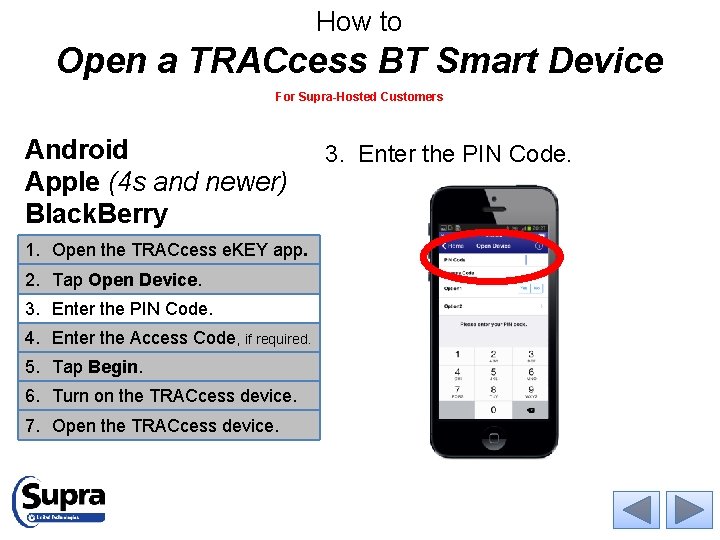
How to Open a TRACcess BT Smart Device For Supra-Hosted Customers Android Apple (4 s and newer) Black. Berry 1. Open the TRACcess e. KEY app. 2. Tap Open Device. 3. Enter the PIN Code. 4. Enter the Access Code, if required. 5. Tap Begin. 6. Turn on the TRACcess device. 7. Open the TRACcess device. 3. Enter the PIN Code.
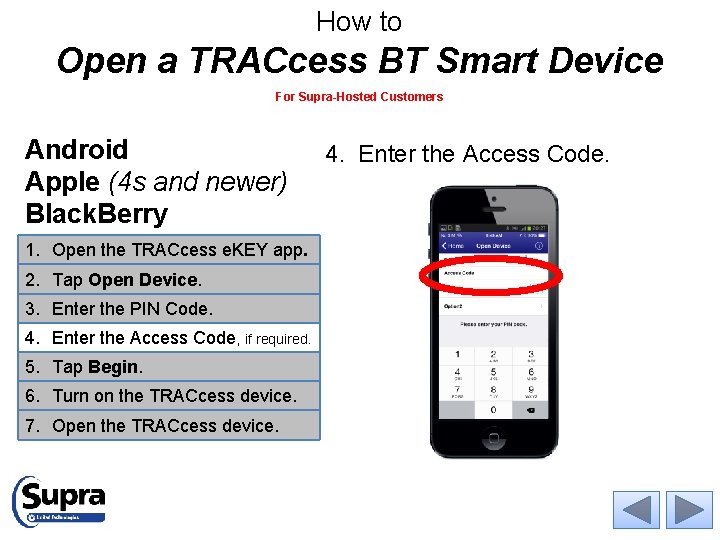
How to Open a TRACcess BT Smart Device For Supra-Hosted Customers Android Apple (4 s and newer) Black. Berry 1. Open the TRACcess e. KEY app. 2. Tap Open Device. 3. Enter the PIN Code. 4. Enter the Access Code, if required. 5. Tap Begin. 6. Turn on the TRACcess device. 7. Open the TRACcess device. 4. Enter the Access Code.
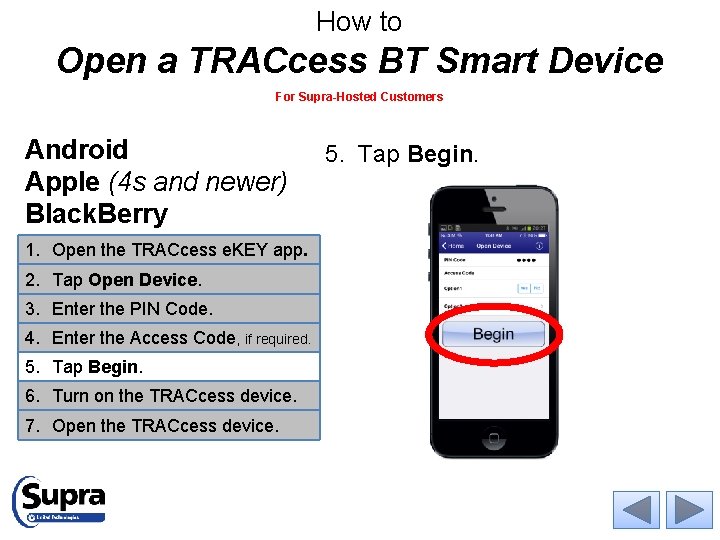
How to Open a TRACcess BT Smart Device For Supra-Hosted Customers Android Apple (4 s and newer) Black. Berry 1. Open the TRACcess e. KEY app. 2. Tap Open Device. 3. Enter the PIN Code. 4. Enter the Access Code, if required. 5. Tap Begin. 6. Turn on the TRACcess device. 7. Open the TRACcess device. 5. Tap Begin.
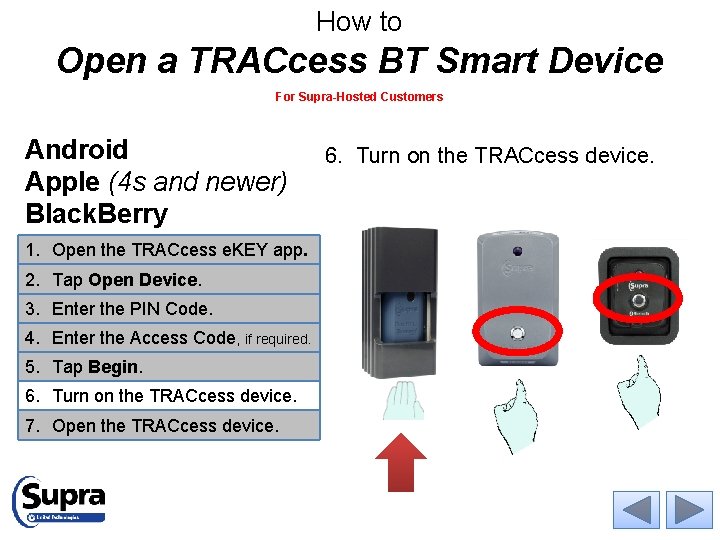
How to Open a TRACcess BT Smart Device For Supra-Hosted Customers Android Apple (4 s and newer) Black. Berry 1. Open the TRACcess e. KEY app. 2. Tap Open Device. 3. Enter the PIN Code. 4. Enter the Access Code, if required. 5. Tap Begin. 6. Turn on the TRACcess device. 7. Open the TRACcess device. 6. Turn on the TRACcess device.
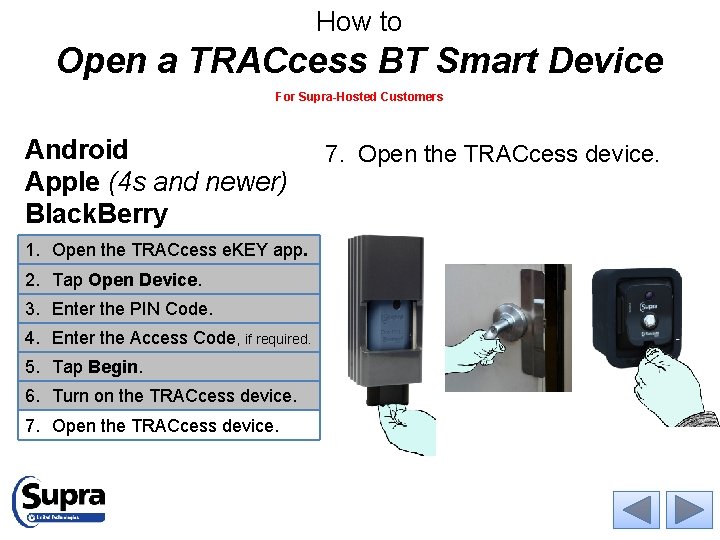
How to Open a TRACcess BT Smart Device For Supra-Hosted Customers Android Apple (4 s and newer) Black. Berry 1. Open the TRACcess e. KEY app. 2. Tap Open Device. 3. Enter the PIN Code. 4. Enter the Access Code, if required. 5. Tap Begin. 6. Turn on the TRACcess device. 7. Open the TRACcess device.

For the latest information, visit us at www. traccessmanager. com. Select Downloads and Resources for instructional videos, How-To’s, and more. © 2015 United Technologies Corporation. All rights reserved. All other brand product names are or may be trademarks of, and are used to identify products or services of, their respective owners.
- Slides: 8