
How to login LoginSign Up Go to www
- Slides: 22
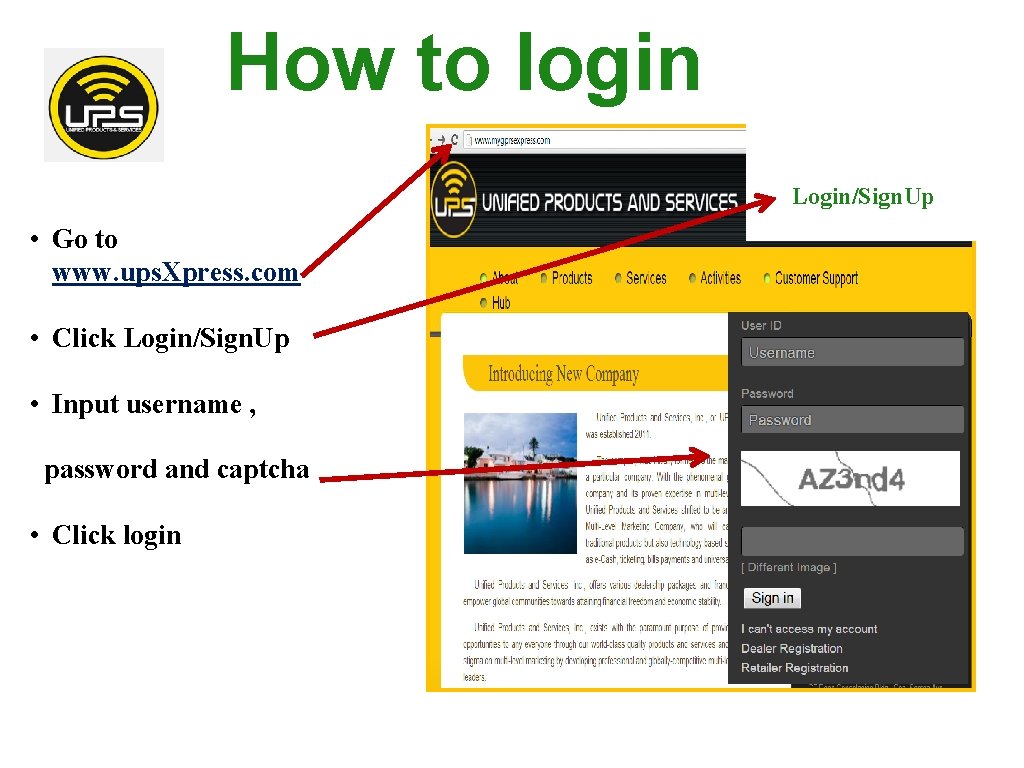
How to login Login/Sign. Up • Go to www. ups. Xpress. com • Click Login/Sign. Up • Input username , password and captcha • Click login
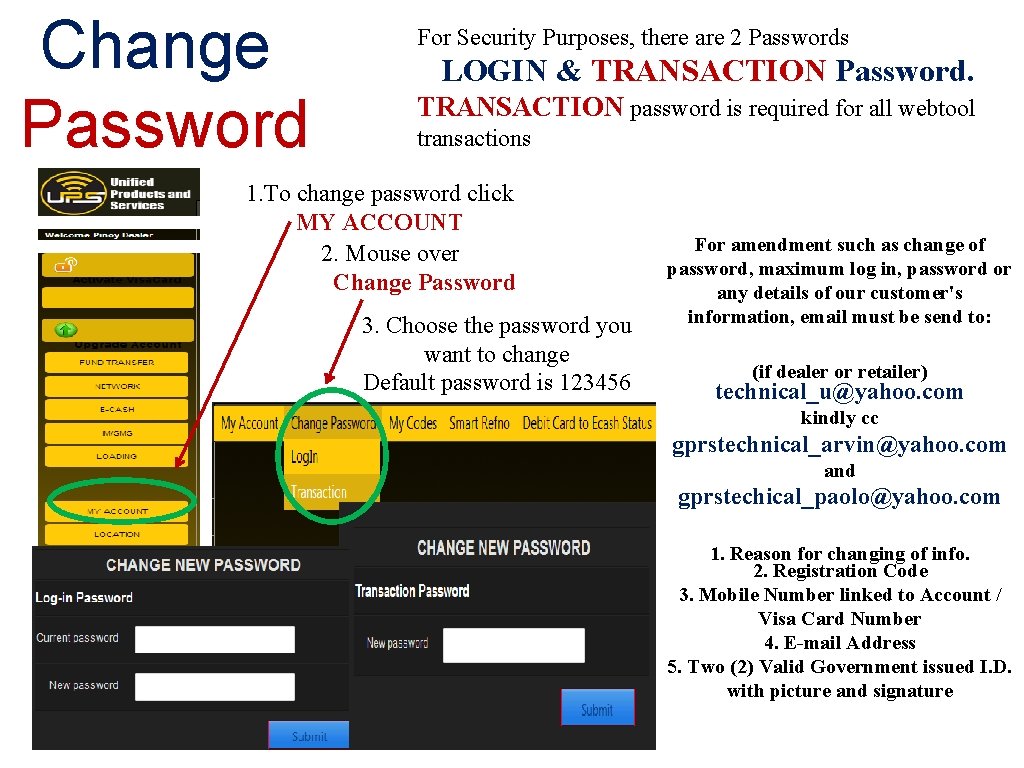
Change Password For Security Purposes, there are 2 Passwords LOGIN & TRANSACTION Password. TRANSACTION password is required for all webtool transactions 1. To change password click MY ACCOUNT 2. Mouse over Change Password 3. Choose the password you want to change Default password is 123456 For amendment such as change of password, maximum log in, password or any details of our customer's information, email must be send to: (if dealer or retailer) technical_u@yahoo. com kindly cc gprstechnical_arvin@yahoo. com and gprstechical_paolo@yahoo. com 1. Reason for changing of info. 2. Registration Code 3. Mobile Number linked to Account / Visa Card Number 4. E-mail Address 5. Two (2) Valid Government issued I. D. with picture and signature
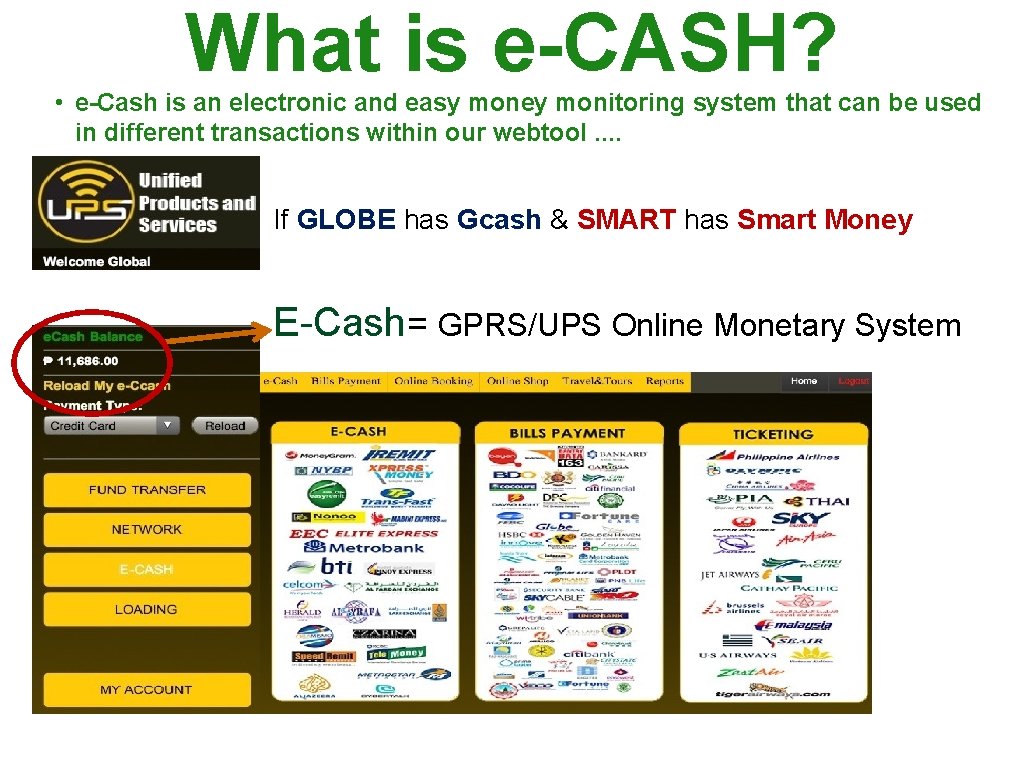
What is e-CASH? • e-Cash is an electronic and easy money monitoring system that can be used in different transactions within our webtool. . If GLOBE has Gcash & SMART has Smart Money E-Cash= GPRS/UPS Online Monetary System
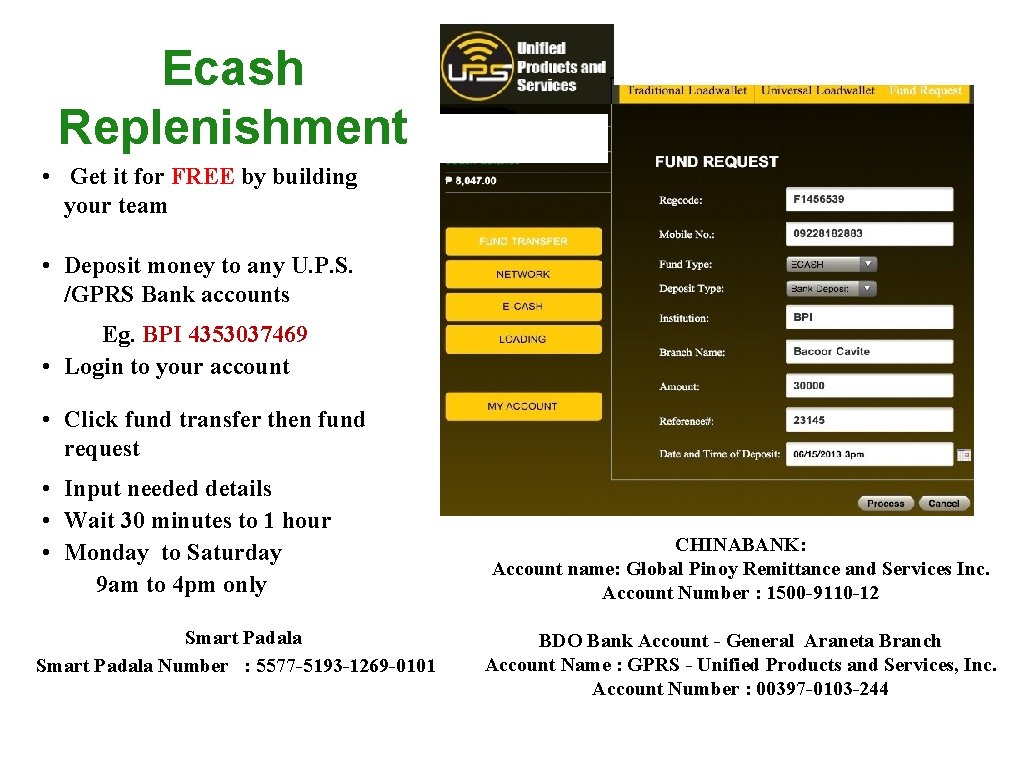
Ecash Replenishment • Get it for FREE by building your team • Deposit money to any U. P. S. /GPRS Bank accounts Eg. BPI 4353037469 • Login to your account • Click fund transfer then fund request • Input needed details • Wait 30 minutes to 1 hour • Monday to Saturday 9 am to 4 pm only Smart Padala Number : 5577 -5193 -1269 -0101 CHINABANK: Account name: Global Pinoy Remittance and Services Inc. Account Number : 1500 -9110 -12 BDO Bank Account - General Araneta Branch Account Name : GPRS - Unified Products and Services, Inc. Account Number : 00397 -0103 -244
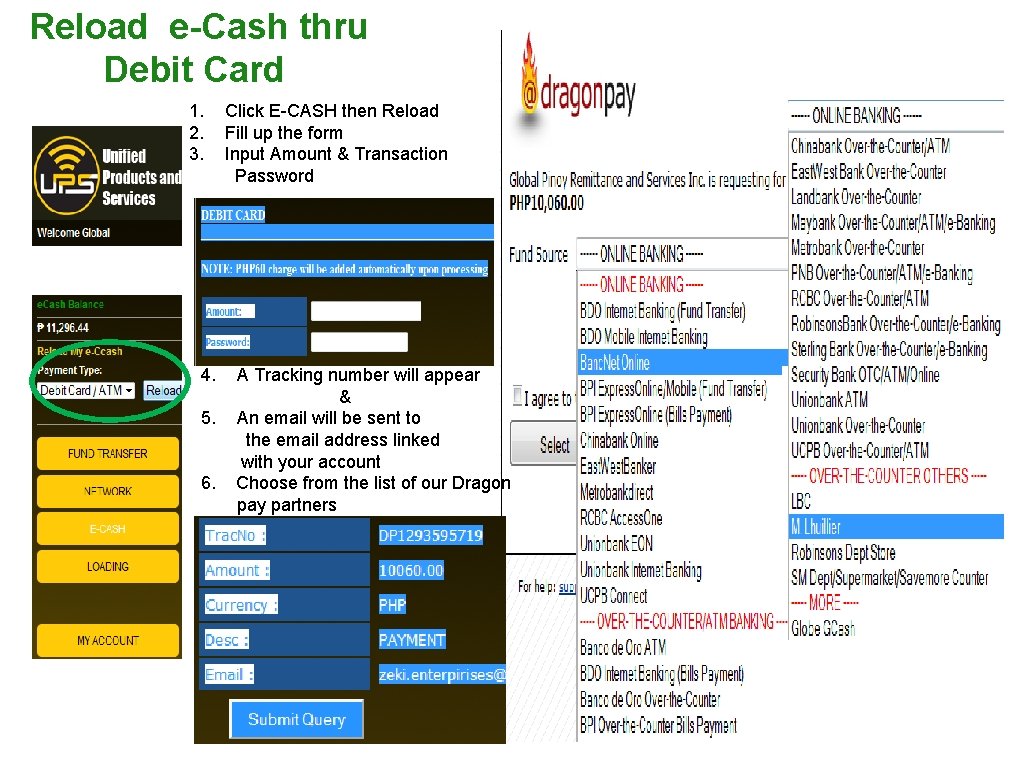
Reload e-Cash thru Debit Card 1. 2. 3. 4. 5. 6. Click E-CASH then Reload Fill up the form Input Amount & Transaction Password A Tracking number will appear & An email will be sent to the email address linked with your account Choose from the list of our Dragon pay partners
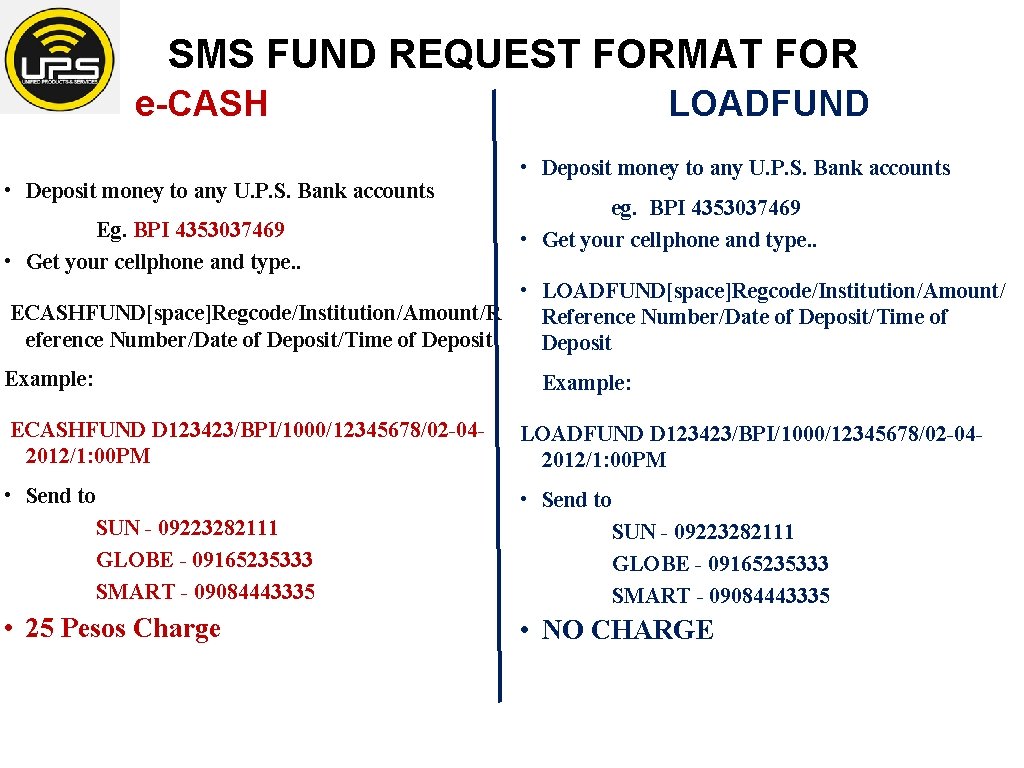
SMS FUND REQUEST FORMAT FOR e-CASH LOADFUND • Deposit money to any U. P. S. Bank accounts Eg. BPI 4353037469 • Get your cellphone and type. . • Deposit money to any U. P. S. Bank accounts eg. BPI 4353037469 • Get your cellphone and type. . • LOADFUND[space]Regcode/Institution/Amount/ ECASHFUND[space]Regcode/Institution/Amount/R Reference Number/Date of Deposit/Time of Deposit Example: ECASHFUND D 123423/BPI/1000/12345678/02 -042012/1: 00 PM LOADFUND D 123423/BPI/1000/12345678/02 -042012/1: 00 PM • Send to SUN - 09223282111 GLOBE - 09165235333 SMART - 09084443335 • 25 Pesos Charge • NO CHARGE
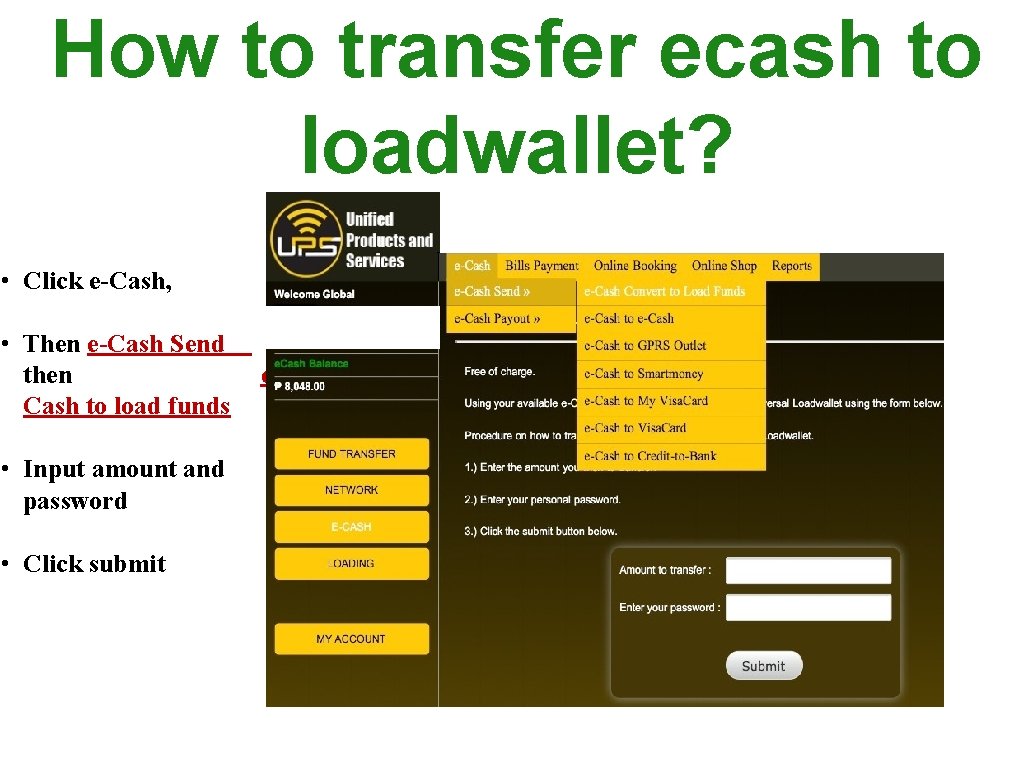
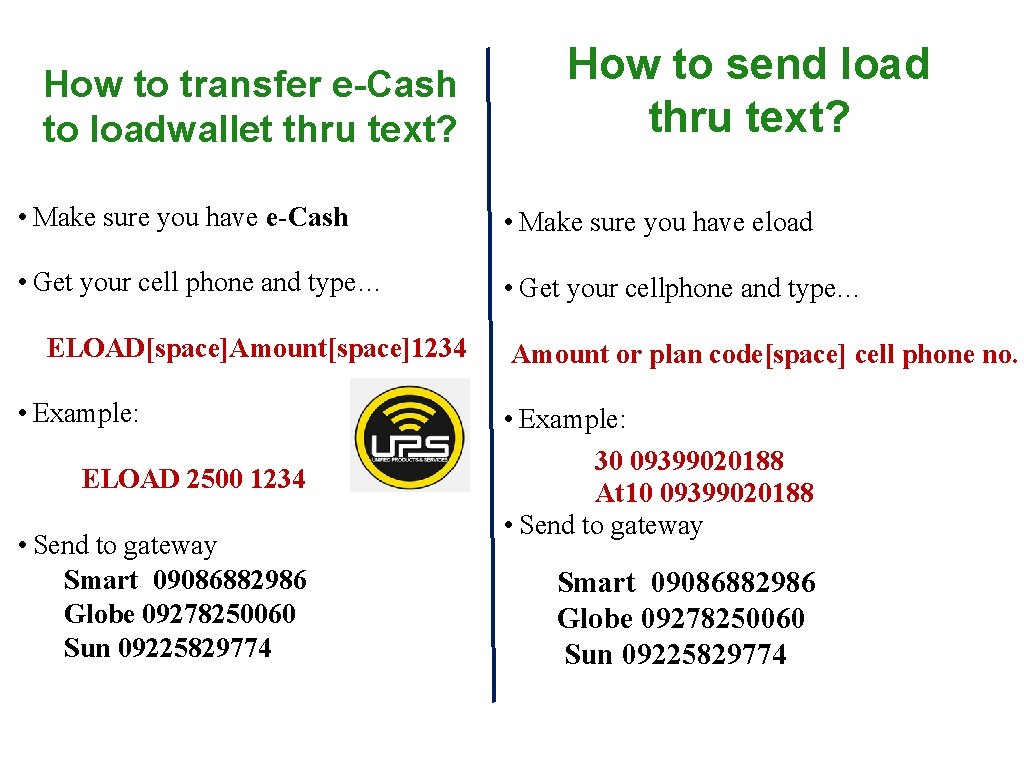
How to transfer ecash to loadwallet? • Click e-Cash, • Then e-Cash Send then e. Cash to load funds • Input amount and password • Click submit
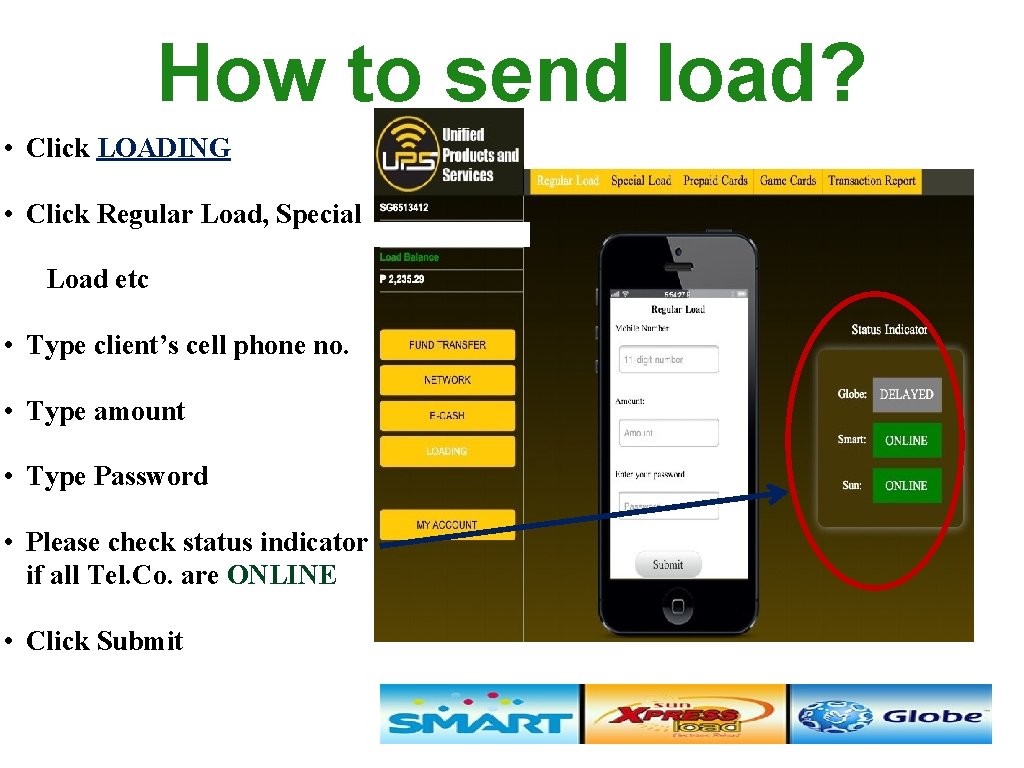
How to send load? • Click LOADING • Click Regular Load, Special Load etc • Type client’s cell phone no. • Type amount • Type Password • Please check status indicator if all Tel. Co. are ONLINE • Click Submit
How to transfer e-Cash to loadwallet thru text? How to send load thru text? • Make sure you have e-Cash • Make sure you have eload • Get your cell phone and type… • Get your cellphone and type… ELOAD[space]Amount[space]1234 Amount or plan code[space] cell phone no. • Example: 30 09399020188 At 10 09399020188 • Send to gateway ELOAD 2500 1234 • Send to gateway Smart 09086882986 Globe 09278250060 Sun 09225829774 Smart 09086882986 Globe 09278250060 Sun 09225829774
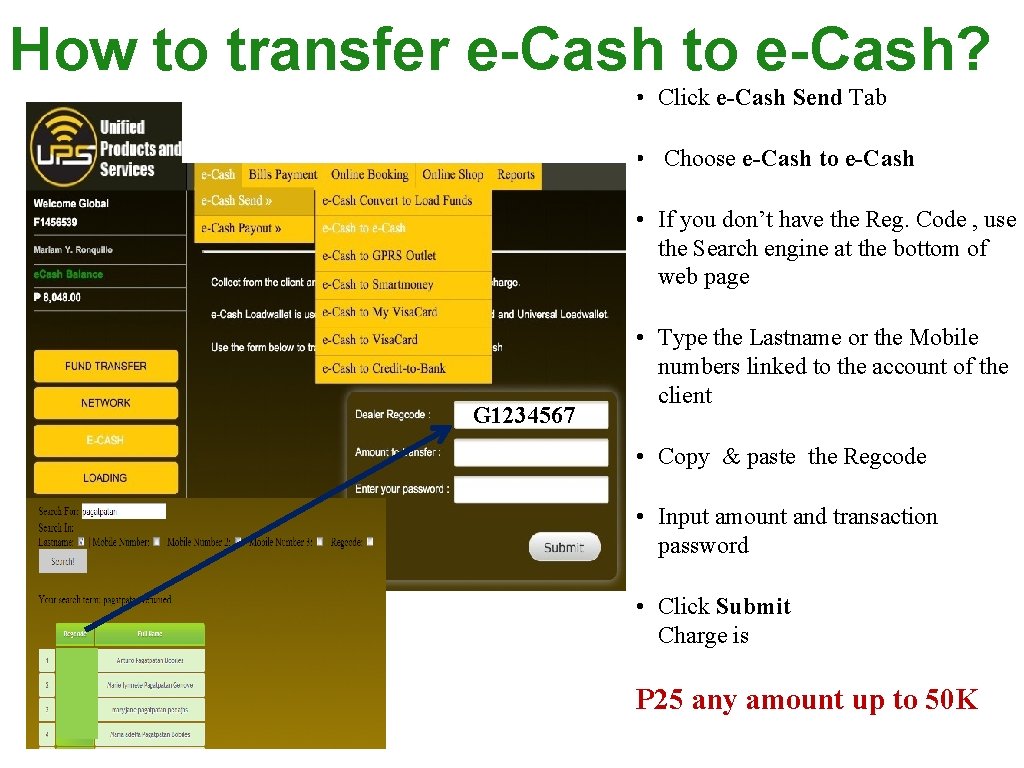
How to transfer e-Cash to e-Cash? • Click e-Cash Send Tab • Choose e-Cash to e-Cash • If you don’t have the Reg. Code , use the Search engine at the bottom of web page G 1234567 • Type the Lastname or the Mobile numbers linked to the account of the client • Copy & paste the Regcode • Input amount and transaction password • Click Submit Charge is P 25 any amount up to 50 K
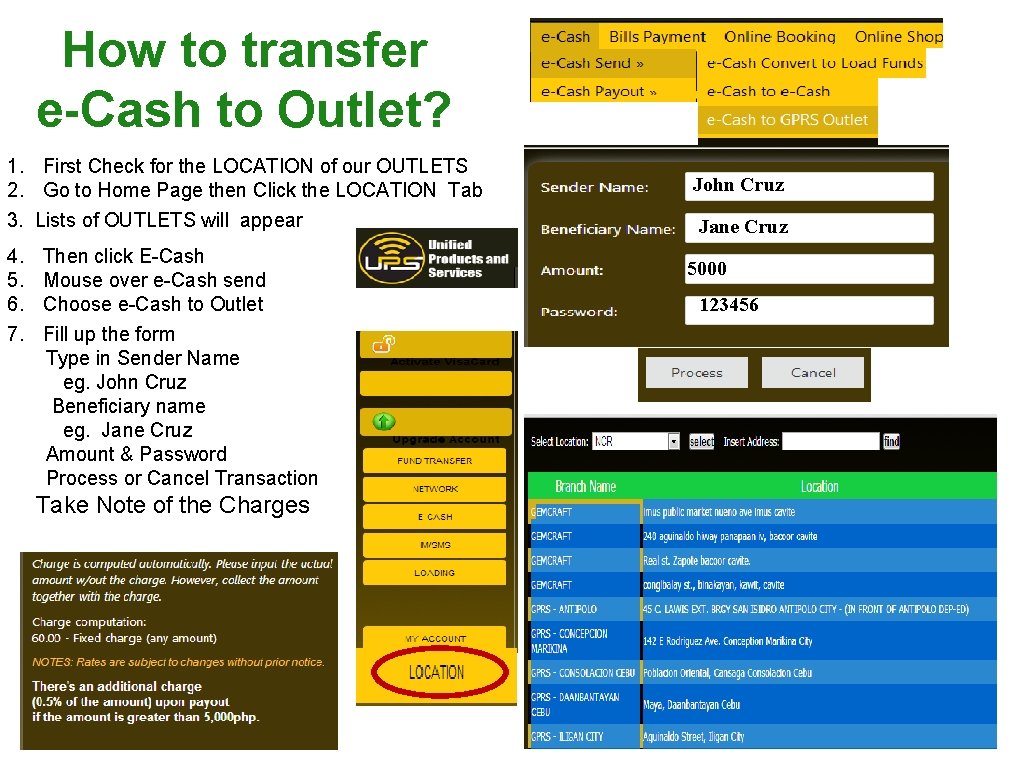
How to transfer e-Cash to Outlet? 1. First Check for the LOCATION of our OUTLETS 2. Go to Home Page then Click the LOCATION Tab 3. Lists of OUTLETS will appear 4. 5. 6. 7. Then click E-Cash Mouse over e-Cash send Choose e-Cash to Outlet Fill up the form Type in Sender Name eg. John Cruz Beneficiary name eg. Jane Cruz Amount & Password Process or Cancel Transaction Take Note of the Charges John Cruz Jane Cruz 5000 123456
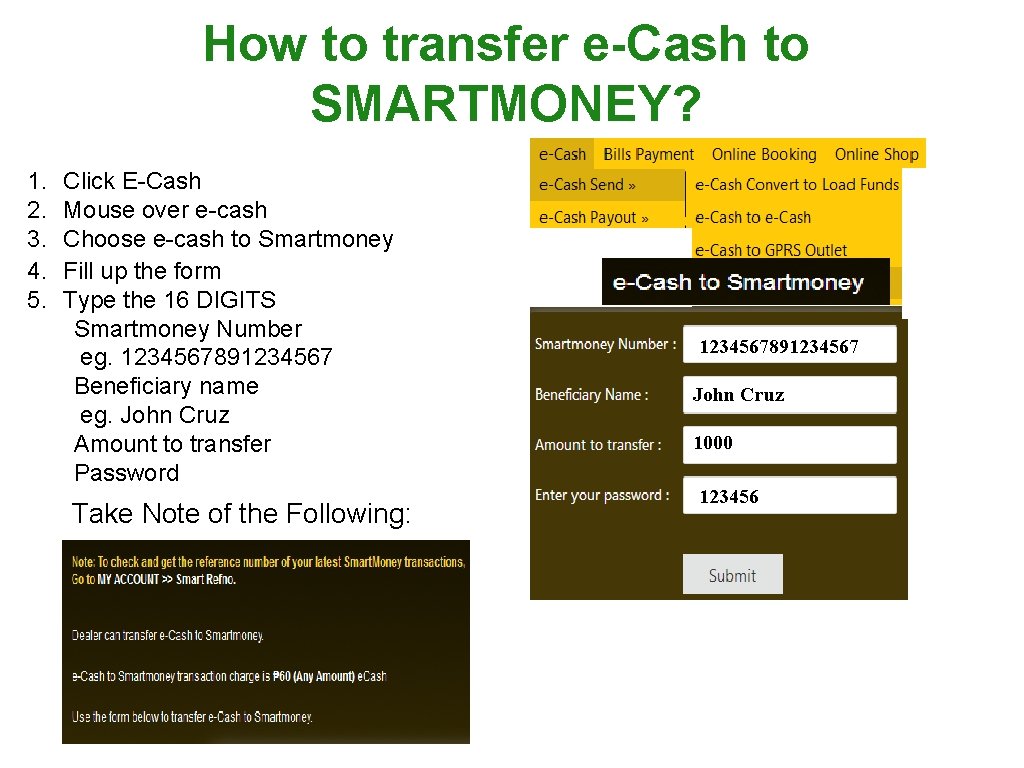
How to transfer e-Cash to SMARTMONEY? 1. 2. 3. 4. 5. Click E-Cash Mouse over e-cash Choose e-cash to Smartmoney Fill up the form Type the 16 DIGITS Smartmoney Number eg. 1234567891234567 Beneficiary name eg. John Cruz Amount to transfer Password Take Note of the Following: 1234567891234567 John Cruz 1000 123456
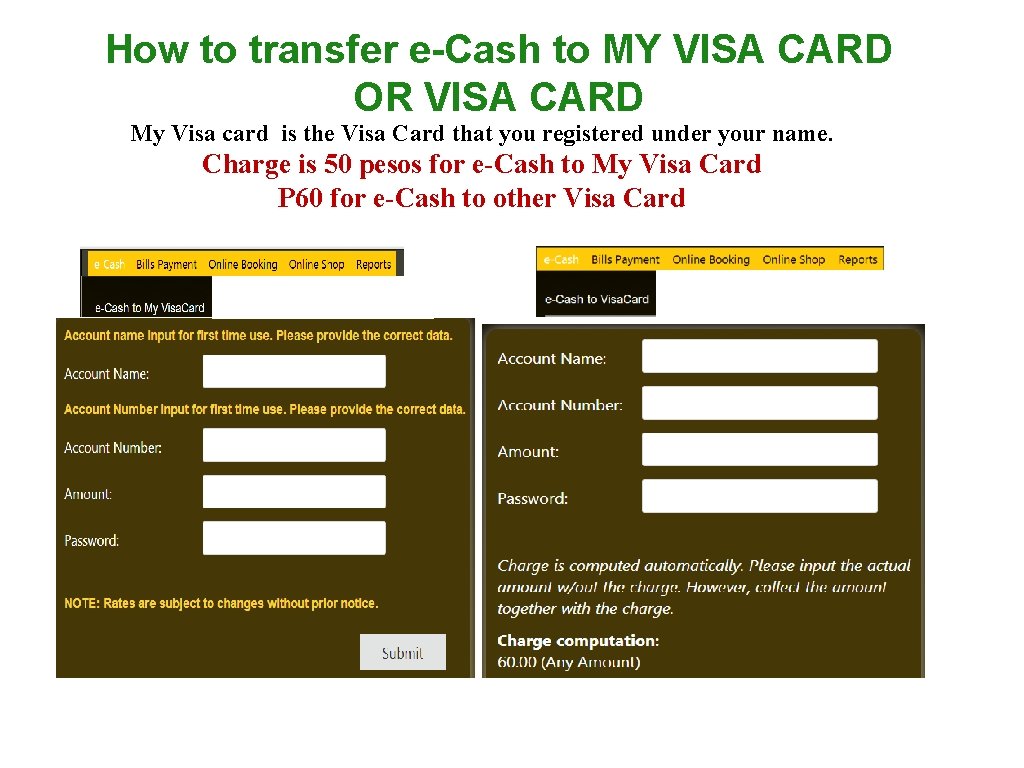
How to transfer e-Cash to MY VISA CARD OR VISA CARD My Visa card is the Visa Card that you registered under your name. Charge is 50 pesos for e-Cash to My Visa Card P 60 for e-Cash to other Visa Card
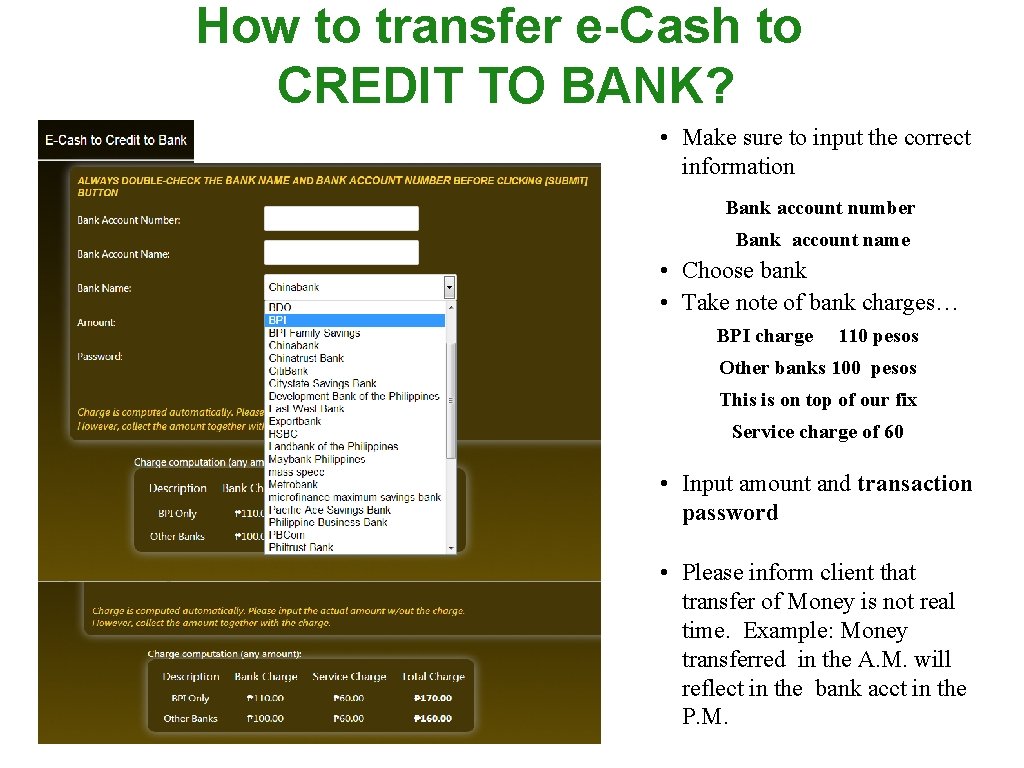
How to transfer e-Cash to CREDIT TO BANK? • Make sure to input the correct information Bank account number Bank account name • Choose bank • Take note of bank charges… BPI charge 110 pesos Other banks 100 pesos This is on top of our fix Service charge of 60 • Input amount and transaction password • Please inform client that transfer of Money is not real time. Example: Money transferred in the A. M. will reflect in the bank acct in the P. M.
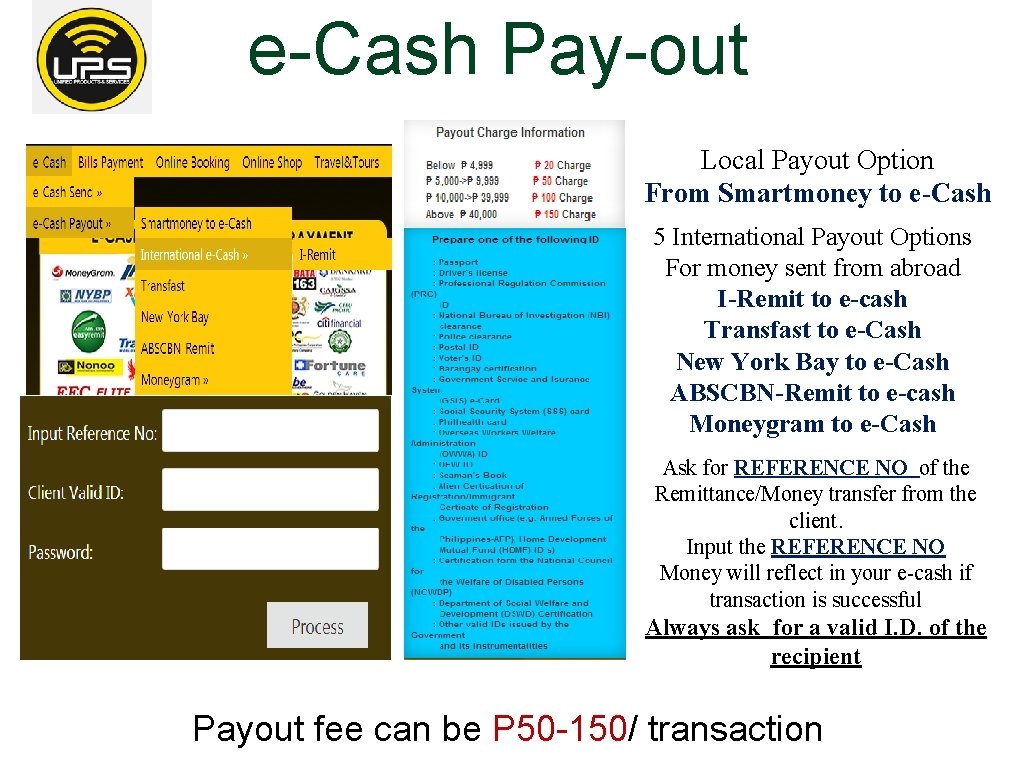
e-Cash Pay-out Local Payout Option From Smartmoney to e-Cash 5 International Payout Options For money sent from abroad I-Remit to e-cash Transfast to e-Cash New York Bay to e-Cash ABSCBN-Remit to e-cash Moneygram to e-Cash Ask for REFERENCE NO of the Remittance/Money transfer from the client. Input the REFERENCE NO Money will reflect in your e-cash if transaction is successful Always ask for a valid I. D. of the recipient Payout fee can be P 50 -150/ transaction
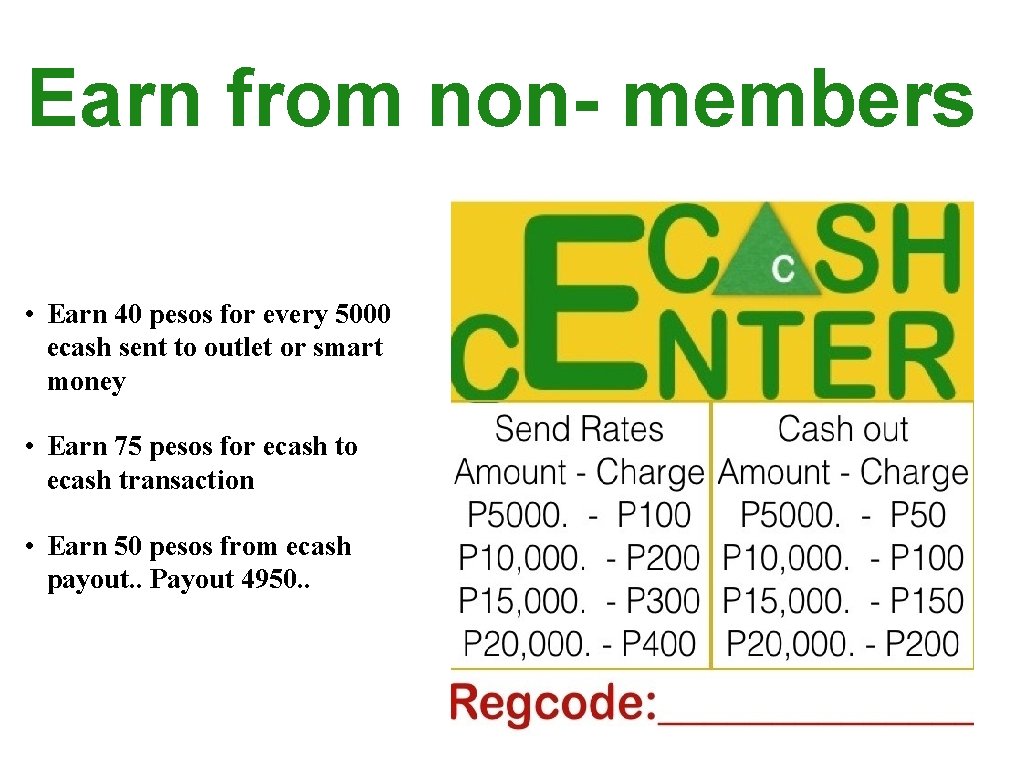
Earn from non- members • Earn 40 pesos for every 5000 ecash sent to outlet or smart money • Earn 75 pesos for ecash to ecash transaction • Earn 50 pesos from ecash payout. . Payout 4950. .
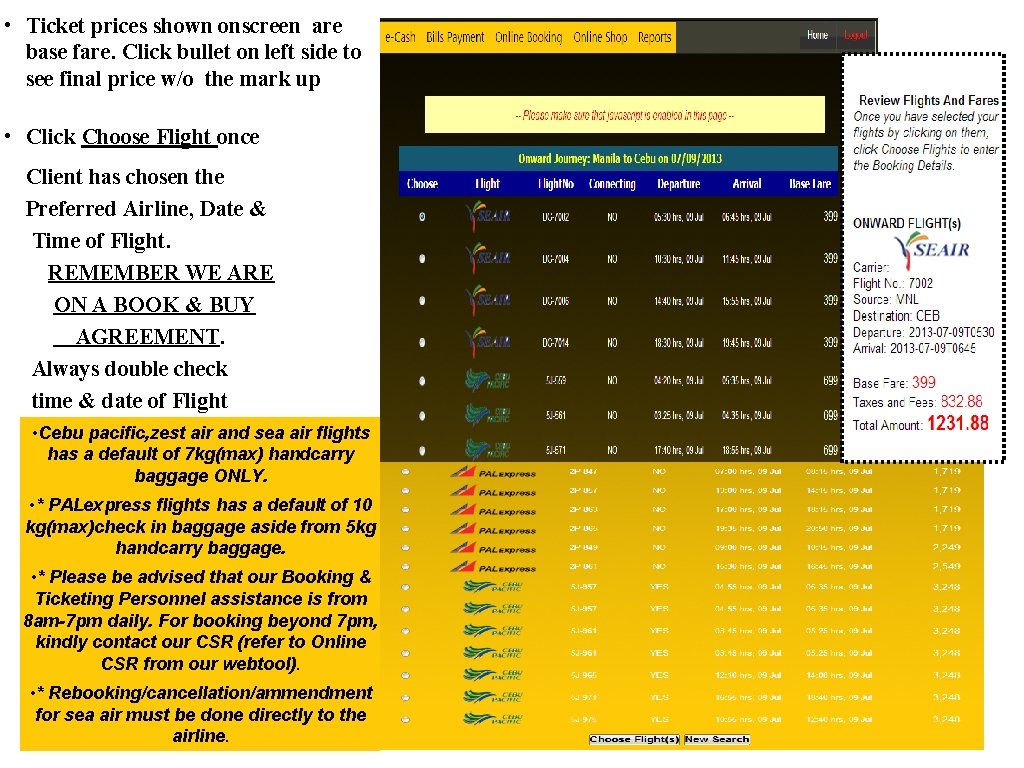
• Ticket prices shown onscreen are base fare. Click bullet on left side to see final price w/o the mark up • Click Choose Flight once Client has chosen the Preferred Airline, Date & Time of Flight. REMEMBER WE ARE ON A BOOK & BUY AGREEMENT. Always double check time & date of Flight • Cebu pacific, zest air and sea air flights has a default of 7 kg(max) handcarry baggage ONLY. • * PALexpress flights has a default of 10 kg(max)check in baggage aside from 5 kg handcarry baggage. • * Please be advised that our Booking & Ticketing Personnel assistance is from 8 am-7 pm daily. For booking beyond 7 pm, kindly contact our CSR (refer to Online CSR from our webtool). • * Rebooking/cancellation/ammendment for sea air must be done directly to the airline.
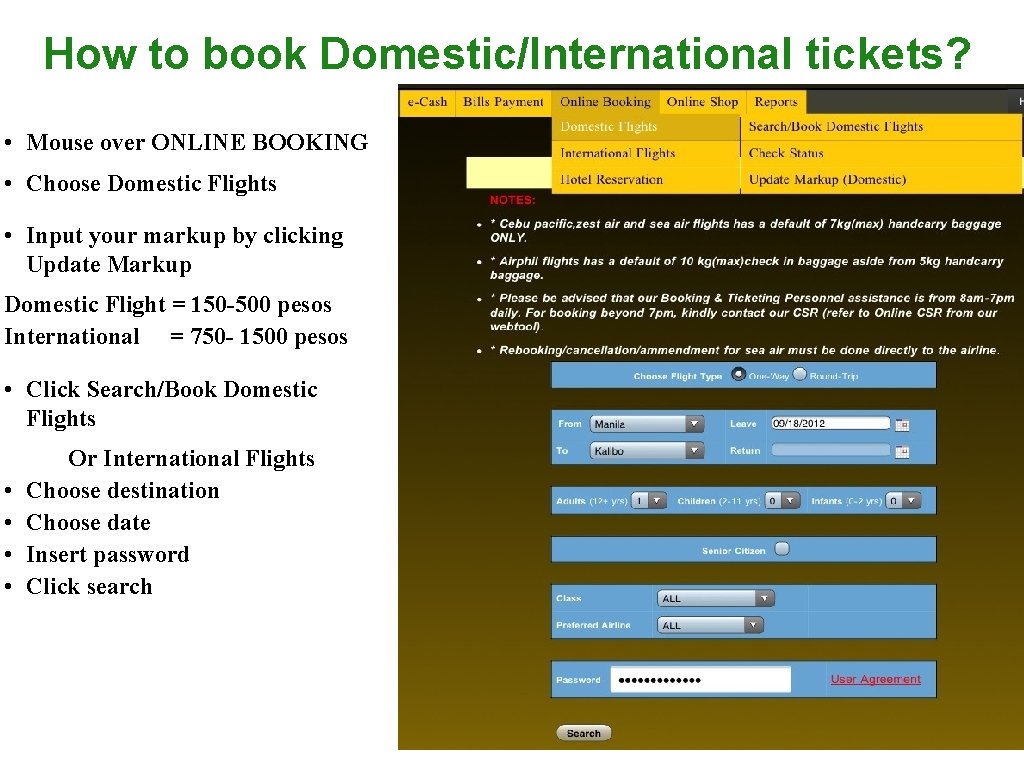
How to book Domestic/International tickets? • Mouse over ONLINE BOOKING • Choose Domestic Flights • Input your markup by clicking Update Markup Domestic Flight = 150 -500 pesos International = 750 - 1500 pesos • Click Search/Book Domestic Flights • • Or International Flights Choose destination Choose date Insert password Click search
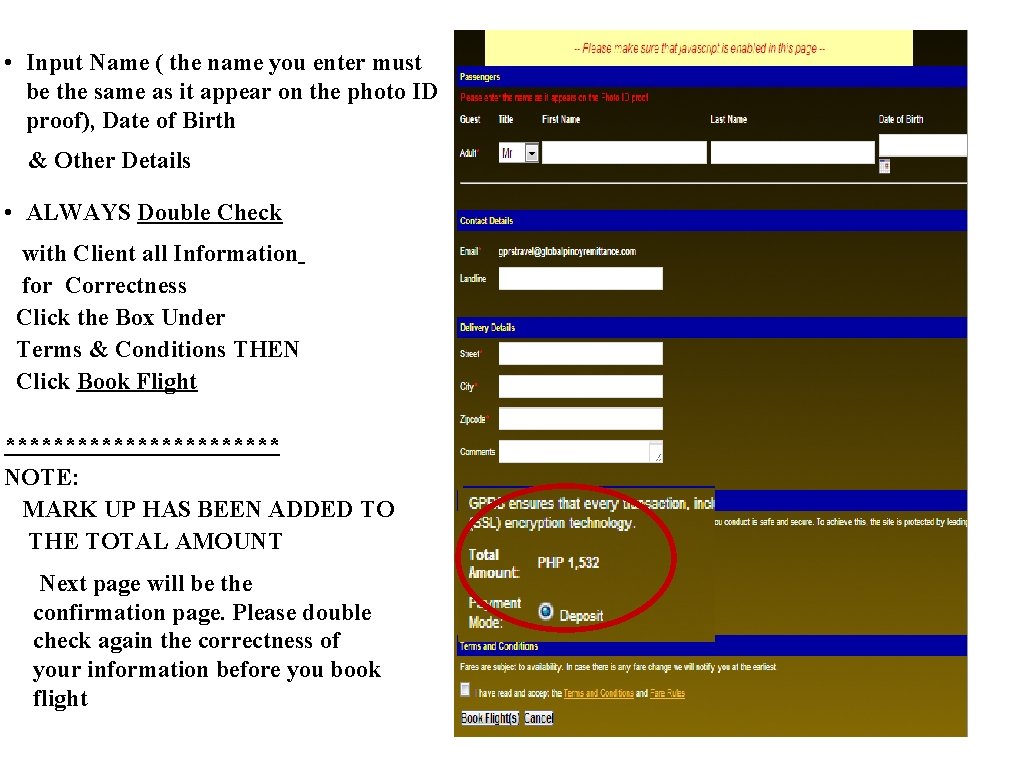
• Input Name ( the name you enter must be the same as it appear on the photo ID proof), Date of Birth & Other Details • ALWAYS Double Check with Client all Information for Correctness Click the Box Under Terms & Conditions THEN Click Book Flight ************ NOTE: MARK UP HAS BEEN ADDED TO THE TOTAL AMOUNT Next page will be the confirmation page. Please double check again the correctness of your information before you book flight
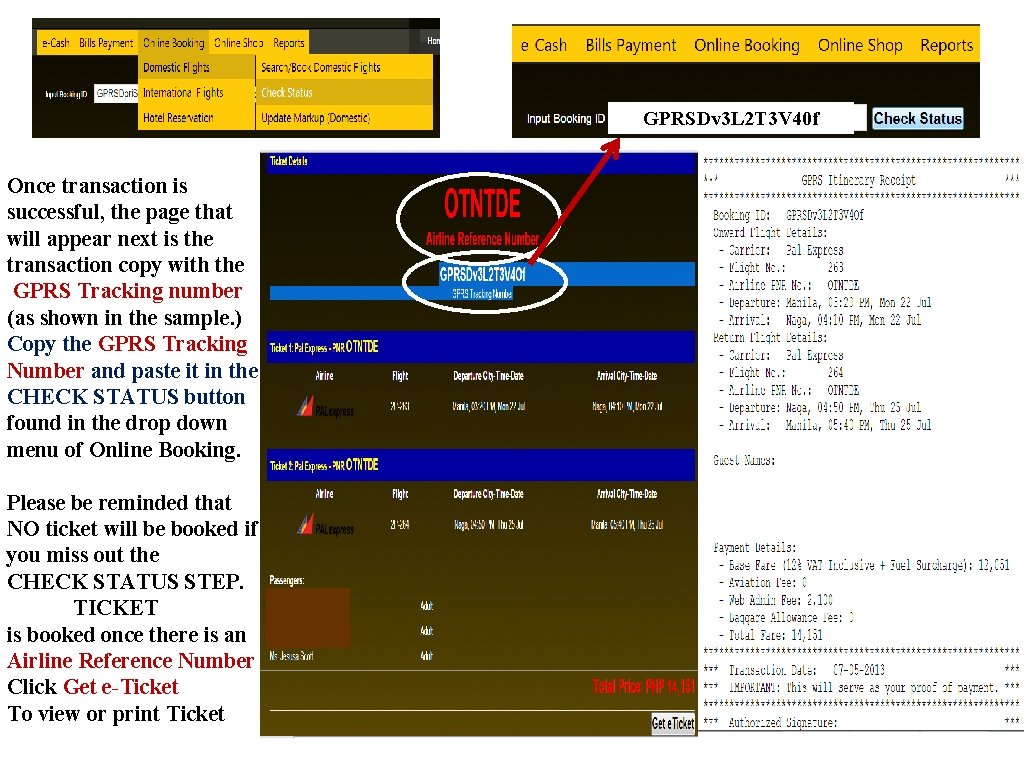
GPRSDv 3 L 2 T 3 V 40 f Once transaction is successful, the page that will appear next is the transaction copy with the GPRS Tracking number (as shown in the sample. ) Copy the GPRS Tracking Number and paste it in the CHECK STATUS button found in the drop down menu of Online Booking. Please be reminded that NO ticket will be booked if you miss out the CHECK STATUS STEP. TICKET is booked once there is an Airline Reference Number Click Get e-Ticket To view or print Ticket
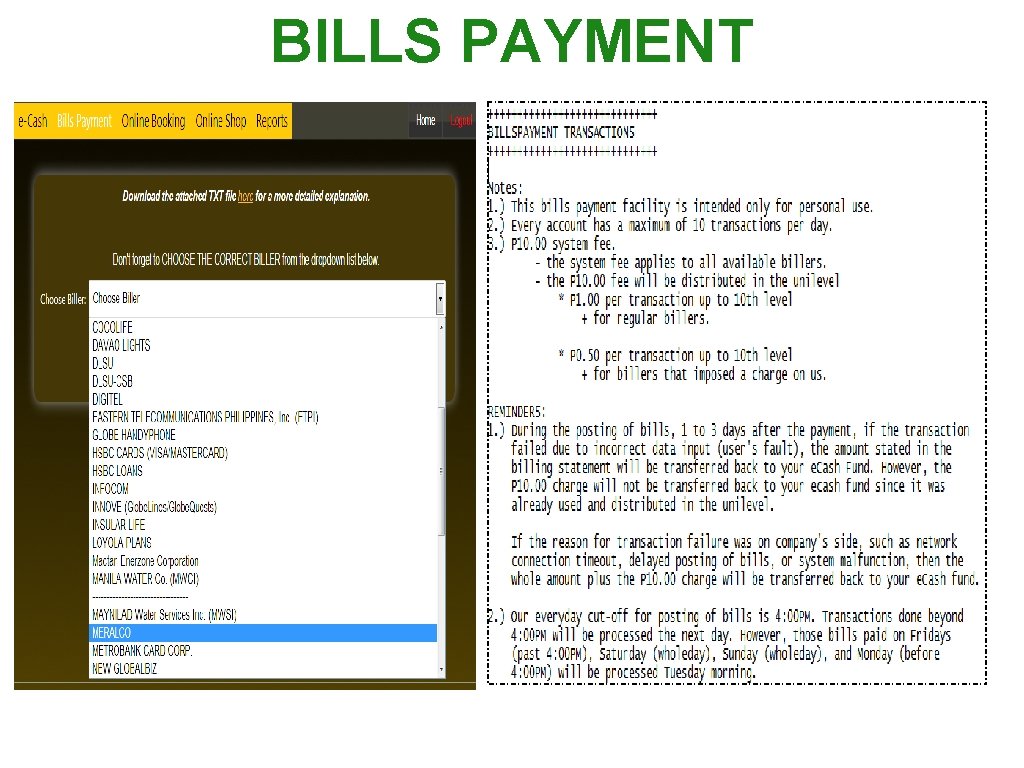
BILLS PAYMENT
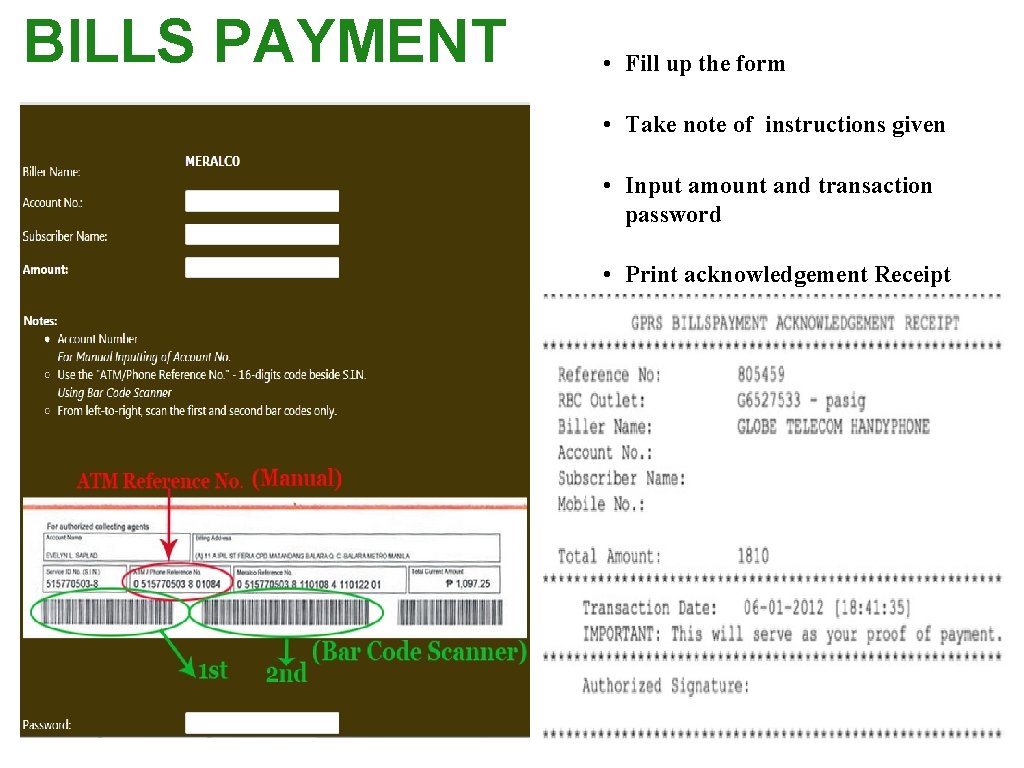
BILLS PAYMENT • Fill up the form • Take note of instructions given • Input amount and transaction password • Print acknowledgement Receipt