
How to log Conservation Planning Assistance Activities Tracking
![How to log Conservation Planning Assistance Activities Logging a New [detail not warranted] Activity](https://slidetodoc.com/presentation_image_h2/28e4ec88aa1d2f54275ce86d5b740a8e/image-9.jpg "How to log Conservation Planning Assistance Activities Logging a New [detail not warranted] Activity")
![How to log Conservation Planning Assistance Activities Logging a new [detail warranted] Activity Incoming](https://slidetodoc.com/presentation_image_h2/28e4ec88aa1d2f54275ce86d5b740a8e/image-13.jpg "How to log Conservation Planning Assistance Activities Logging a new [detail warranted] Activity Incoming")
- Slides: 21
How to log Conservation Planning Assistance Activities Tracking A nd I ntegrated L ogging S ystem TAILS Phase 5 (Federal Activities) In TAILS 1
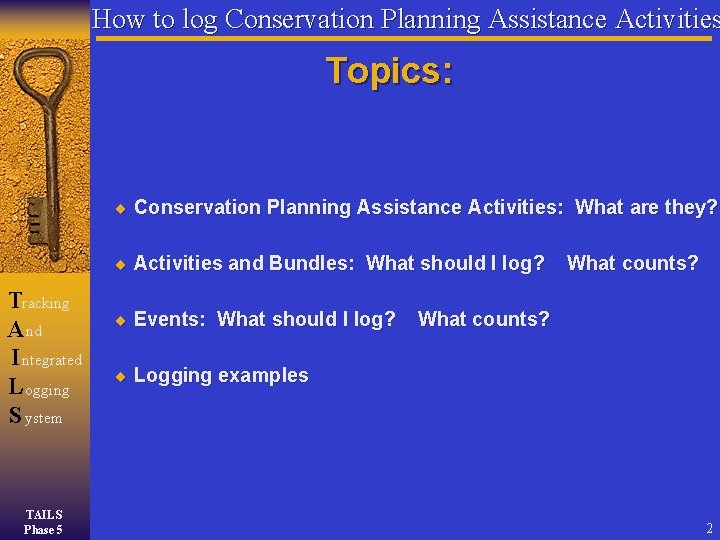
How to log Conservation Planning Assistance Activities Topics: Conservation Planning Assistance Activities: What are they? Activities and Bundles: What should I log? Tracking A nd I ntegrated L ogging S ystem TAILS Phase 5 Events: What should I log? What counts? Logging examples 2
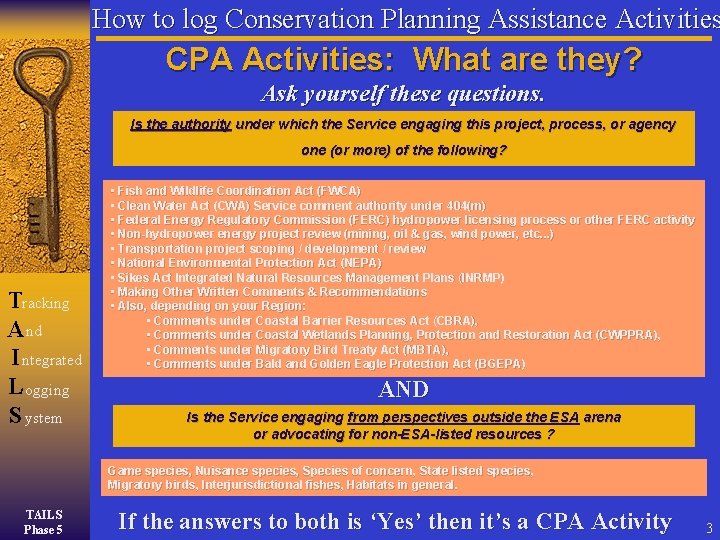
How to log Conservation Planning Assistance Activities CPA Activities: What are they? Ask yourself these questions. Is the authority under which the Service engaging this project, process, or agency one (or more) of the following? Tracking A nd I ntegrated L ogging S ystem • Fish and Wildlife Coordination Act (FWCA) • Clean Water Act (CWA) Service comment authority under 404(m) • Federal Energy Regulatory Commission (FERC) hydropower licensing process or other FERC activity • Non-hydropower energy project review (mining, oil & gas, wind power, etc. . . ) • Transportation project scoping / development / review • National Environmental Protection Act (NEPA) • Sikes Act Integrated Natural Resources Management Plans (INRMP) • Making Other Written Comments & Recommendations • Also, depending on your Region: • Comments under Coastal Barrier Resources Act (CBRA), • Comments under Coastal Wetlands Planning, Protection and Restoration Act (CWPPRA), • Comments under Migratory Bird Treaty Act (MBTA), • Comments under Bald and Golden Eagle Protection Act (BGEPA) AND Is the Service engaging from perspectives outside the ESA arena or advocating for non-ESA-listed resources ? Game species, Nuisance species, Species of concern, State listed species, Migratory birds, Interjurisdictional fishes, Habitats in general. TAILS Phase 5 If the answers to both is ‘Yes’ then it’s a CPA Activity 3
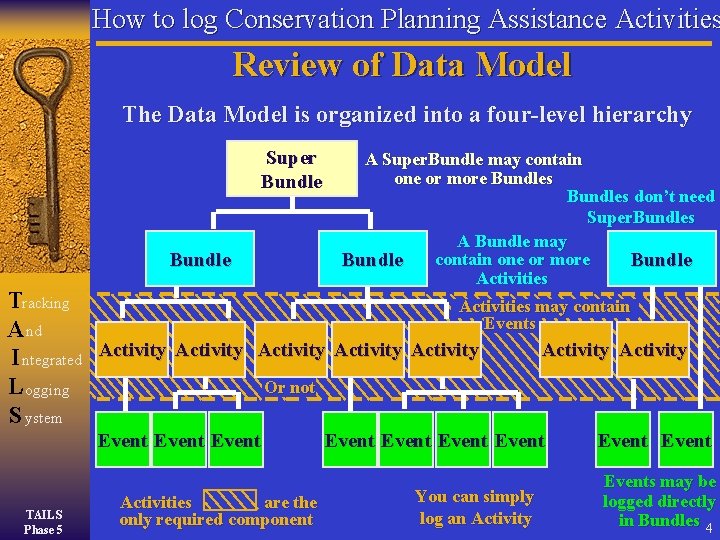
How to log Conservation Planning Assistance Activities Review of Data Model The Data Model is organized into a four-level hierarchy Super Bundle A Super. Bundle may contain one or more Bundles don’t need Super. Bundles A Bundle may contain one or more Bundle Activities Tracking Activities may contain Events A nd Activity I ntegrated Activity Activity Or not L ogging S ystem Event TAILS Phase 5 Activities are the only required component Event You can simply log an Activity Events may be logged directly in Bundles 4
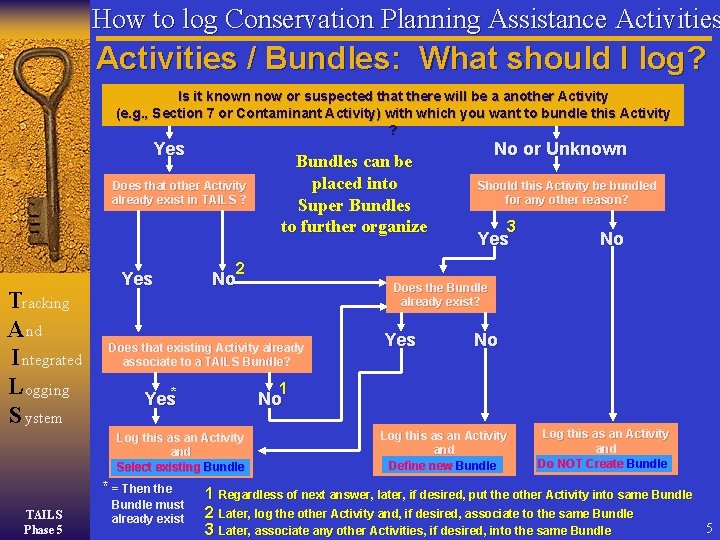
How to log Conservation Planning Assistance Activities / Bundles: What should I log? Is it known now or suspected that there will be a another Activity (e. g. , Section 7 or Contaminant Activity) with which you want to bundle this Activity ? Yes Does that other Activity already exist in TAILS ? Tracking A nd I ntegrated L ogging S ystem Yes 3 Yes No 1 Yes* Bundle must already exist Should this Activity be bundled for any other reason? Does the Bundle already exist? Does that existing Activity already associate to a TAILS Bundle? * = Then the No or Unknown 2 No No Log this as an Activity and m Bundle Select existing TAILS Phase 5 Bundles can be placed into Super Bundles to further organize Log this as an Activity and m Bundle Define new Log this as an Activity and m Bundle Do NOT Create 1 Regardless of next answer, later, if desired, put the other Activity into same Bundle 2 Later, log the other Activity and, if desired, associate to the same Bundle 5 3 Later, associate any other Activities, if desired, into the same Bundle
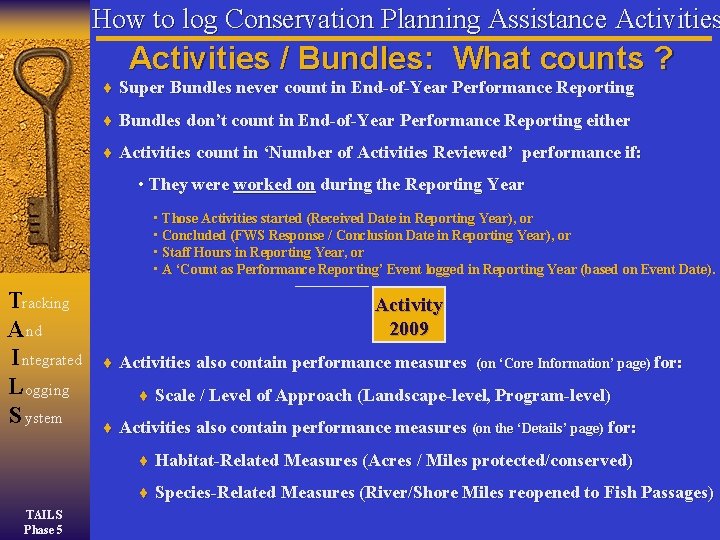
How to log Conservation Planning Assistance Activities / Bundles: What counts ? Super Bundles never count in End-of-Year Performance Reporting Bundles don’t count in End-of-Year Performance Reporting either Activities count in ‘Number of Activities Reviewed’ performance if: • They were worked on during the Reporting Year Super Bundle • Those Activities started (Received Date in Reporting Year), or • Concluded (FWS Response / Conclusion Date in Reporting Year), or • Staff Hours in Reporting Year, or Bundle • A ‘Count as Performance Reporting’ Event logged in Reporting Year (based on Event Date). Tracking A nd I ntegrated L ogging S ystem Activity 2007 2009 Activities also contain performance measures (on ‘Core Information’ page) for: Scale / Level of Approach (Landscape-level, Program-level) Activities also contain performance measures (on the ‘Details’ page) for: Habitat-Related Measures (Acres / Miles protected/conserved) Species-Related Measures (River/Shore Miles reopened to Fish Passages) TAILS Phase 5
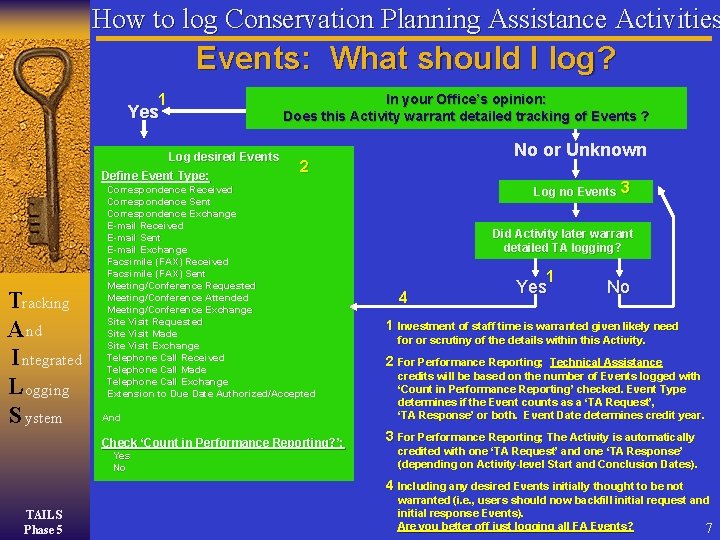
How to log Conservation Planning Assistance Activities Events: What should I log? 1 In your Office’s opinion: Does this Activity warrant detailed tracking of Events ? Yes Log desired Events Define Event Type: Tracking A nd I ntegrated L ogging S ystem 2 Correspondence Received Correspondence Sent Correspondence Exchange E-mail Received E-mail Sent E-mail Exchange Facsimile (FAX) Received Facsimile (FAX) Sent Meeting/Conference Requested Meeting/Conference Attended Meeting/Conference Exchange Site Visit Requested Site Visit Made Site Visit Exchange Telephone Call Received Telephone Call Made Telephone Call Exchange Extension to Due Date Authorized/Accepted And Check ‘Count in Performance Reporting? ’: Yes No No or Unknown Log no Events 3 Did Activity later warrant detailed TA logging? 1 4 Yes No 1 Investment of staff time is warranted given likely need for or scrutiny of the details within this Activity. 2 For Performance Reporting; Technical Assistance credits will be based on the number of Events logged with ‘Count in Performance Reporting’ checked. Event Type determines if the Event counts as a ‘TA Request’, ‘TA Response’ or both. Event Date determines credit year. 3 For Performance Reporting; The Activity is automatically credited with one ‘TA Request’ and one ‘TA Response’ (depending on Activity-level Start and Conclusion Dates). 4 Including any desired Events initially thought to be not TAILS Phase 5 warranted (i. e. , users should now backfill initial request and initial response Events). Are you better off just logging all FA Events? 7
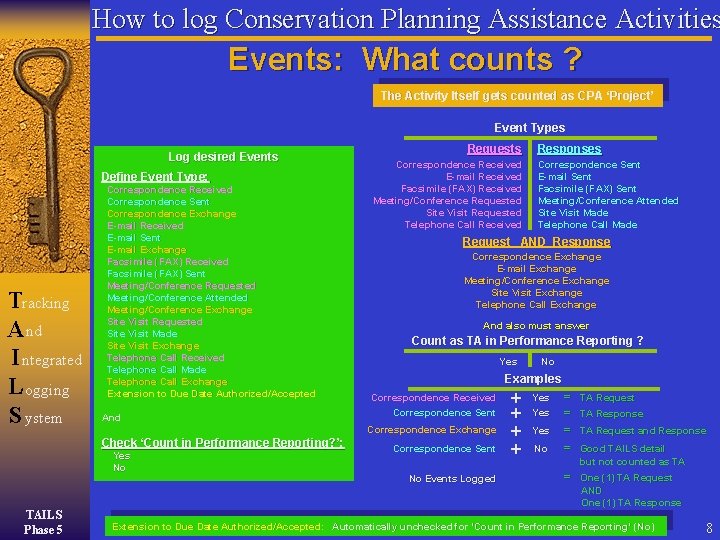
How to log Conservation Planning Assistance Activities Events: What counts ? The Activity Itself gets counted as CPA ‘Project’ Event Types Log desired Events Define Event Type: Tracking A nd I ntegrated L ogging S ystem Correspondence Received Correspondence Sent Correspondence Exchange E-mail Received E-mail Sent E-mail Exchange Facsimile (FAX) Received Facsimile (FAX) Sent Meeting/Conference Requested Meeting/Conference Attended Meeting/Conference Exchange Site Visit Requested Site Visit Made Site Visit Exchange Telephone Call Received Telephone Call Made Telephone Call Exchange Extension to Due Date Authorized/Accepted And Correspondence Received E-mail Received Facsimile (FAX) Received Meeting/Conference Requested Site Visit Requested Telephone Call Received Yes No Responses Correspondence Sent E-mail Sent Facsimile (FAX) Sent Meeting/Conference Attended Site Visit Made Telephone Call Made Request AND Response Correspondence Exchange E-mail Exchange Meeting/Conference Exchange Site Visit Exchange Telephone Call Exchange And also must answer Count as TA in Performance Reporting ? Yes No Examples Correspondence Received Correspondence Sent Correspondence Exchange Check ‘Count in Performance Reporting? ’: TAILS Phase 5 Requests Correspondence Sent No Events Logged + + Yes Yes No = = TA Request TA Response TA Request and Response Good TAILS detail but not counted as TA = One (1) TA Request AND One (1) TA Response Extension to Due Date Authorized/Accepted: Automatically unchecked for ‘Count in Performance Reporting’ (No) 8
How to log Conservation Planning Assistance Activities Logging a New [detail not warranted] Activity Incoming E-mail Search TAILS for existing Activity Tracking A nd I ntegrated L ogging S ystem Search results and content of incoming request indicates that the issue does NOT already exist in TAILS and will therefore be logged as a New Activity Assigned Activity Code: 20420 -2006 -FA-0111 (YYY upgrade) Description: Request for preliminary concerns on equipment upgrade / replacement at Triple Y Refinery Activity Start Date: 8/2/2006 Activity Due Date: 9/15/2006 Activity Conclusion Date: 8/12/2006 FWS Position: No Objection Activity Staff Hours: 0. 5 Hours (FY 2006) Electronic File: ‘Z: /2006/Fed. Act/FA-0111_No_Objection. doc’ 20420 -2006 -FA-0111 (YYY Upgrade) Start Date: 8/2/2006 Due Date: 9/15/2006 All information gathered came from Activity-level logging Completion Date: 8/12/2006 FWS Position: No Objection Events Staff Hours: 0. 5 (FY 2006) No Events were logged in the making of this Activity Electronic File: Z: /2006/Fed_Act/FA-0111_No_Objection. doc TAILS Phase 5 * ‘Activity’ in TAILS terminology. Performance Tally FY 2006: (Hours 0. 5) 1 Activity* worked on 1 TAs Received (assumed) 1 TAs Responded (assumed) Most CPA Service staff know this as a CPA ‘Project’. 9
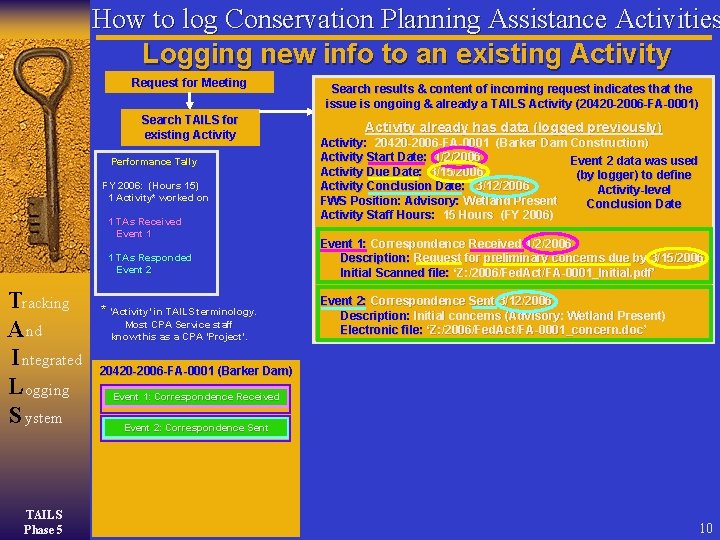
How to log Conservation Planning Assistance Activities Logging new info to an existing Activity Request for Meeting Search TAILS for existing Activity Performance Tally FY 2006: (Hours 15) 1 Activity* worked on 1 TAs Received Event 1 1 TAs Responded Event 2 Tracking A nd I ntegrated L ogging S ystem TAILS Phase 5 * ‘Activity’ in TAILS terminology. Most CPA Service staff know this as a CPA ‘Project’. Search results & content of incoming request indicates that the issue is ongoing & already a TAILS Activity (20420 -2006 -FA-0001) Activity already has data (logged previously) Activity: 20420 -2006 -FA-0001 (Barker Dam Construction) Activity Start Date: 1/2/2006 Event 112 datawas wasused Activity Due Date: 3/15/2006 (by (bylogger)to to todefine Activity Conclusion Date: 3/12/2006 Activity-level Due Start. Date FWS Position: Advisory: Wetland Present Conclusion Date Activity Staff Hours: 15 Hours (FY 2006) Event 1: Correspondence Received 1/2/2006 Description: Request for preliminary concerns due by 3/15/2006 Initial Scanned file: ‘Z: /2006/Fed. Act/FA-0001_Initial. pdf’ Event 2: Correspondence Sent 3/12/2006 Description: Initial concerns (Advisory: Wetland Present) Electronic file: ‘Z: /2006/Fed. Act/FA-0001_concern. doc’ 20420 -2006 -FA-0001 (Barker Dam) Event 1: Correspondence Received Event 2: Correspondence Sent 10
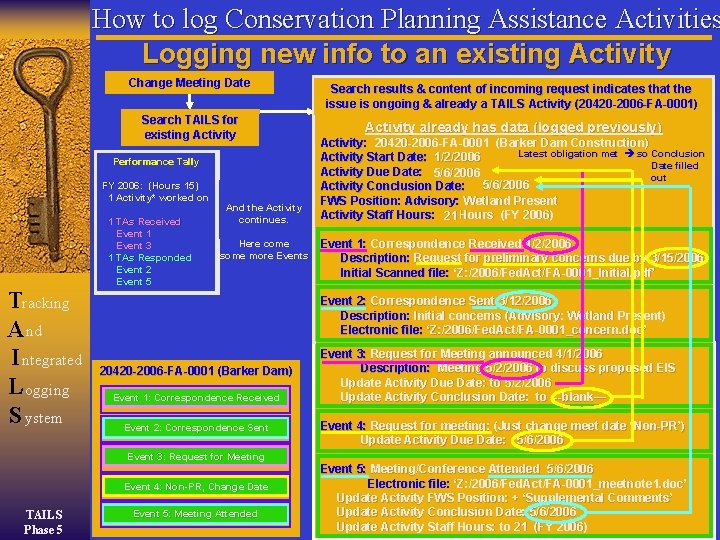
How to log Conservation Planning Assistance Activities Logging new info to an existing Activity Change Request. Meeting for Meeting Date Search TAILS for existing Activity Performance Tally FY 2006: (Hours 15) 1 Activity* worked on Tracking A nd I ntegrated L ogging S ystem 1 TAs Received Event 1 Event 3 1 TAs Responded Event 2 Event 5 In this example, And Log the new. Activity info continues. starting with Event 3 Here come some more Events Search results & content of incoming request indicates that the issue is ongoing & already a TAILS Activity (20420 -2006 -FA-0001) Activity already has data (logged previously) Activity: 20420 -2006 -FA-0001 (Barker Dam Construction) Latest obligation metmet so Activity Conclusion New Simple Obligation info change. not yet NOTE: so : Logged no NOTE Activity Start Date: 1/2/2006 New Obligation = New Due Date filled as longer non-PR Activity Due Date: 3/15/2006 5/2/2006 5/6/2006 out Event Concluded (TA) 5/6/2006 Activity Conclusion Date: 3/12/2006 FWS Position: Advisory: Wetland Present Activity Staff Hours: 15 21 Hours (FY 2006) Event 1: Correspondence Received 1/2/2006 Description: Request for preliminary concerns due by 3/15/2006 Initial Scanned file: ‘Z: /2006/Fed. Act/FA-0001_Initial. pdf’ Event 2: Correspondence Sent 3/12/2006 Description: Initial concerns (Advisory: Wetland Present) Electronic file: ‘Z: /2006/Fed. Act/FA-0001_concern. doc’ 20420 -2006 -FA-0001 (Barker Dam) Event 1: Correspondence Received Event 2: Correspondence Sent Event 3: Request for Meeting announced 4/1/2006 Description: Meeting 5/2/2006 to discuss proposed EIS Update Activity Due Date: to 5/2/2006 Update Activity Conclusion Date: to --blank— Event 4: Request for meeting: (Just change meet date ‘Non-PR’) Update Activity Due Date: 5/6/2006 Event 3: Request for Meeting Event 4: Non-PR, Change Date TAILS Phase 5 Event 5: Meeting Attended Event 5: Meeting/Conference Attended 5/6/2006 Electronic file: ‘Z: /2006/Fed. Act/FA-0001_meetnote 1. doc’ Update Activity FWS Position: + ‘Supplemental Comments’ Update Activity Conclusion Date: 5/6/2006 Update Activity Staff Hours: to 21 (FY 2006) 11
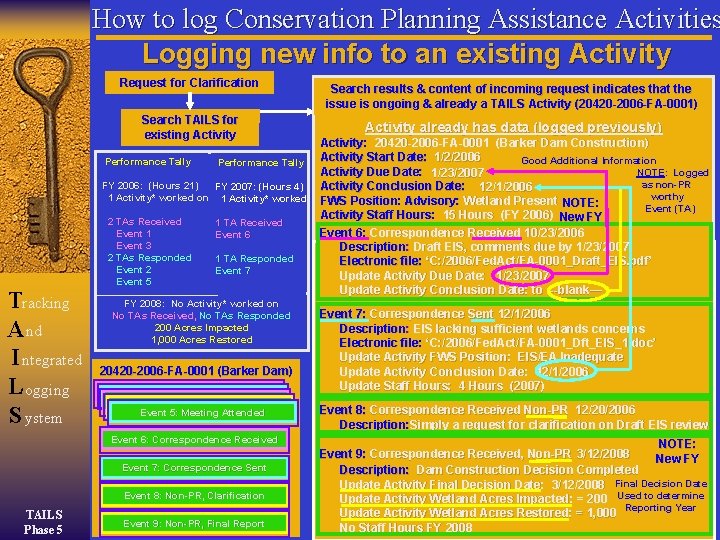
How to log Conservation Planning Assistance Activities Logging new info to an existing Activity Correspondence Request Changefor Meeting Clarification Received Date Search TAILS for existing Activity Performance Tally Performance 21) FY 2006: (Hours 15) FY 2007: (Hours 4) Activity*workedon on 1 Activity* worked 1 Activity Tracking A nd I ntegrated L ogging S ystem 2 TAs Received 1 Event 3 2 TAs Responded 1 Event 2 Event 5 1 TA Received Event 6 1 TA Responded Event 7 FY 2008: No Activity* worked on No TAs Received, No TAs Responded 200 Acres Impacted 1, 000 Acres Restored 20420 -2006 -FA-0001 (Barker Dam) Event 1: Correspondence Received Event Sent Event 2: 3: Correspondence Request for Meeting Event 4: Non-PR Event 5: Meeting Attended Event 6: Correspondence Received Event 7: Correspondence Sent Event 8: Non-PR, Clarification TAILS Phase 5 Event 9: Non-PR, Final Report Search results & content of incoming request indicates that the issue is ongoing & already a TAILS Activity (20420 -2006 -FA-0001) Activity already has data (logged previously) Activity: 20420 -2006 -FA-0001 (Barker Dam Construction) Activity Start Date: 1/2/2006 New Insignificant Obligation not Event yet NOTE: so : Activity Logged NOTE Good Additional Information Latest obligation now met, so Conclusion New Obligation = met New Due Date no as non-PR longer Activity Due Date: 3/15/2006 NOTE: : out Logged NOTE Date filled 1/23/2007 Event Concluded (TA) as non-PR Activity Conclusion Date: 3/12/2006 12/1/2006 worthy FWS Position: Advisory: Wetland Present NOTE: Event (TA) Activity Staff Hours: 15 Hours (FY 2006) New FY Event 6: Correspondence Received 10/23/2006 Description: Draft EIS, comments due by 1/23/2007 Electronic file: ‘C: /2006/Fed. Act/FA-0001_Draft_EIS. pdf’ Update Activity Due Date: 1/23/2007 Update Activity Conclusion Date: to --blank— Event 7: Correspondence Sent 12/1/2006 Description: EIS lacking sufficient wetlands concerns Electronic file: ‘C: /2006/Fed. Act/FA-0001_Dft_EIS_1. doc’ Update Activity FWS Position: EIS/EA Inadequate Update Activity Conclusion Date: 12/1/2006 Update Staff Hours: 4 Hours (2007) Event 8: Correspondence Received Non-PR 12/20/2006 Description: Simply a request for clarification on Draft EIS review NOTE: Event 9: Correspondence Received, Non-PR 3/12/2008 New FY Description: Dam Construction Decision Completed Update Activity Final Decision Date: 3/12/2008 Final Decision Date Update Activity Wetland Acres Impacted: = 200 Used to determine Reporting Year Update Activity Wetland Acres Restored: = 1, 000 No Staff Hours FY 2008 12
How to log Conservation Planning Assistance Activities Logging a new [detail warranted] Activity Incoming Correspondence Search TAILS for existing Activity Smith Dam Bundle (20420 -2006 -B-0001) 20420 -2006 -FA-0112 (CPA (Federal) Activity) Start Date: 1/2/2006 Staff Hours: 3 (FY 2006) Due Date: 3/15/2006 Completion Date: 3/12/2006 FWS Position: E&T Species Present Event 1: Correspondence Received Tracking Event 2: Correspondence Sent A nd Event 3: Non-PR Event (in Federal Activity) I ntegrated 20420 -2006 -F-0045 (Section 7) Staff Hours: 1. 5 (FY 2006) L ogging Date Formal Consultation Initiated: 7/1/2006 S ystem Due Date: 11/13/2006 Event: Correspondence Received: Request for Formal Consultation TAILS Phase 5 • ‘Activity’ in TAILS terminology. Most CPA Service staff know this as a CPA Activities ‘Project’. Search results and incoming correspondence indicate issue is new and will therefore be logged as new Activity Assigned Activity Code: 20420 -2006 -FA-0112 (Smith Dam) Event 1: Correspondence Received 1/2/2006 Description: Request for preliminary concerns due 3/15/06 Initial Scanned file: ‘Z: /2006/Fed. Act/FA-0112_Initial. pdf’ Update Activity Start Date: 1/2/2006 Update Activity Due Date: 3/15/2006 Event 2: Correspondence Sent 3/12/2006 Description: E&T species present, Section 7 needed Electronic file: ‘Z: /2006/Fed. Act/FA-0112_need_S 7. doc’ Update Activity Completion Date: 3/12/2006 Update Activity FWS Position: E&T Species Present Update Activity Staff Hours: 3 Hours (2006) Event 3: Correspondence Received, Non-PR 7/1/2006 Description: Request for Formal Consultation Electronic file: ‘Z: /2006/Sect 7/S 7 -0045_request. pdf Create New Bundle within Federal Activity (Smith Dam) Create New Section 7 Consultation (using magic button) Associate this Event with Section 7 Activity Code Update Staff Hours: (for Section 7 – 1. 5 Hours) Enter Date Formal Consultation Initiated: (Sect 7 7/1/2006) Enter Due Date: (for Section 7 11/13/2006) Performance Tally FY 2006: (Hours 3) 1 Federal Activity* worked on 1 TA Received (Event 1), 1 TAs Responded (Event 2) Section 7 (Separate)) 13
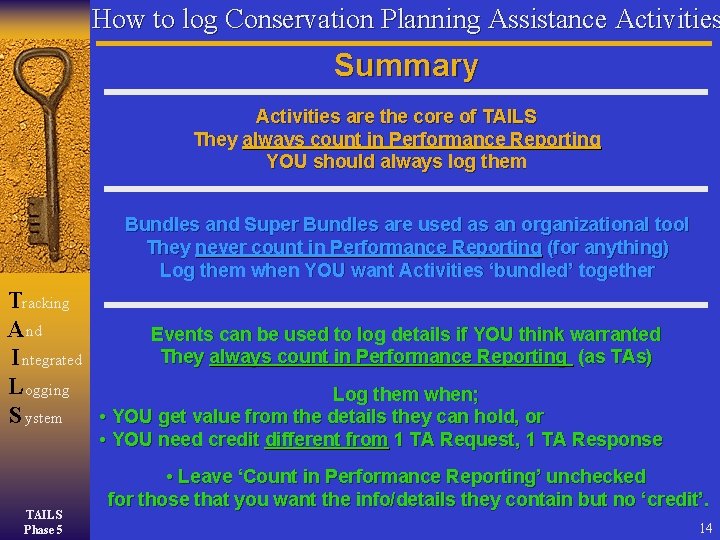
How to log Conservation Planning Assistance Activities Summary Activities are the core of TAILS They always count in Performance Reporting YOU should always log them Bundles and Super Bundles are used as an organizational tool They never count in Performance Reporting (for anything) Log them when YOU want Activities ‘bundled’ together Tracking A nd Events can be used to log details if YOU think warranted They always count in Performance Reporting (as TAs) I ntegrated L ogging Log them when; S ystem • YOU get value from the details they can hold, or • YOU need credit different from 1 TA Request, 1 TA Response TAILS Phase 5 • Leave ‘Count in Performance Reporting’ unchecked for those that you want the info/details they contain but no ‘credit’. 14
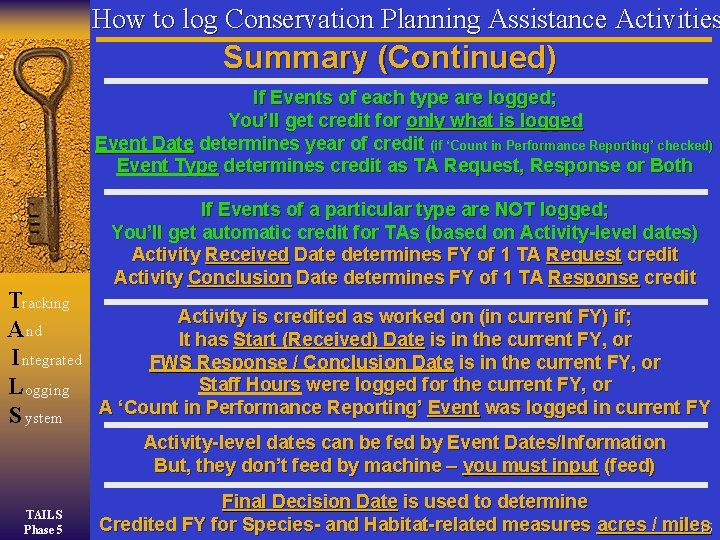
How to log Conservation Planning Assistance Activities Summary (Continued) If Events of each type are logged; You’ll get credit for only what is logged Event Date determines year of credit (if ‘Count in Performance Reporting’ checked) Event Type determines credit as TA Request, Response or Both Tracking A nd I ntegrated L ogging S ystem If Events of a particular type are NOT logged; You’ll get automatic credit for TAs (based on Activity-level dates) Activity Received Date determines FY of 1 TA Request credit Activity Conclusion Date determines FY of 1 TA Response credit Activity is credited as worked on (in current FY) if; It has Start (Received) Date is in the current FY, or FWS Response / Conclusion Date is in the current FY, or Staff Hours were logged for the current FY, or A ‘Count in Performance Reporting’ Event was logged in current FY Activity-level dates can be fed by Event Dates/Information But, they don’t feed by machine – you must input (feed) TAILS Phase 5 Final Decision Date is used to determine Credited FY for Species- and Habitat-related measures acres / miles 15
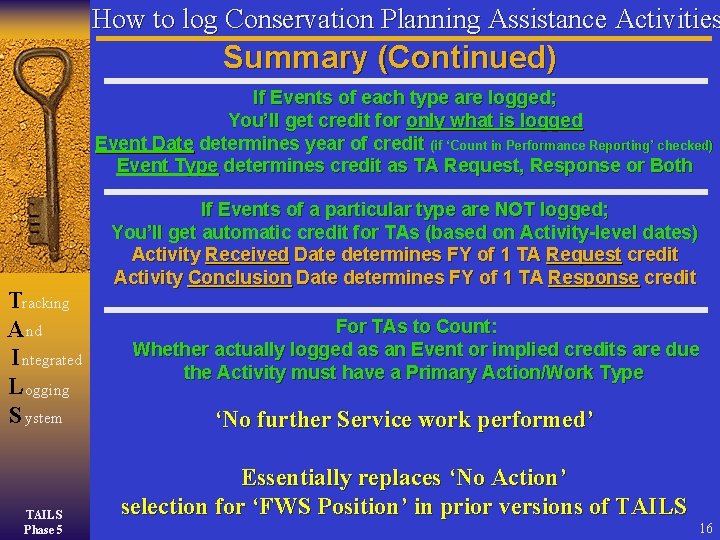
How to log Conservation Planning Assistance Activities Summary (Continued) If Events of each type are logged; You’ll get credit for only what is logged Event Date determines year of credit (if ‘Count in Performance Reporting’ checked) Event Type determines credit as TA Request, Response or Both Tracking A nd I ntegrated L ogging S ystem TAILS Phase 5 If Events of a particular type are NOT logged; You’ll get automatic credit for TAs (based on Activity-level dates) Activity Received Date determines FY of 1 TA Request credit Activity Conclusion Date determines FY of 1 TA Response credit For TAs to Count: Whether actually logged as an Event or implied credits are due the Activity must have a Primary Action/Work Type ‘No further Service work performed’ Essentially replaces ‘No Action’ selection for ‘FWS Position’ in prior versions of TAILS 16
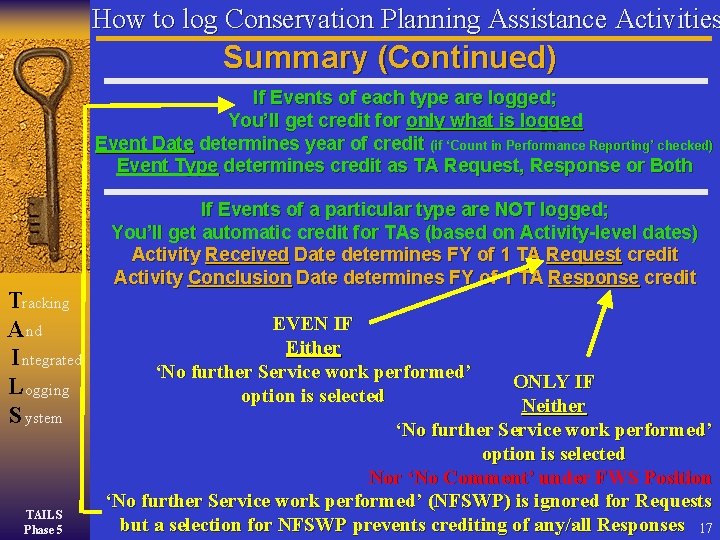
How to log Conservation Planning Assistance Activities Summary (Continued) If Events of each type are logged; You’ll get credit for only what is logged Event Date determines year of credit (if ‘Count in Performance Reporting’ checked) Event Type determines credit as TA Request, Response or Both Tracking A nd I ntegrated L ogging S ystem TAILS Phase 5 If Events of a particular type are NOT logged; You’ll get automatic credit for TAs (based on Activity-level dates) Activity Received Date determines FY of 1 TA Request credit Activity Conclusion Date determines FY of 1 TA Response credit EVEN IF Either ‘No further Service work performed’ option is selected ONLY IF Neither ‘No further Service work performed’ option is selected Nor ‘No Comment’ under FWS Position ‘No further Service work performed’ (NFSWP) is ignored for Requests but a selection for NFSWP prevents crediting of any/all Responses 17
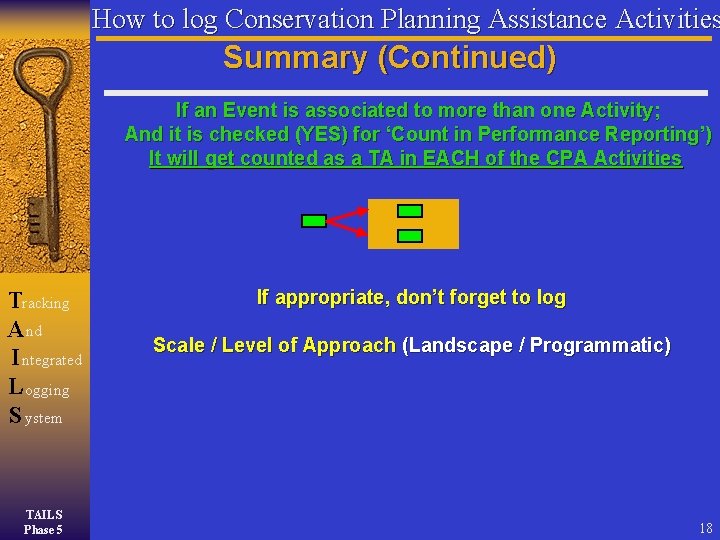
How to log Conservation Planning Assistance Activities Summary (Continued) If an Event is associated to more than one Activity; And it is checked (YES) for ‘Count in Performance Reporting’) It will get counted as a TA in EACH of the CPA Activities Tracking A nd I ntegrated L ogging S ystem TAILS Phase 5 If appropriate, don’t forget to log Scale / Level of Approach (Landscape / Programmatic) 18
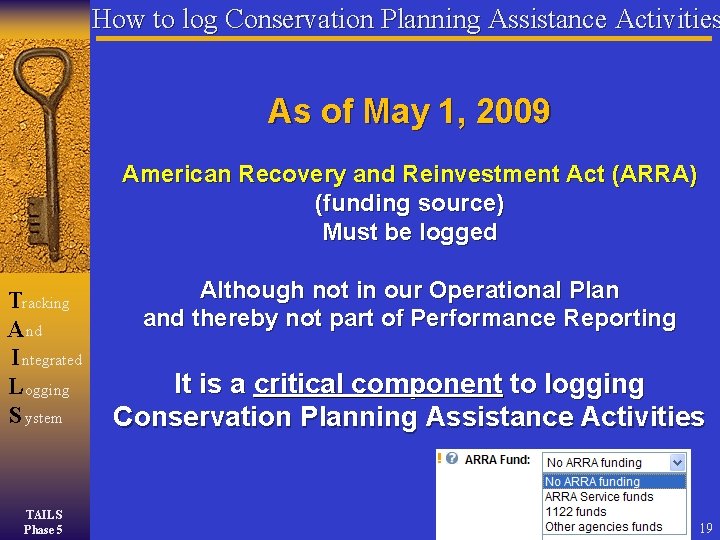
How to log Conservation Planning Assistance Activities As of May 1, 2009 American Recovery and Reinvestment Act (ARRA) (funding source) Must be logged Tracking A nd I ntegrated L ogging S ystem TAILS Phase 5 Although not in our Operational Plan and thereby not part of Performance Reporting It is a critical component to logging Conservation Planning Assistance Activities 19
How to log Conservation Planning Assistance Activities Bottom Line Log what matters to your Office Log Nationally Required Fields Tracking A nd I ntegrated L ogging S ystem TAILS Phase 5 Check the Validation Reports in TAILS Review your counts, if desired, in PRS Don’t let a ‘count desire’ drive how you log !
How to log Conservation Planning Assistance Activities Tracking A nd I ntegrated L ogging S ystem TAILS Phase 5 (Federal Activities) In TAILS 21