
How To for Middle Years Book Trailers by
‘How To’ for Middle Years Book Trailers by Jenny Butler
Step 1 • MOST OF THE HARD WORK IS IN THIS STEP SO TAKE YOUR TIME TO WORK OUT WHAT IS IMPORTANT • Create a folder on your desktop called ‘Book Trailer’. • List 5 points about the plot, setting or ‘feel’ of the book that you think are the most important things to show/tell the viewer. Save this document into your Book Trailer folder. • Think HOW you could get these ideas across – what image/sound effect/music would capture that point in the best way? Add these thoughts to your Plot points doc.
Step 2 • COLLECT YOUR IMAGES • using the weblinks on this page, look around to find images to fit what you have in your head. It is preferable to use these images as the creators have alreay given you permission to use them. Save them all into your Book Trailer folder. • each time you find an image, note down the author/composer/publisher and the URL where you found it. (see 8. Credits document)
Step 3 • COLLECT YOUR BACKGROUND MUSIC • using the weblinks on this page, listen to lots of music to find the right background sound that complements the mood of your book and your chosen images. It is preferable to use music from these sites as the composers have already given you the permission to use their music. Save into your Book Trailer folder.
Step 4 • COLLECT YOUR SOUND EFFECTS • using the weblinks on this page, listen to lots of sound effects to find and save the sounds you are looking for in to your Book Trailer folder. It is preferable to use these sound effects websites as the creators have already given you permission to use their sound effects.
Step 5 • • PUT IT ALL TOGETHER Now you have all your links and thoughts together in one place, it’s time to make some decisions. (1) What software will you use to make your trailer? Photostory, Moviemaker or Powerpoint? Do you want to use still images or moving images? Do you like one particular program more than another? (2) Look at the main points you want to get across and keep this in mind as you choose which images, music and sound go together the best. (3) Remember – the main purpose of a book trailer is to get the viewer to borrow/read the book – will your combination of images and sound do that? (4) Put it all together. (5) As you do, keep checking against the rubric so you can see how your trailer is measuring up. (6) End your book trailer with a shot of your book cover and the credits screen.
How to make your book trailer videos VIDEOS • how to make book trailers in Movie Maker • http: //www. youtube. com/watch? v=HVes. RUBr. TPs • how to make a book trailer using Powerpoint • http: //www. youtube. com/watch? v=Z 0 kkmw. Ay. Ov. E • how to create book trailers using Photostory 3 • http: //www. youtube. com/watch? v=m 6 Oxf_6 lm. Vs
Images • Openphoto http: //openphoto. net/ • Wikimedia Commons http: //commons. wikimedia. org/wiki/Main_Page • Flickr Creative Commons – each photo you choose displays bibliographic information next to it http: //flickrcc. bluemountains. net/ • Veezle – free stock photos http: //www. veezzle. com/ • Burning Well http: //www. burningwell. org/ • Public Domain Images • http: //www. public-domain-image. com/ • Copyright Friendly Image search – links to more free image websites http: //weblist. me/Copyright-friendly-image-search
Moving Image • Moving Image Archive - http: //www. archive. org/details/movies • Wikimedia Commons: Video http: //commons. wikimedia. org/wiki/Catego ry: Videos
Music • Jamemdo - http: //www. jamendo. com/en/ • Soundzabound – royalty free music for schools http: //www. soundzabound. com/index. php • Purple planet http: //www. purple-planet. com/# • FMA Free Music Archive – search by genre http: //freemusicarchive. org/ • Op. Sound - search by genre http: //www. opsound. org/pool/genre/ • Creative Commons Mixter http: //ccmixter. org/ • Brainy Betty - http: //www. brainybetty. com/soundsforpowerpoint. htm
Sound Effects • Find Sounds http: //findsounds. com/ • Partners in Rhyme http: //www. partnersinrhyme. com/pir/PIRsf x. shtml • Sound Jay http: //www. soundjay. com/ • Soungle http: //soungle. com/
Hints to Make a Good Book Trailer • Have a hook for the audience: (1) to get people interested/excited about the book and (2) grab their attention with the first frame. • Don't have too much text. • Set the moods and convey the ‘feeling’ of the book using image, movement and sound. • Length is important. Not too long or too short but enough to give a quick ‘taste’ of the book. • Make sure you keep the balance between telling enough of the plot to hook but also having some unanswered questions/mystery to hook as well. • Look at the concept behind the story and don't focus on the details of the book. • Music and/or sound can really help to get across the plot, setting or ‘feel’ of the book.
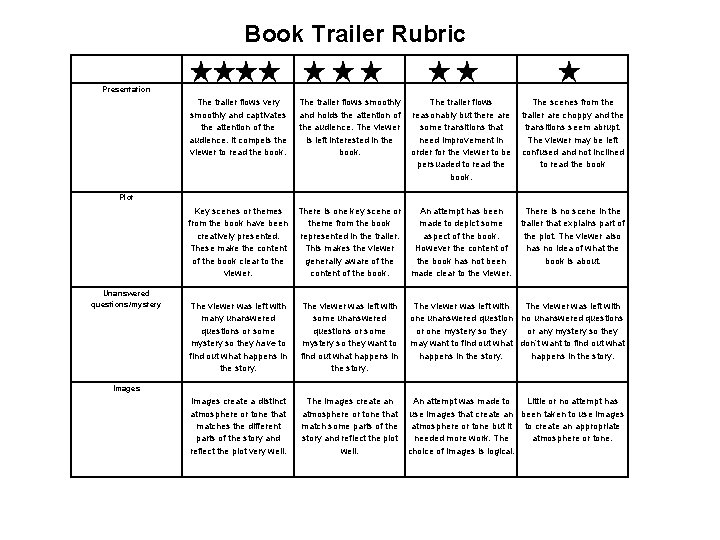
Book Trailer Rubric Presentation The trailer flows very smoothly and captivates the attention of the audience. It compels the viewer to read the book. The trailer flows smoothly The trailer flows The scenes from the and holds the attention of reasonably but there are trailer are choppy and the audience. The viewer some transitions that transitions seem abrupt. is left interested in the need improvement in The viewer may be left book. order for the viewer to be confused and not inclined persuaded to read the book. Plot Key scenes or themes There is one key scene or An attempt has been from the book have been theme from the book made to depict some creatively presented. represented in the trailer. aspect of the book. These make the content This makes the viewer However the content of of the book clear to the generally aware of the book has not been viewer. content of the book. made clear to the viewer. Unanswered questions/mystery There is no scene in the trailer that explains part of the plot. The viewer also has no idea of what the book is about. The viewer was left with many unanswered questions or some mystery so they have to find out what happens in the story. The viewer was left with some unanswered one unanswered question no unanswered questions or some or one mystery so they or any mystery so they want to may want to find out what don’t want to find out what happens in the story. Images create a distinct atmosphere or tone that matches the different parts of the story and reflect the plot very well. The images create an An attempt was made to Little or no attempt has atmosphere or tone that use images that create an been taken to use images match some parts of the atmosphere or tone but it to create an appropriate story and reflect the plot needed more work. The atmosphere or tone. well. choice of images is logical. Images
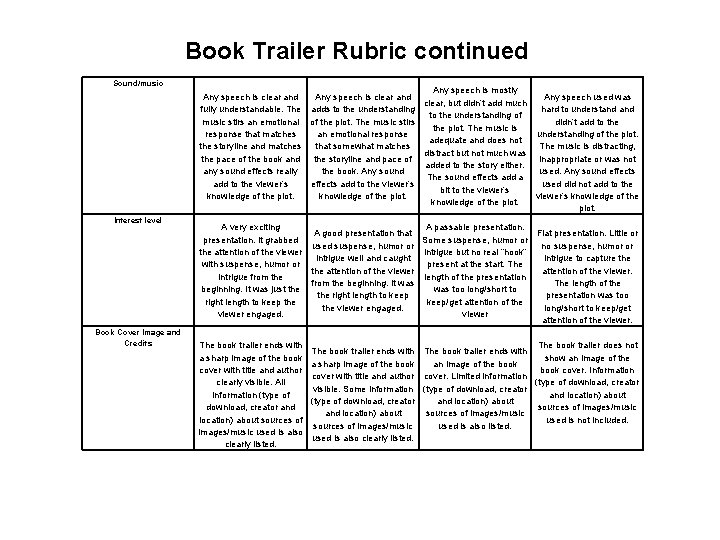
Book Trailer Rubric continued Sound/music Interest level Book Cover Image and Credits Any speech is mostly Any speech is clear and Any speech used was clear, but didn’t add much fully understandable. The adds to the understanding hard to understand to the understanding of music stirs an emotional of the plot. The music stirs didn’t add to the plot. The music is response that matches an emotional response understanding of the plot. adequate and does not the storyline and matches that somewhat matches The music is distracting, distract but not much was the pace of the book and the storyline and pace of inappropriate or was not added to the story either. any sound effects really the book. Any sound used. Any sound effects The sound effects add a add to the viewer’s effects add to the viewer’s used did not add to the bit to the viewer’s knowledge of the plot. A very exciting A passable presentation. A good presentation that Flat presentation. Little or presentation. It grabbed Some suspense, humor or used suspense, humor or no suspense, humor or the attention of the viewer intrigue but no real “hook” intrigue well and caught intrigue to capture the with suspense, humor or present at the start. The the attention of the viewer. intrigue from the length of the presentation from the beginning. It was The length of the beginning. It was just the was too long/short to the right length to keep presentation was too right length to keep the keep/get attention of the viewer engaged. long/short to keep/get viewer engaged. viewer attention of the viewer. The book trailer ends with a sharp image of the book cover with title and author clearly visible. All information (type of download, creator and location) about sources of images/music used is also clearly listed. The book trailer ends with a sharp image of the book cover with title and author visible. Some information (type of download, creator and location) about sources of images/music used is also clearly listed. The book trailer does not The book trailer ends with show an image of the book cover. Information cover. Limited information (type of download, creator and location) about sources of images/music used is not included. used is also listed.
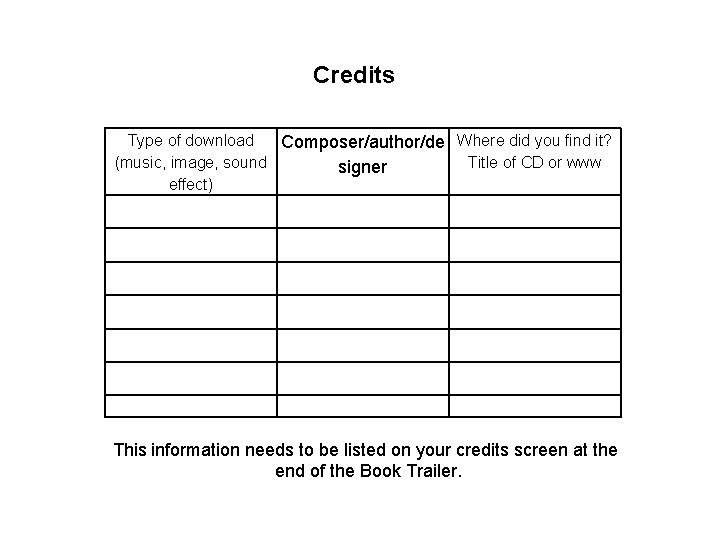
Credits Type of download Composer/author/de Where did you find it? (music, image, sound Title of CD or www signer effect) This information needs to be listed on your credits screen at the end of the Book Trailer.
Most of all, Have FUN!
- Slides: 16