
How to develop a successful Desktop Strategy Thin







- Slides: 38
How to develop a successful Desktop Strategy (Thin, Slate, Thick, VDI. . . V 6) Ritu Patney Optimized Desktop Specialist Microsoft Corporation
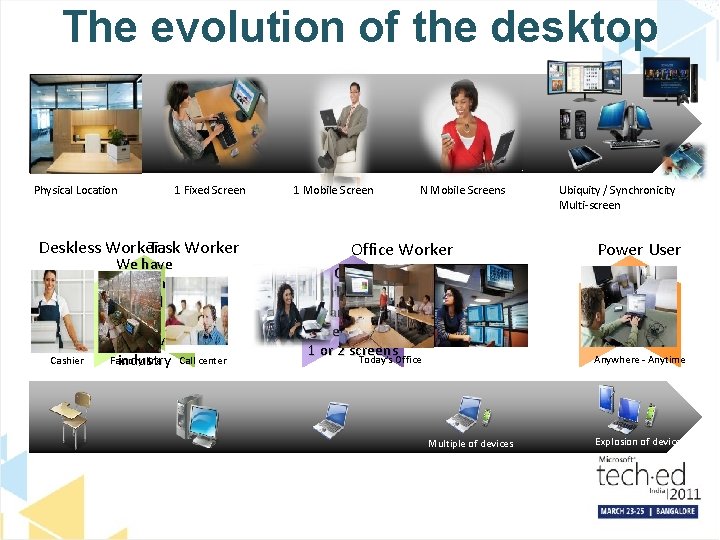
The evolution of the desktop Physical Location 1 Fixed Screen Deskless Worker Task Worker Cashier We have location based workers on almost every Factory line Call center industry 1 Mobile Screen N Mobile Screens Office Worker Office workers who are still dependent on 1 or 2 screens Today’s Office Ubiquity / Synchronicity Multi-screen Power User Focus is on the latest generation of devices Anywhere - Anytime Multiple of devices Explosion of devices
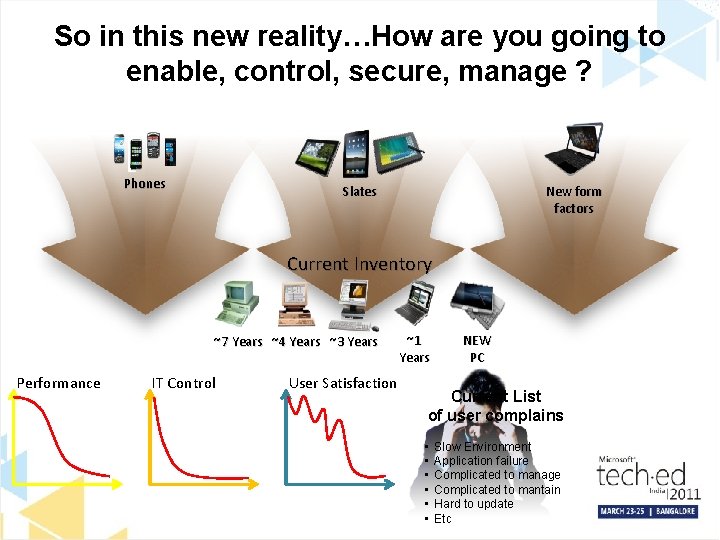
So in this new reality…How are you going to enable, control, secure, manage ? Phones New form factors Slates Current Inventory ~7 Years ~4 Years ~3 Years Performance IT Control User Satisfaction ~1 Years NEW PC Current List of user complains • • • Slow Environment Application failure Complicated to manage Complicated to mantain Hard to update Etc
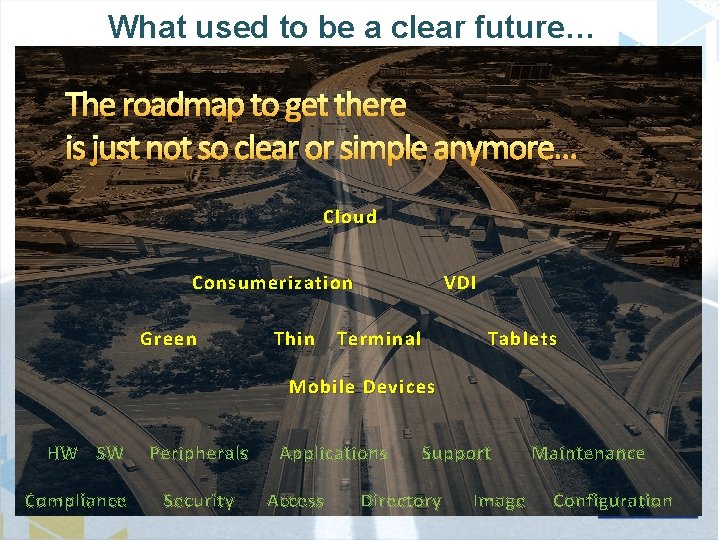
What used to be a clear future… The roadmap to get there is just not so clear or simple anymore… Cloud Consumerization Green Thin VDI Terminal Tablets Mobile Devices HW SW Compliance Peripherals Security Applications Access Support Directory Image Maintenance Configuration
For the last 20 years the solution has been… Jump to hardware selection Multiple of devices Tow er Desktop Thin Client Embedd ed Phone Slate Tablet Kiosk Laptop Roles/Functions All in One l Smal Form r Facto Tasks Processes Netbook Who is going to do… What… Explosion of devices And how will we enable them? Identity, Security, Management, Compliance Where… Functions / Applications
We have moved form a Desktop a Digital Strategy to Workspace Strategy
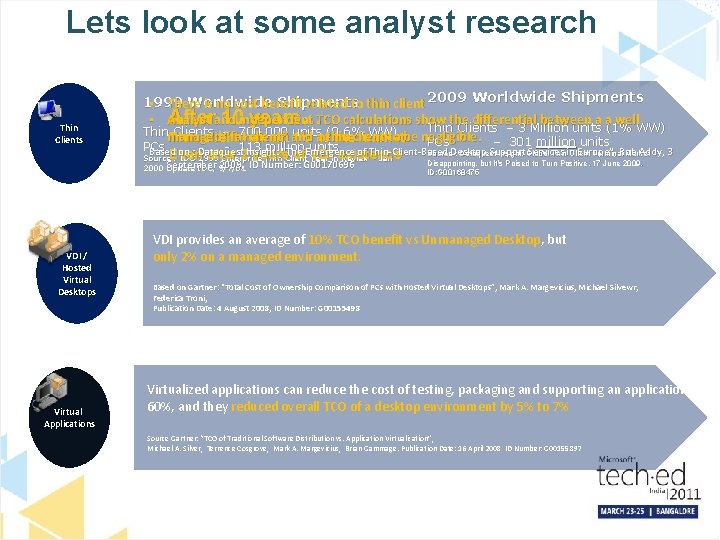
Lets look at some analyst research Thin Clients 1999 Worldwide Shipments • There is no cost benefit related to thin client 2009 Worldwide Shipments Afterand 10 independent years…TCO calculations show • Analyst the differential between a a well Thin Clients – 3 Million units (1% WW) Thinmanaged Clients – 700, 000 units (0. 6% WW) “fatremain client” and to be negligible. – 301 million units Thin client 1% aofthin theclient market PCs - 113 million units Based on : Dataquest Insight: “The Emergence of Thin-Client-Based Desktop Support Services in Europe”, Rob Addy, 3 Source : Dataquest Insight: Global Thin-Client Terminal Market after 2 years of VDI Source. Even : IDC 1999 Enterprise Thin Client Year inexistence Review - Jan Disappointing, but It's Poised to Turn Positive, 17 June 2009, September 2009, 2000 Update IDC, 9/7/01 VDI / Hosted Virtual Desktops Virtual Applications ID Number: G 00170696 ID: G 00168475 VDI provides an average of 10% TCO benefit vs Unmanaged Desktop, but only 2% on a managed environment. Based on Gartner: “Total Cost of Ownership Comparison of PCs with Hosted Virtual Desktops”, Mark A. Margevicius, Michael Silvewr, Federica Troni, Publication Date: 4 August 2008, ID Number: G 00155498 Virtualized applications can reduce the cost of testing, packaging and supporting an application by 60%, and they reduced overall TCO of a desktop environment by 5% to 7% Source Gartner: “TCO of Traditional Software Distribution vs. Application Virtualization”, Michael A. Silver, Terrence Cosgrove, Mark A. Margevicius, Brian Gammage. Publication Date: 16 April 2008 ID Number: G 00155897
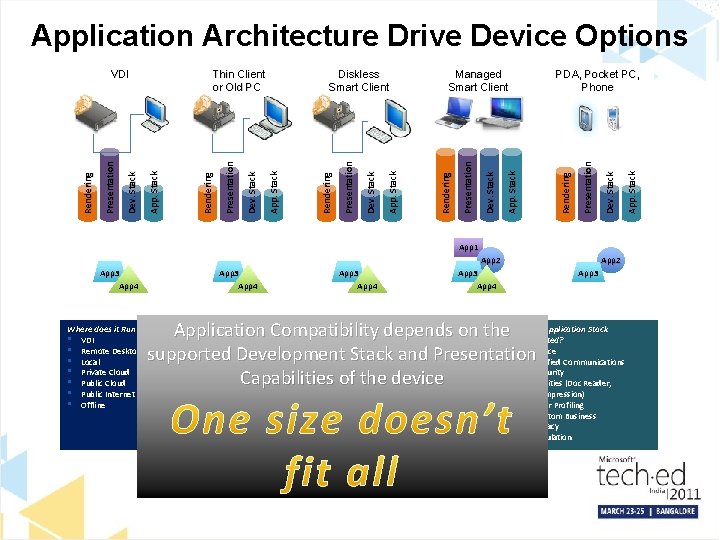
Application Architecture Drive Device Options App 1 App 3 App 4 App 2 App 3 Is Development Stack supported? What format is it Presented the Application Stack Application Compatibility onin? the Issupported? • . Net • depends Mobile • C#, C++ • Weband Presentation • Office supported Development Stack • Java • Rich • Unified Communications • Ajax • Emulation • Security Capabilities of the device • Silverlight • Utilities (Doc Reader, Where does it Run / Render? • VDI • Remote Desktop Services • Local • Private Cloud • Public Internet • Offline • Flash • • Compression) User Profiling Custom Business Legacy Emulation App. Stack Dev. Stack Rendering Presentation PDA, Pocket PC, Phone App. Stack Dev. Stack Presentation Managed Smart Client Rendering App. Stack Dev. Stack Presentation Rendering Diskless Smart Client App. Stack Dev. Stack Presentation Rendering Thin Client or Old PC App. Stack Dev. Stack Presentation Rendering VDI
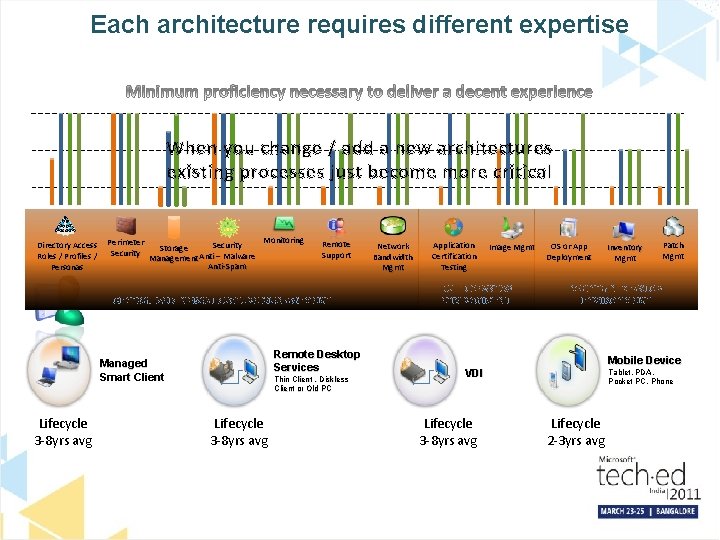
Each architecture requires different expertise High When you change / add a new architectures existing processes just become more critical Med Low Directory Access Roles / Profiles / Personas Perimeter Security Monitoring Security Storage Management Anti – Malware Anti-Spam Remote Support CENTRALIZED INFRASTRUCTURE MANAGEMENT Remote Desktop Services Managed Smart Client Lifecycle 3 -8 yrs avg Thin Client , Diskless Client or Old PC Lifecycle 3 -8 yrs avg Network Bandwidth Mgmt Application Certification Testing Image Mgmt BUILD DESKTOP ENVIRONMENT OS or App Deployment Patch Mgmt MAINTAIN DESKTOP ENVIRONMENT Mobile Device VDI Lifecycle 3 -8 yrs avg Inventory Mgmt Tablet, PDA, Pocket PC, Phone Lifecycle 2 -3 yrs avg
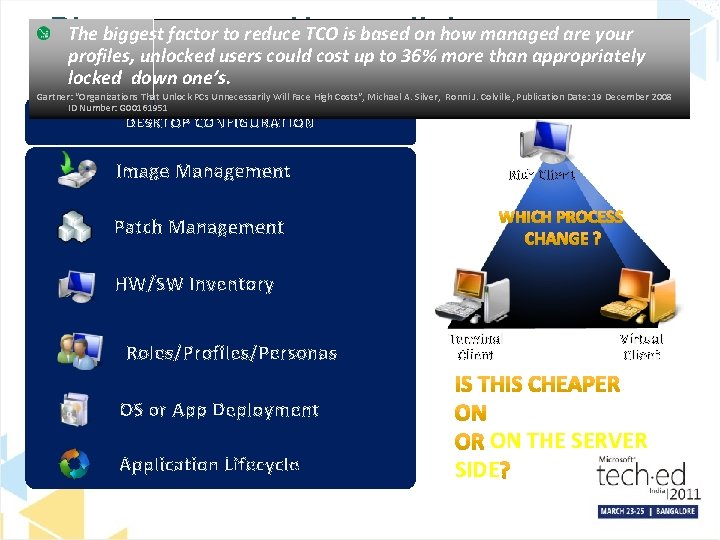
So what do analyst recommend… ANY ARCHITECTURE involves moving all aspects of managing a desktop (HW, SW, Management, Configuration, Processes, etc) ANY ARCHITECTURE will not cure the today’s poor desktop management, it makes it even harder ANY ARCHITECTURE requires more tools and different skills than traditional desktop management Existing PC Support structures are not appropriate for other architectures There are still some heavy entry costs to consider for some of these architectures… Infrastructure dependencies, Licensing, Legal, Operational workload shift, Manageability The biggest factor to reduce TCO is based on how managed are your profiles, unlocked users could cost up to 36% more than appropriately locked down one’s. VDI / Thin Client is not appropriate for all user, applications or deployment scenarios, segment and use accordingly You have to select the right tool for the right job… Gartner: “Top 10 Issues With Hosted Virtual Desktops”, , Mark A. Margevicius, Publication Date: 10 June 2010 ID Number: G 00201182 Gartner: ” Organizational and Staffing Considerations When Planning for Hosted Virtual Desktops”, Mark A. Margevicius, Terrence Cosgrove. Publication Date: 15 June 2010, ID: G 00201376 Gartner: “Best Use Scenarios for Hosted Virtual Desktops”, Mark A. Margevicius. 24 February 2009, ID: G 00165252 Gartner: “Organizations That Unlock PCs Unnecessarily Will Face High Costs“, Michael A. Silver, Ronni J. Colville, Publication Date: 19 December 2008 ID Number: G 00161951 Gartner: “How to Reduce Your PC TCO 30% in 2011 “, Federica Troni, Brian Gammage, Michael A. Silver, Publication Date: 20 March 2009 ID Number: G 00166195 “Choosing From 10 Client Computing Architectural Options”, Brian Gammage, Mark A. Margevicius. 10 December 2007, Publication Date: 27 February 2009 ID Number: G 00164331 Gartner: “Market Trends: x 86 Virtualization Market Driven by Consolidation, Promise of Cost Reduction, and Management Advantages”, 17 November 2009, ID: G 00172438
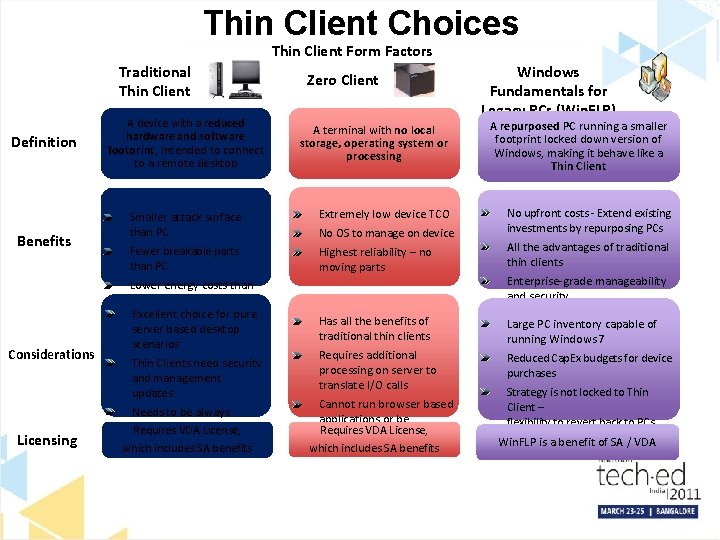
Thin Client Choices Thin Client Form Factors Traditional Thin Client Definition Benefits Considerations Licensing A device with a reduced hardware and software footprint, intended to connect to a remote desktop Zero Client A terminal with no local storage, operating system or processing Windows Fundamentals for Legacy PCs (Win. FLP) A repurposed PC running a smaller footprint locked down version of Windows, making it behave like a Thin Client No upfront costs - Extend existing investments by repurposing PCs Smaller attack surface than PC Extremely low device TCO Fewer breakable parts than PC Highest reliability – no moving parts All the advantages of traditional thin clients Has all the benefits of traditional thin clients Large PC inventory capable of running Windows 7 Requires additional processing on server to translate I/O calls Reduced Cap. Ex budgets for device purchases Lower energy costs than PC Excellent choice for pure server based desktop scenarios Thin Clients need security and management updates Needs to be always connected to network Requires VDA License, which includes SA benefits No OS to manage on device Cannot run browser based applications or be Requires VDA License, upgraded which includes SA benefits Enterprise-grade manageability and security Strategy is not locked to Thin Client – flexibility to revert back to PCs Win. FLP is a benefit of SA / VDA
When Is Thin Client an Option? Scenario Recommended Access Device Hybrid SBD Scenarios If You Have Server. Based Desktops (SBD) VDI / Sessions Local desktop + hosted desktop Local desktop + hosted applications Windows PC Pure SBD Scenarios No local desktop functionality required No local applications or data OR Thin Client Windows PC Unmanaged devices Tablets, i. Pads, smartphones, employee owned PCs Device choice precedes SBD choice Unmanaged Device as Thin Client
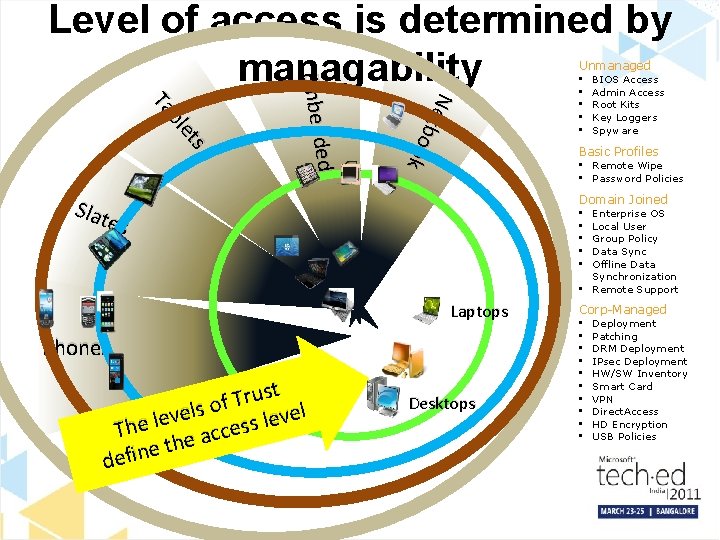
Level of access is determined by managability Unmanaged Net b o o k ed Embedd s et bl Ta Sl at es BIOS Access Admin Access Root Kits Key Loggers Spyware Basic Profiles • Remote Wipe • Password Policies Domain Joined Enterprise OS Local User Group Policy Data Sync Offline Data Synchronization • Remote Support • • • Laptops Phones t s u r T of s l e el v v e e l l s e Th ces c a e th e n i f de • • • Desktops Corp-Managed • • • Deployment Patching DRM Deployment IPsec Deployment HW/SW Inventory Smart Card VPN Direct. Access HD Encryption USB Policies
Please How wellondo you manage The biggestanswer: factor to reduce TCO is based how managed are your profiles, unlocked users could cost up to 36% more than appropriately ? locked down one’s. Gartner: “Organizations That Unlock PCs Unnecessarily Will Face High Costs“, Michael A. Silver, Ronni J. Colville, Publication Date: 19 December 2008 ID Number: G 00161951 DESKTOP CONFIGURATION Image Management Rich Client Patch Management HW/SW Inventory Roles/Profiles/Personas OS or App Deployment Application Lifecycle Terminal Client Virtual Client THE DESKTOP ON THE SERVER SIDE
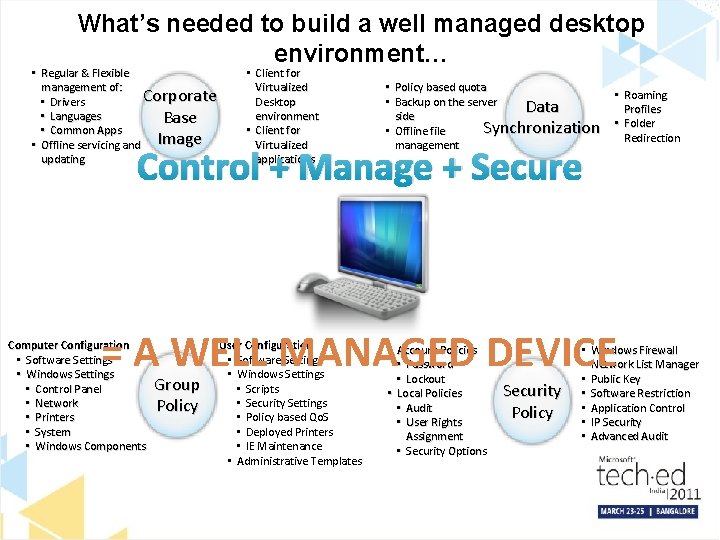
What’s needed to build a well managed desktop environment… • Regular & Flexible management of: Corporate • Drivers • Languages Base • Common Apps • Offline servicing and Image updating • Client for Virtualized Desktop environment • Client for Virtualized applications • Policy based quota • Backup on the server Data side Synchronization • Offline file management Control + Manage + Secure • Roaming Profiles • Folder Redirection = A WELL MANAGED DEVICE Computer Configuration • Software Settings • Windows Settings • Control Panel • Network • Printers • System • Windows Components Group Policy User Configuration • Software Settings • Windows Settings • Scripts • Security Settings • Policy based Qo. S • Deployed Printers • IE Maintenance • Administrative Templates • Account Policies • Password • Lockout • Local Policies • Audit • User Rights Assignment • Security Options Security Policy • • Windows Firewall Network List Manager Public Key Software Restriction Application Control IP Security Advanced Audit
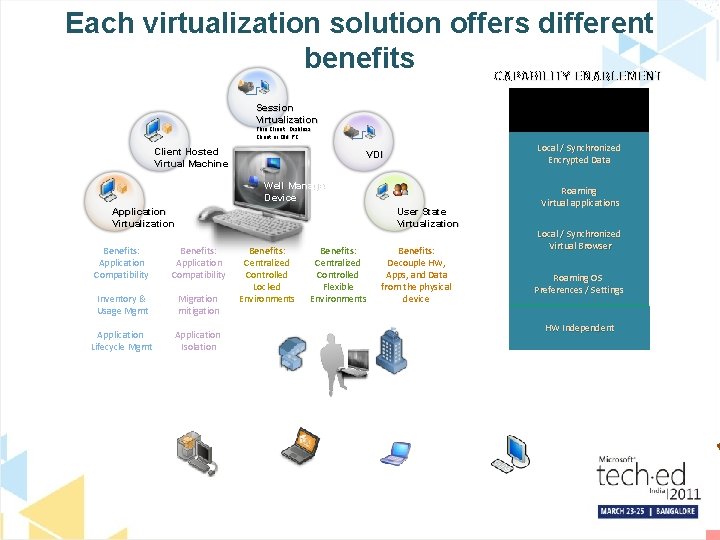
Each virtualization solution offers different benefits CAPABILITY ENABLEMENT Secure & Controlled access Session Virtualization Thin Client , Diskless Client or Old PC Client Hosted Virtual Machine Local / Synchronized Encrypted Data VDI Well Managed Device Application Virtualization User State Virtualization Benefits: Application Compatibility Inventory & Usage Mgmt Migration mitigation Application Lifecycle Mgmt Application Isolation Benefits: Centralized Controlled Locked Environments Benefits: Centralized Controlled Flexible Environments Local / Synchronized Virtual Browser Local Browser Virtual Browser Roaming OS Remote OS Local OS Preferences / Settings HW HWIndependent Dependent HW Independent Home Corporate Managed Desktop Benefits: Decouple HW, Apps, and Data from the physical device Roaming Virtualized Local applications / Virtual Remoteapplications Corporate Managed Laptop Corporate Office Consumer Unmanaged Device Internet Unmanaged Device
What about consumerization? Allow your employees to bring to work their own pc’s The real question is… Managed device Data Applications Device Provisioning/M anagement Unmanaged device Managed Data Unmanaged Data: Data in Rest: Group Policy • Encryption • Managed Data location enforcement Applications: • Data synchronization • Secure Datause recoverability Managed Operating System: of data through • Patch management Data inuse Transit: Secure of applications and data through; • Inventory • Group OS patch management Audit Policy Managed Computers: • • Group Policy Rights management security Firewall management Access • • • IP security enforcement Device (Installation Secure use of management corporate applications andand data • • Configuration Access) through; • Error monitoring • Compliance Application access (Application Locker) • • Hardware inventory Reporting • Security • HW audit management • Lockdown templates • BIOS and driver updates Network Protection • • HW error Access monitoring OS inventory • • Intel v. Pro™ management OS audit • • Group Policy • OS error monitoring • HD encryption • Compliance Reporting • Device Management (Installation and • Direct Access) • USB drive encryption Local Data in rest: • Employee backup/restore responsibility • Theft of PC = loss of data • Unmanaged Who owns intellectual property Consumerized • Applications: How to control access to sensitive data Unmanaged Operating Systems: Web Service Data in rest: data due to; Limited use of corporate • Undetermined location of data (compliance) Limited use of corporate and data due Unknown stateapplications of applications to; • Who owns intellectual property Computer: • • Unmanaged Key Howloggers to control access to sensitive data • Screen capture Limited use of corporate applications and data due • Data Viruses in transit: • • to; Root kits Undetermined BIOS access • • Admin access • • Uncontrollable Root kits • HD access Access corporate applications and data through Remote Desktop or Web based applications
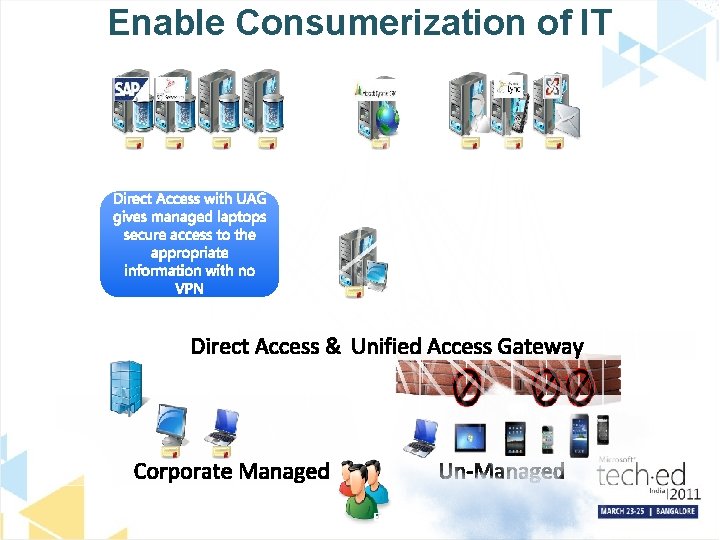
Enable Consumerization of IT Then people started brining in unmanaged computers that also gave people access to business information
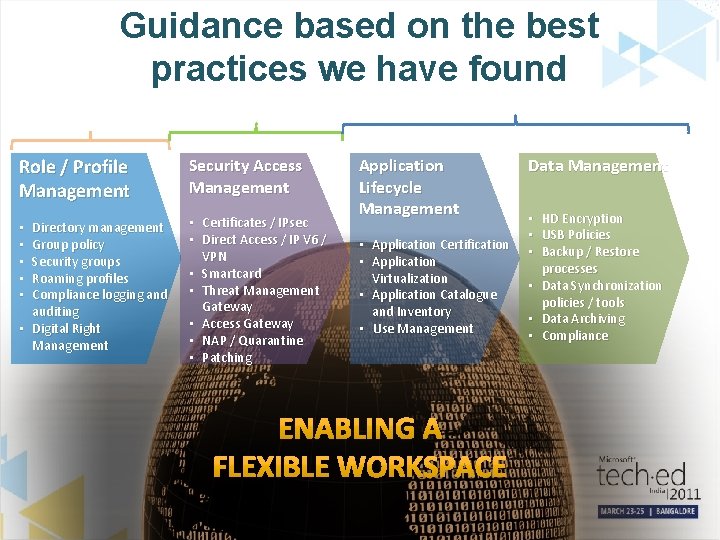
Guidance based on the best practices we have found Who Role / Profile Management Security Access Management Directory management Group policy Security groups Roaming profiles Compliance logging and auditing • Digital Right Management • Certificates / IPsec • Direct Access / IP V 6 / VPN • Smartcard • Threat Management Gateway • Access Gateway • NAP / Quarantine • Patching • • • What Where Application Lifecycle Management • Application Certification • Application Virtualization • Application Catalogue and Inventory • Use Management Data Management • • • HD Encryption USB Policies Backup / Restore processes Data Synchronization policies / tools Data Archiving Compliance
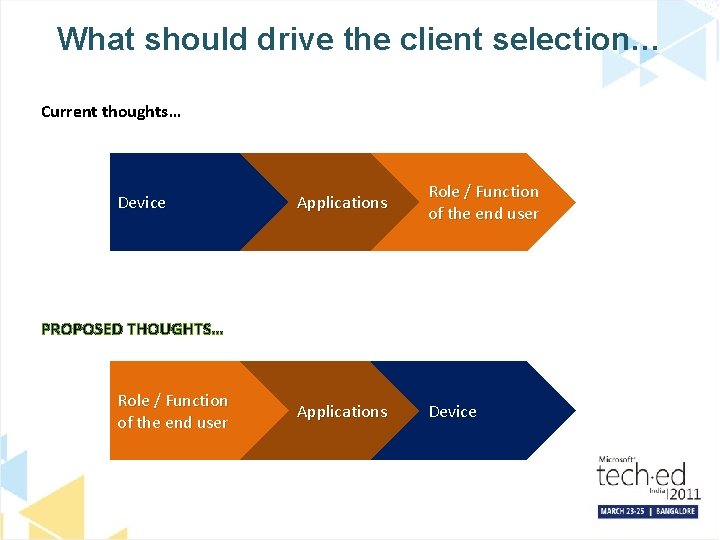
What should drive the client selection… Current thoughts… Device Applications Role / Function of the end user Applications Device PROPOSED THOUGHTS… Role / Function of the end user
Let’s see what is possible today…
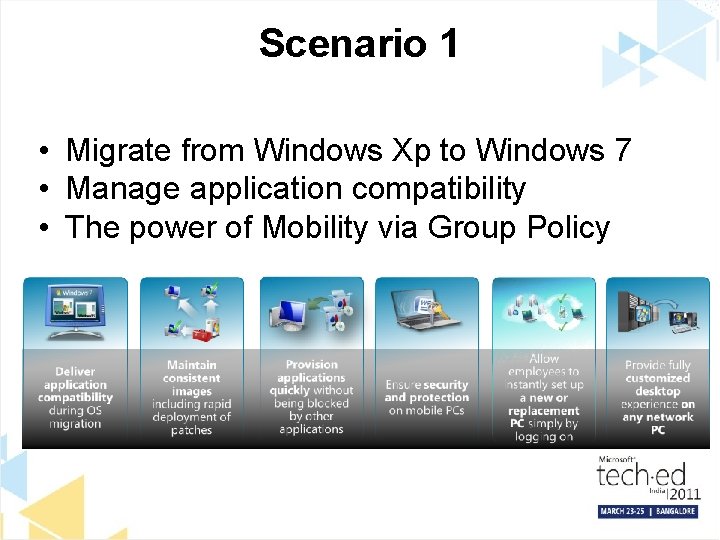
Scenario 1 • Migrate from Windows Xp to Windows 7 • Manage application compatibility • The power of Mobility via Group Policy
What do we recommend. . Optimized Desktop
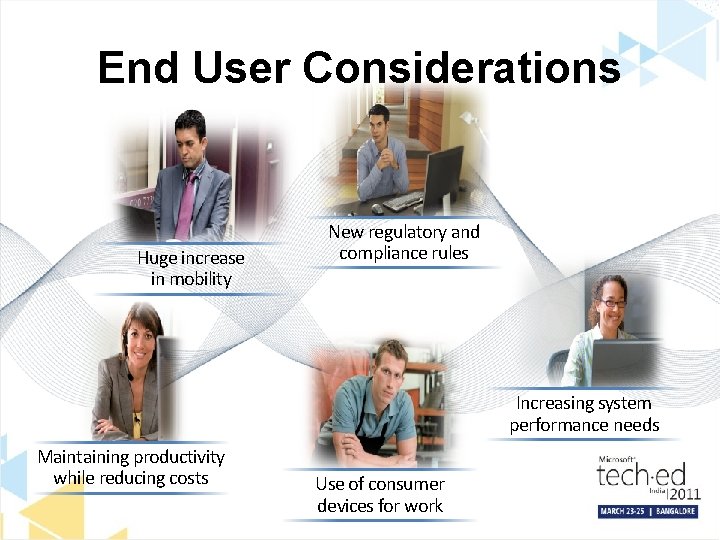
End User Considerations Huge increase in mobility New regulatory and compliance rules Increasing system performance needs Maintaining productivity while reducing costs Use of consumer devices for work
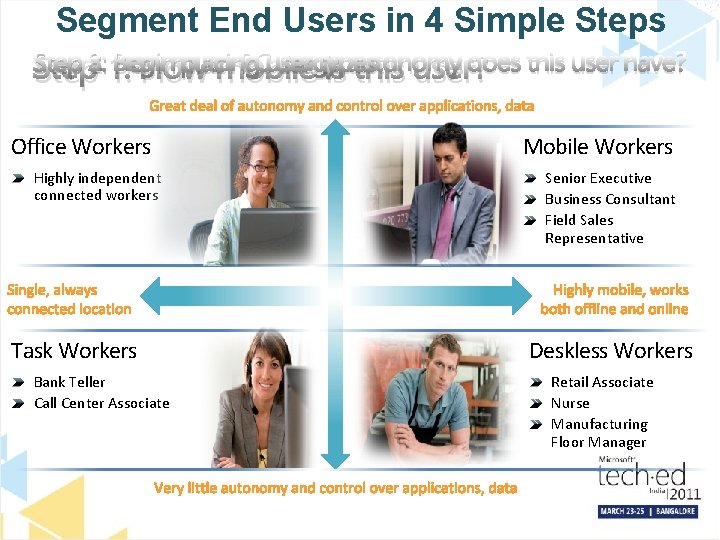
Segment End Users in 4 Simple Steps Step 3: 1: How Begin much placing PCuser usage types does this user have? Step 2: How mobile isautonomy this user? Office Workers Highly independent connected workers Task Workers Bank Teller Call Center Associate Mobile Workers Senior Executive Business Consultant Field Sales Representative Deskless Workers Retail Associate Nurse Manufacturing Floor Manager
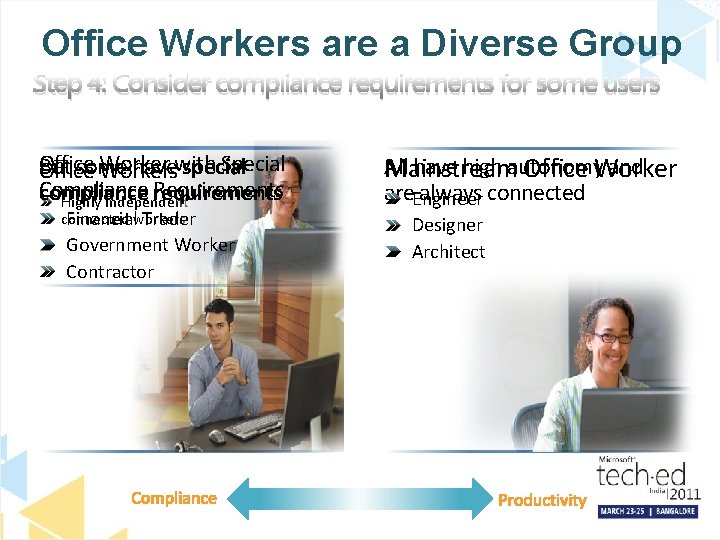
Office Workers are a Diverse Group Step 4: Consider compliance requirements for some users Office Worker Special But some havewith special Office Workers Compliance Requirements compliance requirements Highly independent connected Financialworkers Trader Government Worker Contractor All have high autonomy and Mainstream Office Worker are. Engineer always connected Designer Architect
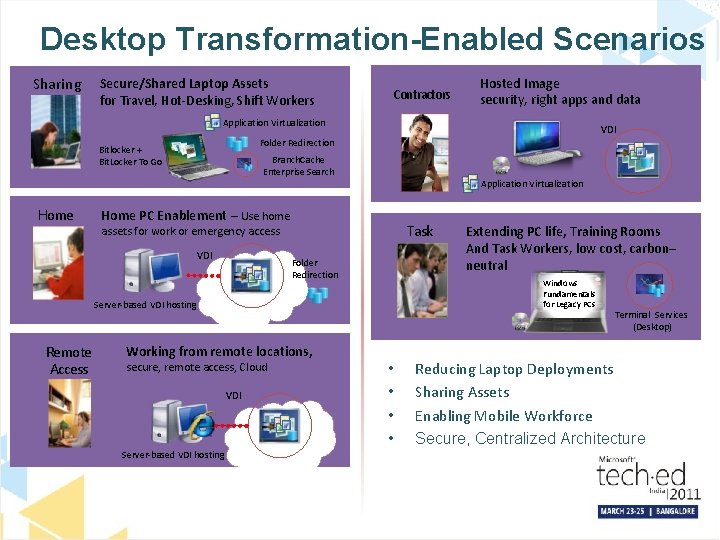
Desktop Transformation-Enabled Scenarios Sharing Secure/Shared Laptop Assets for Travel, Hot-Desking, Shift Workers Contractors Hosted Image security, right apps and data Application Virtualization VDI Folder Redirection Bitlocker + Bit. Locker To Go Branch. Cache Enterprise Search Application Virtualization Home PC Enablement – Use home Task assets for work or emergency access VDI Folder Redirection Windows Fundamentals for Legacy PCs Server-based VDI hosting Remote Access Working from remote locations, secure, remote access, Cloud VDI Server-based VDI hosting Extending PC life, Training Rooms And Task Workers, low cost, carbon– neutral • • Terminal Services (Desktop) Reducing Laptop Deployments Sharing Assets Enabling Mobile Workforce Secure, Centralized Architecture
How can we help Windows 7 Windows Server 2008 R 2 MDOP System Center Optimized Desktop Solution Accelerator Microsoft Services
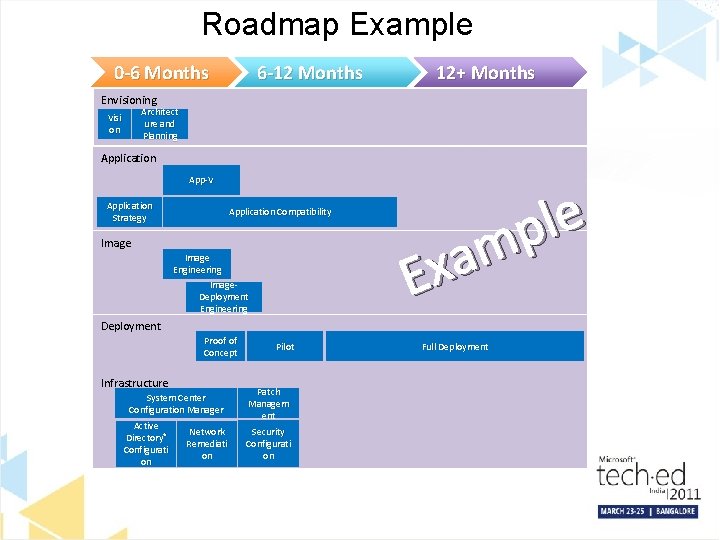
Roadmap Example 0 -6 Months 6 -12 Months 12+ Months Envisioning Architect ure and Planning Visi on Application App-V Application Strategy Application Compatibility Image Engineering Image. Deployment Engineering e l p m a Ex Deployment Proof of Concept Infrastructure System Center Configuration Manager Active Directory® Configurati on Network Remediati on Pilot Patch Managem ent Security Configurati on Full Deployment
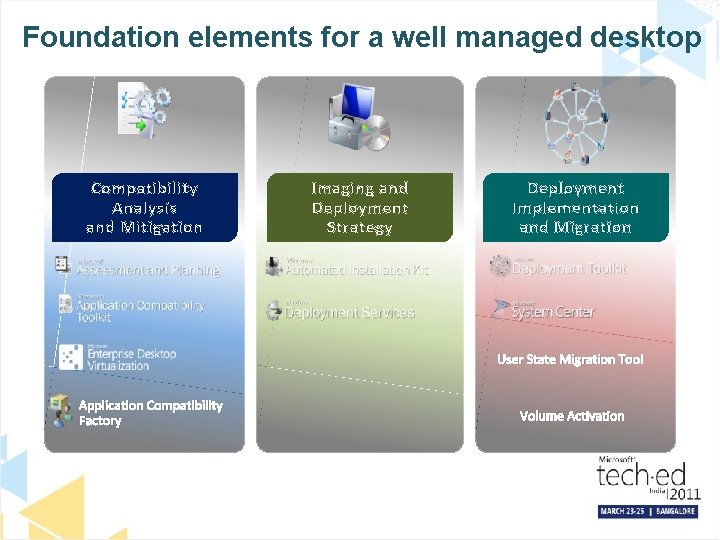
Foundation elements for a well managed desktop Compatibility Analysis and Mitigation Imaging and Deployment Strategy Deployment Implementation and Migration User State Migration Tool Application Compatibility Factory Volume Activation
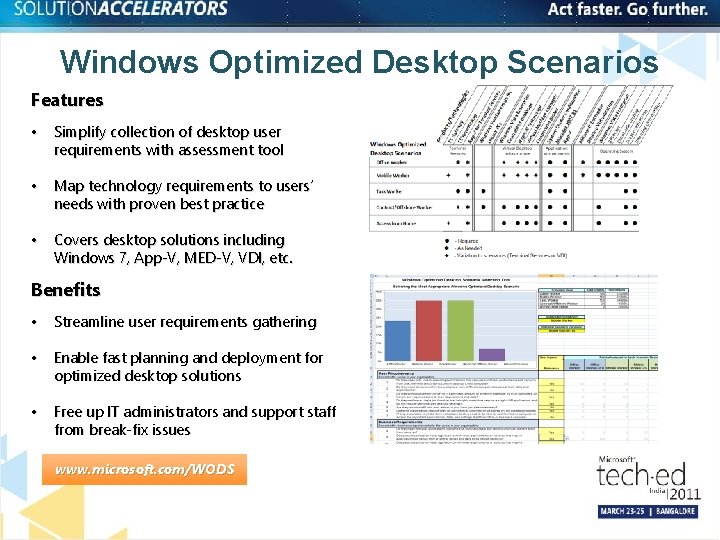
Windows Optimized Desktop Scenarios Features • Simplify collection of desktop user requirements with assessment tool • Map technology requirements to users’ needs with proven best practice • Covers desktop solutions including Windows 7, App-V, MED-V, VDI, etc. Benefits • Streamline user requirements gathering • Enable fast planning and deployment for optimized desktop solutions • Free up IT administrators and support staff from break-fix issues www. microsoft. com/WODS
Microsoft Services Solutions Challenges Reduce Costs of deployment & IT Management Manage Risk and Empower People Anywhere Access to information & Application Benefits IT Enterprise Management: Configuration Management Desktop Planning & Deployment Desktop Image Engineering Desktop Planning & Deployment Desktop Application Compatibility Security, Identity, and Access Management Desktop Planning & Deployment Client Virtualization with Advanced Management Security, Identity, and Access Management Streamline PC Management & Automated Software Update Comprehensive Security and Compliance Make Users Productive Anywhere
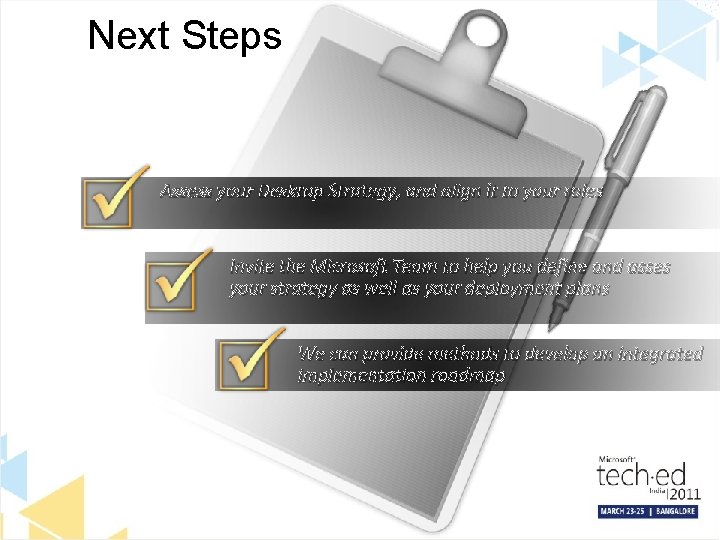
Next Steps Assess your Desktop Strategy, and align it to your roles Invite the Microsoft Team to help you define and asses your strategy as well as your deployment plans We can provide methods to develop an integrated implementation roadmap
Kaun Banega IT Pro Champion Quiz Contest • 1: 30 -2: 00 PM on 24 th & 25 th March • Here’s an opportunity to prove your knowledge/skills around IT Pro topics – Desktop Deployment, Security & Virtualization Technologies • Win exciting prizes • Those interested in nominating yourself, please stay back!
Resources Software Application Developers Infrastructure Professionals http: //msdn. microsoft. com/ http: //technet. microsoft. com/ msdnindia @msdnindia technetindia @technetindia
© 2011 Microsoft Corporation. All rights reserved. Microsoft, Windows Vista and other product names are or may be registered trademarks and/or trademarks in the U. S. and/or other countries. The information herein is for informational purposes only and represents the current view of Microsoft Corporation as of the date of this presentation. Because Microsoft must respond to changing market conditions, it should not be interpreted to be a commitment on the part of Microsoft, and Microsoft cannot guarantee the accuracy of any information provided after the date of this presentation. MICROSOFT MAKES NO WARRANTIES, EXPRESS, IMPLIED OR STATUTORY, AS TO THE INFORMATION IN THIS PRESENTATION.
Sources & References
Recommended References – – – – – Gartner: “Top 10 Issues With Hosted Virtual Desktops”, , Mark A. Margevicius, Publication Date: 10 June 2010 ID Number: G 00201182 Gartner: ” Organizational and Staffing Considerations When Planning for Hosted Virtual Desktops”, Mark A. Margevicius, Terrence Cosgrove. Publication Date: 15 June 2010, ID: G 00201376 Gartner: “Best Use Scenarios for Hosted Virtual Desktops”, Mark A. Margevicius. 24 February 2009, ID: G 00165252 Gartner: “How to Reduce Your PC TCO 30% in 2011 “, Federica Troni, Brian Gammage, Michael A. Silver, Publication Date: 20 March 2009 ID Number: G 00166195 “Choosing From 10 Client Computing Architectural Options”, Brian Gammage, Mark A. Margevicius. 10 December 2007, Publication Date: 27 February 2009 ID Number: G 00164331 Gartner: “Market Trends: x 86 Virtualization Market Driven by Consolidation, Promise of Cost Reduction, and Management Advantages”, 17 November 2009, ID: G 00172438 Gartner: “TCO of Traditional Software Distribution vs. Application Virtualization”, Michael A. Silver, Terrence Cosgrove, Mark A. Margevicius, Brian Gammage. Publication Date: 16 April 2008 ID Number: G 00155897 Gartner, “Total Cost of Ownership Comparison of PCs With Hosted Virtual Desktops”, Mark A. Margevicius, Michael A. Silver, Federica Troni, 4 August 2008 ID Number: G 00155498 Gartner, “Desktop Total Cost of Ownership: 2008 Update”, Publication Date: 24 January 2008 ID Number: G 00153705 Gartner PC Configuration Magic Quadrant Dec 2008 Gartner, “The TCO of Employee-Owned Notebooks Running a Corporate Virtual Machine”, Brian Gammage , Publication Date: 5 May 2008 ID Number: G 00156851 Gartner: “How to Reduce Your PC TCO 30% in 2011 “, Federica Troni, Brian Gammage, Michael A. Silver, Publication Date: 20 March 2009 ID Number: G 00166195 Gartner: “Organizations That Unlock PCs Unnecessarily Will Face High Costs“, Michael A. Silver, Ronni J. Colville, Publication Date: 19 December 2008 ID Number: G 00161951 Gartner: “Hosted Virtual-Desktop Deployments Are Set to Accelerate” Gartner, Brian Gammage, Mark A. Margevicius, 28 July 2008, ID Number: G 00159683 Gartner: “Choosing From 10 Client Computing Architectural Options”, Brian Gammage, Mark A. Margevicius. 10 December 2007, Publication Date: 27 February 2009 ID Number: G 00164331 Gartner Hype Cycle for PC Technologies 2008, Publication Date: 1 July 2008, ID Number G 00158516 Gartner - Dataquest, “Dataquest Insight: Growth in Thin-Client Terminal Markets Points to a Fundamental Shift in Computing Architecture”, 2 October 2008 ID Number: G 00160724