
How to Complete a Provider Enrollment Application INDIVIDUAL

- Slides: 13
How to Complete a Provider Enrollment Application INDIVIDUAL PROVIDER
OWCP Provider Enrollment Application Tutorial • The Purpose of the Enrollment Application • How to Complete an Application for an Individual • What Types of Credentials are Required • How to submit your Provider Enrollment Application
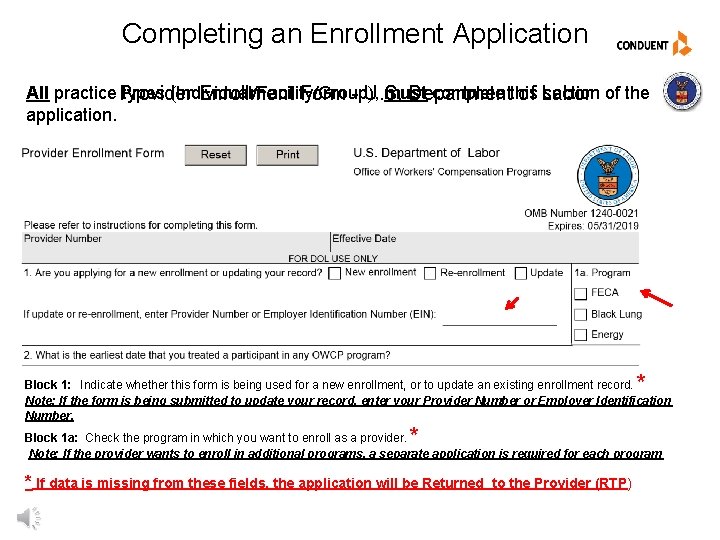
Completing an Enrollment Application All practice Provider types (Individual/Facility/Group), must complete this section of the Enrollment Form - U. S. Department of Labor application. * Block 1: Indicate whether this form is being used for a new enrollment, or to update an existing enrollment record. Note: If the form is being submitted to update your record, enter your Provider Number or Employer Identification Number. * Block 1 a: Check the program in which you want to enroll as a provider. Note: If the provider wants to enroll in additional programs, a separate application is required for each program * If data is missing from these fields, the application will be Returned to the Provider (RTP)
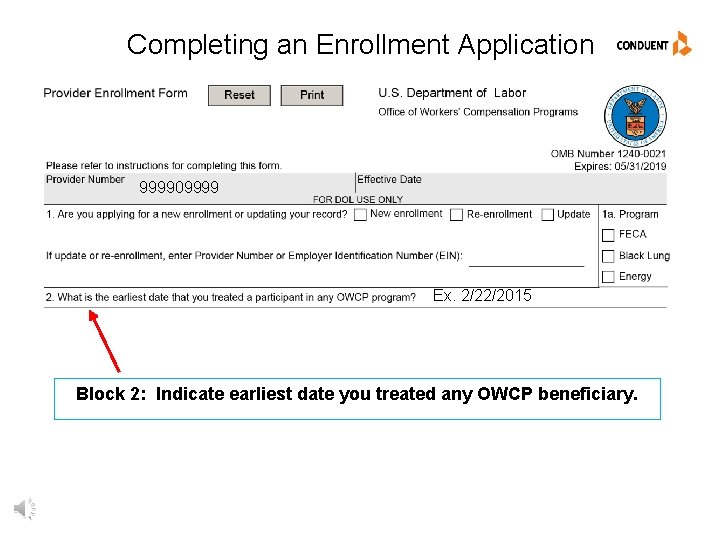
Completing an Enrollment Application 999909999 Ex. 2/22/2015 Block 2: Indicate earliest date you treated any OWCP beneficiary.
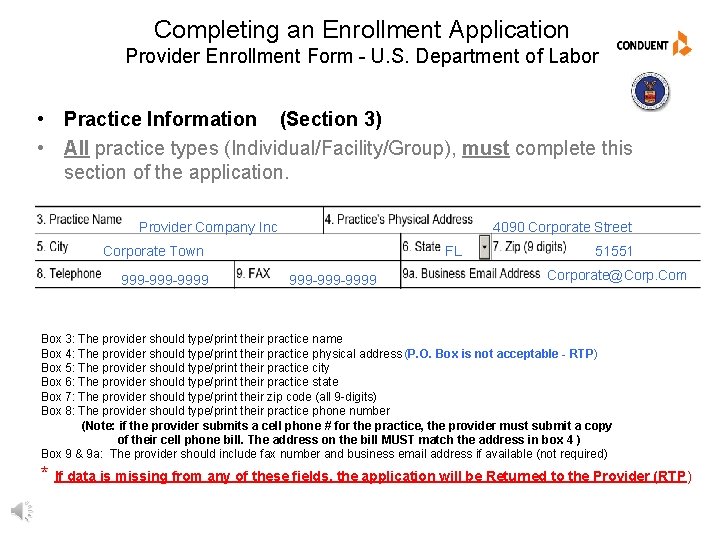
Completing an Enrollment Application Provider Enrollment Form - U. S. Department of Labor • Practice Information (Section 3) • All practice types (Individual/Facility/Group), must complete this section of the application. Provider Company Inc 4090 Corporate Street FL Corporate Town 999 -999 -9999 51551 Corporate@Corp. Com Box 3: The provider should type/print their practice name Box 4: The provider should type/print their practice physical address (P. O. Box is not acceptable - RTP) Box 5: The provider should type/print their practice city Box 6: The provider should type/print their practice state Box 7: The provider should type/print their zip code (all 9 -digits) Box 8: The provider should type/print their practice phone number (Note: if the provider submits a cell phone # for the practice, the provider must submit a copy of their cell phone bill. The address on the bill MUST match the address in box 4 ) Box 9 & 9 a: The provider should include fax number and business email address if available (not required) * If data is missing from any of these fields, the application will be Returned to the Provider (RTP)
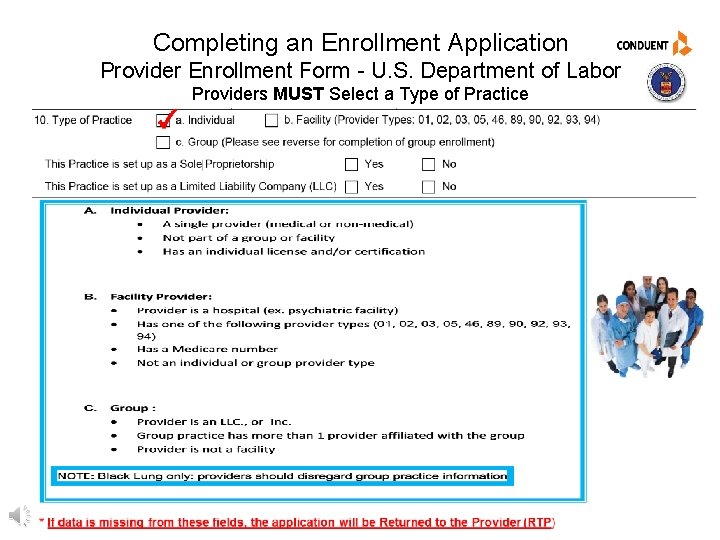
Completing an Enrollment Application Provider Enrollment Form - U. S. Department of Labor Providers MUST Select a Type of Practice
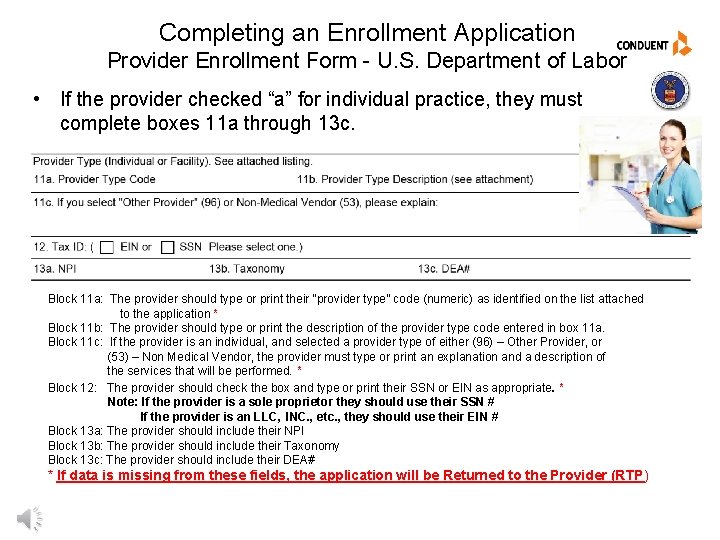
Completing an Enrollment Application Provider Enrollment Form - U. S. Department of Labor • If the provider checked “a” for individual practice, they must complete boxes 11 a through 13 c. Block 11 a: The provider should type or print their “provider type” code (numeric) as identified on the list attached to the application * Block 11 b: The provider should type or print the description of the provider type code entered in box 11 a. Block 11 c: If the provider is an individual, and selected a provider type of either (96) – Other Provider, or (53) – Non Medical Vendor, the provider must type or print an explanation and a description of the services that will be performed. * Block 12: The provider should check the box and type or print their SSN or EIN as appropriate. * Note: If the provider is a sole proprietor they should use their SSN # If the provider is an LLC, INC. , etc. , they should use their EIN # Block 13 a: The provider should include their NPI Block 13 b: The provider should include their Taxonomy Block 13 c: The provider should include their DEA# * If data is missing from these fields, the application will be Returned to the Provider (RTP)
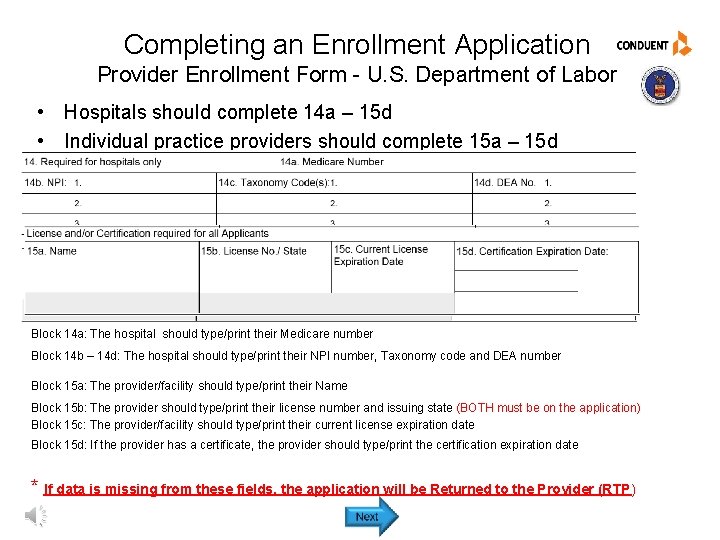
Completing an Enrollment Application Provider Enrollment Form - U. S. Department of Labor • Hospitals should complete 14 a – 15 d • Individual practice providers should complete 15 a – 15 d Block 14 a: The hospital should type/print their Medicare number Block 14 b – 14 d: The hospital should type/print their NPI number, Taxonomy code and DEA number Block 15 a: The provider/facility should type/print their Name Block 15 b: The provider should type/print their license number and issuing state (BOTH must be on the application) Block 15 c: The provider/facility should type/print their current license expiration date Block 15 d: If the provider has a certificate, the provider should type/print the certification expiration date * If data is missing from these fields, the application will be Returned to the Provider (RTP)
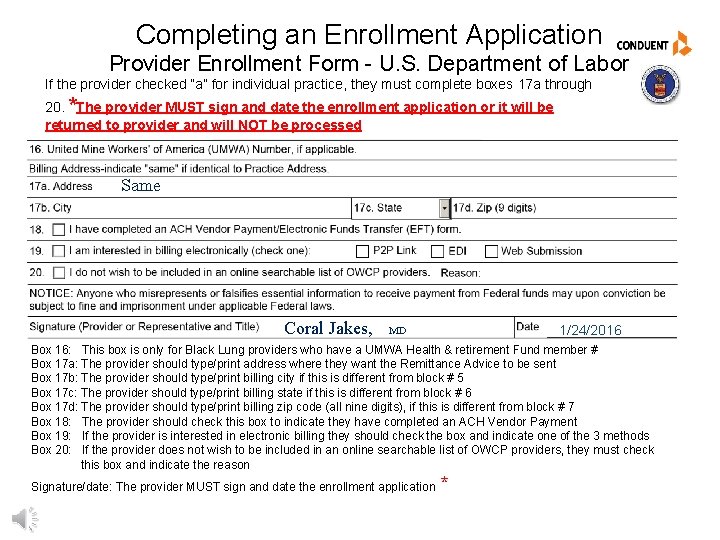
Completing an Enrollment Application Provider Enrollment Form - U. S. Department of Labor If the provider checked “a” for individual practice, they must complete boxes 17 a through 20. *The provider MUST sign and date the enrollment application or it will be returned to provider and will NOT be processed Same Coral Jakes, 1/24/2016 MD Box 16: This box is only for Black Lung providers who have a UMWA Health & retirement Fund member # Box 17 a: The provider should type/print address where they want the Remittance Advice to be sent Box 17 b: The provider should type/print billing city if this is different from block # 5 Box 17 c: The provider should type/print billing state if this is different from block # 6 Box 17 d: The provider should type/print billing zip code (all nine digits), if this is different from block # 7 Box 18: The provider should check this box to indicate they have completed an ACH Vendor Payment Box 19: If the provider is interested in electronic billing they should check the box and indicate one of the 3 methods Box 20: If the provider does not wish to be included in an online searchable list of OWCP providers, they must check this box and indicate the reason Signature/date: The provider MUST sign and date the enrollment application *
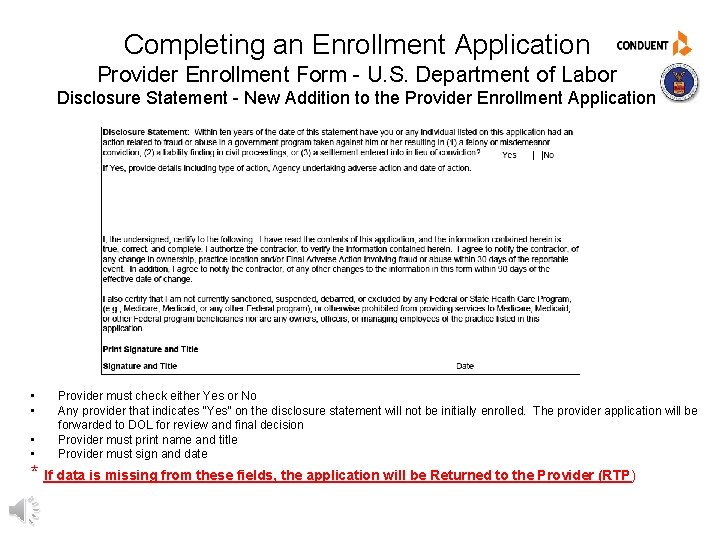
Completing an Enrollment Application Provider Enrollment Form - U. S. Department of Labor Disclosure Statement - New Addition to the Provider Enrollment Application • • Provider must check either Yes or No Any provider that indicates “Yes” on the disclosure statement will not be initially enrolled. The provider application will be forwarded to DOL for review and final decision Provider must print name and title Provider must sign and date * If data is missing from these fields, the application will be Returned to the Provider (RTP)
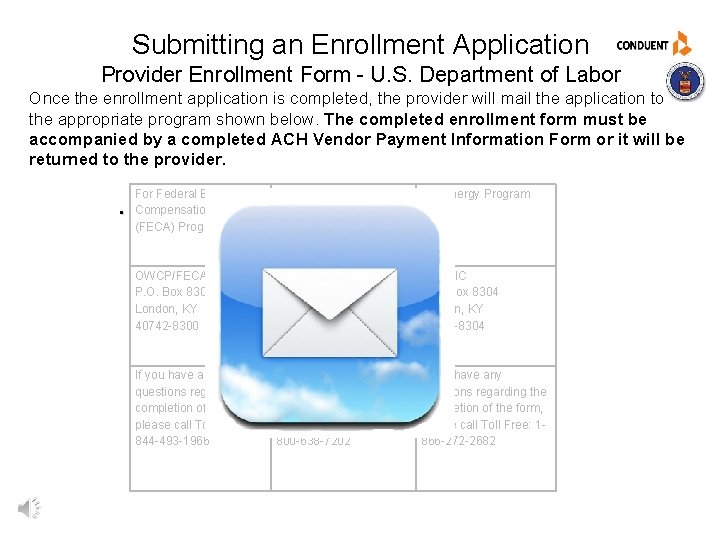
Submitting an Enrollment Application Provider Enrollment Form - U. S. Department of Labor Once the enrollment application is completed, the provider will mail the application to the appropriate program shown below. The completed enrollment form must be accompanied by a completed ACH Vendor Payment Information Form or it will be returned to the provider. . For Federal Employees’ Compensation Act (FECA) Program For Black Lung Program For Energy Program OWCP/FECA P. O. Box 8300 London, KY 40742 -8300 DCMWC/Black Lung P. O. Box 8302 London, KY 40742 -8302 DEEOIC P. O. Box 8304 London, KY 40742 -8304 If you have any questions regarding the completion of the form, please call Toll Free: 1844 -493 -1966 If you have any questions regarding the completion of the form, please call Toll Free: 1800 -638 -7202 If you have any questions regarding the completion of the form, please call Toll Free: 1866 -272 -2682
How to Complete an Individual Provider Enrollment Application _Training Complete Exit
© 2017 Conduent Business Services, LLC. All rights reserved. Conduent and Conduent Agile Star are trademarks of Conduent Business Services, LLC in the United States and/or other countries.