
How The University of Arizona Addressed SSO for



!["Federated SSO with AD will solve all our problems!" [ 5 ]](https://slidetodoc.com/presentation_image_h/c45f0bc83736363c11c4d0f13c597532/image-5.jpg "\"Federated SSO with AD will solve all our problems!\" [ 5 ]")
![Shibboleth — The Sugru ® of SSO [ 9 ]](https://slidetodoc.com/presentation_image_h/c45f0bc83736363c11c4d0f13c597532/image-9.jpg "Shibboleth — The Sugru ® of SSO [ 9 ]")

![Staying Agile – Containerization and Cloud Deployment [ 34 ]](https://slidetodoc.com/presentation_image_h/c45f0bc83736363c11c4d0f13c597532/image-34.jpg "Staying Agile – Containerization and Cloud Deployment [ 34 ]")
![[demo] [ 43 ]](https://slidetodoc.com/presentation_image_h/c45f0bc83736363c11c4d0f13c597532/image-43.jpg "[demo] [ 43 ]")
![Thanks! Resources: • [1] https: //wiki. shibboleth. net/confluence/display/IDP 30/ECPConfiguration • [2] https: //github. com/Jan.](https://slidetodoc.com/presentation_image_h/c45f0bc83736363c11c4d0f13c597532/image-44.jpg "Thanks! Resources: • [1] https: //wiki. shibboleth. net/confluence/display/IDP 30/ECPConfiguration • [2] https: //github. com/Jan.")
- Slides: 44
How The University of Arizona Addressed SSO for Office 365 Gary Windham Senior Enterprise Systems Architect, The University of Arizona - UITS
How The University of Arizona Addressed SSO for Office 365 CONTENTS • All Aboard Office 365 – Mind the Gap! • Shibboleth – the Sugru® of SSO • Staying Agile – Containerization and Cloud Deployment • Demo [ 2 ]
By Will. Mc. C - Own work, CC BY-SA 3. 0, https: //commons. wikimedia. org/w/index. php? curid=4379199 [ 3 ]
"We’re moving all staff and faculty to Office 365" • project kickoff was in October, 2016 • motivations: – part of larger strategy to migrate the bulk of central IT services to the cloud – avoid having to make further capital expenditures to accommodate growth • migrating from on-prem Exchange 2013 – ~ 33 K mailboxes – ~ 60 TB storage [ 4 ]
"Federated SSO with AD will solve all our problems!" [ 5 ]
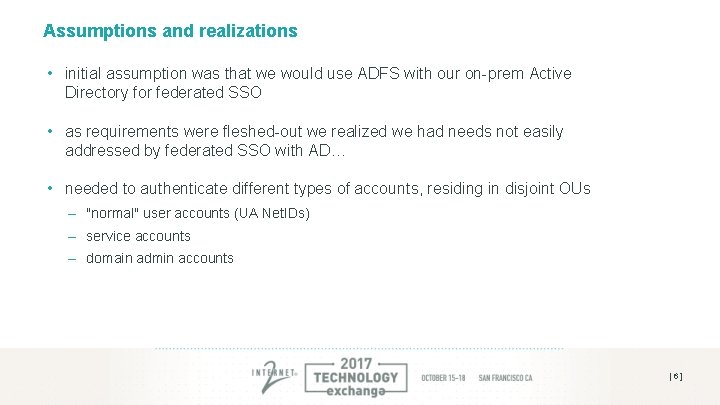
Assumptions and realizations • initial assumption was that we would use ADFS with our on-prem Active Directory for federated SSO • as requirements were fleshed-out we realized we had needs not easily addressed by federated SSO with AD… • needed to authenticate different types of accounts, residing in disjoint OUs – "normal" user accounts (UA Net. IDs) – service accounts – domain admin accounts [ 6 ]
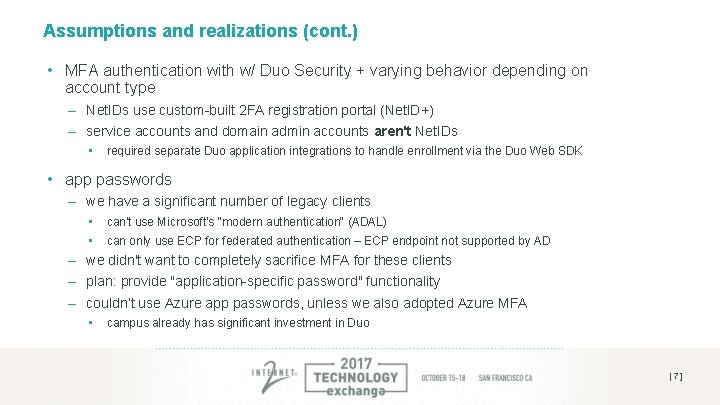
Assumptions and realizations (cont. ) • MFA authentication with w/ Duo Security + varying behavior depending on account type – Net. IDs use custom-built 2 FA registration portal (Net. ID+) – service accounts and domain admin accounts aren't Net. IDs • required separate Duo application integrations to handle enrollment via the Duo Web SDK • app passwords – we have a significant number of legacy clients • can't use Microsoft's "modern authentication" (ADAL) • can only use ECP for federated authentication – ECP endpoint not supported by AD – we didn't want to completely sacrifice MFA for these clients – plan: provide "application-specific password" functionality – couldn’t use Azure app passwords, unless we also adopted Azure MFA • campus already has significant investment in Duo [ 7 ]
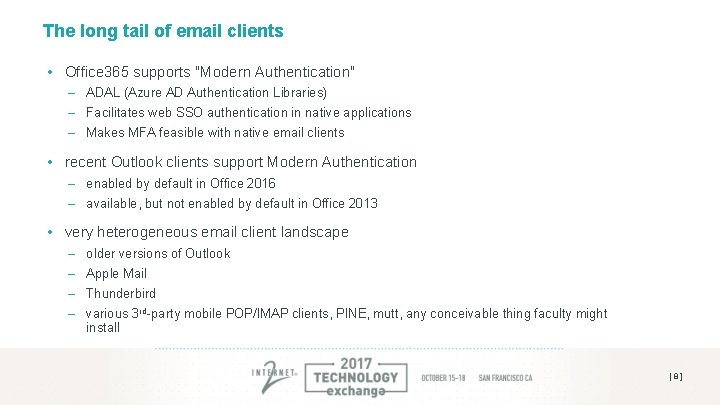
The long tail of email clients • Office 365 supports "Modern Authentication" – ADAL (Azure AD Authentication Libraries) – Facilitates web SSO authentication in native applications – Makes MFA feasible with native email clients • recent Outlook clients support Modern Authentication – enabled by default in Office 2016 – available, but not enabled by default in Office 2013 • very heterogeneous email client landscape – – older versions of Outlook Apple Mail Thunderbird various 3 rd-party mobile POP/IMAP clients, PINE, mutt, any conceivable thing faculty might install [ 8 ]
Shibboleth — The Sugru ® of SSO [ 9 ]
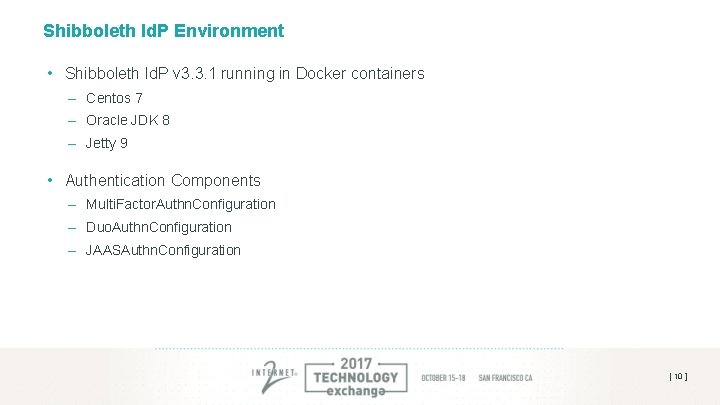
Shibboleth Id. P Environment • Shibboleth Id. P v 3. 3. 1 running in Docker containers – Centos 7 – Oracle JDK 8 – Jetty 9 • Authentication Components – Multi. Factor. Authn. Configuration – Duo. Authn. Configuration – JAASAuthn. Configuration [ 10 ]
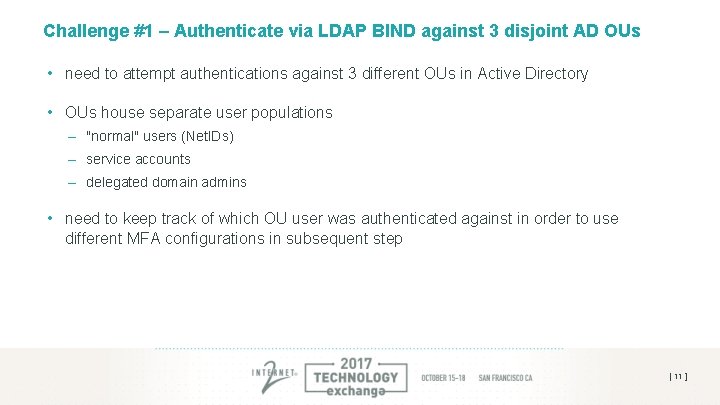
Challenge #1 – Authenticate via LDAP BIND against 3 disjoint AD OUs • need to attempt authentications against 3 different OUs in Active Directory • OUs house separate user populations – "normal" users (Net. IDs) – service accounts – delegated domain admins • need to keep track of which OU user was authenticated against in order to use different MFA configurations in subsequent step [ 11 ]
JAAS to the rescue! • JAAS = Java Authentication and Authorization Service • (from the Shibboleth Wiki) "JAAS is a desktop authentication mechanism in Java that has been commonly misappropriated as a server-side technology. " • PAM-like: can have multiple "configurations" that are tried, in succession, until one succeeds [ 12 ]
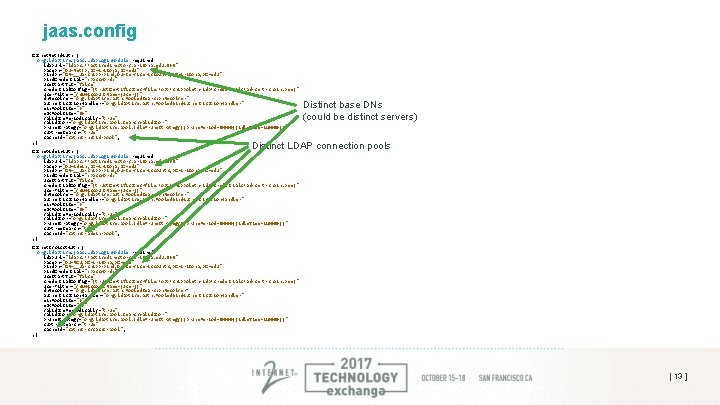
jaas. config Catnet. Net. Id. Auth { org. ldaptive. jaas. Ldap. Login. Module required ldap. Url="ldaps: //activedirectory. arizona. edu: 636" base. Dn="OU=Net. ID, DC=Arizona, DC=edu" bind. Dn="CN=__ua-shibb-bind, OU=Service Accounts, DC=Arizona, DC=edu" bind. Credential="<password>" use. Start. TLS="false" credential. Config="{trust. Certificates=file: /opt/shibboleth-idp/credentials/ad-cert-chain. pem}" user. Filter="(s. AMAccount. Name={user})" dn. Resolver="org. ldaptive. auth. Pooled. Search. Dn. Resolver" authentication. Handler="org. ldaptive. auth. Pooled. Bind. Authentication. Handler" min. Pool. Size="3" max. Pool. Size="10" validate. Periodically="true" validator="org. ldaptive. pool. Search. Validator" prune. Strategy="org. ldaptive. pool. Idle. Prune. Strategy{{prune. Period=60000}{idle. Time=120000}}" subtree. Search="true" cache. Id="catnet-netid-pool"; ; { Distinct base DNs (could be distinct servers) Distinct LDAP connection pools Catnet. Admin. Auth { org. ldaptive. jaas. Ldap. Login. Module required ldap. Url="ldaps: //activedirectory. arizona. edu: 636" base. Dn="OU=Admin, DC=Arizona, DC=edu" bind. Dn="CN=__ua-shibb-bind, OU=Service Accounts, DC=Arizona, DC=edu" bind. Credential="<password>" use. Start. TLS="false" credential. Config="{trust. Certificates=file: /opt/shibboleth-idp/credentials/ad-cert-chain. pem}" user. Filter="(s. AMAccount. Name={user})" dn. Resolver="org. ldaptive. auth. Pooled. Search. Dn. Resolver" authentication. Handler="org. ldaptive. auth. Pooled. Bind. Authentication. Handler" min. Pool. Size="3" max. Pool. Size="10" validate. Periodically="true" validator="org. ldaptive. pool. Search. Validator" prune. Strategy="org. ldaptive. pool. Idle. Prune. Strategy{{prune. Period=60000}{idle. Time=120000}}" subtree. Search="true" cache. Id="catnet-admin-pool"; ; { Catnet. Svc. Acct. Auth { org. ldaptive. jaas. Ldap. Login. Module required ldap. Url="ldaps: //activedirectory. arizona. edu: 636" base. Dn="OU=RCU, DC=Arizona, DC=edu" bind. Dn="CN=__ua-shibb-bind, OU=Service Accounts, DC=Arizona, DC=edu" bind. Credential="<password>" use. Start. TLS="false" credential. Config="{trust. Certificates=file: /opt/shibboleth-idp/credentials/ad-cert-chain. pem}" user. Filter="(s. AMAccount. Name={user})" dn. Resolver="org. ldaptive. auth. Pooled. Search. Dn. Resolver” authentication. Handler="org. ldaptive. auth. Pooled. Bind. Authentication. Handler" min. Pool. Size="3" max. Pool. Size="10" validate. Periodically="true" validator="org. ldaptive. pool. Search. Validator" prune. Strategy="org. ldaptive. pool. Idle. Prune. Strategy{{prune. Period=60000}{idle. Time=120000}}" subtree. Search="true" cache. Id="catnet-svcacct-pool"; ; { [ 13 ]
Challenge #2 – provide ECP access for legacy clients in secure way • need to allow older versions of Outlook, POP/IMAP clients, etc. , to continue authenticating against Office 365 • no simple way for these clients to directly use MFA • don’t want to expose "escape hatch" to MFA enforcement How do we tackle this challenge? Build “app password” service (à la Google or Azure MFA) which stores application-specific passwords in a separate store and requires same level of authentication as logging-in to O 365. [ 14 ]
Configuring ECP in Shibboleth • what is ECP? – "Enhanced Client or Proxy" – client that is not a browser – The ECP profile is an adaptation of the SAML profile used for Browser SSO with the parts that were designed around the limitations of a browser removed. • configuring ECP for password-based auth. N is pretty straightforward and is described on Shibboleth wiki [1] • how do we "know" to access app password store for authentication credentials when ECP binding is used? (will get to this in next challenge!) [ 15 ]
App Password Store • requirements are simple – user can have unlimited number of app passwords – passwords are stored in hashed format (using PBKDF 2) – store created. On, last. Used and simple text description (e. g. , name of app that will be using password) • where to store passwords? – Shib Id. P will have multiple nodes (for HA), so we need a shared data source – dedicated relational DB seems like overkill – ended up settling on AWS Dynamo. DB • • • will be running Shib Id. P hosts in AWS minimal cost/maintenance/effort not really worried about backing up data (beyond replication for HA purposes) • app password "management application" – "serverless" Node. JS application also running in AWS (using Lambda and API Gateway) – use Passport. js for SAML authentication against our Id. P – use AWS Javascript SDK to interface with Dynamo. DB [ 16 ]
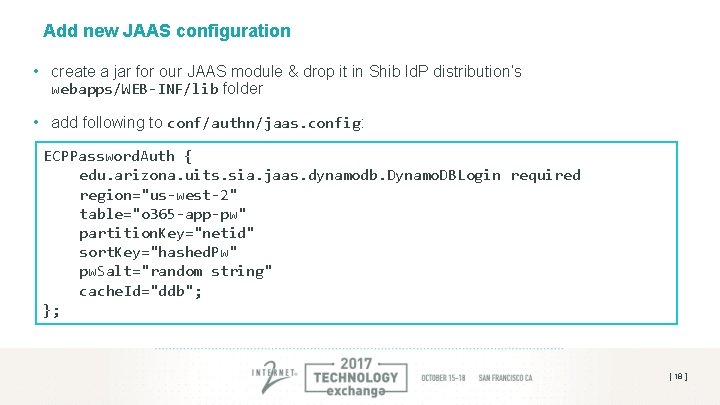
Interfacing the password store w/ Shib • Dynamo. DB has a low-level HTTP-based API, plus numerous higher-level API bindings (e. g. , Java, Python, Javascript, etc. ) • since we were already using JAAS, we developed a simple JAAS module based on Jan Oppolzer’s jaas-rdbms-hashed [2] • not much effort: – had to adapt the Utils class (which performs password hashing) to use PBKDF 2 With. Hmac. SHA 256 instead of SHA 256 – created a Dynamo. DB client factory that uses synchronized Hash. Map to allow for multiple JAAS Dynamo. DB login configs, each with their own client connection pool – implement login() method of javax. security. auth. spi. Login. Module to interface with Dynamo. DB [ 17 ]
Add new JAAS configuration • create a jar for our JAAS module & drop it in Shib Id. P distribution’s webapps/WEB-INF/lib folder • add following to conf/authn/jaas. config: ECPPassword. Auth { edu. arizona. uits. sia. jaas. dynamodb. Dynamo. DBLogin required region="us-west-2" table="o 365 -app-pw" partition. Key="netid" sort. Key="hashed. Pw" pw. Salt="random string" cache. Id="ddb"; }; [ 18 ]
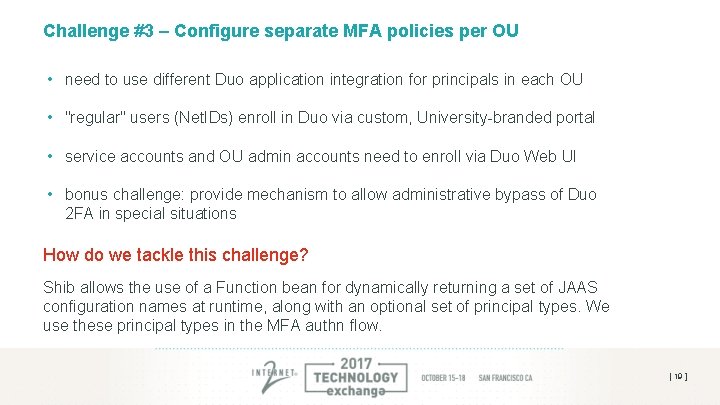
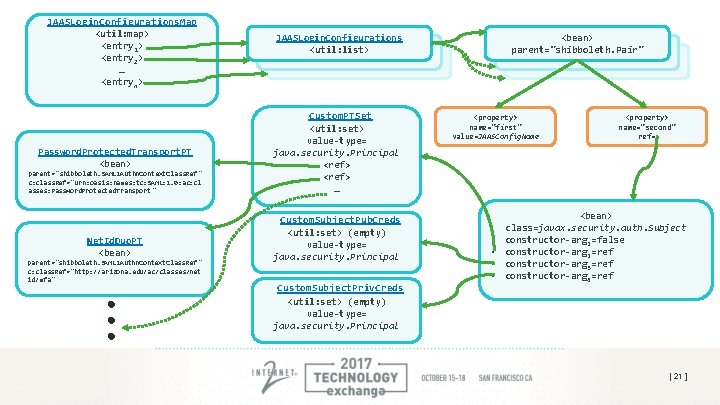
Challenge #3 – Configure separate MFA policies per OU • need to use different Duo application integration for principals in each OU • "regular" users (Net. IDs) enroll in Duo via custom, University-branded portal • service accounts and OU admin accounts need to enroll via Duo Web UI • bonus challenge: provide mechanism to allow administrative bypass of Duo 2 FA in special situations How do we tackle this challenge? Shib allows the use of a Function bean for dynamically returning a set of JAAS configuration names at runtime, along with an optional set of principal types. We use these principal types in the MFA authn flow. [ 19 ]
JAASLogin. Configurations. Map <util: map> <entry 1> <entry 2> … <entryn> Password. Protected. Transport. PT <bean> parent="shibboleth. SAML 2 Authn. Context. Class. Ref " c: class. Ref="urn: oasis: names: tc: SAML: 2. 0: ac: cl asses: Password. Protected. Transport " Net. Id. Duo. PT <bean> parent="shibboleth. SAML 2 Authn. Context. Class. Ref " c: class. Ref="http: //arizona. edu/ac/classes/net id/mfa" JAASLogin. Configurations <util: list> Custom. PTSet <util: set> value-type= java. security. Principal <ref> … Custom. Subject. Pub. Creds <util: set> (empty) value-type= java. security. Principal Custom. Subject. Priv. Creds <util: set> (empty) value-type= java. security. Principal <bean> parent="shibboleth. Pair" <property> name="first" value=JAASConfig. Name • • <property> name="second" ref= <bean> class=javax. security. auth. Subject constructor-arg 1=false constructor-arg 2=ref constructor-arg 3=ref constructor-arg 4=ref [ 21 ]
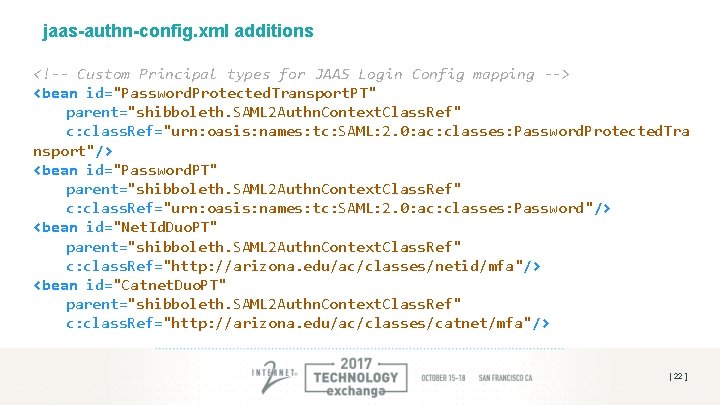
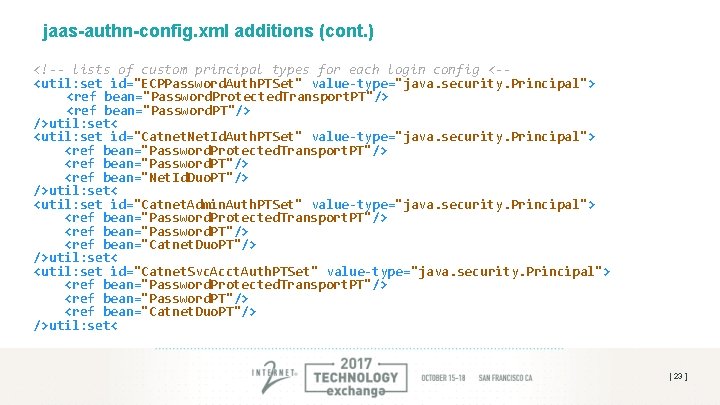
jaas-authn-config. xml additions <!-- Custom Principal types for JAAS Login Config mapping --> <bean id="Password. Protected. Transport. PT" parent="shibboleth. SAML 2 Authn. Context. Class. Ref" c: class. Ref="urn: oasis: names: tc: SAML: 2. 0: ac: classes: Password. Protected. Tra nsport"/> <bean id="Password. PT" parent="shibboleth. SAML 2 Authn. Context. Class. Ref" c: class. Ref="urn: oasis: names: tc: SAML: 2. 0: ac: classes: Password"/> <bean id="Net. Id. Duo. PT" parent="shibboleth. SAML 2 Authn. Context. Class. Ref" c: class. Ref="http: //arizona. edu/ac/classes/netid/mfa"/> <bean id="Catnet. Duo. PT" parent="shibboleth. SAML 2 Authn. Context. Class. Ref" c: class. Ref="http: //arizona. edu/ac/classes/catnet/mfa"/> [ 22 ]
jaas-authn-config. xml additions (cont. ) <!-- lists of custom principal types for each login config <-<util: set id="ECPPassword. Auth. PTSet" value-type="java. security. Principal"> <ref bean="Password. Protected. Transport. PT"/> <ref bean="Password. PT"/> />util: set< <util: set id="Catnet. Net. Id. Auth. PTSet" value-type="java. security. Principal"> <ref bean="Password. Protected. Transport. PT"/> <ref bean="Password. PT"/> <ref bean="Net. Id. Duo. PT"/> />util: set< <util: set id="Catnet. Admin. Auth. PTSet" value-type="java. security. Principal"> <ref bean="Password. Protected. Transport. PT"/> <ref bean="Password. PT"/> <ref bean="Catnet. Duo. PT"/> />util: set< <util: set id="Catnet. Svc. Acct. Auth. PTSet" value-type="java. security. Principal"> <ref bean="Password. Protected. Transport. PT"/> <ref bean="Password. PT"/> <ref bean="Catnet. Duo. PT"/> />util: set< [ 23 ]
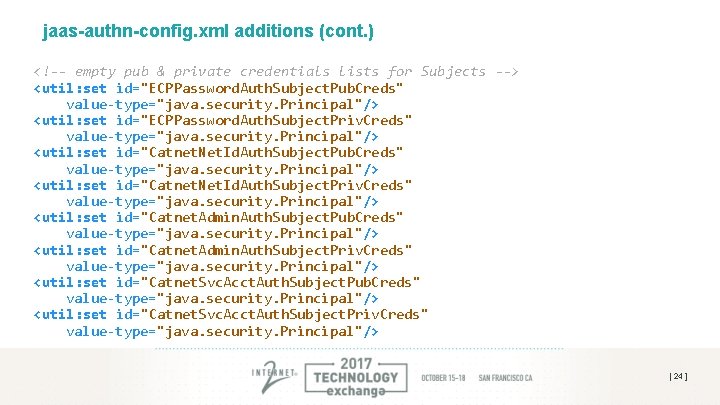
jaas-authn-config. xml additions (cont. ) <!-- empty pub & private credentials lists for Subjects --> <util: set id="ECPPassword. Auth. Subject. Pub. Creds" value-type="java. security. Principal"/> <util: set id="ECPPassword. Auth. Subject. Priv. Creds" value-type="java. security. Principal"/> <util: set id="Catnet. Net. Id. Auth. Subject. Pub. Creds" value-type="java. security. Principal"/> <util: set id="Catnet. Net. Id. Auth. Subject. Priv. Creds" value-type="java. security. Principal"/> <util: set id="Catnet. Admin. Auth. Subject. Pub. Creds" value-type="java. security. Principal"/> <util: set id="Catnet. Admin. Auth. Subject. Priv. Creds" value-type="java. security. Principal"/> <util: set id="Catnet. Svc. Acct. Auth. Subject. Pub. Creds" value-type="java. security. Principal"/> <util: set id="Catnet. Svc. Acct. Auth. Subject. Priv. Creds" value-type="java. security. Principal"/> [ 24 ]
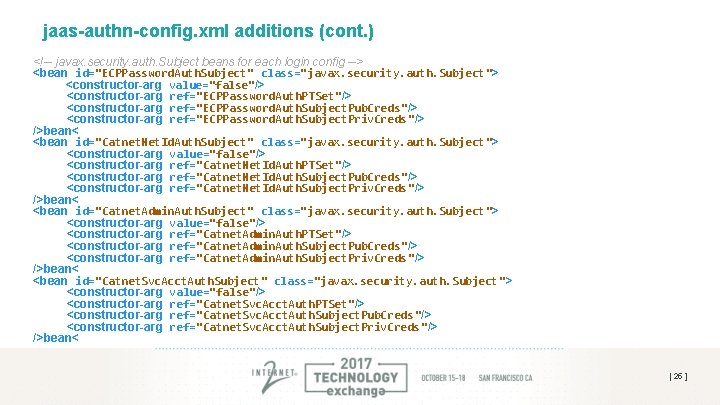
jaas-authn-config. xml additions (cont. ) <!-- javax. security. auth. Subject beans for each login config --> <bean id="ECPPassword. Auth. Subject" class="javax. security. auth. Subject"> <constructor-arg value="false"/> <constructor-arg ref="ECPPassword. Auth. PTSet"/> <constructor-arg ref="ECPPassword. Auth. Subject. Pub. Creds"/> <constructor-arg ref="ECPPassword. Auth. Subject. Priv. Creds"/> />bean< <bean id="Catnet. Net. Id. Auth. Subject" class="javax. security. auth. Subject"> <constructor-arg value="false"/> <constructor-arg ref="Catnet. Net. Id. Auth. PTSet"/> <constructor-arg ref="Catnet. Net. Id. Auth. Subject. Pub. Creds"/> <constructor-arg ref="Catnet. Net. Id. Auth. Subject. Priv. Creds"/> />bean< <bean id="Catnet. Admin. Auth. Subject" class="javax. security. auth. Subject"> <constructor-arg value="false"/> <constructor-arg ref="Catnet. Admin. Auth. PTSet"/> <constructor-arg ref="Catnet. Admin. Auth. Subject. Pub. Creds"/> <constructor-arg ref="Catnet. Admin. Auth. Subject. Priv. Creds"/> />bean< <bean id="Catnet. Svc. Acct. Auth. Subject" class="javax. security. auth. Subject"> <constructor-arg value="false"/> <constructor-arg ref="Catnet. Svc. Acct. Auth. PTSet"/> <constructor-arg ref="Catnet. Svc. Acct. Auth. Subject. Pub. Creds"/> <constructor-arg ref="Catnet. Svc. Acct. Auth. Subject. Priv. Creds "/> />bean< [ 25 ]
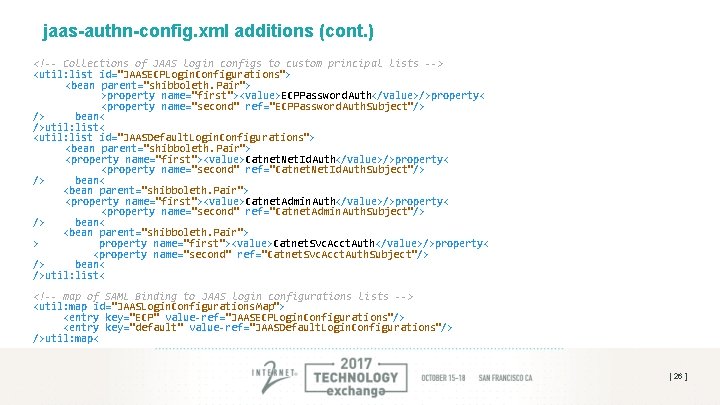
jaas-authn-config. xml additions (cont. ) <!-- Collections of JAAS login configs to custom principal lists --> <util: list id="JAASECPLogin. Configurations"> <bean parent="shibboleth. Pair"> >property name="first"><value>ECPPassword. Auth</value>/>property< <property name="second" ref="ECPPassword. Auth. Subject"/> /> bean< />util: list< <util: list id="JAASDefault. Login. Configurations"> <bean parent="shibboleth. Pair"> <property name="first"><value>Catnet. Net. Id. Auth</value>/>property< <property name="second" ref="Catnet. Net. Id. Auth. Subject"/> /> bean< <bean parent="shibboleth. Pair"> <property name="first"><value>Catnet. Admin. Auth</value>/>property< <property name="second" ref="Catnet. Admin. Auth. Subject"/> /> bean< <bean parent="shibboleth. Pair"> > property name="first"><value>Catnet. Svc. Acct. Auth</value>/>property< <property name="second" ref="Catnet. Svc. Acct. Auth. Subject"/> /> bean< />util: list< <!-- map of SAML Binding to JAAS login configurations lists --> <util: map id="JAASLogin. Configurations. Map"> <entry key="ECP" value-ref="JAASECPLogin. Configurations"/> <entry key="default" value-ref="JAASDefault. Login. Configurations"/> />util: map< [ 26 ]
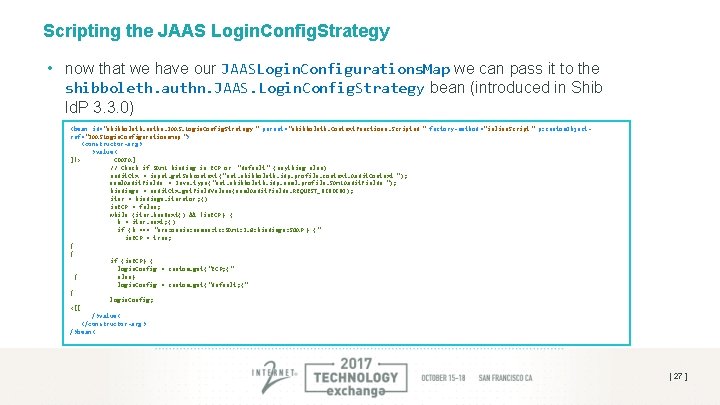
Scripting the JAAS Login. Config. Strategy • now that we have our JAASLogin. Configurations. Map we can pass it to the shibboleth. authn. JAAS. Login. Config. Strategy bean (introduced in Shib Id. P 3. 3. 0) <bean id="shibboleth. authn. JAAS. Login. Config. Strategy " parent="shibboleth. Context. Functions. Scripted " factory-method ="inline. Script " p: custom. Objectref="JAASLogin. Configurations. Map "> <constructor-arg > >value< ]!> CDATA] // Check if SAML binding is ECP or "default" (anything else) audit. Ctx = input. get. Subcontext ("net. shibboleth. idp. profile. context. Audit. Context "); saml. Audit. Fields = Java. type("net. shibboleth. idp. saml. profile. SAMLAudit. Fields "); bindings = audit. Ctx. get. Field. Values(saml. Audit. Fields. REQUEST_BINDING); iter = bindings. iterator ; () is. ECP = false; while (iter. has. Next() && !is. ECP } ( b = iter. next; () if (b === "urn: oasis: names: tc: SAML: 2. 0: bindings: SOAP } (" is. ECP = true; { { if (is. ECP} ( login. Config = custom. get ("ECP; (" { else} login. Config = custom. get ("default; (" { l ogin. Config; <[[ />value< </constructor-arg > />bean< [ 27 ]
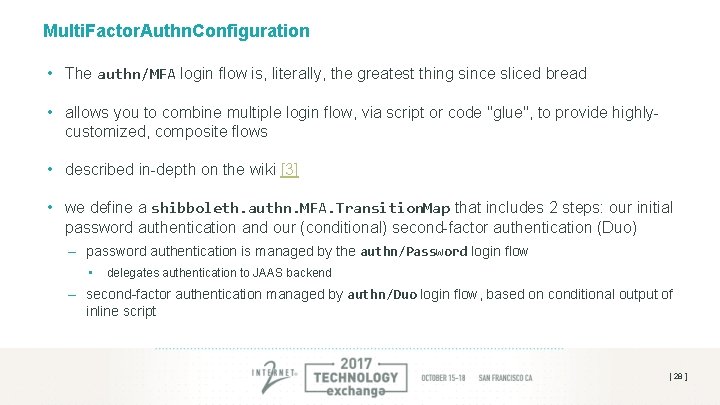
Multi. Factor. Authn. Configuration • The authn/MFA login flow is, literally, the greatest thing since sliced bread • allows you to combine multiple login flow, via script or code "glue", to provide highlycustomized, composite flows • described in-depth on the wiki [3] • we define a shibboleth. authn. MFA. Transition. Map that includes 2 steps: our initial password authentication and our (conditional) second-factor authentication (Duo) – password authentication is managed by the authn/Password login flow • delegates authentication to JAAS backend – second-factor authentication managed by authn/Duo login flow, based on conditional output of inline script [ 28 ]
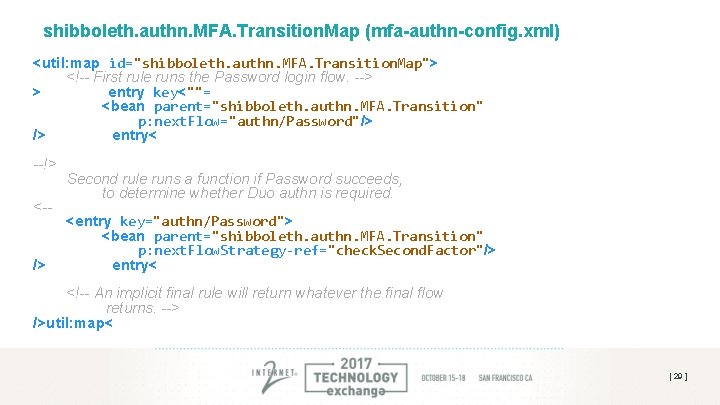
shibboleth. authn. MFA. Transition. Map (mfa-authn-config. xml) <util: map id="shibboleth. authn. MFA. Transition. Map"> <!-- First rule runs the Password login flow. --> > entry key<""= <bean parent="shibboleth. authn. MFA. Transition" p: next. Flow="authn/Password"/> /> entry< --!> <-- /> Second rule runs a function if Password succeeds, to determine whether Duo authn is required. <entry key="authn/Password"> <bean parent="shibboleth. authn. MFA. Transition" p: next. Flow. Strategy-ref="check. Second. Factor"/> entry< <!-- An implicit final rule will return whatever the final flow returns. --> />util: map< [ 29 ]
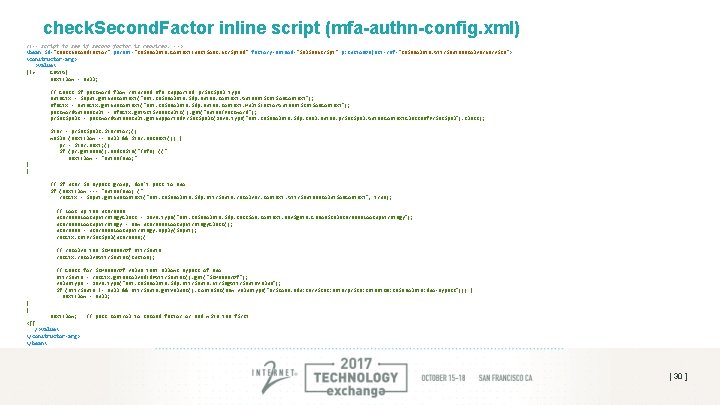
check. Second. Factor inline script (mfa-authn-config. xml) <!-- script to see if second factor is required. --> <bean id="check. Second. Factor" parent="shibboleth. Context. Functions. Scripted" factory-method="inline. Script" p: custom. Object-ref="shibboleth. Attribute. Resolver. Service"> <constructor-arg> >value< ]!> CDATA] next. Flow = null; // Check if password flow returned mfa supported principal type auth. Ctx = input. get. Subcontext("net. shibboleth. idp. authn. context. Authentication. Context"); mfa. Ctx = auth. Ctx. get. Subcontext("net. shibboleth. idp. authn. context. Multi. Factor. Authentication. Context"); password. Auth. Result = mfa. Ctx. get. Active. Results(). get("authn/Password"); principals = password. Auth. Result. get. Supported. Principals(Java. type("net. shibboleth. idp. saml. authn. principal. Authn. Context. Class. Ref. Principal"). class); iter = principals. iterator; () while (next. Flow == null && iter. has. Next()) { pr = iter. next; () if (pr. get. Name(). ends. With("/mfa} ((" next. Flow = "authn/Duo; " { { // if user in bypass group, don't pass to Duo if (next. Flow === "authn/Duo} (" res. Ctx = input. get. Subcontext("net. shibboleth. idp. attribute. resolver. context. Attribute. Resolution. Context", true); // Look up the username. Lookup. Strategy. Class = Java. type("net. shibboleth. idp. session. context. navigate. Canonical. Username. Lookup. Strategy"); username. Lookup. Strategy = new username. Lookup. Strategy. Class(); username = username. Lookup. Strategy. apply(input); res. Ctx. set. Principal(username; ( // resolve the is. Member. Of attribute res. Ctx. resolve. Attributes(custom); // Check for is. Member. Of value that allows bypass of Duo attribute = res. Ctx. get. Resolved. Id. PAttributes(). get("is. Member. Of"); value. Type = Java. type("net. shibboleth. idp. attribute. String. Attribute. Value"); if (attribute != null && attribute. get. Values(). contains(new value. Type("arizona. edu: services: enterprise: catnet 20: shibboleth: duo-bypass"))) { next. Flow = null; { { next. Flow; <[[ />value< </constructor-arg> </bean< // pass control to second factor or end with the first [ 30 ]
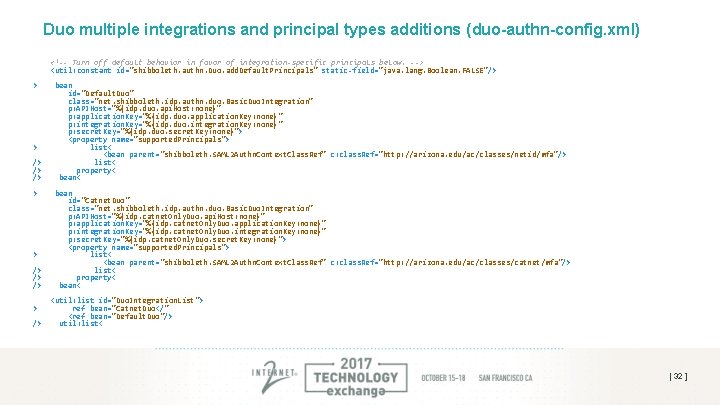
How do we use different Duo configurations for different user types? • once again, Shibboleth has you covered: – multiple Integrations – Duo. Integration. Strategy (dynamic determination of strategy at run-time) – integration-specific principal sets (segregate categories of Duo auth based on principal type) • again, described in detail on the wiki [4] • in UA’s case we configured two net. shibboleth. idp. authn. duo. Basic. Duo. Integration beans – each one tied to one of our custom principal types: • http: //arizona. edu/ac/classes/netid/mfa • http: //arizona. edu/ac/classes/catnet/mfa – recall, these principal types are set by the specific JAAS config which successfully authenticates the user [ 31 ]
Duo multiple integrations and principal types additions (duo-authn-config. xml) <!-- Turn off default behavior in favor of integration-specific principals below. --> <util: constant id="shibboleth. authn. Duo. add. Default. Principals" static-field="java. lang. Boolean. FALSE"/> > > /> /> /> bean id="Default. Duo" class="net. shibboleth. idp. authn. duo. Basic. Duo. Integration" p: APIHost="%{idp. duo. api. Host: none}" p: application. Key="%{idp. duo. application. Key: none}" p: integration. Key="%{idp. duo. integration. Key: none}" p: secret. Key="%{idp. duo. secret. Key: none}"> <property name="supported. Principals"> list< <bean parent="shibboleth. SAML 2 Authn. Context. Class. Ref" c: class. Ref="http: //arizona. edu/ac/classes/netid/mfa"/> list< property< bean id="Catnet. Duo" class="net. shibboleth. idp. authn. duo. Basic. Duo. Integration" p: APIHost="%{idp. catnet. Only. Duo. api. Host: none}" p: application. Key="%{idp. catnet. Only. Duo. application. Key: none}" p: integration. Key="%{idp. catnet. Only. Duo. integration. Key: none}" p: secret. Key="%{idp. catnet. Only. Duo. secret. Key: none}"> <property name="supported. Principals"> list< <bean parent="shibboleth. SAML 2 Authn. Context. Class. Ref" c: class. Ref="http: //arizona. edu/ac/classes/catnet/mfa"/> list< property< bean< <util: list id="Duo. Integration. List"> ref bean="Catnet. Duo</" <ref bean="Default. Duo"/> util: list< [ 32 ]
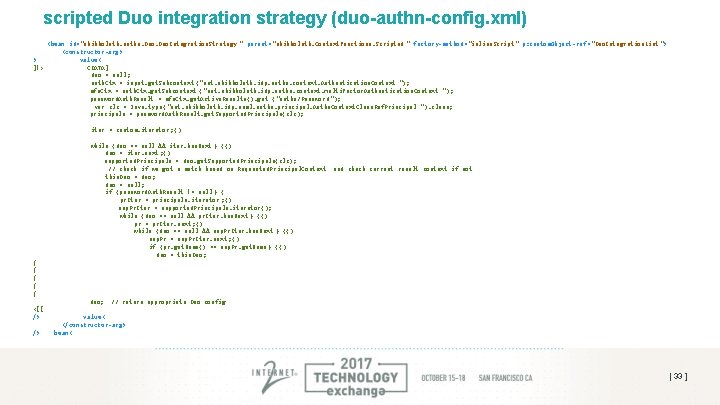
scripted Duo integration strategy (duo-authn-config. xml) <bean id="shibboleth. authn. Duo. Integration. Strategy " parent="shibboleth. Context. Functions. Scripted " factory-method ="inline. Script " p: custom. Object-ref ="Duo. Integration. List "> <constructor-arg> > value< ]!> CDATA] duo = null; auth. Ctx = input. get. Subcontext ("net. shibboleth. idp. authn. context. Authentication. Context "); mfa. Ctx = auth. Ctx. get. Subcontext ("net. shibboleth. idp. authn. context. Multi. Factor. Authentication. Context "); password. Auth. Result = mfa. Ctx. get. Active. Results(). get ("authn/Password "); var clz = Java. type ("net. shibboleth. idp. saml. authn. principal. Authn. Context. Class. Ref. Principal "). class; principals = password. Auth. Result. get. Supported. Principals(clz); iter = custom. iterator ; () while (duo == null && iter. has. Next } (() duo = iter. next ; () supported. Principals = duo. get. Supported. Principals(clz); // check if we got a match based on Requested. Principal. Context this. Duo = duo ; duo = null; if (password. Auth. Result != null } ( pr. Iter = principals. iterator ; () sup. Pr. Iter = supported. Principals. iterator(); while (duo == null && pr. Iter. has. Next } (() pr = pr. Iter. next ; () while (duo == null && sup. Pr. Iter. has. Next } (() sup. Pr = sup. Pr. Iter. next ; () if (pr. get. Name() == sup. Pr. get. Name } (() duo = this. Duo ; and check current result context if not { { { duo; <[[ /> /> // return appropriate Duo config value< </constructor-arg> bean< [ 33 ]
Staying Agile – Containerization and Cloud Deployment [ 34 ]
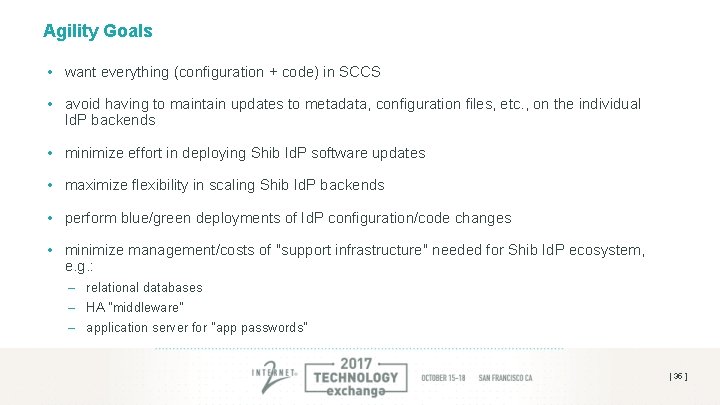
Agility Goals • want everything (configuration + code) in SCCS • avoid having to maintain updates to metadata, configuration files, etc. , on the individual Id. P backends • minimize effort in deploying Shib Id. P software updates • maximize flexibility in scaling Shib Id. P backends • perform blue/green deployments of Id. P configuration/code changes • minimize management/costs of "support infrastructure" needed for Shib Id. P ecosystem, e. g. : – relational databases – HA "middleware" – application server for "app passwords" [ 35 ]
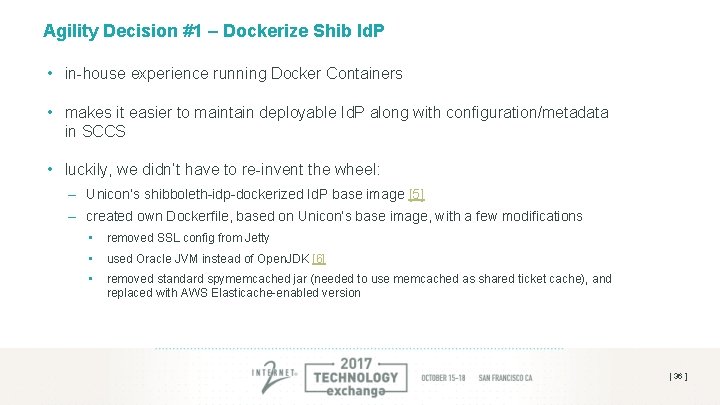
Agility Decision #1 – Dockerize Shib Id. P • in-house experience running Docker Containers • makes it easier to maintain deployable Id. P along with configuration/metadata in SCCS • luckily, we didn’t have to re-invent the wheel: – Unicon’s shibboleth-idp-dockerized Id. P base image [5] – created own Dockerfile, based on Unicon’s base image, with a few modifications • removed SSL config from Jetty • used Oracle JVM instead of Open. JDK [6] • removed standard spymemcached jar (needed to use memcached as shared ticket cache), and replaced with AWS Elasticache-enabled version [ 36 ]
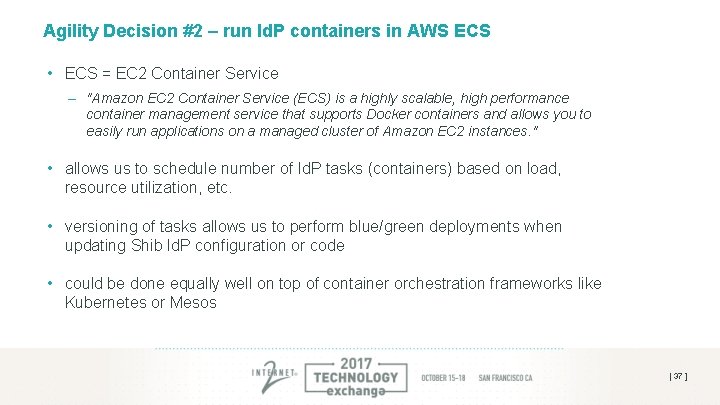
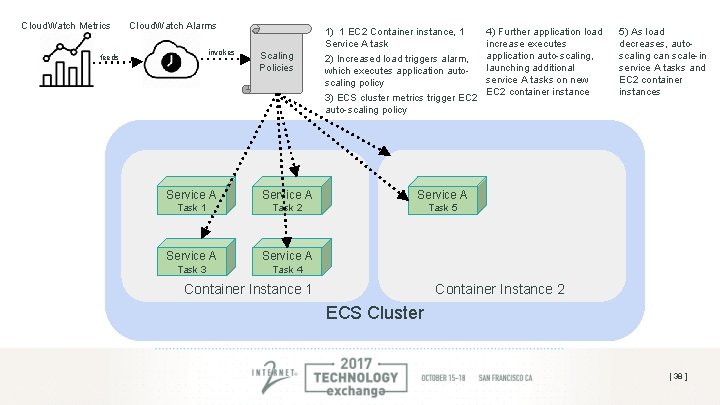
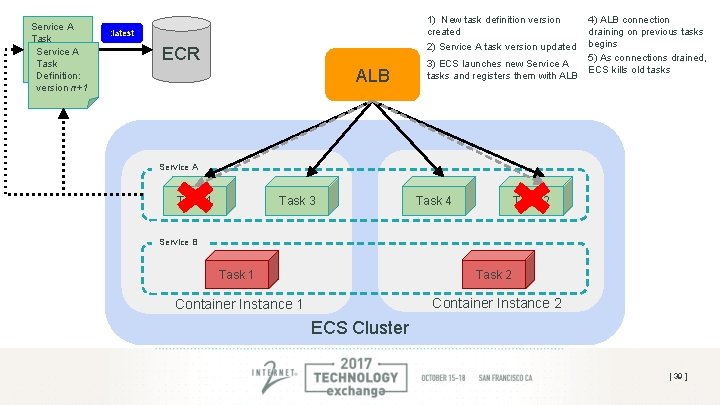
Agility Decision #2 – run Id. P containers in AWS ECS • ECS = EC 2 Container Service – "Amazon EC 2 Container Service (ECS) is a highly scalable, high performance container management service that supports Docker containers and allows you to easily run applications on a managed cluster of Amazon EC 2 instances. " • allows us to schedule number of Id. P tasks (containers) based on load, resource utilization, etc. • versioning of tasks allows us to perform blue/green deployments when updating Shib Id. P configuration or code • could be done equally well on top of container orchestration frameworks like Kubernetes or Mesos [ 37 ]
Cloud. Watch Metrics Cloud. Watch Alarms invokes feeds Scaling Policies 1) 1 EC 2 Container instance, 1 Service A task 2) Increased load triggers alarm, which executes application autoscaling policy 3) ECS cluster metrics trigger EC 2 auto-scaling policy Service A Task 1 Task 2 Task 5 Service A Task 3 Task 4 4) Further application load increase executes application auto-scaling, launching additional service A tasks on new EC 2 container instance 5) As load decreases, autoscaling can scale-in service A tasks and EC 2 container instances Container Instance 2 Container Instance 1 ECS Cluster [ 38 ]
Service A Task Definition: Service A version n Task Definition: version n+1 1) New task definition version created 2) Service A task version updated : latest ECR ALB 3) ECS launches new Service A tasks and registers them with ALB 4) ALB connection draining on previous tasks begins 5) As connections drained, ECS kills old tasks Service A Task 1 Task 3 Task 2 Task 4 Service B Task 1 Task 2 Container Instance 1 Container Instance 2 ECS Cluster [ 39 ]
Agility Decision #3 – use AWS Elasti. Cache for Memcached. Storage. Service • need shared storage mechanism for session storage and replay cache – have successfully used memcached for this in past • could have run memcached instances in Docker containers, alongside Id. P containers – additional infrastructure/code to manage/maintain – memcached discovery problem as number of instances grow/shrink • offload memcached duties to AWS Elasti. Cache – 3 x t 2. micro cache nodes (us-west-2) = ~$25/mo (on-demand) or ~$13/mo (reserved w/ 1 yr term) • use AWS’ Elasti. Cache Cluster Java client [7] – drop-in replacement for spymemcached jar – supports Elasti. Cache’s memcached "auto-discovery" enhancement [ 40 ]
Agility Decision #4 – use SAM for "app password" website • SAM = "Serverless Application Model" – AWS specification for defining "serverless" applications in AWS – built on top of existing AWS components like Lambda, Cloud. Front and API Gateway • website is "utility" site – not used heavily, but must always be accessible • written as SPA using Angular. JS – interacts with API written in Express (Node. js application framework) • API deployed as Lambda function and exposed via API gateway – Claudia. js used to deploy • Passport. js used for Shib authentication and session state stored in Dynamo. DB • use of Lambda + Dynamo. DB makes this solution essentially "free" for the amount of utilization we have [ 41 ]
Agility Decision #5 – use Cloud. Formation + Git • entire Id. P environment specified and deployed via AWS Cloud. Formation • Cloud. Formation templates stored/maintained in git repository • changes to environment performed through CF change sets [ 42 ]
[demo] [ 43 ]
Thanks! Resources: • [1] https: //wiki. shibboleth. net/confluence/display/IDP 30/ECPConfiguration • [2] https: //github. com/Jan. Oppolzer/jaas-rdbms-hashed • [3] https: //wiki. shibboleth. net/confluence/display/IDP 30/Multi. Factor. Authn. Configuration • [4] https: //wiki. shibboleth. net/confluence/display/IDP 30/Duo. Authn. Configuration • [5] https: //github. com/Unicon/shibboleth-idp-dockerized • [6] https: //github. com/Unicon/shibboleth-idp-dockerized/wiki/Switching-to-the-Oracle-JVM • [7] https: //github. com/awslabs/aws-elasticache-cluster-client-memcached-for-java • JAAS Dynamo. DB module: https: //bitbucket. org/ua_sia/jaas-dynamodb