
How does multitenancy work across the layers of
- Slides: 46
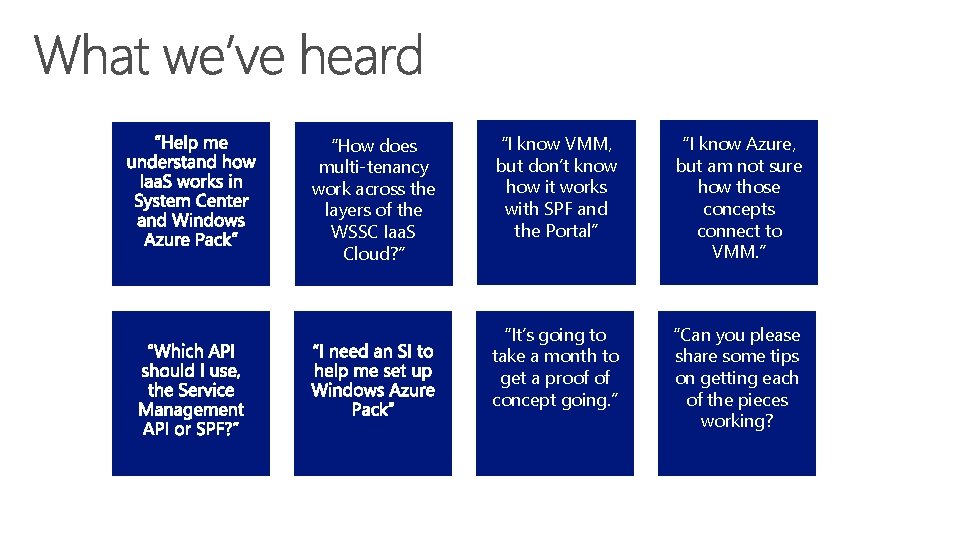
“How does multi-tenancy work across the layers of the WSSC Iaa. S Cloud? ” “I know VMM, but don’t know how it works with SPF and the Portal” “I know Azure, but am not sure how those concepts connect to VMM. ” “It’s going to take a month to get a proof of concept going. ” “Can you please share some tips on getting each of the pieces working?
Session Goals • Review the architecture and design principles of Microsoft Iaa. S solution powered by Windows Server, System Center and Windows Azure Pack Demystify the bootstrap configuration process to setup your own Iaa. S solution • Demonstrate How to setup and configure a multi-tenant Iaa. S cloud in an hour, and share best practices and tips •
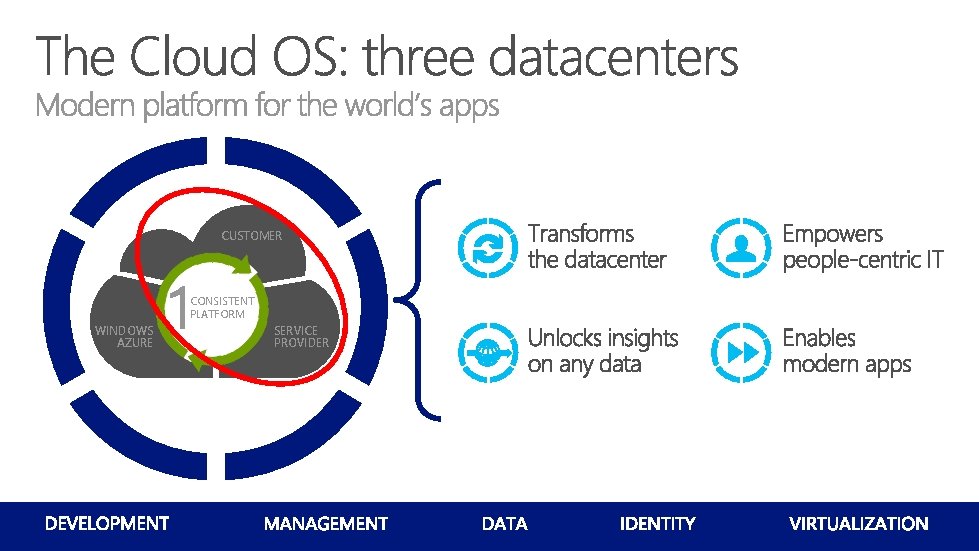
CUSTOMER WINDOWS AZURE 1 CONSISTENT PLATFORM SERVICE PROVIDER
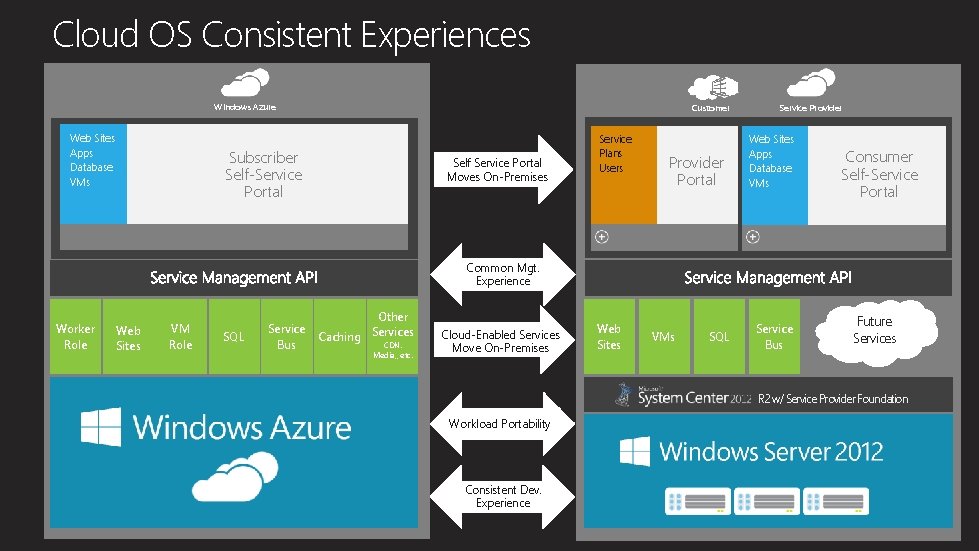
Cloud OS Consistent Experiences Windows Azure Web Sites Apps Database VMs Customer Subscriber Self-Service Portal Self Service Portal Moves On-Premises Service Plans Users Provider Portal Service Provider Web Sites Apps Database VMs Consumer Self-Service Portal Common Mgt. Experience Worker Role Web Sites VM Role SQL Service Bus Other Caching Services CDN. Media, , etc. Cloud-Enabled Services Move On-Premises Web Sites VMs SQL Service Bus Future Services R 2 w/ Service Provider Foundation Workload Portability Consistent Dev. Experience
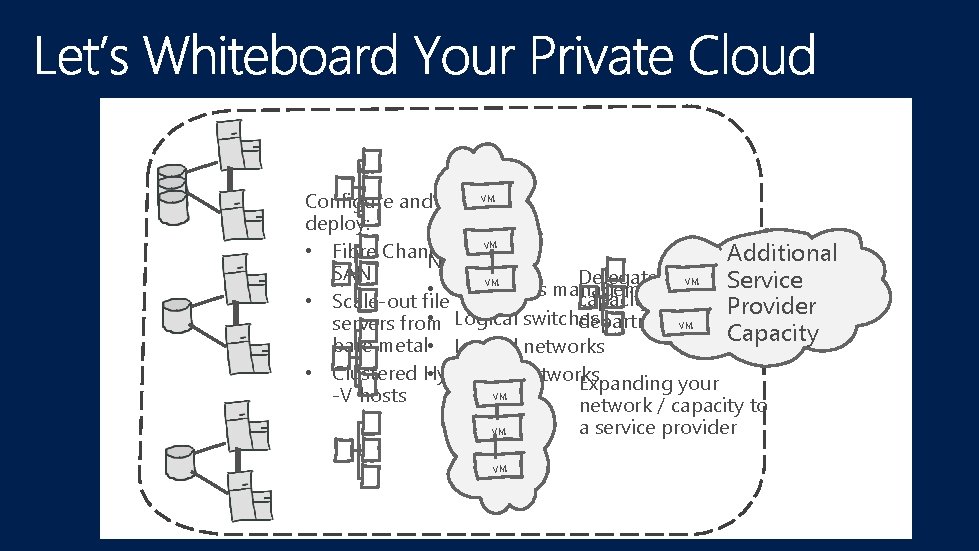
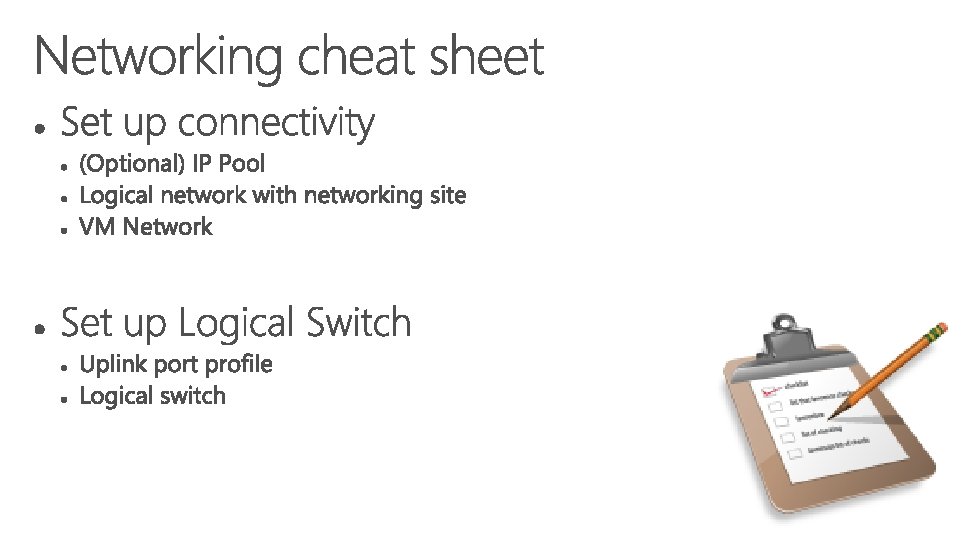
VM Configure and deploy: • Fibre Channel VM Additional Networking SAN Delegated VM Service VM • IP address management capacity for • Scale-out file Provider • Logical switches departments VM servers from Capacity bare metal • Logical networks • Clustered Hyper • Virtual networks Expanding your VM -V hosts network / capacity to VM VM a service provider
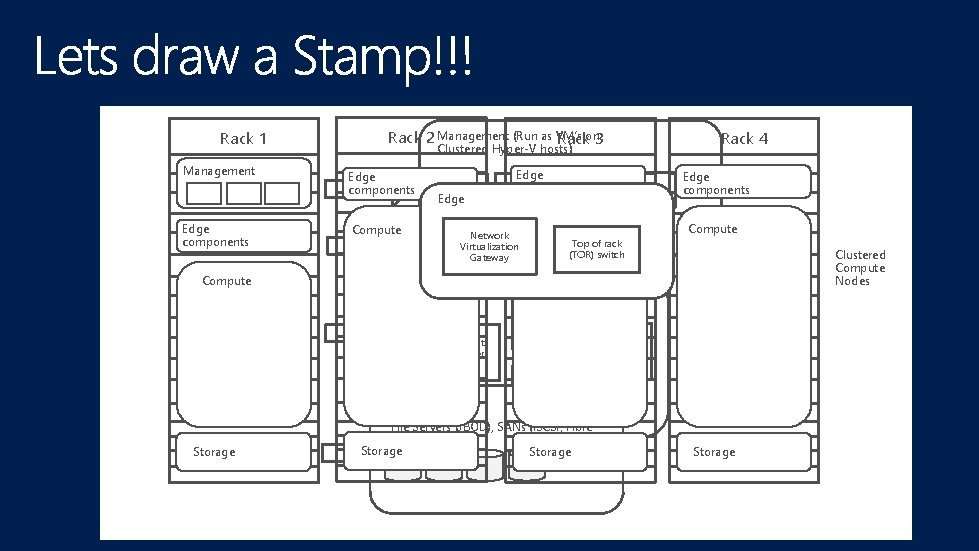
Rack 1 Management Edge components Rack 2 Management (Run as VM’s Rackon 3 Edge components Compute VMM Edge VM Edge components OM SPF VM Network Virtualization Gateway Etc VM Compute Top of rack (TOR) switch Edge components Compute Clustered Compute Nodes Compute Tenant or user VMs Storage Rack 4 Clustered Hyper-V hosts) Tenant or user VMs File Servers (JBOD), SANs (i. SCSI, Fibre Channel) Storage
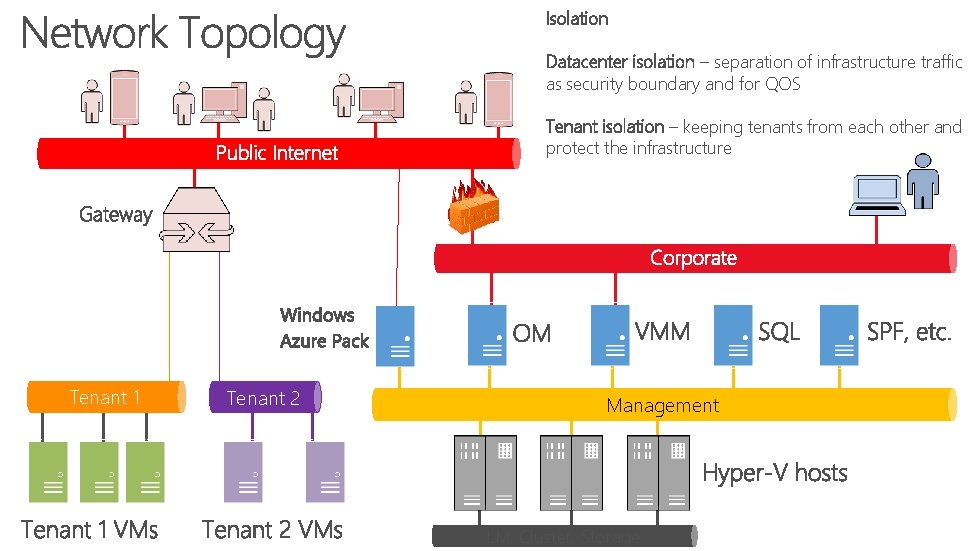
Isolation Datacenter isolation – separation of infrastructure traffic as security boundary and for QOS Tenant isolation – keeping tenants from each other and protect the infrastructure Tenant 1 Tenant 2 Management LM, Cluster, Storage
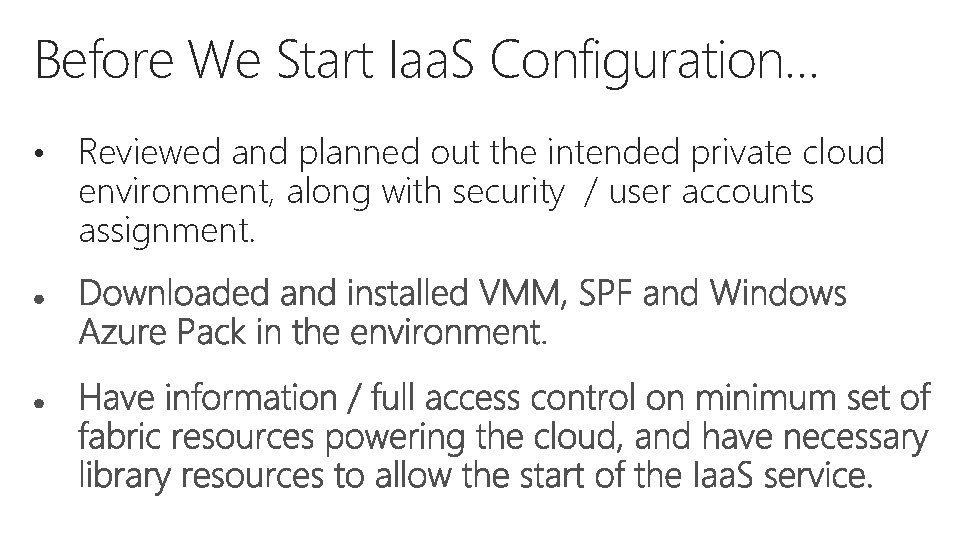
Before We Start Iaa. S Configuration… • Reviewed and planned out the intended private cloud environment, along with security / user accounts assignment.
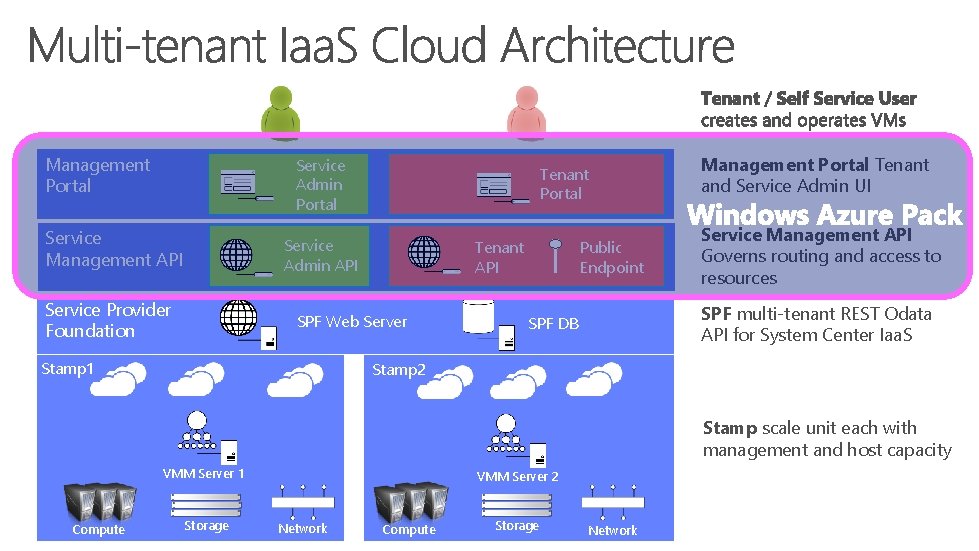
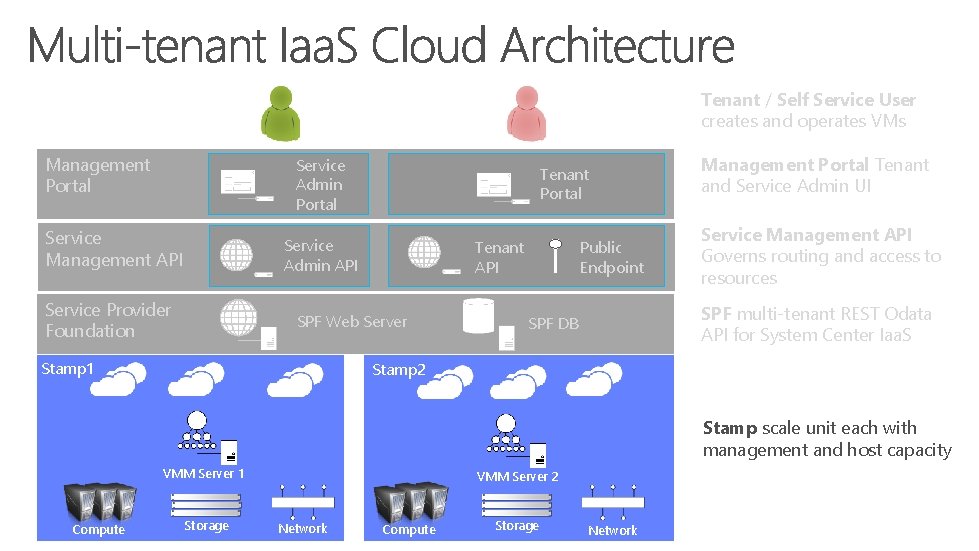
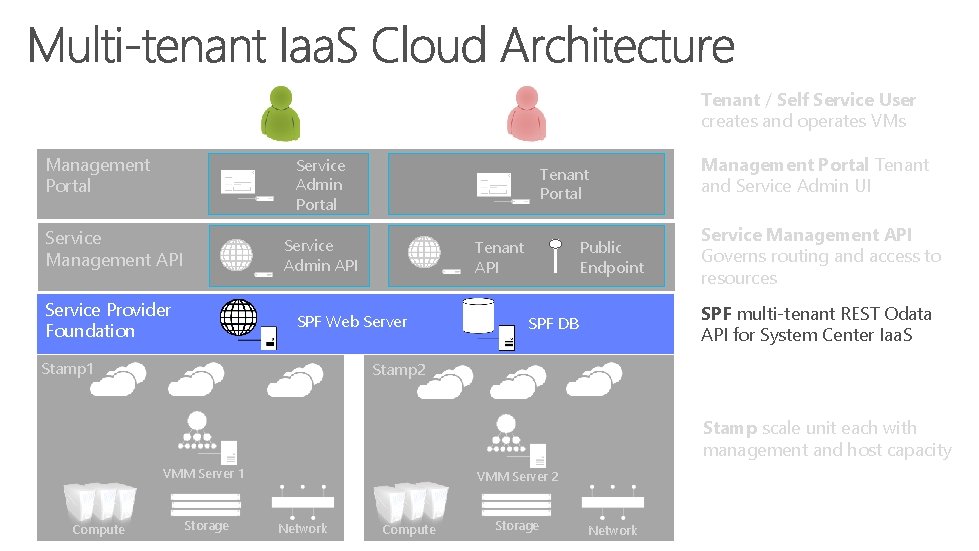
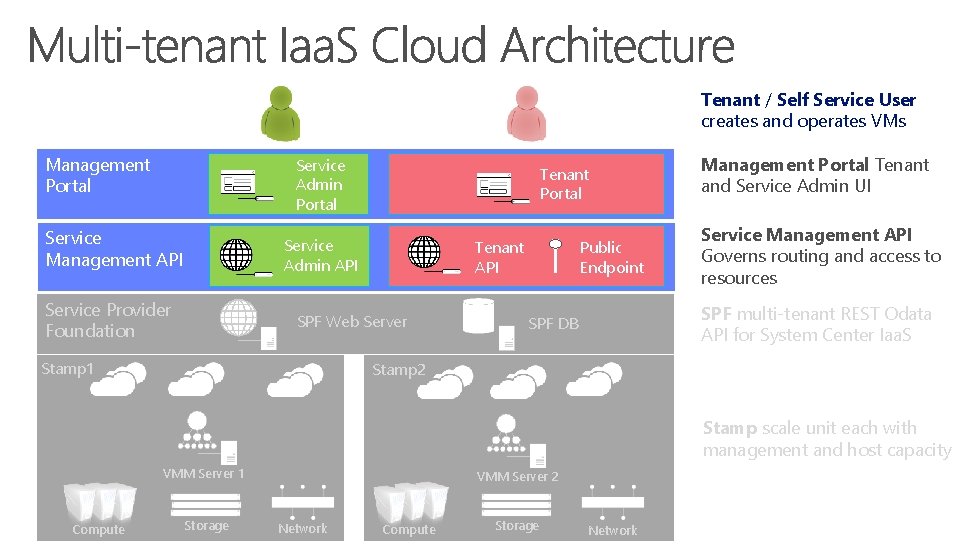
Management Portal Service Admin Portal Service Management API Tenant Portal Service Admin API Service Provider Foundation SPF Web Server Stamp 1 Public Endpoint Tenant API Management Portal Tenant and Service Admin UI Service Management API Governs routing and access to resources SPF multi-tenant REST Odata API for System Center Iaa. S SPF DB Stamp 2 Stamp scale unit each with management and host capacity VMM Server 1 Compute Storage VMM Server 2 VMs Network Compute Storage Network
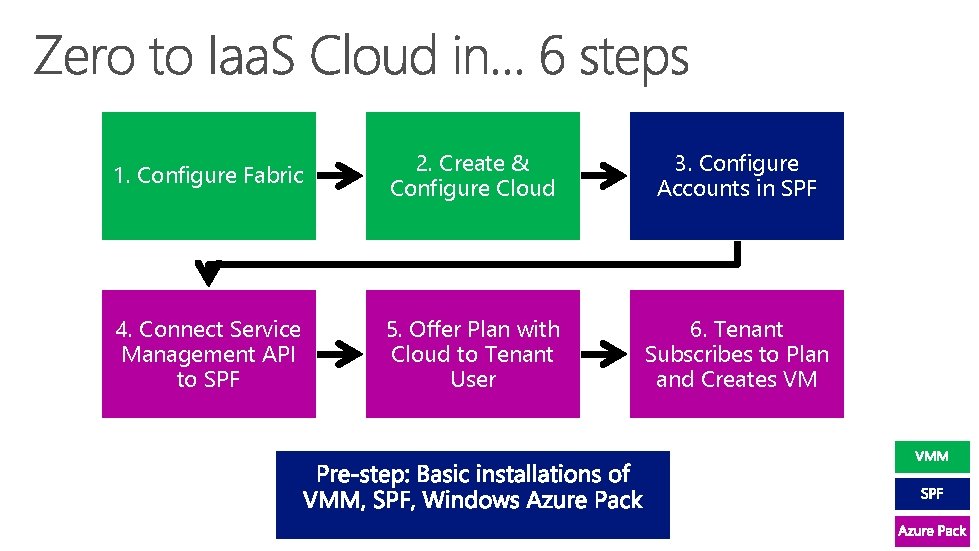
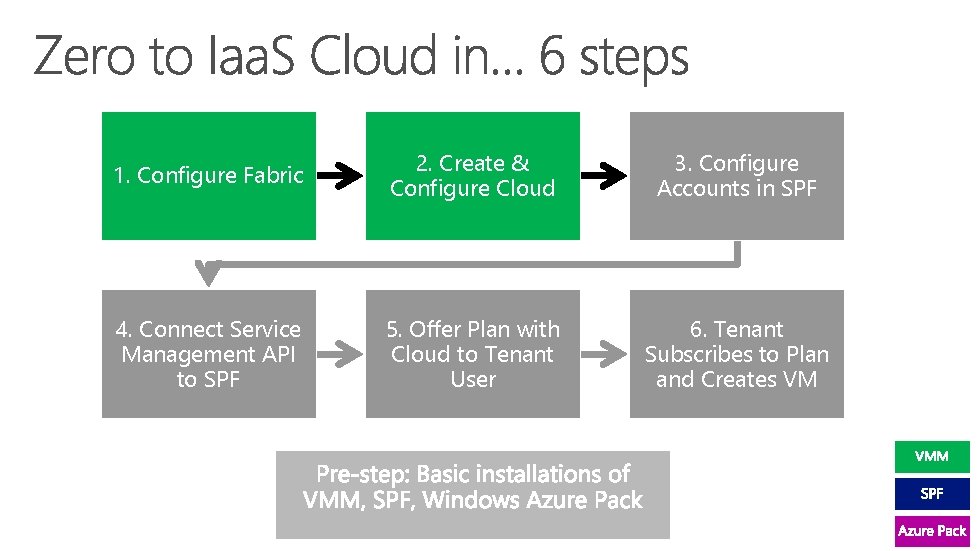
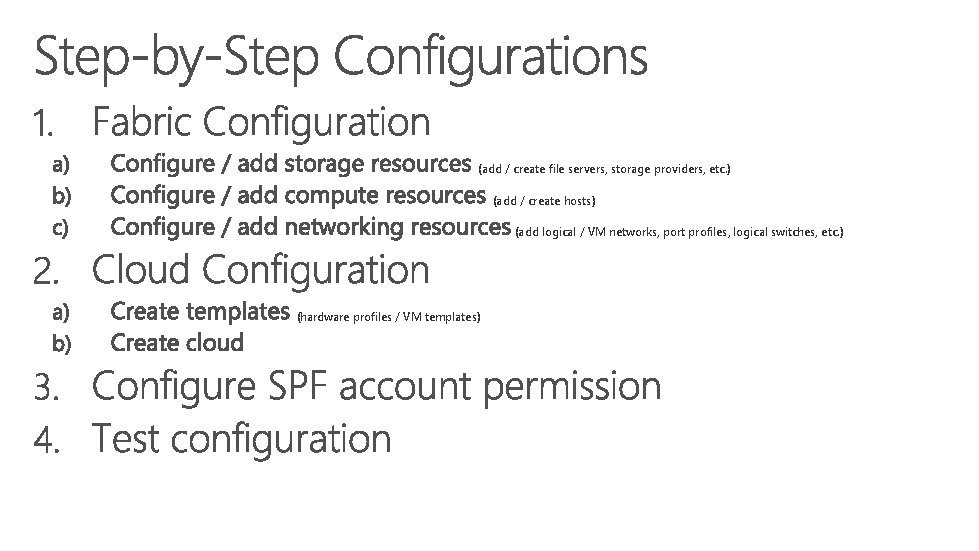
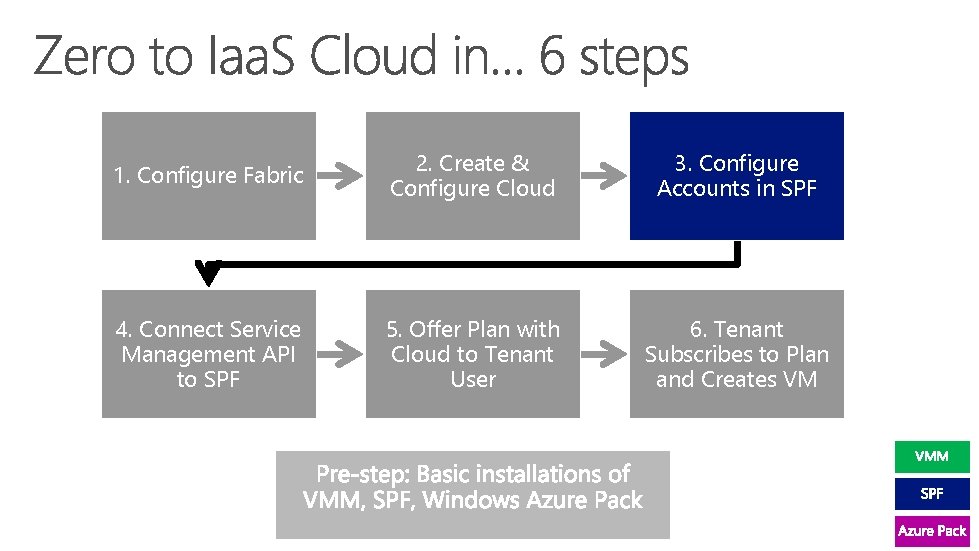
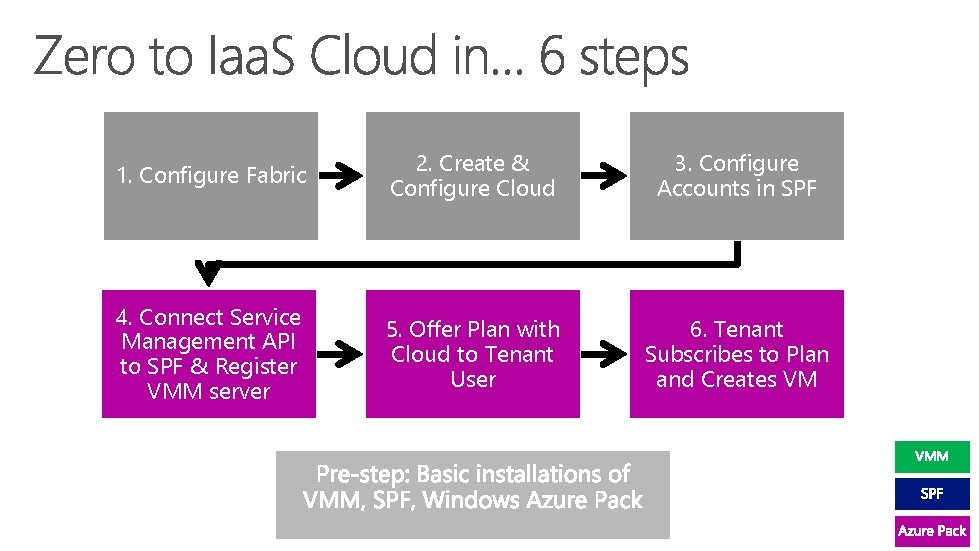
1. Configure Fabric 2. Create & Configure Cloud 3. Configure Accounts in SPF 4. Connect Service Management API to SPF 5. Offer Plan with Cloud to Tenant User 6. Tenant Subscribes to Plan and Creates VM
Tenant / Self Service User creates and operates VMs Management Portal Service Admin Portal Service Management API Tenant Portal Service Admin API Service Provider Foundation SPF Web Server Stamp 1 Public Endpoint Tenant API Management Portal Tenant and Service Admin UI Service Management API Governs routing and access to resources SPF multi-tenant REST Odata API for System Center Iaa. S SPF DB Stamp 2 Stamp scale unit each with management and host capacity VMM Server 1 Compute Storage VMM Server 2 VMs Network Compute Storage Network
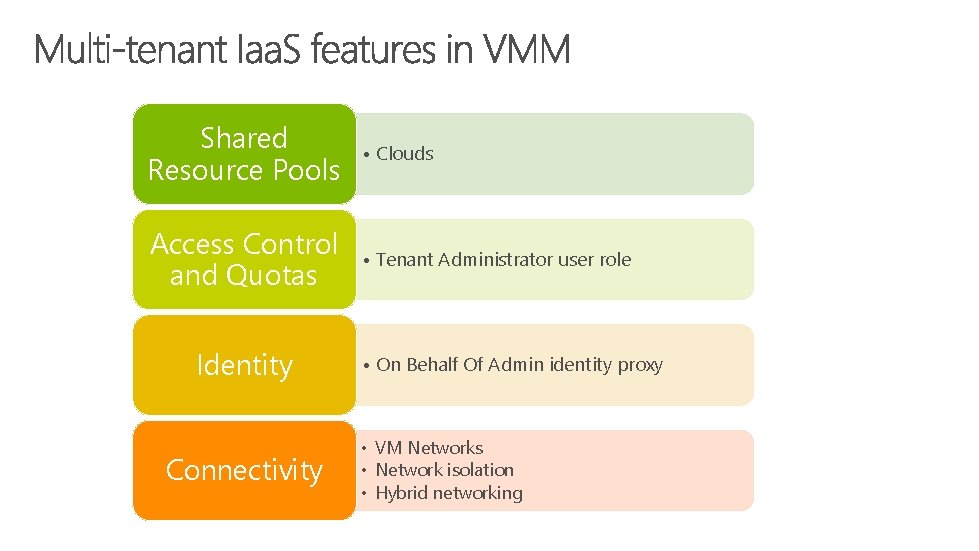
Shared Resource Pools • Clouds Access Control and Quotas • Tenant Administrator user role Identity Connectivity • On Behalf Of Admin identity proxy • VM Networks • Network isolation • Hybrid networking
1. Configure Fabric 2. Create & Configure Cloud 3. Configure Accounts in SPF 4. Connect Service Management API to SPF 5. Offer Plan with Cloud to Tenant User 6. Tenant Subscribes to Plan and Creates VM
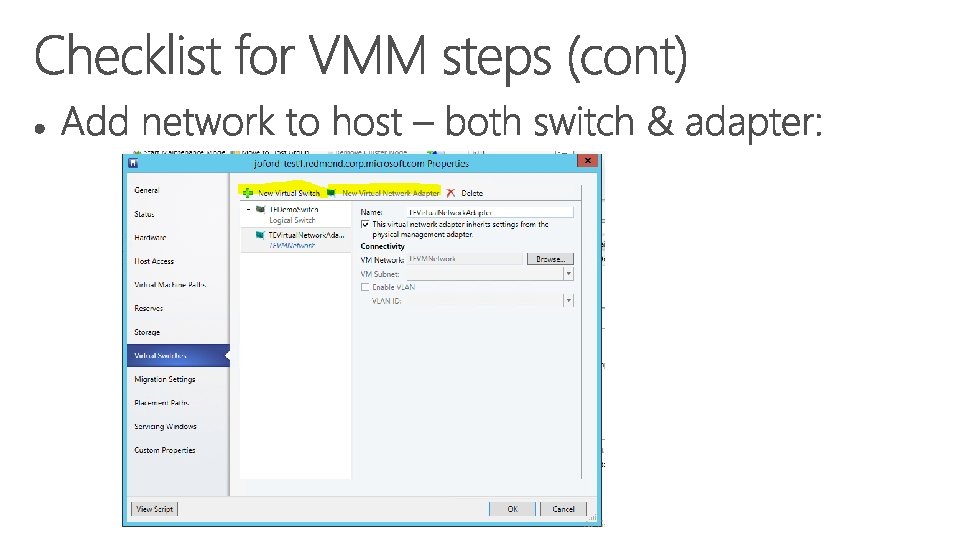
(add / create file servers, storage providers, etc. ) (add / create hosts) (add logical / VM networks, port profiles, logical switches, etc. ) (hardware profiles / VM templates)
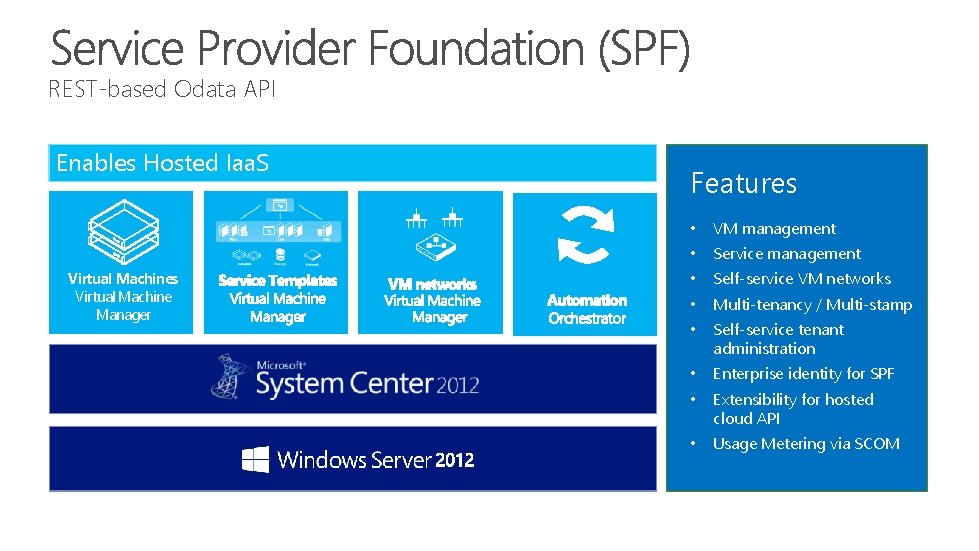
REST-based Odata API Enables Hosted Iaa. S Virtual Machines Virtual Machine Manager Features • VM management • Service management • Self-service VM networks • Multi-tenancy / Multi-stamp • Self-service tenant administration • Enterprise identity for SPF • Extensibility for hosted cloud API • Usage Metering via SCOM
Tenant / Self Service User creates and operates VMs Management Portal Service Admin Portal Service Management API Tenant Portal Service Admin API Service Provider Foundation SPF Web Server Stamp 1 Public Endpoint Tenant API Management Portal Tenant and Service Admin UI Service Management API Governs routing and access to resources SPF multi-tenant REST Odata API for System Center Iaa. S SPF DB Stamp 2 Stamp scale unit each with management and host capacity VMM Server 1 Compute Storage VMM Server 2 VMs Network Compute Storage Network
1. Configure Fabric 2. Create & Configure Cloud 3. Configure Accounts in SPF 4. Connect Service Management API to SPF 5. Offer Plan with Cloud to Tenant User 6. Tenant Subscribes to Plan and Creates VM
Tenant / Self Service User creates and operates VMs Management Portal Service Admin Portal Service Management API Tenant Portal Service Admin API Service Provider Foundation SPF Web Server Stamp 1 Public Endpoint Tenant API Management Portal Tenant and Service Admin UI Service Management API Governs routing and access to resources SPF multi-tenant REST Odata API for System Center Iaa. S SPF DB Stamp 2 Stamp scale unit each with management and host capacity VMM Server 1 Compute Storage VMM Server 2 VMs Network Compute Storage Network
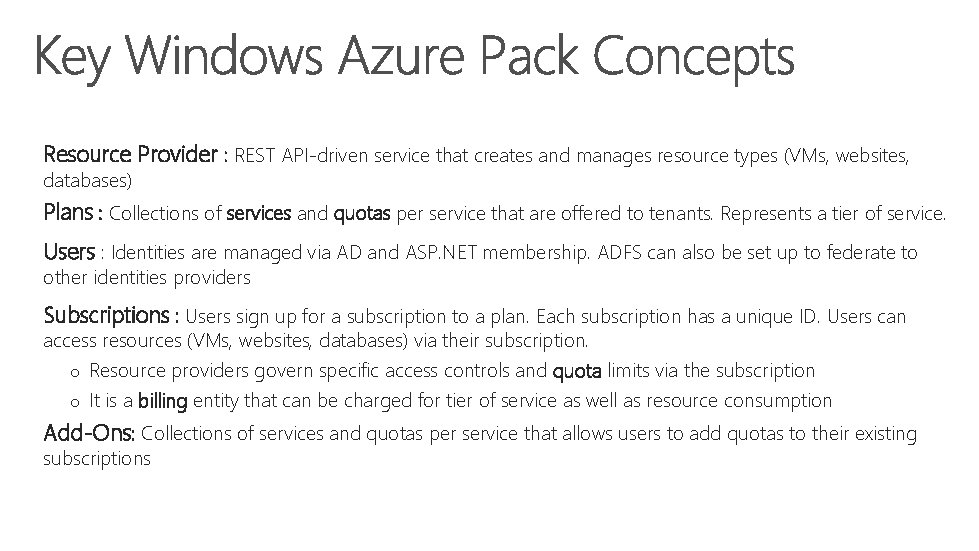
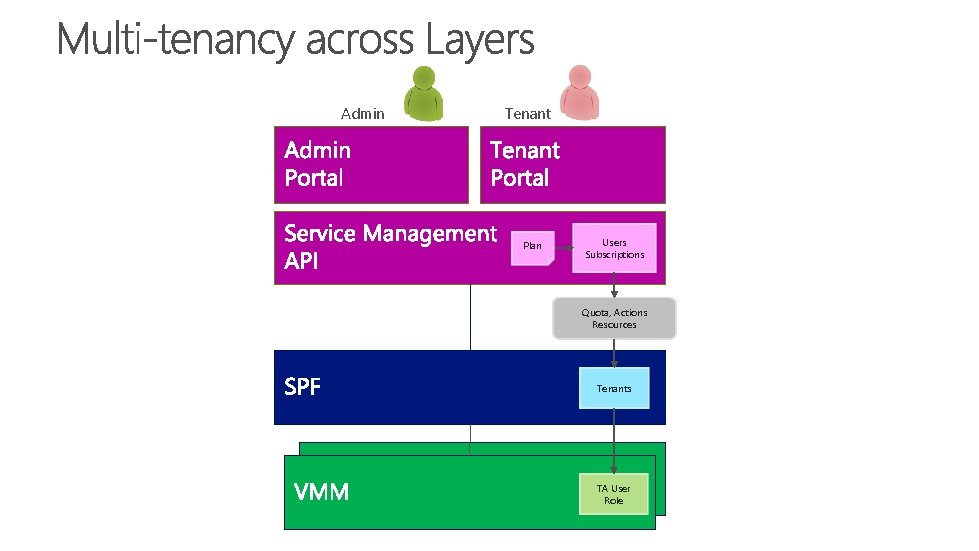
Resource Provider : REST API-driven service that creates and manages resource types (VMs, websites, databases) Plans : Collections of services and quotas per service that are offered to tenants. Represents a tier of service. Users : Identities are managed via AD and ASP. NET membership. ADFS can also be set up to federate to other identities providers Subscriptions : Users sign up for a subscription to a plan. Each subscription has a unique ID. Users can access resources (VMs, websites, databases) via their subscription. o Resource providers govern specific access controls and quota limits via the subscription o It is a billing entity that can be charged for tier of service as well as resource consumption Add-Ons: Collections of services and quotas per service that allows users to add quotas to their existing subscriptions
1. Configure Fabric 2. Create & Configure Cloud 3. Configure Accounts in SPF 4. Connect Service Management API to SPF & Register VMM server 5. Offer Plan with Cloud to Tenant User 6. Tenant Subscribes to Plan and Creates VM
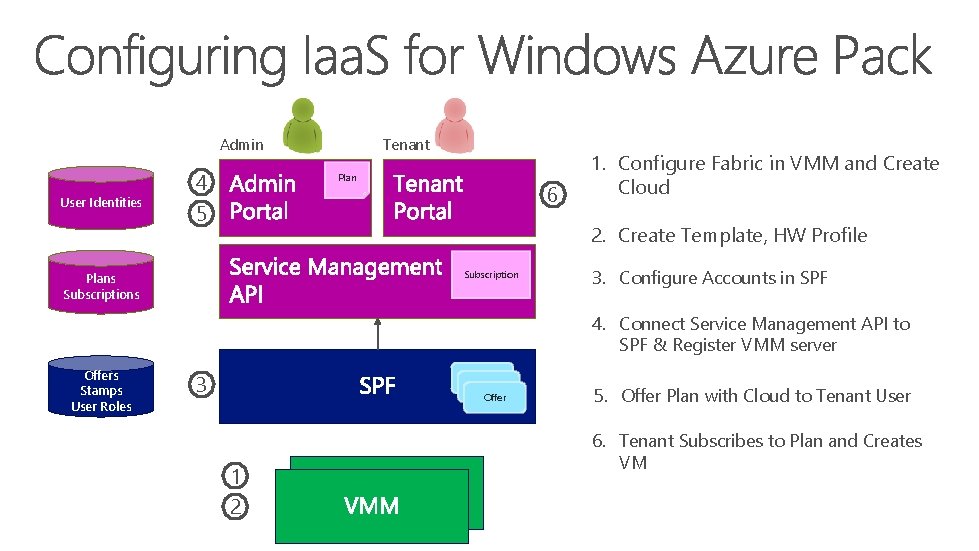
Admin User Identities 4 5 Tenant Plan 6 1. Configure Fabric in VMM and Create Cloud 2. Create Template, HW Profile Subscription Plans Subscriptions 3. Configure Accounts in SPF 4. Connect Service Management API to SPF & Register VMM server Offers Stamps User Roles 3 Offer 1 2 5. Offer Plan with Cloud to Tenant User 6. Tenant Subscribes to Plan and Creates VM
Admin Tenant Plan Users Subscriptions Quota, Actions Resources Tenants TA User Role
http: //www. microsoft. com/hosting/en/us/services. aspx
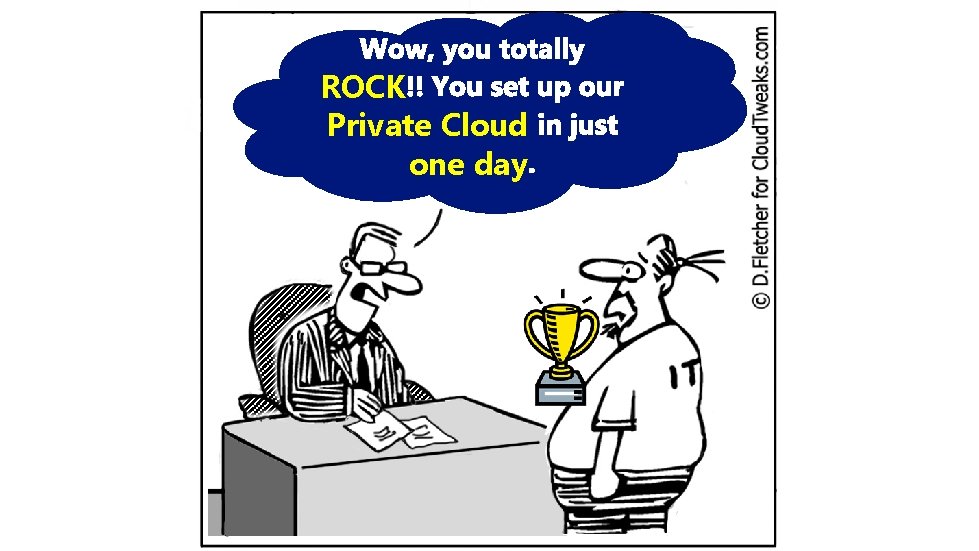
ROCK Private Cloud one day
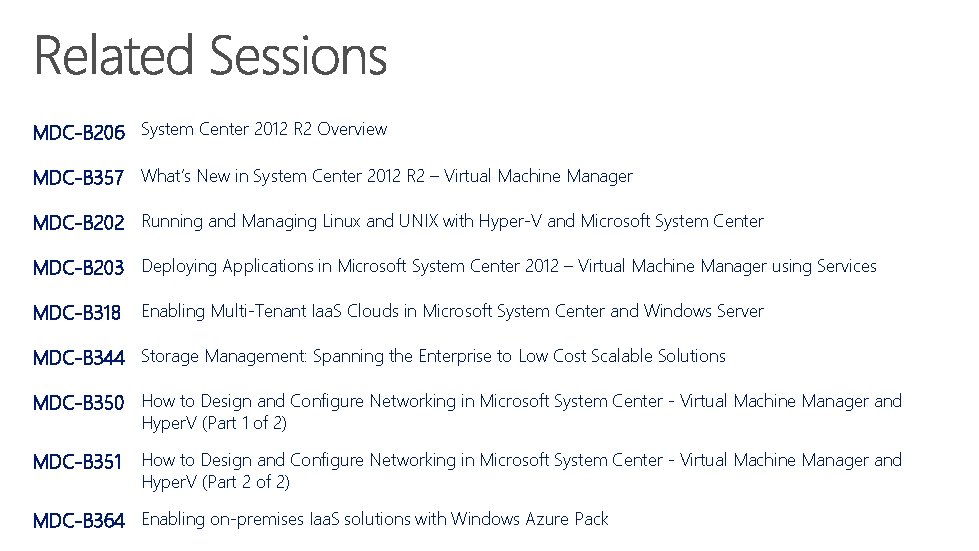
MDC-B 206 System Center 2012 R 2 Overview MDC-B 357 What’s New in System Center 2012 R 2 – Virtual Machine Manager MDC-B 202 Running and Managing Linux and UNIX with Hyper-V and Microsoft System Center MDC-B 203 Deploying Applications in Microsoft System Center 2012 – Virtual Machine Manager using Services MDC-B 318 Enabling Multi-Tenant Iaa. S Clouds in Microsoft System Center and Windows Server MDC-B 344 Storage Management: Spanning the Enterprise to Low Cost Scalable Solutions MDC-B 350 How to Design and Configure Networking in Microsoft System Center - Virtual Machine Manager and Hyper. V (Part 1 of 2) MDC-B 351 How to Design and Configure Networking in Microsoft System Center - Virtual Machine Manager and Hyper. V (Part 2 of 2) MDC-B 364 Enabling on-premises Iaa. S solutions with Windows Azure Pack
http: //channel 9. msdn. com/Events/Tech. Ed www. microsoft. com/learning http: //microsoft. com/technet http: //microsoft. com/msdn