
Horus e Portfolio for Foundation Kata Vrnai Project

- Slides: 11
Horus e. Portfolio for Foundation Kata Várnai Project Manager, HEE. Horus@nhs. net
Introduction • From August 2016, all foundation doctors in England will be moved onto the Horus e. Portfolio • A project team was formed in January 2016 • The project team is made up of representatives from the following groups: – – – – HEE national team HEE North West team (inc the Horus development team) Foundation School Directors Foundation School Managers Business Managers UKFPO English Deans @NHS_Health. Ed. Eng
What is the project team doing? • In the process of producing plans and documentation regarding governance, security and privacy, data migration, system development, service provision and training • Speaking to current users of Horus to gain insight into their experience with the system • Speaking to users of other e-portfolios to learn from their experiences • Attending national meetings to share information and get feedback from stakeholders – Inc FSDs, FSMs, TAG, NACT, FDAB @NHS_Health. Ed. Eng
And the development team? • The development team has been expanded and has begun work on preparing the system to receive its increased user base for the August 2016 -17 training year. • Some of their biggest tasks at the moment are: – Building the HEE location tree into Horus – Overhauling the current authorisation of users process (e. g. user types and what they can see/do in the system) to allow for a widened user base – Reviewing system code to identify where throughout the system updates are required to allow above-mentioned developments @NHS_Health. Ed. Eng
Development team continued • Following this, the team will work on, amongst other developments: – Setting up a bulk FPAS import process for FP 2016 – Updating necessary forms/functionality as requested by the UKFPO for August 2016 – New hosting arrangements for the expanded system, including load testing – Setting up a test/training version of Horus @NHS_Health. Ed. Eng
Training • We know that training requirements are extensive and that robust training is vital for successful roll out • We ask all our stakeholders to contribute in any way you can to national and local training plans • The February newsletter (which most of you should have received by now) details some of our plans • We’re working hard to confirm dates for webinars and face to face national training events and hope to advertise these within the next two weeks @NHS_Health. Ed. Eng
What does Horus look like and when will I get access? • I will show you a series of screenshots to give you an idea of what it looks like • These slides will be circulated to attendees following this event, together with the February newsletter and the first Horus familiarisation document • Access will be granted to administrators as soon as feasible and no later than 1 July 2016 – We are working hard to get you access earlier than this! @NHS_Health. Ed. Eng
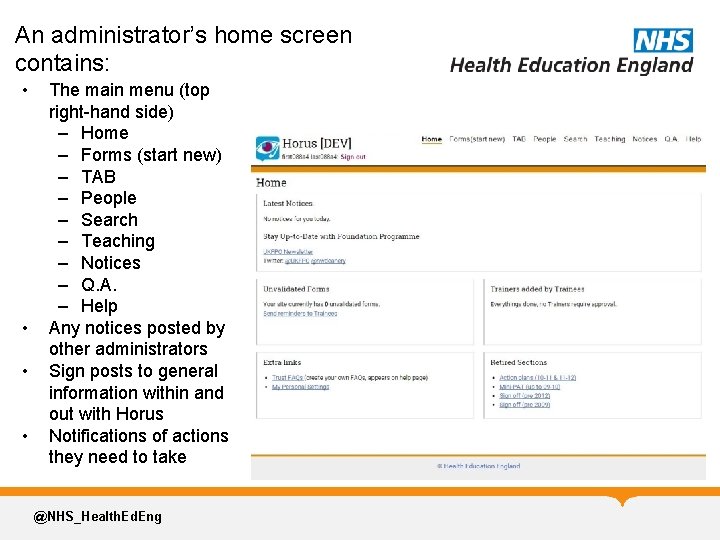
An administrator’s home screen contains: • • The main menu (top right-hand side) – Home – Forms (start new) – TAB – People – Search – Teaching – Notices – Q. A. – Help Any notices posted by other administrators Sign posts to general information within and out with Horus Notifications of actions they need to take @NHS_Health. Ed. Eng
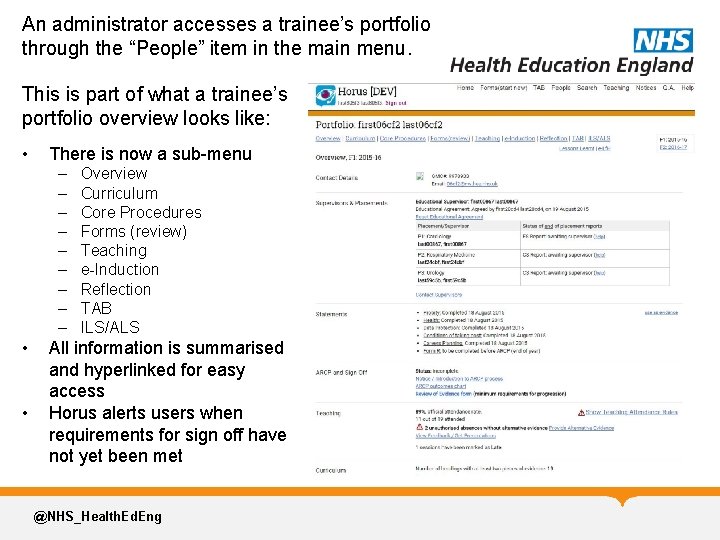
An administrator accesses a trainee’s portfolio through the “People” item in the main menu. This is part of what a trainee’s portfolio overview looks like: • There is now a sub-menu – – – – – • • Overview Curriculum Core Procedures Forms (review) Teaching e-Induction Reflection TAB ILS/ALS All information is summarised and hyperlinked for easy access Horus alerts users when requirements for sign off have not yet been met @NHS_Health. Ed. Eng
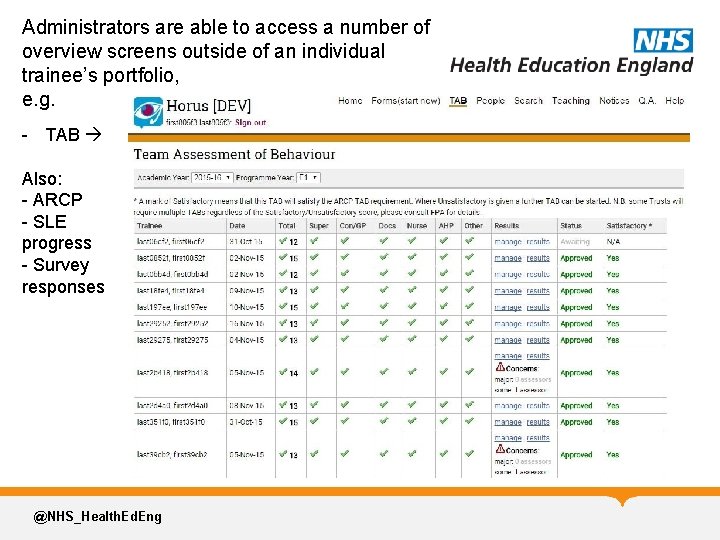
Administrators are able to access a number of overview screens outside of an individual trainee’s portfolio, e. g. - TAB Also: - ARCP - SLE progress - Survey responses @NHS_Health. Ed. Eng
Thanks for listening! Any questions? @NHS_Health. Ed. Eng Contact us at HEE. Horus@nhs. net