
Honeywell Inbound Shipping Solution Implementation TMS Transportation Management
Honeywell Inbound Shipping Solution Implementation TMS (Transportation Management System) x. Carrier Wave 5 Deployment
Policy Letter sent to Suppliers Dear Valued Supplier, Adopting a Transportation Management System (TMS) to control costs and manage our transportation lanes more effectively in today's fast-changing environment is a natural next step in Supply Chain Management. To take us to the next level, we've integrated a web-based shipping application called x. Carrier into our Honeywell Aerospace standard Enterprise Resource Planning (ERP) system that is currently running SAP Software. x. Carrier will allow Honeywell to better manage our inbound freight costs and provide real-time visibility to supplier shipments using Advanced Ship Notices (ASN). All required documentation, including SPOC 239 label, carrier label will be printed out of the x. Carrier system. Initial implementation of our x. Carrier system begins with suppliers to our Phoenix Engines facility. This deployment in June will be followed by a series of deployment waves through the end of the year for our other sites. x. Carrier will become the standard method that suppliers will use to ship to Honeywell. Existing Honeywell carrier account numbers will be deactivated after an initial deployment grace period. All inbound Honeywell funded shipments will be required to be sent though the x. Carrier system. Currently, not all Honeywell Aerospace sites are up on SAP. Consequently, those sites not running SAP are not able to use x. Carrier functionality at this time. A complete list of Honeywell sites currently not in scope for x. Carrier shipments will be communicated by our TMS team to all suppliers. We know this requirement will require internal process changes in your organization, therefore we will be providing training. The TMS team has already contacted suppliers to Phoenix Engines and completed preliminary training. Additional training sessions will be scheduled. Training Material is being finalized and will be distributed to all suppliers. Our Buyers and Supplier Development Engineers are aware of these changes but if you have questions, please contact the TMS team first at their team mailbox: Aero. Xcarrier. Support@honeywell. com. Your help and cooperation in this effort is greatly appreciated. Thank you. Sincerely, Jimmy Mc. Donald Vice President, Honeywell Global Sourcing #2 HONEYWELL - CONFIDENTIAL File Number
Support Info Supplier Support Information: You will need the following information to assist with supporting Suppliers in the setup and use of this tool: Honeywell Aerospace Supplier Portal (HASP) Link (x. Carrier) Supplier Training Documentation x. Carrier Support Mailbox Buyer Training Two Buyer Training sessions for EMEA Region Scheduled for September and more will be scheduled if required. #3 HONEYWELL - CONFIDENTIAL File Number
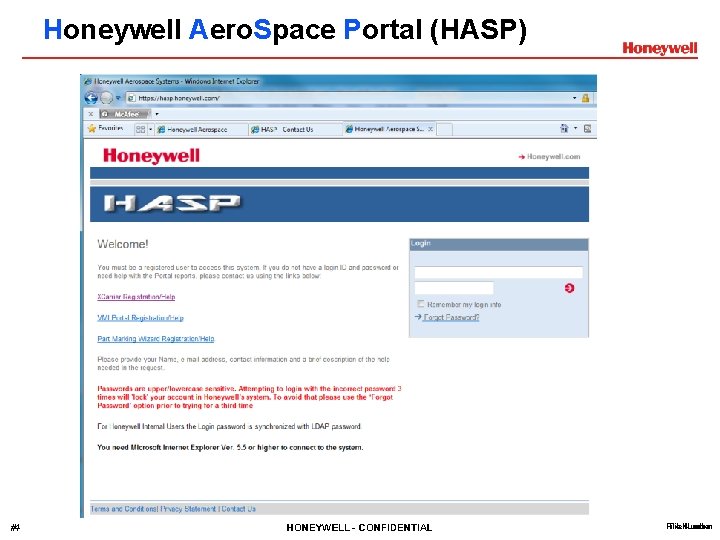
Honeywell Aero. Space Portal (HASP) #4 HONEYWELL - CONFIDENTIAL File Number
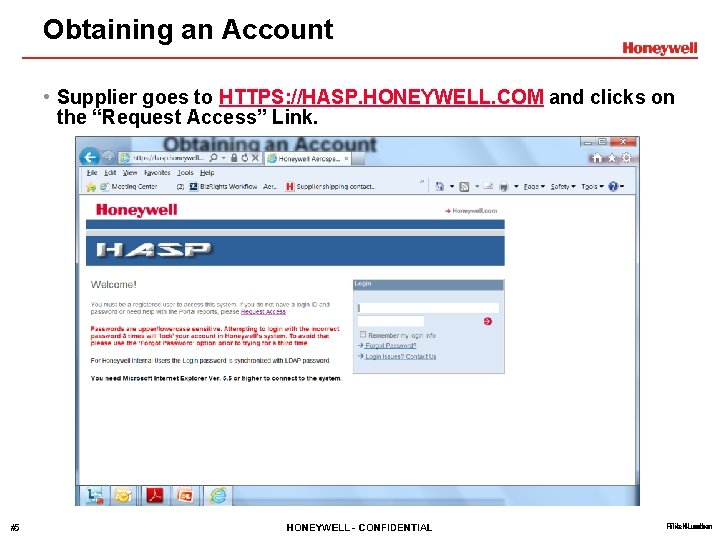
Obtaining an Account • Supplier goes to HTTPS: //HASP. HONEYWELL. COM and clicks on the “Request Access” Link. #5 HONEYWELL - CONFIDENTIAL File Number
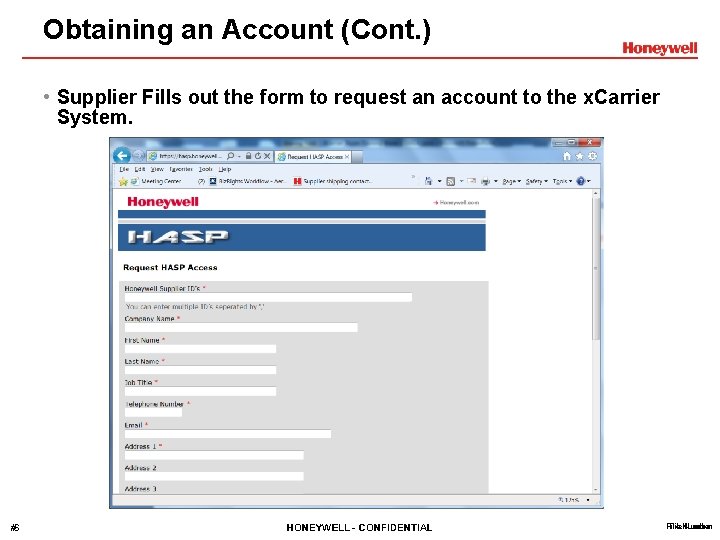
Obtaining an Account (Cont. ) • Supplier Fills out the form to request an account to the x. Carrier System. #6 HONEYWELL - CONFIDENTIAL File Number
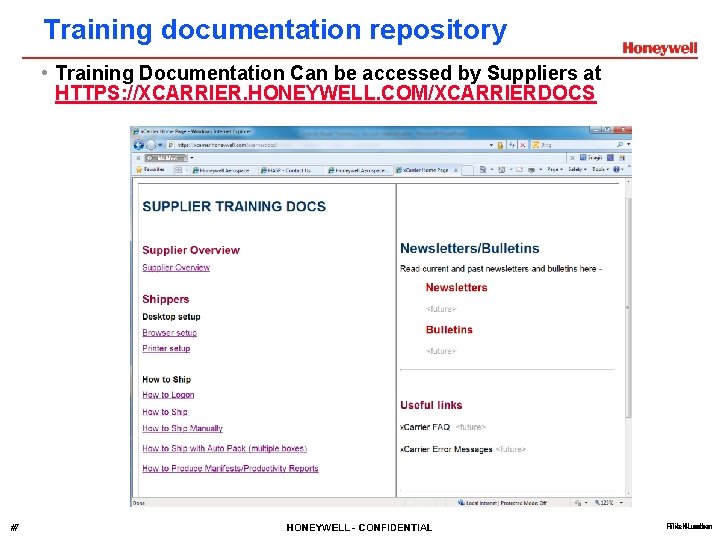
Training documentation repository • Training Documentation Can be accessed by Suppliers at HTTPS: //XCARRIER. HONEYWELL. COM/XCARRIERDOCS #7 HONEYWELL - CONFIDENTIAL File Number
Support For any questions related to Xcarrier, send email to: Aero. Xcarrier. Support@Honeywell. com Support mailbox monitored 24 hours a day during working days. #8 HONEYWELL - CONFIDENTIAL File Number
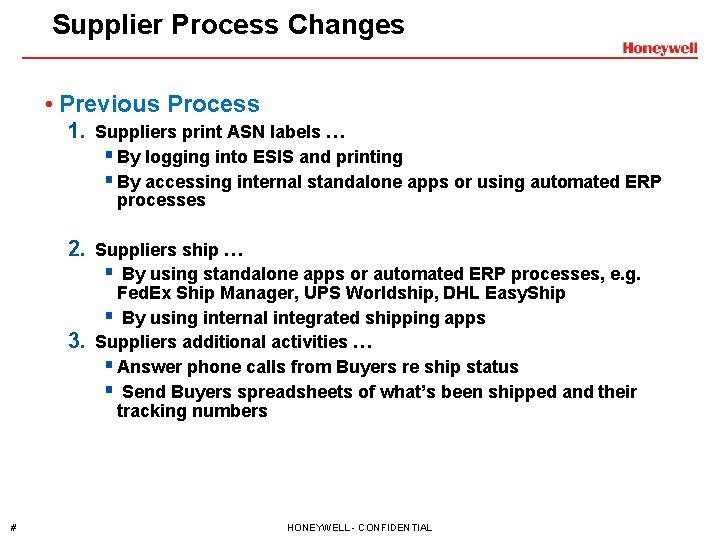
Supplier Process Changes • Previous Process 1. Suppliers print ASN labels … § By logging into ESIS and printing § By accessing internal standalone apps or using automated ERP processes 2. Suppliers ship … § By using standalone apps or automated ERP processes, e. g. 3. # Fed. Ex Ship Manager, UPS Worldship, DHL Easy. Ship § By using internal integrated shipping apps Suppliers additional activities … § Answer phone calls from Buyers re ship status § Send Buyers spreadsheets of what’s been shipped and their tracking numbers HONEYWELL - CONFIDENTIAL File Number
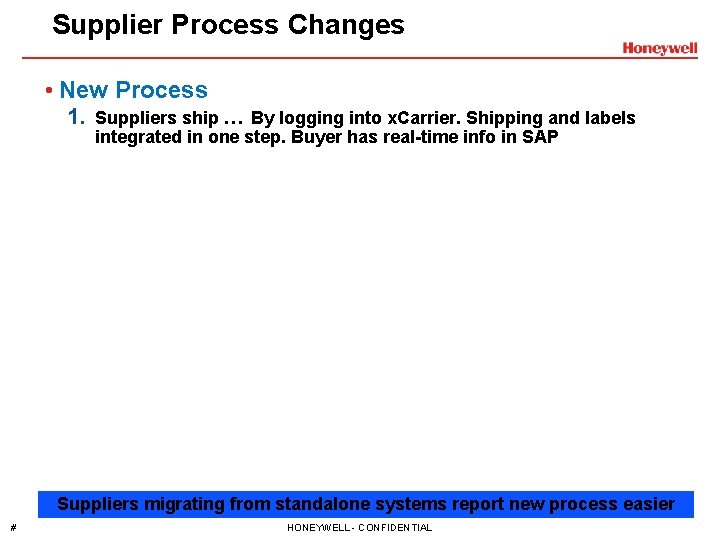
Supplier Process Changes • New Process 1. Suppliers ship … By logging into x. Carrier. Shipping and labels integrated in one step. Buyer has real-time info in SAP Suppliers migrating from standalone systems report new process easier # HONEYWELL - CONFIDENTIAL File Number
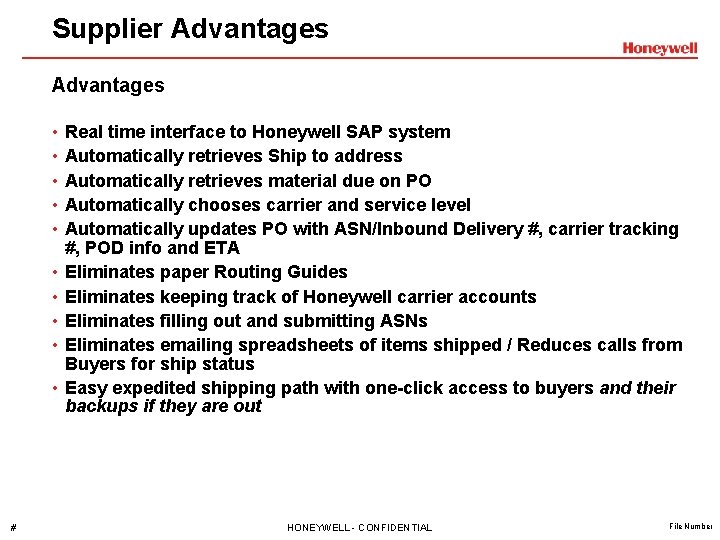
Supplier Advantages • • • # Real time interface to Honeywell SAP system Automatically retrieves Ship to address Automatically retrieves material due on PO Automatically chooses carrier and service level Automatically updates PO with ASN/Inbound Delivery #, carrier tracking #, POD info and ETA Eliminates paper Routing Guides Eliminates keeping track of Honeywell carrier accounts Eliminates filling out and submitting ASNs Eliminates emailing spreadsheets of items shipped / Reduces calls from Buyers for ship status Easy expedited shipping path with one-click access to buyers and their backups if they are out HONEYWELL - CONFIDENTIAL File Number
Shipment Expedite Request Process (Buyer) # HONEYWELL - CONFIDENTIAL File Number
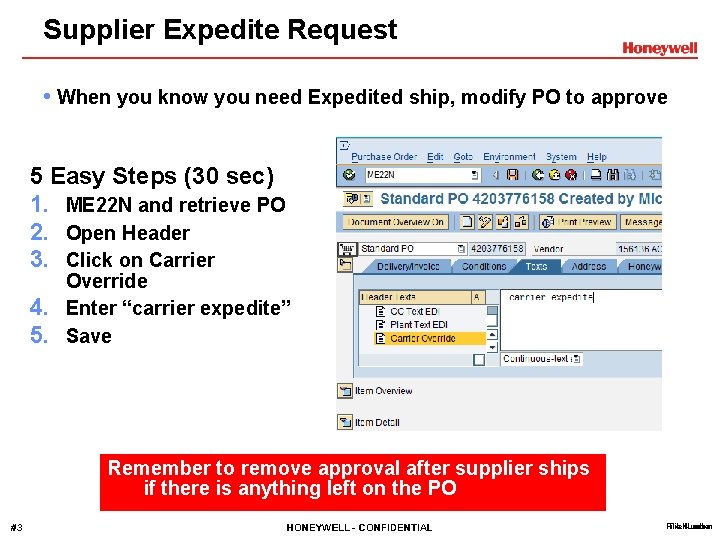
Supplier Expedite Request • When you know you need Expedited ship, modify PO to approve 5 Easy Steps (30 sec) 1. ME 22 N and retrieve PO 2. Open Header 3. Click on Carrier 4. 5. Override Enter “carrier expedite” Save Remember to remove approval after supplier ships if there is anything left on the PO #13 HONEYWELL - CONFIDENTIAL File Number
Supplier Expedite Request Optional method: Enter the specific SO 10 Text or Search for it • Complete instructions here - #14 HONEYWELL - CONFIDENTIAL File Number
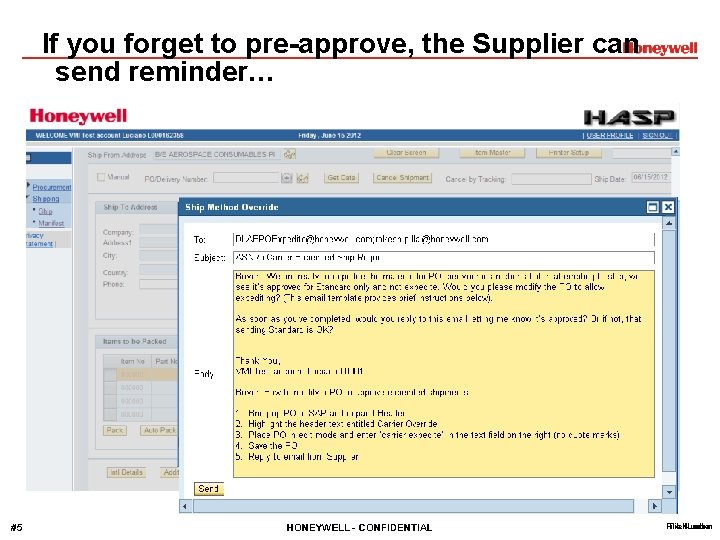
If you forget to pre-approve, the Supplier can send reminder… #15 HONEYWELL - CONFIDENTIAL File Number
If you will be out, set you Out of Office with Auto Forward in Outlook #16 HONEYWELL - CONFIDENTIAL File Number
Appendix # HONEYWELL - CONFIDENTIAL File Number
ESIS ASN to x. Carrier ASN Transition # HONEYWELL - CONFIDENTIAL File Number
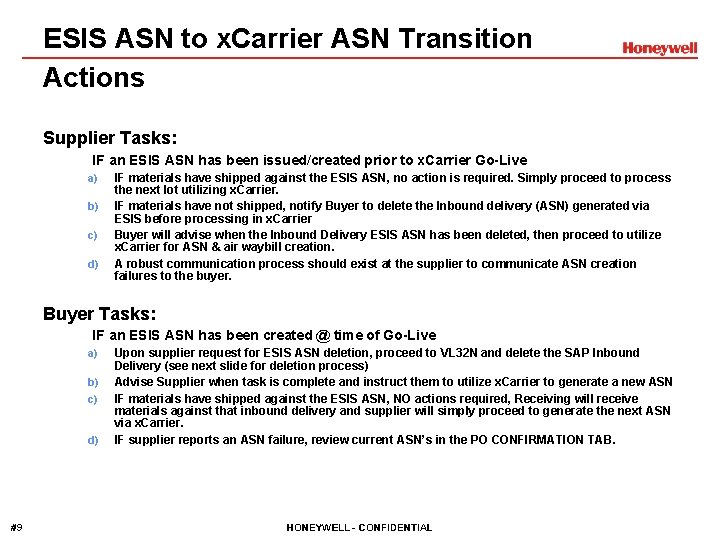
ESIS ASN to x. Carrier ASN Transition Actions Supplier Tasks: 1) IF an ESIS ASN has been issued/created prior to x. Carrier Go-Live a) b) c) d) IF materials have shipped against the ESIS ASN, no action is required. Simply proceed to process the next lot utilizing x. Carrier. IF materials have not shipped, notify Buyer to delete the Inbound delivery (ASN) generated via ESIS before processing in x. Carrier Buyer will advise when the Inbound Delivery ESIS ASN has been deleted, then proceed to utilize x. Carrier for ASN & air waybill creation. A robust communication process should exist at the supplier to communicate ASN creation failures to the buyer. Buyer Tasks: 1) IF an ESIS ASN has been created @ time of Go-Live a) b) c) d) #19 Upon supplier request for ESIS ASN deletion, proceed to VL 32 N and delete the SAP Inbound Delivery (see next slide for deletion process) Advise Supplier when task is complete and instruct them to utilize x. Carrier to generate a new ASN IF materials have shipped against the ESIS ASN, NO actions required, Receiving will receive materials against that inbound delivery and supplier will simply proceed to generate the next ASN via x. Carrier. IF supplier reports an ASN failure, review current ASN’s in the PO CONFIRMATION TAB. HONEYWELL - CONFIDENTIAL File Number
Site Supply Specialist / Receiving Lemon Shelf/Error Recognition & Resolution # HONEYWELL - CONFIDENTIAL File Number
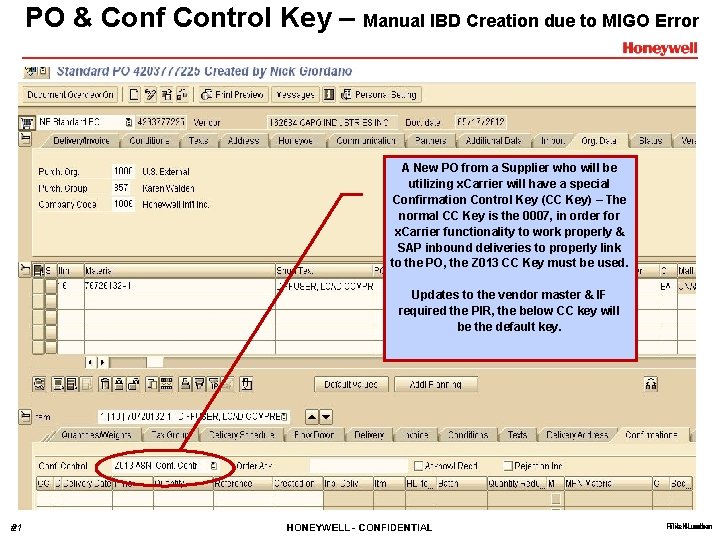
PO & Conf Control Key – Manual IBD Creation due to MIGO Error A New PO from a Supplier who will be utilizing x. Carrier will have a special Confirmation Control Key (CC Key) – The normal CC Key is the 0007, in order for x. Carrier functionality to work properly & SAP inbound deliveries to properly link to the PO, the Z 013 CC Key must be used. Updates to the vendor master & IF required the PIR, the below CC key will be the default key. #21 HONEYWELL - CONFIDENTIAL File Number
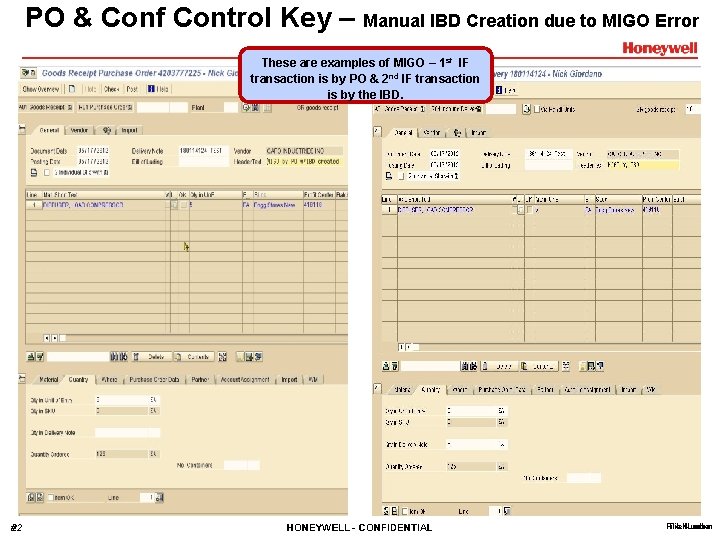
PO & Conf Control Key – Manual IBD Creation due to MIGO Error These are examples of MIGO – 1 st IF transaction is by PO & 2 nd IF transaction is by the IBD. #22 HONEYWELL - CONFIDENTIAL File Number
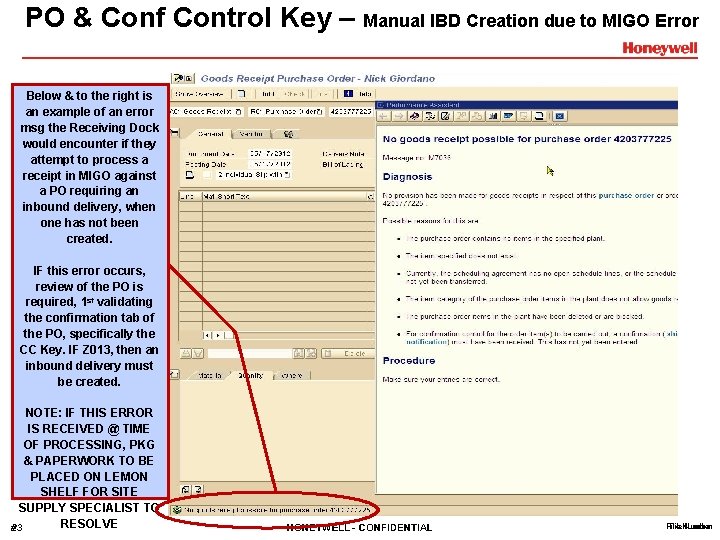
PO & Conf Control Key – Manual IBD Creation due to MIGO Error Below & to the right is an example of an error msg the Receiving Dock would encounter if they attempt to process a receipt in MIGO against a PO requiring an inbound delivery, when one has not been created. IF this error occurs, review of the PO is required, 1 st validating the confirmation tab of the PO, specifically the CC Key. IF Z 013, then an inbound delivery must be created. NOTE: IF THIS ERROR IS RECEIVED @ TIME OF PROCESSING, PKG & PAPERWORK TO BE PLACED ON LEMON SHELF FOR SITE SUPPLY SPECIALIST TO RESOLVE #23 HONEYWELL - CONFIDENTIAL File Number
Site Supply Specialist Creating an IBD & Deleting an IBD Lemon Shelf Items # HONEYWELL - CONFIDENTIAL File Number
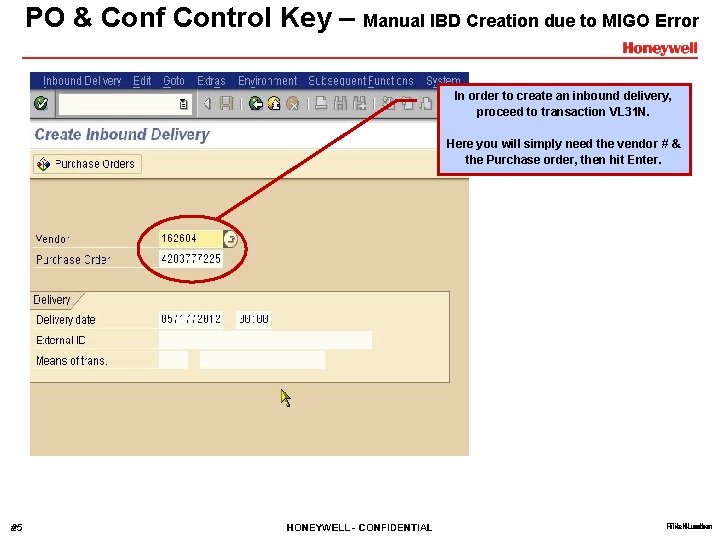
PO & Conf Control Key – Manual IBD Creation due to MIGO Error In order to create an inbound delivery, proceed to transaction VL 31 N. Here you will simply need the vendor # & the Purchase order, then hit Enter. #25 HONEYWELL - CONFIDENTIAL File Number
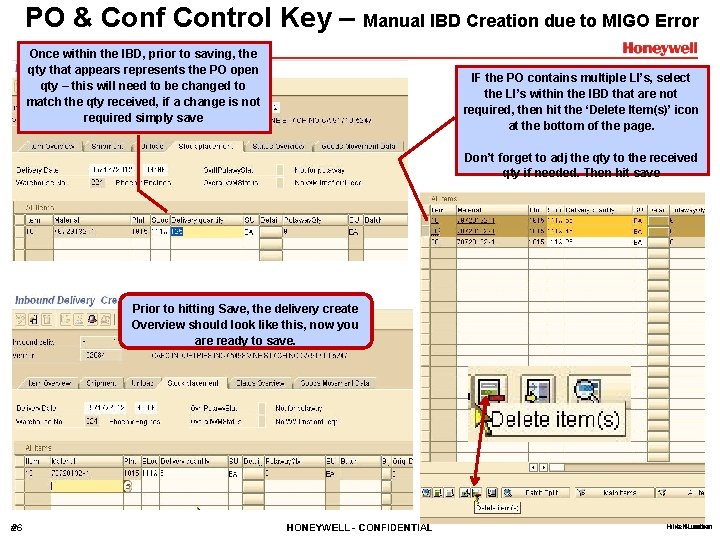
PO & Conf Control Key – Manual IBD Creation due to MIGO Error Once within the IBD, prior to saving, the qty that appears represents the PO open qty – this will need to be changed to match the qty received, if a change is not required simply save IF the PO contains multiple LI’s, select the LI’s within the IBD that are not required, then hit the ‘Delete Item(s)’ icon at the bottom of the page. Don’t forget to adj the qty to the received qty if needed. Then hit save Prior to hitting Save, the delivery create Overview should look like this, now you are ready to save. #26 HONEYWELL - CONFIDENTIAL File Number
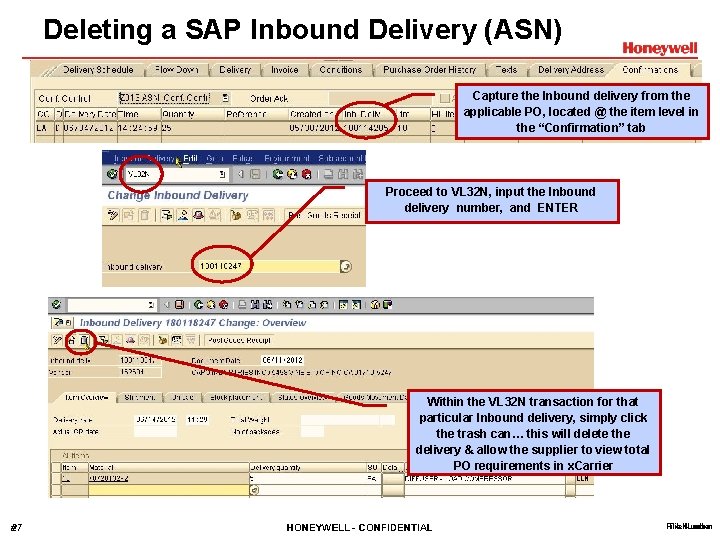
Deleting a SAP Inbound Delivery (ASN) Capture the Inbound delivery from the applicable PO, located @ the item level in the “Confirmation” tab Proceed to VL 32 N, input the Inbound delivery number, and ENTER Within the VL 32 N transaction for that particular Inbound delivery, simply click the trash can… this will delete the delivery & allow the supplier to view total PO requirements in x. Carrier #27 HONEYWELL - CONFIDENTIAL File Number
Receiving Personnel Processing a PO with materials having a SN profile of Z 001 # HONEYWELL - CONFIDENTIAL File Number
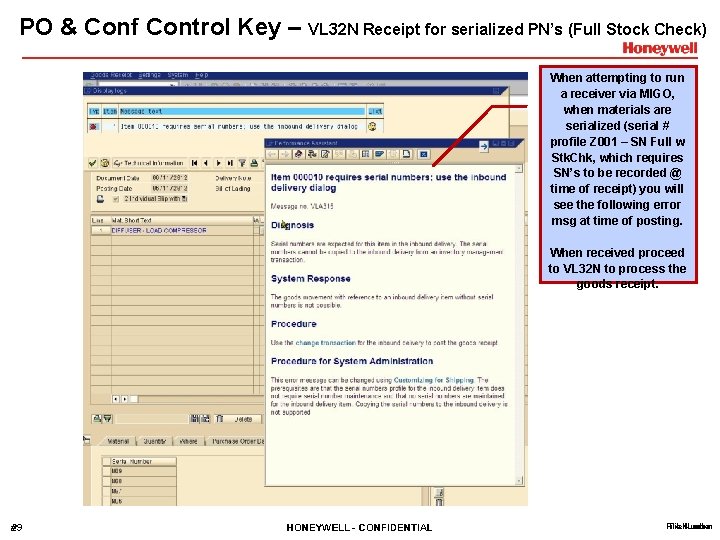
PO & Conf Control Key – VL 32 N Receipt for serialized PN’s (Full Stock Check) When attempting to run a receiver via MIGO, when materials are serialized (serial # profile Z 001 – SN Full w Stk. Chk, which requires SN’s to be recorded @ time of receipt) you will see the following error msg at time of posting. When received proceed to VL 32 N to process the goods receipt. #29 HONEYWELL - CONFIDENTIAL File Number
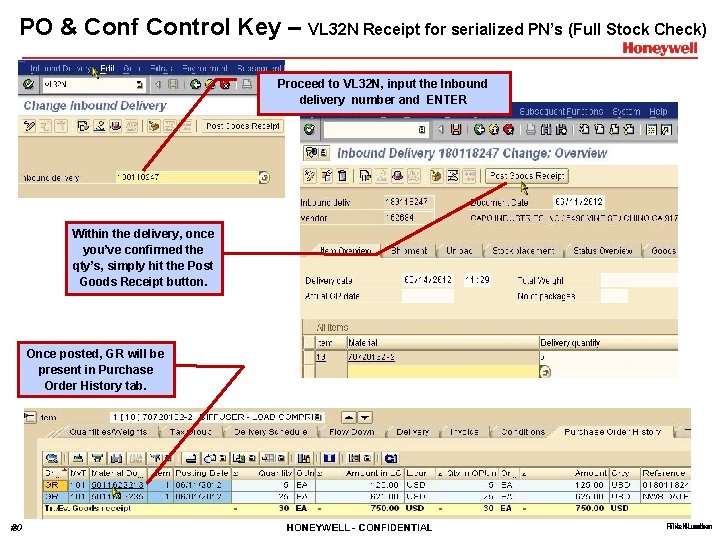
PO & Conf Control Key – VL 32 N Receipt for serialized PN’s (Full Stock Check) Proceed to VL 32 N, input the Inbound delivery number and ENTER Within the delivery, once you’ve confirmed the qty’s, simply hit the Post Goods Receipt button. Once posted, GR will be present in Purchase Order History tab. #30 HONEYWELL - CONFIDENTIAL File Number
XCarrier – SAP Interface FAQ’s # HONEYWELL - CONFIDENTIAL File Number
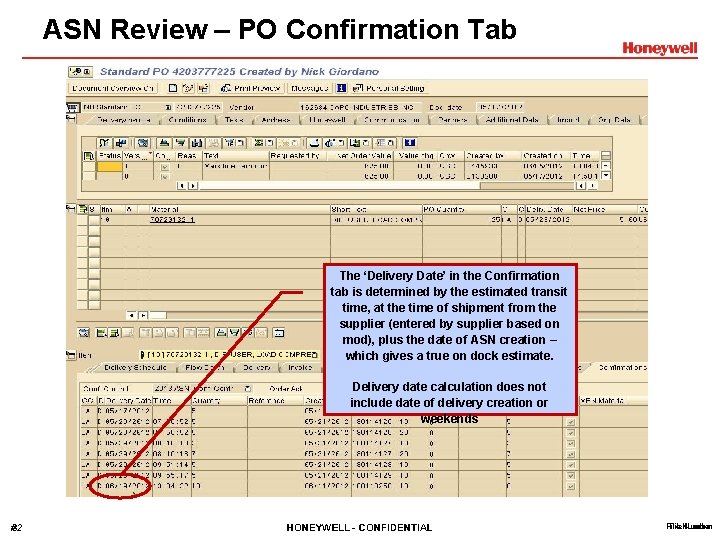
ASN Review – PO Confirmation Tab The ‘Delivery Date’ in the Confirmation tab is determined by the estimated transit time, at the time of shipment from the supplier (entered by supplier based on mod), plus the date of ASN creation – which gives a true on dock estimate. Delivery date calculation does not include date of delivery creation or weekends #32 HONEYWELL - CONFIDENTIAL File Number
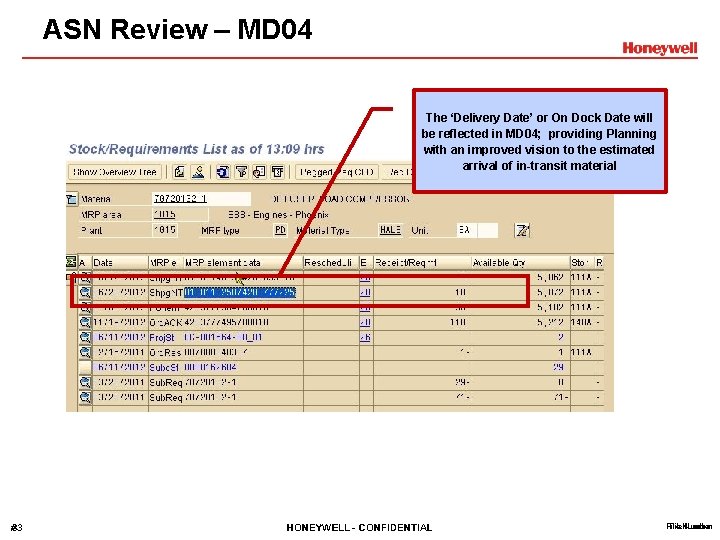
ASN Review – MD 04 The ‘Delivery Date’ or On Dock Date will be reflected in MD 04; providing Planning with an improved vision to the estimated arrival of in-transit material #33 HONEYWELL - CONFIDENTIAL File Number
- Slides: 33