
HIPP Calculator Training Scott Cioffi Jill Bell Donna
HIPP Calculator Training Scott Cioffi Jill Bell Donna Mc. Kay Vadim Yafayev
Overview • The HIPP program is designed to determine the cost effectiveness of paying a premium for Employer Sponsored Health Insurance (ESI) on behalf of Medicaid eligible individuals. • The calculator will determine if the cost of the premium added to the cost of the Medicaid wrap-around services (optional services not included in the ESI plan) + deductibles and administrative fees is less than the regional Medicaid managed care rates for individual covered on the policy. The policy must be cost effective to be eligible for HIPP (unless reimbursing for AHIP). • The calculation may be performed and saved under a registry or case number, but the user cannot create a HIPP payment until active CINs are added to the calculation. • Benchmark and wrap services may be covered by more than one policy. All covered benchmark and wrap services on the calculation must be included in one of the policies specified on the calculation. All clients entered on the calculation must be covered on all policies. HIPP Calculator Training 6/7/2021 6: 59 PM Slide 2 of 22
Agenda • Overview of HIPP Calculator Scott – Checklist of Important Information – Creating a HIPP Calculation Scratchpad – Creating a HIPP Policy • Walkthrough Examples Jill, Donna, Vadim – Creating a HIPP Calculation Scratchpad – Creating a HIPP Policy – Adding the HIPP Payee and creating a Pay-line – Editing Existing Pay-lines – Using the Mobius Report • Question and Comments HIPP Calculator Training 6/7/2021 6: 59 PM Slide 3 of 22
HIPP Calculator Checklist Make sure to: ü Have the case # ü Client’s First and Last name ü The Residential County of the Policy Holder ü Know the Scope of Benefits included in the Plan ü Know if the client(s) is MAGI or SSI ü All CINs that will be on the policy ü If pertinent, the policy number of the client’s plan, if he/she already has one on file. ü The carrier code for the plan HIPP Calculator Training 6/7/2021 6: 59 PM Slide 4 of 22
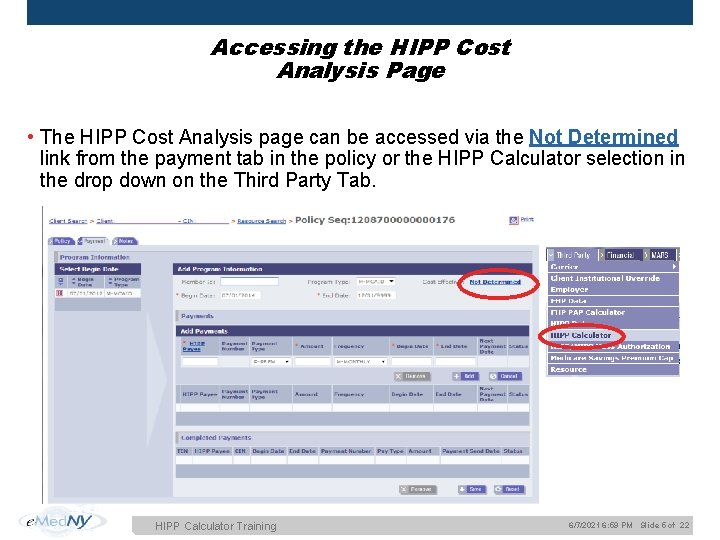
Accessing the HIPP Cost Analysis Page • The HIPP Cost Analysis page can be accessed via the Not Determined link from the payment tab in the policy or the HIPP Calculator selection in the drop down on the Third Party Tab. HIPP Calculator Training 6/7/2021 6: 59 PM Slide 5 of 22
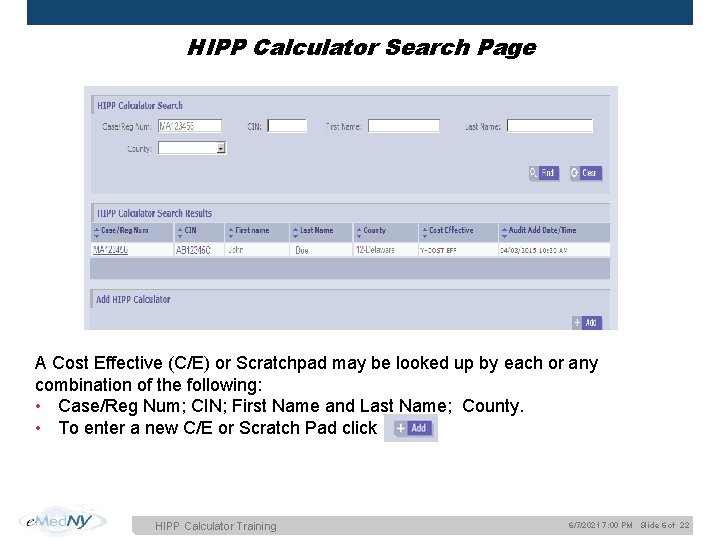
HIPP Calculator Search Page A Cost Effective (C/E) or Scratchpad may be looked up by each or any combination of the following: • Case/Reg Num; CIN; First Name and Last Name; County. • To enter a new C/E or Scratch Pad click HIPP Calculator Training 6/7/2021 7: 00 PM Slide 6 of 22
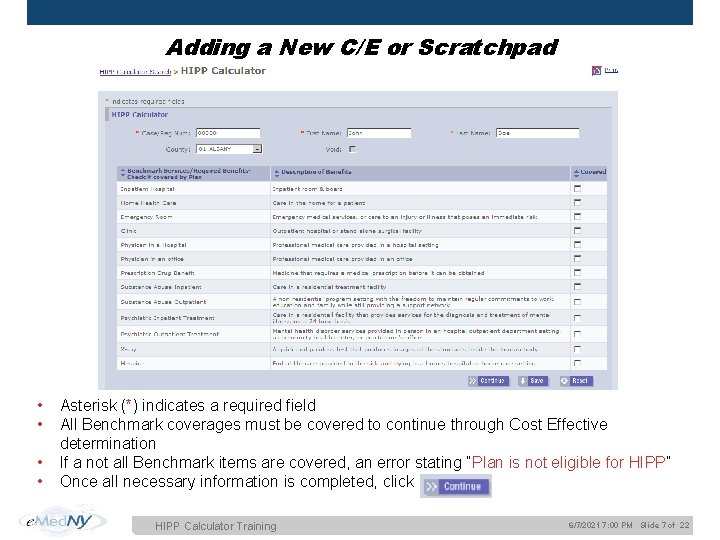
Adding a New C/E or Scratchpad • • Asterisk (*) indicates a required field All Benchmark coverages must be covered to continue through Cost Effective determination If a not all Benchmark items are covered, an error stating “Plan is not eligible for HIPP” Once all necessary information is completed, click HIPP Calculator Training 6/7/2021 7: 00 PM Slide 7 of 22
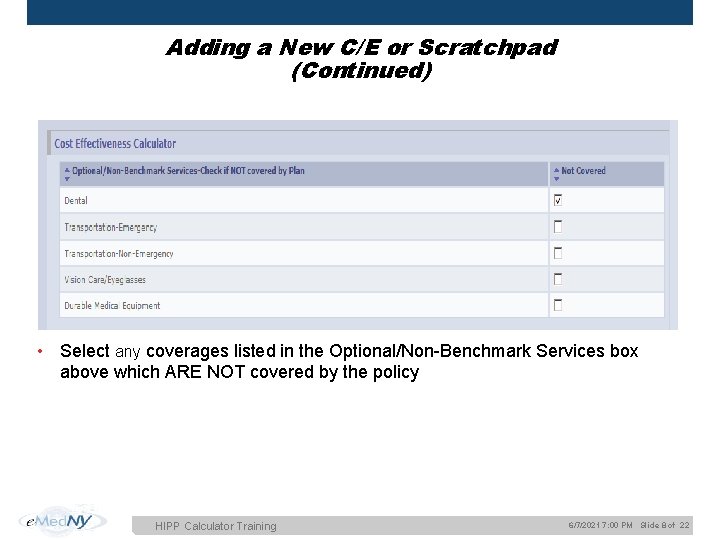
Adding a New C/E or Scratchpad (Continued) • Select any coverages listed in the Optional/Non-Benchmark Services box above which ARE NOT covered by the policy HIPP Calculator Training 6/7/2021 7: 00 PM Slide 8 of 22
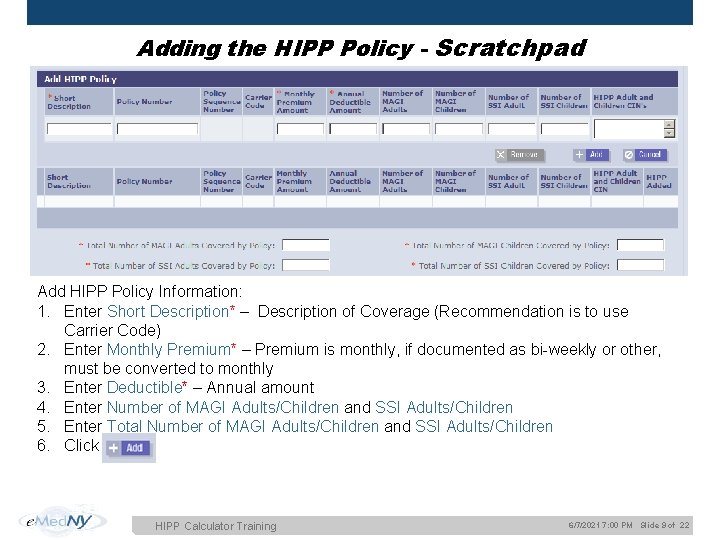
Adding the HIPP Policy - Scratchpad Add HIPP Policy Information: 1. Enter Short Description* – Description of Coverage (Recommendation is to use Carrier Code) 2. Enter Monthly Premium* – Premium is monthly, if documented as bi-weekly or other, must be converted to monthly 3. Enter Deductible* – Annual amount 4. Enter Number of MAGI Adults/Children and SSI Adults/Children 5. Enter Total Number of MAGI Adults/Children and SSI Adults/Children 6. Click HIPP Calculator Training 6/7/2021 7: 00 PM Slide 9 of 22
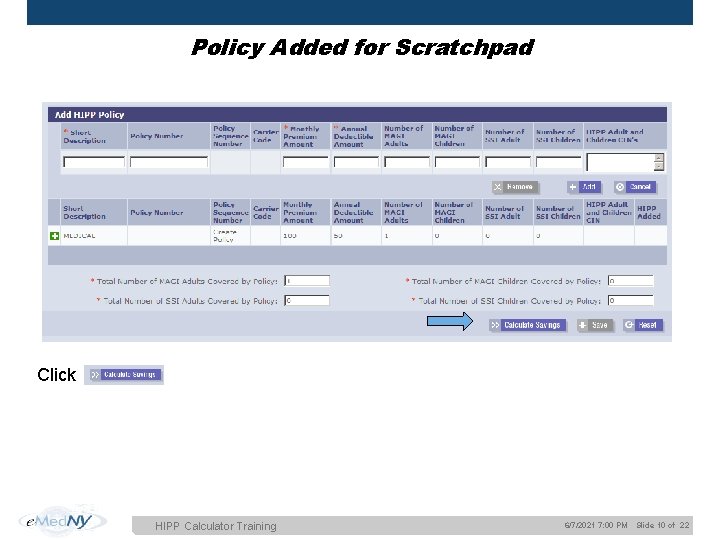
Policy Added for Scratchpad Click HIPP Calculator Training 6/7/2021 7: 00 PM Slide 10 of 22
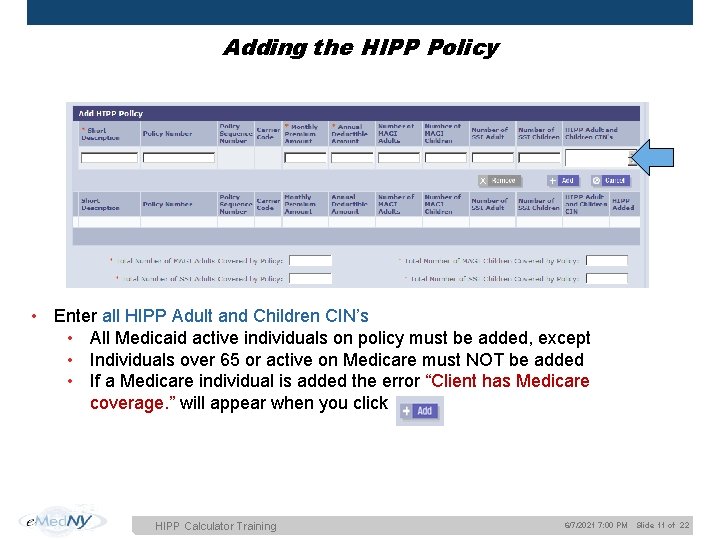
Adding the HIPP Policy • Enter all HIPP Adult and Children CIN’s • All Medicaid active individuals on policy must be added, except • Individuals over 65 or active on Medicare must NOT be added • If a Medicare individual is added the error “Client has Medicare coverage. ” will appear when you click HIPP Calculator Training 6/7/2021 7: 00 PM Slide 11 of 22
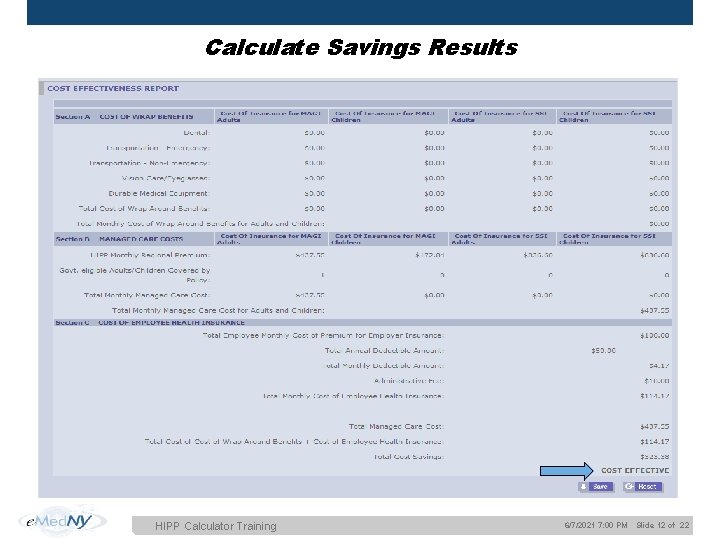
Calculate Savings Results HIPP Calculator Training 6/7/2021 7: 00 PM Slide 12 of 22
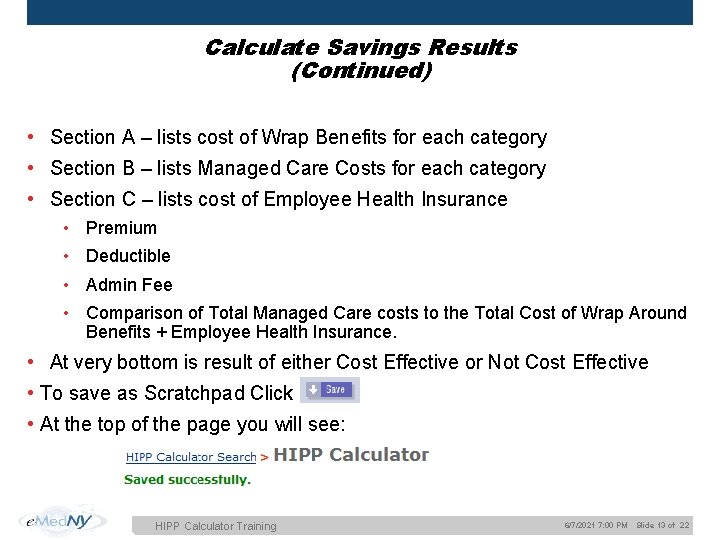
Calculate Savings Results (Continued) • Section A – lists cost of Wrap Benefits for each category • Section B – lists Managed Care Costs for each category • Section C – lists cost of Employee Health Insurance • Premium • Deductible • Admin Fee • Comparison of Total Managed Care costs to the Total Cost of Wrap Around Benefits + Employee Health Insurance. • At very bottom is result of either Cost Effective or Not Cost Effective • To save as Scratchpad Click • At the top of the page you will see: HIPP Calculator Training 6/7/2021 7: 00 PM Slide 13 of 22
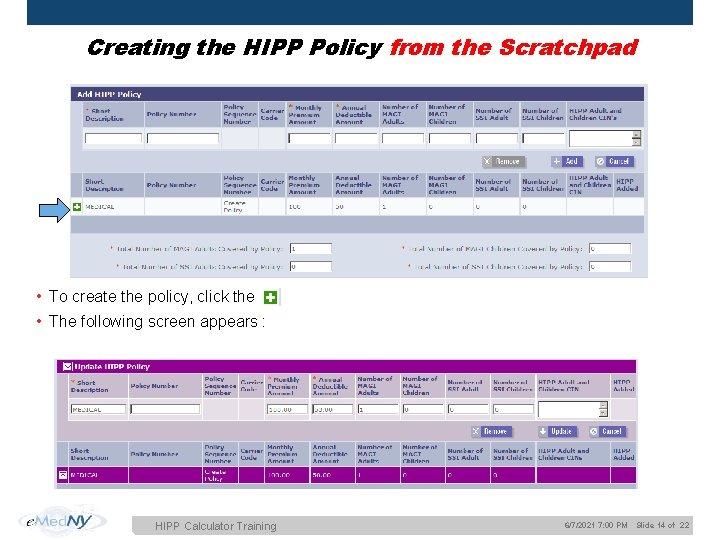
Creating the HIPP Policy from the Scratchpad • To create the policy, click the • The following screen appears : HIPP Calculator Training 6/7/2021 7: 00 PM Slide 14 of 22
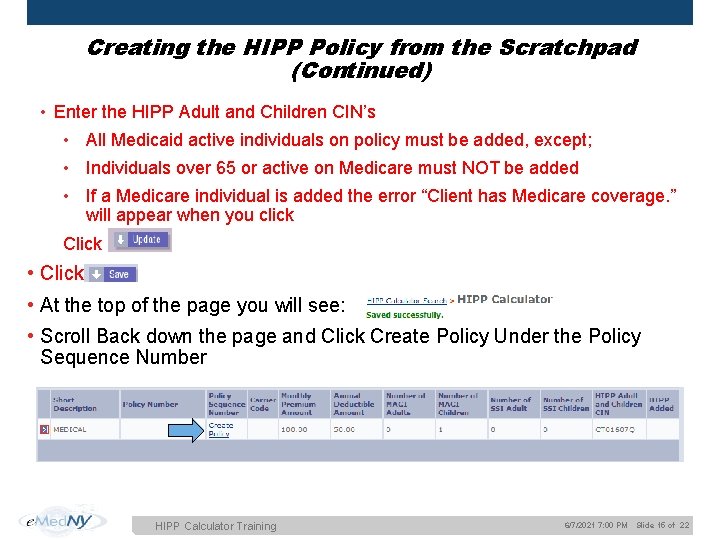
Creating the HIPP Policy from the Scratchpad (Continued) • Enter the HIPP Adult and Children CIN’s • All Medicaid active individuals on policy must be added, except; • Individuals over 65 or active on Medicare must NOT be added • If a Medicare individual is added the error “Client has Medicare coverage. ” will appear when you click Click • Click • At the top of the page you will see: • Scroll Back down the page and Click Create Policy Under the Policy Sequence Number HIPP Calculator Training 6/7/2021 7: 00 PM Slide 15 of 22
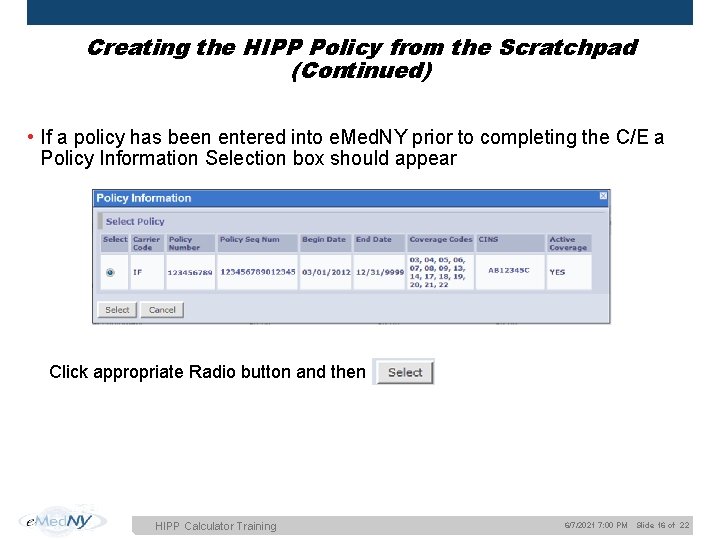
Creating the HIPP Policy from the Scratchpad (Continued) • If a policy has been entered into e. Med. NY prior to completing the C/E a Policy Information Selection box should appear Click appropriate Radio button and then HIPP Calculator Training 6/7/2021 7: 00 PM Slide 16 of 22
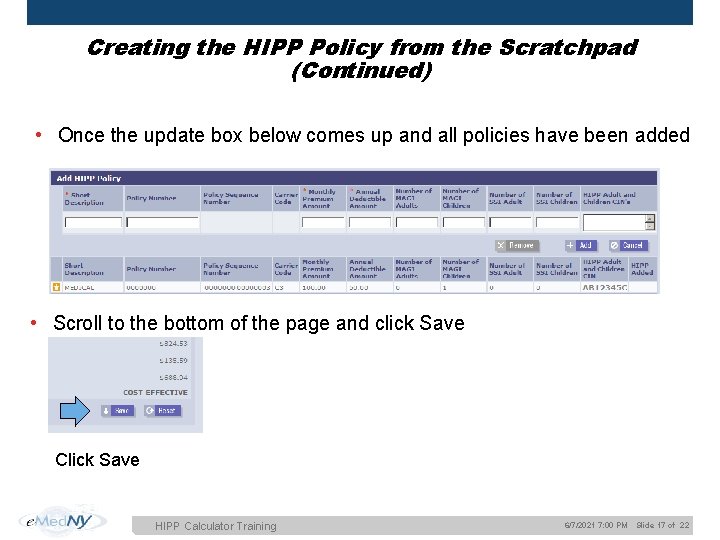
Creating the HIPP Policy from the Scratchpad (Continued) • Once the update box below comes up and all policies have been added • Scroll to the bottom of the page and click Save Click Save HIPP Calculator Training 6/7/2021 7: 00 PM Slide 17 of 22
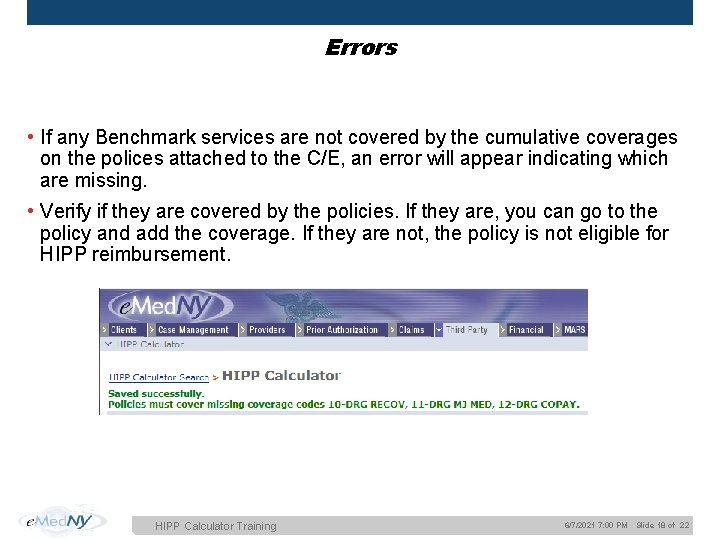
Errors • If any Benchmark services are not covered by the cumulative coverages on the polices attached to the C/E, an error will appear indicating which are missing. • Verify if they are covered by the policies. If they are, you can go to the policy and add the coverage. If they are not, the policy is not eligible for HIPP reimbursement. HIPP Calculator Training 6/7/2021 7: 00 PM Slide 18 of 22
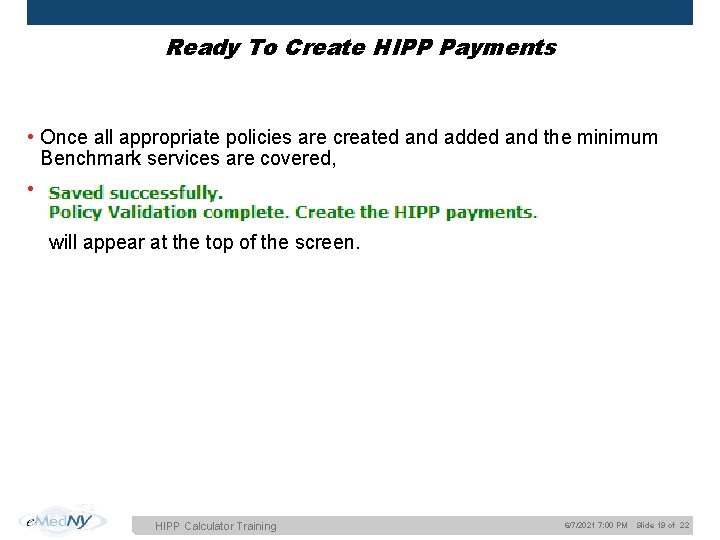
Ready To Create HIPP Payments • Once all appropriate policies are created and added and the minimum Benchmark services are covered, • will appear at the top of the screen. HIPP Calculator Training 6/7/2021 7: 00 PM Slide 19 of 22
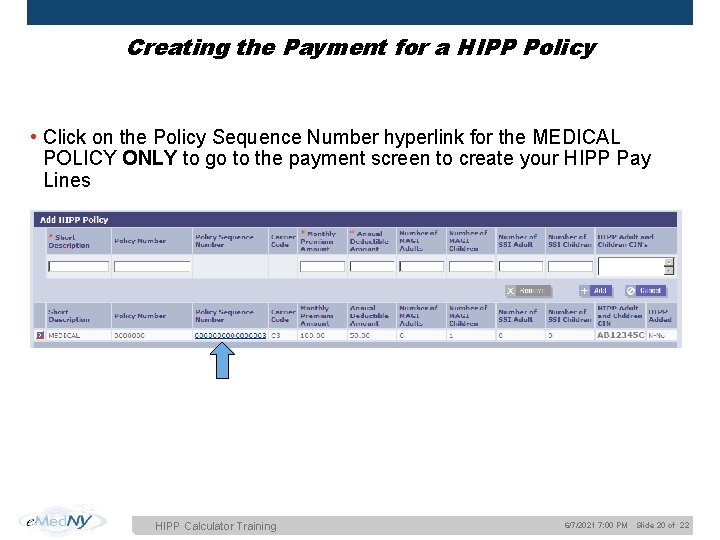
Creating the Payment for a HIPP Policy • Click on the Policy Sequence Number hyperlink for the MEDICAL POLICY ONLY to go to the payment screen to create your HIPP Pay Lines HIPP Calculator Training 6/7/2021 7: 00 PM Slide 20 of 22
Review of Examples • Scratchpad (with and without Benchmark errors) • MIPP Payments • Has Third Party Health Insurance • Cost Effective Pay Lines • The TPL HIPP Cost Analysis Report HIPP Calculator Training 6/7/2021 7: 00 PM Slide 21 of 22
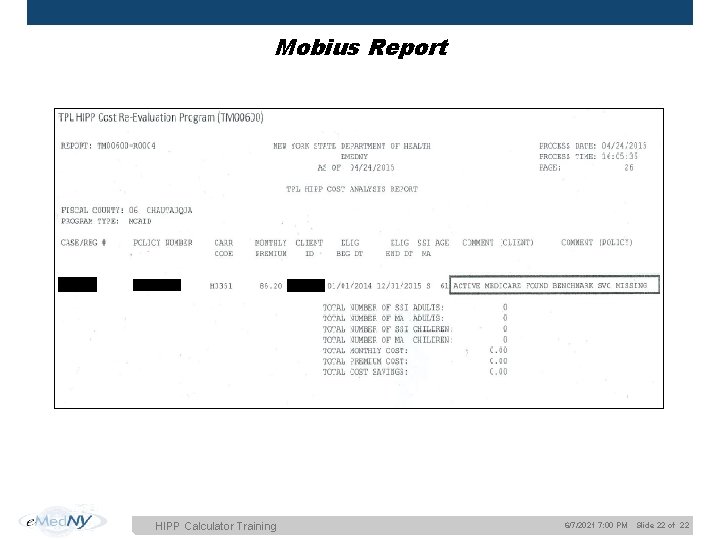
Mobius Report HIPP Calculator Training 6/7/2021 7: 00 PM Slide 22 of 22
Questions or Comments? • For more information, refer to the user guides. • For troubleshooting, call the e. Med. NY End User Help Desk at 866 -5419006 or email emednyapphelpdesk@csc. com • To receive credit for training you must complete the survey indicating your name and county. • Survey Link: https: //www. surveymonkey. com/s/Help. Desk. Training HIPP Calculator Training 6/7/2021 7: 00 PM Slide 23 of 22
- Slides: 23