
High Performance Computing With Microsoft Compute Cluster Solution





![Example: Calculate pi #include "mpi. h" #include <math. h> int main(int argc, char *argv[])](https://slidetodoc.com/presentation_image_h/1573dcb5653af1db38fc36795a016eec/image-25.jpg "Example: Calculate pi #include \"mpi. h\" #include <math. h> int main(int argc, char *argv[])")
- Slides: 34
High Performance Computing With Microsoft Compute Cluster Solution Kyril Faenov (kyrilf@microsoft. com) DAT 301 Director of High Performance Computing Microsoft Corporation 1
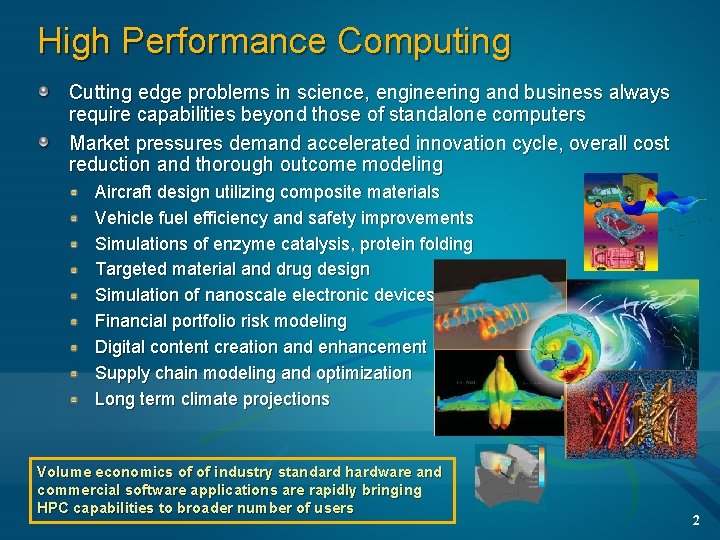
High Performance Computing Cutting edge problems in science, engineering and business always require capabilities beyond those of standalone computers Market pressures demand accelerated innovation cycle, overall cost reduction and thorough outcome modeling Aircraft design utilizing composite materials Vehicle fuel efficiency and safety improvements Simulations of enzyme catalysis, protein folding Targeted material and drug design Simulation of nanoscale electronic devices Financial portfolio risk modeling Digital content creation and enhancement Supply chain modeling and optimization Long term climate projections Volume economics of of industry standard hardware and commercial software applications are rapidly bringing HPC capabilities to broader number of users 2
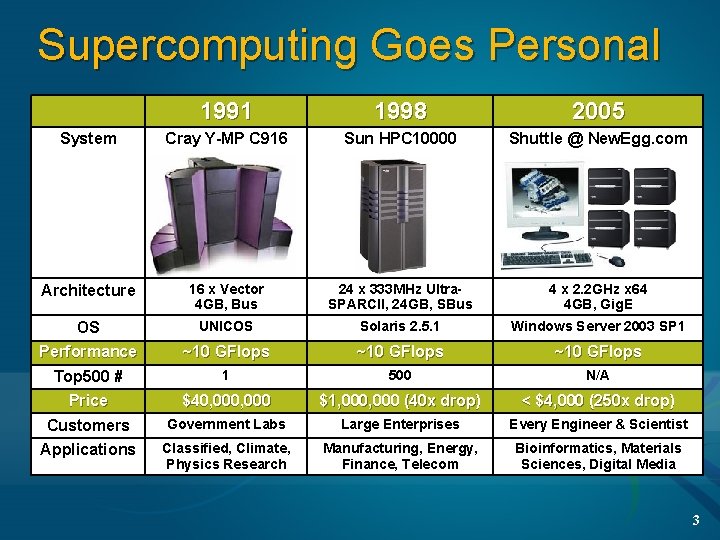
Supercomputing Goes Personal 1991 1998 2005 System Cray Y-MP C 916 Sun HPC 10000 Shuttle @ New. Egg. com Architecture 16 x Vector 4 GB, Bus 24 x 333 MHz Ultra. SPARCII, 24 GB, SBus 4 x 2. 2 GHz x 64 4 GB, Gig. E OS UNICOS Solaris 2. 5. 1 Windows Server 2003 SP 1 Performance ~10 GFlops Top 500 # Price 1 500 N/A $40, 000 $1, 000 (40 x drop) < $4, 000 (250 x drop) Customers Government Labs Large Enterprises Every Engineer & Scientist Applications Classified, Climate, Physics Research Manufacturing, Energy, Finance, Telecom Bioinformatics, Materials Sciences, Digital Media 3
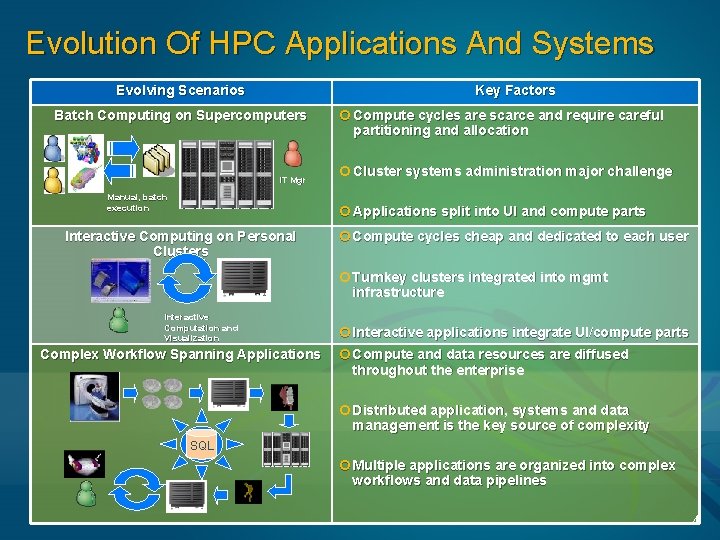
Evolution Of HPC Applications And Systems Evolving Scenarios Key Factors Batch Computing on Supercomputers IT Mgr Manual, batch execution ¢ Compute cycles are scarce and require careful partitioning and allocation ¢ Cluster systems administration major challenge ¢ Applications split into UI and compute parts Interactive Computing on Personal Clusters ¢ Compute cycles cheap and dedicated to each user ¢ Turnkey clusters integrated into mgmt infrastructure Interactive Computation and Visualization Complex Workflow Spanning Applications ¢ Interactive applications integrate UI/compute parts ¢ Compute and data resources are diffused throughout the enterprise ¢ Distributed application, systems and data management is the key source of complexity SQL ¢ Multiple applications are organized into complex workflows and data pipelines 4
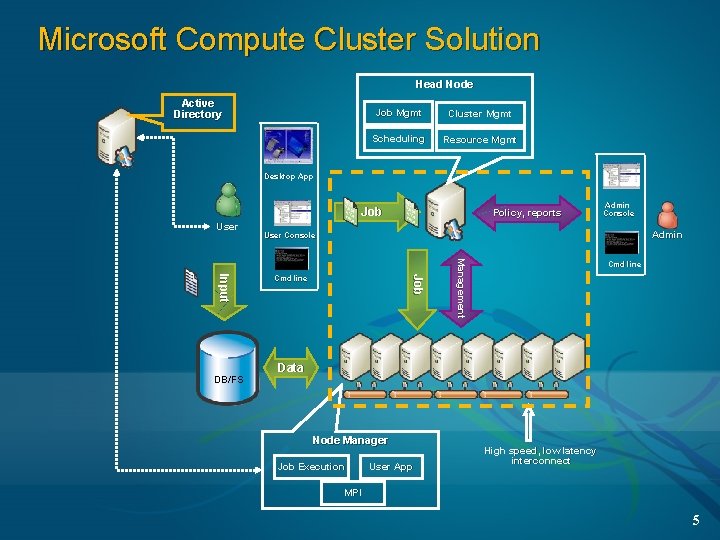
Microsoft Compute Cluster Solution Head Node Active Directory Job Mgmt Cluster Mgmt Scheduling Resource Mgmt Desktop App Job User Admin Console Admin User Console Cmd line Management Job Input DB/FS Policy, reports Cmd line Data Node Manager Job Execution User App High speed, low latency interconnect MPI 5
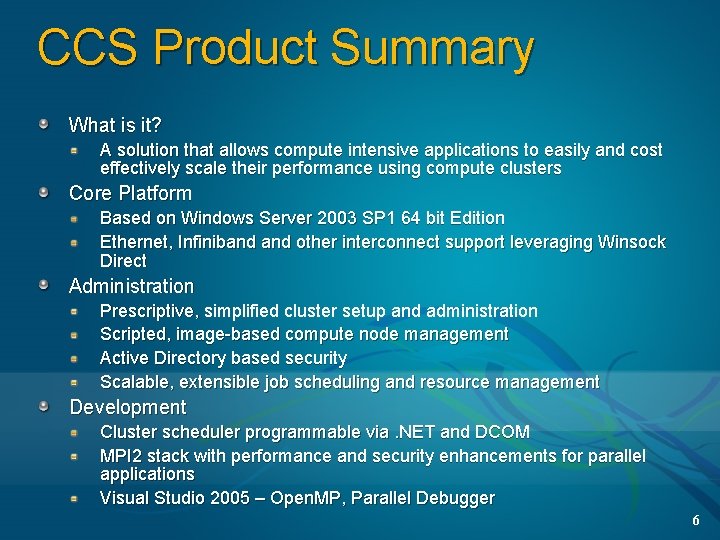
CCS Product Summary What is it? A solution that allows compute intensive applications to easily and cost effectively scale their performance using compute clusters Core Platform Based on Windows Server 2003 SP 1 64 bit Edition Ethernet, Infiniband other interconnect support leveraging Winsock Direct Administration Prescriptive, simplified cluster setup and administration Scripted, image-based compute node management Active Directory based security Scalable, extensible job scheduling and resource management Development Cluster scheduler programmable via. NET and DCOM MPI 2 stack with performance and security enhancements for parallel applications Visual Studio 2005 – Open. MP, Parallel Debugger 6
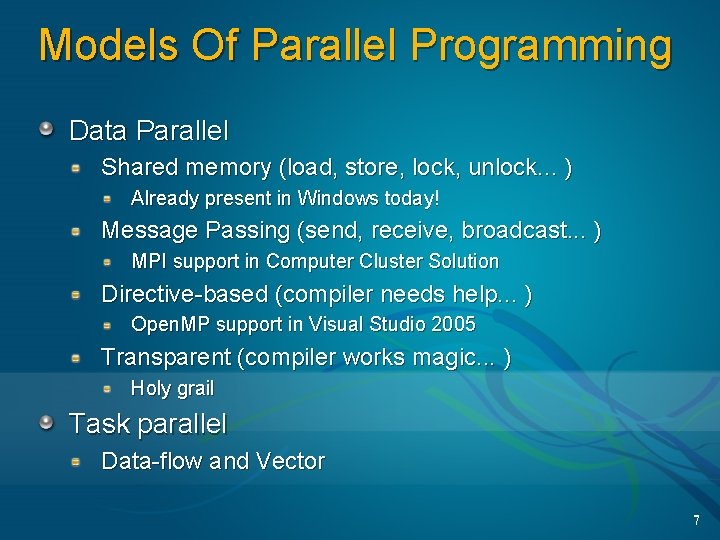
Models Of Parallel Programming Data Parallel Shared memory (load, store, lock, unlock. . . ) Already present in Windows today! Message Passing (send, receive, broadcast. . . ) MPI support in Computer Cluster Solution Directive-based (compiler needs help. . . ) Open. MP support in Visual Studio 2005 Transparent (compiler works magic. . . ) Holy grail Task parallel Data-flow and Vector 7
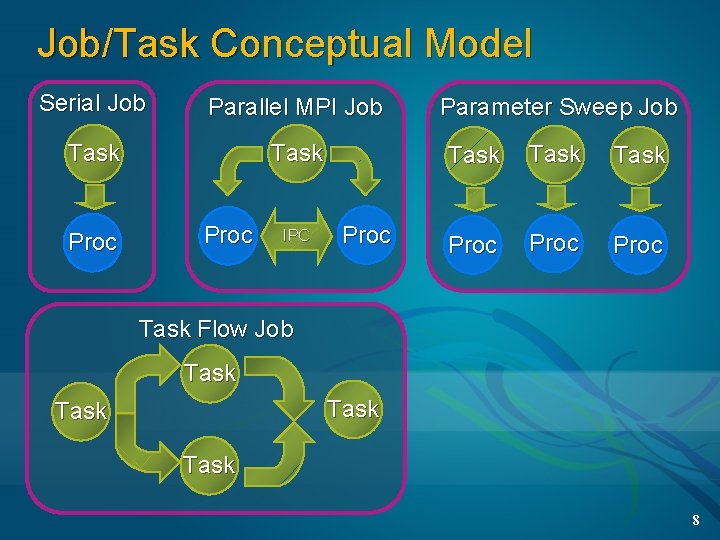
Job/Task Conceptual Model Serial Job Parallel MPI Job Task Proc IPC Proc Parameter Sweep Job Task Proc Task Flow Job Task 8
Message Passing Interface 9
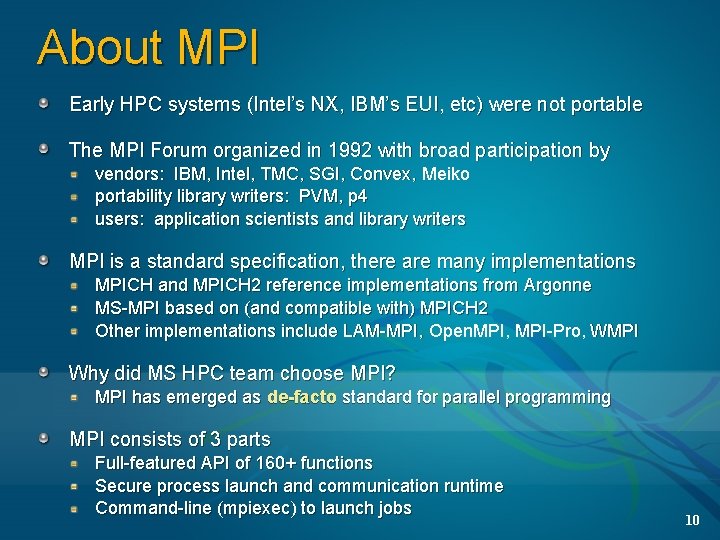
About MPI Early HPC systems (Intel’s NX, IBM’s EUI, etc) were not portable The MPI Forum organized in 1992 with broad participation by vendors: IBM, Intel, TMC, SGI, Convex, Meiko portability library writers: PVM, p 4 users: application scientists and library writers MPI is a standard specification, there are many implementations MPICH and MPICH 2 reference implementations from Argonne MS-MPI based on (and compatible with) MPICH 2 Other implementations include LAM-MPI, Open. MPI, MPI-Pro, WMPI Why did MS HPC team choose MPI? MPI has emerged as de-facto standard for parallel programming MPI consists of 3 parts Full-featured API of 160+ functions Secure process launch and communication runtime Command-line (mpiexec) to launch jobs 10
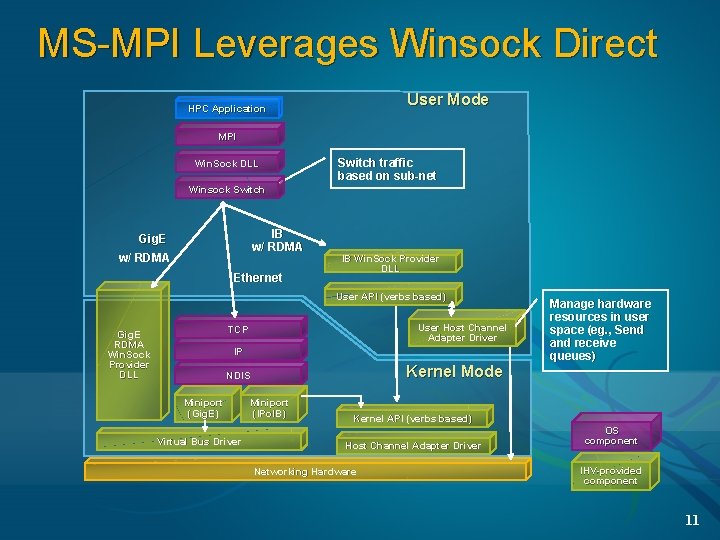
MS-MPI Leverages Winsock Direct User Mode HPC Application MPI Win. Sock DLL Switch traffic based on sub-net Winsock Switch IB w/ RDMA Gig. E w/ RDMA Ethernet IB Win. Sock Provider DLL User API (verbs based) User Host Channel Adapter Driver TCP Gig. E RDMA Win. Sock Provider DLL IP Kernel Mode NDIS Miniport (Gig. E) Virtual Bus Driver Manage hardware resources in user space (eg. , Send (eg. , and receive queues) Miniport (IPo. IB) Kernel API (verbs based) Host Channel Adapter Driver Networking Hardware OS component IHV-provided component 11
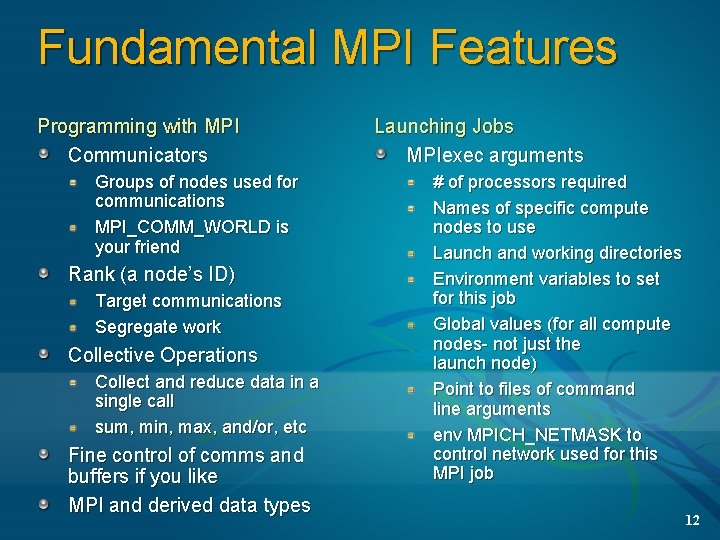
Fundamental MPI Features Programming with MPI Communicators Groups of nodes used for communications MPI_COMM_WORLD is your friend Rank (a node’s ID) Target communications Segregate work Collective Operations Collect and reduce data in a single call sum, min, max, and/or, etc Fine control of comms and buffers if you like MPI and derived data types Launching Jobs MPIexec arguments # of processors required Names of specific compute nodes to use Launch and working directories Environment variables to set for this job Global values (for all compute nodes- not just the launch node) Point to files of command line arguments env MPICH_NETMASK to control network used for this MPI job 12
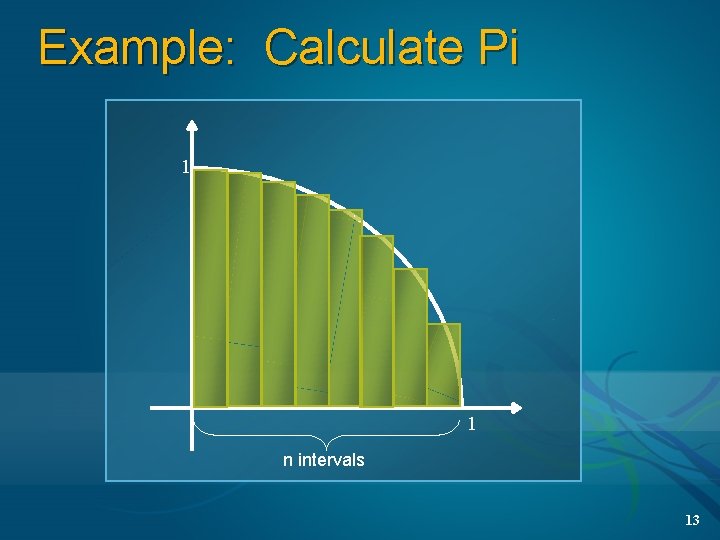
Example: Calculate Pi 1 1 n intervals 13
Parallel Debugger And MPI 14
Parallel Execution Visualization 1000 x Each line represents 1000’s of messages Detailed view shows opportunities for optimization 15
Job Scheduler Technical Details 16
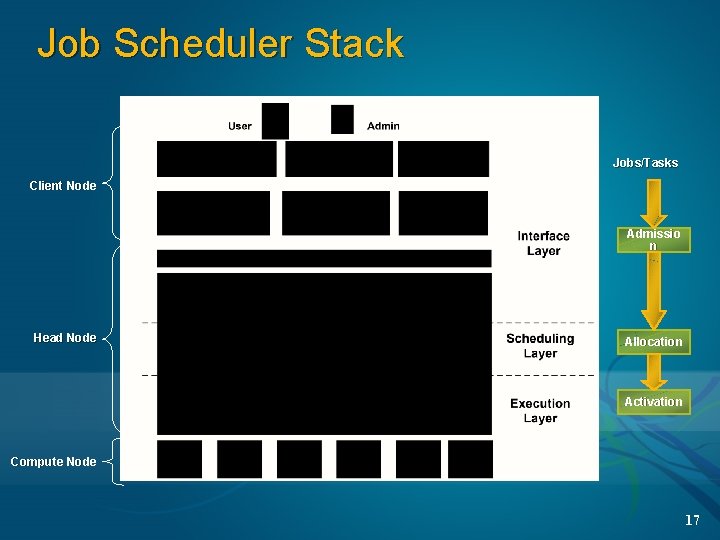
Job Scheduler Stack Jobs/Tasks Client Node Admissio n Head Node Allocation Activation Compute Node 17
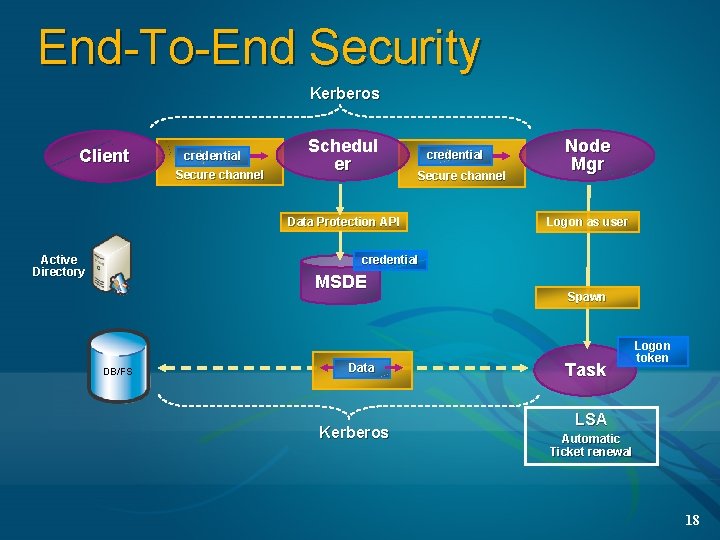
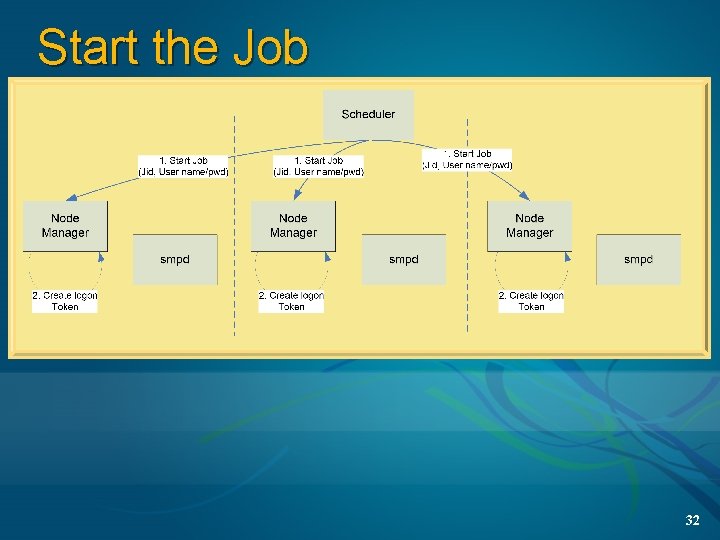
End-To-End Security Kerberos Client credential Secure channel Schedul er credential Secure channel Data Protection API Active Directory Node Mgr Logon as user credential MSDE DB/FS Data Kerberos Spawn Task Logon token LSA Automatic Ticket renewal 18
Job Scheduler 19
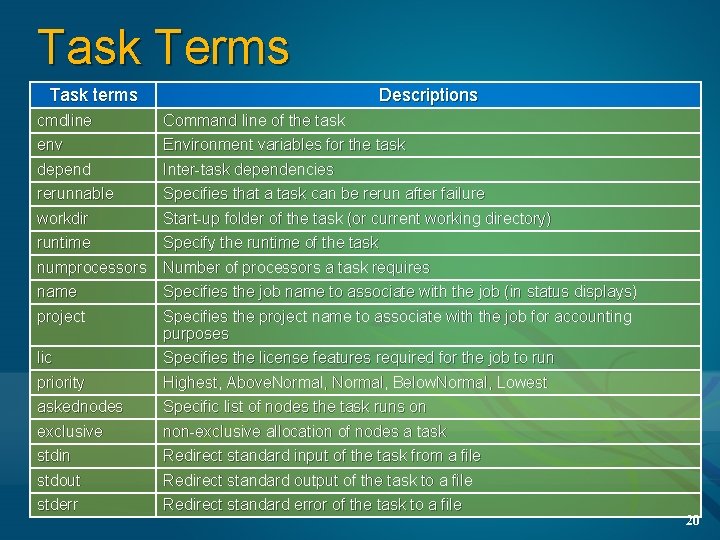
Task Terms Task terms Descriptions cmdline env Command line of the task Environment variables for the task depend rerunnable Inter-task dependencies Specifies that a task can be rerun after failure workdir runtime Start-up folder of the task (or current working directory) Specify the runtime of the task numprocessors name Number of processors a task requires Specifies the job name to associate with the job (in status displays) project Specifies the project name to associate with the job for accounting purposes Specifies the license features required for the job to run lic priority askednodes exclusive stdin stdout stderr Highest, Above. Normal, Below. Normal, Lowest Specific list of nodes the task runs on non-exclusive allocation of nodes a task Redirect standard input of the task from a file Redirect standard output of the task to a file Redirect standard error of the task to a file 20
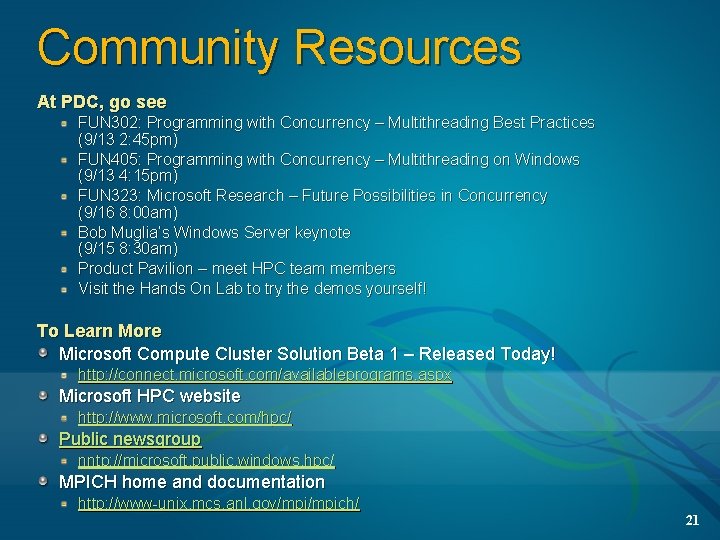
Community Resources At PDC, go see FUN 302: Programming with Concurrency – Multithreading Best Practices (9/13 2: 45 pm) FUN 405: Programming with Concurrency – Multithreading on Windows (9/13 4: 15 pm) FUN 323: Microsoft Research – Future Possibilities in Concurrency (9/16 8: 00 am) Bob Muglia’s Windows Server keynote (9/15 8: 30 am) Product Pavilion – meet HPC team members Visit the Hands On Lab to try the demos yourself! To Learn More Microsoft Compute Cluster Solution Beta 1 – Released Today! http: //connect. microsoft. com/availableprograms. aspx Microsoft HPC website http: //www. microsoft. com/hpc/ Public newsgroup nntp: //microsoft. public. windows. hpc/ MPICH home and documentation http: //www-unix. mcs. anl. gov/mpich/ 21
© 2005 Microsoft Corporation. All rights reserved. This presentation is for informational purposes only. Microsoft makes no warranties, express or implied, in this summary. 22
Appendix 23
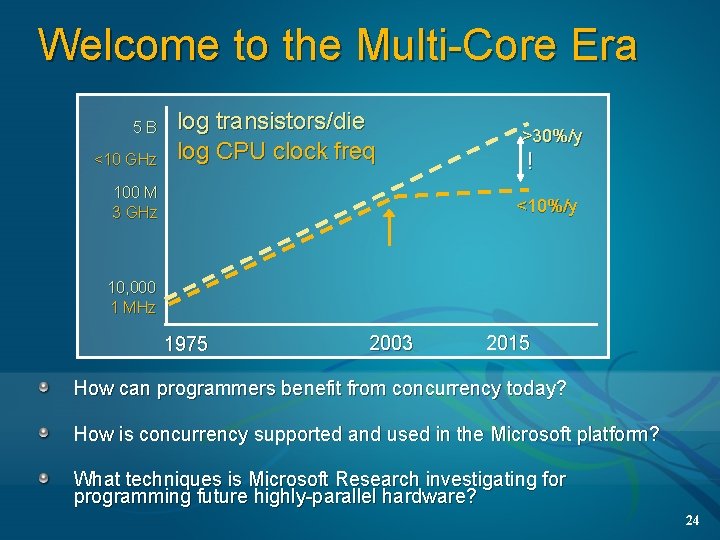
Welcome to the Multi-Core Era 5 B <10 GHz log transistors/die log CPU clock freq 100 M 3 GHz >30%/y ! <10%/y 10, 000 1 MHz 1975 2003 2015 How can programmers benefit from concurrency today? How is concurrency supported and used in the Microsoft platform? What techniques is Microsoft Research investigating for programming future highly-parallel hardware? 24
Example: Calculate pi #include "mpi. h" #include <math. h> int main(int argc, char *argv[]) { Initialize int done = 0, n, myid, numprocs, i, rc; “Correct” pi double PI 25 DT = 3. 141592653589793238462643; double mypi, h, sum, x, a; Start MPI_Init(&argc, &argv); Get # procs assigned to this job MPI_Comm_size(MPI_COMM_WORLD, &numprocs); Get proc # of this proc MPI_Comm_rank(MPI_COMM_WORLD, &myid); while (!done) { if (myid == 0) { On proc 0, ask user printf("Enter the number of intervals: for number of (0 quits) "); intervals scanf("%d", &n); } MPI_Bcast(&n, 1, MPI_INT, 0, MPI_COMM_WORLD); Compute if (n == 0) break; Send # of intervals to all procs 25
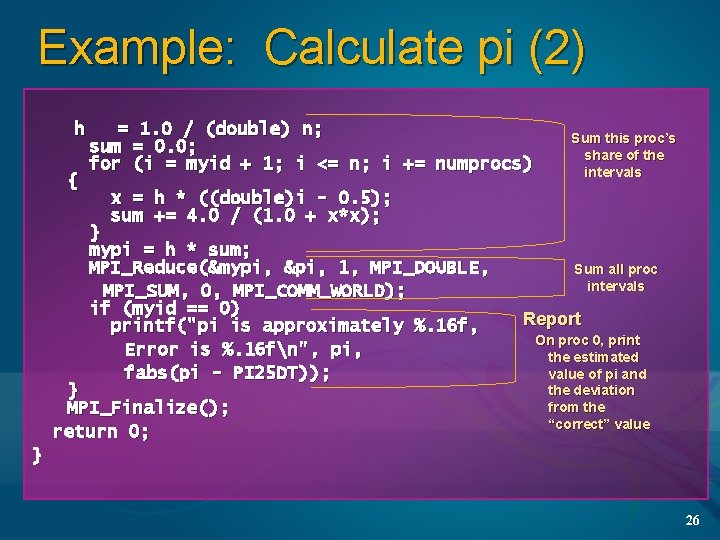
Example: Calculate pi (2) h { = 1. 0 / (double) n; sum = 0. 0; for (i = myid + 1; i <= n; i += numprocs) Sum this proc’s share of the intervals x = h * ((double)i - 0. 5); sum += 4. 0 / (1. 0 + x*x); } mypi = h * sum; MPI_Reduce(&mypi, &pi, 1, MPI_DOUBLE, MPI_SUM, 0, MPI_COMM_WORLD); if (myid == 0) printf("pi is approximately %. 16 f, Error is %. 16 fn", pi, fabs(pi - PI 25 DT)); } MPI_Finalize(); return 0; Sum all proc intervals Report On proc 0, print the estimated value of pi and the deviation from the “correct” value } 26
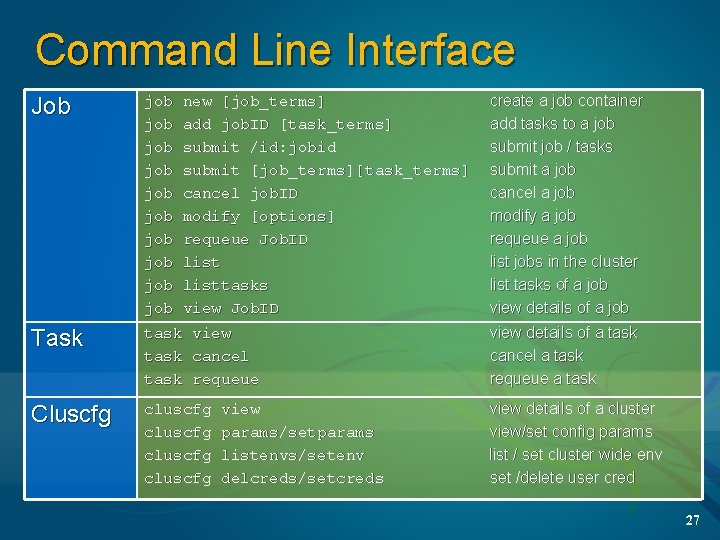
Command Line Interface Job job job job Task task view task cancel task requeue Cluscfg cluscfg new [job_terms] add job. ID [task_terms] submit /id: jobid submit [job_terms][task_terms] cancel job. ID modify [options] requeue Job. ID listtasks view Job. ID view params/setparams listenvs/setenv delcreds/setcreds create a job container add tasks to a job submit job / tasks submit a job cancel a job modify a job requeue a job list jobs in the cluster list tasks of a job view details of a task cancel a task requeue a task view details of a cluster view/set config params list / set cluster wide env set /delete user cred 27
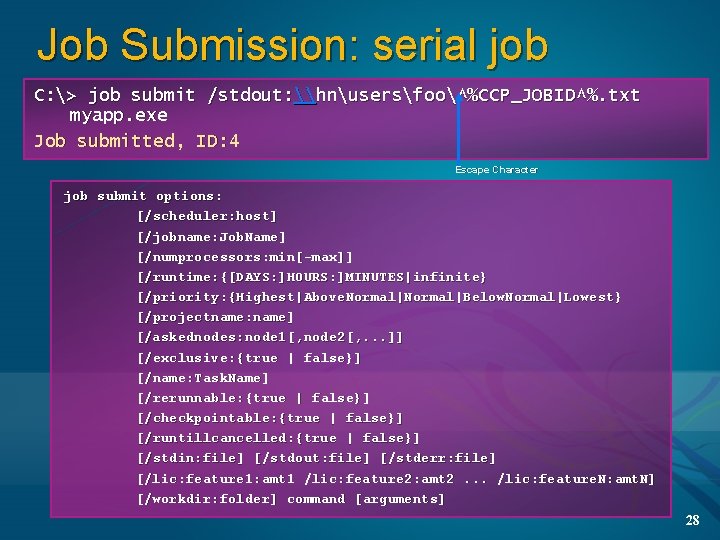
Job Submission: serial job C: > job submit /stdout: \hnusersfoo^%CCP_JOBID^%. txt myapp. exe Job submitted, ID: 4 Escape Character job submit options: [/scheduler: host] [/jobname: Job. Name] [/numprocessors: min[-max]] [/runtime: {[DAYS: ]HOURS: ]MINUTES|infinite} [/priority: {Highest|Above. Normal|Below. Normal|Lowest} [/projectname: name] [/askednodes: node 1[, node 2[, . . . ]] [/exclusive: {true | false}] [/name: Task. Name] [/rerunnable: {true | false}] [/checkpointable: {true | false}] [/runtillcancelled: {true | false}] [/stdin: file] [/stdout: file] [/stderr: file] [/lic: feature 1: amt 1 /lic: feature 2: amt 2. . . /lic: feature. N: amt. N] [/workdir: folder] command [arguments] 28
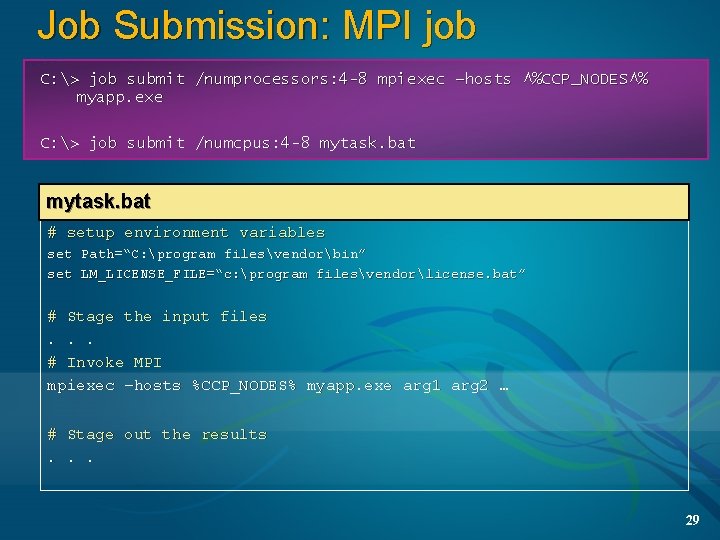
Job Submission: MPI job C: > job submit /numprocessors: 4 -8 mpiexec –hosts ^%CCP_NODES^% myapp. exe C: > job submit /numcpus: 4 -8 mytask. bat myjob. bat # setup environment variables set Path=“C: program filesvendorbin” set LM_LICENSE_FILE=“c: program filesvendorlicense. bat” # Stage the input files. . . # Invoke MPI mpiexec –hosts %CCP_NODES% myapp. exe arg 1 arg 2 … # Stage out the results. . . 29
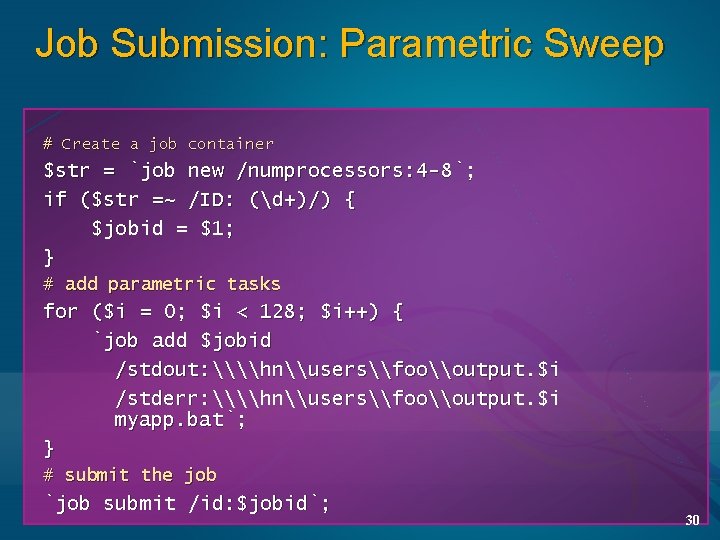
Job Submission: Parametric Sweep # Create a job container $str = `job new /numprocessors: 4 -8`; if ($str =~ /ID: (d+)/) { $jobid = $1; } # add parametric tasks for ($i = 0; $i < 128; $i++) { `job add $jobid /stdout: \\hn\users\foo\output. $i /stderr: \\hn\users\foo\output. $i myapp. bat`; } # submit the job `job submit /id: $jobid`; 30
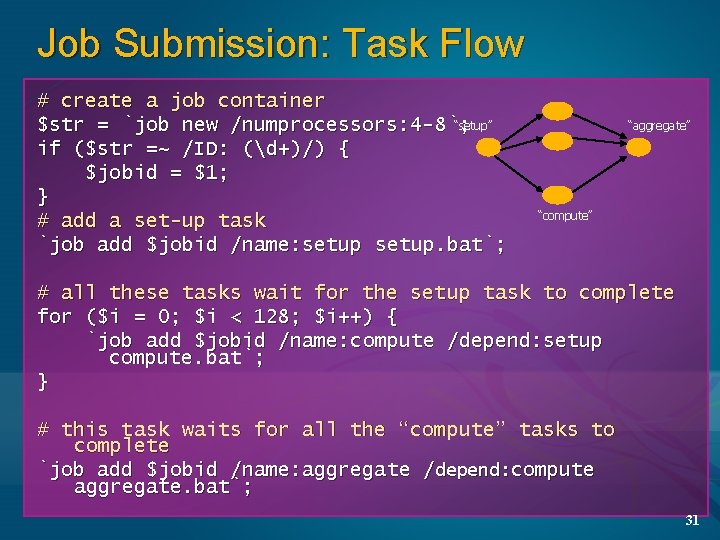
Job Submission: Task Flow # create a job container “setup” $str = `job new /numprocessors: 4 -8`; if ($str =~ /ID: (d+)/) { $jobid = $1; } # add a set-up task `job add $jobid /name: setup. bat`; “aggregate” “compute” # all these tasks wait for the setup task to complete for ($i = 0; $i < 128; $i++) { `job add $jobid /name: compute /depend: setup compute. bat`; } # this task waits for all the “compute” tasks to complete `job add $jobid /name: aggregate /depend: compute aggregate. bat`; 31
Start the Job 32
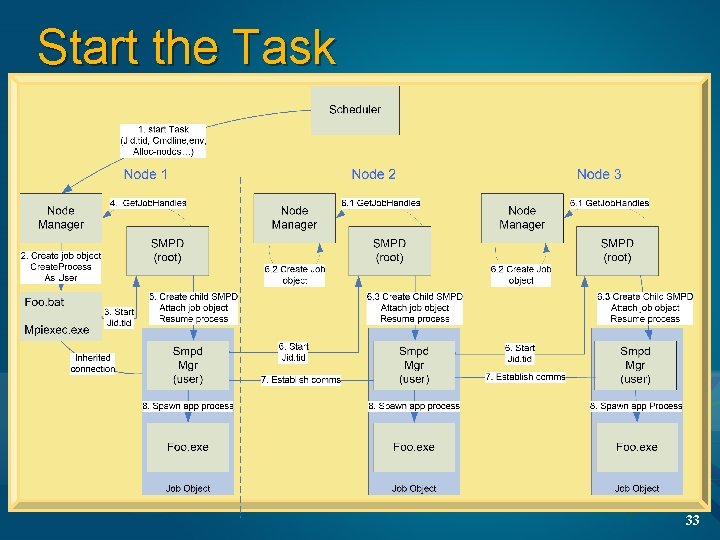
Start the Task 33
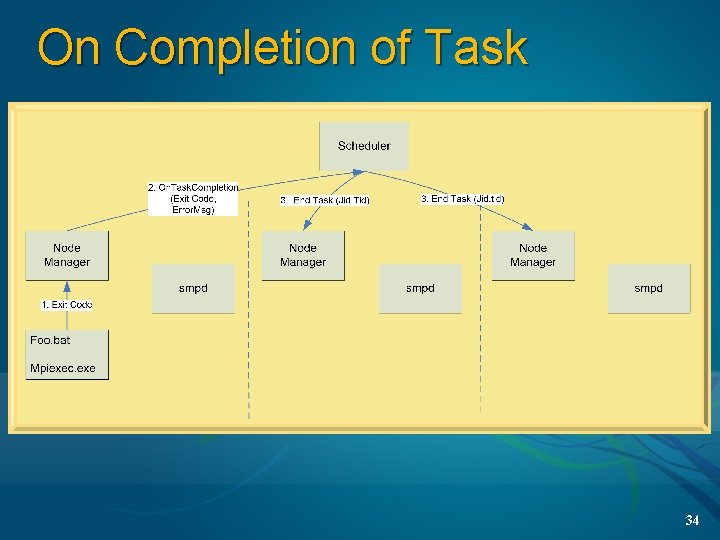
On Completion of Task 34