
Helmut Schnfelder ABB StotzKontakt 27 08 2012 UMC
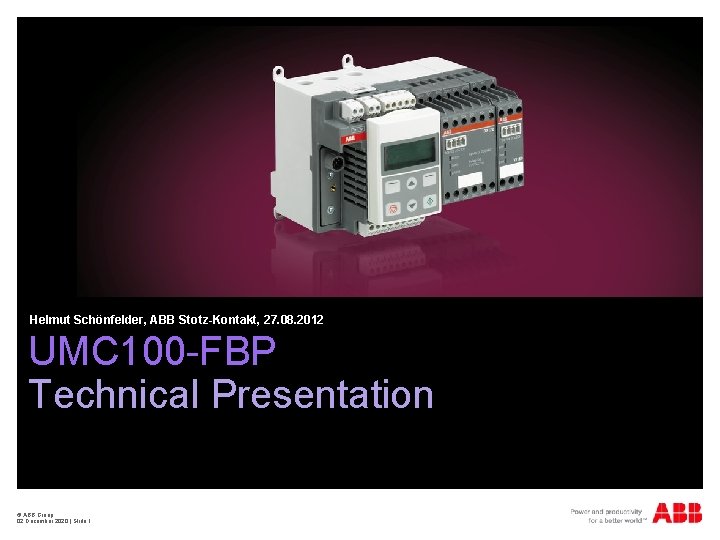
Helmut Schönfelder, ABB Stotz-Kontakt, 27. 08. 2012 UMC 100 -FBP Technical Presentation © ABB Group 02 December 2020 | Slide 1
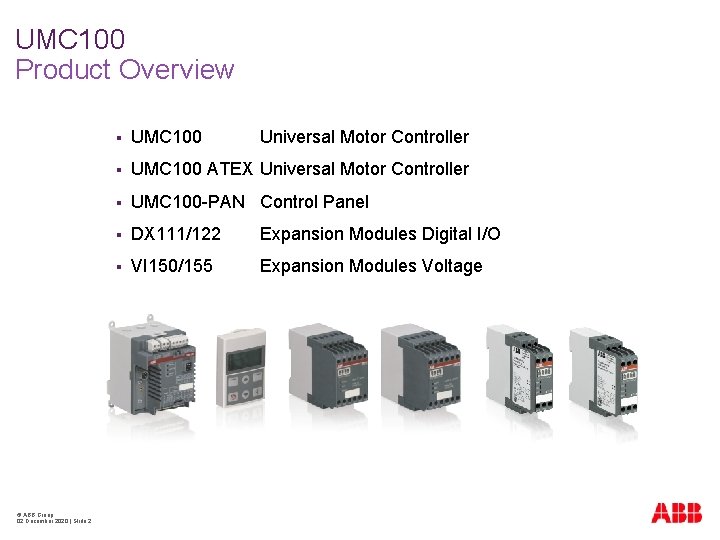
UMC 100 Product Overview © ABB Group 02 December 2020 | Slide 2 § UMC 100 Universal Motor Controller § UMC 100 ATEX Universal Motor Controller § UMC 100 -PAN Control Panel § DX 111/122 Expansion Modules Digital I/O § VI 150/155 Expansion Modules Voltage

UMC 100 Intelligent Motor Protection & Control System © ABB Group 02 December 2020 | Slide 3 § Advanced Motor Protection § Flexible Motor Control § Diagnostics and Maintenance § Communication for all major fieldbusses
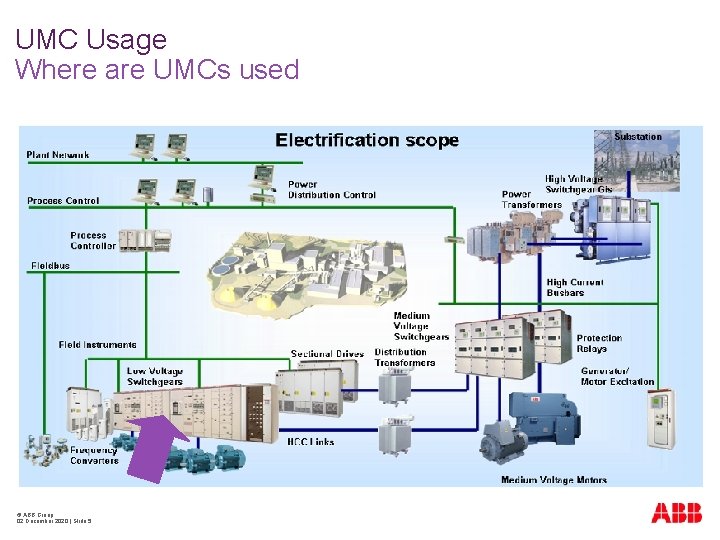
UMC Usage Where are UMCs used © ABB Group 02 December 2020 | Slide 5
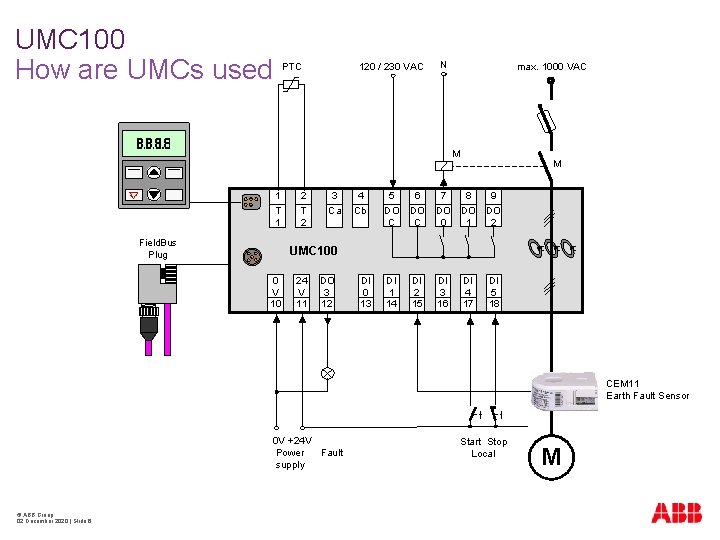
UMC 100 How are UMCs used PTC 120 / 230 VAC N max. 1000 VAC M 1 T 1 Field. Bus Plug 2 T 2 3 Ca 4 Cb M 5 DO C 6 DO C 7 DO 0 8 9 DO DO 1 2 DI 1 14 DI 2 15 DI 3 16 DI 4 17 UMC 100 0 V 10 24 V 11 DO 3 12 DI 0 13 DI 5 18 CEM 11 Earth Fault Sensor 0 V +24 V Power Fault supply © ABB Group 02 December 2020 | Slide 6 Start Stop Local M
UMC 100 Motor Protection Overview § § © ABB Group 02 December 2020 | Slide 7 Comprehensive motor protection for 3 -phase motors § For motor voltages up to 1000 VAC 50 / 60 Hz § Sinus wave current no drive, no softstarter § For nominal motor currents § 240 m. A to 63 A without accessories § > 63 A with external current transformer Protection against § Overload according to EN/IEC 60947 -4 -1 tripclasses 5 E, 10 E, 20 E, 30 E, 40 E § Rotor blocking § Phase loss / imbalance / sequence § Under- / Overcurrent § Under- / Overvoltage § Under- / Overload overload calculated or based on powerfactor § Hot motor Thermistor § Earth fault calculation or sensor CEM 11 § Too many starts per time
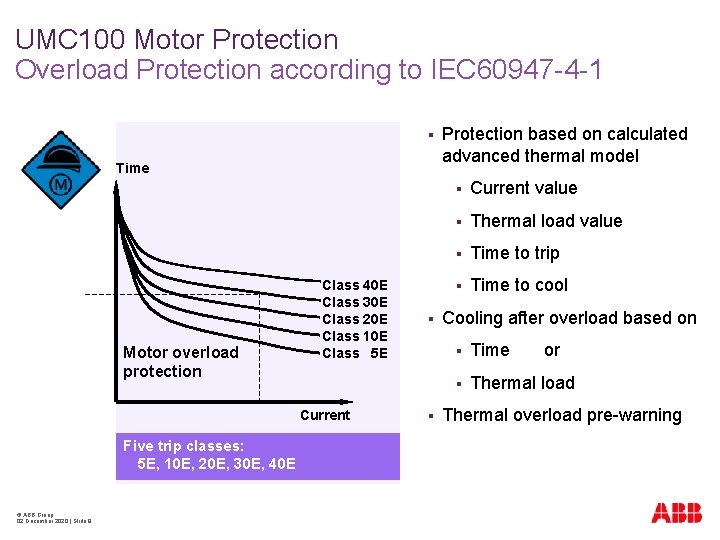
UMC 100 Motor Protection Overload Protection according to IEC 60947 -4 -1 § Time Motor overload protection Class 40 E Class 30 E Class 20 E Class 10 E Class 5 E Current Five trip classes: 5 E, 10 E, 20 E, 30 E, 40 E © ABB Group 02 December 2020 | Slide 8 § § Protection based on calculated advanced thermal model § Current value § Thermal load value § Time to trip § Time to cool Cooling after overload based on § Time or § Thermal load Thermal overload pre-warning
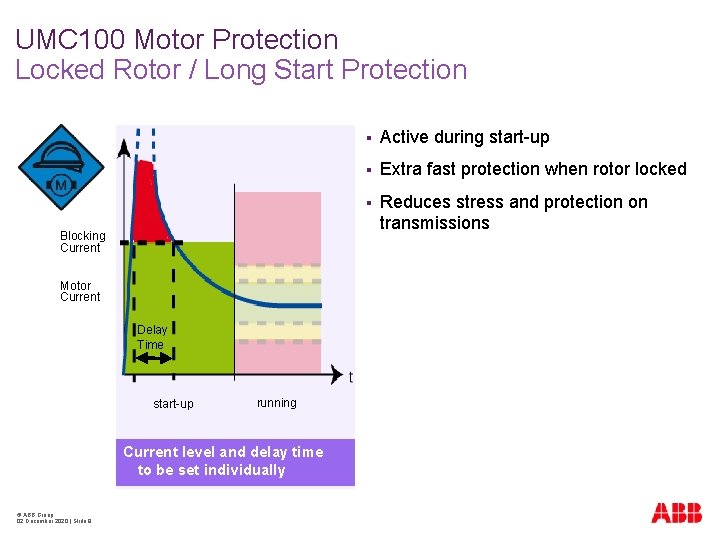
UMC 100 Motor Protection Locked Rotor / Long Start Protection Blocking Current Motor Current Delay Time start-up running Current level and delay time to be set individually © ABB Group 02 December 2020 | Slide 9 § Active during start-up § Extra fast protection when rotor locked § Reduces stress and protection on transmissions
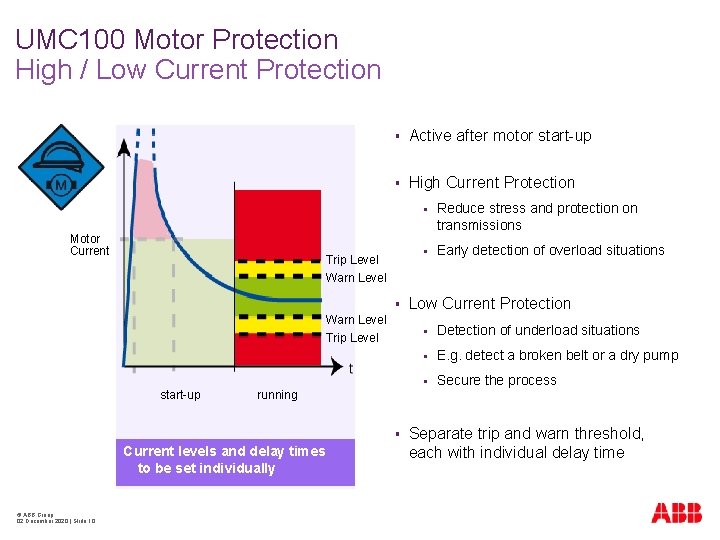
UMC 100 Motor Protection High / Low Current Protection Motor Current § Active after motor start-up § High Current Protection Trip Level Warn Level § Warn Level Trip Level start-up Reduce stress and protection on transmissions § Early detection of overload situations Low Current Protection § Detection of underload situations § E. g. detect a broken belt or a dry pump § Secure the process running § Current levels and delay times to be set individually © ABB Group 02 December 2020 | Slide 10 § Separate trip and warn threshold, each with individual delay time
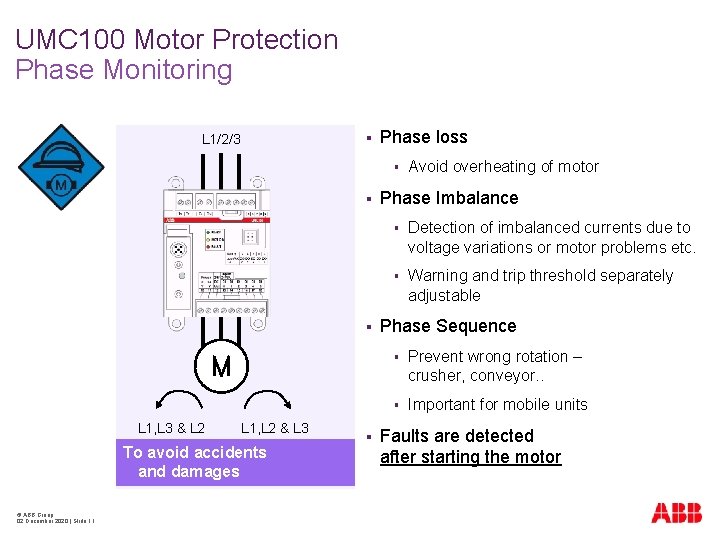
UMC 100 Motor Protection Phase Monitoring § L 1/2/3 Phase loss § § § L 1, L 3 & L 2 L 1, L 2 & L 3 To avoid accidents and damages © ABB Group 02 December 2020 | Slide 11 § Avoid overheating of motor Phase Imbalance § Detection of imbalanced currents due to voltage variations or motor problems etc. § Warning and trip threshold separately adjustable Phase Sequence § Prevent wrong rotation – crusher, conveyor. . § Important for mobile units Faults are detected after starting the motor
UMC 100 Motor Protection With additional Voltage Module § With an additional Voltage Expansion Module VI 150 or VI 155 UMC 100 offers some more motor protection functions § High / Low power § Powerfactor (cos. Phi) § § § © ABB Group 02 December 2020 | Slide 12 Underload important for pump applications Under / Overvoltage All settings have warn / trip level and individual delay times
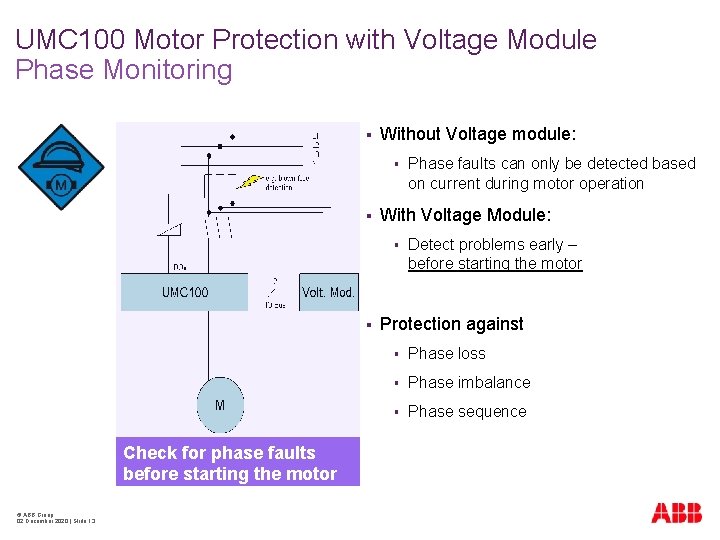
UMC 100 Motor Protection with Voltage Module Phase Monitoring § Without Voltage module: § § With Voltage Module: § § Check for phase faults before starting the motor © ABB Group 02 December 2020 | Slide 13 Phase faults can only be detected based on current during motor operation Detect problems early – before starting the motor Protection against § Phase loss § Phase imbalance § Phase sequence
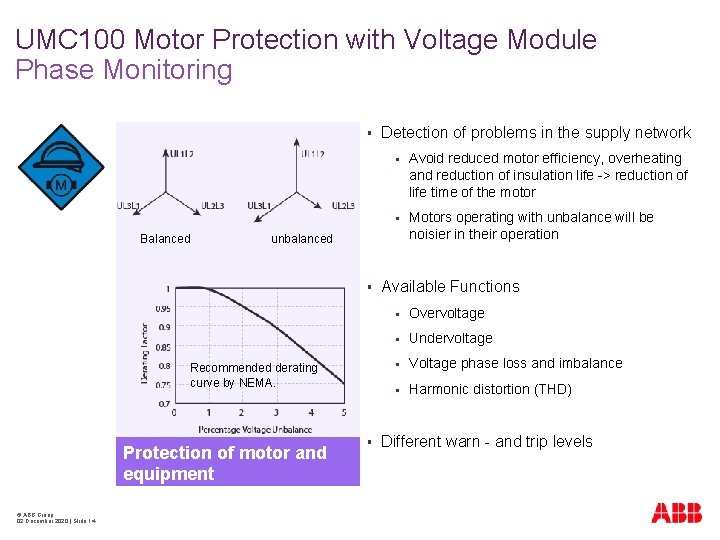
UMC 100 Motor Protection with Voltage Module Phase Monitoring § Balanced § Avoid reduced motor efficiency, overheating and reduction of insulation life -> reduction of life time of the motor § Motors operating with unbalance will be noisier in their operation unbalanced § Recommended derating curve by NEMA. Protection of motor and equipment © ABB Group 02 December 2020 | Slide 14 Detection of problems in the supply network § Available Functions § Overvoltage § Undervoltage § Voltage phase loss and imbalance § Harmonic distortion (THD) Different warn - and trip levels
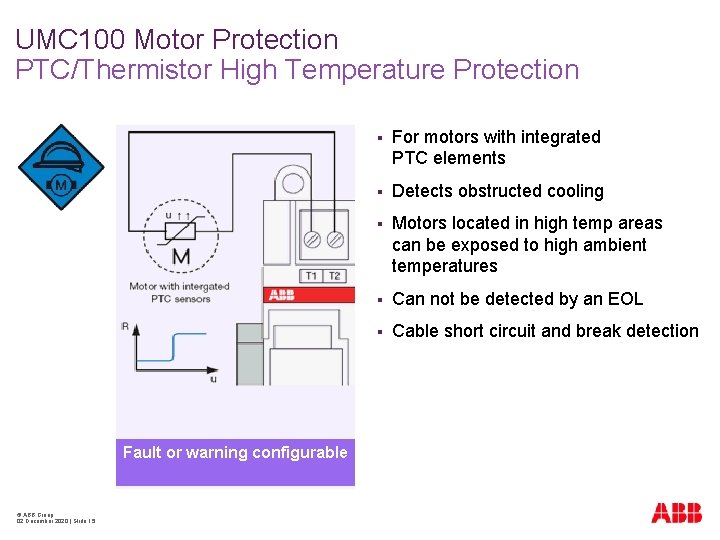
UMC 100 Motor Protection PTC/Thermistor High Temperature Protection Fault or warning configurable © ABB Group 02 December 2020 | Slide 15 § For motors with integrated PTC elements § Detects obstructed cooling § Motors located in high temp areas can be exposed to high ambient temperatures § Can not be detected by an EOL § Cable short circuit and break detection
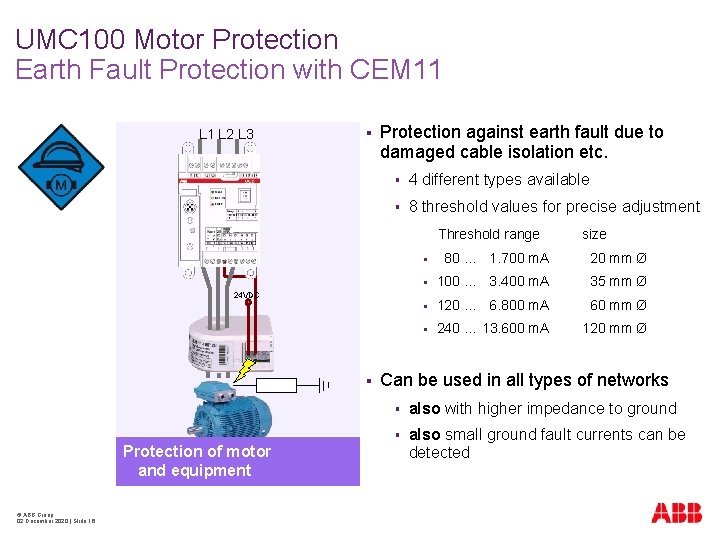
UMC 100 Motor Protection Earth Fault Protection with CEM 11 L 2 L 3 § Protection against earth fault due to damaged cable isolation etc. § 4 different types available § 8 threshold values for precise adjustment Threshold range § 80 … 1. 700 m. A 20 mm Ø § 100 … 3. 400 m. A 35 mm Ø § 120 … 6. 800 m. A 60 mm Ø § 240 … 13. 600 m. A 120 mm Ø 24 VDC § Protection of motor and equipment © ABB Group 02 December 2020 | Slide 16 size Can be used in all types of networks § also with higher impedance to ground § also small ground fault currents can be detected
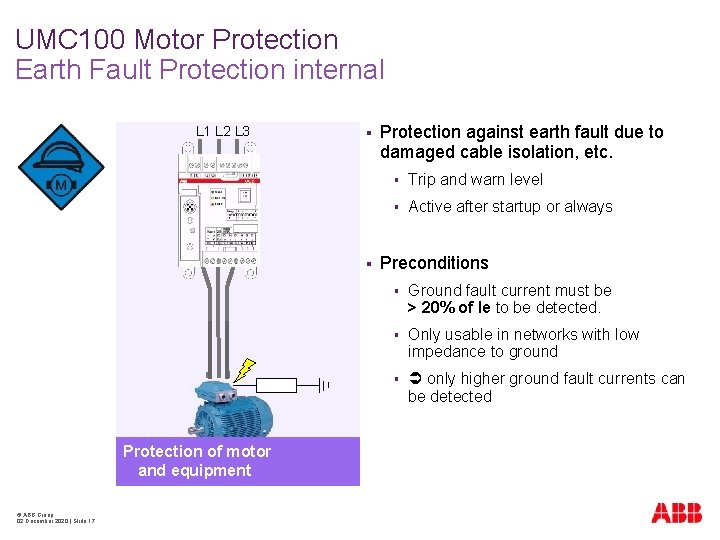
UMC 100 Motor Protection Earth Fault Protection internal L 1 L 2 L 3 § § Protection of motor and equipment © ABB Group 02 December 2020 | Slide 17 Protection against earth fault due to damaged cable isolation, etc. § Trip and warn level § Active after startup or always Preconditions § Ground fault current must be > 20% of Ie to be detected. § Only usable in networks with low impedance to ground § only higher ground fault currents can be detected
UMC 100 Motor Protection Checkback Supervision § Check supervision ensures that the motor is really running after a start command § Three options for checkback § © ABB Group 02 December 2020 | Slide 18 § Checkback current based (default) § Checkback via an auxiliary contact on the main contactor. Connect auxiliary signal to DI 0 of UMC § Simulation: no checkback at all, for test purposes only Checkback delay time is adjustable
UMC 100 Motor Protection Load Shedding (Voltage DIP) § § § © ABB Group 02 December 2020 | Slide 19 Application: § Stop motor in case of undervoltage § Automatic motor restart once voltage is back Configuration: § Minimum time to detect undervoltage § Maximum time for automatic restart § Delay time for motor restart Undervoltage detection by § External voltage monitor or § Voltage expansion module VI 150 / VI 155
UMC 100 Motor Control and Protection Limitation of Starts per Time § © ABB Group 02 December 2020 | Slide 22 Application: § Protect the motor against too many starts in a short time § Limit the number of starts for a given time period § Enforce a pause time between two motor starts § Configurable fault / warning in case of one start left
UMC 100 Motor Control Overview § Most common motor starters are integrated as easy to parametrize control functions § Direct / Reverse / Star-Delta starter § Pole changing / Dahlander § Actuator mode (Open / close valve control) § Overload Relay § Transparent mode for feeders § Custom Application Editor for individual control functions § Support of different control stations § § Support of different operation modes § © ABB Group 02 December 2020 | Slide 23 (DCS, Local bottons, Operation Panel. . . ) Remote, Local 1, Local 2
UMC 100 Motor Control Integrated Motor Starters Motor starters § Direct Starter § Reversing Starter § Star-Delta Starter § Two-Speed Starter Others © ABB Group 02 December 2020 | Slide 24 § Different Actuators Open/Close Valve Control § Overload Relay Standalone application without fieldbus § Transparent Mode Feeder applications
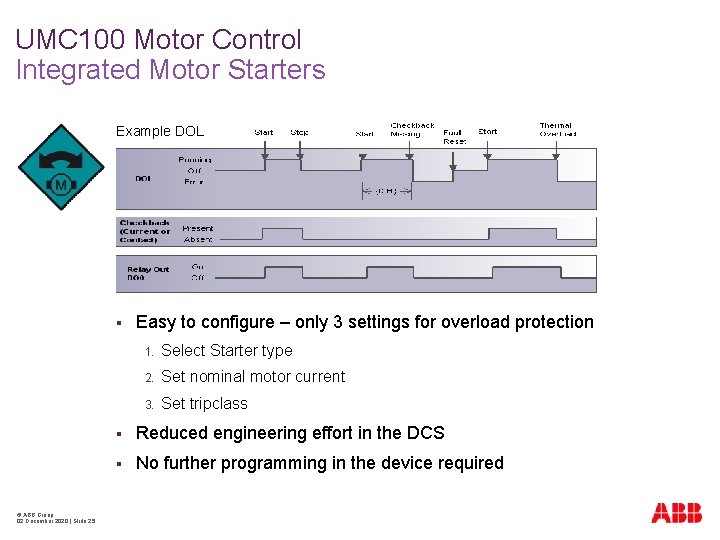
UMC 100 Motor Control Integrated Motor Starters Example DOL § © ABB Group 02 December 2020 | Slide 25 Easy to configure – only 3 settings for overload protection 1. Select Starter type 2. Set nominal motor current 3. Set tripclass § Reduced engineering effort in the DCS § No further programming in the device required
UMC 100 Motor Control Custom Application Editor § In most cases the built-in logic is flexible enough but © ABB Group 02 December 2020 | Slide 26 § for special requirements an individual starter application can be created § This is done with the “Custom Application Editor”, which is part of the PBDTM software package § Application Editor includes a library with function blocks for § UMC 100 inputs / outputs § Logic functions § Basic functions § Control functions § Expansion modules
UMC 100 Motor Control Custom Application Editor § 2 ways how to set up a Custom Application Logic § Full flexibility § Start from zero § Build up logic step by step result is an individual starter function § © ABB Group 02 December 2020 | Slide 27 Easy way § Use the ABB standard starter and modify it as required § Advantage: use of ready and tested starter functions § In most cases only small modifications will be required
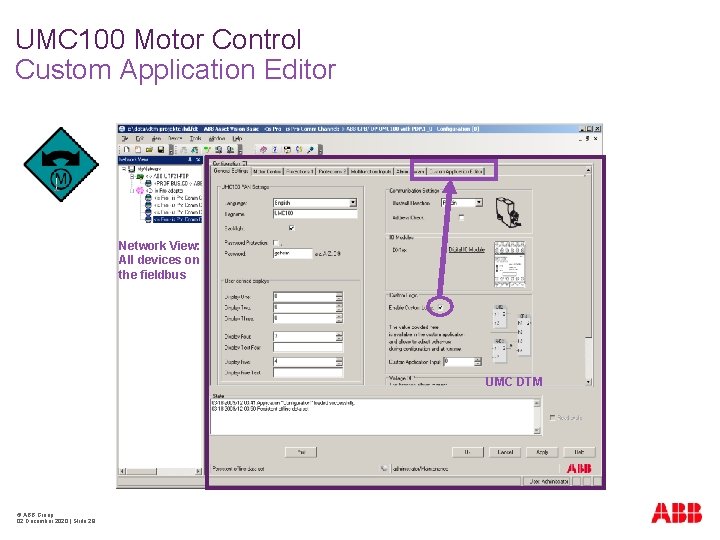
UMC 100 Motor Control Custom Application Editor Network View: All devices on the fieldbus UMC DTM © ABB Group 02 December 2020 | Slide 28
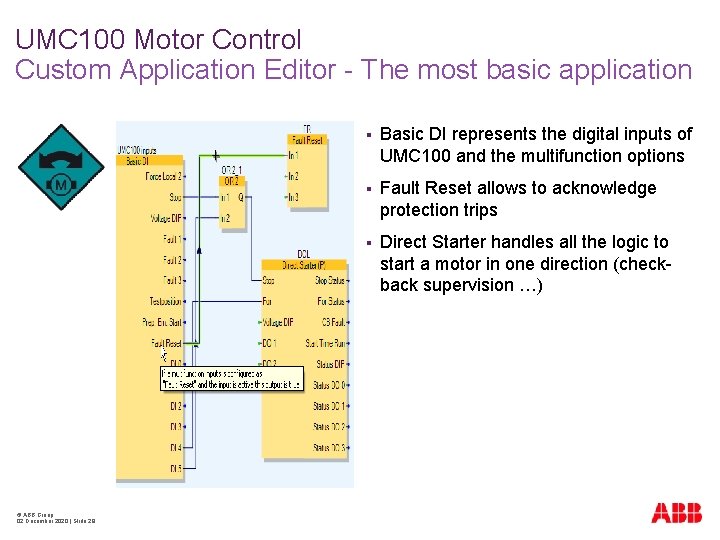
UMC 100 Motor Control Custom Application Editor - The most basic application © ABB Group 02 December 2020 | Slide 29 § Basic DI represents the digital inputs of UMC 100 and the multifunction options § Fault Reset allows to acknowledge protection trips § Direct Starter handles all the logic to start a motor in one direction (checkback supervision …)
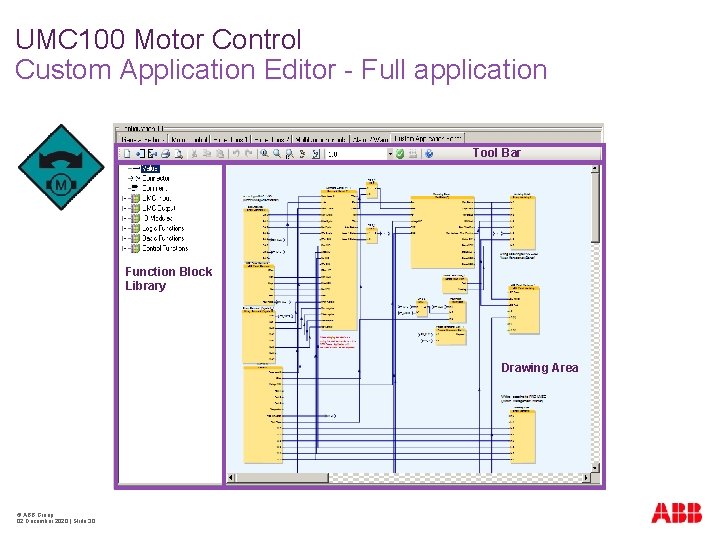
UMC 100 Motor Control Custom Application Editor - Full application Tool Bar Function Block Library Drawing Area © ABB Group 02 December 2020 | Slide 30
UMC 100 Motor Control Hardware - Digital Inputs Six digital inputs DI 0. . . DI 5 § § § © ABB Group 02 December 2020 | Slide 31 DI 0. . . DI 2: Configurable Multifunction inputs § Alarm / Warning /. . . § Delay time § NO/NC § Autoreset, Fault text DI 3. . . DI 5: Predefined inputs § Start Forward / Reverse / Stop § Jog / Inching mode § NO/NC All inputs can be read by the DCS independent from their setting
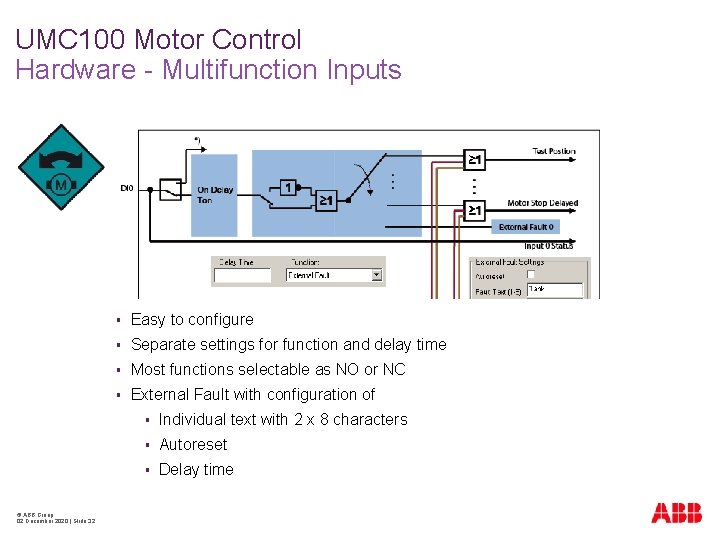
UMC 100 Motor Control Hardware - Multifunction Inputs © ABB Group 02 December 2020 | Slide 32 § Easy to configure § Separate settings for function and delay time § Most functions selectable as NO or NC § External Fault with configuration of § Individual text with 2 x 8 characters § Autoreset § Delay time
UMC 100 Motor Control Hardware - Multifunction Inputs © ABB Group 02 December 2020 | Slide 33 § Off § Stop (NO/NC) § Ext. Fault always (NO/NC) § Ext. Fault Motor on (NO/NC) § Prep. emerg. Start (NO/NC) § Testposition (NC/NC) § Force local 2 (NO/NC) § Fault reset (NO/NC) § Voltage DIP (NO/NC) § CEM 11 Warning always § CEM 11 Warning after startup § CEM 11 Fault always § CEM 11 Fault after startup § Delay time configurable
UMC 100 Motor Control Hardware - Digital Outputs § § § 3 x Relay Outputs DO 0. . . DO 2 § Switching the motor contactors § Directly controlled by the control function in the UMC § Free outputs can be controlled by the DCS or the UMC 100 Customer Application § DO 2 can be configured as fault output 1 x 24 V Transistor Output DO 3 § Configurable as fault output § or controlled by DCS § or controlled by Customer Application Logic Fault Output: § © ABB Group 02 December 2020 | Slide 34 Configurable On / Off / Flashing in case of fault
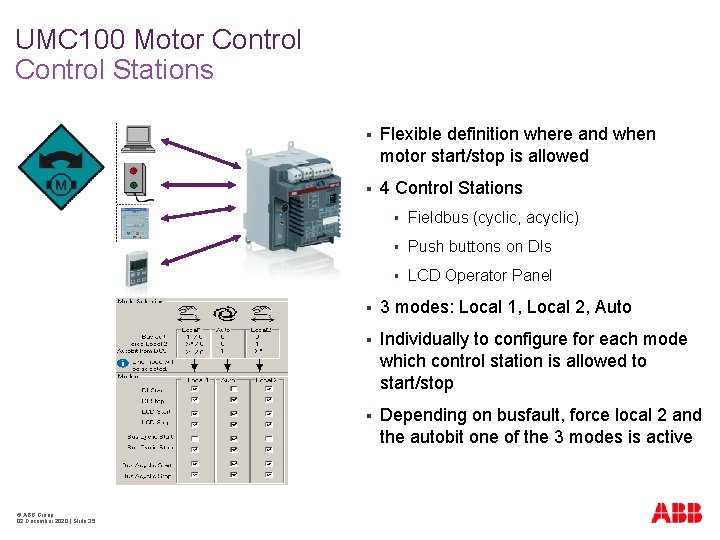
UMC 100 Motor Control Stations © ABB Group 02 December 2020 | Slide 35 § Flexible definition where and when motor start/stop is allowed § 4 Control Stations § Fieldbus (cyclic, acyclic) § Push buttons on DIs § LCD Operator Panel § 3 modes: Local 1, Local 2, Auto § Individually to configure for each mode which control station is allowed to start/stop § Depending on busfault, force local 2 and the autobit one of the 3 modes is active
UMC 100 Motor Control Fault Reset © ABB Group 02 December 2020 | Slide 36 § Fault reset via Bus, LCD Panel or Digital Input § Manual reset of protection faults § Manual or automatic fault reset of faults coming from the multifunction inputs or inputs of the digital IO module
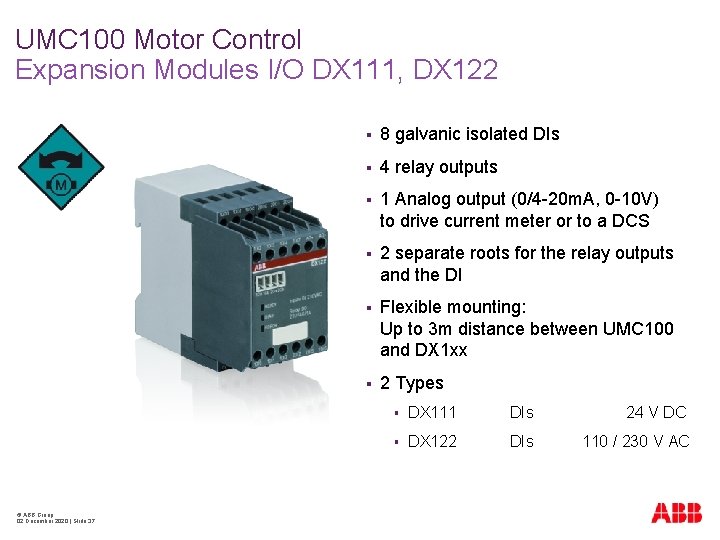
UMC 100 Motor Control Expansion Modules I/O DX 111, DX 122 © ABB Group 02 December 2020 | Slide 37 § 8 galvanic isolated DIs § 4 relay outputs § 1 Analog output (0/4 -20 m. A, 0 -10 V) to drive current meter or to a DCS § 2 separate roots for the relay outputs and the DI § Flexible mounting: Up to 3 m distance between UMC 100 and DX 1 xx § 2 Types § DX 111 DIs 24 V DC § DX 122 DIs 110 / 230 V AC
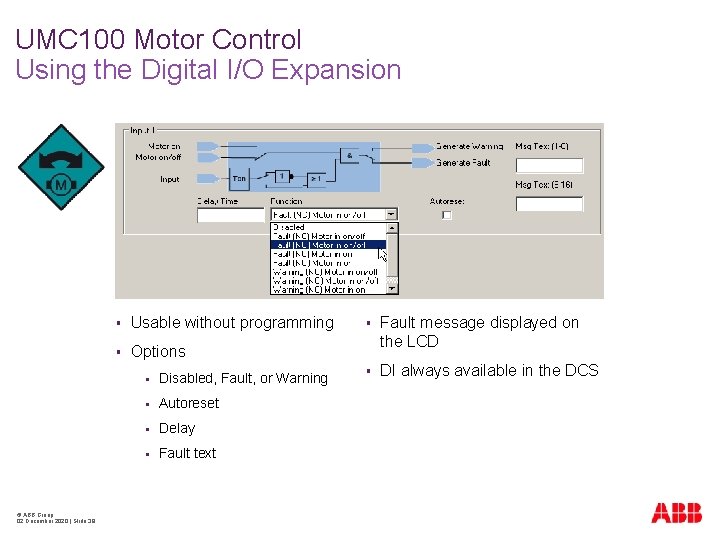
UMC 100 Motor Control Using the Digital I/O Expansion © ABB Group 02 December 2020 | Slide 38 § Usable without programming § Options § Disabled, Fault, or Warning § Autoreset § Delay § Fault text § Fault message displayed on the LCD § DI always available in the DCS
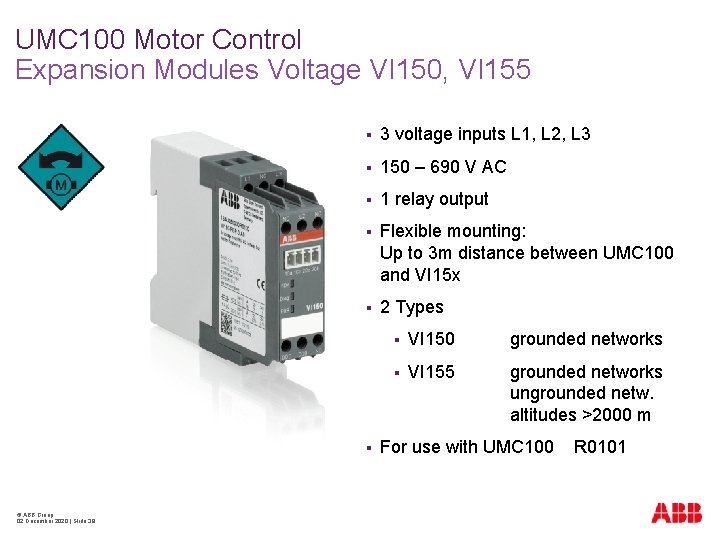
UMC 100 Motor Control Expansion Modules Voltage VI 150, VI 155 § 3 voltage inputs L 1, L 2, L 3 § 150 – 690 V AC § 1 relay output § Flexible mounting: Up to 3 m distance between UMC 100 and VI 15 x § 2 Types § © ABB Group 02 December 2020 | Slide 39 § VI 150 grounded networks § VI 155 grounded networks ungrounded netw. altitudes >2000 m For use with UMC 100 R 0101
UMC 100 Motor Control Expansion Modules Voltage VI 150, VI 155 § Additional features with Voltage module § § © ABB Group 02 December 2020 | Slide 40 Protection § Under / Overvoltage protection § Under / Overload protection § Power factor (cos Phi) § Voltage based phase loss / imbalance / sequence Diagnostics § 3 Phase voltages § Powerfactor § Voltage imbalance § Active power § Apparent power § Energy § THD Total harmonic distortion
UMC 100 Diagnostics General § Comprehensive information via fieldbus and LCD operator panel § © ABB Group 02 December 2020 | Slide 41 Motor data § Status § Current § 3 Phase Voltages § Active Power § Powerfactor § Thermal Load § Start-up time and max. current § Time to trip, Time to cool
UMC 100 Diagnostics General § Faults and Warnings § § § © ABB Group 02 December 2020 | Slide 42 Shown as text on the display Maintenance counters § Operating hours of motor § Number of starts § Number of overload trips § Energy Event memory for the last 16 events
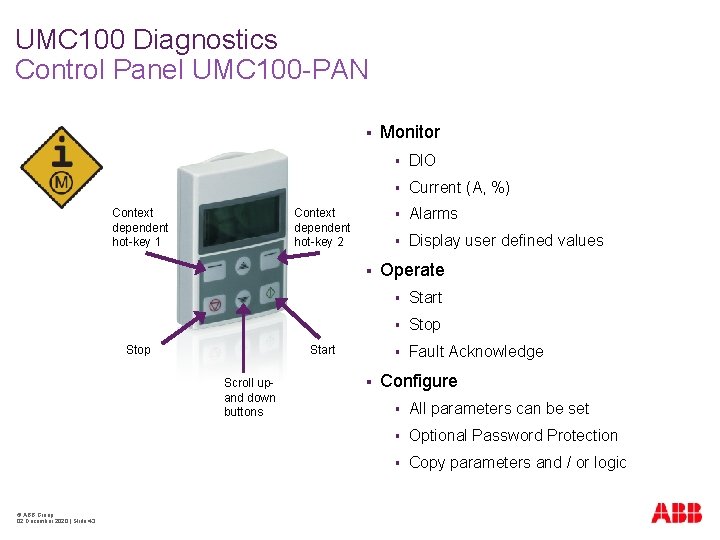
UMC 100 Diagnostics Control Panel UMC 100 -PAN § Context dependent hot-key 1 Context dependent hot-key 2 § Stop Start Scroll upand down buttons © ABB Group 02 December 2020 | Slide 43 § Monitor § DIO § Current (A, %) § Alarms § Display user defined values Operate § Start § Stop § Fault Acknowledge Configure § All parameters can be set § Optional Password Protection § Copy parameters and / or logic
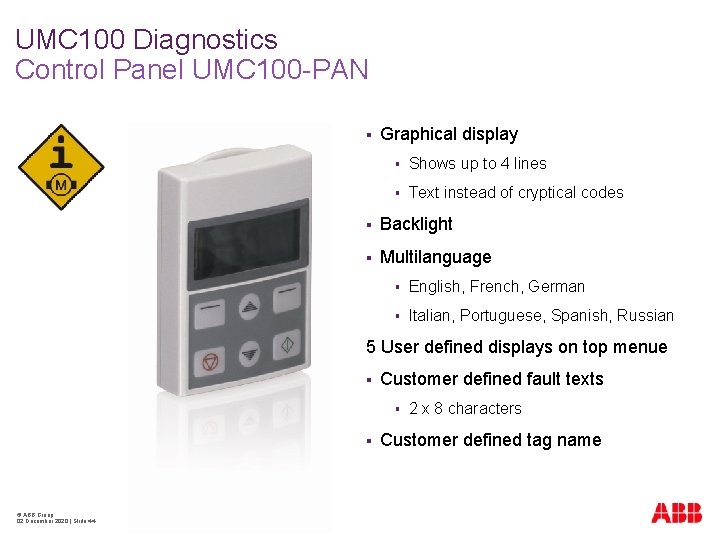
UMC 100 Diagnostics Control Panel UMC 100 -PAN § Graphical display § Shows up to 4 lines § Text instead of cryptical codes § Backlight § Multilanguage § English, French, German § Italian, Portuguese, Spanish, Russian 5 User defined displays on top menue § Customer defined fault texts § § © ABB Group 02 December 2020 | Slide 44 2 x 8 characters Customer defined tag name
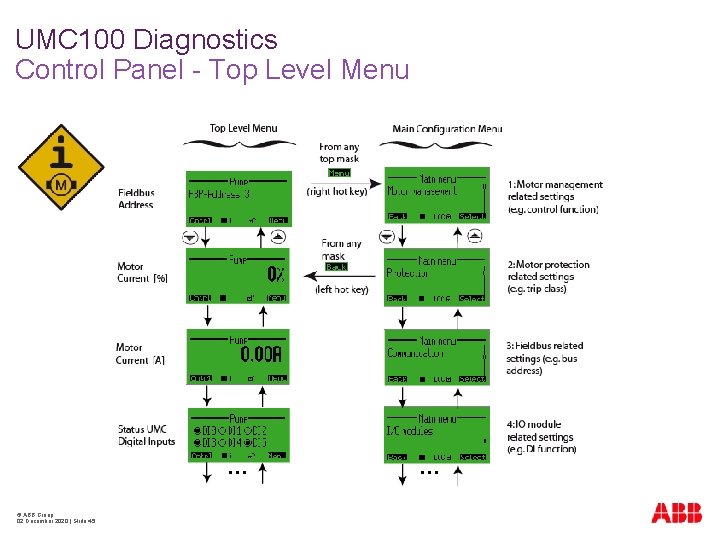
UMC 100 Diagnostics Control Panel - Top Level Menu … © ABB Group 02 December 2020 | Slide 45 …
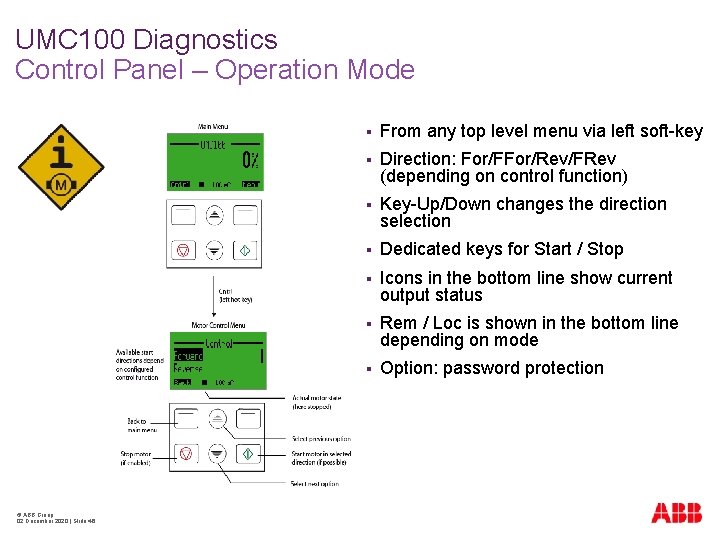
UMC 100 Diagnostics Control Panel – Operation Mode © ABB Group 02 December 2020 | Slide 46 § From any top level menu via left soft-key § Direction: For/FFor/Rev/FRev (depending on control function) § Key-Up/Down changes the direction selection § Dedicated keys for Start / Stop § Icons in the bottom line show current output status § Rem / Loc is shown in the bottom line depending on mode § Option: password protection
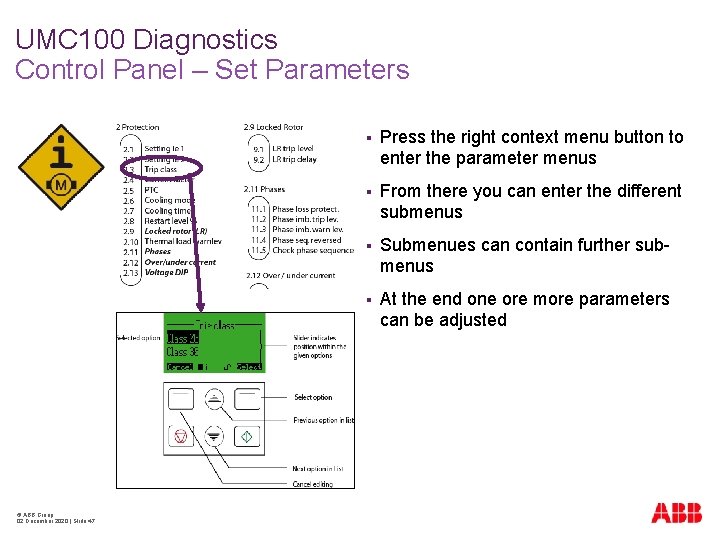
UMC 100 Diagnostics Control Panel – Set Parameters © ABB Group 02 December 2020 | Slide 47 § Press the right context menu button to enter the parameter menus § From there you can enter the different submenus § Submenues can contain further submenus § At the end one ore more parameters can be adjusted
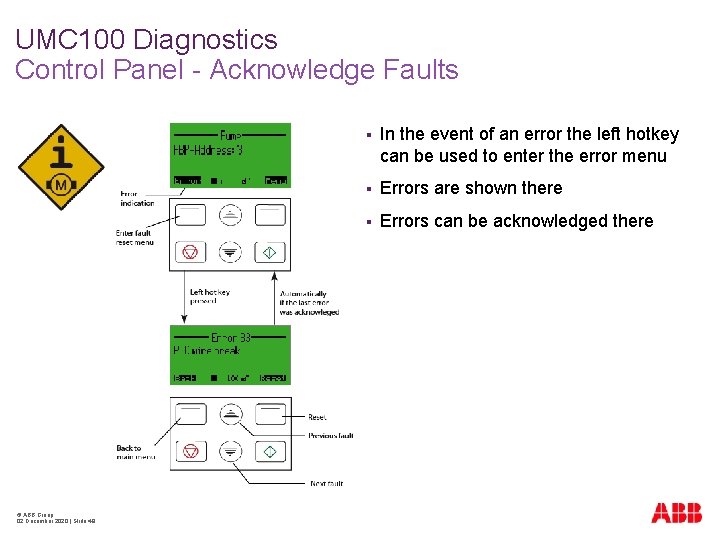
UMC 100 Diagnostics Control Panel - Acknowledge Faults © ABB Group 02 December 2020 | Slide 48 § In the event of an error the left hotkey can be used to enter the error menu § Errors are shown there § Errors can be acknowledged there
UMC 100 Communication Fieldbuses and Networks § © ABB Group 02 December 2020 | Slide 49 UMC 100 can be connected via Field. Bus. Plug to § Modbus TCP § PROFIBUS DP § Device. Net § Modbus RTU § CANopen new § Only one version of UMC 100 for all fieldbuses and networks § Full motor protection and control in case of a bus failure § Fieldbus interface and UMC can be mounted separately perfect for withdrawable MCC applications § Parameterization via device description files (GSD, EDS) or Operator Panel or PC Configuration Tool
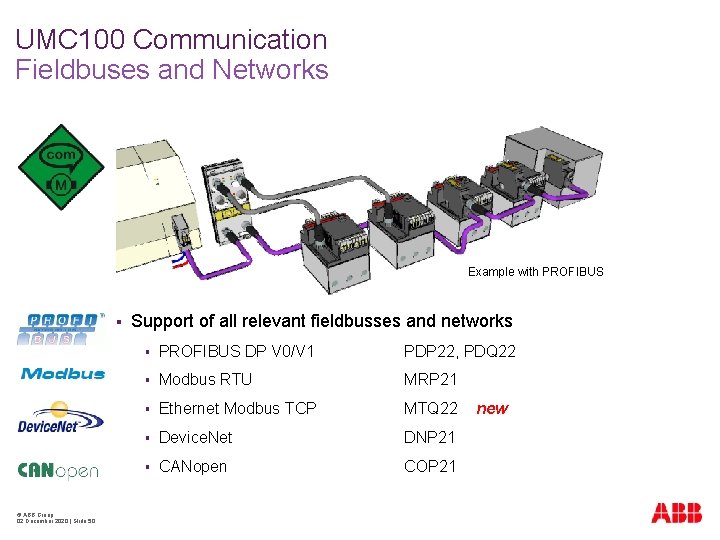
UMC 100 Communication Fieldbuses and Networks Example with PROFIBUS § © ABB Group 02 December 2020 | Slide 50 Support of all relevant fieldbusses and networks § PROFIBUS DP V 0/V 1 PDP 22, PDQ 22 § Modbus RTU MRP 21 § Ethernet Modbus TCP MTQ 22 § Device. Net DNP 21 § CANopen COP 21 new
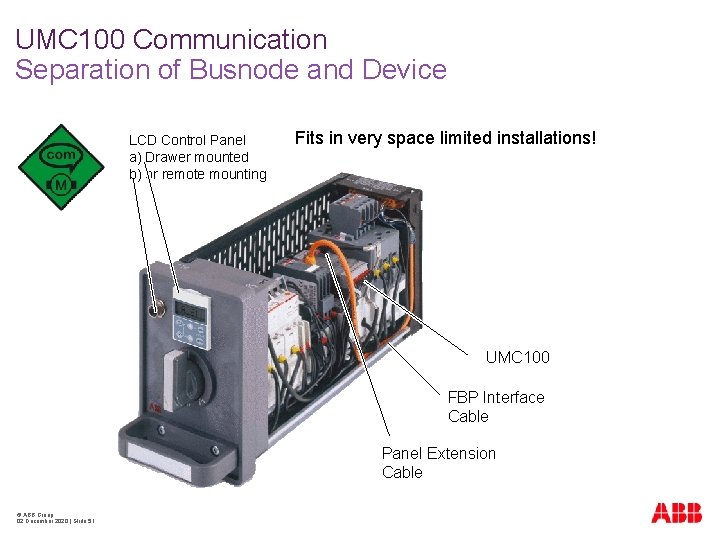
UMC 100 Communication Separation of Busnode and Device LCD Control Panel a) Drawer mounted b) or remote mounting Fits in very space limited installations! UMC 100 FBP Interface Cable Panel Extension Cable © ABB Group 02 December 2020 | Slide 51
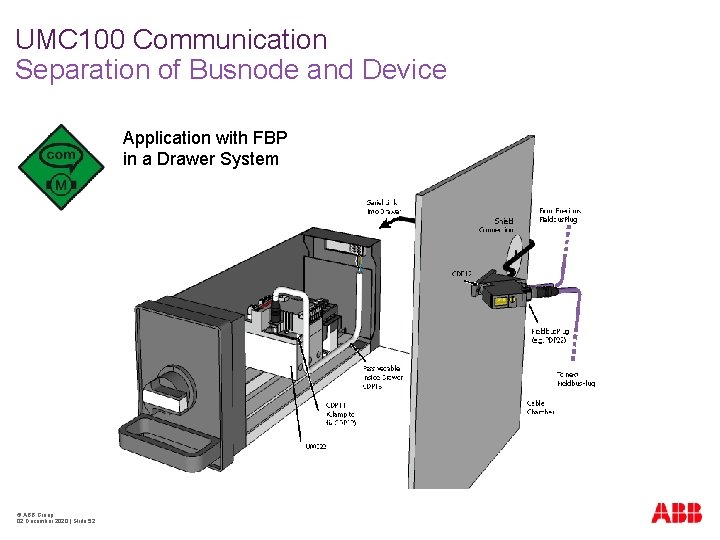
UMC 100 Communication Separation of Busnode and Device Application with FBP in a Drawer System © ABB Group 02 December 2020 | Slide 52
UMC 100 Communication Separation of Busnode and Device © ABB Group 02 December 2020 | Slide 53 § Robust solution to connect fieldbus with motor controller inside a drawer: No trunklines! § Busnode stays alive while drawer gets exchanged § All required accessories available: control panel extension, inside and outside passive cable and fixing bracket
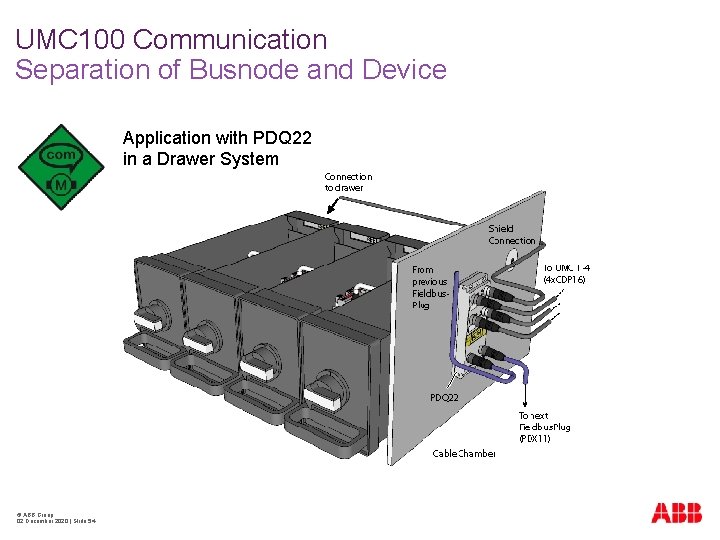
UMC 100 Communication Separation of Busnode and Device Application with PDQ 22 in a Drawer System © ABB Group 02 December 2020 | Slide 54
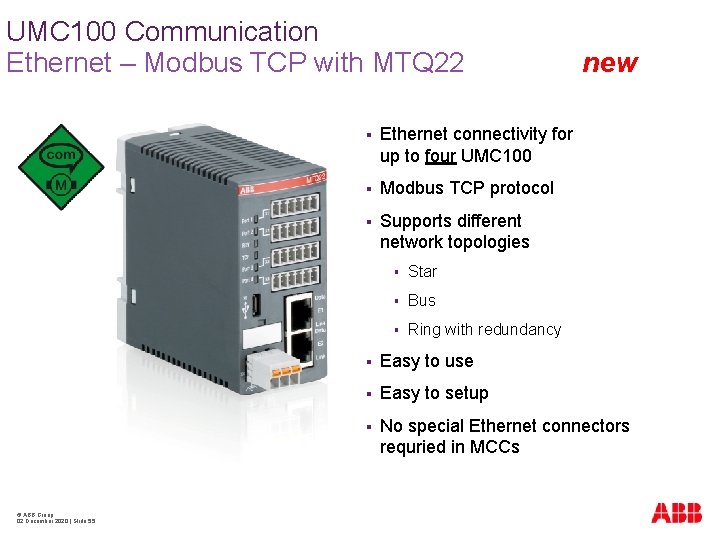
UMC 100 Communication Ethernet – Modbus TCP with MTQ 22 © ABB Group 02 December 2020 | Slide 55 § Ethernet connectivity for up to four UMC 100 § Modbus TCP protocol § Supports different network topologies § Star § Bus § Ring with redundancy new § Easy to use § Easy to setup § No special Ethernet connectors requried in MCCs
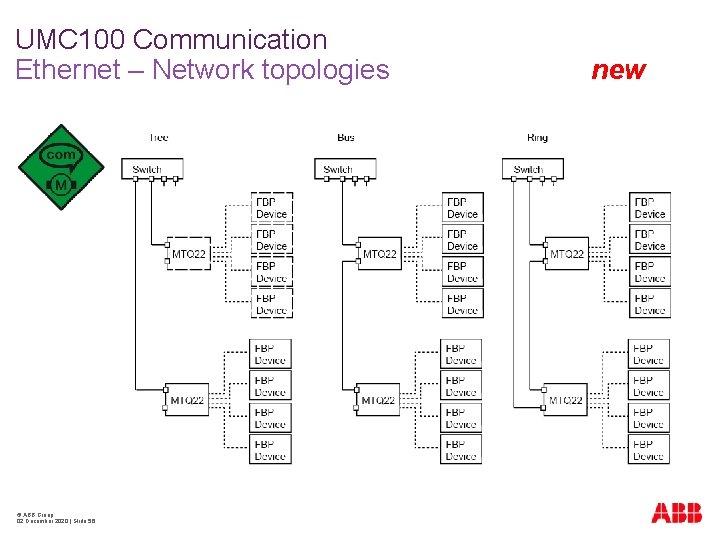
UMC 100 Communication Ethernet – Network topologies © ABB Group 02 December 2020 | Slide 56 new
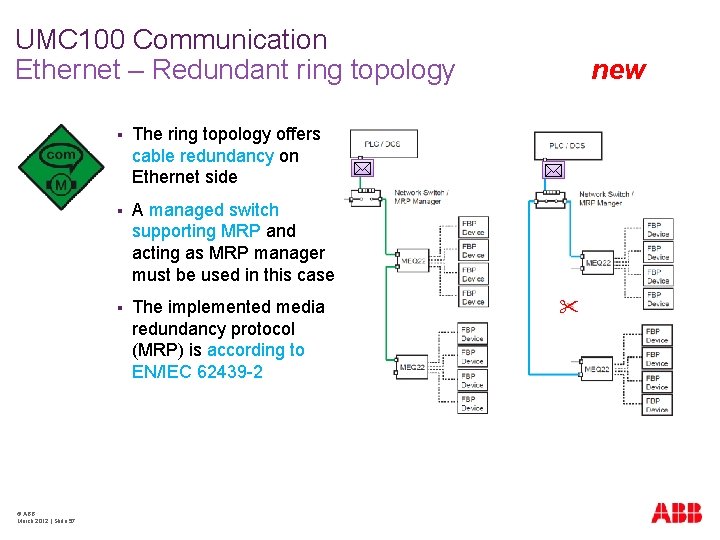
UMC 100 Communication Ethernet – Redundant ring topology § © ABB March 2012 | Slide 57 The ring topology offers cable redundancy on Ethernet side § A managed switch supporting MRP and acting as MRP manager must be used in this case § The implemented media redundancy protocol (MRP) is according to EN/IEC 62439 -2 new
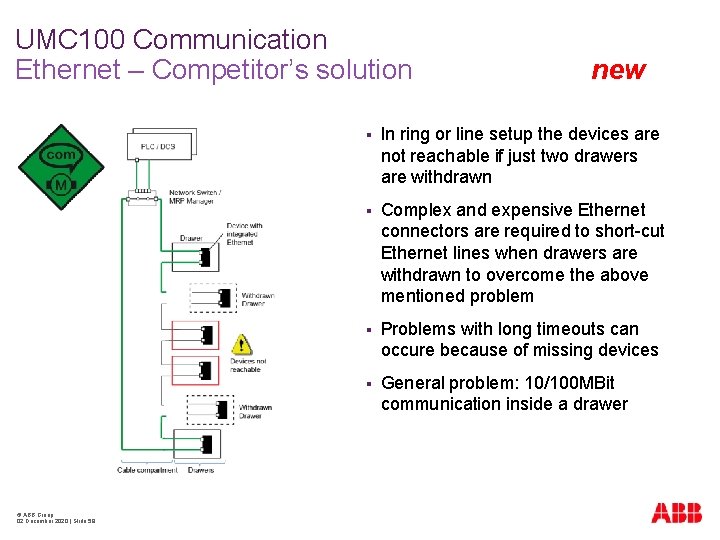
UMC 100 Communication Ethernet – Competitor’s solution © ABB Group 02 December 2020 | Slide 58 new § In ring or line setup the devices are not reachable if just two drawers are withdrawn § Complex and expensive Ethernet connectors are required to short-cut Ethernet lines when drawers are withdrawn to overcome the above mentioned problem § Problems with long timeouts can occure because of missing devices § General problem: 10/100 MBit communication inside a drawer
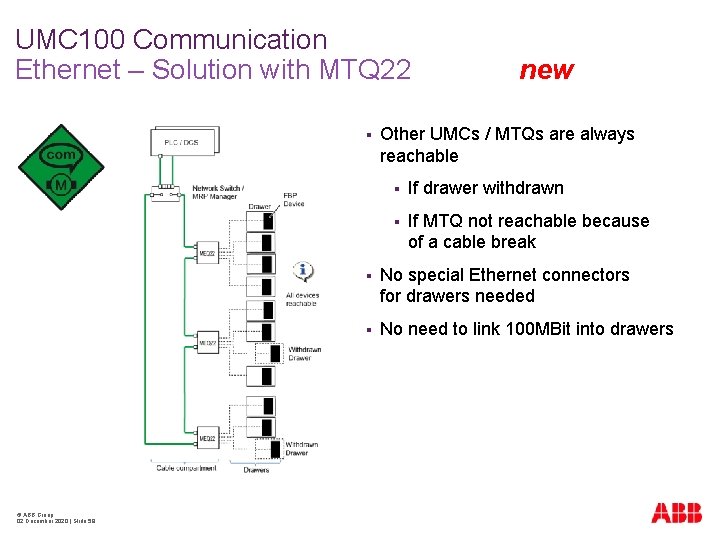
UMC 100 Communication Ethernet – Solution with MTQ 22 § © ABB Group 02 December 2020 | Slide 59 new Other UMCs / MTQs are always reachable § If drawer withdrawn § If MTQ not reachable because of a cable break § No special Ethernet connectors for drawers needed § No need to link 100 MBit into drawers
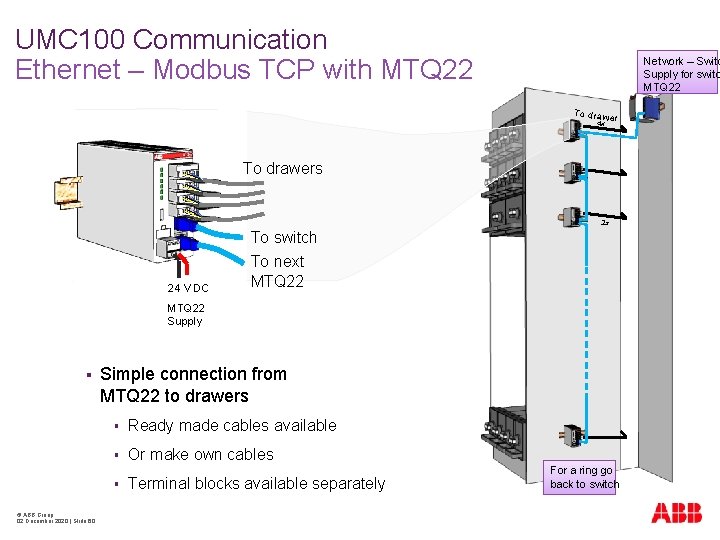
UMC 100 Communication Ethernet – Modbus TCP with MTQ 22 Network – Switc Supply for switc MTQ 22 To drawe r 4 x To drawers 2 x To switch 24 V DC To next MTQ 22 Supply § Simple connection from MTQ 22 to drawers § Ready made cables available § Or make own cables § © ABB Group 02 December 2020 | Slide 60 Terminal blocks available separately For a ring go back to switch
UMC 100 Communication Ethernet – Modbus TCP with MTQ 22 § © ABB Group 02 December 2020 | Slide 61 new Advantages § Multimaster functionality – up to 4 masters supported § Supports MRP protocol EN/IEC 62439 -2 for redundancy § No Ethernet inside a drawer – no need to bring in 100 Mbit/s § Simple connection between MTQ 22 and UMC 100 – No special Ethernet connectors required § Redundancy even works with several drawers taken out § All types of UMCs are supported – easy system upgrade § Micro USB port for configuration via PC
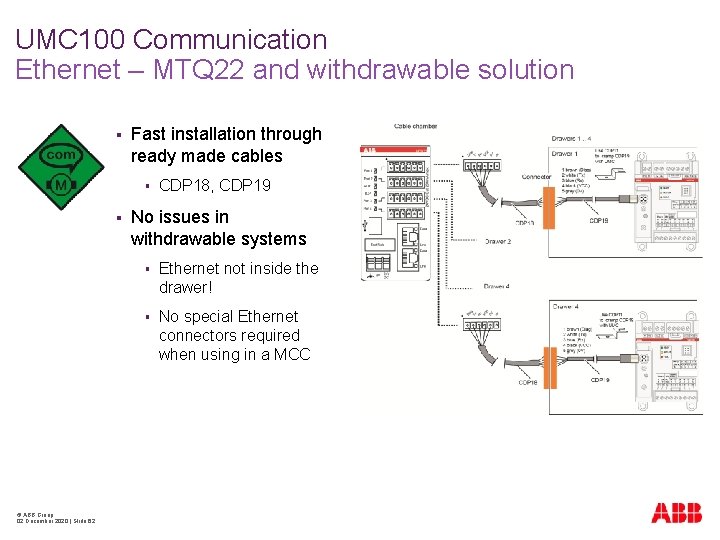
UMC 100 Communication Ethernet – MTQ 22 and withdrawable solution § Fast installation through ready made cables § § © ABB Group 02 December 2020 | Slide 62 CDP 18, CDP 19 No issues in withdrawable systems § Ethernet not inside the drawer! § No special Ethernet connectors required when using in a MCC
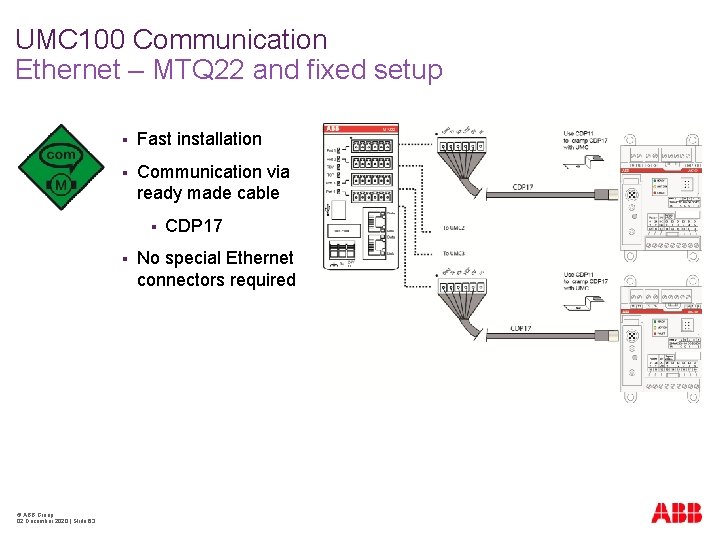
UMC 100 Communication Ethernet – MTQ 22 and fixed setup § Fast installation § Communication via ready made cable § § © ABB Group 02 December 2020 | Slide 63 CDP 17 No special Ethernet connectors required
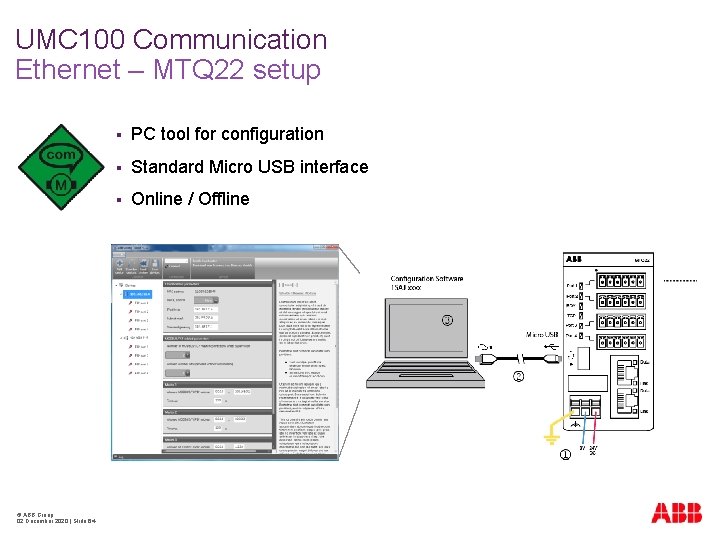
UMC 100 Communication Ethernet – MTQ 22 setup © ABB Group 02 December 2020 | Slide 64 § PC tool for configuration § Standard Micro USB interface § Online / Offline
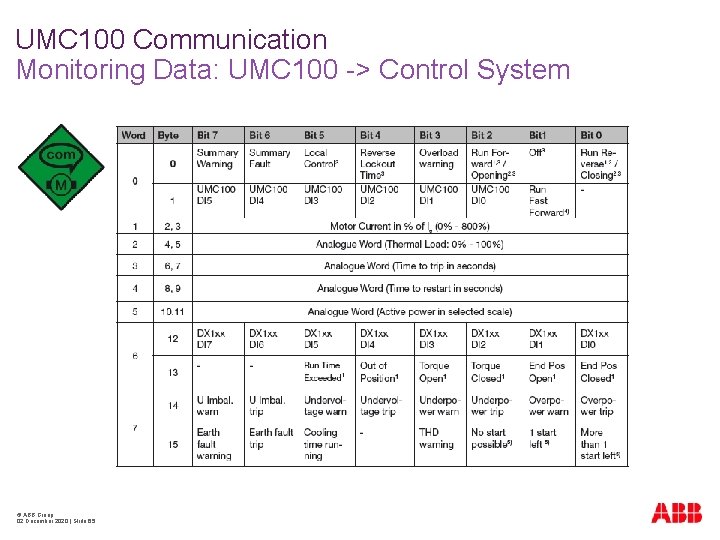
UMC 100 Communication Monitoring Data: UMC 100 -> Control System © ABB Group 02 December 2020 | Slide 65
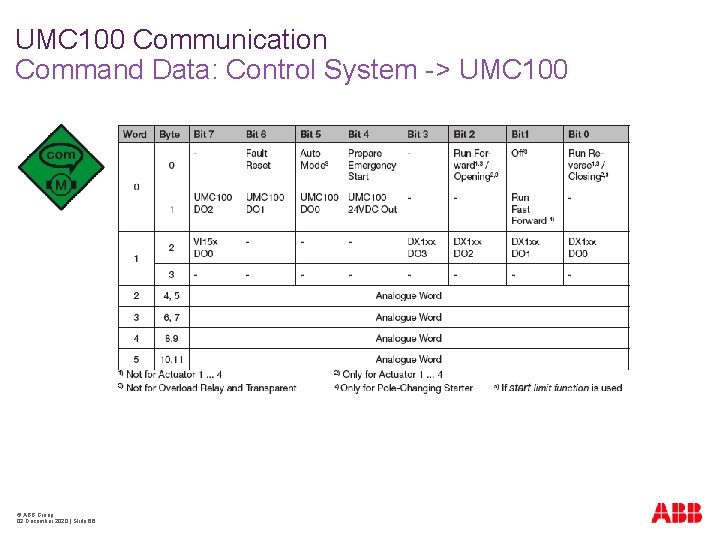
UMC 100 Communication Command Data: Control System -> UMC 100 © ABB Group 02 December 2020 | Slide 66
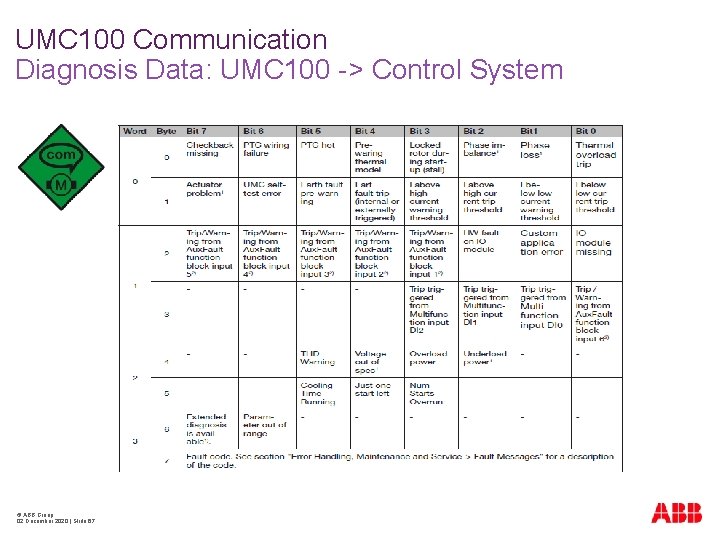
UMC 100 Communication Diagnosis Data: UMC 100 -> Control System © ABB Group 02 December 2020 | Slide 67
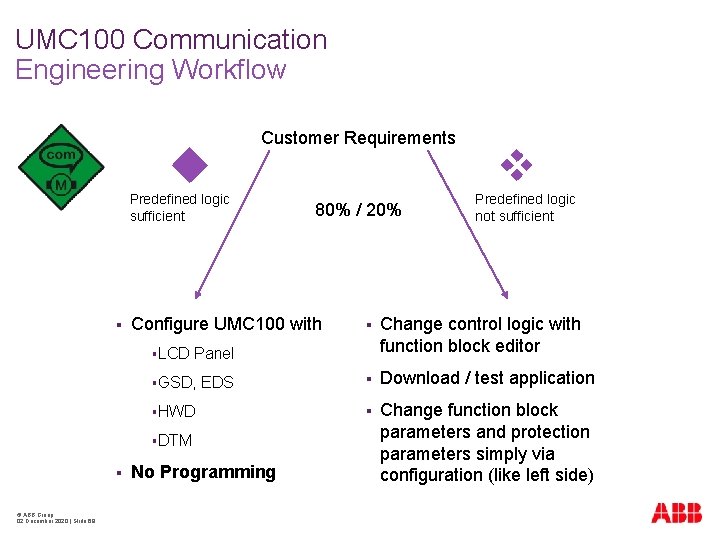
UMC 100 Communication Engineering Workflow Customer Requirements Predefined logic sufficient § Configure UMC 100 with §LCD EDS §HWD §DTM © ABB Group 02 December 2020 | Slide 68 No Programming Predefined logic not sufficient § Change control logic with function block editor § Download / test application § Change function block parameters and protection parameters simply via configuration (like left side) Panel §GSD, § 80% / 20%
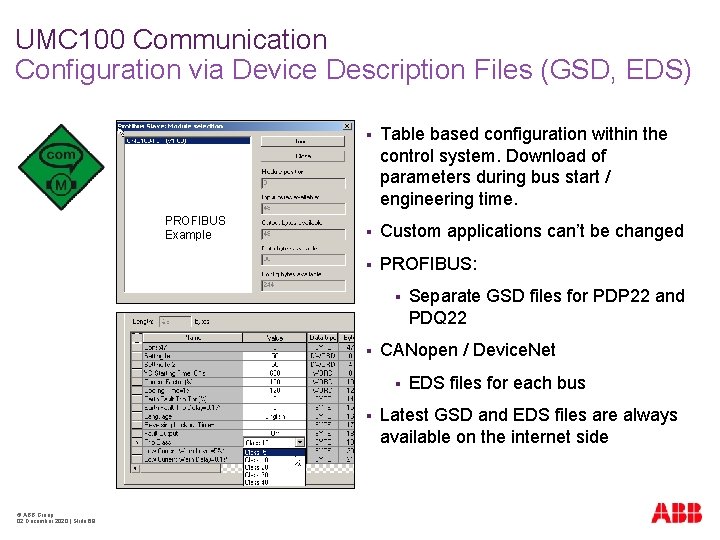
UMC 100 Communication Configuration via Device Description Files (GSD, EDS) PROFIBUS Example § Table based configuration within the control system. Download of parameters during bus start / engineering time. § Custom applications can’t be changed § PROFIBUS: § § CANopen / Device. Net § § © ABB Group 02 December 2020 | Slide 69 Separate GSD files for PDP 22 and PDQ 22 EDS files for each bus Latest GSD and EDS files are always available on the internet side
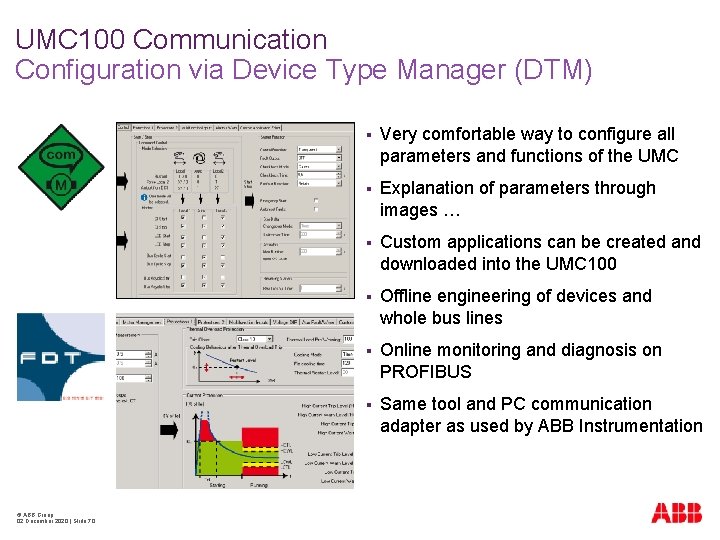
UMC 100 Communication Configuration via Device Type Manager (DTM) © ABB Group 02 December 2020 | Slide 70 § Very comfortable way to configure all parameters and functions of the UMC § Explanation of parameters through images … § Custom applications can be created and downloaded into the UMC 100 § Offline engineering of devices and whole bus lines § Online monitoring and diagnosis on PROFIBUS § Same tool and PC communication adapter as used by ABB Instrumentation
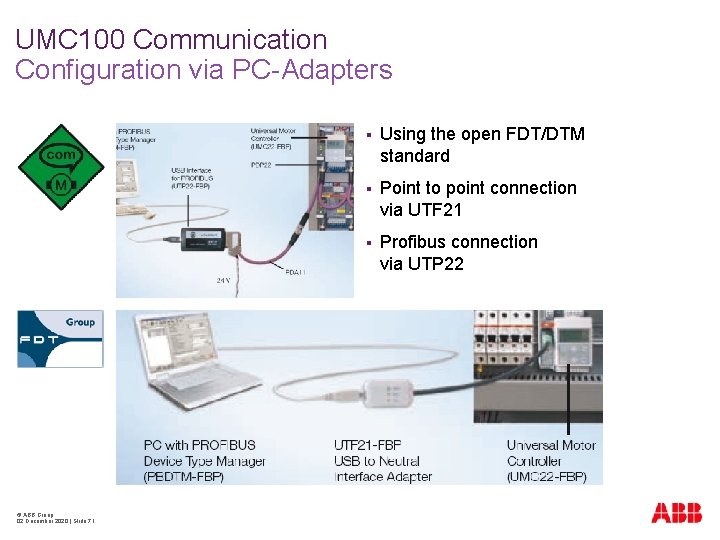
UMC 100 Communication Configuration via PC-Adapters © ABB Group 02 December 2020 | Slide 71 § Using the open FDT/DTM standard § Point to point connection via UTF 21 § Profibus connection via UTP 22
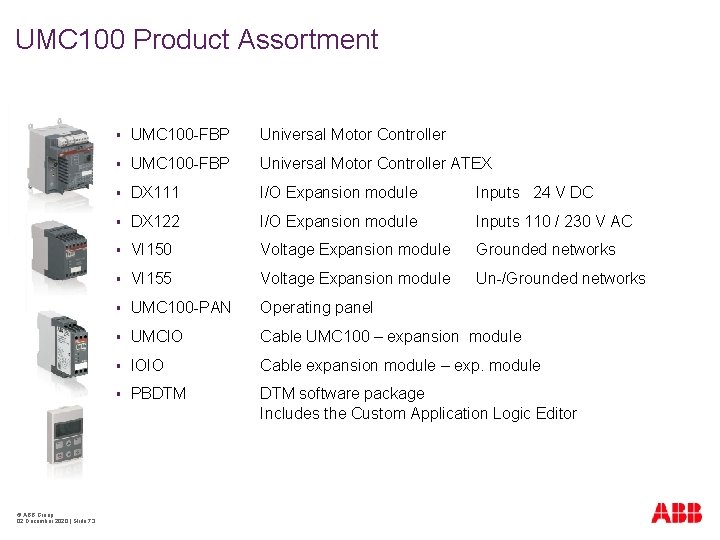
UMC 100 Product Assortment © ABB Group 02 December 2020 | Slide 73 § UMC 100 -FBP Universal Motor Controller ATEX § DX 111 I/O Expansion module Inputs 24 V DC § DX 122 I/O Expansion module Inputs 110 / 230 V AC § VI 150 Voltage Expansion module Grounded networks § VI 155 Voltage Expansion module Un-/Grounded networks § UMC 100 -PAN Operating panel § UMCIO Cable UMC 100 – expansion module § IOIO Cable expansion module – exp. module § PBDTM software package Includes the Custom Application Logic Editor
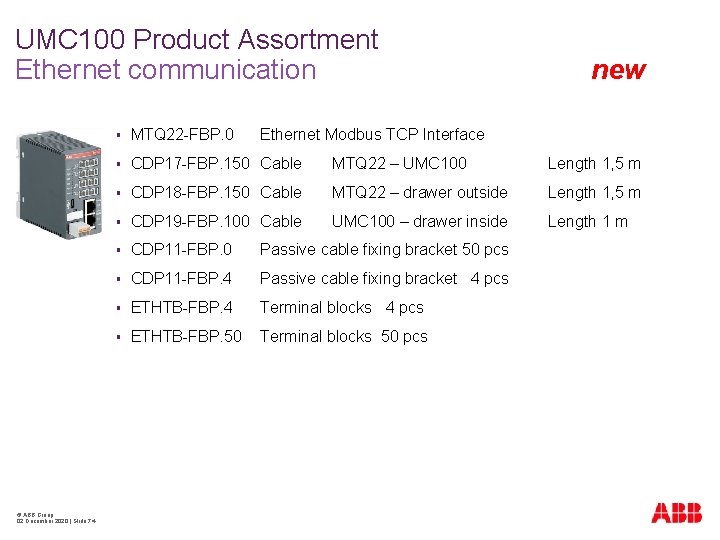
UMC 100 Product Assortment Ethernet communication © ABB Group 02 December 2020 | Slide 74 new § MTQ 22 -FBP. 0 Ethernet Modbus TCP Interface § CDP 17 -FBP. 150 Cable MTQ 22 – UMC 100 Length 1, 5 m § CDP 18 -FBP. 150 Cable MTQ 22 – drawer outside Length 1, 5 m § CDP 19 -FBP. 100 Cable UMC 100 – drawer inside Length 1 m § CDP 11 -FBP. 0 Passive cable fixing bracket 50 pcs § CDP 11 -FBP. 4 Passive cable fixing bracket 4 pcs § ETHTB-FBP. 4 Terminal blocks 4 pcs § ETHTB-FBP. 50 Terminal blocks 50 pcs
UMC 100 Summary § § Advanced Motor Protection § Flexible Motor Control § Diagnostics and Maintenance Data § Fieldbus Communication for all major busses § Perfect solution for Motor Control Centers § Can be adapted to almost all customer requirements § © ABB Group 02 December 2020 | Slide 75 UMC 100 integrates § Built-in logic -> just configure § Customer specific logic -> logic editor Powerful LCD panel for monitoring, parameterization and control

- Slides: 72