
HCS 12 ARCHITECTURE Razvan Bogdan Embedded Systems Content
HCS 12 ARCHITECTURE Razvan Bogdan Embedded Systems
Content Overview of the HCS 12 Architecture Basic Architecture HCS 12 Architecture Details Addressing Modes Instruction Set Program trace

ES - hardware The Generic Model
Overview of the HCS 12 Architecture Freescale designed the 68 HC 12 as an upgrade to the 8 -bit 68 HC 11 microcontroller 8 MHz of 68 HC 12 – not satisfactory => Freescale revised the design to achieve a bus clock rate of 25 MHz (a few microcontrollers can run at 33 MHz). The revised 68 HC 12 was referred to as the Star 12 family. Automotive and process control applications are the two major target markets of the HCS 12. This is evidenced by the inclusion of such peripheral functions as � input capture (IC), output compare (OC), pulse-width modulation (PWM), controller area network (CAN), and byte data link control (BDLC). Other application areas: � the MC 9 S 12 NE 64 was designed for applications that need to access the Internet � the MC 9 S 12 UF 32 was designed for interfacing with the USB bus
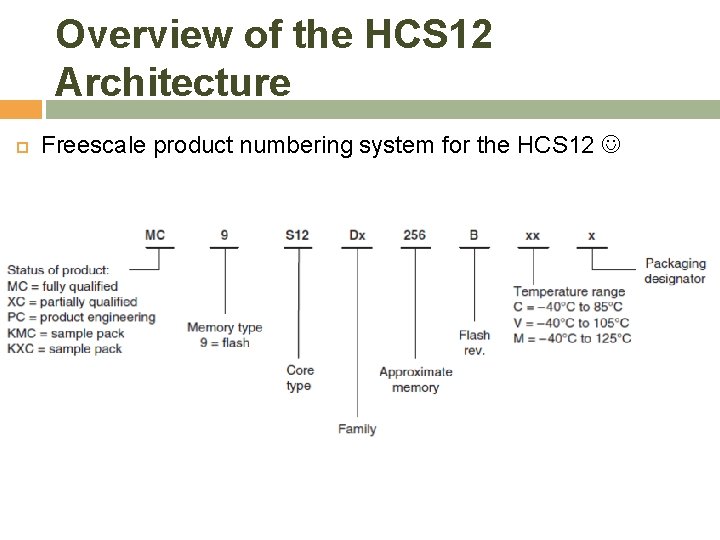
Overview of the HCS 12 Architecture Freescale product numbering system for the HCS 12
Basic Architecture The architecture of a computer system defines how its processor, RAM, ROM, input devices, and output devices are connected, including the assembly instructions used to access RAM, ROM, and I/O devices
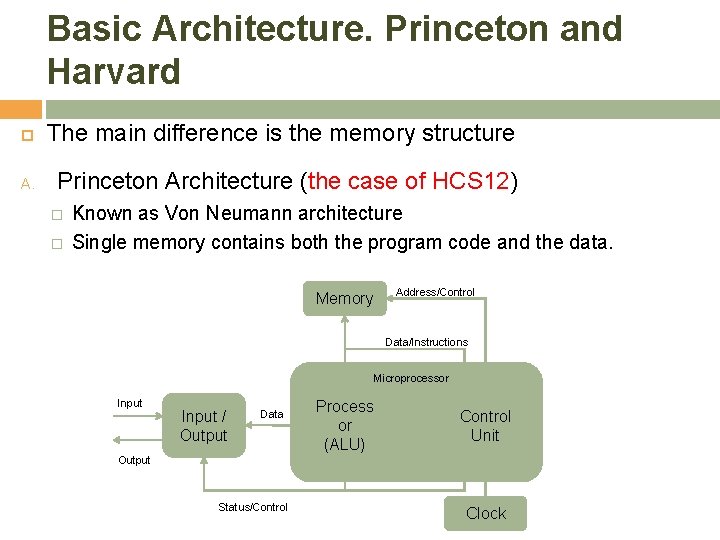
Basic Architecture. Princeton and Harvard The main difference is the memory structure A. Princeton Architecture (the case of HCS 12) � � Known as Von Neumann architecture Single memory contains both the program code and the data. Memory Address/Control Data/Instructions Microprocessor Input / Output Data Process or (ALU) Control Unit Output Status/Control Clock
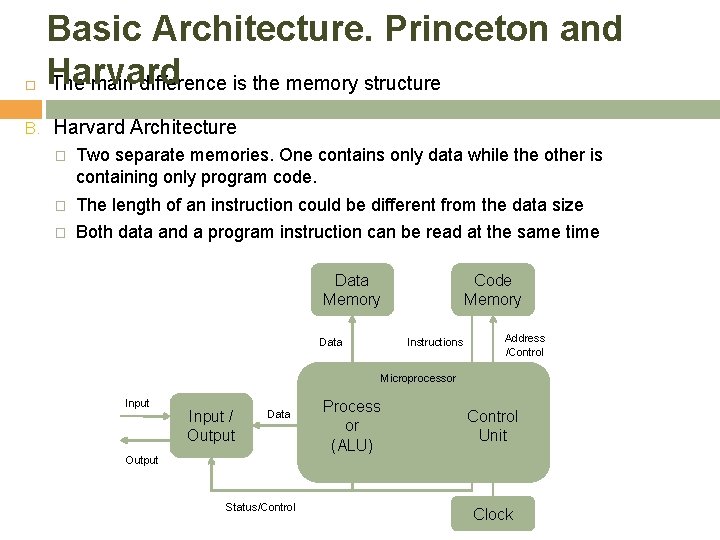
B. Basic Architecture. Princeton and Harvard The main difference is the memory structure Harvard Architecture � Two separate memories. One contains only data while the other is containing only program code. � The length of an instruction could be different from the data size � Both data and a program instruction can be read at the same time Data Memory Data Code Memory Instructions Address /Control Microprocessor Input / Output Data Process or (ALU) Control Unit Output Status/Control Clock
Basic Architecture. Major components 1. Processor Also called an arithmetic logic unit (ALU). Operations such as addition, subtraction, bit-wise AND and OR, shift operations. The processor has registers (groups of D flip-flops used to store binary values). Many microcontrollers perform operations on data that is located in a register. This requires the microcontroller to � � � load the data from memory into a register in the processor, manipulate the data, then store the new value back to memory. The processor also generates signals that indicates when values are negative, zero, or when arithmetic overflow occurs.
Basic Architecture. Major components 2. Control Unit A synchronous sequential machine that coordinates the flow of data between the other units and operations of the other blocks. The sequence of states and control output of the unit depend on the inputs: the current program instruction, the status outputs of the other blocks, and the input/output block. Generally speaking, central processing unit (CPU) refers to not only the processor but also the control unit.
Basic Architecture. Major components 3. Memory is the place where program code and data are stored. A sequence of directly addressable ‘locations. ’ Therefore, the number of addresses available in a memory is limited by the number of bits used to represent the address. If 16 bits are used for the address, there are 65, 536 (=216) different addresses available.
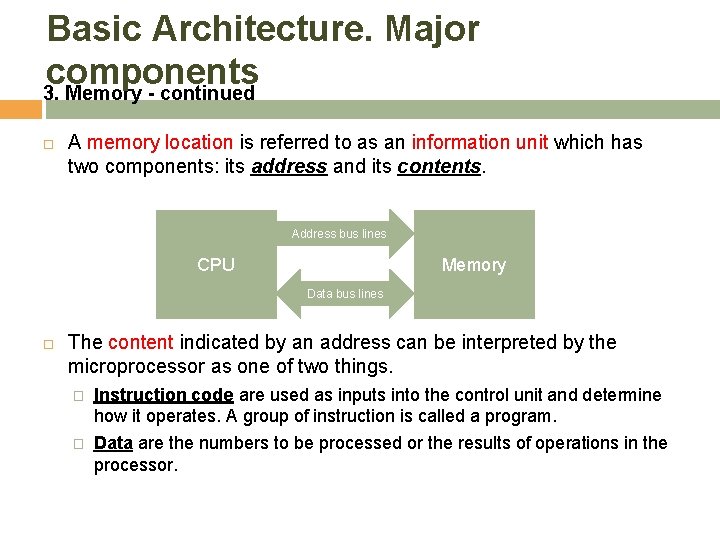
Basic Architecture. Major components 3. Memory - continued A memory location is referred to as an information unit which has two components: its address and its contents. Address bus lines CPU Memory Data bus lines The content indicated by an address can be interpreted by the microprocessor as one of two things. � Instruction code are used as inputs into the control unit and determine how it operates. A group of instruction is called a program. � Data are the numbers to be processed or the results of operations in the processor.

Basic Architecture. Major components 3. Memory – continued: MCS 12 Address Space MC 9 S 12 has 16 address lines MC 9 S 12 can address 216 distinct locations For MC 9 S 12, each location holds one byte (eight bits) MC 9 S 12 can address 216 bytes 216 = 65536 216 = 26 × 210 = 64 × 1024 = 64 KB (1 K = 210 = 1024) MC 9 S 12 can address 64 KB Lowest address: 000000002 = 000016 = 010 Highest address: 111111112 = FFFF 16 = 6553510
Basic Architecture. Major components 3. Memory – continued: MCS 12 Memory Type RAM: Random Access Memory (can read and write) ROM: Read Only Memory (programmed at factory) PROM: Programmable Read Only Memory � EPROM: Erasable Programmable Read Only Memory � (Program at site, can erase using UV light and reprogram) EEPROM: Electrically Erasable Programmable Read Only Memory � (Programmed once at site) (Program and erase using voltage rather than UV light) MCS 12 DG 256 has: � 12 KB RAM � 4 KB EEPROM (Normally can only access 3 KB) � 256 KB Flash EEPROM (Can access 16 KB at a time)
Basic Architecture. Major components 4. Clock A periodic signal for the sequential machine in the control unit. Also used by other blocks to synchronize operations 5. Input/Output The Input/Output (I/O for short) block represents the interface between the internals of the microcomputer and the outside world. Keyboard, LED and LCD display, printers for example.
Basic Architecture. Instruction Codes Instruction codes consist of Operation Code and Operation Code (Opcode or Op code for short) � This tells the microcomputer what action to perform and how to interpret the operand. All instructions must have an op code. Operand � � � The operand contains the data that microcontroller will perform the action on. Some operands include several numbers for op codes that specify more complex actions. Some operation codes that perform simple tasks do not need to have operands.
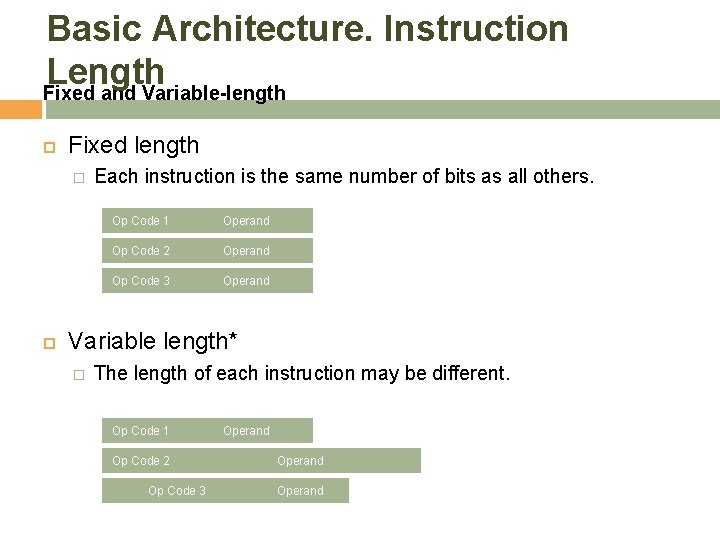
Basic Architecture. Instruction Length Fixed and Variable-length Fixed length � Each instruction is the same number of bits as all others. Op Code 1 Operand Op Code 2 Operand Op Code 3 Operand Variable length* � The length of each instruction may be different. Op Code 1 Op Code 2 Op Code 3 Operand
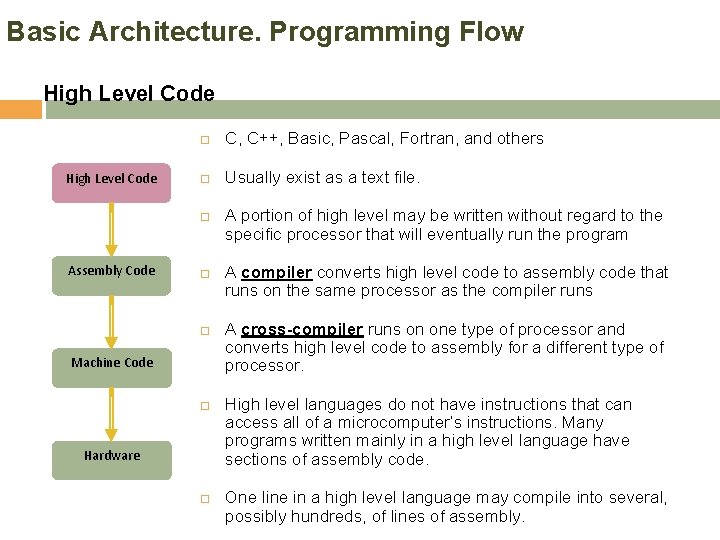
Basic Architecture. Programming Flow High Level Code C, C++, Basic, Pascal, Fortran, and others Usually exist as a text file. Assembly Code Machine Code Hardware A portion of high level may be written without regard to the specific processor that will eventually run the program A compiler converts high level code to assembly code that runs on the same processor as the compiler runs A cross-compiler runs on one type of processor and converts high level code to assembly for a different type of processor. High level languages do not have instructions that can access all of a microcomputer’s instructions. Many programs written mainly in a high level language have sections of assembly code. One line in a high level language may compile into several, possibly hundreds, of lines of assembly.
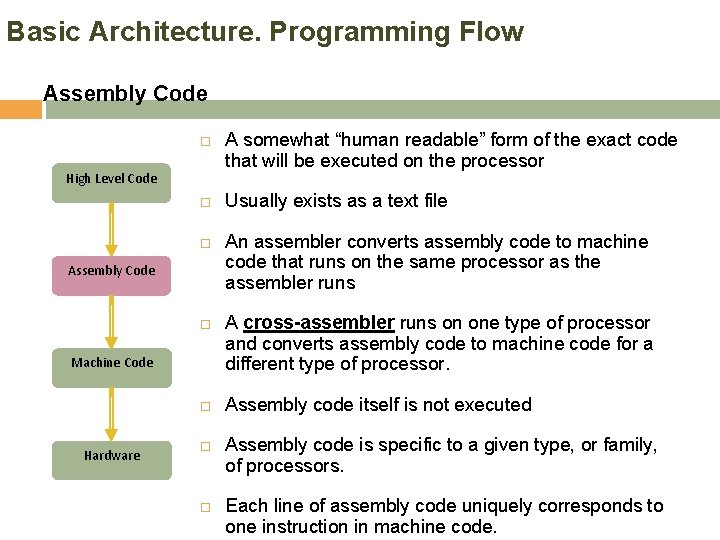
Basic Architecture. Programming Flow Assembly Code High Level Code Assembly Code Machine Code Hardware A somewhat “human readable” form of the exact code that will be executed on the processor Usually exists as a text file An assembler converts assembly code to machine code that runs on the same processor as the assembler runs A cross-assembler runs on one type of processor and converts assembly code to machine code for a different type of processor. Assembly code itself is not executed Assembly code is specific to a given type, or family, of processors. Each line of assembly code uniquely corresponds to one instruction in machine code.
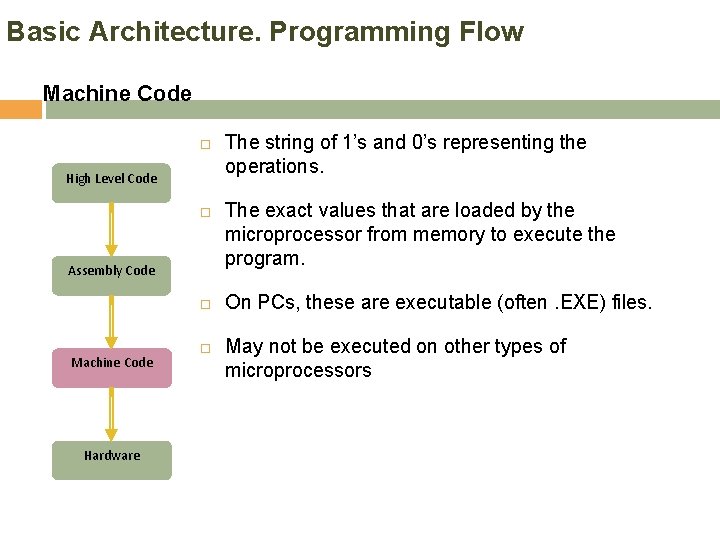
Basic Architecture. Programming Flow Machine Code High Level Code Assembly Code Machine Code Hardware The string of 1’s and 0’s representing the operations. The exact values that are loaded by the microprocessor from memory to execute the program. On PCs, these are executable (often. EXE) files. May not be executed on other types of microprocessors
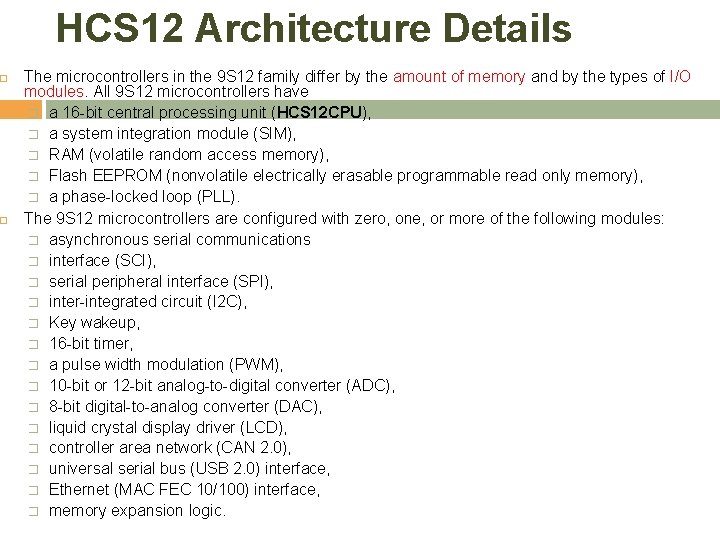
HCS 12 Architecture Details The microcontrollers in the 9 S 12 family differ by the amount of memory and by the types of I/O modules. All 9 S 12 microcontrollers have � a 16 -bit central processing unit (HCS 12 CPU), � a system integration module (SIM), � RAM (volatile random access memory), � Flash EEPROM (nonvolatile electrically erasable programmable read only memory), � a phase-locked loop (PLL). The 9 S 12 microcontrollers are configured with zero, one, or more of the following modules: � asynchronous serial communications � interface (SCI), � serial peripheral interface (SPI), � inter-integrated circuit (I 2 C), � Key wakeup, � 16 -bit timer, � a pulse width modulation (PWM), � 10 -bit or 12 -bit analog-to-digital converter (ADC), � 8 -bit digital-to-analog converter (DAC), � liquid crystal display driver (LCD), � controller area network (CAN 2. 0), � universal serial bus (USB 2. 0) interface, � Ethernet (MAC FEC 10/100) interface, � memory expansion logic.
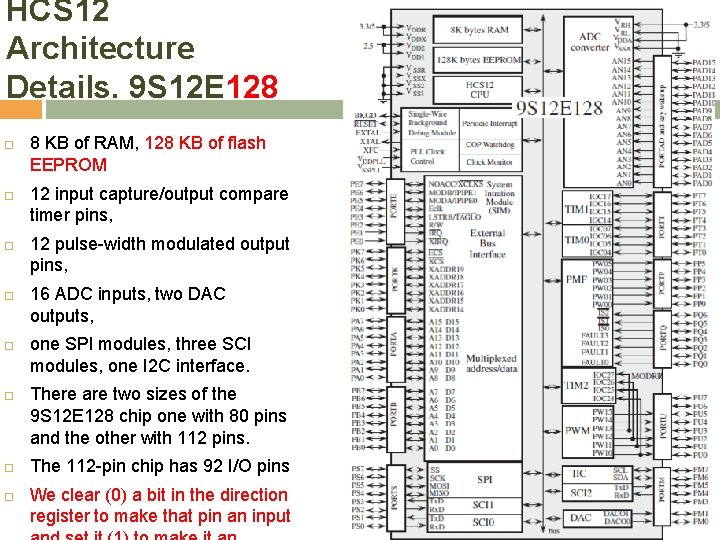
HCS 12 Architecture Details. 9 S 12 E 128 8 KB of RAM, 128 KB of flash EEPROM 12 input capture/output compare timer pins, 12 pulse-width modulated output pins, 16 ADC inputs, two DAC outputs, one SPI modules, three SCI modules, one I 2 C interface. There are two sizes of the 9 S 12 E 128 chip one with 80 pins and the other with 112 pins. The 112 -pin chip has 92 I/O pins We clear (0) a bit in the direction register to make that pin an input
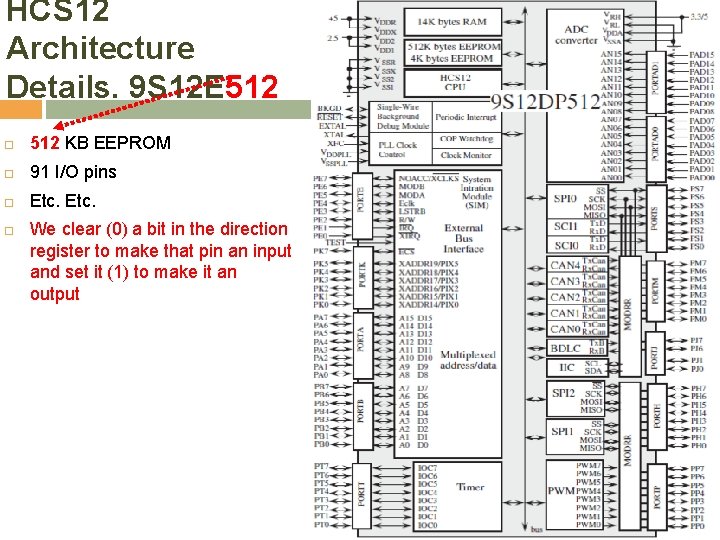
HCS 12 Architecture Details. 9 S 12 E 512 KB EEPROM 91 I/O pins Etc. We clear (0) a bit in the direction register to make that pin an input and set it (1) to make it an output
HCS 12 Architecture Details. MC 9 S 12 DG 256 16 -bit CPU (central processing unit), 256 KB of flash memory, 12 KB of RAM, 4 KB of EEPROM and many on-chip peripherals The main features of the MC 9 S 12 DG 256 are listed below: � � � � Powerful 16 -bit CPU 256 K bytes of flash memory 12 K bytes of RAM 4 K bytes of EEPROM 2 SCI ports 3 SPI ports 2 CAN 2. 0 ports I 2 C interface 8 -ch 16 -bit timers 8 -ch 8 -bit or 4 -ch 16 bit PWM 16 -channel 10 -bit A/D converter Fast 25 MHz bus speed via on-chip Phase Lock Loop BDM for in-circuit programming and debugging 112 -pin LQFP package offers up to 91 I/O in a small footprint
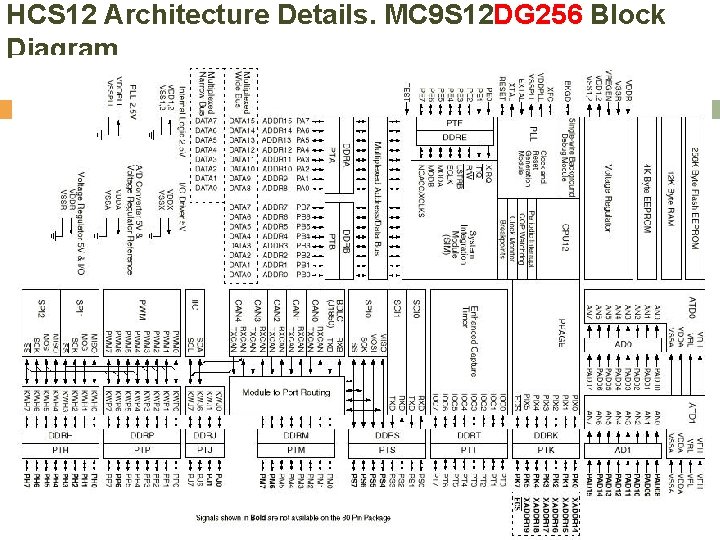
HCS 12 Architecture Details. MC 9 S 12 DG 256 Block Diagram
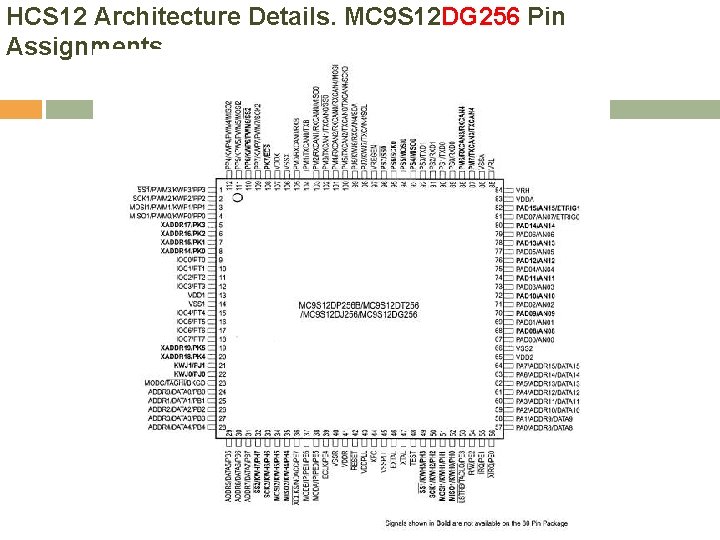
HCS 12 Architecture Details. MC 9 S 12 DG 256 Pin Assignments
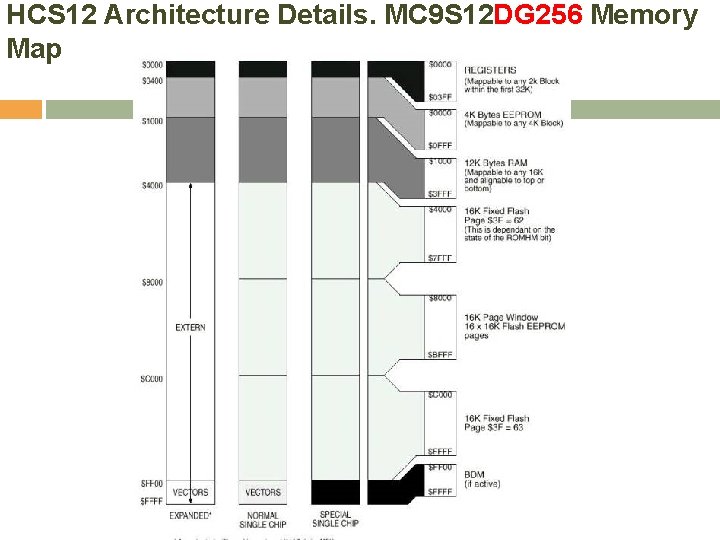
HCS 12 Architecture Details. MC 9 S 12 DG 256 Memory Map
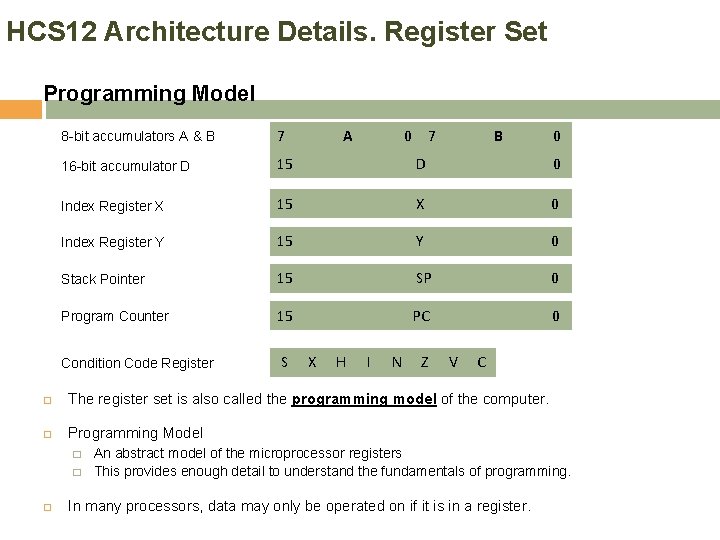
HCS 12 Architecture Details. Register Set Programming Model 8 -bit accumulators A & B 7 A 16 -bit accumulator D 15 D 0 Index Register X 15 X 0 Index Register Y 15 Y 0 Stack Pointer 15 SP 0 Program Counter 15 PC 0 Condition Code Register S X H 0 I N 7 Z B V C The register set is also called the programming model of the computer. Programming Model � � 0 An abstract model of the microprocessor registers This provides enough detail to understand the fundamentals of programming. In many processors, data may only be operated on if it is in a register.
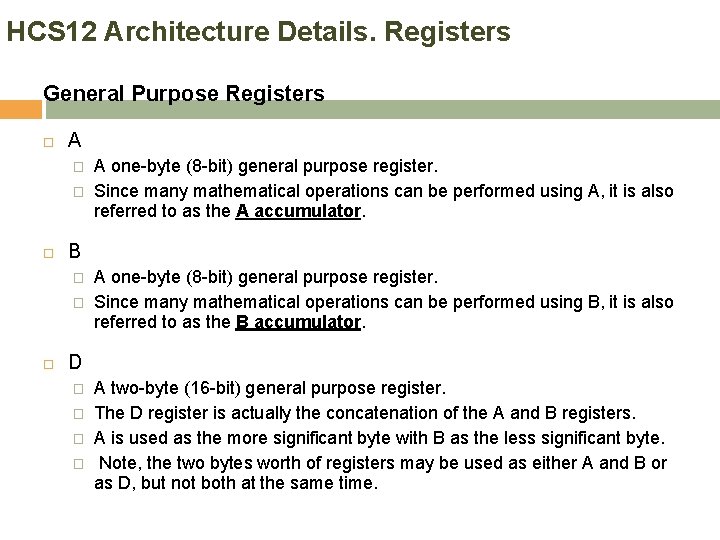
HCS 12 Architecture Details. Registers General Purpose Registers A � � B � � A one-byte (8 -bit) general purpose register. Since many mathematical operations can be performed using A, it is also referred to as the A accumulator. A one-byte (8 -bit) general purpose register. Since many mathematical operations can be performed using B, it is also referred to as the B accumulator. D � � A two-byte (16 -bit) general purpose register. The D register is actually the concatenation of the A and B registers. A is used as the more significant byte with B as the less significant byte. Note, the two bytes worth of registers may be used as either A and B or as D, but not both at the same time.
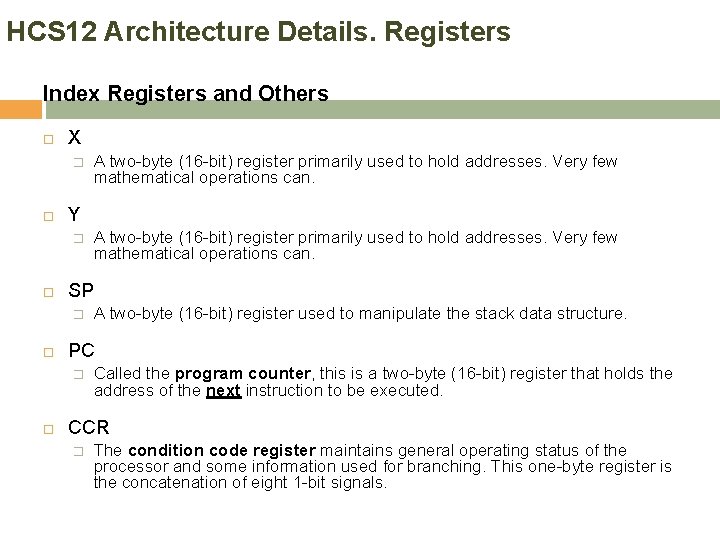
HCS 12 Architecture Details. Registers Index Registers and Others X � Y � A two-byte (16 -bit) register used to manipulate the stack data structure. PC � A two-byte (16 -bit) register primarily used to hold addresses. Very few mathematical operations can. SP � A two-byte (16 -bit) register primarily used to hold addresses. Very few mathematical operations can. Called the program counter, this is a two-byte (16 -bit) register that holds the address of the next instruction to be executed. CCR � The condition code register maintains general operating status of the processor and some information used for branching. This one-byte register is the concatenation of eight 1 -bit signals.
HCS 12 Architecture Details. Registers Interaction – simple processor diagram
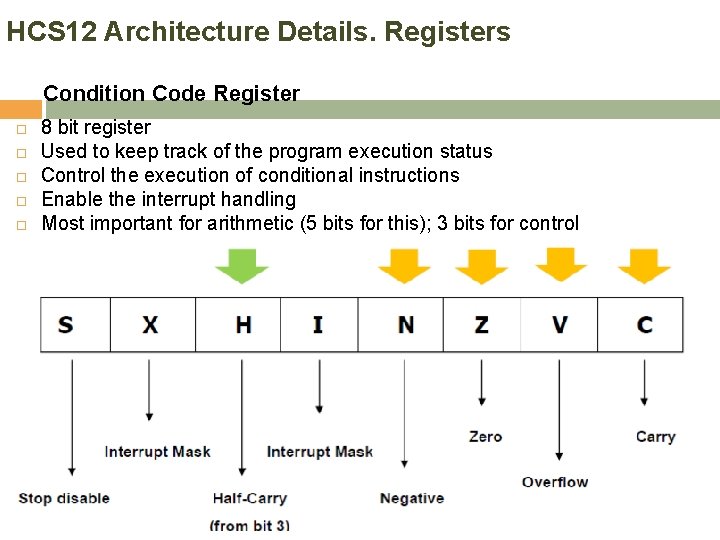
HCS 12 Architecture Details. Registers Condition Code Register 8 bit register Used to keep track of the program execution status Control the execution of conditional instructions Enable the interrupt handling Most important for arithmetic (5 bits for this); 3 bits for control
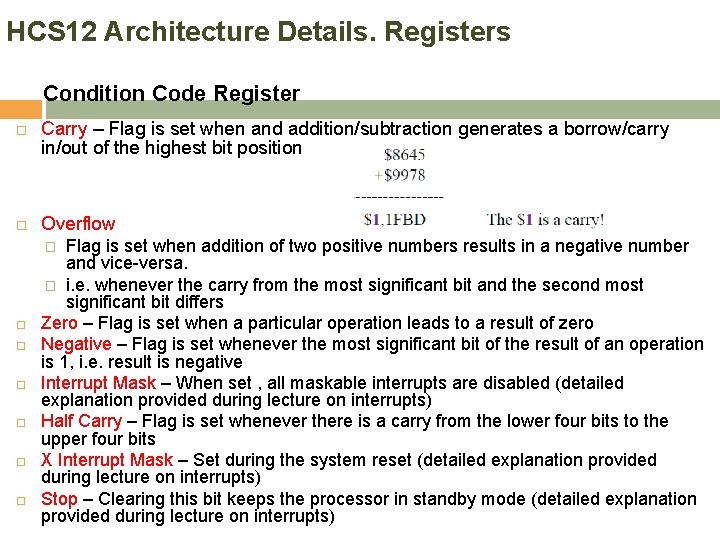
HCS 12 Architecture Details. Registers Condition Code Register Carry – Flag is set when and addition/subtraction generates a borrow/carry in/out of the highest bit position Overflow Flag is set when addition of two positive numbers results in a negative number and vice-versa. � i. e. whenever the carry from the most significant bit and the second most significant bit differs Zero – Flag is set when a particular operation leads to a result of zero Negative – Flag is set whenever the most significant bit of the result of an operation is 1, i. e. result is negative Interrupt Mask – When set , all maskable interrupts are disabled (detailed explanation provided during lecture on interrupts) Half Carry – Flag is set whenever there is a carry from the lower four bits to the upper four bits X Interrupt Mask – Set during the system reset (detailed explanation provided during lecture on interrupts) Stop – Clearing this bit keeps the processor in standby mode (detailed explanation provided during lecture on interrupts) �
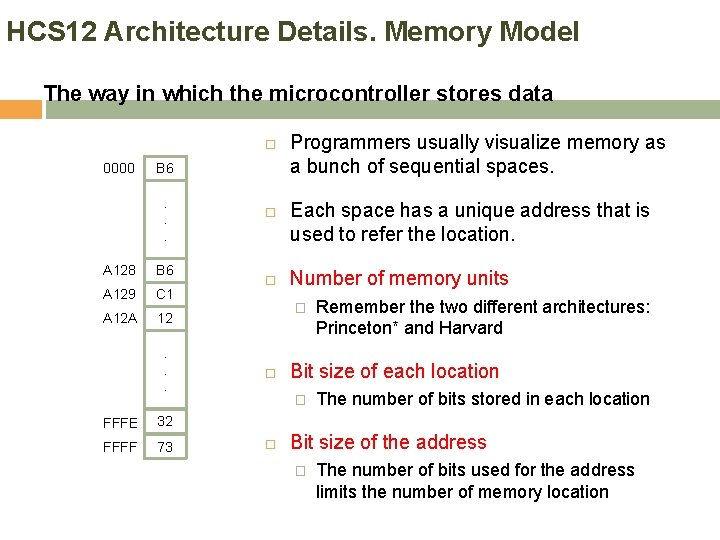
HCS 12 Architecture Details. Memory Model The way in which the microcontroller stores data 0000 B 6. . . A 128 B 6 A 129 C 1 A 12. . . FFFE 32 FFFF 73 Programmers usually visualize memory as a bunch of sequential spaces. Each space has a unique address that is used to refer the location. Number of memory units � Bit size of each location � Remember the two different architectures: Princeton* and Harvard The number of bits stored in each location Bit size of the address � The number of bits used for the address limits the number of memory location
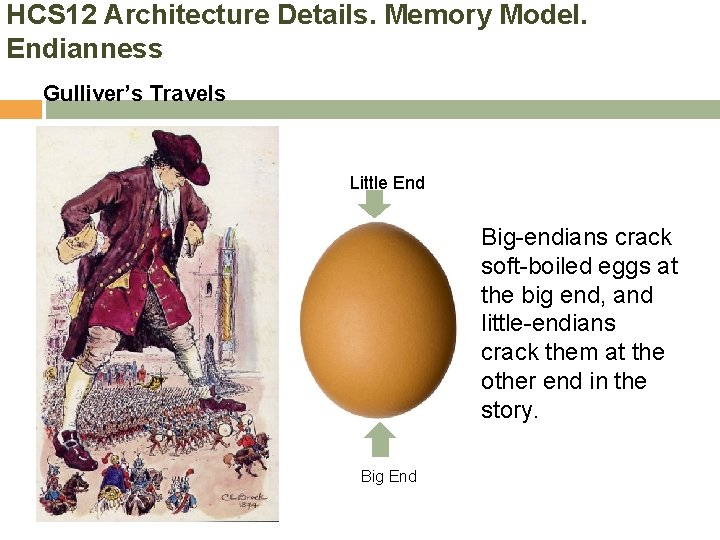
HCS 12 Architecture Details. Memory Model. Endianness Gulliver’s Travels Big Little End Big-endians crack soft-boiled eggs at the big end, and little-endians crack them at the other end in the story. Big End
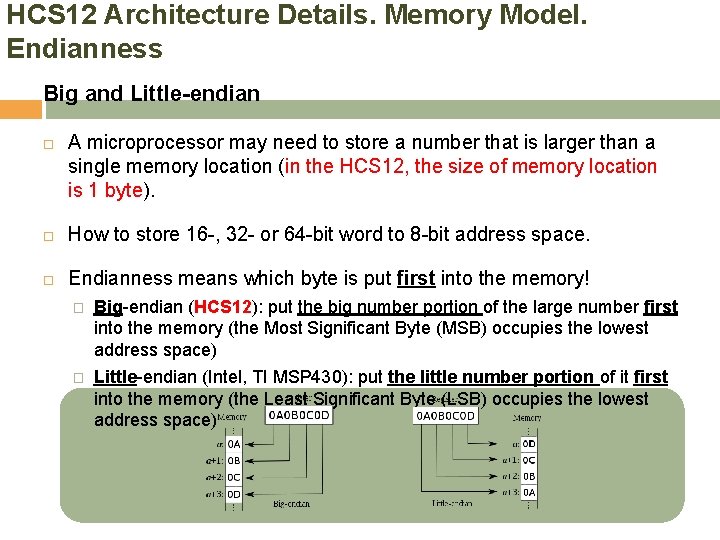
HCS 12 Architecture Details. Memory Model. Endianness Big and Little-endian A microprocessor may need to store a number that is larger than a single memory location (in the HCS 12, the size of memory location is 1 byte). How to store 16 -, 32 - or 64 -bit word to 8 -bit address space. Endianness means which byte is put first into the memory! � Big-endian (HCS 12): put the big number portion of the large number first into the memory (the Most Significant Byte (MSB) occupies the lowest address space) � Little-endian (Intel, TI MSP 430): put the little number portion of it first into the memory (the Least Significant Byte (LSB) occupies the lowest address space)
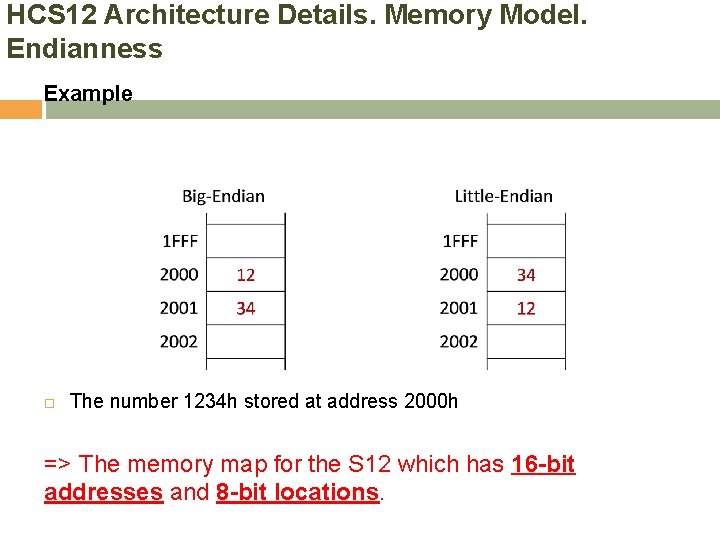
HCS 12 Architecture Details. Memory Model. Endianness Example The number 1234 h stored at address 2000 h => The memory map for the S 12 which has 16 -bit addresses and 8 -bit locations.
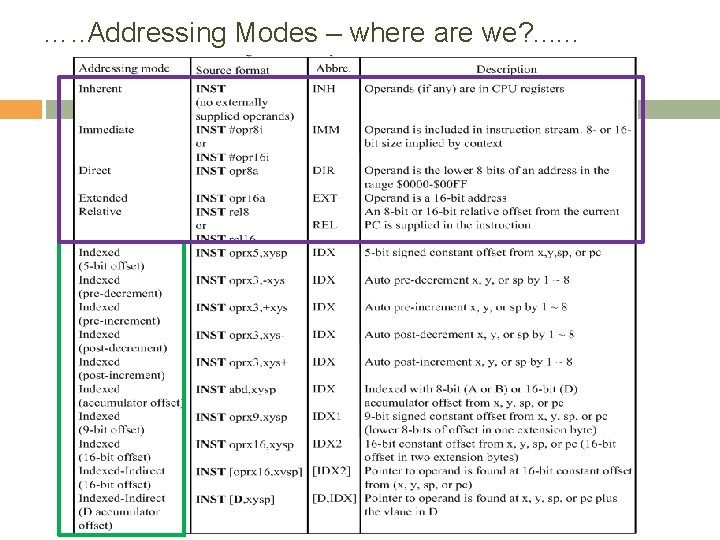
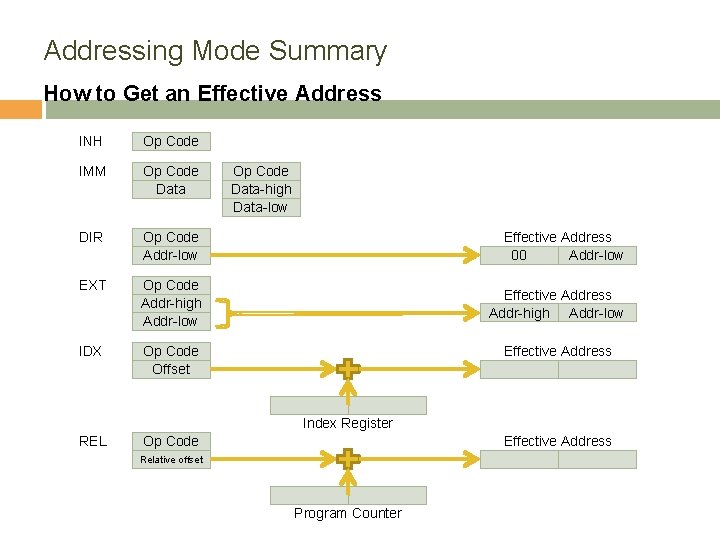
HCS 12 Architecture Details. Addressing Modes How to get effective addresses The operand of an instruction can use different methods for specifying data in the memory (=addressing modes). � � If the data number is in registers (inside the microprocessor), a memory address is not needed. The addressing mode may specify a value, a register, or a memory location to be used as an operand. The HCS 12 has six addressing modes Effective Address � � � Extended (EXT) Direct (DIR) Inherent (INH) Immediate (IMM) Relative (REL) : Used only with branch instructions. Index (IDX) The effective address is the location that holds the data to be used by the operation. The operand is often used to construct the effective address. An addressing mode tells the microprocessor the way of calculation to get the effective address. A HCS 12 instruction consists of one or two bytes of opcode and zero to five bytes of operand addressing information. Opcode bytes specify the operation to be performed by the CPU
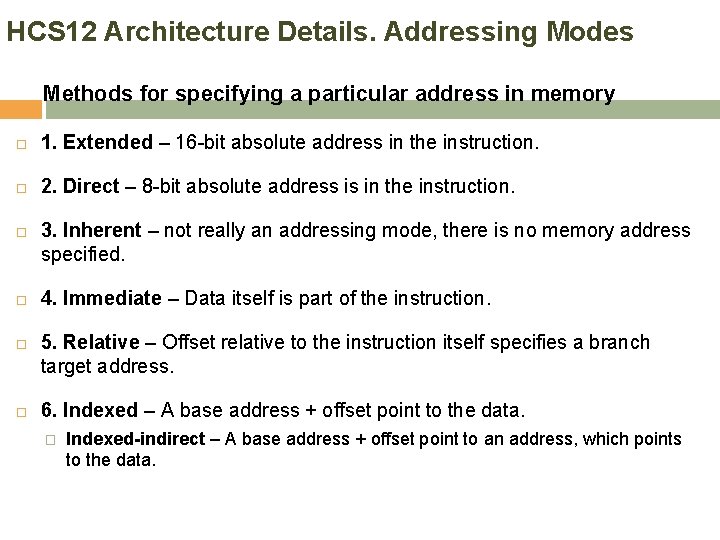
HCS 12 Architecture Details. Addressing Modes Methods for specifying a particular address in memory 1. Extended – 16 -bit absolute address in the instruction. 2. Direct – 8 -bit absolute address is in the instruction. 3. Inherent – not really an addressing mode, there is no memory address specified. 4. Immediate – Data itself is part of the instruction. 5. Relative – Offset relative to the instruction itself specifies a branch target address. 6. Indexed – A base address + offset point to the data. � Indexed-indirect – A base address + offset point to an address, which points to the data.
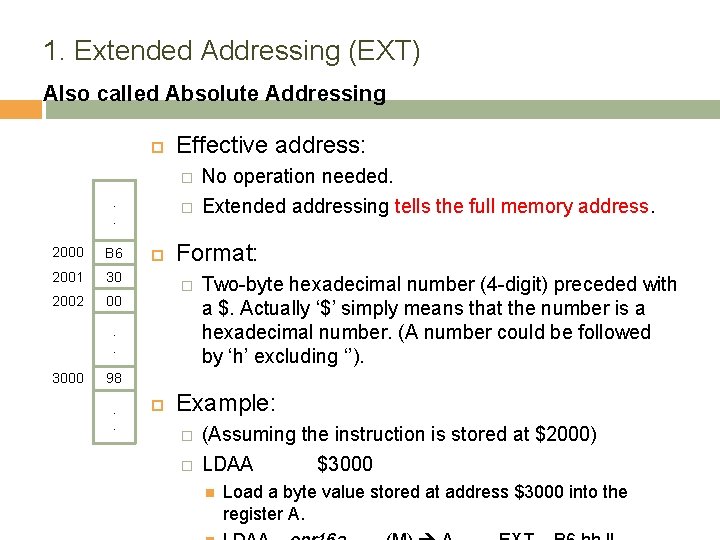
1. Extended Addressing (EXT) Also called Absolute Addressing Effective address: � . . 2000 B 6 2001 30 2002 00 � Format: � . . 3000 No operation needed. Extended addressing tells the full memory address. Two-byte hexadecimal number (4 -digit) preceded with a $. Actually ‘$’ simply means that the number is a hexadecimal number. (A number could be followed by ‘h’ excluding ‘’). 98. . Example: � � (Assuming the instruction is stored at $2000) LDAA $3000 Load a byte value stored at address $3000 into the register A.
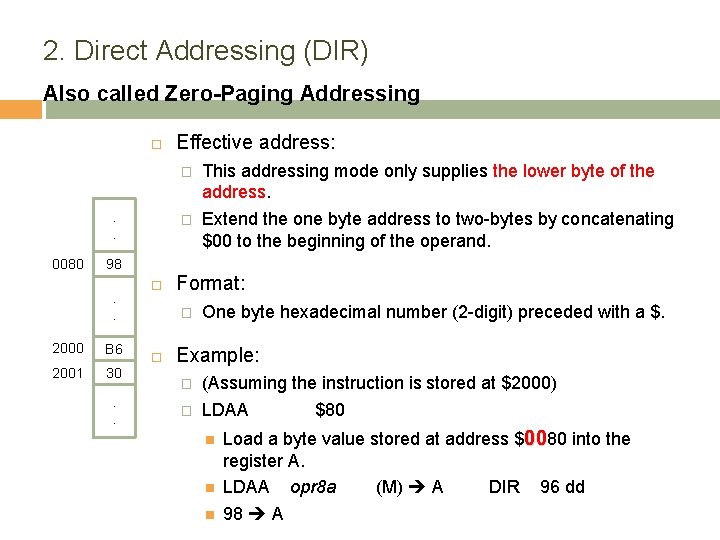
2. Direct Addressing (DIR) Also called Zero-Paging Addressing . . 0080 Effective address: � This addressing mode only supplies the lower byte of the address. � Extend the one byte address to two-bytes by concatenating $00 to the beginning of the operand. 98. . 2000 B 6 2001 30. . Format: � One byte hexadecimal number (2 -digit) preceded with a $. Example: � (Assuming the instruction is stored at $2000) � LDAA $80 Load a byte value stored at address $0080 into the register A. LDAA opr 8 a (M) A DIR 96 dd 98 A
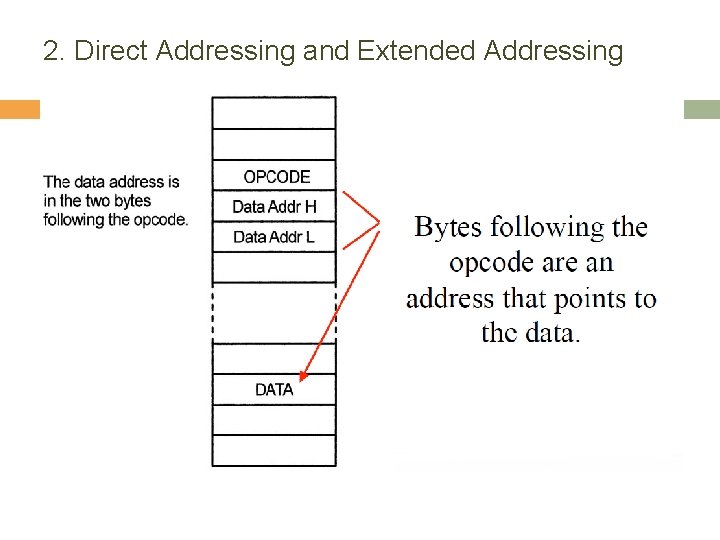
2. Direct Addressing and Extended Addressing
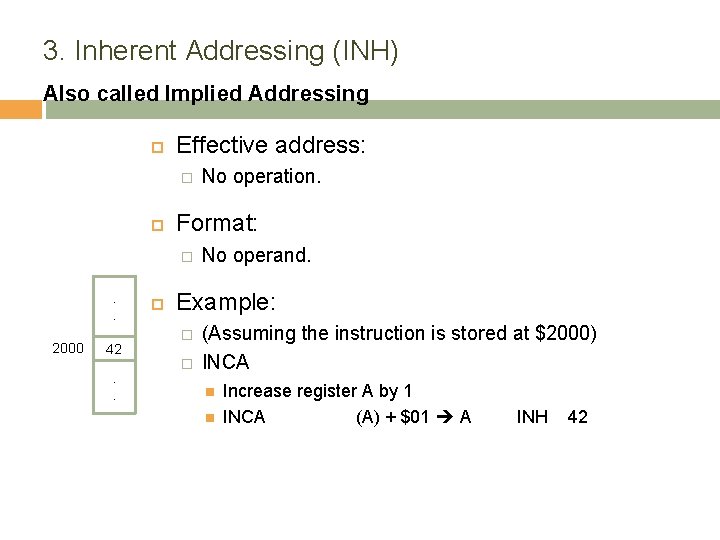
3. Inherent Addressing (INH) Also called Implied Addressing Effective address: � Format: � . . 2000 42. . No operation. No operand. Example: � � (Assuming the instruction is stored at $2000) INCA Increase register A by 1 INCA (A) + $01 A INH 42
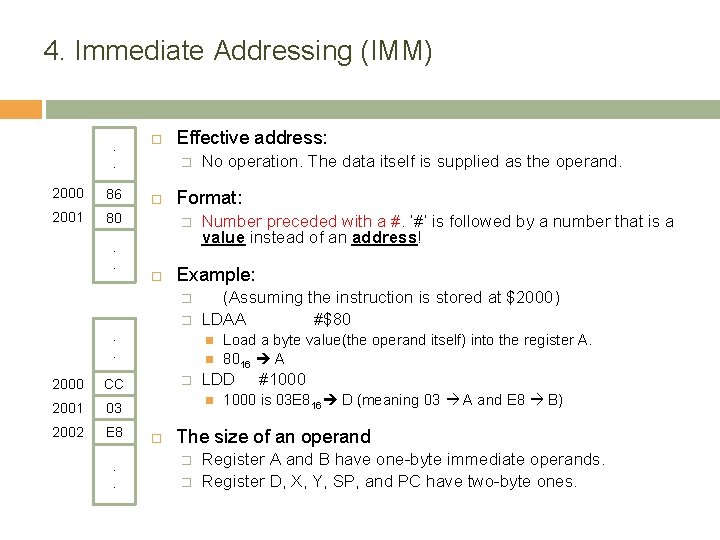
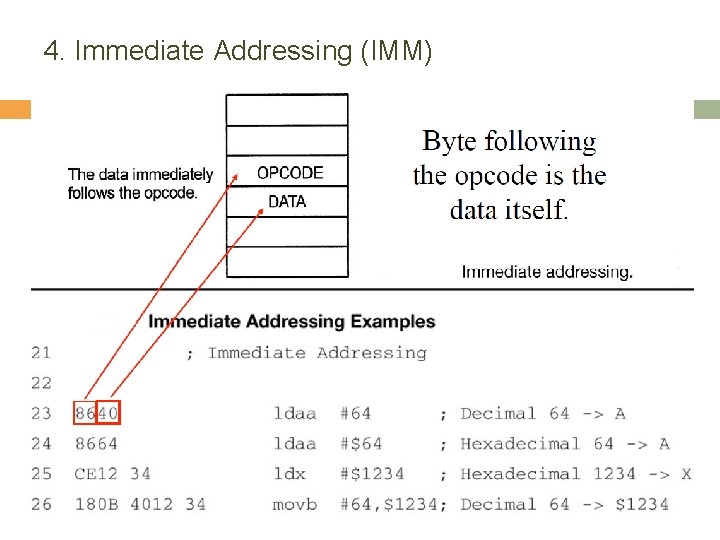
4. Immediate Addressing (IMM) . . 2000 86 2001 80. . Effective address: � Format: � � . . CC 2001 03 2002 E 8. . Number preceded with a #. ‘#’ is followed by a number that is a value instead of an address! Example: � 2000 No operation. The data itself is supplied as the operand. (Assuming the instruction is stored at $2000) LDAA #$80 � LDD Load a byte value(the operand itself) into the register A. 8016 A #1000 is 03 E 816 D (meaning 03 A and E 8 B) The size of an operand � � Register A and B have one-byte immediate operands. Register D, X, Y, SP, and PC have two-byte ones.
4. Immediate Addressing (IMM)
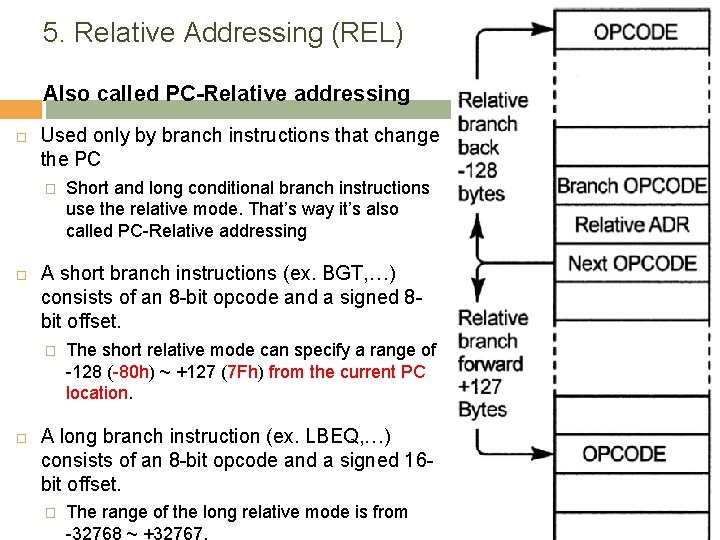
5. Relative Addressing (REL) Also called PC-Relative addressing Used only by branch instructions that change the PC � A short branch instructions (ex. BGT, …) consists of an 8 -bit opcode and a signed 8 bit offset. � Short and long conditional branch instructions use the relative mode. That’s way it’s also called PC-Relative addressing The short relative mode can specify a range of -128 (-80 h) ~ +127 (7 Fh) from the current PC location. A long branch instruction (ex. LBEQ, …) consists of an 8 -bit opcode and a signed 16 bit offset. � The range of the long relative mode is from -32768 ~ +32767.
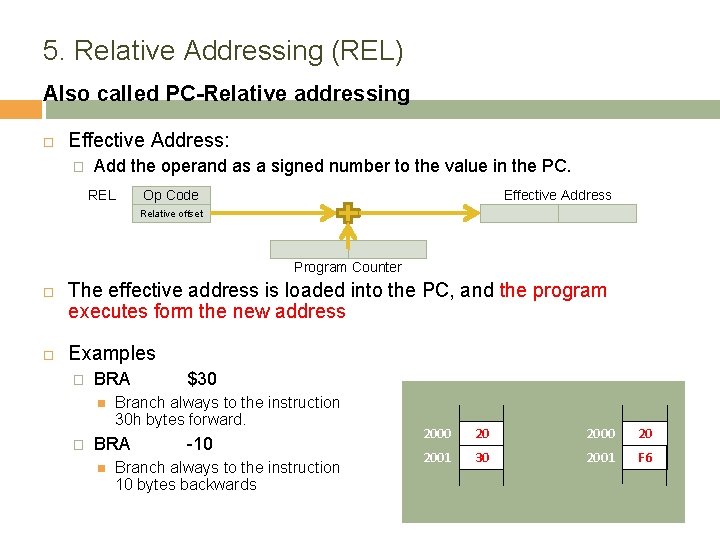
5. Relative Addressing (REL) Also called PC-Relative addressing Effective Address: � Add the operand as a signed number to the value in the PC. REL Op Code Effective Address Relative offset Program Counter The effective address is loaded into the PC, and the program executes form the new address Examples � BRA � Branch always to the instruction 30 h bytes forward. BRA $30 -10 Branch always to the instruction 10 bytes backwards 2000 20 2001 30 2001 F 6
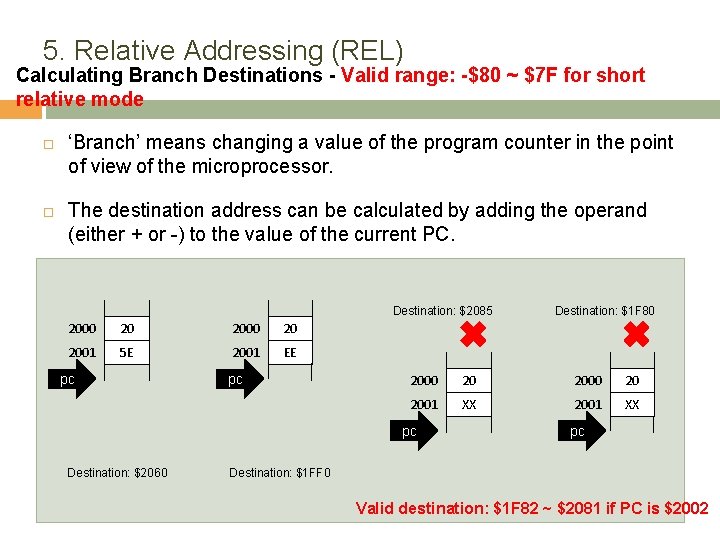
5. Relative Addressing (REL) Calculating Branch Destinations - Valid range: -$80 ~ $7 F for short relative mode ‘Branch’ means changing a value of the program counter in the point of view of the microprocessor. The destination address can be calculated by adding the operand (either + or -) to the value of the current PC. Destination: $2085 2000 20 2001 5 E 2001 EE pc pc 2000 20 2001 XX pc Destination: $2060 Destination: $1 F 80 pc Destination: $1 FF 0 Valid destination: $1 F 82 ~ $2081 if PC is $2002
…. . Addressing Modes – where are we? . . .
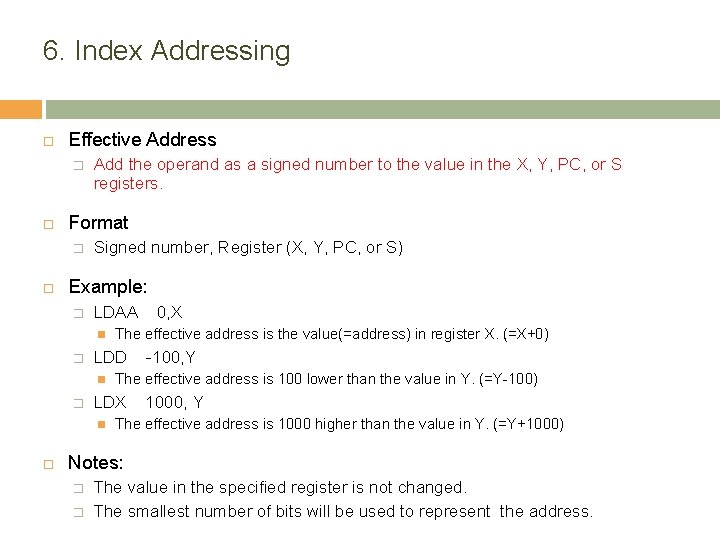
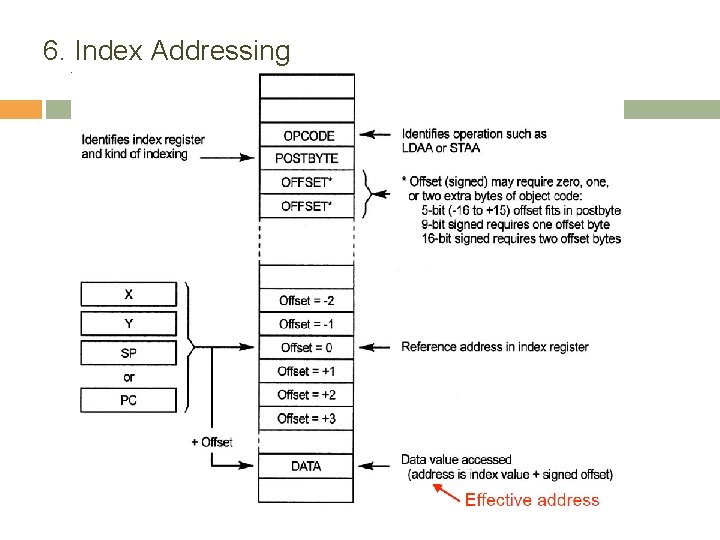
6. Index Addressing Effective Address � Format � Add the operand as a signed number to the value in the X, Y, PC, or S registers. Signed number, Register (X, Y, PC, or S) Example: � LDAA � � -100, Y The effective address is 100 lower than the value in Y. (=Y-100) LDX The effective address is the value(=address) in register X. (=X+0) LDD 0, X 1000, Y The effective address is 1000 higher than the value in Y. (=Y+1000) Notes: � � The value in the specified register is not changed. The smallest number of bits will be used to represent the address.
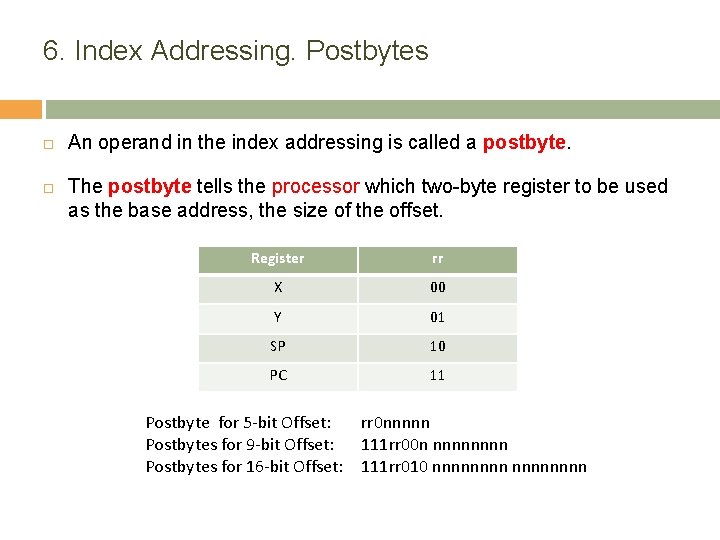
6. Index Addressing. Postbytes An operand in the index addressing is called a postbyte. The postbyte tells the processor which two-byte register to be used as the base address, the size of the offset. Register rr X 00 Y 01 SP 10 PC 11 Postbyte for 5 -bit Offset: Postbytes for 9 -bit Offset: Postbytes for 16 -bit Offset: rr 0 nnnnn 111 rr 00 n nnnn 111 rr 010 nnnnnnnn
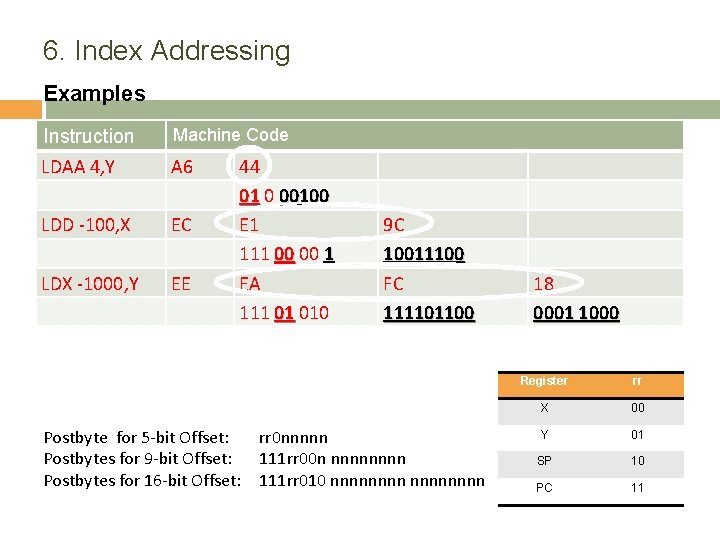
6. Index Addressing Examples Machine Code Instruction LDAA 4, Y A 6 LDD -100, X EC LDX -1000, Y EE 44 01 0 00100 E 1 111 00 00 1 EA 111 01 010 Postbyte for 5 -bit Offset: Postbytes for 9 -bit Offset: Postbytes for 16 -bit Offset: 9 C 10011100 FC 111101100 rr 0 nnnnn 111 rr 00 n nnnn 111 rr 010 nnnnnnnn 18 0001 1000 Register rr X 00 Y 01 SP 10 PC 11
6. Index Addressing
Addressing Mode Summary How to Get an Effective Address INH Op Code IMM Op Code Data DIR Op Code Addr-low Effective Address 00 Addr-low EXT Op Code Addr-high Addr-low Effective Address Addr-high Addr-low IDX Op Code Offset Op Code Data-high Data-low Effective Address Index Register REL Op Code Effective Address Relative offset Program Counter
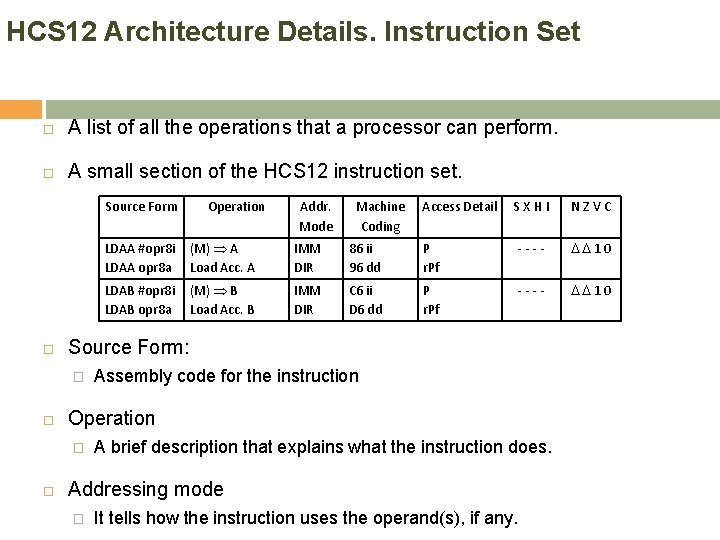
HCS 12 Architecture Details. Instruction Set A list of all the operations that a processor can perform. A small section of the HCS 12 instruction set. Source Form Machine Coding Access Detail SXHI NZVC LDAA #opr 8 i LDAA opr 8 a (M) A Load Acc. A IMM DIR 86 ii 96 dd P r. Pf ---- 10 LDAB #opr 8 i LDAB opr 8 a (M) B Load Acc. B IMM DIR C 6 ii D 6 dd P r. Pf ---- 10 Assembly code for the instruction Operation � Addr. Mode Source Form: � Operation A brief description that explains what the instruction does. Addressing mode � It tells how the instruction uses the operand(s), if any.
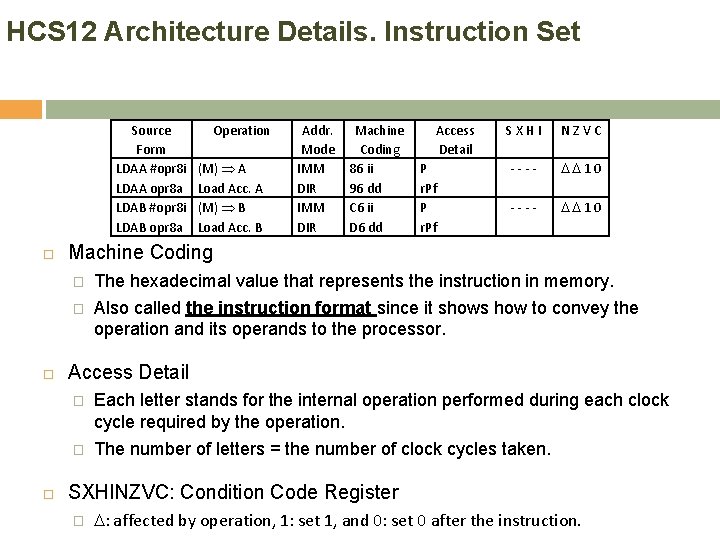
HCS 12 Architecture Details. Instruction Set Source Form LDAA #opr 8 i LDAA opr 8 a LDAB #opr 8 i LDAB opr 8 a Operation (M) A Load Acc. A (M) B Load Acc. B Addr. Mode IMM DIR Machine Coding 86 ii 96 dd C 6 ii D 6 dd Access Detail P r. Pf SXHI NZVC ---- 10 Machine Coding � The hexadecimal value that represents the instruction in memory. � Also called the instruction format since it shows how to convey the operation and its operands to the processor. Access Detail � Each letter stands for the internal operation performed during each clock cycle required by the operation. � The number of letters = the number of clock cycles taken. SXHINZVC: Condition Code Register � : affected by operation, 1: set 1, and 0: set 0 after the instruction.
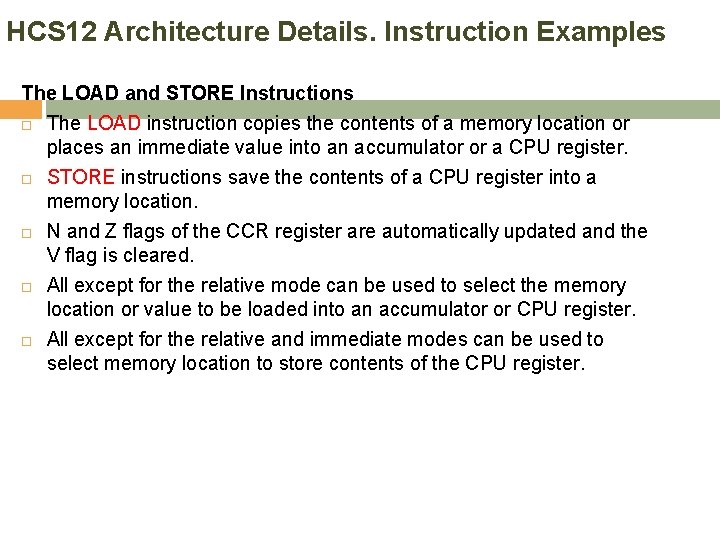
HCS 12 Architecture Details. Instruction Examples The LOAD and STORE Instructions The LOAD instruction copies the contents of a memory location or places an immediate value into an accumulator or a CPU register. STORE instructions save the contents of a CPU register into a memory location. N and Z flags of the CCR register are automatically updated and the V flag is cleared. All except for the relative mode can be used to select the memory location or value to be loaded into an accumulator or CPU register. All except for the relative and immediate modes can be used to select memory location to store contents of the CPU register.
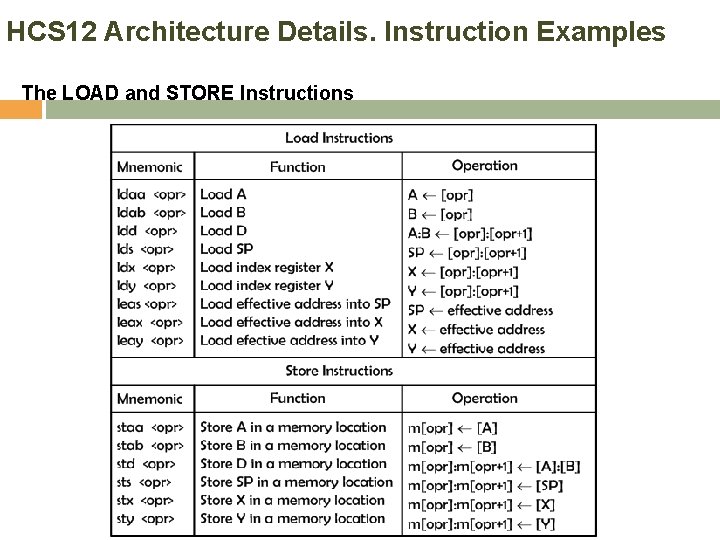
HCS 12 Architecture Details. Instruction Examples The LOAD and STORE Instructions
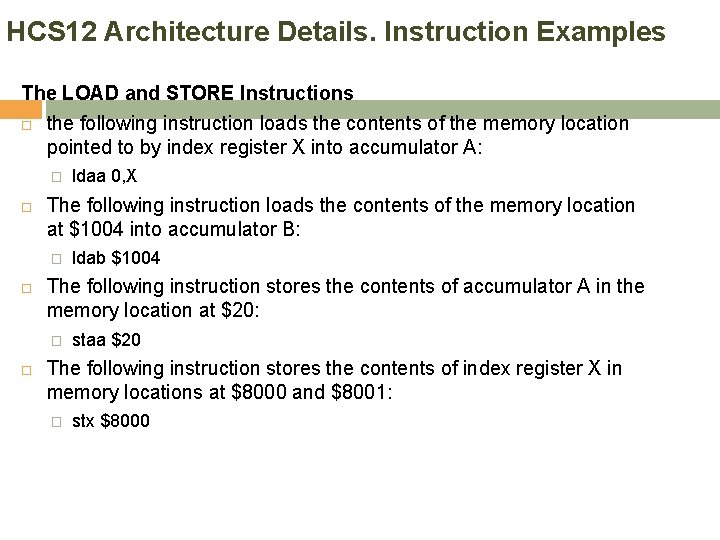
HCS 12 Architecture Details. Instruction Examples The LOAD and STORE Instructions the following instruction loads the contents of the memory location pointed to by index register X into accumulator A: � The following instruction loads the contents of the memory location at $1004 into accumulator B: � ldab $1004 The following instruction stores the contents of accumulator A in the memory location at $20: � ldaa 0, X staa $20 The following instruction stores the contents of index register X in memory locations at $8000 and $8001: � stx $8000
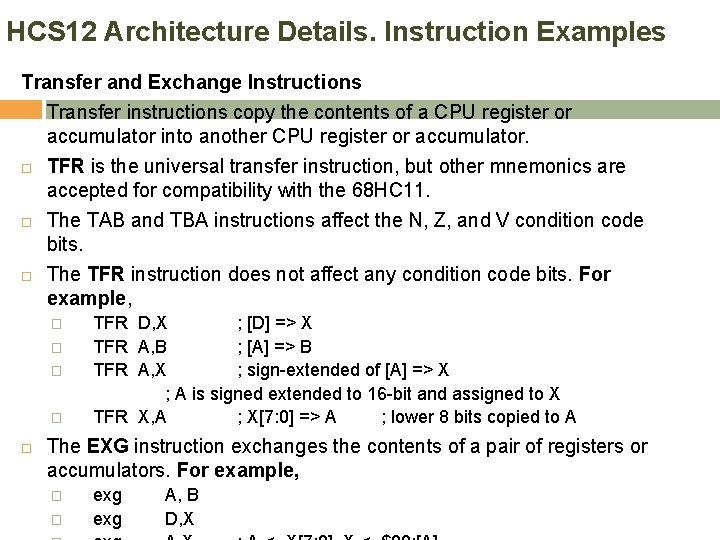
HCS 12 Architecture Details. Instruction Examples Transfer and Exchange Instructions Transfer instructions copy the contents of a CPU register or accumulator into another CPU register or accumulator. TFR is the universal transfer instruction, but other mnemonics are accepted for compatibility with the 68 HC 11. The TAB and TBA instructions affect the N, Z, and V condition code bits. The TFR instruction does not affect any condition code bits. For example, � � TFR D, X ; [D] => X TFR A, B ; [A] => B TFR A, X ; sign-extended of [A] => X ; A is signed extended to 16 -bit and assigned to X TFR X, A ; X[7: 0] => A ; lower 8 bits copied to A The EXG instruction exchanges the contents of a pair of registers or accumulators. For example, � � exg A, B D, X
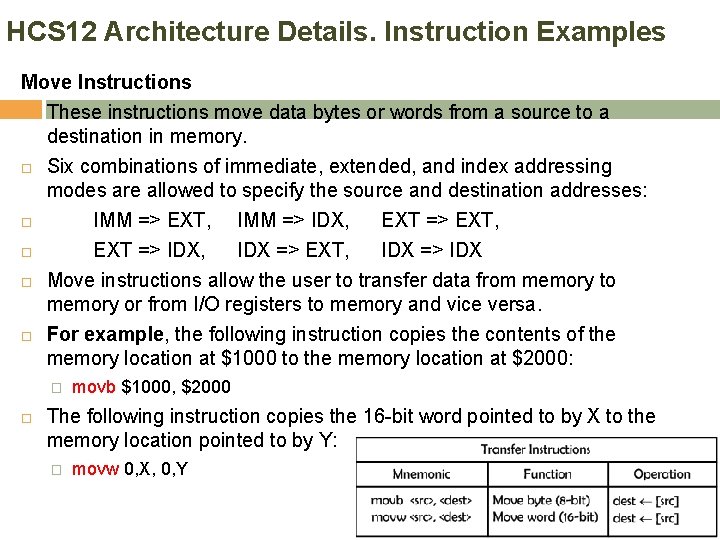
HCS 12 Architecture Details. Instruction Examples Move Instructions These instructions move data bytes or words from a source to a destination in memory. Six combinations of immediate, extended, and index addressing modes are allowed to specify the source and destination addresses: IMM => EXT, IMM => IDX, EXT => EXT, EXT => IDX, IDX => EXT, IDX => IDX Move instructions allow the user to transfer data from memory to memory or from I/O registers to memory and vice versa. For example, the following instruction copies the contents of the memory location at $1000 to the memory location at $2000: � movb $1000, $2000 The following instruction copies the 16 -bit word pointed to by X to the memory location pointed to by Y: � movw 0, X, 0, Y
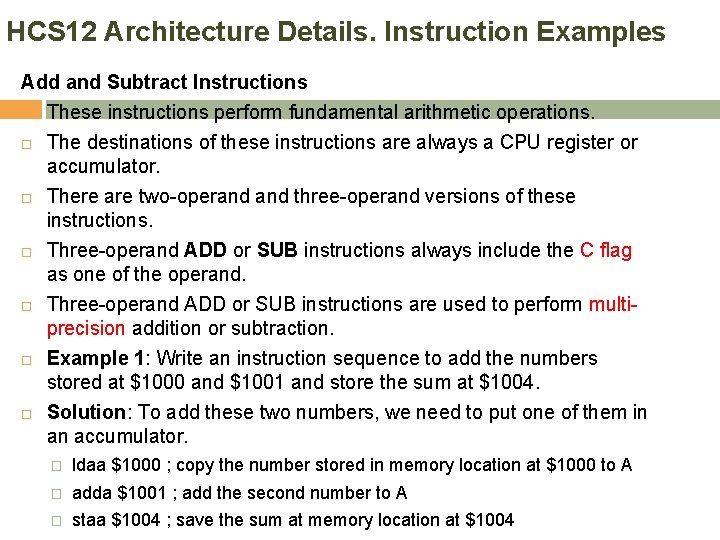
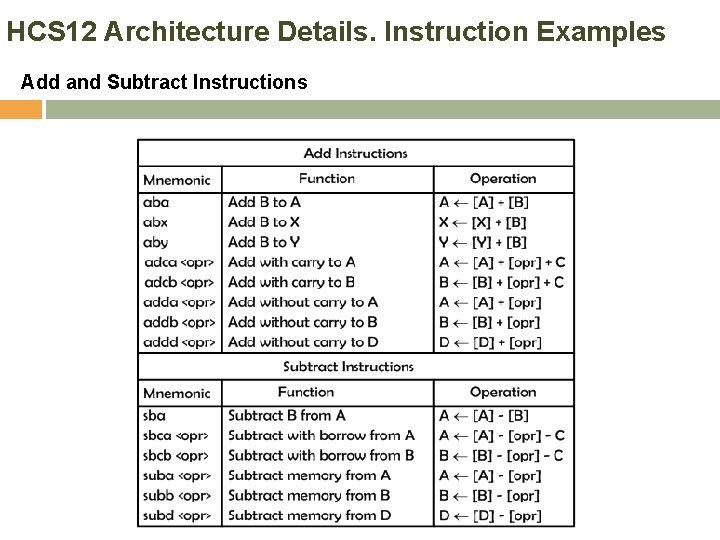
HCS 12 Architecture Details. Instruction Examples Add and Subtract Instructions These instructions perform fundamental arithmetic operations. The destinations of these instructions are always a CPU register or accumulator. There are two-operand three-operand versions of these instructions. Three-operand ADD or SUB instructions always include the C flag as one of the operand. Three-operand ADD or SUB instructions are used to perform multiprecision addition or subtraction. Example 1: Write an instruction sequence to add the numbers stored at $1000 and $1001 and store the sum at $1004. Solution: To add these two numbers, we need to put one of them in an accumulator. � ldaa $1000 ; copy the number stored in memory location at $1000 to A � adda $1001 ; add the second number to A � staa $1004 ; save the sum at memory location at $1004
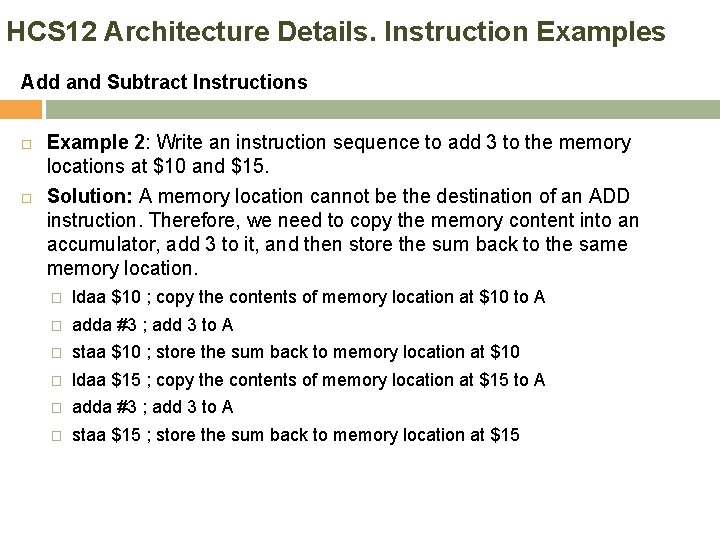
HCS 12 Architecture Details. Instruction Examples Add and Subtract Instructions Example 2: Write an instruction sequence to add 3 to the memory locations at $10 and $15. Solution: A memory location cannot be the destination of an ADD instruction. Therefore, we need to copy the memory content into an accumulator, add 3 to it, and then store the sum back to the same memory location. � ldaa $10 ; copy the contents of memory location at $10 to A � adda #3 ; add 3 to A � staa $10 ; store the sum back to memory location at $10 � ldaa $15 ; copy the contents of memory location at $15 to A � adda #3 ; add 3 to A � staa $15 ; store the sum back to memory location at $15
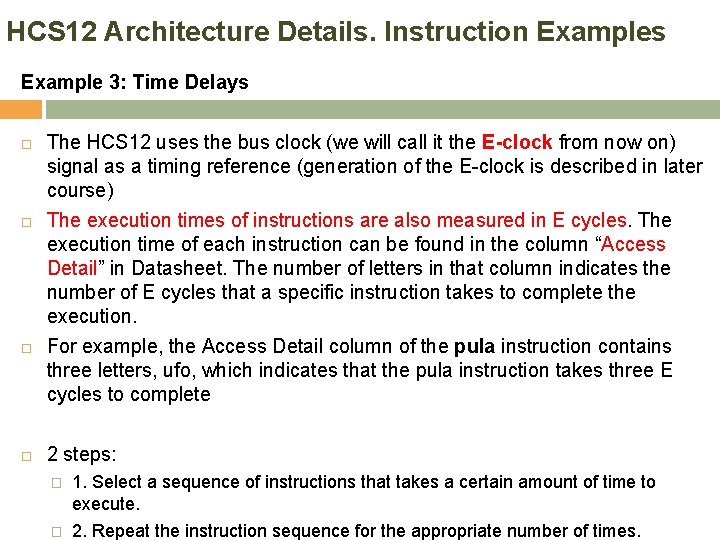
HCS 12 Architecture Details. Instruction Examples Example 3: Time Delays The HCS 12 uses the bus clock (we will call it the E-clock from now on) signal as a timing reference (generation of the E-clock is described in later course) The execution times of instructions are also measured in E cycles. The execution time of each instruction can be found in the column “Access Detail” in Datasheet. The number of letters in that column indicates the number of E cycles that a specific instruction takes to complete the execution. For example, the Access Detail column of the pula instruction contains three letters, ufo, which indicates that the pula instruction takes three E cycles to complete 2 steps: � 1. Select a sequence of instructions that takes a certain amount of time to execute. � 2. Repeat the instruction sequence for the appropriate number of times.
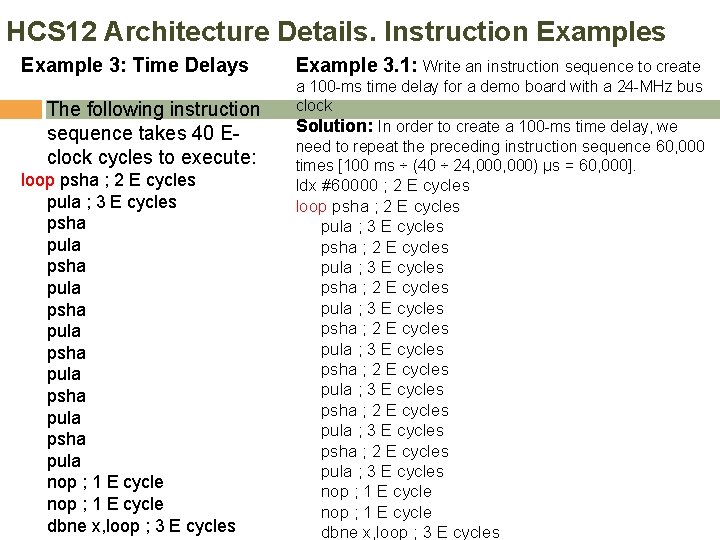
HCS 12 Architecture Details. Instruction Examples Example 3: Time Delays The following instruction sequence takes 40 Eclock cycles to execute: loop psha ; 2 E cycles pula ; 3 E cycles psha pula psha pula nop ; 1 E cycle dbne x, loop ; 3 E cycles Example 3. 1: Write an instruction sequence to create a 100 -ms time delay for a demo board with a 24 -MHz bus clock Solution: In order to create a 100 -ms time delay, we need to repeat the preceding instruction sequence 60, 000 times [100 ms ÷ (40 ÷ 24, 000) μs = 60, 000]. ldx #60000 ; 2 E cycles loop psha ; 2 E cycles pula ; 3 E cycles psha ; 2 E cycles pula ; 3 E cycles nop ; 1 E cycle dbne x, loop ; 3 E cycles
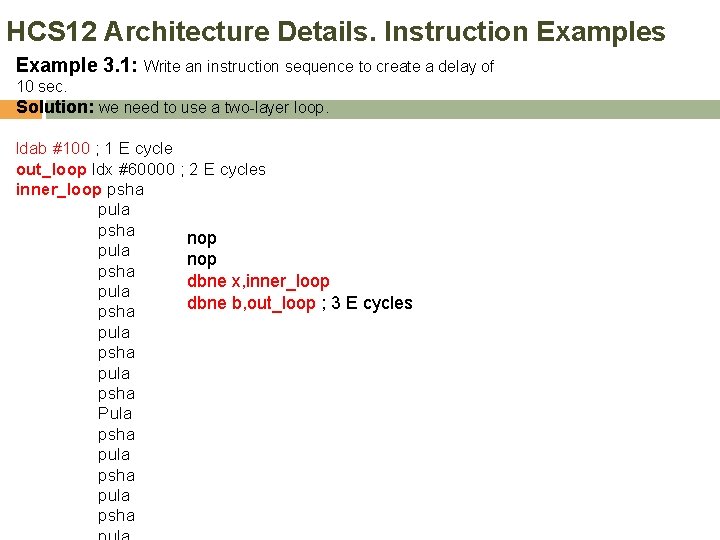
HCS 12 Architecture Details. Instruction Examples Example 3. 1: Write an instruction sequence to create a delay of 10 sec. Solution: we need to use a two-layer loop. ldab #100 ; 1 E cycle out_loop ldx #60000 ; 2 E cycles inner_loop psha pula psha nop pula nop psha dbne x, inner_loop pula dbne b, out_loop ; 3 E cycles psha pula psha Pula psha pula psha
HCS 12 Architecture Details. Instruction Examples Add and Subtract Instructions
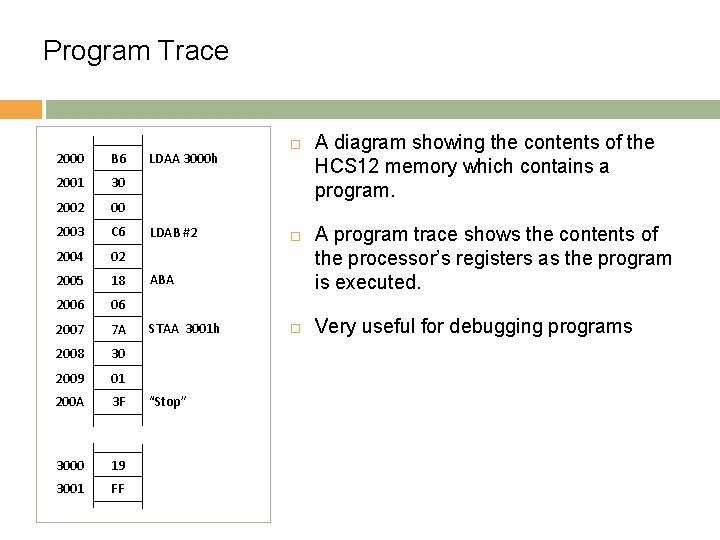
Program Trace 2000 B 6 2001 30 2002 00 2003 C 6 2004 02 2005 18 2006 06 2007 7 A 2008 30 2009 01 200 A 3 F 3000 19 3001 FF LDAA 3000 h LDAB #2 ABA STAA 3001 h “Stop” A diagram showing the contents of the HCS 12 memory which contains a program. A program trace shows the contents of the processor’s registers as the program is executed. Very useful for debugging programs
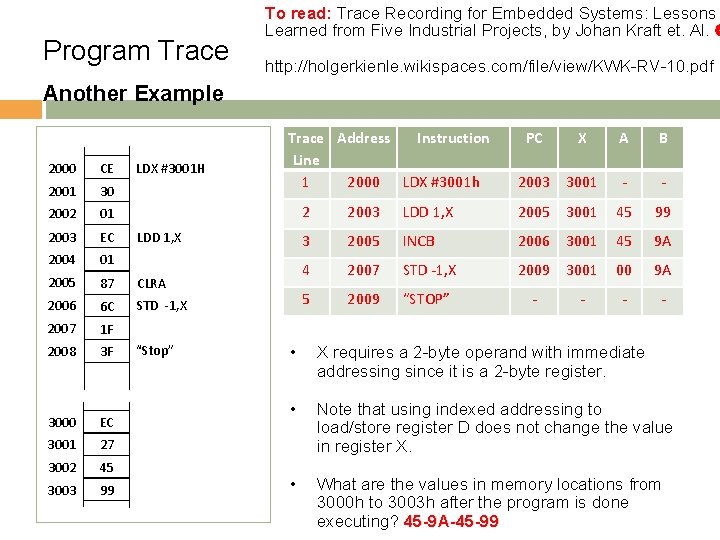
Program Trace To read: Trace Recording for Embedded Systems: Lessons Learned from Five Industrial Projects, by Johan Kraft et. Al. http: //holgerkienle. wikispaces. com/file/view/KWK-RV-10. pdf Another Example 2000 CE 2001 30 2002 01 2003 EC 2004 01 2005 87 CLRA 2006 6 C STD -1, X 2007 1 F 2008 3 F 3000 EC 3001 27 3002 45 3003 99 LDX #3001 H Trace Address Instruction Line 1 2000 LDX #3001 h LDD 1, X “Stop” PC X A B 2003 3001 - - 2 2003 LDD 1, X 2005 3001 45 99 3 2005 INCB 2006 3001 45 9 A 4 2007 STD -1, X 2009 3001 00 9 A 5 2009 “STOP” - - • X requires a 2 -byte operand with immediate addressing since it is a 2 -byte register. • Note that using indexed addressing to load/store register D does not change the value in register X. • What are the values in memory locations from 3000 h to 3003 h after the program is done executing? 45 -9 A-45 -99
Content Overview of the HCS 12 Architecture Basic Architecture HCS 12 Architecture Details Addressing Modes Instruction Set Program trace
- Slides: 70