
Hardware flow control How we can activate our
- Slides: 19
Hardware ‘flow control’ How we can activate our NIC’s ability to avoid overwhelming the capacities of its ‘link partner’
Our ‘txburst. c’ demo • This module is intended to let us explore a problem that can arise in using our ‘nic. c’ character-mode device-driver • It lets the user trigger the transmission of multiple ethernet-packets in a single ‘burst’ • When using the ‘cat’ command, our ‘nic. c’ device-driver cannot seem to keep up with the amount of arriving packet-data
In-class demonstration • Install ‘nic. ko’ on one of our anchor-cluster machines and execute the ‘cat’ command: $ cat /dev/nic • Compile our ‘txburst. c’ module and install it on another of the anchor-cluster stations, then execute the following ‘cat’ command: $ cat /proc/txburst Timeout for this classroom demonstration
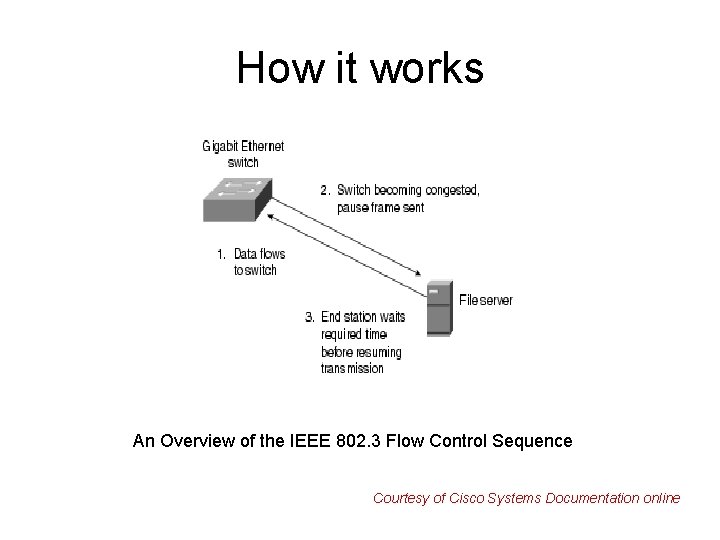
Some packets got ‘lost’ • The burst of packets being transmitted are arriving too rapidly for our device-driver to service all of them – hence ‘lost’ packets! • Modern ethernet controllers (like 82573 L) offer a convenient way for the hardware to assist a device-driver in overcoming this ‘data-congestion’ problem • It’s an IEEE 802. 3 ‘flow control’ standard
How it works An Overview of the IEEE 802. 3 Flow Control Sequence Courtesy of Cisco Systems Documentation online
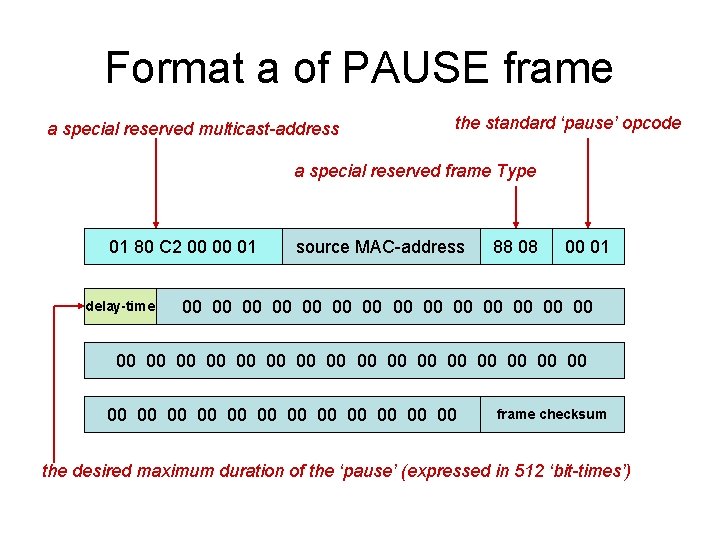
Format a of PAUSE frame a special reserved multicast-address the standard ‘pause’ opcode a special reserved frame Type 01 80 C 2 00 00 01 delay-time source MAC-address 88 08 00 01 00 00 00 00 00 00 00 00 00 00 00 frame checksum the desired maximum duration of the ‘pause’ (expressed in 512 ‘bit-times’)
Automatic XOFF/XON • In principle it would be possible for the device-driver programmer to include code that would transmit a PAUSE frame • But it’s much simpler to just delegate that functionality to the network hardware and avoid consuming CPU-time setting it up • The 82573 L makes it easy for a driver to “turn on” the ‘flow control’ mechanism
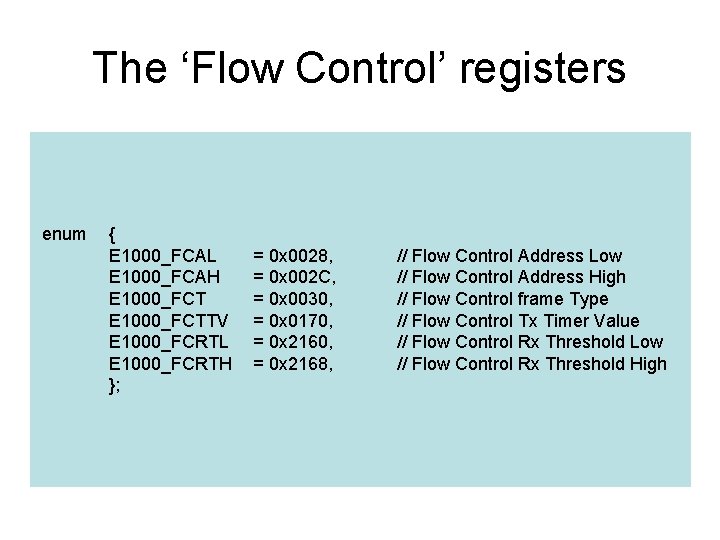
The ‘Flow Control’ registers enum { E 1000_FCAL E 1000_FCAH E 1000_FCTTV E 1000_FCRTL E 1000_FCRTH }; = 0 x 0028, = 0 x 002 C, = 0 x 0030, = 0 x 0170, = 0 x 2168, // Flow Control Address Low // Flow Control Address High // Flow Control frame Type // Flow Control Tx Timer Value // Flow Control Rx Threshold Low // Flow Control Rx Threshold High
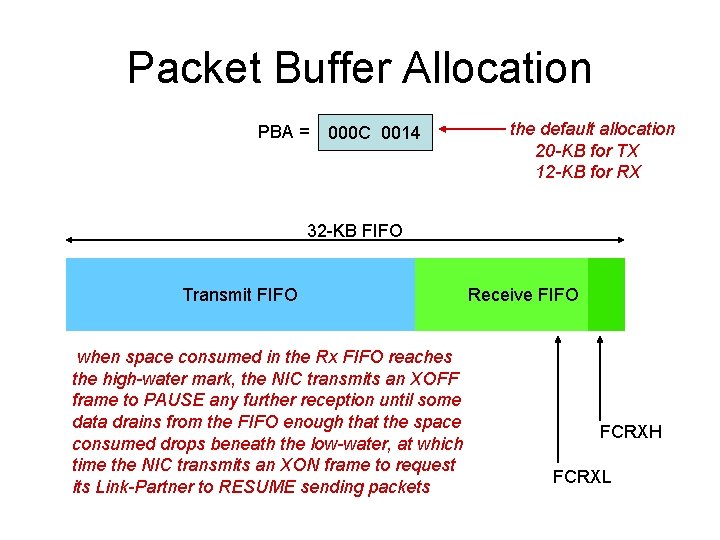
Packet Buffer Allocation PBA = 000 C 0014 the default allocation 20 -KB for TX 12 -KB for RX 32 -KB FIFO Transmit FIFO when space consumed in the Rx FIFO reaches the high-water mark, the NIC transmits an XOFF frame to PAUSE any further reception until some data drains from the FIFO enough that the space consumed drops beneath the low-water, at which time the NIC transmits an XON frame to request its Link-Partner to RESUME sending packets Receive FIFO FCRXH FCRXL
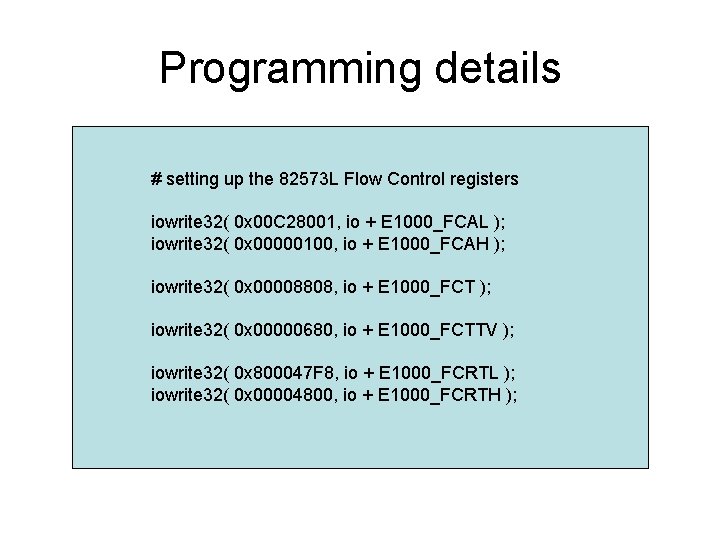
Programming details # setting up the 82573 L Flow Control registers iowrite 32( 0 x 00 C 28001, io + E 1000_FCAL ); iowrite 32( 0 x 00000100, io + E 1000_FCAH ); iowrite 32( 0 x 00008808, io + E 1000_FCT ); iowrite 32( 0 x 00000680, io + E 1000_FCTTV ); iowrite 32( 0 x 800047 F 8, io + E 1000_FCRTL ); iowrite 32( 0 x 00004800, io + E 1000_FCRTH );
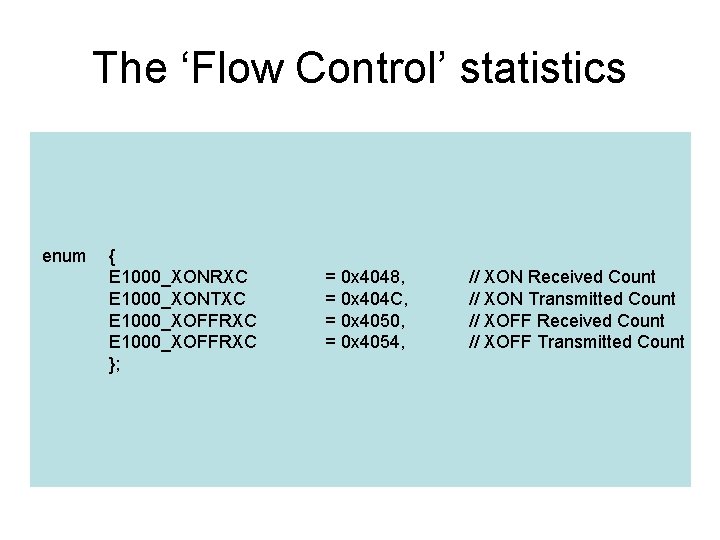
The ‘Flow Control’ statistics enum { E 1000_XONRXC E 1000_XONTXC E 1000_XOFFRXC }; = 0 x 4048, = 0 x 404 C, = 0 x 4050, = 0 x 4054, // XON Received Count // XON Transmitted Count // XOFF Received Count // XOFF Transmitted Count
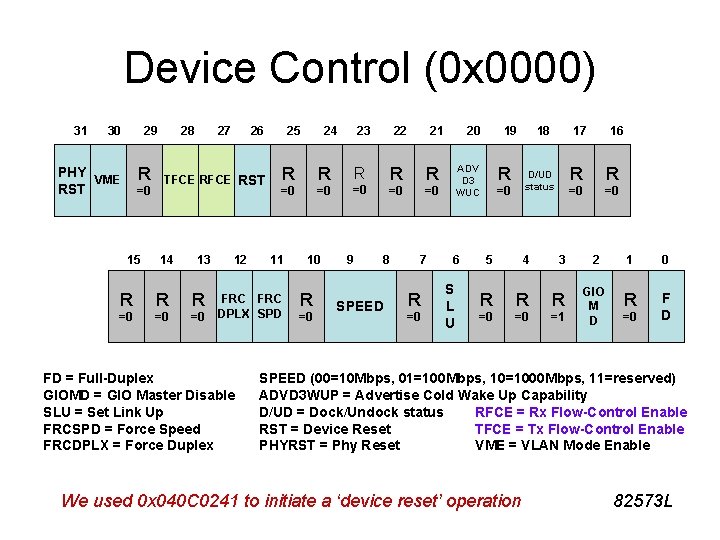
Device Control (0 x 0000) 31 30 29 R PHY VME RST =0 15 28 27 26 TFCE RST 14 13 R R R =0 =0 =0 12 25 R R =0 =0 11 FRC DPLX SPD FD = Full-Duplex GIOMD = GIO Master Disable SLU = Set Link Up FRCSPD = Force Speed FRCDPLX = Force Duplex 24 10 R =0 23 22 R =0 9 R R =0 =0 8 SPEED 21 7 R =0 20 19 ADV D 3 WUC 6 S L U R 18 17 D/UD status =0 5 4 3 R R R =0 =0 =1 16 R R =0 =0 2 1 0 GIO M 0 D R 0=0 F D SPEED (00=10 Mbps, 01=100 Mbps, 10=1000 Mbps, 11=reserved) ADVD 3 WUP = Advertise Cold Wake Up Capability D/UD = Dock/Undock status RFCE = Rx Flow-Control Enable RST = Device Reset TFCE = Tx Flow-Control Enable PHYRST = Phy Reset VME = VLAN Mode Enable We used 0 x 040 C 0241 to initiate a ‘device reset’ operation 82573 L
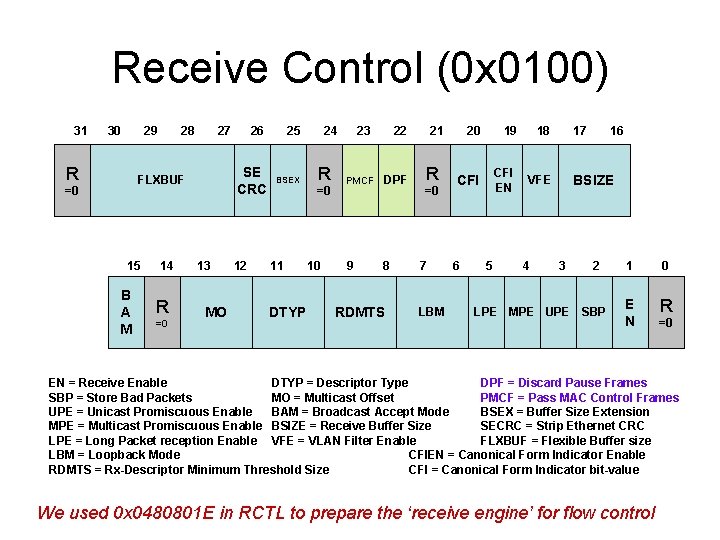
Receive Control (0 x 0100) 31 R =0 30 29 0 28 27 SE CRC F 0 LXBUF 15 B A M 14 R =0 26 13 MO 12 25 BSEX 11 DTYP 24 R =0 10 23 22 PMCF DPF 9 8 RDMTS 21 R =0 7 20 19 18 CFI EN VFE 6 I S L LBML O S U 5 4 17 16 BSIZE 3 2 LPE MPE UPE SBP 0 1 0 E R 0 N =0 EN = Receive Enable DTYP = Descriptor Type DPF = Discard Pause Frames SBP = Store Bad Packets MO = Multicast Offset PMCF = Pass MAC Control Frames UPE = Unicast Promiscuous Enable BAM = Broadcast Accept Mode BSEX = Buffer Size Extension MPE = Multicast Promiscuous Enable BSIZE = Receive Buffer Size SECRC = Strip Ethernet CRC LPE = Long Packet reception Enable VFE = VLAN Filter Enable FLXBUF = Flexible Buffer size LBM = Loopback Mode CFIEN = Canonical Form Indicator Enable RDMTS = Rx-Descriptor Minimum Threshold Size CFI = Canonical Form Indicator bit-value We used 0 x 0480801 E in RCTL to prepare the ‘receive engine’ for flow control
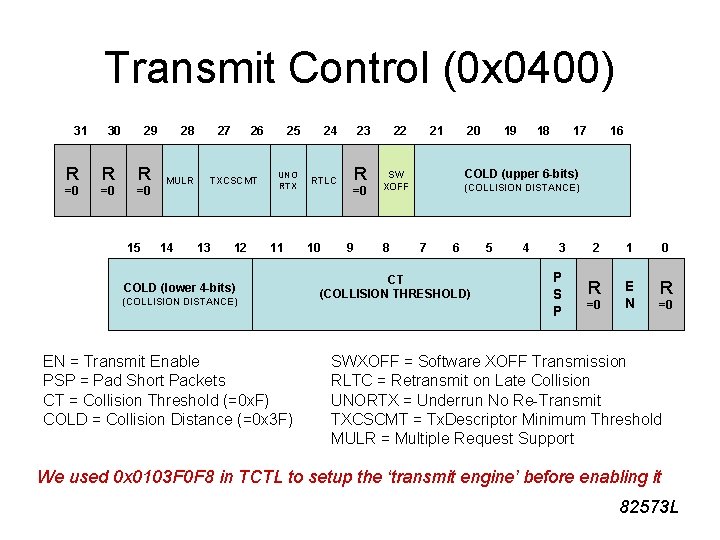
Transmit Control (0 x 0400) 31 30 29 R R R =0 =0 =0 15 28 MULR 14 27 26 TXCSCMT 13 12 25 UNO RTX 11 COLD (lower 4 -bits) (COLLISION DISTANCE) EN = Transmit Enable PSP = Pad Short Packets CT = Collision Threshold (=0 x. F) COLD = Collision Distance (=0 x 3 F) 24 RTLC 10 0 23 R =0 9 22 21 20 18 17 16 COLD (upper 6 -bits) SW XOFF 8 19 (COLLISION DISTANCE) 7 6 5 I S CT L TBI (COLLISION ASDV THRESHOLD) SPEED L O mode S U 4 3 P S P 2 1 0 R 0 =0 0 N E R =0 SWXOFF = Software XOFF Transmission RLTC = Retransmit on Late Collision UNORTX = Underrun No Re-Transmit TXCSCMT = Tx. Descriptor Minimum Threshold MULR = Multiple Request Support We used 0 x 0103 F 0 F 8 in TCTL to setup the ‘transmit engine’ before enabling it 82573 L
Our ‘txburst. c’ again • The statement that enables flow control in the Device Control register originally was “commented out” for our earlier demo • Now we restore that statement as part of the executable code during initialization • This time we observe a different effect! Timeout for this second classroom demonstration
In-class exercise #1 • Can you reduce the value in the FCTTVregister (to PAUSE for a briefer time) and still avoid losing any transmitted packets? • How small can FCTTV be?
In-class exercise #2 • Is it necessary to turn on BOTH of the bits in the Device Control register that enable the controller’s hardware flow control? – The RFCE-bit (bit 23) – The TFCE-bit (bit 24)
In-class exercise #3 • Must the ‘receive’ engine be enabled? • Must the PMCF-bit (bit #23) be turned on in the RCTL register? PMCF = Pass MAC Control Frames • Could the DPF-bit (bit 324) be turned on? DPF = Drop PAUSE Frames
Out-of-class exercise • Can you design module-code that would demonstrate the use of the SWXOFF-bit (bit #22) in the Transmit Control register?