
HandsOn Ethical Hacking and Network Defense Second Edition
- Slides: 49
Hands-On Ethical Hacking and Network Defense Second Edition Chapter 13 Network Protection Systems
Objectives • After reading this chapter and completing the exercises, you will be able to: – Explain how routers are used as network protection systems – Describe firewall technology and tools for configuring firewalls and routers – Describe intrusion detection and prevention systems and Web-filtering technology – Explain the purpose of honeypots Hands-On Ethical Hacking and Network Defense, Second Edition 2
Understanding Routers • Network protection systems – – – Routers Firewalls Intrusion detection and prevention systems Web filtering Honeypots • Security appliance – Single device combining two or more protection functions Hands-On Ethical Hacking and Network Defense, Second Edition 3
Understanding Routing Protocols • Routers are hardware devices – Used to send packets to different network segments • Operate at network layer of OSI model • Routing protocols – Link-state routing protocol • Router advertises link-state – Distance-vector routing protocol • Router passes routing table to all participating routers – Path-vector routing protocol • Uses dynamically updated paths or routing tables to transmit packets Hands-On Ethical Hacking and Network Defense, Second Edition 4
Understanding Basic Hardware Routers • Cisco routers – Widely used in networking community • Millions used by companies around the world • Vulnerabilities exist – As they do in any OS – Security professionals must consider the router type when conducting a security test Hands-On Ethical Hacking and Network Defense, Second Edition 5
Cisco Router Components • Random access memory (RAM) – Holds router’s running configuration, routing tables, and buffers • If turned off, contents stored in RAM are erased • Nonvolatile RAM (NVRAM) – Holds router’s configuration file • Information is not lost if the router is turned off • Flash memory – Holds IOS the router is using – Rewritable memory, so IOS can be upgraded Hands-On Ethical Hacking and Network Defense, Second Edition 6
Cisco Router Components (cont’d. ) • Read-only memory (ROM) – Contains a minimal version of IOS • Used to boot router if flash memory gets corrupted • Interfaces – Hardware connectivity points for components of most concern • Ethernet port is an interface that connects to a LAN Hands-On Ethical Hacking and Network Defense, Second Edition 7
Cisco Router Configuration • Configuration modes: – User mode • Administrator can perform basic troubleshooting tests and list information stored on router • Indicated by router name followed by > • Default mode – Privileged mode • Administrator can perform full router configuration tasks • Indicated by router name followed by # Hands-On Ethical Hacking and Network Defense, Second Edition 8
Cisco Router Configuration (cont’d. ) • Modes to configure the router (in privileged mode) – Global configuration mode • Configure router settings affecting router operation – Interface configuration mode • Administrator can configure an interface on the router Hands-On Ethical Hacking and Network Defense, Second Edition 9
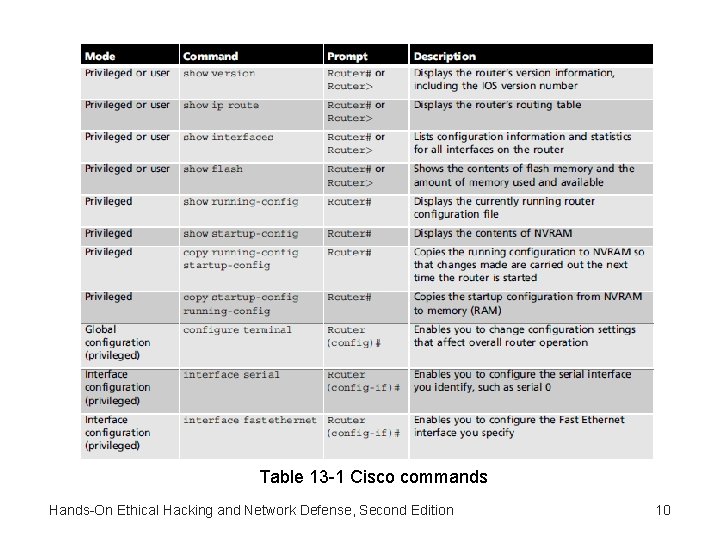
Table 13 -1 Cisco commands Hands-On Ethical Hacking and Network Defense, Second Edition 10
Understanding Access Control Lists • Several types of access control lists – This section focuses on IP access lists • Lists IP addresses, subnets, or networks allowed or denied access through a router’s interface • Cisco router access lists – Standard IP access lists – Extended IP access lists Hands-On Ethical Hacking and Network Defense, Second Edition 11
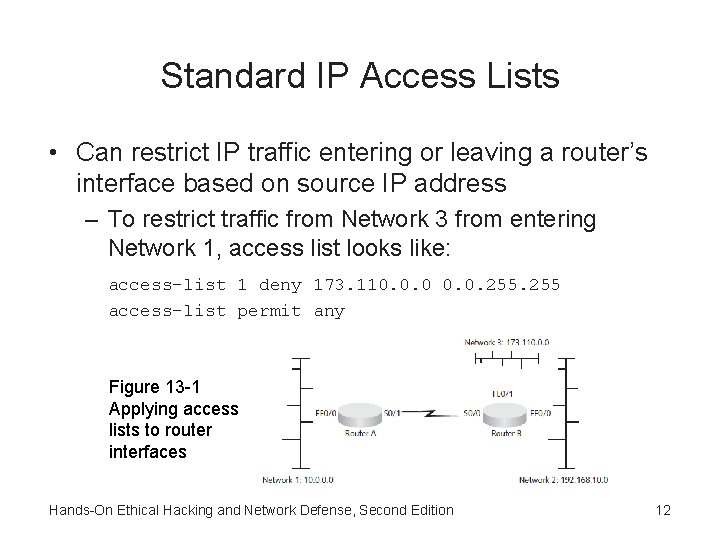
Standard IP Access Lists • Can restrict IP traffic entering or leaving a router’s interface based on source IP address – To restrict traffic from Network 3 from entering Network 1, access list looks like: access-list 1 deny 173. 110. 0. 0. 255 access-list permit any Figure 13 -1 Applying access lists to router interfaces Hands-On Ethical Hacking and Network Defense, Second Edition 12
Extended IP Access Lists • Restricts IP traffic entering or leaving based on: – – Source IP address Destination IP address Protocol type Application port number • Configuration – Similar to configuring a standard IP access list Hands-On Ethical Hacking and Network Defense, Second Edition 13
Understanding Firewalls • Hardware devices with embedded OSs – Controls access to all traffic entering internal network – Controls traffic leaving internal network • Hardware firewall advantages: – Usually faster than software firewalls – Can handle larger throughput than software firewalls • Hardware firewall disadvantage: – Locked into firewall’s hardware Hands-On Ethical Hacking and Network Defense, Second Edition 14
Understanding Firewalls (cont’d. ) • Software firewalls advantage: – NICs are easily added to server running firewall software • Software firewalls disadvantage: – Configuration problems – Rely on running OS Hands-On Ethical Hacking and Network Defense, Second Edition 15
Understanding Firewall Technology • Technologies include: – – – Network address translation Access lists Packet filtering Stateful packet inspection Application layer inspection Hands-On Ethical Hacking and Network Defense, Second Edition 16
Network Address Translation • Most basic security feature – Internal private IP addresses are mapped to public external IP addresses • Hiding internal infrastructure • Port Address Translation – Derived from NAT – Allows thousands of internal IP addresses to be mapped to one external IP address Hands-On Ethical Hacking and Network Defense, Second Edition 17
Access Lists • Used to filter traffic based on: – Source IP address – Destination IP address – Ports or services • Firewalls also use this technology • Creating access lists in a firewall – Similar to creating them in a router Hands-On Ethical Hacking and Network Defense, Second Edition 18
Packet Filtering • Packet filters – Screen packets based on information contained in packet header • Protocol type • IP address • TCP/UDP port Hands-On Ethical Hacking and Network Defense, Second Edition 19
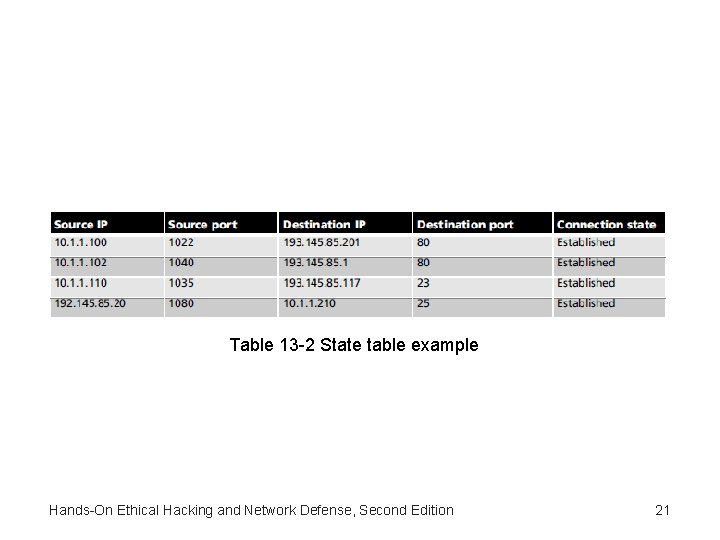
Stateful Packet Inspection • Record session-specific information about a network connection – Including state table • Port scans relying on spoofing or sending packets after a three-way handshake are made ineffective • Stateful packet filters – Recognize anomalies most routers ignore – Handle each packet on an individual basis • Not resistant to spoofing or Do. S attacks Hands-On Ethical Hacking and Network Defense, Second Edition 20
Table 13 -2 State table example Hands-On Ethical Hacking and Network Defense, Second Edition 21
Application Layer Inspection • Inspects network traffic at a higher level in OSI model – Makes sure network traffic’s application protocol is the type allowed by a rule • Some application-aware firewalls act as a proxy for all connections – Safety net for servers or clients (or both) • Depends on firewall Hands-On Ethical Hacking and Network Defense, Second Edition 22
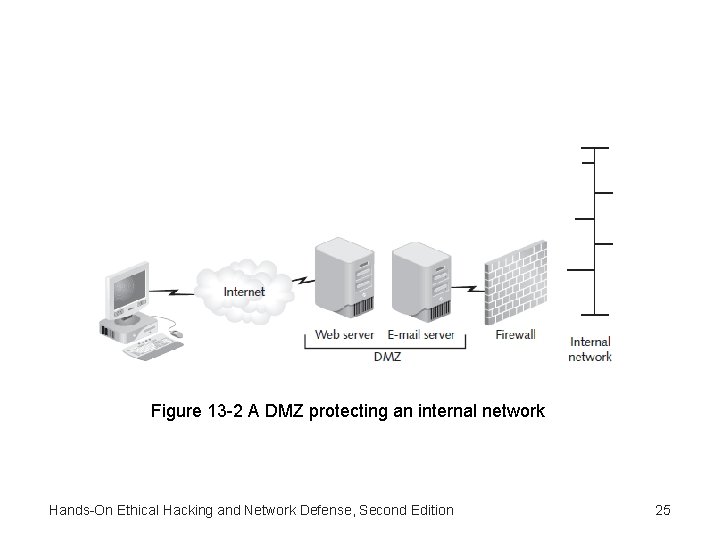
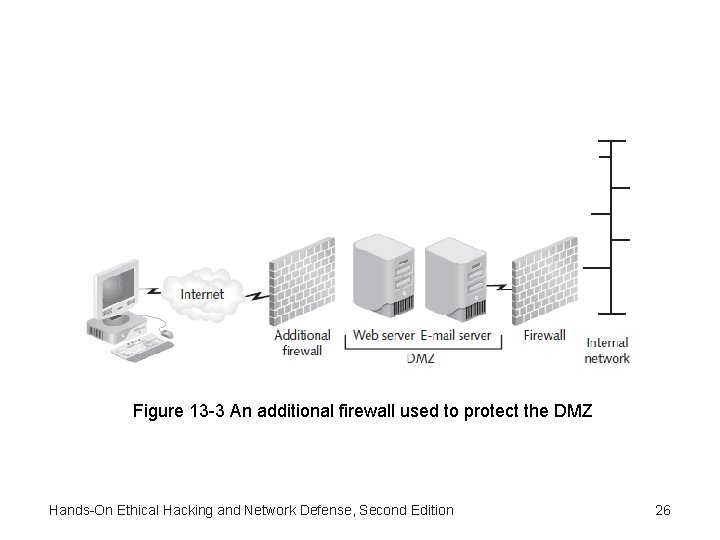
Implementing a Firewall • Placing a firewall between a company’s internal network and the Internet is dangerous – Leaves company open to attack if a hacker compromises the firewall • Use a demilitarized zone instead – Adds a layer of defense Hands-On Ethical Hacking and Network Defense, Second Edition 23
Demilitarized Zone • Small network – Contains resources a company wants available to Internet users • Helps maintain security on internal network • Sits between Internet and internal network – Sometimes referred to as a “perimeter network” Hands-On Ethical Hacking and Network Defense, Second Edition 24
Figure 13 -2 A DMZ protecting an internal network Hands-On Ethical Hacking and Network Defense, Second Edition 25
Figure 13 -3 An additional firewall used to protect the DMZ Hands-On Ethical Hacking and Network Defense, Second Edition 26
Understanding the Cisco Adaptive Security Appliance Firewall • Cisco Adaptive Security Appliance (ASA) firewall – One of the most widely used firewalls – Replaced PIX firewall – Added advanced modular features • Intrusion detection and prevention • More sophisticated application layer inspection Hands-On Ethical Hacking and Network Defense, Second Edition 27
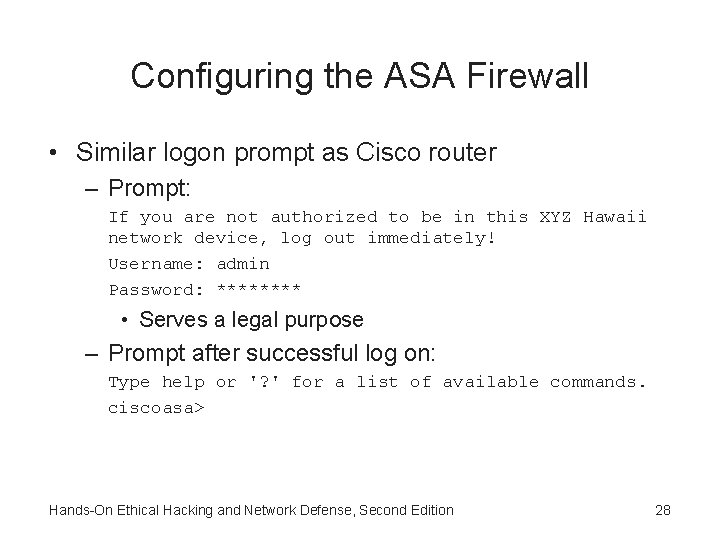
Configuring the ASA Firewall • Similar logon prompt as Cisco router – Prompt: If you are not authorized to be in this XYZ Hawaii network device, log out immediately! Username: admin Password: **** • Serves a legal purpose – Prompt after successful log on: Type help or '? ' for a list of available commands. ciscoasa> Hands-On Ethical Hacking and Network Defense, Second Edition 28
Configuring the ASA Firewall (cont’d. ) • After entering correct password – You are in privileged mode • To enter configuration mode – Use same command as on a Cisco router configure terminal or configure t • Access lists – Used to filter traffic Hands-On Ethical Hacking and Network Defense, Second Edition 29
Using Configuration and Risk Analysis Tools for Firewalls and Routers • Center for Internet Security – One of the best Web sites for finding configuration benchmarks and configuration assessment tools • Benchmark – Industry consensus of best configuration practices • Cisco routers use CIS Cisco IOS Benchmark • Cisco ASA firewalls use CIS Benchmark for Cisco Firewall Devices • Router Audit Tool (RAT) – Faster and easier to use Hands-On Ethical Hacking and Network Defense, Second Edition 30
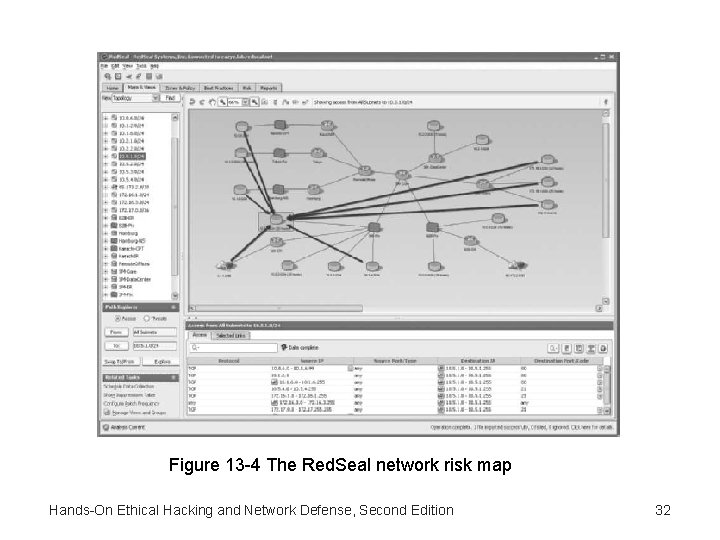
Using Configuration and Risk Analysis Tools for Firewalls and Routers (cont’d. ) • Red. Seal – Unique network risk analysis and mapping tool – Identifies configuration vulnerabilities in routers or firewalls – Generates professional-looking reports – Analyzes IPSs and OS vulnerability scans – Shows a graphical representation of vulnerabilities discovered Hands-On Ethical Hacking and Network Defense, Second Edition 31
Figure 13 -4 The Red. Seal network risk map Hands-On Ethical Hacking and Network Defense, Second Edition 32
Understanding Intrusion Detection and Prevention Systems • Monitor network devices – Security administrators can identify attacks in progress and stop them • Intrusion detection system (IDS) – Examines traffic and compares it with known exploits • Similar to virus software using a signature file to identify viruses • Intrusion prevention systems (IPSs) – Similar to IDSs – Also performs an action to prevent the intrusion Hands-On Ethical Hacking and Network Defense, Second Edition 33
Network-Based and Host-Based IDSs and IPSs • Network-based IDSs/IPSs – Monitor activity on network segments – Sniff traffic and alerts if something suspicious occurs • Host-based IDSs/IPSs – Used to protect a critical network server or database server – Software is installed on server you’re attempting to protect Hands-On Ethical Hacking and Network Defense, Second Edition 34
Network-Based and Host-Based IDSs and IPSs (cont’d. ) • IDSs are also categorized by how they react when they detect suspicious behavior – Passive systems • Don’t take preventative action • Send out an alert and log the activity – Active systems • Log events and send out alerts • Can also interoperate with routers and firewalls Hands-On Ethical Hacking and Network Defense, Second Edition 35
Network-Based and Host-Based IDSs and IPSs (cont’d. ) • Vendors have started focusing on IPSs – True network-based IPS are installed inline to network infrastructure • Traffic has to pass through IPS before going into or out of the network – More capable of stopping malicious traffic – Host-based IPSs operate at the OS (or kernel) level • Intercept traffic not allowed by host policy Hands-On Ethical Hacking and Network Defense, Second Edition 36
Network-Based and Host-Based IDSs and IPSs (cont’d. ) • Network-based IDSs and IPSs are further categorized by the way they detect attacks – Signature detectors • Detect malicious activity by using a database of known attack signatures – Anomaly detectors • Use a baseline of normal activity and send an alert if activity deviates significantly Hands-On Ethical Hacking and Network Defense, Second Edition 37
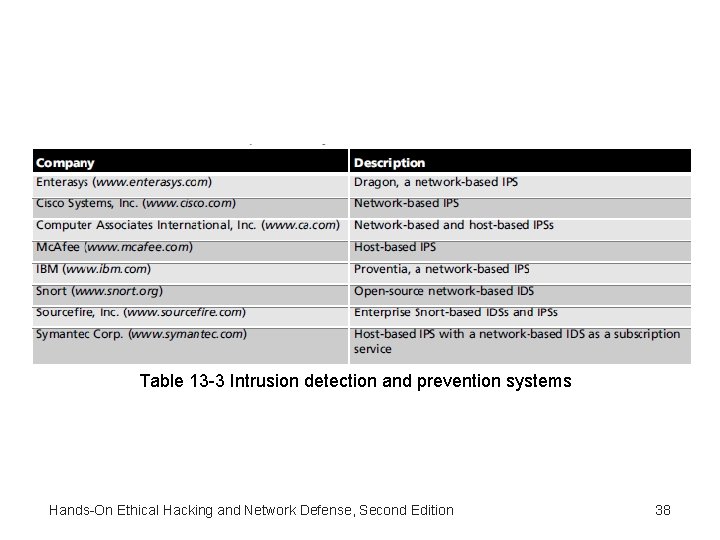
Table 13 -3 Intrusion detection and prevention systems Hands-On Ethical Hacking and Network Defense, Second Edition 38
Web Filtering • Statistically, firewalls and IPSs do a good job of protecting a network from Internet attacks – Hackers know statistics • Now using least restricted pathway through a firewall – Target devices allowed access out of the network automatically: user workstations • Get internal user to visit a bogus Web site or install malicious code from an e-mail attachment • Don’t need to break through the firewall • Firewall application layer inspection might not detect this kind of attack Hands-On Ethical Hacking and Network Defense, Second Edition 39
Web Filtering (cont’d. ) • Web filtering is used to detect users’ attempts to access malicious Web sites and block tem – Some block malicious code • Before it gets to a user’s workstation • Before it connects to an attacker’s control system outside the network • Mass compromises are used to initiate drive-by downloads – Web site visitors download malicious code without their knowledge Hands-On Ethical Hacking and Network Defense, Second Edition 40
Security Incident Response Teams • Large organizations with sensitive or critical data – Normal administrative expertise isn’t enough to do: • Follow up and damage assessment • Risk remediation and legal consultation • Security incident response team (SIRT) – Permanent team – Responsible solely for security-response functions • Ad hoc team – Members normally have other roles – Called in response to a specific incident Hands-On Ethical Hacking and Network Defense, Second Edition 41
Understanding Honeypots • Honeypot – Computer placed on network perimeter • Contains information to lure and trap hackers • Configured to have vulnerabilities – Keeps hackers connected long enough so they can be traced back – Serves as an excellent data collector and early warning system Hands-On Ethical Hacking and Network Defense, Second Edition 42
How Honeypots Work • Honeypot appears to have important data or sensitive information stored on it – Could store fake financial data – Hackers will spend time attacking the honeypot • Stop looking for real vulnerabilities • Enables security to collect data on attackers • Available honeypots – Commercial and open-source • Virtual honeypots – Created using programming language Hands-On Ethical Hacking and Network Defense, Second Edition 43
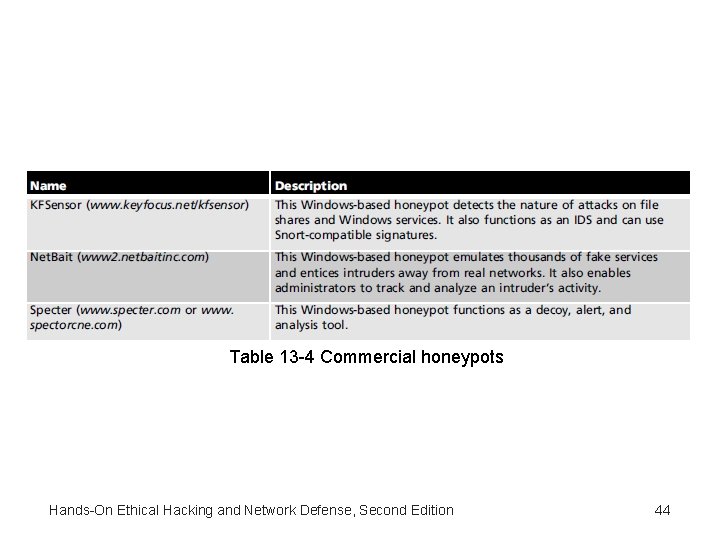
Table 13 -4 Commercial honeypots Hands-On Ethical Hacking and Network Defense, Second Edition 44
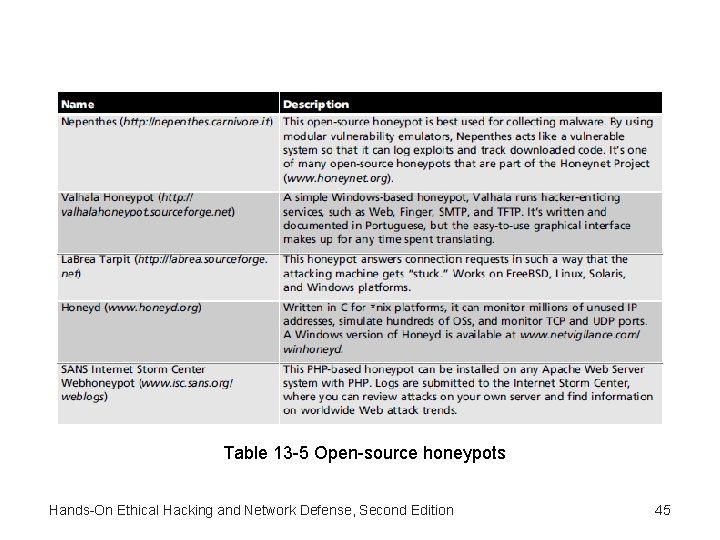
Table 13 -5 Open-source honeypots Hands-On Ethical Hacking and Network Defense, Second Edition 45
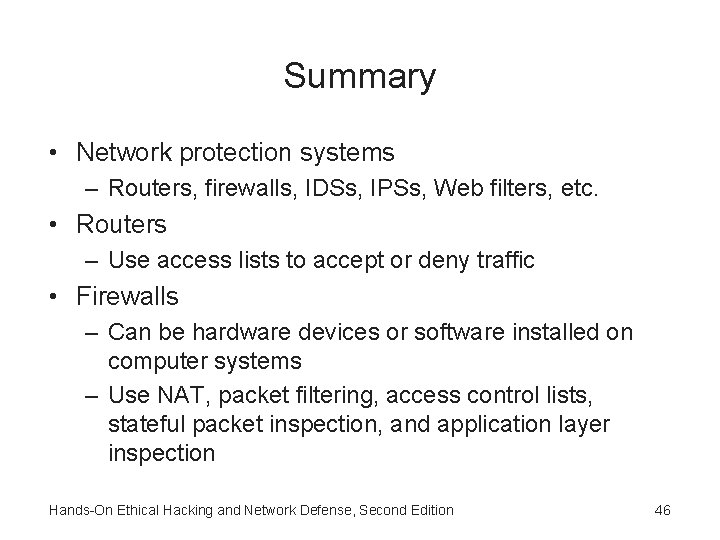
Summary • Network protection systems – Routers, firewalls, IDSs, IPSs, Web filters, etc. • Routers – Use access lists to accept or deny traffic • Firewalls – Can be hardware devices or software installed on computer systems – Use NAT, packet filtering, access control lists, stateful packet inspection, and application layer inspection Hands-On Ethical Hacking and Network Defense, Second Edition 46
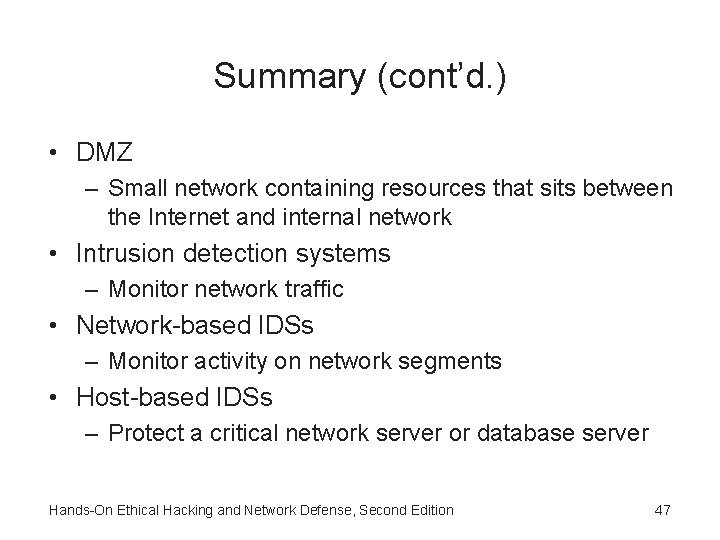
Summary (cont’d. ) • DMZ – Small network containing resources that sits between the Internet and internal network • Intrusion detection systems – Monitor network traffic • Network-based IDSs – Monitor activity on network segments • Host-based IDSs – Protect a critical network server or database server Hands-On Ethical Hacking and Network Defense, Second Edition 47
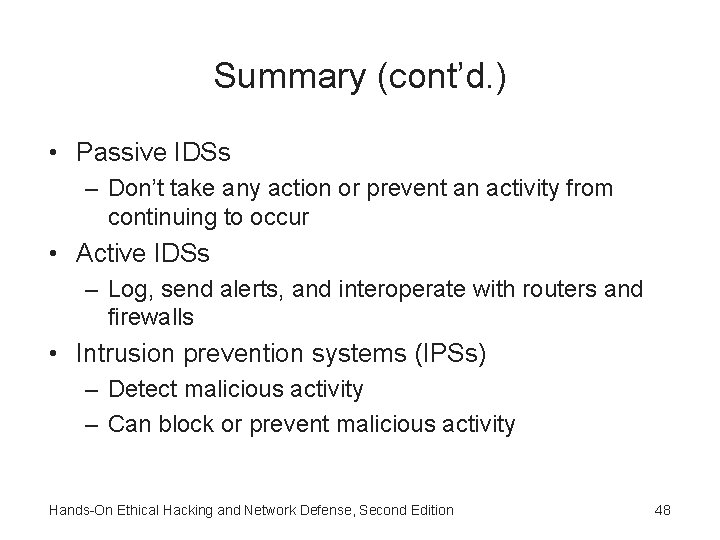
Summary (cont’d. ) • Passive IDSs – Don’t take any action or prevent an activity from continuing to occur • Active IDSs – Log, send alerts, and interoperate with routers and firewalls • Intrusion prevention systems (IPSs) – Detect malicious activity – Can block or prevent malicious activity Hands-On Ethical Hacking and Network Defense, Second Edition 48
Summary (cont’d. ) • Anomaly detectors – Detect activity varying from a set baseline • Configuring routers and firewalls securely – Easier with benchmark tools • Web filtering – Can block Web sites containing malicious code • Large organizations – Might need a security incident response team • Honeypots – Lure hackers away from legitimate resources Hands-On Ethical Hacking and Network Defense, Second Edition 49