
Handling a UART interrupt A look at some
- Slides: 17
Handling a UART interrupt A look at some recent changes in the Linux kernel’s programming interface for device-interrupts
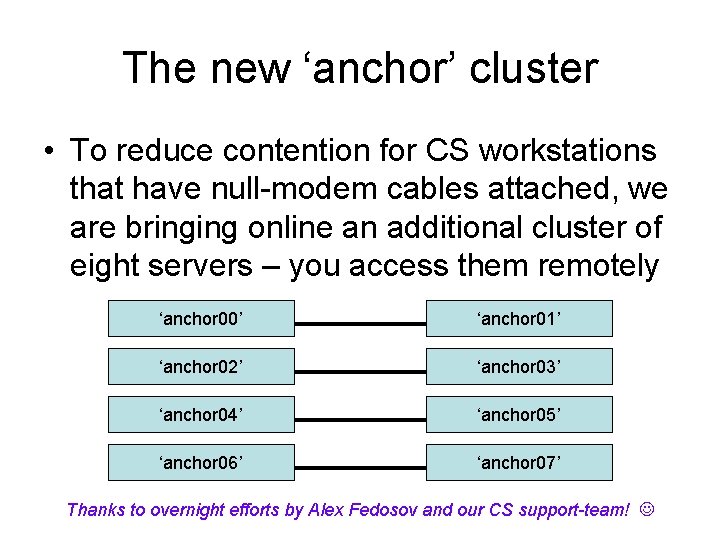
The new ‘anchor’ cluster • To reduce contention for CS workstations that have null-modem cables attached, we are bringing online an additional cluster of eight servers – you access them remotely ‘anchor 00’ ‘anchor 01’ ‘anchor 02’ ‘anchor 03’ ‘anchor 04’ ‘anchor 05’ ‘anchor 06’ ‘anchor 07’ Thanks to overnight efforts by Alex Fedosov and our CS support-team!
LDD 3: kernel 2. 6. 10 • Our text “Linux Device Drivers (3 rd Ed)” is published by O’Reilly in February 2005 • The kernel version it covers is 2. 6. 10 • But in our classroom we are using a more recent version of the kernel (i. e. , 2. 6. 22. 5) which was released in mid-August 2007 • Various changes (improvements) are now implemented (and differ from LDD 3 book)
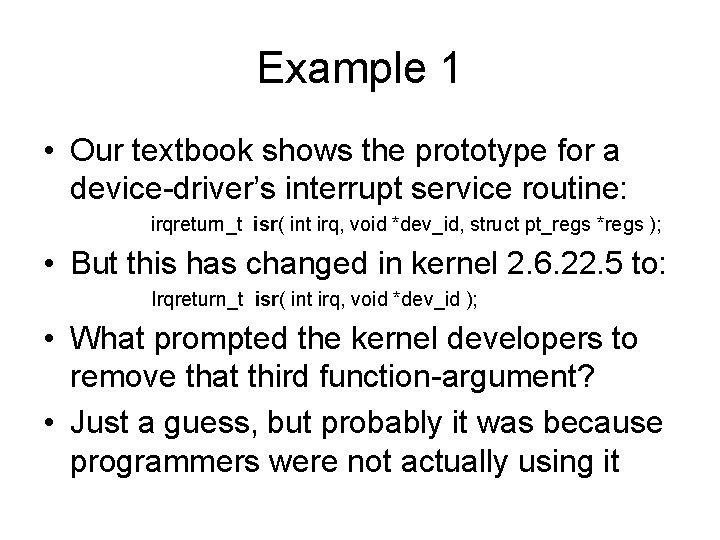
Example 1 • Our textbook shows the prototype for a device-driver’s interrupt service routine: irqreturn_t isr( int irq, void *dev_id, struct pt_regs *regs ); • But this has changed in kernel 2. 6. 22. 5 to: Irqreturn_t isr( int irq, void *dev_id ); • What prompted the kernel developers to remove that third function-argument? • Just a guess, but probably it was because programmers were not actually using it
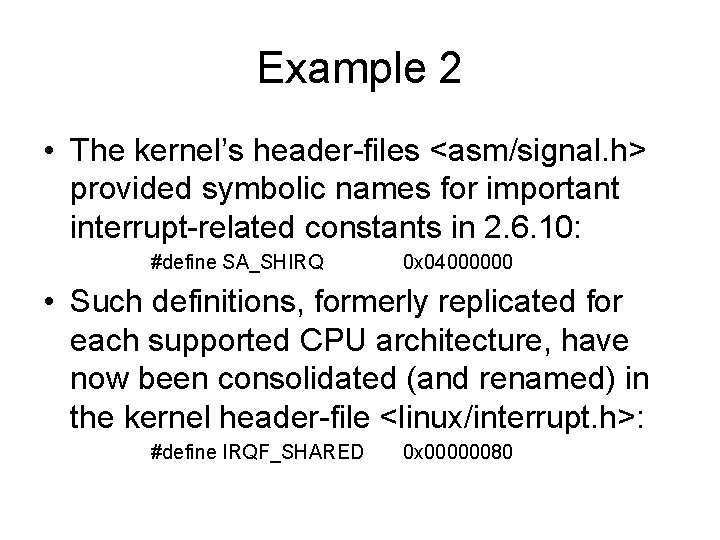
Example 2 • The kernel’s header-files <asm/signal. h> provided symbolic names for important interrupt-related constants in 2. 6. 10: #define SA_SHIRQ 0 x 04000000 • Such definitions, formerly replicated for each supported CPU architecture, have now been consolidated (and renamed) in the kernel header-file <linux/interrupt. h>: #define IRQF_SHARED 0 x 00000080
Consequences • If you try to apply the textbook discussion about interrupt-handlers to your LKMs for this class, the compiler will generate error messages and/or warning messages • So you will need to use the “new” kernel’s interfaces, not documented in our textbook • Maybe you can locate an online tutorial, or look at other device-drivers’ source-code
Our ‘uartintr. c’ module • We have written a kernel module that you can study (and experiment with) showing an interrupt-handler for the UART device that we created purely for demonstration purposes using kernel version 2. 6. 22. 5 • Obviously you would need to modify it if you wanted to use an interrupt-handler in your solution for our course’s Project #2
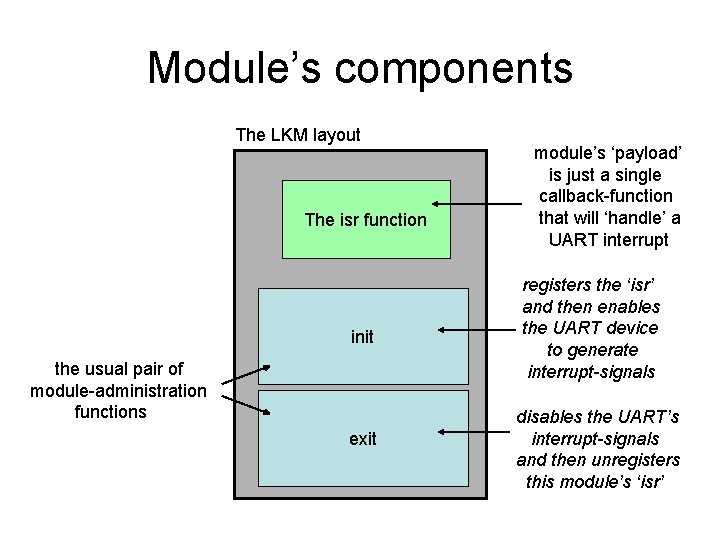
Module’s components The LKM layout The isr function init the usual pair of module-administration functions exit module’s ‘payload’ is just a single callback-function that will ‘handle’ a UART interrupt registers the ‘isr’ and then enables the UART device to generate interrupt-signals disables the UART’s interrupt-signals and then unregisters this module’s ‘isr’
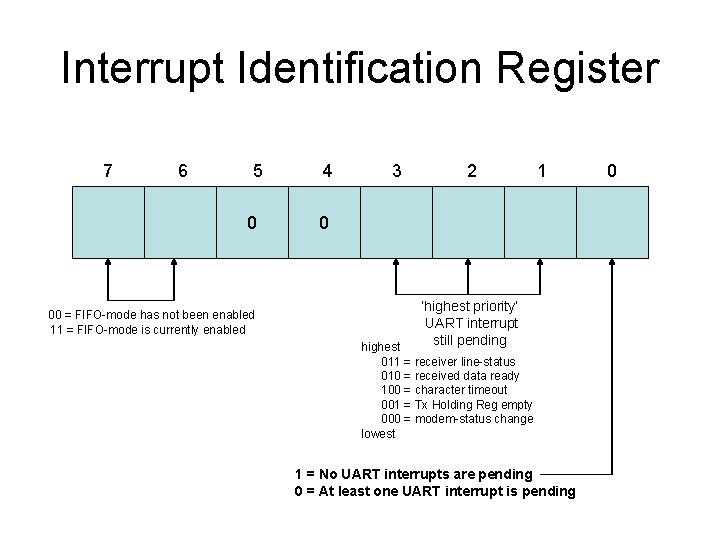
Interrupt Identification Register 7 6 5 0 00 = FIFO-mode has not been enabled 11 = FIFO-mode is currently enabled 4 3 2 1 0 ‘highest priority’ UART interrupt still pending highest 011 = receiver line-status 010 = received data ready 100 = character timeout 001 = Tx Holding Reg empty 000 = modem-status change lowest 1 = No UART interrupts are pending 0 = At least one UART interrupt is pending 0
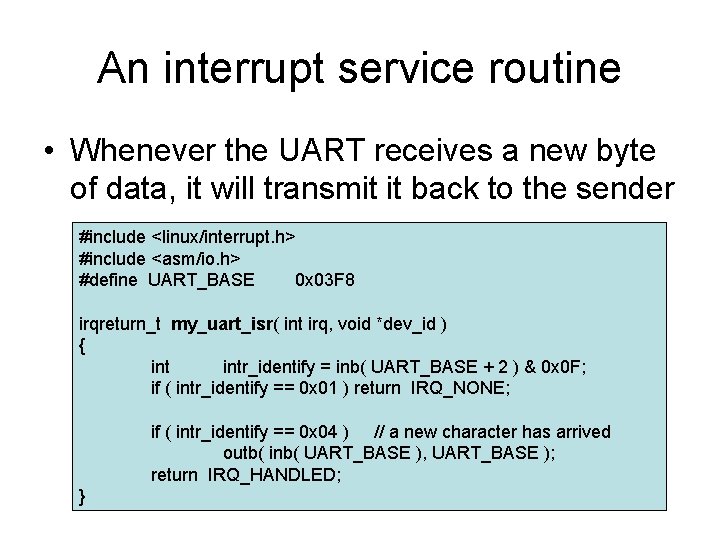
An interrupt service routine • Whenever the UART receives a new byte of data, it will transmit it back to the sender #include <linux/interrupt. h> #include <asm/io. h> #define UART_BASE 0 x 03 F 8 irqreturn_t my_uart_isr( int irq, void *dev_id ) { intr_identify = inb( UART_BASE + 2 ) & 0 x 0 F; if ( intr_identify == 0 x 01 ) return IRQ_NONE; if ( intr_identify == 0 x 04 ) // a new character has arrived outb( inb( UART_BASE ), UART_BASE ); return IRQ_HANDLED; }
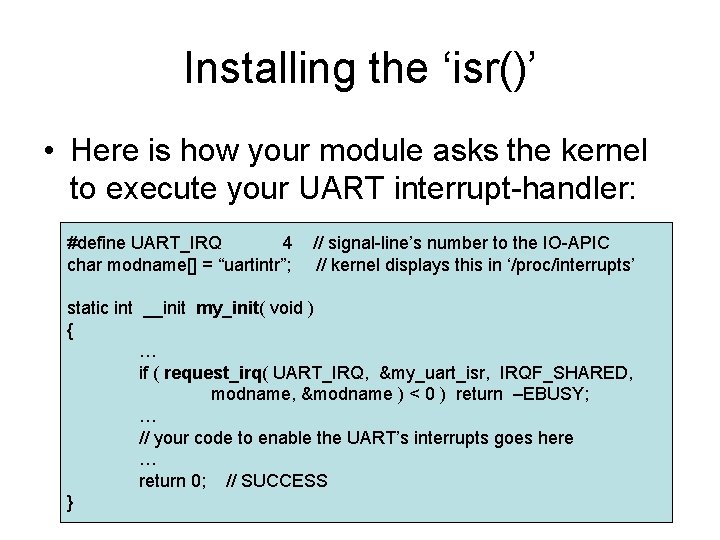
Installing the ‘isr()’ • Here is how your module asks the kernel to execute your UART interrupt-handler: #define UART_IRQ 4 char modname[] = “uartintr”; // signal-line’s number to the IO-APIC // kernel displays this in ‘/proc/interrupts’ static int __init my_init( void ) { … if ( request_irq( UART_IRQ, &my_uart_isr, IRQF_SHARED, modname, &modname ) < 0 ) return –EBUSY; … // your code to enable the UART’s interrupts goes here … return 0; // SUCCESS }
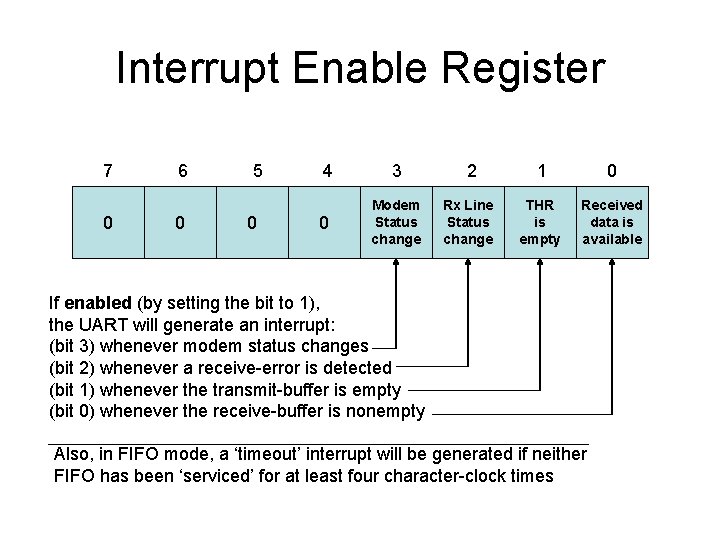
Interrupt Enable Register 7 0 6 0 5 0 4 3 0 Modem Status change 2 Rx Line Status change 1 0 THR is empty Received data is available If enabled (by setting the bit to 1), the UART will generate an interrupt: (bit 3) whenever modem status changes (bit 2) whenever a receive-error is detected (bit 1) whenever the transmit-buffer is empty (bit 0) whenever the receive-buffer is nonempty Also, in FIFO mode, a ‘timeout’ interrupt will be generated if neither FIFO has been ‘serviced’ for at least four character-clock times
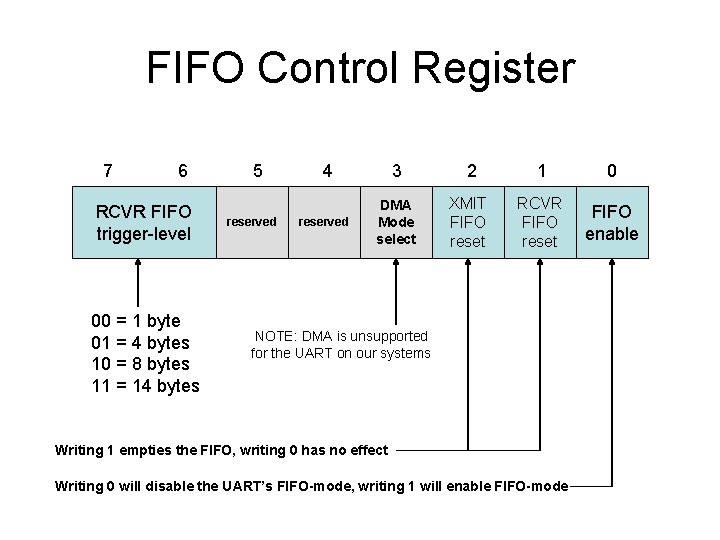
FIFO Control Register 7 6 RCVR FIFO trigger-level 00 = 1 byte 01 = 4 bytes 10 = 8 bytes 11 = 14 bytes 5 reserved 4 3 reserved DMA Mode select 2 1 0 XMIT FIFO reset RCVR FIFO reset FIFO enable NOTE: DMA is unsupported for the UART on our systems Writing 1 empties the FIFO, writing 0 has no effect Writing 0 will disable the UART’s FIFO-mode, writing 1 will enable FIFO-mode
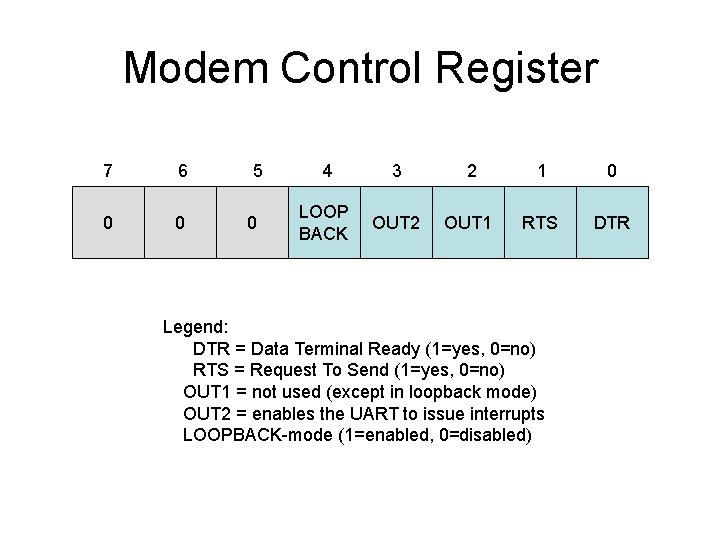
Modem Control Register 7 6 0 0 5 0 4 3 2 1 0 LOOP BACK OUT 2 OUT 1 RTS DTR Legend: DTR = Data Terminal Ready (1=yes, 0=no) RTS = Request To Send (1=yes, 0=no) OUT 1 = not used (except in loopback mode) OUT 2 = enables the UART to issue interrupts LOOPBACK-mode (1=enabled, 0=disabled)
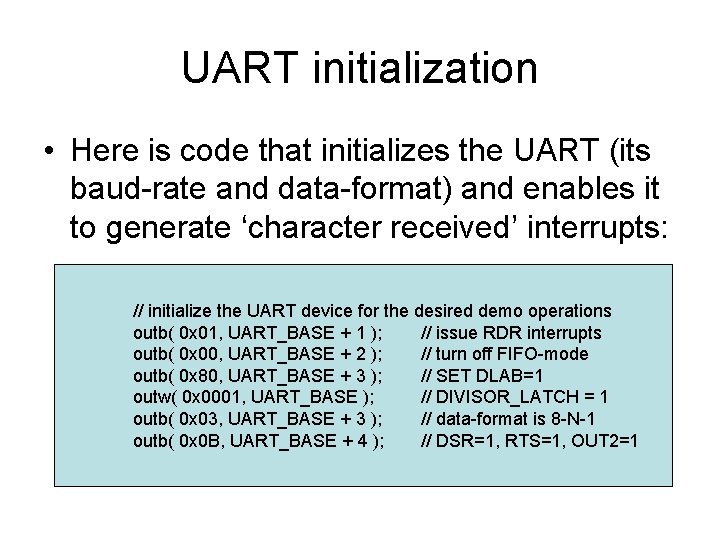
UART initialization • Here is code that initializes the UART (its baud-rate and data-format) and enables it to generate ‘character received’ interrupts: // initialize the UART device for the desired demo operations outb( 0 x 01, UART_BASE + 1 ); // issue RDR interrupts outb( 0 x 00, UART_BASE + 2 ); // turn off FIFO-mode outb( 0 x 80, UART_BASE + 3 ); // SET DLAB=1 outw( 0 x 0001, UART_BASE ); // DIVISOR_LATCH = 1 outb( 0 x 03, UART_BASE + 3 ); // data-format is 8 -N-1 outb( 0 x 0 B, UART_BASE + 4 ); // DSR=1, RTS=1, OUT 2=1
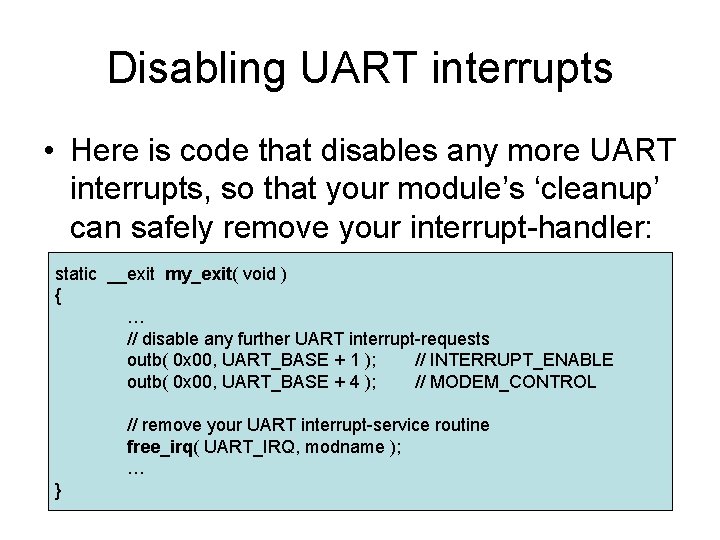
Disabling UART interrupts • Here is code that disables any more UART interrupts, so that your module’s ‘cleanup’ can safely remove your interrupt-handler: static __exit my_exit( void ) { … // disable any further UART interrupt-requests outb( 0 x 00, UART_BASE + 1 ); // INTERRUPT_ENABLE outb( 0 x 00, UART_BASE + 4 ); // MODEM_CONTROL // remove your UART interrupt-service routine free_irq( UART_IRQ, modname ); … }
In-class exercise • Try running our ‘trycable. cpp’ application on an adjacent workstation after you have downloaded, compiled, and installed our ‘uartintr. c’ demo-module • What do you see on the two screens? • Tonight’s class ends early -- so that you can attend the ACM Chapter’s Pizza Night