
Guide to Operating System Security Chapter 6 Firewalls
- Slides: 50
Guide to Operating System Security Chapter 6 Firewalls and Border Security
Objectives l l Understand how TCP, UDP, and IP work, and the security vulnerabilities of these protocols Explain the use of IP addressing on a network and how it is used for security Explain border and firewall security Configure the firewall capabilities in operating systems Guide to Operating System Security 2
Transmission Control Protocol/Internet Protocol l Networking protocol that serves as a universal language of communication for networks and operating systems Ubiquity makes it a prime target for attackers Three core component protocols Transmission Control Protocol (TCP) u User Datagram Protocol (UDP) u Internet Protocol (IP) u Guide to Operating System Security 3
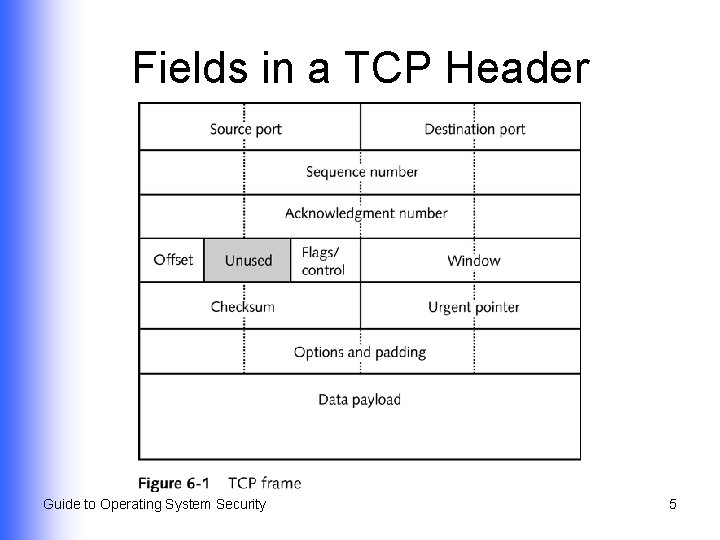
Understanding TCP l l Establishes reliable connection-oriented communications between communicating devices on networks Enables communications to operate in an orderly fashion through use of sequence numbers and acknowledgments Guide to Operating System Security 4
Fields in a TCP Header Guide to Operating System Security 5
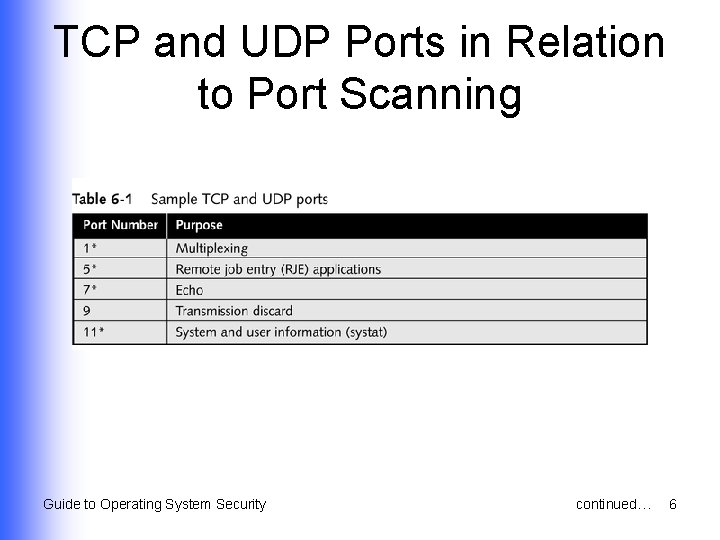
TCP and UDP Ports in Relation to Port Scanning Guide to Operating System Security continued… 6
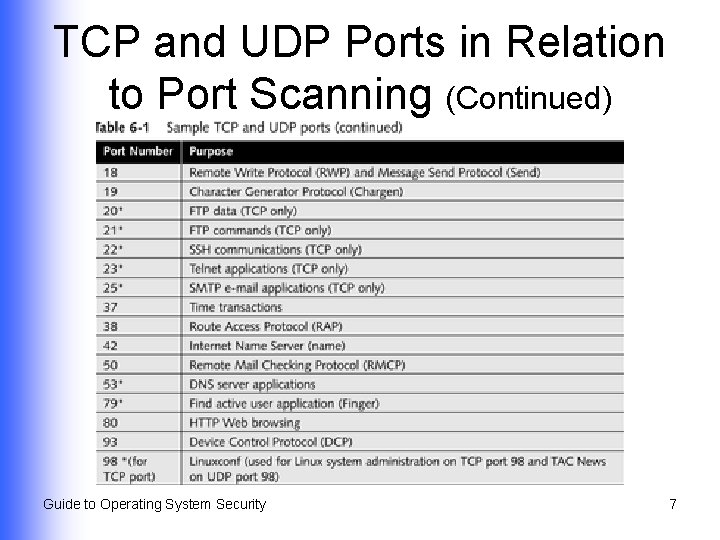
TCP and UDP Ports in Relation to Port Scanning (Continued) Guide to Operating System Security 7
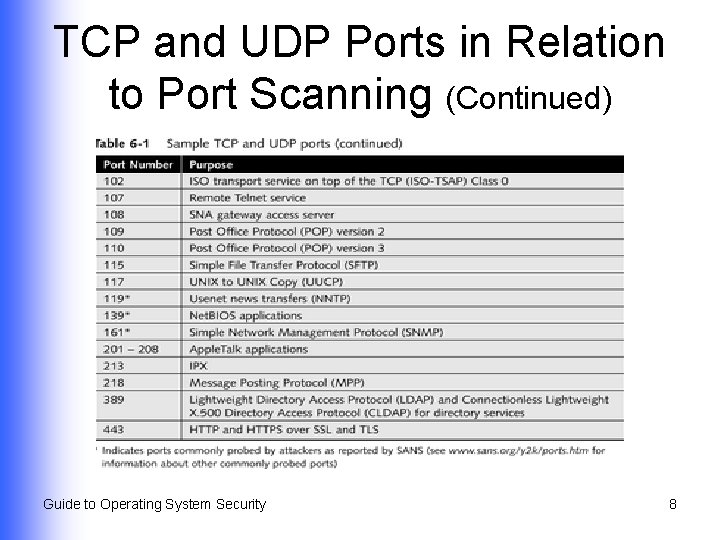
TCP and UDP Ports in Relation to Port Scanning (Continued) Guide to Operating System Security 8
Understanding UDP l l l Connectionless protocol Can be used instead of TCP Faster communications when reliability is less of a concern Performs no flow control, sequencing, or acknowledgment Port-scanning attacks are less productive against it Guide to Operating System Security 9
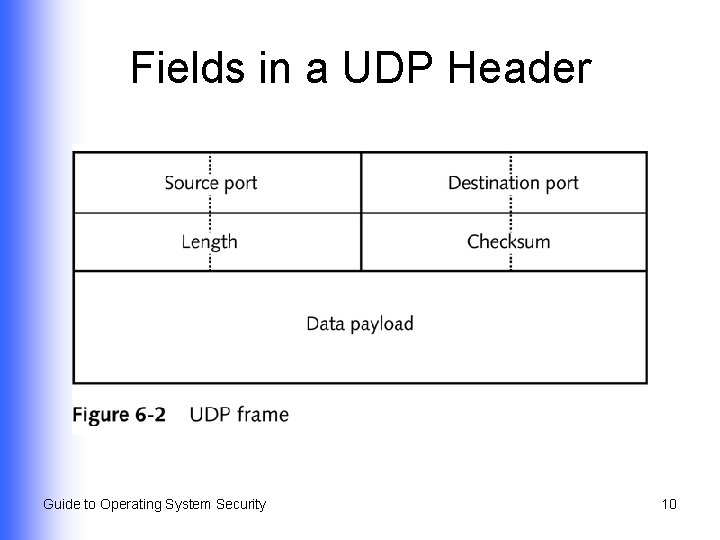
Fields in a UDP Header Guide to Operating System Security 10
Understanding How IP Works l l Enables packet to reach different subnetworks on a LAN and different networks on a WAN Networks must use transport methods compatible with TCP/IP Guide to Operating System Security 11
Basic Functions of IP l l l Data transfer Packet addressing Packet routing Fragmentation Simple detection of packet errors Guide to Operating System Security 12
IP as a Connectionless Protocol l Provides network-to-network addressing and routing information Changes size of packets when size varies from network to network Leaves reliability of communications in hands of the embedded TCP segment Guide to Operating System Security 13
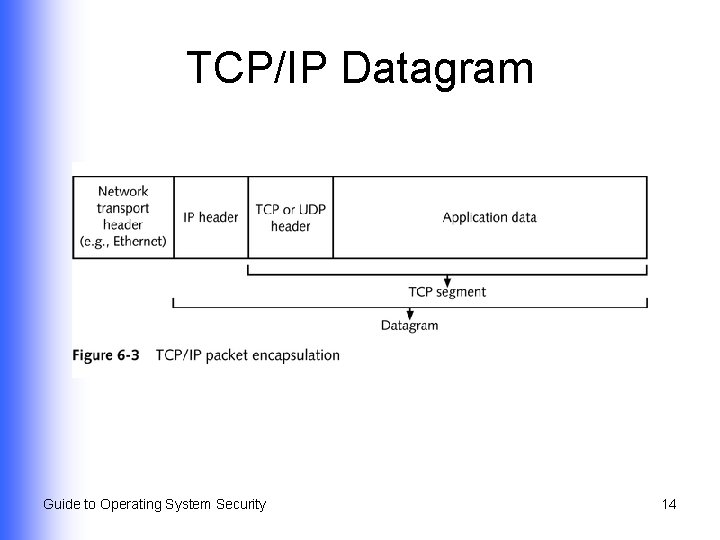
TCP/IP Datagram Guide to Operating System Security 14
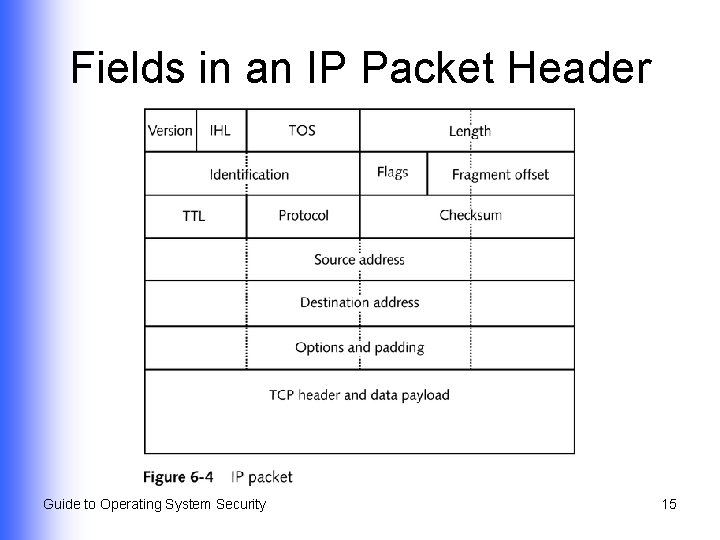
Fields in an IP Packet Header Guide to Operating System Security 15
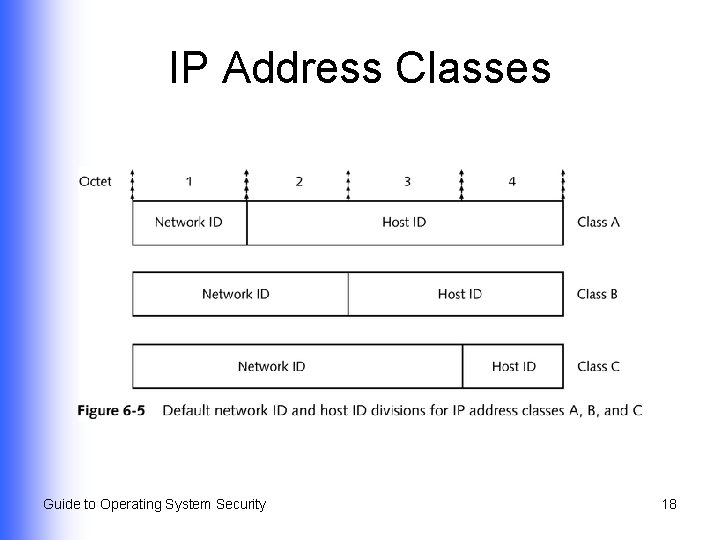
How IP Addressing Works l l Identifies a specific station and the network on which it resides Each IP address must be unique Uses dotted decimal addressing Enables use of network IDs and host IDs for locating networks and specific devices on the network Guide to Operating System Security 16
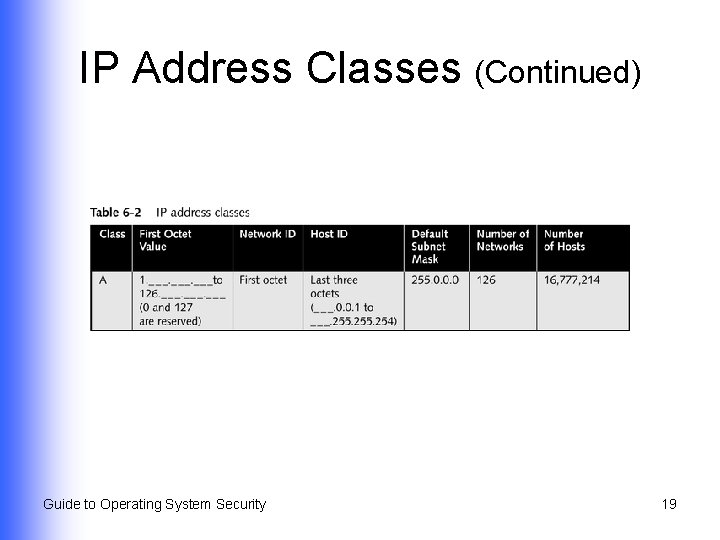
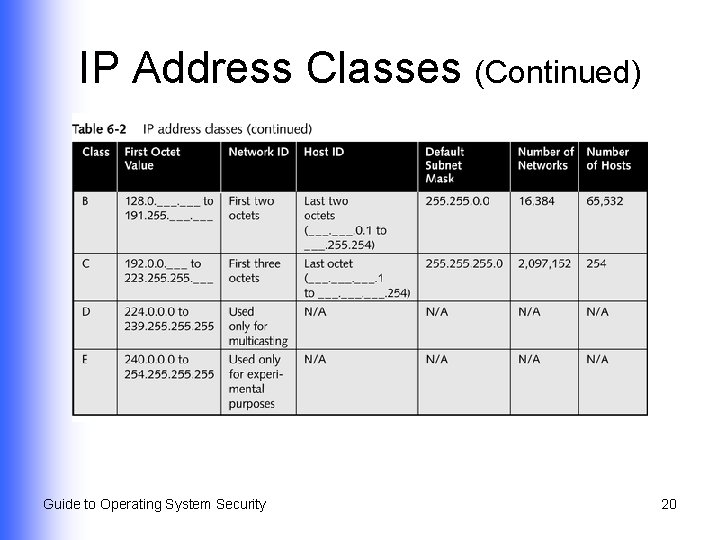
IP Address Classes l l Fives classes – Class A through Class E – each used with different type of network Reflect size of network and whether the packet is unicast or multicast Guide to Operating System Security 17
IP Address Classes Guide to Operating System Security 18
IP Address Classes (Continued) Guide to Operating System Security 19
IP Address Classes (Continued) Guide to Operating System Security 20
Using a Subnet Mask l l l Required by TCP/IP addresses Determine how portions of addresses on a network are divided into network ID and host ID Divide a network into subnetworks to control network traffic Guide to Operating System Security 21
Creating Subnetworks l l Subnet mask contains a subnet ID within network and host IDs Enables routing devices to ignore traditional class designations u u l Creates more options for segmenting networks through multiple subnets and additional network addresses Overcomes four-octet limitation in IPv 4 Newer way to ignore class designation u Classless interdomain routing (CIDR) Guide to Operating System Security 22
Border and Firewall Security l l Firewalls protect internal or private networks Firewall functions Packet filtering u Network address translation u Working as application gateways or proxies u Guide to Operating System Security 23
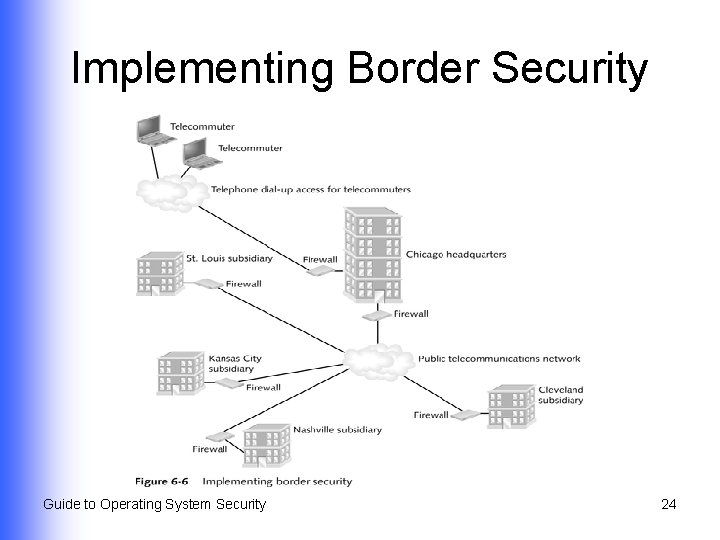
Implementing Border Security Guide to Operating System Security 24
Packet Filtering l l l Use characteristics of a packet Determines whether a packet should be forwarded or blocked Techniques Stateless packet filtering u Stateful packet filtering u Guide to Operating System Security 25
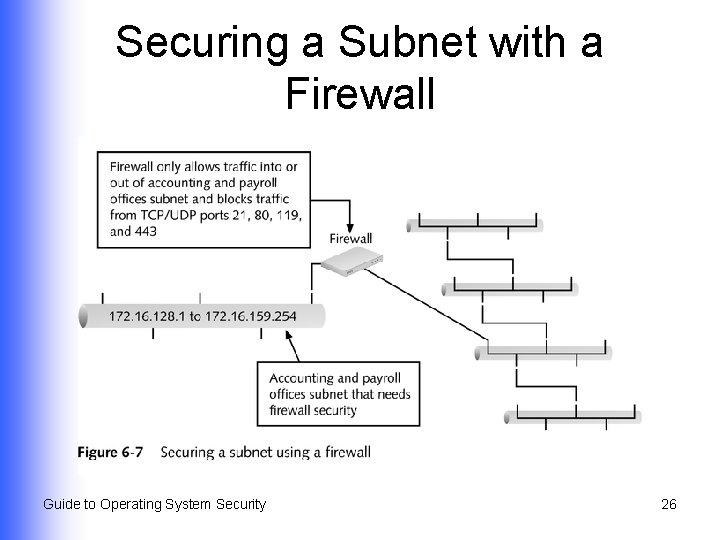
Securing a Subnet with a Firewall Guide to Operating System Security 26
Network Address Translation (NAT) l l Discourages attackers; all protected network addresses are seen by outsiders as a single address Enables a network to use IP addresses on the internal network that are not formally registered for Internet use Guide to Operating System Security 27
Ways to Perform NAT Translation l l Dynamic translation (or IP masquerade) Static translation Network redundancy translation Load balancing Guide to Operating System Security 28
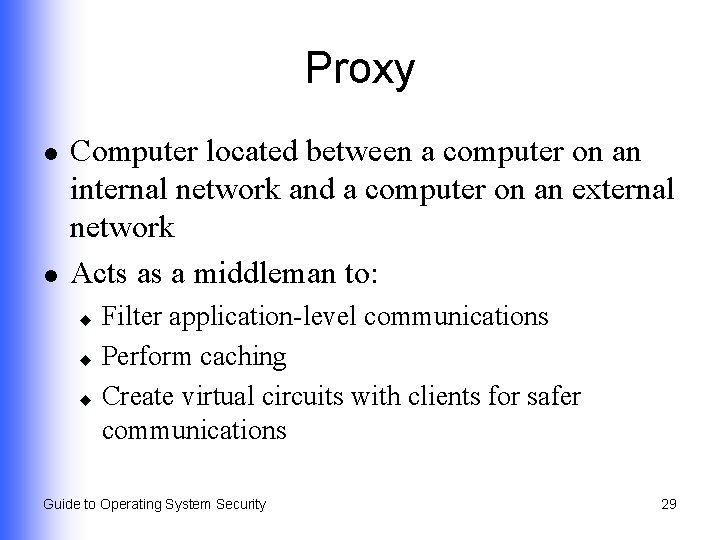
Proxy l l Computer located between a computer on an internal network and a computer on an external network Acts as a middleman to: Filter application-level communications u Perform caching u Create virtual circuits with clients for safer communications u Guide to Operating System Security 29
Proxy Configurations l l Application-level gateways Circuit-level gateways Guide to Operating System Security 30
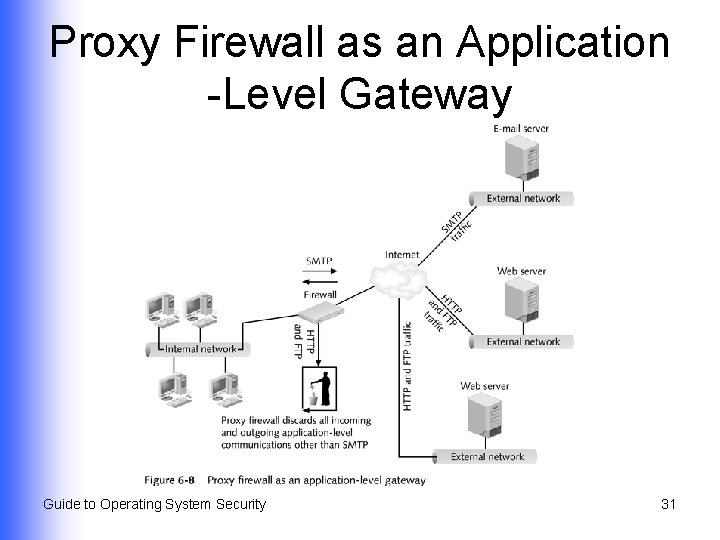
Proxy Firewall as an Application -Level Gateway Guide to Operating System Security 31
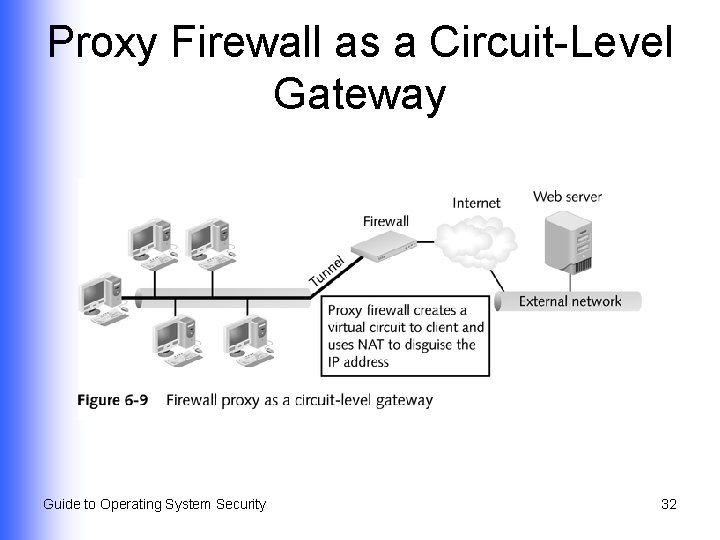
Proxy Firewall as a Circuit-Level Gateway Guide to Operating System Security 32
Using Routers for Border Security (Continued) l l Often used as firewalls because they can filter packets and protocols Forward packets and frames to networks using a decision-making process based on: Routing table data u Discovery of most efficient routes u Preprogrammed information u Guide to Operating System Security 33
Using Routers for Border Security (Continued) l Protocols used by routers in a local system u Routing Information Protocol (RIP) • u Uses only hop count as its metric Open Shortest Path First (OSPF) • • • Router sends only the link-state routing message Compact packet format Shared updated routing table information among routers Guide to Operating System Security 34
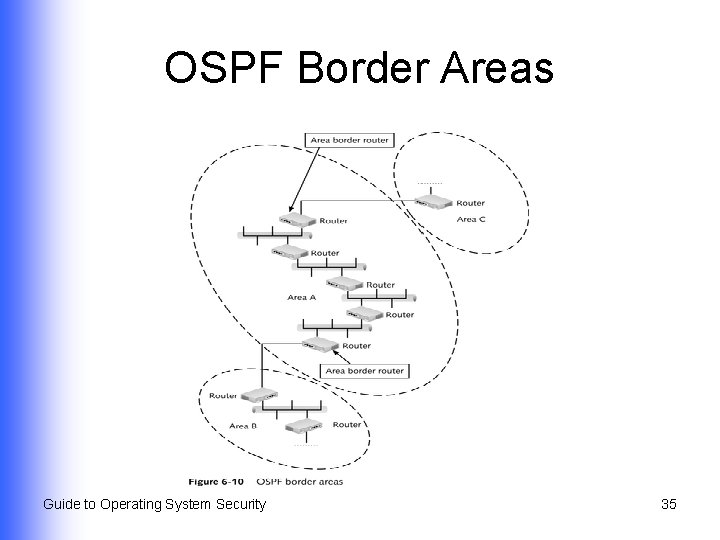
OSPF Border Areas Guide to Operating System Security 35
Using Firewall Capabilities in Operating Systems l Important when the computer: On which OS is running is directly connected to the Internet u Is in a demilitarized zone (DMZ) u Guide to Operating System Security 36
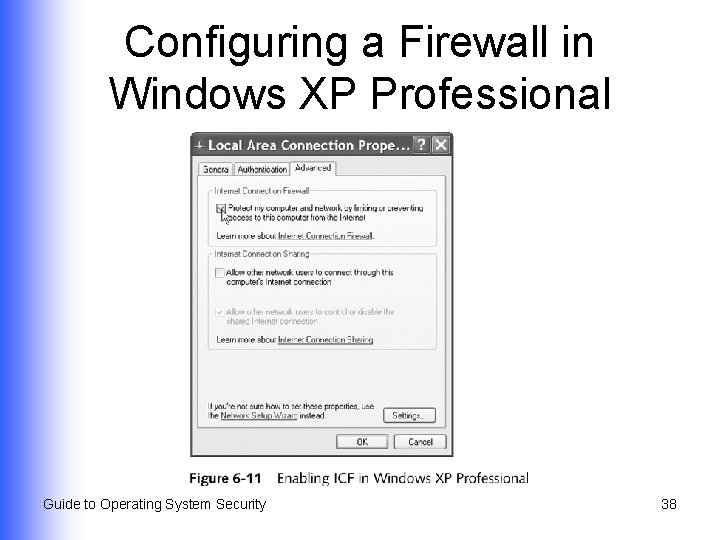
Configuring a Firewall in Windows XP Professional l Enable Internet Connection Firewall (ICF) Monitors source and destination addresses that come in and go out of the computer via Internet u Maintains table of IP addresses allowed into OS u Discards communications from unauthorized IP addresses u Discourages port scanning via an Internet connection u Guide to Operating System Security 37
Configuring a Firewall in Windows XP Professional Guide to Operating System Security 38
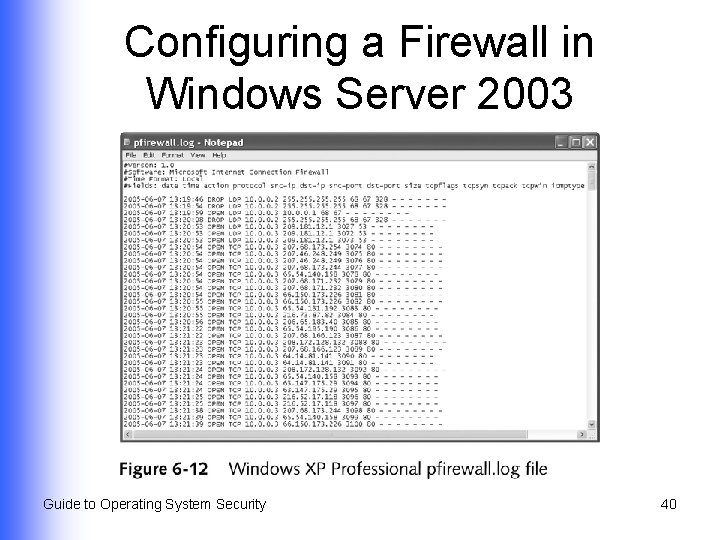
Configuring a Firewall in Windows Server 2003 l Enable ICF, enabling only those services that are needed on the server Guide to Operating System Security 39
Configuring a Firewall in Windows Server 2003 Guide to Operating System Security 40
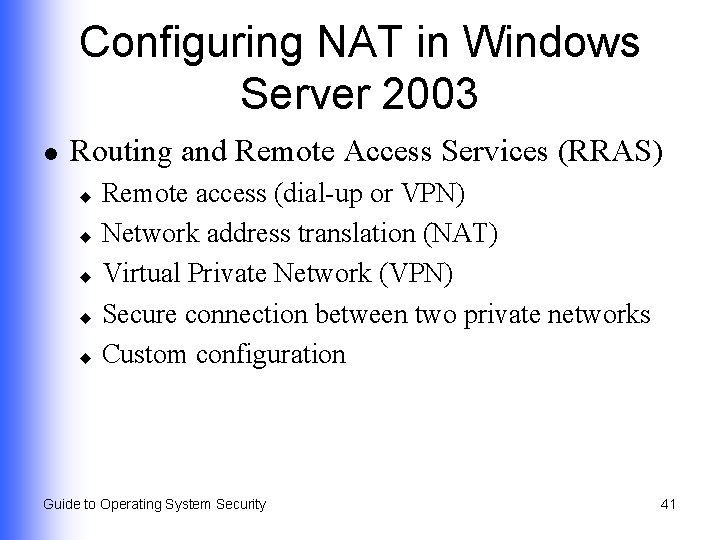
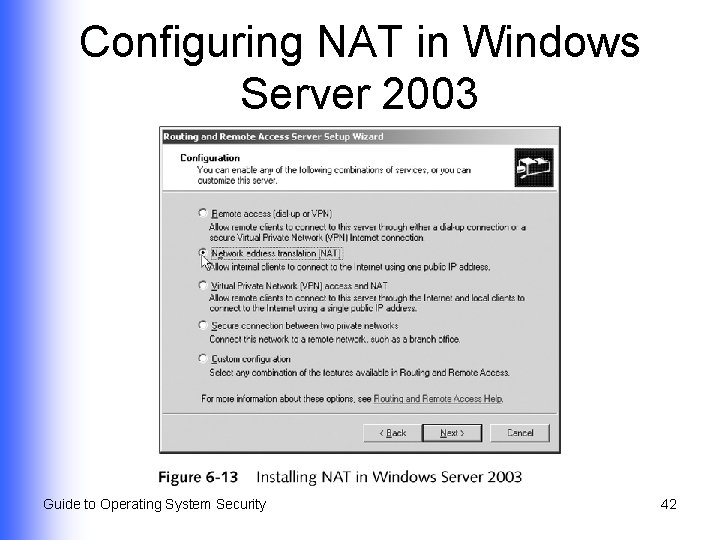
Configuring NAT in Windows Server 2003 l Routing and Remote Access Services (RRAS) Remote access (dial-up or VPN) u Network address translation (NAT) u Virtual Private Network (VPN) u Secure connection between two private networks u Custom configuration u Guide to Operating System Security 41
Configuring NAT in Windows Server 2003 Guide to Operating System Security 42
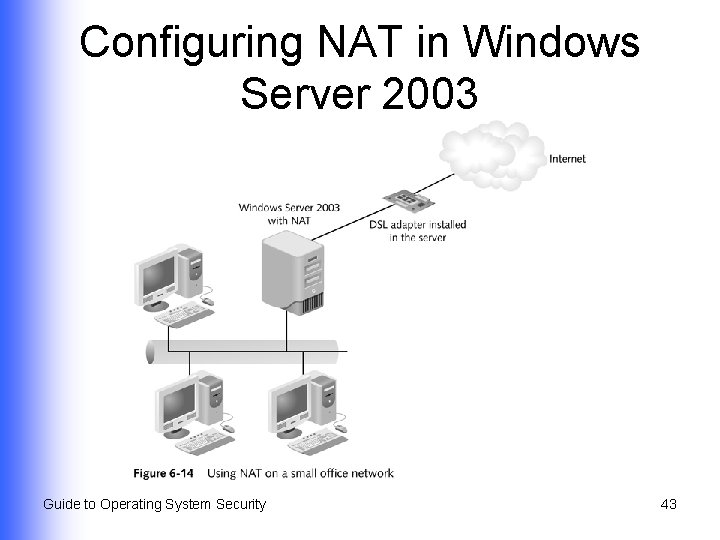
Configuring NAT in Windows Server 2003 Guide to Operating System Security 43
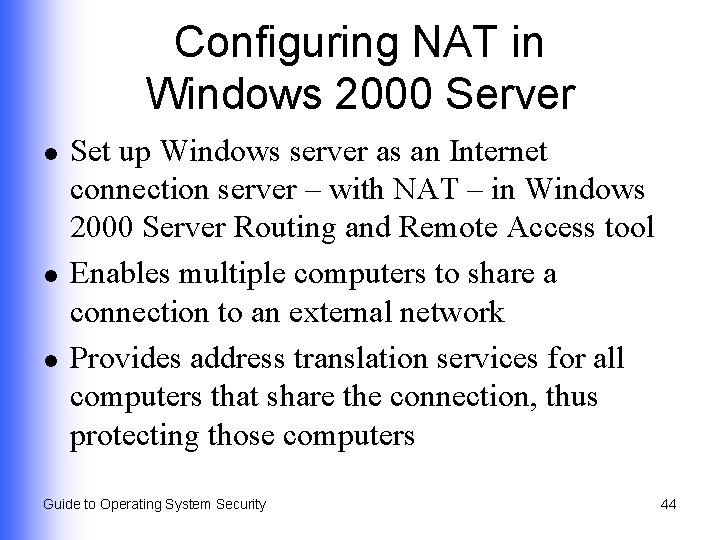
Configuring NAT in Windows 2000 Server l l l Set up Windows server as an Internet connection server – with NAT – in Windows 2000 Server Routing and Remote Access tool Enables multiple computers to share a connection to an external network Provides address translation services for all computers that share the connection, thus protecting those computers Guide to Operating System Security 44
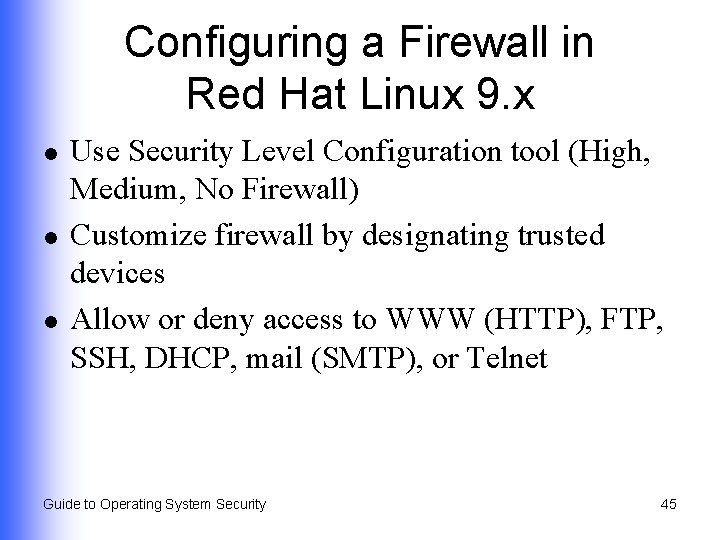
Configuring a Firewall in Red Hat Linux 9. x l l l Use Security Level Configuration tool (High, Medium, No Firewall) Customize firewall by designating trusted devices Allow or deny access to WWW (HTTP), FTP, SSH, DHCP, mail (SMTP), or Telnet Guide to Operating System Security 45
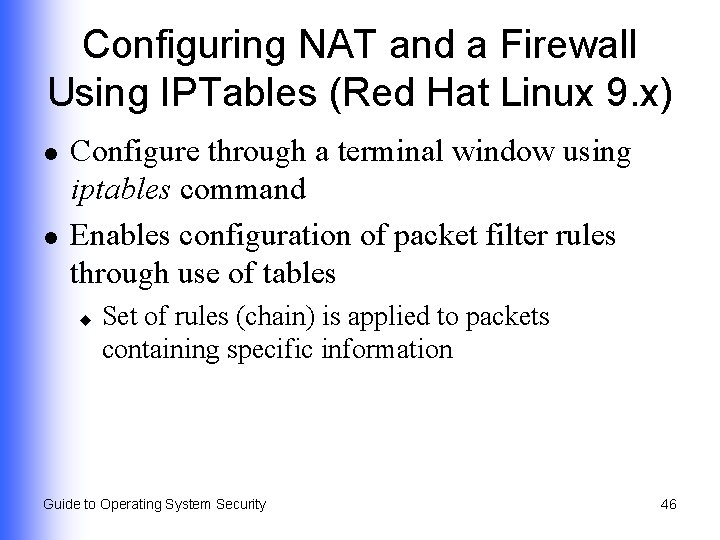
Configuring NAT and a Firewall Using IPTables (Red Hat Linux 9. x) l l Configure through a terminal window using iptables command Enables configuration of packet filter rules through use of tables u Set of rules (chain) is applied to packets containing specific information Guide to Operating System Security 46
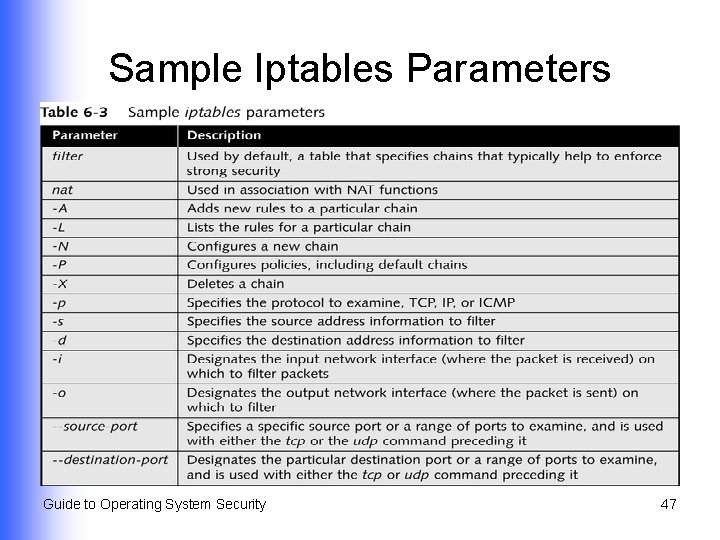
Sample Iptables Parameters Guide to Operating System Security 47
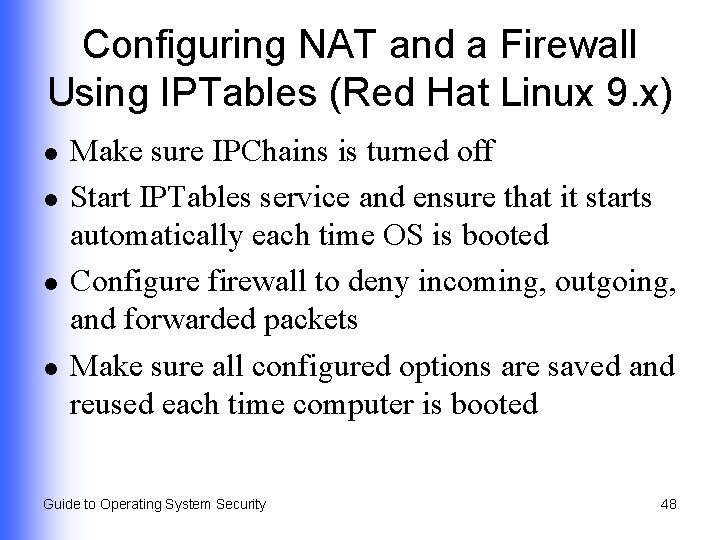
Configuring NAT and a Firewall Using IPTables (Red Hat Linux 9. x) l l Make sure IPChains is turned off Start IPTables service and ensure that it starts automatically each time OS is booted Configure firewall to deny incoming, outgoing, and forwarded packets Make sure all configured options are saved and reused each time computer is booted Guide to Operating System Security 48
Configuring a Mac OS X Firewall l Use System Preferences via the Sharing icon Allow or deny network communications through TCP and UDP ports by turning specific services on or off Turn firewall on or off Guide to Operating System Security 49
Summary l l TCP, UDP, and IP protocols, their security vulnerabilities and how to mitigate them IP addressing and how it can be used to thwart attacks How border and firewall security use characteristics of TCP, UDP, and IP to build more secure networks How to configure firewall capabilities of operating systems Guide to Operating System Security 50