
Guide to Operating System Security Chapter 4 Accountbased
Guide to Operating System Security Chapter 4 Account-based Security
Objectives l l l Discuss how to develop account naming and security policies Explain and configure user accounts Discuss and configure account policies and logon security techniques Discuss and implement global access privileges Use group policies and security templates in Windows 2000 Server and Windows Server 2003 Guide to Operating System Security 2
Account Naming l l Provides orderly access to server and network resources Enables administrators to monitor security: Which users are accessing the server u What resources they are using u l Establish conventions for account names User’s actual name u User’s function u Guide to Operating System Security 3
Security Policies l l Apply to all accounts or to all accounts in a particular directory service container Affected elements: u Password security • • • Expiration period Minimum length Password recollection Account lockout u Authentication method u Guide to Operating System Security 4
Creating User Accounts in Windows 2000 Professional l Typically installed with: Administrator account u Guest account u l To create and manage user accounts: Start – Settings – Control Panel – Users and Passwords, or u Right-click My Computer – Manage – Local Users and Groups – Users u Guide to Operating System Security 5
Creating User Accounts in Windows XP Professional l Installed with: u u u l Account that usually consists of user’s name Administrator account Guest account Help. Assistant account for remote desktop help Support accounts for Microsoft and computer manufacturer To create and manage user accounts: u u Start – Control Panel – User Accounts, or Right-click My Computer – Manage – Local Users and Groups – Users Guide to Operating System Security 6
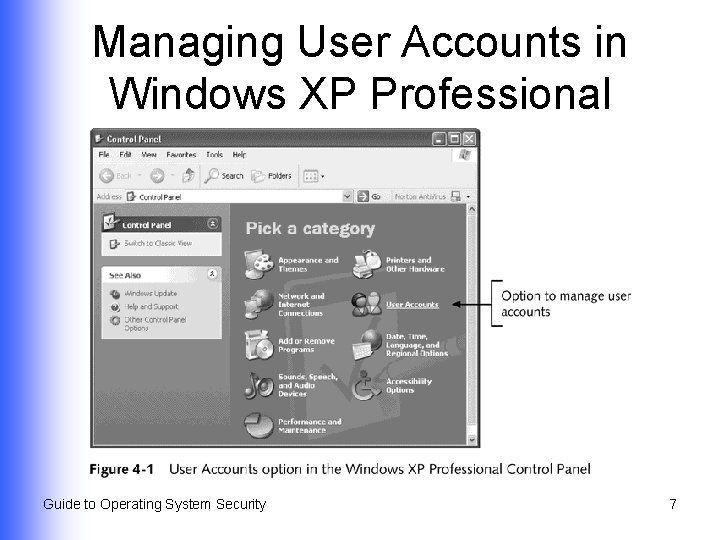
Managing User Accounts in Windows XP Professional Guide to Operating System Security 7
Creating User Accounts in Windows 2000 Server/Server 2003 l Installed with: Administrator account u Guest account u Other accounts, depending on services installed on server u l Create new accounts by entering account information and password controls Local user account on a server that is not part of a domain u Account in the Active Directory u Guide to Operating System Security 8
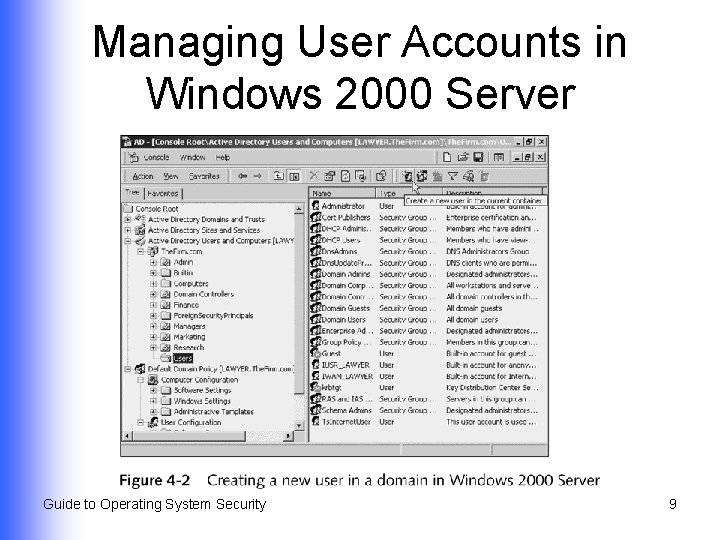
Managing User Accounts in Windows 2000 Server Guide to Operating System Security 9
Creating a New User l Complete name, user logon name, password, and password confirmation information User must change password at next logon u User cannot change password u Password never expires u Account is disabled u l Further configure associated properties Guide to Operating System Security 10
Account Properties in Windows Server 2003 l l l l General tab Address tab Account tab Profile tab Telephones tab Organization tab Member Of Guide to Operating System Security l l l Dial-in Environment Sessions Remote Control Terminal Services Profile COM+ tab 11
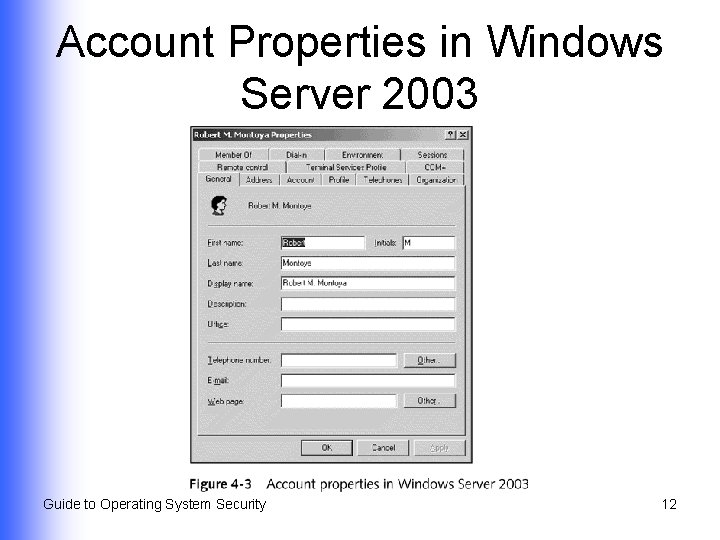
Account Properties in Windows Server 2003 Guide to Operating System Security 12
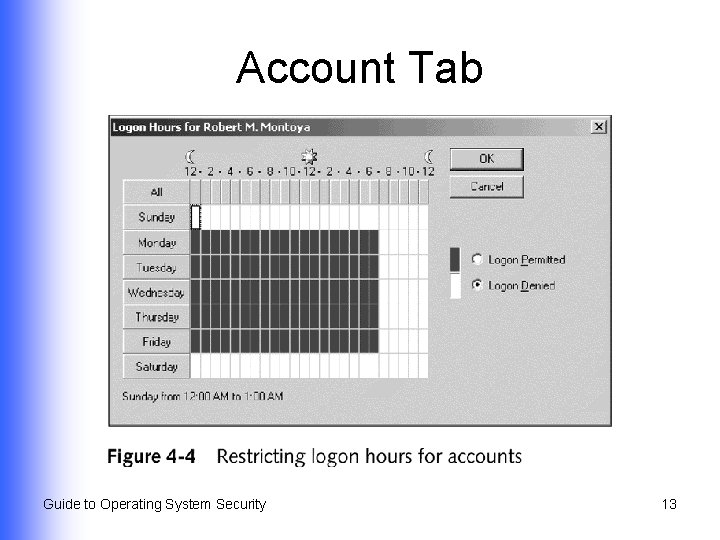
Account Tab Guide to Operating System Security 13
Creating User Accounts in Red Hat Linux 9. x l l Each user account is associated with a user identification number (UID) Assign users with common access needs to a group via a group identification number (GID) Guide to Operating System Security 14
Contents of Linux Password File (/etc/passwd) l l l Username Encrypted password or reference to shadow file UID and GID Information about the user Location of user’s home directory Command that is executed as user logs on Guide to Operating System Security 15
Linux Shadow File (/etc/shadow) l l Available only to system administrator Contains password restriction information Minimum/maximum number of days between password changes u When password was last changed u When password will expire u Amount of time account can be inactive before access is prohibited u Guide to Operating System Security 16
Creating User Accounts and Groups in Linux l Use command-line commands Create new user with useradd u Modify parameters with usermod u Delete accounts with userdel u l Use Red Hat User Manger from GNOME desktop Guide to Operating System Security 17
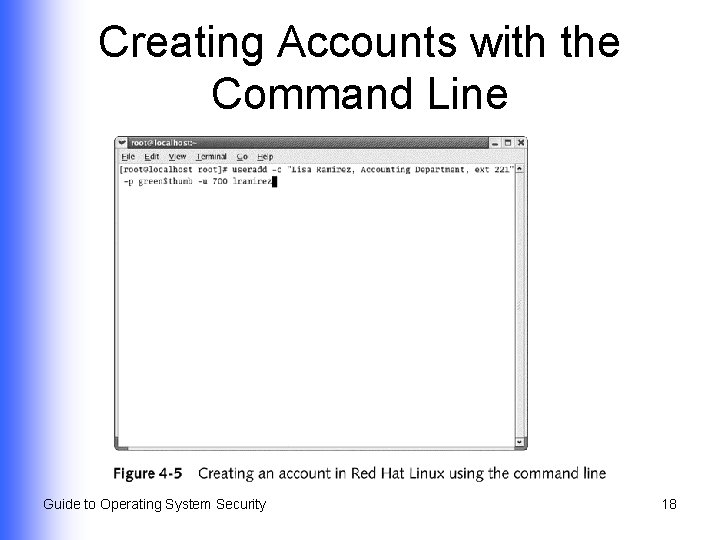
Creating Accounts with the Command Line Guide to Operating System Security 18
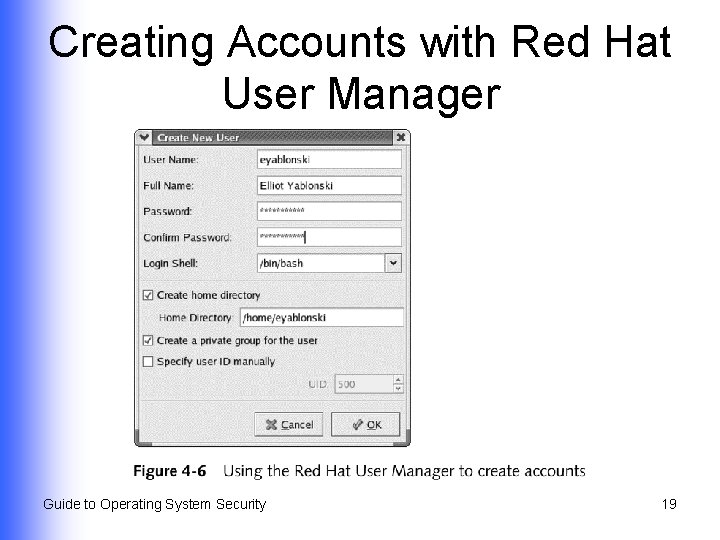
Creating Accounts with Red Hat User Manager Guide to Operating System Security 19
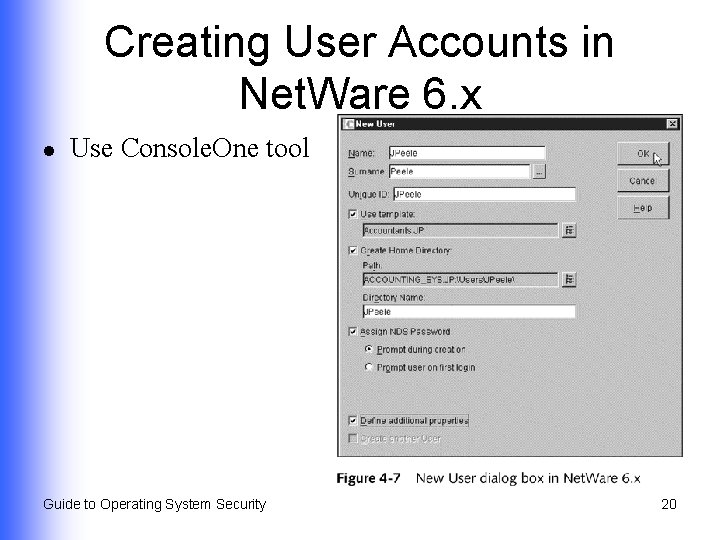
Creating User Accounts in Net. Ware 6. x l Use Console. One tool Guide to Operating System Security 20
Creating User Accounts in Mac OS X (Continued) l Choose Accounts icon in System Preferences window Name of account holder u Short name for logging on u Password hint u Guide to Operating System Security 21
Creating User Accounts in Mac OS X (Continued) l Tools that enable server management (Mac OS X Server) Server Admin u Macintosh Manager u Guide to Operating System Security 22
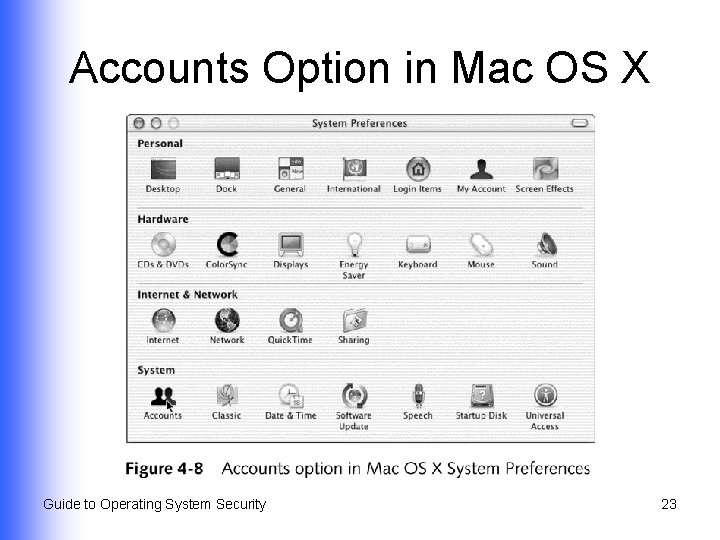
Accounts Option in Mac OS X Guide to Operating System Security 23
Mac OS X Logon Options l l Automatically log on to specific account when computer is booted Log on by viewing a name and password box, or by seeing a list of user accounts Hide Restart and Shut Down buttons Show password hint after three unsuccessful logon attempts Guide to Operating System Security 24
Mac OS X Server l Tools Server Admin u Mac. Intosh Manager u Guide to Operating System Security 25
Setting Account Policies and Configuring Logon Security l l Place restrictions on passwords Automatically lock out accounts after a specified number of unsuccessful logon attempts Guide to Operating System Security 26
Guidelines for Building Strong Passwords Do use l l 7+ characters Combination of upper- and lowercase letters, numbers, and characters Symbol character(s) Coded phrase to help you remember Guide to Operating System Security Do not use l l l Words in the dictionary or proper names Sports terms or names of sports teams Your account name Consecutive characters Common slang terms 27
Using Account Policies in Windows Server 2000/Server 2003 l l l Set up as part of group policy that applies to all accounts in an Active Directory container Can also be configured for a local computer Account policy options affect: Password security u Account lockout u Guide to Operating System Security 28
Password Security Options in Windows Server 2000/Server 2003 l l l Enforce password history Maximum password age Minimum password length Password(s) must meet complexity requirements Store password using reversible encryption Guide to Operating System Security 29
Account Lockout Options in Windows Server 2000/Server 2003 l l l Account lockout duration Account lockout threshold Reset account lockout container after Guide to Operating System Security 30
Account Security Options in Red Hat Linux 9. x l l l No formal account security policies Enables configuration of security options associated with individual accounts (using Red Hat User Manager) Stores security information in shadow file (/etc/shadow) as properties associated with accounts Guide to Operating System Security 31
Account Password Configuration Options in Red Hat Linux l l l Setting an account to expire on a particular date Locking a user account Expiration of account passwords so that users have to reset them Guide to Operating System Security 32
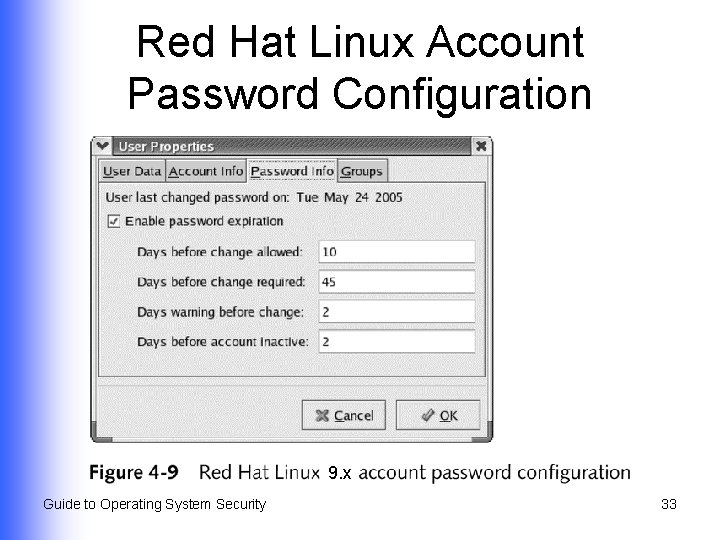
Red Hat Linux Account Password Configuration 9. x Guide to Operating System Security 33
Using Account Templates in Net. Ware 6. x l l Configure through user templates before accounts are created Use Console. One utility to create user templates Guide to Operating System Security 34
Establishing Account Properties with User Template (Net. Ware 6. x) (Continued) l l l Home directory location and access rights to that directory Requirement for a password Minimum password length Requirement that password be changed within specified interval of time Grace period that limits number of times user can log in after password has expired Guide to Operating System Security 35
Establishing Account Properties with User Template (Net. Ware 6. x) l l l Requirement that a new password be used each time the old one is changed Time restrictions Intruder detection capabilities Limit on number of simultaneous connections Workstation logon restrictions Guide to Operating System Security 36
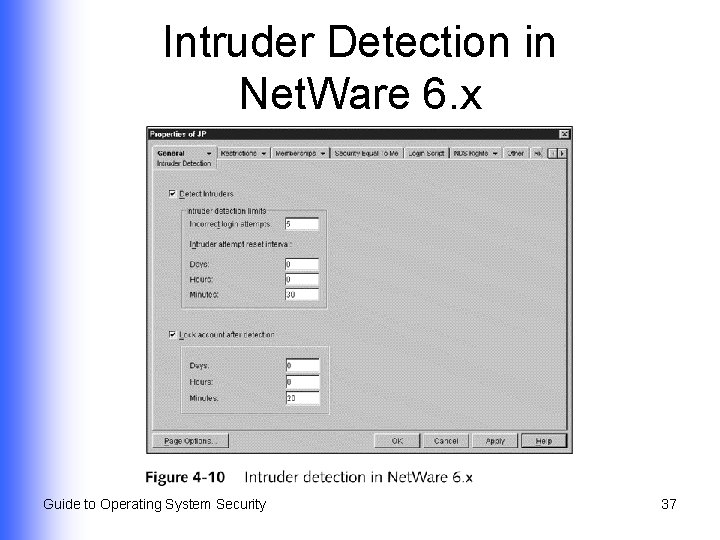
Intruder Detection in Net. Ware 6. x Guide to Operating System Security 37
Using Global Access Privileges l Windows 2000 Server/Server 2003 u l User rights govern user and administrative functions Net. Ware 6. x Uses access rights, applied in a different way, for more fine-tuned access functions u Role-based security establishes administrative roles for managing a server u Guide to Operating System Security 38
Windows Server 2000/ Server 2003 User Rights (Continued) l Enable account or group to perform predefined tasks Basic rights: access a server u Advanced: create accounts and manage server functions u l Can be assigned to user accounts or to groups u Groups are more efficient (inherited rights) Guide to Operating System Security 39
Windows Server 2000/ Server 2003 User Rights l l (Continued) Give server administrative security controls over who can access server and Active Directory resources Two categories u Privileges • u Manage server or Active Directory functions Logon rights • Access accounts, computers, and services Guide to Operating System Security 40
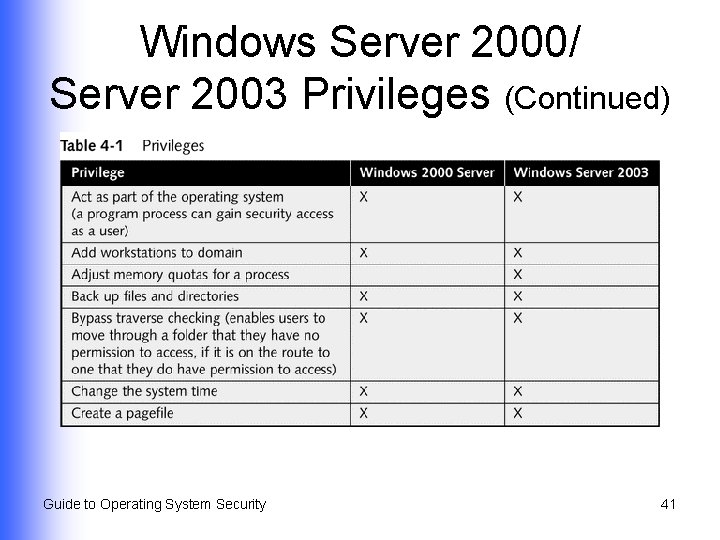
Windows Server 2000/ Server 2003 Privileges (Continued) Guide to Operating System Security 41
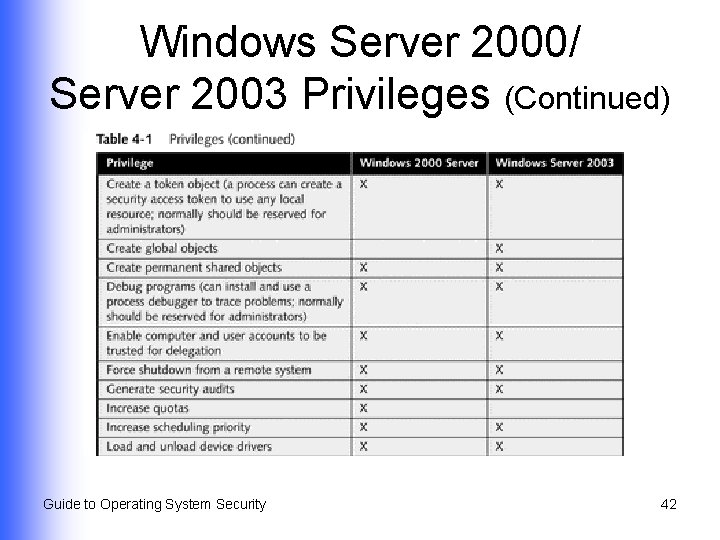
Windows Server 2000/ Server 2003 Privileges (Continued) Guide to Operating System Security 42
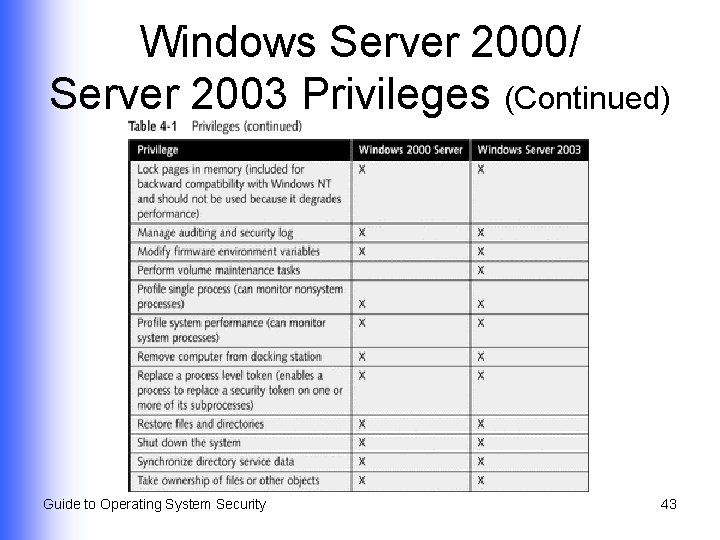
Windows Server 2000/ Server 2003 Privileges (Continued) Guide to Operating System Security 43
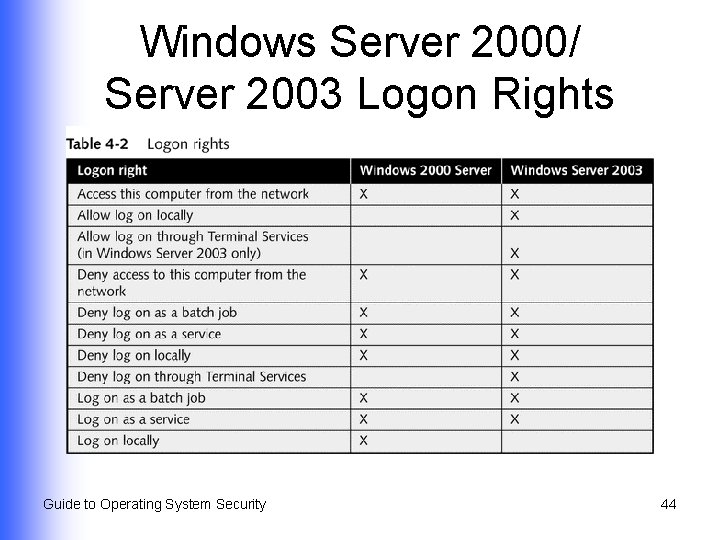
Windows Server 2000/ Server 2003 Logon Rights Guide to Operating System Security 44
Role-based Security in Net. Ware 6. x l Allocated according to administrative roles (managing tasks or network services) DHCP Management u DNS Management u e. Directory u i. Print Management u License Management u Guide to Operating System Security 45
Using Group Policies in Windows Server 2000/Server 2003 l l Enables standardization by setting policies in Active Directory or on local computer (eg, account policies, user rights, IPSec policies) Evolved from Windows NT Server 4. 0 concept of system policy u Use Poledit. exe to configure basic user account and computer parameters (domain-wide or specific) Guide to Operating System Security 46
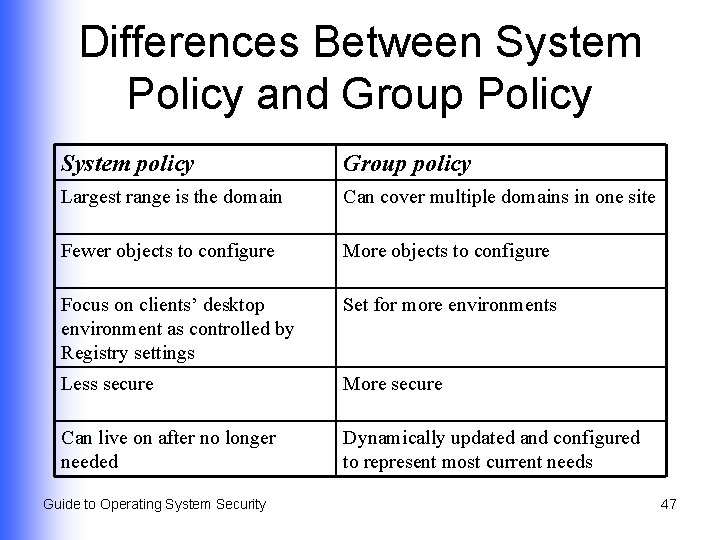
Differences Between System Policy and Group Policy System policy Group policy Largest range is the domain Can cover multiple domains in one site Fewer objects to configure More objects to configure Focus on clients’ desktop environment as controlled by Registry settings Set for more environments Less secure More secure Can live on after no longer needed Dynamically updated and configured to represent most current needs Guide to Operating System Security 47
Defining Characteristics of Group Policy l l l Can be set for a site, domain, OU, or local computer Stored in group policy objects Local and nonlocal GPOs Guide to Operating System Security 48
Configuring Client Security Using Policies l Advantages to customizing settings used by clients Improved security u Consistent working environment u l Customize settings by configuring policies on Windows 2000/2003 servers that clients access u When client logs on, policies are applied Guide to Operating System Security 49
Manually Configuring Policies for Clients l Use either: Group Policy Snap-in (Windows 2000 Server) u Group Policy Object Editor Snap-in (Windows Server 2003) u l Use Administrative Templates object under User Configuration in a group policy object to customize desktop settings for client computers Guide to Operating System Security 50
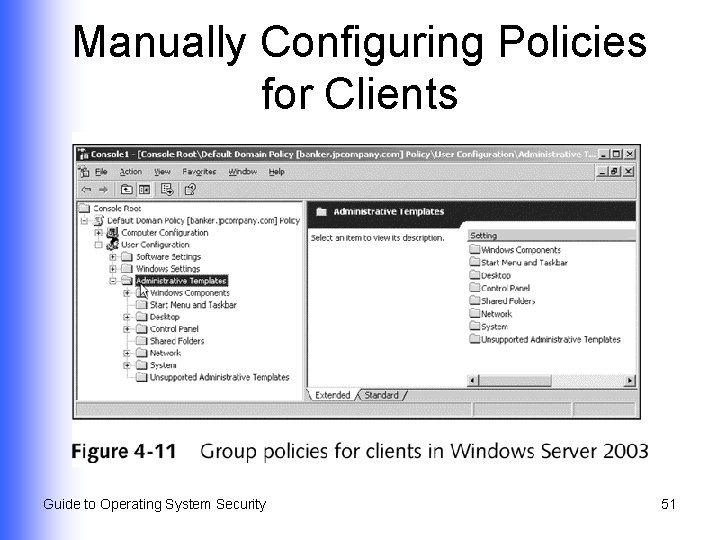
Manually Configuring Policies for Clients Guide to Operating System Security 51
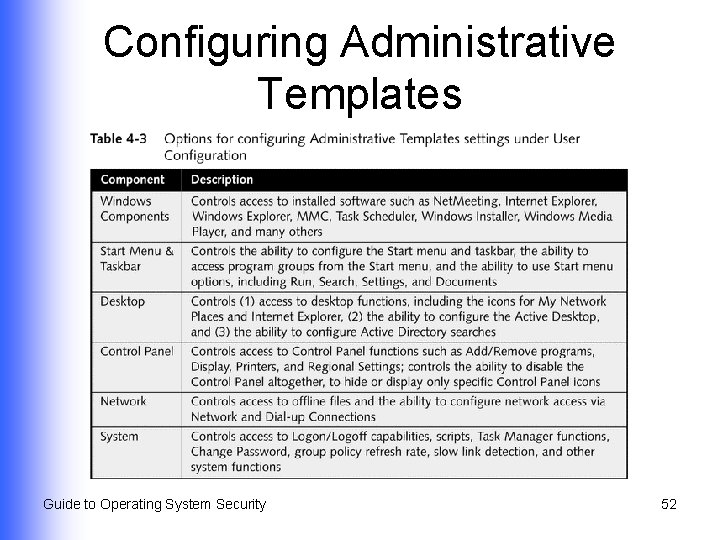
Configuring Administrative Templates Guide to Operating System Security 52
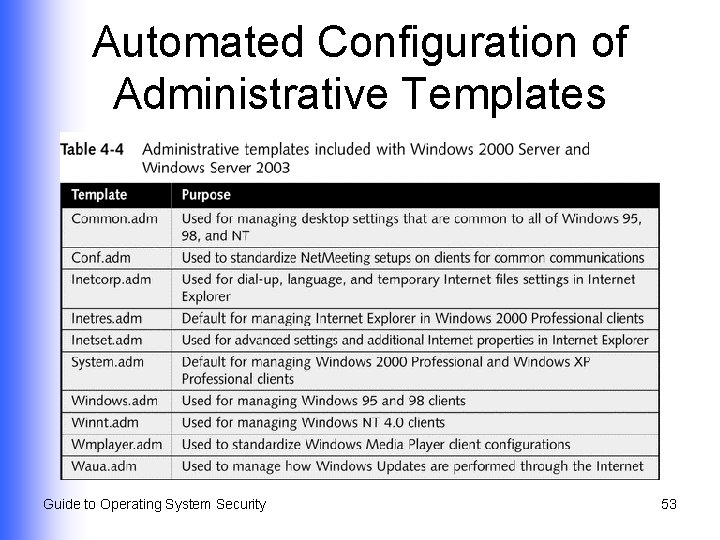
Automated Configuration of Administrative Templates Guide to Operating System Security 53
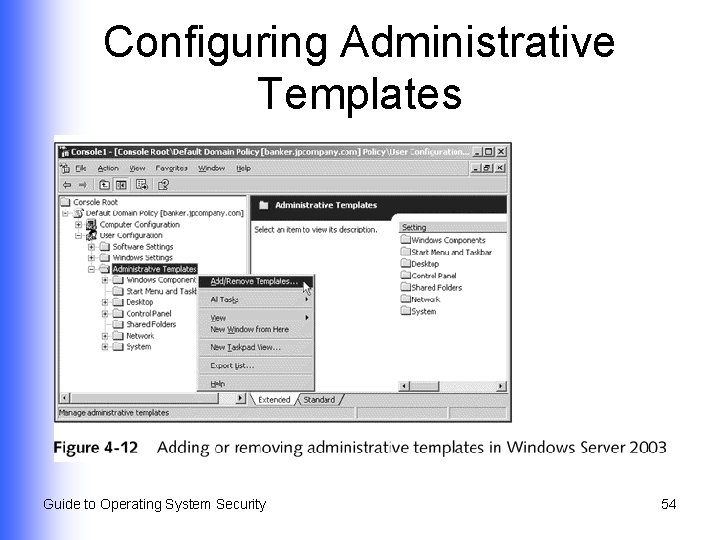
Configuring Administrative Templates Guide to Operating System Security 54
Configuring Additional Security Options l l Fine-tune security on a server by configuring security options within local policies in a GPO Enables you to configure group policy security for special needs Guide to Operating System Security 55
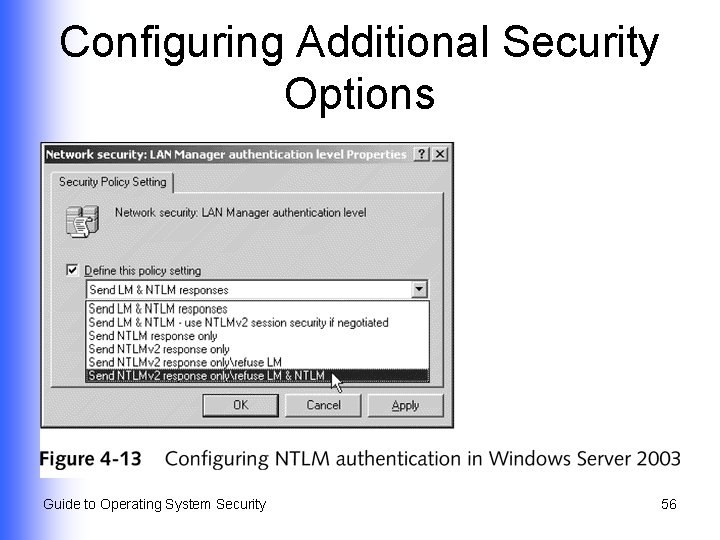
Configuring Additional Security Options Guide to Operating System Security 56
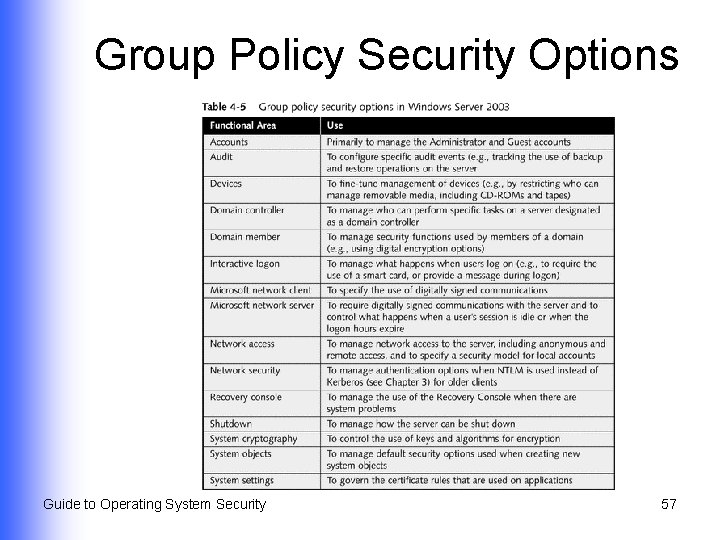
Group Policy Security Options Guide to Operating System Security 57
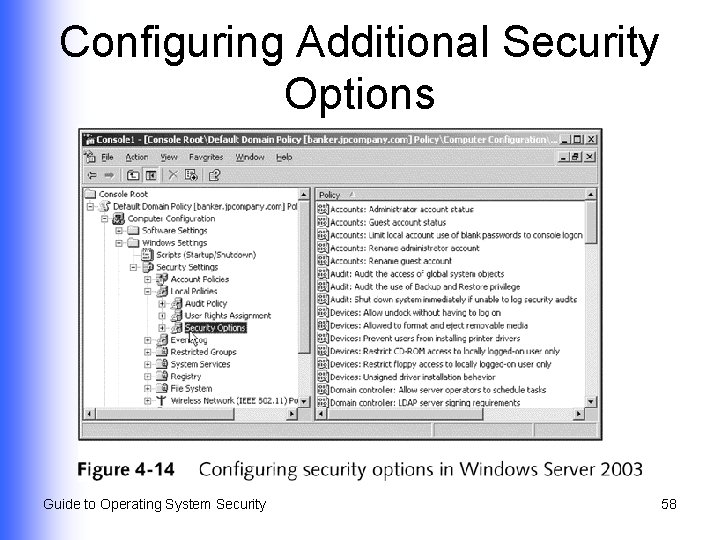
Configuring Additional Security Options Guide to Operating System Security 58
Summary l l l Considerations when creating formal policies about account naming and security How to set up accounts in different operating systems How to configure those accounts to implement an organization’s policies User rights and role-based security How to work with group policies and security templates Guide to Operating System Security 59
- Slides: 59