
Guide to Operating System Security Chapter 12 Security

- Slides: 55
Guide to Operating System Security Chapter 12 Security through Monitoring and Auditing
Objectives l l l Understand the relationship between baselining and hardening Explain intrusion-detection methods Use audit trails and logs Monitor logged-on users Monitor a network Guide to Operating System Security 2
Baselining and Hardening l Baselines Measurement standards for hardware, software, and network operations u Used to establish performance statistics under varying loads or circumstances u Guide to Operating System Security 3
Overview of Intrusion Detection l l Detects and reports possible network and computer system intrusions or attacks Main approaches Passive u Active u Network-based u Inspectors u Auditors u Decoys and honeypots u Guide to Operating System Security 4
Passive Intrusion Detection l l Detects and records intrusions; does not take action on findings Effective as long as administrator checks logs u l Can create filters or traps Examples of monitored activities Login attempts u Changes to files u Port scans u Guide to Operating System Security 5
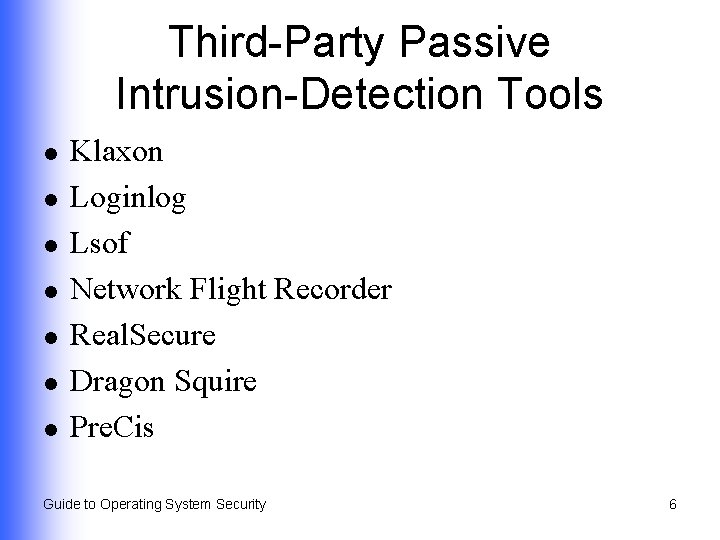
Third-Party Passive Intrusion-Detection Tools l l l l Klaxon Loginlog Lsof Network Flight Recorder Real. Secure Dragon Squire Pre. Cis Guide to Operating System Security 6
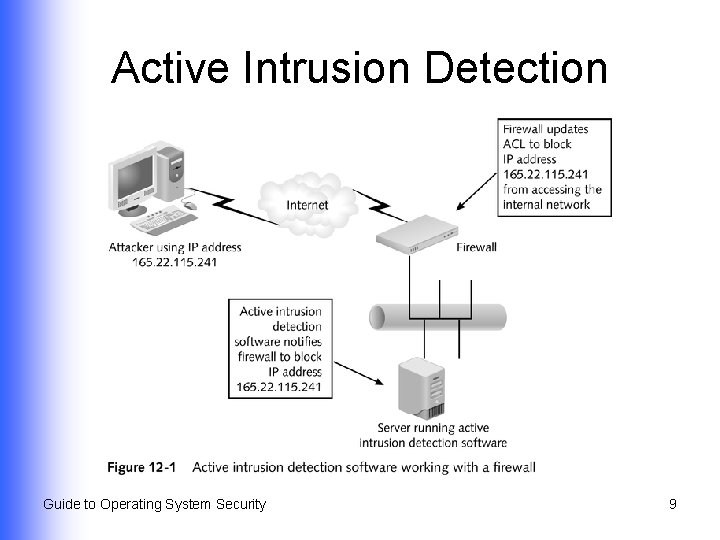
Active Intrusion Detection l l Detects an attack and sends alert to administrator or takes action to block attack May use logs, monitoring, and recording devices Guide to Operating System Security 7
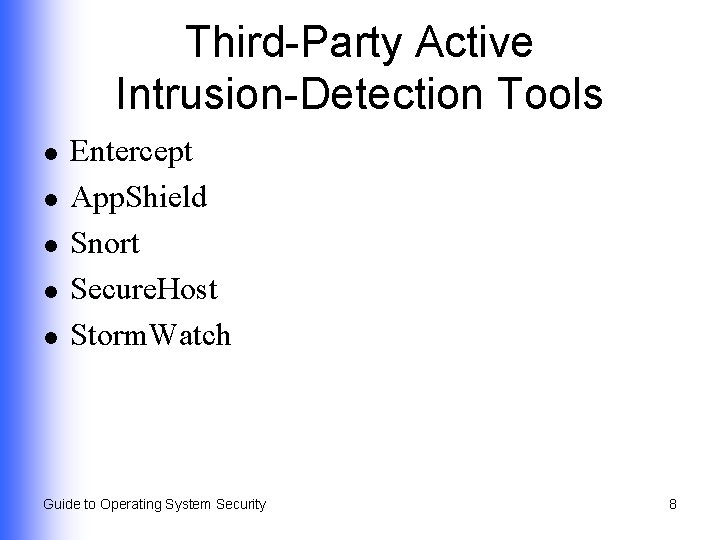
Third-Party Active Intrusion-Detection Tools l l l Entercept App. Shield Snort Secure. Host Storm. Watch Guide to Operating System Security 8
Active Intrusion Detection Guide to Operating System Security 9
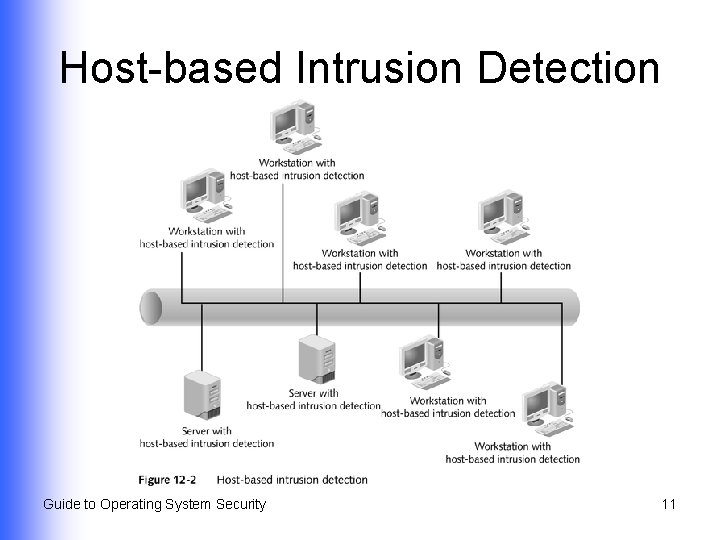
Host-based Intrusion Detection l Software that monitors the computer on which it is loaded Logons u Files and folders u Applications u Network traffic u Changes to security u l Host wrappers and host-based agents Guide to Operating System Security 10
Host-based Intrusion Detection Guide to Operating System Security 11
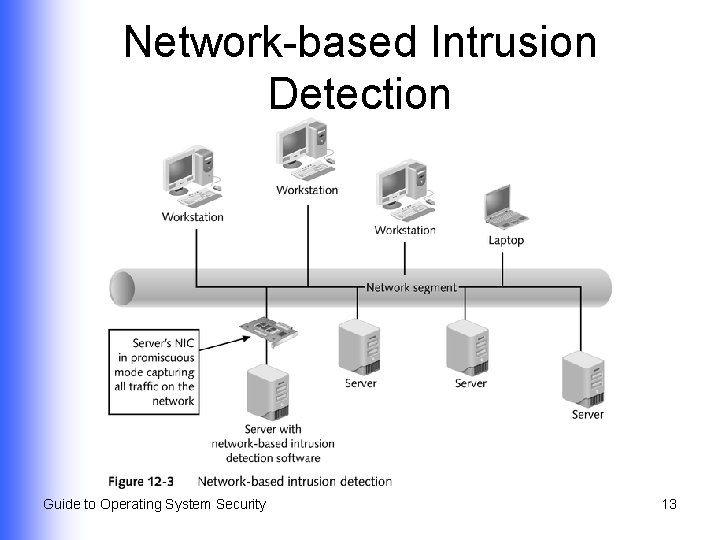
Network-based Intrusion Detection l l Monitors network traffic associated with a specific network segment Typically places NIC in promiscuous mode Guide to Operating System Security 12
Network-based Intrusion Detection Guide to Operating System Security 13
Inspector l l l Examines captured data, logs, or other recorded information Determines if an intrusion is occurring or has occurred Administrator sets up inspection parameters, for example: u u u Files changed/created under suspicious circumstances Permissions unexpectedly changed Excessive use of computer’s resources Guide to Operating System Security 14
Auditor l Tracks full range of data and events – normal and suspicious, for example: Every time services are started and stopped u Hardware events or problems u Every logon attempt u Every time permissions are changed u Network connection events u l Records information to a log Guide to Operating System Security 15
Decoys and Honeypots l l l Fully operational computers that contain no information of value Draw attackers away from critical targets Provide a means to identify and catch or block attackers before they harm other systems Guide to Operating System Security 16
Using Audit Trails and Logs l A form of passive intrusion detection used by most operating systems: Windows 2000/XP/2003 u Red Hat Linux 9. x u Net. Ware 6. x u Mac OS X u Guide to Operating System Security 17
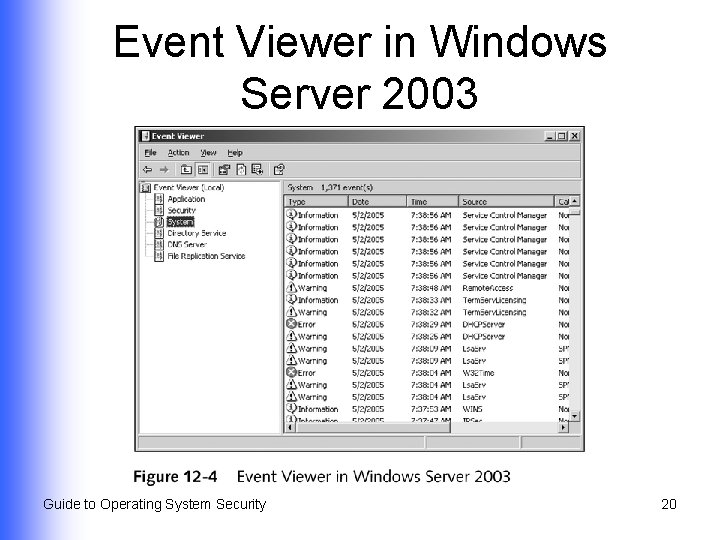
Viewing Logs in Windows 2000/XP/2003 (Continued) l l l Accessed through Event Viewer Event logs can help identify a security problem Filter option can help quickly locate a problem Guide to Operating System Security 18
Viewing Logs in Windows 2000/XP/2003 (Continued) l Principal event logs System u Security u Application u l Event logs for installed services Directory Service u DNS Service u File Replication u Guide to Operating System Security 19
Event Viewer in Windows Server 2003 Guide to Operating System Security 20
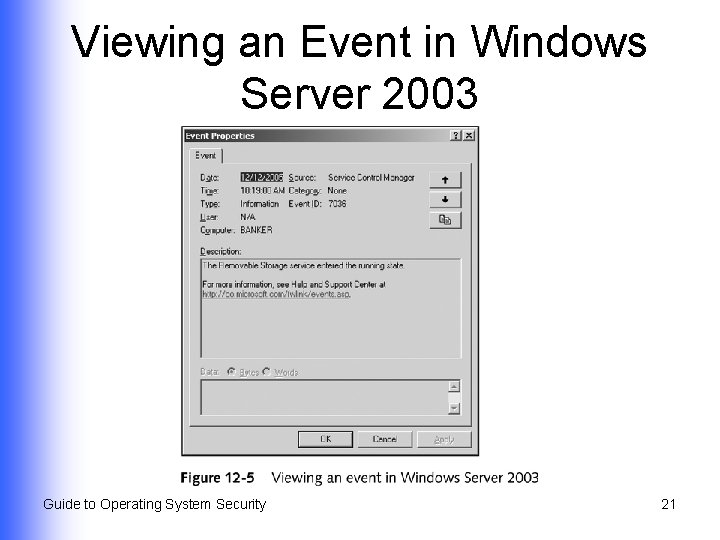
Viewing an Event in Windows Server 2003 Guide to Operating System Security 21
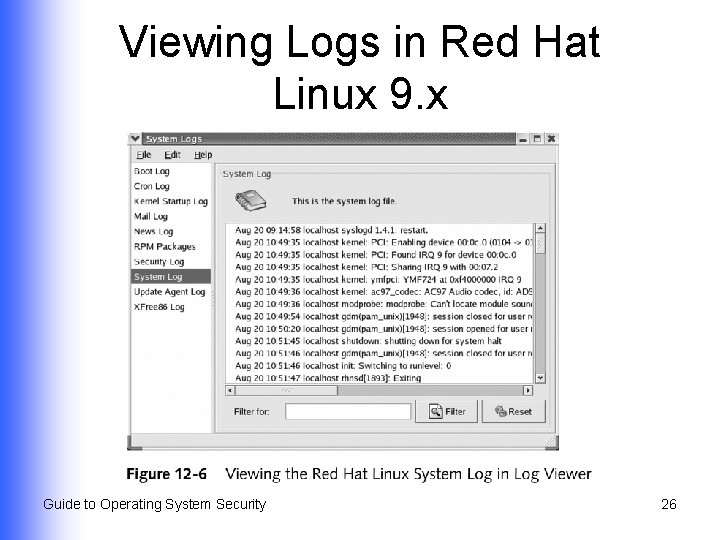
Viewing Logs in Red Hat Linux 9. x (Continued) l l Offers a range of default logs Log files Have four rotation levels u Managed through syslogd u Guide to Operating System Security 22
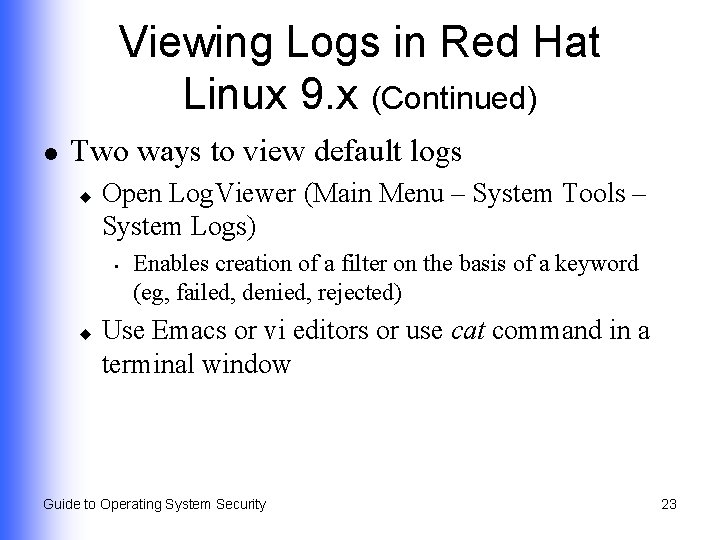
Viewing Logs in Red Hat Linux 9. x (Continued) l Two ways to view default logs u Open Log. Viewer (Main Menu – System Tools – System Logs) • u Enables creation of a filter on the basis of a keyword (eg, failed, denied, rejected) Use Emacs or vi editors or use cat command in a terminal window Guide to Operating System Security 23
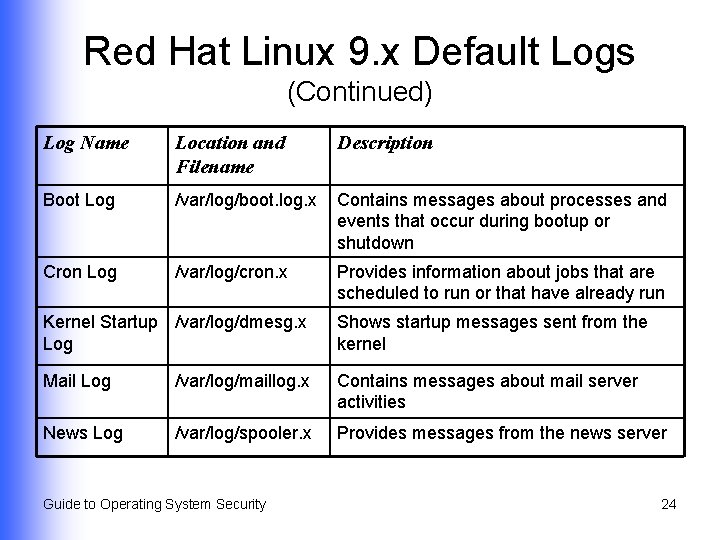
Red Hat Linux 9. x Default Logs (Continued) Log Name Location and Filename Description Boot Log /var/log/boot. log. x Contains messages about processes and events that occur during bootup or shutdown Cron Log /var/log/cron. x Provides information about jobs that are scheduled to run or that have already run Kernel Startup /var/log/dmesg. x Log Shows startup messages sent from the kernel Mail Log /var/log/maillog. x Contains messages about mail server activities News Log /var/log/spooler. x Provides messages from the news server Guide to Operating System Security 24
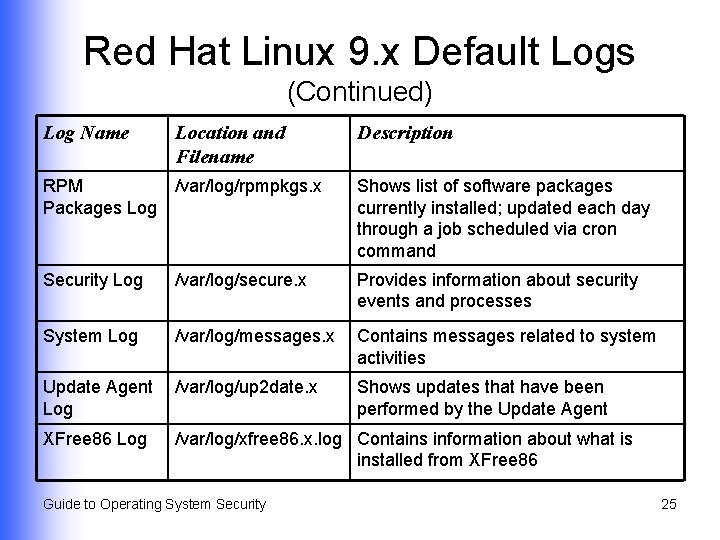
Red Hat Linux 9. x Default Logs (Continued) Log Name Location and Filename Description RPM /var/log/rpmpkgs. x Packages Log Shows list of software packages currently installed; updated each day through a job scheduled via cron command Security Log /var/log/secure. x Provides information about security events and processes System Log /var/log/messages. x Contains messages related to system activities Update Agent /var/log/up 2 date. x Log XFree 86 Log Shows updates that have been performed by the Update Agent /var/log/xfree 86. x. log Contains information about what is installed from XFree 86 Guide to Operating System Security 25
Viewing Logs in Red Hat Linux 9. x Guide to Operating System Security 26
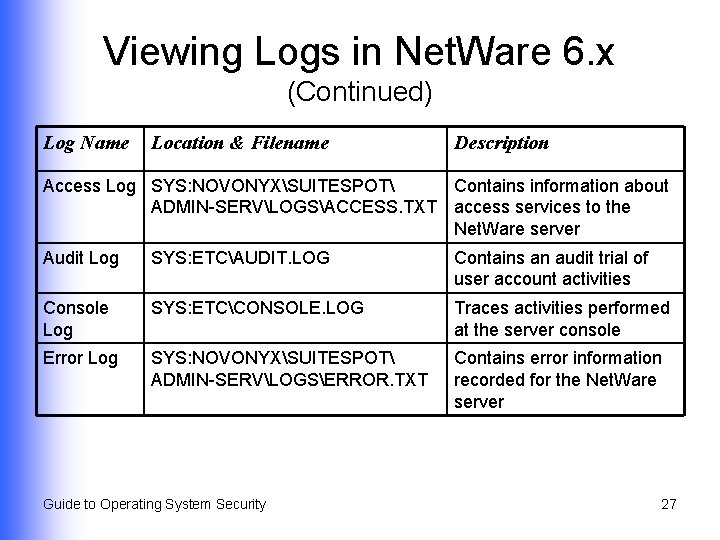
Viewing Logs in Net. Ware 6. x (Continued) Log Name Location & Filename Description Access Log SYS: NOVONYXSUITESPOT Contains information about ADMIN-SERVLOGSACCESS. TXT access services to the Net. Ware server Audit Log SYS: ETCAUDIT. LOG Contains an audit trial of user account activities Console Log SYS: ETCCONSOLE. LOG Traces activities performed at the server console Error Log SYS: NOVONYXSUITESPOT ADMIN-SERVLOGSERROR. TXT Contains error information recorded for the Net. Ware server Guide to Operating System Security 27
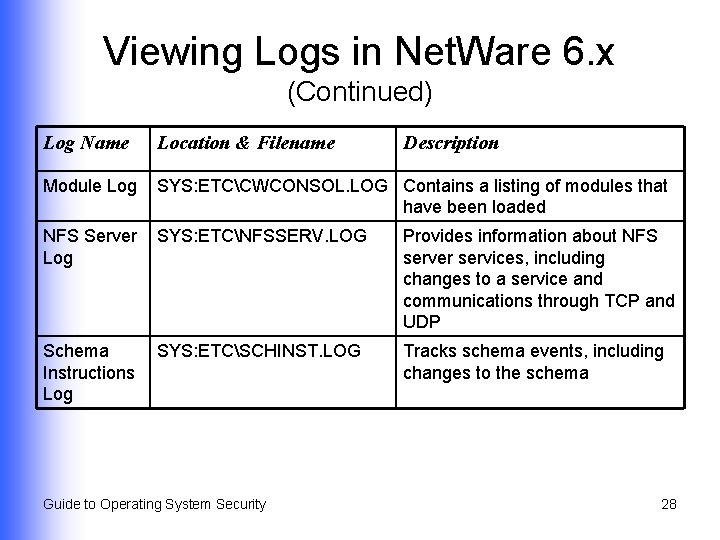
Viewing Logs in Net. Ware 6. x (Continued) Log Name Location & Filename Description Module Log SYS: ETCCWCONSOL. LOG Contains a listing of modules that have been loaded NFS Server SYS: ETCNFSSERV. LOG Log Provides information about NFS server services, including changes to a service and communications through TCP and UDP Schema SYS: ETCSCHINST. LOG Instructions Log Tracks schema events, including changes to the schema Guide to Operating System Security 28
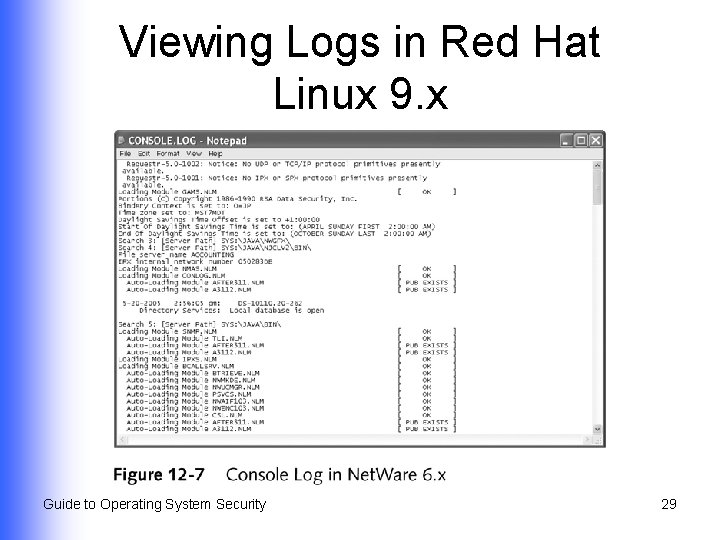
Viewing Logs in Red Hat Linux 9. x Guide to Operating System Security 29
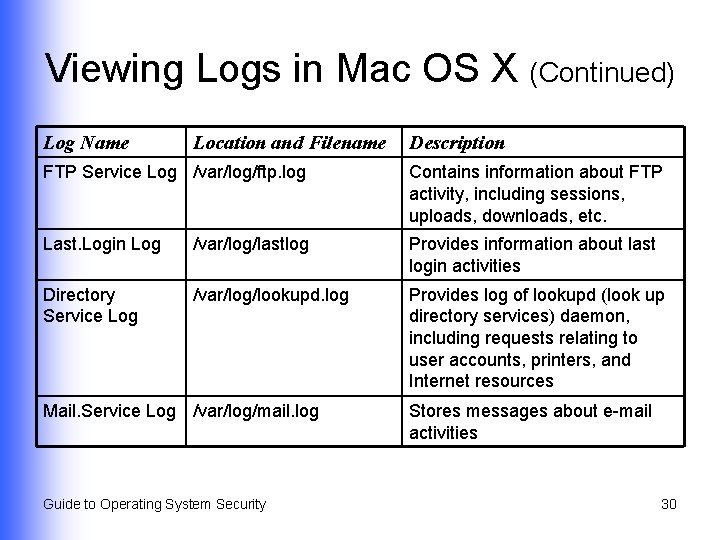
Viewing Logs in Mac OS X (Continued) Log Name Location and Filename Description FTP Service Log /var/log/ftp. log Contains information about FTP activity, including sessions, uploads, downloads, etc. Last. Login Log /var/log/lastlog Provides information about last login activities Directory Service Log /var/log/lookupd. log Provides log of lookupd (look up directory services) daemon, including requests relating to user accounts, printers, and Internet resources Mail. Service Log /var/log/mail. log Guide to Operating System Security Stores messages about e-mail activities 30
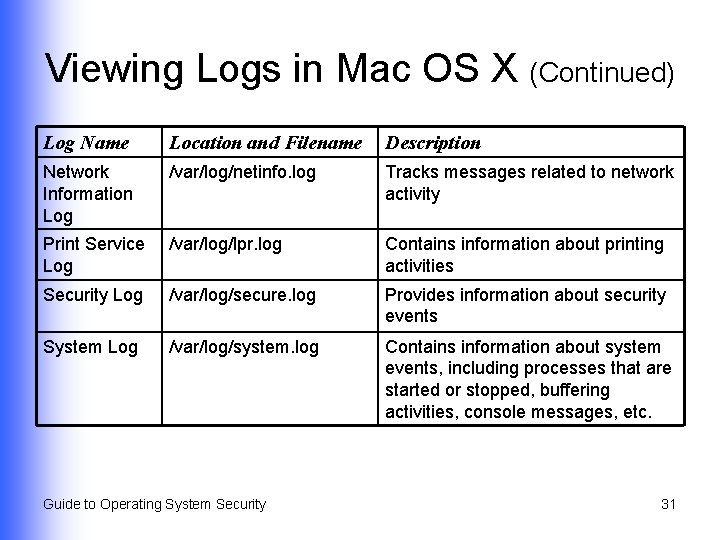
Viewing Logs in Mac OS X (Continued) Log Name Location and Filename Description Network Information Log /var/log/netinfo. log Tracks messages related to network activity Print Service Log /var/log/lpr. log Contains information about printing activities Security Log /var/log/secure. log Provides information about security events System Log /var/log/system. log Contains information about system events, including processes that are started or stopped, buffering activities, console messages, etc. Guide to Operating System Security 31
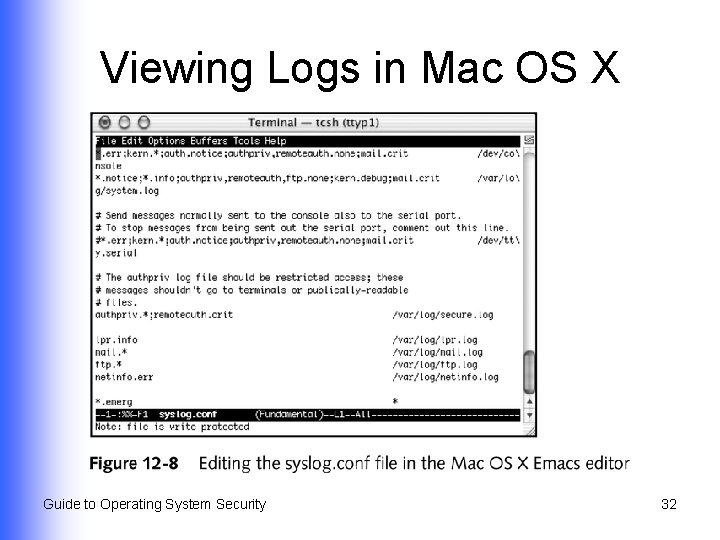
Viewing Logs in Mac OS X Guide to Operating System Security 32
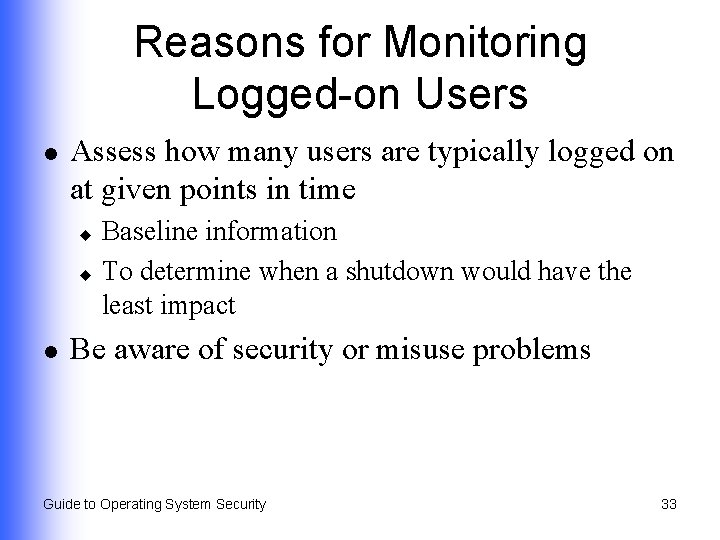
Reasons for Monitoring Logged-on Users l Assess how many users are typically logged on at given points in time Baseline information u To determine when a shutdown would have the least impact u l Be aware of security or misuse problems Guide to Operating System Security 33
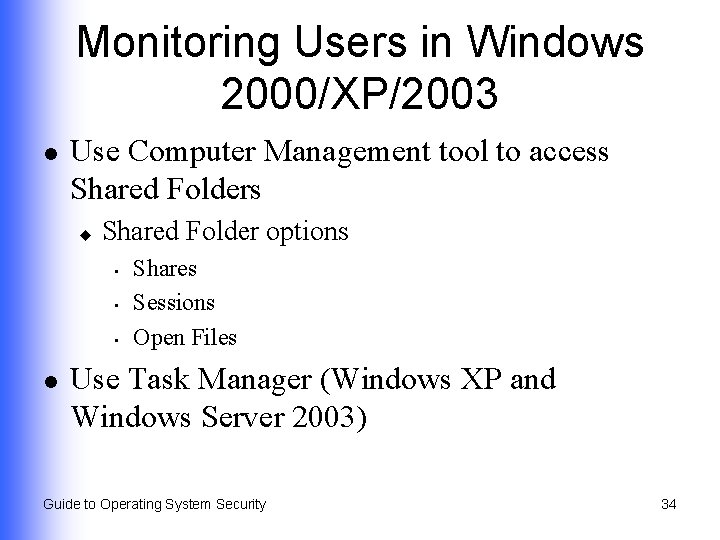
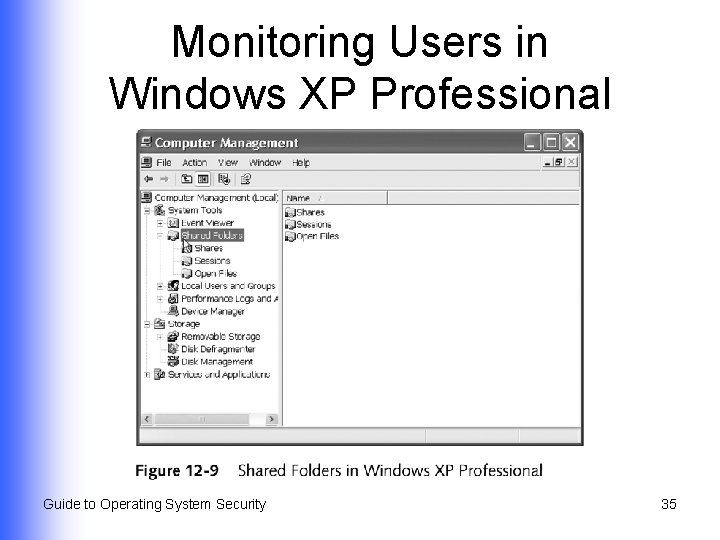
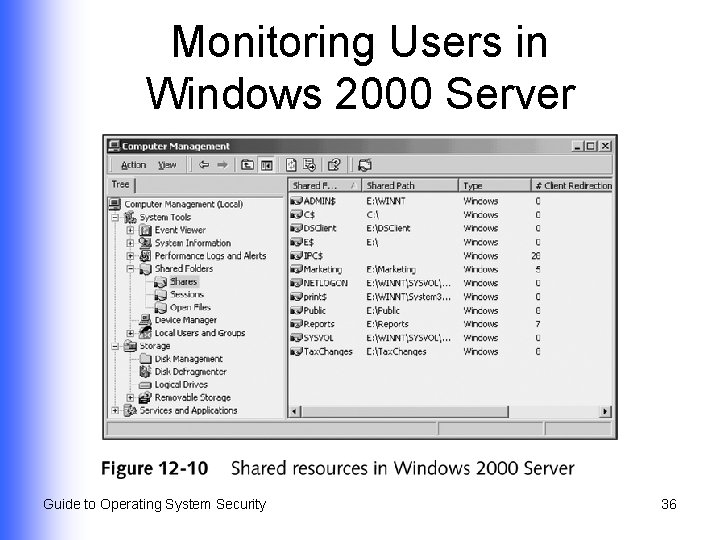
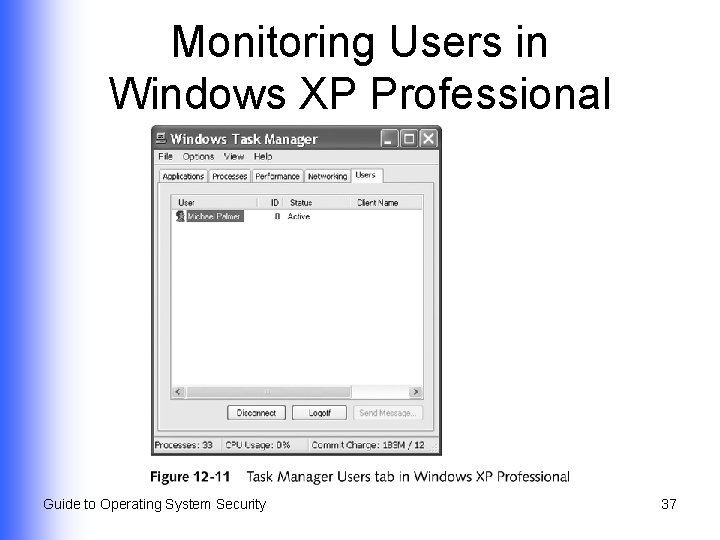
Monitoring Users in Windows 2000/XP/2003 l Use Computer Management tool to access Shared Folders u Shared Folder options • • • l Shares Sessions Open Files Use Task Manager (Windows XP and Windows Server 2003) Guide to Operating System Security 34
Monitoring Users in Windows XP Professional Guide to Operating System Security 35
Monitoring Users in Windows 2000 Server Guide to Operating System Security 36
Monitoring Users in Windows XP Professional Guide to Operating System Security 37
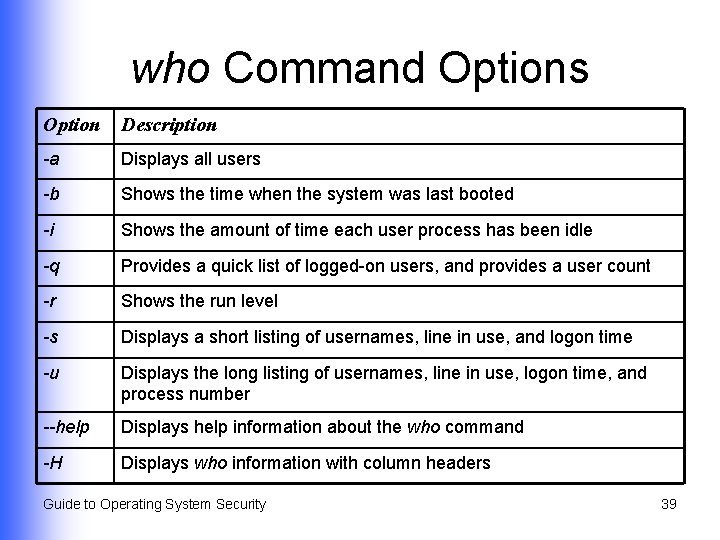
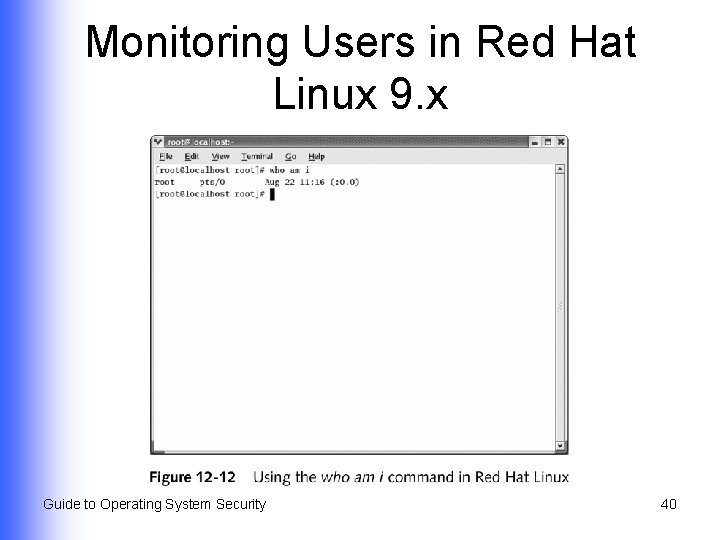
Monitoring Users in Red Hat Linux 9. x l Use the who command Guide to Operating System Security 38
who Command Options Option Description -a Displays all users -b Shows the time when the system was last booted -i Shows the amount of time each user process has been idle -q Provides a quick list of logged-on users, and provides a user count -r Shows the run level -s Displays a short listing of usernames, line in use, and logon time -u Displays the long listing of usernames, line in use, logon time, and process number --help Displays help information about the who command -H Displays who information with column headers Guide to Operating System Security 39
Monitoring Users in Red Hat Linux 9. x Guide to Operating System Security 40
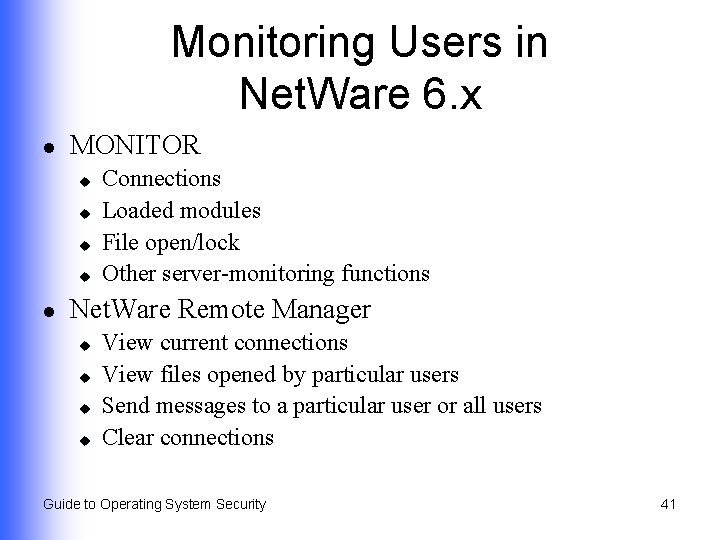
Monitoring Users in Net. Ware 6. x l MONITOR u u l Connections Loaded modules File open/lock Other server-monitoring functions Net. Ware Remote Manager u u View current connections View files opened by particular users Send messages to a particular user or all users Clear connections Guide to Operating System Security 41
Monitoring Users in Mac OS X l Use the who command in a terminal window u l Supports few options (primarily -H and -u) Process Viewer Guide to Operating System Security 42
Monitoring a Network l Network Monitor Network monitoring software with the most features u Comes with Windows 2000 Server and Windows Server 2003 u Guide to Operating System Security 43
Why Network Monitoring Is Important l l l Networks are dynamic Administrator must distinguish an attack from an equipment malfunction Establish and use benchmarks to help quickly identify and resolve problems Guide to Operating System Security 44
Using Microsoft Network Monitor l l Uses Network Monitor Driver to monitor network from server’s NIC (promiscuous mode) Sample activities that can be monitored Percent network utilization u Frames and bytes transported per second u Network station statistics u NIC statistics u Error data u Guide to Operating System Security 45
Network Monitor Driver l l Detects many forms of network traffic Captures packets and frames for analysis and reporting by Network Monitor Guide to Operating System Security 46
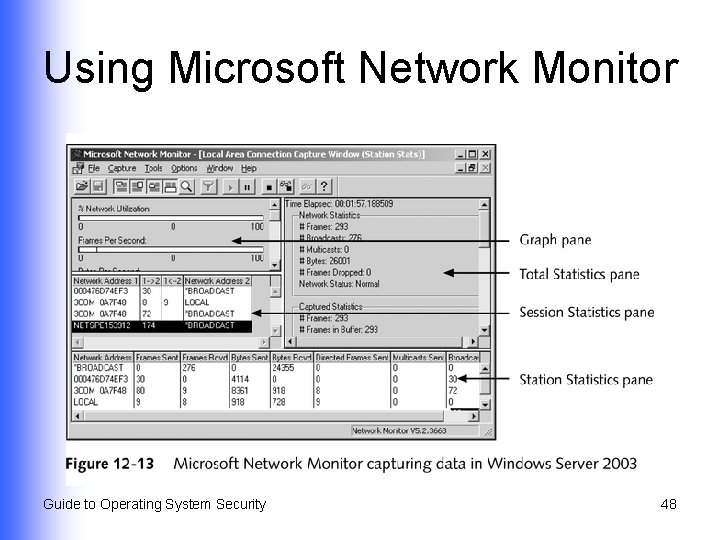
Using Microsoft Network Monitor l l Start from Administrative Tools menu Four panes of information Graph u Total Statistics u Session Statistics u Station Statistics u l View captured information Guide to Operating System Security 47
Using Microsoft Network Monitor Guide to Operating System Security 48
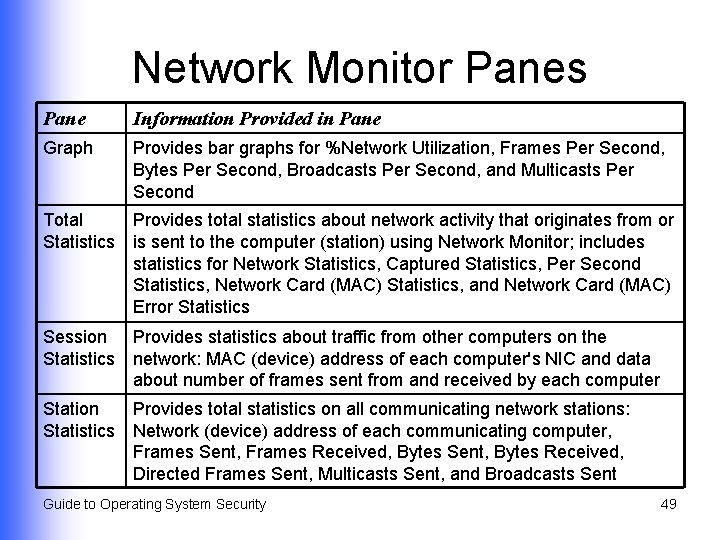
Network Monitor Panes Pane Information Provided in Pane Graph Provides bar graphs for %Network Utilization, Frames Per Second, Bytes Per Second, Broadcasts Per Second, and Multicasts Per Second Total Statistics Provides total statistics about network activity that originates from or is sent to the computer (station) using Network Monitor; includes statistics for Network Statistics, Captured Statistics, Per Second Statistics, Network Card (MAC) Statistics, and Network Card (MAC) Error Statistics Session Statistics Provides statistics about traffic from other computers on the network: MAC (device) address of each computer's NIC and data about number of frames sent from and received by each computer Station Statistics Provides total statistics on all communicating network stations: Network (device) address of each communicating computer, Frames Sent, Frames Received, Bytes Sent, Bytes Received, Directed Frames Sent, Multicasts Sent, and Broadcasts Sent Guide to Operating System Security 49
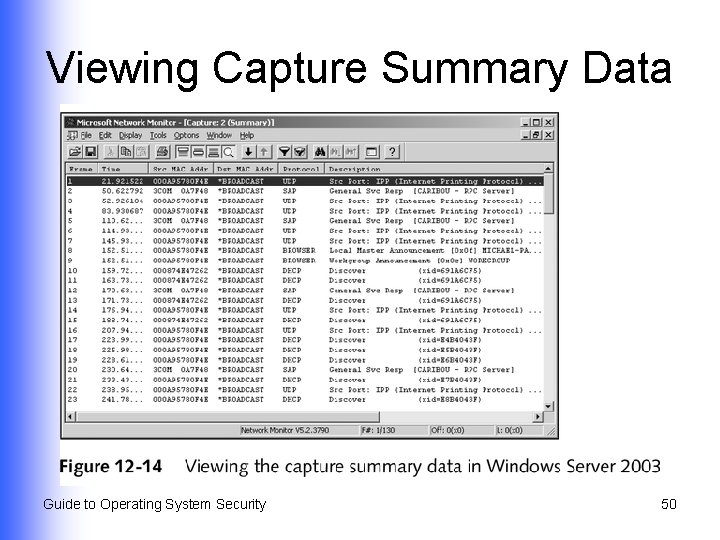
Viewing Capture Summary Data Guide to Operating System Security 50
Creating a Filter in Network Monitor l Two property types Service Access Point (SAP) u Ethertype (ETYPE) u Guide to Operating System Security 51
Using Capture Trigger l Software performs a specific function when a predefined situation occurs Guide to Operating System Security 52
Using Network Monitor to Set Baselines l From the Graph pane % Network Utilization u Frames Per Second u Broadcasts Per Second u Multicasts Per Second u Guide to Operating System Security 53
Summary (Continued) l l Creating baselines to help quickly identify when an attack is occurring Intrusion-detection methods Employed through an operating system u Third-party software u l Using auditing and logging tools to track intrusion events Guide to Operating System Security 54
Summary l Monitoring user activities GUI-based Computer Management tool in Windows 2000/XP/2003 u who command in Red Hat Linux and Mac OS X u l Network monitoring with Microsoft Network Monitor Guide to Operating System Security 55