
Guide for Course Registration of Fall Semester of
![2. Course Registration C. Course registration □ Course registration : Click [Submit] for the](https://slidetodoc.com/presentation_image_h2/647f2eafd93bff12143698f814a05139/image-19.jpg "2. Course Registration C. Course registration □ Course registration : Click [Submit] for the")
![5. Other important notice C. Check the grade earned : Click [Grade Management] >](https://slidetodoc.com/presentation_image_h2/647f2eafd93bff12143698f814a05139/image-25.jpg "5. Other important notice C. Check the grade earned : Click [Grade Management] >")
- Slides: 26
Guide for Course Registration of Fall Semester of 2013 Academic Affairs Team, UST
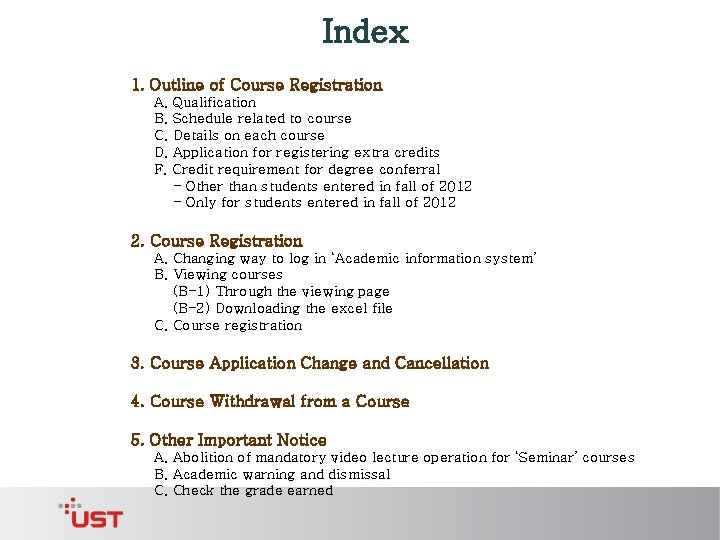
Index 1. Outline of Course Registration A. Qualification B. Schedule related to course C. Details on each course D. Application for registering extra credits F. Credit requirement for degree conferral - Other than students entered in fall of 2012 - Only for students entered in fall of 2012 2. Course Registration A. Changing way to log in ‘Academic information system’ B. Viewing courses (B-1) Through the viewing page (B-2) Downloading the excel file C. Course registration 3. Course Application Change and Cancellation 4. Course Withdrawal from a Course 5. Other Important Notice A. Abolition of mandatory video lecture operation for ‘Seminar’ courses B. Academic warning and dismissal C. Check the grade earned
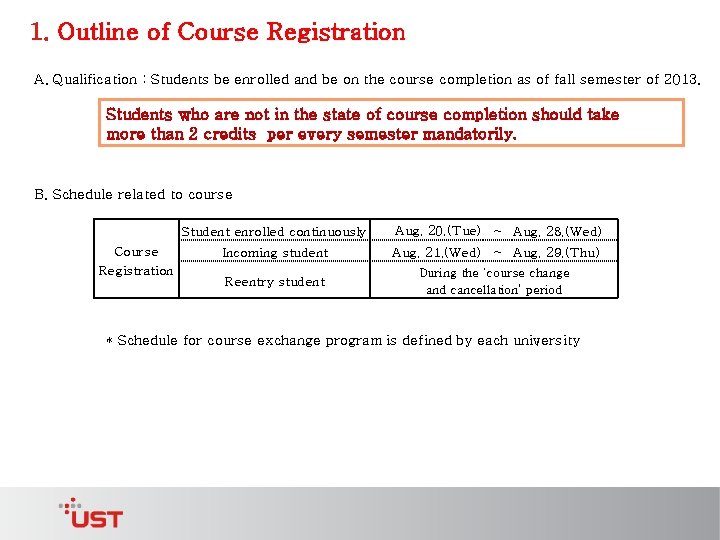
1. Outline of Course Registration A. Qualification : Students be enrolled and be on the course completion as of fall semester of 2013. Students who are not in the state of course completion should take more than 2 credits per every semester mandatorily. B. Schedule related to course Course Registration Student enrolled continuously Aug. 20. (Tue) ~ Aug. 28. (Wed) Incoming student Aug. 21. (Wed) ~ Aug. 29. (Thu) Reentry student During the ‘course change and cancellation’ period * Schedule for course exchange program is defined by each university
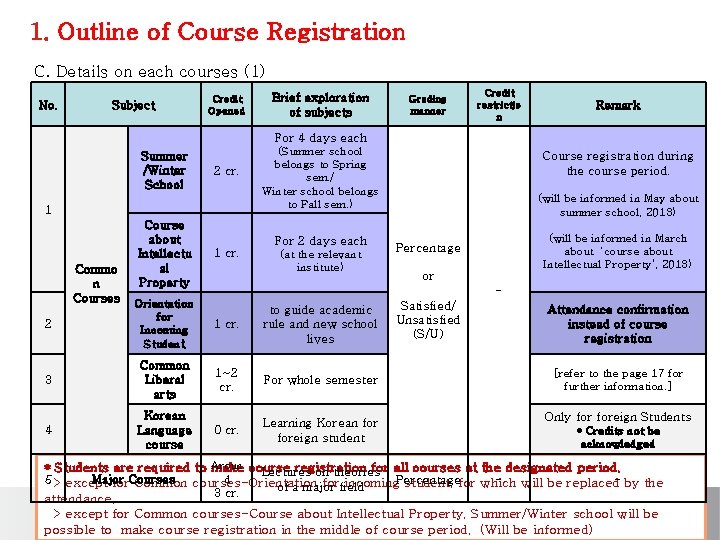
1. Outline of Course Registration C. Details on each courses (1) No. Subject Credit Opened Brief exploration of subjects Grading manner Credit restrictio n Remark For 4 days each Summer /Winter School 2 cr. 1 Commo n Courses Course about Intellectu al Property (Summer school belongs to Spring sem. / Winter school belongs to Fall sem. ) For 2 days each 1 cr. (at the relevant institute) Course registration during the course period. (will be informed in May about summer school, 2013) (will be informed in March about ‘course about Intellectual Property’, 2013) Percentage or - 2 Orientation for Incoming Student 1 cr. to guide academic rule and new school lives 3 Common Liberal arts 1~2 cr. For whole semester 4 Korean Language course 0 cr. Learning Korean foreign student Satisfied/ Unsatisfied (S/U) Attendance confirmation instead of course registration [refer to the page 17 for further information. ] Only foreign Students * Credits not be acknowledged * Students are required to Aroun make course registration for all courses at the designated period. Lectures on theories d 5 > except Major Courses for Common courses-Orientation forfield incoming. Percentage student, for which will be replaced- by the of a major 3 cr. attendance. > except for Common courses-Course about Intellectual Property, Summer/Winter school will be possible to make course registration in the middle of course period. (Will be informed)
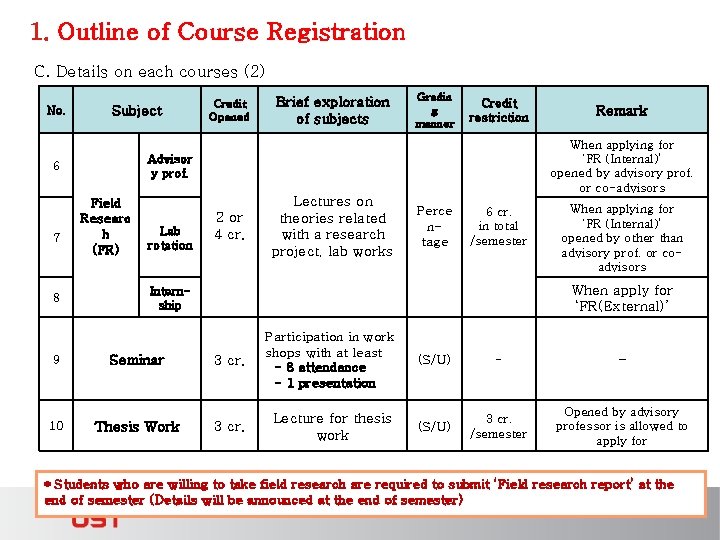
1. Outline of Course Registration C. Details on each courses (2) No. Subject 8 Brief exploration of subjects Gradin g manner Credit restriction Field Researc h (FR) Lab rotation Remark When applying for ‘FR (Internal)’ opened by advisory prof. or co-advisors Advisor y prof. 6 7 Credit Opened 2 or 4 cr. Lectures on theories related with a research project, lab works Perce ntage 6 cr. in total /semester When applying for ‘FR (Internal)’ opened by other than advisory prof. or coadvisors When apply for ‘FR(External)’ Internship 9 Seminar 3 cr. Participation in work shops with at least - 8 attendance - 1 presentation 10 Thesis Work 3 cr. Lecture for thesis work (S/U) - - (S/U) 3 cr. /semester Opened by advisory professor is allowed to apply for * Students who are willing to take field research are required to submit ‘Field research report’ at the end of semester (Details will be announced at the end of semester)
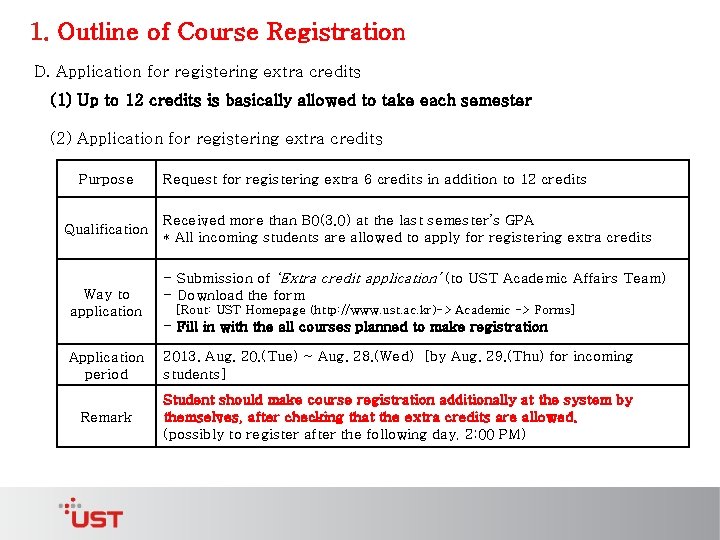
1. Outline of Course Registration D. Application for registering extra credits (1) Up to 12 credits is basically allowed to take each semester (2) Application for registering extra credits Purpose Qualification Way to application Request for registering extra 6 credits in addition to 12 credits Received more than B 0(3. 0) at the last semester’s GPA * All incoming students are allowed to apply for registering extra credits - Submission of ‘Extra credit application’ (to UST Academic Affairs Team) - Download the form [Rout: UST Homepage (http: //www. ust. ac. kr)-> Academic -> Forms] - Fill in with the all courses planned to make registration Application period 2013. Aug. 20. (Tue) ~ Aug. 28. (Wed) [by Aug. 29. (Thu) for incoming students] Remark Student should make course registration additionally at the system by themselves, after checking that the extra credits are allowed. (possibly to register after the following day, 2: 00 PM)
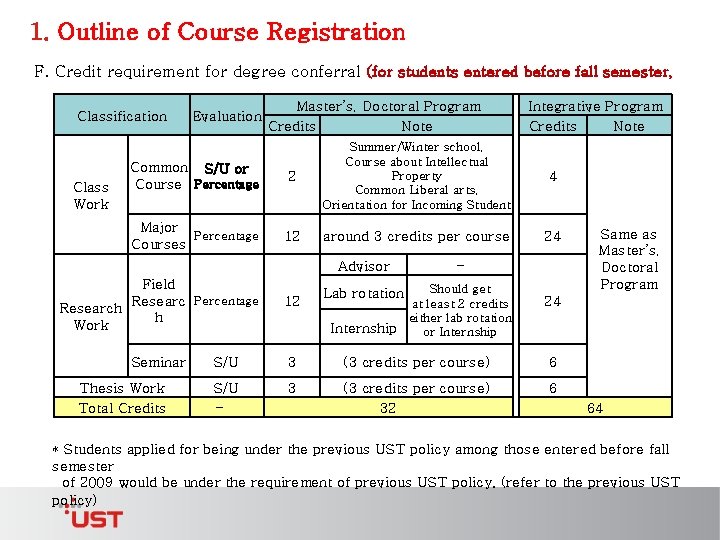
1. Outline of Course Registration F. Credit requirement for degree conferral (for students entered before fall semester, 2012) Classification Class Work Evaluation Master’s, Doctoral Program Credits Note Common S/U or Course Percentage 2 Summer/Winter school, Course about Intellectual Property Common Liberal arts, Orientation for Incoming Student Major Percentage Courses 12 around 3 credits per course Advisor Integrative Program Credits Note 4 24 - Field Researc Percentage Research h Work 12 Seminar S/U 3 (3 credits per course) 6 S/U - 3 (3 credits per course) 32 6 Thesis Work Total Credits Should get at least 2 credits either lab rotation Internship or Internship Lab rotation Same as Master’s, Doctoral Program 24 64 * Students applied for being under the previous UST policy among those entered before fall semester of 2009 would be under the requirement of previous UST policy. (refer to the previous UST policy)
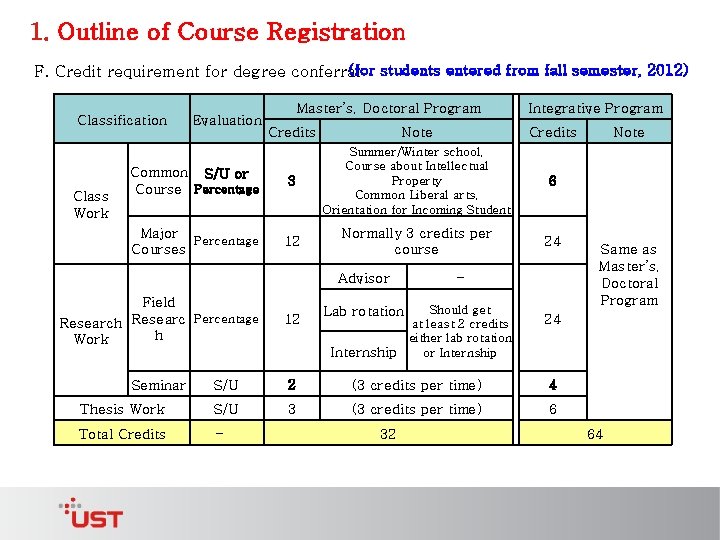
1. Outline of Course Registration (for students entered from fall semester, 2012) F. Credit requirement for degree conferral Classification Class Work Evaluation Master’s, Doctoral Program Integrative Program Credits Note Credits Common S/U or Course Percentage 3 Summer/Winter school, Course about Intellectual Property Common Liberal arts, Orientation for Incoming Student 6 Major Percentage Courses 12 Normally 3 credits per course 24 Advisor - Field Research Researc Percentage h Work 12 Seminar S/U 2 (3 credits per time) 4 Thesis Work S/U 3 (3 credits per time) 6 Total Credits - Should get at least 2 credits either lab rotation or Internship Lab rotation 32 Note Same as Master’s, Doctoral Program 24 64
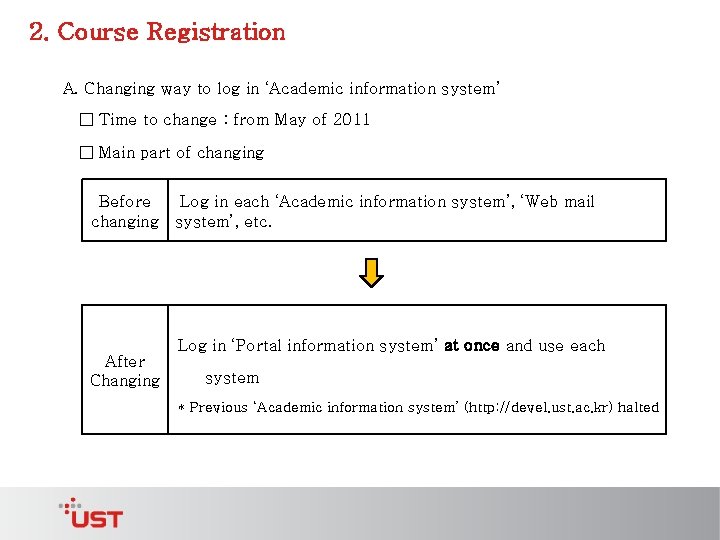
2. Course Registration A. Changing way to log in ‘Academic information system’ □ Time to change : from May of 2011 □ Main part of changing Before changing Log in each ‘Academic information system’, ‘Web mail system’, etc. Log in ‘Portal information system’ at once and use each After Changing system * Previous ‘Academic information system’ (http: //devel. ust. ac. kr) halted
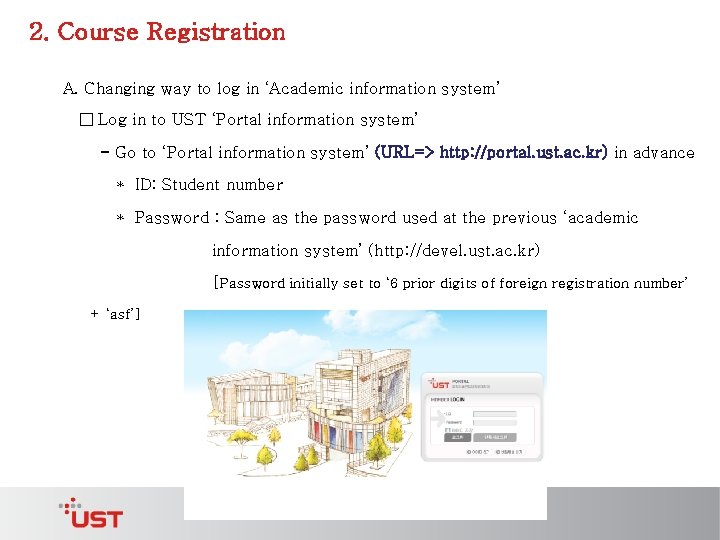
2. Course Registration A. Changing way to log in ‘Academic information system’ □ Log in to UST ‘Portal information system’ - Go to ‘Portal information system’ (URL=> http: //portal. ust. ac. kr) in advance * ID: Student number * Password : Same as the password used at the previous ‘academic information system’ (http: //devel. ust. ac. kr) [Password initially set to ‘ 6 prior digits of foreign registration number’ + ‘asf’]
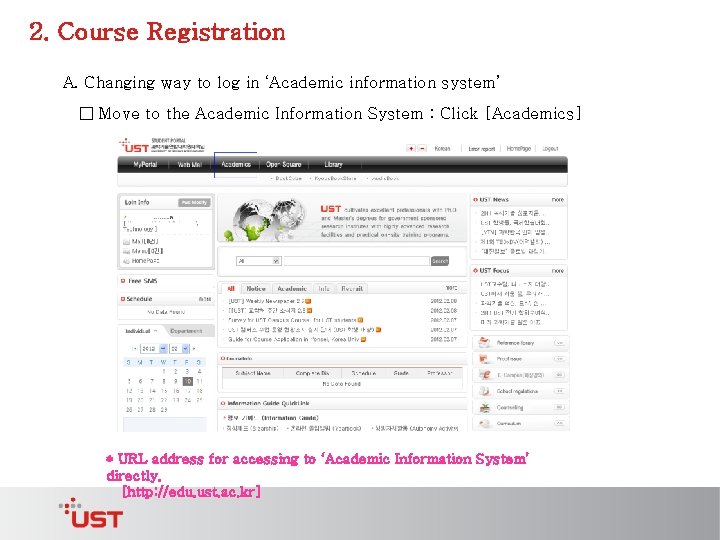
2. Course Registration A. Changing way to log in ‘Academic information system’ □ Move to the Academic Information System : Click [Academics] * URL address for accessing to ‘Academic Information System’ directly. [http: //edu. ust. ac. kr]
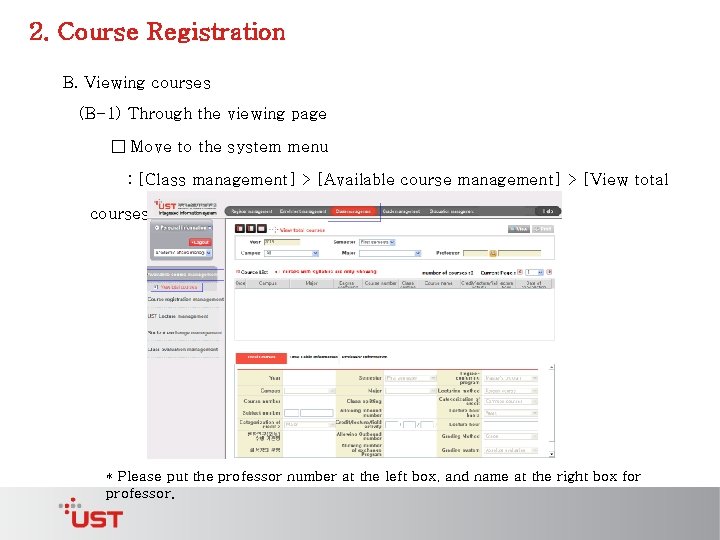
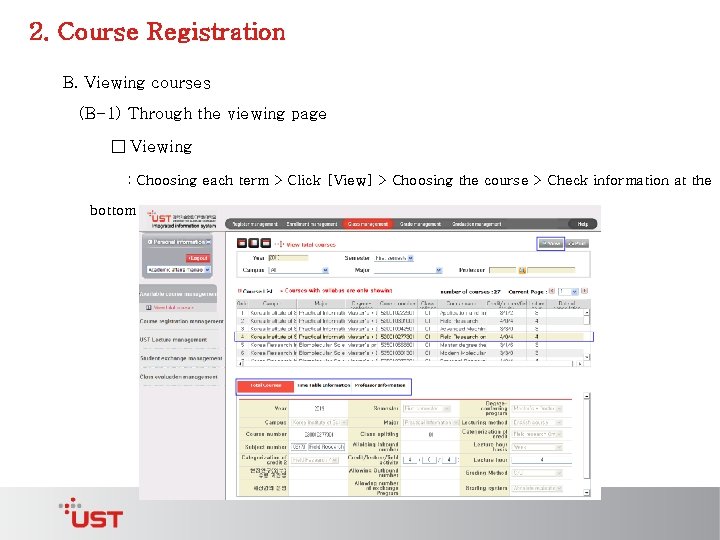
2. Course Registration B. Viewing courses (B-1) Through the viewing page □ Move to the system menu : [Class management] > [Available course management] > [View total courses] * Please put the professor number at the left box, and name at the right box for professor.
2. Course Registration B. Viewing courses (B-1) Through the viewing page □ Viewing : Choosing each term > Click [View] > Choosing the course > Check information at the bottom
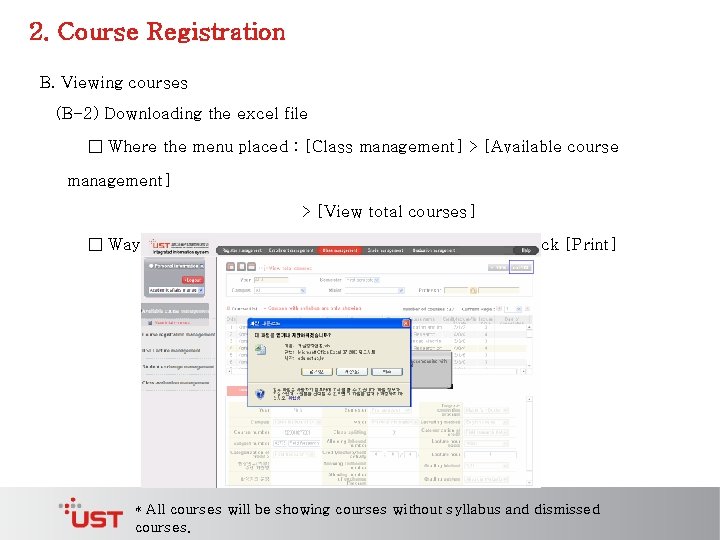
2. Course Registration B. Viewing courses (B-2) Downloading the excel file □ Where the menu placed : [Class management] > [Available course management] > [View total courses] □ Way to view : Choosing the term of year, semester > Click [Print] * All courses will be showing courses without syllabus and dismissed courses.
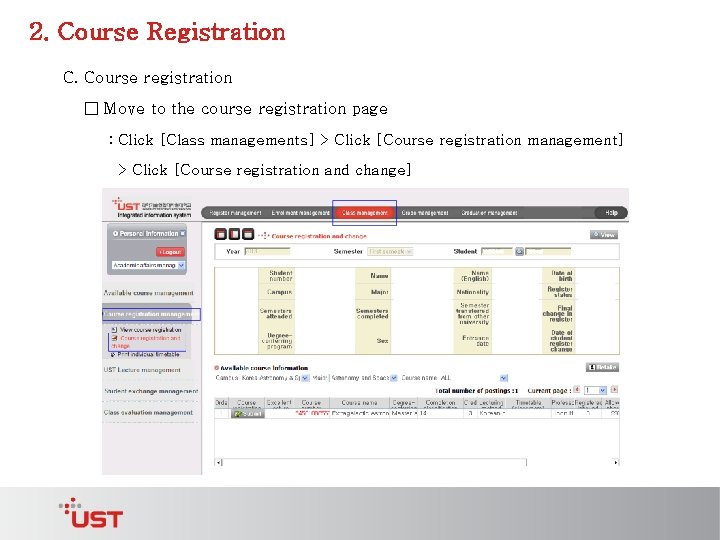
2. Course Registration C. Course registration □ Move to the course registration page : Click [Class managements] > Click [Course registration management] > Click [Course registration and change]
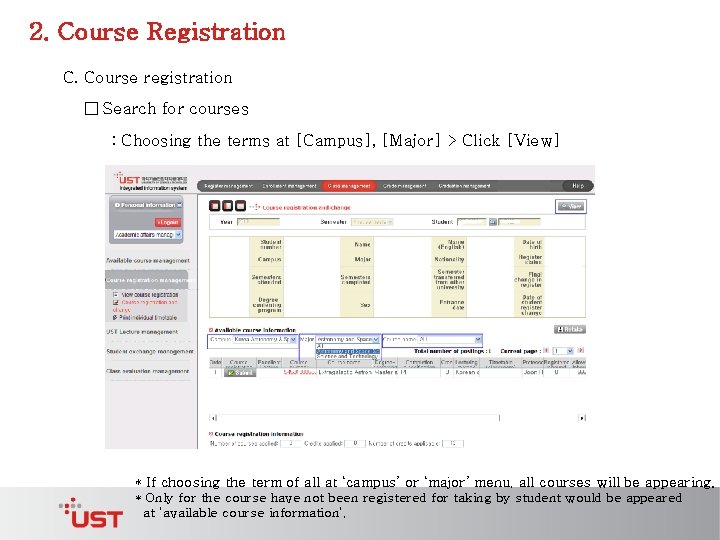
2. Course Registration C. Course registration □ Search for courses : Choosing the terms at [Campus], [Major] > Click [View] * If choosing the term of all at ‘campus’ or ‘major’ menu, all courses will be appearing. * Only for the course have not been registered for taking by student would be appeared at ‘available course information’.
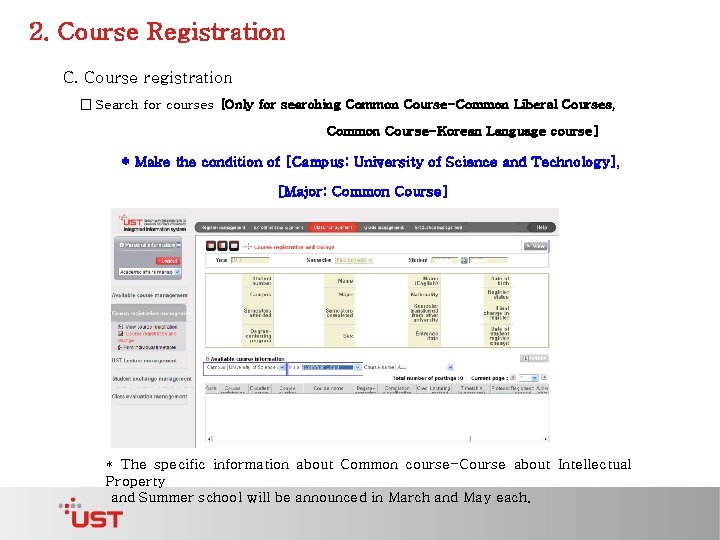
2. Course Registration C. Course registration □ Search for courses [Only for searching Common Course-Common Liberal Courses, Common Course-Korean Language course] * Make the condition of [Campus: University of Science and Technology], [Major: Common Course] * The specific information about Common course-Course about Intellectual Property and Summer school will be announced in March and May each.
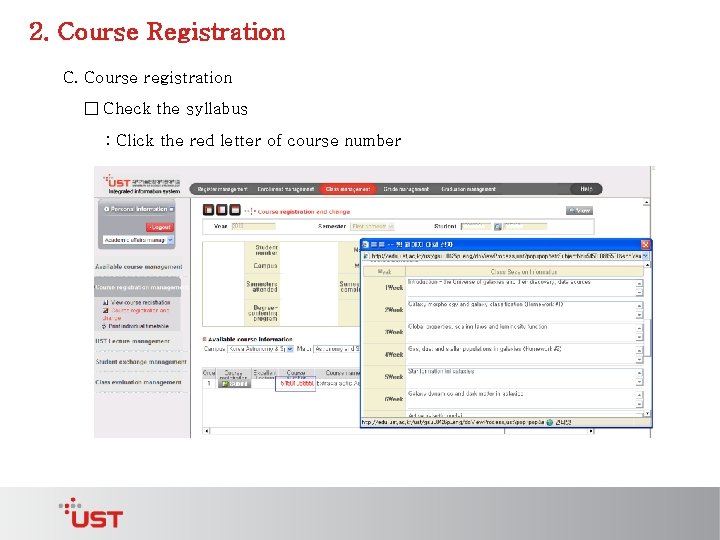
2. Course Registration C. Course registration □ Check the syllabus : Click the red letter of course number
2. Course Registration C. Course registration □ Course registration : Click [Submit] for the course * Can go on to the next step, after double check of course registration. * ‘Registered Inbound Number’ counts the number of registered students, in case that the students’ campus and major are same as the course belonging to. * ‘Registered Outbound Number’ counts the number of registered students, in case that the
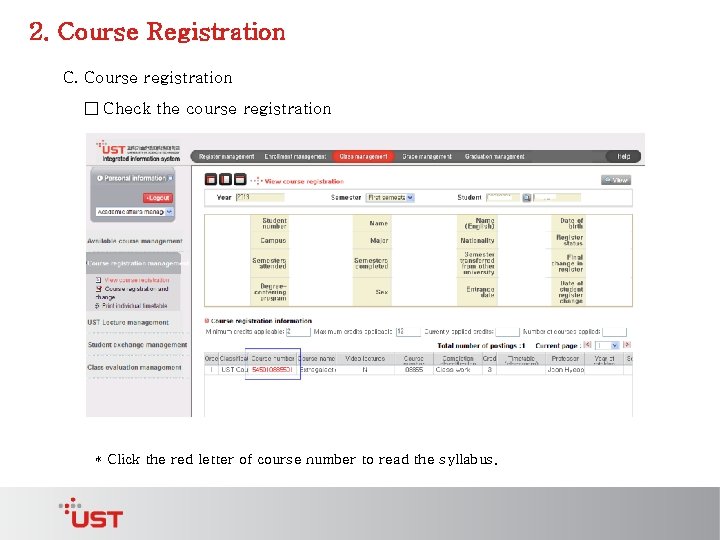
2. Course Registration C. Course registration □ Check the course registration * Click the red letter of course number to read the syllabus.
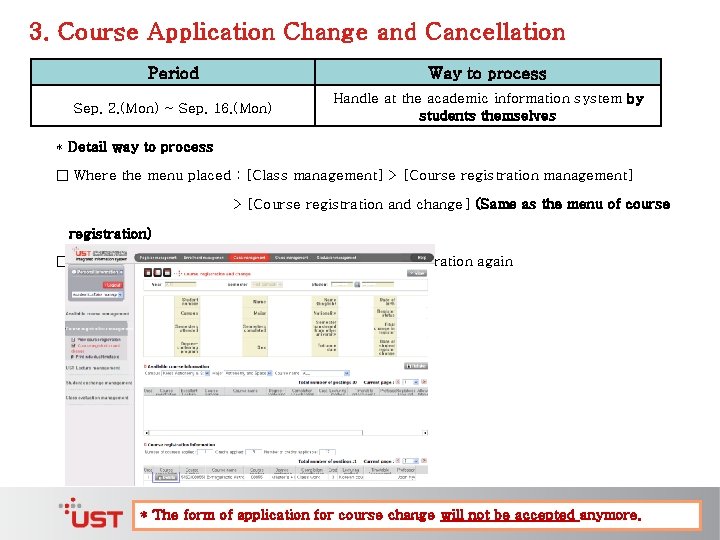
3. Course Application Change and Cancellation Period Way to process Sep. 2. (Mon) ~ Sep. 16. (Mon) Handle at the academic information system by students themselves * Detail way to process □ Where the menu placed : [Class management] > [Course registration and change] (Same as the menu of course registration) □ Way to process : Click [Delete] > make course registration again * The form of application for course change will not be accepted anymore.
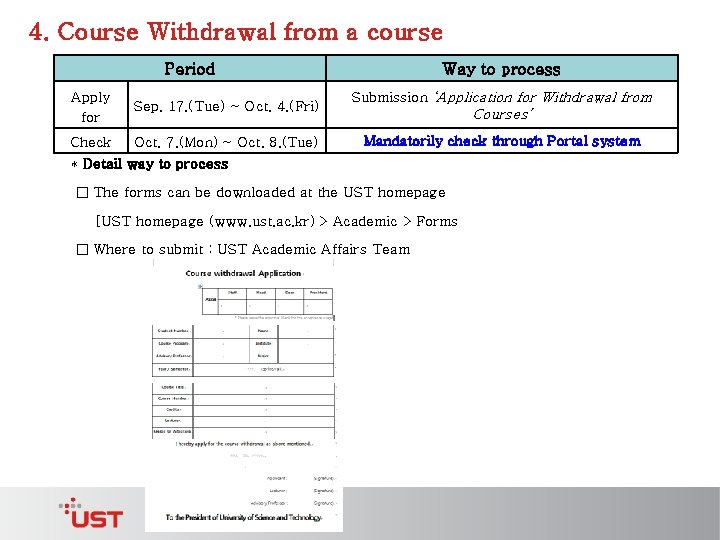
4. Course Withdrawal from a course Period Apply for Sep. 17. (Tue) ~ Oct. 4. (Fri) Check Oct. 7. (Mon) ~ Oct. 8. (Tue) Way to process Submission ‘Application for Withdrawal from Courses’ Mandatorily check through Portal system * Detail way to process □ The forms can be downloaded at the UST homepage [UST homepage (www. ust. ac. kr) > Academic > Forms □ Where to submit : UST Academic Affairs Team
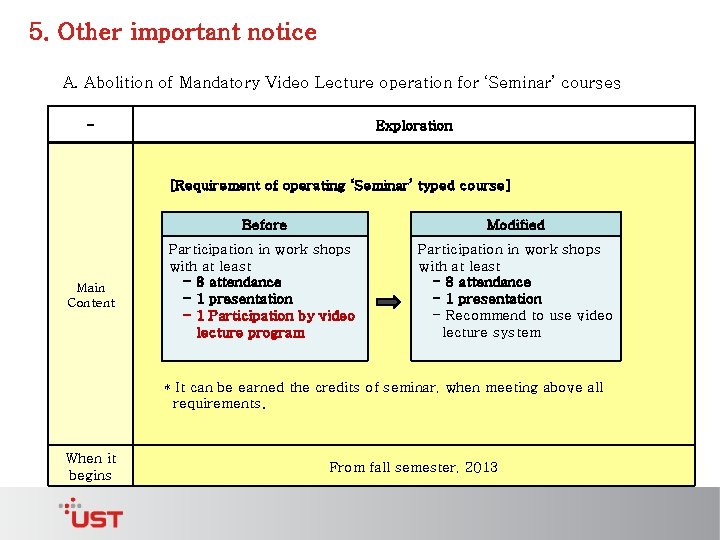
5. Other important notice A. Abolition of Mandatory Video Lecture operation for ‘Seminar’ courses - Exploration [Requirement of operating ‘Seminar’ typed course] Main Content Before Modified Participation in work shops with at least - 8 attendance - 1 presentation - 1 Participation by video lecture program Participation in work shops with at least - 8 attendance - 1 presentation - Recommend to use video lecture system * It can be earned the credits of seminar, when meeting above all requirements. When it begins From fall semester, 2013
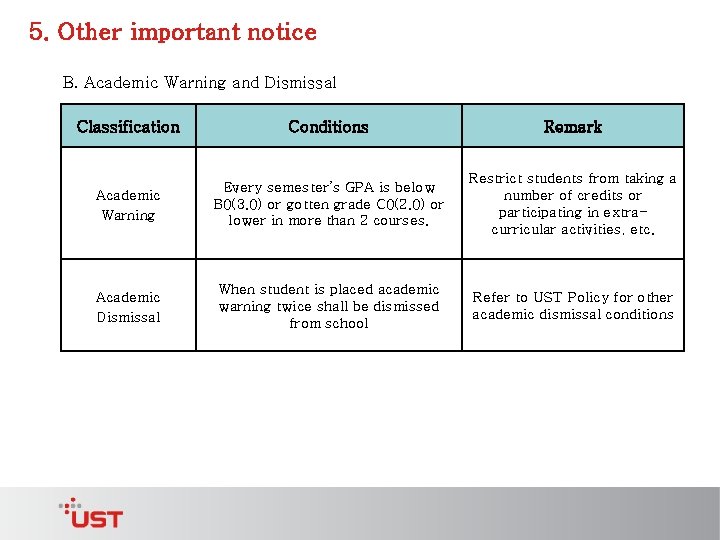
5. Other important notice B. Academic Warning and Dismissal Classification Conditions Remark Academic Warning Every semester’s GPA is below B 0(3. 0) or gotten grade C 0(2. 0) or lower in more than 2 courses. Restrict students from taking a number of credits or participating in extracurricular activities, etc. Academic Dismissal When student is placed academic warning twice shall be dismissed from school Refer to UST Policy for other academic dismissal conditions
5. Other important notice C. Check the grade earned : Click [Grade Management] > Click [View Grade by semester]
Inquiry □ About Course ▶ Staff: UST Academic Affairs Team, Gijong Jung ▶ Tel: 042 -865 -2322 ▶ E-mail: jung@ust. ac. kr □ About system ▶ Staff: UST Smart University Team, Eun Young Choi ▶ Tel: 042 -865 -2381 ▶ E-mail: eychoi 79@ust. ac. kr