
Greg James NVIDIA Direct 3 D Special Effects
![RGB-Encoding Diagram: L=2 1. 0 depth B [0, 3] 16 x G [0, 3]](https://slidetodoc.com/presentation_image/31d804451a0525b88437f61ce56d2554/image-31.jpg "RGB-Encoding Diagram: L=2 1. 0 depth B [0, 3] 16 x G [0, 3]")
![RGB-Encoding • Vertex shader computes depth from [0, 1] DP 4 r 1. x,](https://slidetodoc.com/presentation_image/31d804451a0525b88437f61ce56d2554/image-32.jpg "RGB-Encoding • Vertex shader computes depth from [0, 1] DP 4 r 1. x,")

- Slides: 47
Greg James, NVIDIA Direct 3 D Special Effects • Glow effect – Developed for Disney/Monolith’s “Tron 2. 0” • Volume fog from polygon objects – Used in Bandai/Dimps “Universal. Century. net Gundam Online” • Take away: – Render-to-texture is awesome!
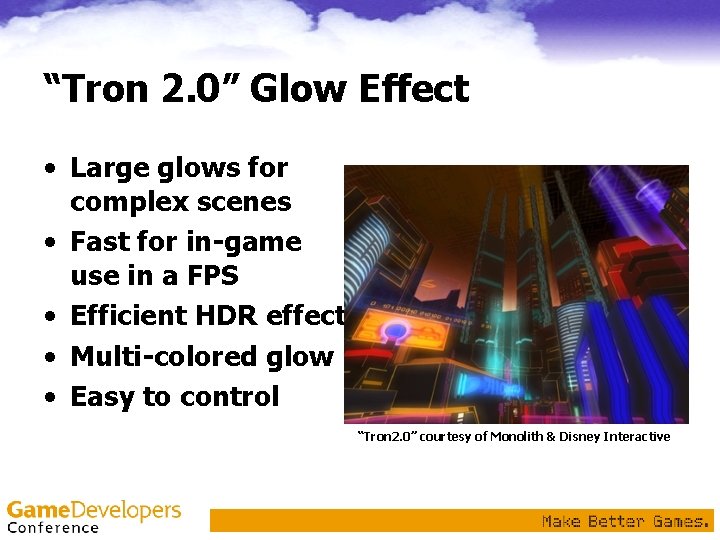
“Tron 2. 0” Glow Effect • Large glows for complex scenes • Fast for in-game use in a FPS • Efficient HDR effect • Multi-colored glow • Easy to control “Tron 2. 0” courtesy of Monolith & Disney Interactive
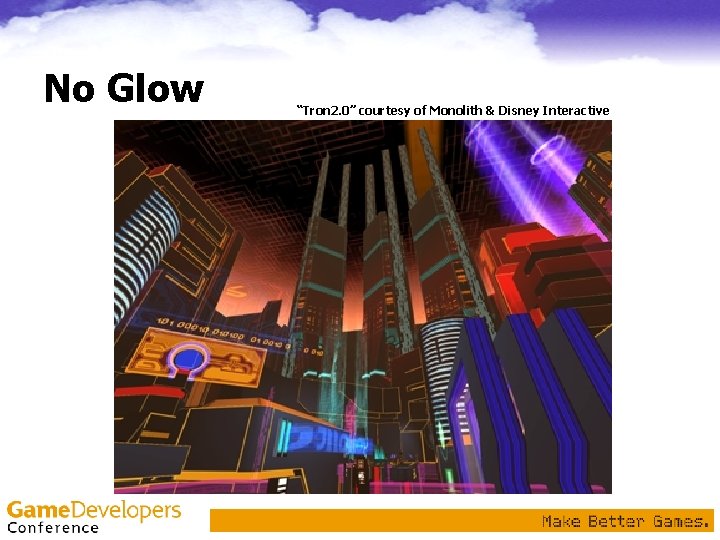
No Glow “Tron 2. 0” courtesy of Monolith & Disney Interactive
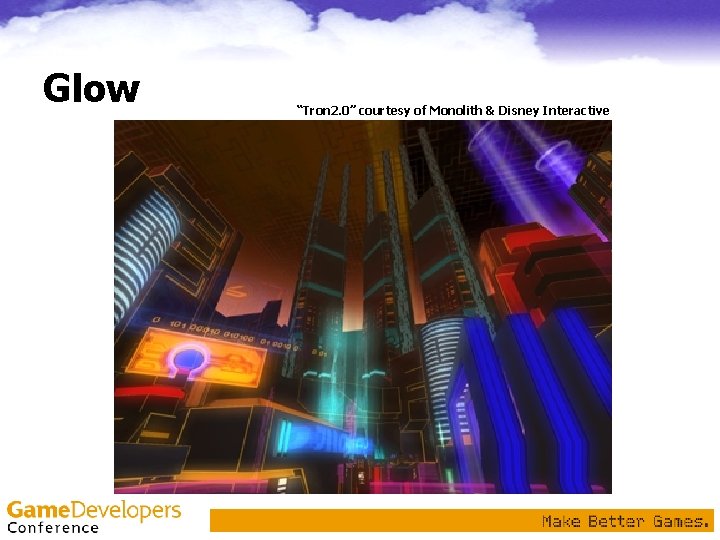
Glow “Tron 2. 0” courtesy of Monolith & Disney Interactive
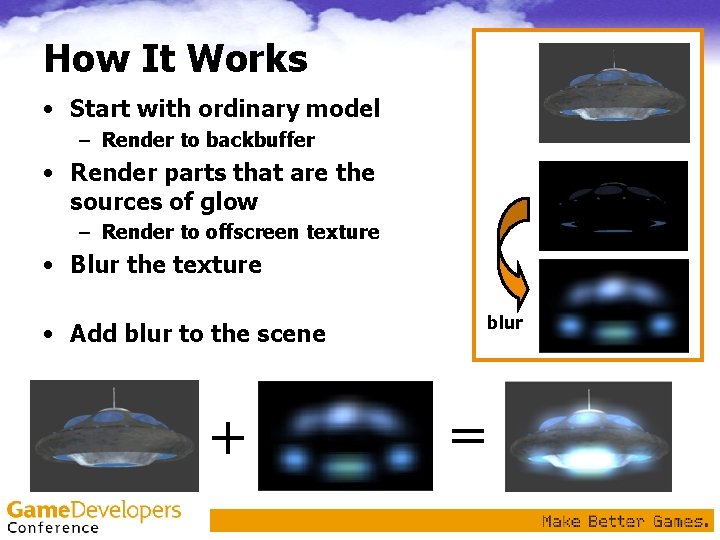
How It Works • Start with ordinary model – Render to backbuffer • Render parts that are the sources of glow – Render to offscreen texture • Blur the texture blur • Add blur to the scene + =
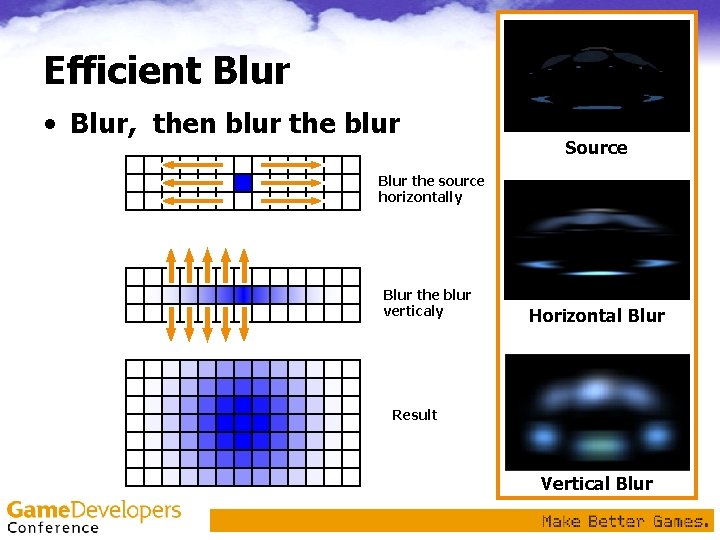
Efficient Blur • Blur, then blur the blur Source Blur the source horizontally Blur the blur verticaly Horizontal Blur Result Vertical Blur
General Approach • No CPU pixel processing! – No texture locks or CPU readbacks – Render to GPU video memory textures • Minimize render target changes • Fill rate bound – Minimize fill cost – Low resolution glow processing – Magnify glow texture to cover the full screen • Full scene gets blurred at once – Could break it up for finer control
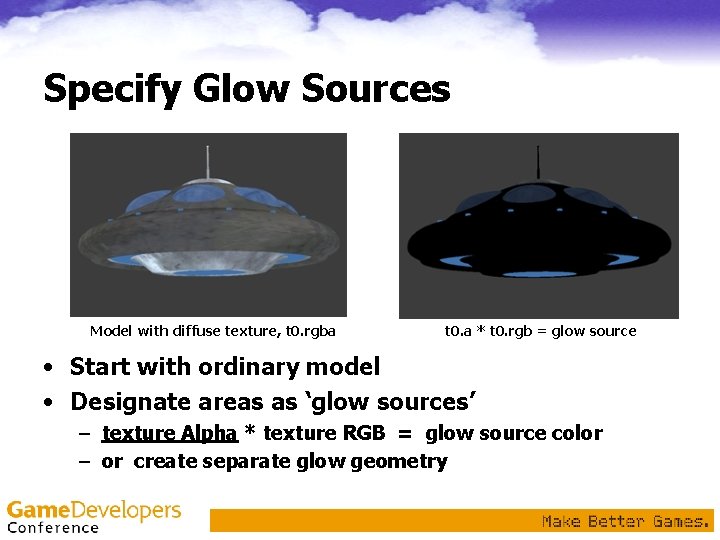
Specify Glow Sources Model with diffuse texture, t 0. rgba t 0. a * t 0. rgb = glow source • Start with ordinary model • Designate areas as ‘glow sources’ – texture Alpha * texture RGB = glow source color – or create separate glow geometry
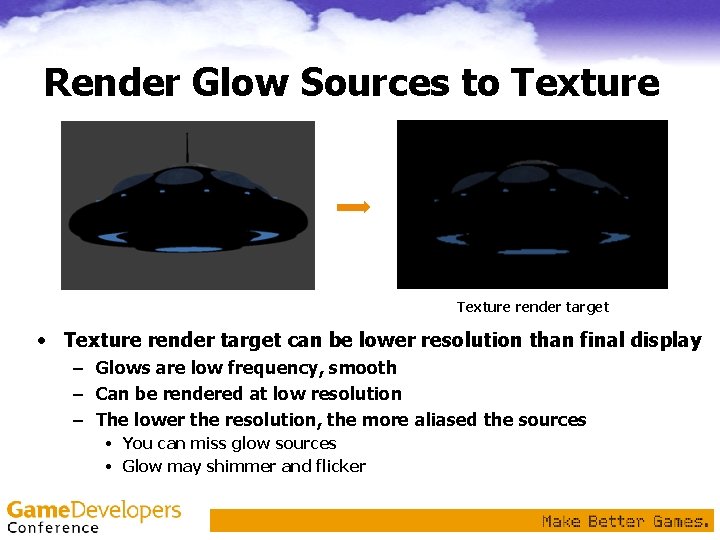
Render Glow Sources to Texture render target • Texture render target can be lower resolution than final display – Glows are low frequency, smooth – Can be rendered at low resolution – The lower the resolution, the more aliased the sources • You can miss glow sources • Glow may shimmer and flicker
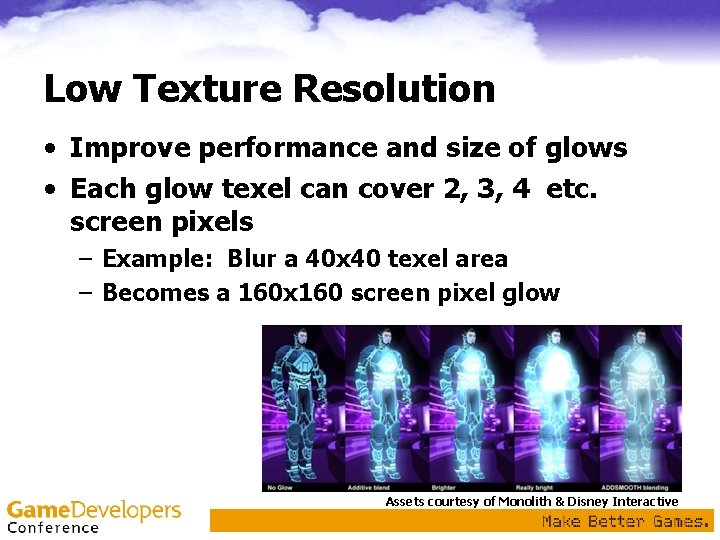
Low Texture Resolution • Improve performance and size of glows • Each glow texel can cover 2, 3, 4 etc. screen pixels – Example: Blur a 40 x 40 texel area – Becomes a 160 x 160 screen pixel glow Assets courtesy of Monolith & Disney Interactive
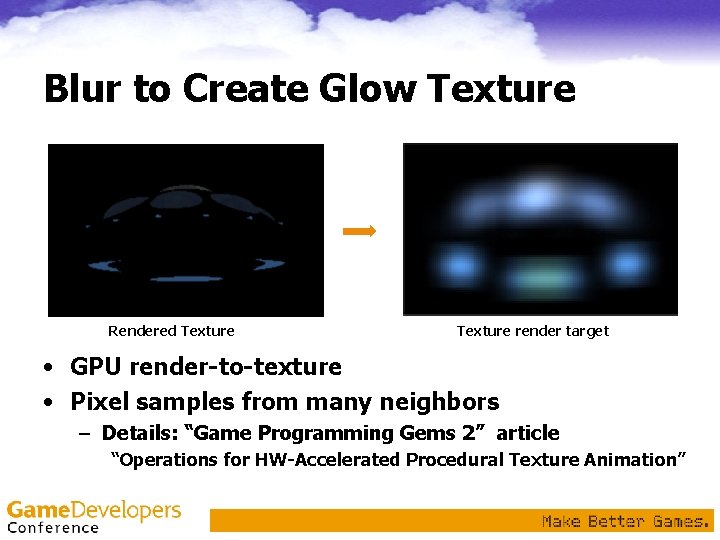
Blur to Create Glow Texture Rendered Texture render target • GPU render-to-texture • Pixel samples from many neighbors – Details: “Game Programming Gems 2” article “Operations for HW-Accelerated Procedural Texture Animation”
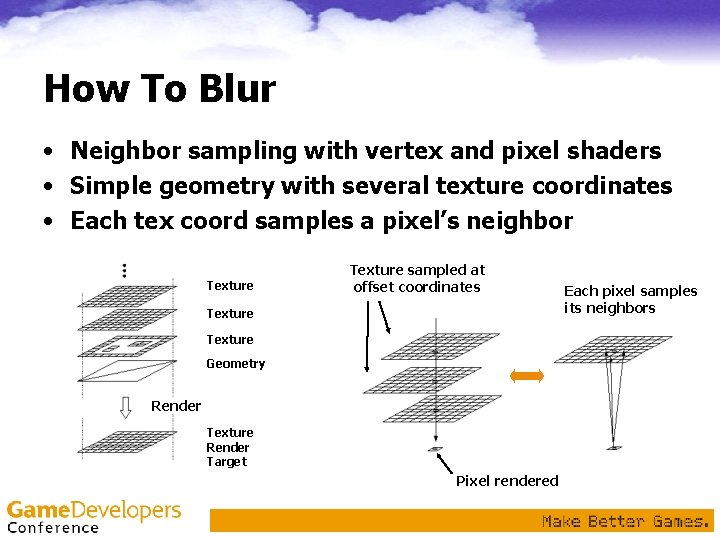
How To Blur • Neighbor sampling with vertex and pixel shaders • Simple geometry with several texture coordinates • Each tex coord samples a pixel’s neighbor Texture sampled at offset coordinates Texture Geometry Render Texture Render Target Pixel rendered Each pixel samples its neighbors
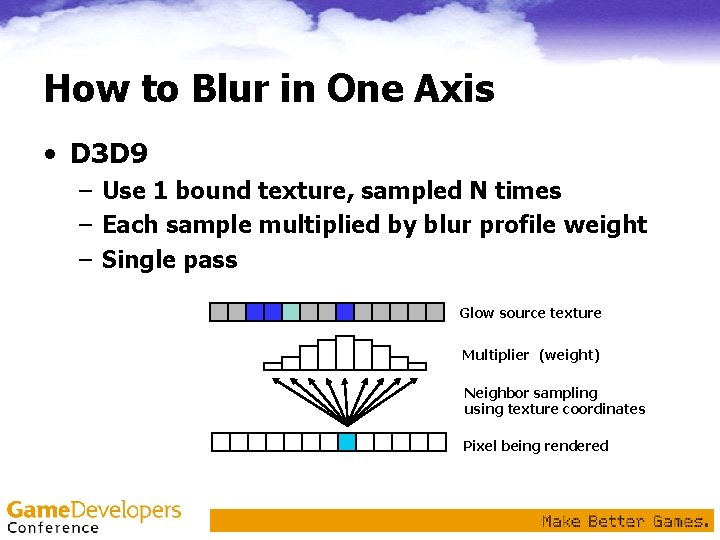
How to Blur in One Axis • D 3 D 9 – Use 1 bound texture, sampled N times – Each sample multiplied by blur profile weight – Single pass Glow source texture Multiplier (weight) Neighbor sampling using texture coordinates Pixel being rendered
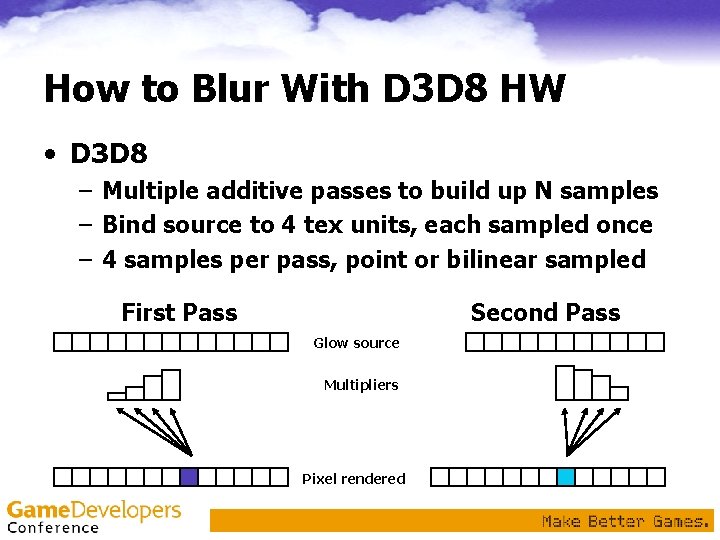
How to Blur With D 3 D 8 HW • D 3 D 8 – Multiple additive passes to build up N samples – Bind source to 4 tex units, each sampled once – 4 samples per pass, point or bilinear sampled First Pass Second Pass Glow source Multipliers Pixel rendered
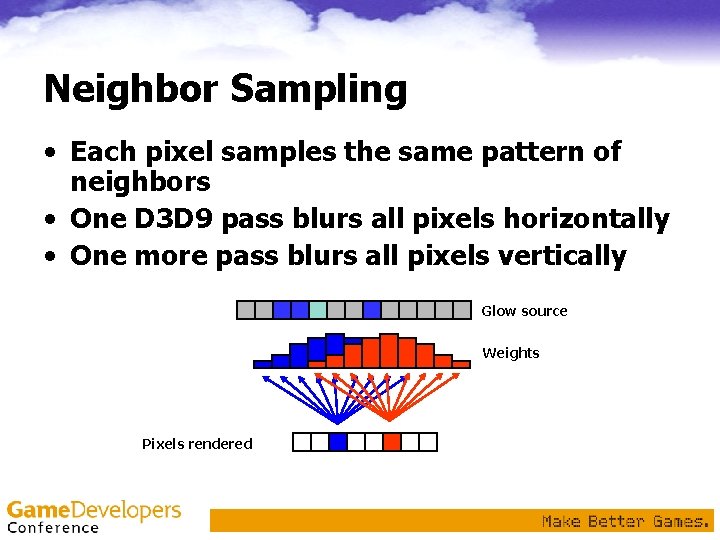
Neighbor Sampling • Each pixel samples the same pattern of neighbors • One D 3 D 9 pass blurs all pixels horizontally • One more pass blurs all pixels vertically Glow source Weights Pixels rendered
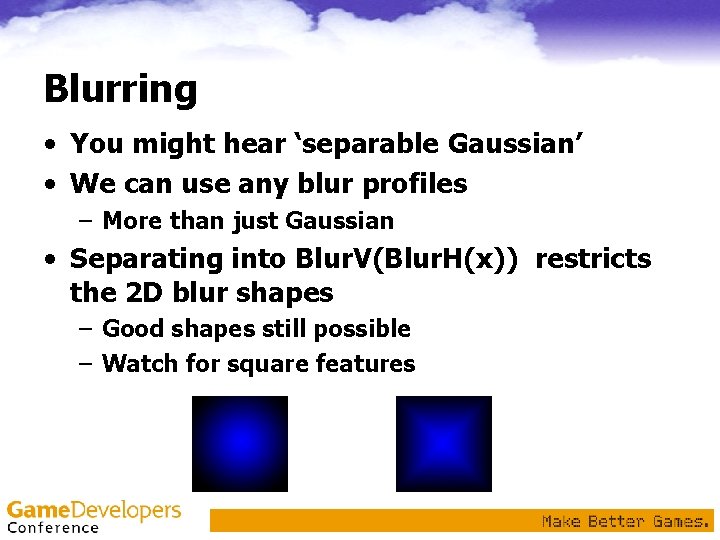
Blurring • You might hear ‘separable Gaussian’ • We can use any blur profiles – More than just Gaussian • Separating into Blur. V(Blur. H(x)) restricts the 2 D blur shapes – Good shapes still possible – Watch for square features
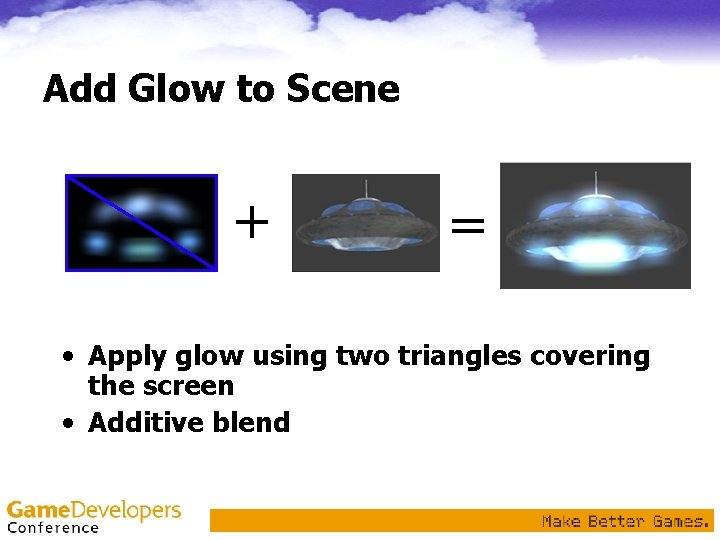
Add Glow to Scene + = • Apply glow using two triangles covering the screen • Additive blend
Performance Concerns • Limited by: • Number of Draw. Primitive calls needed to render glow sources – Batch rendering of glow sources as much as possible – Call Draw. . Primitive() as little as possible • Texture render target resolution – Use pow 2 textures or non-pow 2? 256 x 256 or 300 x 200? – Test each • Blur convolution size – Perf of Nx. N separable blur is O(N), not O(N 2)
Many Uses for Glow Technique • Key to making things look bright – Subtle glow has dramatic effect – Reflections: water, shiny objects – Atmospheric: neon lights, smoke haze • More than just glow! – Blur, depth of field, light scattering • Remember, it doesn’t require HDR assets or floating point textures! – Great for D 3 D 8 hardware – Greater with D 3 D 9 hardware
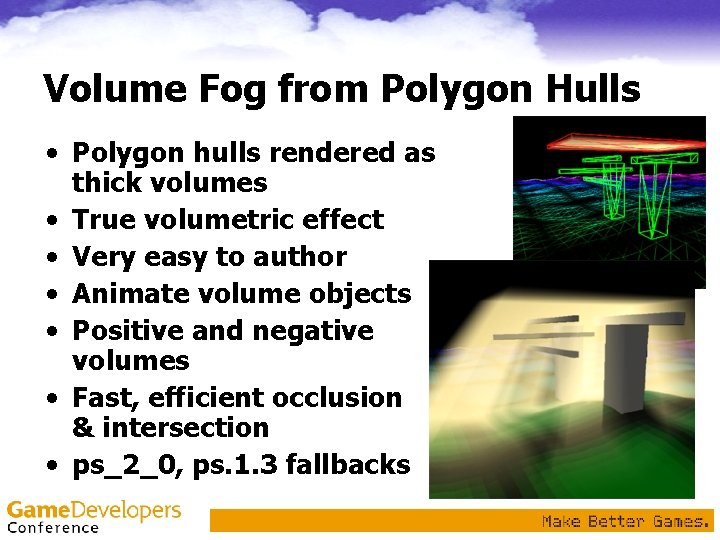
Volume Fog from Polygon Hulls • Polygon hulls rendered as thick volumes • True volumetric effect • Very easy to author • Animate volume objects • Positive and negative volumes • Fast, efficient occlusion & intersection • ps_2_0, ps. 1. 3 fallbacks
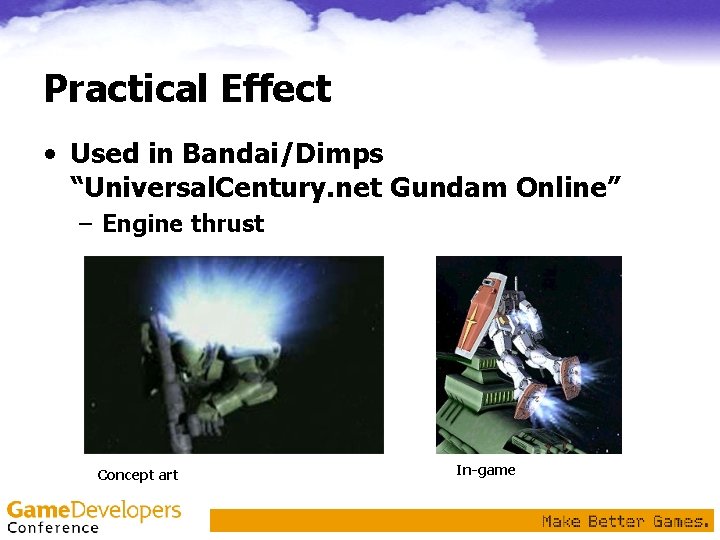
Practical Effect • Used in Bandai/Dimps “Universal. Century. net Gundam Online” – Engine thrust Concept art In-game
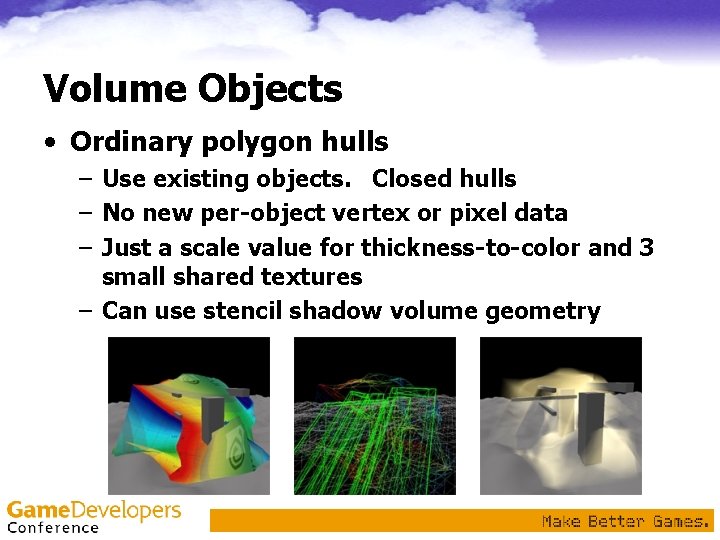
Volume Objects • Ordinary polygon hulls – Use existing objects. Closed hulls – No new per-object vertex or pixel data – Just a scale value for thickness-to-color and 3 small shared textures – Can use stencil shadow volume geometry
Demo
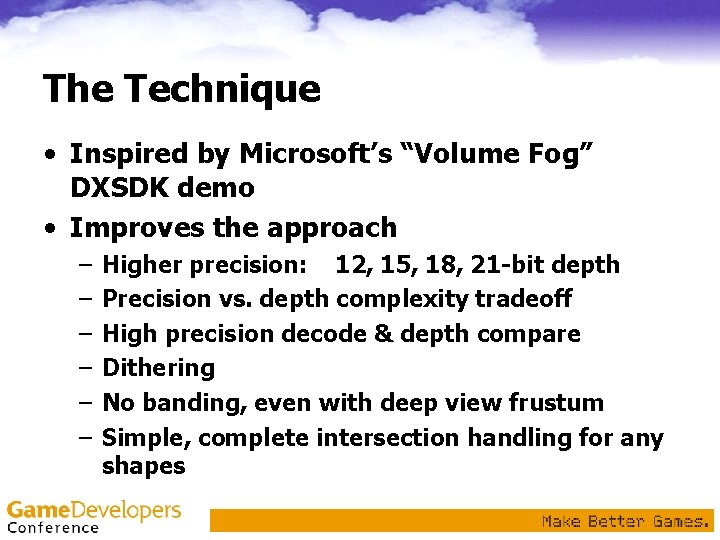
The Technique • Inspired by Microsoft’s “Volume Fog” DXSDK demo • Improves the approach – – – Higher precision: 12, 15, 18, 21 -bit depth Precision vs. depth complexity tradeoff High precision decode & depth compare Dithering No banding, even with deep view frustum Simple, complete intersection handling for any shapes
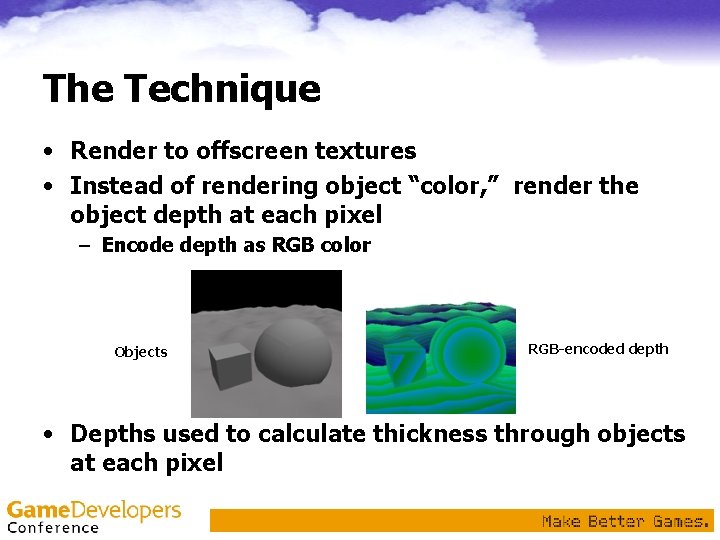
The Technique • Render to offscreen textures • Instead of rendering object “color, ” render the object depth at each pixel – Encode depth as RGB color Objects RGB-encoded depth • Depths used to calculate thickness through objects at each pixel
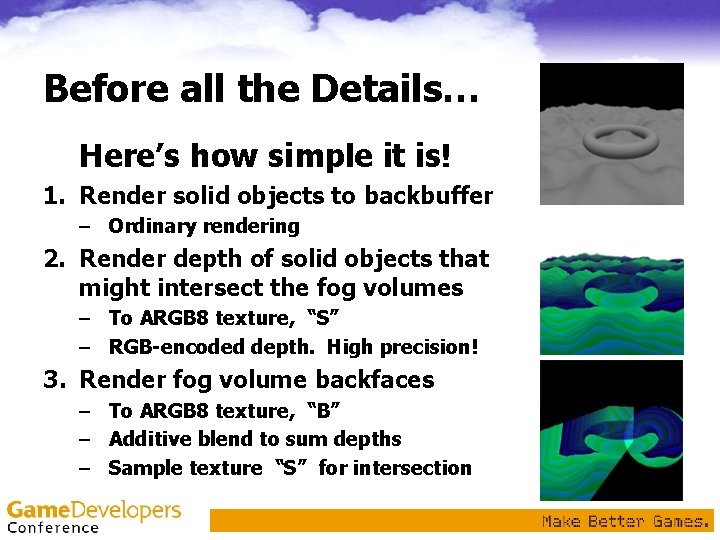
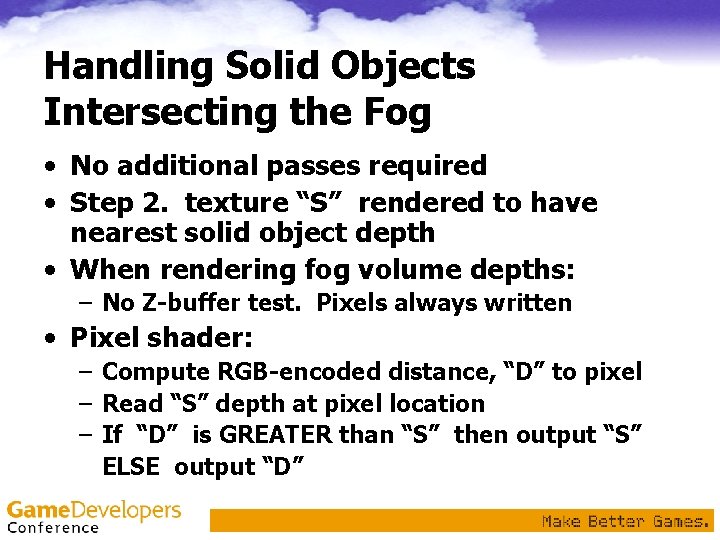
Before all the Details… Here’s how simple it is! 1. Render solid objects to backbuffer – Ordinary rendering 2. Render depth of solid objects that might intersect the fog volumes – To ARGB 8 texture, “S” – RGB-encoded depth. High precision! 3. Render fog volume backfaces – To ARGB 8 texture, “B” – Additive blend to sum depths – Sample texture “S” for intersection
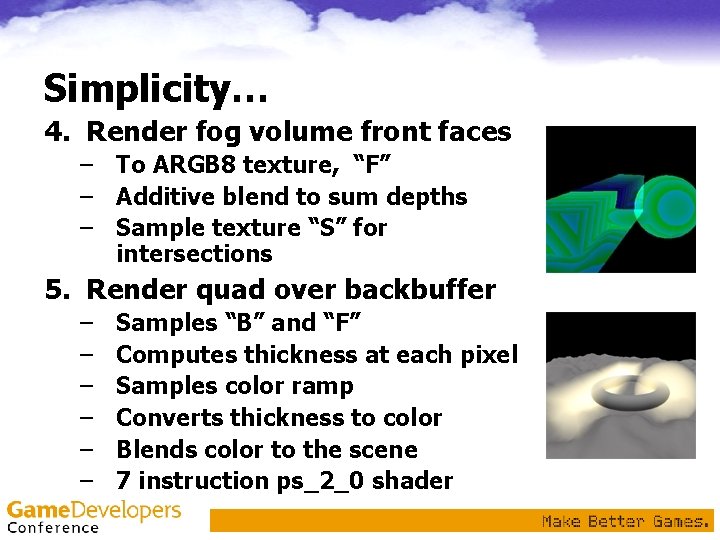
Simplicity… 4. Render fog volume front faces – To ARGB 8 texture, “F” – Additive blend to sum depths – Sample texture “S” for intersections 5. Render quad over backbuffer – – – Samples “B” and “F” Computes thickness at each pixel Samples color ramp Converts thickness to color Blends color to the scene 7 instruction ps_2_0 shader
Floating Point Image Surfaces? • Why not use those? • Need additive blending – No existing HW supports float additive blending to the render target – Too many passes without it • ARGB 8 surfaces can do the job – Good for all D 3 D 8 pixel shading hardware – Millions can run the effect today
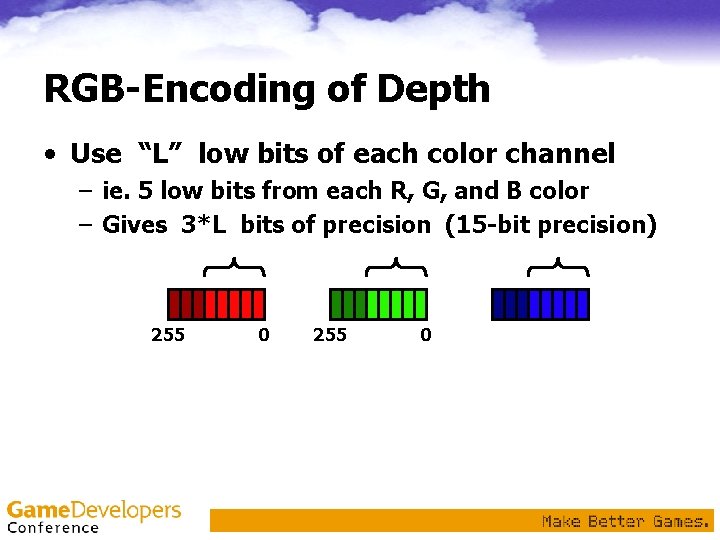
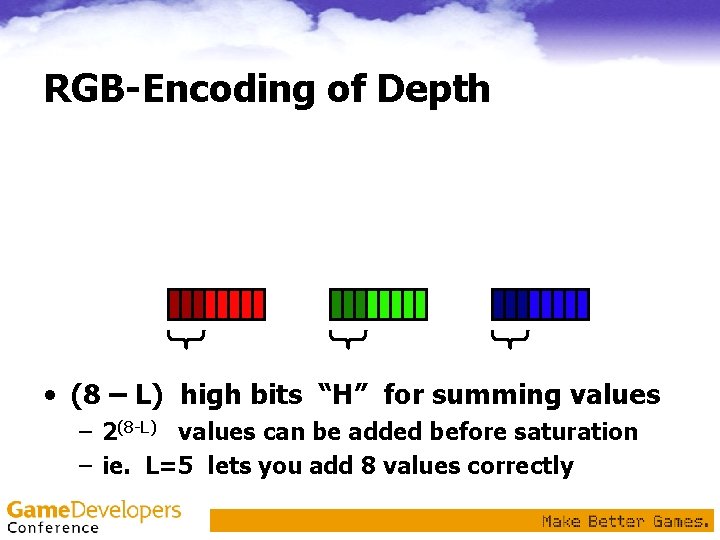
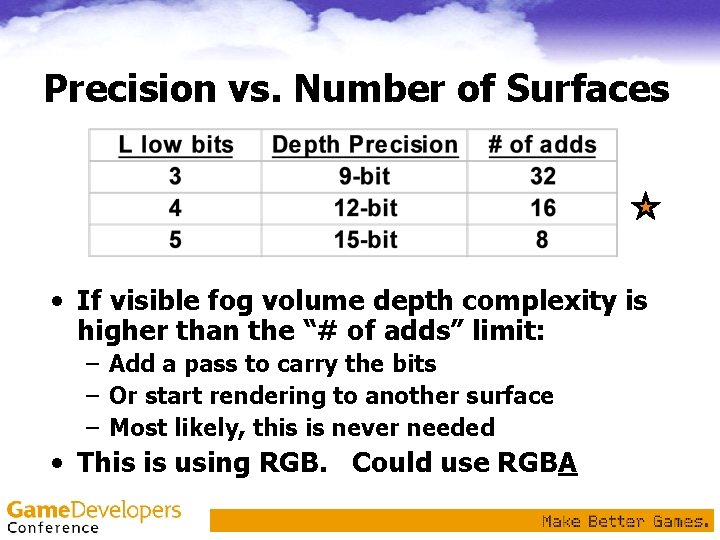
RGB-Encoding of Depth • Use “L” low bits of each color channel – ie. 5 low bits from each R, G, and B color – Gives 3*L bits of precision (15 -bit precision) 255 0 • (8 – L) high bits “H” for acumulation – 2(8 -L) depth values can be added before overflow – ie. L=5 lets you add 8 values safely
RGB-Encoding of Depth • Use “L” low bits of each color channel – ie. 5 low bits from each R, G, and B color – Gives 3*L bits of precision (15 -bit precision) • (8 – L) high bits “H” for summing values – 2(8 -L) values can be added before saturation – ie. L=5 lets you add 8 values correctly
RGB-Encoding Diagram: L=2 1. 0 depth B [0, 3] 16 x G [0, 3] 4 x R [0, 3] • One 6 -bit depth uses only [0, 3] of [0, 255] • Values [4, 255] used when adding depths
RGB-Encoding • Vertex shader computes depth from [0, 1] DP 4 r 1. x, r 1. y, r 1. z, r 1. w, V_POSITION, c[CV_WORLDVIEWPROJ_0] c[CV_WORLDVIEWPROJ_1] c[CV_WORLDVIEWPROJ_2] c[CV_WORLDVIEWPROJ_3] • Vertes shader turns depth into tex coords – Tex. Coord. r = D * 1. 0 – Tex. Coord. g = D * 2 L – Tex. Coord. b = D * 22 L MUL ie. G = D * 16 ie. B = D * 256 r 0. xyz, r 1. z, c[CV_DEPTH_TO_TEX_SCALE]. xyz
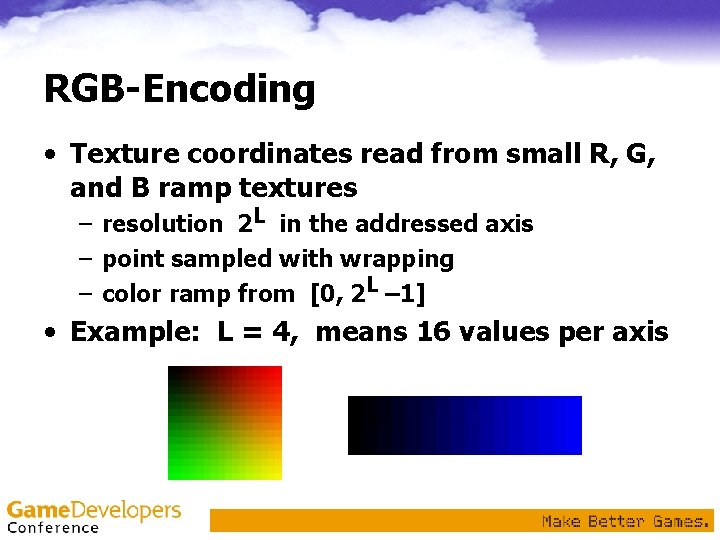
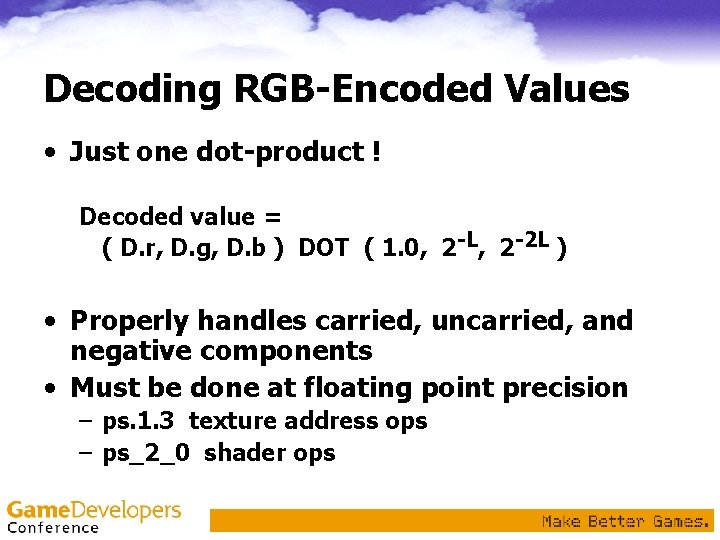
RGB-Encoding • Texture coordinates read from small R, G, and B ramp textures – resolution 2 L in the addressed axis – point sampled with wrapping – color ramp from [0, 2 L – 1] • Example: L = 4, means 16 values per axis
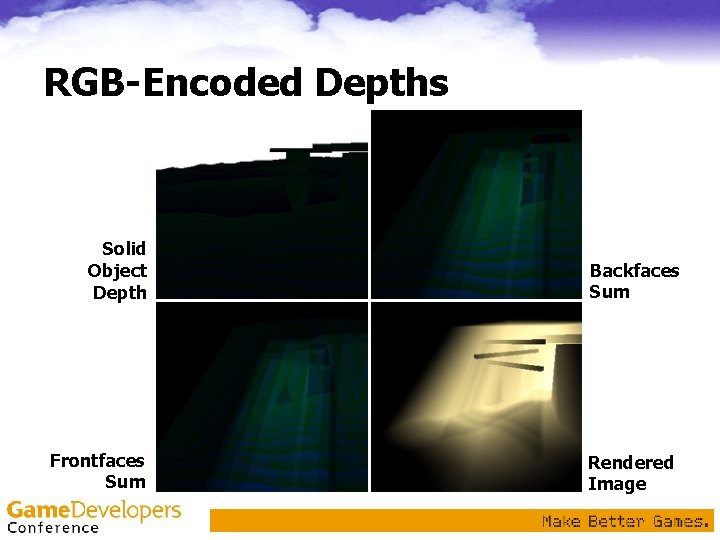
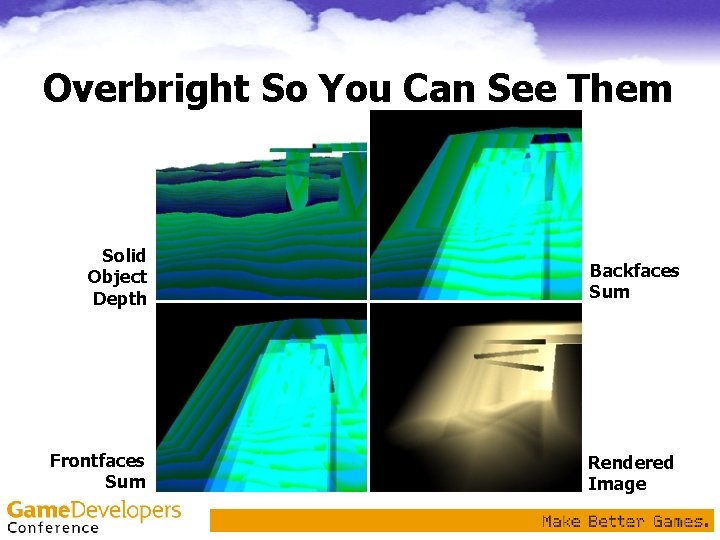
RGB-Encoded Depths Solid Object Depth Frontfaces Sum Backfaces Sum Rendered Image
Overbright So You Can See Them Solid Object Depth Frontfaces Sum Backfaces Sum Rendered Image
Precision vs. Number of Surfaces • If visible fog volume depth complexity is higher than the “# of adds” limit: – Add a pass to carry the bits – Or start rendering to another surface – Most likely, this is never needed • This is using RGB. Could use RGBA
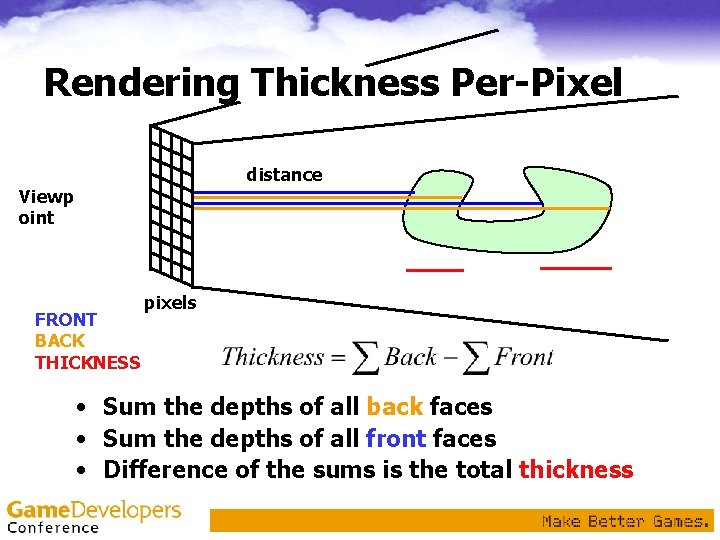
Rendering Thickness Per-Pixel distance Viewp oint FRONT BACK THICKNESS pixels • Sum the depths of all back faces • Sum the depths of all front faces • Difference of the sums is the total thickness
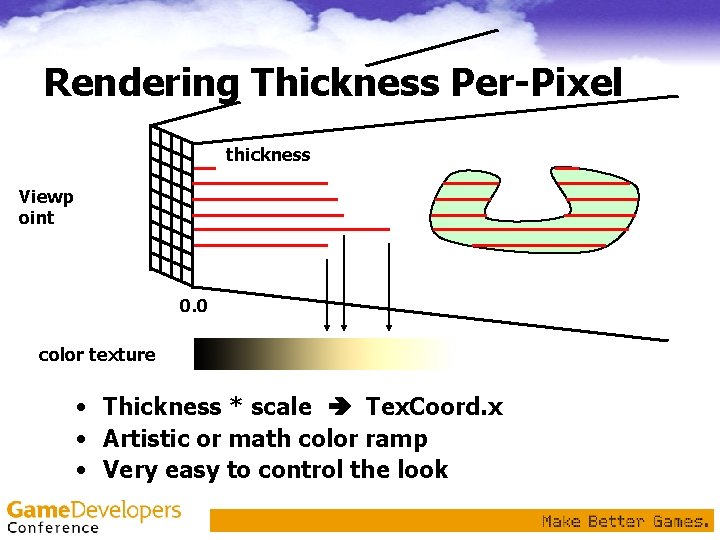
Rendering Thickness Per-Pixel thickness Viewp oint 0. 0 color texture • Thickness * scale Tex. Coord. x • Artistic or math color ramp • Very easy to control the look
Decoding RGB-Encoded Values • Just one dot-product ! Decoded value = ( D. r, D. g, D. b ) DOT ( 1. 0, 2 -L, 2 -2 L ) • Properly handles carried, uncarried, and negative components • Must be done at floating point precision – ps. 1. 3 texture address ops – ps_2_0 shader ops
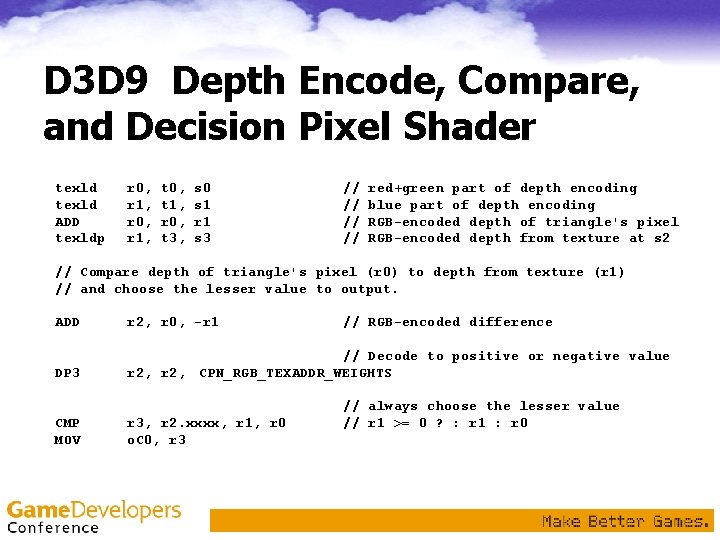
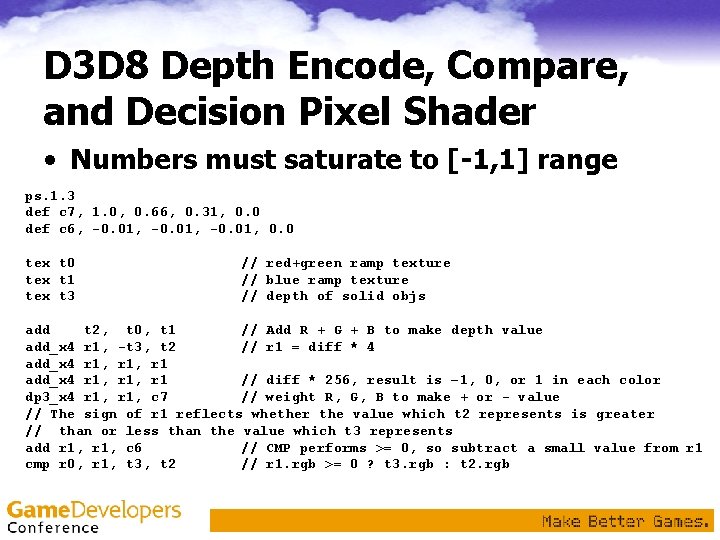
Handling Solid Objects Intersecting the Fog • No additional passes required • Step 2. texture “S” rendered to have nearest solid object depth • When rendering fog volume depths: – No Z-buffer test. Pixels always written • Pixel shader: – Compute RGB-encoded distance, “D” to pixel – Read “S” depth at pixel location – If “D” is GREATER than “S” then output “S” ELSE output “D”
D 3 D 9 Depth Encode, Compare, and Decision Pixel Shader texld ADD texldp r 0, r 1, t 0, t 1, r 0, t 3, s 0 s 1 r 1 s 3 // // red+green part of depth encoding blue part of depth encoding RGB-encoded depth of triangle's pixel RGB-encoded depth from texture at s 2 // Compare depth of triangle's pixel (r 0) to depth from texture (r 1) // and choose the lesser value to output. ADD r 2, r 0, -r 1 DP 3 // Decode to positive or negative value r 2, CPN_RGB_TEXADDR_WEIGHTS CMP MOV r 3, r 2. xxxx, r 1, r 0 o. C 0, r 3 // RGB-encoded difference // always choose the lesser value // r 1 >= 0 ? : r 1 : r 0
D 3 D 8 Depth Encode, Compare, and Decision Pixel Shader • Numbers must saturate to [-1, 1] range ps. 1. 3 def c 7, 1. 0, 0. 66, 0. 31, 0. 0 def c 6, -0. 01, 0. 0 tex t 1 tex t 3 // red+green ramp texture // blue ramp texture // depth of solid objs add t 2, t 0, t 1 // Add R + G + B to make depth value add_x 4 r 1, -t 3, t 2 // r 1 = diff * 4 add_x 4 r 1, r 1 // diff * 256, result is – 1, 0, or 1 in each color dp 3_x 4 r 1, c 7 // weight R, G, B to make + or - value // The sign of r 1 reflects whether the value which t 2 represents is greater // than or less than the value which t 3 represents add r 1, c 6 // CMP performs >= 0, so subtract a small value from r 1 cmp r 0, r 1, t 3, t 2 // r 1. rgb >= 0 ? t 3. rgb : t 2. rgb
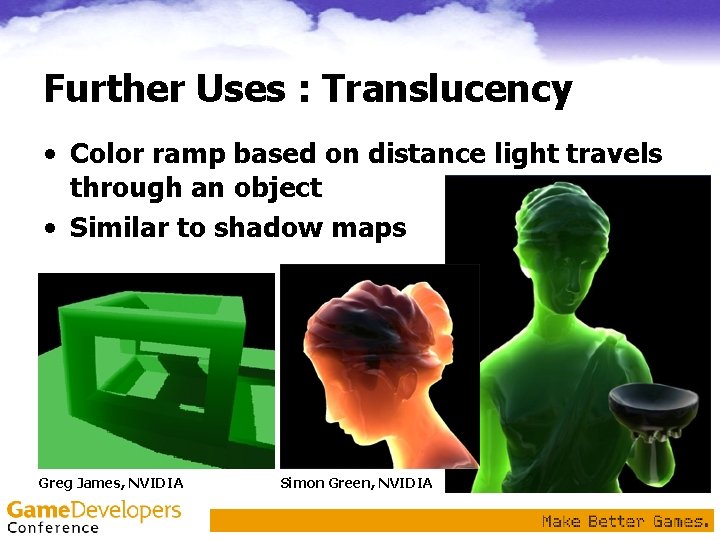
Further Uses : Translucency • Color ramp based on distance light travels through an object • Similar to shadow maps Greg James, NVIDIA Simon Green, NVIDIA
Further Ideas • Attenuation from volumes – Simulate light scattering or absorption – Darken things behind the volumes • Turbulence texture – RGB-encoded turbulence applied in order to add and subtract thickness – Enhance simple volume fog geometry – Animate the texture • Animate the volume objects
Additional Materials • NVIDIA SDK & Cg Effects Browser • http: //Developer. nvidia. com – – SDKDEMOSDirect 3 D 9Srccg_Glow SDKDEMOSDirect 3 D 8Srccg_Glow SDKDEMOSDirect 3 D 9SrcFog. Polygon. Volumes SDKTOOLSbinreleaseCg. Browser. exe • Books: – – “Real-Time Rendering” 2 nd ed. “Shader. X” “Game Programming Gems” and 2 “The Cg Tutorial” ISBN 1 -56881 -182 -9 1 -55622 -041 -3 1 -58450 -054 -9 0 -321 -19496 -9
Additional Credits • NVIDIA Dev. Tech & Demo. Tech! • Matthias Wloka – Neighbor sampling & convolution • Gary King – Parallel development Ge. Force FX OGL volume fog • Simon Green – Translucency, endless supply of cool articles! • Microsoft • Chas Boyd & co. – DXSDK examples
Questions? • gjames@nvidia. com • SDKFeedback@nvidia. com