
Graphics Images Table of Content 1 2 3
Graphics & Images
Table of Content 1. 2. 3. 4. 5. 6. 7. 8. 9. Introduction Types of graphics Resolution Memory/Storage requirement Types of images Image colour schemes Colour dithering Image processing Graphic file formats
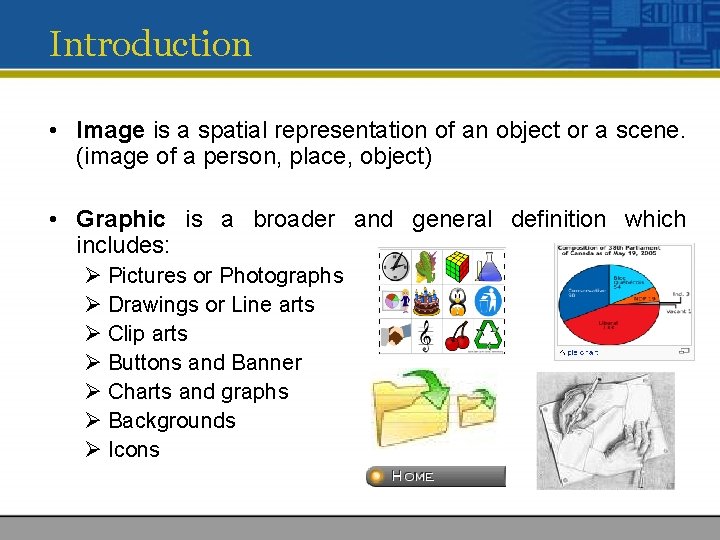
Introduction • Image is a spatial representation of an object or a scene. (image of a person, place, object) • Graphic is a broader and general definition which includes: Ø Pictures or Photographs Ø Drawings or Line arts Ø Clip arts Ø Buttons and Banner Ø Charts and graphs Ø Backgrounds Ø Icons
Picture Vs Graphics / Image Pictures: • Pictures are found in the world which is external to the computers. Images / Graphics: • Images are the 2 -Dimensional digital representations of pictures found in computers. • Computer attempts to duplicate the “look and feel” of a picture via storing and processing. • Therefore, an image is a “realistic” version of the original picture ; dependant on the quality and capabilities of the computer and the graphic artist’s ability to use the software.
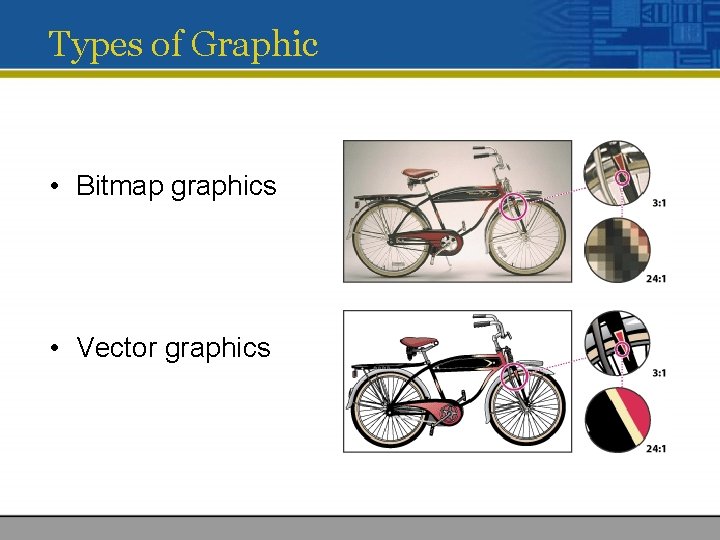
Types of Graphic • Bitmap graphics • Vector graphics
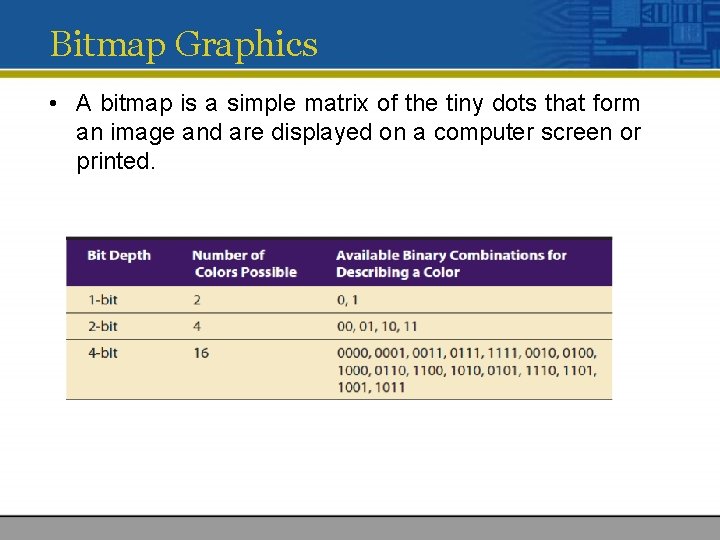
Bitmap Graphics • A bitmap is a simple matrix of the tiny dots that form an image and are displayed on a computer screen or printed.
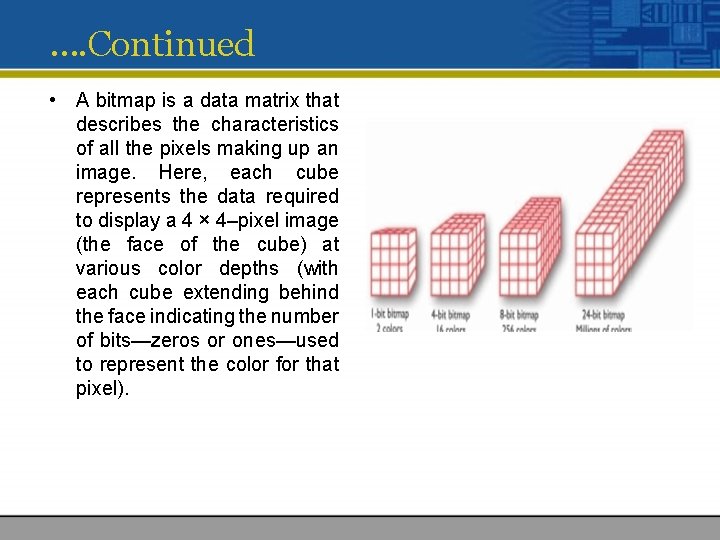
…. Continued • A bitmap is a data matrix that describes the characteristics of all the pixels making up an image. Here, each cube represents the data required to display a 4 × 4–pixel image (the face of the cube) at various color depths (with each cube extending behind the face indicating the number of bits—zeros or ones—used to represent the color for that pixel).
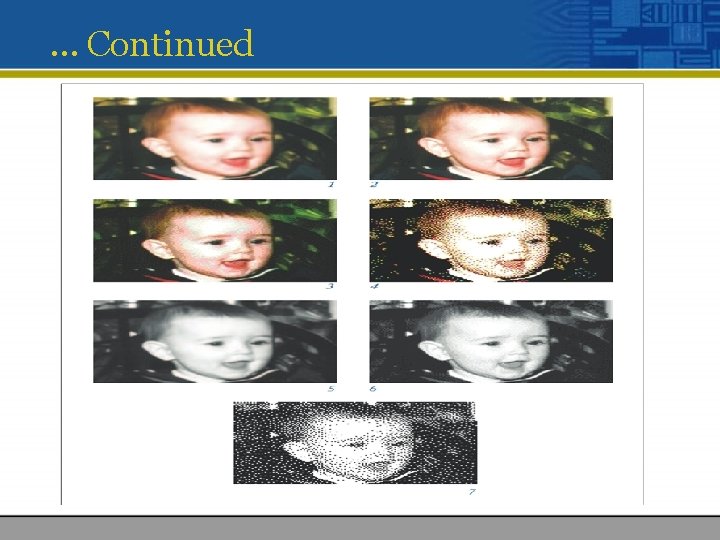
… Continued
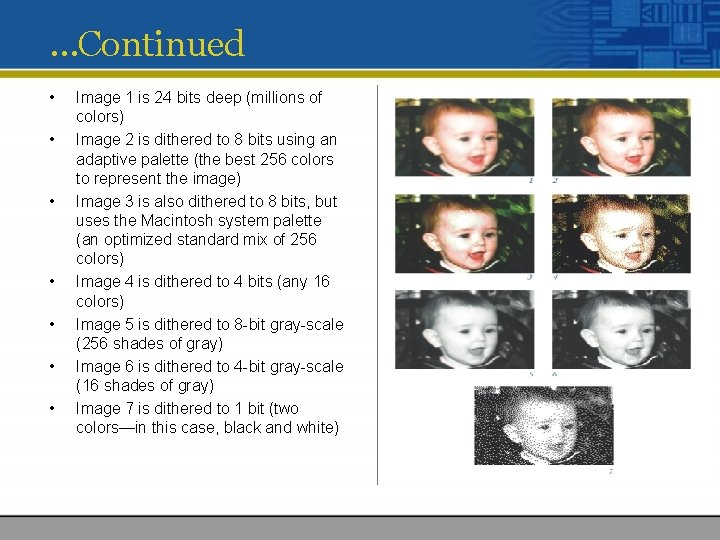
…Continued • • Image 1 is 24 bits deep (millions of colors) Image 2 is dithered to 8 bits using an adaptive palette (the best 256 colors to represent the image) Image 3 is also dithered to 8 bits, but uses the Macintosh system palette (an optimized standard mix of 256 colors) Image 4 is dithered to 4 bits (any 16 colors) Image 5 is dithered to 8 -bit gray-scale (256 shades of gray) Image 6 is dithered to 4 -bit gray-scale (16 shades of gray) Image 7 is dithered to 1 bit (two colors—in this case, black and white)
Bitmap Sources • Where do bitmaps come from? How are they made? You can do the following: • Make a bitmap from scratch with a paint or drawing program. • Grab a bitmap from an active computer screen with a screen capture program, and then paste it into a paint program or your application. • Capture a bitmap from a photo or other artwork using a scanner to digitize the image. • Once made, a bitmap can be copied, altered, e-mailed, and otherwise used in many creative ways. • http: //www. gettyimages. com/
… Continued • Regardless of the source, once you have a bitmap, you can manipulate and adjust many of its properties (such as brightness, contrast, color depth, hue, and size)
Bitmap and vector based Software • Microsoft Paint • Adobe’s Photoshop • Adobe’s Illustrator • Corel. DRAW • Corel’s Painter
Capturing and Editing Images • you may often need to capture and store an image directly from your screen • The simplest way to capture what you see on the screen at any given moment is to press the proper keys on your computer keyboard. • In Windows, when you press print screen, a copy of your screen’s image goes to the clipboard. • From the clipboard, you can then paste the captured bitmap into an application (such as Paint, which comes with Windows).
Lasso and Morphing • Isolating and extracting parts of an image is an essential skill in multimedia production. • Most bitmap editors have “lasso” type tools that select areas by drawing a path • This selection can be “feathered, ” or made to include partially transparent pixels outside the selected area.
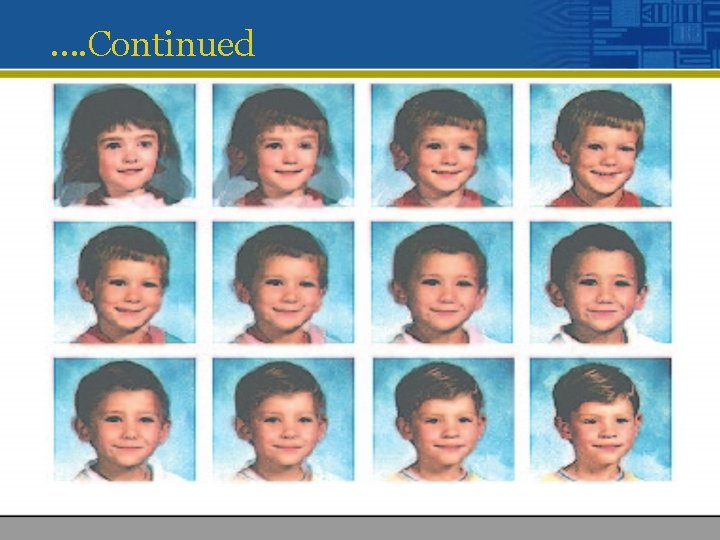
…Continued • In addition to letting you enhance and make composite images, image-editing tools allow you to alter and distort images. • A color photograph of a red rose can be changed into a purple rose, or blue if you prefer. • Morphing is another effect that can be used to manipulate still images or to create interesting and often bizarre animated transformations.
…. Continued
Vector Drawing • Most multimedia authoring systems provide for use of vector-drawn objects such as lines, rectangles, ovals, polygons, complex drawings created from those objects, and text. • Computer-aided design (CAD) programs have traditionally used vector-drawn object systems for creating the highly complex and geometric renderings needed by architects and engineers.
… Continued • Programs for 3 -D animation also use vector-drawn graphics. • How Vector Drawing Works? • A vector is a line that is described by the location of its two endpoints. • Vector drawing uses Cartesian coordinates where a pair of numbers describes a point in two-dimensional space as the intersection of horizontal and vertical lines (the x and y axes). • So a line might be simply • <line x 1="0" y 1="0" x 2="200" y 2="100">
How Vector Graphics Works? • A simple rectangle is computed • <rect x="0" y="0" width="200" height="100" fill="#FFFFFF" stroke="#FF 0000"/> • Circles are defined by a location and a radius: • <circle cx="50" cy="50" r="10" fill="none" stroke="#000000" />
Bitmap graphics • The most common and comprehensive form of storage for images on computers is bitmap image. • Bitmap use combination blocks of different colours (known as pixels) to represent an image. Each pixel is assigned a specific location and colour value. • There also called pixelized or raster graphics. • Software to edit bitmapped graphics are : • Adobe Photoshop • Paint Shop Pro
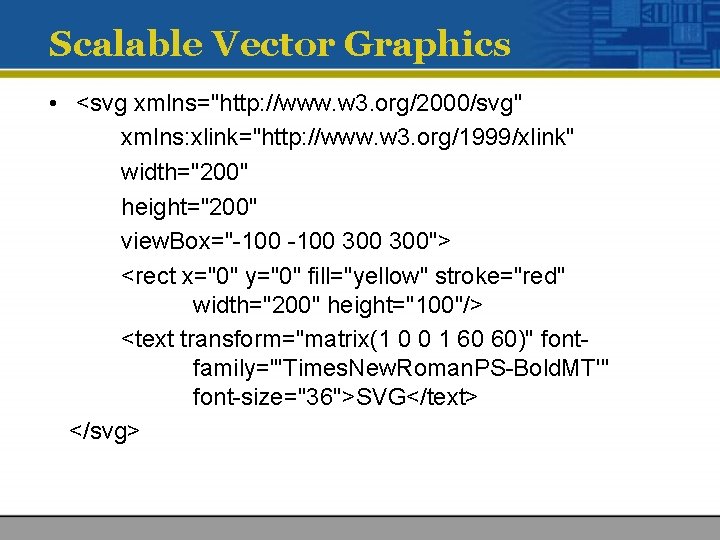
Scalable Vector Graphics • <svg xmlns="http: //www. w 3. org/2000/svg" xmlns: xlink="http: //www. w 3. org/1999/xlink" width="200" height="200" view. Box="-100 300 300"> <rect x="0" y="0" fill="yellow" stroke="red" width="200" height="100"/> <text transform="matrix(1 0 0 1 60 60)" fontfamily="'Times. New. Roman. PS-Bold. MT'" font-size="36">SVG</text> </svg>
…Continued • Because these SVG files can be saved in a small amount of memory and • Because they are scalable without distortion • SVG is supported by browsers on most mobile phones and PDAs. • Vector drawing tools use Bézier curves or paths to mathematically represent a curve. • Mastering Bézier curves is an important skill: these curves not only create graphic shapes but represent motion paths when creating animations
Vector-Drawn Objects vs. Bitmaps • Vector-drawn objects are described and drawn to the computer screen using a fraction of the memory space required to describe and store the same object in bitmap form. • The file containing the vector-drawn colored rectangle described in the preceding section is less than 698 bytes of alphanumeric data • On the other hand, the same rectangle saved as a. gif image with a 64 -color palette takes 1, 100 bytes.
…Continued • Because of this file size advantage, web pages that use vector graphics as SVG files or in plug-ins such as Flash download faster and, when used for animation, draw faster than pages displaying bitmaps. • A vector-drawn object is created “on the fly, ” that is, the computer draws the image from the instructions it has been given, rather than displaying a precreated image. • This means that vector objects are easily scalable without loss of resolution or image quality
… Continued • Resizing a bitmapped image requires either duplicating pixels (creating a blocky, jagged look called pixelation) or throwing pixels away (eliminating details).
Converting Between Bitmaps and Drawn Images • you can convert a drawing that consists of several vector drawn objects into a bitmap when you save the drawing. • Converting bitmaps to drawn objects is more difficult. • Autotracing is the procedure by which you can compute the bounds of a bitmapped image or the shapes of colors within an image and then derive the polygon object that describes the image.
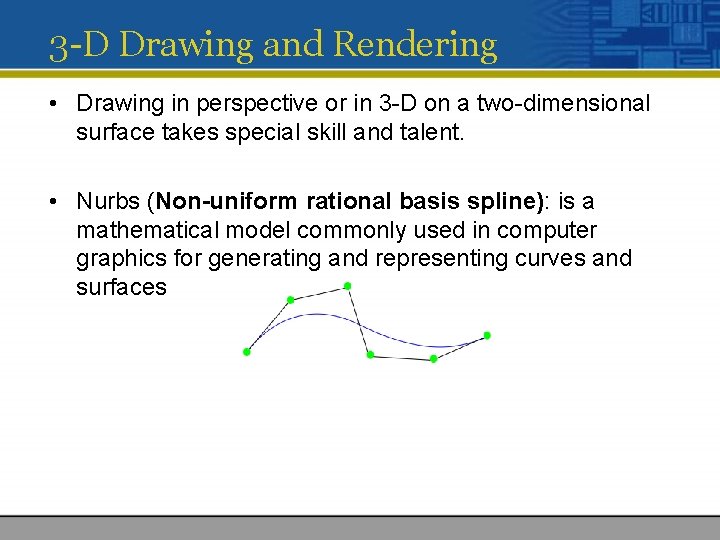
3 -D Drawing and Rendering • Drawing in perspective or in 3 -D on a two-dimensional surface takes special skill and talent. • Nurbs (Non-uniform rational basis spline): is a mathematical model commonly used in computer graphics for generating and representing curves and surfaces
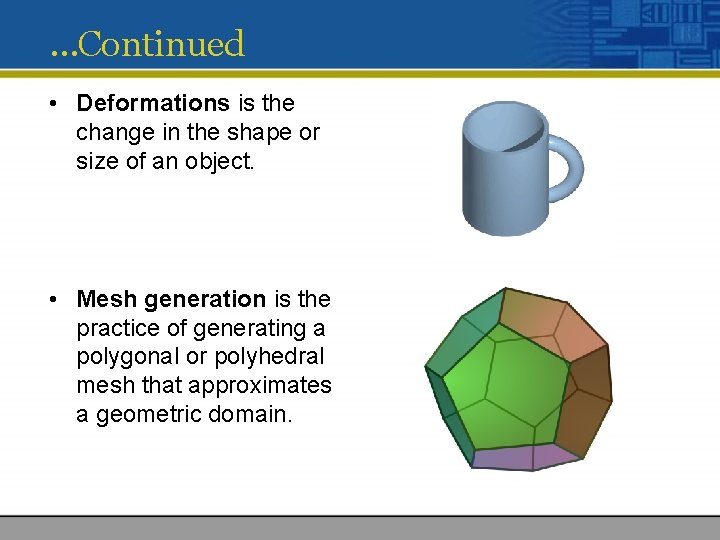
…Continued • Deformations is the change in the shape or size of an object. • Mesh generation is the practice of generating a polygonal or polyhedral mesh that approximates a geometric domain.
…Continued • Tools for 3 D drawing: • • • Daz 3 D (www. daz 3 d. com) form • Z (www. formz. com) New. Tek’s Lightwave (www. newtek. com/lightwave) Autodesk’s Maya (www. autodesk. com/Maya) For experimenting with 3 -D, Google’s Sketch. Up (sketchup. google. com) provides a simple (and free)crossplatform tool.
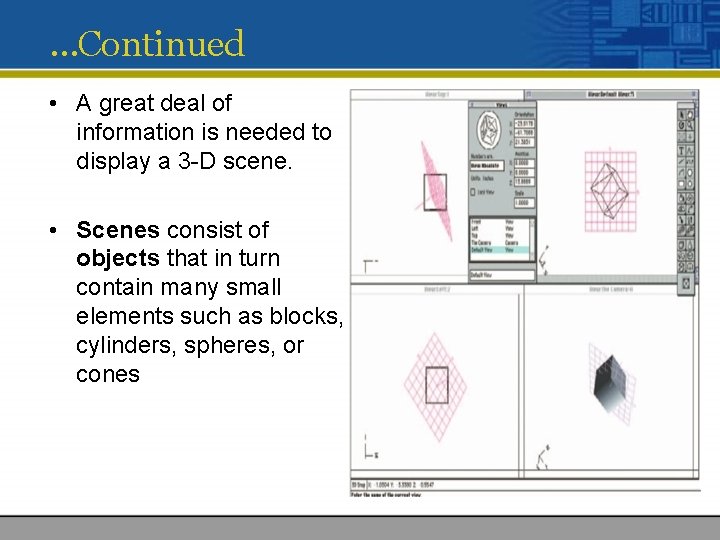
…Continued • A great deal of information is needed to display a 3 -D scene. • Scenes consist of objects that in turn contain many small elements such as blocks, cylinders, spheres, or cones
Panoramas • You can view a single surrounding image as if you were “inside” the picture and able to look up or down, turn, or zoom in on features • To make this work, you need to stitch together many images taken from different angles around a circle.
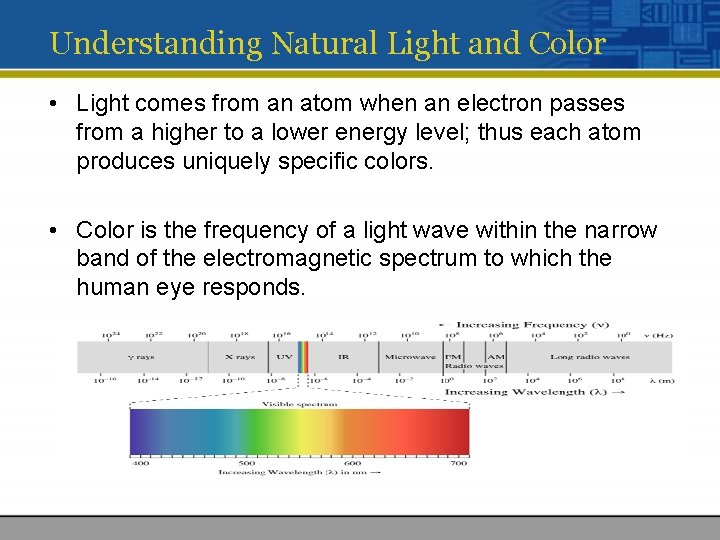
Understanding Natural Light and Color • Light comes from an atom when an electron passes from a higher to a lower energy level; thus each atom produces uniquely specific colors. • Color is the frequency of a light wave within the narrow band of the electromagnetic spectrum to which the human eye responds.
…Continued • The letters of the mnemonic ROY G. BIV, learned by many of us to remember the colors of the rainbow, are the ascending frequencies of the visible light spectrum • Light that is infrared, or below the frequency of red light and not perceivable by the human eye • Ultraviolet light, on the other hand, is beyond the higher end of the visible spectrum and can be damaging to humans.
…Continued • The color white is a noisy mixture of all the color frequencies in the visible spectrum. • Sunlight and fluorescent tubes produce white light • The light these sources produce typically reaches your eye as a reflection of that light into the lens of your eye • The eye can differentiate among about 80, 000 colors, or hues, consisting of combinations of red, green, and blue.
… Continued • Human response to color is complicated by cultural and experiential filters • Green, blue, yellow, orange, purple, pink, brown, black, gray, and white are the ten most common colordescribing words used in all human languages and cultures • Blue is world's favorite color! (www. diacenter. org/km/index. html)
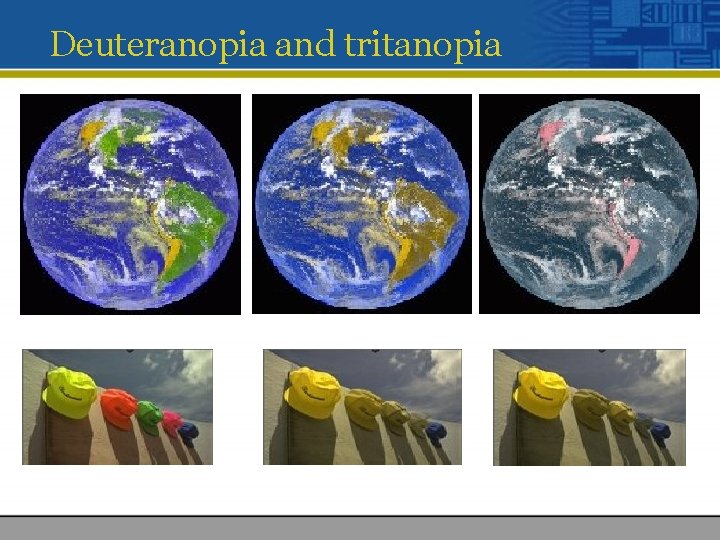
Deuteranopia and tritanopia
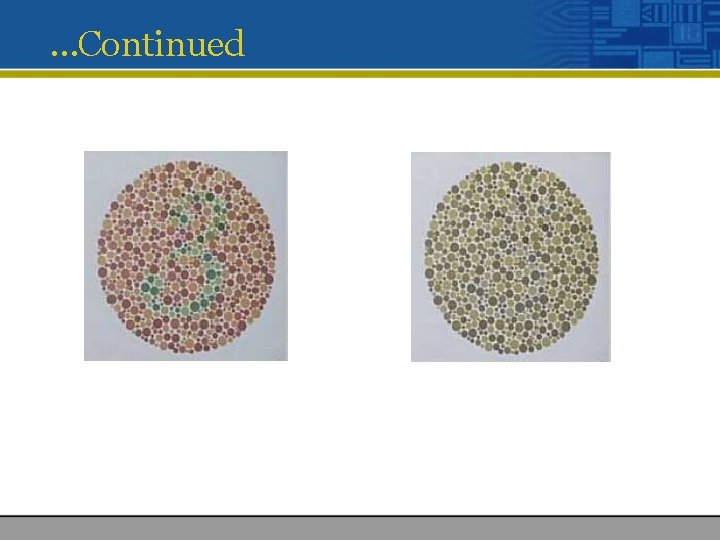
…Continued
Computerized Colors • Because the eye’s receptors are sensitive to red, green, and blue light, by adjusting combinations of these three colors, the eye and brain will interpolate the combinations of colors in between. • Although the eye perceives colors based upon red, green, and blue, there actually two basic methods of making color: additive and subtractive.
Additive Color • In the additive color method, a color is created by combining colored light sources in three primary colors: red, green, and blue (RGB). • This is the process used for cathode ray tube (CRT), liquid crystal (LCD), and plasma displays • On the back of the glass face of a CRT are thousands of phosphorescing chemical dots • These dots are each about 0. 30 mm or less in diameter
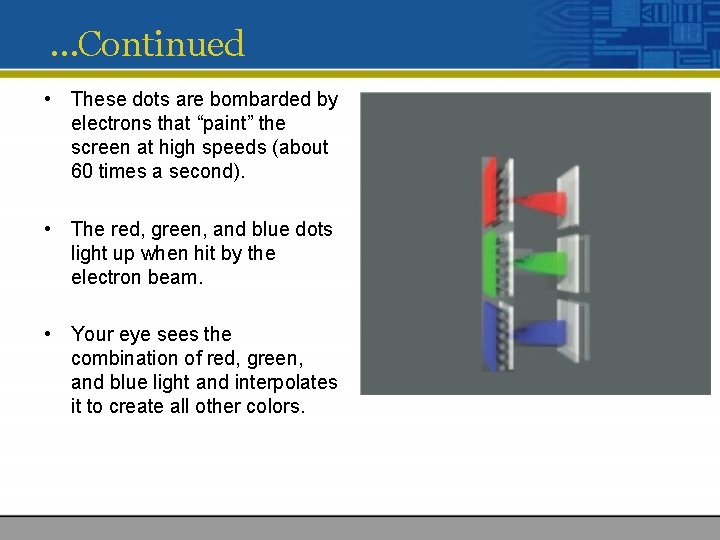
…Continued • These dots are bombarded by electrons that “paint” the screen at high speeds (about 60 times a second). • The red, green, and blue dots light up when hit by the electron beam. • Your eye sees the combination of red, green, and blue light and interpolates it to create all other colors.
Subtractive Color • In the subtractive color method, color is created by combining colored media such as paints or ink that absorb (or subtract) some parts of the color spectrum of light and reflect the others back to the eye. • Subtractive color is the process used to create color in printing. • The printed page is made up of tiny halftone dots of three primary colors: cyan, magenta, and yellow (designated as CMY).
…Continued
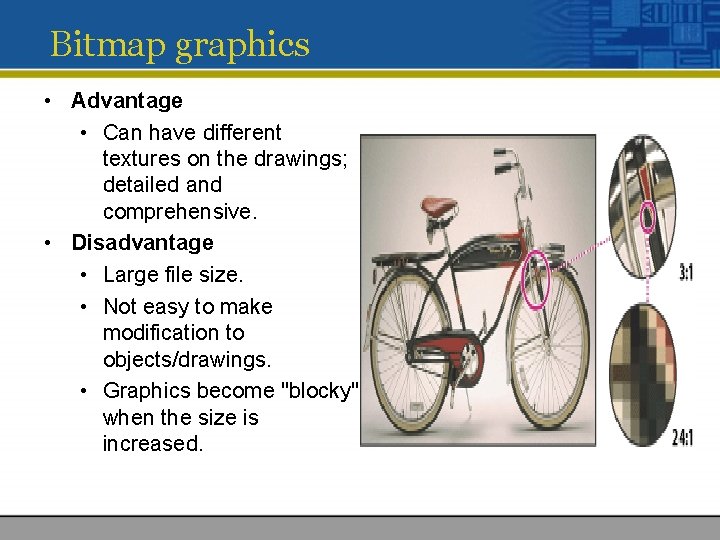
Bitmap graphics • Advantage • Can have different textures on the drawings; detailed and comprehensive. • Disadvantage • Large file size. • Not easy to make modification to objects/drawings. • Graphics become "blocky" when the size is increased.
Vector Graphics • Vector images are based on drawing elements/objects to create an image. • The elements and objects are stored as a series of command that define the individual objects. • Packages that allow to create vector graphics include : • Adobe Freehand MX • Adobe Flash MX • Adobe Illustrator
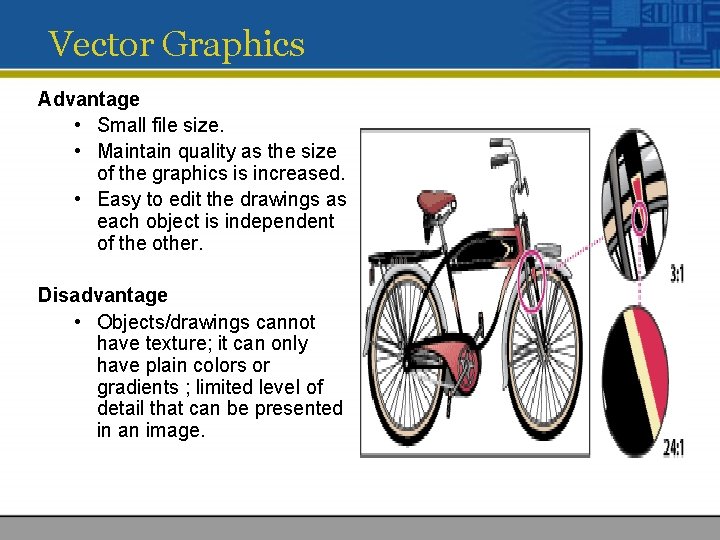
Vector Graphics Advantage • Small file size. • Maintain quality as the size of the graphics is increased. • Easy to edit the drawings as each object is independent of the other. Disadvantage • Objects/drawings cannot have texture; it can only have plain colors or gradients ; limited level of detail that can be presented in an image.
Resolution There are three types of resolution measuring different aspects of the quality, detail and size of an image: • • • Colour resolution Image resolution Display resolution Image Resolution: The term resolution often associated with an image’s degree of detail or quality. Display Resolution: Resolution can also refer to quality capability of graphic output (monitor). Colour Resolution / Colour Depth: Colour depth describe the number of bits used to represent the colour of a single pixel.
Image resolution • Image resolution measures the pixel dimension of an overall image or how many pixel the image has. • Image resolution is measured in width and height. • For example, 100 * 100 -pixel image has a total of 10, 000 pixels.
Display resolution • Display resolution is also measured in pixels in terms of height and width. • It simply means how many pixels can be displayed on the computer screen. • Display resolution normally uses a setting of 640 x 480(VGA), 800 x 600 (SVGA), 1024 x 768, etc. • You can change the display resolution under Display Properties in Control panel. • If your image resolution is bigger than the display resolution, the result would be part of the image will be out of the display area.
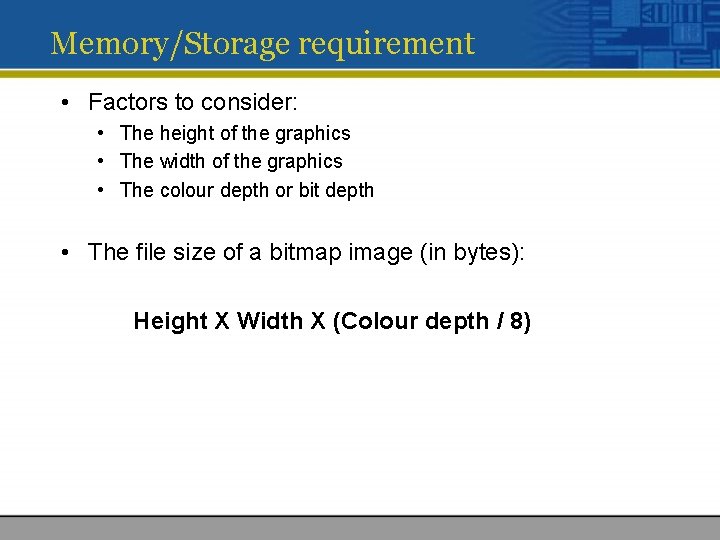
Memory/Storage requirement • Factors to consider: • The height of the graphics • The width of the graphics • The colour depth or bit depth • The file size of a bitmap image (in bytes): Height X Width X (Colour depth / 8)
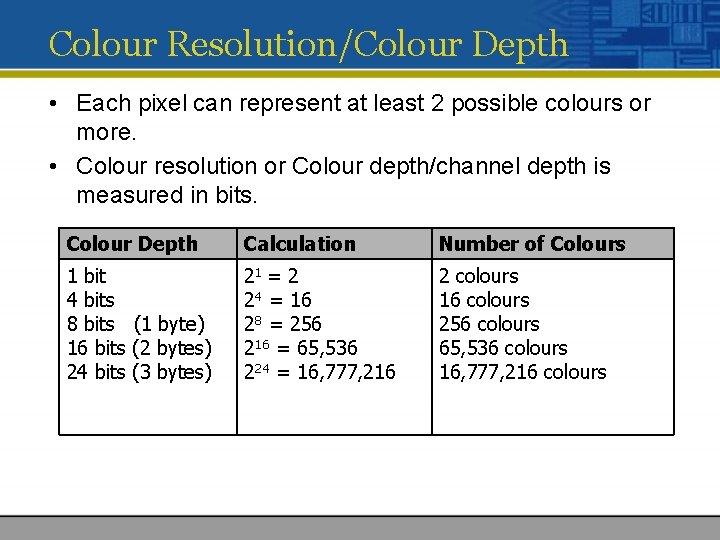
Colour Resolution/Colour Depth • Each pixel can represent at least 2 possible colours or more. • Colour resolution or Colour depth/channel depth is measured in bits. Colour Depth Calculation Number of Colours 1 bit 4 bits 8 bits (1 byte) 16 bits (2 bytes) 24 bits (3 bytes) 21 = 2 24 = 16 28 = 256 216 = 65, 536 224 = 16, 777, 216 2 colours 16 colours 256 colours 65, 536 colours 16, 777, 216 colours
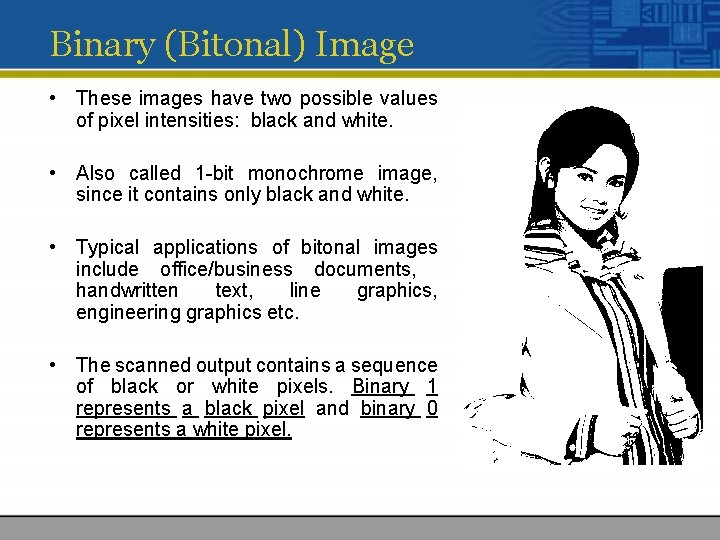
Binary (Bitonal) Image • These images have two possible values of pixel intensities: black and white. • Also called 1 -bit monochrome image, since it contains only black and white. • Typical applications of bitonal images include office/business documents, handwritten text, line graphics, engineering graphics etc. • The scanned output contains a sequence of black or white pixels. Binary 1 represents a black pixel and binary 0 represents a white pixel.
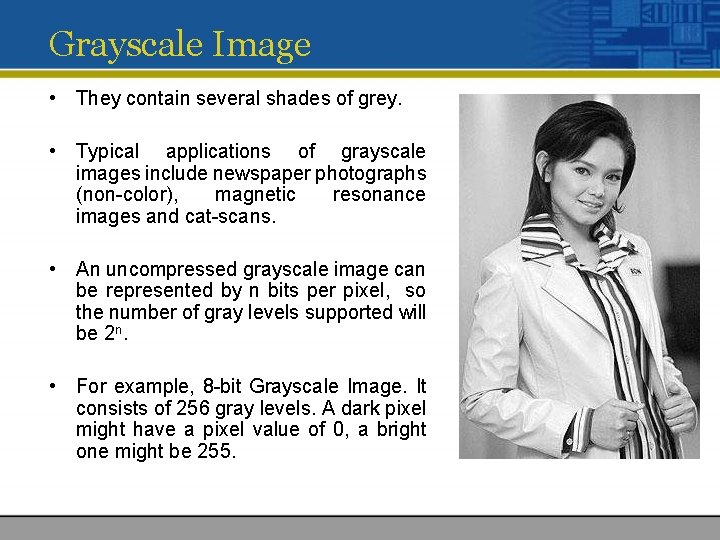
Grayscale Image • They contain several shades of grey. • Typical applications of grayscale images include newspaper photographs (non-color), magnetic resonance images and cat-scans. • An uncompressed grayscale image can be represented by n bits per pixel, so the number of gray levels supported will be 2 n. • For example, 8 -bit Grayscale Image. It consists of 256 gray levels. A dark pixel might have a pixel value of 0, a bright one might be 255.
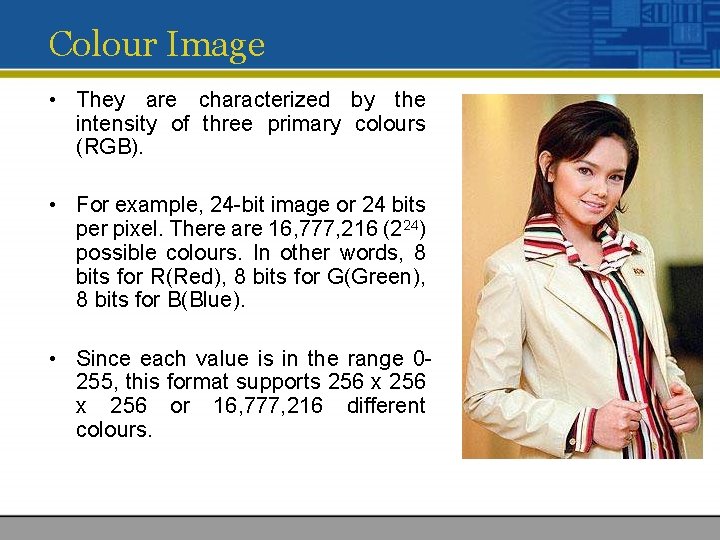
Colour Image • They are characterized by the intensity of three primary colours (RGB). • For example, 24 -bit image or 24 bits per pixel. There are 16, 777, 216 (224) possible colours. In other words, 8 bits for R(Red), 8 bits for G(Green), 8 bits for B(Blue). • Since each value is in the range 0255, this format supports 256 x 256 or 16, 777, 216 different colours.
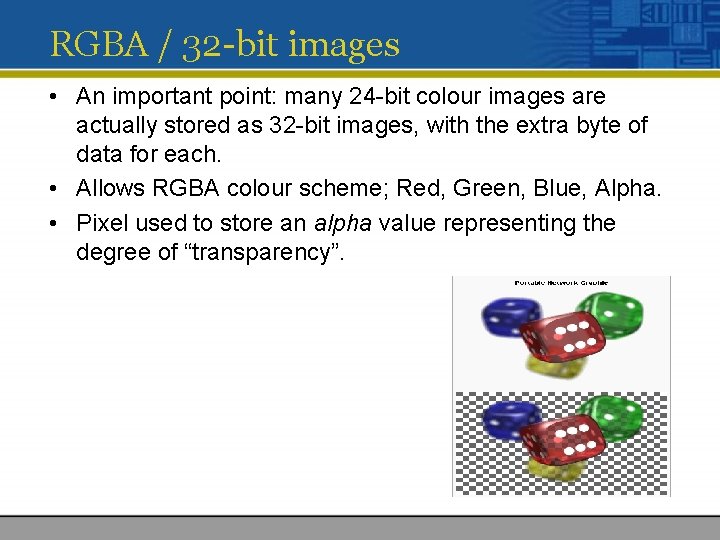
RGBA / 32 -bit images • An important point: many 24 -bit colour images are actually stored as 32 -bit images, with the extra byte of data for each. • Allows RGBA colour scheme; Red, Green, Blue, Alpha. • Pixel used to store an alpha value representing the degree of “transparency”.
Image Colour Schemes
Various Colour Schemes • Several colour schemes (also called colour space, models or formats) have been developed to represent colour mathematically. • There are 4 commonly used colour schemes : • RGB Colour Scheme • CMY or CMYK Colour Scheme • HSB or HSI (Hue, Saturation, Brightness/Intensity) Colour Scheme • YUV Colour Scheme
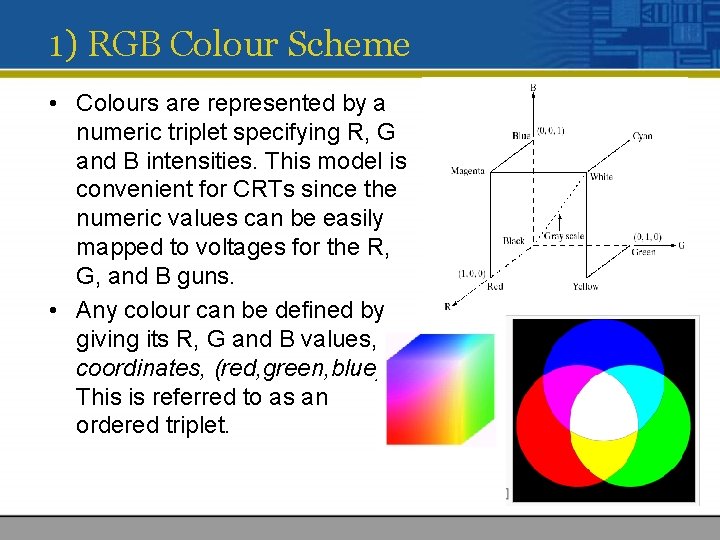
1) RGB Colour Scheme • Colours are represented by a numeric triplet specifying R, G and B intensities. This model is convenient for CRTs since the numeric values can be easily mapped to voltages for the R, G, and B guns. • Any colour can be defined by giving its R, G and B values, or coordinates, (red, green, blue). This is referred to as an ordered triplet.
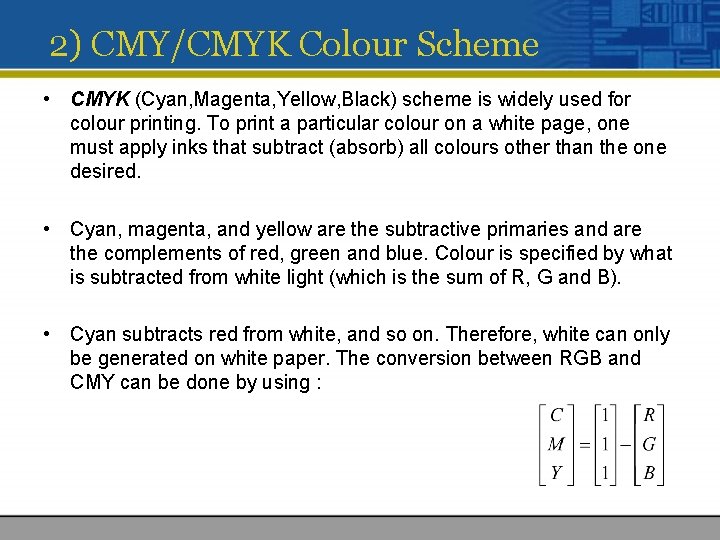
2) CMY/CMYK Colour Scheme • CMYK (Cyan, Magenta, Yellow, Black) scheme is widely used for colour printing. To print a particular colour on a white page, one must apply inks that subtract (absorb) all colours other than the one desired. • Cyan, magenta, and yellow are the subtractive primaries and are the complements of red, green and blue. Colour is specified by what is subtracted from white light (which is the sum of R, G and B). • Cyan subtracts red from white, and so on. Therefore, white can only be generated on white paper. The conversion between RGB and CMY can be done by using :
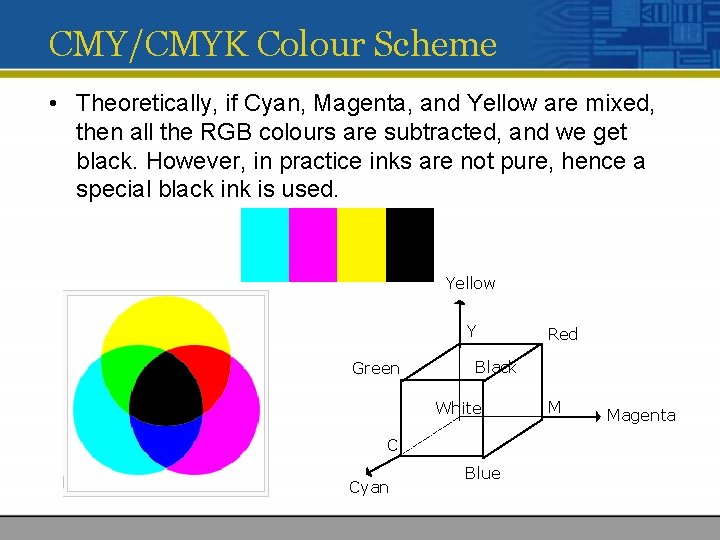
CMY/CMYK Colour Scheme • Theoretically, if Cyan, Magenta, and Yellow are mixed, then all the RGB colours are subtracted, and we get black. However, in practice inks are not pure, hence a special black ink is used. Yellow Y Green Black White C Cyan Red Blue M Magenta
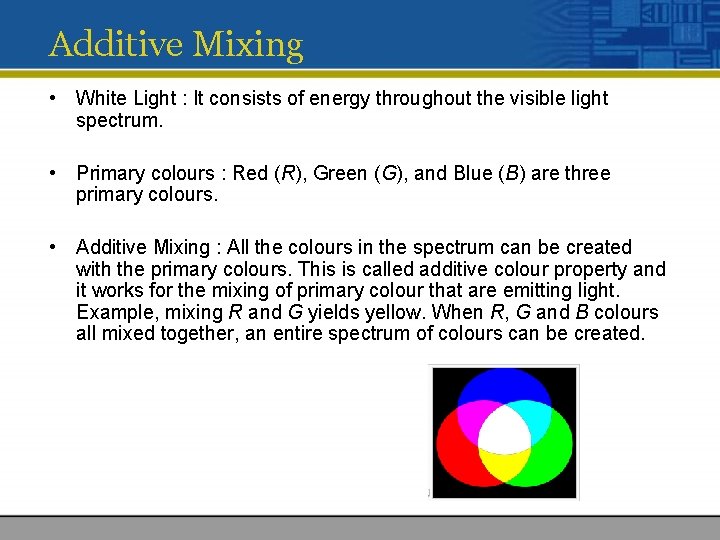
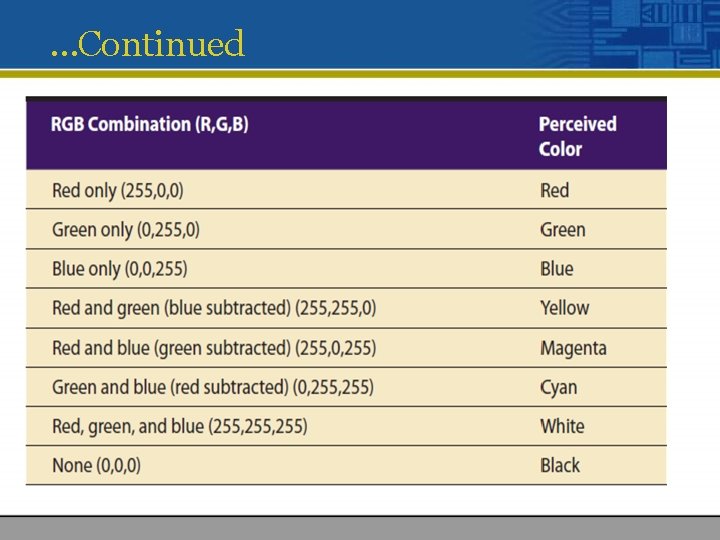
Additive Mixing • White Light : It consists of energy throughout the visible light spectrum. • Primary colours : Red (R), Green (G), and Blue (B) are three primary colours. • Additive Mixing : All the colours in the spectrum can be created with the primary colours. This is called additive colour property and it works for the mixing of primary colour that are emitting light. Example, mixing R and G yields yellow. When R, G and B colours all mixed together, an entire spectrum of colours can be created.
Subtractive Mixing • Secondary colours : Cyan, Magenta and Yellow (CMY) are secondary colours or subtractive primary colours. • Subtractive Mixing : Subtractive colour mixing is based on reflective colours rather than emissive colours. • It generates colour by mixing secondary colours. For example, mixing magenta and yellow yields red. • In subtractive mixing, unwanted colours are selectively absorbed and the required colour is reflected. The yellow colour absorbs the blue component, and the magenta absorbs the green component, resulting in red. • Subtractive mixing is used primarily in the printing industry, by printing the three subtractive colours in differing proportions on white paper can generate all the colours in the spectrum.
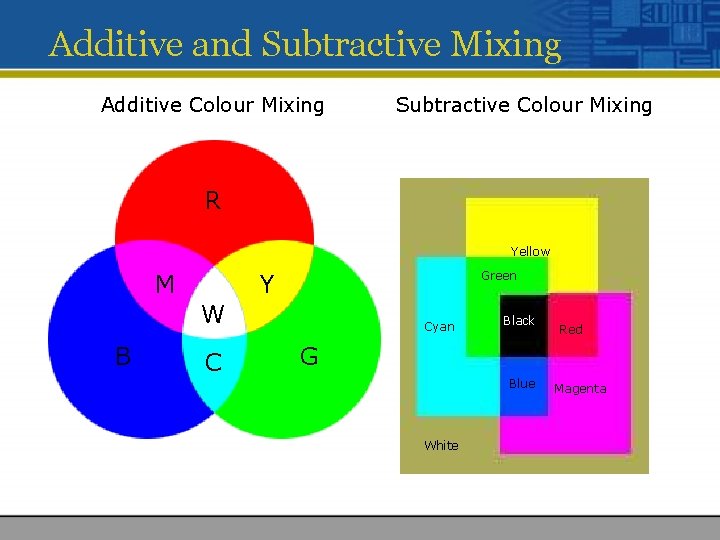
Additive and Subtractive Mixing Additive Colour Mixing Subtractive Colour Mixing R Yellow M Green Y W B C Cyan Black Red G Blue White Magenta
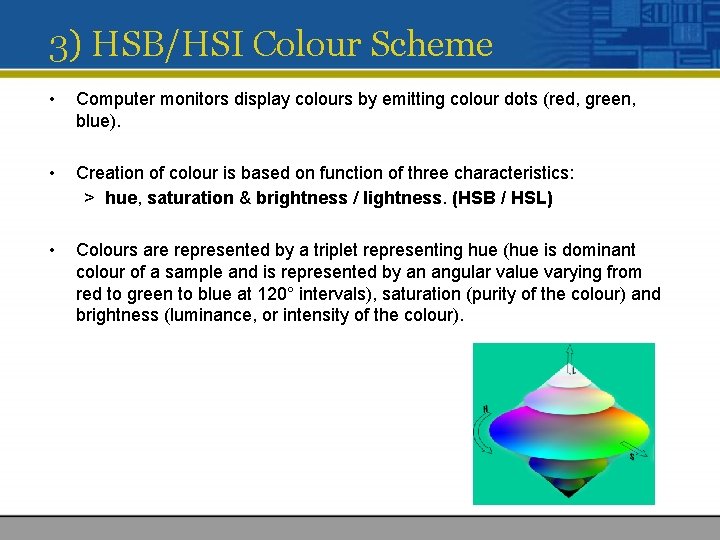
3) HSB/HSI Colour Scheme • Computer monitors display colours by emitting colour dots (red, green, blue). • Creation of colour is based on function of three characteristics: > hue, saturation & brightness / lightness. (HSB / HSL) • Colours are represented by a triplet representing hue (hue is dominant colour of a sample and is represented by an angular value varying from red to green to blue at 120° intervals), saturation (purity of the colour) and brightness (luminance, or intensity of the colour).
HSB/HSI Colour Scheme • Hue: It is the colour sensation produced in an observer due to the presence of certain wavelengths of colour. Each wavelength presents a different hue. Hue is based on a vector value moving from 0 to 360 degrees on a colour wheel. • Saturation: This is a measure of colour intensity, for example, the difference between red and pink. Although the two colours have the same predominant wavelength, one may have more white colour mixed in with it and hence appear less saturated. (100% = pure colour, 0% = black, white , gray) • Intensity / Luminance or Brightness : This is a measure of the light emitted or reflected by an object. Certain colours appear brighter than others as the human eye does not respond in the same way to all colours. The human eyes see finer details in image scene more because of brightness variations than because of colour variations.
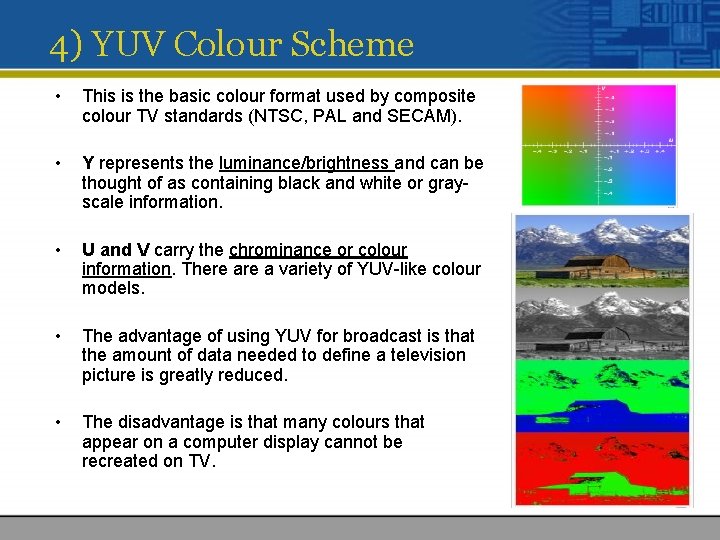
4) YUV Colour Scheme • This is the basic colour format used by composite colour TV standards (NTSC, PAL and SECAM). • Y represents the luminance/brightness and can be thought of as containing black and white or grayscale information. • U and V carry the chrominance or colour information. There a variety of YUV-like colour models. • The advantage of using YUV for broadcast is that the amount of data needed to define a television picture is greatly reduced. • The disadvantage is that many colours that appear on a computer display cannot be recreated on TV.

Colour Dithering • Usually, digitised images are 24 bit, 16 million colour depth. • If display system is limited to less than 16 million colours, the image must be transformed for display in the lesser colour environment (colour dithering). • Colour Dithering – the process through which colours are changed to meet the closest available colour based on the available palette. • Colours are substituted with closest available colours (output device). • The quality of dithering will depend on the algorithm used to select the closest colour.
Image Processing
Image Processing • Analyzing and manipulating images with a computer. Image processing generally involves three steps: • 1. Import an image with an optical scanner or directly through digital photography. • 2. Manipulate or analyze the image in some way. This stage can include image enhancement and data compression. • 3. Output the result. The result might be the image altered in some way.
Image Processing Techniques • Image processing operations may operate directly on pixel data or on higher level features such as edges, surfaces, and volumes. • Image processing operations may be roughly divided into six categories. - Editing Point operations Filtering Compositing Geometric transformations Conversions • Support for a variety of image operations is now becoming available in page layout and paint programs (such as Photoshop).
1) Editing • The most basic operation is changing individual pixels. • Image editors also support cutting, copying, and pasting selected groups of pixel. A selection might be a simple rectangular sub-image or an arbitrarily shaped region. • Selections are either drawn by the user or calculated by software (for instance, by examining colour differences between neighboring pixels).
2) Point Operations • A point operation consists of applying a function to every pixel in an image (or selection). • The function is such that in calculating a new pixel value, the only image data used is the pixel’s current value and exclude the neighboring pixels. • Examples include: • Thresholding: A pixel is set to 1 or 0 depending upon whether it is above or below the threshold value. This creates monochrome (binary) images which are often used as masks when compositing*. * Compositing: creating new images or moving images by combining images from different sources – like realworld digital video, film, synthetic 3 -D imagery, 2 -D animations, painted backdrops, digital still photographs, and text. • colour correction: An image may be modified to increase or reduce contrast, brightness, and to strengthen or weaken particular colours.
3) Filtering • Filter operations, like point operation, involve applying a function to every pixel in an image or selection. • The function determines a pixel’s new value based on its current value and that of neighboring pixels. • Depending on the definition of the function, filtering is used to blur or sharpen the image, introduce distortions, and produce a variety of special effects.
4) Compositing • Image compositing is the combination of two or more images to produce a new image. • Alpha channels are frequently used to control blending and masking. • In general, compositing is specified by mathematical relationship between the various images. For instance one image might be produced from the sum of two existing images. • A very large variety of effects are possible.
5) Geometric Transformations • Basic geometric transformations include displacing, rotating, mirroring, and scaling an image. • Other geometric transformations include skewing (slanting) and warping (an example of warping is mapping a rectangular selection to an arbitrary foursided polygon)
6) Conversions • With the variety of image formats available, there is a frequent need to convert from one format to another. • Fortunately, there a number of public domain software packages which handle many format conversion tasks. In addition, image processing software will usually import and export images in a number of formats. • Besides format conversion, there are other operations that can be considered forms of conversion. These include image compression or decompression, changing colour schemes (or models) and changing image depth or resolution.
Graphic File formats • Due to the number of choices available in determining image representation, it is not surprising that a number of image formats have evolved. Some examples of image file formats used for storing images are • • GIF (Graphics Interchange Format) Bitmap Post. Script JPEG TIFF (Tagged Image File Format) TGA (often called Targa) PNG, and etc.
Graphics Interchange Format (GIF) • 8 -bit per pixel, bitmap image format commonly used by the world wide web • Uses lossless compression technique • Compress line art well • Image can have transparent portion • Interlaced images possible • Animation possible (Jasc Animation Shop ) • Can only have a maximum of 256 colours • Does not compress photographs well • Copyrighted format such that developers must pay royalty
Windows Bitmap (BMP) • Bitmapped Graphics Format • Most common format containing pixel by pixel value • Platform independent • Support up to 24 -bit colour depth • No compression • A 32 -bit version with integrated alpha channel has been introduced with Windows XP. (support transparency) • No animation
Joint Photographic Expert Group (JPEG) • Commonly used standard method of compression for photographic images • Support a maximum of 16. 7 million colours • Compresses photographs well • Possible to select compression ratio versus quality • Progressive (interlaced) images possible • Lossy compression technique: Losses some image information • Degradation of image possible with repeated editing and saving • No transparency • No animation
Portable Network Graphic (PNG) • No colour information lost • Can use all colour depth - supports more than 16. 7 million colours • Compresses well- Lossless Compression Technique • Image can have transparent portion • No animation
Other Graphic File formats • RAW Graphics File Format (. raw) A flexible basic file format for transferring files between applications and computer platforms. This format consists of a stream of bytes describing the colour information in the file. • Tagged Image File Format (. tif, . tiff) TIFF is mainly used for exchanging documents between different applications and different computer platforms. It supports the LZW method compression for image types. • Truevision Targa (. tga) Developed by Truevision Inc. TGA files is a file format that will support images suitable for display on Targa hardware but is supported by many applications on a wide range of platforms. • Z Soft Paintbrush (. pcx) Bitmap graphics file format, originally developed by Z-Soft for use with PC-Paintbrush. This file format is now used and generated by many applications and scanners.
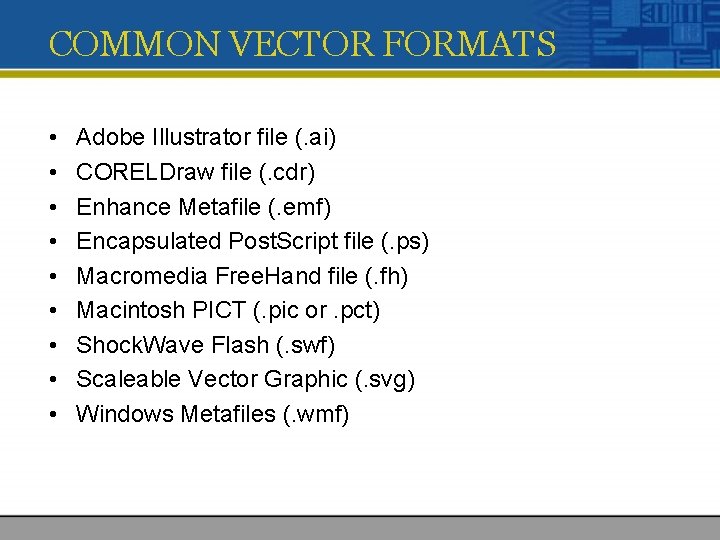
COMMON VECTOR FORMATS • • • Adobe Illustrator file (. ai) CORELDraw file (. cdr) Enhance Metafile (. emf) Encapsulated Post. Script file (. ps) Macromedia Free. Hand file (. fh) Macintosh PICT (. pic or. pct) Shock. Wave Flash (. swf) Scaleable Vector Graphic (. svg) Windows Metafiles (. wmf)
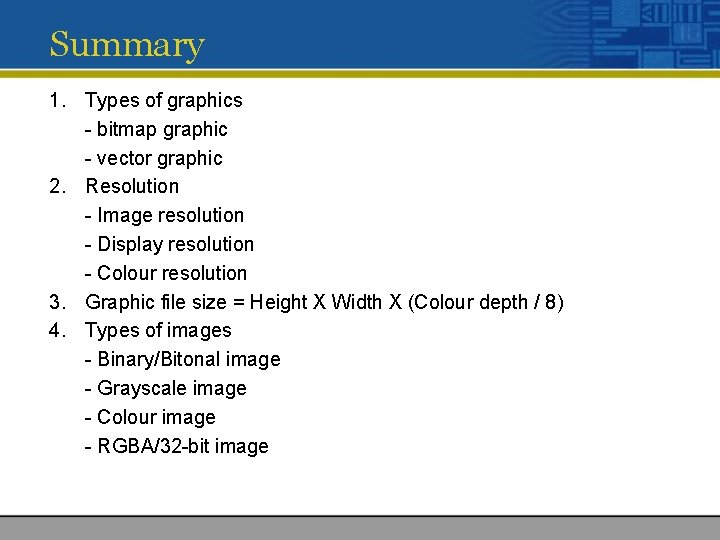
Summary 1. Types of graphics - bitmap graphic - vector graphic 2. Resolution - Image resolution - Display resolution - Colour resolution 3. Graphic file size = Height X Width X (Colour depth / 8) 4. Types of images - Binary/Bitonal image - Grayscale image - Colour image - RGBA/32 -bit image
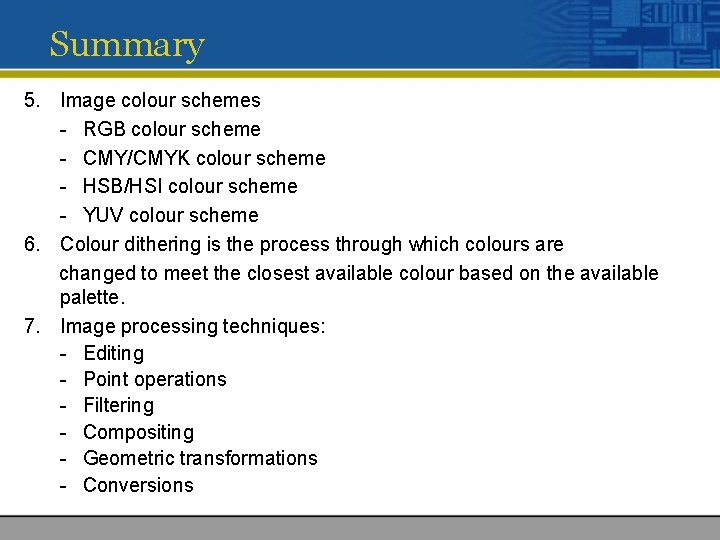
Summary 5. Image colour schemes - RGB colour scheme - CMY/CMYK colour scheme - HSB/HSI colour scheme - YUV colour scheme 6. Colour dithering is the process through which colours are changed to meet the closest available colour based on the available palette. 7. Image processing techniques: - Editing - Point operations - Filtering - Compositing - Geometric transformations - Conversions
- Slides: 84