
GPC ONEPAGER Smart Pay 3 Do D Data


- Slides: 4
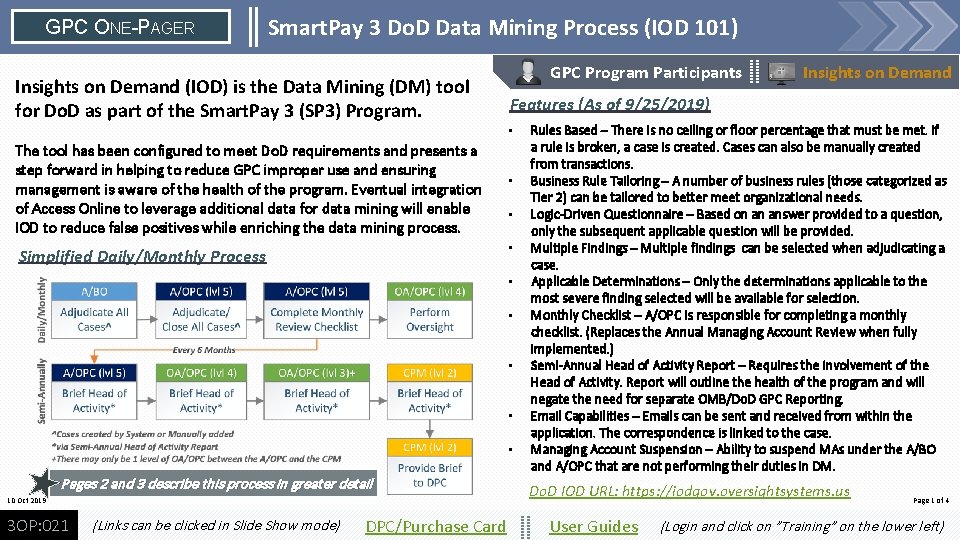
GPC ONE-PAGER Smart. Pay 3 Do. D Data Mining Process (IOD 101) Insights on Demand (IOD) is the Data Mining (DM) tool for Do. D as part of the Smart. Pay 3 (SP 3) Program. The tool has been configured to meet Do. D requirements and presents a step forward in helping to reduce GPC improper use and ensuring management is aware of the health of the program. Eventual integration of Access Online to leverage additional data for data mining will enable IOD to reduce false positives while enriching the data mining process. GPC Program Participants Features (As of 9/25/2019) • • Simplified Daily/Monthly Process • • • Pages 2 and 3 describe this process in greater detail 10 Oct 2019 3 OP: 021 (Links can be clicked in Slide Show mode) DPC/Purchase Card Insights on Demand Rules Based – There is no ceiling or floor percentage that must be met. If a rule is broken, a case is created. Cases can also be manually created from transactions. Business Rule Tailoring – A number of business rules (those categorized as Tier 2) can be tailored to better meet organizational needs. Logic-Driven Questionnaire – Based on an answer provided to a question, only the subsequent applicable question will be provided. Multiple Findings – Multiple findings can be selected when adjudicating a case. Applicable Determinations – Only the determinations applicable to the most severe finding selected will be available for selection. Monthly Checklist – A/OPC is responsible for completing a monthly checklist. (Replaces the Annual Managing Account Review when fully implemented. ) Semi-Annual Head of Activity Report – Requires the involvement of the Head of Activity. Report will outline the health of the program and will negate the need for separate OMB/Do. D GPC Reporting. Email Capabilities – Emails can be sent and received from within the application. The correspondence is linked to the case. Managing Account Suspension – Ability to suspend MAs under the A/BO and A/OPC that are not performing their duties in DM. Do. D IOD URL: https: //iodgov. oversightsystems. us User Guides Page 1 of 4 (Login and click on ”Training” on the lower left)
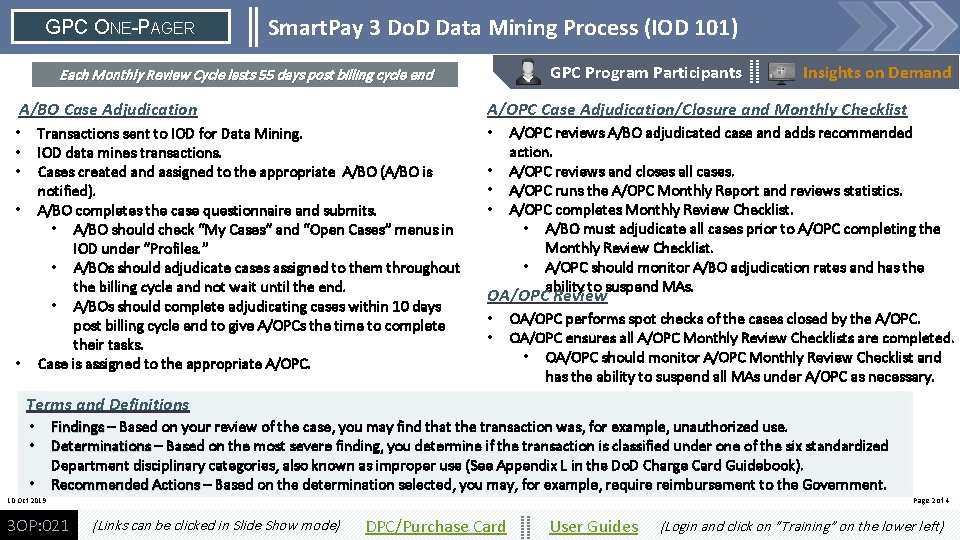
GPC ONE-PAGER Smart. Pay 3 Do. D Data Mining Process (IOD 101) GPC Program Participants Each Monthly Review Cycle lasts 55 days post billing cycle end A/BO Case Adjudication • • • Insights on Demand A/OPC Case Adjudication/Closure and Monthly Checklist Transactions sent to IOD for Data Mining. IOD data mines transactions. Cases created and assigned to the appropriate A/BO (A/BO is notified). A/BO completes the case questionnaire and submits. • A/BO should check “My Cases” and “Open Cases” menus in IOD under “Profiles. ” • A/BOs should adjudicate cases assigned to them throughout the billing cycle and not wait until the end. • A/BOs should complete adjudicating cases within 10 days post billing cycle end to give A/OPCs the time to complete their tasks. Case is assigned to the appropriate A/OPC. • • A/OPC reviews A/BO adjudicated case and adds recommended action. A/OPC reviews and closes all cases. A/OPC runs the A/OPC Monthly Report and reviews statistics. A/OPC completes Monthly Review Checklist. • A/BO must adjudicate all cases prior to A/OPC completing the Monthly Review Checklist. • A/OPC should monitor A/BO adjudication rates and has the ability to suspend MAs. OA/OPC Review • • OA/OPC performs spot checks of the cases closed by the A/OPC. OA/OPC ensures all A/OPC Monthly Review Checklists are completed. • OA/OPC should monitor A/OPC Monthly Review Checklist and has the ability to suspend all MAs under A/OPC as necessary. Terms and Definitions • Findings – Based on your review of the case, you may find that the transaction was, for example, unauthorized use. • Determinations – Based on the most severe finding, you determine if the transaction is classified under one of the six standardized Department disciplinary categories, also known as improper use (See Appendix L in the Do. D Charge Card Guidebook). • Recommended Actions – Based on the determination selected, you may, for example, require reimbursement to the Government. 10 Oct 2019 3 OP: 021 Page 2 of 4 (Links can be clicked in Slide Show mode) DPC/Purchase Card User Guides (Login and click on “Training” on the lower left)
GPC ONE-PAGER Smart. Pay 3 Do. D Data Mining Process (IOD 101) GPC Program Participants Semi-Annual Head of Activity Reporting takes place every 6 months Insights on Demand A/OPC Briefs the Head of Activity (HA) • • A/OPC completes the 6 th Monthly Review Checklist. A/OPC runs the Semi-Annual Head of Activity Report. A/OPC briefs the Head of Activity. • • OA/OPC waits for all A/OPCs to complete their tasks. OA/OPC runs the Semi-Annual Head of Activity Report. OA/OPC briefs the Head of Activity. There is currently no way to systematically mark the task as complete and notify the OA/OPC that the task has been completed. * OA/OPC Briefs the HA (there may be 2 OA/OPC levels) The goals of this process are to ensure that oversight personnel, up to the HA at each level: • Are familiar with the health of the GPC program under their purview, and • Make appropriate course corrections when necessary. SP 3 Governance There is currently no way to systematically mark the task as complete and notify the CPM that the task has been completed. * The Integrated Solutions Team (IST) semi-annual governance CPM Briefs the HA and provides briefing to DPC meeting presents an opportunity for Do. D to tweak the • CPM waits for all OA/OPCs to complete their tasks. application to better identify improper use and to reduce • CPM runs the Semi-Annual Head of Activity Report. data mining cases as a result of false positives. Members • CPM briefs the HA (no later than June 15 and December 15). include individuals from Master. Card, IOD, U. S. Bank, DPC • There is currently no way to systematically mark the task as complete. * and the Service CPMs. Work with your CPM to learn more. • CPM provides HA review results to DPC within 30 days of HA Semi. Annual briefs (no later than July 15 and January 15). 10 Oct 2019 3 OP: 021 (Links can be clicked in Slide Show mode) *As of 10/10/2019 DPC/Purchase Card User Guides Page 3 of 4 (Login and click on “Training” on the lower left)
GPC ONE-PAGER Smart. Pay 3 Do. D Data Mining Process (IOD 101) GPC Program Participants Common Questions (A/BO) I logged into IOD for the first time, where do I start? • • • Click on “Profiles” located on the left side toolbar. This will open a drop-down menu. In the drop-down, click on “My Open Cases. ” “My Open Cases” displays all cases where you are assigned as the owner. If there are 0 records in “My Open Cases, ” go back to the drop-down on the left tool bar and click on “Open Cases. ” “Open Cases” displays all cases which you have the permission to view, including those where you may be the alternate A/BO. (Any User) I am the Primary (A/BO or AOPC), but cases are being assigned to my Alternate. How do I correct this? (A/OPC) Why is my Monthly Review “Not Ready to Certify? ” • • In order to certify, all of the cases within that monthly cycle must be closed. An easy way to find the open cases that need to be closed by cycle is to click on “Open Cases” on the left tool bar. Next, above the center table, click on the drop-down menu found next to “Summarized By, ” and scroll down to select “Cycle. ” In the center table, click on the menu heading “Cycle” to sort from oldest to youngest. Click the checkbox next to any cycle to display the cases from that cycle in the bottom table. (A/OPC) What reports can help me keep track of progress? • Actions and Findings Report – Shows the results of all closed cases within your hierarchy My Related User Report – Shows information on users within your hierarchy, including username, last login date, and reporting hierarchy IOD assigns cases based on the Reporting Hierarchy and Functional • Entitlement Groups found in Ax. OL. • If there is a single Primary with the correct Reporting Hierarchy, IOD assigns the case to that user. • If there are two or more Primaries, IOD will assign the case randomly to one of the Primaries. A/OPCs can additionally reassign the case by Need more help? -> changing the owner. 10 Oct 2019 • 3 OP: 021 (Links can be clicked in Slide Show mode) Insights on Demand DPC/Purchase Card User Guides IOD Help Desk Contact Information: Email: iodgov@oversightsystems. com Phone: 855 -213 -8240 Page 4 of 4 (Login and Click on “Training’”on the lower left)