
Google File System A real massive distributed file
Google File System • A real massive distributed file system • Hundreds of servers and clients – The largest cluster has >1000 storage nodes, over 300 TB of disk storage, hundreds of clients • Metadata replication • Design driven by application workload and technological environment • Avoided many of the difficulties traditionally associated with replication by designing for a specific use case CMPT 431© A. Fedorova 1
Specifics of the Google Environment • FS is consists of hundreds of storage machines, built of inexpensive commodity parts • Component failures are a norm – Application and OS bugs – Human errors – Hardware failures: disks, memory, network, power supplies • • Millions of files, each 100 MB or larger Multi-GB files are common Applications are written for GFS Allows co-design of the file system and applications CMPT 431© A. Fedorova 2
Specifics of the Google Workload • Google applications: – – Data analysis programs that scan through data repositories Data streaming applications Archiving Indexing applications that produce (intermediate) search results • Most files are mutated by appending new data – large sequential writes • Random writes are very uncommon • Files are written once, then they are only read • Reads are sequential • Large streaming reads and small random reads • High bandwidth is more important than low latency CMPT 431© A. Fedorova 3
GFS Architecture CMPT 431© A. Fedorova 4

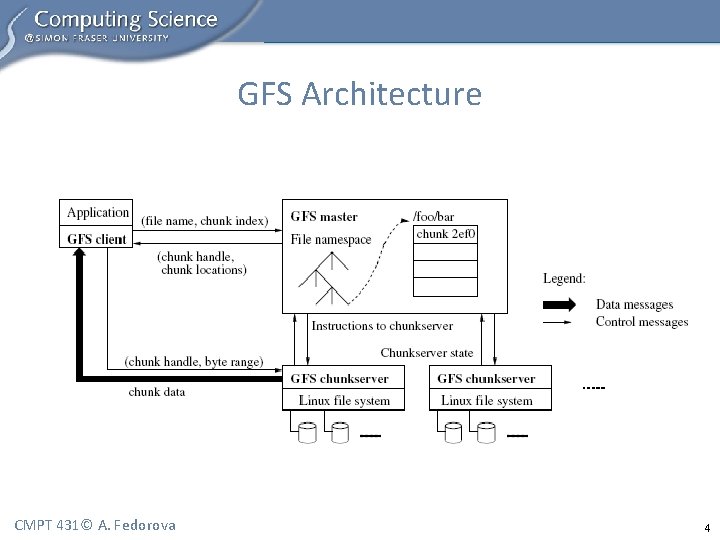
GFS Architecture (cont. ) • • Single master Multiple chunk servers Multiple clients Each is a commodity Linux machine, a server is a user-level process Files are divided into chunks Each chunk has a handle (an ID assigned by the master) Each chunk is replicated (on three machines by default) Master stores metadata, manages chunks, does garbage collection, etc. • What is metadata? • Clients communicate with master for metadata operations, but with chunkservers for data operations • No additional caching (besides the Linux in-memory buffer caching) CMPT 431© A. Fedorova 5
Client/GFS Interaction • Client: – Takes file and offset – Translates it into the chunk index within the file – Sends request to master, containing file name and chunk index • Master: – Replies with the corresponding chunk handle and location of the replicas (the master must know where the replicas are) • Client: – Caches this information – Contacts one of the replicas (i. e. , a chunkserver) for data CMPT 431© A. Fedorova 6
Master • Stores metadata – The file and chunk namespaces – Mapping from files to chunks – Locations of each chunk’s replicas • Interacts with clients • Creates chunk replicas • Orchestrates chunk modifications across multiple replicas – Ensures atomic concurrent appends – Locks concurrent operations • Deletes old files (via garbage collection) CMPT 431© A. Fedorova 7
Metadata On Master • Metadata – data about the data: – File names – Mapping of file names to chunk IDs – Chunk locations • Metadata is kept in memory • File names and chunk mappings are also kept persistent in an operation log • Chunk locations are kept in memory only – They will be lost during the crash – The master asks chunk servers about their chunks at startup – builds a table of chunk locations CMPT 431© A. Fedorova 8
Why Keep Metadata In Memory? • To keep master operations fast • Master can periodically scan its internal state in the background, in order to implement: – Garbage collection – Re-replication (in case of chunk server failures) – Chunk migration (for load balancing) • But the file system size is limited by the amount of memory on the master? – This has not been a problem for GFS – metadata is compact CMPT 431© A. Fedorova 9
Why Not Keep Chunk Locations Persistent? • Chunk location – which chunk server has a replica of a given chunk • Master polls chunk servers for that information on startup • Thereafter, master keeps itself up-to-date: – It controls all initial chunk placement, migration and re-replication – It monitors chunkserver status with regular Heart. Beat messages • Motivation: simplicity • Eliminates the need to keep master and chunkservers synchronized • Synchronization would be needed when chunkservers: – Join and leave the cluster – Change names – Fail and restart CMPT 431© A. Fedorova 10
Operation Log • Historical record of metadata changes • Maintains logical order of concurrent operations • Log is used for recovery – the master replays it in the event of failures • Master periodically checkpoints the log • Checkpoint is a B-tree data structure – Can be loaded into memory – Used for namespace lookup without extra parsing • Checkpoint can be done on the background CMPT 431© A. Fedorova 11
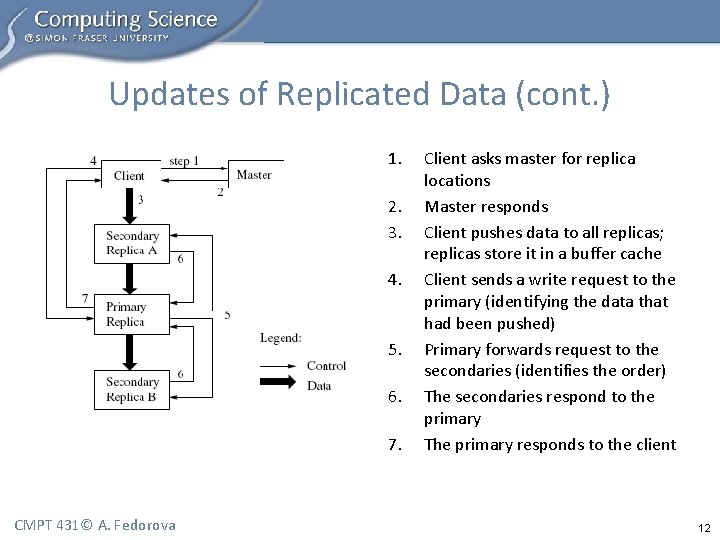
Updates of Replicated Data (cont. ) 1. 2. 3. 4. 5. 6. 7. CMPT 431© A. Fedorova Client asks master for replica locations Master responds Client pushes data to all replicas; replicas store it in a buffer cache Client sends a write request to the primary (identifying the data that had been pushed) Primary forwards request to the secondaries (identifies the order) The secondaries respond to the primary The primary responds to the client 12
Failure Handling During Updates • If a write fails at the primary: – The primary may report failure to the client – the client will retry – If the primary does not respond, the client retries from Step 1 by contacting the master • If a write succeeds at the primary, but fails at several replicas – The client retries several times (Steps 3 -7) CMPT 431© A. Fedorova 13
Primary Replica in GFS • Each mutation (modification) is performed at all the replicas • Modifications are applied in the same order across all replicas • Master grants a chunk lease to one replica – i. e. , the primary • The primary picks a serial order for all mutations to the chunk • The client pushes data to all replicas • The primary tells the replicas in which order they should apply modifications CMPT 431© A. Fedorova 14
Data Consistency in GFS • Loose data consistency – applications are designed for it • Applications may see inconsistent data – data is different on different replicas • Applications may see data from partially completed writes – undefined file region • On successful modification the file region is consistent • Replicas are not guaranteed to be bytewise identical (we’ll see why later, and how clients deal with this) CMPT 431© A. Fedorova 15
Implications of Loose Data Consistency For Applications • Applications are designed to handle loose data consistency • Example 1: a file is generated from beginning to end – – An application creates a file with a temporary name Atomically renames the file May periodically checkpoint the file while it is written File is written via appends – more resilient to failures than random writes • Example 2: producer-consumer file – Many writers concurrently append to one file (for merged results) – Each record is self-validating (contains a checksum) – Client filters out padding and duplicate records CMPT 431© A. Fedorova 16
Atomic Record Appends • Atomic append is a write where – The primary chooses the offset where the append happens – Returns the offset to the client • This way GFS can decide on serial order of concurrent appends without client synchronization • If an append fails at some replicas – the client retries • As a result, the file may contain multiple copies of the same record, plus replicas may be bytewise different • But after a successful update all replicas will be defined – they will all have the data written by the client at the same offset CMPT 431© A. Fedorova 17
Non-Identical Replicas • Because of failed and retried record appends, replicas may be nonidentical bytewise • Some replicas may have duplicate records (because of failed and retried appends) • Some replicas may have padded file space (empty space filled with junk) – if the master chooses record offset higher than the first available offset at a replica • Clients must deal with it: they write self-identifying records so they can distinguish valid data from junk • If clients cannot tolerate duplicates, they must insert version numbers in records • GFS pushes complexity to the client; without this, complex failure recovery scheme would need to be in place CMPT 431© A. Fedorova 18
Data Flow • Data flow is decoupled from control flow • Data is pushed linearly across all chunkservers in a pipelined fashion (not necessarily from client to primary and from primary to secondary) • Client forwards data to the closest replica; that replica forwards to the next closest replica, etc. • Pipelined fashion: while the data is incoming, the server begins forwarding it to the next replica • This design ensures good network utilization CMPT 431© A. Fedorova 19
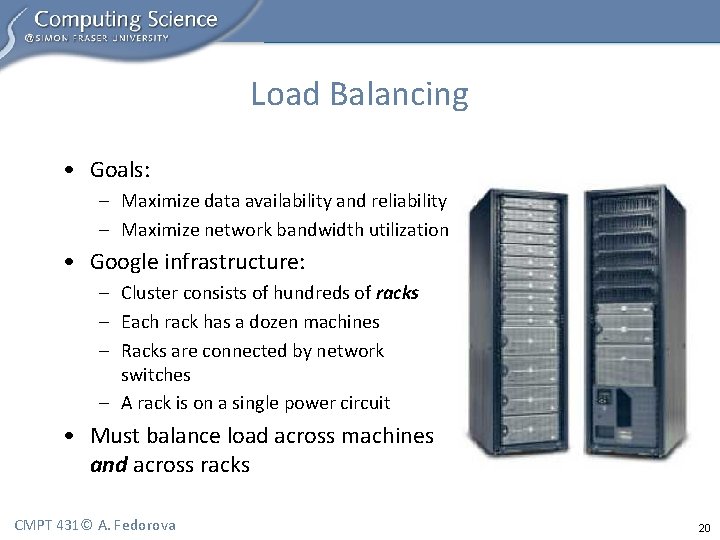
Load Balancing • Goals: – Maximize data availability and reliability – Maximize network bandwidth utilization • Google infrastructure: – Cluster consists of hundreds of racks – Each rack has a dozen machines – Racks are connected by network switches – A rack is on a single power circuit • Must balance load across machines and across racks CMPT 431© A. Fedorova 20
Fault Tolerance • Fast recovery – No distinction between normal and abnormal shutdown – Servers are routinely restarted by “killing” a server process – Servers are designed for fast recovery – all state can be recovered from the log • • Chunk replication Master replication Data integrity Diagnostic tools CMPT 431© A. Fedorova 21
Chunk Replication • Each chunk is replicated on multiple chunkservers on different racks • Users can specify different replication levels for different parts of the file namespace (default is 3) • The master clones existing replicas as needed to keep each chunk fully replicated CMPT 431© A. Fedorova 22
Single Master • Simplifies design • Master can make sophisticated load-balancing decisions involving chunk placement using global knowledge • To prevent master from becoming the bottleneck – – Clients communicate with master only for metadata Master keeps metadata in memory Clients cache metadata File data is transferred from chunkservers CMPT 431© A. Fedorova 23
Master Replication • Master state is replicated on multiple machines, so a new server can become master if the old master fails • What is replicated: operation logs and checkpoints • A modification is considered successful only after it has been logged on all master replicas • A single master is in charge; if it fails, it restarts almost instantaneously • If a machine fails and the master cannot restart itself, a failure detector outside GFS starts a new master with a replicated operation log (no master election) • Master replicas are master’s shadows – they operate similarly to the master w. r. t. updating the log, the in-memory metadata, polling the chunkservers CMPT 431© A. Fedorova 24
Detecting Stale Replicas • A replica may become stale if it misses a modification while the chunkserver was down • Each chunk has a version number, version numbers are used to detect stale replicas • A stale replica will never be given to the client as a chunk location, and will never participate in mutation • A client may read from a stale replica (because the client caches metadata) – But this window is limited, because cache entries time out CMPT 431© A. Fedorova 25
GFS Summary • Real replicated file system • Uses commodity hardware – hundreds of commodity PCs and disks • Two levels of replication: – Metadata is replicated via replicated masters – Data is replicated on replicated chunkservers • Designed for specific use case – for Google applications – And applications are designed for GFS • This is why it is simple and it actually works CMPT 431© A. Fedorova 26
- Slides: 26