
Go Paperless Please do not print this document
- Slides: 18
Go Paperless! Please do not print this document. Receiving this document electronically reduces greenhouse gas emissions (GHG). Each page not printed avoids 15 grams of CO 2. Purchase/Travel Program New Card Registration and Information Arkansas State University
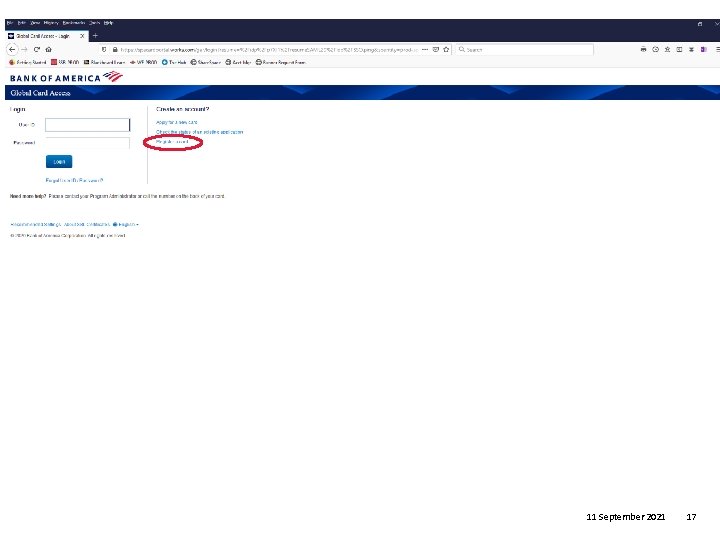
Index Welcome Slide 3 Card Activation Slide 4 Global Card Access _________________________Slide 7 Registration Mobile Alerts (North America) On-Line PIN Check Cardholder Support Slide 10 Frequently Asked Questions _____________________Slide 12 Global Card Access login and home page ________________Slide 17 2
Welcome The State of Arkansas has entered into a new contract with Bank of America (Bof. A) to provide credit card services for all agencies in the State of Arkansas. The state’s current contract with US Bank will expire at the end of the year. Bank of America will transition Arkansas State University’s credit cards (travel, departmental and Pcard) by November 2020. There may be a brief period of overlap with US Bank card transactions in Concur during this time. There should be no changes in Concur with the exception of your new card number. Bof. A has an easy to use website for statements and viewing transactions. Chip and PIN Overview Your Bank of America card is Chip & PIN enabled. The embedded microchip provides improved fraud protection and increased global acceptance. For most transactions at chip-enabled merchants, you will be asked to enter your 4 -digit PIN; therefore, it is important that you memorize your PIN before you begin to use your chip card at the point of sale. Please note that if you customize your PIN, the first time that you use your card to make a in-person purchase, your PIN may not be recognized by the card terminal until it is sync’d to the chip on your card. In this case, please leave the card in the terminal and attempt up to three times with your custom PIN to allow the Chip and PIN to sync. 3
Card Activation
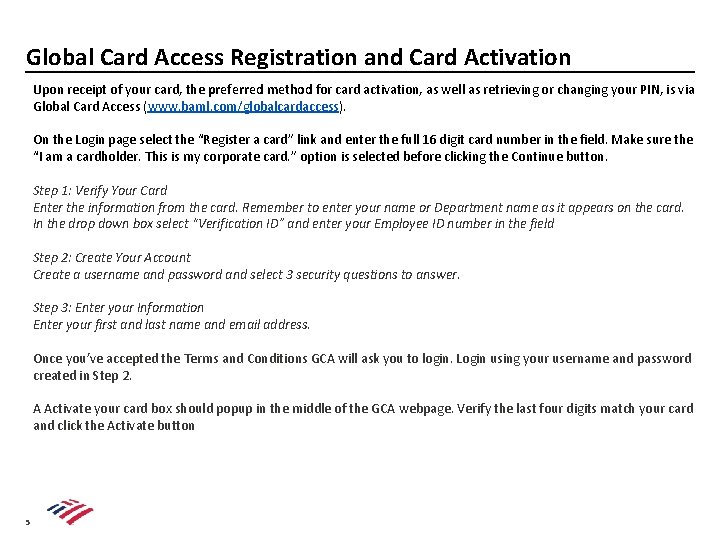
Global Card Access Registration and Card Activation Upon receipt of your card, the preferred method for card activation, as well as retrieving or changing your PIN, is via Global Card Access (www. baml. com/globalcardaccess). On the Login page select the “Register a card” link and enter the full 16 digit card number in the field. Make sure the “I am a cardholder. This is my corporate card. ” option is selected before clicking the Continue button. Step 1: Verify Your Card Enter the information from the card. Remember to enter your name or Department name as it appears on the card. In the drop down box select “Verification ID” and enter your Employee ID number in the field Step 2: Create Your Account Create a username and password and select 3 security questions to answer. Step 3: Enter your Information Enter your first and last name and email address. Once you’ve accepted the Terms and Conditions GCA will ask you to login. Login using your username and password created in Step 2. A Activate your card box should popup in the middle of the GCA webpage. Verify the last four digits match your card and click the Activate button 5
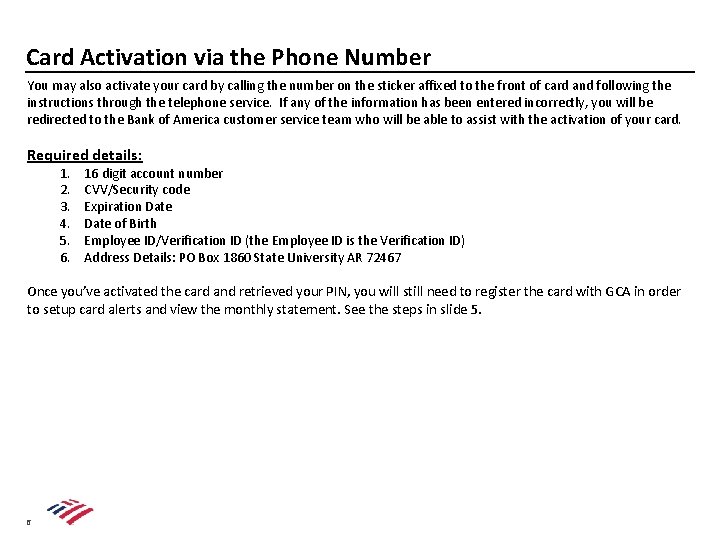
Card Activation via the Phone Number You may also activate your card by calling the number on the sticker affixed to the front of card and following the instructions through the telephone service. If any of the information has been entered incorrectly, you will be redirected to the Bank of America customer service team who will be able to assist with the activation of your card. Required details: 1. 2. 3. 4. 5. 6. 16 digit account number CVV/Security code Expiration Date of Birth Employee ID/Verification ID (the Employee ID is the Verification ID) Address Details: PO Box 1860 State University AR 72467 Once you’ve activated the card and retrieved your PIN, you will still need to register the card with GCA in order to setup card alerts and view the monthly statement. See the steps in slide 5. 6
Global Card Access (GCA) www. baml. com/globalcardaccess Alerts PIN Check Statements Locking
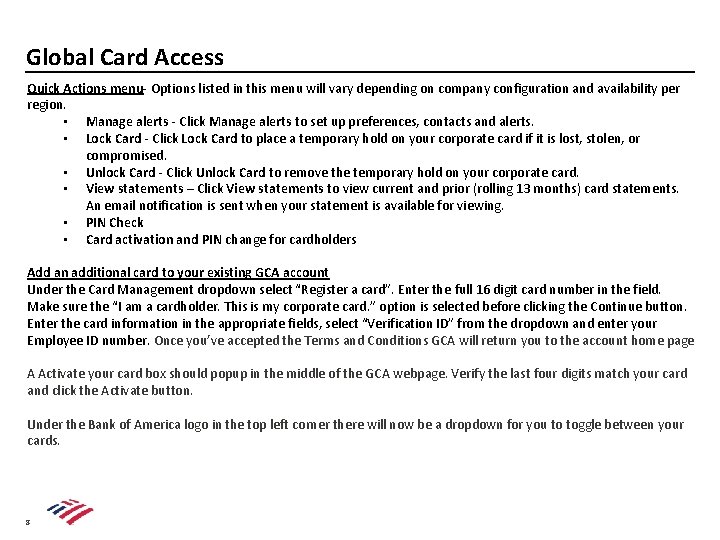
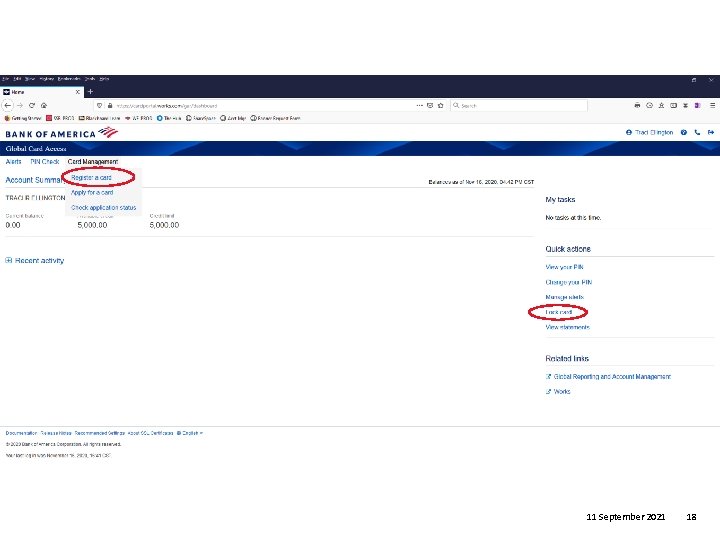
Global Card Access Quick Actions menu- Options listed in this menu will vary depending on company configuration and availability per region. • Manage alerts - Click Manage alerts to set up preferences, contacts and alerts. • Lock Card - Click Lock Card to place a temporary hold on your corporate card if it is lost, stolen, or compromised. • Unlock Card - Click Unlock Card to remove the temporary hold on your corporate card. • View statements – Click View statements to view current and prior (rolling 13 months) card statements. An email notification is sent when your statement is available for viewing. • PIN Check • Card activation and PIN change for cardholders Add an additional card to your existing GCA account Under the Card Management dropdown select “Register a card”. Enter the full 16 digit card number in the field. Make sure the “I am a cardholder. This is my corporate card. ” option is selected before clicking the Continue button. Enter the card information in the appropriate fields, select “Verification ID” from the dropdown and enter your Employee ID number. Once you’ve accepted the Terms and Conditions GCA will return you to the account home page A Activate your card box should popup in the middle of the GCA webpage. Verify the last four digits match your card and click the Activate button. Under the Bank of America logo in the top left corner there will now be a dropdown for you to toggle between your cards. 8
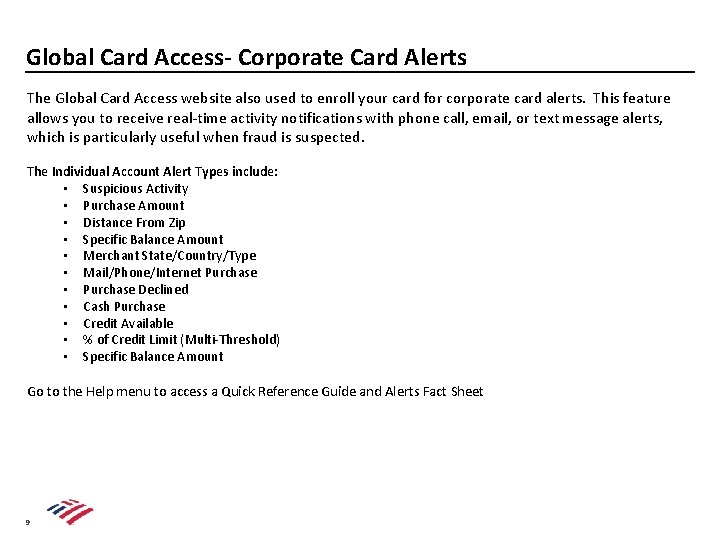
Global Card Access- Corporate Card Alerts The Global Card Access website also used to enroll your card for corporate card alerts. This feature allows you to receive real-time activity notifications with phone call, email, or text message alerts, which is particularly useful when fraud is suspected. The Individual Account Alert Types include: • Suspicious Activity • Purchase Amount • Distance From Zip • Specific Balance Amount • Merchant State/Country/Type • Mail/Phone/Internet Purchase • Purchase Declined • Cash Purchase • Credit Available • % of Credit Limit (Multi-Threshold) • Specific Balance Amount Go to the Help menu to access a Quick Reference Guide and Alerts Fact Sheet 9
Cardholder Support
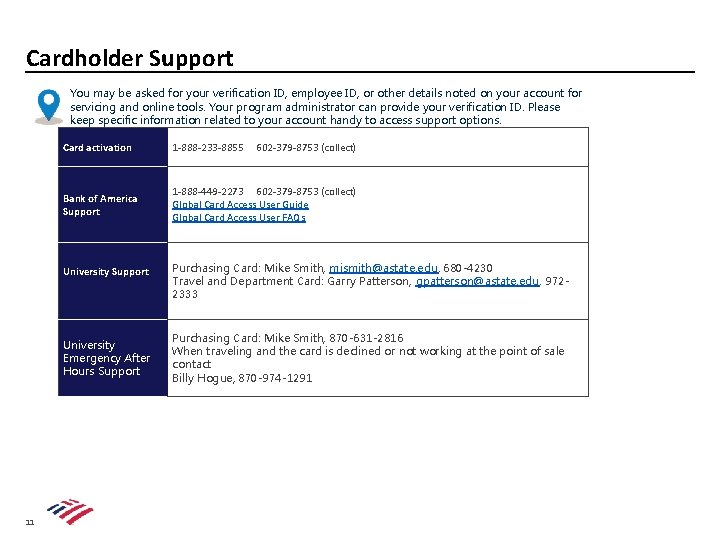
Cardholder Support You may be asked for your verification ID, employee ID, or other details noted on your account for servicing and online tools. Your program administrator can provide your verification ID. Please keep specific information related to your account handy to access support options. Card activation 1 -888 -233 -8855 Bank of America Support 1 -888 -449 -2273 602 -379 -8753 (collect) Global Card Access User Guide Global Card Access User FAQs University Support University Emergency After Hours Support 11 602 -379 -8753 (collect) Purchasing Card: Mike Smith, mismith@astate. edu, 680 -4230 Travel and Department Card: Garry Patterson, gpatterson@astate. edu, 9722333 Purchasing Card: Mike Smith, 870 -631 -2816 When traveling and the card is declined or not working at the point of sale contact Billy Hogue, 870 -974 -1291
Frequently Asked Questions
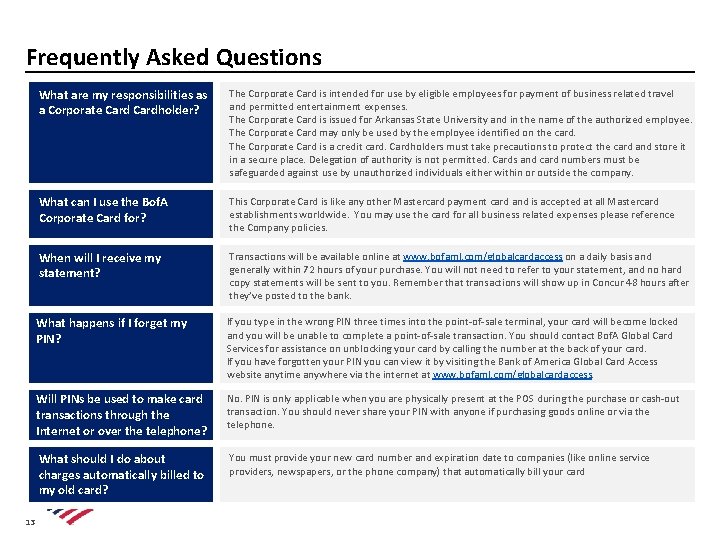
Frequently Asked Questions 13 What are my responsibilities as a Corporate Cardholder? The Corporate Card is intended for use by eligible employees for payment of business related travel and permitted entertainment expenses. The Corporate Card is issued for Arkansas State University and in the name of the authorized employee. The Corporate Card may only be used by the employee identified on the card. The Corporate Card is a credit card. Cardholders must take precautions to protect the card and store it in a secure place. Delegation of authority is not permitted. Cards and card numbers must be safeguarded against use by unauthorized individuals either within or outside the company. What can I use the Bof. A Corporate Card for? This Corporate Card is like any other Mastercard payment card and is accepted at all Mastercard establishments worldwide. You may use the card for all business related expenses please reference the Company policies. When will I receive my statement? Transactions will be available online at www. bofaml. com/globalcardaccess on a daily basis and generally within 72 hours of your purchase. You will not need to refer to your statement, and no hard copy statements will be sent to you. Remember that transactions will show up in Concur 48 hours after they’ve posted to the bank. What happens if I forget my PIN? If you type in the wrong PIN three times into the point-of-sale terminal, your card will become locked and you will be unable to complete a point-of-sale transaction. You should contact Bof. A Global Card Services for assistance on unblocking your card by calling the number at the back of your card. If you have forgotten your PIN you can view it by visiting the Bank of America Global Card Access website anytime anywhere via the internet at www. bofaml. com/globalcardaccess. Will PINs be used to make card transactions through the Internet or over the telephone? No. PIN is only applicable when you are physically present at the POS during the purchase or cash-out transaction. You should never share your PIN with anyone if purchasing goods online or via the telephone. What should I do about charges automatically billed to my old card? You must provide your new card number and expiration date to companies (like online service providers, newspapers, or the phone company) that automatically bill your card
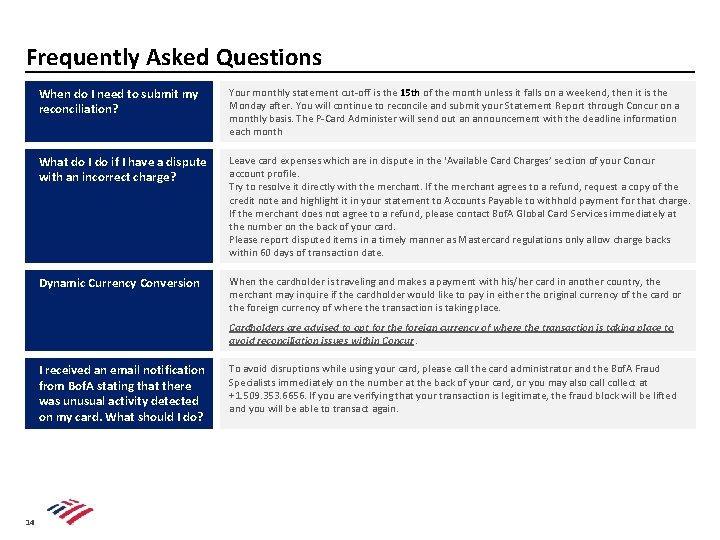
Frequently Asked Questions When do I need to submit my reconciliation? Your monthly statement cut-off is the 15 th of the month unless it falls on a weekend, then it is the Monday after. You will continue to reconcile and submit your Statement Report through Concur on a monthly basis. The P-Card Administer will send out an announcement with the deadline information each month What do I do if I have a dispute with an incorrect charge? Leave card expenses which are in dispute in the ‘Available Card Charges’ section of your Concur account profile. Try to resolve it directly with the merchant. If the merchant agrees to a refund, request a copy of the credit note and highlight it in your statement to Accounts Payable to withhold payment for that charge. If the merchant does not agree to a refund, please contact Bof. A Global Card Services immediately at the number on the back of your card. Please report disputed items in a timely manner as Mastercard regulations only allow charge backs within 60 days of transaction date. Dynamic Currency Conversion When the cardholder is traveling and makes a payment with his/her card in another country, the merchant may inquire if the cardholder would like to pay in either the original currency of the card or the foreign currency of where the transaction is taking place. Cardholders are advised to opt for the foreign currency of where the transaction is taking place to avoid reconciliation issues within Concur. I received an email notification from Bof. A stating that there was unusual activity detected on my card. What should I do? 14 To avoid disruptions while using your card, please call the card administrator and the Bof. A Fraud Specialists immediately on the number at the back of your card, or you may also call collect at +1. 509. 353. 6656. If you are verifying that your transaction is legitimate, the fraud block will be lifted and you will be able to transact again.
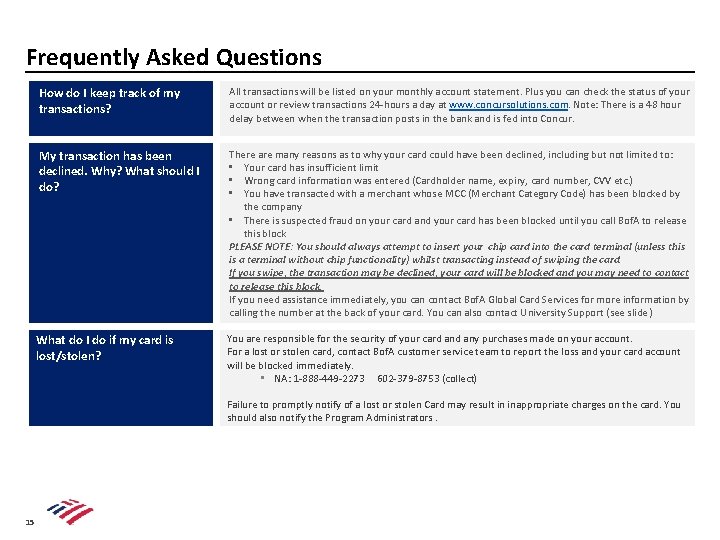
Frequently Asked Questions How do I keep track of my transactions? All transactions will be listed on your monthly account statement. Plus you can check the status of your account or review transactions 24 -hours a day at www. concursolutions. com. Note: There is a 48 hour delay between when the transaction posts in the bank and is fed into Concur. My transaction has been declined. Why? What should I do? There are many reasons as to why your card could have been declined, including but not limited to: • Your card has insufficient limit • Wrong card information was entered (Cardholder name, expiry, card number, CVV etc. ) • You have transacted with a merchant whose MCC (Merchant Category Code) has been blocked by the company • There is suspected fraud on your card and your card has been blocked until you call Bof. A to release this block PLEASE NOTE: You should always attempt to insert your chip card into the card terminal (unless this is a terminal without chip functionality) whilst transacting instead of swiping the card. If you swipe, the transaction may be declined, your card will be blocked and you may need to contact to release this block. If you need assistance immediately, you can contact Bof. A Global Card Services for more information by calling the number at the back of your card. You can also contact University Support (see slide ) What do I do if my card is lost/stolen? You are responsible for the security of your card any purchases made on your account. For a lost or stolen card, contact Bof. A customer service team to report the loss and your card account will be blocked immediately. • NA: 1 -888 -449 -2273 602 -379 -8753 (collect) Failure to promptly notify of a lost or stolen Card may result in inappropriate charges on the card. You should also notify the Program Administrators. 15
Disclaimer “Bank of America” and “Bof. ASecurities” are the marketing names used by the Global Banking and Global Markets divisions of Bank of America Corporation. Lending, other commercial banking activities, and trading in certain financial instruments are performed globally by banking affiliates of Bank of America Corporation, including Bank of America, N. A. , Member FDIC. Trading in securities and financial instruments, and strategic advisory, and other investment banking activities, are performed globally by investment banking affiliates of Bank of America Corporation (“Investment Banking Affiliates”), including, in the United States, Bof. ASecurities, Inc. and Merrill Lynch Professional Clearing Corp. , both of which are registered broker-dealers and Members of SIPC, and, in other jurisdictions, by locally registered entities. Bof. ASecurities, Inc. and Merrill Lynch Professional Clearing Corp. are registered as futures commission merchants with the CFTC and are members of the NFA. Investment products offered by Investment Banking Affiliates: Are Not FDIC Insured * May Lose Value * Are Not Bank Guaranteed. This document is intended for information purposes only and does not constitute a binding commitment to enter into any type of transaction or business relationship as a consequence of any information contained herein. These materials have been prepared by one or more subsidiaries of Bank of America Corporation solely for the client or potential client to whom such materials are directly addressed and delivered (the “Company”) in connection with an actual or potential business relationship and may not be used or relied upon for any purpose other than as specifically contemplated by a written agreement with us. We assume no obligation to update or otherwise revise these materials, which speak as of the date of this presentation (or another date, if so noted) and are subject to change without notice. Under no circumstances may a copy of this presentation be shown, copied, transmitted or otherwise given to any person other than your authorized representatives. Products and services that may be referenced in the accompanying materials may be provided through one or more affiliates of Bank of America, N. A. We are required to obtain, verify and record certain information that identifies our clients, which information includes the name and address of the client and other information that will allow us to identify the client in accordance with the USA Patriot Act (Title III of Pub. L. 107 -56, as amended (signed into law October 26, 2001)) and such other laws, rules and regulations. We do not provide legal, compliance, tax or accounting advice. For more information, including terms and conditions that apply to the service(s), please contact your Bank of America representative. Investment Banking Affiliates are not banks. The securities and financial instruments sold, offered or recommended by Investment Banking Affiliates, including without limitation money market mutual funds, are not bank deposits, are not guaranteed by, and are not otherwise obligations of, any bank, thrift or other subsidiary of Bank of America Corporation (unless explicitly stated otherwise), and are not insured by the Federal Deposit Insurance Corporation (“FDIC”) or any other governmental agency (unless explicitly stated otherwise). This document does not constitute investment advice or a recommendation or an offer or solicitation, and is not the basis for any contract to purchase or sell any security or other instrument, or for Investment Banking Affiliates or banking affiliates to enter into or arrange any type of transaction as a consequent of any information contained herein. With respect to investments in money market mutual funds, you should carefully consider a fund’s investment objectives, risks, charges, and expenses before investing. Although money market mutual funds seek to preserve the value of your investment at $1. 00 per share, it is possible to lose money by investing in money market mutual funds. The value of investments and the income derived from them may go down as well as up and you may not get back your original investment. The level of yield may be subject to fluctuation and is not guaranteed. Changes in rates of exchange between currencies may cause the value of investments to decrease or increase. We have adopted policies and guidelines designed to preserve the independence of our research analysts. These policies prohibit employees from offering research coverage, a favorable research rating or a specific price target or offering to change a research rating or price target as consideration for or an inducement to obtain business or other compensation. © 2019 Bank of America Corporation. All rights reserved. 11 September 2021 16
11 September 2021 17
11 September 2021 18