
GLM II Basic Modeling Strategy 2012 CAS Ratemaking
GLM II Basic Modeling Strategy 2012 CAS Ratemaking and Product Management Seminar by Len Llaguno March 20, 2012 © 2012 Towers Watson. All rights reserved.

towerswatson. com © 2012 Towers Watson. All rights reserved. Proprietary and Confidential. For Towers Watson and Towers Watson client use only. 1
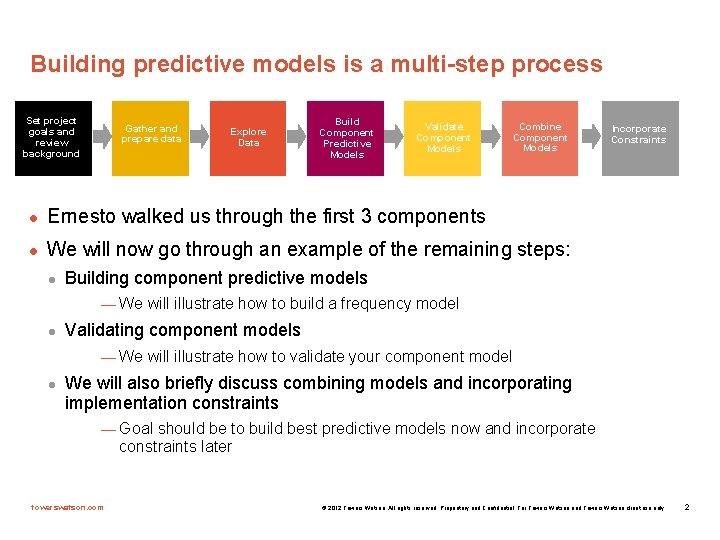
Building predictive models is a multi-step process Set project goals and review background Gather and prepare data Explore Data Build Component Predictive Models Validate Component Models Combine Component Models l Ernesto walked us through the first 3 components l We will now go through an example of the remaining steps: l Incorporate Constraints Building component predictive models — We will illustrate how to build a frequency model l Validating component models — We will illustrate how to validate your component model l We will also briefly discuss combining models and incorporating implementation constraints — Goal should be to build best predictive models now and incorporate constraints later towerswatson. com © 2012 Towers Watson. All rights reserved. Proprietary and Confidential. For Towers Watson and Towers Watson client use only. 2
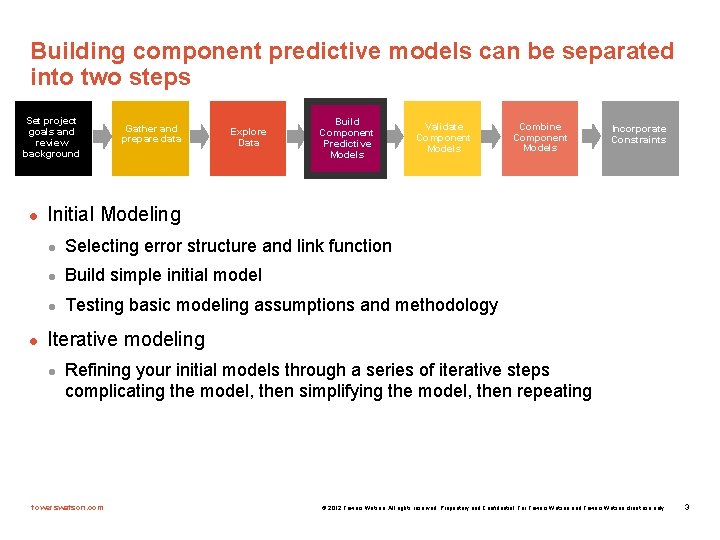
Building component predictive models can be separated into two steps Set project goals and review background l l Gather and prepare data Explore Data Build Component Predictive Models Validate Component Models Combine Component Models Incorporate Constraints Initial Modeling l Selecting error structure and link function l Build simple initial model l Testing basic modeling assumptions and methodology Iterative modeling l Refining your initial models through a series of iterative steps complicating the model, then simplifying the model, then repeating towerswatson. com © 2012 Towers Watson. All rights reserved. Proprietary and Confidential. For Towers Watson and Towers Watson client use only. 3
Initial modeling is done to test basic modeling methodology Is my link function appropriate? Is my error structure appropriate? Is my overall modeling methodology appropriate (e. g. do I need to cap losses? Exclude expense only claims? Model by peril? ) towerswatson. com © 2012 Towers Watson. All rights reserved. Proprietary and Confidential. For Towers Watson and Towers Watson client use only. 4
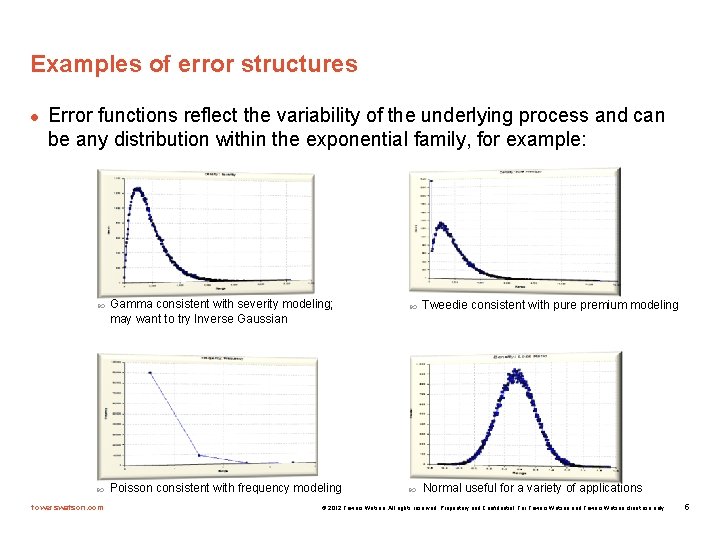
Examples of error structures l Error functions reflect the variability of the underlying process and can be any distribution within the exponential family, for example: towerswatson. com Gamma consistent with severity modeling; may want to try Inverse Gaussian Poisson consistent with frequency modeling Tweedie consistent with pure premium modeling Normal useful for a variety of applications © 2012 Towers Watson. All rights reserved. Proprietary and Confidential. For Towers Watson and Towers Watson client use only. 5
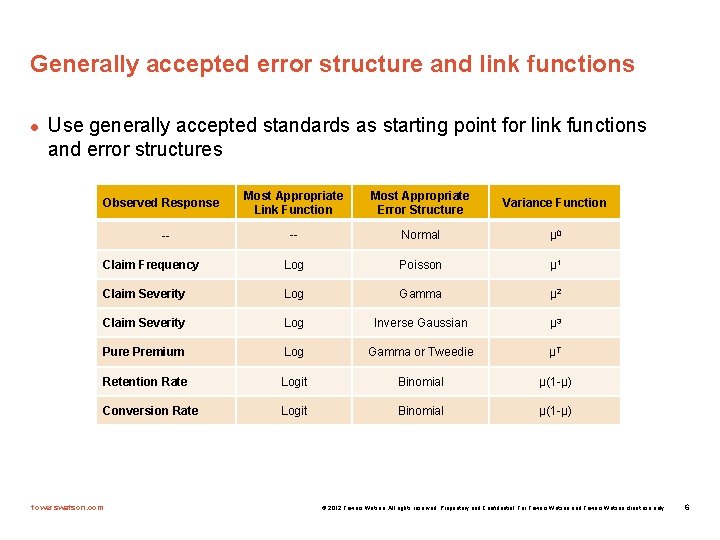
Generally accepted error structure and link functions l Use generally accepted standards as starting point for link functions and error structures Most Appropriate Link Function Most Appropriate Error Structure Variance Function -- Normal µ 0 Claim Frequency Log Poisson µ 1 Claim Severity Log Gamma µ 2 Claim Severity Log Inverse Gaussian µ 3 Pure Premium Log Gamma or Tweedie µT Retention Rate Logit Binomial µ(1 -µ) Conversion Rate Logit Binomial µ(1 -µ) Observed Response -- towerswatson. com © 2012 Towers Watson. All rights reserved. Proprietary and Confidential. For Towers Watson and Towers Watson client use only. 6
Build an initial model l Reasonable starting points for model structure l Prior model l Stepwise regression l General insurance knowledge l CART (Classification and Regression Trees) or similar algorithms towerswatson. com © 2012 Towers Watson. All rights reserved. Proprietary and Confidential. For Towers Watson and Towers Watson client use only. 7
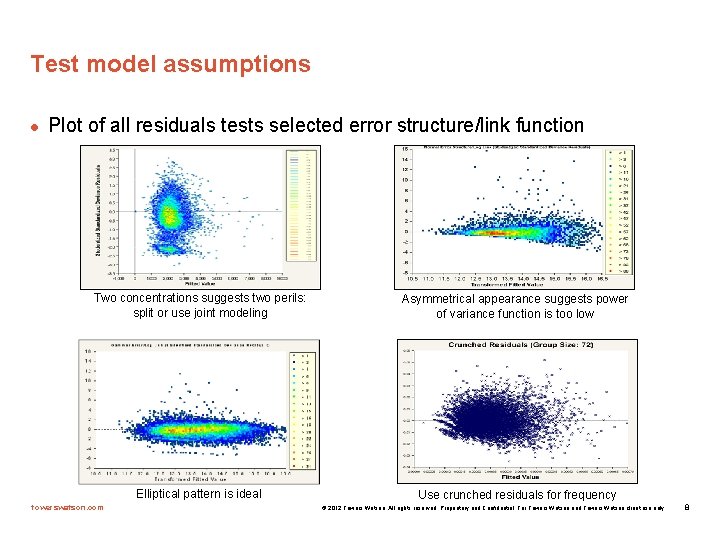
Test model assumptions l Plot of all residuals tests selected error structure/link function Two concentrations suggests two perils: split or use joint modeling Elliptical pattern is ideal towerswatson. com Asymmetrical appearance suggests power of variance function is too low Use crunched residuals for frequency © 2012 Towers Watson. All rights reserved. Proprietary and Confidential. For Towers Watson and Towers Watson client use only. 8
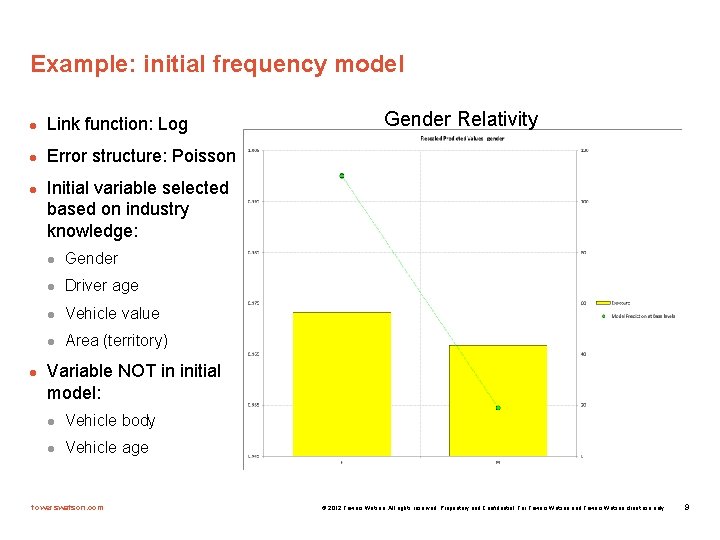
Example: initial frequency model l Link function: Log l Error structure: Poisson l l Gender Relativity Initial variable selected based on industry knowledge: l Gender l Driver age l Vehicle value l Area (territory) Variable NOT in initial model: l Vehicle body l Vehicle age towerswatson. com © 2012 Towers Watson. All rights reserved. Proprietary and Confidential. For Towers Watson and Towers Watson client use only. 9
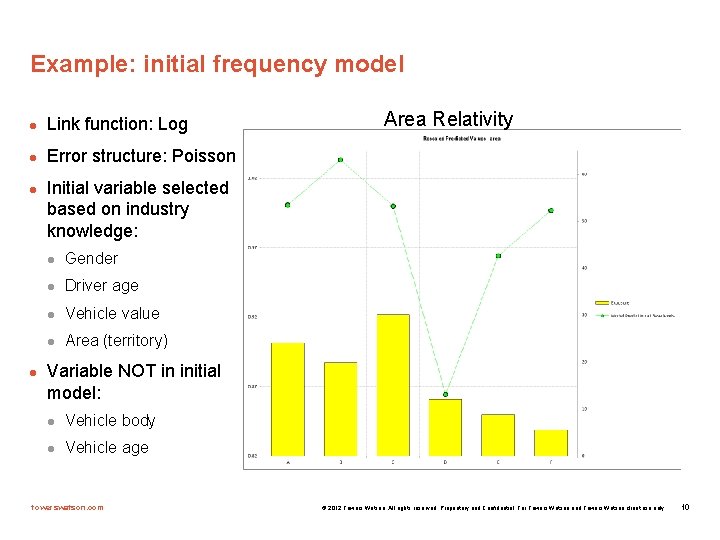
Example: initial frequency model l Link function: Log l Error structure: Poisson l l Area Relativity Initial variable selected based on industry knowledge: l Gender l Driver age l Vehicle value l Area (territory) Variable NOT in initial model: l Vehicle body l Vehicle age towerswatson. com © 2012 Towers Watson. All rights reserved. Proprietary and Confidential. For Towers Watson and Towers Watson client use only. 10
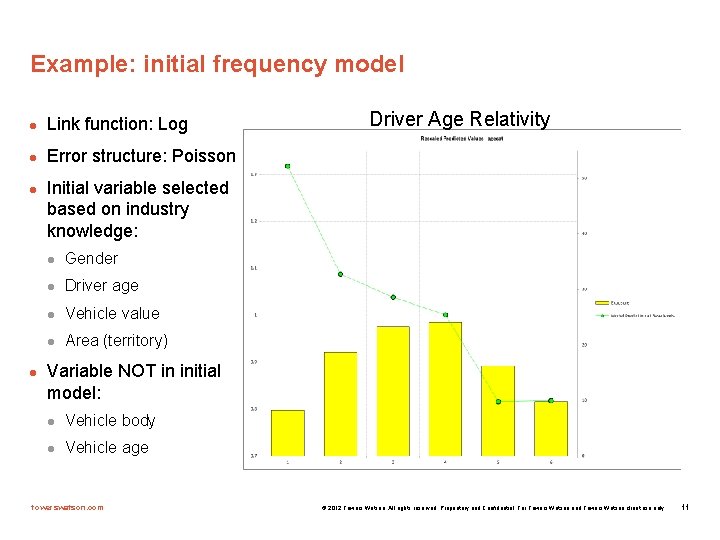
Example: initial frequency model l Link function: Log l Error structure: Poisson l l Driver Age Relativity Initial variable selected based on industry knowledge: l Gender l Driver age l Vehicle value l Area (territory) Variable NOT in initial model: l Vehicle body l Vehicle age towerswatson. com © 2012 Towers Watson. All rights reserved. Proprietary and Confidential. For Towers Watson and Towers Watson client use only. 11
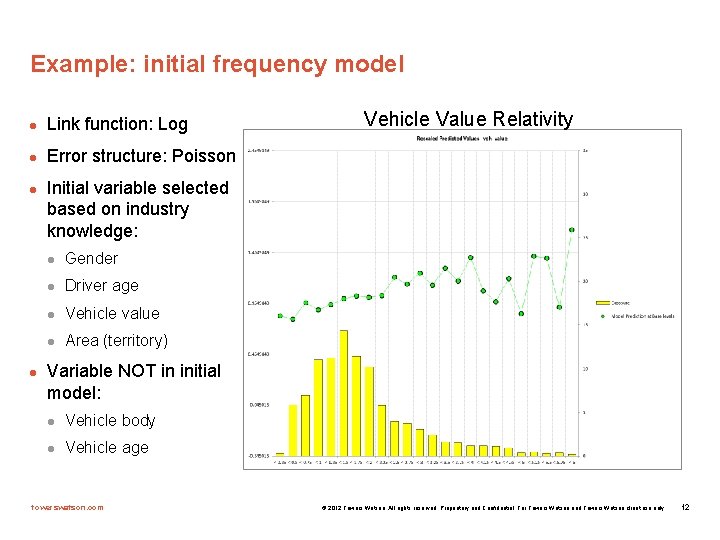
Example: initial frequency model l Link function: Log l Error structure: Poisson l l Vehicle Value Relativity Initial variable selected based on industry knowledge: l Gender l Driver age l Vehicle value l Area (territory) Variable NOT in initial model: l Vehicle body l Vehicle age towerswatson. com © 2012 Towers Watson. All rights reserved. Proprietary and Confidential. For Towers Watson and Towers Watson client use only. 12
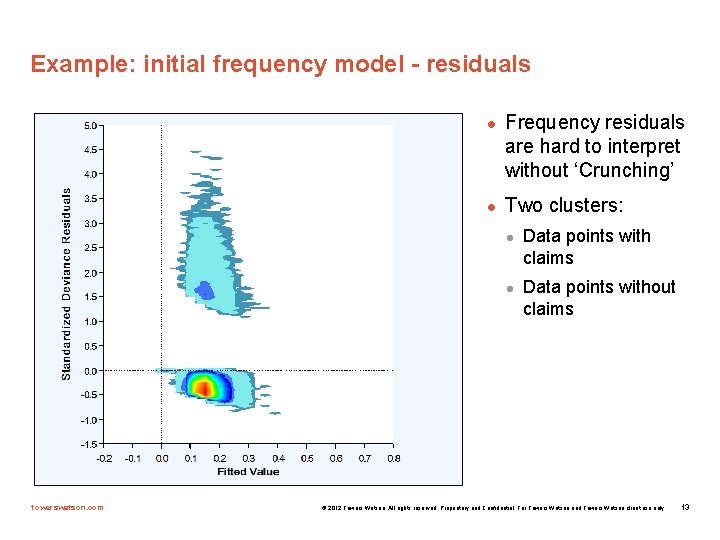
Example: initial frequency model - residuals l l Frequency residuals are hard to interpret without ‘Crunching’ Two clusters: l l towerswatson. com Data points with claims Data points without claims © 2012 Towers Watson. All rights reserved. Proprietary and Confidential. For Towers Watson and Towers Watson client use only. 13
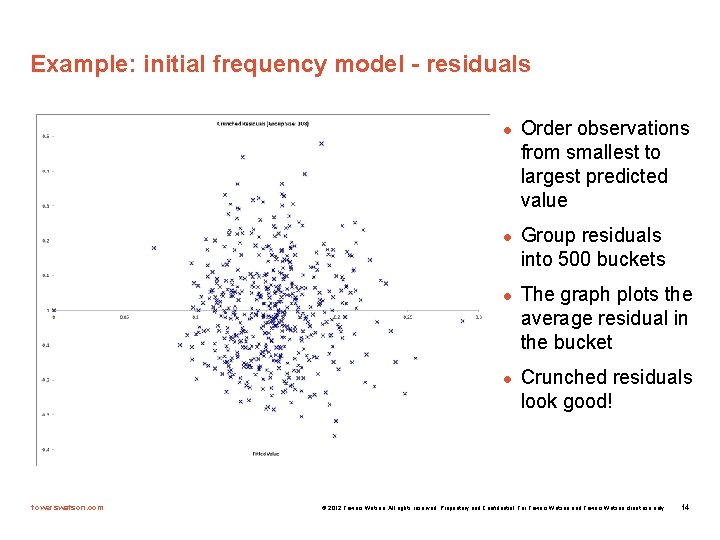
Example: initial frequency model - residuals l l towerswatson. com Order observations from smallest to largest predicted value Group residuals into 500 buckets The graph plots the average residual in the bucket Crunched residuals look good! © 2012 Towers Watson. All rights reserved. Proprietary and Confidential. For Towers Watson and Towers Watson client use only. 14
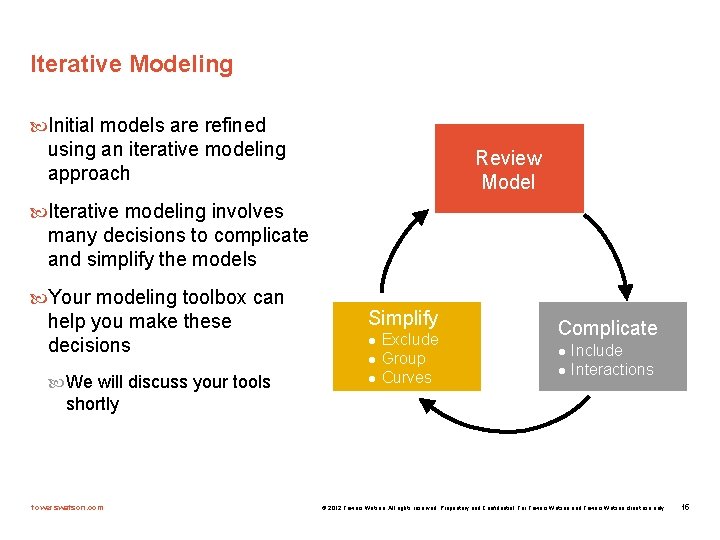
Iterative Modeling Initial models are refined using an iterative modeling approach Review Model Iterative modeling involves many decisions to complicate and simplify the models Your modeling toolbox can help you make these decisions Simplify We will discuss your tools l l l Exclude Group Curves Complicate l l Include Interactions shortly towerswatson. com © 2012 Towers Watson. All rights reserved. Proprietary and Confidential. For Towers Watson and Towers Watson client use only. 15
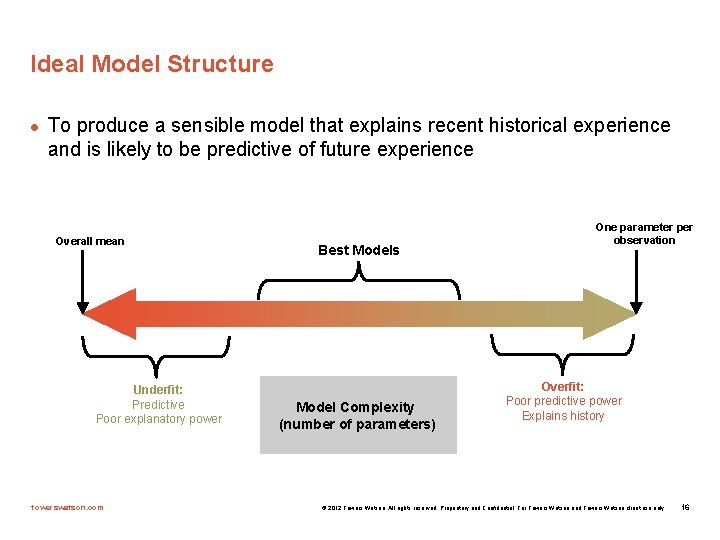
Ideal Model Structure l To produce a sensible model that explains recent historical experience and is likely to be predictive of future experience Overall mean Underfit: Predictive Poor explanatory power towerswatson. com Best Models Model Complexity (number of parameters) One parameter per observation Overfit: Poor predictive power Explains history © 2012 Towers Watson. All rights reserved. Proprietary and Confidential. For Towers Watson and Towers Watson client use only. 16
Your modeling tool box l l Model decisions include: l Simplification: excluding variables, grouping levels, fitting curves l Complication: including variables, adding interactions Your modeling toolbox will help you make these decisions l Your tools include: — Parameters/standard errors — Consistency of patterns over time or random data sets — Type III statistical tests (e. g. , chi-square tests, F-tests) — Balance tests (i. e. actual vs. expected test) — Judgment (e. g. , do the trends make sense? ) towerswatson. com © 2012 Towers Watson. All rights reserved. Proprietary and Confidential. For Towers Watson and Towers Watson client use only. 17
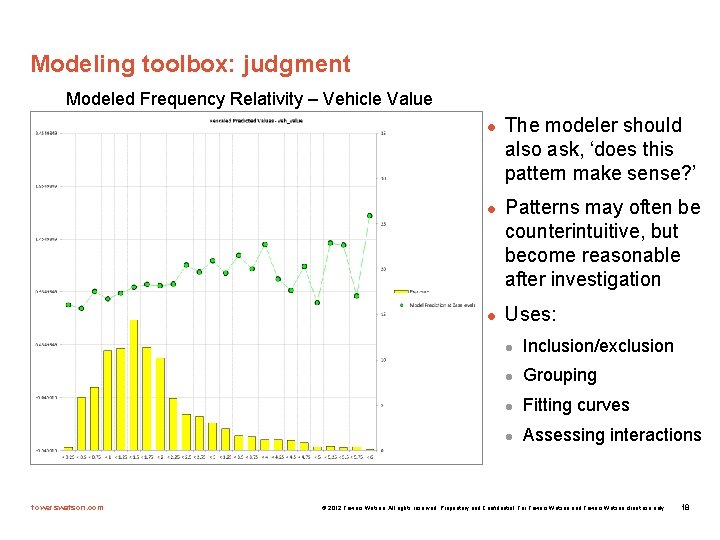
Modeling toolbox: judgment Modeled Frequency Relativity – Vehicle Value l l l towerswatson. com The modeler should also ask, ‘does this pattern make sense? ’ Patterns may often be counterintuitive, but become reasonable after investigation Uses: l Inclusion/exclusion l Grouping l Fitting curves l Assessing interactions © 2012 Towers Watson. All rights reserved. Proprietary and Confidential. For Towers Watson and Towers Watson client use only. 18
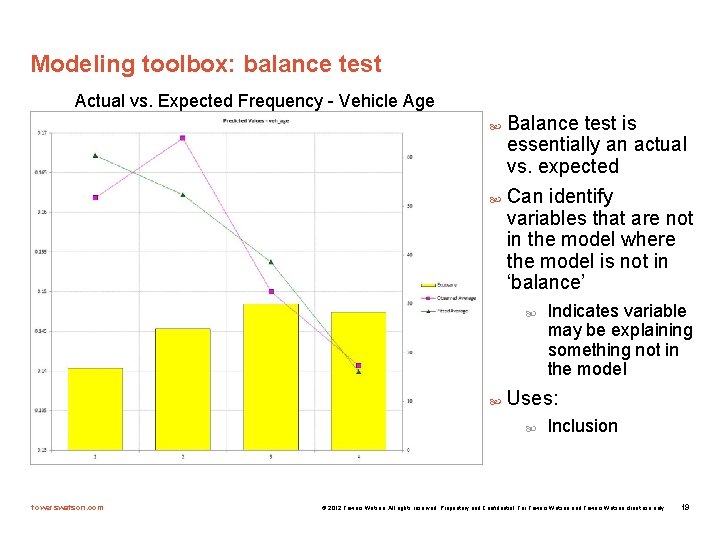
Modeling toolbox: balance test Actual vs. Expected Frequency - Vehicle Age Balance test is essentially an actual vs. expected Can identify variables that are not in the model where the model is not in ‘balance’ Uses: towerswatson. com Indicates variable may be explaining something not in the model Inclusion © 2012 Towers Watson. All rights reserved. Proprietary and Confidential. For Towers Watson and Towers Watson client use only. 19
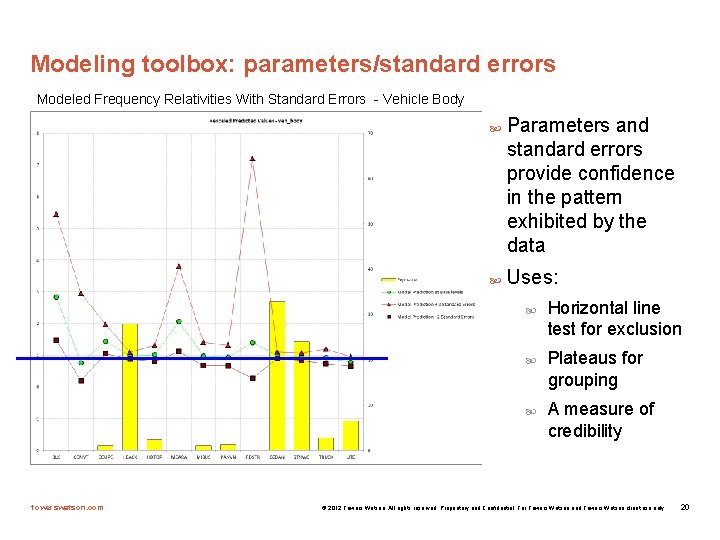
Modeling toolbox: parameters/standard errors Modeled Frequency Relativities With Standard Errors - Vehicle Body Parameters and standard errors provide confidence in the pattern exhibited by the data Uses: towerswatson. com Horizontal line test for exclusion Plateaus for grouping A measure of credibility © 2012 Towers Watson. All rights reserved. Proprietary and Confidential. For Towers Watson and Towers Watson client use only. 20
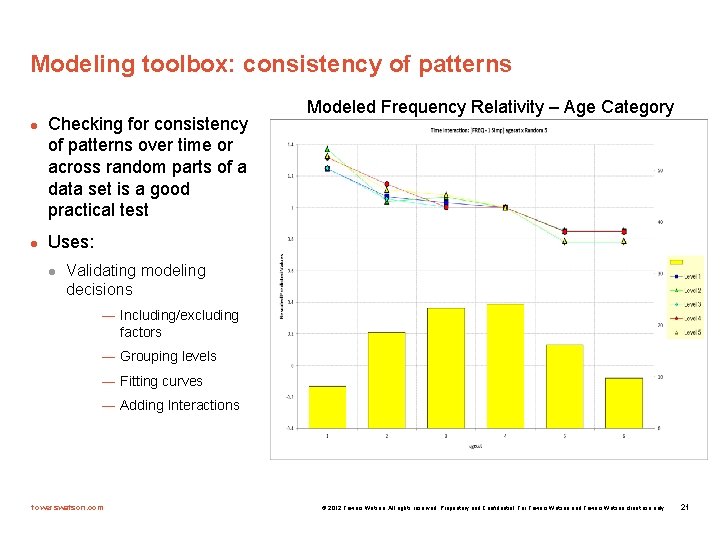
Modeling toolbox: consistency of patterns l l Checking for consistency of patterns over time or across random parts of a data set is a good practical test Modeled Frequency Relativity – Age Category Uses: l Validating modeling decisions — Including/excluding factors — Grouping levels — Fitting curves — Adding Interactions towerswatson. com © 2012 Towers Watson. All rights reserved. Proprietary and Confidential. For Towers Watson and Towers Watson client use only. 21
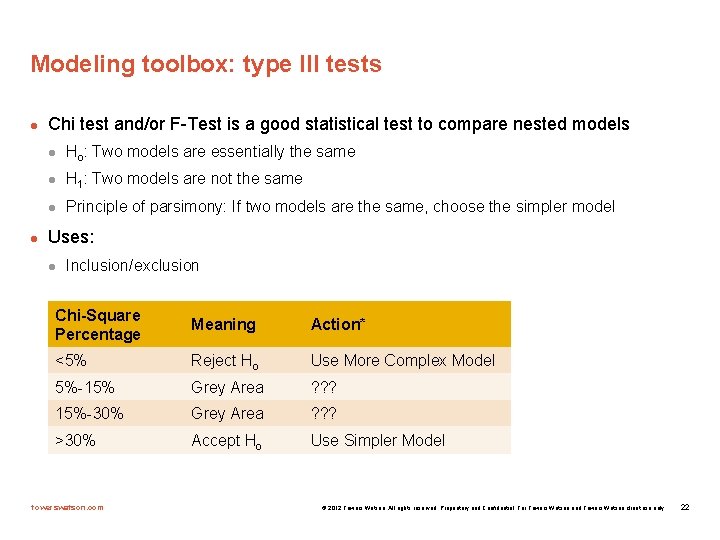
Modeling toolbox: type III tests l l Chi test and/or F-Test is a good statistical test to compare nested models l Ho: Two models are essentially the same l H 1: Two models are not the same l Principle of parsimony: If two models are the same, choose the simpler model Uses: l Inclusion/exclusion Chi-Square Percentage Meaning Action* <5% Reject Ho Use More Complex Model 5%-15% Grey Area ? ? ? 15%-30% Grey Area ? ? ? >30% Accept Ho Use Simpler Model towerswatson. com © 2012 Towers Watson. All rights reserved. Proprietary and Confidential. For Towers Watson and Towers Watson client use only. 22
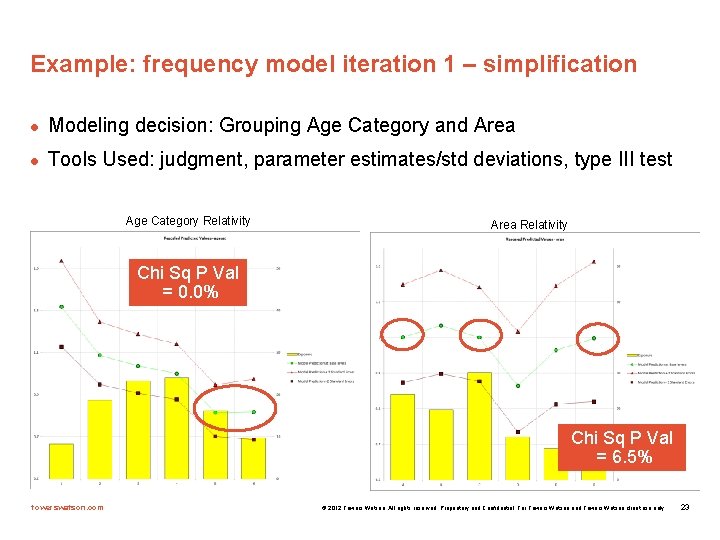
Example: frequency model iteration 1 – simplification l Modeling decision: Grouping Age Category and Area l Tools Used: judgment, parameter estimates/std deviations, type III test Age Category Relativity Area Relativity Chi Sq P Val = 0. 0% Chi Sq P Val = 6. 5% towerswatson. com © 2012 Towers Watson. All rights reserved. Proprietary and Confidential. For Towers Watson and Towers Watson client use only. 23
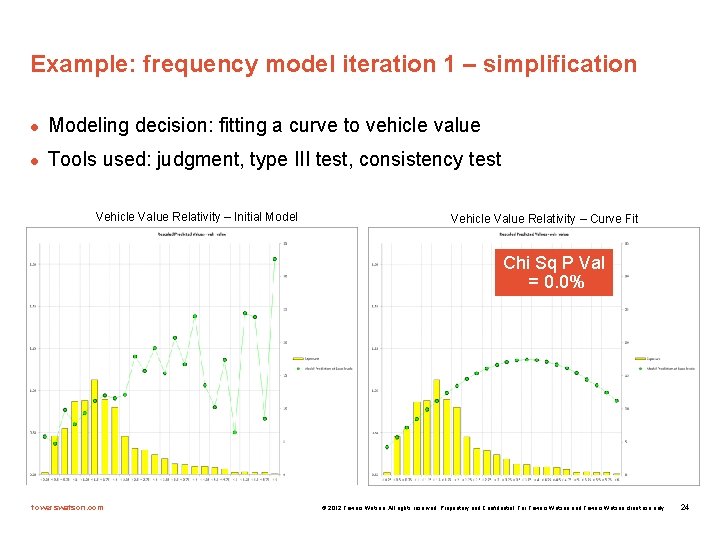
Example: frequency model iteration 1 – simplification l Modeling decision: fitting a curve to vehicle value l Tools used: judgment, type III test, consistency test Vehicle Value Relativity – Initial Model Vehicle Value Relativity – Curve Fit Chi Sq P Val = 0. 0% towerswatson. com © 2012 Towers Watson. All rights reserved. Proprietary and Confidential. For Towers Watson and Towers Watson client use only. 24
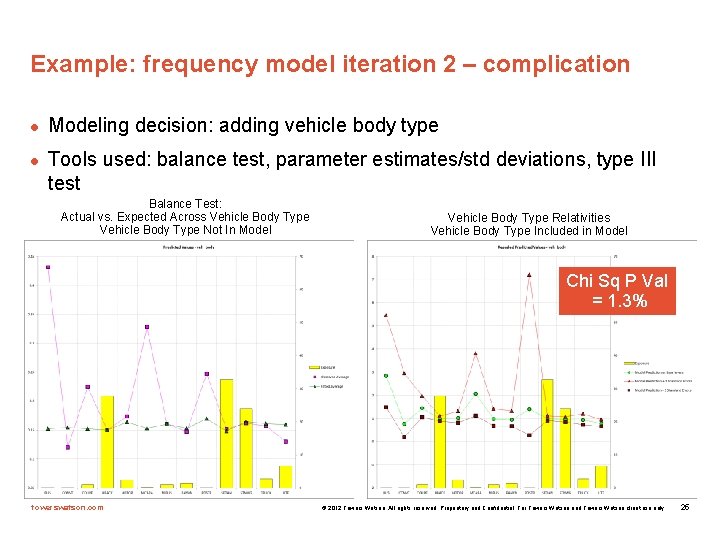
Example: frequency model iteration 2 – complication l l Modeling decision: adding vehicle body type Tools used: balance test, parameter estimates/std deviations, type III test Balance Test: Actual vs. Expected Across Vehicle Body Type Not In Model Vehicle Body Type Relativities Vehicle Body Type Included in Model Chi Sq P Val = 1. 3% towerswatson. com © 2012 Towers Watson. All rights reserved. Proprietary and Confidential. For Towers Watson and Towers Watson client use only. 25
Example: iterative modeling continued…. l Iteration 3 - simplification l l Iteration 4 – complication l l Group vehicle body type Add vehicle age Iteration 5 – simplification l group vehicle age levels towerswatson. com © 2012 Towers Watson. All rights reserved. Proprietary and Confidential. For Towers Watson and Towers Watson client use only. 26
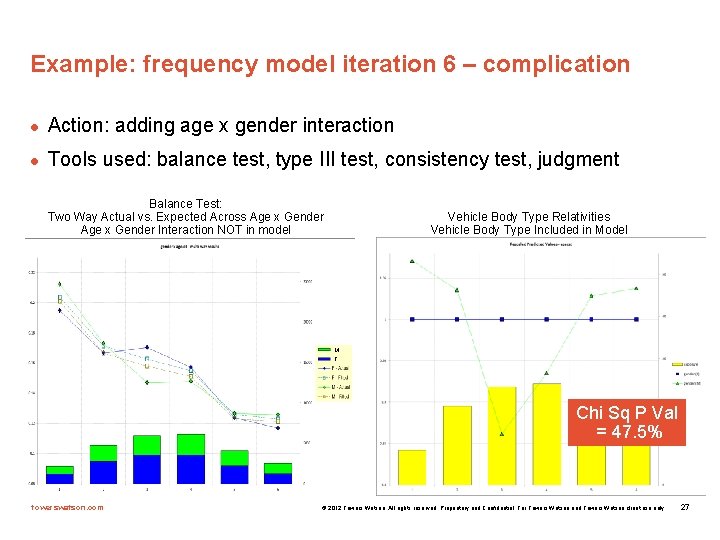
Example: frequency model iteration 6 – complication l Action: adding age x gender interaction l Tools used: balance test, type III test, consistency test, judgment Balance Test: Two Way Actual vs. Expected Across Age x Gender Interaction NOT in model Vehicle Body Type Relativities Vehicle Body Type Included in Model M F Chi Sq P Val = 47. 5% towerswatson. com © 2012 Towers Watson. All rights reserved. Proprietary and Confidential. For Towers Watson and Towers Watson client use only. 27
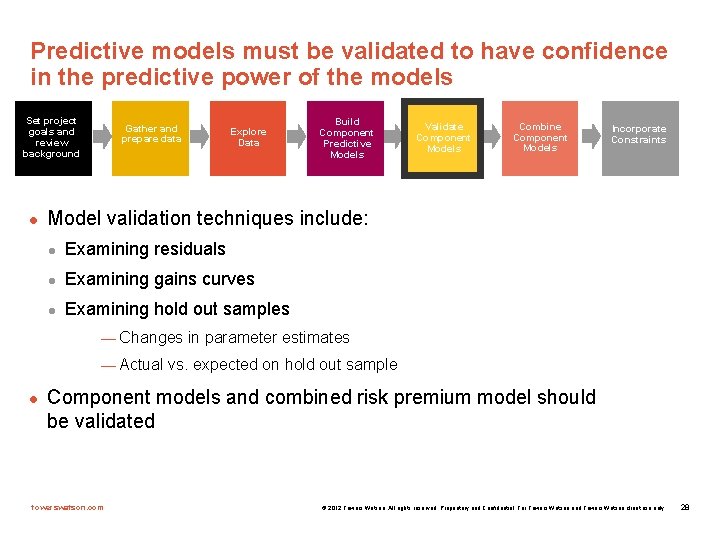
Predictive models must be validated to have confidence in the predictive power of the models Set project goals and review background l Gather and prepare data Explore Data Build Component Predictive Models Validate Component Models Combine Component Models Incorporate Constraints Model validation techniques include: l Examining residuals l Examining gains curves l Examining hold out samples — Changes in parameter estimates — Actual vs. expected on hold out sample l Component models and combined risk premium model should be validated towerswatson. com © 2012 Towers Watson. All rights reserved. Proprietary and Confidential. For Towers Watson and Towers Watson client use only. 28
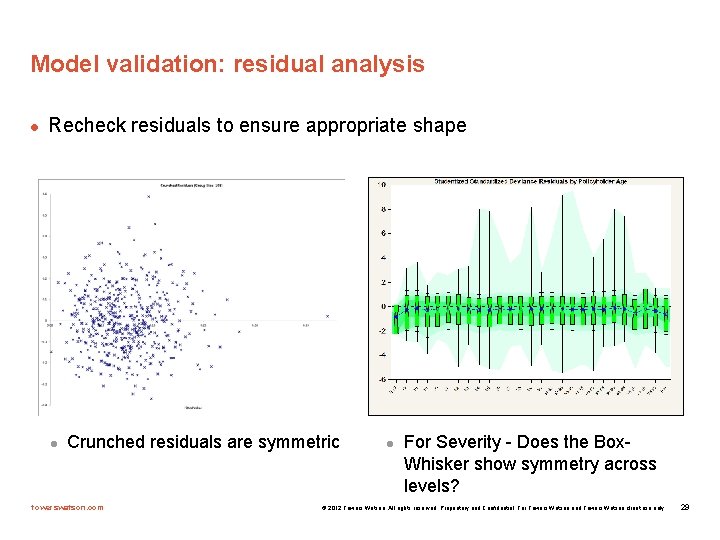
Model validation: residual analysis l Recheck residuals to ensure appropriate shape l Crunched residuals are symmetric towerswatson. com l For Severity - Does the Box. Whisker show symmetry across levels? © 2012 Towers Watson. All rights reserved. Proprietary and Confidential. For Towers Watson and Towers Watson client use only. 29
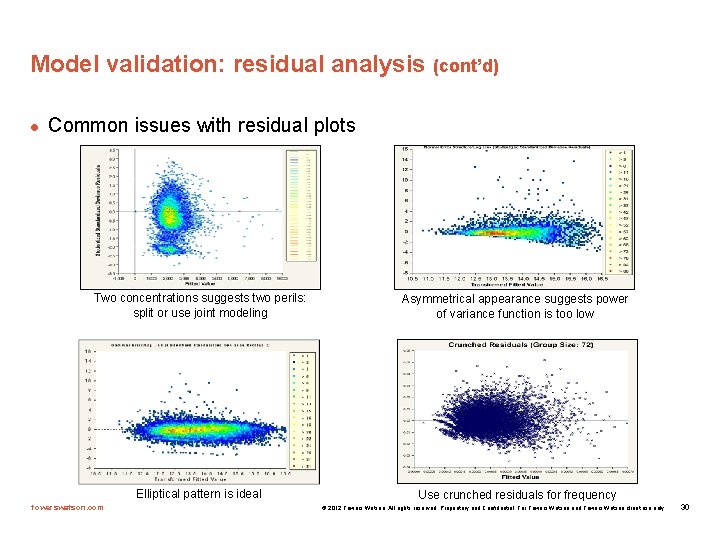
Model validation: residual analysis (cont’d) l Common issues with residual plots Two concentrations suggests two perils: split or use joint modeling Elliptical pattern is ideal towerswatson. com Asymmetrical appearance suggests power of variance function is too low Use crunched residuals for frequency © 2012 Towers Watson. All rights reserved. Proprietary and Confidential. For Towers Watson and Towers Watson client use only. 30
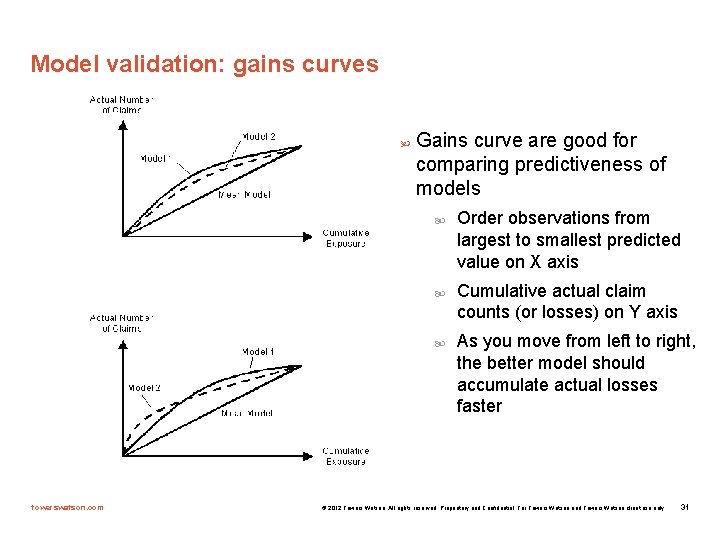
Model validation: gains curves Gains curve are good for comparing predictiveness of models towerswatson. com Order observations from largest to smallest predicted value on X axis Cumulative actual claim counts (or losses) on Y axis As you move from left to right, the better model should accumulate actual losses faster © 2012 Towers Watson. All rights reserved. Proprietary and Confidential. For Towers Watson and Towers Watson client use only. 31
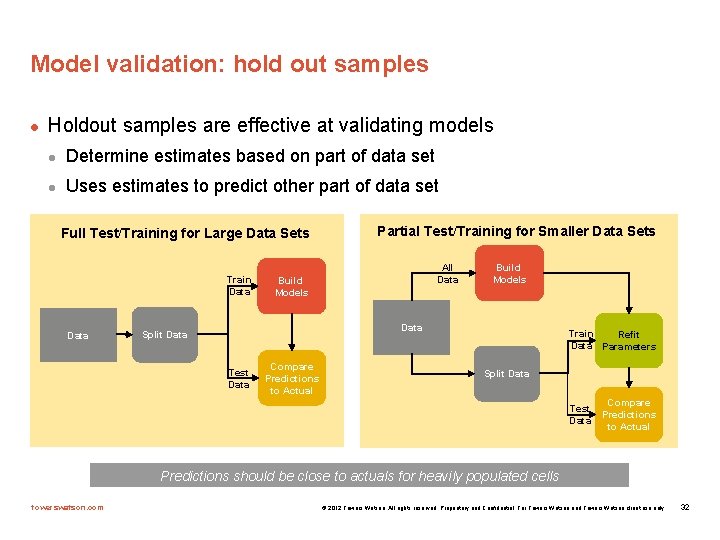
Model validation: hold out samples l Holdout samples are effective at validating models l Determine estimates based on part of data set l Uses estimates to predict other part of data set Full Test/Training for Large Data Sets Train Data Partial Test/Training for Smaller Data Sets All Data Build Models Data Split Data Test Data Compare Predictions to Actual Train Refit Data Parameters Split Data Test Data Compare Predictions to Actual Predictions should be close to actuals for heavily populated cells towerswatson. com © 2012 Towers Watson. All rights reserved. Proprietary and Confidential. For Towers Watson and Towers Watson client use only. 32
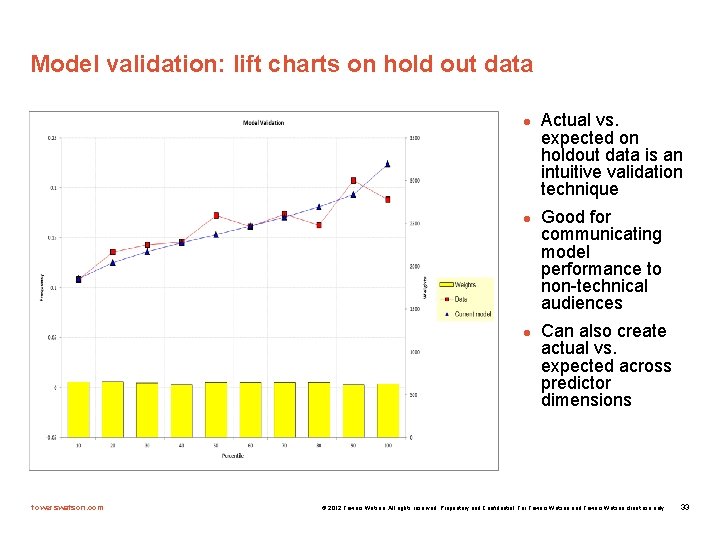
Model validation: lift charts on hold out data l l l towerswatson. com Actual vs. expected on holdout data is an intuitive validation technique Good for communicating model performance to non-technical audiences Can also create actual vs. expected across predictor dimensions © 2012 Towers Watson. All rights reserved. Proprietary and Confidential. For Towers Watson and Towers Watson client use only. 33
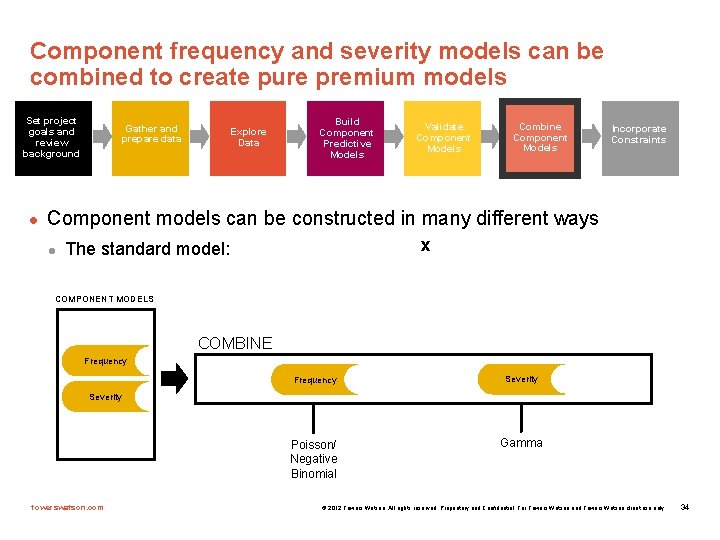
Component frequency and severity models can be combined to create pure premium models Set project goals and review background l Gather and prepare data Explore Data Build Component Predictive Models Validate Component Models Combine Component Models Incorporate Constraints Component models can be constructed in many different ways l x The standard model: COMPONENT MODELS COMBINE Frequency Severity Poisson/ Negative Binomial Gamma Severity towerswatson. com © 2012 Towers Watson. All rights reserved. Proprietary and Confidential. For Towers Watson and Towers Watson client use only. 34
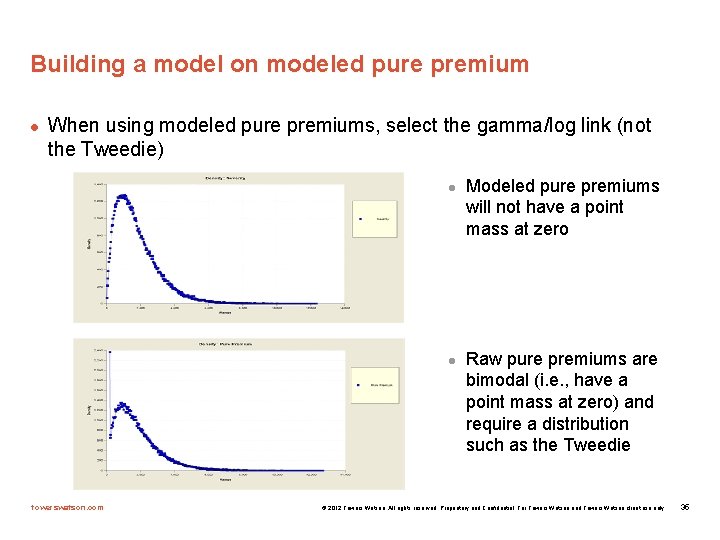
Building a model on modeled pure premium l When using modeled pure premiums, select the gamma/log link (not the Tweedie) l l towerswatson. com Modeled pure premiums will not have a point mass at zero Raw pure premiums are bimodal (i. e. , have a point mass at zero) and require a distribution such as the Tweedie © 2012 Towers Watson. All rights reserved. Proprietary and Confidential. For Towers Watson and Towers Watson client use only. 35
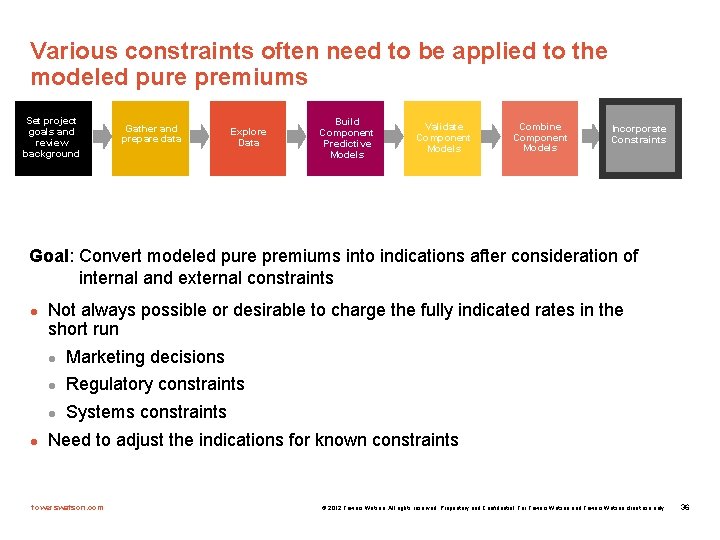
Various constraints often need to be applied to the modeled pure premiums Set project goals and review background Gather and prepare data Explore Data Build Component Predictive Models Validate Component Models Combine Component Models Incorporate Constraints Goal: Convert modeled pure premiums into indications after consideration of internal and external constraints l l Not always possible or desirable to charge the fully indicated rates in the short run l Marketing decisions l Regulatory constraints l Systems constraints Need to adjust the indications for known constraints towerswatson. com © 2012 Towers Watson. All rights reserved. Proprietary and Confidential. For Towers Watson and Towers Watson client use only. 36
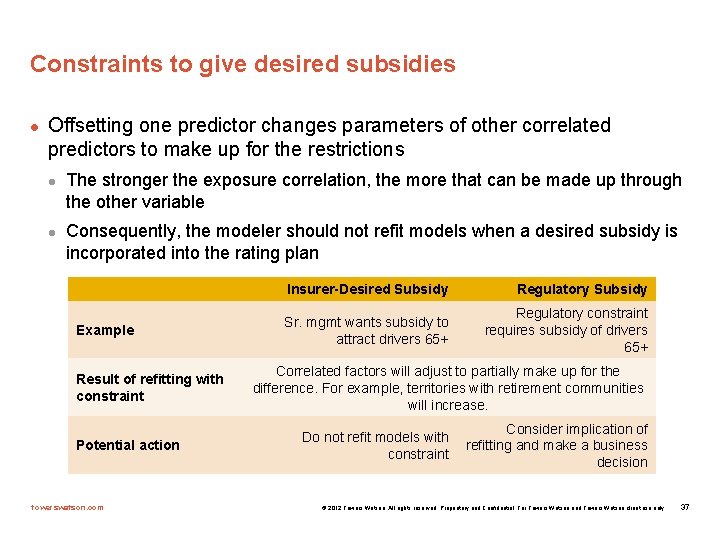
Constraints to give desired subsidies l Offsetting one predictor changes parameters of other correlated predictors to make up for the restrictions l l The stronger the exposure correlation, the more that can be made up through the other variable Consequently, the modeler should not refit models when a desired subsidy is incorporated into the rating plan Example Result of refitting with constraint Potential action towerswatson. com Insurer-Desired Subsidy Regulatory Subsidy Sr. mgmt wants subsidy to attract drivers 65+ Regulatory constraint requires subsidy of drivers 65+ Correlated factors will adjust to partially make up for the difference. For example, territories with retirement communities will increase. Do not refit models with constraint Consider implication of refitting and make a business decision © 2012 Towers Watson. All rights reserved. Proprietary and Confidential. For Towers Watson and Towers Watson client use only. 37
- Slides: 38