
GIF FORMAT COMPUTER GRAPHIC FILE FORMAT Conceptually a
![GIF FORMAT [ COMPUTER GRAPHIC ]](https://slidetodoc.com/presentation_image_h2/14b3151b4bb95b48cfd98f4b8deb1892/image-1.jpg "GIF FORMAT [ COMPUTER GRAPHIC ]")
- Slides: 6
GIF FORMAT [ COMPUTER GRAPHIC ]
FILE FORMAT Conceptually, a GIF file describes a fixed-sized graphical area (the "logical screen") populated with zero or more "images". Many GIF files have a single image that fills the entire logical screen. Others divide the logical screen into separate sub-images. The images may also function as animation frames in an animated GIF file, but again these need not fill the entire logical screen. GIF files start with a fixed-length header ("GIF 87 a" or "GIF 89 a") giving the version, followed by a fixed-length Logical Screen Descriptor giving the pixel dimensions and other characteristics of the logical screen. The screen descriptor may also specify the presence and size of a Global Color Table, which follows next if present.
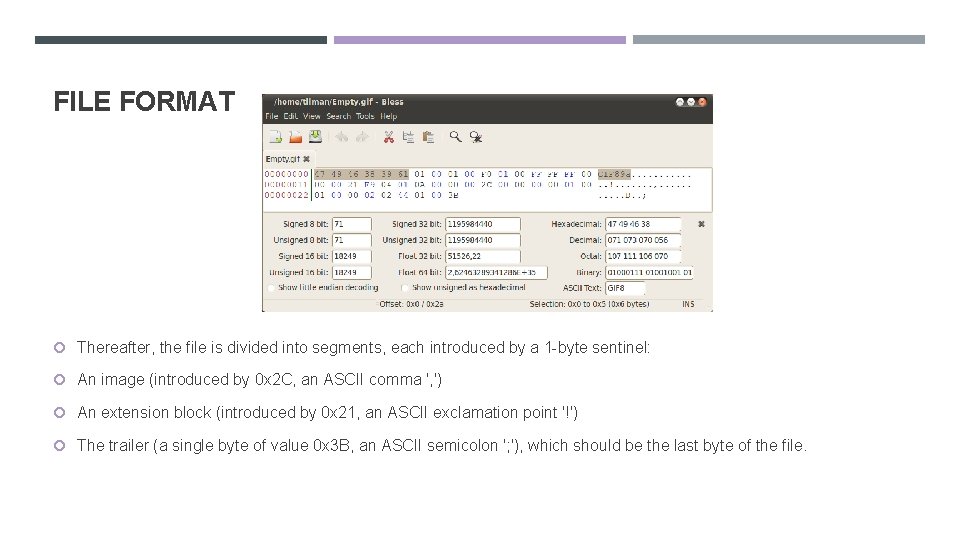
FILE FORMAT Thereafter, the file is divided into segments, each introduced by a 1 -byte sentinel: An image (introduced by 0 x 2 C, an ASCII comma ', ') An extension block (introduced by 0 x 21, an ASCII exclamation point '!') The trailer (a single byte of value 0 x 3 B, an ASCII semicolon '; '), which should be the last byte of the file.
FILE FORMAT Extension blocks (blocks that "extend" the 87 a definition via a mechanism already defined in the 87 a spec) consist of the sentinel, an additional byte specifying the type of extension, and a linked list of sub-blocks with the extension data. Extension blocks that modify an image (like the Graphic Control Extension that specifies the optional animation delay time and optional transparent background color) must immediately precede the segment with the image they refer to. The linked lists used by the image data and the extension blocks consist of series of sub-blocks, each sub-block beginning with a byte giving the number of subsequent data bytes in the sub-block (1 to 255). The series of subblocks is terminated by an empty sub-block (a 0 byte). This structure allows the file to be parsed even if not all parts are understood. A GIF marked 87 a may contain extension blocks; the intent is that a decoder can read and display the file without the features covered in extensions it does not understand.
ANIMATED GIF Although GIF was not designed as an animation medium, its ability to store multiple images in one file naturally suggested using the format to store the frames of an animation sequence. To facilitate displaying animations, the GIF 89 a spec added the Graphics Control Extension (GCE), which allows the images (frames) in the file to be painted with time delays, forming a video clip. Each frame in an animation GIF is introduced by its own GCE specifying the time delay to wait after the frame is drawn. Global information at the start of the file applies by default to all frames. The data is stream-oriented, so the file offset of the start of each GCE depends on the length of preceding data. Within each frame the LZW-coded image data is arranged in sub-blocks of up to 255 bytes; the size of each subblock is declared by the byte that precedes it.
ANIMATED GIF By default, an animation displays the sequence of frames only once, stopping when the last frame is displayed. To enable an animation to loop, Netscape in the 1990 s used the Application Extension block (intended to allow vendors to add application-specific information to the GIF file) to implement the Netscape Application Block (NAB). [30] This block, placed immediately before the sequence of animation frames, specifies the number of times the sequence of frames should be played or that it should repeat continuously. Support for these repeating animations first appeared in Netscape Navigator version 2. 0, and then spread to other browsers. [31] Most browsers now recognize, and support NAB, though it is not strictly part of the GIF 89 a specification. The following example shows the structure of the animation file Rotating earth (large). gif shown (as a thumbnail) at the top of the article.