
Getting a Grip on the BPMN Specification Discovering
Getting a Grip on the BPMN Specification Discovering Method & Style
Agenda 01 The Concepts of Process Modeling • Definition of a Process • Levels of Process Modeling 02 The BPMN Basics • Basic Building Blocks of the Notation • Exercises 03 The Extended BPMN Syntax • Elaborated Building Blocks of the Notation • Exercises

The Concepts
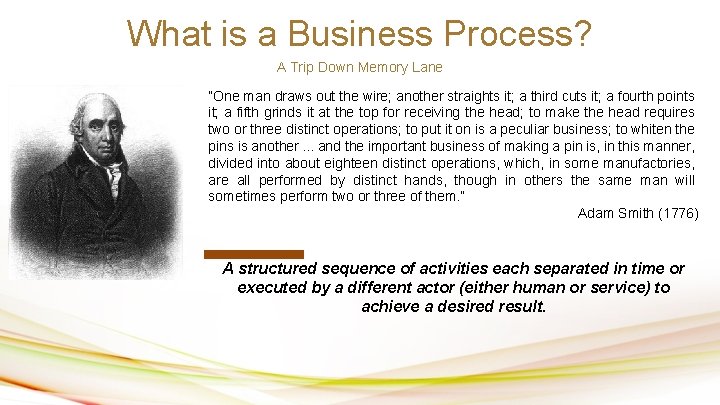
What is a Business Process? A Trip Down Memory Lane ”One man draws out the wire; another straights it; a third cuts it; a fourth points it; a fifth grinds it at the top for receiving the head; to make the head requires two or three distinct operations; to put it on is a peculiar business; to whiten the pins is another. . . and the important business of making a pin is, in this manner, divided into about eighteen distinct operations, which, in some manufactories, are all performed by distinct hands, though in others the same man will sometimes perform two or three of them. ” Adam Smith (1776) A structured sequence of activities each separated in time or executed by a different actor (either human or service) to achieve a desired result.
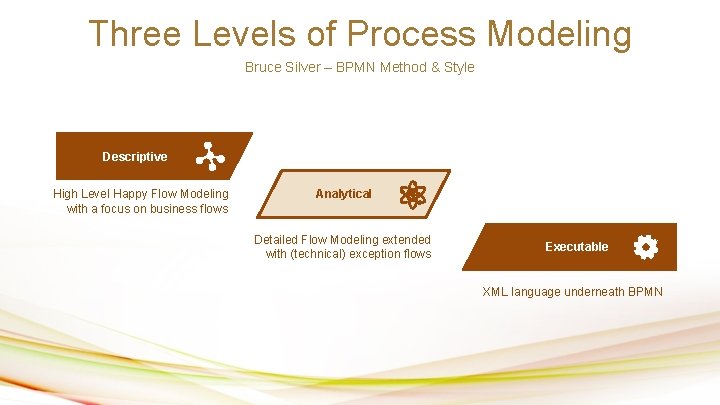
Three Levels of Process Modeling Bruce Silver – BPMN Method & Style Descriptive High Level Happy Flow Modeling with a focus on business flows Analytical Detailed Flow Modeling extended with (technical) exception flows Your Text Here Executable XML language underneath BPMN
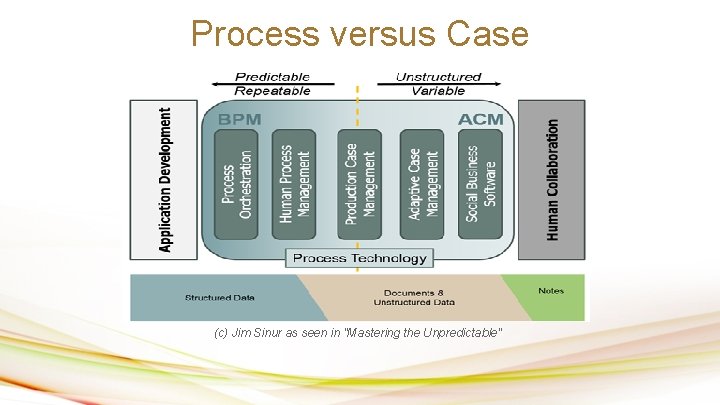
Process versus Case (c) Jim Sinur as seen in "Mastering the Unpredictable"
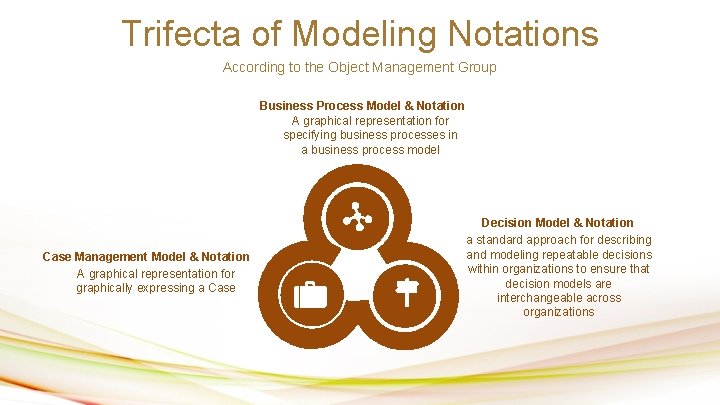
Trifecta of Modeling Notations According to the Object Management Group Business Process Model & Notation A graphical representation for specifying business processes in a business process model Case Management Model & Notation A graphical representation for graphically expressing a Case Decision Model & Notation a standard approach for describing and modeling repeatable decisions within organizations to ensure that decision models are interchangeable across organizations
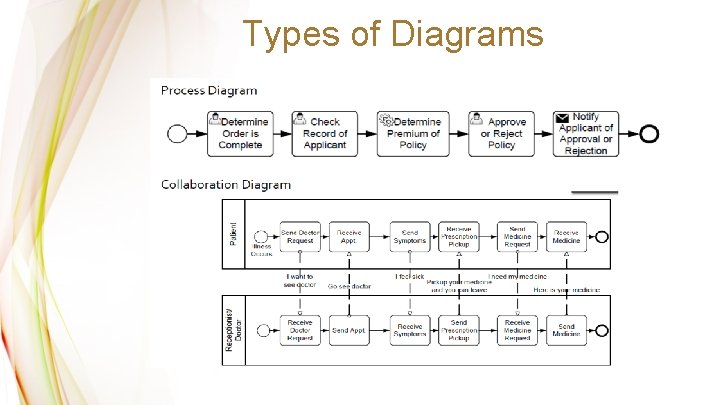
Types of Diagrams
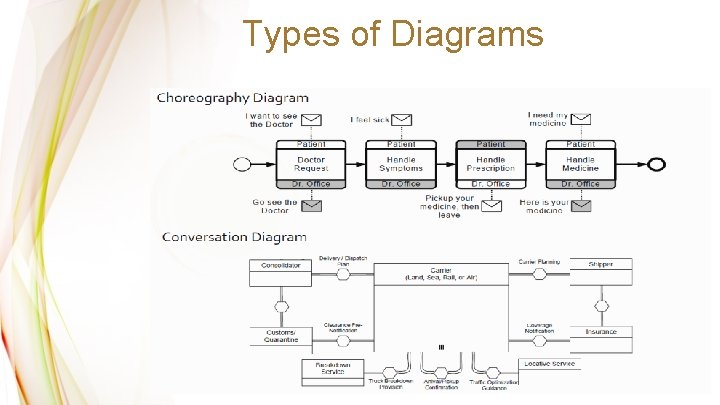
Types of Diagrams
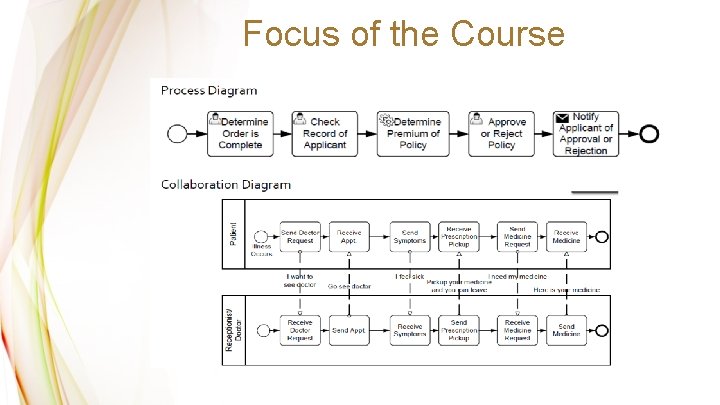
Focus of the Course
Reference Works The Inspiration for this Course OMG BPMN Specification Your Text Here The Specification as written up by the Object Management Group. A great resource for getting to know BPMN. Focusses both on the elements of the notation and how to use them, as well as give examples of how to model properly. An expansion on his previous book, Bruce Silver revisits method style of process modeling. A great resource for when you are just getting started with Business Process Management.

The Basic Language
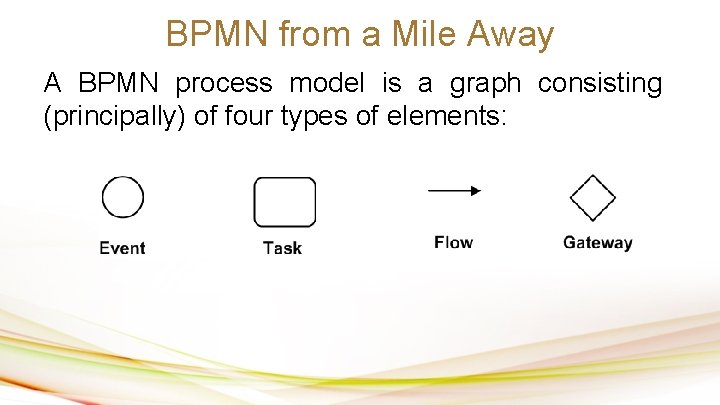
BPMN from a Mile Away A BPMN process model is a graph consisting (principally) of four types of elements:
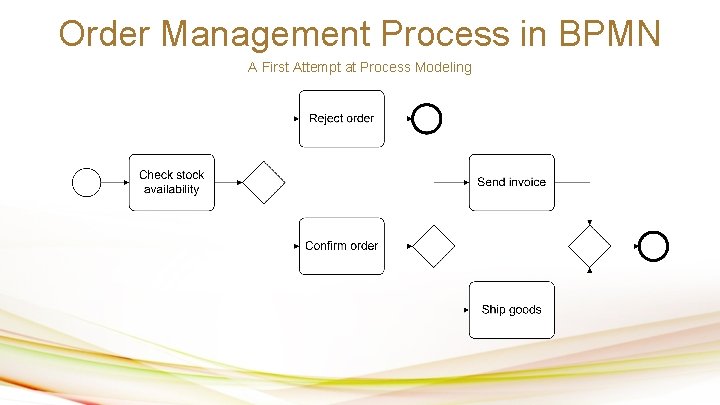
Order Management Process in BPMN A First Attempt at Process Modeling
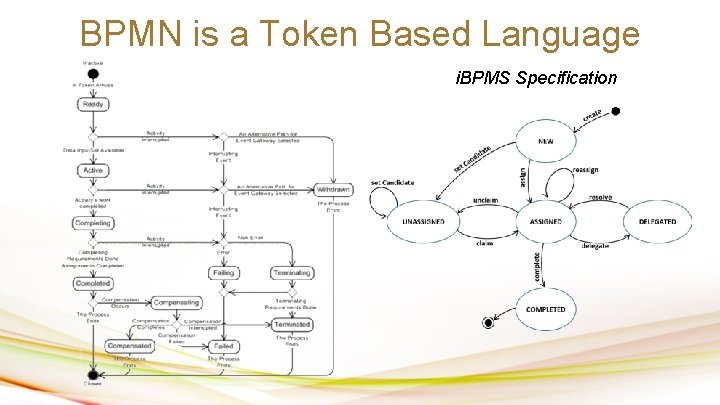
BPMN is a Token Based Language i. BPMS Specification
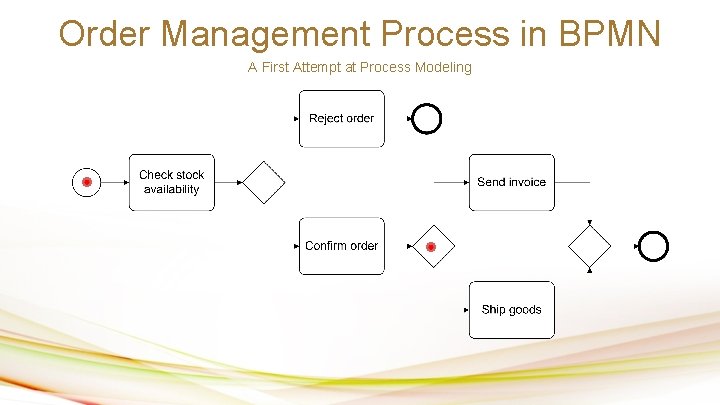
Order Management Process in BPMN A First Attempt at Process Modeling
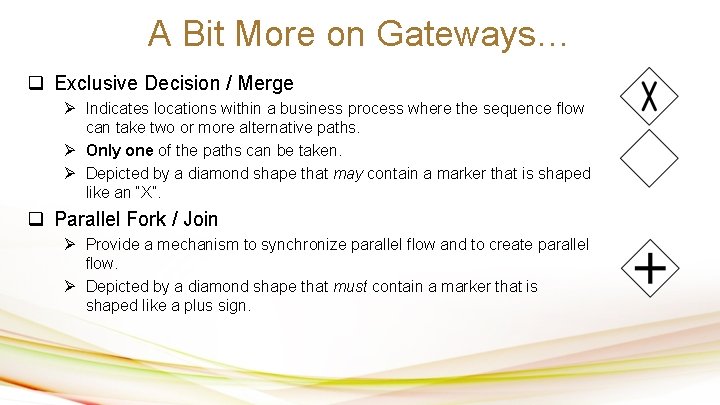
A Bit More on Gateways… q Exclusive Decision / Merge Ø Indicates locations within a business process where the sequence flow can take two or more alternative paths. Ø Only one of the paths can be taken. Ø Depicted by a diamond shape that may contain a marker that is shaped like an “X”. q Parallel Fork / Join Ø Provide a mechanism to synchronize parallel flow and to create parallel flow. Ø Depicted by a diamond shape that must contain a marker that is shaped like a plus sign.
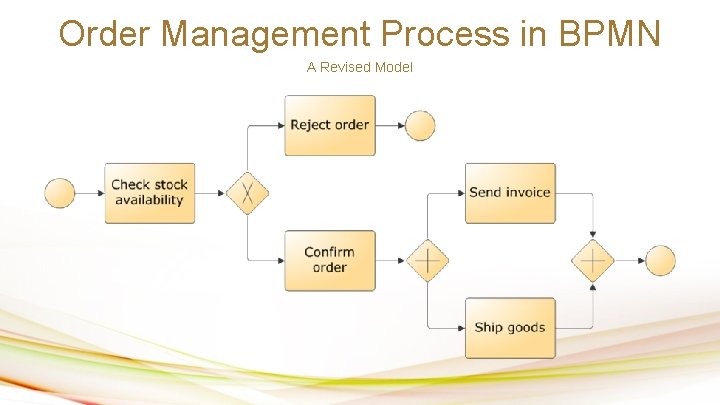
Order Management Process in BPMN A Revised Model
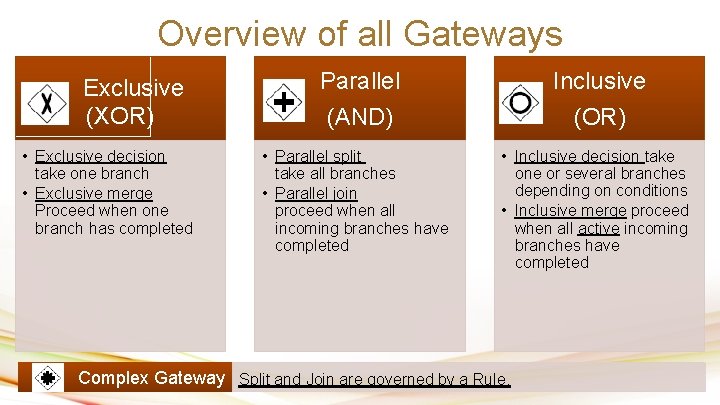
Overview of all Gateways Exclusive (XOR) • Exclusive decision take one branch • Exclusive merge Proceed when one branch has completed Parallel Inclusive (AND) (OR) • Parallel split take all branches • Parallel join proceed when all incoming branches have completed • Inclusive decision take one or several branches depending on conditions • Inclusive merge proceed when all active incoming branches have completed Complex Gateway Split and Join are governed by a Rule.
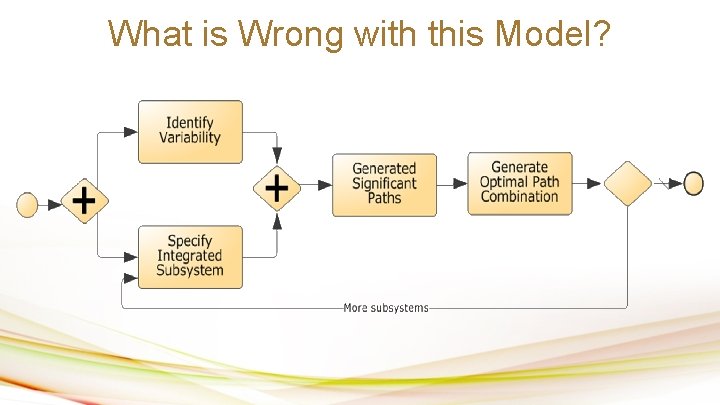
What is Wrong with this Model?
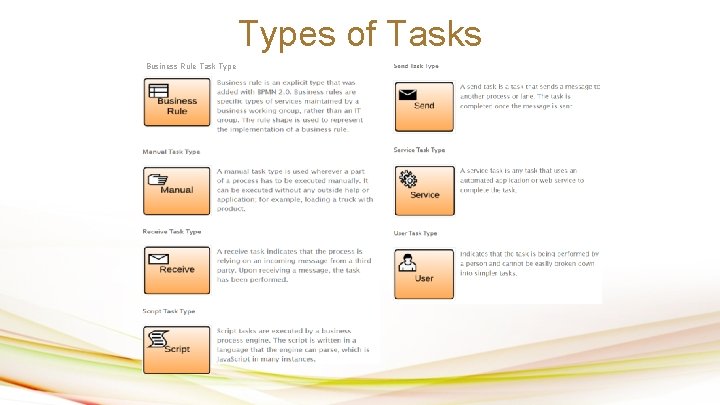
Types of Tasks Business Rule Task Type
Organisational Elements Two basic abstractions: • Resource: Human actor or equipment (e. g. printer) that is required to perform an activity • Resource class: Set of resources with shared characteristics, e. g. Clerk, Manager, Insurance Officer A resource class may be a: • Role (skill, competence, qualification) Classification based on what a resource can do or is expected to do. • Group (department, team, office, organizational unit) Classification based on the organization’s structure.
Resource Modelling • In BPMN, resource classes are captured using: – Pools – independent organizational entities, e. g. • Customer, Supplier, East-Tallinn Hospital, Tartu Clinic – Lanes – resource classes in the same organizational space and sharing common systems • Sales Department, Marketing Department • Clerk, Manager, Engineer
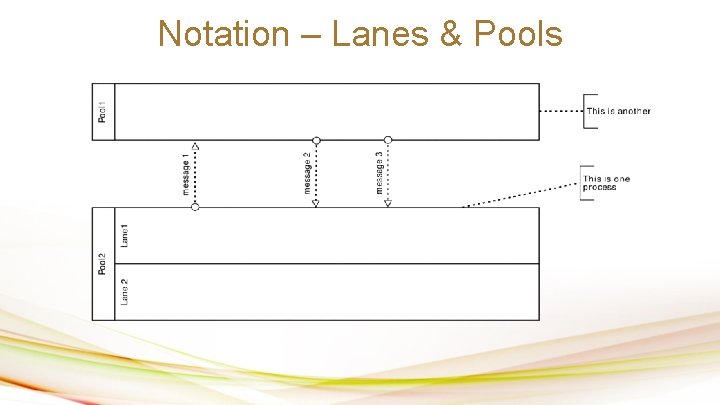
Notation – Lanes & Pools
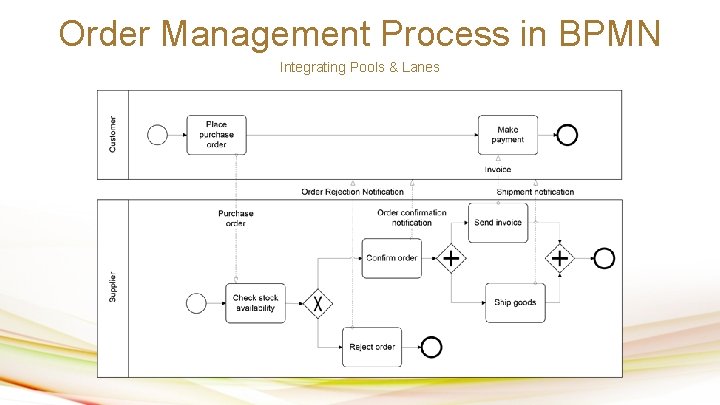
Order Management Process in BPMN Integrating Pools & Lanes
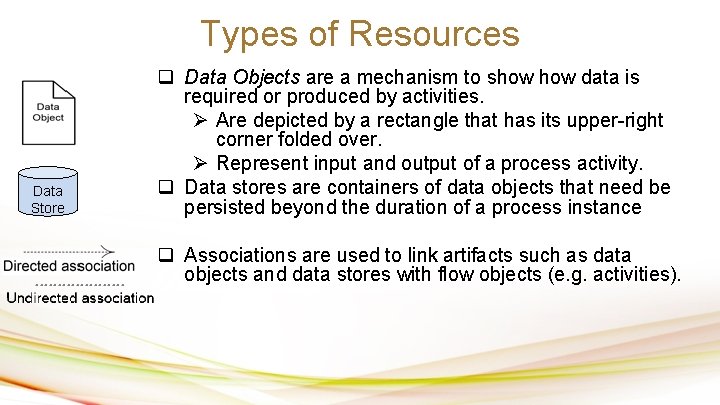
Types of Resources Data Store q Data Objects are a mechanism to show data is required or produced by activities. Ø Are depicted by a rectangle that has its upper-right corner folded over. Ø Represent input and output of a process activity. q Data stores are containers of data objects that need be persisted beyond the duration of a process instance q Associations are used to link artifacts such as data objects and data stores with flow objects (e. g. activities).
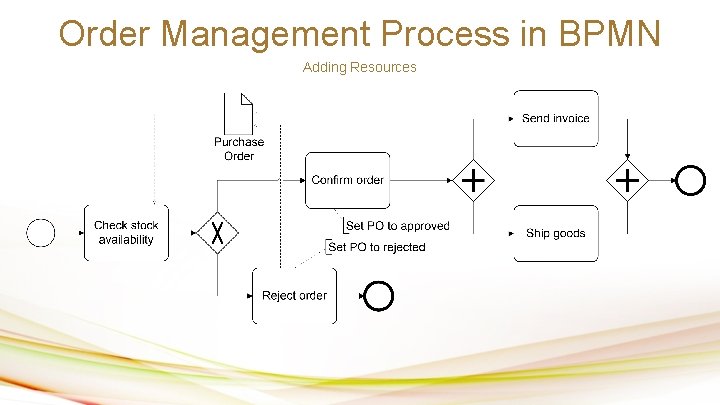
Order Management Process in BPMN Adding Resources
Exercise Time
BPMN Exercise 01 • Claims Handling process at a car insurer A customer submits a claim by sending in relevant documentation. The Customer Service department checks the documents for completeness and registers the claim. After registration, the claim is classified leading to two possible outcomes: simple or complex. If the overall claim is simple, the policy is checked. For complex claims, both the policy and the damage are checked independently. The Claims Handling department checks the insurance policy. The same department does the damage assessment. If the overall assessment is positive, the damages are validated and a garage is phoned by the customer service department to authorise the repairs and the payment is scheduled (in this order). In any case (whether the outcome is positive or negative), an e-mail is sent to the customer to notify the outcome.
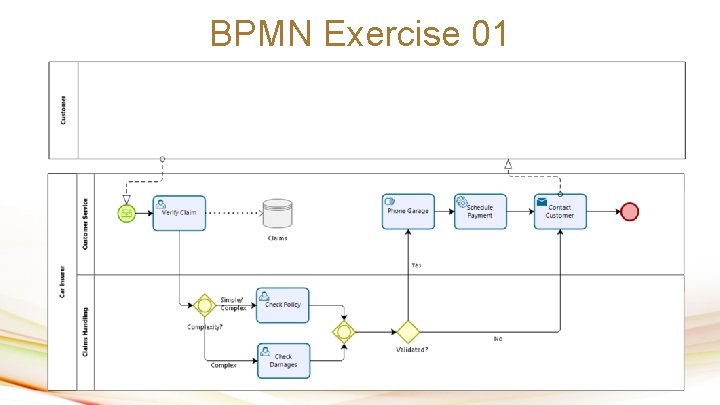
BPMN Exercise 01
BPMN Exercise 02 In the context of a claim handling process, an insurance claim agent needs to verify the policy and an insurance claim agent needs to verify the claimant’s precedents. There is no fixed sequence for these actions. However, at soon as either of these tasks has been performed, the system needs to launch an automated task to add the claim to a daily overview report.
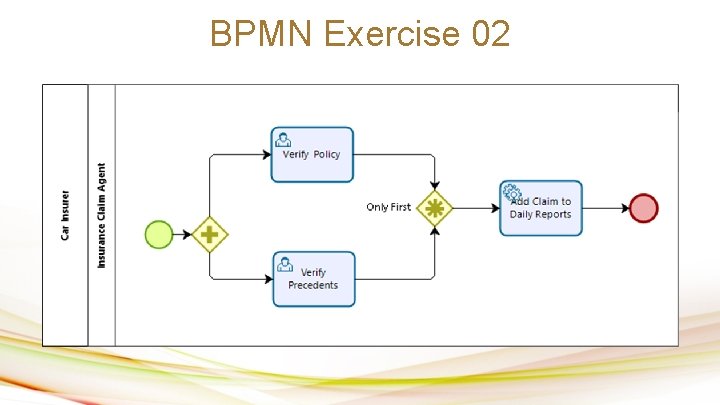
BPMN Exercise 02

The Extended Language
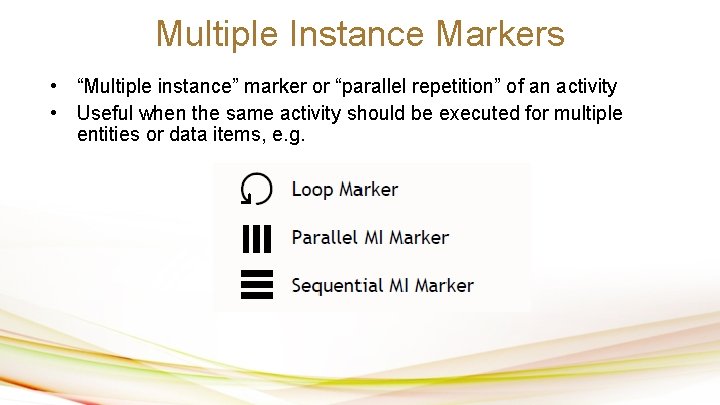
Multiple Instance Markers • “Multiple instance” marker or “parallel repetition” of an activity • Useful when the same activity should be executed for multiple entities or data items, e. g.
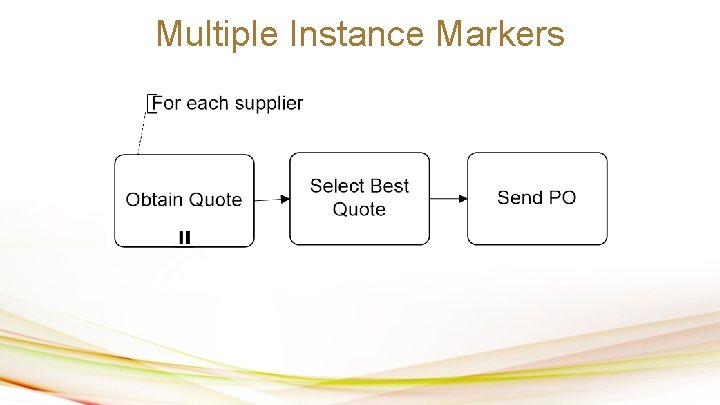
Multiple Instance Markers
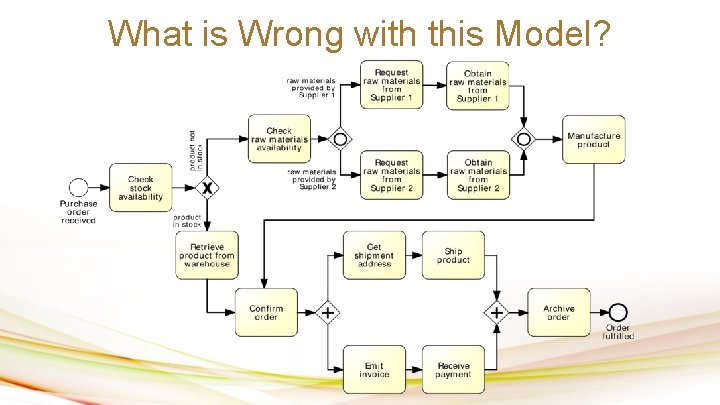
What is Wrong with this Model?
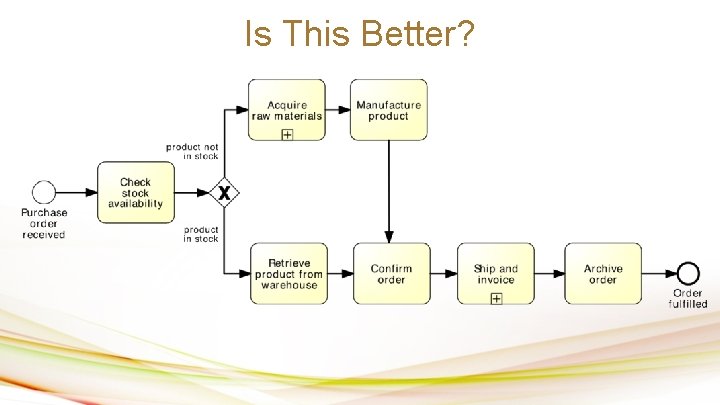
Is This Better?
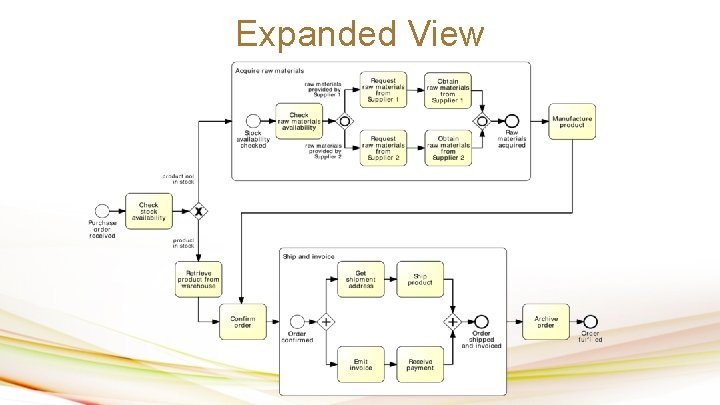
Expanded View
Subprocesses • An activity in a process can “invoke” a separate (sub-)process • Use this feature to: 1. Break down large models into smaller ones, making them easier to understand maintain process hierarchies 2. Share common fragments across multiple processes shared subprocesses 3. Identify parts of a process that should be: • repeated • executed multiple times in parallel • cancelled
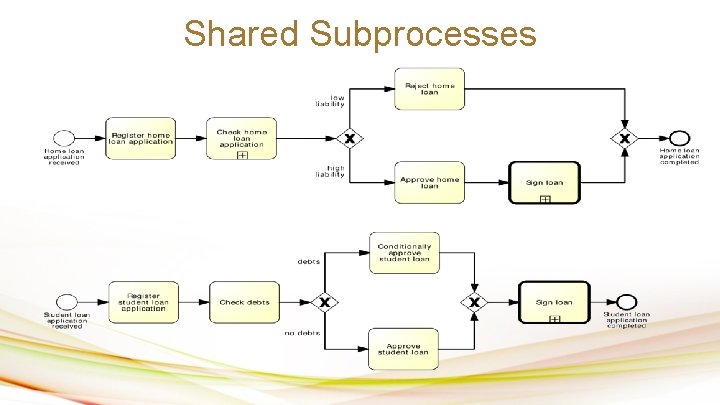
Shared Subprocesses
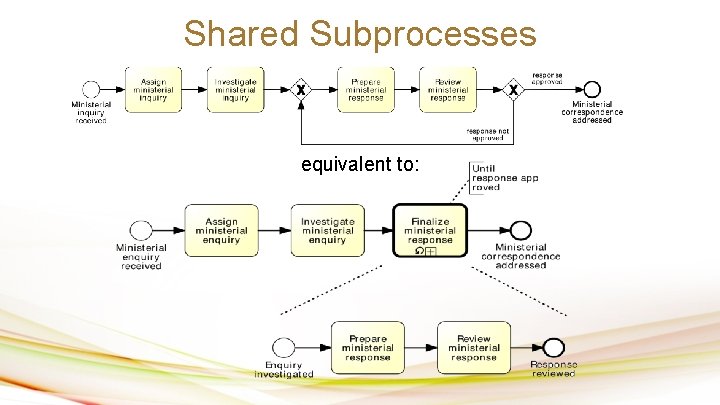
Shared Subprocesses equivalent to:
Exercise Time
BPMN Exercise 03 After a claim is registered, it is examined by two different claims officers. Each claims officer then writes a “settlement recommendation”. These recommendations are checked by a senior claims officer who may mark the claim as “OK” or “Not OK”. If the claim is marked as “Not OK”, it is sent back to the claims officers and the examination is repeated. If the claim is marked as “OK”, the settlement to the customer.
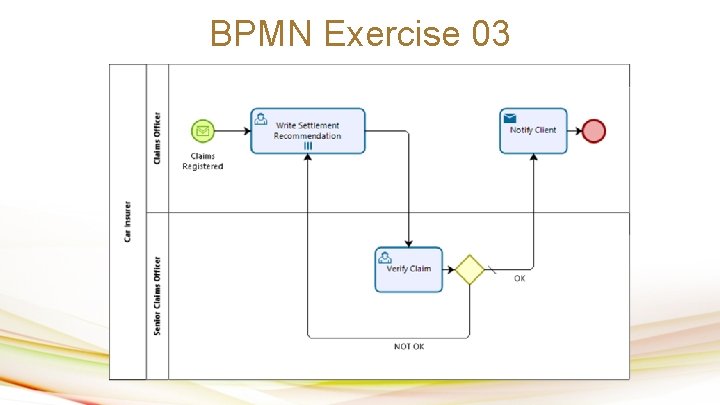
BPMN Exercise 03

The Extended Language
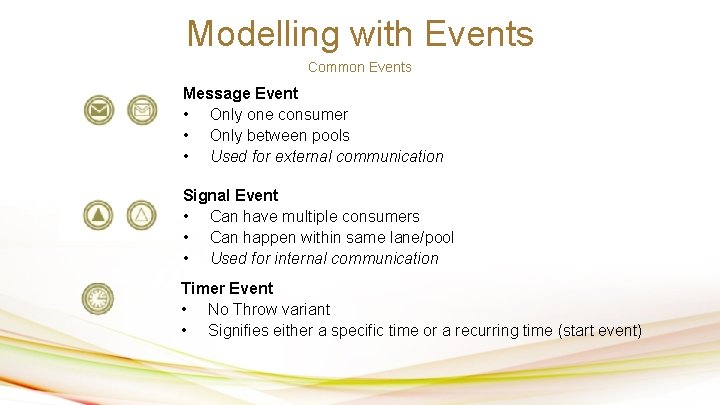
Modelling with Events Common Events Message Event • Only one consumer • Only between pools • Used for external communication Signal Event • Can have multiple consumers • Can happen within same lane/pool • Used for internal communication Timer Event • No Throw variant • Signifies either a specific time or a recurring time (start event)
Modelling with Events - Example A PO handling process starts when a PO is received. The PO is first registered. If the current date is not a working day, the process waits until the following working day before proceeding. Otherwise, an availability check is performed and a “PO response” is sent back to the customer. Anytime during the process, the customer may send a “PO change request”. When such a request is received, it is just registered, without further action.
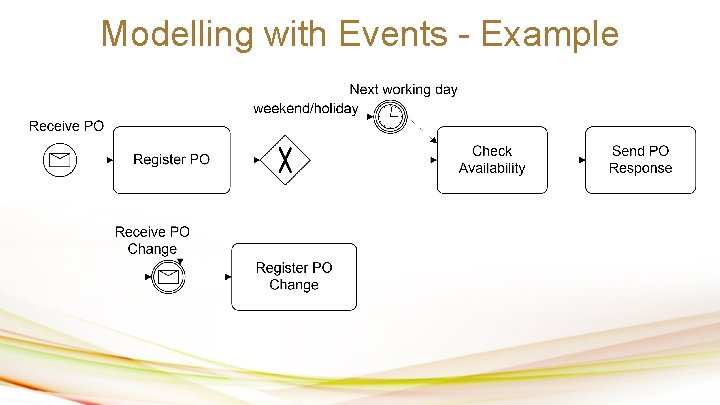
Modelling with Events - Example
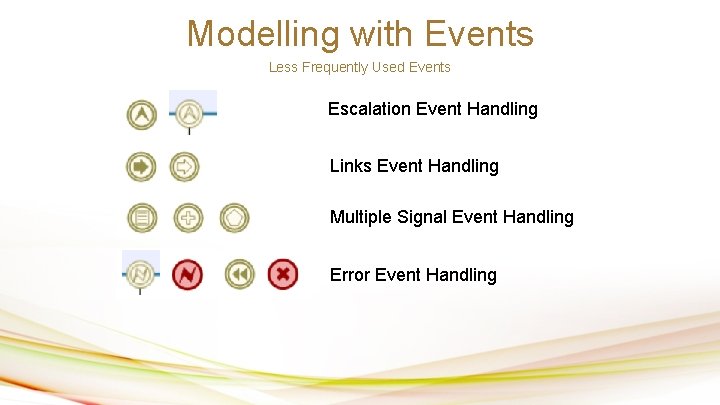
Modelling with Events Less Frequently Used Events Escalation Event Handling Links Event Handling Multiple Signal Event Handling Error Event Handling
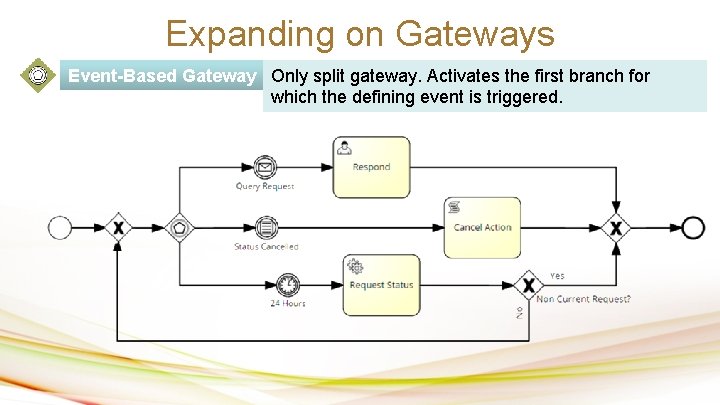
Expanding on Gateways Event-Based Gateway Only split gateway. Activates the first branch for which the defining event is triggered.
Boundary Events • Sometimes during a sub-process or task execution, some event may occur that needs some action… • Such events are placed at the boundaries of the sub-process/task (boundary events) • Two flavors: – Interrupting boundary events – Non-interrupting boundary events
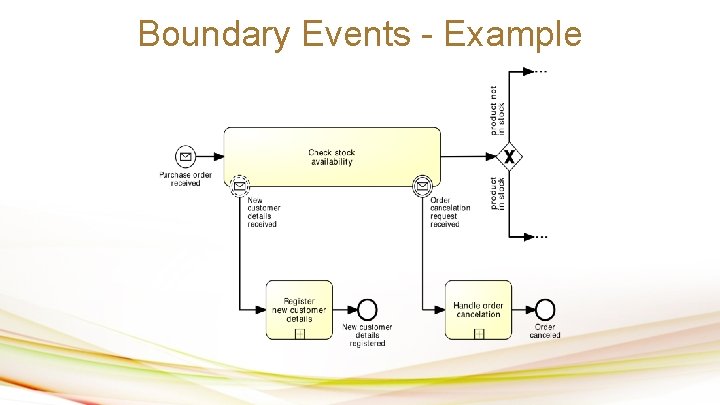
Boundary Events - Example
Event Sub-Processes • An event sub-process is a process that is attached to a parent process, and that are triggered when an event happens • Alternative to putting a boundary non-interrupting event around the parent process
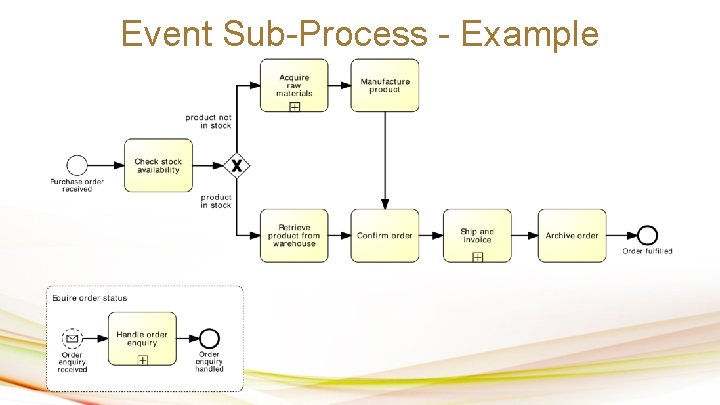
Event Sub-Process - Example
Exception Handling – Error Events • Exceptions are events that deviate a process from its “normal” course • Handling exceptions often involves stopping a sub-process and performing a special activity • Achieved using two event nodes: – An “end error event” that stops the enclosing subprocess execution – An “intermediate error event” attached to the enclosing subprocess – this is where the process execution will continue after the error
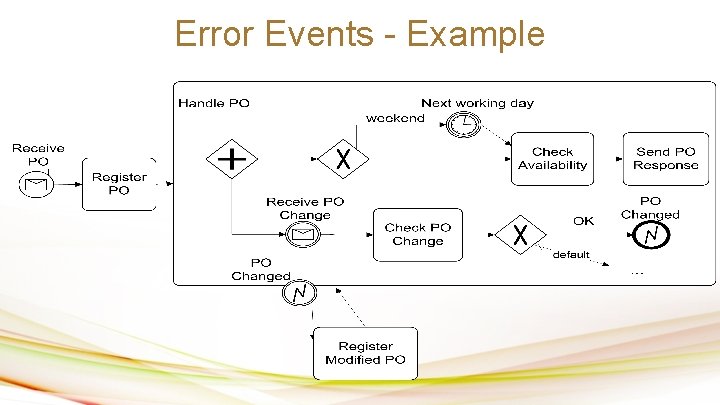
Error Events - Example
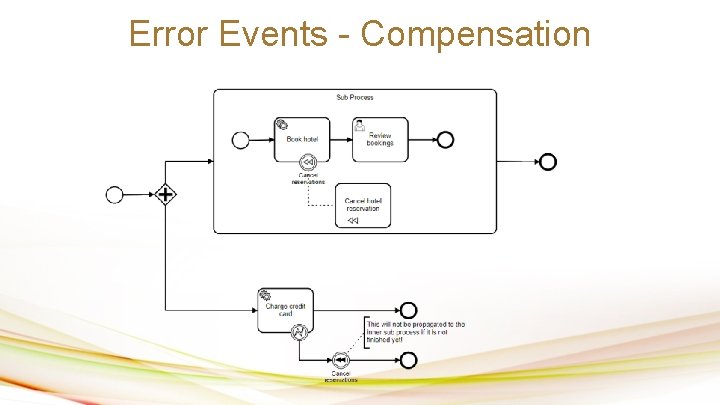
Error Events - Compensation
Exercise Time
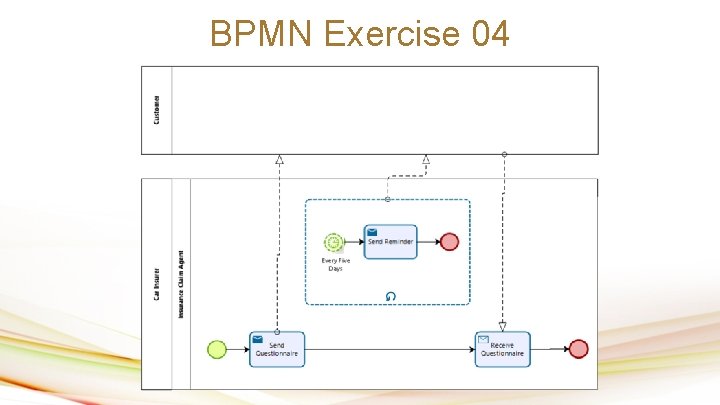
BPMN Exercise 04 In the context of a claim handling process, it is sometimes necessary to send a questionnaire to the claimant to gather additional information. The claimant is expected to return the questionnaire within five days. If no response is received after five days, a reminder is sent to the claimant. If after another five days there is still no response, another reminder is sent and so on until the completed questionnaire is received.
BPMN Exercise 04 III
BPMN Exercise 05 (Increased Difficulty) In the context of a claim handling process, we would like to introduce automation to reduce the work done by the insurance claim agent. So when a valid claim is received, or when this process is manually started, we either allow for agent to process the claim, or we allow for the system to automatically try and process the claim. If for some reason the system cannot process the claim, and the agent hasn’t yet processed the claim, the system should retry after an incremental waiting period of 10 minutes (first time wait 10 minutes, second time wait 20 minutes…).
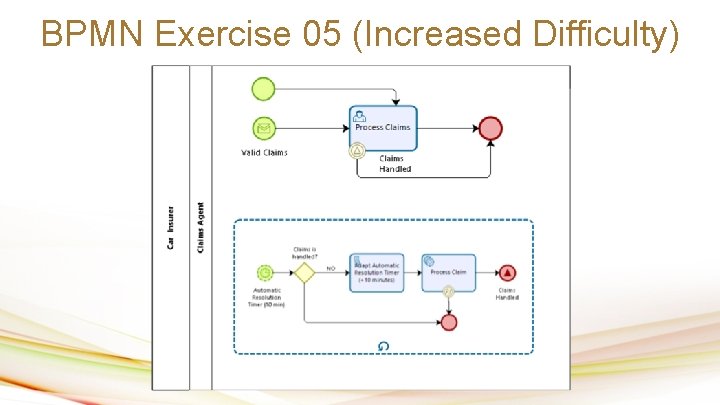
BPMN Exercise 05 (Increased Difficulty)
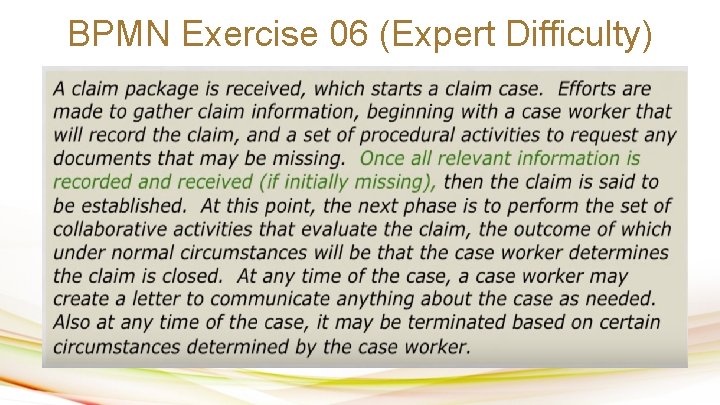
BPMN Exercise 06 (Expert Difficulty)
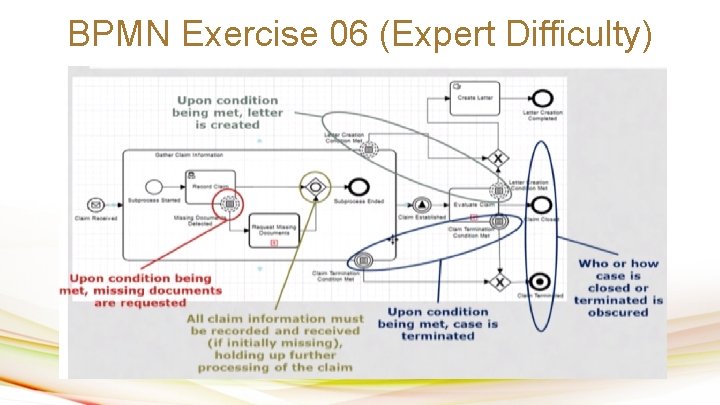
BPMN Exercise 06 (Expert Difficulty)
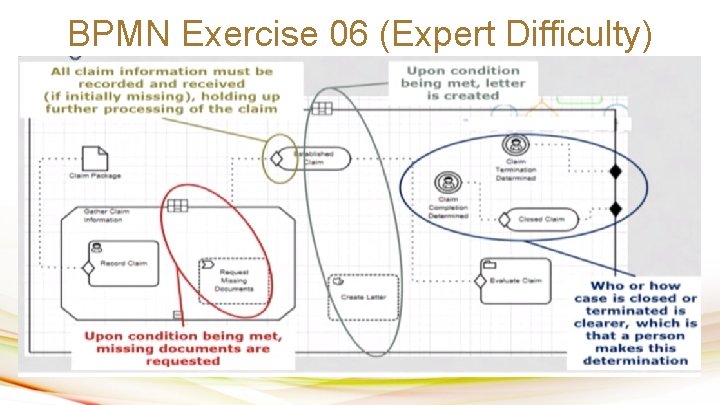
BPMN Exercise 06 (Expert Difficulty)

Conventions
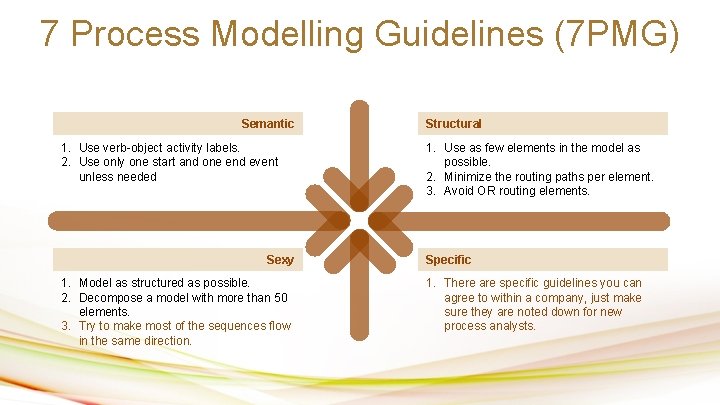
7 Process Modelling Guidelines (7 PMG) Semantic 1. Use verb-object activity labels. 2. Use only one start and one end event unless needed Sexy 1. Model as structured as possible. 2. Decompose a model with more than 50 elements. 3. Try to make most of the sequences flow in the same direction. Structural 1. Use as few elements in the model as possible. 2. Minimize the routing paths per element. 3. Avoid OR routing elements. Specific 1. There are specific guidelines you can agree to within a company, just make sure they are noted down for new process analysts.

Thank you

Section Break Insert the title of your subtitle Here

Welcome!! Insert the title of your subtitle Here This Power. Point Template has clean and neutral design that can be adapted to any content and meets various market segments.
Timeline Style Insert the title of your subtitle Here 2015 2017 2019 Your Text Here 2016 You can simply impress your audience and add a unique zing and appeal to your Presentations. Your Text Here You can simply impress your audience and add a unique zing and appeal to your Presentations. 2018 You can simply impress your audience and add a unique zing and appeal to your Presentations. Your Text Here You can simply impress your audience and add a unique zing and appeal to your Presentations.
Our Services Insert the title of your subtitle Here Your Text Here You can simply impress your audience and add a unique zing and appeal to your Presentations.
Our Team Layout Insert the title of your subtitle Here Name Here Programmer You can simply impress your audience and add a unique zing.
Infographic Style Insert the title of your subtitle Here Your Text Here You can simply impress your audience and add a unique zing.
Your Text Here You can simply impress your audience and add a unique zing. Portfolio Presentation
Infographic Style Insert the title of your subtitle Here Your Text Easy Here to change colors, photos and Text.
Infographic Style Insert the title of your subtitle Here Easy to change colors, photos and Text. Your Text Here Your Text Here Easy to change colors, photos and Text.
Portfolio Presentation Designed You can simply impress your audience and add a unique zing. Get a modern Power. Point Presentation that is beautifully designed. Easy to change colors, photos and Text. You can simply impress your audience and add a unique zing and appeal to your Presentations.
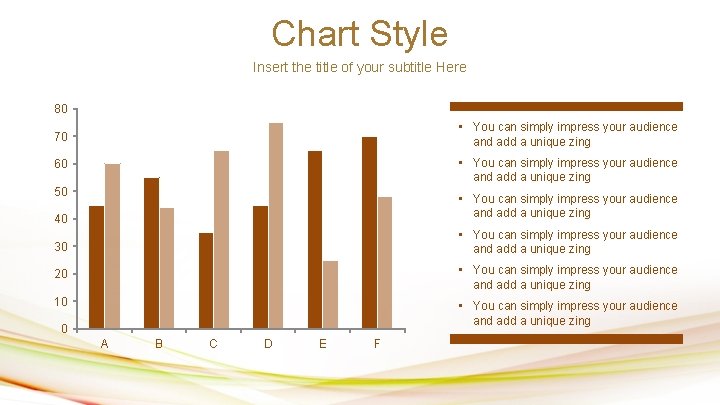
Chart Style Insert the title of your subtitle Here 80 70 • You can simply impress your audience and add a unique zing 60 • You can simply impress your audience and add a unique zing 50 • You can simply impress your audience and add a unique zing 40 30 • You can simply impress your audience and add a unique zing 20 • You can simply impress your audience and add a unique zing 10 • You can simply impress your audience and add a unique zing 0 A B C D E F
Infographic Style Insert the title of your subtitle Here Your Text Here You can simply impress your audience and add a unique zing and appeal to your Presentations.
Portfolio Presentation Insert the title of your subtitle Here Get a modern Power. Point Presentation that is beautifully designed. You can simply impress your audience and add a unique zing and appeal to your Presentations.
Infographic Style Insert the title of your subtitle Here Your Text Here You can simply impress your audience and add a unique zing and appeal to your Presentations.
Table Style Insert the title of your subtitle Here Add Contents Title Content Here Simple Power. Point Add Text Content Here Add Text Simple Power. Point Get a modern Power. Point Presentation that is beautifully designed. Easy to change colors, photos and Text. You can simply impress your audience and add a unique zing and appeal to your Presentations. Get a modern Power. Point Presentation that is beautifully designed. Easy to change colors, photos and Text.
Portfolio Presentation Insert the title of your subtitle Here Portfolio Presentation You can simply impress your audience and add a unique zing and appeal to your Presentations. Easy to change colors, photos and Text.
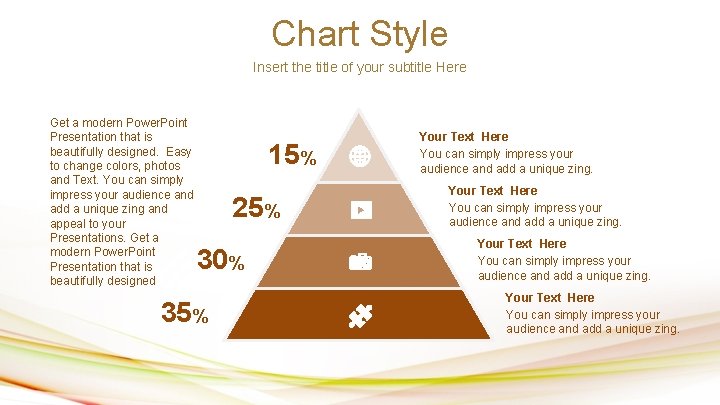
Chart Style Insert the title of your subtitle Here Get a modern Power. Point Presentation that is beautifully designed. Easy to change colors, photos and Text. You can simply impress your audience and add a unique zing and appeal to your Presentations. Get a modern Power. Point Presentation that is beautifully designed 15% 25% 30% 35% Your Text Here You can simply impress your audience and add a unique zing.
Worldmap Style Insert the title of your subtitle Here You can simply impress your audience and add a unique zing and appeal to your Presentations. 1, 256, 000 You can simply impress your audience and add a unique zing and appeal to your Presentations. Get a modern Power. Point Presentation that is beautifully designed. Easy to change colors, photos and Text. You can simply impress your audience and add a unique zing and appeal to your Presentations.
Table Style Insert the title of your subtitle Here Content Your Text Here Text Here Your Text Your Text Here Text Here $50. 50
Infographic Style Insert the title of your subtitle Here Your Text Here You can simply impress your audience and add a unique zing.
Infographic Style Insert the title of your subtitle Here Your Text Here You can simply impress your audience and add a unique zing and appeal to your Presentations. Get a modern Power. Point Presentation that is beautifully designed.
Infographic Style Insert the title of your subtitle Here Your Text Here You can simply impress your audience and add a unique zing.
Infographic Style Insert the title of your subtitle Here Easy to change colors, photos and Text. You can simply impress your audience and add a unique zing and appeal to your Presentations. Get a modern Power. Point Presentation that is beautifully designed. Your Text Here You can simply impress your audience and add a unique zing and appeal to your Presentations. Text Here
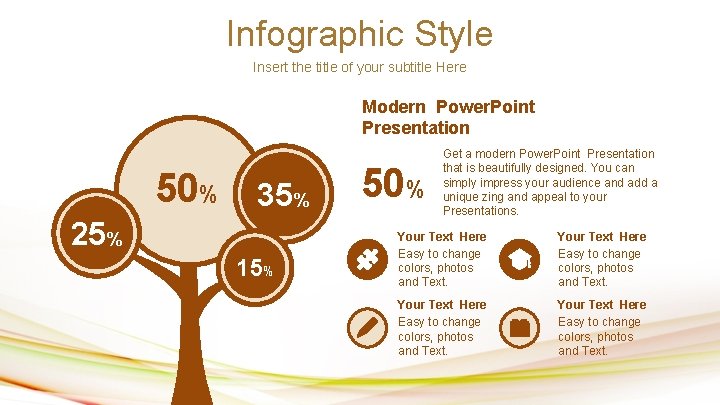
Infographic Style Insert the title of your subtitle Here Modern Power. Point Presentation 50% 35% 25% 15% 50% Get a modern Power. Point Presentation that is beautifully designed. You can simply impress your audience and add a unique zing and appeal to your Presentations. Your Text Here Easy to change colors, photos and Text.
Chart Style Insert the title of your subtitle Here Your Text Here You can simply impress your audience and add a unique zing and appeal to your Presentations. Your Text Here You can simply impress your audience and add a unique zing.
You can simply impress your audience and add a unique zing. Get a modern Power. Point Presentation that is beautifully designed. Easy to change colors, photos and Text. You can simply impress your audience and add a unique zing and appeal to your Presentations. Portfolio Presentation Designed You can simply impress your audience and add a unique zing. Get a modern Power. Point Presentation that is beautifully designed. Easy to change colors, photos and Text. You can simply impress your audience and add a unique zing and appeal to your Presentations. Easy to change colors, photos and Text.
Worldmap Style Insert the title of your subtitle Here You can simply impress your audience and add a unique zing and appeal to your Presentations. Your Text Here You can simply impress your audience and add a unique zing and appeal to your Presentations.
Columns Style Insert the title of your subtitle Here 01 Your Text Here 02 Add Contents Title You can simply impress your audience and add a unique zing and appeal to your Presentations. I hope and I believe that this Template will your Time, Money and Reputation. You can simply impress your audience and add a unique zing and appeal to your Presentations. Easy to change colors, photos and Text. Get a modern Power. Point Presentation that is beautifully designed. You can simply impress your audience and add a unique zing and appeal to your Presentations. Easy to change colors, photos and Text. I hope and I believe that this Template will your Time, Money and Reputation. You can simply impress your audience and add a unique zing and appeal to your Presentations.
Columns Style Insert the title of your subtitle Here 01 Your Text Here 02 You can simply impress your audience and add a unique zing. Get a modern Power. Point Presentation that is beautifully designed. 03 Your Text Here You can simply impress your audience and add a unique zing and appeal to your Presentations. Get a modern Power. Point Presentation that is beautifully designed. Add Contents Title You can simply impress your audience and add a unique zing and appeal to your Presentations. Easy to change colors, photos and Text. You can simply impress your audience and add a unique zing and appeal to your Presentations. 04 Add Contents Title You can simply impress your audience and add a unique zing and appeal to your Presentations. Easy to change colors, photos and Text. I hope and I believe that this Template will your Time, Money and Reputation. You can simply impress your audience and add a unique zing and appeal to your Presentations.
Fully Editable Icon Sets : A You can Resize without losing quality You can Change Fill Color & Line Color FREE PPT TEMPLATES www. allppt. com
Fully Editable Icon Sets : B You can Resize without losing quality You can Change Fill Color & Line Color FREE PPT TEMPLATES www. allppt. com
Fully Editable Icon Sets : C You can Resize without losing quality You can Change Fill Color & Line Color FREE PPT TEMPLATES www. allppt. com
- Slides: 100