
Get out your notes Dimensioning Standards Learning Objectives

Get out your notes. Dimensioning Standards
Learning Objectives • Understand be able to apply different dimensioning standards to drawings.

Dimension Guidelines
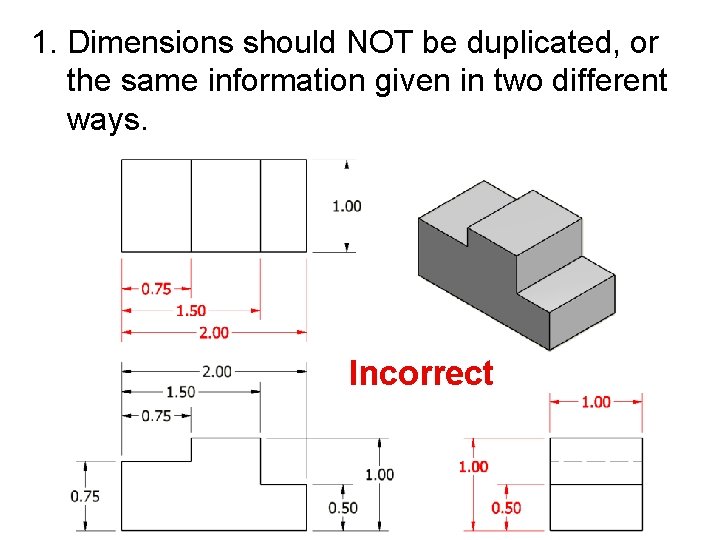
1. Dimensions should NOT be duplicated, or the same information given in two different ways. Incorrect
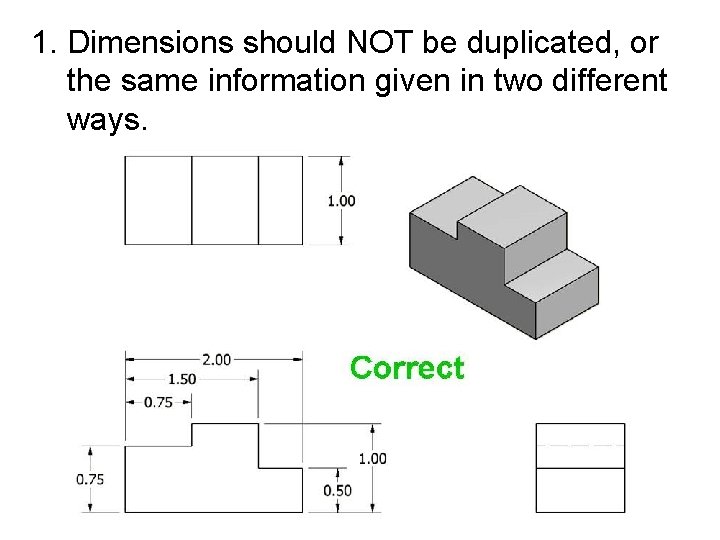
1. Dimensions should NOT be duplicated, or the same information given in two different ways.
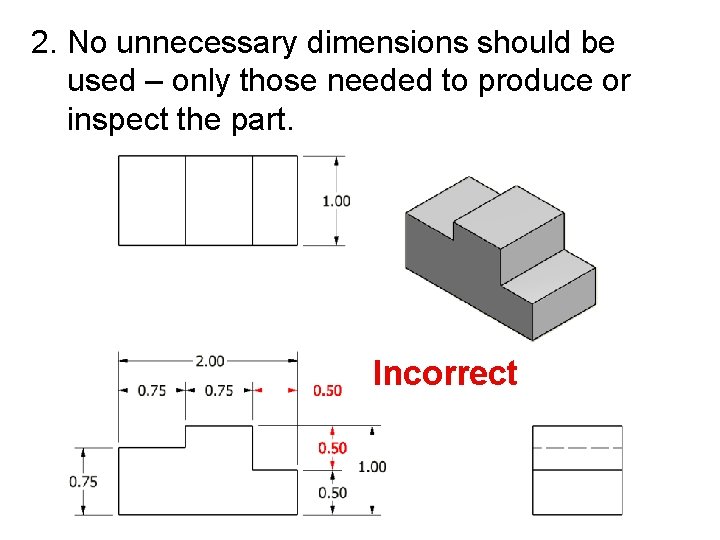
2. No unnecessary dimensions should be used – only those needed to produce or inspect the part. Incorrect
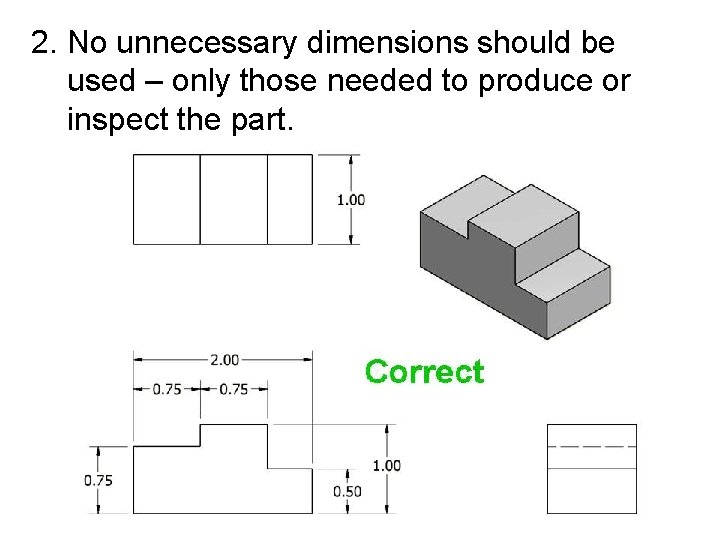
2. No unnecessary dimensions should be used – only those needed to produce or inspect the part.
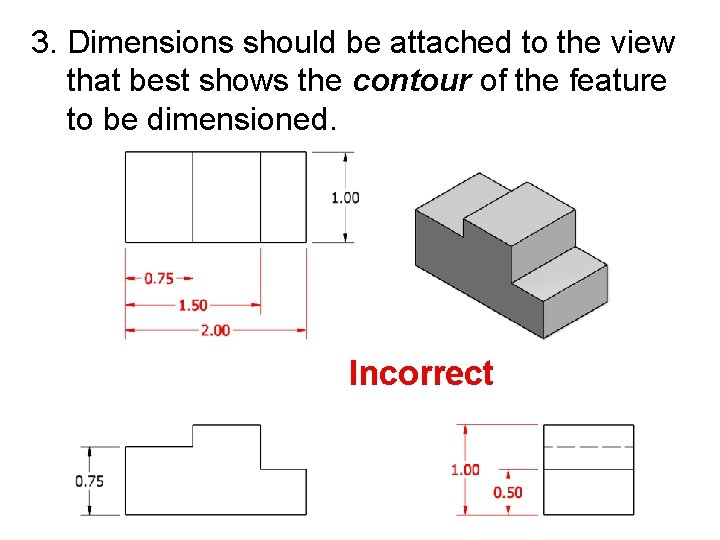
3. Dimensions should be attached to the view that best shows the contour of the feature to be dimensioned. Incorrect
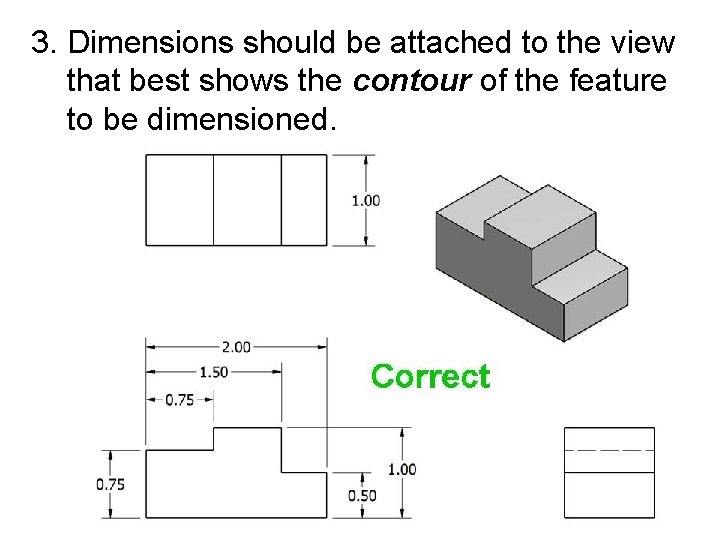
3. Dimensions should be attached to the view that best shows the contour of the feature to be dimensioned.
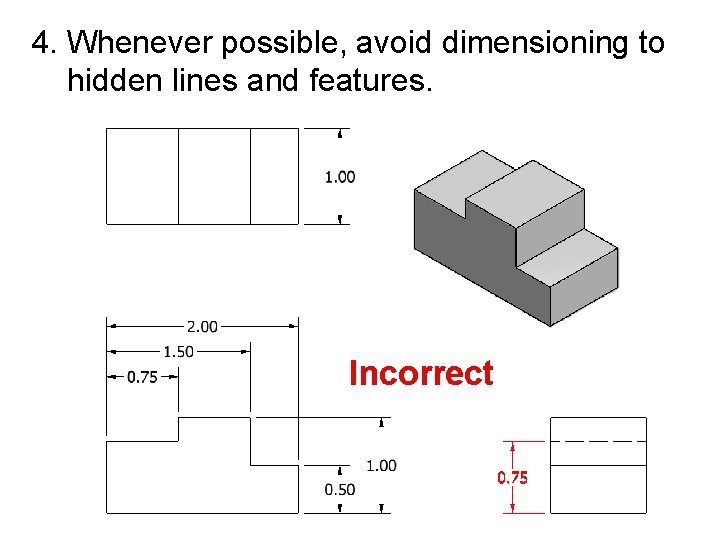
4. Whenever possible, avoid dimensioning to hidden lines and features. Incorrect
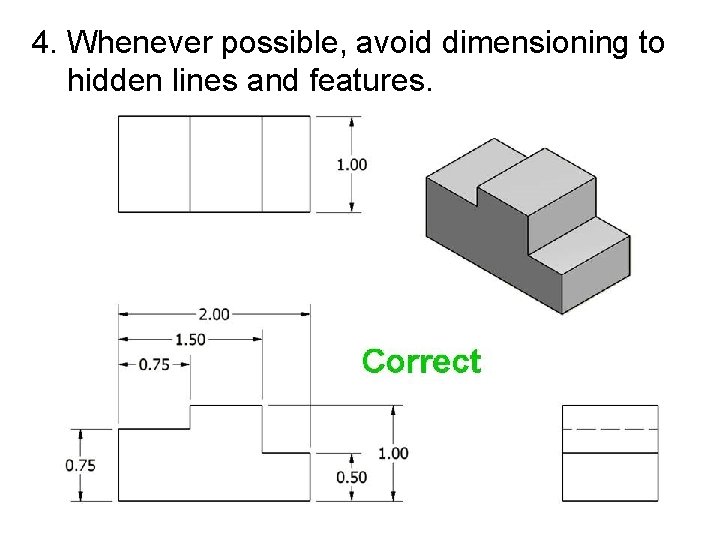
4. Whenever possible, avoid dimensioning to hidden lines and features.
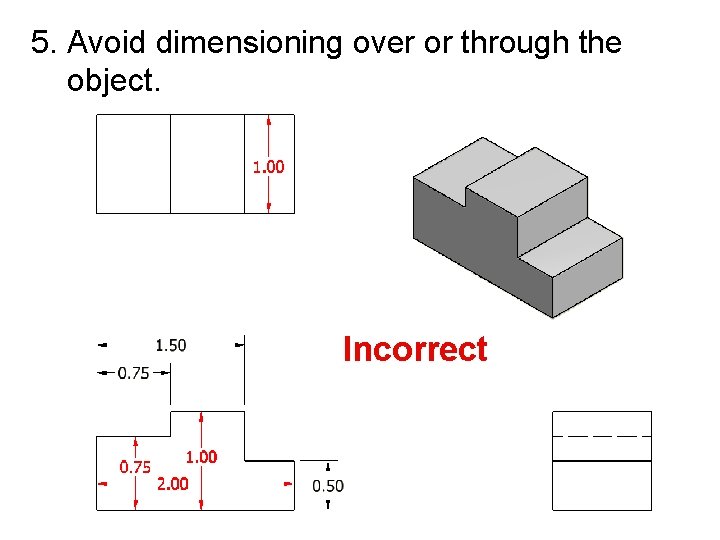
5. Avoid dimensioning over or through the object. Incorrect
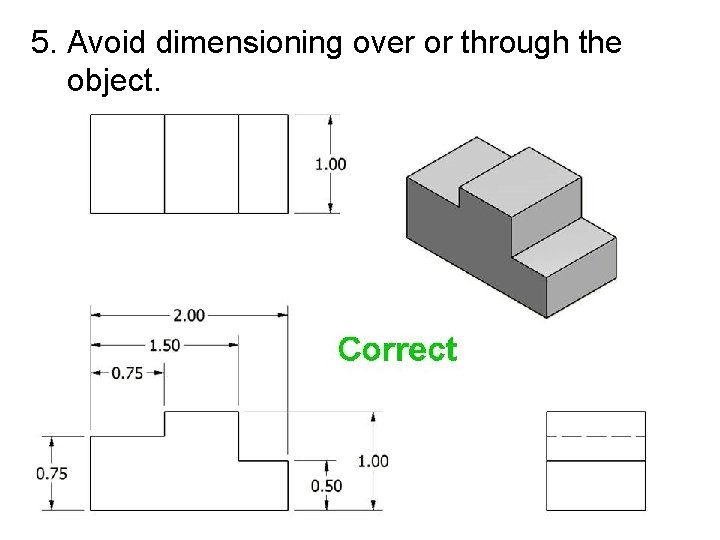
5. Avoid dimensioning over or through the object.
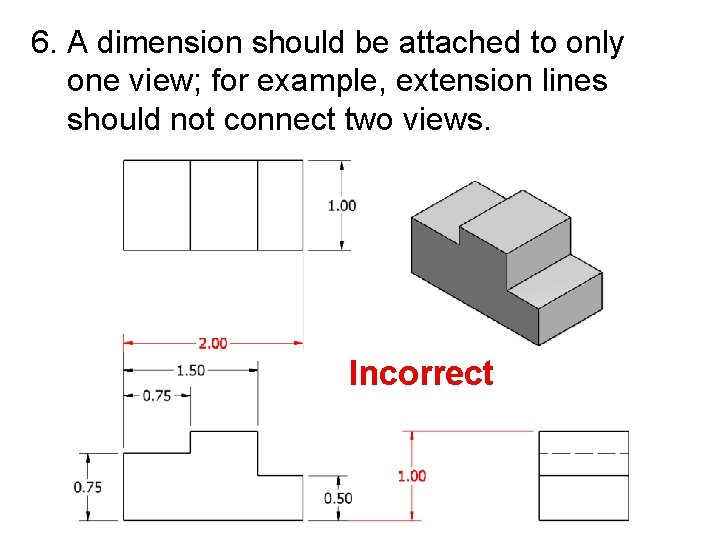
6. A dimension should be attached to only one view; for example, extension lines should not connect two views. Incorrect
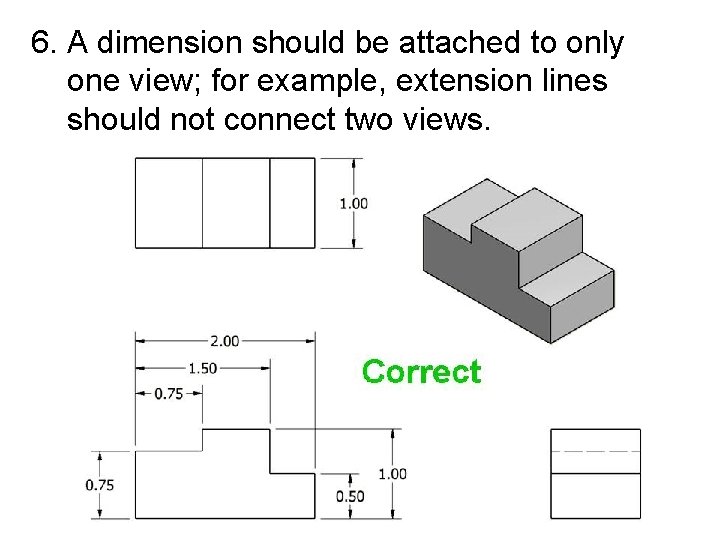
6. A dimension should be attached to only one view; for example, extension lines should not connect two views.
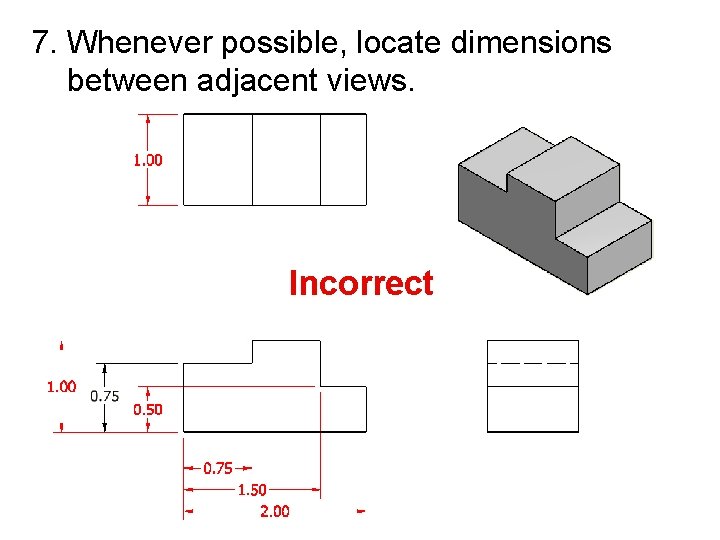
7. Whenever possible, locate dimensions between adjacent views. Incorrect
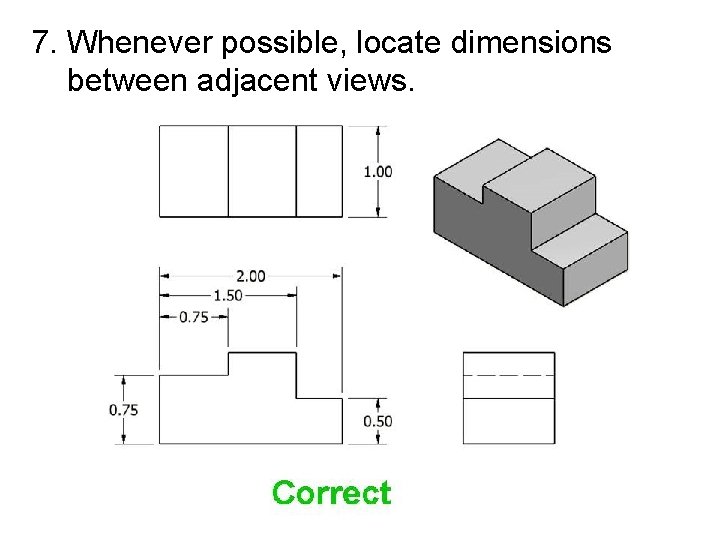
7. Whenever possible, locate dimensions between adjacent views.
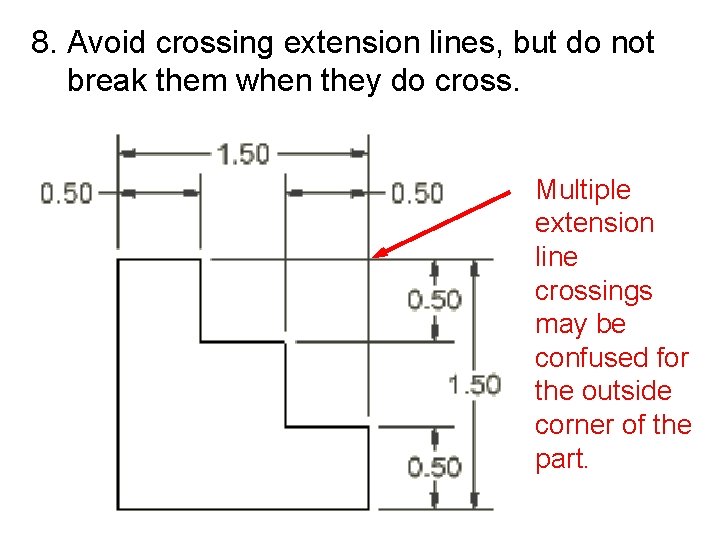
8. Avoid crossing extension lines, but do not break them when they do cross. Multiple extension line crossings may be confused for the outside corner of the part.
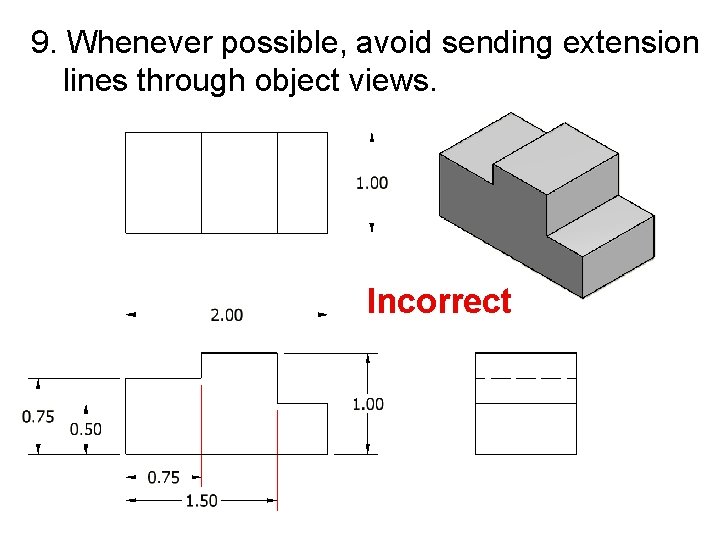
9. Whenever possible, avoid sending extension lines through object views. Incorrect
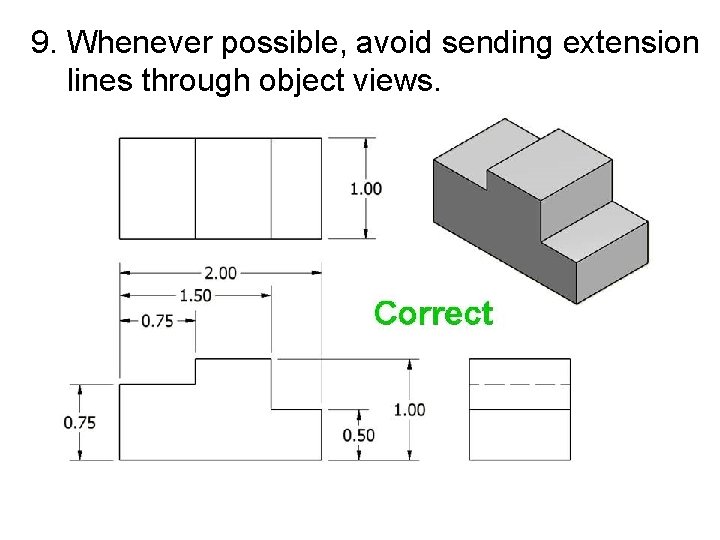
9. Whenever possible, avoid sending extension lines through object views.
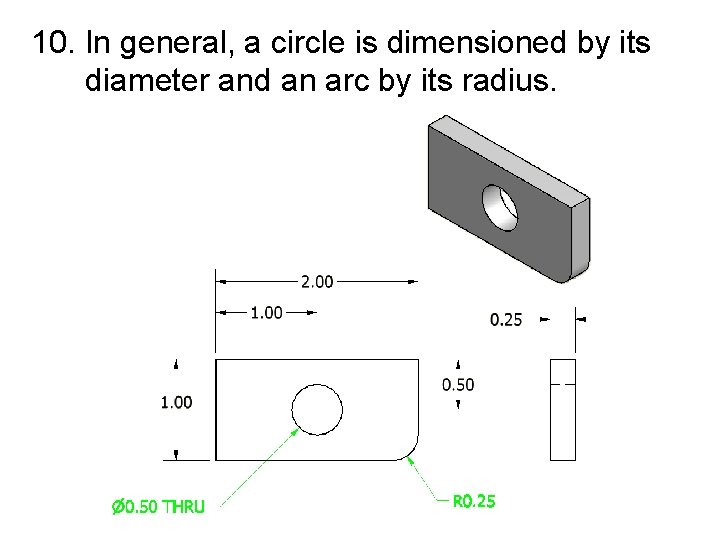
10. In general, a circle is dimensioned by its diameter and an arc by its radius.
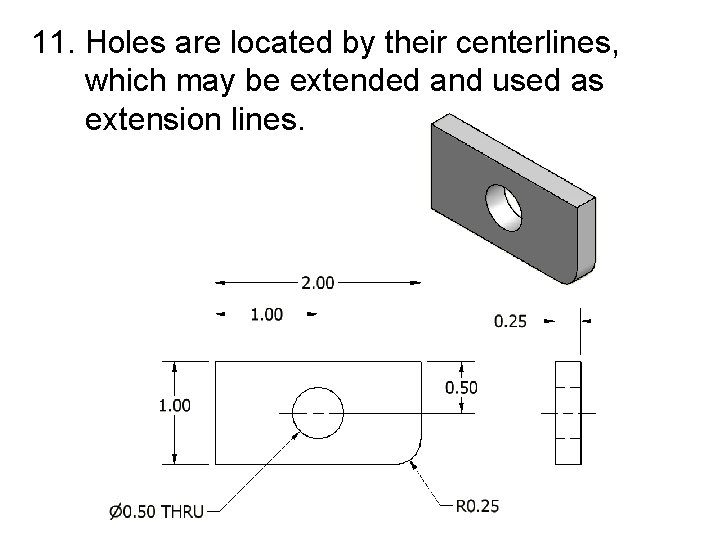
11. Holes are located by their centerlines, which may be extended and used as extension lines.
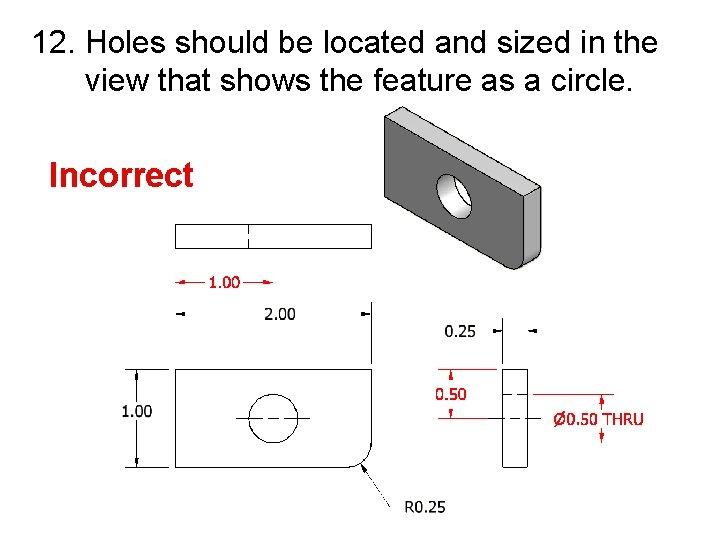
12. Holes should be located and sized in the view that shows the feature as a circle. Incorrect
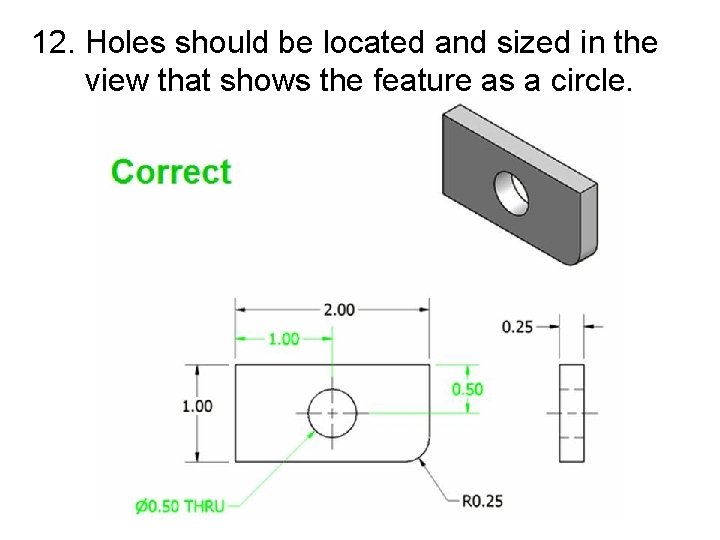
12. Holes should be located and sized in the view that shows the feature as a circle.
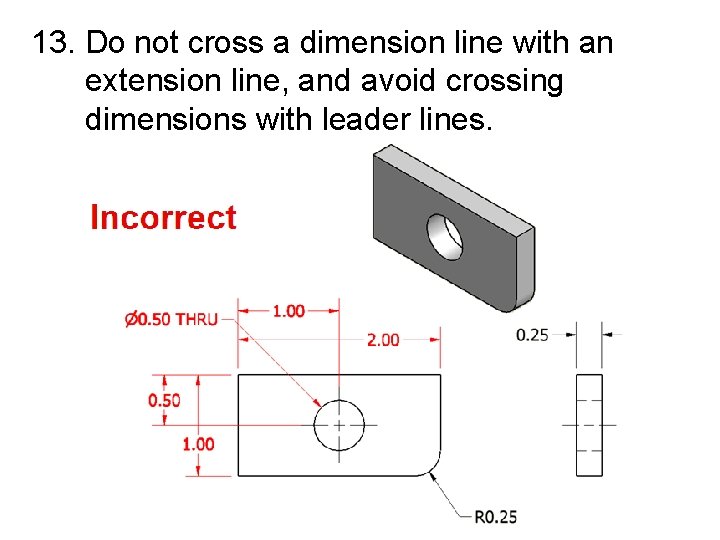
13. Do not cross a dimension line with an extension line, and avoid crossing dimensions with leader lines.
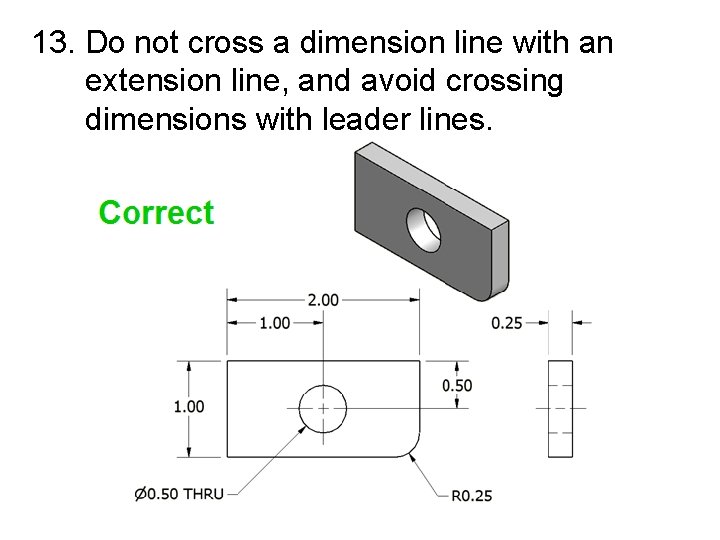
13. Do not cross a dimension line with an extension line, and avoid crossing dimensions with leader lines.
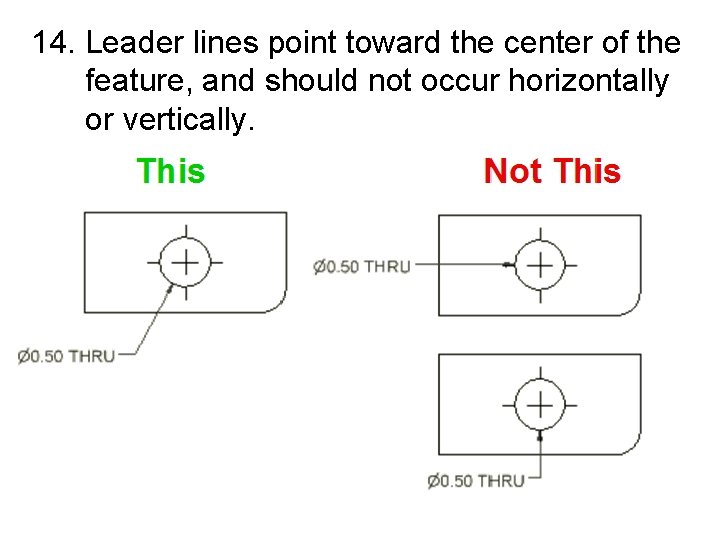
14. Leader lines point toward the center of the feature, and should not occur horizontally or vertically.
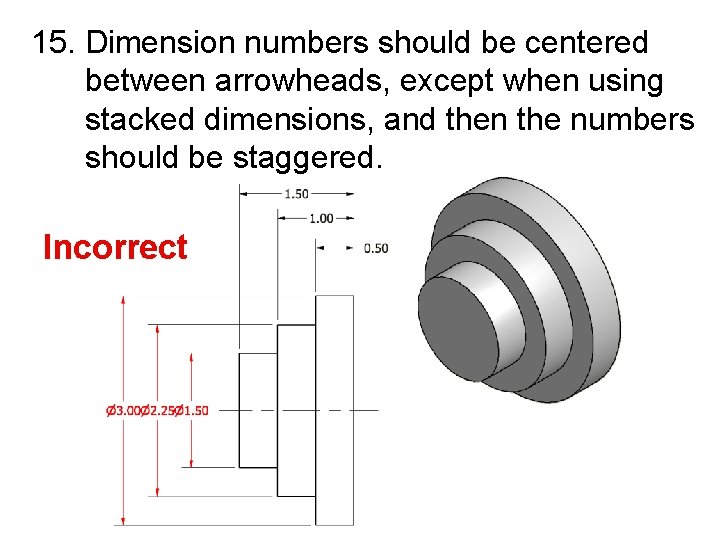
15. Dimension numbers should be centered between arrowheads, except when using stacked dimensions, and then the numbers should be staggered. Incorrect
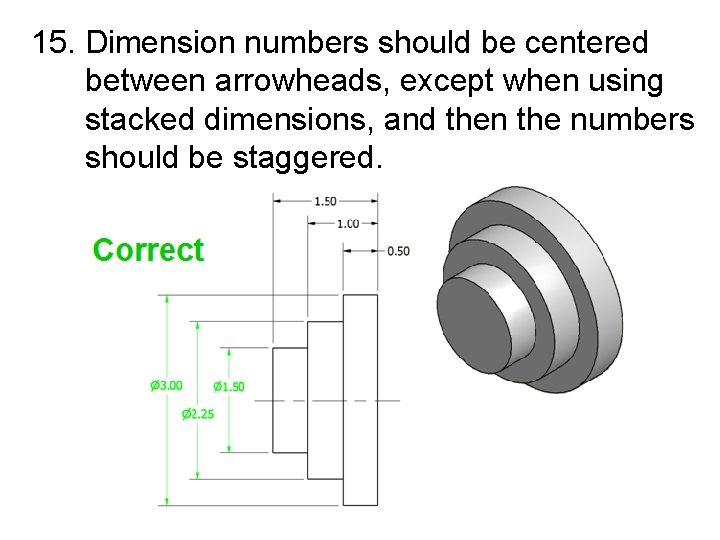
15. Dimension numbers should be centered between arrowheads, except when using stacked dimensions, and then the numbers should be staggered.
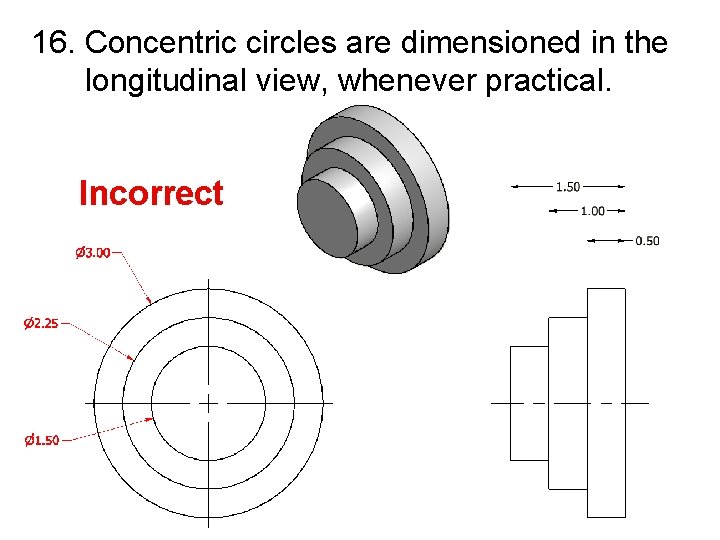
16. Concentric circles are dimensioned in the longitudinal view, whenever practical. Incorrect
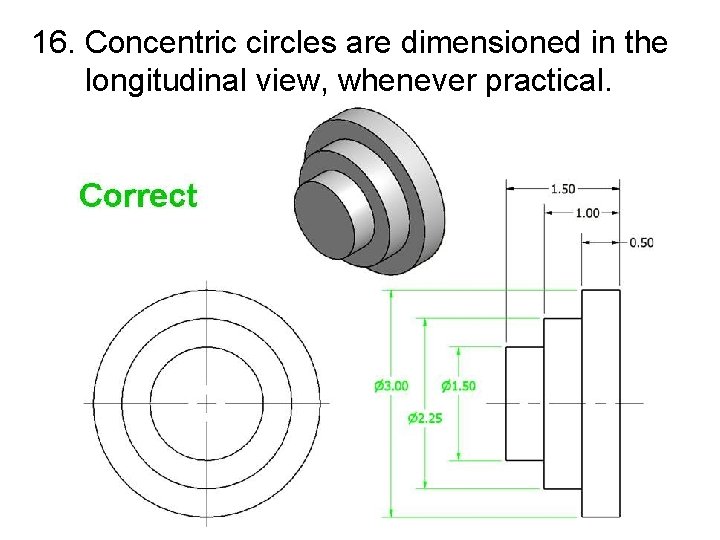
16. Concentric circles are dimensioned in the longitudinal view, whenever practical.
Dimensioning Standards § In order for the drawings to be dimensioned so that all people can understand them, we need to follow standards that every company in the world must follow. Standards are created by these organizations: —ANSI —ISO —MIL —DOD —DIN —JIS —CEN

Standards Institutions • ANSI - American National Standards Institute. This institute creates the engineering standards for North America. • ISO - International Organization for Standardization. This is a worldwide organization that creates engineering standards with approximately 100 participating countries.
Standards Institutions • The United States military has two organizations that develop standards. – DOD - Department Of Defense ‒ MIL - Military Standard

Standards Institutions • DIN - Deutsches Institut für Normung. The German Standards Institute created many standards used worldwide, including the standards for camera film. • JIS - Japanese Industrial Standard. Created after WWII for Japanese standards. • CEN - European Standards Organization.
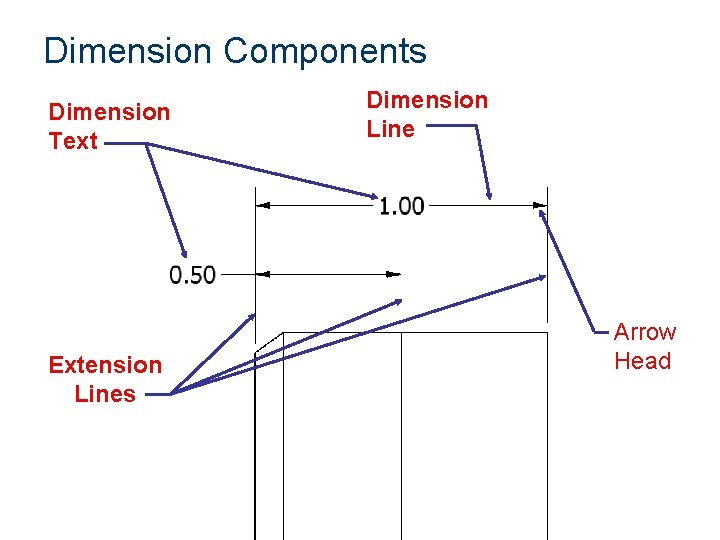
Dimension Components Dimension Text Extension Lines Dimension Line Arrow Head
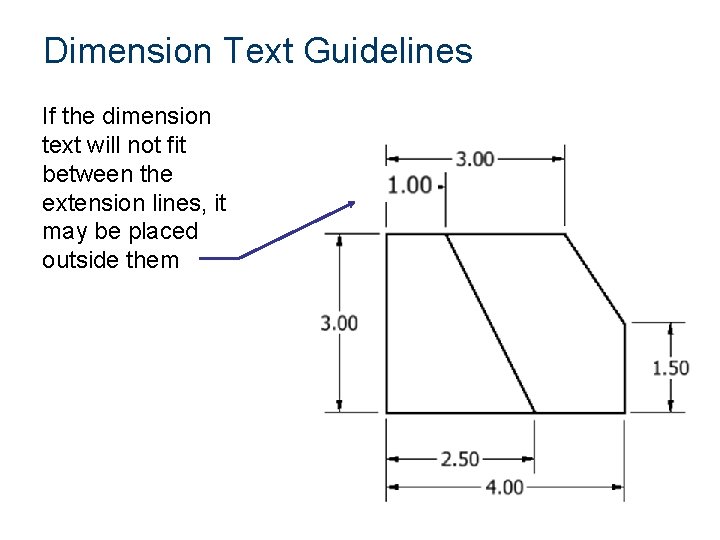
Dimension Text Guidelines If the dimension text will not fit between the extension lines, it may be placed outside them
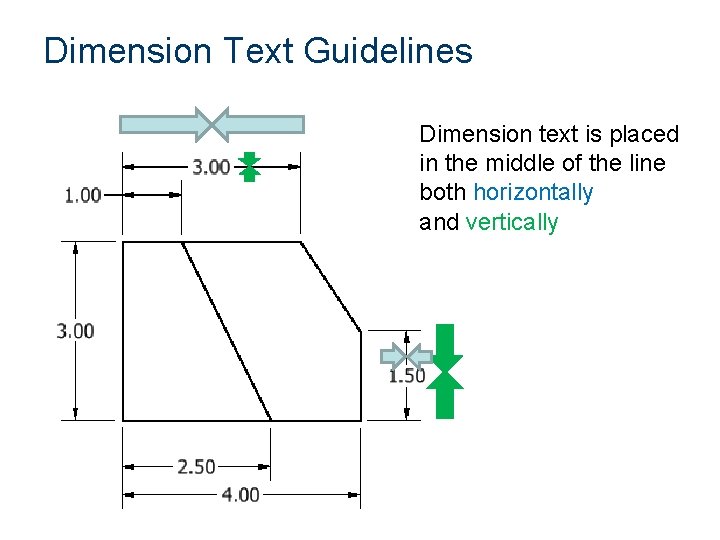
Dimension Text Guidelines Dimension text is placed in the middle of the line both horizontally and vertically
Dimensioning Methods • Dimensions are represented on a drawing using one of two systems, unidirectional or aligned. • The unidirectional method means all dimensions are read in the same direction. • The aligned method means the dimensions are read in alignment with the dimension lines or side of the part, some read horizontally and others read vertically.
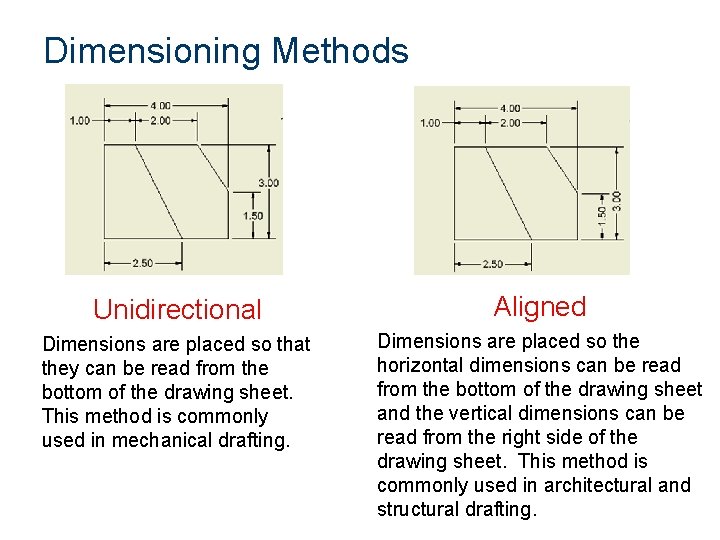
Dimensioning Methods Unidirectional Aligned Dimensions are placed so that they can be read from the bottom of the drawing sheet. This method is commonly used in mechanical drafting. Dimensions are placed so the horizontal dimensions can be read from the bottom of the drawing sheet and the vertical dimensions can be read from the right side of the drawing sheet. This method is commonly used in architectural and structural drafting.
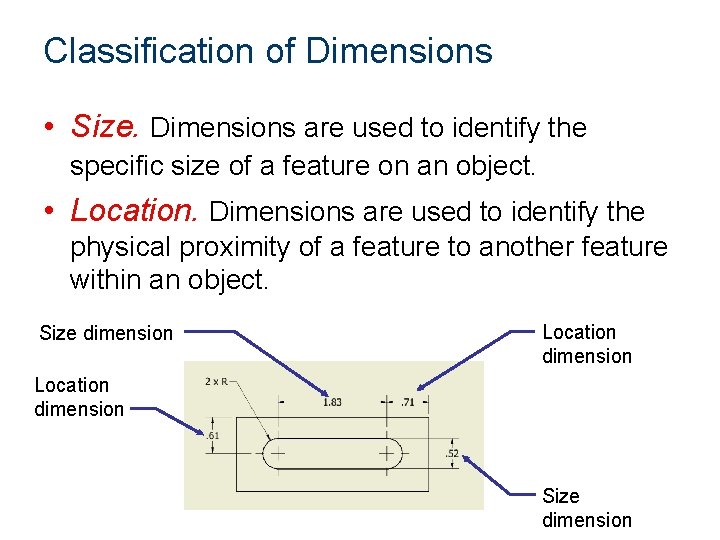
Classification of Dimensions • Size. Dimensions are used to identify the specific size of a feature on an object. • Location. Dimensions are used to identify the physical proximity of a feature to another feature within an object. Size dimension Location dimension Size dimension
Linear Dimensioning • Chain Dimensioning – Dimensioning from feature to feature – Common dimensioning technique
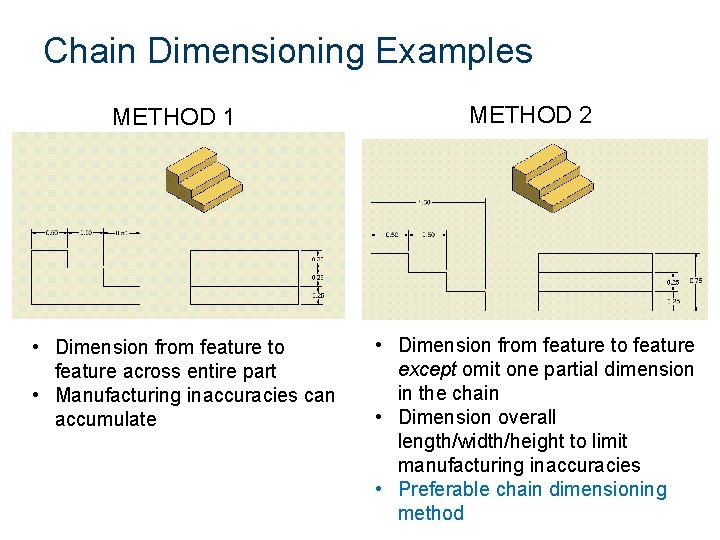
Chain Dimensioning Examples METHOD 1 • Dimension from feature to feature across entire part • Manufacturing inaccuracies can accumulate METHOD 2 • Dimension from feature to feature except omit one partial dimension in the chain • Dimension overall length/width/height to limit manufacturing inaccuracies • Preferable chain dimensioning method
Datum Dimensioning • Datum Dimensioning – Dimensioning from a single point of origin called a DATUM – Reduces dimensional deviations in manufactured parts because each size/location dimension is referenced to a single point
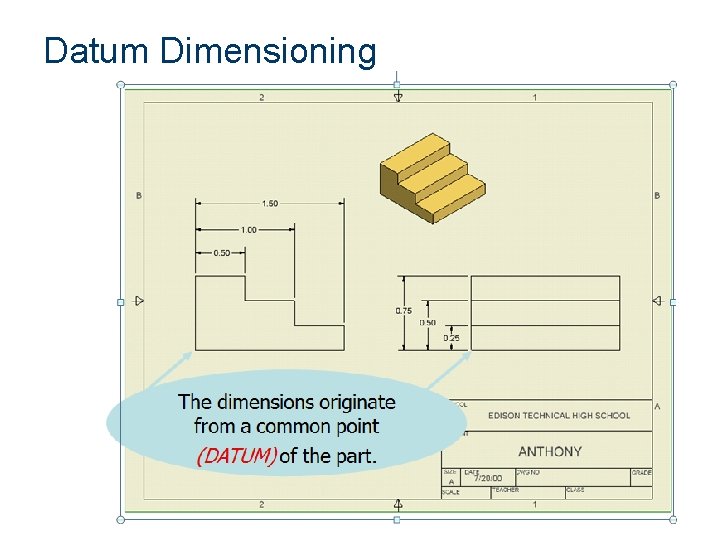
Datum Dimensioning
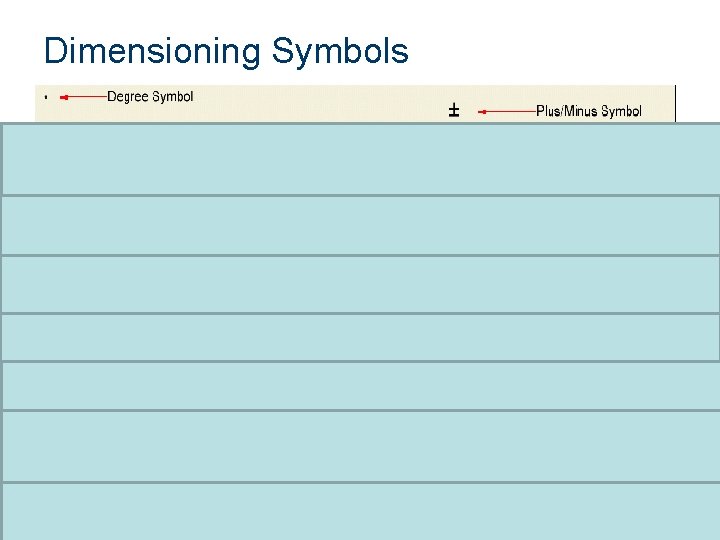
Dimensioning Symbols
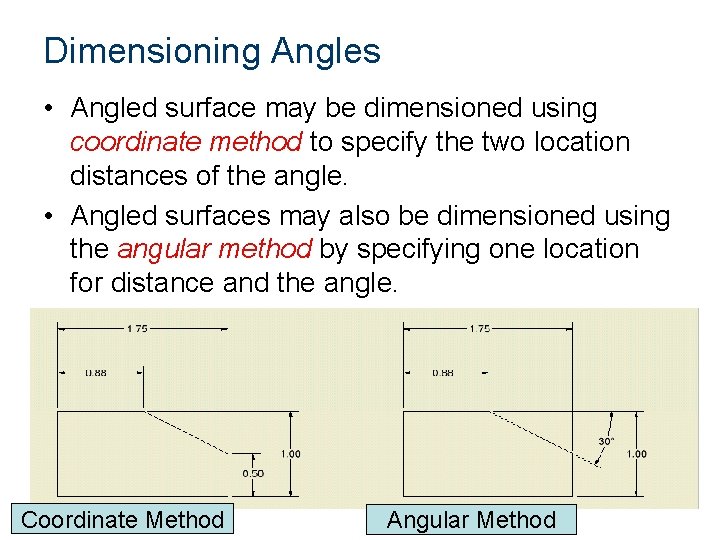
Dimensioning Angles • Angled surface may be dimensioned using coordinate method to specify the two location distances of the angle. • Angled surfaces may also be dimensioned using the angular method by specifying one location for distance and the angle. Coordinate Method Angular Method
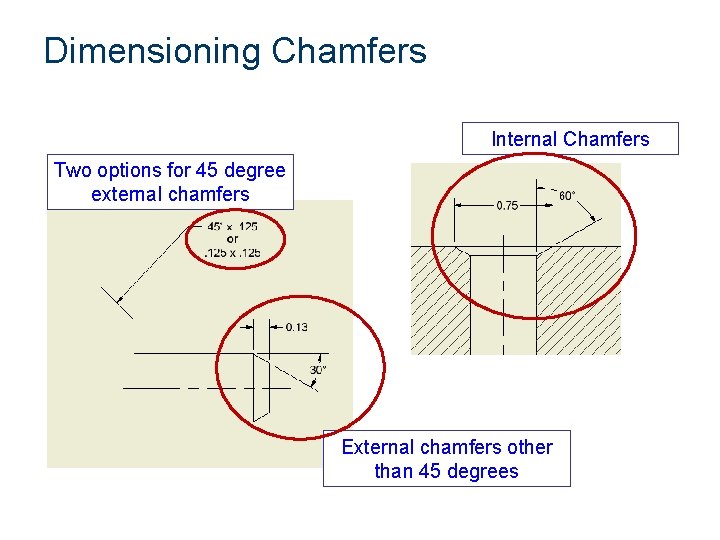
Dimensioning Chamfers Internal Chamfers Two options for 45 degree external chamfers External chamfers other than 45 degrees
Dimensioning Arcs and Circles • Arcs and circles are dimensioned in views that show the arc or circle. • Arcs are dimensioned with a leader to identify the radius; in some cases, a center mark is included. • Circles should have a center mark and are dimensioned with a leader to identify the diameter.
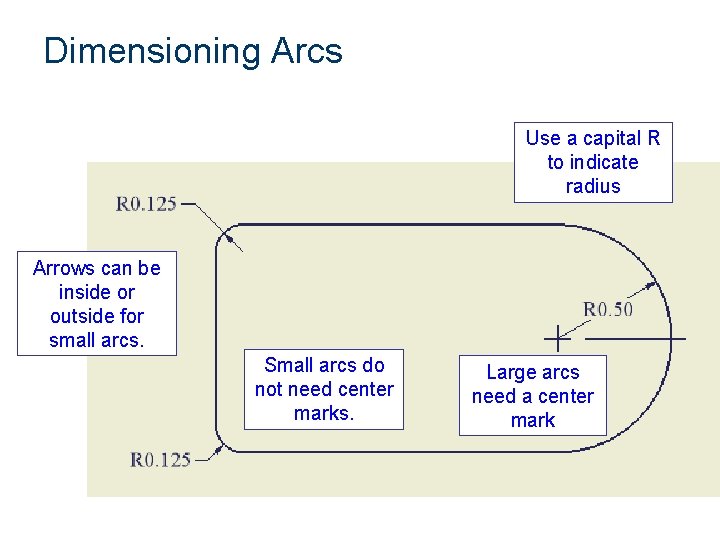
Dimensioning Arcs Use a capital R to indicate radius Arrows can be inside or outside for small arcs. Small arcs do not need center marks. Large arcs need a center mark
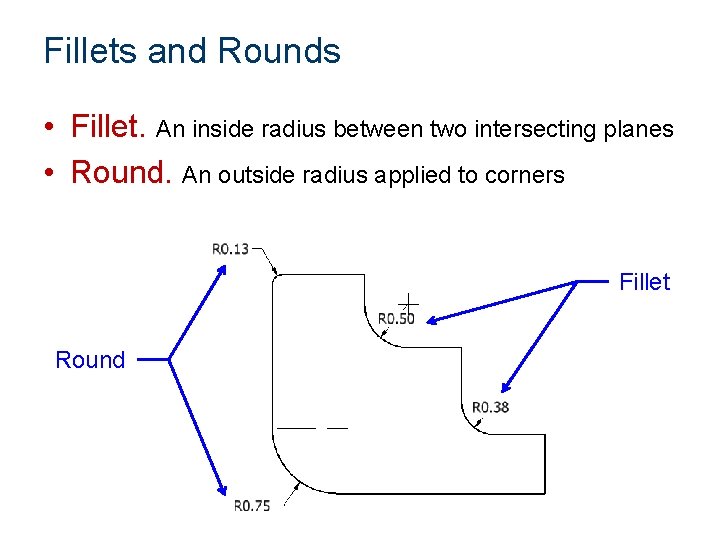
Fillets and Rounds • Fillet. An inside radius between two intersecting planes • Round. An outside radius applied to corners Fillet Round
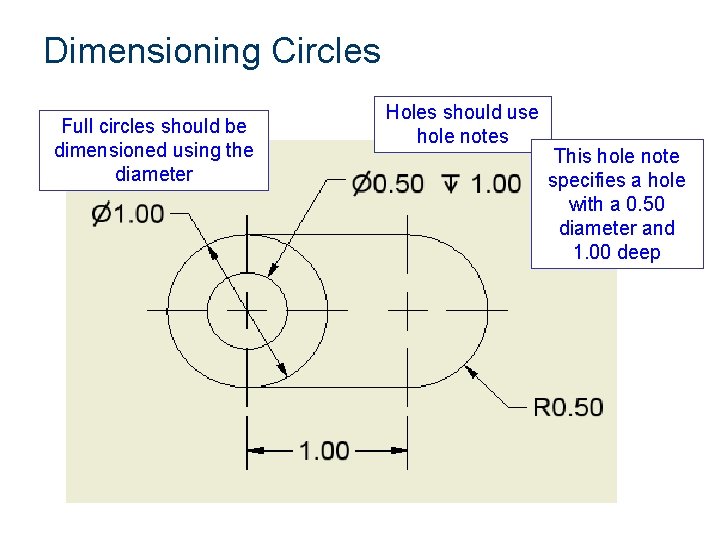
Dimensioning Circles Full circles should be dimensioned using the diameter Holes should use hole notes This hole note specifies a hole with a 0. 50 diameter and 1. 00 deep
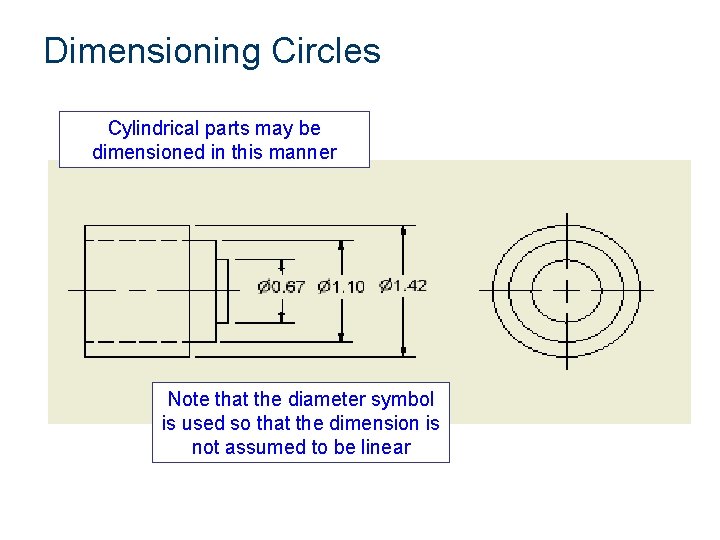
Dimensioning Circles Cylindrical parts may be dimensioned in this manner Note that the diameter symbol is used so that the dimension is not assumed to be linear
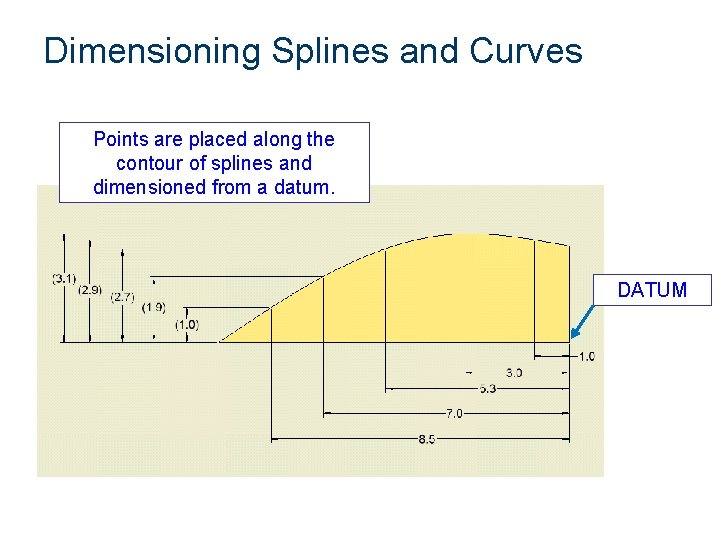
Dimensioning Splines and Curves Points are placed along the contour of splines and dimensioned from a datum. DATUM
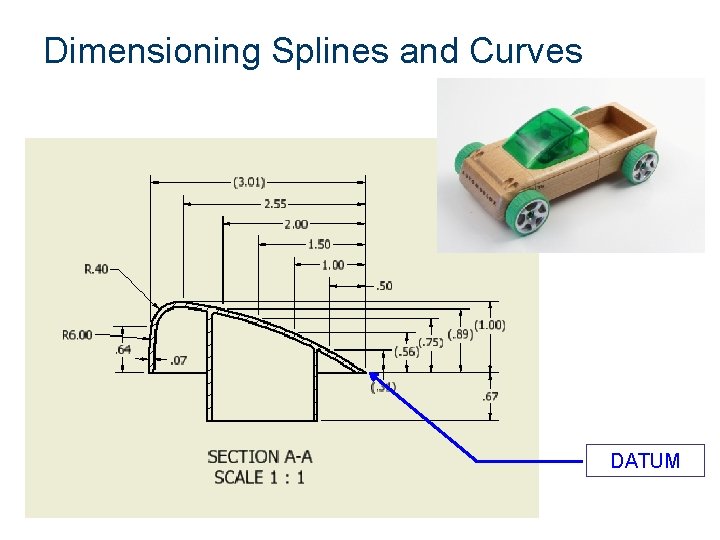
Dimensioning Splines and Curves DATUM
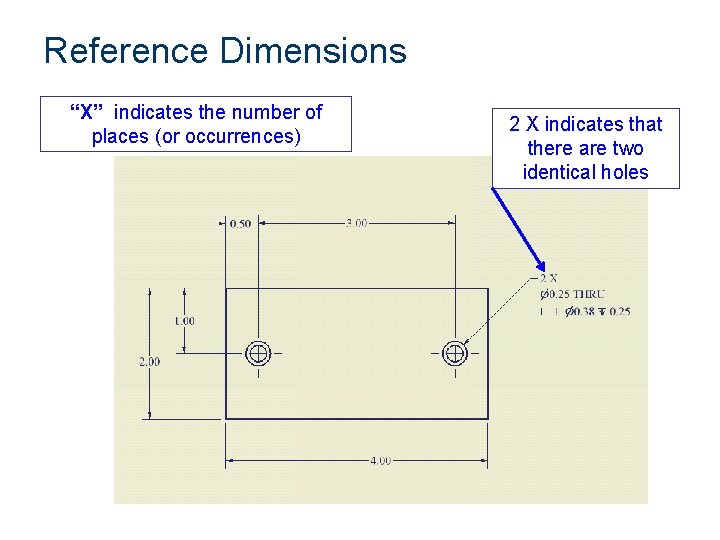
Reference Dimensions “X” indicates the number of places (or occurrences) 2 X indicates that there are two identical holes
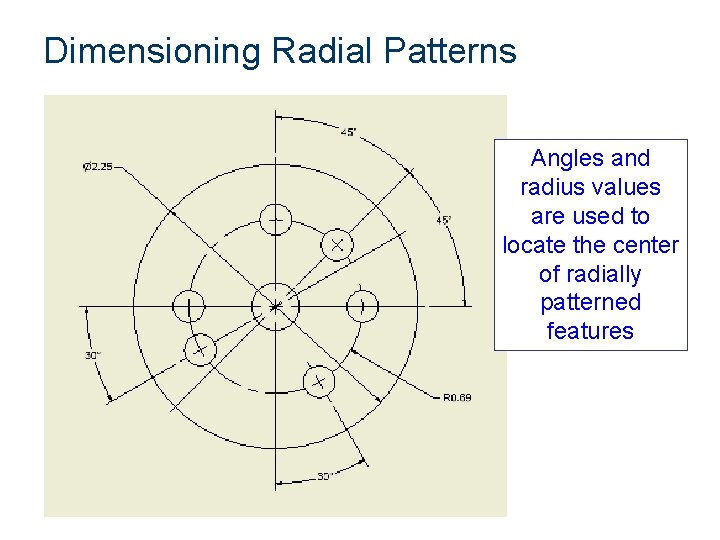
Dimensioning Radial Patterns Angles and radius values are used to locate the center of radially patterned features
Review • • • Datum Dimensioning Chain Dimensioning Unidirectional dimensioning Coordinate method Angular Method
Review: Creating Drawings in CAD
Creating A Drawing • Drawings communicate ideas • Standards define drawing properties • Inventor process – – – Create a part Create a drawing Place base view Project views from base (multi-view and isometric) Dimension multi-views
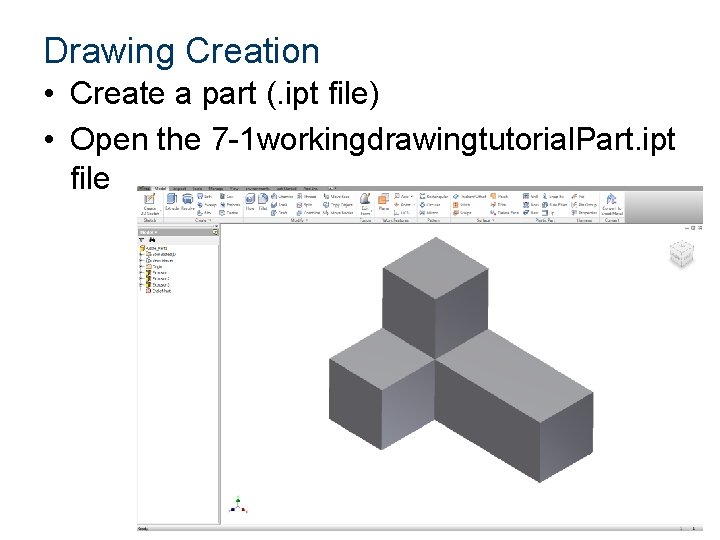
Drawing Creation • Create a part (. ipt file) • Open the 7 -1 workingdrawingtutorial. Part. ipt file
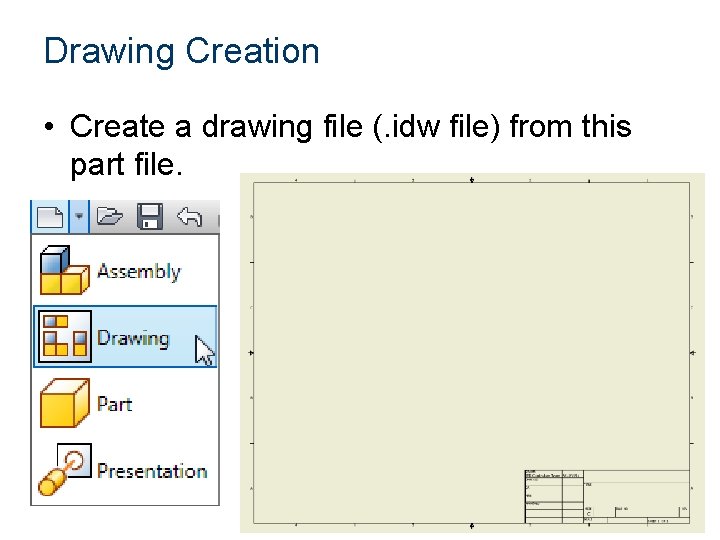
Drawing Creation • Create a drawing file (. idw file) from this part file.
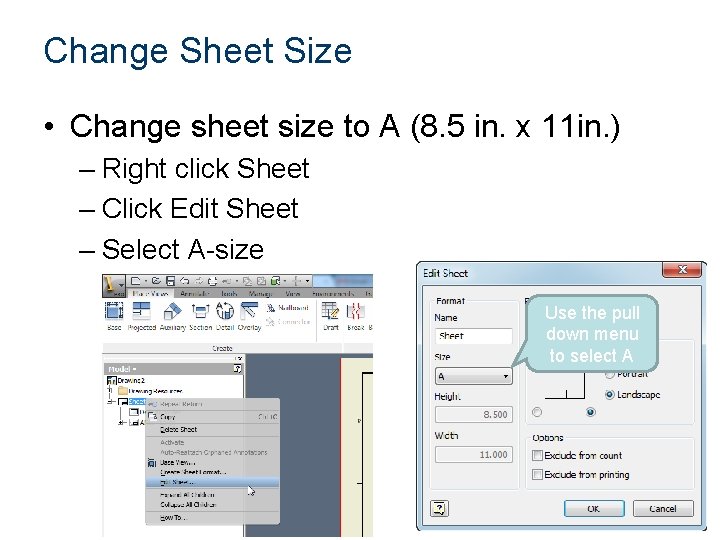
Change Sheet Size • Change sheet size to A (8. 5 in. x 11 in. ) – Right click Sheet – Click Edit Sheet – Select A-size Use the pull down menu to select A
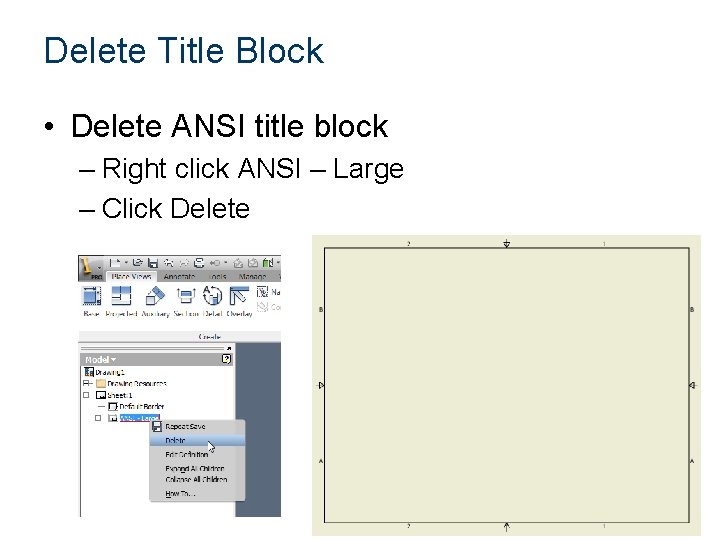
Delete Title Block • Delete ANSI title block – Right click ANSI – Large – Click Delete
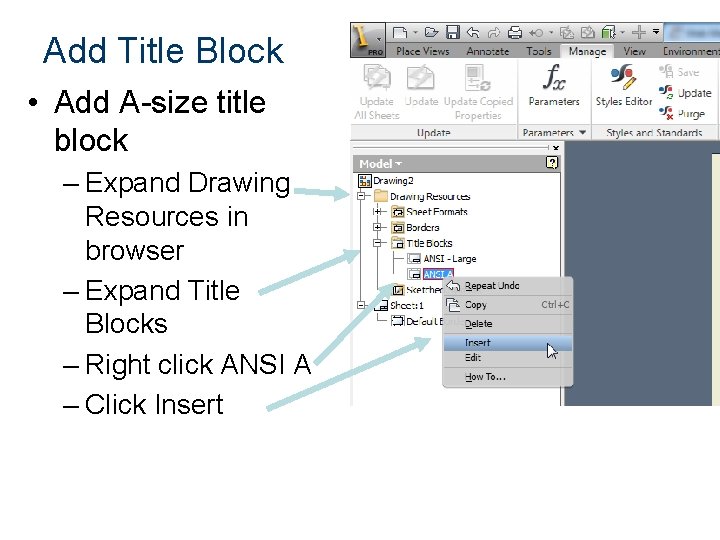
Add Title Block • Add A-size title block – Expand Drawing Resources in browser – Expand Title Blocks – Right click ANSI A – Click Insert
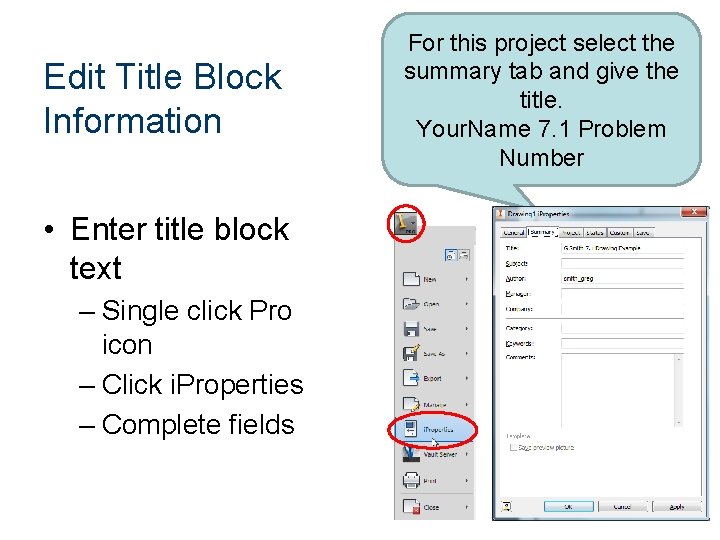
Edit Title Block Information • Enter title block text – Single click Pro icon – Click i. Properties – Complete fields For this project select the summary tab and give the title. Your. Name 7. 1 Problem Number
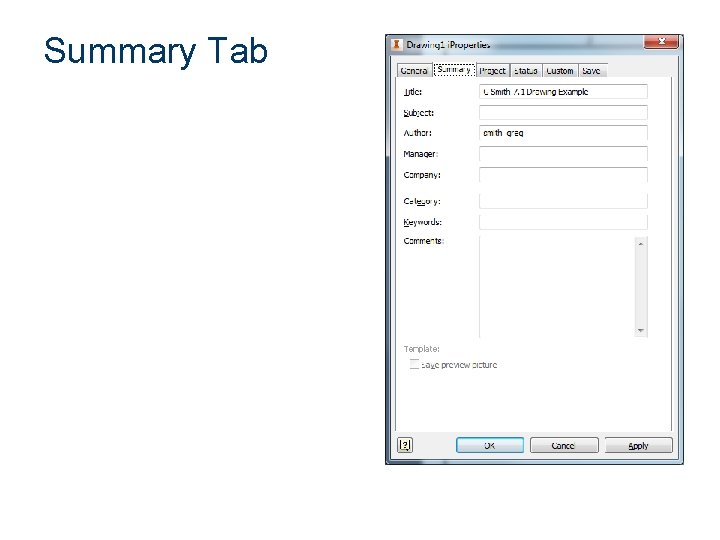
Summary Tab
Create Base View
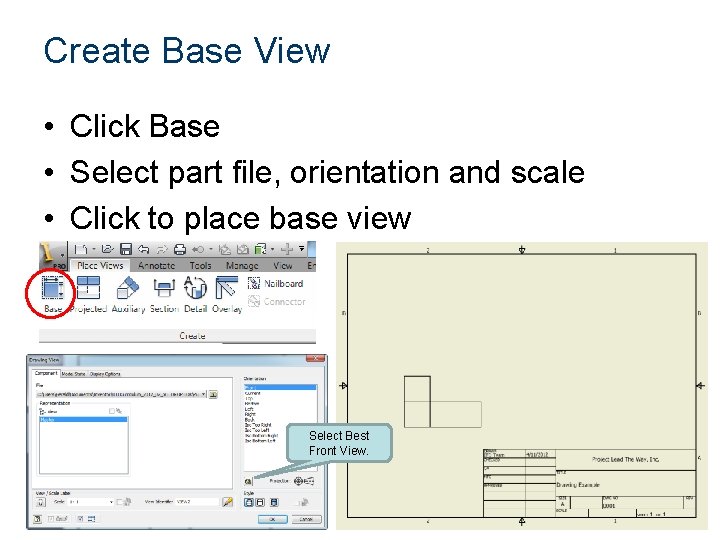
Create Base View • Click Base • Select part file, orientation and scale • Click to place base view Select Best Front View.
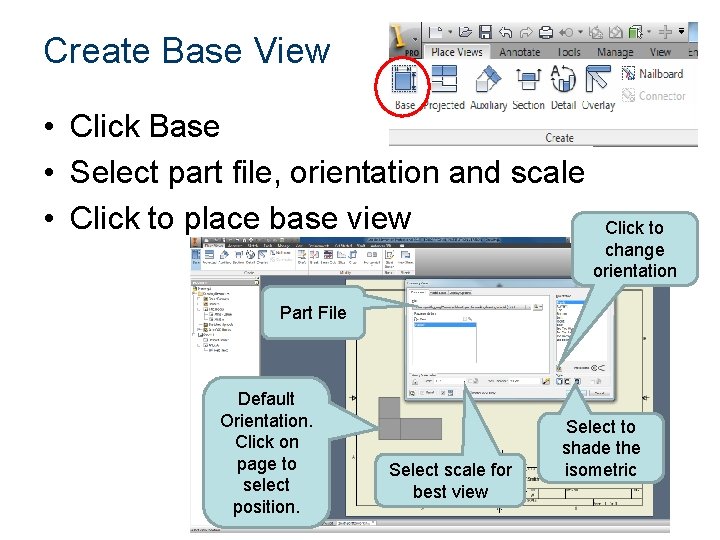
Create Base View • Click Base • Select part file, orientation and scale • Click to place base view Click to change orientation Part File Default Orientation. Click on page to select position. Select scale for best view Select to shade the isometric
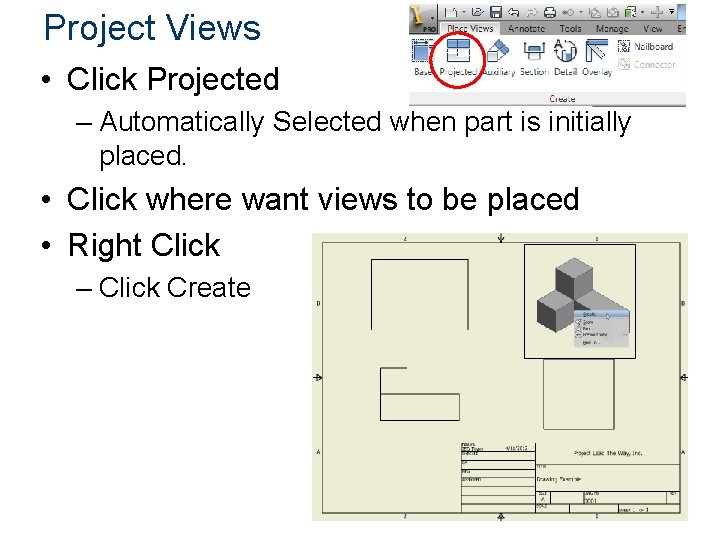
Project Views • Click Projected – Automatically Selected when part is initially placed. • Click where want views to be placed • Right Click – Click Create
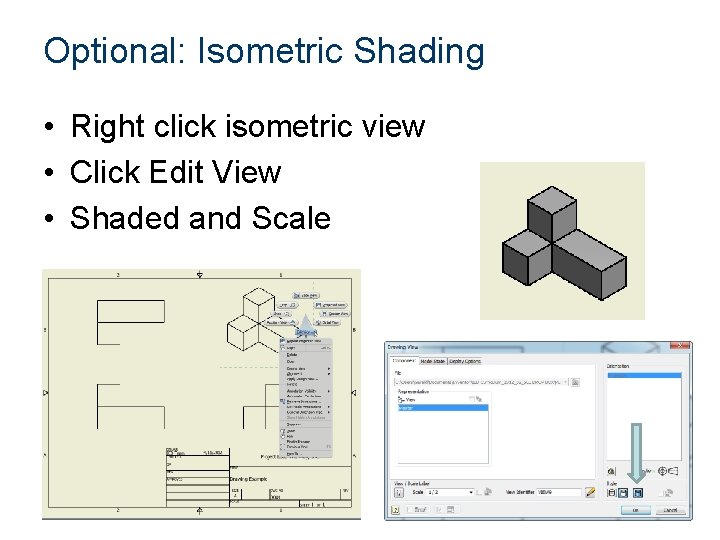
Optional: Isometric Shading • Right click isometric view • Click Edit View • Shaded and Scale
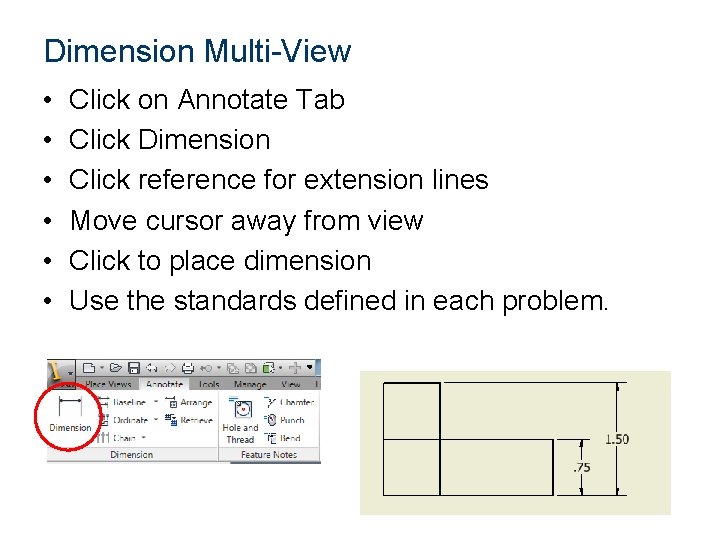
Dimension Multi-View • • • Click on Annotate Tab Click Dimension Click reference for extension lines Move cursor away from view Click to place dimension Use the standards defined in each problem.
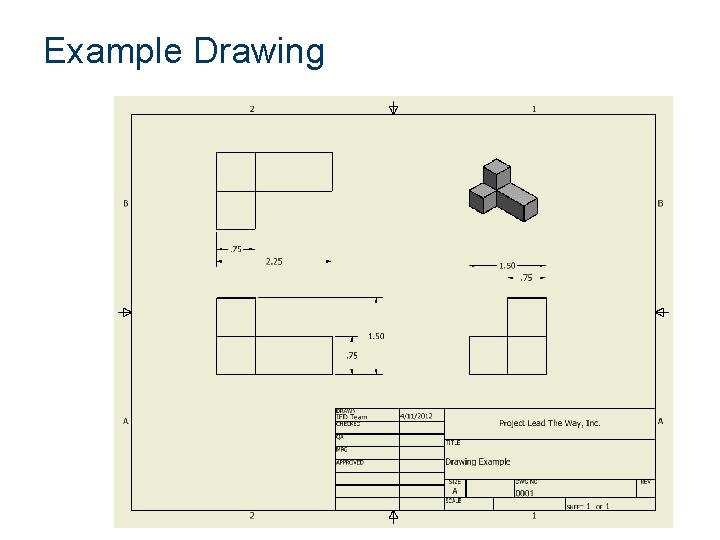
Example Drawing
Applying the Dimensioning Standards • Complete Activity 7. 1 More dimensioning • Save each piece using the convention – Your. Name 7 -1 Problem. X • For Problem 6, Since the printer is not working, Evaluate your neighbors drawings and let them make appropriate corrections for 7 • 8: Bonus • Conclusion: Answer the questions in a Word Document using complete sentences.
- Slides: 75