
Get Cozy with DB 2 for zOS Stored
Get Cozy with DB 2 for z/OS Stored Procedures and UDFs Denis Tronin CA Technologies Session Code: F 11 November 16, Wednesday, 11: 00 - 12: 00| Platform: DB 2 for z/OS
Agenda • • • Stored Procedure and User Defined Function concepts Recent enhancements overview Stored procedure and UDF monitoring capabilities Administrative procedures Q&A 2
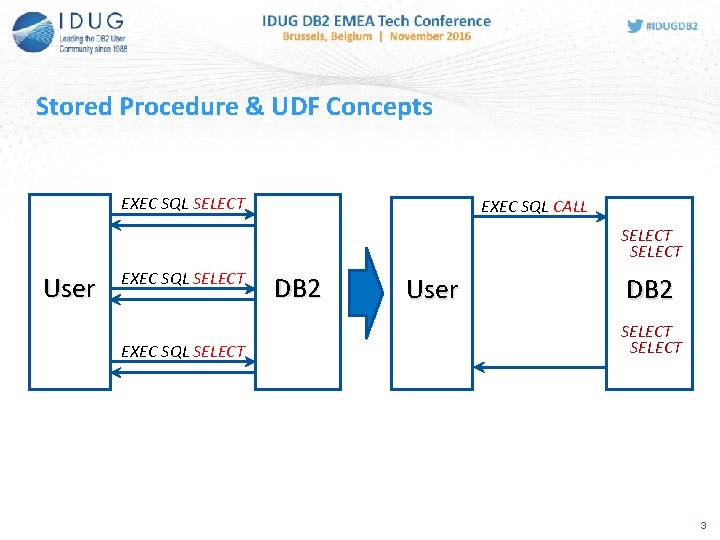
Stored Procedure & UDF Concepts EXEC SQL SELECT EXEC SQL CALL SELECT User EXEC SQL SELECT DB 2 User DB 2 SELECT 3
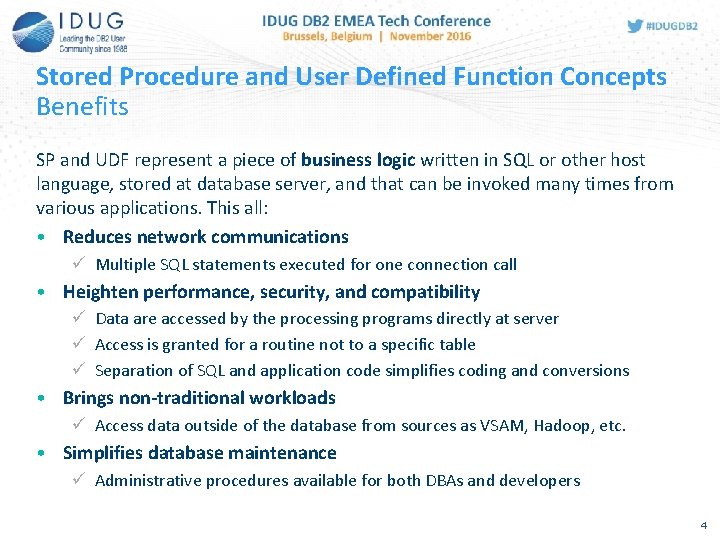
Stored Procedure and User Defined Function Concepts Benefits SP and UDF represent a piece of business logic written in SQL or other host language, stored at database server, and that can be invoked many times from various applications. This all: • Reduces network communications ü Multiple SQL statements executed for one connection call • Heighten performance, security, and compatibility ü Data are accessed by the processing programs directly at server ü Access is granted for a routine not to a specific table ü Separation of SQL and application code simplifies coding and conversions • Brings non-traditional workloads ü Access data outside of the database from sources as VSAM, Hadoop, etc. • Simplifies database maintenance ü Administrative procedures available for both DBAs and developers 4
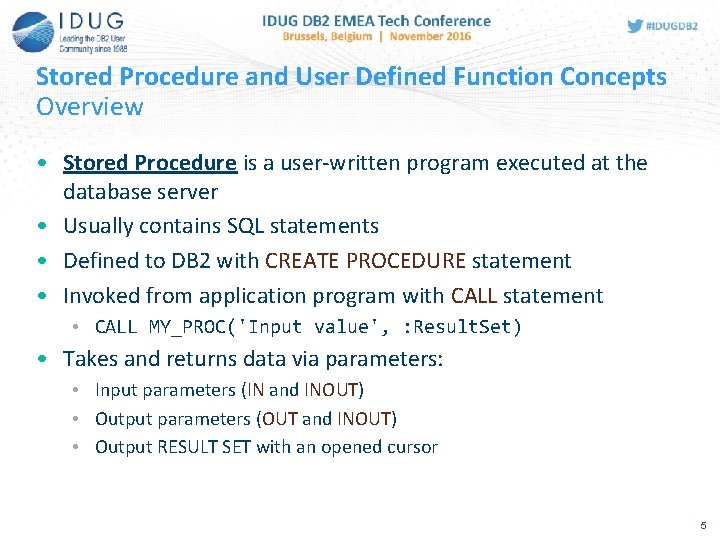
Stored Procedure and User Defined Function Concepts Overview • Stored Procedure is a user-written program executed at the database server • Usually contains SQL statements • Defined to DB 2 with CREATE PROCEDURE statement • Invoked from application program with CALL statement • CALL MY_PROC('Input value', : Result. Set) • Takes and returns data via parameters: • Input parameters (IN and INOUT) • Output parameters (OUT and INOUT) • Output RESULT SET with an opened cursor 5
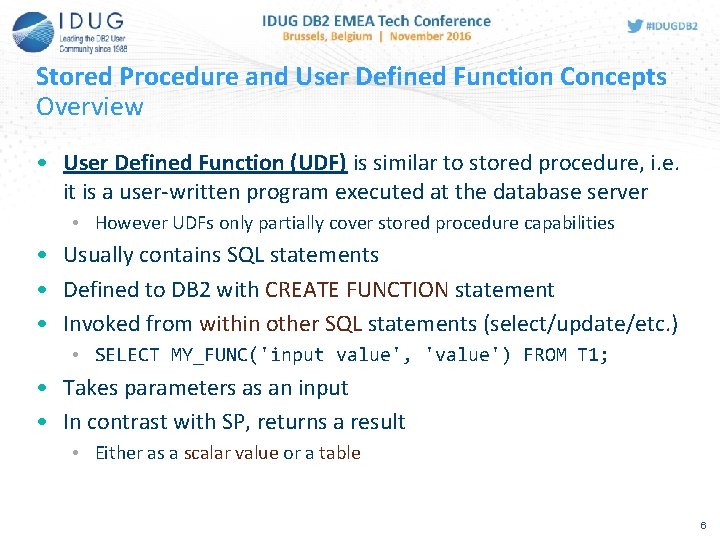
Stored Procedure and User Defined Function Concepts Overview • User Defined Function (UDF) is similar to stored procedure, i. e. it is a user-written program executed at the database server • However UDFs only partially cover stored procedure capabilities • Usually contains SQL statements • Defined to DB 2 with CREATE FUNCTION statement • Invoked from within other SQL statements (select/update/etc. ) • SELECT MY_FUNC('input value', 'value') FROM T 1; • Takes parameters as an input • In contrast with SP, returns a result • Either as a scalar value or a table 6
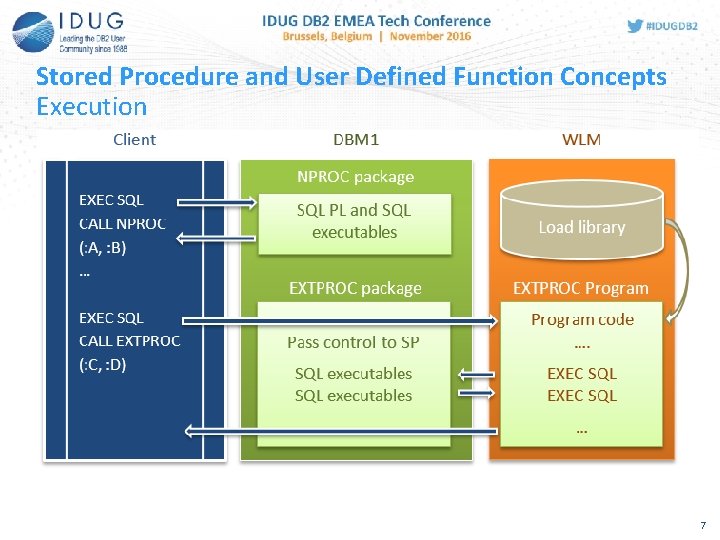
Stored Procedure and User Defined Function Concepts Execution 7
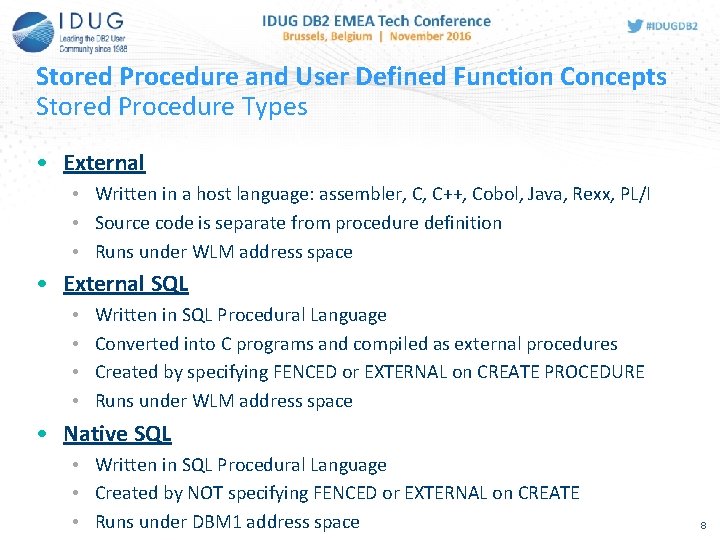
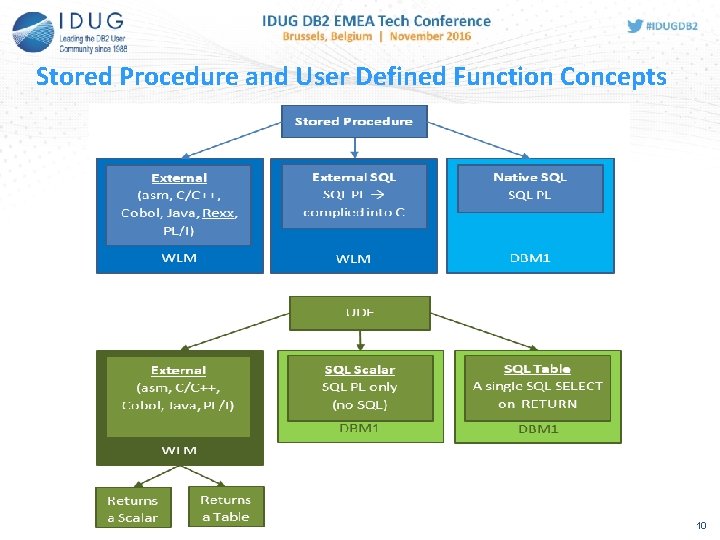
Stored Procedure and User Defined Function Concepts Stored Procedure Types • External • Written in a host language: assembler, C, C++, Cobol, Java, Rexx, PL/I • Source code is separate from procedure definition • Runs under WLM address space • External SQL • • Written in SQL Procedural Language Converted into C programs and compiled as external procedures Created by specifying FENCED or EXTERNAL on CREATE PROCEDURE Runs under WLM address space • Native SQL • Written in SQL Procedural Language • Created by NOT specifying FENCED or EXTERNAL on CREATE • Runs under DBM 1 address space 8
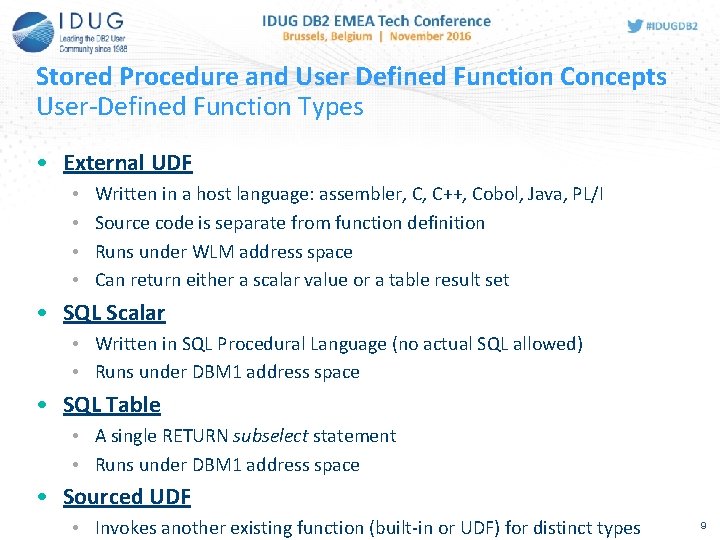
Stored Procedure and User Defined Function Concepts User-Defined Function Types • External UDF • • Written in a host language: assembler, C, C++, Cobol, Java, PL/I Source code is separate from function definition Runs under WLM address space Can return either a scalar value or a table result set • SQL Scalar • Written in SQL Procedural Language (no actual SQL allowed) • Runs under DBM 1 address space • SQL Table • A single RETURN subselect statement • Runs under DBM 1 address space • Sourced UDF • Invokes another existing function (built-in or UDF) for distinct types 9
Stored Procedure and User Defined Function Concepts 10
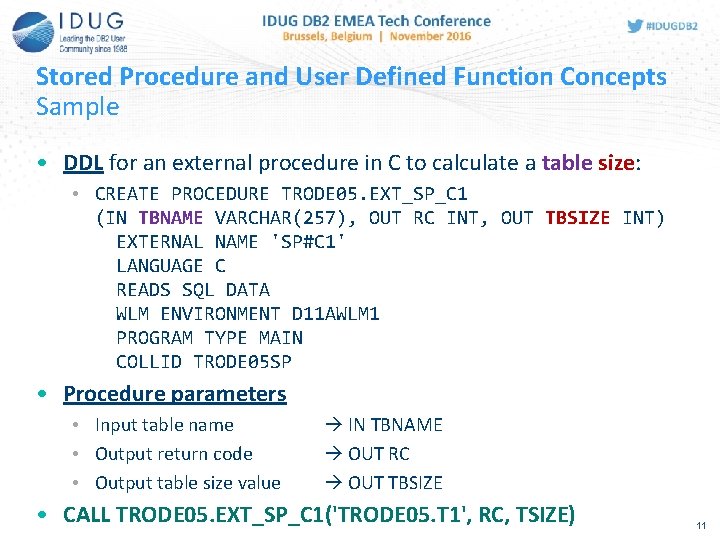
Stored Procedure and User Defined Function Concepts Sample • DDL for an external procedure in C to calculate a table size: • CREATE PROCEDURE TRODE 05. EXT_SP_C 1 (IN TBNAME VARCHAR(257), OUT RC INT, OUT TBSIZE INT) EXTERNAL NAME 'SP#C 1' LANGUAGE C READS SQL DATA WLM ENVIRONMENT D 11 AWLM 1 PROGRAM TYPE MAIN COLLID TRODE 05 SP • Procedure parameters • Input table name • Output return code • Output table size value IN TBNAME OUT RC OUT TBSIZE • CALL TRODE 05. EXT_SP_C 1('TRODE 05. T 1', RC, TSIZE) 11
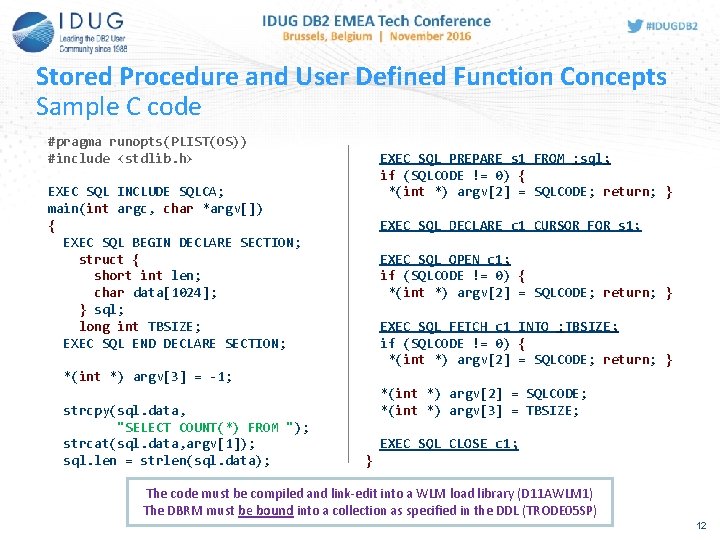
Stored Procedure and User Defined Function Concepts Sample C code #pragma runopts(PLIST(OS)) #include <stdlib. h> EXEC SQL PREPARE s 1 FROM : sql; if (SQLCODE != 0) { *(int *) argv[2] = SQLCODE; return; } EXEC SQL INCLUDE SQLCA; main(int argc, char *argv[]) { EXEC SQL BEGIN DECLARE SECTION; struct { short int len; char data[1024]; } sql; long int TBSIZE; EXEC SQL END DECLARE SECTION; EXEC SQL DECLARE c 1 CURSOR FOR s 1; EXEC SQL OPEN c 1; if (SQLCODE != 0) { *(int *) argv[2] = SQLCODE; return; } EXEC SQL FETCH c 1 INTO : TBSIZE; if (SQLCODE != 0) { *(int *) argv[2] = SQLCODE; return; } *(int *) argv[3] = -1; strcpy(sql. data, "SELECT COUNT(*) FROM "); strcat(sql. data, argv[1]); sql. len = strlen(sql. data); *(int *) argv[2] = SQLCODE; *(int *) argv[3] = TBSIZE; EXEC SQL CLOSE c 1; } The code must be compiled and link-edit into a WLM load library (D 11 AWLM 1) The DBRM must be bound into a collection as specified in the DDL (TRODE 05 SP) 12
Recent Enhancements 13
Recent Enhancements Native SQL Procedure (DB 2 9) • Introduced in DB 2 9 NFM • Stored completely in DB 2 • No external load module • Runs in DBM 1 address space (WLM is only used for debugging) • Contains SQL PL statements • Written in SQL PL • BEGIN / END, DECLARE / SET, FOR / WHILE, IF / ELSE, RETURN… • Nested compound statements are allowed • Easy to create and maintain • Designed with application life cycle in mind: Create Debug Replace or Add a new version Deploy • z. IIP eligible when invoked remotely (via DRDA) 14
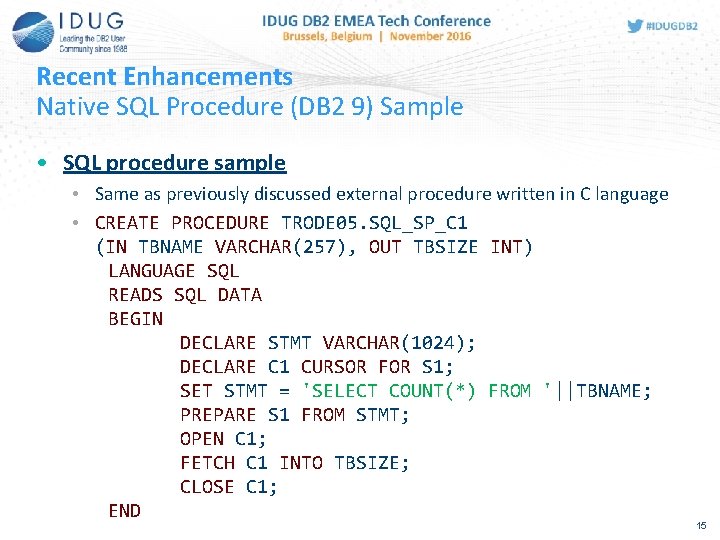
Recent Enhancements Native SQL Procedure (DB 2 9) Sample • SQL procedure sample • Same as previously discussed external procedure written in C language • CREATE PROCEDURE TRODE 05. SQL_SP_C 1 (IN TBNAME VARCHAR(257), OUT TBSIZE INT) LANGUAGE SQL READS SQL DATA BEGIN DECLARE STMT VARCHAR(1024); DECLARE C 1 CURSOR FOR S 1; SET STMT = 'SELECT COUNT(*) FROM '||TBNAME; PREPARE S 1 FROM STMT; OPEN C 1; FETCH C 1 INTO TBSIZE; CLOSE C 1; END 15
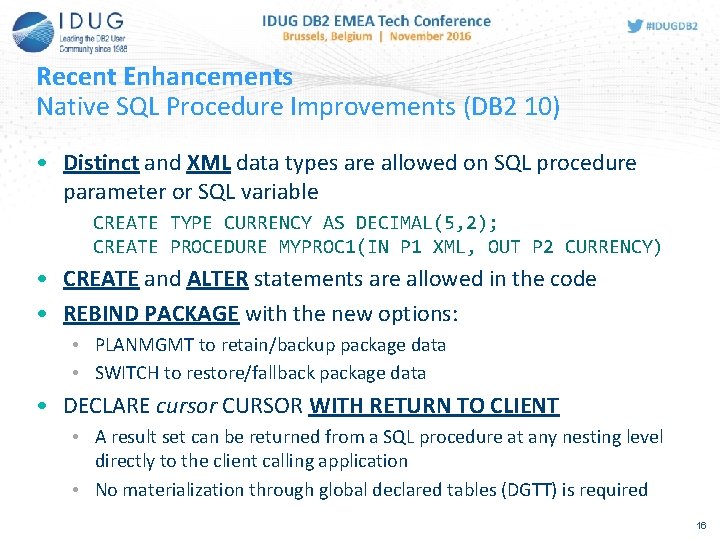
Recent Enhancements Native SQL Procedure Improvements (DB 2 10) • Distinct and XML data types are allowed on SQL procedure parameter or SQL variable CREATE TYPE CURRENCY AS DECIMAL(5, 2); CREATE PROCEDURE MYPROC 1(IN P 1 XML, OUT P 2 CURRENCY) • CREATE and ALTER statements are allowed in the code • REBIND PACKAGE with the new options: • PLANMGMT to retain/backup package data • SWITCH to restore/fallback package data • DECLARE cursor CURSOR WITH RETURN TO CLIENT • A result set can be returned from a SQL procedure at any nesting level directly to the client calling application • No materialization through global declared tables (DGTT) is required 16
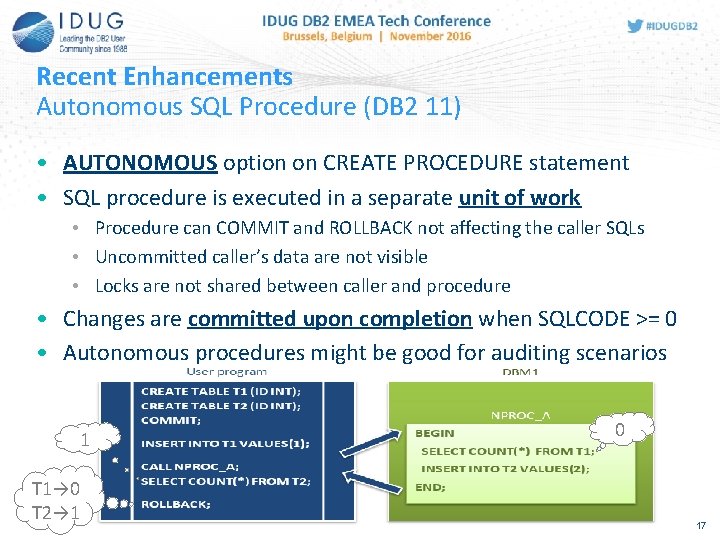
Recent Enhancements Autonomous SQL Procedure (DB 2 11) • AUTONOMOUS option on CREATE PROCEDURE statement • SQL procedure is executed in a separate unit of work • Procedure can COMMIT and ROLLBACK not affecting the caller SQLs • Uncommitted caller’s data are not visible • Locks are not shared between caller and procedure • Changes are committed upon completion when SQLCODE >= 0 • Autonomous procedures might be good for auditing scenarios 1 T 1→ 0 T 2→ 1 0 17
Recent Enhancements SQL PL: GLOBAL VARIABLEs (DB 2 11) • GLOBAL VARIABLE: • Created as a separate database object • SYSIBM. SYSVARIABLES and SYSIBM. SYSVARIABLEAUTH • Access is controlled with GRANT/REVOKE • Created once and available for use in any SQL statement • Value is independent and unique to the session (DB 2 connection) • Very similar to special registers • Value is not affected by a COMMIT or ROLLBACK CREATE VARIABLE schema. name data-type DEFAULT default-value Easy and neat way of passing data between SQL calls and control execution application logic flow 18
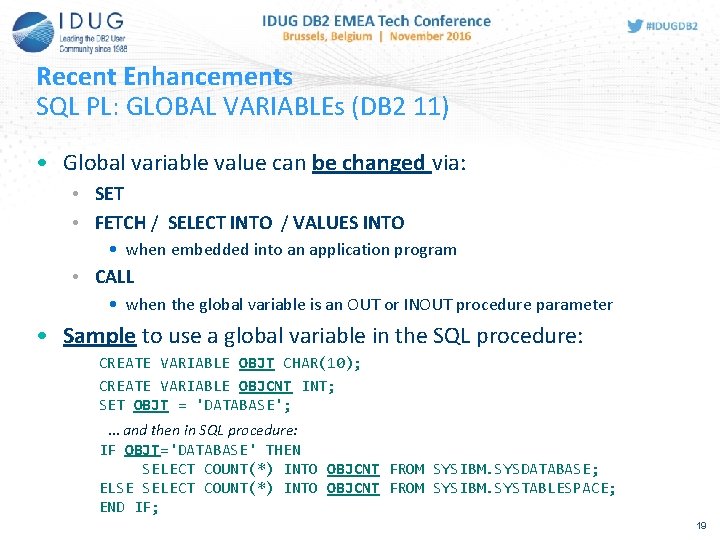
Recent Enhancements SQL PL: GLOBAL VARIABLEs (DB 2 11) • Global variable value can be changed via: • SET • FETCH / SELECT INTO / VALUES INTO • when embedded into an application program • CALL • when the global variable is an OUT or INOUT procedure parameter • Sample to use a global variable in the SQL procedure: CREATE VARIABLE OBJT CHAR(10); CREATE VARIABLE OBJCNT INT; SET OBJT = 'DATABASE'; … and then in SQL procedure: IF OBJT='DATABASE' THEN SELECT COUNT(*) INTO OBJCNT FROM SYSIBM. SYSDATABASE; ELSE SELECT COUNT(*) INTO OBJCNT FROM SYSIBM. SYSTABLESPACE; END IF; 19
Recent Enhancements SQL PL: ARRAY data type (DB 2 11) • User data type for having multiple values in a single variable • Elements are based on one of the existing built-in data types • Defined with CREATE TYPE and dropped via DROP TYPE • Definitions are stored to SYSIBM. SYSDATATYPES • Supported only: • • As SQL PL variables In SQL scalar functions, as a parameter or RETURNS data-type In native SQL procedures, as parameter In CAST specification, as a target data type Arrays simplify writing complex SQL PL programs and allow passing multiple IN and OUT parameters to a SQL procedure 20
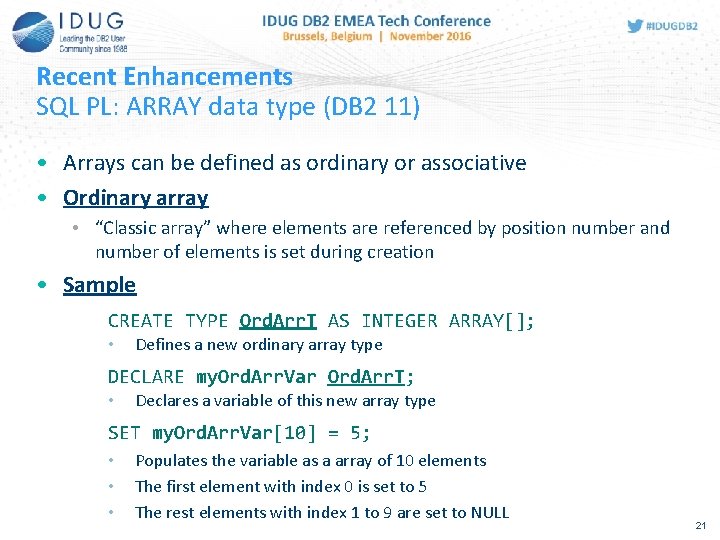
Recent Enhancements SQL PL: ARRAY data type (DB 2 11) • Arrays can be defined as ordinary or associative • Ordinary array • “Classic array” where elements are referenced by position number and number of elements is set during creation • Sample CREATE TYPE Ord. Arr. T AS INTEGER ARRAY[]; • Defines a new ordinary array type DECLARE my. Ord. Arr. Var Ord. Arr. T; • Declares a variable of this new array type SET my. Ord. Arr. Var[10] = 5; • • • Populates the variable as a array of 10 elements The first element with index 0 is set to 5 The rest elements with index 1 to 9 are set to NULL 21
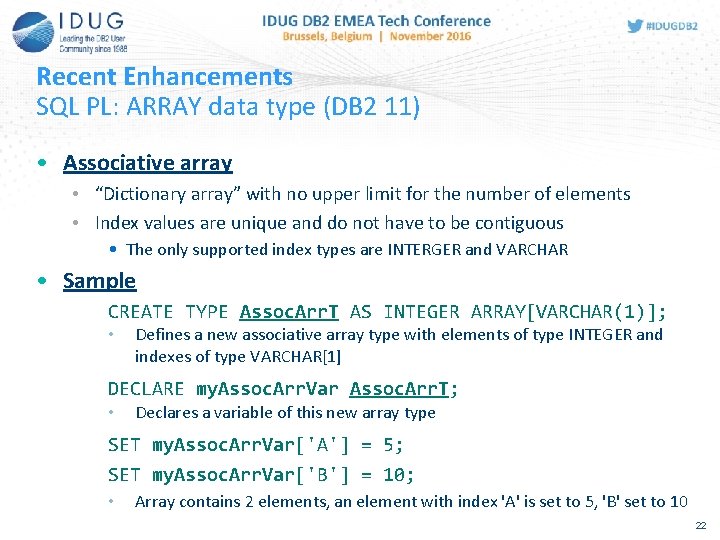
Recent Enhancements SQL PL: ARRAY data type (DB 2 11) • Associative array • “Dictionary array” with no upper limit for the number of elements • Index values are unique and do not have to be contiguous • The only supported index types are INTERGER and VARCHAR • Sample CREATE TYPE Assoc. Arr. T AS INTEGER ARRAY[VARCHAR(1)]; • Defines a new associative array type with elements of type INTEGER and indexes of type VARCHAR[1] DECLARE my. Assoc. Arr. Var Assoc. Arr. T; • Declares a variable of this new array type SET my. Assoc. Arr. Var['A'] = 5; SET my. Assoc. Arr. Var['B'] = 10; • Array contains 2 elements, an element with index 'A' is set to 5, 'B' set to 10 22
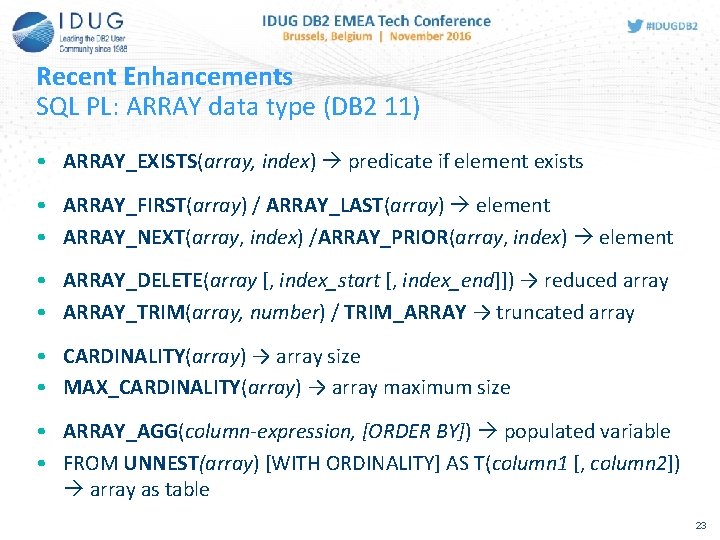
Recent Enhancements SQL PL: ARRAY data type (DB 2 11) • ARRAY_EXISTS(array, index) predicate if element exists • ARRAY_FIRST(array) / ARRAY_LAST(array) element • ARRAY_NEXT(array, index) /ARRAY_PRIOR(array, index) element • ARRAY_DELETE(array [, index_start [, index_end]]) → reduced array • ARRAY_TRIM(array, number) / TRIM_ARRAY → truncated array • CARDINALITY(array) → array size • MAX_CARDINALITY(array) → array maximum size • ARRAY_AGG(column-expression, [ORDER BY]) populated variable • FROM UNNEST(array) [WITH ORDINALITY] AS T(column 1 [, column 2]) array as table 23
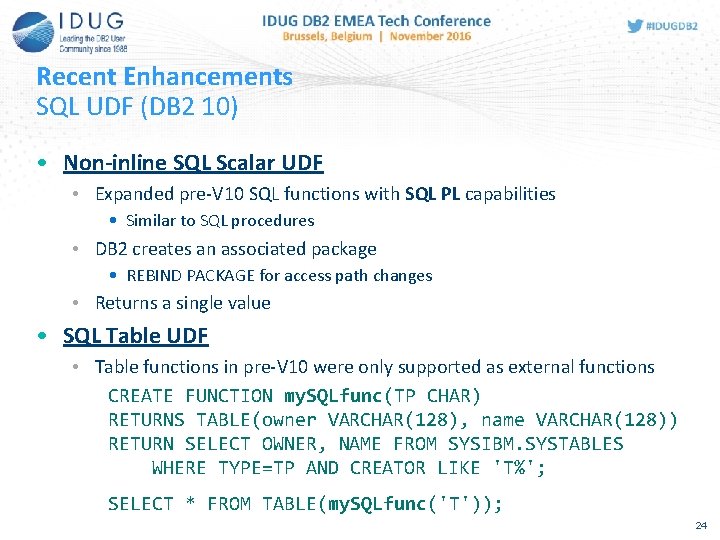
Recent Enhancements SQL UDF (DB 2 10) • Non-inline SQL Scalar UDF • Expanded pre-V 10 SQL functions with SQL PL capabilities • Similar to SQL procedures • DB 2 creates an associated package • REBIND PACKAGE for access path changes • Returns a single value • SQL Table UDF • Table functions in pre-V 10 were only supported as external functions CREATE FUNCTION my. SQLfunc(TP CHAR) RETURNS TABLE(owner VARCHAR(128), name VARCHAR(128)) RETURN SELECT OWNER, NAME FROM SYSIBM. SYSTABLES WHERE TYPE=TP AND CREATOR LIKE 'T%'; SELECT * FROM TABLE(my. SQLfunc('T')); 24
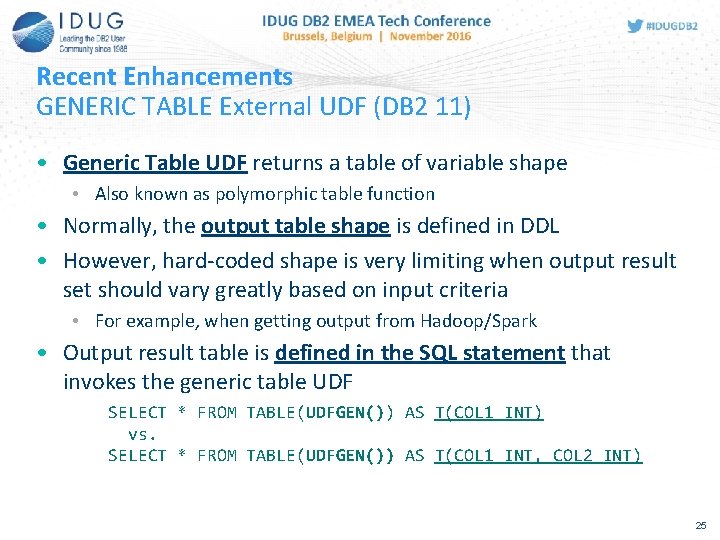
Recent Enhancements GENERIC TABLE External UDF (DB 2 11) • Generic Table UDF returns a table of variable shape • Also known as polymorphic table function • Normally, the output table shape is defined in DDL • However, hard-coded shape is very limiting when output result set should vary greatly based on input criteria • For example, when getting output from Hadoop/Spark • Output result table is defined in the SQL statement that invokes the generic table UDF SELECT * FROM TABLE(UDFGEN()) AS T(COL 1 INT) vs. SELECT * FROM TABLE(UDFGEN()) AS T(COL 1 INT, COL 2 INT) 25
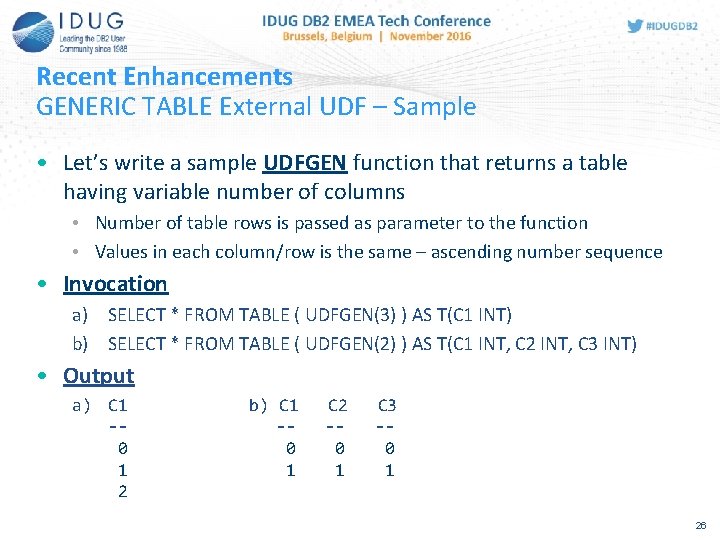
Recent Enhancements GENERIC TABLE External UDF – Sample • Let’s write a sample UDFGEN function that returns a table having variable number of columns • Number of table rows is passed as parameter to the function • Values in each column/row is the same – ascending number sequence • Invocation a) SELECT * FROM TABLE ( UDFGEN(3) ) AS T(C 1 INT) b) SELECT * FROM TABLE ( UDFGEN(2) ) AS T(C 1 INT, C 2 INT, C 3 INT) • Output a) C 1 -0 1 2 b) C 1 -0 1 C 2 -0 1 C 3 -0 1 26
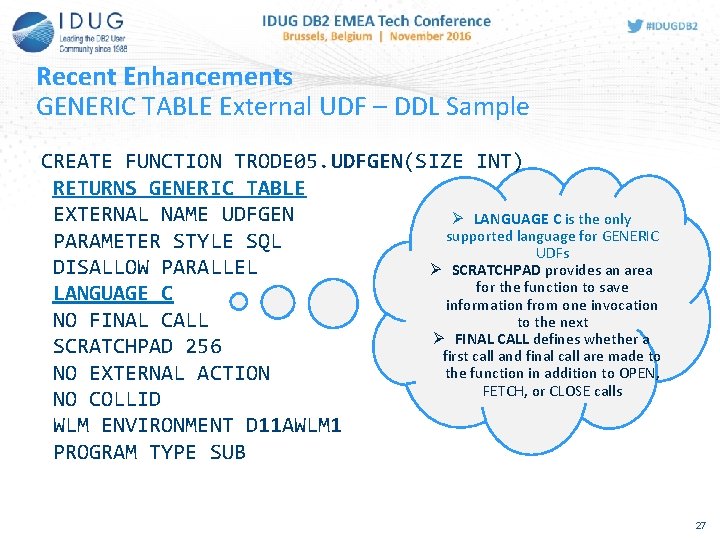
Recent Enhancements GENERIC TABLE External UDF – DDL Sample CREATE FUNCTION TRODE 05. UDFGEN(SIZE INT) RETURNS GENERIC TABLE EXTERNAL NAME UDFGEN Ø LANGUAGE C is the only supported language for GENERIC PARAMETER STYLE SQL UDFs DISALLOW PARALLEL Ø SCRATCHPAD provides an area for the function to save LANGUAGE C information from one invocation NO FINAL CALL to the next Ø FINAL CALL defines whether a SCRATCHPAD 256 first call and final call are made to the function in addition to OPEN, NO EXTERNAL ACTION FETCH, or CLOSE calls NO COLLID WLM ENVIRONMENT D 11 AWLM 1 PROGRAM TYPE SUB 27
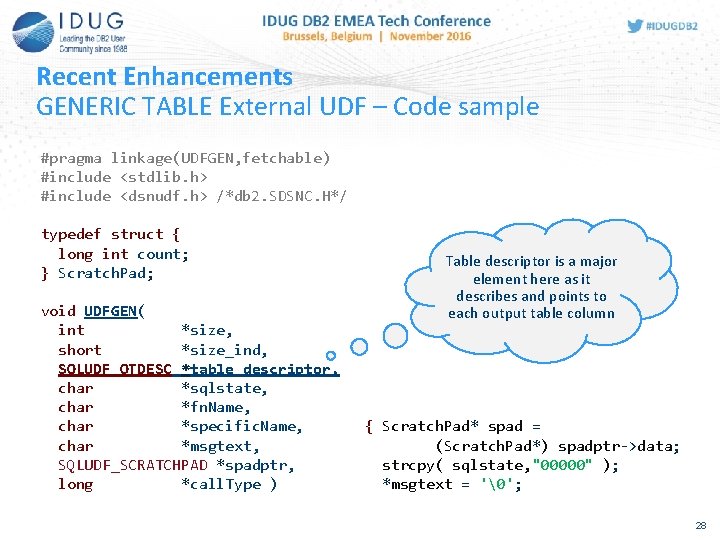
Recent Enhancements GENERIC TABLE External UDF – Code sample #pragma linkage(UDFGEN, fetchable) #include <stdlib. h> #include <dsnudf. h> /*db 2. SDSNC. H*/ typedef struct { long int count; } Scratch. Pad; void UDFGEN( int *size, short *size_ind, SQLUDF_OTDESC *table_descriptor, char *sqlstate, char *fn. Name, char *specific. Name, char *msgtext, SQLUDF_SCRATCHPAD *spadptr, long *call. Type ) Table descriptor is a major element here as it describes and points to each output table column { Scratch. Pad* spad = (Scratch. Pad*) spadptr->data; strcpy( sqlstate, "00000" ); *msgtext = ''; 28
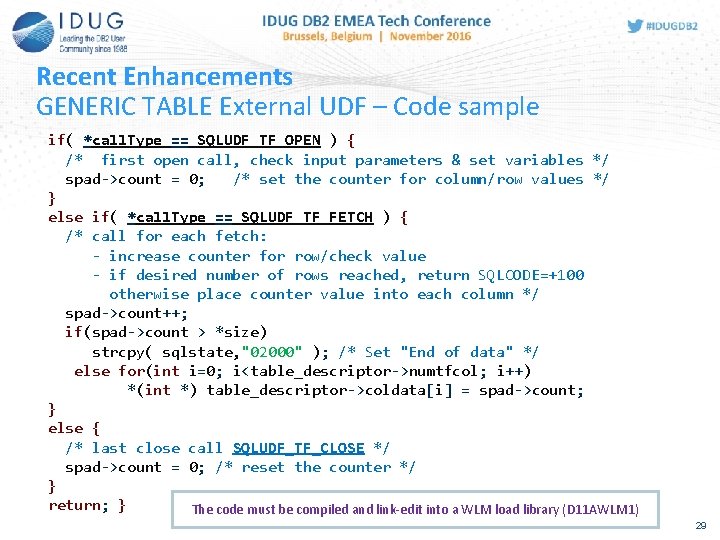
Recent Enhancements GENERIC TABLE External UDF – Code sample if( *call. Type == SQLUDF_TF_OPEN ) { /* first open call, check input parameters & set variables */ spad->count = 0; /* set the counter for column/row values */ } else if( *call. Type == SQLUDF_TF_FETCH ) { /* call for each fetch: - increase counter for row/check value - if desired number of rows reached, return SQLCODE=+100 otherwise place counter value into each column */ spad->count++; if(spad->count > *size) strcpy( sqlstate, "02000" ); /* Set "End of data" */ else for(int i=0; i<table_descriptor->numtfcol; i++) *(int *) table_descriptor->coldata[i] = spad->count; } else { /* last close call SQLUDF_TF_CLOSE */ spad->count = 0; /* reset the counter */ } return; } The code must be compiled and link-edit into a WLM load library (D 11 AWLM 1) 29
Monitoring Capabilities 30
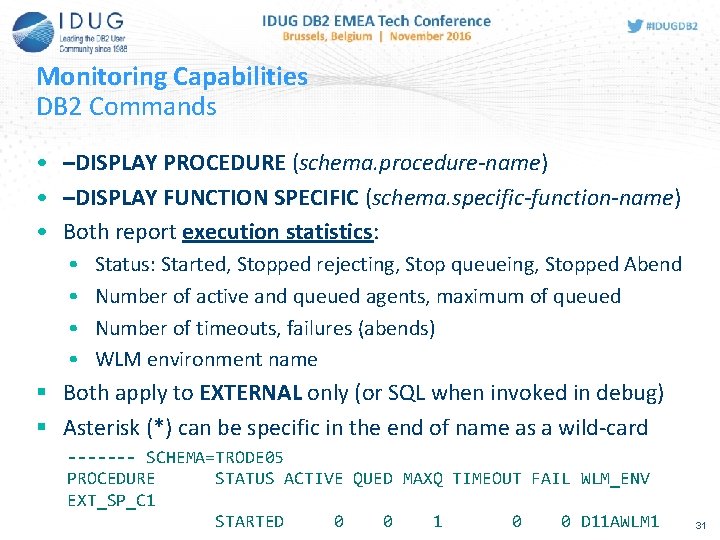
Monitoring Capabilities DB 2 Commands • –DISPLAY PROCEDURE (schema. procedure-name) • –DISPLAY FUNCTION SPECIFIC (schema. specific-function-name) • Both report execution statistics: • • Status: Started, Stopped rejecting, Stop queueing, Stopped Abend Number of active and queued agents, maximum of queued Number of timeouts, failures (abends) WLM environment name § Both apply to EXTERNAL only (or SQL when invoked in debug) § Asterisk (*) can be specific in the end of name as a wild-card ------- SCHEMA=TRODE 05 PROCEDURE STATUS ACTIVE QUED MAXQ TIMEOUT FAIL WLM_ENV EXT_SP_C 1 STARTED 0 0 1 0 0 D 11 AWLM 1 31
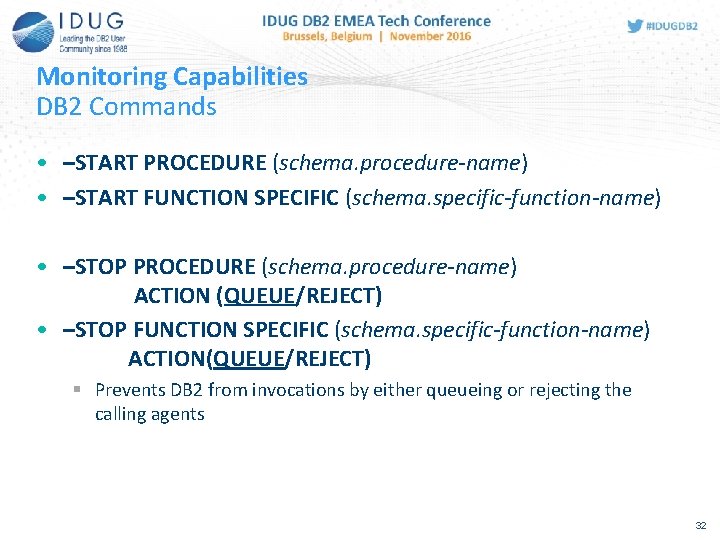
Monitoring Capabilities DB 2 Commands • –START PROCEDURE (schema. procedure-name) • –START FUNCTION SPECIFIC (schema. specific-function-name) • –STOP PROCEDURE (schema. procedure-name) ACTION (QUEUE/REJECT) • –STOP FUNCTION SPECIFIC (schema. specific-function-name) ACTION(QUEUE/REJECT) § Prevents DB 2 from invocations by either queueing or rejecting the calling agents 32
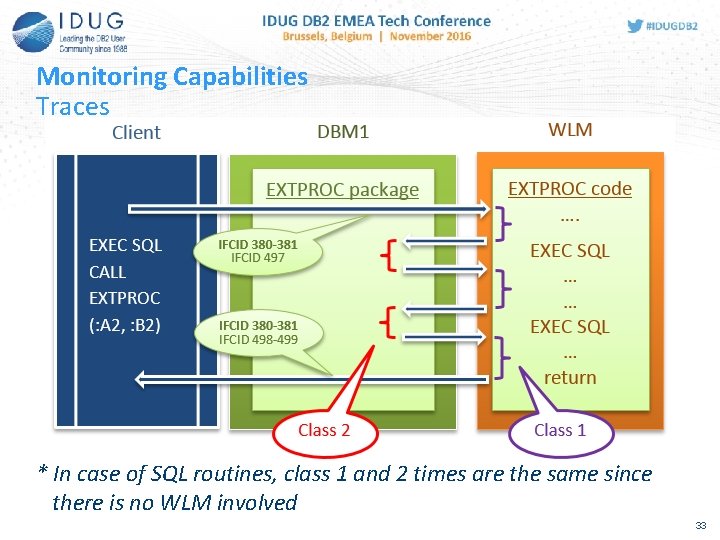
Monitoring Capabilities Traces * In case of SQL routines, class 1 and 2 times are the same since there is no WLM involved 33
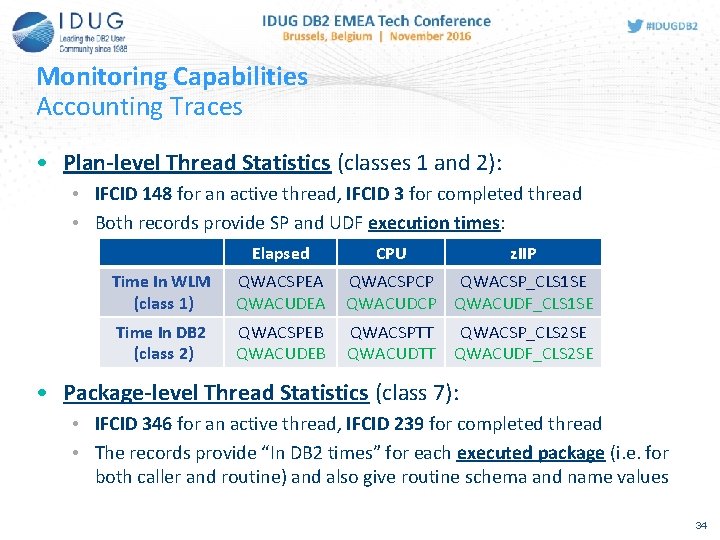
Monitoring Capabilities Accounting Traces • Plan-level Thread Statistics (classes 1 and 2): • IFCID 148 for an active thread, IFCID 3 for completed thread • Both records provide SP and UDF execution times: Elapsed CPU z. IIP Time In WLM (class 1) QWACSPEA QWACUDEA QWACSPCP QWACSP_CLS 1 SE QWACUDCP QWACUDF_CLS 1 SE Time In DB 2 (class 2) QWACSPEB QWACUDEB QWACSPTT QWACUDTT QWACSP_CLS 2 SE QWACUDF_CLS 2 SE • Package-level Thread Statistics (class 7): • IFCID 346 for an active thread, IFCID 239 for completed thread • The records provide “In DB 2 times” for each executed package (i. e. for both caller and routine) and also give routine schema and name values 34
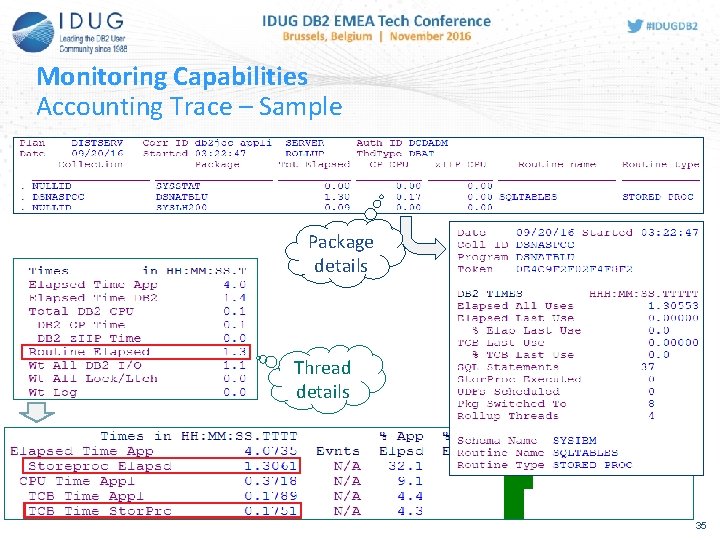
Monitoring Capabilities Accounting Trace – Sample Package details Thread details 35
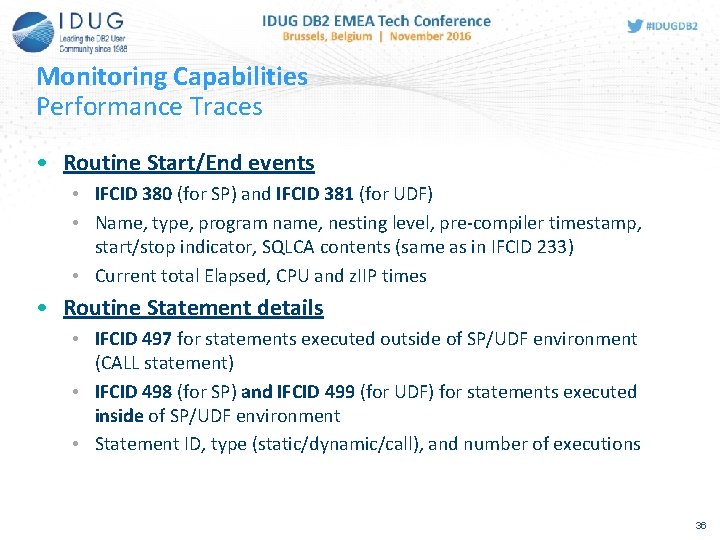
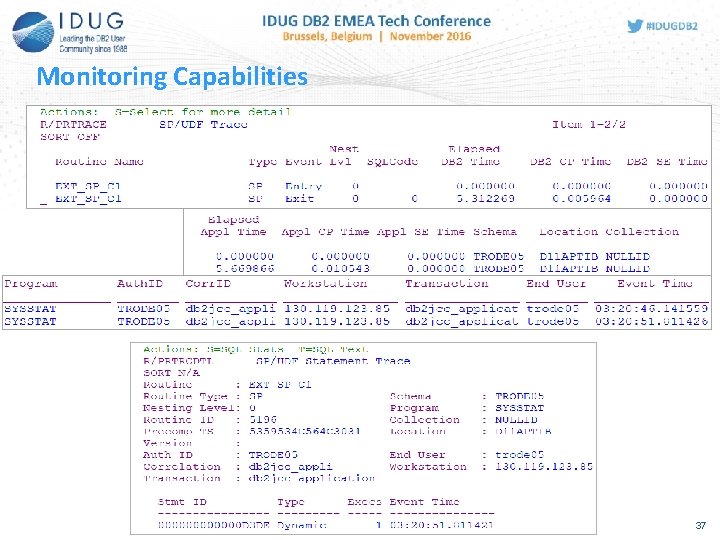
Monitoring Capabilities Performance Traces • Routine Start/End events • IFCID 380 (for SP) and IFCID 381 (for UDF) • Name, type, program name, nesting level, pre-compiler timestamp, start/stop indicator, SQLCA contents (same as in IFCID 233) • Current total Elapsed, CPU and z. IIP times • Routine Statement details • IFCID 497 for statements executed outside of SP/UDF environment (CALL statement) • IFCID 498 (for SP) and IFCID 499 (for UDF) for statements executed inside of SP/UDF environment • Statement ID, type (static/dynamic/call), and number of executions 36
Monitoring Capabilities 37
Administrative Procedures 38
SP&UDF Administrative Procedures Overview • DB 2 is delivered with 60+ stored procedures and most of them can be called in programs to perform administrative functions: • Command execution • ADMIN_COMMAND_DB 2, ADMIN_COMMAND_DSN, ADMIN_COMMAND_MVS, ADMIN_COMMAND_UNIX • Dataset maintenance • ADMIN_DS_BROWSE, ADMIN_DS_DELETE, ADMIN_DS_LIST, ADMIN_DS_RENAME, ADMIN_DS_SEARCH, ADMIN_DS_WRITE • z/OS job management • ADMIN_JOB_CANCEL, ADMIN_JOB_FETCH, ADMIN_JOB_QUERY, ADMIN_JOB_SUBMIT • Scheduling procedures and jobs • ADMIN_TASK_ADD, ADMIN_TASK_CANCEL, ADMIN_TASK_REMOVE, ADMIN_TASK_UPDATE 39
SP&UDF Administrative Procedures Overview • System monitoring • ADMIN_INFO_HOST, ADMIN_INFO_SMS, ADMIN_INFO_SQL, ADMIN_INFO_SSID, ADMIN_INFO_SYSLOG, ADMIN_INFO_SYSPARM, GET_CONFIG, GET_SYSTEM_INFO • System configuration • ADMIN_UPDATE_SYSPARM, DSN_WLM_APPLENV, WLM_REFRESH, WLM_SET_CLIENT_INFO • Managing EXPLAIN tables • ADMIN_EXPLAIN_MAINT • RUNSTATS automation • ADMIN_UTL_EXECUTE, ADMIN_UTL_MODIFY, ADMIN_UTL_MONITOR, ADMIN_UTL_SCHEDULE, ADMIN_UTL_SORT • DB 2 object maintenance • DSNACCOX, DSNUTILU • Etc. 40
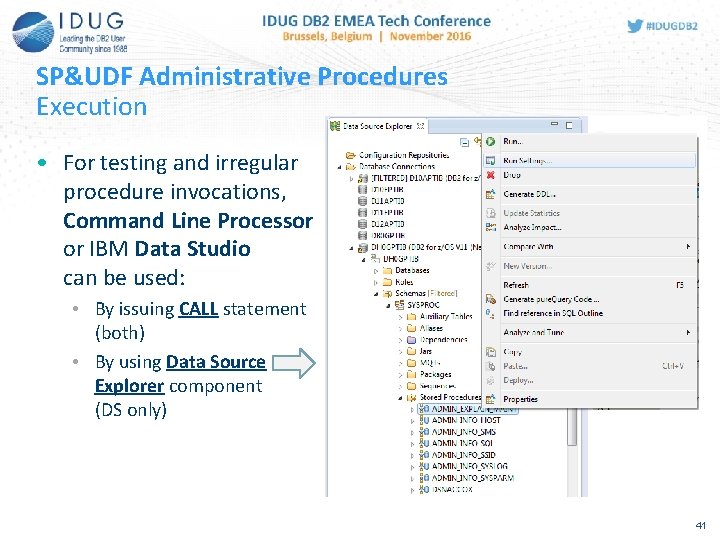
SP&UDF Administrative Procedures Execution • For testing and irregular procedure invocations, Command Line Processor or IBM Data Studio can be used: • By issuing CALL statement (both) • By using Data Source Explorer component (DS only) 41
SP&UDF Administrative Procedures SYSPROC. DSNACCOX • DSNACCOX procedure gives recommendations for DB 2 object maintenance based on catalog real-time statistics • Recommendations are provided in the output result set • When to reorganize, image copy, or update statistics for table spaces or index spaces • Identify when a data set has exceeded a specified threshold for the number of extents it occupies • Identify whether objects are in restricted states • It is a good idea to externalize in-memory statistics beforehand: • –ACCESS DATABASE MODE(STATS) • Statistics are automatically externalized at the end of time interval defined with STATSINT z. Parm 42
SP&UDF Administrative Procedures SYSPROC. DSNACCOX • Input parameters • Query. Type – type of actions to get recommendations on: • COPY / RUNSTATS / REORG – whether to run the utility • EXTENTS – indicates when data sets exceeded a user-specified extents limit • RESTRICT – indicates which objects are in a restricted state • Object. Type – object types to examine • TS (tablespace) / IX (index) / ALL • Criteria – narrows the set of objects (in form of WHERE clause) • Multiple “threshold” parameters for utility recommendation tuning • Output result set • Object details: dbname, type, partition, status • Utility recommendation: full/incremental image copy, runstats, etc. • Multiple object details relevant to utility execution 43
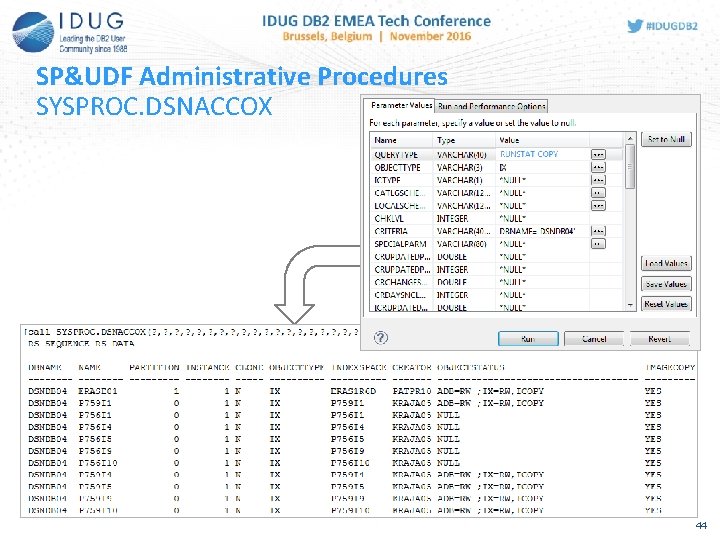
SP&UDF Administrative Procedures SYSPROC. DSNACCOX 44
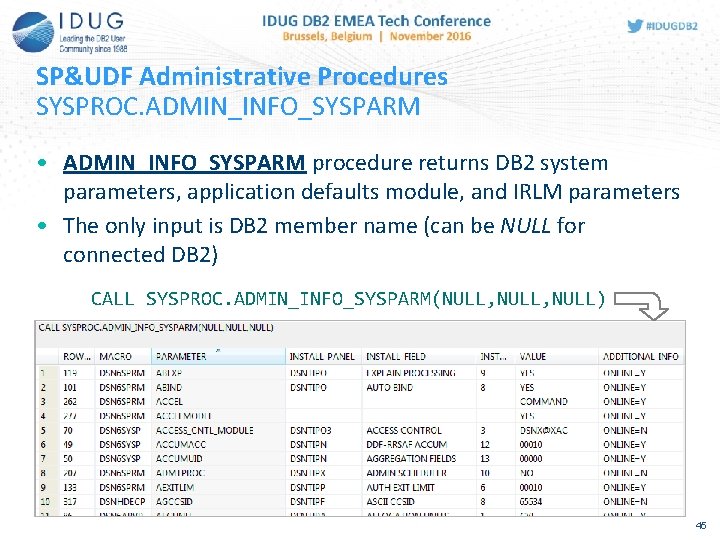
SP&UDF Administrative Procedures SYSPROC. ADMIN_INFO_SYSPARM • ADMIN_INFO_SYSPARM procedure returns DB 2 system parameters, application defaults module, and IRLM parameters • The only input is DB 2 member name (can be NULL for connected DB 2) CALL SYSPROC. ADMIN_INFO_SYSPARM(NULL, NULL) 45
SP&UDF Administrative Procedures SYSPROC. ADMIN_EXPLAIN_MAINT • ADMIN_EXPLAIN_MAINT procedure allows to create new EXPLAIN tables or upgrade existing to the current DB 2 version • Input parameters • Mode – processing modes: RUN / PREVIEW • Action: • • • 'STANDARDIZE' to upgrade all existing tables 'STANDARDIZE_AND_CREATE' to upgrade all existing and create missing 'CREATE' to create specified tables 'DROP' to drop all existing tables 'DROP_AND_CREATE' to recreate all tables • Table-Set – ALL / ACCEL / DIAGNOSTICS / ALL_EXCEPT(table-name 1, …) • Object details – Authid for CURRENT SQLID, Schema-Name, Database. Name, Stogroup-Database, Stogroup-Index, buffer pool names, etc. 46
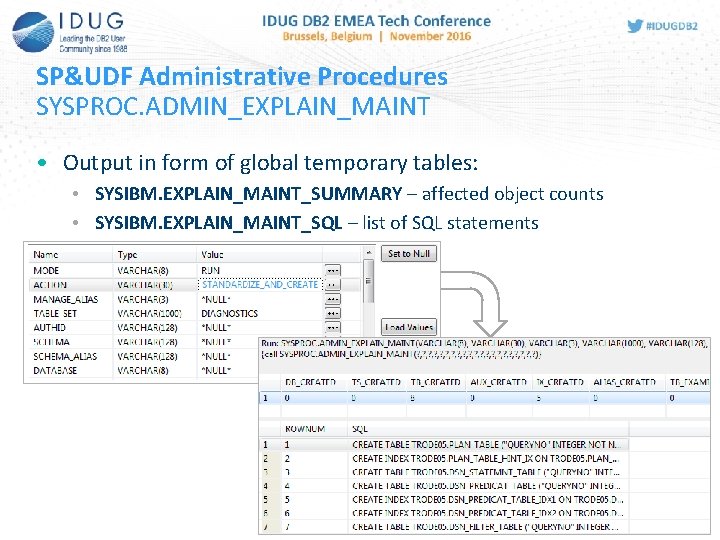
SP&UDF Administrative Procedures SYSPROC. ADMIN_EXPLAIN_MAINT • Output in form of global temporary tables: • SYSIBM. EXPLAIN_MAINT_SUMMARY – affected object counts • SYSIBM. EXPLAIN_MAINT_SQL – list of SQL statements 47
Questions and Answers 48
References • Application Programming and SQL Guide for DB 2 for z/OS • http: //publibfp. dhe. ibm. com/epubs/pdf/dsnapn 05. pdf • SQL Reference for DB 2 for z/OS • http: //publibfp. dhe. ibm. com/epubs/pdf/dsnsqn 06. pdf • DB 2 9 for z/OS Stored Procedures: Through the CALL and Beyond • http: //www. redbooks. ibm. com/redbooks/pdfs/sg 247604. pdf • “DB 2 11 Application Developer for z/OS” IDUG blog series • http: //www. idug. org/p/bl/et/blogaid=484 49
Denis Tronin CA Technologies Denis. Tronin@ca. com Get Cozy with DB 2 for z/OS Stored Procedures and UDFs Please fill out your session evaluation before leaving!
- Slides: 50