
Genesys Compact Edition OXE SIP Agent Desktop PC

- Slides: 27
Genesys Compact Edition OXE & SIP Agent Desktop PC R 1. 0 Product Presentation
Agenda 1. Positioning & Benefits 2. Architecture 3. Genesys Agent Desktop Application (GAD) 4. Options: Gplus Adapters 5. Serviceability 2 | GCE R 1. 0 Agent DT | November 2010 All rights reserved. © 2010, Genesys Telecommunications Laboratories, Inc.
1. Positioning & Benefits 3 | GCE R 1. 0 Agent DT | November 2010
GCE In Summary GCE is an open, flexible compact contact center solution that is easy to operate and administer. It lowers operational and support costs and improves time to deployment while leveraging the power of Genesys, the “best of breed” contact center platform. 4 | GCE R 1. 0 Agent DT | November 2010 All rights reserved. © 2010, Genesys Telecommunications Laboratories, Inc.
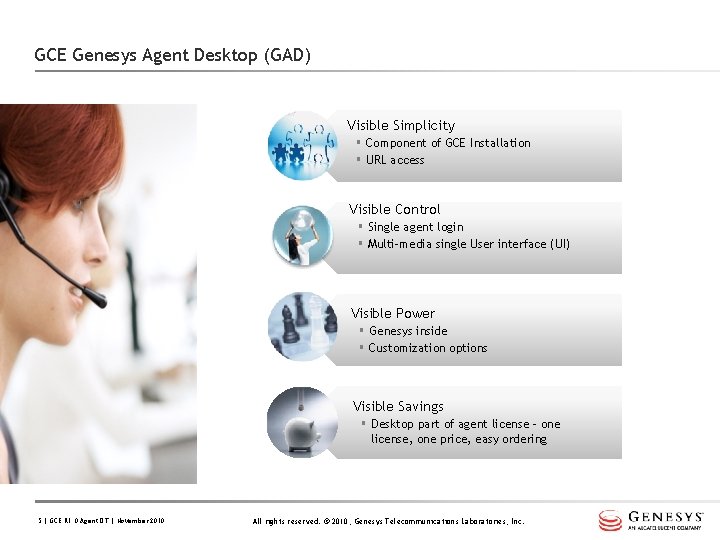
GCE Genesys Agent Desktop (GAD) Visible Simplicity § Component of GCE Installation § URL access Visible Control § Single agent login § Multi-media single User interface (UI) Visible Power § Genesys inside § Customization options Visible Savings § Desktop part of agent license – one license, one price, easy ordering 5 | GCE R 1. 0 Agent DT | November 2010 All rights reserved. © 2010, Genesys Telecommunications Laboratories, Inc.
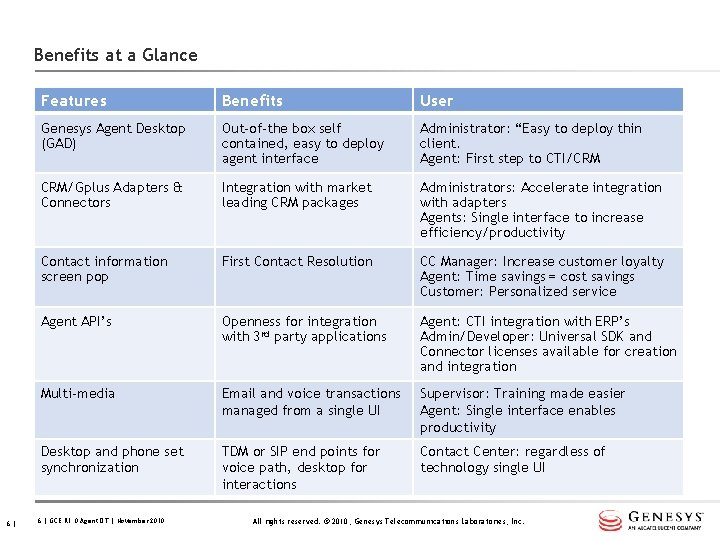
Benefits at a Glance 6| Features Benefits User Genesys Agent Desktop (GAD) Out-of-the box self contained, easy to deploy agent interface Administrator: “Easy to deploy thin client. Agent: First step to CTI/CRM CRM/Gplus Adapters & Connectors Integration with market leading CRM packages Administrators: Accelerate integration with adapters Agents: Single interface to increase efficiency/productivity Contact information screen pop First Contact Resolution CC Manager: Increase customer loyalty Agent: Time savings = cost savings Customer: Personalized service Agent API’s Openness for integration with 3 rd party applications Agent: CTI integration with ERP’s Admin/Developer: Universal SDK and Connector licenses available for creation and integration Multi-media Email and voice transactions managed from a single UI Supervisor: Training made easier Agent: Single interface enables productivity Desktop and phone set synchronization TDM or SIP end points for voice path, desktop for interactions Contact Center: regardless of technology single UI 6 | GCE R 1. 0 Agent DT | November 2010 All rights reserved. © 2010, Genesys Telecommunications Laboratories, Inc.
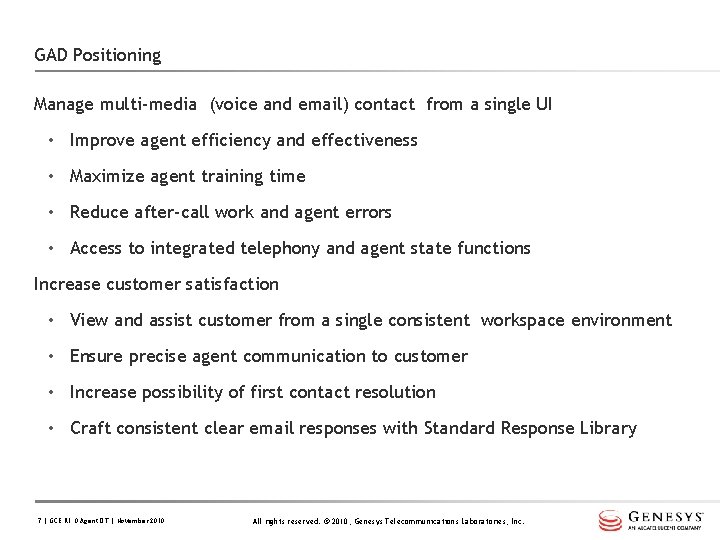
GAD Positioning Manage multi-media (voice and email) contact from a single UI • Improve agent efficiency and effectiveness • Maximize agent training time • Reduce after-call work and agent errors • Access to integrated telephony and agent state functions Increase customer satisfaction • View and assist customer from a single consistent workspace environment • Ensure precise agent communication to customer • Increase possibility of first contact resolution • Craft consistent clear email responses with Standard Response Library 7 | GCE R 1. 0 Agent DT | November 2010 All rights reserved. © 2010, Genesys Telecommunications Laboratories, Inc.
2. Architecture 8 | GCE R 1. 0 Agent DT | November 2010
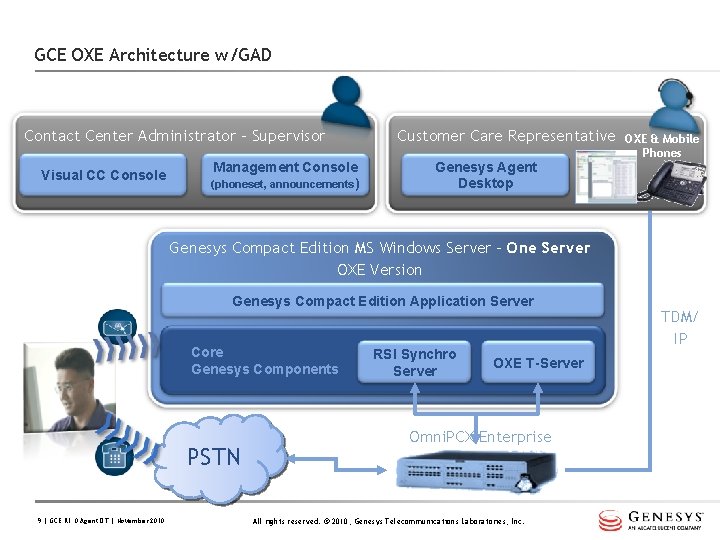
GCE OXE Architecture w/GAD Contact Center Administrator - Supervisor Visual CC Console Management Console (phoneset, announcements) Customer Care Representative Genesys Agent Desktop OXE & Mobile Phones Genesys Compact Edition MS Windows Server – One Server OXE Version Genesys Compact Edition Application Server Core Genesys Components PSTN 9 | GCE R 1. 0 Agent DT | November 2010 RSI Synchro Server OXE T-Server Omni. PCX Enterprise All rights reserved. © 2010, Genesys Telecommunications Laboratories, Inc. TDM/ IP
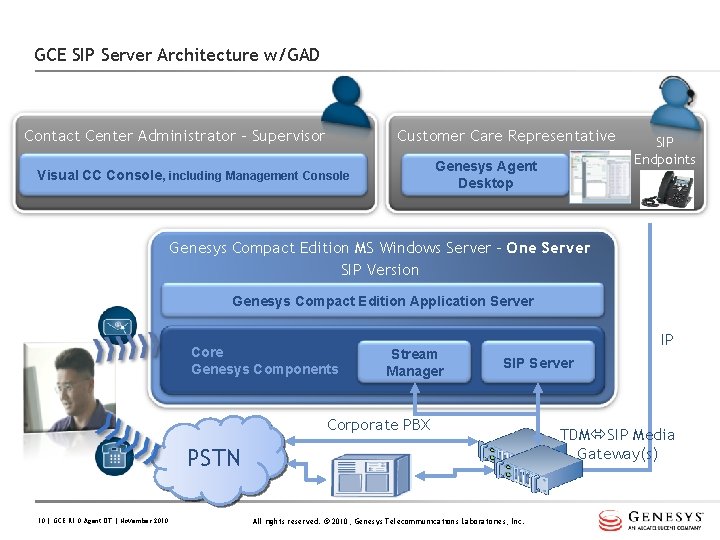
GCE SIP Server Architecture w/GAD Contact Center Administrator - Supervisor Customer Care Representative Genesys Agent Desktop Visual CC Console, including Management Console SIP Endpoints Genesys Compact Edition MS Windows Server – One Server SIP Version Genesys Compact Edition Application Server Core Genesys Components Stream Manager IP Server Corporate PBX PSTN 10 | GCE R 1. 0 Agent DT | November 2010 All rights reserved. © 2010, Genesys Telecommunications Laboratories, Inc. TDM SIP Media Gateway(s)
3. Genesys Agent Desktop 11 | GCE R 1. 0 Agent DT | November 2010
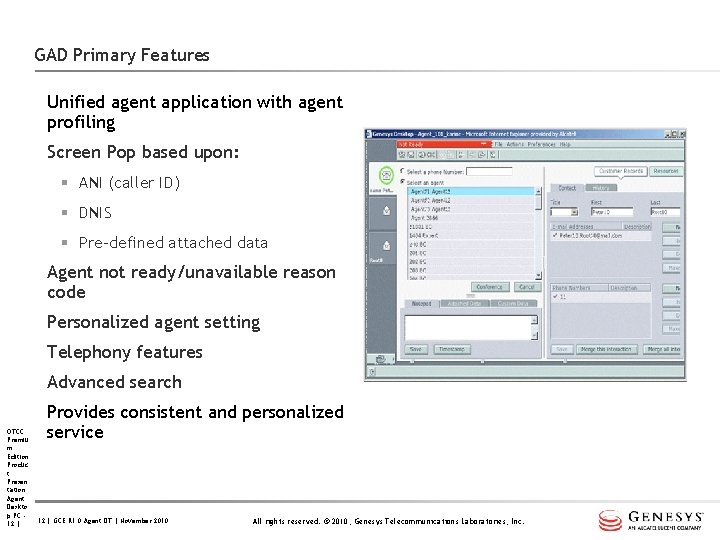
GAD Primary Features Unified agent application with agent profiling Screen Pop based upon: § ANI (caller ID) § DNIS § Pre-defined attached data Agent not ready/unavailable reason code Personalized agent setting Telephony features Advanced search OTCC Premiu m Edition Produc t Presen tation Agent Deskto p PC 12 | Provides consistent and personalized service 12 | GCE R 1. 0 Agent DT | November 2010 All rights reserved. © 2010, Genesys Telecommunications Laboratories, Inc.
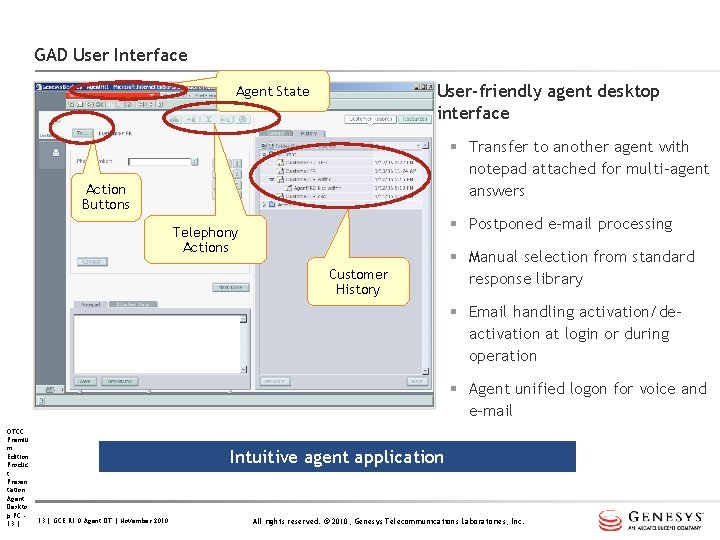
GAD User Interface User-friendly agent desktop interface Agent State § Transfer to another agent with notepad attached for multi-agent answers Action Buttons § Postponed e-mail processing Telephony Actions Customer History § Manual selection from standard response library § Email handling activation/deactivation at login or during operation § Agent unified logon for voice and e-mail OTCC Premiu m Edition Produc t Presen tation Agent Deskto p PC 13 | Intuitive agent application 13 | GCE R 1. 0 Agent DT | November 2010 All rights reserved. © 2010, Genesys Telecommunications Laboratories, Inc.
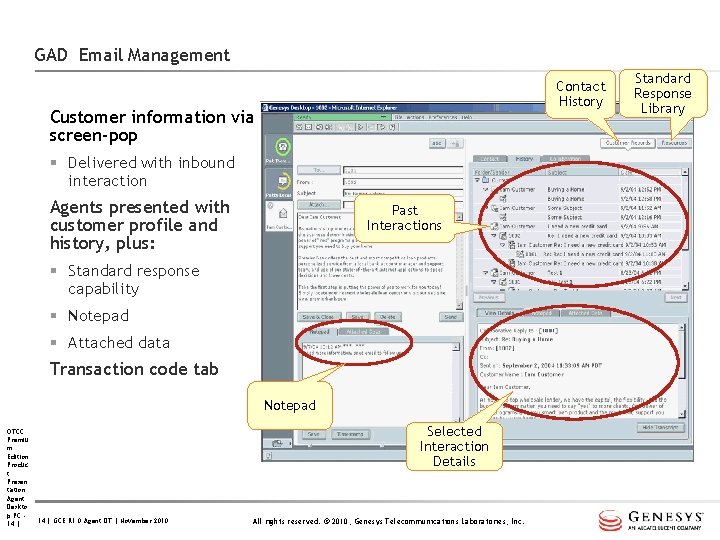
GAD Email Management Contact History Customer information via screen-pop § Delivered with inbound interaction Agents presented with customer profile and history, plus: Past Interactions § Standard response capability § Notepad § Attached data Transaction code tab Notepad OTCC Premiu m Edition Produc t Presen tation Agent Deskto p PC 14 | Selected Interaction Details 14 | GCE R 1. 0 Agent DT | November 2010 All rights reserved. © 2010, Genesys Telecommunications Laboratories, Inc. Standard Response Library
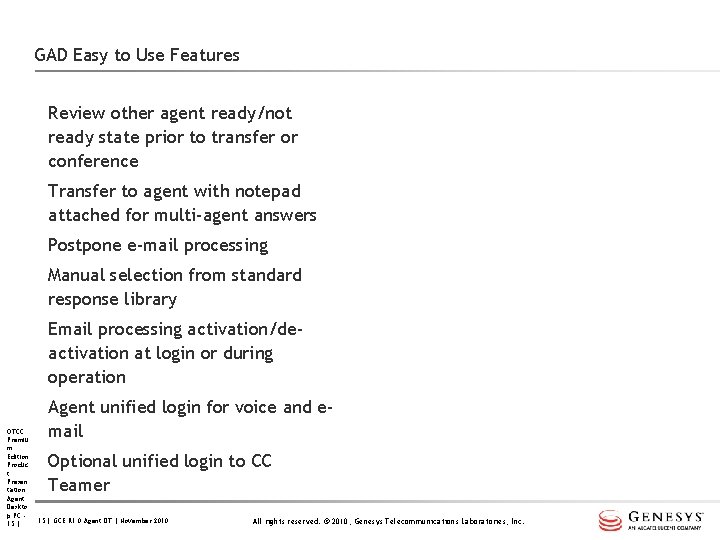
GAD Easy to Use Features Review other agent ready/not ready state prior to transfer or conference Transfer to agent with notepad attached for multi-agent answers Postpone e-mail processing Manual selection from standard response library Email processing activation/deactivation at login or during operation OTCC Premiu m Edition Produc t Presen tation Agent Deskto p PC 15 | Agent unified login for voice and email Optional unified login to CC Teamer 15 | GCE R 1. 0 Agent DT | November 2010 All rights reserved. © 2010, Genesys Telecommunications Laboratories, Inc.
4. Options: Gplus Adapters 16 | GCE R 1. 0 Agent DT | November 2010
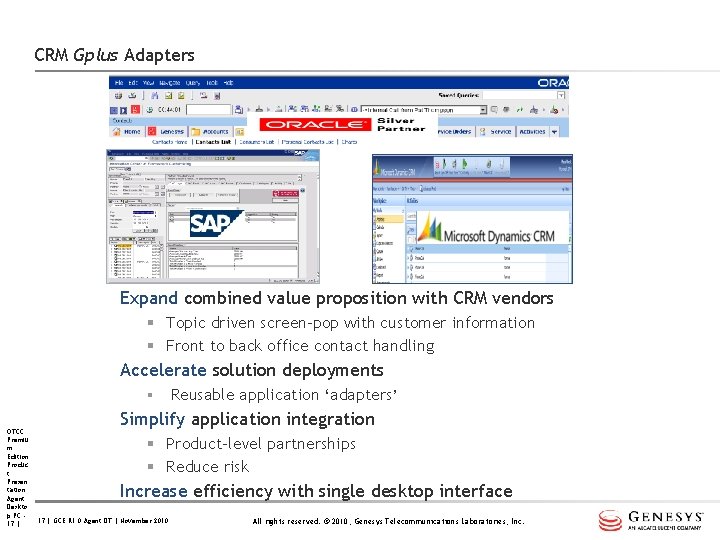
CRM Gplus Adapters Expand combined value proposition with CRM vendors § Topic driven screen-pop with customer information § Front to back office contact handling Accelerate solution deployments § OTCC Premiu m Edition Produc t Presen tation Agent Deskto p PC 17 | Reusable application ‘adapters’ Simplify application integration § Product-level partnerships § Reduce risk Increase efficiency with single desktop interface 17 | GCE R 1. 0 Agent DT | November 2010 All rights reserved. © 2010, Genesys Telecommunications Laboratories, Inc.
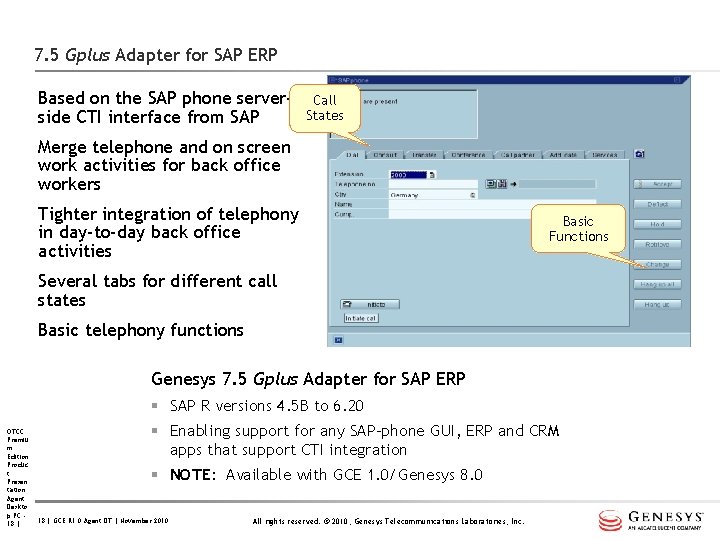
7. 5 Gplus Adapter for SAP ERP Based on the SAP phone serverside CTI interface from SAP Call States Merge telephone and on screen work activities for back office workers Tighter integration of telephony in day-to-day back office activities Basic Functions Several tabs for different call states Basic telephony functions Genesys 7. 5 Gplus Adapter for SAP ERP § SAP R versions 4. 5 B to 6. 20 OTCC Premiu m Edition Produc t Presen tation Agent Deskto p PC 18 | § Enabling support for any SAP-phone GUI, ERP and CRM apps that support CTI integration § NOTE: Available with GCE 1. 0/Genesys 8. 0 18 | GCE R 1. 0 Agent DT | November 2010 All rights reserved. © 2010, Genesys Telecommunications Laboratories, Inc.
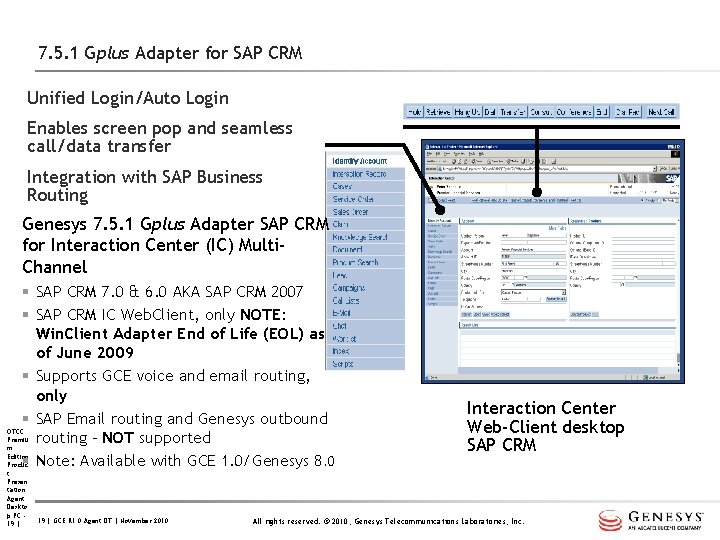
7. 5. 1 Gplus Adapter for SAP CRM Unified Login/Auto Login Enables screen pop and seamless call/data transfer Integration with SAP Business Routing Genesys 7. 5. 1 Gplus Adapter SAP CRM for Interaction Center (IC) Multi. Channel § SAP CRM 7. 0 & 6. 0 AKA SAP CRM 2007 § SAP CRM IC Web. Client, only NOTE: Win. Client Adapter End of Life (EOL) as of June 2009 § Supports GCE voice and email routing, only § SAP Email routing and Genesys outbound OTCC Premiu routing – NOT supported m Edition § Note: Available with GCE 1. 0/Genesys 8. 0 Produc t Presen tation Agent Deskto p PC 19 | GCE R 1. 0 Agent DT | November 2010 Interaction Center Web-Client desktop SAP CRM All rights reserved. © 2010, Genesys Telecommunications Laboratories, Inc.
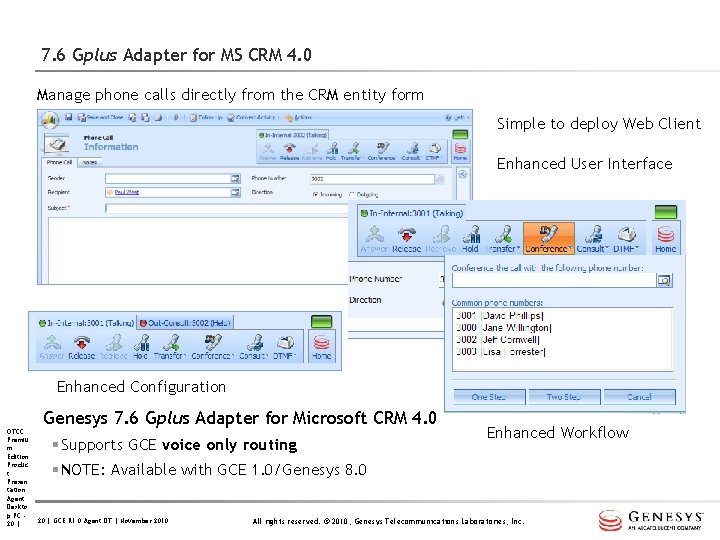
7. 6 Gplus Adapter for MS CRM 4. 0 Manage phone calls directly from the CRM entity form Simple to deploy Web Client Enhanced User Interface Enhanced Configuration OTCC Premiu m Edition Produc t Presen tation Agent Deskto p PC 20 | Genesys 7. 6 Gplus Adapter for Microsoft CRM 4. 0 § Supports GCE voice only routing Enhanced Workflow § NOTE: Available with GCE 1. 0/Genesys 8. 0 20 | GCE R 1. 0 Agent DT | November 2010 All rights reserved. © 2010, Genesys Telecommunications Laboratories, Inc.
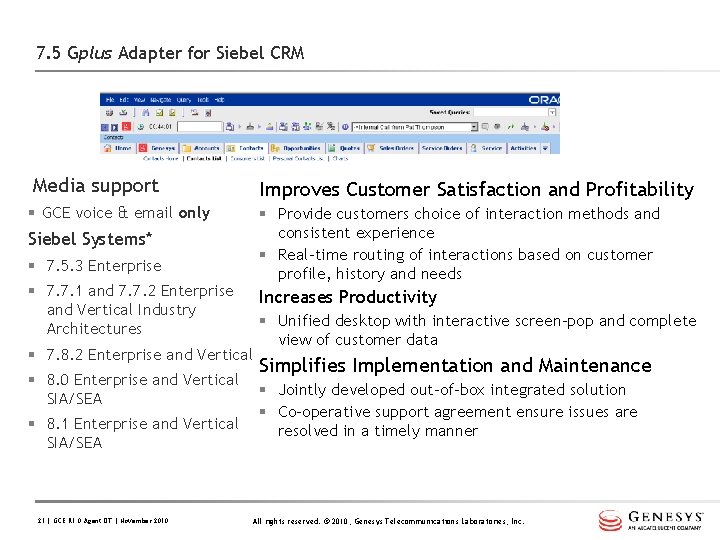
7. 5 Gplus Adapter for Siebel CRM Media support Improves Customer Satisfaction and Profitability § GCE voice & email only § Provide customers choice of interaction methods and consistent experience § Real-time routing of interactions based on customer profile, history and needs Siebel Systems* § 7. 5. 3 Enterprise § 7. 7. 1 and 7. 7. 2 Enterprise and Vertical Industry Architectures Increases Productivity § 7. 8. 2 Enterprise and Vertical § 8. 0 Enterprise and Vertical SIA/SEA § 8. 1 Enterprise and Vertical SIA/SEA 21 | GCE R 1. 0 Agent DT | November 2010 § Unified desktop with interactive screen-pop and complete view of customer data Simplifies Implementation and Maintenance § Jointly developed out-of-box integrated solution § Co-operative support agreement ensure issues are resolved in a timely manner All rights reserved. © 2010, Genesys Telecommunications Laboratories, Inc.
Deployment Assistance for CRM Adapters & Connectors Alcatel-Lucent Professional Services is available to perform the integration of the adapters for customer provided CRM applications. OTCC Premiu m Edition Produc t Presen tation Agent Deskto p PC 22 | GCE R 1. 0 Agent DT | November 2010 All rights reserved. © 2010, Genesys Telecommunications Laboratories, Inc.
Enhancements & Pre-requisites for GAD R 7. 6. 3 Maximum § 150 agent “enabled seats” (>150 with CU approval) Enhancements § SIP interaction preview § View surveys in contact history § Custom column exposure in work-bin Pre-requisites updates § GCE 1. 0 Server Windows 2008 Server Microsoft SQL Server 2008 § PC client Citrix 4. 0 & 4. 5 Internet Explorer 7. 0, 8. 0 OTCC Premiu m Edition Produc t Presen tation Agent Deskto p PC 23 | GCE R 1. 0 Agent DT | November 2010 All rights reserved. © 2010, Genesys Telecommunications Laboratories, Inc.
5. Serviceability 24 | GCE R 1. 0 Agent DT | November 2010
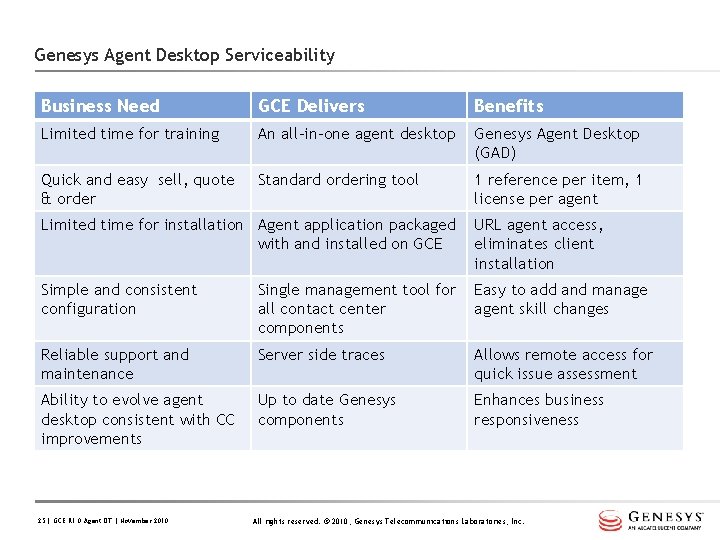
Genesys Agent Desktop Serviceability Business Need GCE Delivers Benefits Limited time for training An all-in-one agent desktop Genesys Agent Desktop (GAD) Quick and easy sell, quote & order Standard ordering tool 1 reference per item, 1 license per agent Limited time for installation Agent application packaged with and installed on GCE URL agent access, eliminates client installation Simple and consistent configuration Single management tool for all contact center components Easy to add and manage agent skill changes Reliable support and maintenance Server side traces Allows remote access for quick issue assessment Ability to evolve agent desktop consistent with CC improvements Up to date Genesys components Enhances business responsiveness 25 | GCE R 1. 0 Agent DT | November 2010 All rights reserved. © 2010, Genesys Telecommunications Laboratories, Inc.
Thank You for Your Attention Questions? 26 | GCE R 1. 0 Agent DT | November 2010 All rights reserved. © 2010, Genesys Telecommunications Laboratories, Inc.
www. alcatel-lucent. com www. genesyslab. com 27 | Presentation Title | Month 2009