
General GIS Quick Reference Earth Common Units Geographic
- Slides: 2
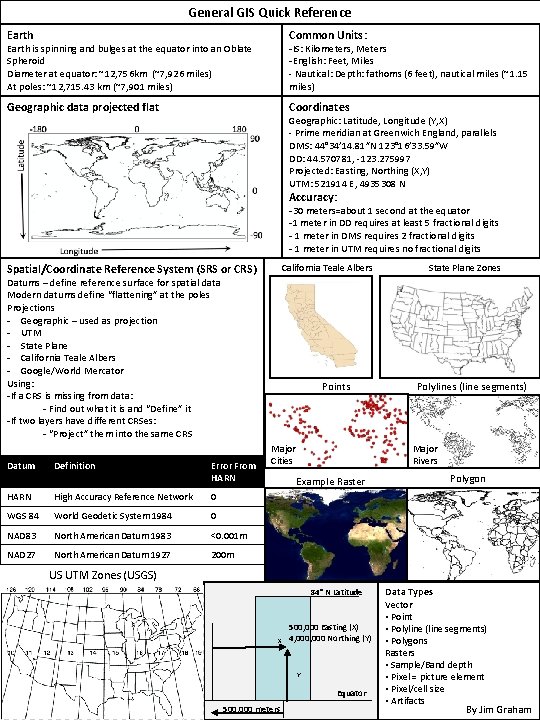
General GIS Quick Reference Earth Common Units: Geographic data projected flat Coordinates -IS: Kilometers, Meters -English: Feet, Miles - Nautical: Depth: fathoms (6 feet), nautical miles (~1. 15 miles) Earth is spinning and bulges at the equator into an Oblate Spheroid Diameter at equator: ~12, 756 km (~7, 926 miles) At poles: ~12, 715. 43 km (~7, 901 miles) Geographic: Latitude, Longitude (Y, X) - Prime meridian at Greenwich England, parallels DMS: 44° 34′ 14. 81″N 123° 16′ 33. 59″W DD: 44. 570781, -123. 275997 Projected: Easting, Northing (X, Y) UTM: 521914 E, 4935308 N Accuracy: -30 meters=about 1 second at the equator -1 meter in DD requires at least 5 fractional digits - 1 meter in DMS requires 2 fractional digits - 1 meter in UTM requires no fractional digits Spatial/Coordinate Reference System (SRS or CRS) California Teale Albers Datums – define reference surface for spatial data Modern datums define “flattening” at the poles Projections - Geographic – used as projection - UTM - State Plane - California Teale Albers - Google/World Mercator Using: -If a CRS is missing from data: - Find out what it is and “Define” it -If two layers have different CRSes: - “Project” them into the same CRS Datum Definition Points Error From HARN High Accuracy Reference Network 0 WGS 84 World Geodetic System 1984 0 NAD 83 North American Datum 1983 <0. 001 m NAD 27 North American Datum 1927 200 m Major Cities State Plane Zones Polylines (line segments) Major Rivers Example Raster Polygon US UTM Zones (USGS) 84° N Latitude X 500, 000 Easting (X) 4, 000 Northing (Y) Y Equator 500, 000 meters Data Types Vector • Point • Polyline (line segments) • Polygons Rasters • Sample/Band depth • Pixel = picture element • Pixel/cell size • Artifacts By Jim Graham
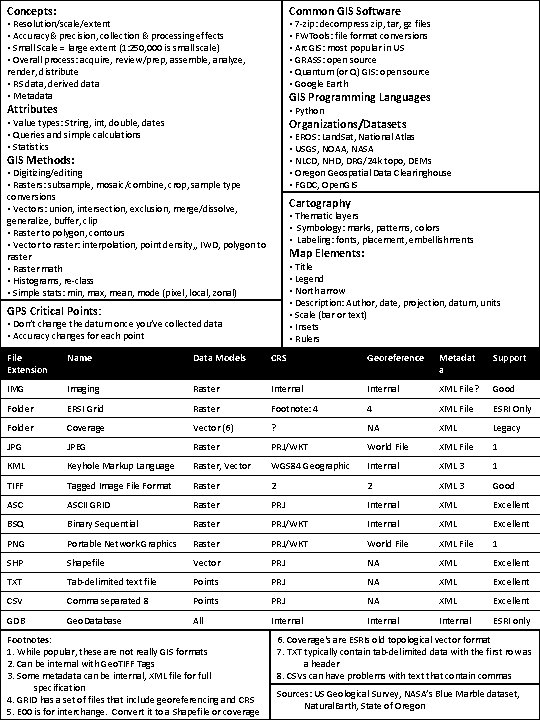
Common GIS Software Concepts: • 7 -zip: decompress zip, tar, gz files • FWTools: file format conversions • Arc. GIS: most popular in US • GRASS: open source • Quantum (or Q) GIS: open source • Google Earth • Resolution/scale/extent • Accuracy& precision, collection & processing effects • Small Scale = large extent (1: 250, 000 is small scale) • Overall process: acquire, review/prep, assemble, analyze, render, distribute • RS data, derived data • Metadata GIS Programming Languages Attributes • Python Organizations/Datasets • Value types: String, int, double, dates • Queries and simple calculations • Statistics • EROS: Land. Sat, National Atlas • USGS, NOAA, NASA • NLCD, NHD, DRG/24 k topo, DEMs • Oregon Geospatial Data Clearinghouse • FGDC, Open. GIS Methods: • Digitizing/editing • Rasters: subsample, mosaic/combine, crop, sample type conversions • Vectors: union, intersection, exclusion, merge/dissolve, generalize, buffer, clip • Raster to polygon, contours • Vector to raster: interpolation, point density, , IWD, polygon to raster • Raster math • Histograms, re-class • Simple stats: min, max, mean, mode (pixel, local, zonal) Cartography • Thematic layers • Symbology: marks, patterns, colors • Labeling: fonts, placement, embellishments Map Elements: • Title • Legend • North arrow • Description: Author, date, projection, datum, units • Scale (bar or text) • Insets • Rulers GPS Critical Points: • Don’t change the datum once you’ve collected data • Accuracy changes for each point File Extension Name Data Models CRS Georeference Metadat a Support IMG Imaging Raster Internal XML File? Good Folder ERSI Grid Raster Footnote: 4 4 XML File ESRI Only Folder Coverage Vector (6) ? NA XML Legacy JPG JPEG Raster PRJ/WKT World File XML File 1 KML Keyhole Markup Language Raster, Vector WGS 84 Geographic Internal XML 3 1 TIFF Tagged Image File Format Raster 2 2 XML 3 Good ASCII GRID Raster PRJ Internal XML Excellent BSQ Binary Sequential Raster PRJ/WKT Internal XML Excellent PNG Portable Network Graphics Raster PRJ/WKT World File XML File 1 SHP Shapefile Vector PRJ NA XML Excellent TXT Tab-delimited text file Points PRJ NA XML Excellent CSV Comma separated 8 Points PRJ NA XML Excellent GDB Geo. Database All Internal ESRI only Footnotes: 1. While popular, these are not really GIS formats 2. Can be internal with Geo. TIFF Tags 3. Some metadata can be internal, XML file for full specification 4. GRID has a set of files that include georeferencing and CRS 5. E 00 is for interchange. Convert it to a Shapefile or coverage 6. Coverage's are ESRIs old topological vector format 7. TXT typically contain tab-delimited data with the first row as a header 8. CSVs can have problems with text that contain commas Sources: US Geological Survey, NASA’s Blue Marble dataset, Natural. Earth, State of Oregon