
GBS Query Management Process and Service now Training
GBS Query Management Process and Service -now Training Territory Finance – Introduction to Service-now
Agenda Ø Ø Ø Ø Service-now ………………. . 3 Objectives………………… 7 Introduction & Principles…………. . 9 Process Overview …………. 13 Query Creation……. …………………. . 26 Conclusion ……………. ……… 42 Contact Info…. …. . …………. . 44 2/1/2022 -- SPE Confidential 2
Service-now Launch Service-now will help GBS… • Resolve customer queries quickly and accurately • Improve management (ownership, tracking and reporting) of queries/incidents throughout their lifecycle • Provide management and stakeholder visibility 2/1/2022 -- SPE Confidential 3
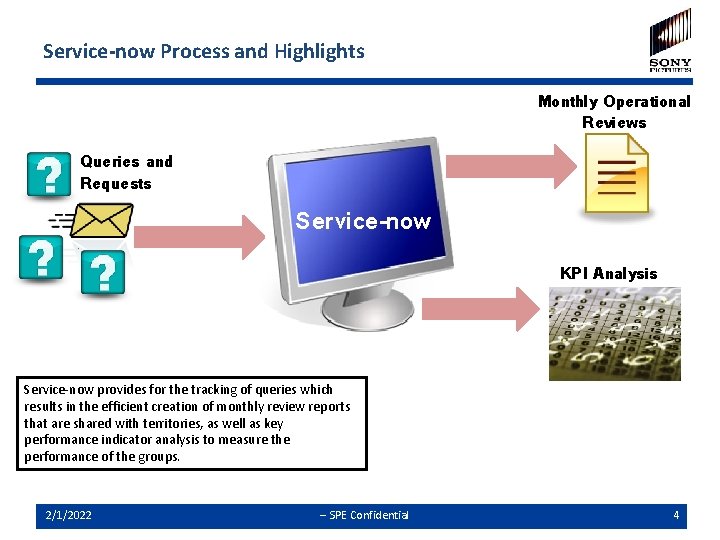
Service-now Process and Highlights Monthly Operational Reviews Queries and Requests Service-now KPI Analysis Service-now provides for the tracking of queries which results in the efficient creation of monthly review reports that are shared with territories, as well as key performance indicator analysis to measure the performance of the groups. 2/1/2022 -- SPE Confidential 4
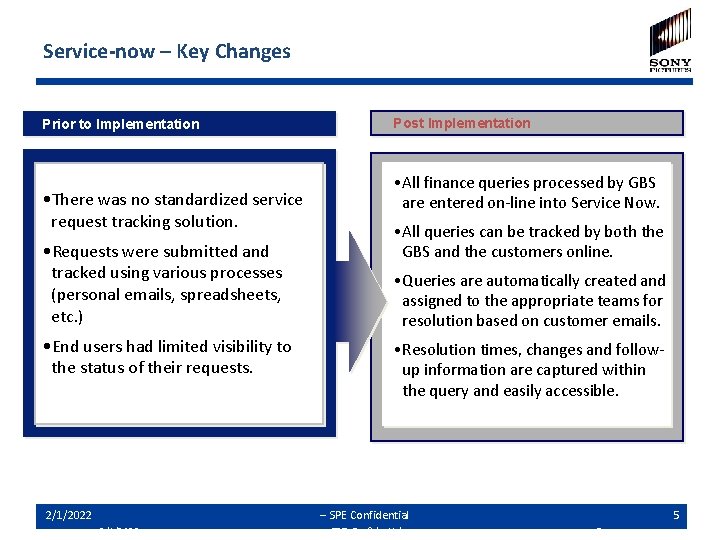
Service-now – Key Changes Prior to Implementation • There was no standardized service request tracking solution. • Requests were submitted and tracked using various processes (personal emails, spreadsheets, etc. ) • End users had limited visibility to the status of their requests. 2/1/2022 Post Implementation • All finance queries processed by GBS are entered on-line into Service Now. • All queries can be tracked by both the GBS and the customers online. • Queries are automatically created and assigned to the appropriate teams for resolution based on customer emails. • Resolution times, changes and followup information are captured within the query and easily accessible. -- SPE Confidential 2/1/2022 -- SPE Confidential 5 5
Agenda ü Ø Ø Ø Service-now Objectives Introduction & Principles Process Overview Query Creation Conclusion Contact Info 2/1/2022 -- SPE Confidential 6
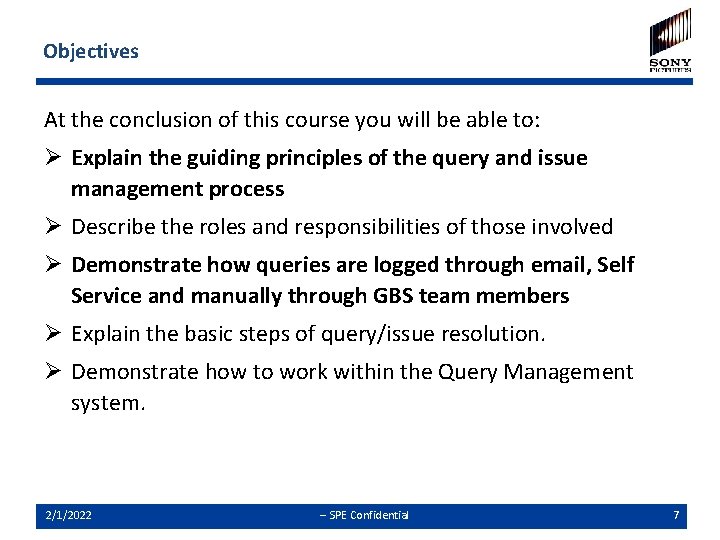
Objectives At the conclusion of this course you will be able to: Ø Explain the guiding principles of the query and issue management process Ø Describe the roles and responsibilities of those involved Ø Demonstrate how queries are logged through email, Self Service and manually through GBS team members Ø Explain the basic steps of query/issue resolution. Ø Demonstrate how to work within the Query Management system. 2/1/2022 -- SPE Confidential 7
Agenda ü ü Ø Ø Ø Service Now Objectives Introduction & Principles Process Overview Query Creation Conclusion Contact Info 2/1/2022 -- SPE Confidential 8
Introduction Ø Objective of the standard query management process and Service-now tool, at GBS. Ø The need to track, understand, analyze and manage the customer inquires. Ø Recognize opportunities for continuous improvement. 2/1/2022 -- SPE Confidential 9
Principles Ø All customer queries and issues must be logged and managed through the GBS query management system – “Service-now”. Ø The preferred way to submit queries is now through designated GBS email addresses that have been established by process, by country, by customer company and by LOB. These should be used by all customers, vendors and GBS personnel to communicate queries/issues. This will allow the auto logging of the queries/issues in Service-now. Ø All other customer queries and issues received via telephone, personal email address, fax etc. need to be logged manually by GBS personnel in an “open” state in Service-now. Ø Any follow ups addressed to the generic/designated email boxes will be tracked automatically in Service-now. – Important note: Always reference the query number QRY 0000000 in the subject line or the body of the email in order to ensure that the communication history gets tracked in the ticket. 2/1/2022 -- SPE Confidential 10
Agenda ü ü ü Ø Ø Service Now Objectives Introduction & Principles Process Overview Query Creation Conclusion Contact Info 2/1/2022 -- SPE Confidential 11
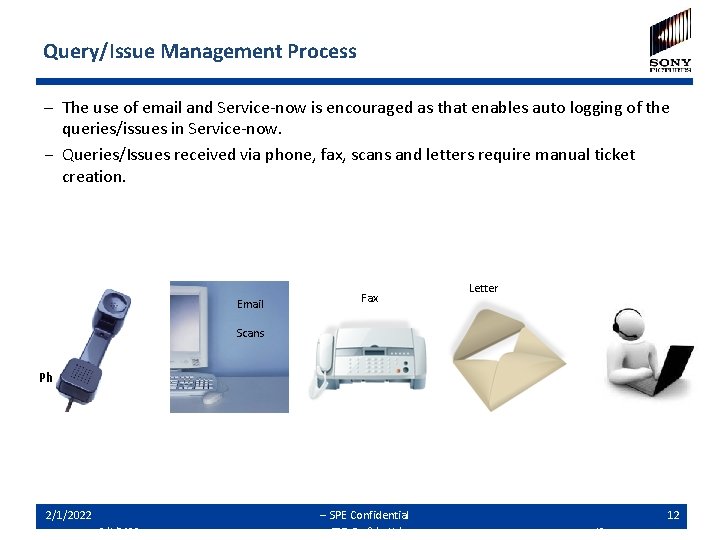
Query/Issue Management Process – The use of email and Service-now is encouraged as that enables auto logging of the queries/issues in Service-now. − Queries/Issues received via phone, fax, scans and letters require manual ticket creation. Email Fax Letter Scans Service-now Phone 2/1/2022 -- SPE Confidential 12 12
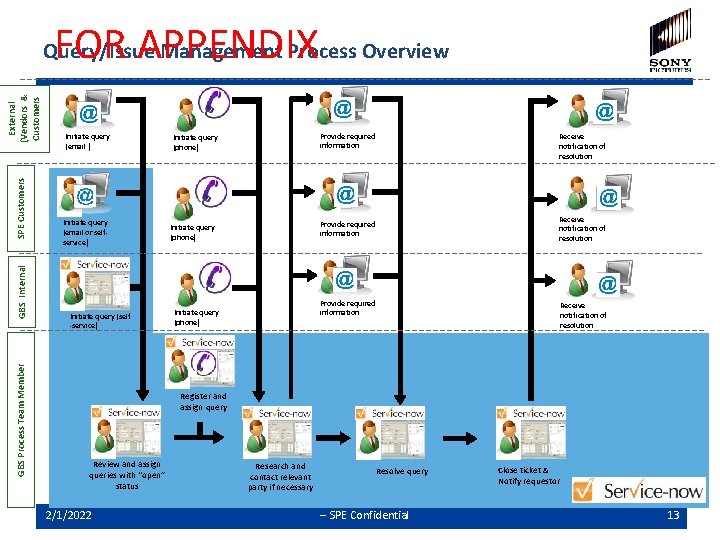
FOR APPENDIX GBS Process Team Member GBS Internal SPE Customers External (Vendors & Customers Query/Issue Management Process Overview Initiate query (email ) Initiate query (email or selfservice) Initiate query (self -service) Provide required information Initiate query (phone) Receive notification of resolution Register and assign query Review and assign queries with "open” status 2/1/2022 Research and contact relevant party if necessary Resolve query -- SPE Confidential Close ticket & Notify requestor 13
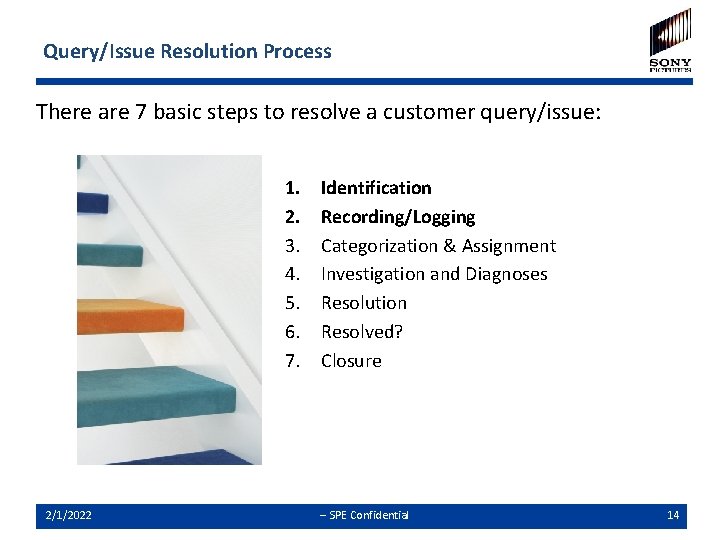
Query/Issue Resolution Process There are 7 basic steps to resolve a customer query/issue: 1. 2. 3. 4. 5. 6. 7. 2/1/2022 Identification Recording/Logging Categorization & Assignment Investigation and Diagnoses Resolution Resolved? Closure -- SPE Confidential 14
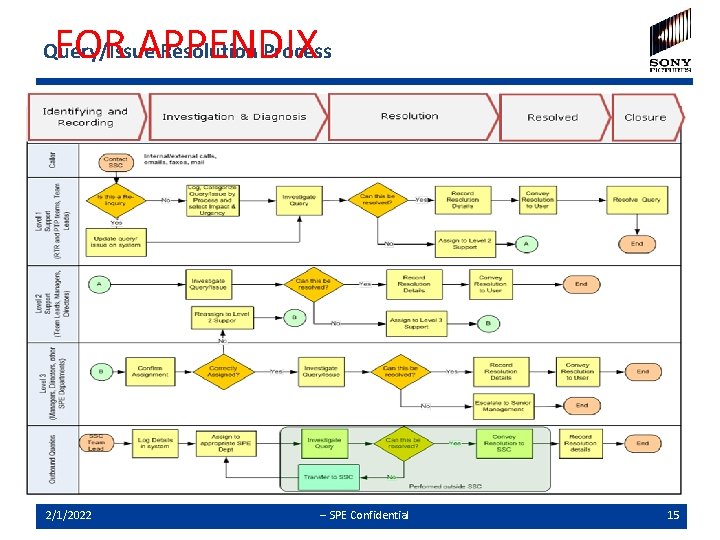
FOR APPENDIX Query/Issue Resolution Process 2/1/2022 -- SPE Confidential 15
Roles and Responsibilities Ø GBS Customers, Line of Business, and Support Departments • Submit queries and requests to GBS members via email, self service or direct contact • Respond to GBS inquiries as requested Ø Analyst/Accountant/Specialist • Create queries based on phone calls, assign queries and issues received from self-service and auto generated email queries • Assign the appropriate category and priority in the system • Update the status of the query and issue as needed • Resolve/close queries and issues timely and accurately • Communicate/inform customers and vendors Ø Team Leads • • 2/1/2022 Manage teams and monitor the query and issue resolution process Ensure that all queries and issues are assigned and prioritized properly Issue escalations and complaints Take ownership of High Impact/High Urgency queries and issues if necessary Notify Manager/Director of queries and issues that need to be escalated outside of GBS Ensure the queries and issues are managed to meet Service Level Agreement (SLA) targets Ensure that queries and issues are managed efficiently -- SPE Confidential 16
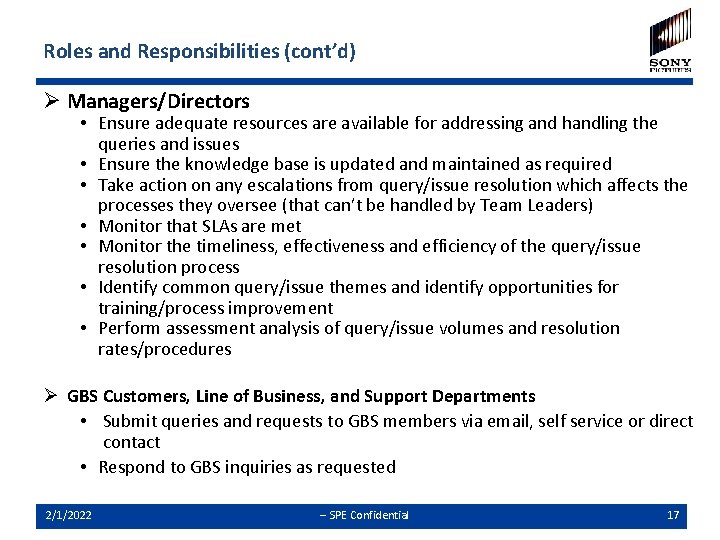
Roles and Responsibilities (cont’d) Ø Managers/Directors • Ensure adequate resources are available for addressing and handling the queries and issues • Ensure the knowledge base is updated and maintained as required • Take action on any escalations from query/issue resolution which affects the processes they oversee (that can’t be handled by Team Leaders) • Monitor that SLAs are met • Monitor the timeliness, effectiveness and efficiency of the query/issue resolution process • Identify common query/issue themes and identify opportunities for training/process improvement • Perform assessment analysis of query/issue volumes and resolution rates/procedures Ø GBS Customers, Line of Business, and Support Departments • Submit queries and requests to GBS members via email, self service or direct contact • Respond to GBS inquiries as requested 2/1/2022 -- SPE Confidential 17
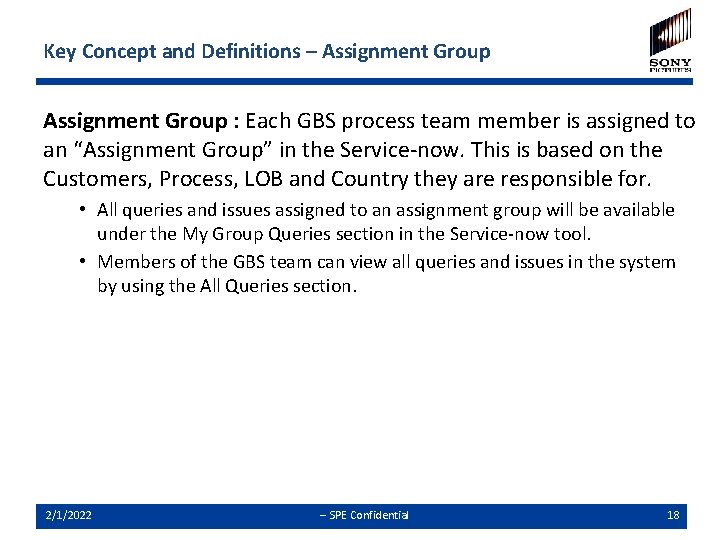
Key Concept and Definitions – Assignment Group : Each GBS process team member is assigned to an “Assignment Group” in the Service-now. This is based on the Customers, Process, LOB and Country they are responsible for. • All queries and issues assigned to an assignment group will be available under the My Group Queries section in the Service-now tool. • Members of the GBS team can view all queries and issues in the system by using the All Queries section. 2/1/2022 -- SPE Confidential 18
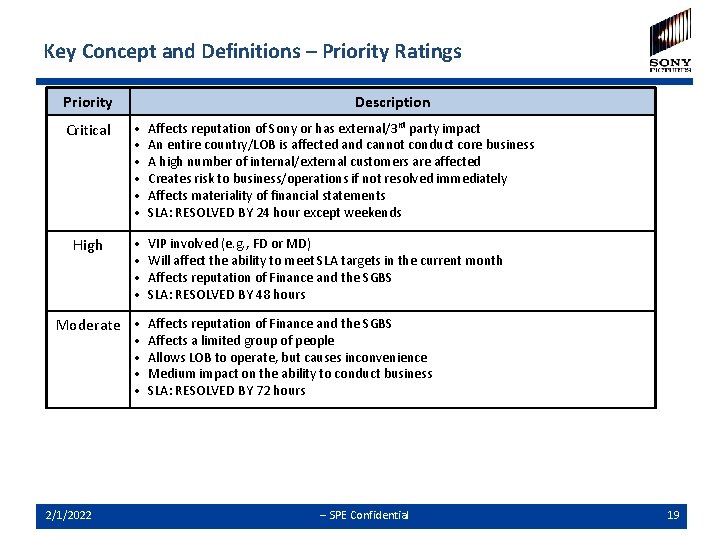
Key Concept and Definitions – Priority Ratings Priority Description Critical • • • Affects reputation of Sony or has external/3 rd party impact An entire country/LOB is affected and cannot conduct core business A high number of internal/external customers are affected Creates risk to business/operations if not resolved immediately Affects materiality of financial statements SLA: RESOLVED BY 24 hour except weekends High • • VIP involved (e. g. , FD or MD) Will affect the ability to meet SLA targets in the current month Affects reputation of Finance and the SGBS SLA: RESOLVED BY 48 hours Moderate • Affects reputation of Finance and the SGBS • • 2/1/2022 Affects a limited group of people Allows LOB to operate, but causes inconvenience Medium impact on the ability to conduct business SLA: RESOLVED BY 72 hours -- SPE Confidential 19
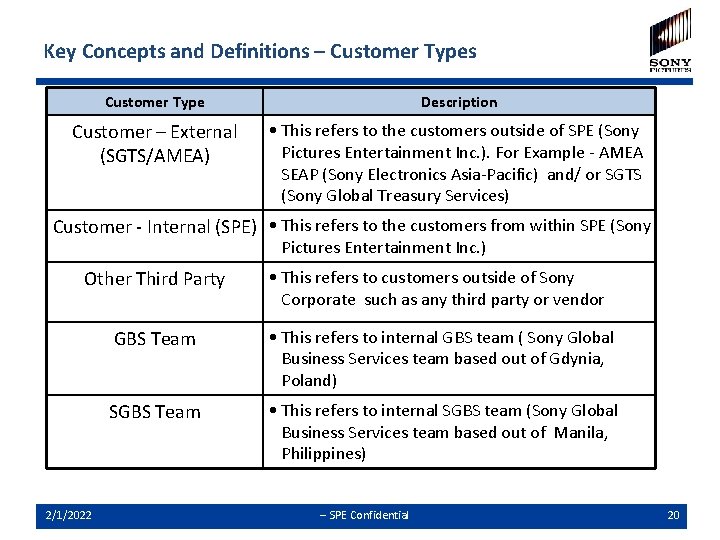
Key Concepts and Definitions – Customer Types Customer Type Description Customer – External (SGTS/AMEA) • This refers to the customers outside of SPE (Sony Pictures Entertainment Inc. ). For Example - AMEA SEAP (Sony Electronics Asia-Pacific) and/ or SGTS (Sony Global Treasury Services) Customer - Internal (SPE) • This refers to the customers from within SPE (Sony Pictures Entertainment Inc. ) Other Third Party • This refers to customers outside of Sony Corporate such as any third party or vendor GBS Team • This refers to internal GBS team ( Sony Global Business Services team based out of Gdynia, Poland) SGBS Team • This refers to internal SGBS team (Sony Global Business Services team based out of Manila, Philippines) 2/1/2022 -- SPE Confidential 20
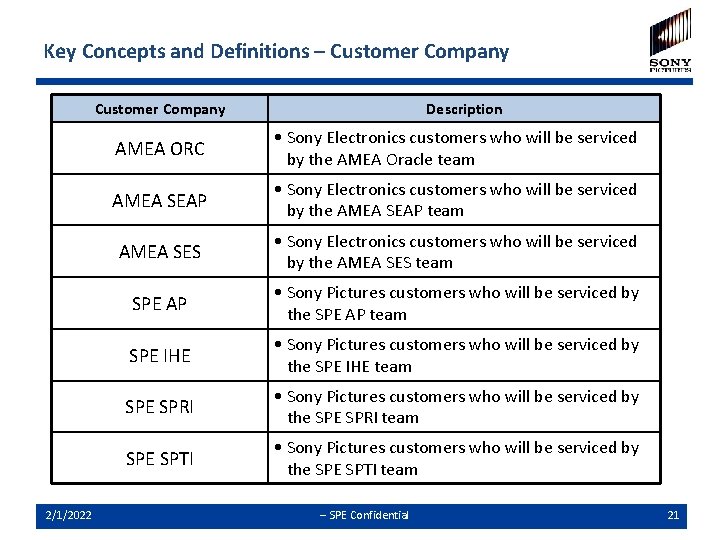
Key Concepts and Definitions – Customer Company 2/1/2022 Description AMEA ORC • Sony Electronics customers who will be serviced by the AMEA Oracle team AMEA SEAP • Sony Electronics customers who will be serviced by the AMEA SEAP team AMEA SES • Sony Electronics customers who will be serviced by the AMEA SES team SPE AP • Sony Pictures customers who will be serviced by the SPE AP team SPE IHE • Sony Pictures customers who will be serviced by the SPE IHE team SPE SPRI • Sony Pictures customers who will be serviced by the SPE SPRI team SPE SPTI • Sony Pictures customers who will be serviced by the SPE SPTI team -- SPE Confidential 21
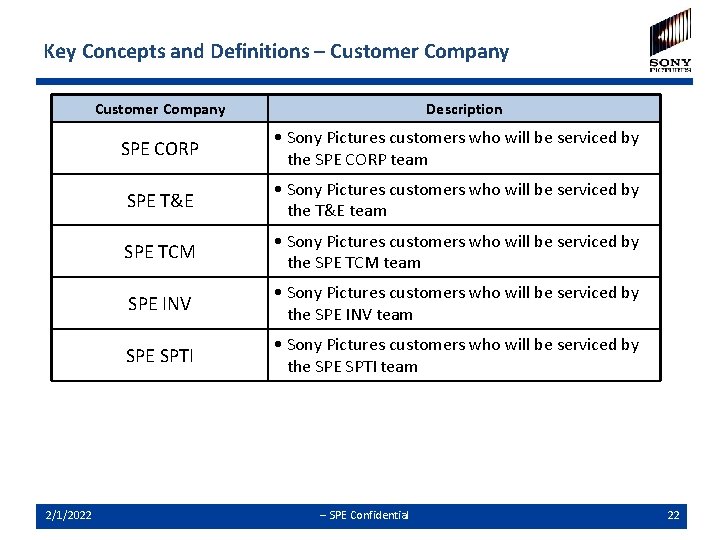
Key Concepts and Definitions – Customer Company 2/1/2022 Description SPE CORP • Sony Pictures customers who will be serviced by the SPE CORP team SPE T&E • Sony Pictures customers who will be serviced by the T&E team SPE TCM • Sony Pictures customers who will be serviced by the SPE TCM team SPE INV • Sony Pictures customers who will be serviced by the SPE INV team SPE SPTI • Sony Pictures customers who will be serviced by the SPE SPTI team -- SPE Confidential 22
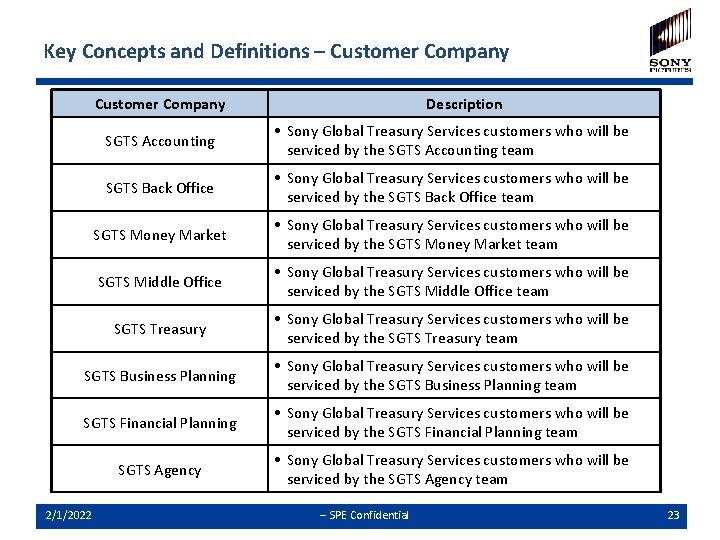
Key Concepts and Definitions – Customer Company Description SGTS Accounting • Sony Global Treasury Services customers who will be serviced by the SGTS Accounting team SGTS Back Office • Sony Global Treasury Services customers who will be serviced by the SGTS Back Office team SGTS Money Market • Sony Global Treasury Services customers who will be serviced by the SGTS Money Market team SGTS Middle Office • Sony Global Treasury Services customers who will be serviced by the SGTS Middle Office team SGTS Treasury • Sony Global Treasury Services customers who will be serviced by the SGTS Treasury team SGTS Business Planning • Sony Global Treasury Services customers who will be serviced by the SGTS Business Planning team SGTS Financial Planning • Sony Global Treasury Services customers who will be serviced by the SGTS Financial Planning team SGTS Agency • Sony Global Treasury Services customers who will be serviced by the SGTS Agency team 2/1/2022 -- SPE Confidential 23
Agenda ü ü Ø Ø Ø Service Now Objectives Introduction & Principles Process Overview Query Creation Conclusion Contact Info 2/1/2022 -- SPE Confidential 24
Creation of a Query in Service-now There are two ways that a query can be created: 1. Automatic ü Emails sent to the designated GBS mailboxes (see appendix) will automatically create a new query and assign it to the associated Assignment Group. ü Queries/issues submitted through the Self Service option of Servicenow will automatically create a new query and assign it to the appropriate Assignment Group. 2. Manual ü GBS users can use the “Create a New Query” option in Service-now to log and create a new query detailing the customer request and assign it to the appropriate Assignment Group. 2/1/2022 -- SPE Confidential 25
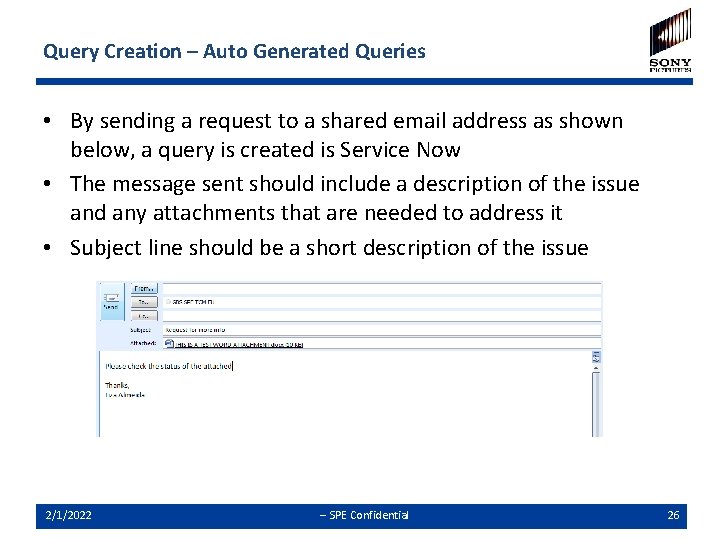
Query Creation – Auto Generated Queries • By sending a request to a shared email address as shown below, a query is created is Service Now • The message sent should include a description of the issue and any attachments that are needed to address it • Subject line should be a short description of the issue 2/1/2022 -- SPE Confidential 26
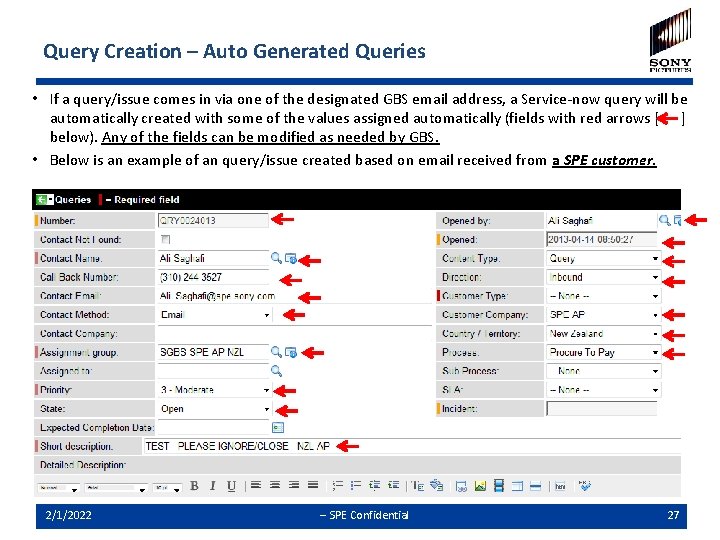
Query Creation – Auto Generated Queries • If a query/issue comes in via one of the designated GBS email address, a Service-now query will be automatically created with some of the values assigned automatically (fields with red arrows [ ] below). Any of the fields can be modified as needed by GBS. • Below is an example of an query/issue created based on email received from a SPE customer. 2/1/2022 -- SPE Confidential 27
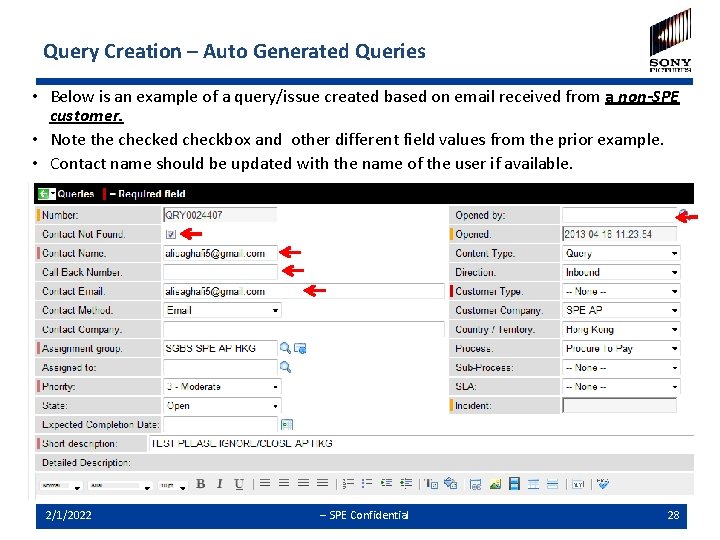
Query Creation – Auto Generated Queries • Below is an example of a query/issue created based on email received from a non-SPE customer. • Note the checked checkbox and other different field values from the prior example. • Contact name should be updated with the name of the user if available. 2/1/2022 -- SPE Confidential 28
Rules for using Generic/ Designated email addresses Ø If two GBS email addresses are included in an email ( for example in To or CC fields), only one query will be created and assigned to the first email address listed. Ø If a GBS email address is added to an existing email conversation a new query will be created and assigned to the Assignment Group associated with that new address. Ø The GBS email addresses are set up for incoming queries only. Any follow up outbound communication (to customers or other GBS users) should be done via email option within Service-now and NOT from GBS mailboxes. 2/1/2022 -- SPE Confidential 29
Self Service - Overview Ø Customers with access to Service-now can utilize the Self Service option (“SGBS Query” link from their home page) to submit their queries directly in Service-now. Ø This option can also be utilized by GBS team for creation and assignment of a query to an Assignment Group. 2/1/2022 -- SPE Confidential 30
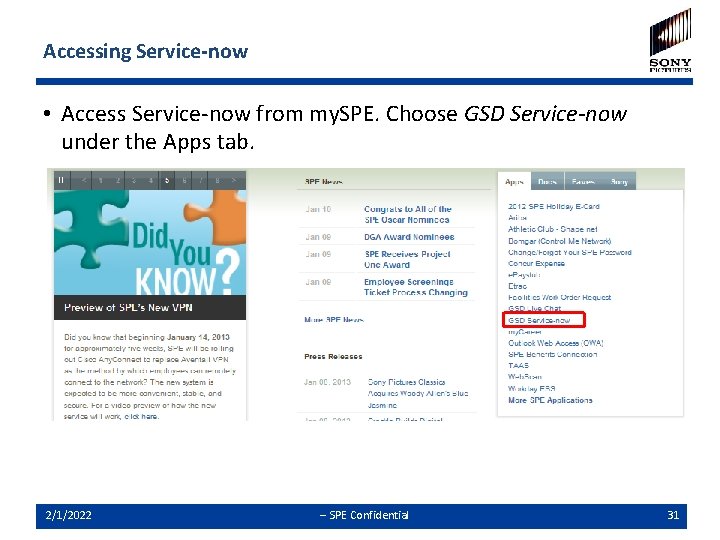
Accessing Service-now • Access Service-now from my. SPE. Choose GSD Service-now under the Apps tab. 2/1/2022 -- SPE Confidential 31
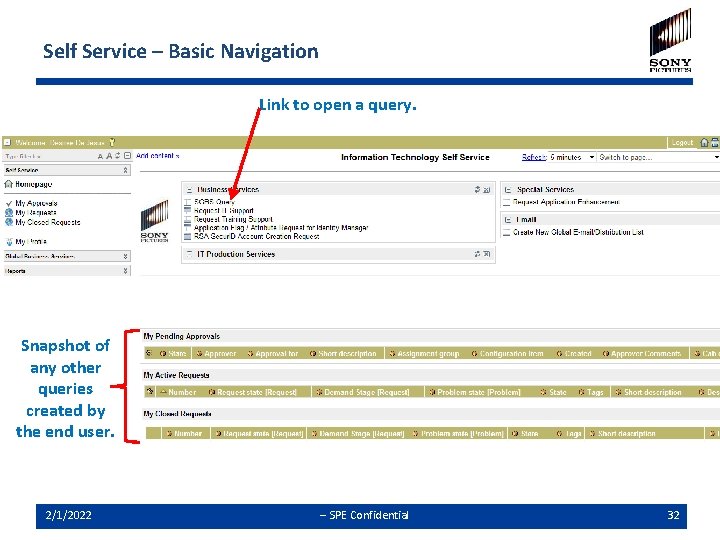
Self Service – Basic Navigation Link to open a query. Snapshot of any other queries created by the end user. 2/1/2022 -- SPE Confidential 32
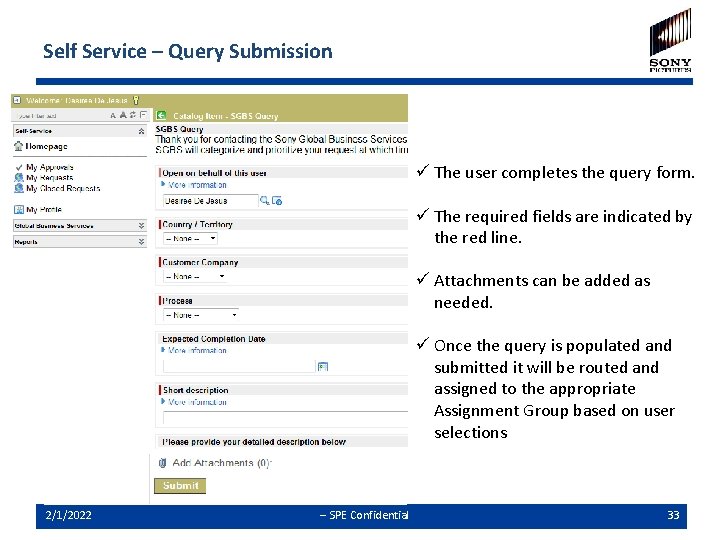
Self Service – Query Submission ü The user completes the query form. ü The required fields are indicated by the red line. ü Attachments can be added as needed. ü Once the query is populated and submitted it will be routed and assigned to the appropriate Assignment Group based on user selections 2/1/2022 -- SPE Confidential 33
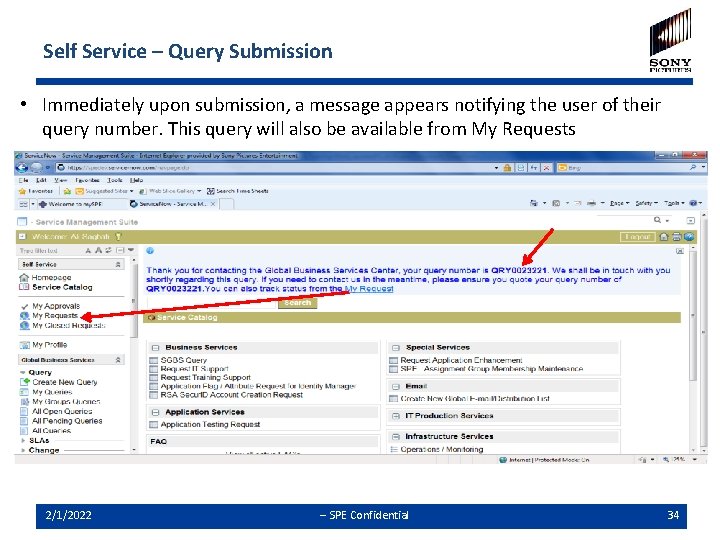
Self Service – Query Submission • Immediately upon submission, a message appears notifying the user of their query number. This query will also be available from My Requests 2/1/2022 -- SPE Confidential 34
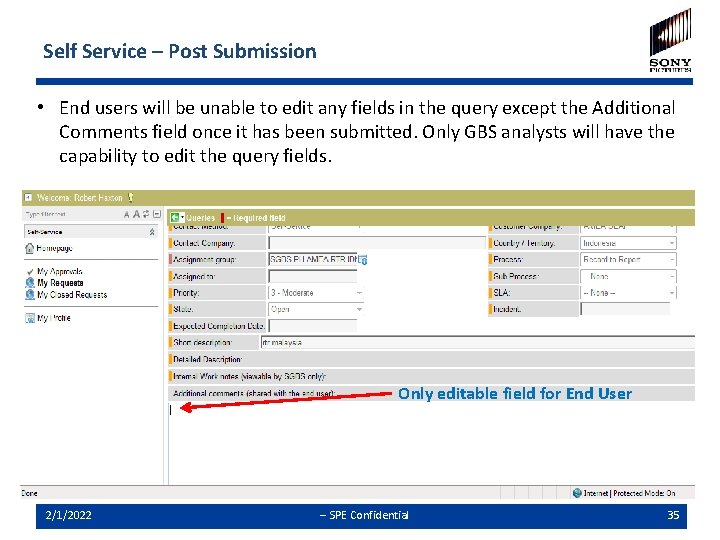
Self Service – Post Submission • End users will be unable to edit any fields in the query except the Additional Comments field once it has been submitted. Only GBS analysts will have the capability to edit the query fields. Only editable field for End User 2/1/2022 -- SPE Confidential 35
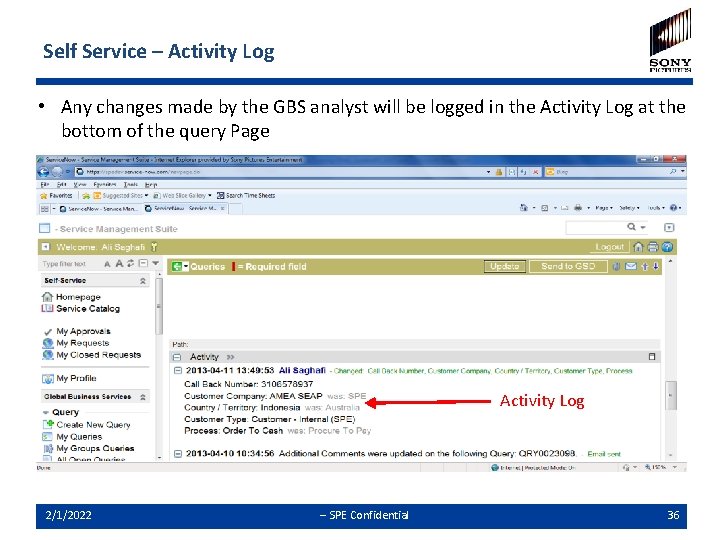
Self Service – Activity Log • Any changes made by the GBS analyst will be logged in the Activity Log at the bottom of the query Page Activity Log Only editable field for End User 2/1/2022 -- SPE Confidential 36
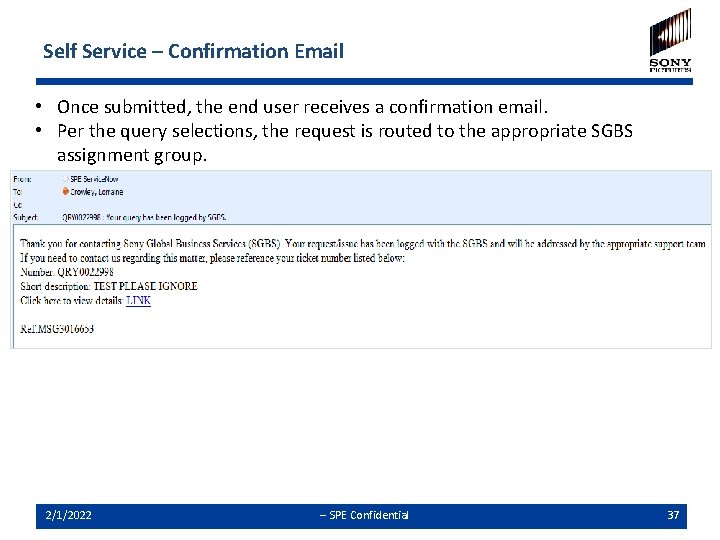
Self Service – Confirmation Email • Once submitted, the end user receives a confirmation email. • Per the query selections, the request is routed to the appropriate SGBS assignment group. 2/1/2022 -- SPE Confidential 37
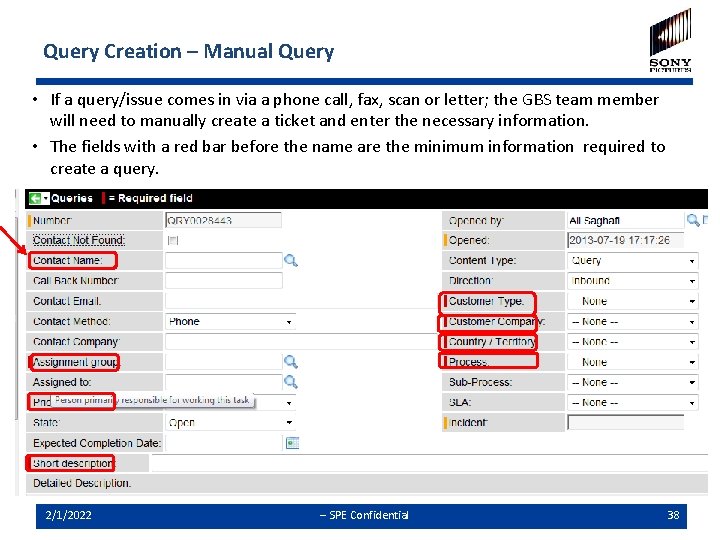
Query Creation – Manual Query • If a query/issue comes in via a phone call, fax, scan or letter; the GBS team member will need to manually create a ticket and enter the necessary information. • The fields with a red bar before the name are the minimum information required to create a query. 2/1/2022 -- SPE Confidential 38
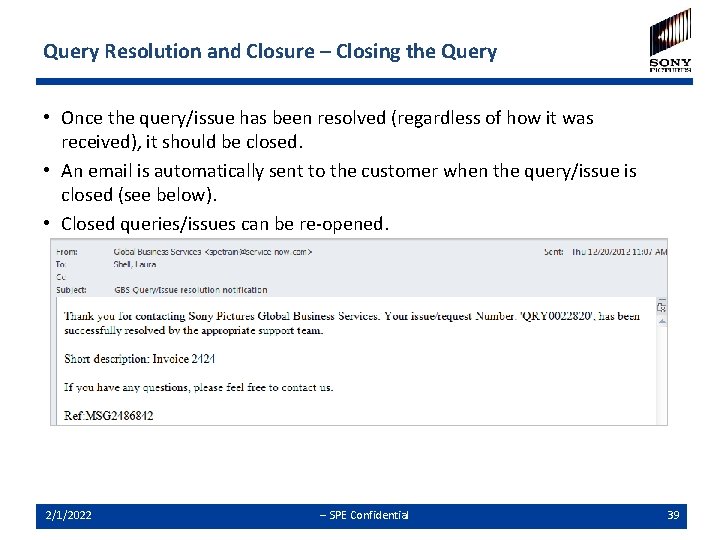
Query Resolution and Closure – Closing the Query • Once the query/issue has been resolved (regardless of how it was received), it should be closed. • An email is automatically sent to the customer when the query/issue is closed (see below). • Closed queries/issues can be re-opened. 2/1/2022 -- SPE Confidential 39
Agenda ü ü ü Ø Ø Service Now Objectives Introduction & Principles Process Overview Query Creation Conclusion Contact Info 2/1/2022 -- SPE Confidential 40
Conclusion - Next Steps Ø All requests and issues will now be directed through the query management process in Service Now Ø Preferred communication from customers is through email via the shared email addresses set up for each country, process and LOB or through the self service module in Service Now • Direct communication to team members is still acceptable Ø Log any issues, questions, and suggestions to the query management tool Ø Project team will review these on a weekly basis and make the necessary enhancement to the process and system during the stabilization period Ø A monthly activity/status report on queries/issues logged in Service-now will be generated and shared with the stakeholders in the monthly operations review meeting. 2/1/2022 -- SPE Confidential 41
Agenda ü ü ü Ø Service Now Objectives Introduction & Principles Process Overview Query Creation Conclusion Contact Info 2/1/2022 -- SPE Confidential 42
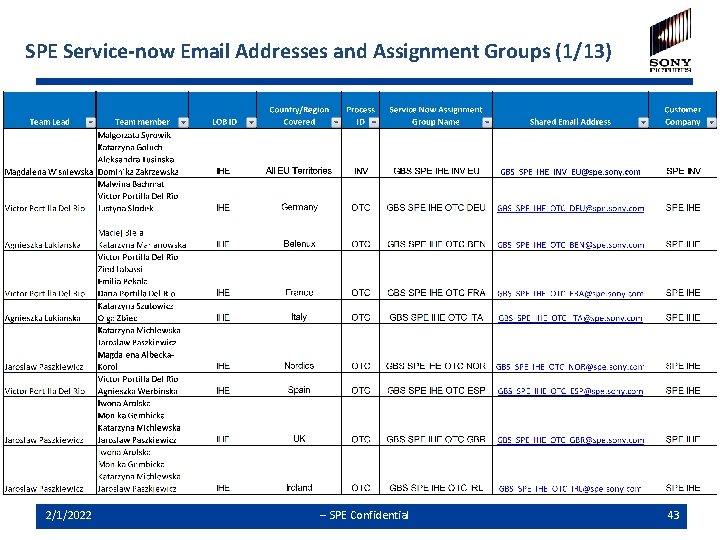
SPE Service-now Email Addresses and Assignment Groups (1/13) 2/1/2022 -- SPE Confidential 43
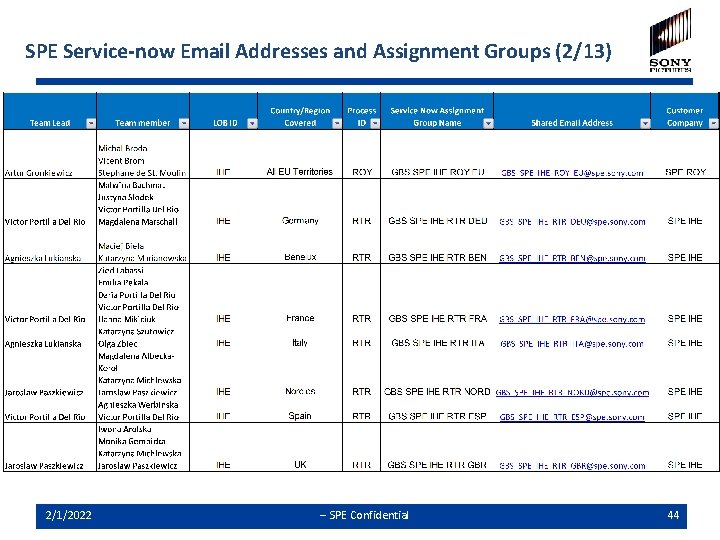
SPE Service-now Email Addresses and Assignment Groups (2/13) 2/1/2022 -- SPE Confidential 44
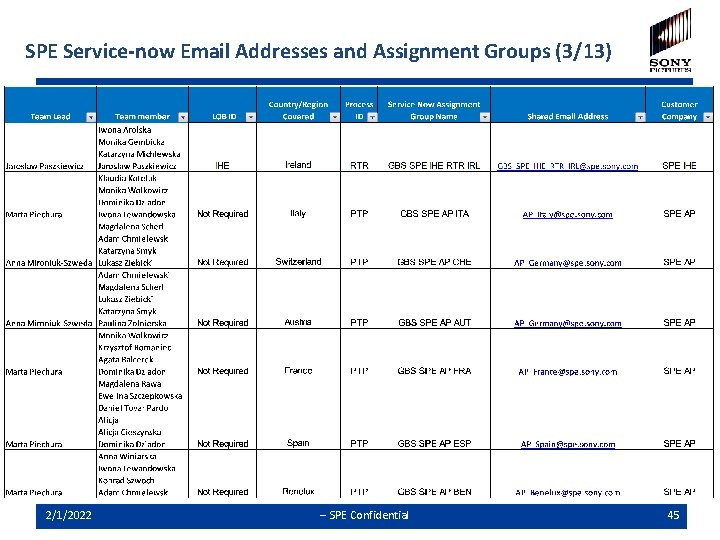
SPE Service-now Email Addresses and Assignment Groups (3/13) 2/1/2022 -- SPE Confidential 45
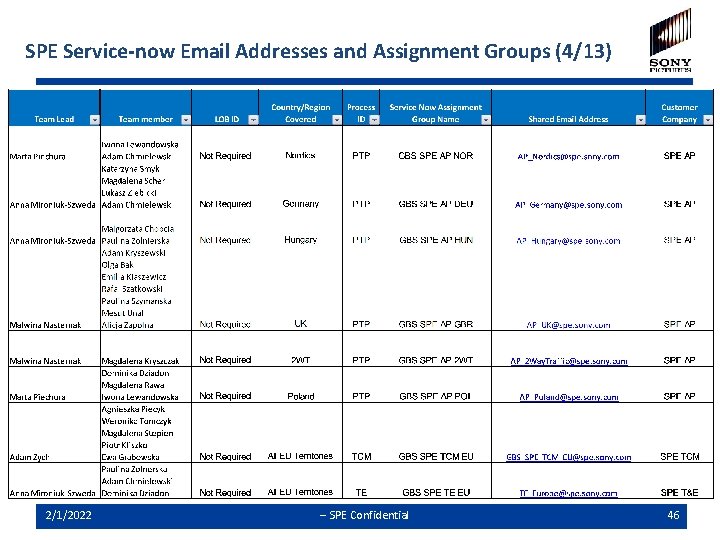
SPE Service-now Email Addresses and Assignment Groups (4/13) 2/1/2022 -- SPE Confidential 46
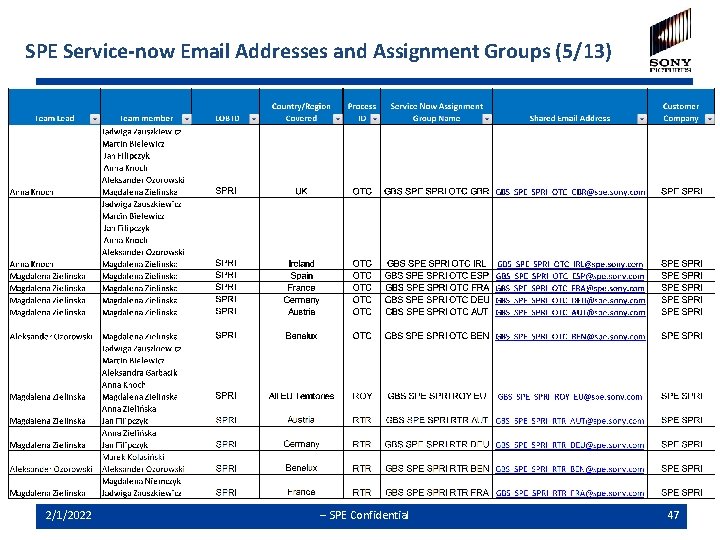
SPE Service-now Email Addresses and Assignment Groups (5/13) 2/1/2022 -- SPE Confidential 47
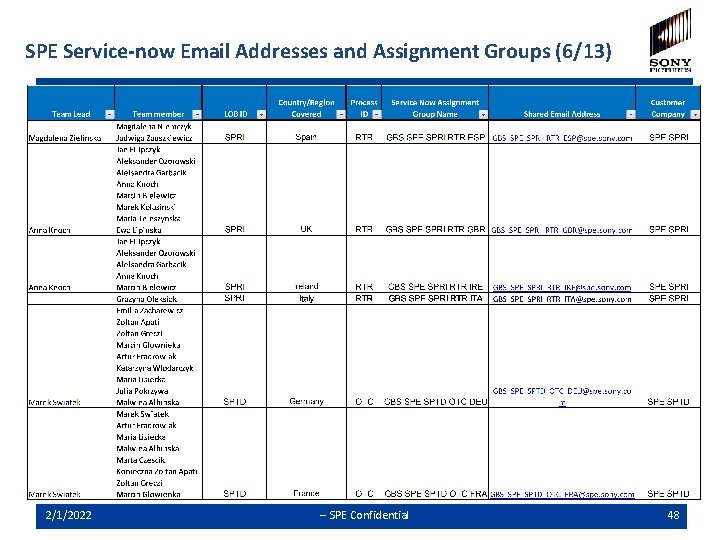
SPE Service-now Email Addresses and Assignment Groups (6/13) 2/1/2022 -- SPE Confidential 48
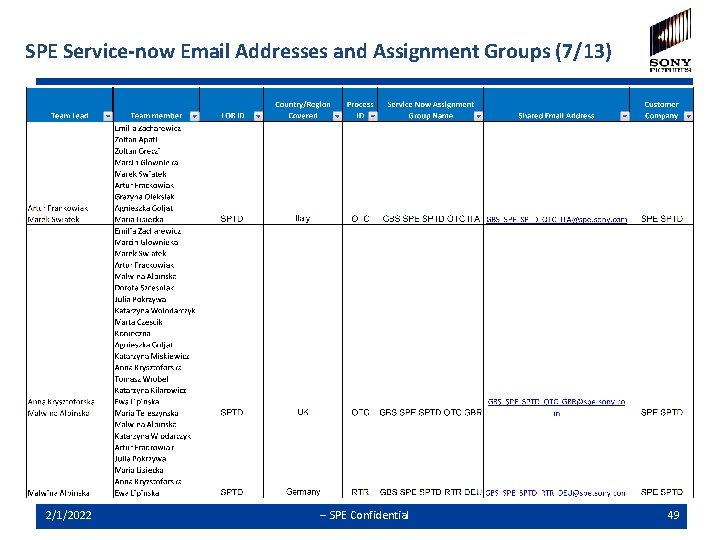
SPE Service-now Email Addresses and Assignment Groups (7/13) 2/1/2022 -- SPE Confidential 49
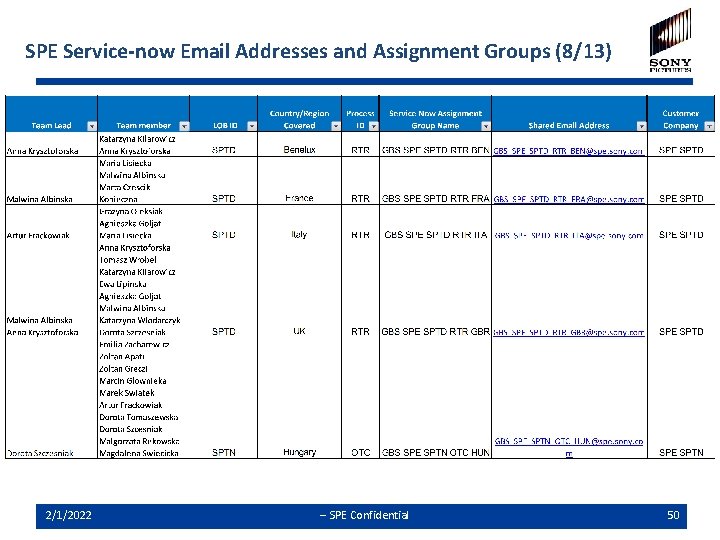
SPE Service-now Email Addresses and Assignment Groups (8/13) 2/1/2022 -- SPE Confidential 50
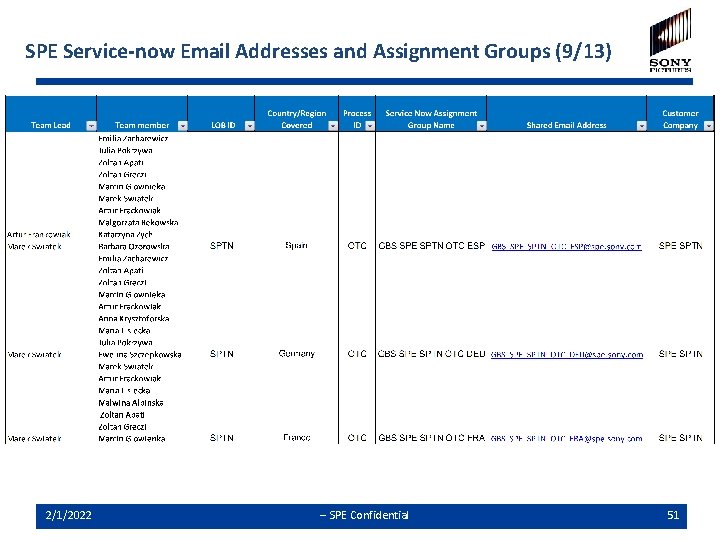
SPE Service-now Email Addresses and Assignment Groups (9/13) 2/1/2022 -- SPE Confidential 51
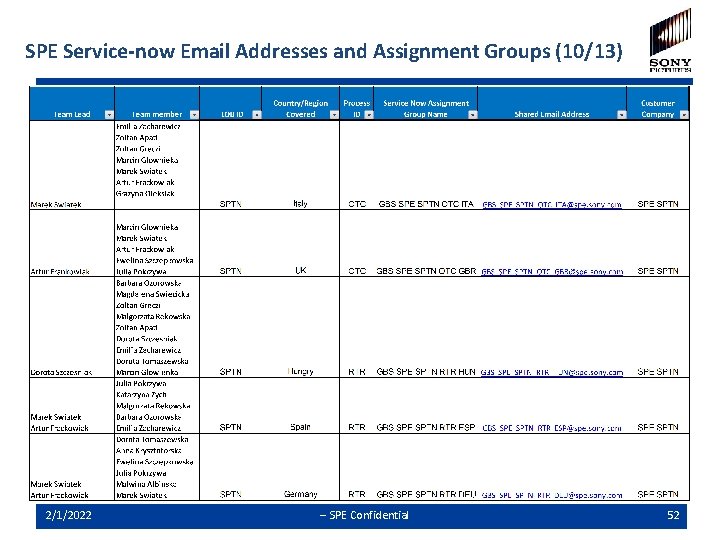
SPE Service-now Email Addresses and Assignment Groups (10/13) 2/1/2022 -- SPE Confidential 52
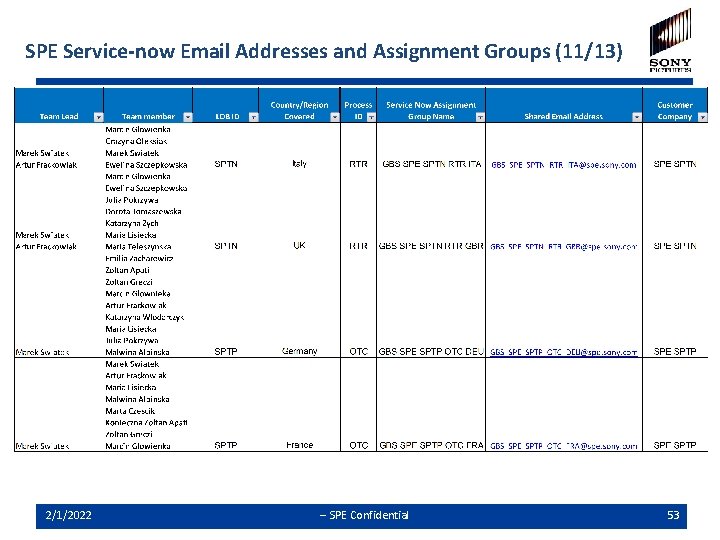
SPE Service-now Email Addresses and Assignment Groups (11/13) 2/1/2022 -- SPE Confidential 53
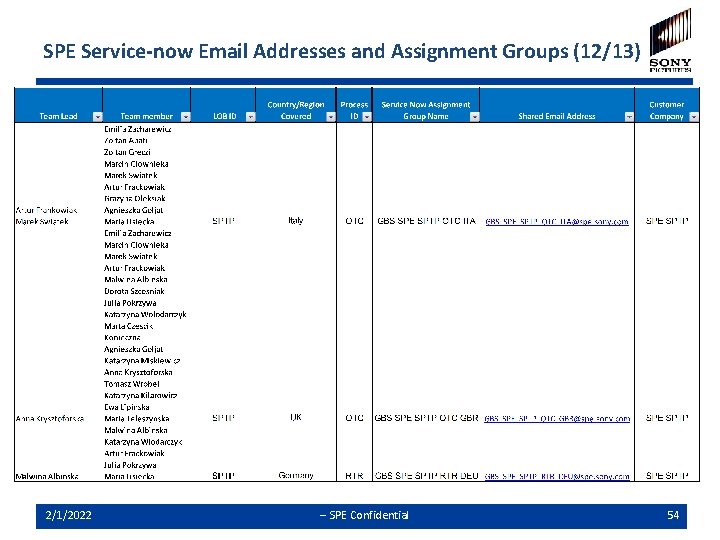
SPE Service-now Email Addresses and Assignment Groups (12/13) 2/1/2022 -- SPE Confidential 54
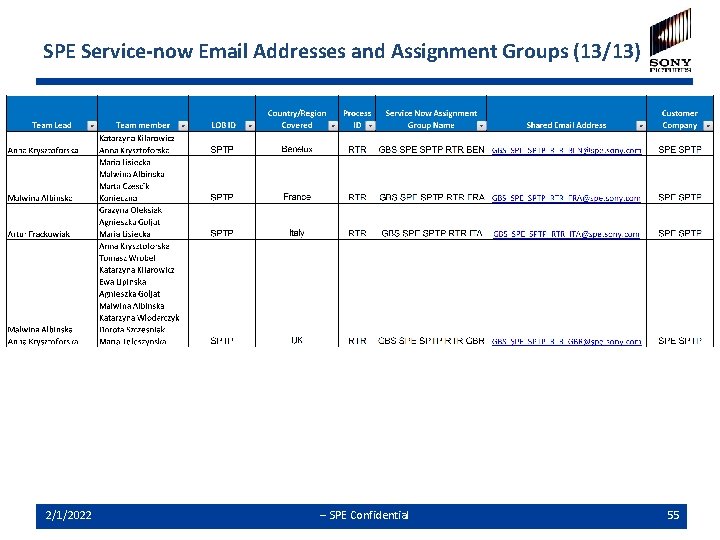
SPE Service-now Email Addresses and Assignment Groups (13/13) 2/1/2022 -- SPE Confidential 55
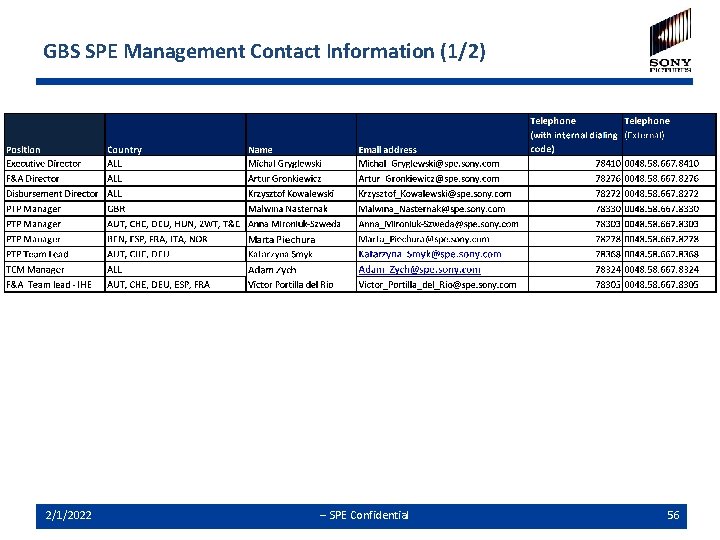
GBS SPE Management Contact Information (1/2) 2/1/2022 -- SPE Confidential 56
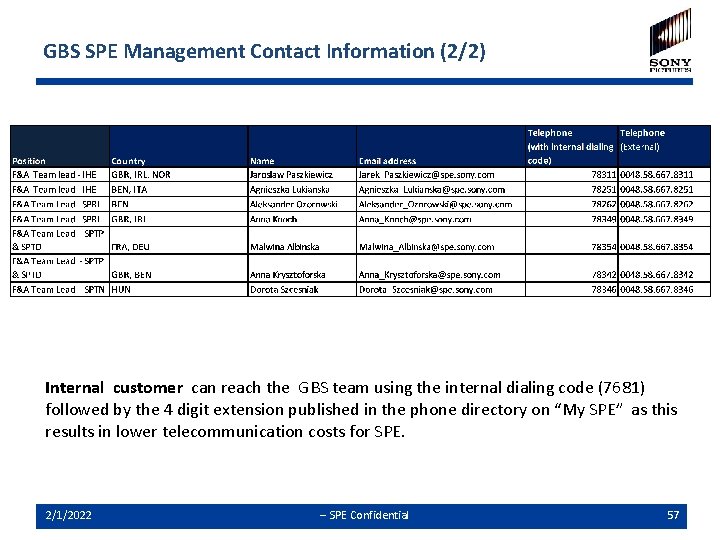
GBS SPE Management Contact Information (2/2) Internal customer can reach the GBS team using the internal dialing code (7681) followed by the 4 digit extension published in the phone directory on “My SPE” as this results in lower telecommunication costs for SPE. 2/1/2022 -- SPE Confidential 57
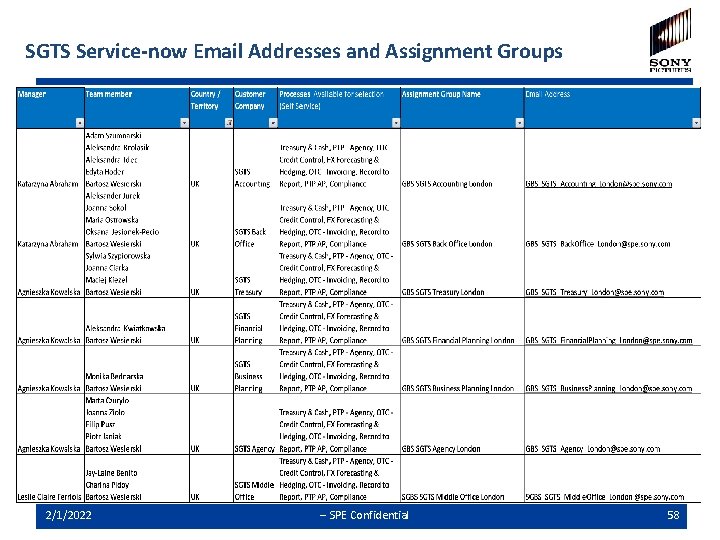
SGTS Service-now Email Addresses and Assignment Groups 2/1/2022 -- SPE Confidential 58
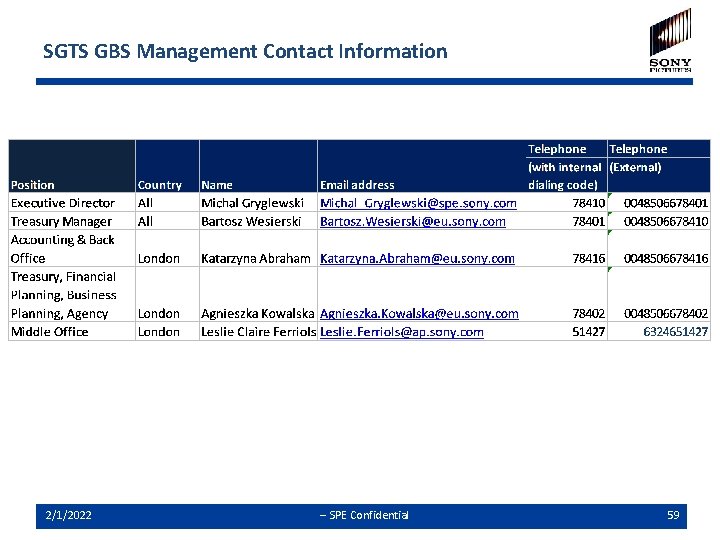
SGTS GBS Management Contact Information 2/1/2022 -- SPE Confidential 59
Questions & Answers 2/1/2022 -- SPE Confidential 60
- Slides: 60