
GATE Versus Geant 4 Developers point of view



- Slides: 24
GATE Versus Geant 4 Developer’s point of view Irène Buvat & Sébastien Jan for the Open. GATE Collaboration 5/20/2021 1
Outline • • • Context Class Management : Overview Volume & Geometry Materials Physics list & Cuts Primary Generator Navigation & Tracking Digitizer Output Simulation Management 5/20/2021 2
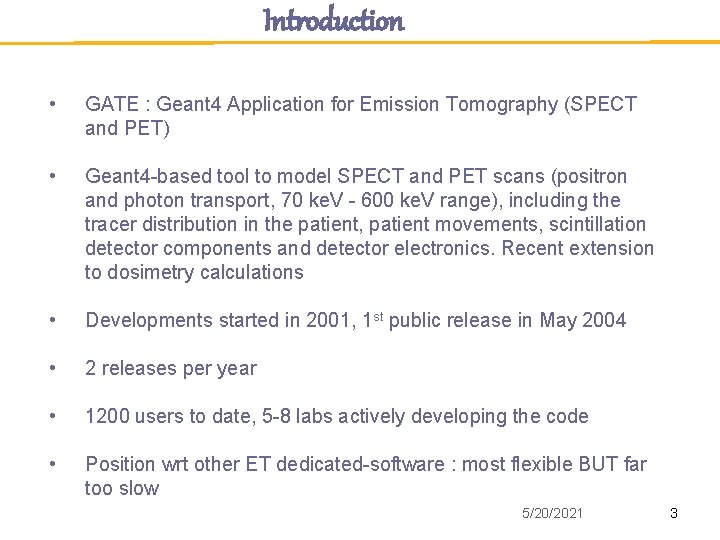
Introduction • GATE : Geant 4 Application for Emission Tomography (SPECT and PET) • Geant 4 -based tool to model SPECT and PET scans (positron and photon transport, 70 ke. V - 600 ke. V range), including the tracer distribution in the patient, patient movements, scintillation detector components and detector electronics. Recent extension to dosimetry calculations • Developments started in 2001, 1 st public release in May 2004 • 2 releases per year • 1200 users to date, 5 -8 labs actively developing the code • Position wrt other ET dedicated-software : most flexible BUT far too slow 5/20/2021 3
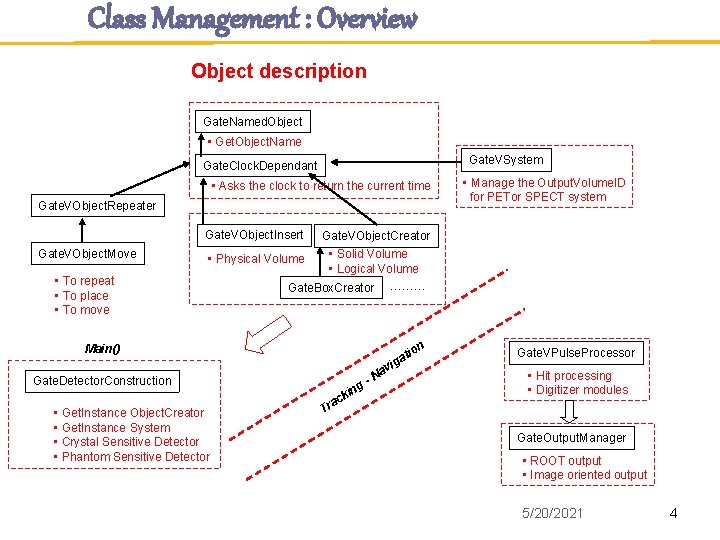
Class Management : Overview Object description Gate. Named. Object • Get. Object. Name Gate. VSystem Gate. Clock. Dependant • Asks the clock to return the current time Gate. VObject. Repeater Gate. VObject. Insert Gate. VObject. Move • Manage the Output. Volume. ID for PETor SPECT system Gate. VObject. Creator • Solid Volume • Logical Volume Gate. Box. Creator ……… • Physical Volume • To repeat • To place • To move n tio a ig av Main() ing Gate. Detector. Construction • Get. Instance Object. Creator • Get. Instance System • Crystal Sensitive Detector • Phantom Sensitive Detector k ac Tr N Gate. VPulse. Processor • Hit processing • Digitizer modules Gate. Output. Manager • ROOT output • Image oriented output 5/20/2021 4
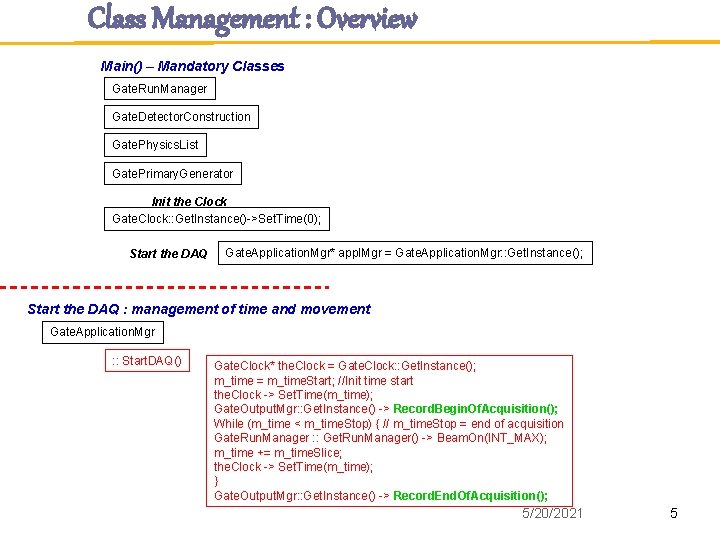
Class Management : Overview Main() – Mandatory Classes Gate. Run. Manager Gate. Detector. Construction Gate. Physics. List Gate. Primary. Generator Init the Clock Gate. Clock: : Get. Instance()->Set. Time(0); Start the DAQ Gate. Application. Mgr* appl. Mgr = Gate. Application. Mgr: : Get. Instance(); Start the DAQ : management of time and movement Gate. Application. Mgr : : Start. DAQ() Gate. Clock* the. Clock = Gate. Clock: : Get. Instance(); m_time = m_time. Start; //Init time start the. Clock -> Set. Time(m_time); Gate. Output. Mgr: : Get. Instance() -> Record. Begin. Of. Acquisition(); While (m_time < m_time. Stop) { // m_time. Stop = end of acquisition Gate. Run. Manager : : Get. Run. Manager() -> Beam. On(INT_MAX); m_time += m_time. Slice; the. Clock -> Set. Time(m_time); } Gate. Output. Mgr: : Get. Instance() -> Record. End. Of. Acquisition(); 5/20/2021 5
Volume & Geometry The World is the only volume initially present in GATE All volumes are daughters or granddaughters of the world : the World volume is essential Y axis world Scanner Sourc e Body Z axis X axis Head Rsector Crystal LSO BGO 5/20/2021 6
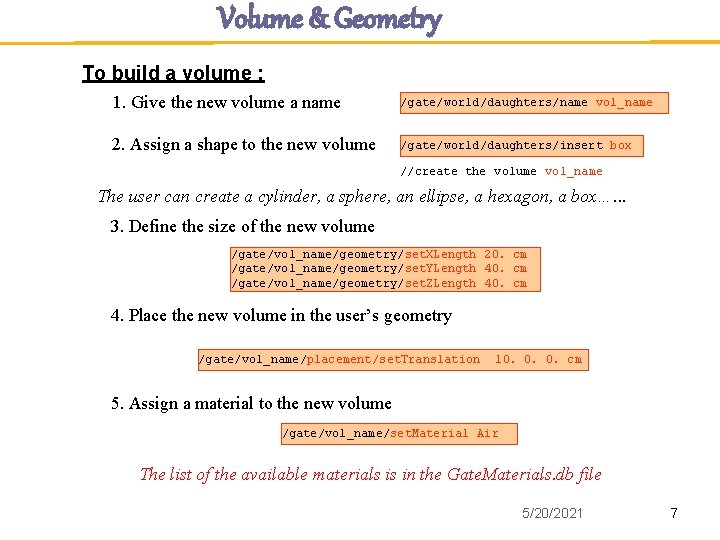
Volume & Geometry To build a volume : 1. Give the new volume a name /gate/world/daughters/name vol_name 2. Assign a shape to the new volume /gate/world/daughters/insert box //create the volume vol_name The user can create a cylinder, a sphere, an ellipse, a hexagon, a box…. . . 3. Define the size of the new volume /gate/vol_name/geometry/set. XLength 20. cm /gate/vol_name/geometry/set. YLength 40. cm /gate/vol_name/geometry/set. ZLength 40. cm 4. Place the new volume in the user’s geometry /gate/vol_name/placement/set. Translation 10. 0. 0. cm 5. Assign a material to the new volume /gate/vol_name/set. Material Air The list of the available materials is in the Gate. Materials. db file 5/20/2021 7
Volume & Geometry Special classes to repeat Volumes Linear repeater /gate/vol_name/repeaters/insert linear /gate/vol_name/linear/set. Repeat. Number 4 /gate/vol_name/linear/set. Repeat. Vector 0. 0. 5. mm Ring repeater /gate/vol_name/repeaters/insert ring /gate/vol_name/ring/set. Number 10 /gate/vol_name/ring/set. Point 1 0. 0. 1. mm /gate/vol_name/ring/set. Point 2 0. 0. 0. mm Cubic array repeater /gate/vol_name/repeaters/insert cubic. Array /gate/vol_name/cubic. Array/set. Repeat. Number. X 5 /gate/vol_name/cubic. Array/set. Repeat. Number. Y 5 /gate/vol_name/cubic. Array/set. Repeat. Number. Z 2 /gate/vol_name/cubic. Array/set. Repeat. Vector 5. 5. 15. cm 5/20/2021 8
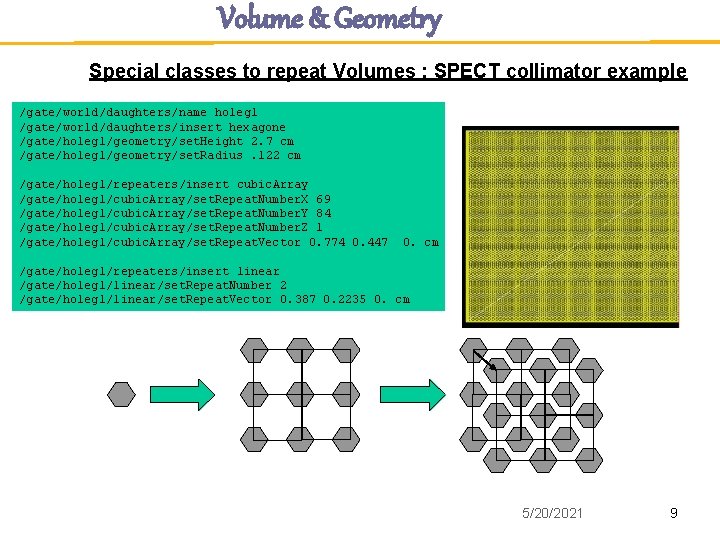
Volume & Geometry Special classes to repeat Volumes : SPECT collimator example /gate/world/daughters/name holeg 1 /gate/world/daughters/insert hexagone /gate/holeg 1/geometry/set. Height 2. 7 cm /gate/holeg 1/geometry/set. Radius. 122 cm /gate/holeg 1/repeaters/insert cubic. Array /gate/holeg 1/cubic. Array/set. Repeat. Number. X 69 /gate/holeg 1/cubic. Array/set. Repeat. Number. Y 84 /gate/holeg 1/cubic. Array/set. Repeat. Number. Z 1 /gate/holeg 1/cubic. Array/set. Repeat. Vector 0. 774 0. 447 0. cm /gate/holeg 1/repeaters/insert linear /gate/holeg 1/linear/set. Repeat. Number 2 /gate/holeg 1/linear/set. Repeat. Vector 0. 387 0. 2235 0. cm 5/20/2021 9
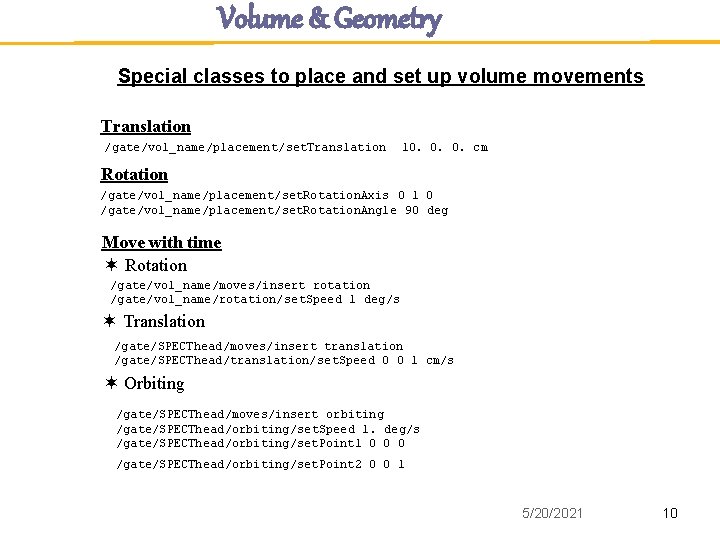
Volume & Geometry Special classes to place and set up volume movements Translation /gate/vol_name/placement/set. Translation 10. 0. 0. cm Rotation /gate/vol_name/placement/set. Rotation. Axis 0 1 0 /gate/vol_name/placement/set. Rotation. Angle 90 deg Move with time Rotation /gate/vol_name/moves/insert rotation /gate/vol_name/rotation/set. Speed 1 deg/s Translation /gate/SPECThead/moves/insert translation /gate/SPECThead/translation/set. Speed 0 0 1 cm/s Orbiting /gate/SPECThead/moves/insert orbiting /gate/SPECThead/orbiting/set. Speed 1. deg/s /gate/SPECThead/orbiting/set. Point 1 0 0 0 /gate/SPECThead/orbiting/set. Point 2 0 0 1 5/20/2021 10
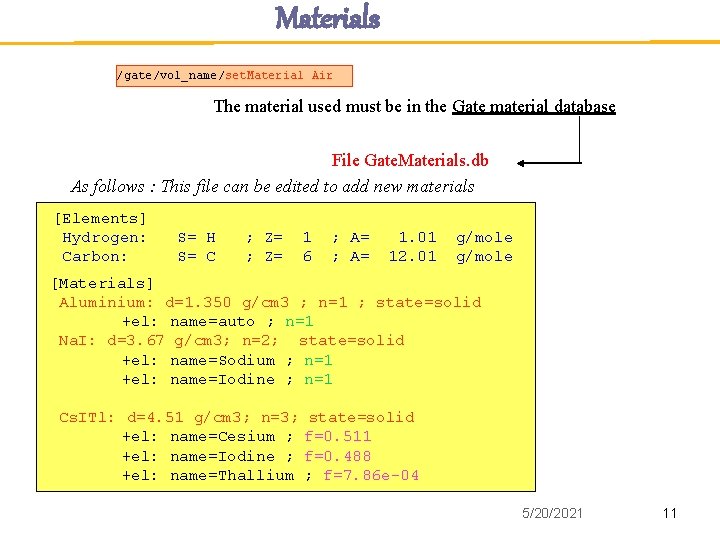
Materials /gate/vol_name/set. Material Air The material used must be in the Gate material database File Gate. Materials. db As follows : This file can be edited to add new materials [Elements] Hydrogen: Carbon: S= H S= C ; Z= 1 6 ; A= 1. 01 12. 01 g/mole [Materials] Aluminium: d=1. 350 g/cm 3 ; n=1 ; state=solid +el: name=auto ; n=1 Na. I: d=3. 67 g/cm 3; n=2; state=solid +el: name=Sodium ; n=1 +el: name=Iodine ; n=1 Cs. ITl: d=4. 51 g/cm 3; n=3; state=solid +el: name=Cesium ; f=0. 511 +el: name=Iodine ; f=0. 488 +el: name=Thallium ; f=7. 86 e-04 5/20/2021 11
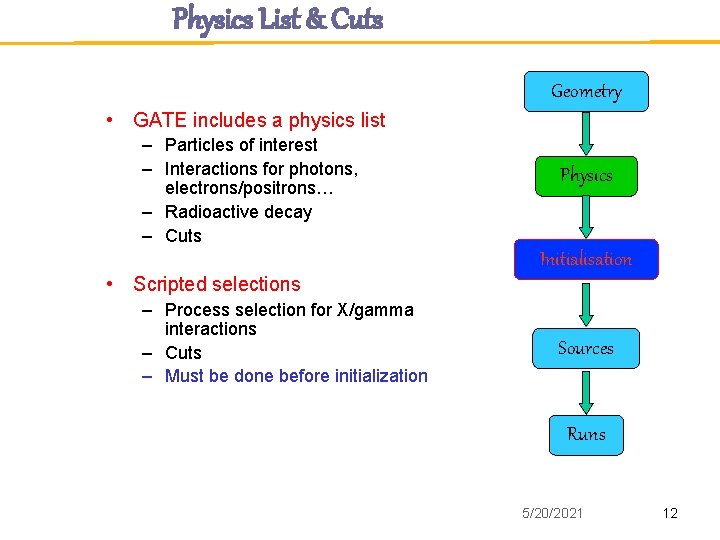
Physics List & Cuts Geometry • GATE includes a physics list – Particles of interest – Interactions for photons, electrons/positrons… – Radioactive decay – Cuts Physics Initialisation • Scripted selections – Process selection for X/gamma interactions – Cuts – Must be done before initialization Sources Runs 5/20/2021 12
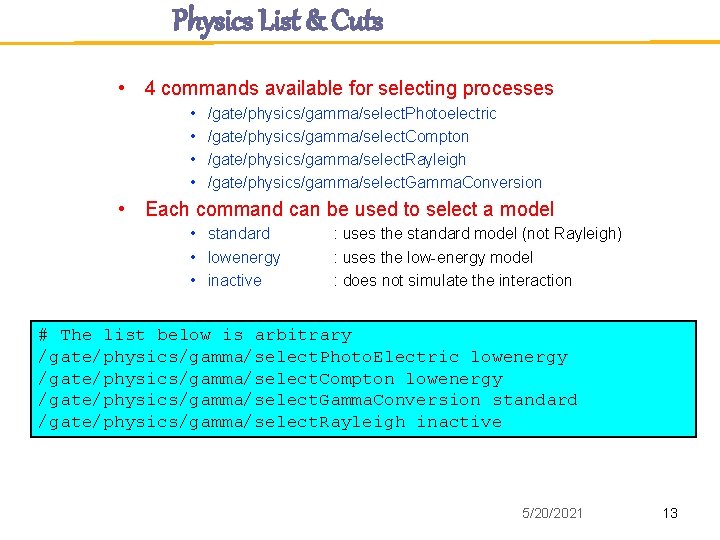
Physics List & Cuts • 4 commands available for selecting processes • • /gate/physics/gamma/select. Photoelectric /gate/physics/gamma/select. Compton /gate/physics/gamma/select. Rayleigh /gate/physics/gamma/select. Gamma. Conversion • Each command can be used to select a model • standard • lowenergy • inactive : uses the standard model (not Rayleigh) : uses the low-energy model : does not simulate the interaction # The list below is arbitrary /gate/physics/gamma/select. Photo. Electric lowenergy /gate/physics/gamma/select. Compton lowenergy /gate/physics/gamma/select. Gamma. Conversion standard /gate/physics/gamma/select. Rayleigh inactive 5/20/2021 13
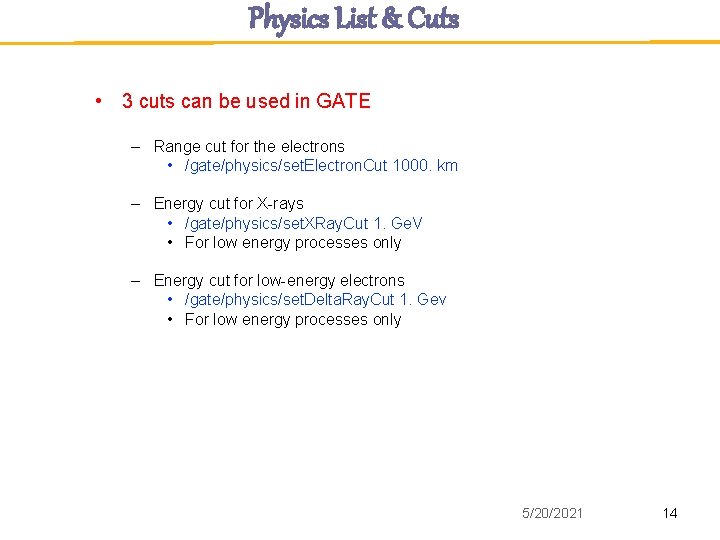
Physics List & Cuts • 3 cuts can be used in GATE – Range cut for the electrons • /gate/physics/set. Electron. Cut 1000. km – Energy cut for X-rays • /gate/physics/set. XRay. Cut 1. Ge. V • For low energy processes only – Energy cut for low-energy electrons • /gate/physics/set. Delta. Ray. Cut 1. Gev • For low energy processes only 5/20/2021 14
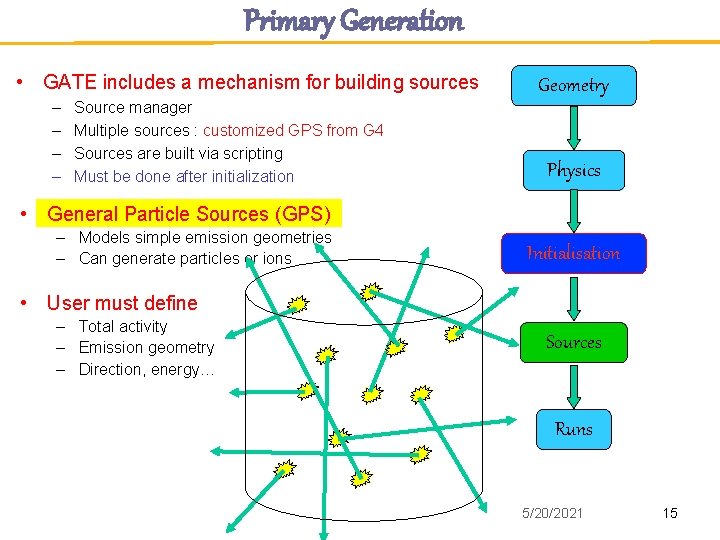
Primary Generation • GATE includes a mechanism for building sources – – Source manager Multiple sources : customized GPS from G 4 Sources are built via scripting Must be done after initialization Geometry Physics • General Particle Sources (GPS) – Models simple emission geometries – Can generate particles or ions Initialisation • User must define – Total activity – Emission geometry – Direction, energy… Sources Runs 5/20/2021 15
Navigator & Tracking Question : How could we optimize or define the particle navigation to speed up the simulation ? • Tracking in parameterized volumes • Performance of Geant 4 with large voxelized phantoms Will be discussed in the next talk … 5/20/2021 16
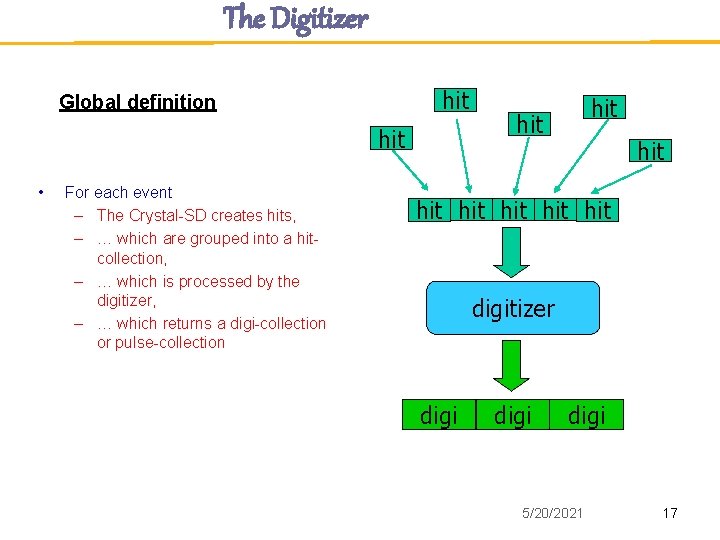
The Digitizer hit Global definition hit • For each event – The Crystal-SD creates hits, – … which are grouped into a hitcollection, – … which is processed by the digitizer, – … which returns a digi-collection or pulse-collection hit hit digitizer digi 5/20/2021 17
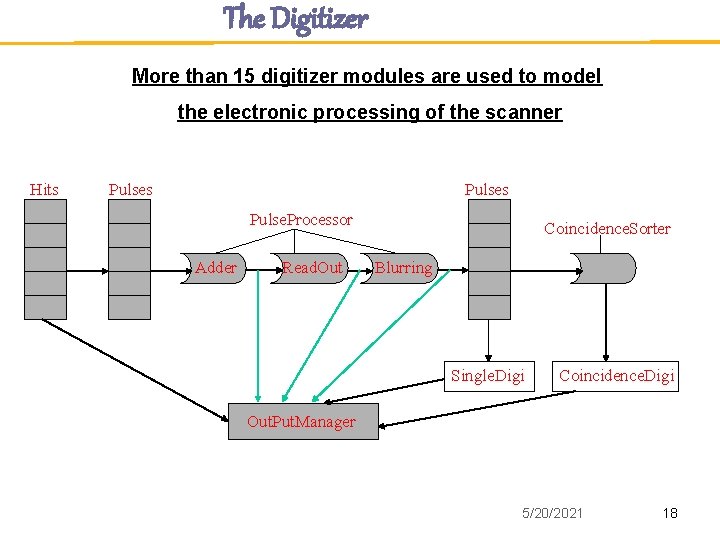
The Digitizer More than 15 digitizer modules are used to model the electronic processing of the scanner Hits Pulses Pulse. Processor Adder Read. Out Coincidence. Sorter Blurring Single. Digi Coincidence. Digi Out. Put. Manager 5/20/2021 18
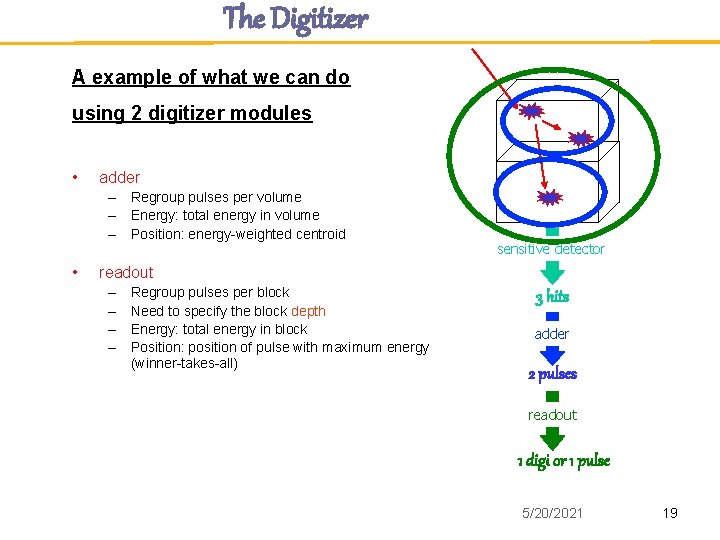
The Digitizer A example of what we can do using 2 digitizer modules • adder – Regroup pulses per volume – Energy: total energy in volume – Position: energy-weighted centroid • sensitive detector readout – – Regroup pulses per block Need to specify the block depth Energy: total energy in block Position: position of pulse with maximum energy (winner-takes-all) 3 hits adder 2 pulses readout 1 digi or 1 pulse 5/20/2021 19
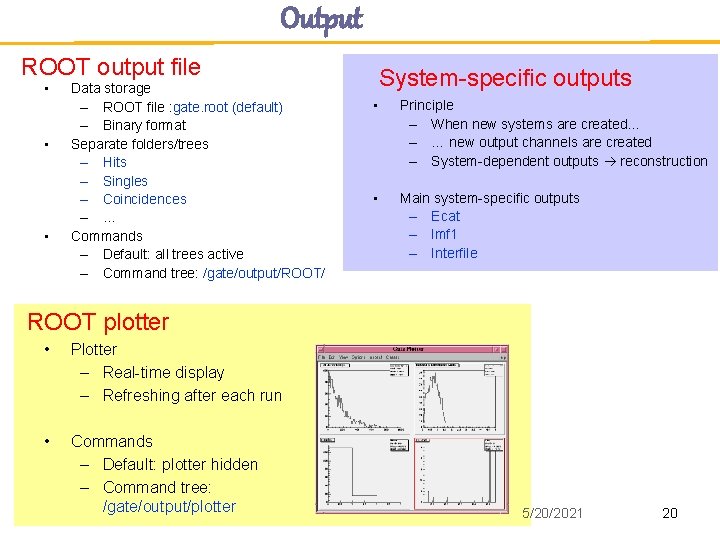
Output ROOT output file • • • Data storage – ROOT file : gate. root (default) – Binary format Separate folders/trees – Hits – Singles – Coincidences – … Commands – Default: all trees active – Command tree: /gate/output/ROOT/ System-specific outputs • Principle – When new systems are created… – … new output channels are created – System-dependent outputs reconstruction • Main system-specific outputs – Ecat – lmf 1 – Interfile ROOT plotter • Plotter – Real-time display – Refreshing after each run • Commands – Default: plotter hidden – Command tree: /gate/output/plotter 5/20/2021 20
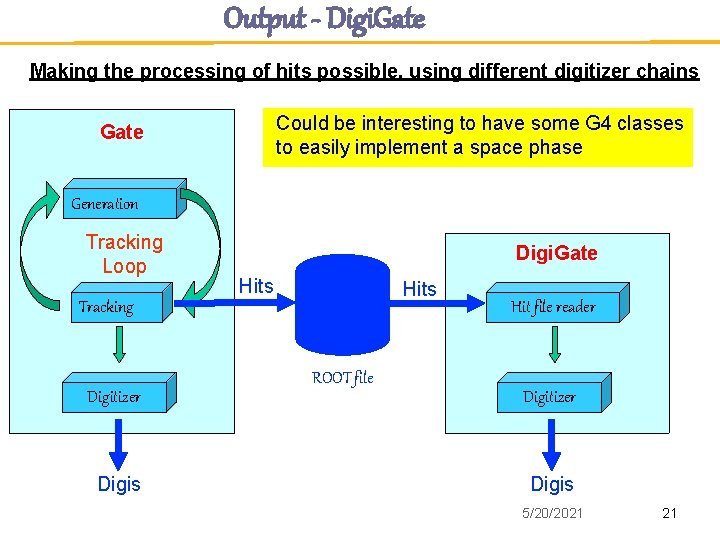
Output - Digi. Gate Making the processing of hits possible, using different digitizer chains Could be interesting to have some G 4 classes to easily implement a space phase Gate Generation Tracking Loop Digi. Gate Hits Tracking Digitizer Digis ROOT file Hit file reader Digitizer Digis 5/20/2021 21
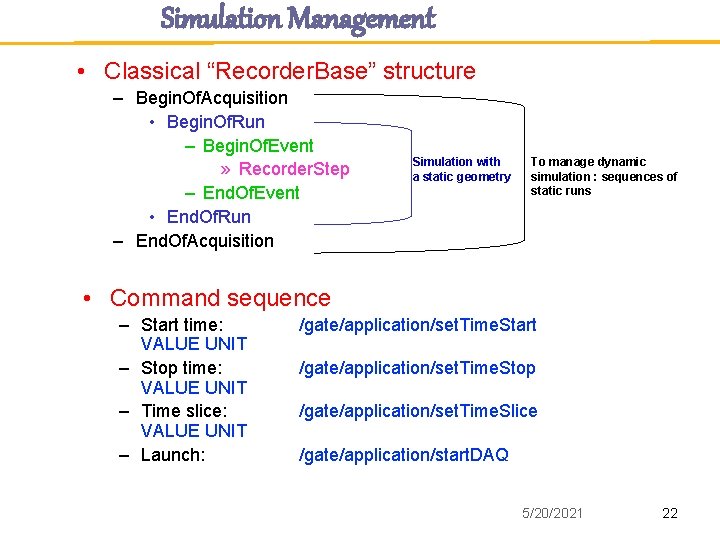
Simulation Management • Classical “Recorder. Base” structure – Begin. Of. Acquisition • Begin. Of. Run – Begin. Of. Event » Recorder. Step – End. Of. Event • End. Of. Run – End. Of. Acquisition Simulation with a static geometry To manage dynamic simulation : sequences of static runs • Command sequence – Start time: VALUE UNIT – Stop time: VALUE UNIT – Time slice: VALUE UNIT – Launch: /gate/application/set. Time. Start /gate/application/set. Time. Stop /gate/application/set. Time. Slice /gate/application/start. DAQ 5/20/2021 22
Geant 4 & Gate - Close interactions Improving Geant 4 -based simulations for medical imaging and dosimetry applications • • Tracking and navigation • Gold standard : tracking inside a CSG solid (G 4 Box filled with water) • How to improve the voxelised description ? • How to improve the navigation inside a voxelized structure ? • Could we expect a speed-up factor higher than 15 or 20 ? Variance reduction techniques • Overview of Geant 4 tools • Geant 4. 9. 0/source/geometry/biasing – – • • G 4 VCell. Scorer G 4 VWeight. Window. Algorithm …. Contact : Michael Dressel ? ? Physics List • Dosimetry for charged particles, validation at low energy New volume description • Based on CAD description (scanner description) 5/20/2021 23
Geant 4 & Gate - Future Tools to facilitate shared developments • Geant 4 developers at our bi-annual Open. GATE technical meetings • Mailing list common to GATE and Geant 4 developpers • List (emails) of persons technically deeply involved in specific GATE and Geant 4 developments who will commit to answer emails ; -) • Few meetings on specific aspects of developments (VRT, navigation, aso) 5/20/2021 24