
Gas Pal Basics CuttingEdge Software for Managing Gas

Gas. Pal. Basics Cutting-Edge Software for Managing Gas Production and Storage Operations Copyright 2007, 2009 www. maraco. info eld. maraco@gmail. com 1
Hello Gas. Pal Table of Contents Maraco Inc. Who Is Maraco? Get To Know Gas. Pal Building A Model Reservoir Cells – GRIDDER Gas. Pal’s Reservoir Model Gas. Pal’s Tubing Flow Gas. Pal’s Surface Flow Network Setting Up A Gas. Pal Run Analyze Gas. Pal’s Results History Matching Water Influx From Aquifer March 2007 Gas. Pal Output Of Results Swing Production Example Network Change Example Gas Backout Example Flapper Valve Example Compressor Hookup Time Example External Gas Example Online Help Wrap Up Return to Gas. Pal Home Page 2

Gas. Pal. Basics A Brief History of Maraco, Inc. Copyright 2007 3
Maraco, Inc. Gas. Pal. Basics Maraco was incorporated in 1979, Los Angeles, California. Maraco’s first client was Santos, the largest natural gas operator in Australia. SIPS, Santos Investment Planning System, was developed by Maraco. 4
Other Maraco Software Gas. Pal. Basics GMAN. SIM --- Gas reservoir simulator GMAN. OPT --- Optimize development of gas reservoirs GASTOP --- Gas storage optimization GOMAN --- Optimal Planning tool for oil reservoirs & surface processing Gas. Pal --- Gas reservoir simulator plus TFR, GRIDDER, UPSCLR --- state-of-the-art gas production & storage planning tool 5
Maraco’s Clients Gas. Pal. Basics Kuwait Oil Company, Kuwait national oil co. EBN, Dutch government corporation - bosses hydrocarbon production of the Netherlands. Total. Fina. Elf & other gas operators in Europe & the North Sea. Southern California Gas Company ARAMCO - Arabian American Oil Company 6

Maraco’s Manpower Dr. Elmer Dougherty Gas. Pal. Basics President and founder of Maraco. Professor Emeritus, Petr & Chem Eng, USC - University of Southern California 48 years of reservoir simulation and optimization experience. 7
Maraco’s Manpower Dr. Jincai Chang Gas. Pal. Basics Petroleum consultant and software engineer. 16 years of experience in reservoir simulation and optimization Return to Hello Gas. Pal TOC 8

Gas. Pal Interface Compressor oop Offtake Points w. L Reservoir Tree NW-Network Pane Flo RTReservoir Tree Pane Gas. Pal Reservoirs GO-Graph Output Pane Output Results Compressor Installed TNTTerminal Node Tree Pane 9
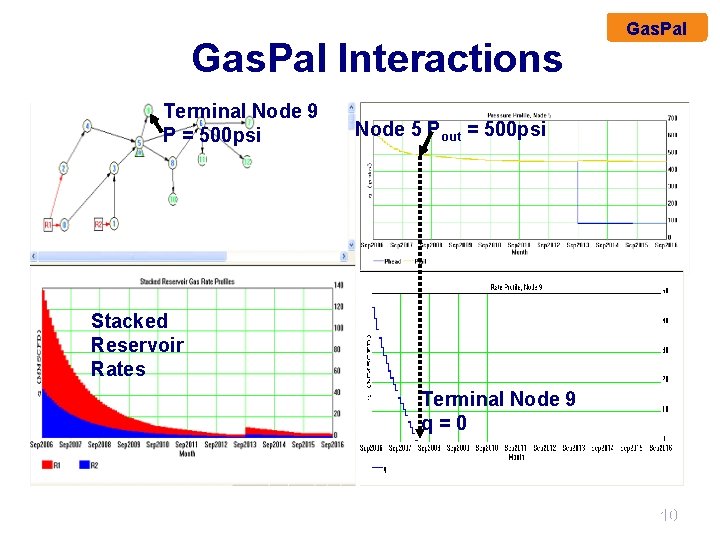
Gas. Pal Interactions Terminal Node 9 P = 500 psi Gas. Pal Node 5 Pout = 500 psi Stacked Reservoir Rates Terminal Node 9 q=0 10
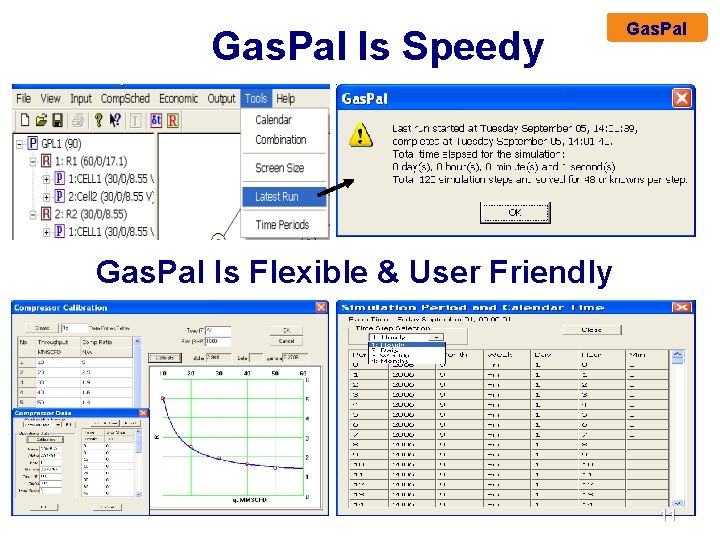
Gas. Pal Is Speedy Gas. Pal Is Flexible & User Friendly 11

Benefits From Gas. Pal Business Operations Gas. Pal With History Matched Model: • Make accurate & reliable predictions of gas reservoir – surface flow potential. • Determine size & timing of compressors to maximize economic recovery. • Determine ultimate reserves & time distribution of their recovery. • Work out timely & orderly plan of development – drilling, surface facilities, abandonments, workovers – to facilitate budget, capital, expense, equipment, procurement & manpower planning. • Fix desired spare capacity with the selected production schedule. 12

Benefits From Gas. Pal Reservoir Studies Gas. Pal Test What If Questions: • How sensitive performance is to changed reservoir parameters, e. g. GIP, k, h, Area (PV), composition. • How timing of drilling affects incremental recovery. • How timing & location of perforations affects reserves. • How distribution of well rates affects aquifer influence – trapped gas volume, WOR vs t, water-out dates. • How surface equipment affects rate and recovery - line size, compression, separator ∆P, chokes. • How geologic features impact optimal development & production plan – How big is a new prospect? 13
Benefits From Gas. Pal Reservoir Studies Gas. Pal Test What If Questions: • How surface flow interaction affects distribution of flow from reservoirs o backout of old reservoir by new? o back flow into old reservoirs? o compressor ‘hookup time’ – when to switch new reservoir to suction o impact of tolling external gas to market. • How mixing reservoir flows affects composition and heating value of delivered gas. • How production mechanism affects flow – shale gas, coal seam gas, condensate – all under development. 14
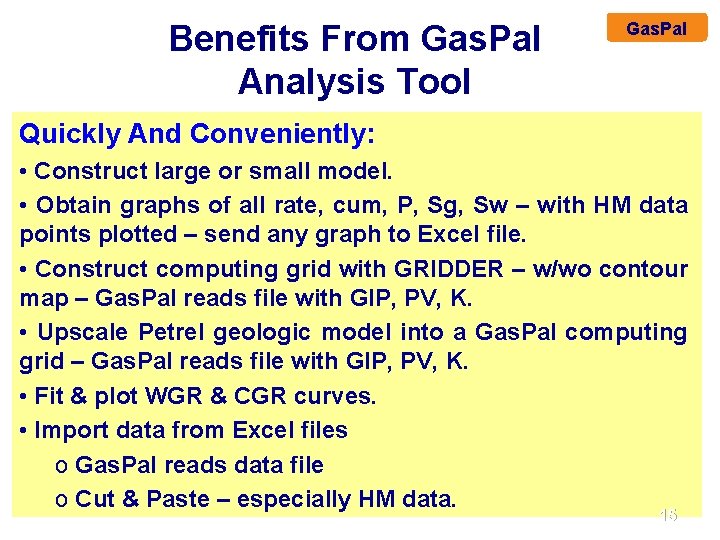
Benefits From Gas. Pal Analysis Tool Gas. Pal Quickly And Conveniently: • Construct large or small model. • Obtain graphs of all rate, cum, P, Sg, Sw – with HM data points plotted – send any graph to Excel file. • Construct computing grid with GRIDDER – w/wo contour map – Gas. Pal reads file with GIP, PV, K. • Upscale Petrel geologic model into a Gas. Pal computing grid – Gas. Pal reads file with GIP, PV, K. • Fit & plot WGR & CGR curves. • Import data from Excel files o Gas. Pal reads data file o Cut & Paste – especially HM data. 15
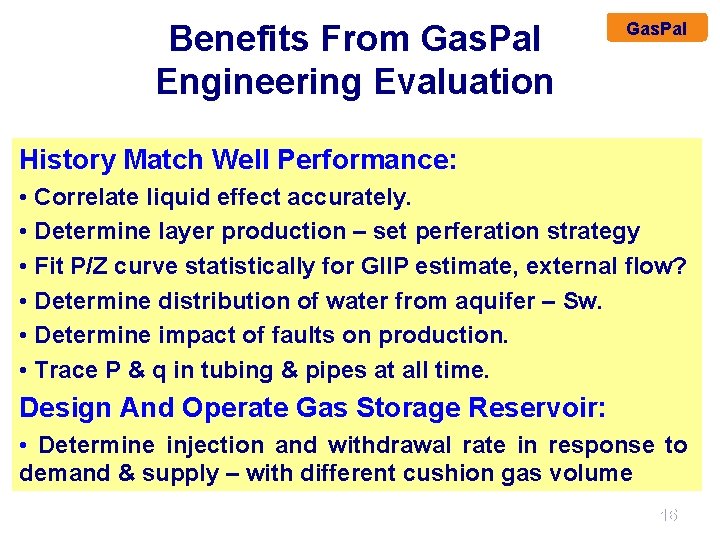
Benefits From Gas. Pal Engineering Evaluation Gas. Pal History Match Well Performance: • Correlate liquid effect accurately. • Determine layer production – set perferation strategy • Fit P/Z curve statistically for GIIP estimate, external flow? • Determine distribution of water from aquifer – Sw. • Determine impact of faults on production. • Trace P & q in tubing & pipes at all time. Design And Operate Gas Storage Reservoir: • Determine injection and withdrawal rate in response to demand & supply – with different cushion gas volume 16

Gas. Pal Logic Diagram Create Grid Model GRIDDER Write RSD Data File Gas. Pal’s Onscreen & Print Output History Matching Gas. Pal Input Panel Windows Graphics Tabular Text Files RSD File Gas. Pal Input Panels Calibrate Tubing TFR Predict Rate/ Pressure/ Saturation in Reservoir/ Flowline System Write PAL Database File Tabular CSV Files Gas Show: Saturation Shadow Graphs 17
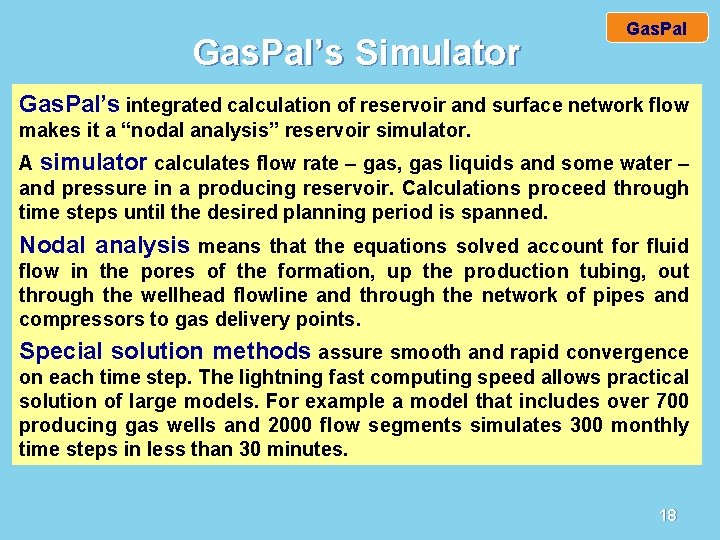
Gas. Pal’s Simulator Gas. Pal’s integrated calculation of reservoir and surface network flow makes it a “nodal analysis” reservoir simulator. A simulator calculates flow rate – gas, gas liquids and some water – and pressure in a producing reservoir. Calculations proceed through time steps until the desired planning period is spanned. Nodal analysis means that the equations solved account for fluid flow in the pores of the formation, up the production tubing, out through the wellhead flowline and through the network of pipes and compressors to gas delivery points. Special solution methods assure smooth and rapid convergence on each time step. The lightning fast computing speed allows practical solution of large models. For example a model that includes over 700 producing gas wells and 2000 flow segments simulates 300 monthly time steps in less than 30 minutes. 18
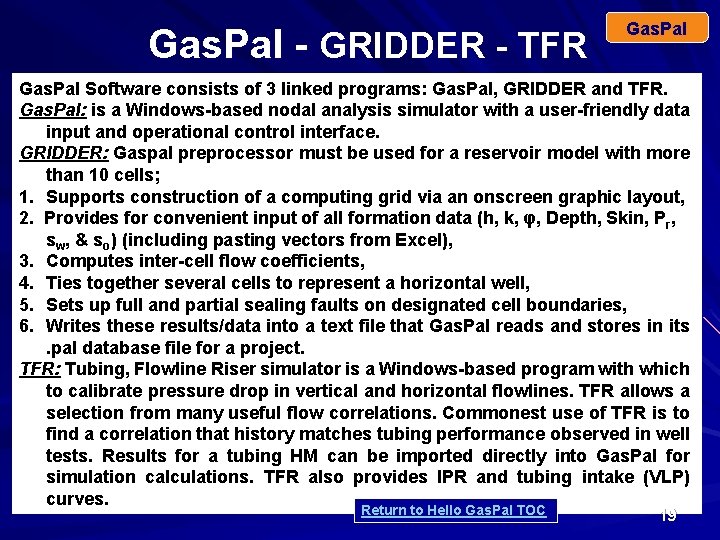
Gas. Pal - GRIDDER - TFR Gas. Pal Software consists of 3 linked programs: Gas. Pal, GRIDDER and TFR. Gas. Pal: is a Windows-based nodal analysis simulator with a user-friendly data input and operational control interface. GRIDDER: Gaspal preprocessor must be used for a reservoir model with more than 10 cells; 1. Supports construction of a computing grid via an onscreen graphic layout, 2. Provides for convenient input of all formation data (h, k, φ, Depth, Skin, Pr, sw, & so) (including pasting vectors from Excel), 3. Computes inter-cell flow coefficients, 4. Ties together several cells to represent a horizontal well, 5. Sets up full and partial sealing faults on designated cell boundaries, 6. Writes these results/data into a text file that Gas. Pal reads and stores in its. pal database file for a project. TFR: Tubing, Flowline Riser simulator is a Windows-based program with which to calibrate pressure drop in vertical and horizontal flowlines. TFR allows a selection from many useful flow correlations. Commonest use of TFR is to find a correlation that history matches tubing performance observed in well tests. Results for a tubing HM can be imported directly into Gas. Pal for simulation calculations. TFR also provides IPR and tubing intake (VLP) curves. Return to Hello Gas. Pal TOC 19
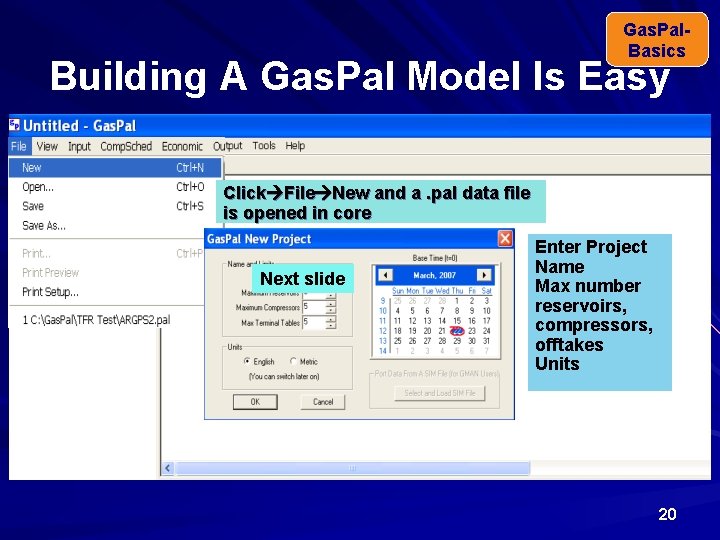
Gas. Pal. Basics Building A Gas. Pal Model Is Easy Click File New and a. pal data file is opened in core Next slide Enter Project Name Max number reservoirs, compressors, offtakes Units 20
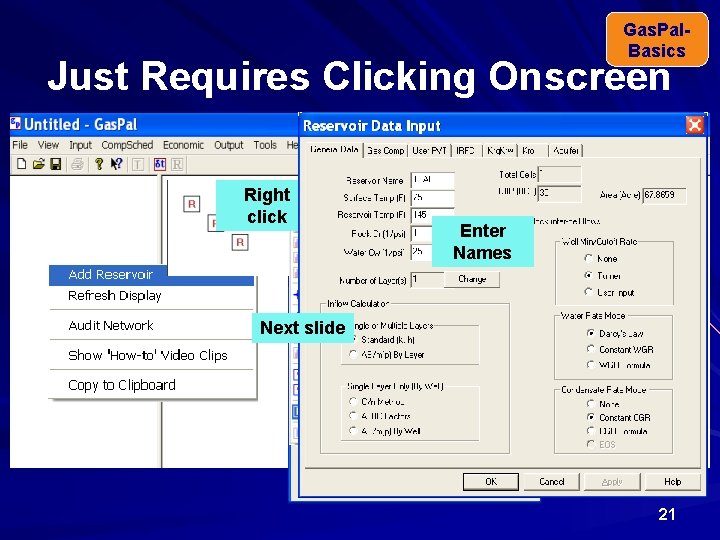
Gas. Pal. Basics Just Requires Clicking Onscreen Right inserts 1 st reservoir. Gas. Pal click onscreen to add Right Enter more reservoirs. Names Next slide 21
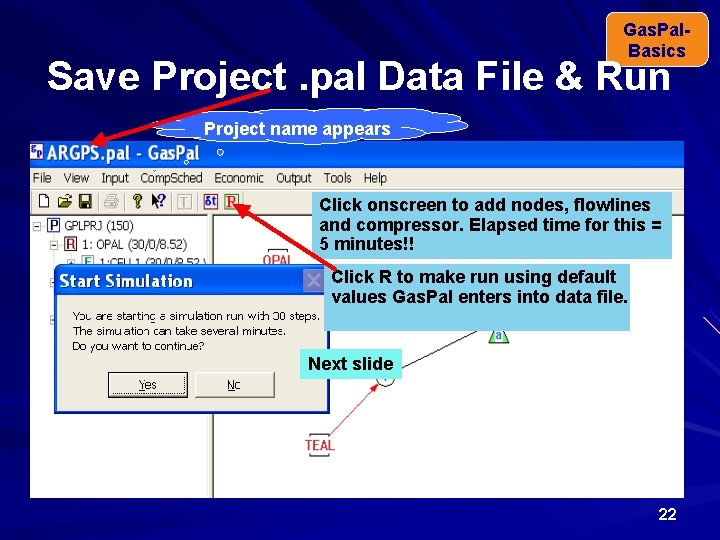
Gas. Pal. Basics Save Project. pal Data File & Run Project name appears Click onscreen to add nodes, flowlines and compressor. Elapsed time for this = 5 minutes!! Click R to make run using default values Gas. Pal enters into data file. Next slide 22
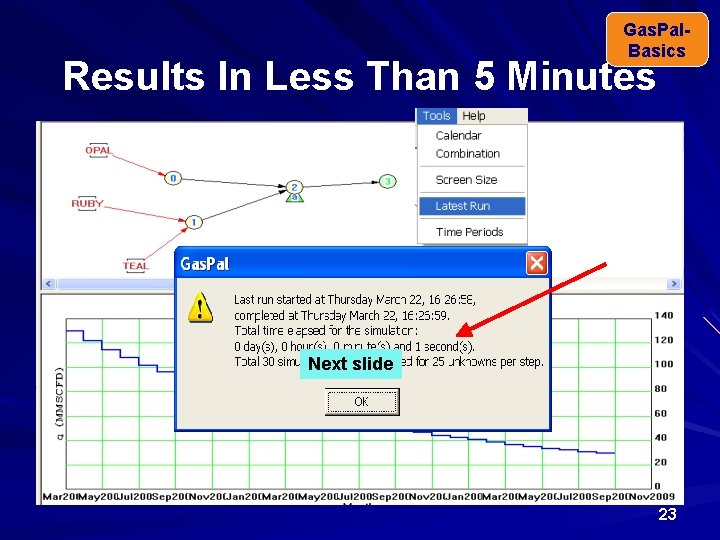
Gas. Pal. Basics Results In Less Than 5 Minutes Next slide 23
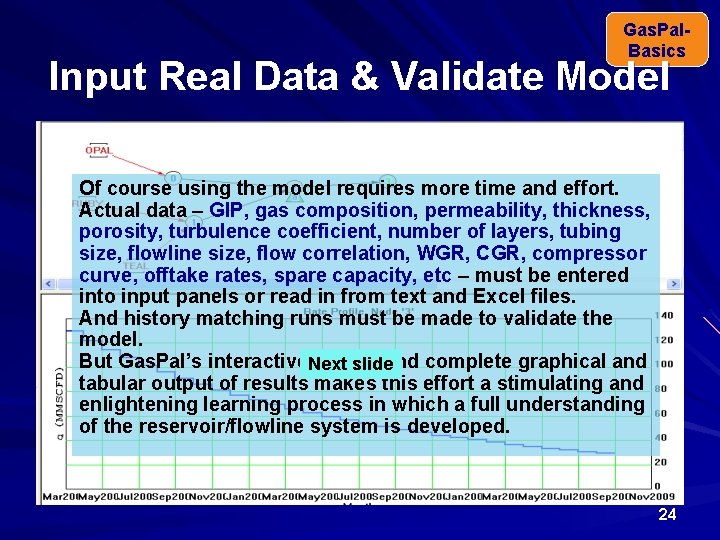
Gas. Pal. Basics Input Real Data & Validate Model Of course using the model requires more time and effort. Actual data – GIP, gas composition, permeability, thickness, porosity, turbulence coefficient, number of layers, tubing size, flowline size, flow correlation, WGR, CGR, compressor curve, offtake rates, spare capacity, etc – must be entered into input panels or read in from text and Excel files. And history matching runs must be made to validate the model. But Gas. Pal’s interactive. Next design and complete graphical and slide tabular output of results makes this effort a stimulating and enlightening learning process in which a full understanding of the reservoir/flowline system is developed. 24
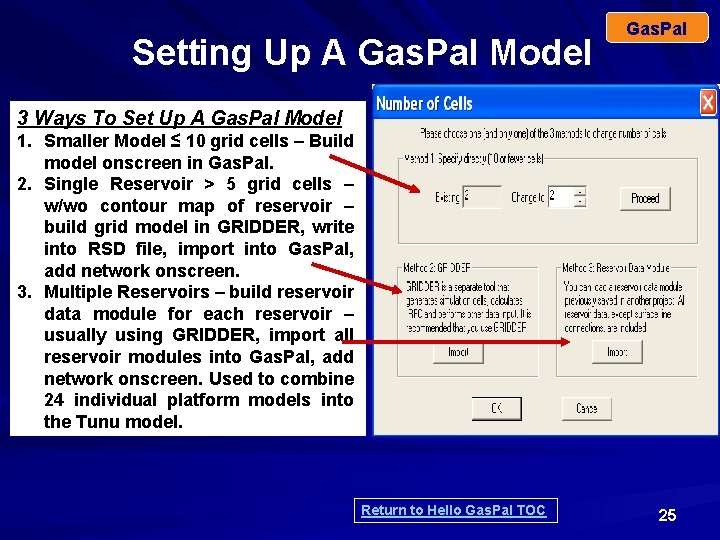
Setting Up A Gas. Pal Model Gas. Pal 3 Ways To Set Up A Gas. Pal Model 1. Smaller Model ≤ 10 grid cells – Build model onscreen in Gas. Pal. 2. Single Reservoir > 5 grid cells – w/wo contour map of reservoir – build grid model in GRIDDER, write into RSD file, import into Gas. Pal, add network onscreen. 3. Multiple Reservoirs – build reservoir data module for each reservoir – usually using GRIDDER, import all reservoir modules into Gas. Pal, add network onscreen. Used to combine 24 individual platform models into the Tunu model. Return to Hello Gas. Pal TOC 25
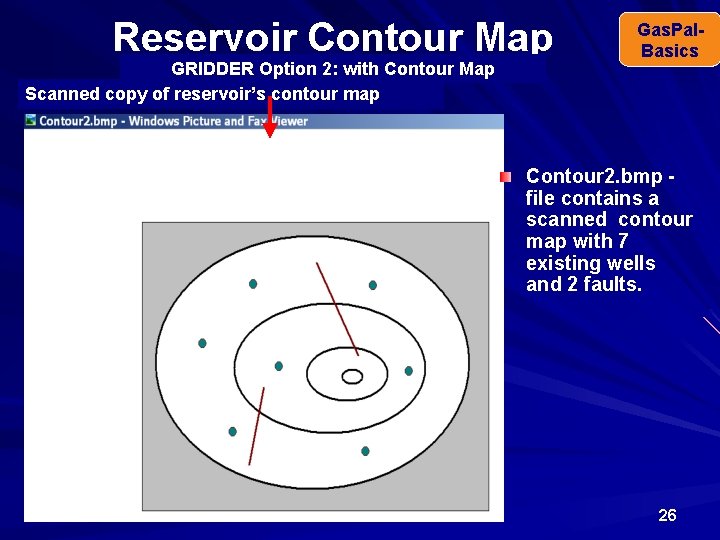
Reservoir Contour Map GRIDDER Option 2: with Contour Map Scanned copy of reservoir’s contour map Gas. Pal. Basics Contour 2. bmp file contains a scanned contour map with 7 existing wells and 2 faults. 26
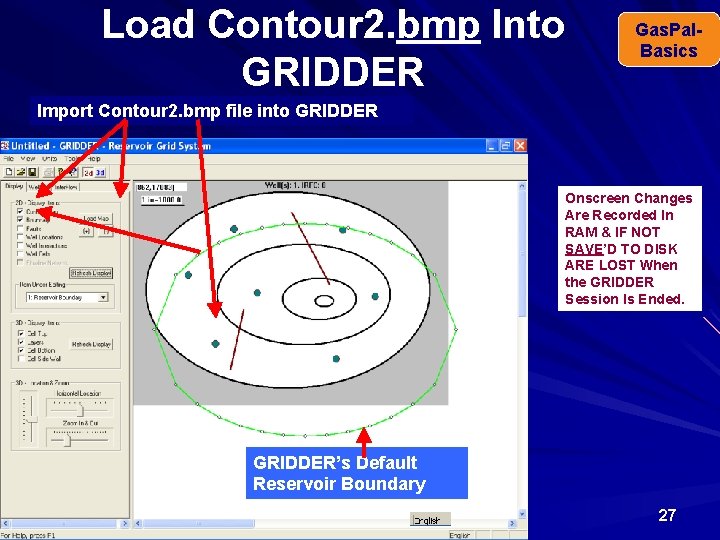
Load Contour 2. bmp Into GRIDDER Gas. Pal. Basics Import Contour 2. bmp file into GRIDDER Onscreen Changes Are Recorded In RAM & IF NOT SAVE’D TO DISK ARE LOST When the GRIDDER Session Is Ended. GRIDDER’s Default Reservoir Boundary 27
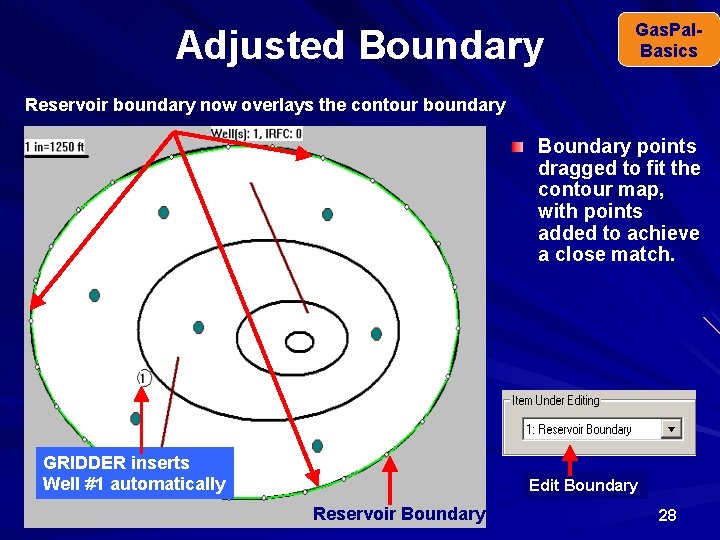
Adjusted Boundary Gas. Pal. Basics Reservoir boundary now overlays the contour boundary Boundary points dragged to fit the contour map, with points added to achieve a close match. GRIDDER inserts Well #1 automatically Edit Boundary Reservoir Boundary 28
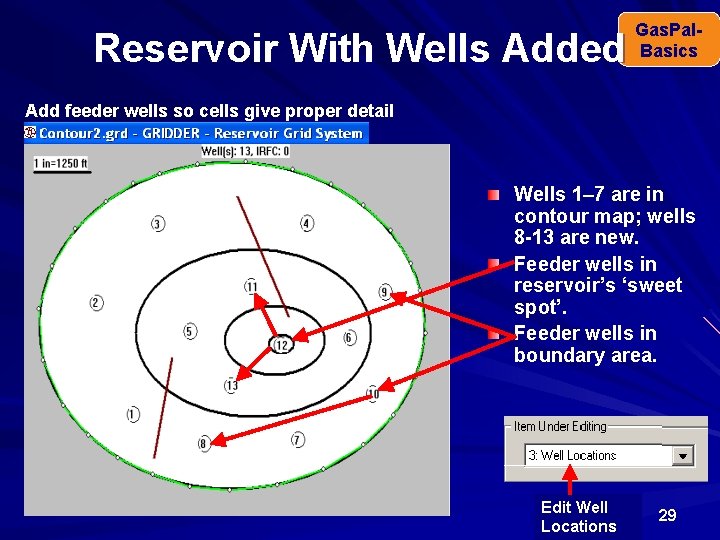
Reservoir With Wells Added Gas. Pal. Basics Add feeder wells so cells give proper detail Wells 1– 7 are in contour map; wells 8 -13 are new. Feeder wells in reservoir’s ‘sweet spot’. Feeder wells in boundary area. Edit Well Locations 29
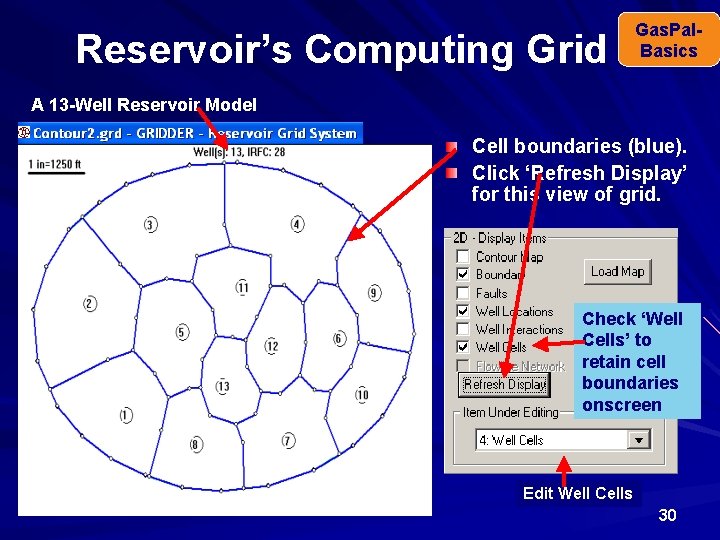
Reservoir’s Computing Grid Gas. Pal. Basics A 13 -Well Reservoir Model Cell boundaries (blue). Click ‘Refresh Display’ for this view of grid. Check ‘Well Cells’ to retain cell boundaries onscreen Edit Well Cells 30
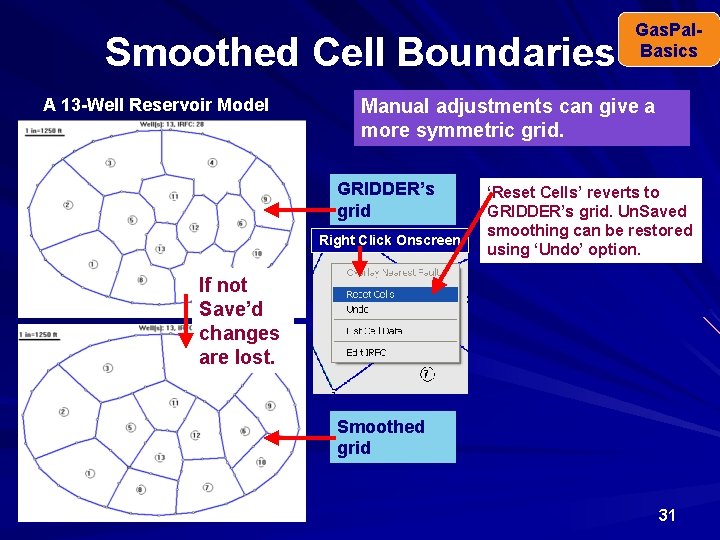
Smoothed Cell Boundaries A 13 -Well Reservoir Model Gas. Pal. Basics Manual adjustments can give a more symmetric grid. GRIDDER’s grid Right Click Onscreen ‘Reset Cells’ reverts to GRIDDER’s grid. Un. Saved smoothing can be restored using ‘Undo’ option. If not Save’d changes are lost. Smoothed grid 31
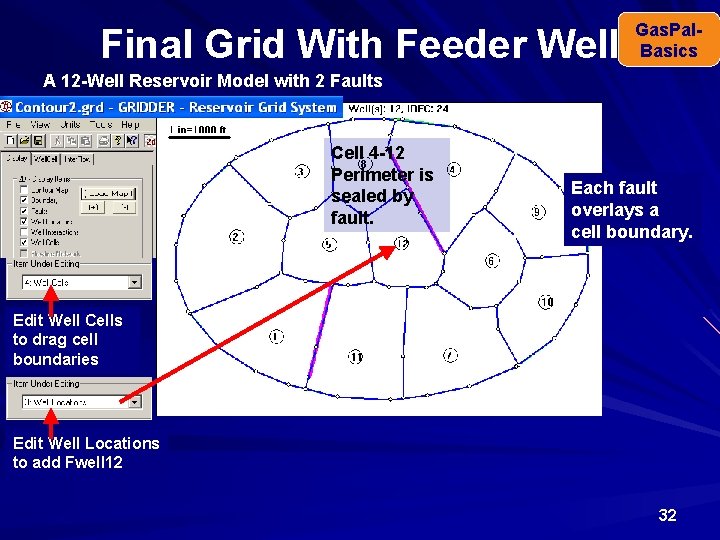
Final Grid With Feeder Well Gas. Pal. Basics A 12 -Well Reservoir Model with 2 Faults Cell 4 -12 Perimeter is sealed by fault. Each fault overlays a cell boundary. Edit Well Cells to drag cell boundaries Edit Well Locations to add Fwell 12 32
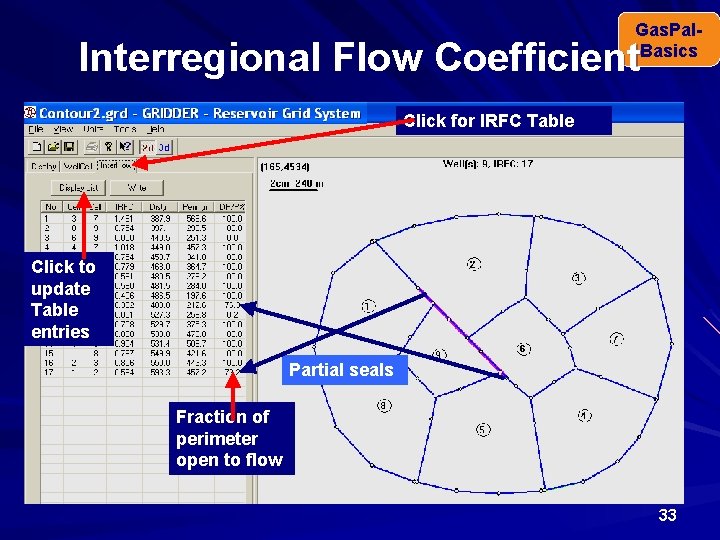
Gas. Pal. Basics Interregional Flow Coefficient Click for IRFC Table Click to update Table entries Partial seals Fraction of perimeter open to flow 33
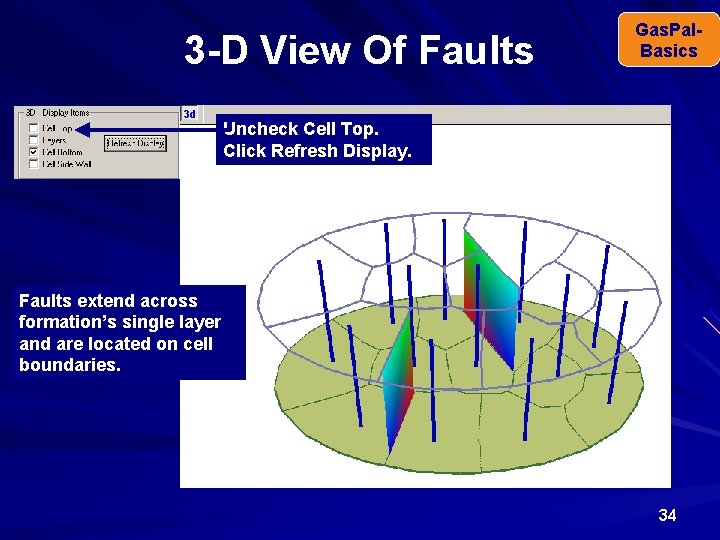
3 -D View Of Faults Gas. Pal. Basics Uncheck Cell Top. Click Refresh Display. Faults extend across formation’s single layer and are located on cell boundaries. 34
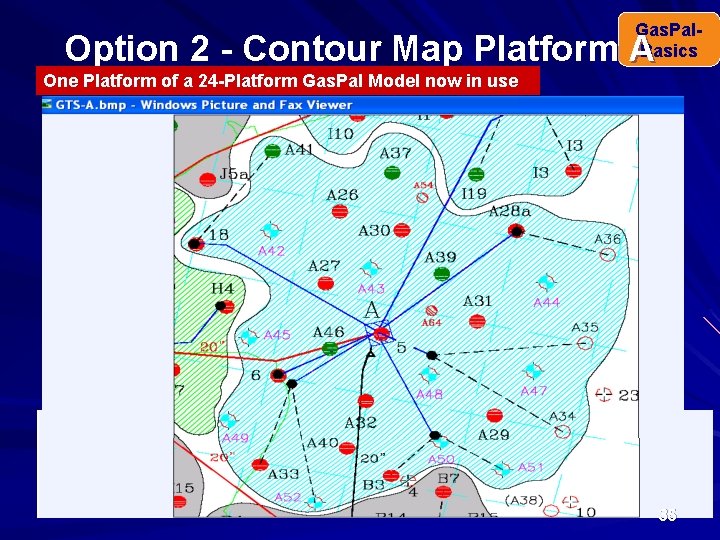
Gas. Pal. Basics Option 2 - Contour Map Platform A One Platform of a 24 -Platform Gas. Pal Model now in use 35
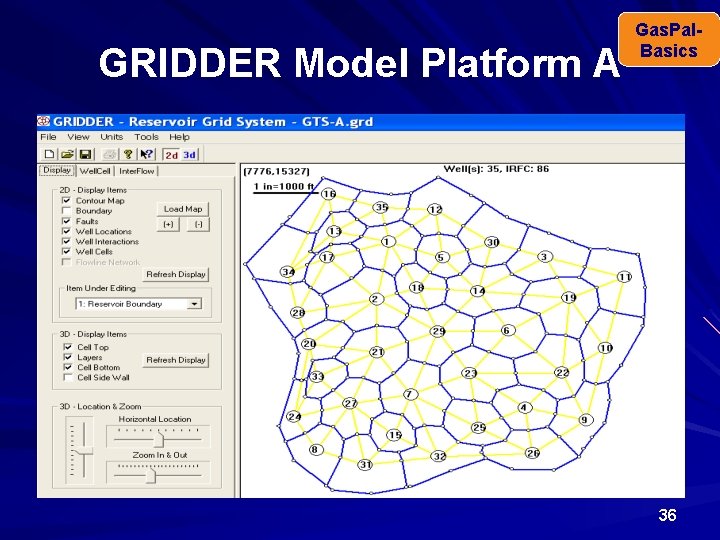
GRIDDER Model Platform A Gas. Pal. Basics 36
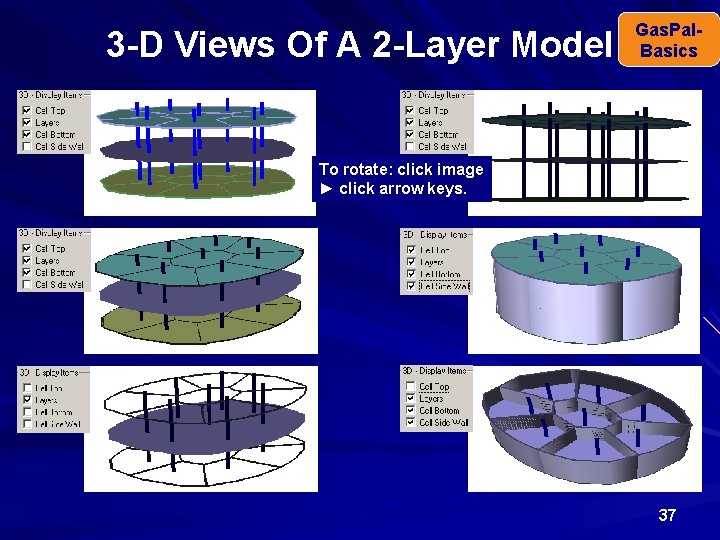
3 -D Views Of A 2 -Layer Model Gas. Pal. Basics To rotate: click image ► click arrow keys. 37
Gas. Pal. Basics Reservoir Data Anticline, syncline, stratagraphic trap, caprock, source Sand, shale/clay, limestone, dolomite Fault, fault block, porous & permeable layers Permeability, thickness, porosity, turbulence, Skin Normal hydrostatic gradient & reservoir pressure Aquifer, gas/water contact, water influx Saturation: : Sg, Scw, So, Sg, trap Relative permeability, WGR-bbl/MMCF Gas composition, condensate/NGL, CGR-bbl/MMCF 38
Input Data Logic Sequence Gas. Pal. Basics Building a model with GRIDDER can conveniently be thought of as consisting of nine steps: 1. Layout boundary (Option 1) or match it to contour map (Option 2). 2. Locate wells • Onscreen. • Fine tune in Well Locations Table. 3. Enter well depth & type (Vertical, Horizontal). 4. Enter gas composition & reservoir/surface temperature (o. F). 5. Enter residual oil volume (STB) & gravity (o. API). 6. Enter layer data: K, h, Φ, Swc, Pr. 7. Fine tune GIIP by adjusting screen scale factor, SF. 8. GRIDDER Calculate cells’ area, volume, CA (Dietz factor) & interregional flow coefficients (IRFC). 9. Export GRIDDER data file to Gas. Pal. 39
Port Data to Gas. Pal. Basics When a reservoir’s data have been entered into GRIDDER, ‘Save’ into a binary (GRD) file. Write the input data (k, h, Φ, Tr, Ts, Ci, Pr, ) along with the simulation grid parameters calculated by GRIDDER into a text file (RSD file). These parameters, cell volumes, areas, CA factors, GIIP & interregional flow coefficients (IRFC), define the reservoir’s underground model. Gal. Pal reads an RSD file and stores the data in that reservoir’s slot in the model’s data arrays. The data from the RSD files are combined in the data arrays with data typed in directly. Gas. Pal writes the data arrays into a PAL input file that Gas. Pal can read on the next instance of Gas. Pal. Return to Hello Gas. Pal TOC 40
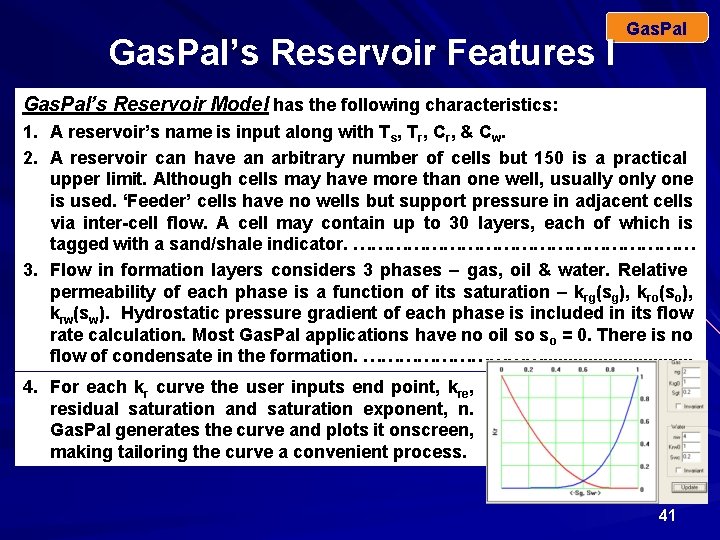
Gas. Pal’s Reservoir Features I Gas. Pal’s Reservoir Model has the following characteristics: 1. A reservoir’s name is input along with Ts, Tr, Cr, & Cw. 2. A reservoir can have an arbitrary number of cells but 150 is a practical upper limit. Although cells may have more than one well, usually one is used. ‘Feeder’ cells have no wells but support pressure in adjacent cells via inter-cell flow. A cell may contain up to 30 layers, each of which is tagged with a sand/shale indicator. ………………………… 3. Flow in formation layers considers 3 phases – gas, oil & water. Relative permeability of each phase is a function of its saturation – krg(sg), kro(so), krw(sw). Hydrostatic pressure gradient of each phase is included in its flow rate calculation. Most Gas. Pal applications have no oil so so = 0. There is no flow of condensate in the formation. ……………. . . . 4. For each kr curve the user inputs end point, kre, residual saturation and saturation exponent, n. Gas. Pal generates the curve and plots it onscreen, making tailoring the curve a convenient process. 41
Gas. Pal’s Reservoir Features II Gas. Pal’s Reservoir Model has the following characteristics: 5. Normally, there is no flow between layers. However, Gas. Pal’s IONAC feature allows any two cells in the model to be connected for flow. Flow coefficient is harmonic average of kh’s multiplied by a ‘strength factor’. IONAC is particularly useful in history matching and predicting production rate from a distribution of stratigraphic traps (sand bars). ……………. . . 6. Each reservoir can be attached to a ‘Fetkovitch’ aquifer defined by input VW (MMB), compressibility (psi-1) and productivity index, J (B/D/psi). Each cell in the reservoir may be connected to the aquifer. Water influx is distributed among the cell’s permeable layers. A layer’s qwil depends only upon paq – play and not sw. Harmonic average of kha & khl is used. Rate of decline of paq depends upon sum of qwi for all connected cells. ………………. . 7. A cell’s well may be horizontal or vertical, but not both. A horizontal well is allowed in only a single layer cell. A vertical well penetrates all layers. A cell’s drilling schedule is a time vector giving the number of wells drilled on specified dates. Perforation date and plug date are input separately for each layer. ………………………………………. . 42
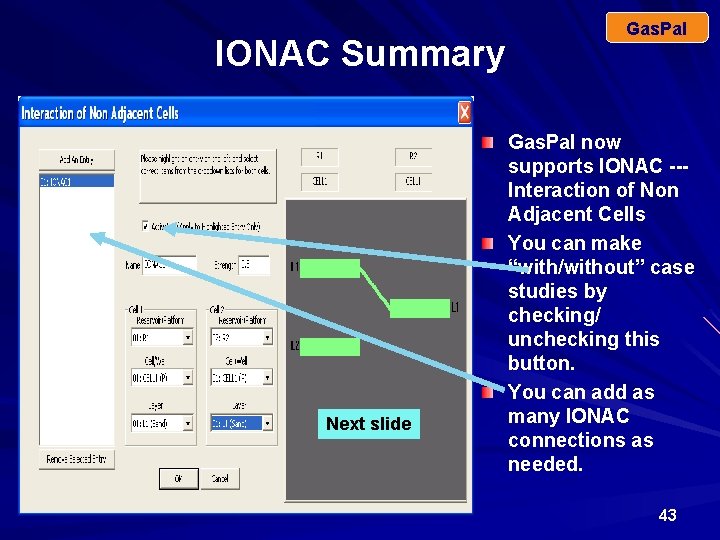
IONAC Summary Next slide Gas. Pal now supports IONAC --Interaction of Non Adjacent Cells You can make “with/without” case studies by checking/ unchecking this button. You can add as many IONAC connections as needed. 43
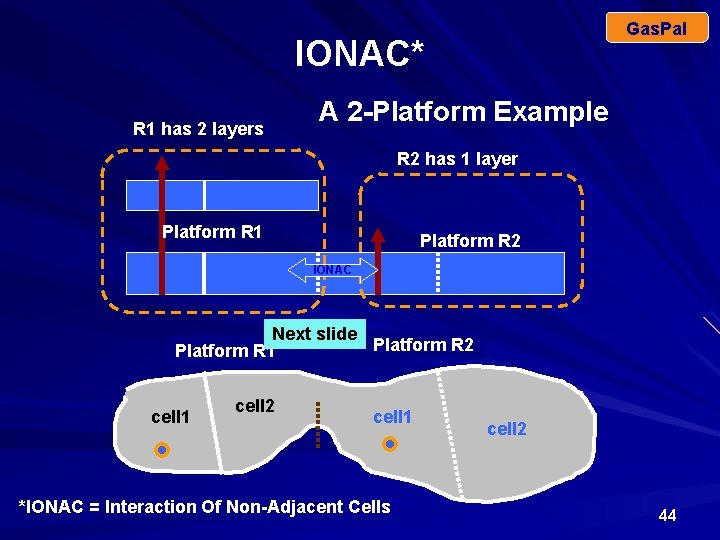
Gas. Pal IONAC* R 1 has 2 layers A 2 -Platform Example R 2 has 1 layer Platform R 1 Platform R 2 IONAC Next slide Platform R 2 Platform R 1 cell 2 cell 1 *IONAC = Interaction Of Non-Adjacent Cells cell 2 44
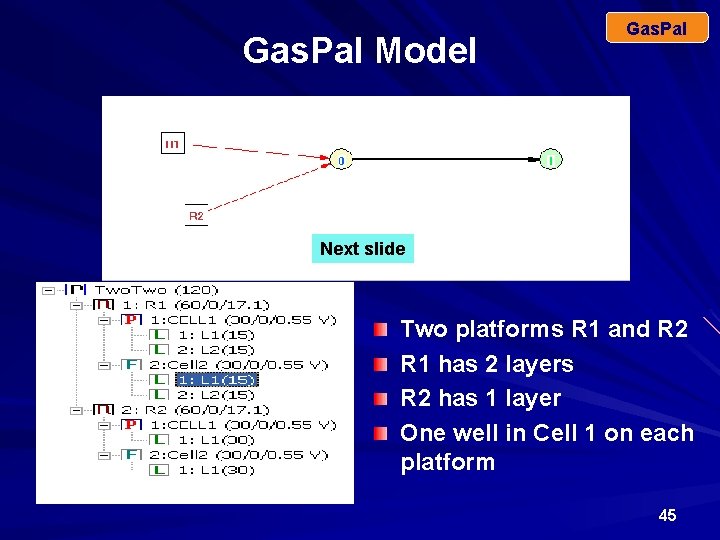
Gas. Pal Model Gas. Pal Next slide Two platforms R 1 and R 2 R 1 has 2 layers R 2 has 1 layer One well in Cell 1 on each platform 45
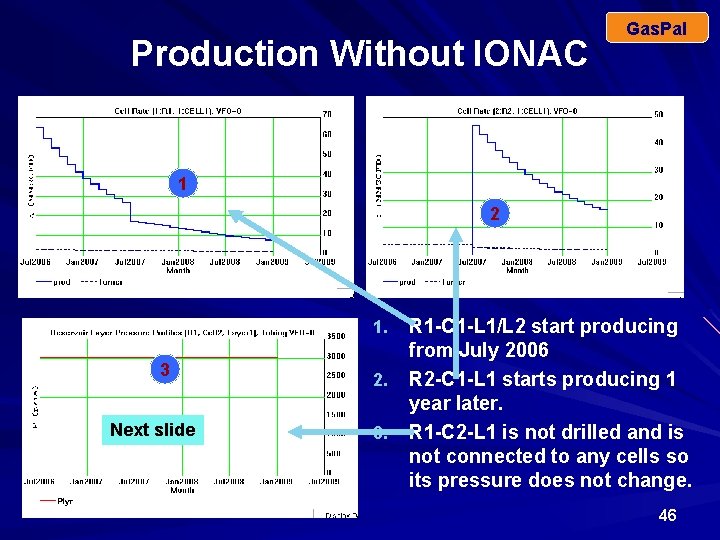
Production Without IONAC Gas. Pal 1 2 R 1 -C 1 -L 1/L 2 start producing from July 2006 2. R 2 -C 1 -L 1 starts producing 1 year later. 3. R 1 -C 2 -L 1 is not drilled and is not connected to any cells so its pressure does not change. 1. 3 Next slide 46
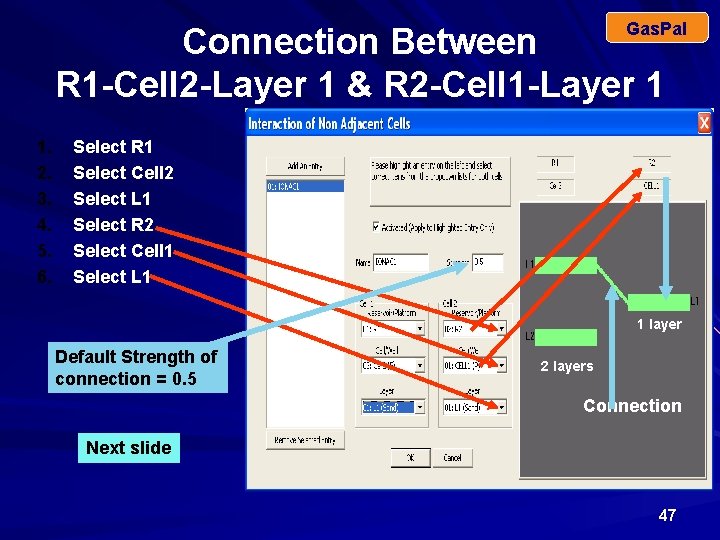
Gas. Pal Connection Between R 1 -Cell 2 -Layer 1 & R 2 -Cell 1 -Layer 1 1. 2. 3. 4. 5. 6. Select R 1 Select Cell 2 Select L 1 Select R 2 Select Cell 1 Select L 1 1 layer Default Strength of connection = 0. 5 2 layers Connection Next slide 47
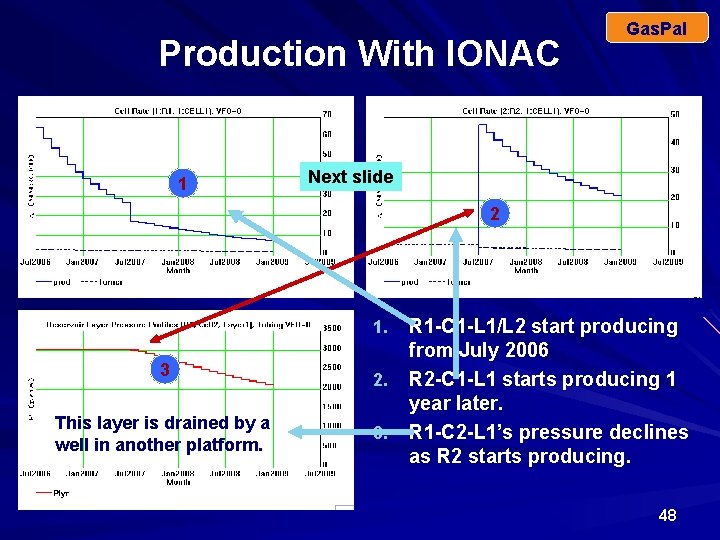
Production With IONAC 1 Gas. Pal Next slide 2 R 1 -C 1 -L 1/L 2 start producing from July 2006 2. R 2 -C 1 -L 1 starts producing 1 year later. 3. R 1 -C 2 -L 1’s pressure declines as R 2 starts producing. 1. 3 This layer is drained by a well in another platform. 48
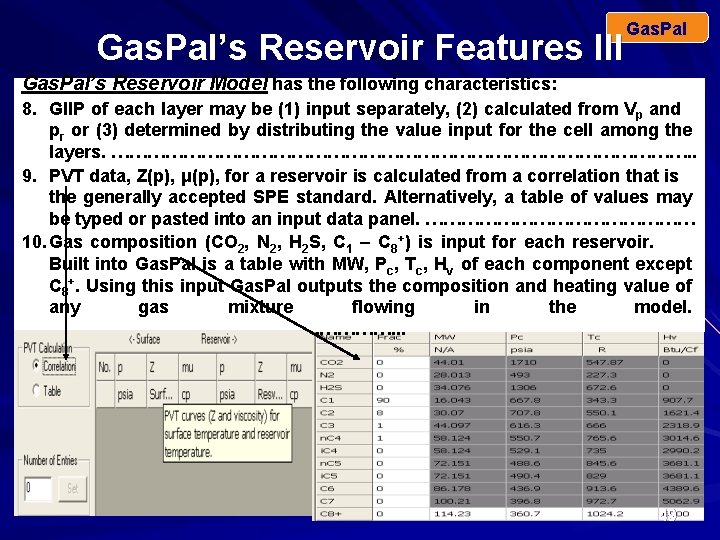
Gas. Pal’s Reservoir Features III Gas. Pal’s Reservoir Model has the following characteristics: 8. GIIP of each layer may be (1) input separately, (2) calculated from Vp and pr or (3) determined by distributing the value input for the cell among the layers. …………………………………………. . 9. PVT data, Z(p), μ(p), for a reservoir is calculated from a correlation that is the generally accepted SPE standard. Alternatively, a table of values may be typed or pasted into an input data panel. …………………… 10. Gas composition (CO 2, N 2, H 2 S, C 1 – C 8+) is input for each reservoir. Built into Gas. Pal is a table with MW, Pc, Tc, Hv of each component except C 8+. Using this input Gas. Pal outputs the composition and heating value of any gas mixture flowing in the model. …………………………. . . 49
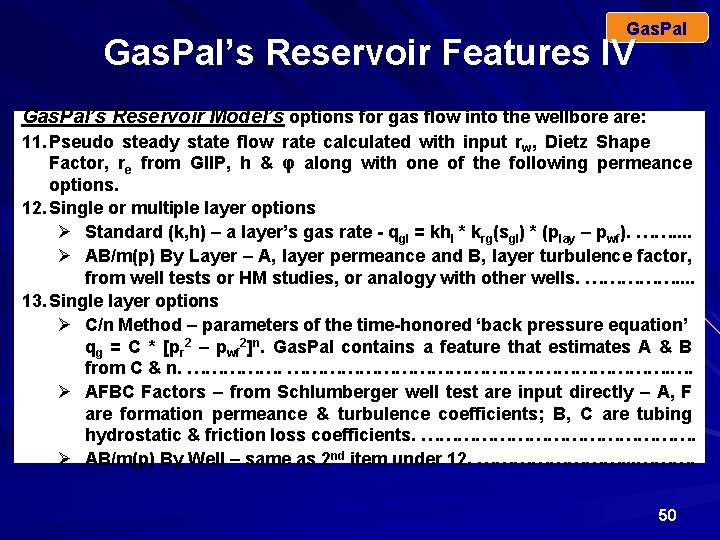
Gas. Pal’s Reservoir Features IV Gas. Pal’s Reservoir Model’s options for gas flow into the wellbore are: 11. Pseudo steady state flow rate calculated with input rw, Dietz Shape Factor, re from GIIP, h & φ along with one of the following permeance options. 12. Single or multiple layer options Ø Standard (k, h) – a layer’s gas rate - qgl = khl * krg(sgl) * (play – pwf). ……. . Ø AB/m(p) By Layer – A, layer permeance and B, layer turbulence factor, from well tests or HM studies, or analogy with other wells. ……………. . 13. Single layer options Ø C/n Method – parameters of the time-honored ‘back pressure equation’ qg = C * [pr 2 – pwf 2]n. Gas. Pal contains a feature that estimates A & B from C & n. …………………………………. …. Ø AFBC Factors – from Schlumberger well test are input directly – A, F are formation permeance & turbulence coefficients; B, C are tubing hydrostatic & friction loss coefficients. ……………………. Ø AB/m(p) By Well – same as 2 nd item under 12. …………. . . ………. 50
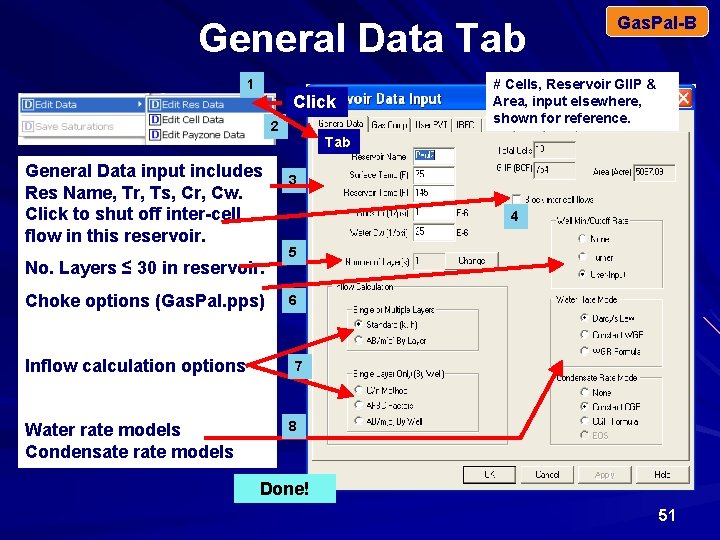
General Data Tab 1 Click 2 Gas. Pal-B # Cells, Reservoir GIIP & Area, input elsewhere, shown for reference. Tab General Data input includes Res Name, Tr, Ts, Cr, Cw. Click to shut off inter-cell flow in this reservoir. No. Layers ≤ 30 in reservoir. Choke options (Gas. Pal. pps) Inflow calculation options Water rate models Condensate rate models 3 4 5 6 7 8 Done! 51
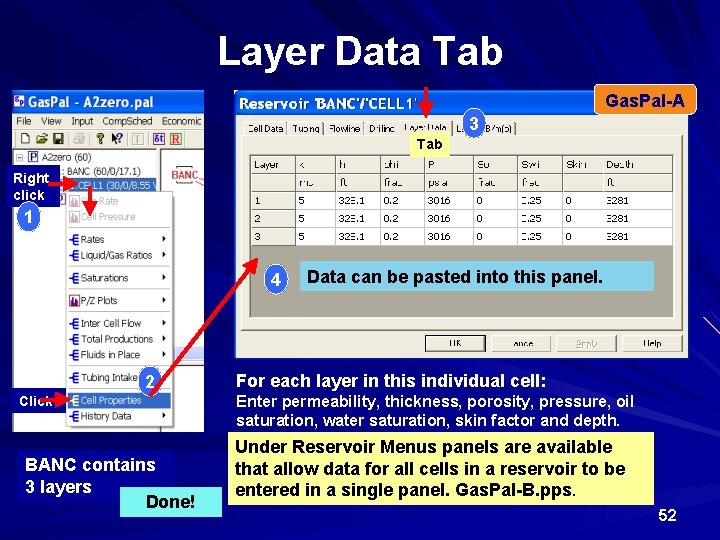
Layer Data Tab Gas. Pal-A 3 Tab Right click 1 4 2 Click BANC contains 3 layers Done! Data can be pasted into this panel. For each layer in this individual cell: Enter permeability, thickness, porosity, pressure, oil saturation, water saturation, skin factor and depth. Under Reservoir Menus panels are available that allow data for all cells in a reservoir to be entered in a single panel. Gas. Pal-B. pps. 52
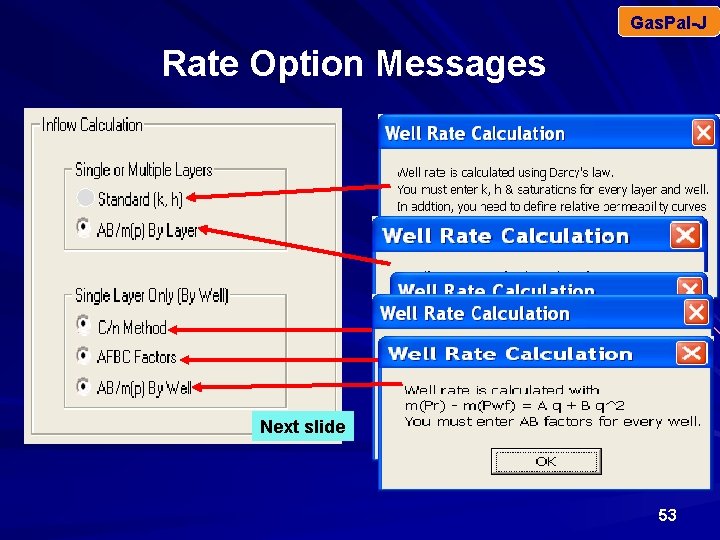
Gas. Pal-J Rate Option Messages Next slide 53
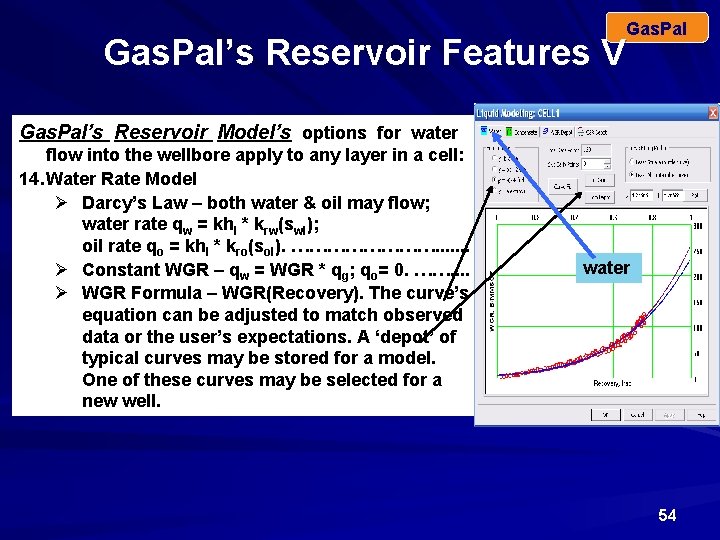
Gas. Pal’s Reservoir Features V Gas. Pal’s Reservoir Model’s options for water flow into the wellbore apply to any layer in a cell: 14. Water Rate Model Ø Darcy’s Law – both water & oil may flow; water rate qw = khl * krw(swl); oil rate qo = khl * kro(sol). …………. . . . Ø Constant WGR – qw = WGR * qg; qo= 0. ……. . Ø WGR Formula – WGR(Recovery). The curve’s equation can be adjusted to match observed data or the user’s expectations. A ‘depot’ of typical curves may be stored for a model. One of these curves may be selected for a new well. water 54
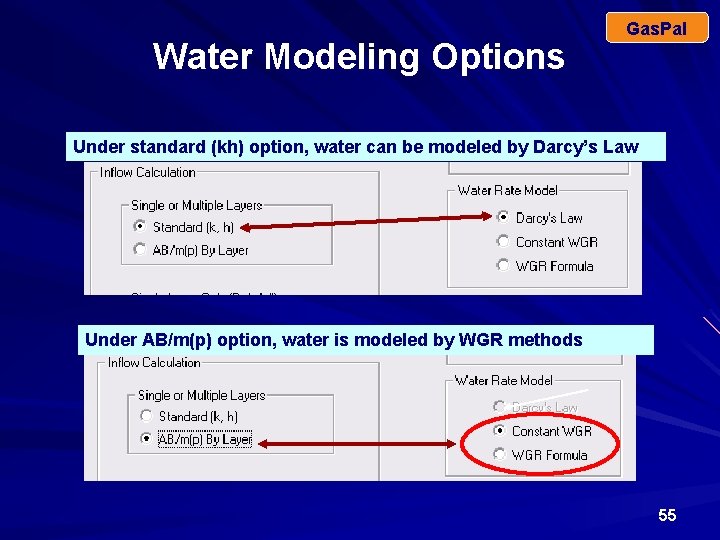
Water Modeling Options Gas. Pal Under standard (kh) option, water can be modeled by Darcy’s Law Under AB/m(p) option, water is modeled by WGR methods 55
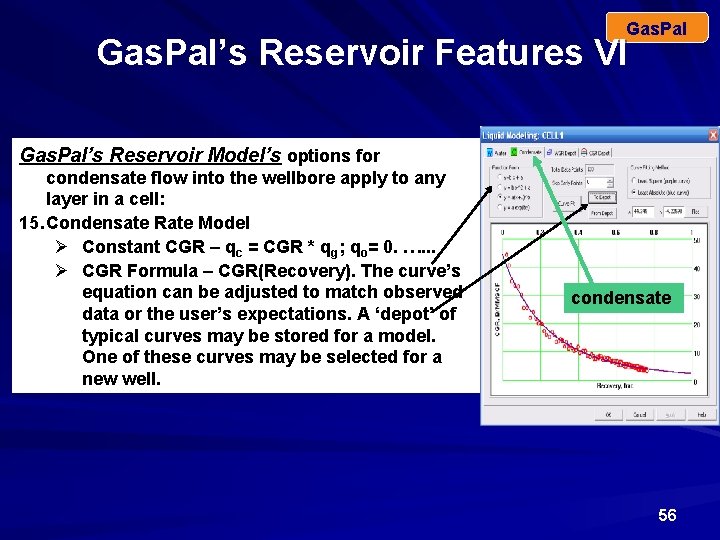
Gas. Pal’s Reservoir Features VI Gas. Pal’s Reservoir Model’s options for condensate flow into the wellbore apply to any layer in a cell: 15. Condensate Rate Model Ø Constant CGR – qc = CGR * qg; qo= 0. …. . . Ø CGR Formula – CGR(Recovery). The curve’s equation can be adjusted to match observed data or the user’s expectations. A ‘depot’ of typical curves may be stored for a model. One of these curves may be selected for a new well. condensate 56
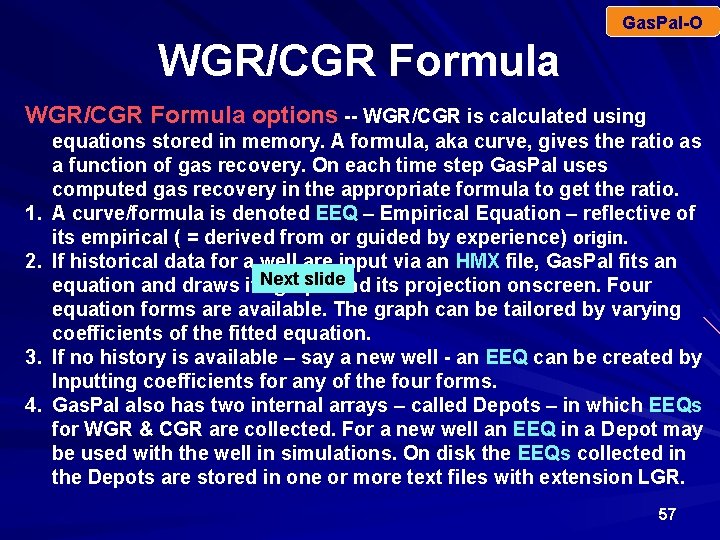
Gas. Pal-O WGR/CGR Formula options -- WGR/CGR is calculated using 1. 2. 3. 4. equations stored in memory. A formula, aka curve, gives the ratio as a function of gas recovery. On each time step Gas. Pal uses computed gas recovery in the appropriate formula to get the ratio. A curve/formula is denoted EEQ – Empirical Equation – reflective of its empirical ( = derived from or guided by experience) origin. If historical data for a well are input via an HMX file, Gas. Pal fits an slide equation and draws its. Next graph and its projection onscreen. Four equation forms are available. The graph can be tailored by varying coefficients of the fitted equation. If no history is available – say a new well - an EEQ can be created by Inputting coefficients for any of the four forms. Gas. Pal also has two internal arrays – called Depots – in which EEQs for WGR & CGR are collected. For a new well an EEQ in a Depot may be used with the well in simulations. On disk the EEQs collected in the Depots are stored in one or more text files with extension LGR. 57
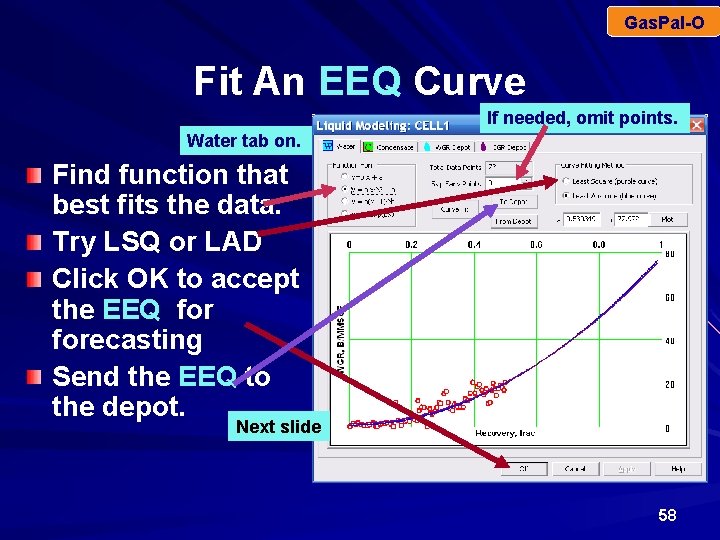
Gas. Pal-O Fit An EEQ Curve If needed, omit points. Water tab on. Find function that best fits the data. Try LSQ or LAD Click OK to accept the EEQ forecasting Send the EEQ to the depot. Next slide 58
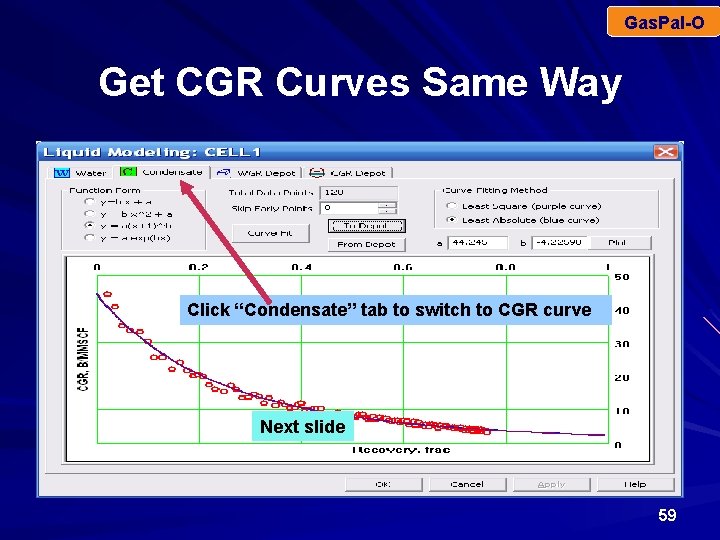
Gas. Pal-O Get CGR Curves Same Way Click “Condensate” tab to switch to CGR curve Next slide 59
Gas. Pal-O Switch WGR/CGR Curves Within a simulation horizon, WGR/CGR may change abruptly because: – A high water content layer is plugged. – A new layer is perforated. Gas. Pal allows 2 WGR/CGR curves within a simulation horizon: – – – The Primary curve is used before the change date. The change (plug/perf) date is specified. Nextdate slide Gas. Pal uses the Secondary After the change curve. 60
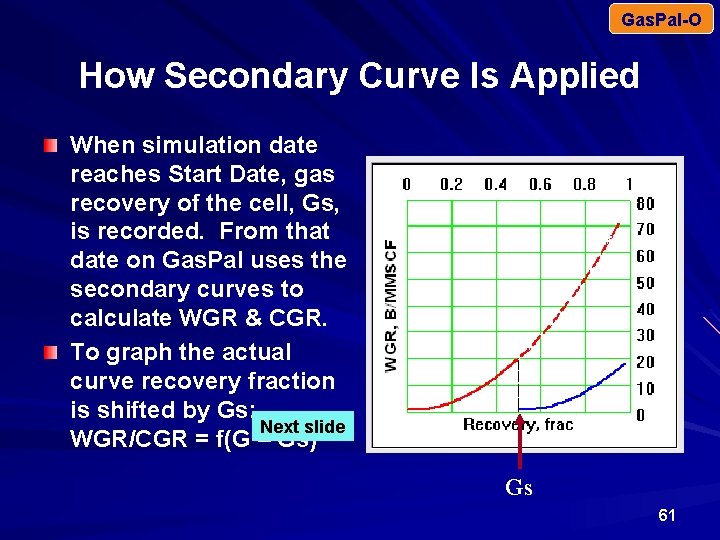
Gas. Pal-O How Secondary Curve Is Applied When simulation date reaches Start Date, gas recovery of the cell, Gs, is recorded. From that date on Gas. Pal uses the secondary curves to calculate WGR & CGR. To graph the actual curve recovery fraction is shifted by Gs: Next slide WGR/CGR = f(G – Gs) Gs 61
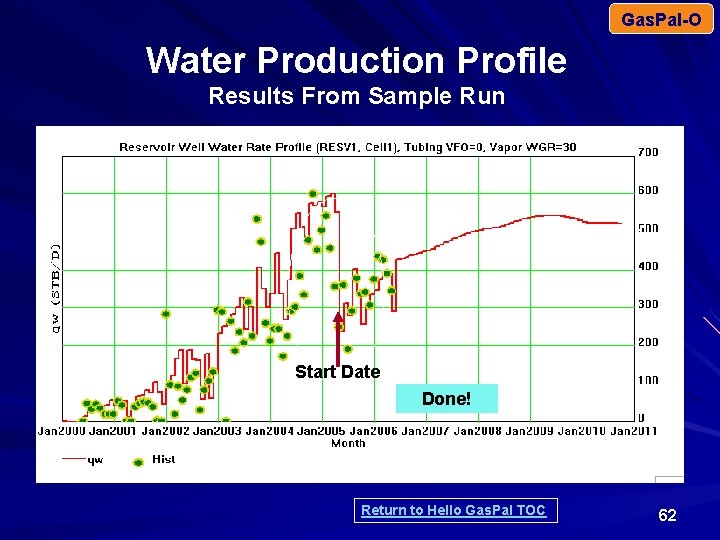
Gas. Pal-O Water Production Profile Results From Sample Run Start Date Done! Return to Hello Gas. Pal TOC 62
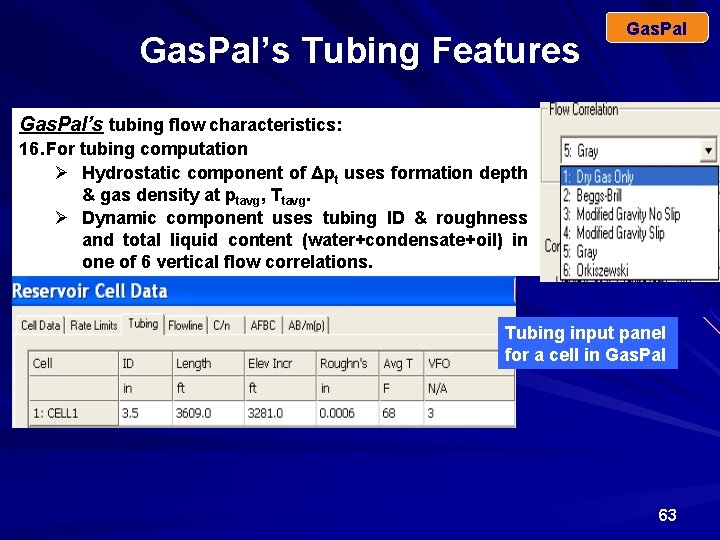
Gas. Pal’s Tubing Features Gas. Pal’s tubing flow characteristics: 16. For tubing computation Ø Hydrostatic component of Δpt uses formation depth & gas density at ptavg, Ttavg. Ø Dynamic component uses tubing ID & roughness and total liquid content (water+condensate+oil) in one of 6 vertical flow correlations. Tubing input panel for a cell in Gas. Pal 63
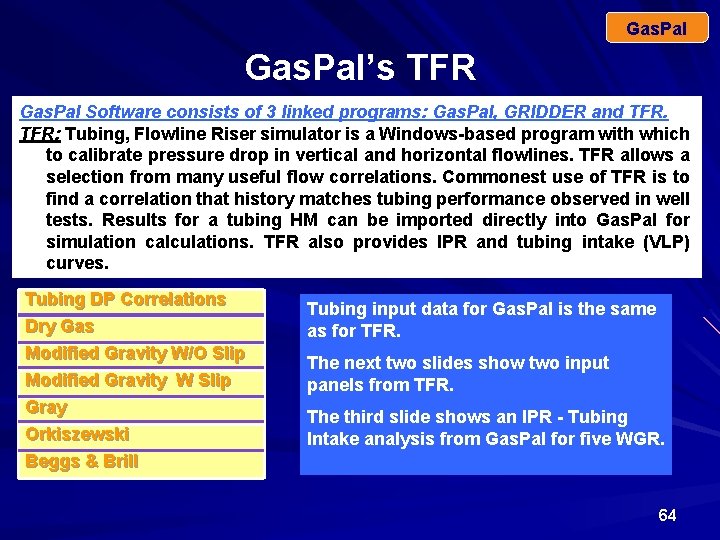
Gas. Pal’s TFR Gas. Pal Software consists of 3 linked programs: Gas. Pal, GRIDDER and TFR: Tubing, Flowline Riser simulator is a Windows-based program with which to calibrate pressure drop in vertical and horizontal flowlines. TFR allows a selection from many useful flow correlations. Commonest use of TFR is to find a correlation that history matches tubing performance observed in well tests. Results for a tubing HM can be imported directly into Gas. Pal for simulation calculations. TFR also provides IPR and tubing intake (VLP) curves. Tubing DP Correlations Dry Gas Modified Gravity W/O Slip Modified Gravity W Slip Gray Orkiszewski Beggs & Brill Tubing input data for Gas. Pal is the same as for TFR. The next two slides show two input panels from TFR. The third slide shows an IPR - Tubing Intake analysis from Gas. Pal for five WGR. 64
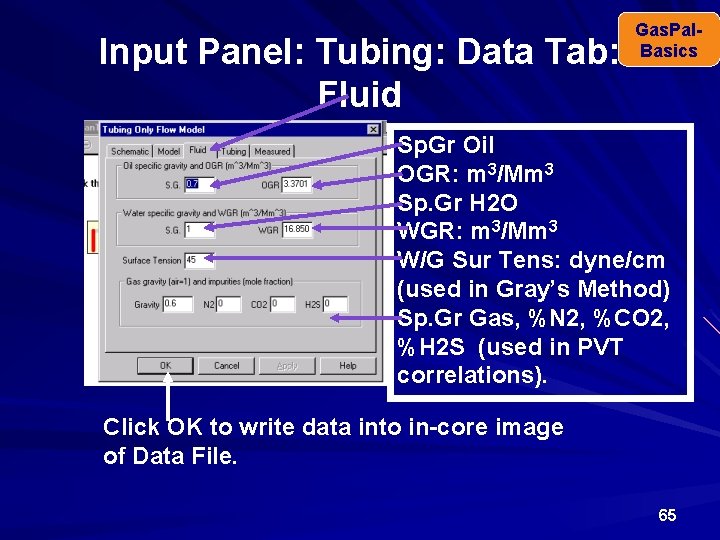
Input Panel: Tubing: Data Tab: Fluid Gas. Pal. Basics Sp. Gr Oil OGR: m 3/Mm 3 Sp. Gr H 2 O WGR: m 3/Mm 3 W/G Sur Tens: dyne/cm (used in Gray’s Method) Sp. Gr Gas, %N 2, %CO 2, %H 2 S (used in PVT correlations). Click OK to write data into in-core image of Data File. 65
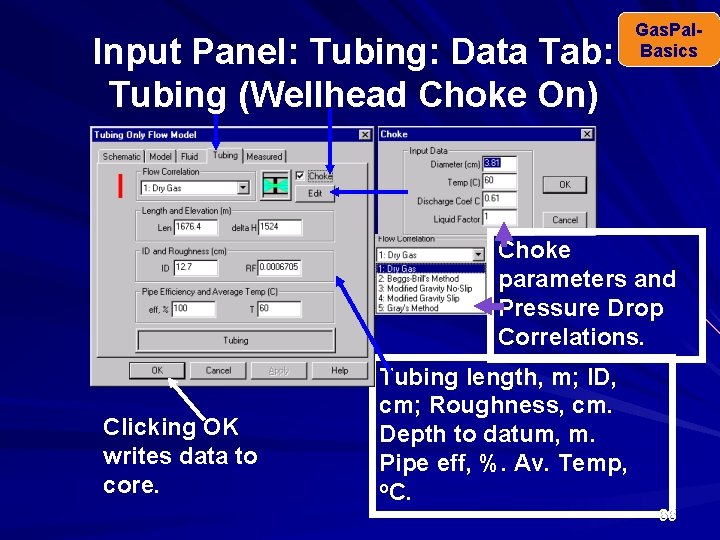
Input Panel: Tubing: Data Tab: Tubing (Wellhead Choke On) Gas. Pal. Basics Choke parameters and Pressure Drop Correlations. Clicking OK writes data to core. Tubing length, m; ID, cm; Roughness, cm. Depth to datum, m. Pipe eff, %. Av. Temp, o. C. 66
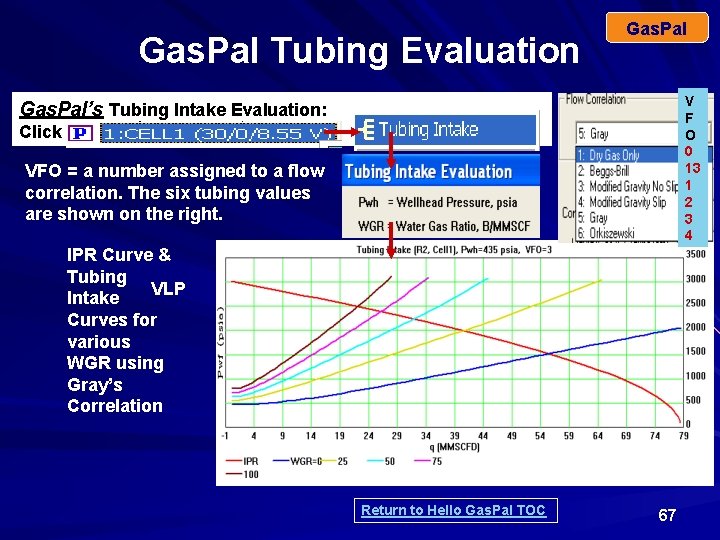
Gas. Pal Tubing Evaluation Gas. Pal V F O 0 13 1 2 3 4 Gas. Pal’s Tubing Intake Evaluation: Click VFO = a number assigned to a flow correlation. The six tubing values are shown on the right. IPR Curve & Tubing VLP Intake Curves for various WGR using Gray’s Correlation Return to Hello Gas. Pal TOC 67
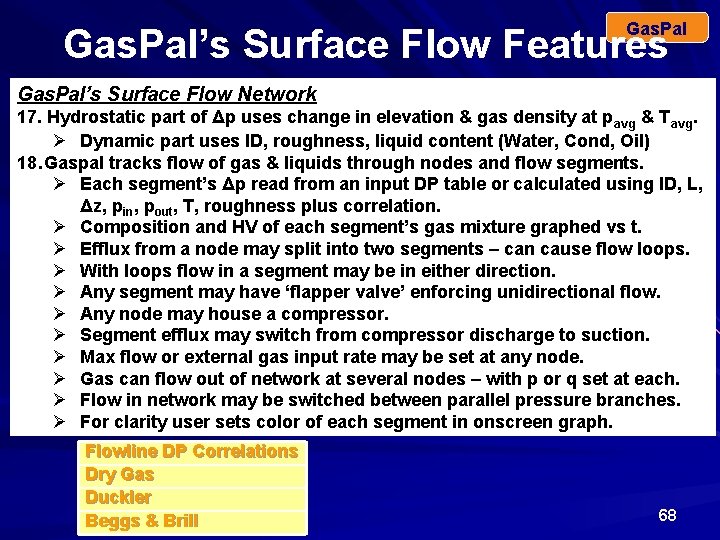
Gas. Pal’s Surface Flow Features Gas. Pal’s Surface Flow Network 17. Hydrostatic part of Δp uses change in elevation & gas density at pavg & Tavg. Ø Dynamic part uses ID, roughness, liquid content (Water, Cond, Oil) 18. Gaspal tracks flow of gas & liquids through nodes and flow segments. Ø Each segment’s Δp read from an input DP table or calculated using ID, L, Δz, pin, pout, T, roughness plus correlation. Ø Composition and HV of each segment’s gas mixture graphed vs t. Ø Efflux from a node may split into two segments – can cause flow loops. Ø With loops flow in a segment may be in either direction. Ø Any segment may have ‘flapper valve’ enforcing unidirectional flow. Ø Any node may house a compressor. Ø Segment efflux may switch from compressor discharge to suction. Ø Max flow or external gas input rate may be set at any node. Ø Gas can flow out of network at several nodes – with p or q set at each. Ø Flow in network may be switched between parallel pressure branches. Ø For clarity user sets color of each segment in onscreen graph. Flowline DP Correlations Dry Gas Duckler Beggs & Brill 68
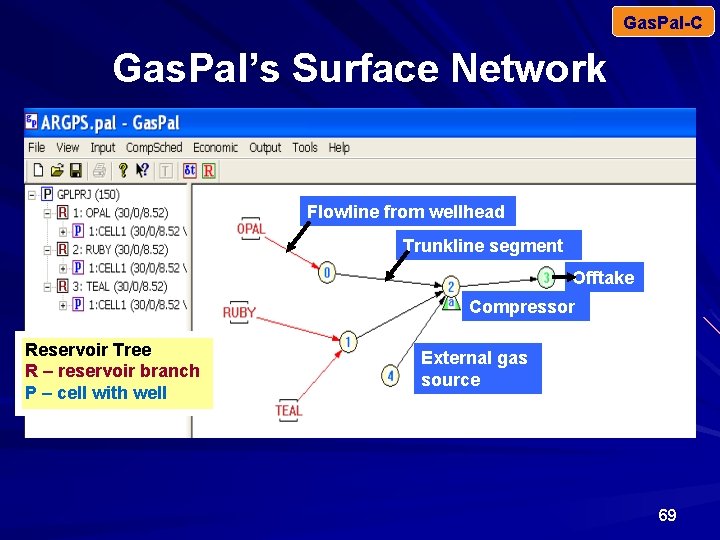
Gas. Pal-C Gas. Pal’s Surface Network Flowline from wellhead Trunkline segment Offtake Compressor Reservoir Tree R – reservoir branch P – cell with well External gas source 69
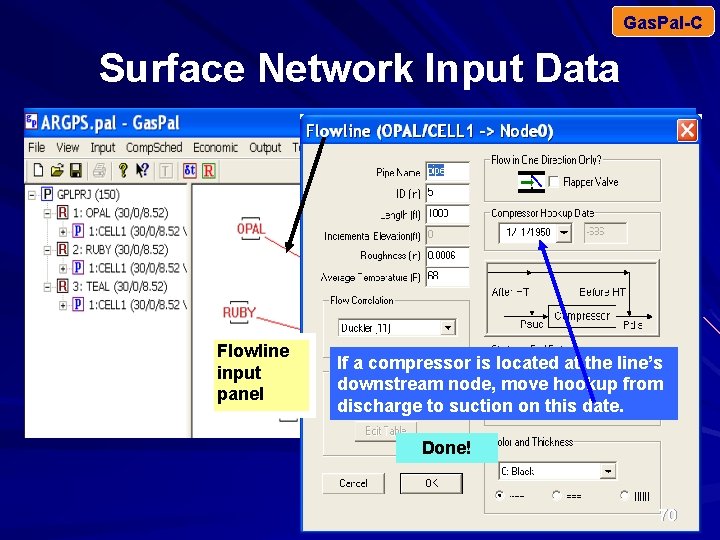
Gas. Pal-C Surface Network Input Data Flowline from wellhead Trunkline segment Offtake Compressor Flowline input panel External gas If a compressor is located at the line’s source downstream node, move hookup from discharge to suction on this date. Done! 70
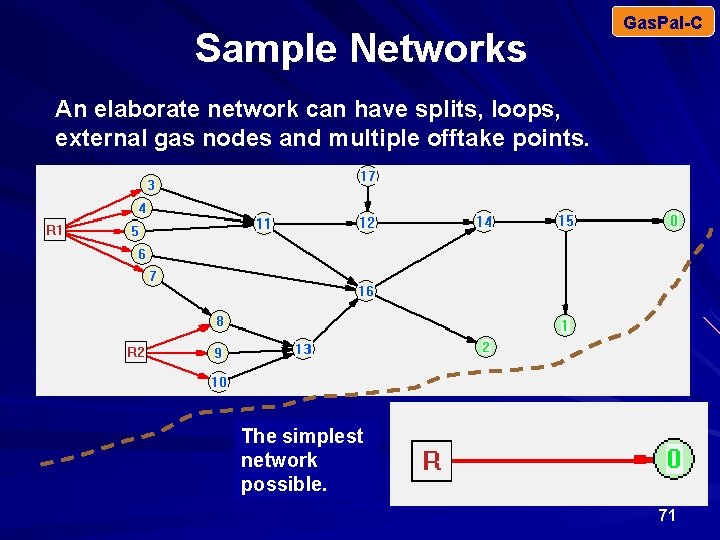
Sample Networks Gas. Pal-C An elaborate network can have splits, loops, external gas nodes and multiple offtake points. The simplest network possible. 71
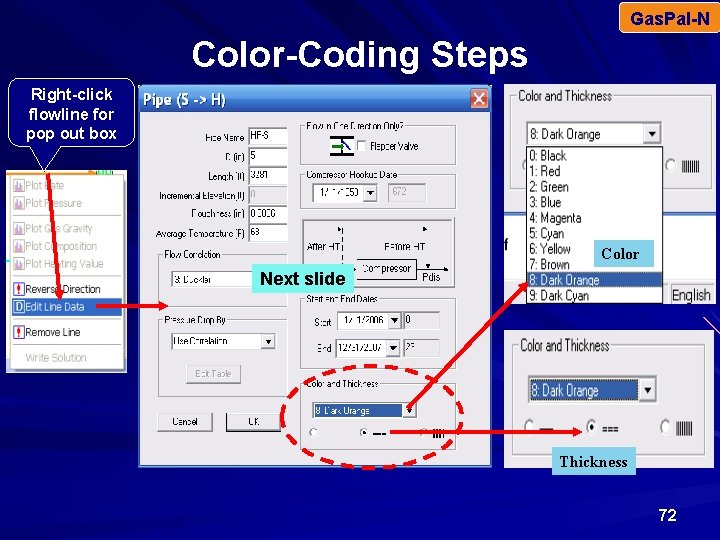
Gas. Pal-N Color-Coding Steps Right-click flowline for pop out box Color Next slide Thickness 72
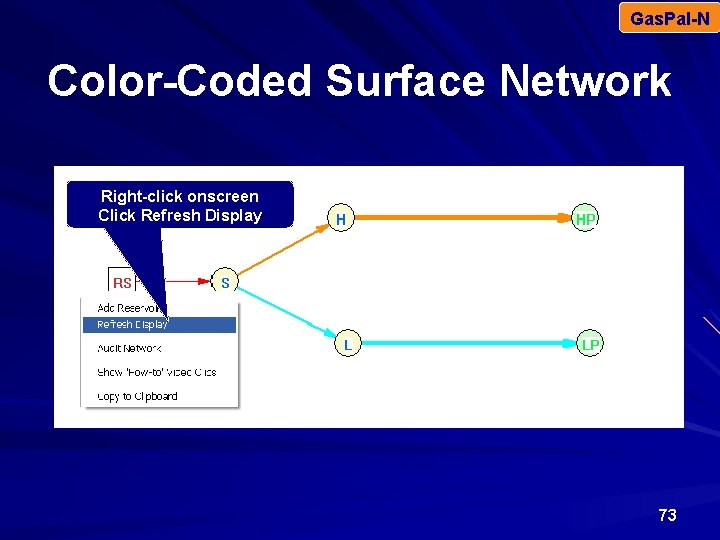
Gas. Pal-N Color-Coded Surface Network Right-click onscreen Click Refresh Display 73
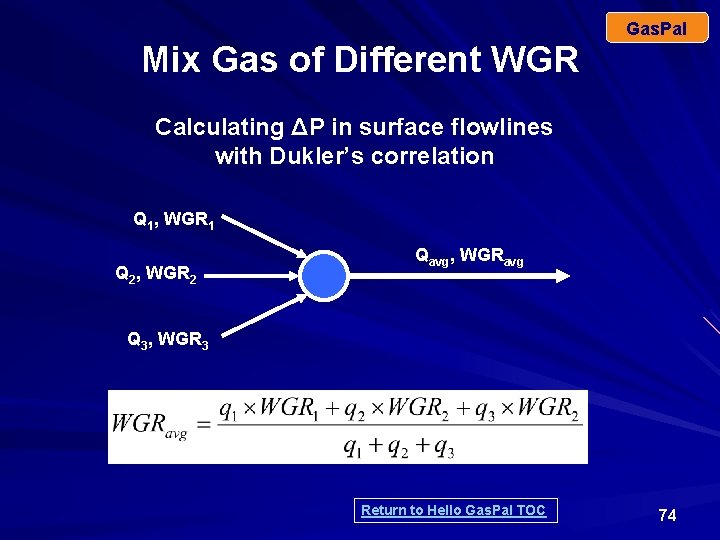
Gas. Pal Mix Gas of Different WGR Calculating ΔP in surface flowlines with Dukler’s correlation Q 1, WGR 1 Q 2, WGR 2 Qavg, WGRavg Q 3, WGR 3 Return to Hello Gas. Pal TOC 74
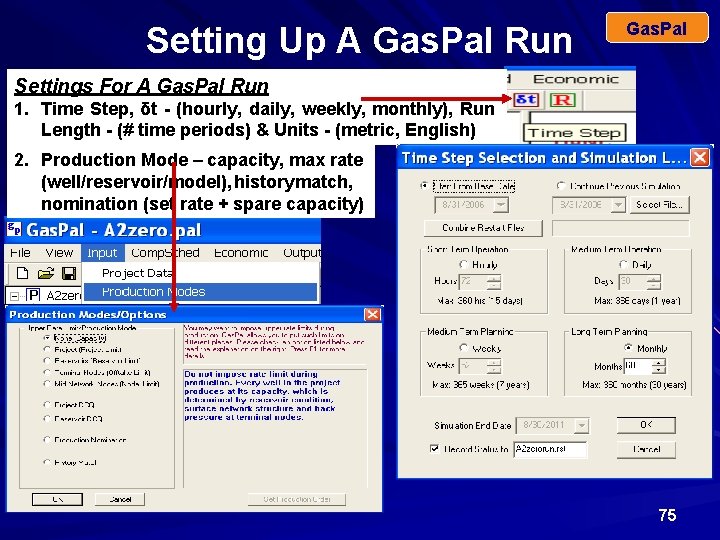
Setting Up A Gas. Pal Run Gas. Pal Settings For A Gas. Pal Run 1. Time Step, δt - (hourly, daily, weekly, monthly), Run Length - (# time periods) & Units - (metric, English) 2. Production Mode – capacity, max rate (well/reservoir/model), history match, nomination (set rate + spare capacity) 75
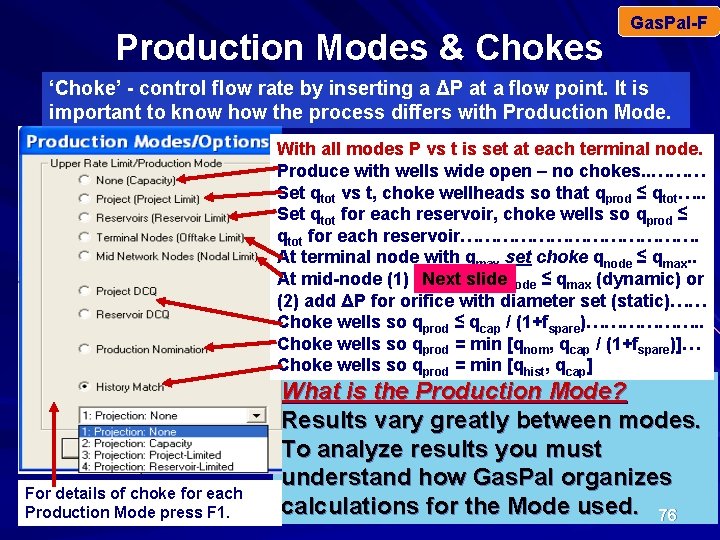
Production Modes & Chokes Gas. Pal-F ‘Choke’ - control flow rate by inserting a ΔP at a flow point. It is important to know how the process differs with Production Mode. With all modes P vs t is set at each terminal node. Produce with wells wide open – no chokes. . ……… Set qtot vs t, choke wellheads so that qprod ≤ qtot…. . Set qtot for each reservoir, choke wells so qprod ≤ qtot for each reservoir…………………. At terminal node with qmax set choke qnode ≤ qmax. . At mid-node (1) choke so qnode ≤ qmax (dynamic) or Next slide (2) add ΔP for orifice with diameter set (static)…… Choke wells so qprod ≤ qcap / (1+fspare)………………. . Choke wells so qprod = min [qnom, qcap / (1+fspare)]… Choke wells so qprod = min [qhist, qcap] For details of choke for each Production Mode press F 1. What is the Production Mode? Results vary greatly between modes. To analyze results you must understand how Gas. Pal organizes calculations for the Mode used. 76
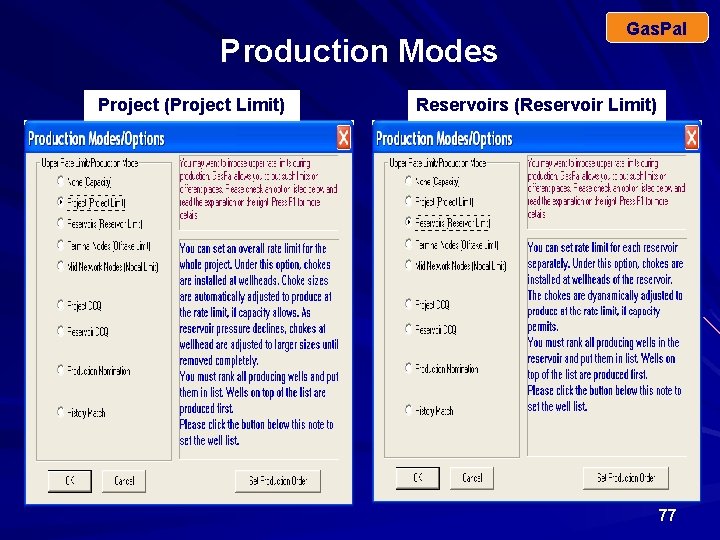
Production Modes Project(Project. Limit) Project Gas. Pal Reservoirs (Reservoir Limit) 77
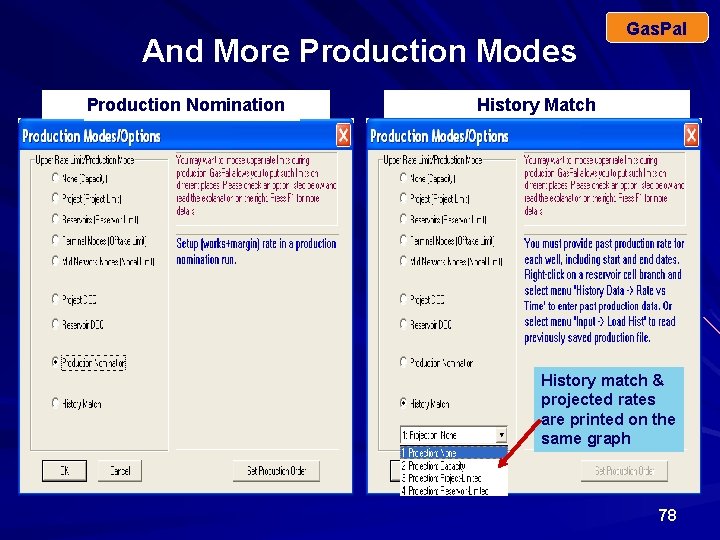
And More Production Modes Production Nomination Project (Project Limit) Gas. Pal History Match Limit) Reservoirs (Reservoir History match & projected rates are printed on the same graph 78
Gas. Pal Why and How to Choke Wells Why: Possible reasons – To control downstream rates because of pipe/facility limits – To provide producing margin (spare capacity) How: Rank wells based on a given criterion such as WGR or pressure, then – Shut in low-priority wells completely until desired margin is achieved, or – Reduce production rates from low-priority wells to predefined fractions until desired margin is achieved. 79
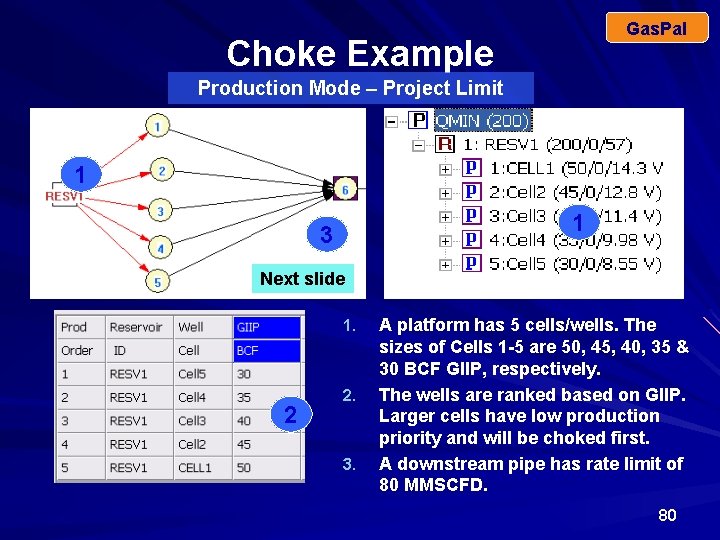
Gas. Pal Choke Example Production Mode – Project Limit 1 1 3 Next slide 1. 2 2. 3. A platform has 5 cells/wells. The sizes of Cells 1 -5 are 50, 45, 40, 35 & 30 BCF GIIP, respectively. The wells are ranked based on GIIP. Larger cells have low production priority and will be choked first. A downstream pipe has rate limit of 80 MMSCFD. 80
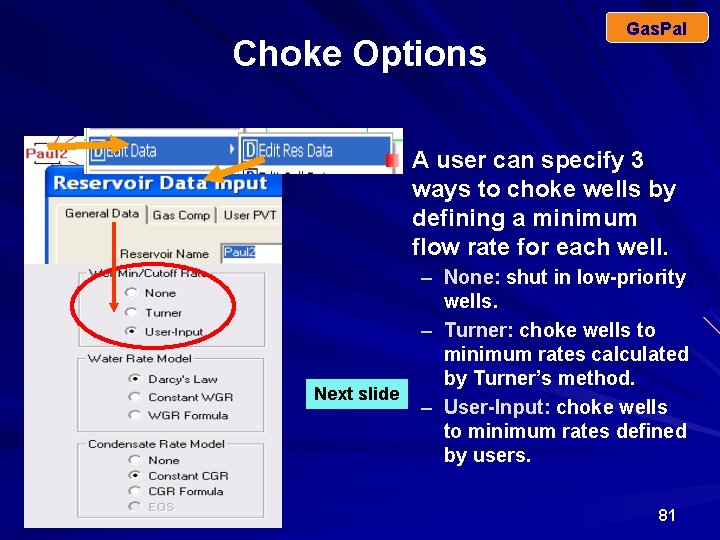
Choke Options Gas. Pal A user can specify 3 ways to choke wells by defining a minimum flow rate for each well. Next slide – None: shut in low-priority wells. – Turner: choke wells to minimum rates calculated by Turner’s method. – User-Input: choke wells to minimum rates defined by users. 81
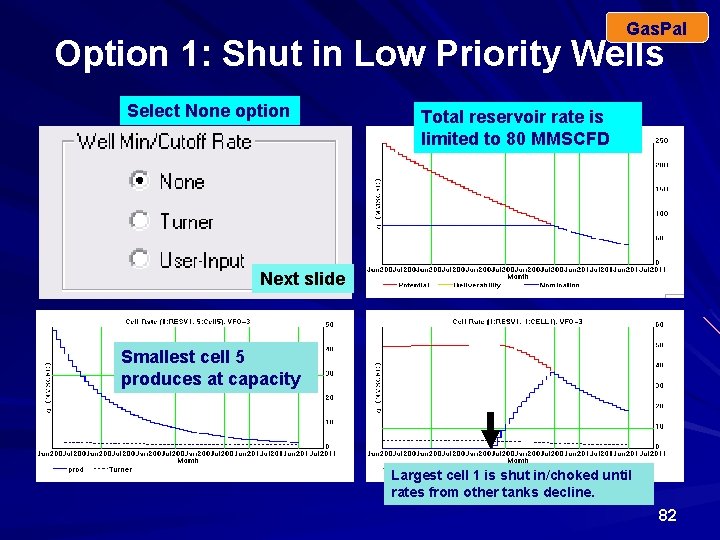
Gas. Pal Option 1: Shut in Low Priority Wells Select None option Total reservoir rate is limited to 80 MMSCFD Next slide Smallest cell 5 produces at capacity Largest cell 1 is shut in/choked until rates from other tanks decline. 82
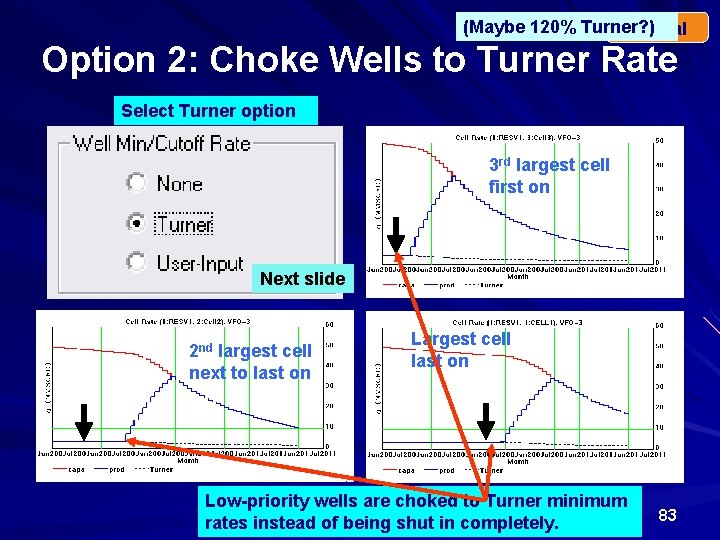
(Maybe 120% Turner? ) Gas. Pal Option 2: Choke Wells to Turner Rate Select Turner option 3 rd largest cell first on Next slide 2 nd largest cell next to last on Largest cell last on Low-priority wells are choked to Turner minimum rates instead of being shut in completely. 83
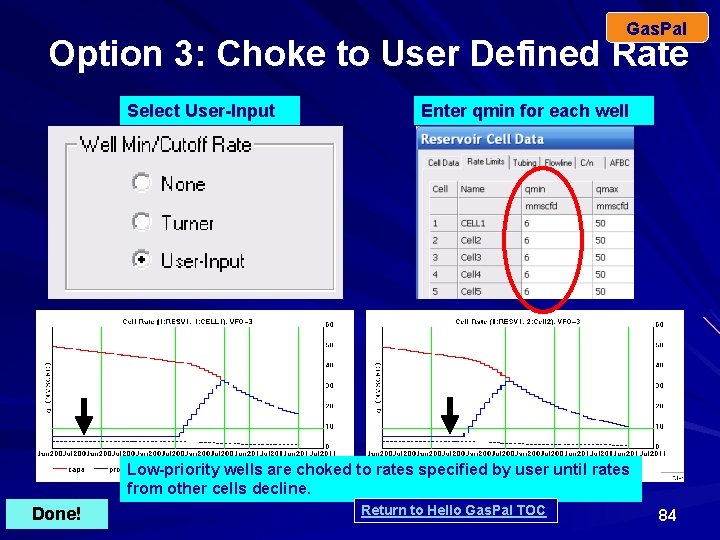
Gas. Pal Option 3: Choke to User Defined Rate Select User-Input Enter qmin for each well Low-priority wells are choked to rates specified by user until rates from other cells decline. Done! Return to Hello Gas. Pal TOC 84
Anatomy Of A Run Gas. Pal-F How do you use Gas. Pal’s output features – onscreen graphs, gas trace & text / xls files to explain results? What is the Production Mode? Results vary greatly between the 9 modes. Here we consider Project Limit. How many offtake nodes in the model? Here 2. Is P or q set at each offtake node? P = 435 psi at Node OUT 1; P = 400 psi at Node OUT 2. Is spare capacity > 0? Here it is 10%. Are flow limits specified for any node? Here qmax = 61 at Node 1. What priorities are set for wells? These are set by user in input data panel. 85
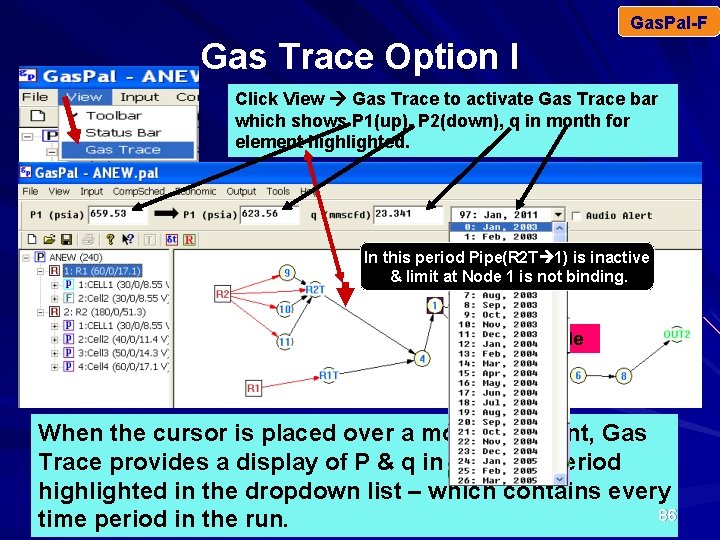
Gas. Pal-F Gas Trace Option I Click View Gas Trace to activate Gas Trace bar which shows P 1(up), P 2(down), q in month for element highlighted. In this period Pipe(R 2 T 1) is inactive & limit at Node 1 is not binding. Next Slide When the cursor is placed over a model element, Gas Trace provides a display of P & q in the time period highlighted in the dropdown list – which contains every 86 time period in the run.
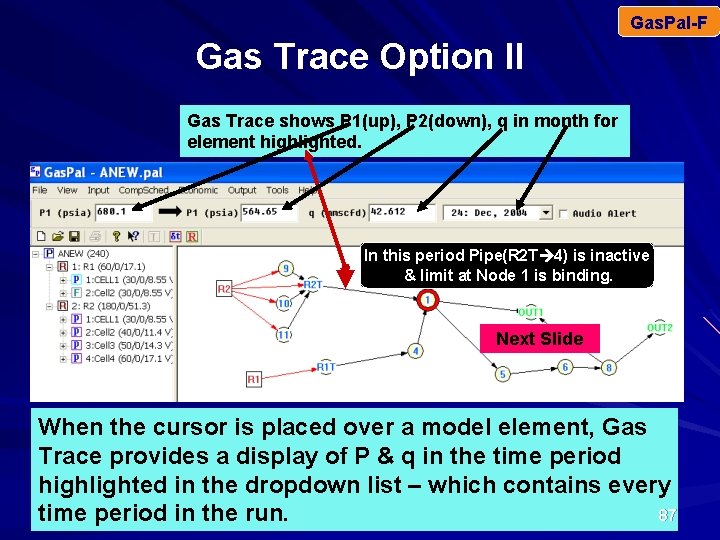
Gas. Pal-F Gas Trace Option II Gas Trace shows P 1(up), P 2(down), q in month for element highlighted. In this period Pipe(R 2 T 4) is inactive & limit at Node 1 is binding. Next Slide When the cursor is placed over a model element, Gas Trace provides a display of P & q in the time period highlighted in the dropdown list – which contains every 87 time period in the run.
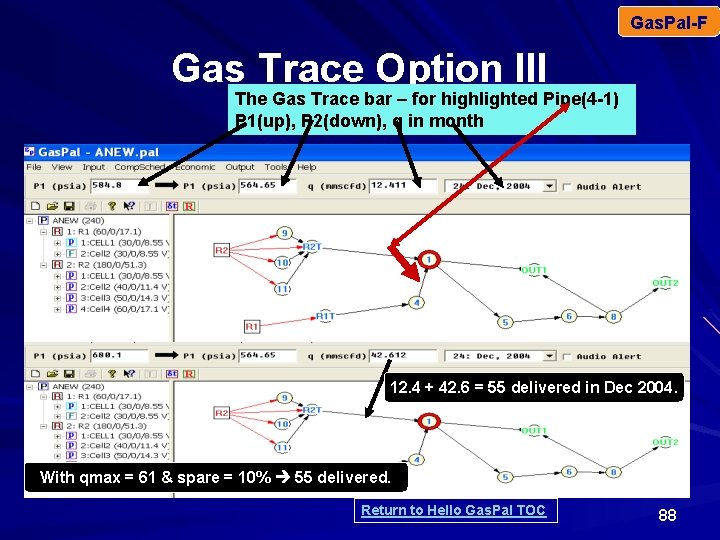
Gas. Pal-F Gas Trace Option III The Gas Trace bar – for highlighted Pipe(4 -1) P 1(up), P 2(down), q in month 12. 4 + 42. 6 = 55 delivered in Dec 2004. With qmax = 61 & spare = 10% 55 delivered. Return to Hello Gas. Pal TOC 88
Gas. Pal History Matching Process Vertical Flow Option HM is a trial-and–error process to determine parameters (k, h, Φ, Skin, rw, GIIP, turbulence, WGR, CGR, VFO, etc) that cause a reservoir model’s prediction of q & P for each producing well to agree ‘close enough’ to observed performance during a historical period. ‘Close enough’ means the analyst judges that the model is valid enough to provide projections of future performance with ‘engineering’ accuracy. Each reservoir in a multiple-reservoir model is HMed individually, albeit perhaps simultaneously with other reservoirs in the model. Gas. Pal facilitates HM: (1) historical q & p vectors cut from an Excel file are pasted into input panels, (2) graphs and tables comparing predicted to observed performance are obtained onscreen with a mouse click, (3) new runs are made quickly after revised parameter values are input & (4) upon request a restart file is written after a HM run – to provide reservoir status at the beginning of future performance-prediction runs. 3 89
HM Simulation Summary Gas. Pal HM and projections can be combined in a single Gas. Pal run. Combination runs provide graphs comparing observed vs calculated behavior in the HM period followed by future predictions afterward. The projection portion can be – None (rate set to zero after HM period) – At capacity – Total production rate = Min(qreq, capacity) – Each reservoir’s rate = Min(qreq, capacity) HM and projection can be run separately via use of a restart file that gives status of all reservoirs at end of the HM period. 90
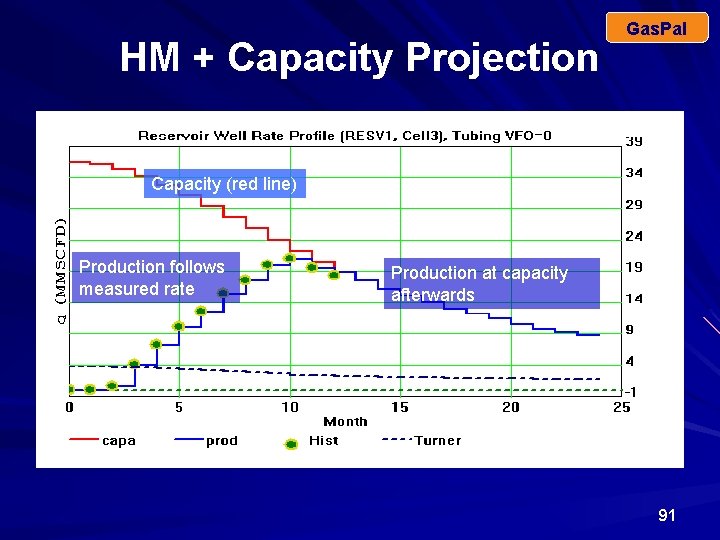
HM + Capacity Projection Gas. Pal Capacity (red line) Production follows measured rate Production at capacity afterwards 91
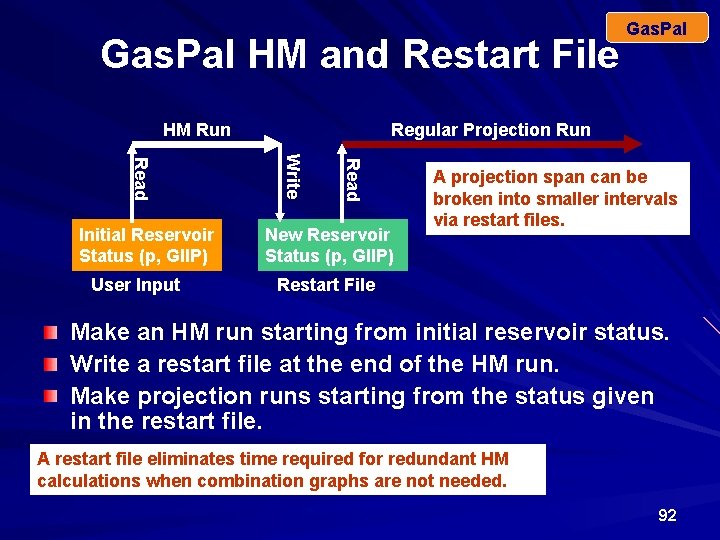
Gas. Pal HM and Restart File HM Run Read User Input Regular Projection Run Write Read Initial Reservoir Status (p, GIIP) Gas. Pal New Reservoir Status (p, GIIP) A projection span can be broken into smaller intervals via restart files. Restart File Make an HM run starting from initial reservoir status. Write a restart file at the end of the HM run. Make projection runs starting from the status given in the restart file. A restart file eliminates time required for redundant HM calculations when combination graphs are not needed. 92
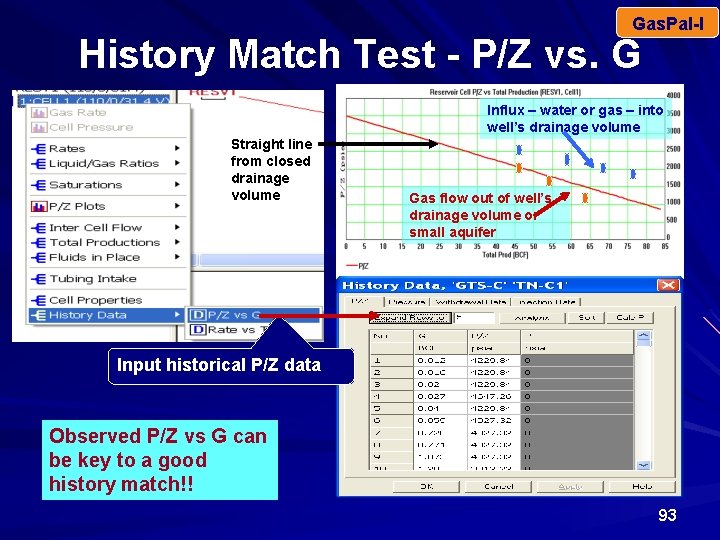
Gas. Pal-I History Match Test - P/Z vs. G Influx – water or gas – into well’s drainage volume Straight line from closed drainage volume Gas flow out of well’s drainage volume or small aquifer Input historical P/Z data Observed P/Z vs G can be key to a good history match!! 93
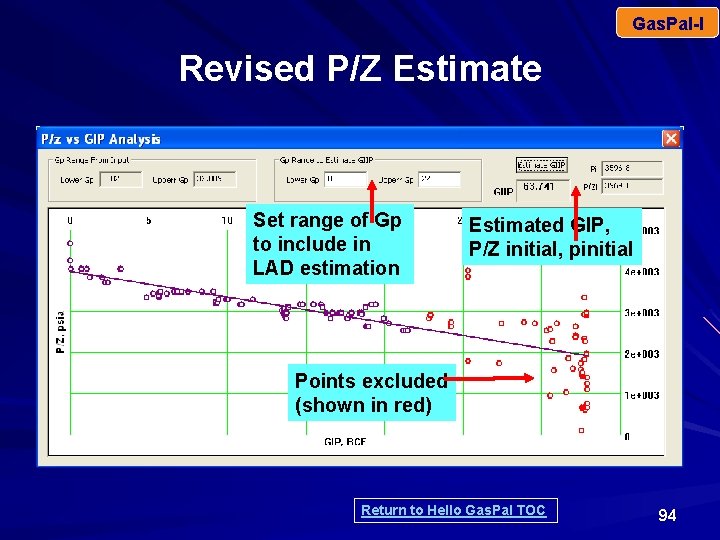
Gas. Pal-I Revised P/Z Estimate Set range of Gp to include in LAD estimation Estimated GIP, P/Z initial, pinitial Points excluded (shown in red) Return to Hello Gas. Pal TOC 94
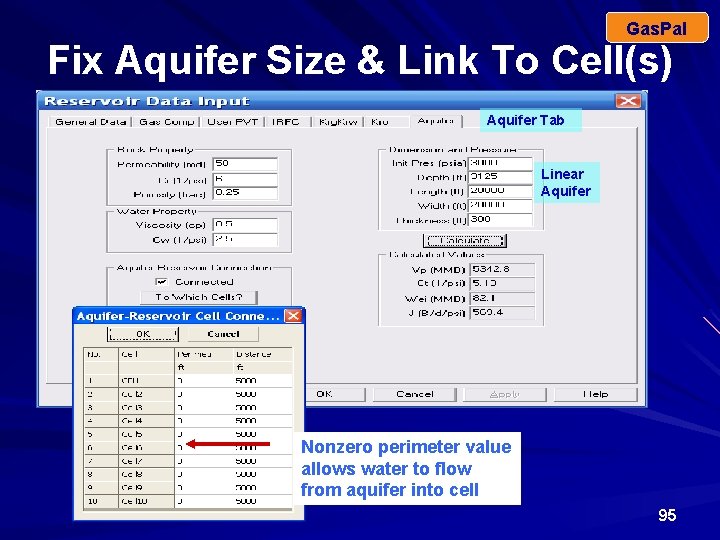
Gas. Pal Fix Aquifer Size & Link To Cell(s) Aquifer Tab Linear Aquifer Nonzero perimeter value allows water to flow from aquifer into cell 95
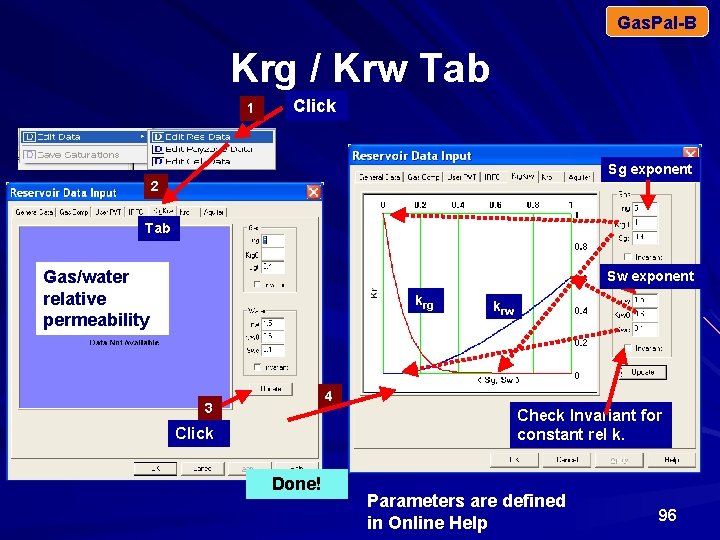
Gas. Pal-B Krg / Krw Tab 1 Click Sg exponent 2 Tab Gas/water relative permeability Sw exponent krg krw 4 3 Check Invariant for constant rel k. Click Done! Parameters are defined in Online Help 96
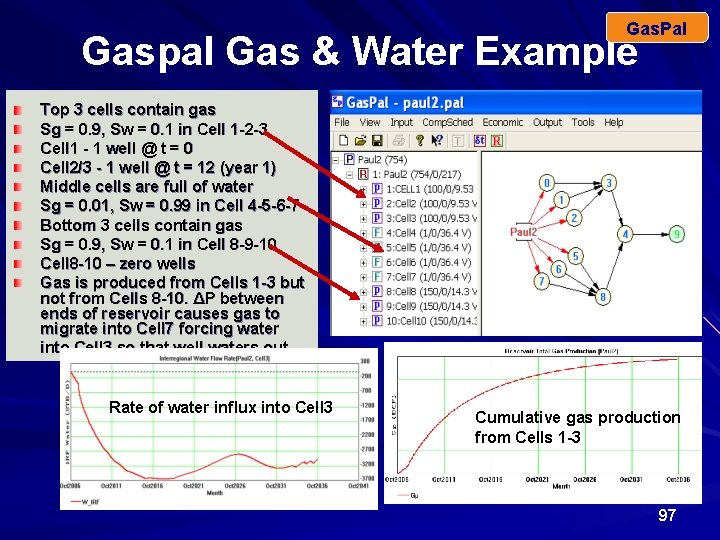
Gas. Pal Gaspal Gas & Water Example Top 3 cells contain gas Sg = 0. 9, Sw = 0. 1 in Cell 1 -2 -3 Cell 1 - 1 well @ t = 0 Cell 2/3 - 1 well @ t = 12 (year 1) Middle cells are full of water Sg = 0. 01, Sw = 0. 99 in Cell 4 -5 -6 -7 Bottom 3 cells contain gas Sg = 0. 9, Sw = 0. 1 in Cell 8 -9 -10 Cell 8 -10 – zero wells Gas is produced from Cells 1 -3 but not from Cells 8 -10. ΔP between ends of reservoir causes gas to migrate into Cell 7 forcing water into Cell 3 so that well waters out. Rate of water influx into Cell 3 Cumulative gas production from Cells 1 -3 97
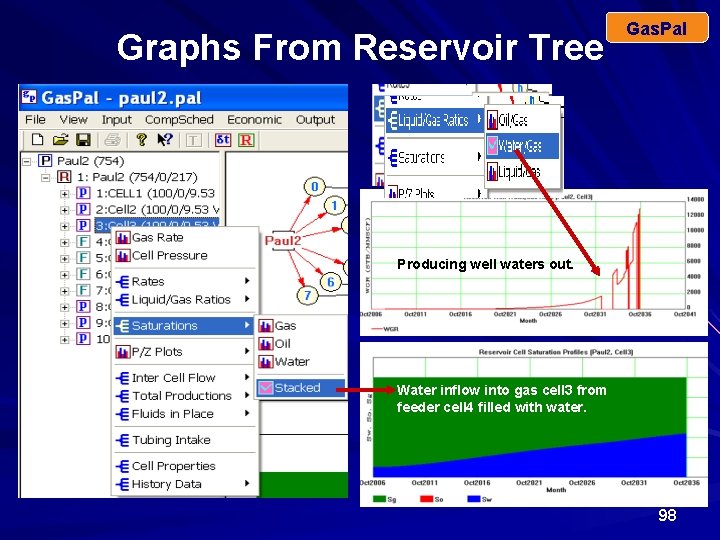
Graphs From Reservoir Tree Gas. Pal Producing well waters out. Water inflow into gas cell 3 from feeder cell 4 filled with water. 98
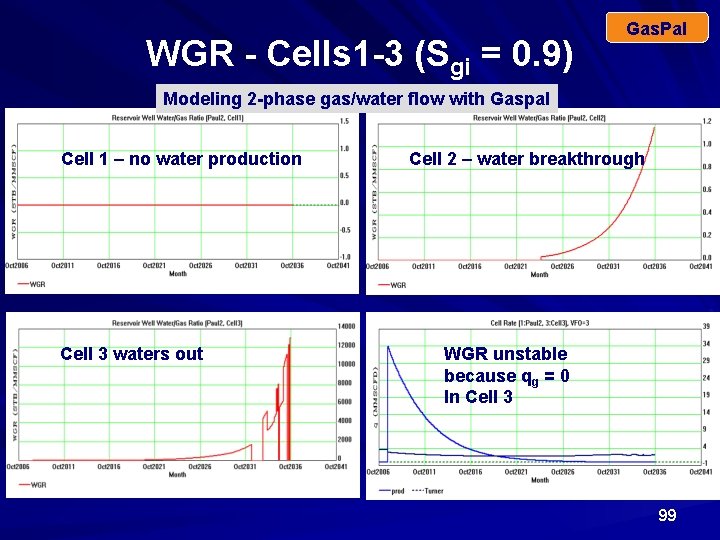
WGR - Cells 1 -3 (Sgi = 0. 9) Gas. Pal Modeling 2 -phase gas/water flow with Gaspal Cell 1 – no water production Cell 3 waters out Cell 2 – water breakthrough WGR unstable because qg = 0 In Cell 3 99
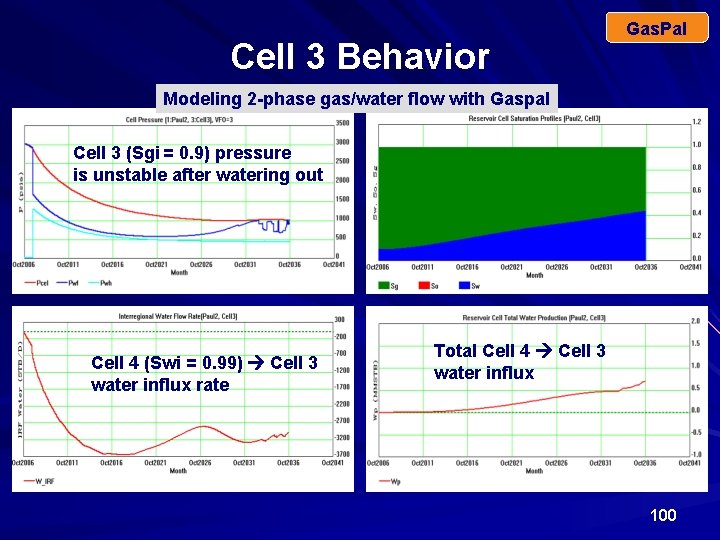
Cell 3 Behavior Gas. Pal Modeling 2 -phase gas/water flow with Gaspal Cell 3 (Sgi = 0. 9) pressure is unstable after watering out Cell 4 (Swi = 0. 99) Cell 3 water influx rate Total Cell 4 Cell 3 water influx 100
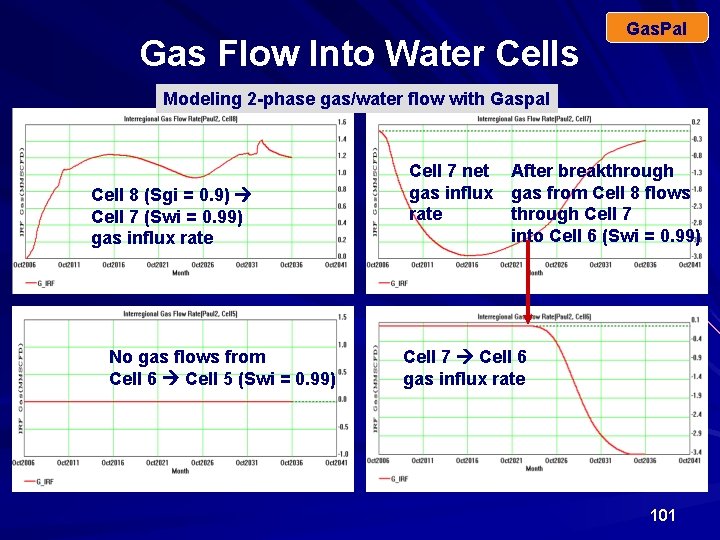
Gas Flow Into Water Cells Gas. Pal Modeling 2 -phase gas/water flow with Gaspal Cell 8 (Sgi = 0. 9) Cell 7 (Swi = 0. 99) gas influx rate No gas flows from Cell 6 Cell 5 (Swi = 0. 99) Cell 7 net gas influx rate After breakthrough gas from Cell 8 flows through Cell 7 into Cell 6 (Swi = 0. 99) Cell 7 Cell 6 gas influx rate 101
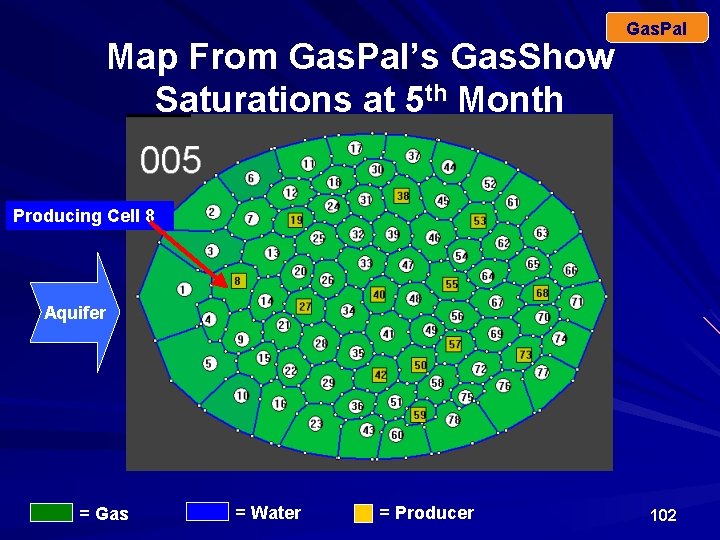
Map From Gas. Pal’s Gas. Show Saturations at 5 th Month Gas. Pal Producing Cell 8 Aquifer = Gas = Water = Producer 102
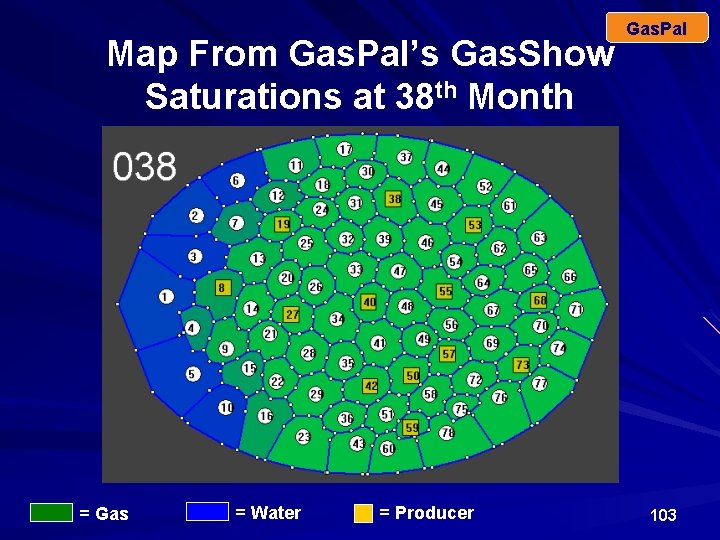
Map From Gas. Pal’s Gas. Show Saturations at 38 th Month = Gas = Water = Producer Gas. Pal 103
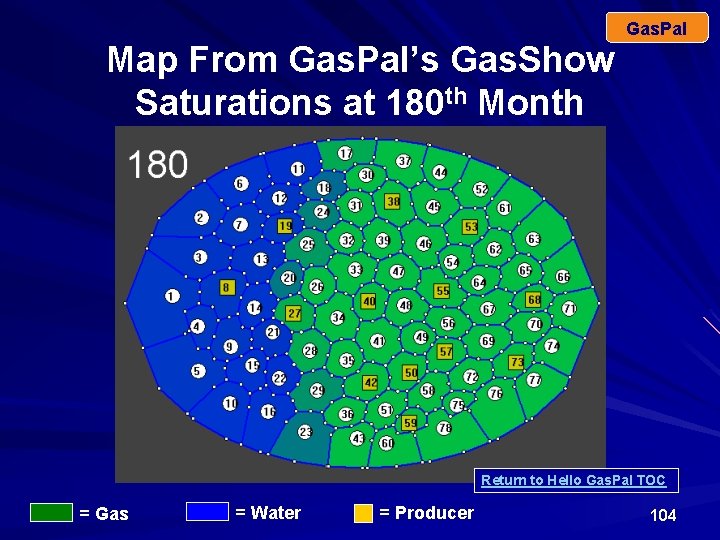
Gas. Pal Map From Gas. Pal’s Gas. Show Saturations at 180 th Month Return to Hello Gas. Pal TOC = Gas = Water = Producer 104
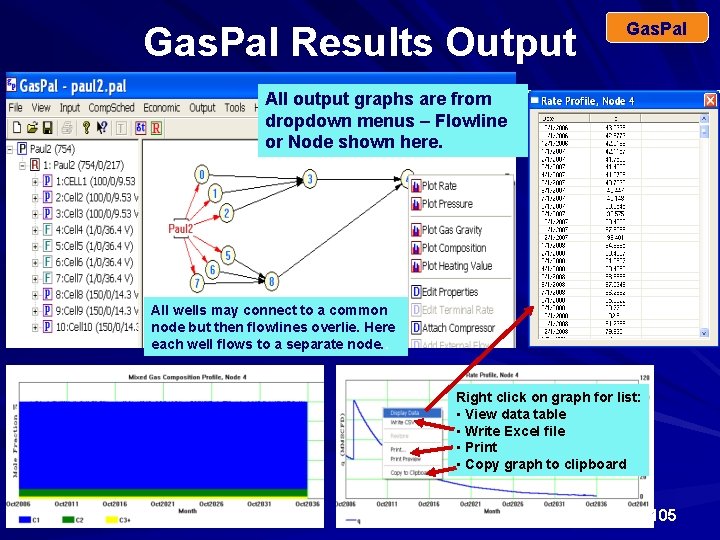
Gas. Pal Results Output Gas. Pal All output graphs are from dropdown menus – Flowline or Node shown here. All wells may connect to a common node but then flowlines overlie. Here each well flows to a separate node. . Right click on graph for list: • View data table • Write Excel file • Print • Copy graph to clipboard 105
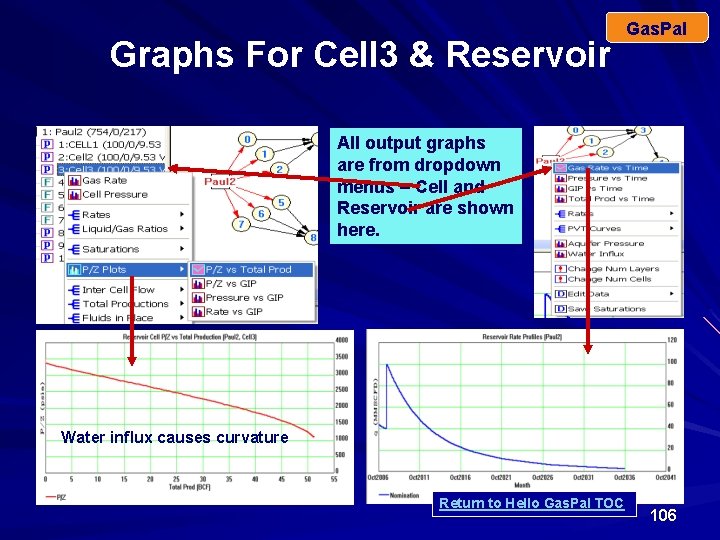
Graphs For Cell 3 & Reservoir Gas. Pal All output graphs are from dropdown menus – Cell and Reservoir are shown here. Water influx causes curvature Return to Hello Gas. Pal TOC 106
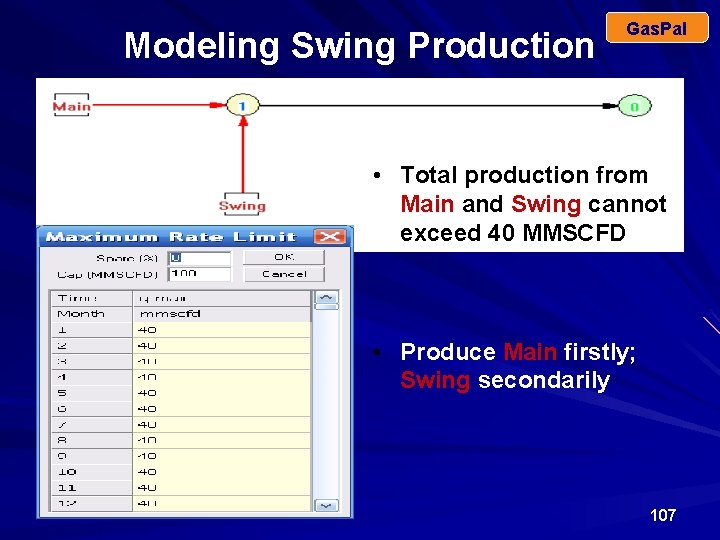
Modeling Swing Production Gas. Pal • Total production from Main and Swing cannot exceed 40 MMSCFD • Produce Main firstly; Swing secondarily 107
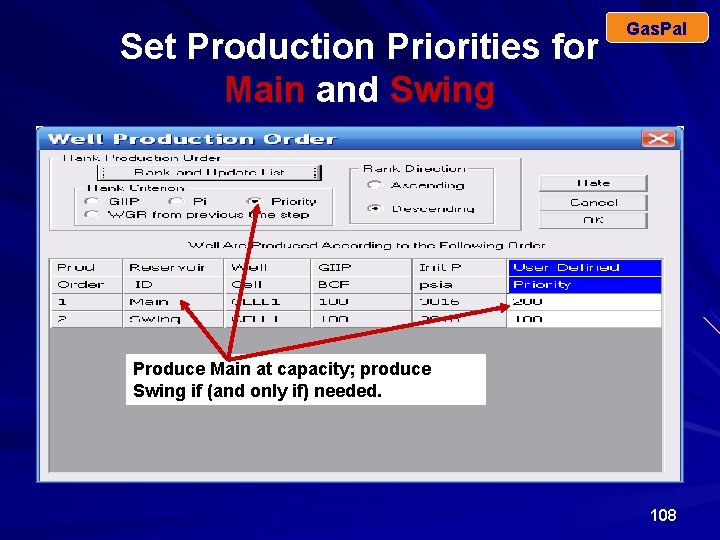
Set Production Priorities for Main and Swing Gas. Pal Produce Main at capacity; produce Swing if (and only if) needed. 108
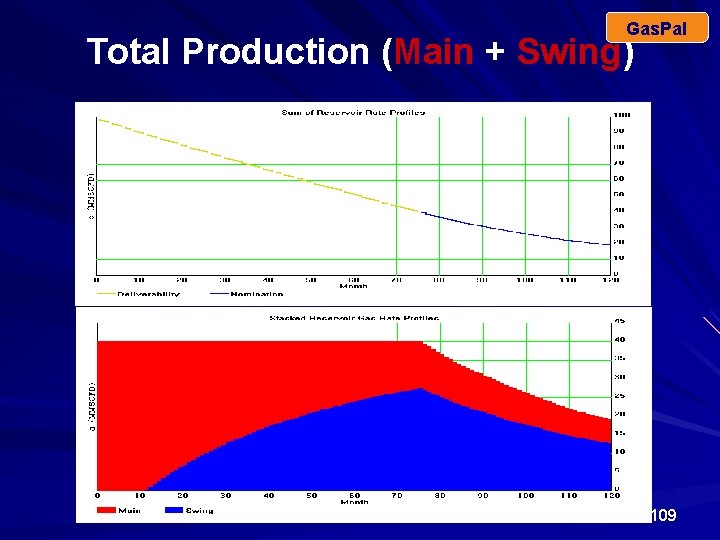
Gas. Pal Total Production (Main + Swing) 109
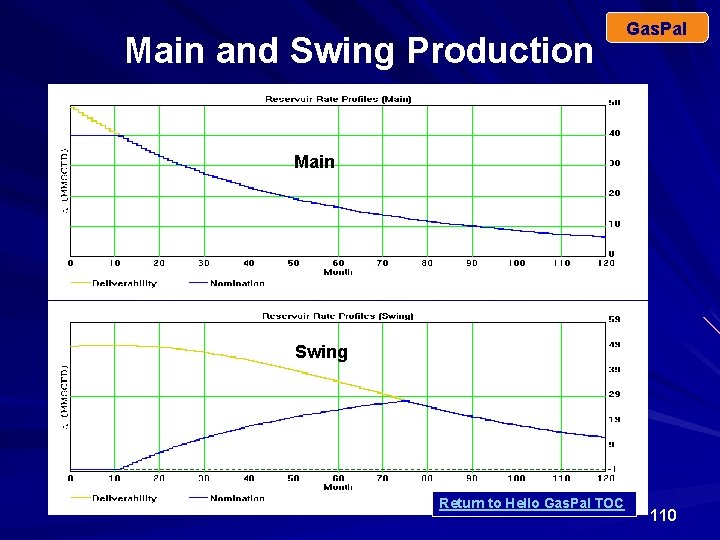
Main and Swing Production Gas. Pal Main Swing Return to Hello Gas. Pal TOC 110
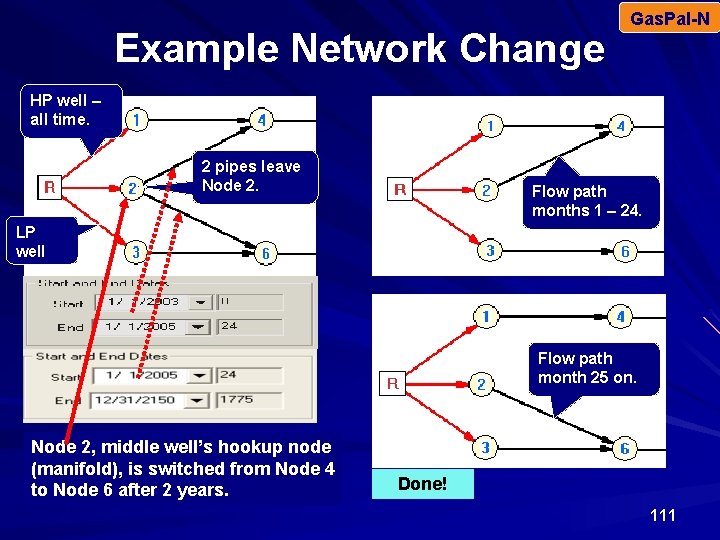
Example Network Change Gas. Pal-N HP well – all time. 2 pipes leave Node 2. Flow path months 1 – 24. LP well Flow path month 25 on. Node 2, middle well’s hookup node (manifold), is switched from Node 4 to Node 6 after 2 years. Done! 111
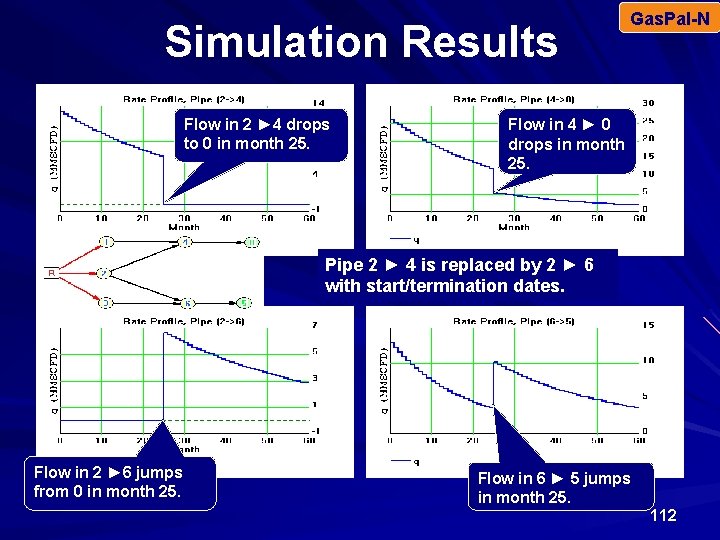
Simulation Results Flow in 2 ► 4 drops to 0 in month 25. Gas. Pal-N Flow in 4 ► 0 drops in month 25. Pipe 2 ► 4 is replaced by 2 ► 6 with start/termination dates. Flow in 2 ► 6 jumps from 0 in month 25. Flow in 6 ► 5 jumps in month 25. 112
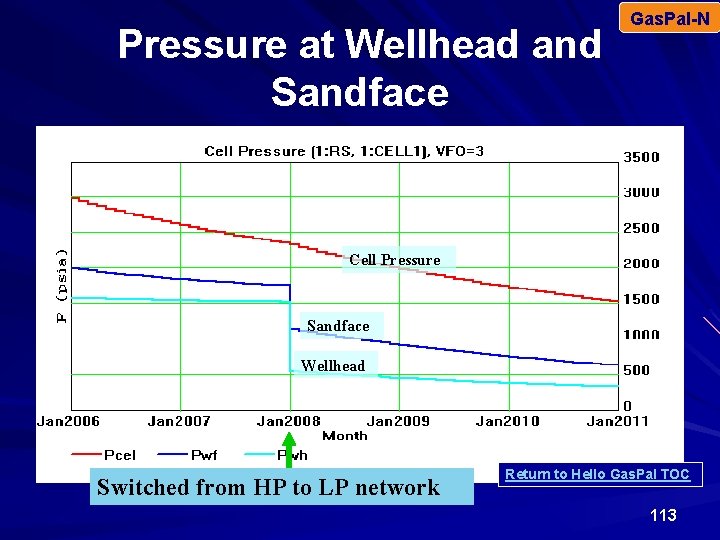
Pressure at Wellhead and Sandface Gas. Pal-N Cell Pressure Sandface Wellhead Switched from HP to LP network Return to Hello Gas. Pal TOC 113
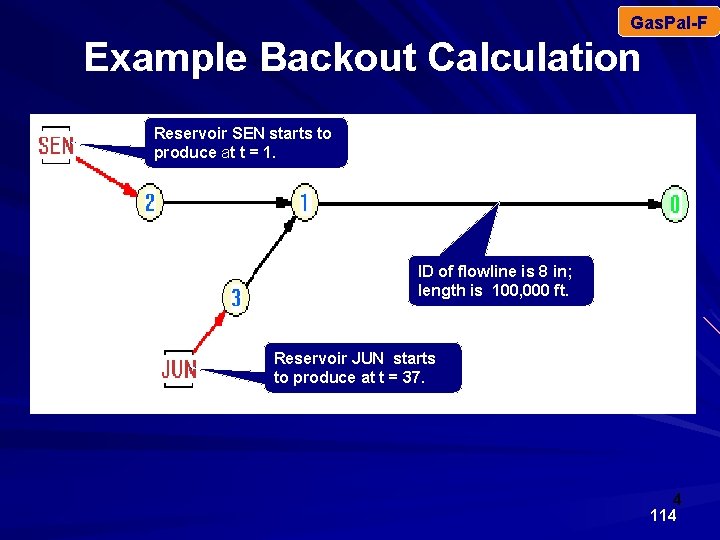
Gas. Pal-F Example Backout Calculation Reservoir SEN starts to produce at t = 1. ID of flowline is 8 in; length is 100, 000 ft. Reservoir JUN starts to produce at t = 37. 4 114
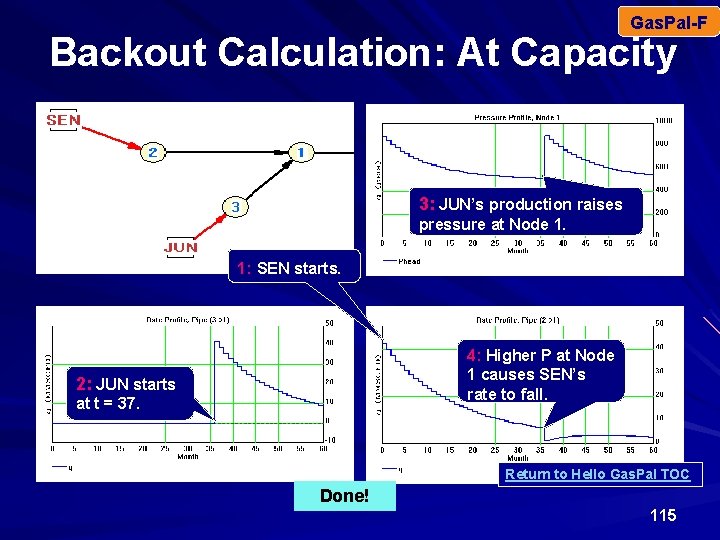
Gas. Pal-F Backout Calculation: At Capacity 3: JUN’s production raises pressure at Node 1. 1: SEN starts. 4: Higher P at Node 1 causes SEN’s rate to fall. 2: JUN starts at t = 37. Return to Hello Gas. Pal TOC Done! 115
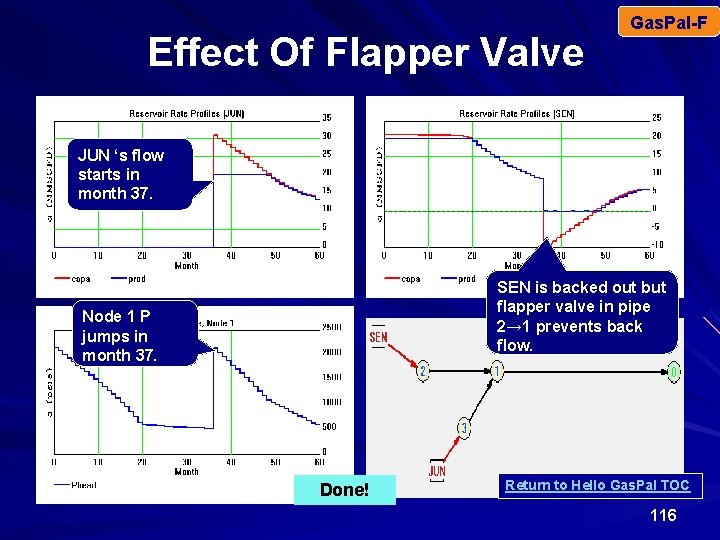
Effect Of Flapper Valve Gas. Pal-F JUN ‘s flow starts in month 37. SEN is backed out but flapper valve in pipe 2→ 1 prevents back flow. Node 1 P jumps in month 37. Done! Return to Hello Gas. Pal TOC 116
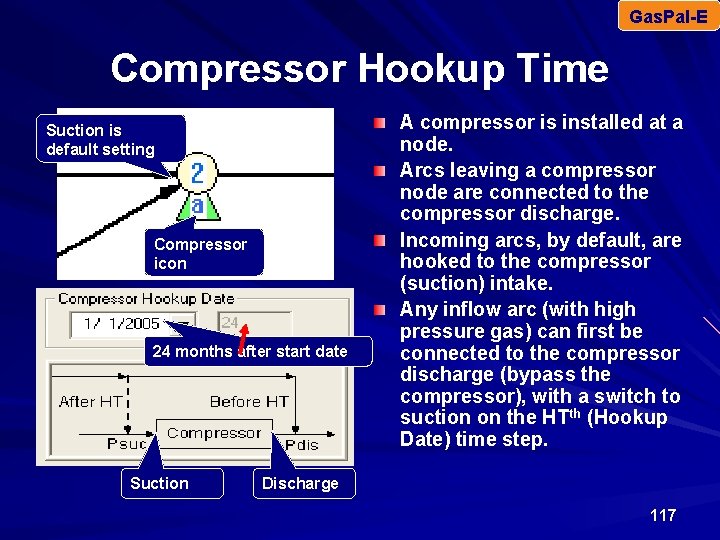
Gas. Pal-E Compressor Hookup Time Suction is default setting Compressor icon 24 months after start date Suction A compressor is installed at a node. Arcs leaving a compressor node are connected to the compressor discharge. Incoming arcs, by default, are hooked to the compressor (suction) intake. Any inflow arc (with high pressure gas) can first be connected to the compressor discharge (bypass the compressor), with a switch to suction on the HTth (Hookup Date) time step. Discharge 117
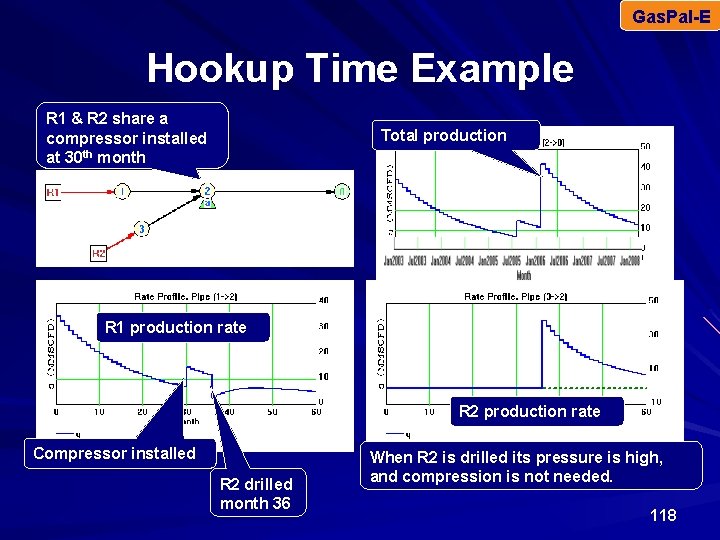
Gas. Pal-E Hookup Time Example R 1 & R 2 share a compressor installed at 30 th month Total production R 1 production rate R 2 production rate Compressor installed R 2 drilled month 36 When R 2 is drilled its pressure is high, and compression is not needed. 118
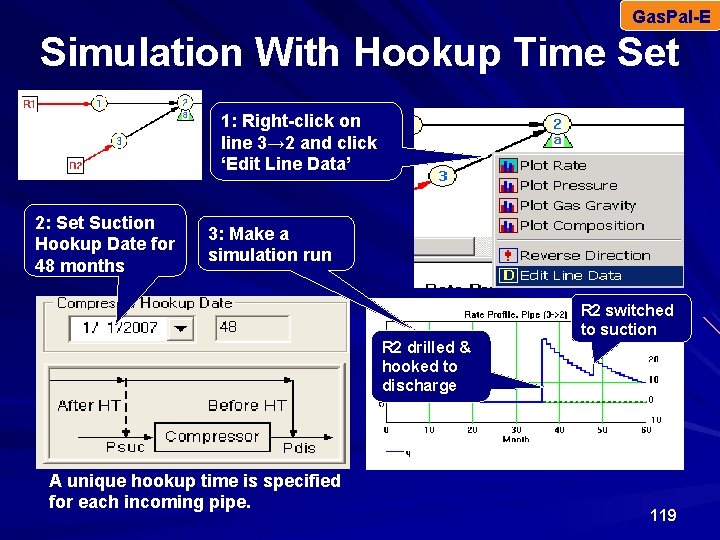
Gas. Pal-E Simulation With Hookup Time Set 1: Right-click on line 3→ 2 and click ‘Edit Line Data’ 2: Set Suction Hookup Date for 48 months 3: Make a simulation run R 2 switched to suction R 2 drilled & hooked to discharge A unique hookup time is specified for each incoming pipe. 119
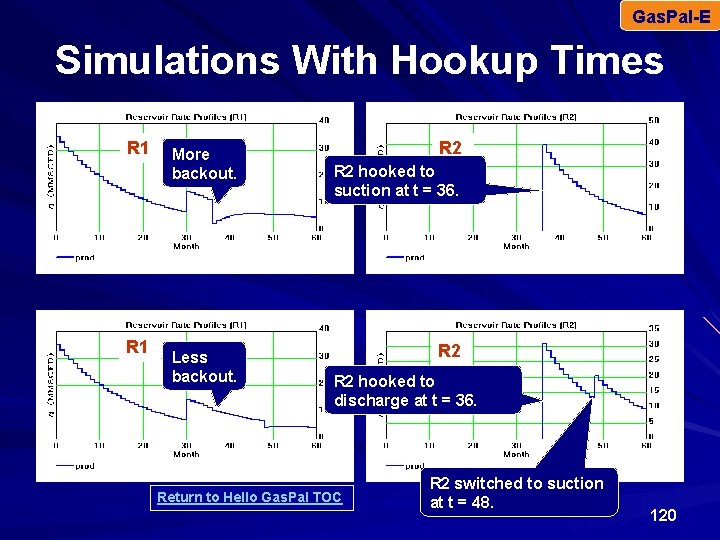
Gas. Pal-E Simulations With Hookup Times R 1 More backout. Less backout. R 2 hooked to suction at t = 36. R 2 hooked to discharge at t = 36. Return to Hello Gas. Pal TOC R 2 switched to suction at t = 48. 120
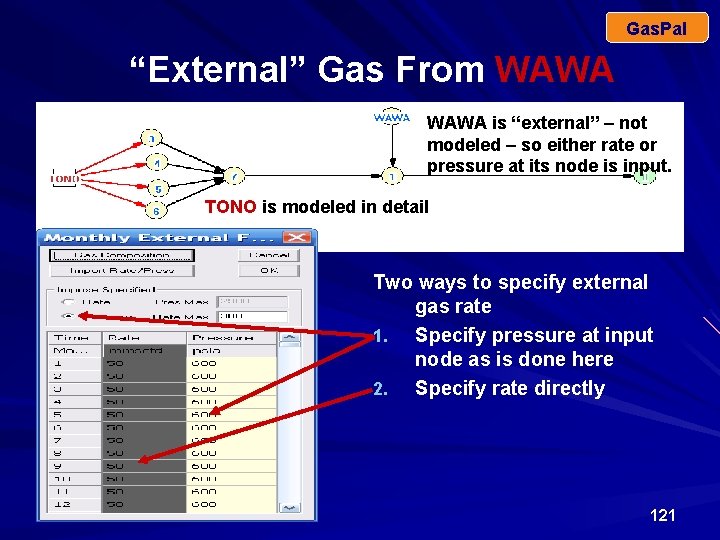
Gas. Pal “External” Gas From WAWA is “external” – not modeled – so either rate or pressure at its node is input. TONO is modeled in detail Two ways to specify external gas rate 1. Specify pressure at input node as is done here 2. Specify rate directly 121
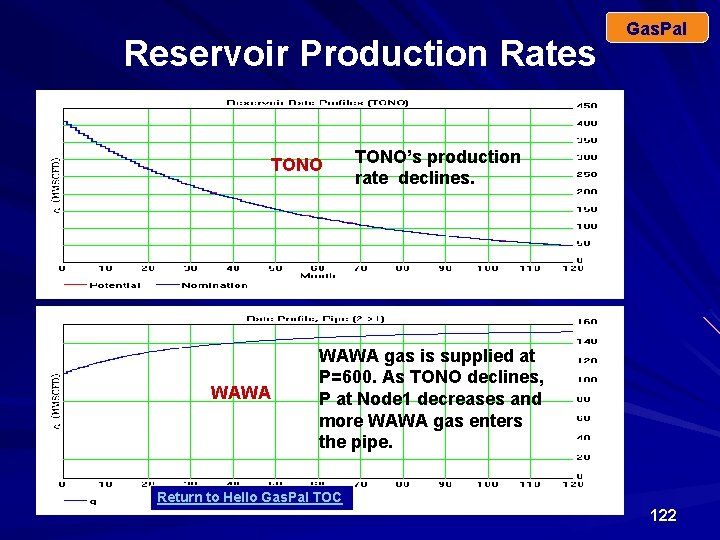
Reservoir Production Rates TONO WAWA Gas. Pal TONO’s production rate declines. WAWA gas is supplied at P=600. As TONO declines, P at Node 1 decreases and more WAWA gas enters the pipe. Return to Hello Gas. Pal TOC 122
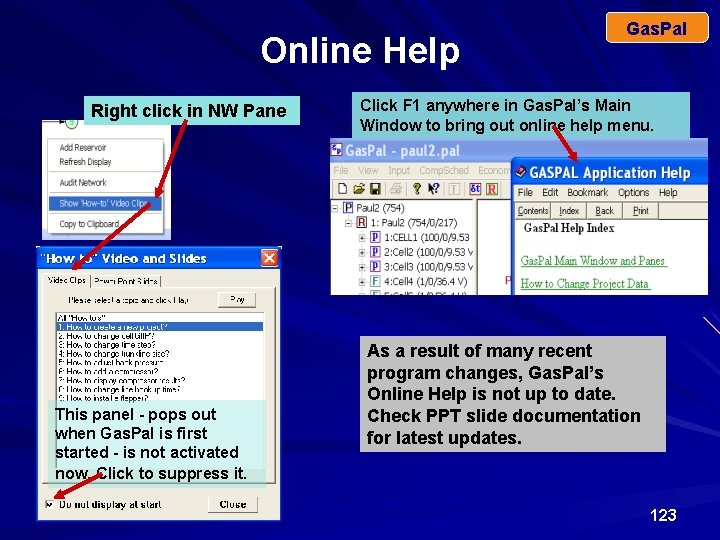
Online Help Right click in NW Pane This panel - pops out when Gas. Pal is first started - is not activated now. Click to suppress it. Gas. Pal Click F 1 anywhere in Gas. Pal’s Main Window to bring out online help menu. As a result of many recent program changes, Gas. Pal’s Online Help is not up to date. Check PPT slide documentation for latest updates. 123
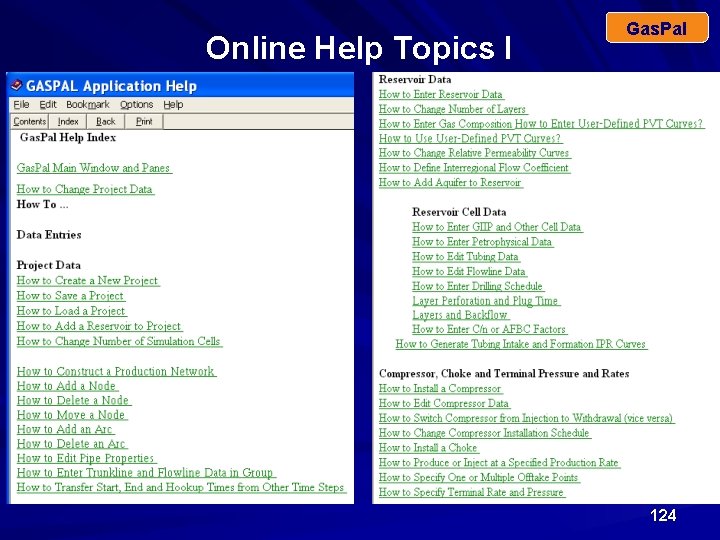
Online Help Topics I Gas. Pal 124

Online Help Topics II Gas. Pal 125

Better Software ─ Better Service June 2009 Thank You For Watching 126

To Contact Us Please contact Maraco Communications Coordinator Loy Combs loy. combs@gmail. com loy. combs@maraco. com 949 -973 -4065 Maraco Inc 33531 Marlinspike Drive Monarch Beach, Ca 92629 949 -388 -6193 Return to Hello Gas. Pal TOC 127
- Slides: 127