
Game Engine Architecture Chapter 6 Resources and the
- Slides: 47
Game Engine Architecture Chapter 6 Resources and the File System prepared by Roger Mailler, Ph. D. , Associate Professor of Computer Science, University of Tulsa 1
Overview • File System • Resource Manager prepared by Roger Mailler, Ph. D. , Associate Professor of Computer Science, University of Tulsa 2
Data • Game engines are inherently data management systems • Handle all forms of input media o o o Textures 3 D mesh data Animations Audio clips World layouts Physics data • Memory is limited, so we need to manage these resources intelligently prepared by Roger Mailler, Ph. D. , Associate Professor of Computer Science, University of Tulsa 3
File system • Resource managers make heavy use of the file system • Often the file system calls are wrapped o Provides device independence o Provides additional features like file streaming • Sometimes the calls for accessing different forms of media are distinct - Disk versus a memory card on a console • Wrapping can remove this consideration prepared by Roger Mailler, Ph. D. , Associate Professor of Computer Science, University of Tulsa 4
Engine file system • Game engine file systems usually address the following issues o o Manipulating filenames and path Opening, closing, reading and writing individual files Scanning the contents of a directory Handling asynchronous file I/O requests prepared by Roger Mailler, Ph. D. , Associate Professor of Computer Science, University of Tulsa 5
File names and paths • Path is a string describing the location of a file or directory o volume/directory 1/directory 2/…/directory. N/file-name • They consist of an optional volume specifier followed by path components separated with a reserved character (/ or ) • The root is indicated by a path starting with a volume specifier followed by a single path separator prepared by Roger Mailler, Ph. D. , Associate Professor of Computer Science, University of Tulsa 6
OS differences • UNIX and Mac OS X o Uses forward slash (/) o Supports current working directory, but only one • Mac OS 8 and 9 o Uses the colon (: ) • Windows o Uses back slash () – more recent versions can use either o Volumes are specified either as C: or \some-computersome-share o Supports current working directory per volume and current working volume • Consoles – often used predefined names for different volumes prepared by Roger Mailler, Ph. D. , Associate Professor of Computer Science, University of Tulsa 7
Pathing • Both windows and UNIX support absolute and relative pathing o Absolute • Windows - C: WindowsSystem 32 • Unix - /usr/local/bin/grep o Relative • Windows – system 32 (relative to CWD of c: Windows) • Windows – X: animationwalkanim (relative to CWD on the X volume) • Unix – bin/grep (relative to CWD of /usr/local) prepared by Roger Mailler, Ph. D. , Associate Professor of Computer Science, University of Tulsa 8
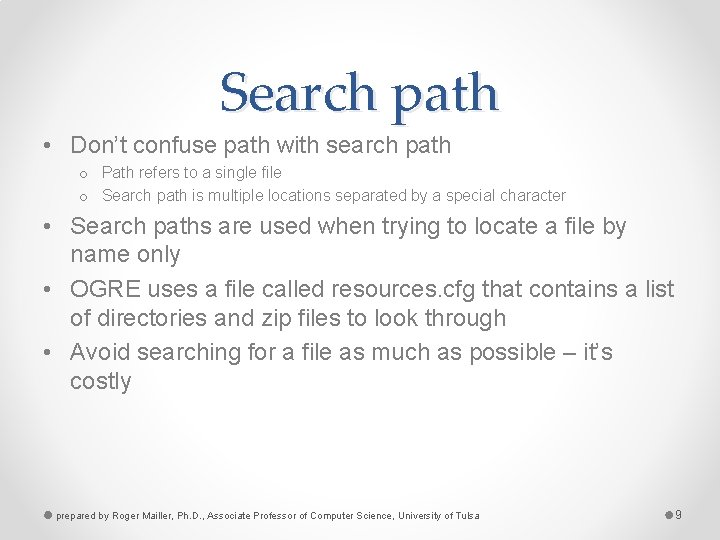
Search path • Don’t confuse path with search path o Path refers to a single file o Search path is multiple locations separated by a special character • Search paths are used when trying to locate a file by name only • OGRE uses a file called resources. cfg that contains a list of directories and zip files to look through • Avoid searching for a file as much as possible – it’s costly prepared by Roger Mailler, Ph. D. , Associate Professor of Computer Science, University of Tulsa 9
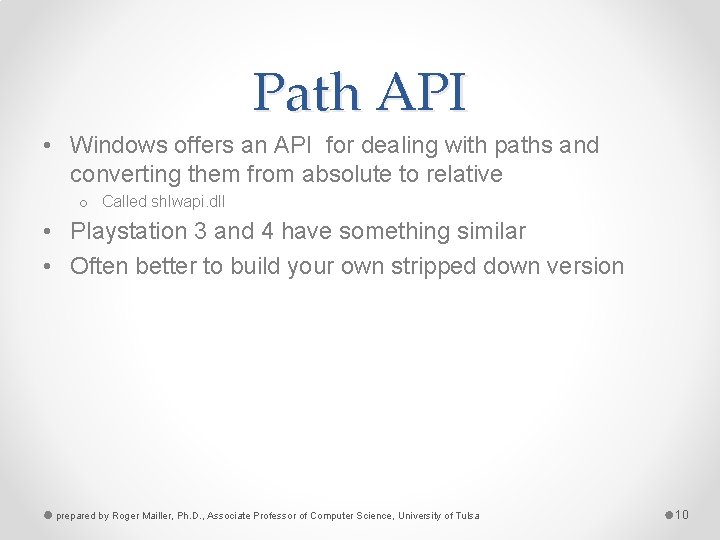
Path API • Windows offers an API for dealing with paths and converting them from absolute to relative o Called shlwapi. dll • Playstation 3 and 4 have something similar • Often better to build your own stripped down version prepared by Roger Mailler, Ph. D. , Associate Professor of Computer Science, University of Tulsa 10
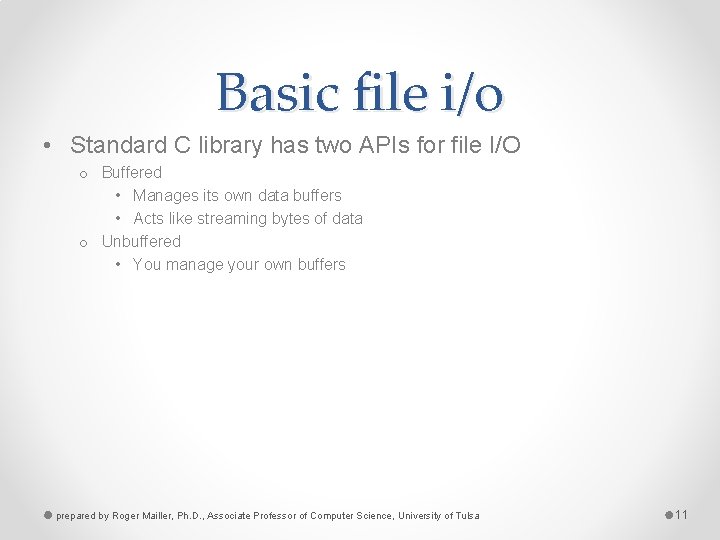
Basic file i/o • Standard C library has two APIs for file I/O o Buffered • Manages its own data buffers • Acts like streaming bytes of data o Unbuffered • You manage your own buffers prepared by Roger Mailler, Ph. D. , Associate Professor of Computer Science, University of Tulsa 11
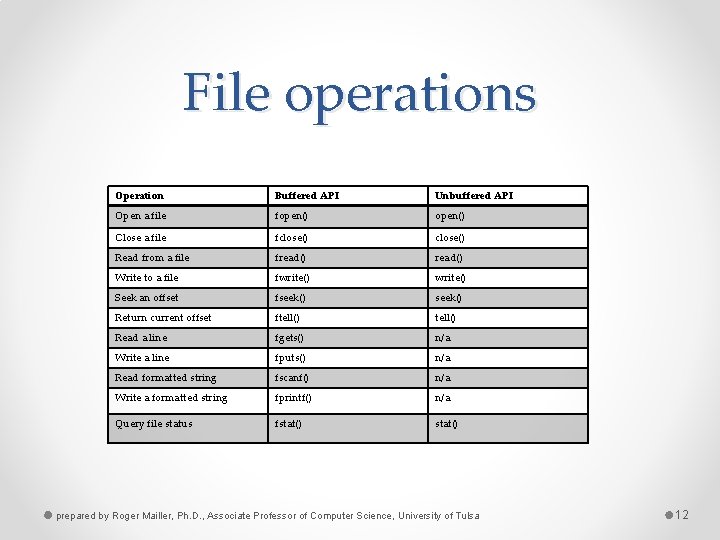
File operations Operation Buffered API Unbuffered API Open a file fopen() Close a file fclose() Read from a file fread() Write to a file fwrite() Seek an offset fseek() Return current offset ftell() Read a line fgets() n/a Write a line fputs() n/a Read formatted string fscanf() n/a Write a formatted string fprintf() n/a Query file status fstat() prepared by Roger Mailler, Ph. D. , Associate Professor of Computer Science, University of Tulsa 12
File system specific • On UNIX system, the unbuffered operations are native system calls • On Windows, there is even a lower level o Some people wrap these calls instead of the standard C ones • Some programmers like to handle their own buffering o Gives more control to when data is going to be written prepared by Roger Mailler, Ph. D. , Associate Professor of Computer Science, University of Tulsa 13
To wrap or not • Three advantages to wrapping o Guarantee identical behavior across all platforms o The API can be simplified down to only what is required o Extended functionality can be provided • Disadvantages o You have to write the code o Still impossible to prevent people from working around your API prepared by Roger Mailler, Ph. D. , Associate Professor of Computer Science, University of Tulsa 14
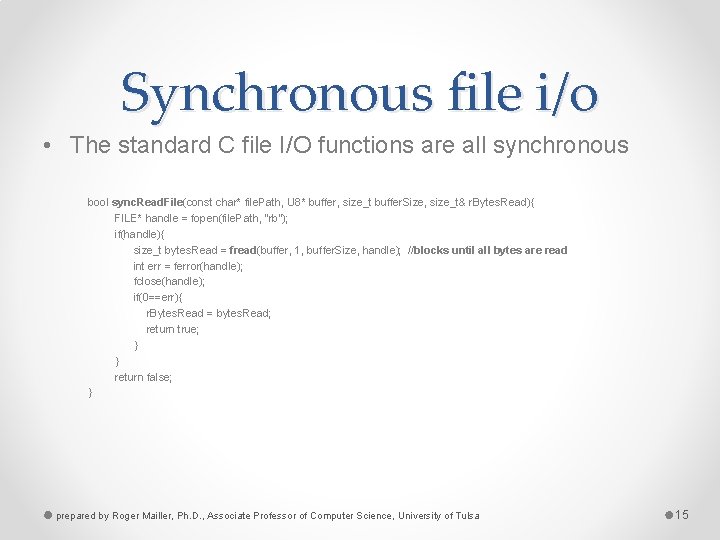
Synchronous file i/o • The standard C file I/O functions are all synchronous bool sync. Read. File(const char* file. Path, U 8* buffer, size_t buffer. Size, size_t& r. Bytes. Read){ FILE* handle = fopen(file. Path, “rb”); if(handle){ size_t bytes. Read = fread(buffer, 1, buffer. Size, handle); //blocks until all bytes are read int err = ferror(handle); fclose(handle); if(0==err){ r. Bytes. Read = bytes. Read; return true; } } return false; } prepared by Roger Mailler, Ph. D. , Associate Professor of Computer Science, University of Tulsa 15
Asynchronous I/O • Often it is better to make a read call and set a callback function when data become available • This involves spawning a thread to manage the reading, buffering, and notification • Some APIs allow the programmer to ask for estimates of the operations durations • They also allow external control prepared by Roger Mailler, Ph. D. , Associate Professor of Computer Science, University of Tulsa 16
Priorities • It is important to remember that certain data is more important than others o If you are streaming audio or video then you cannot lag • You should assign priorities to the operations and allow lower priority ones to be suspended prepared by Roger Mailler, Ph. D. , Associate Professor of Computer Science, University of Tulsa 17
Best practices • Asynchronous file I/O should operate in its own thread • When the main thread requests an operation, the request is placed on a queue (could be priority queue) • The file I/O handles one request at a time prepared by Roger Mailler, Ph. D. , Associate Professor of Computer Science, University of Tulsa 18
Resource manager • All good game engine have a resource manager • Every resource manager has two components o Offline tools for integrating resource into engine ready form o Runtime resource management prepared by Roger Mailler, Ph. D. , Associate Professor of Computer Science, University of Tulsa 19
Off-line resource management • Revision control - can be managed using a shared drive or a complex system like SVN or Perforce • Cautions about data size o Remember that code is small compared to images or video o May not want many copies lying around (they all need to be backed up) o Some places deal with this by using symlinking prepared by Roger Mailler, Ph. D. , Associate Professor of Computer Science, University of Tulsa 20
Resource database • The resource database contains information about how an asset needs to be conditioned to be useful in a game • For example, an image may need to be flipped along its x-axis, some images should be scaled down • This is particularly true when many people are adding assets prepared by Roger Mailler, Ph. D. , Associate Professor of Computer Science, University of Tulsa 21
Resource data • • • The ability to deal with multiple types of resources The ability to create new resources The ability to delete resources The ability to inspect and modify resources The ability to move the resources source file to another location The ability for a resource to cross-reference another resource The ability to maintain referential integrity The ability to maintain revision history Searches and queries prepared by Roger Mailler, Ph. D. , Associate Professor of Computer Science, University of Tulsa 22
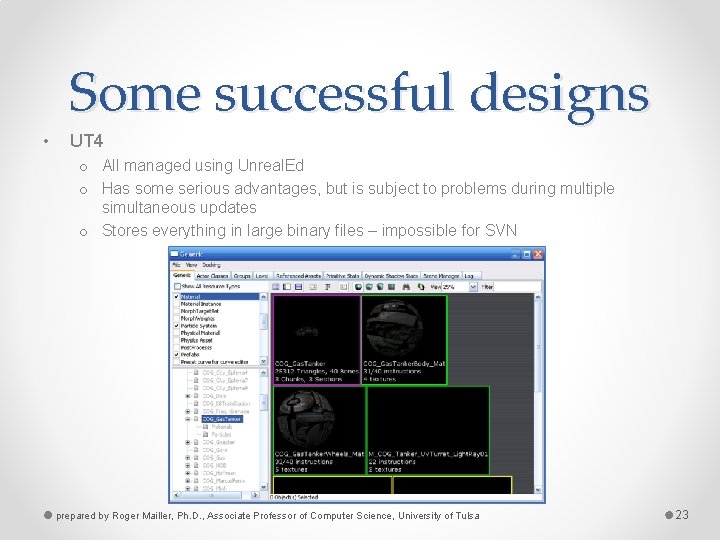
Some successful designs • UT 4 o All managed using Unreal. Ed o Has some serious advantages, but is subject to problems during multiple simultaneous updates o Stores everything in large binary files – impossible for SVN prepared by Roger Mailler, Ph. D. , Associate Professor of Computer Science, University of Tulsa 23
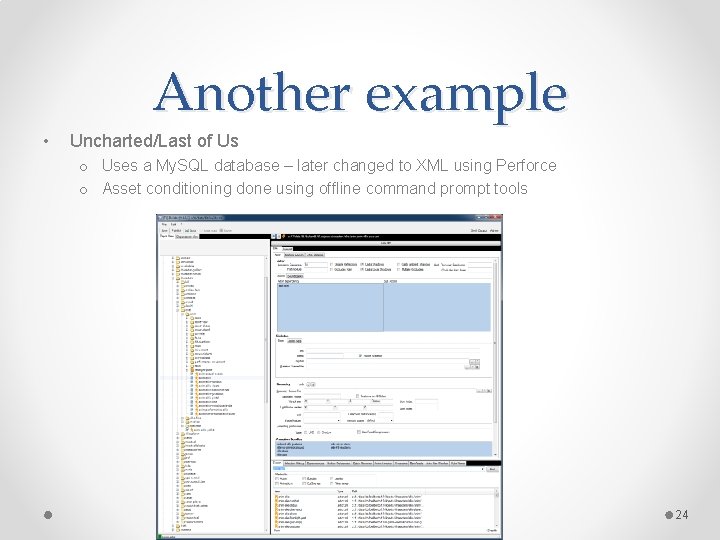
Another example • Uncharted/Last of Us o Uses a My. SQL database – later changed to XML using Perforce o Asset conditioning done using offline command prompt tools 24
Still others… • Ogre o Runtime only resource management • XNA o A plugin to VS IDE called Game Studio Express prepared by Roger Mailler, Ph. D. , Associate Professor of Computer Science, University of Tulsa 25
Asset conditioning • Assets are produced from many source file types • They need to be converted to a single format for ease of management • There are three processing stages o Exporters – These get the data out into a useful format o Resource compilers – pre-calculation can done on the files to make them easier to use o Resource linker – multiple assets can be brought together in one file prepared by Roger Mailler, Ph. D. , Associate Professor of Computer Science, University of Tulsa 26
Resource dependencies • You have to be careful to manage the interdependencies in a game • Assets often rely on one another and that needs to be documented • Documentation can take written form or automated into a script • make is a good tool for explicitly specifying the dependencies prepared by Roger Mailler, Ph. D. , Associate Professor of Computer Science, University of Tulsa 27
Runtime resource management • Ensure that only one copy of an asset is in memory • Manages the lifetime of the object • Handles loading of composite resources • Maintains referential integrity • Manages memory usage • Permits custom processing • Provides a unified interface • Handles streaming prepared by Roger Mailler, Ph. D. , Associate Professor of Computer Science, University of Tulsa 28
Resource files • Games can manage assets by placing them loosely in directory structures • Or use a zip file (Better) o o Open format Virtual file remember their relative position They may be compressed They are modular • UT 3 uses a proprietary format called pak (for package) prepared by Roger Mailler, Ph. D. , Associate Professor of Computer Science, University of Tulsa 29
Resource file formats • Assets of the same type may come in many formats o Think images (BMP, TIFF, GIF, PNG…) • Some conditioning pipelines standardize the set • Other make up there own container formats • Having your unique format makes it easier to control the layout in memory prepared by Roger Mailler, Ph. D. , Associate Professor of Computer Science, University of Tulsa 30
Resource guids • You will need a way to uniquely identify assets in your game • Come up with a naming scheme o Often involves more than just the file path and name • In UT files are named using o package. folder. file prepared by Roger Mailler, Ph. D. , Associate Professor of Computer Science, University of Tulsa 31
Resource registry • In order to only have an asset loaded once, you have to have a registry • Usually done as a giant hashmap (keyed on GUID) • Resources loading can be done on the fly, but that is usually a bad idea o Done in-between levels o In the background prepared by Roger Mailler, Ph. D. , Associate Professor of Computer Science, University of Tulsa 32
Resource lifetime • Some resources are LSR (load-and-stay resident) o Character mesh o HUD o Core Animations • • Some are level specific Some are very temporary – a cut-scene in a level Other are streaming Lifetime is often defined by use, sometimes by reference counting prepared by Roger Mailler, Ph. D. , Associate Professor of Computer Science, University of Tulsa 33
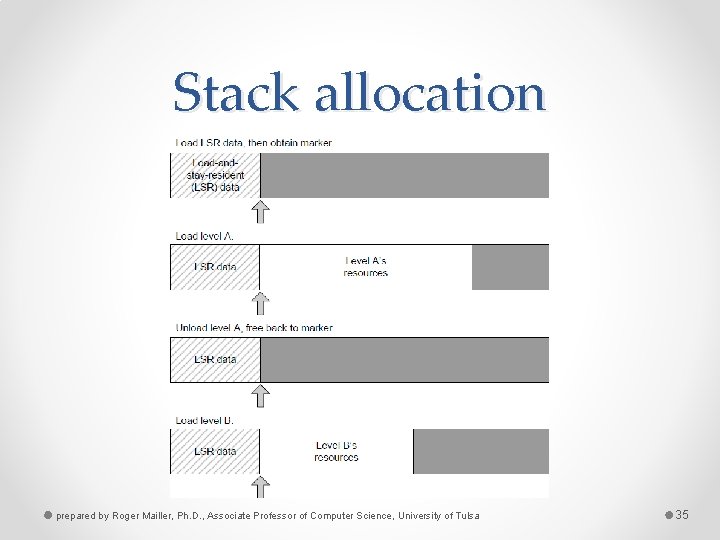
Memory management • Very closely tied to general memory management • Heap allocation – allow the OS to handle it o Like malloc() or new o Works fine on a PC, not so much on a memory limited console • Stack allocation o Can be used if • The game is linear and level centric • Each level fits in memory prepared by Roger Mailler, Ph. D. , Associate Professor of Computer Science, University of Tulsa 34
Stack allocation prepared by Roger Mailler, Ph. D. , Associate Professor of Computer Science, University of Tulsa 35
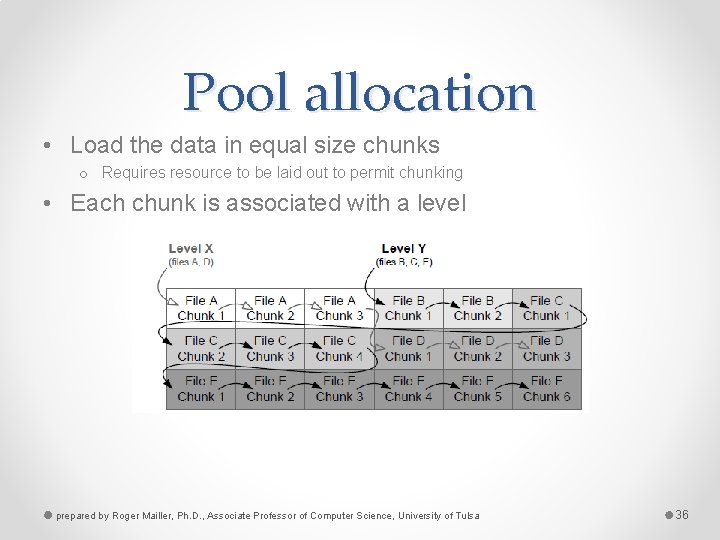
Pool allocation • Load the data in equal size chunks o Requires resource to be laid out to permit chunking • Each chunk is associated with a level prepared by Roger Mailler, Ph. D. , Associate Professor of Computer Science, University of Tulsa 36
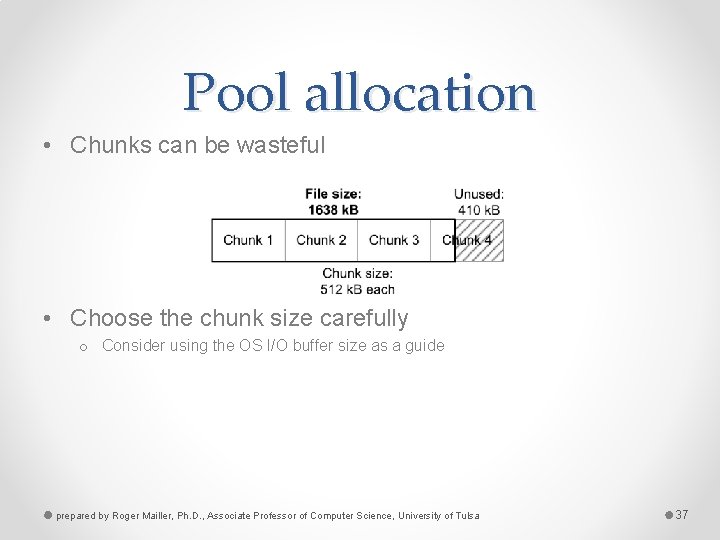
Pool allocation • Chunks can be wasteful • Choose the chunk size carefully o Consider using the OS I/O buffer size as a guide prepared by Roger Mailler, Ph. D. , Associate Professor of Computer Science, University of Tulsa 37
Resource chunk allocator • You can reclaim unused areas of chunks • Use a linked list of all chunks with unused memory along with the size • Works great if the original chunk owner doesn’t free it • Can be mitigated by considering lifetimes o Only allocated unused parts to short lifetime objects prepared by Roger Mailler, Ph. D. , Associate Professor of Computer Science, University of Tulsa 38
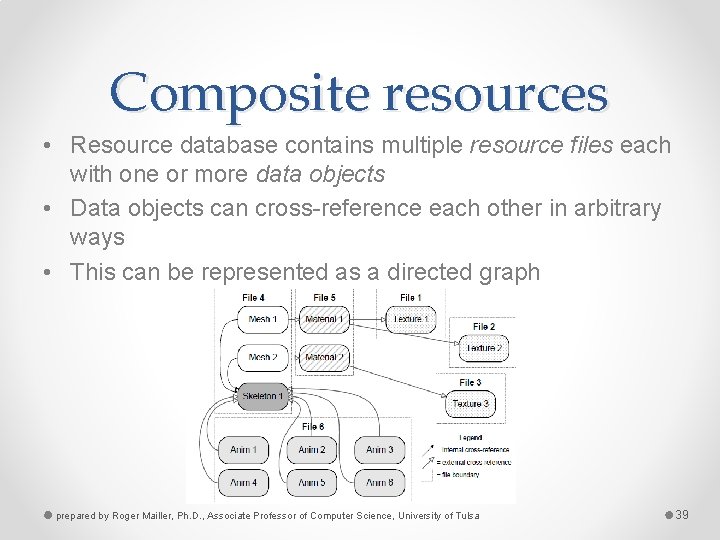
Composite resources • Resource database contains multiple resource files each with one or more data objects • Data objects can cross-reference each other in arbitrary ways • This can be represented as a directed graph prepared by Roger Mailler, Ph. D. , Associate Professor of Computer Science, University of Tulsa 39
Composite resources • A cluster of interdependent resources is referred to as a composite resource • For example, a model consists of o o o One or more triangle meshes Optional skeleton Optional animations Each mesh is mapped with a material Each material refers to one or more textures prepared by Roger Mailler, Ph. D. , Associate Professor of Computer Science, University of Tulsa 40
Handling cross-references • Have to ensure that referential integrity is maintained o Can’t rely on a pointer because they are meaningless in a file • One approach is to use GUIDs o When a resource is loaded the GUID is stored in a hashmap along with a reference to it prepared by Roger Mailler, Ph. D. , Associate Professor of Computer Science, University of Tulsa 41
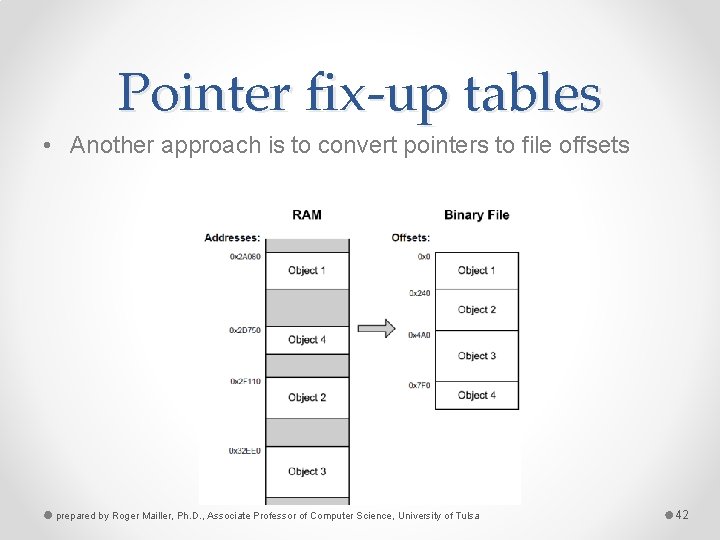
Pointer fix-up tables • Another approach is to convert pointers to file offsets prepared by Roger Mailler, Ph. D. , Associate Professor of Computer Science, University of Tulsa 42
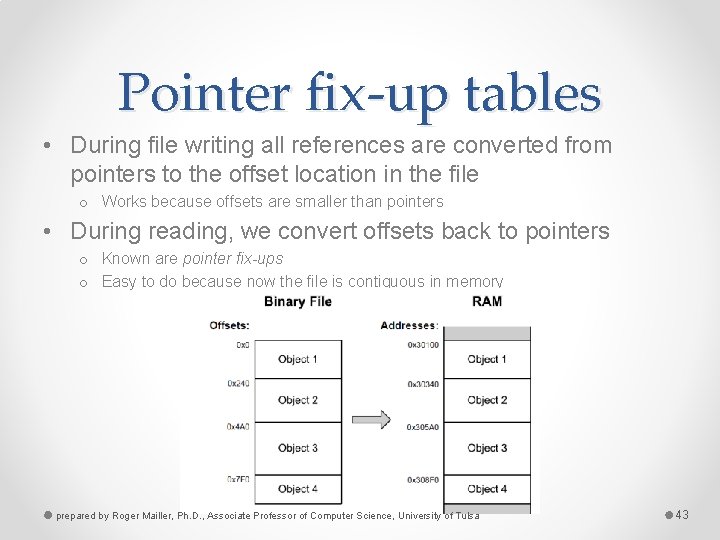
Pointer fix-up tables • During file writing all references are converted from pointers to the offset location in the file o Works because offsets are smaller than pointers • During reading, we convert offsets back to pointers o Known are pointer fix-ups o Easy to do because now the file is contiguous in memory prepared by Roger Mailler, Ph. D. , Associate Professor of Computer Science, University of Tulsa 43
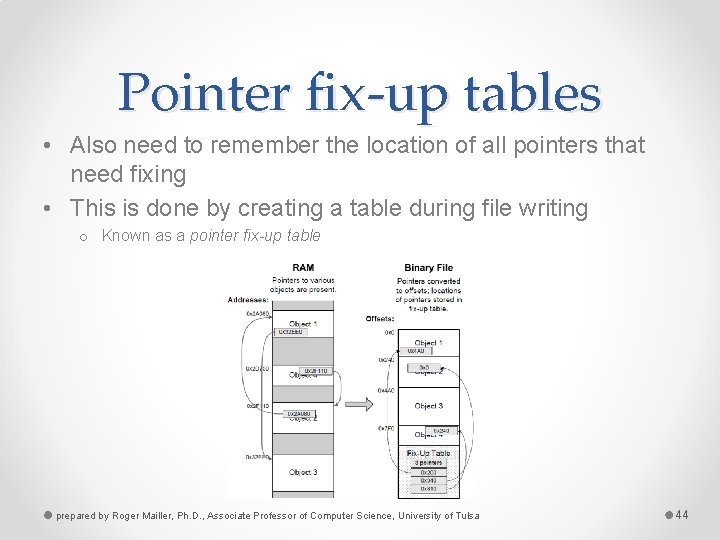
Pointer fix-up tables • Also need to remember the location of all pointers that need fixing • This is done by creating a table during file writing o Known as a pointer fix-up table prepared by Roger Mailler, Ph. D. , Associate Professor of Computer Science, University of Tulsa 44
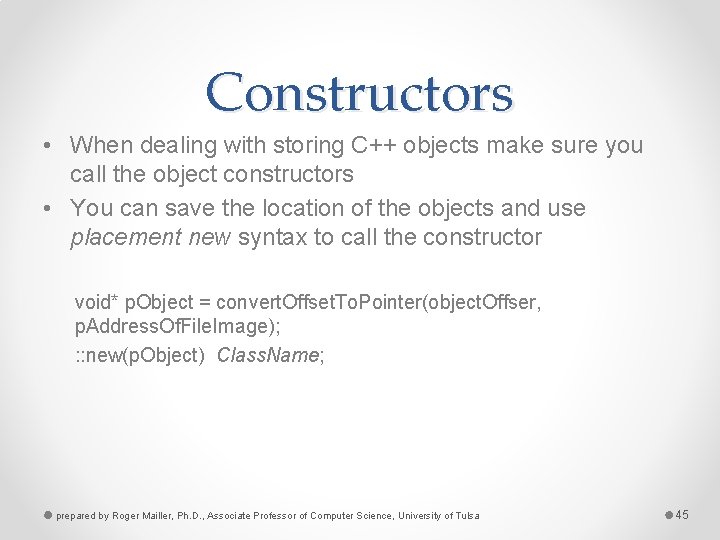
Constructors • When dealing with storing C++ objects make sure you call the object constructors • You can save the location of the objects and use placement new syntax to call the constructor void* p. Object = convert. Offset. To. Pointer(object. Offser, p. Address. Of. File. Image); : : new(p. Object) Class. Name; prepared by Roger Mailler, Ph. D. , Associate Professor of Computer Science, University of Tulsa 45
Handling external references • Externally referenced objects have to be handled differently • Store the path along with the GUID or offset • Load each file first then fix the references in a second pass prepared by Roger Mailler, Ph. D. , Associate Professor of Computer Science, University of Tulsa 46
Post-load initialization • Cannot always load in a ready-to-go state o Unavoidable – need to move vertex data to the video card o Avoidable, but convenient – calculating spline data during development • In C++ using virtual functions like init() and destroy() may be the simplest strategy prepared by Roger Mailler, Ph. D. , Associate Professor of Computer Science, University of Tulsa 47