
Game Design LESSON 5 Workplace Games and Intro
![EXERCISE 1 a: Combine Modeling: Tree [Part 1] SET UNITS: Unity uses Meters. Maya](https://slidetodoc.com/presentation_image_h2/f8ac56808e5736dddae2225303842bdc/image-24.jpg "EXERCISE 1 a: Combine Modeling: Tree [Part 1] SET UNITS: Unity uses Meters. Maya")
![EXERCISE 1 b: Combine Modeling: Tree [Part 3] Apply the Texture and adjust UVs:](https://slidetodoc.com/presentation_image_h2/f8ac56808e5736dddae2225303842bdc/image-25.jpg "EXERCISE 1 b: Combine Modeling: Tree [Part 3] Apply the Texture and adjust UVs:")
![EXERCISE 1 c: Combine Modeling: Tree [Part 4] Clean up and Export: a) Hit](https://slidetodoc.com/presentation_image_h2/f8ac56808e5736dddae2225303842bdc/image-26.jpg "EXERCISE 1 c: Combine Modeling: Tree [Part 4] Clean up and Export: a) Hit")
![EXERCISE 2 b: Shape Modeling: Dino [Part 2] Extrude into a 3 D object:](https://slidetodoc.com/presentation_image_h2/f8ac56808e5736dddae2225303842bdc/image-29.jpg "EXERCISE 2 b: Shape Modeling: Dino [Part 2] Extrude into a 3 D object:")
![EXERCISE 2 c: Shape Modeling: Dino [Part 3] Apply Texture: a) Open the Hypershade](https://slidetodoc.com/presentation_image_h2/f8ac56808e5736dddae2225303842bdc/image-30.jpg "EXERCISE 2 c: Shape Modeling: Dino [Part 3] Apply Texture: a) Open the Hypershade")
- Slides: 33
Game Design LESSON #5: Workplace Games and Intro to 3 D Assets in Maya
TODAY: 1. Design Method #5: Workplace Games Examples and methodology 2. Introduction to Maya interface and basic asset creation, and importing 3 D assets into Unity. 3. Unity Prefabs
Design: Why Make a Game about a Job?
Design: Why Make a Game about a Job? 1. Built-in systems to exploit. 2. Immediately recognizable to players. 3. Transform Society: inform or change views about a way of life or a population of workers, creating opportunities for empathy.
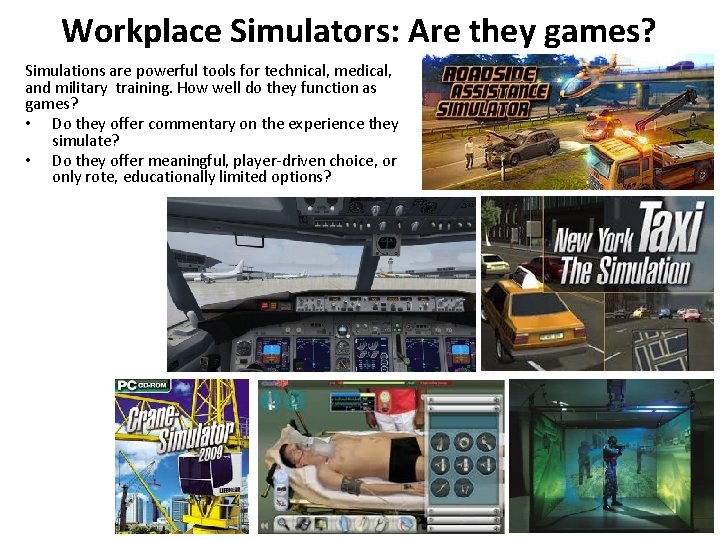
Workplace Simulators: Are they games? Simulations are powerful tools for technical, medical, and military training. How well do they function as games? • Do they offer commentary on the experience they simulate? • Do they offer meaningful, player-driven choice, or only rote, educationally limited options?
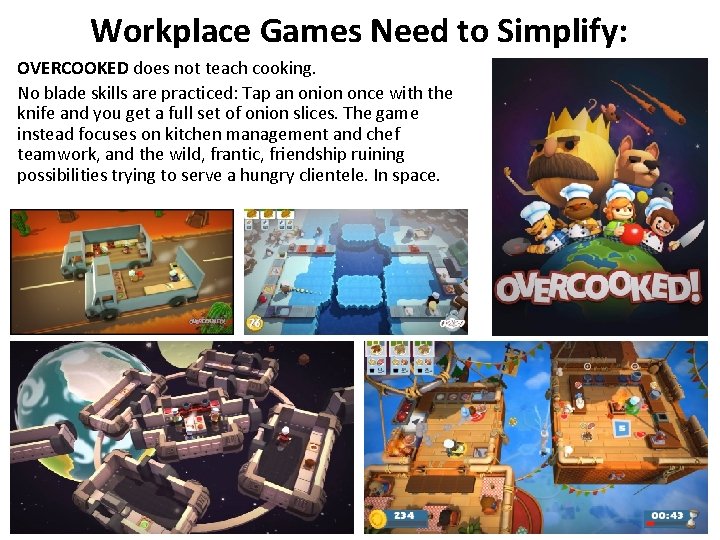
Workplace Games Need to Simplify: OVERCOOKED does not teach cooking. No blade skills are practiced: Tap an onion once with the knife and you get a full set of onion slices. The game instead focuses on kitchen management and chef teamwork, and the wild, frantic, friendship ruining possibilities trying to serve a hungry clientele. In space.
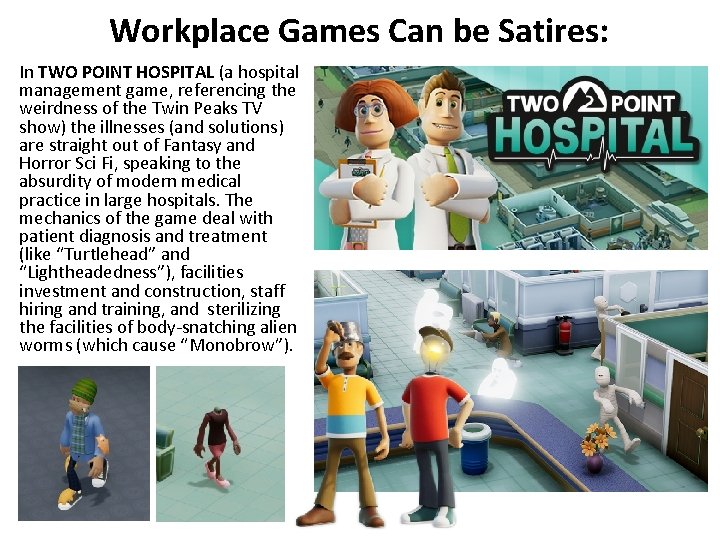
Workplace Games Can be Satires: In TWO POINT HOSPITAL (a hospital management game, referencing the weirdness of the Twin Peaks TV show) the illnesses (and solutions) are straight out of Fantasy and Horror Sci Fi, speaking to the absurdity of modern medical practice in large hospitals. The mechanics of the game deal with patient diagnosis and treatment (like “Turtlehead” and “Lightheadedness”), facilities investment and construction, staff hiring and training, and sterilizing the facilities of body-snatching alien worms (which cause “Monobrow”).
Workplace Games Considerations: When we talk about games based on the routines of a workplace, consider these points: 1. 2. 3. 4. Player job title and primary responsibility. Game type and main mechanics: what workplaceroutine inspired tasks does the player need to fulfil? Feedback for task progress and completion: Feedback from Customers? Boss? Ability to complete tasks? Main decisions player gets to make doing this job. Often this task comments on the job as a whole.
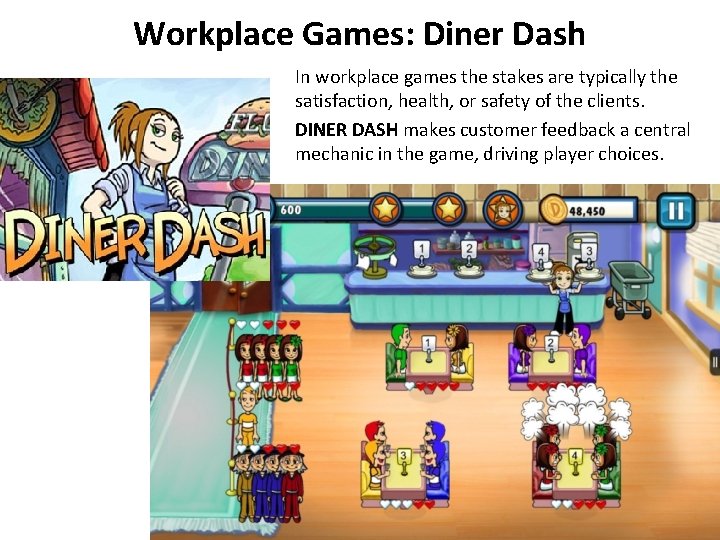
Workplace Games: Diner Dash In workplace games the stakes are typically the satisfaction, health, or safety of the clients. DINER DASH makes customer feedback a central mechanic in the game, driving player choices.
Workplace Games: Diner Dash 1. You are a waitress managing meals for a small diner crowd. 2. Casual/Resource Gathering Game: Seat customers, take food orders, deliver orders to chef, deliver coffee and food, take money, clear tables. 3. Customers get cranky if made to wait. 4. Make decisions on who gets fed first: Try not to get overwhelmed by multiple tasks/complaints.
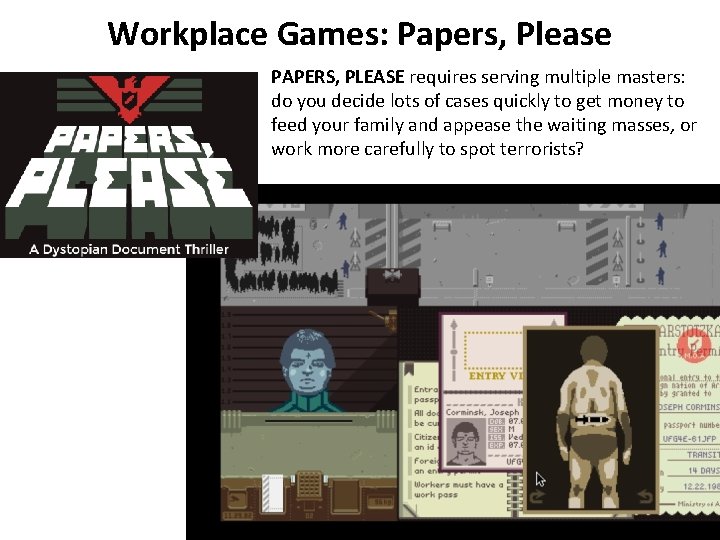
Workplace Games: Papers, Please PAPERS, PLEASE requires serving multiple masters: do you decide lots of cases quickly to get money to feed your family and appease the waiting masses, or work more carefully to spot terrorists?
Workplace Games: Papers, Please 1. Manage a border checkpoint. 2. Puzzle Game: Compare documents, look for discrepancies/criminals. Ask for more information. Arrest people. 3. Applicants can attempt to plead or bribe, and waiting masses can act against your state. 4. Make decisions on who passes through. Try not to be weighed down by those decisions.
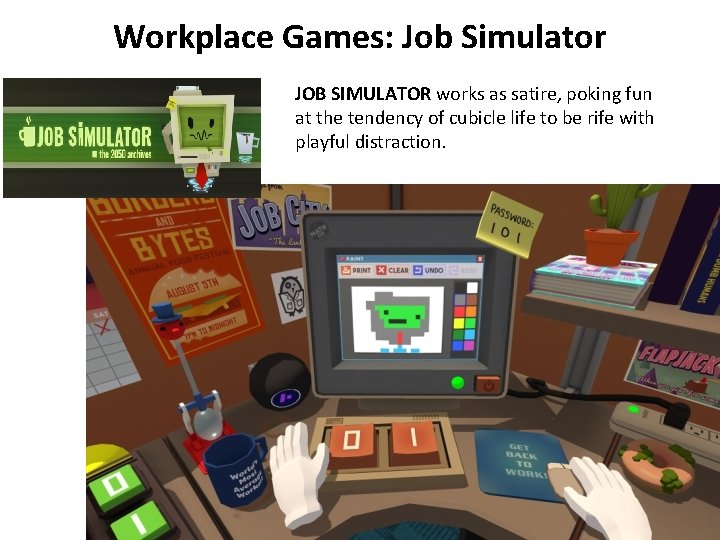
Workplace Games: Job Simulator JOB SIMULATOR works as satire, poking fun at the tendency of cubicle life to be rife with playful distraction.
Workplace Games: Job Simulator 1. Work an office cubicle job (in VR). 2. Exploration game: Fulfill tasks/missions assigned by robot boss. Explore distractions in cubicle. 3. Feedback from Robot Boss and signs. 4. Make decisions on how to spend time. Additional Games: Auto Mechanic, Convenience Store Clerk, etc.
Workplace Games: Create! Choose a new team to design a tabletop or digital Workplace game, and produce a paper prototype for next week 1. 2. 3. 4. 5. THEME: Brainstorm multiple jobs with clear routines. MECHANICS/FLOW: List the routines and consider which lend themselves to interesting choices and playable mechanics. FEEDBACK: Consider potential actions by the customers of the workplace, and how they can provide meaningful stakes and feedback to the player. GOAL: Determine the components of a successful day/job completion. FIERO: Consider the critical choices the player can make to achieve the goal, and the emotional impact of those choices, to adjust mechanics and feedback for greater impact.
Unity Prefabs WHY USE PREFABS: Unity does not merge scene files easily. The best way for multiple people to work on a Unity project is for only one to “own” the scene and everyone else to pack their files as Prefabs to send to the current scene-owner, who can then import/ unpack the prefab into the Unity project. TO MAKE A PREFAB: Rightclick on objects in the Project window and choose Create Prefab. If you want to make a Prefab of specific object settings in the Scene/Hierarchy: [a] Parent those objects under an Empty Game Object (G. O. ) in the Hierarchy [b] drag that Empty G. O. to the Project to make an instance [c] rightclick to Prefab. Be sure to include all parts in the prefab, like textures!
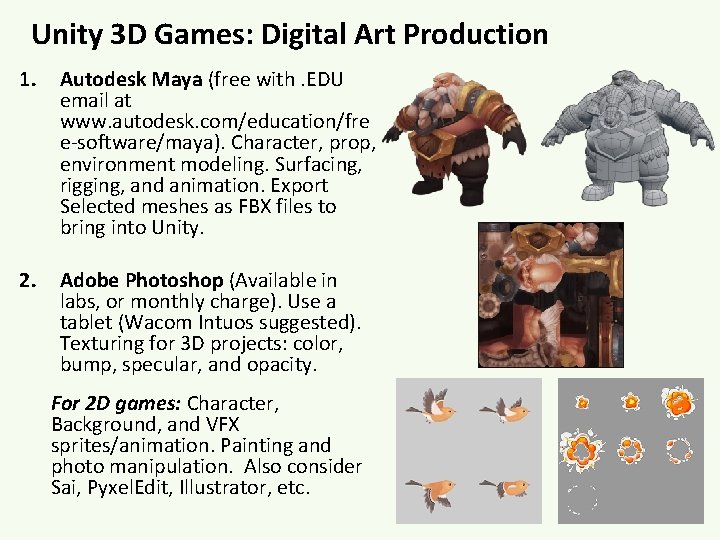
Unity 3 D Games: Digital Art Production 1. Autodesk Maya (free with. EDU email at www. autodesk. com/education/fre e-software/maya). Character, prop, environment modeling. Surfacing, rigging, and animation. Export Selected meshes as FBX files to bring into Unity. 2. Adobe Photoshop (Available in labs, or monthly charge). Use a tablet (Wacom Intuos suggested). Texturing for 3 D projects: color, bump, specular, and opacity. For 2 D games: Character, Background, and VFX sprites/animation. Painting and photo manipulation. Also consider Sai, Pyxel. Edit, Illustrator, etc.
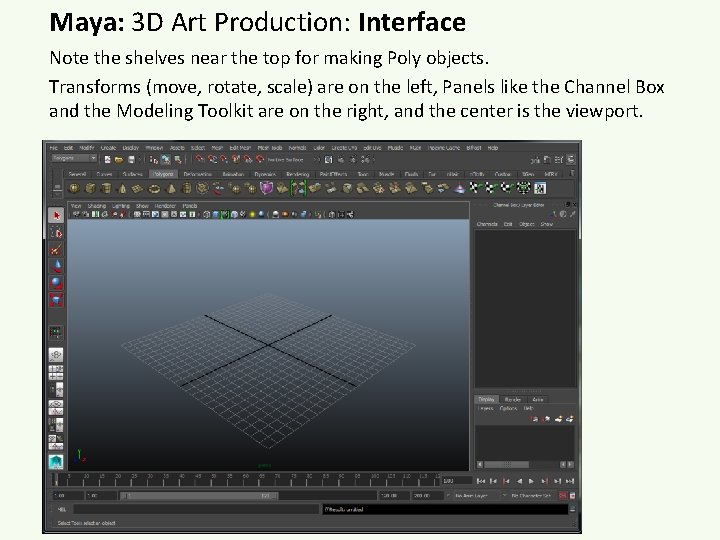
Maya: 3 D Art Production: Interface Note the shelves near the top for making Poly objects. Transforms (move, rotate, scale) are on the left, Panels like the Channel Box and the Modeling Toolkit are on the right, and the center is the viewport.
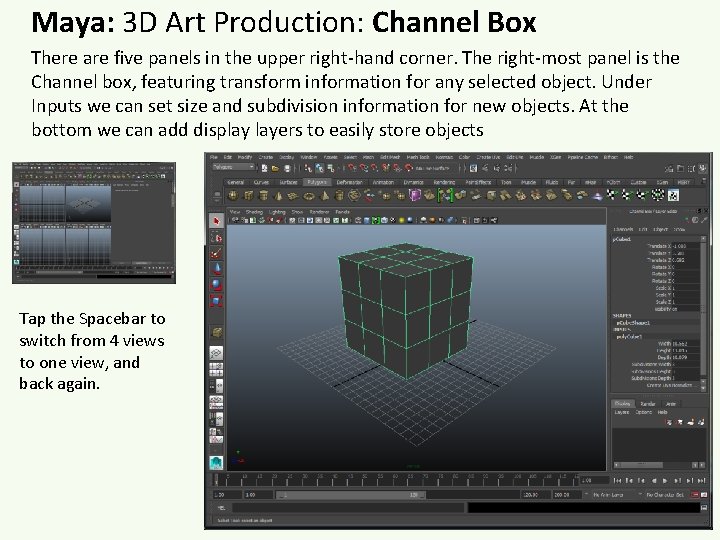
Maya: 3 D Art Production: Channel Box There are five panels in the upper right-hand corner. The right-most panel is the Channel box, featuring transform information for any selected object. Under Inputs we can set size and subdivision information for new objects. At the bottom we can add display layers to easily store objects Tap the Spacebar to switch from 4 views to one view, and back again.
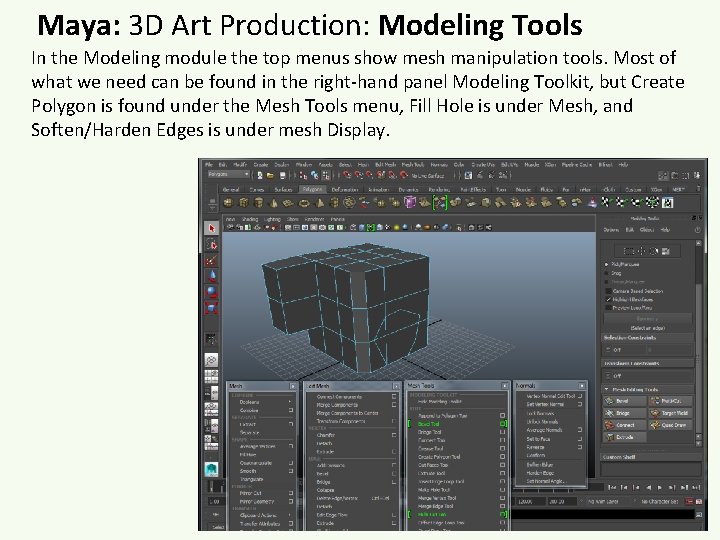
Maya: 3 D Art Production: Modeling Tools In the Modeling module the top menus show mesh manipulation tools. Most of what we need can be found in the right-hand panel Modeling Toolkit, but Create Polygon is found under the Mesh Tools menu, Fill Hole is under Mesh, and Soften/Harden Edges is under mesh Display.
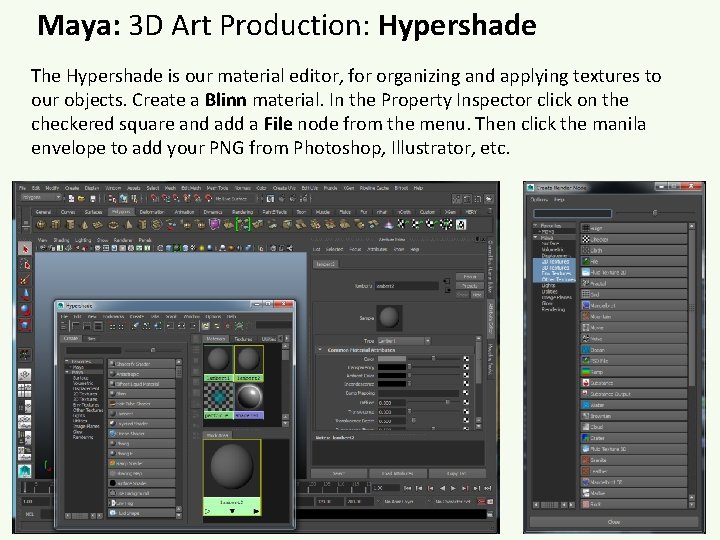
Maya: 3 D Art Production: Hypershade The Hypershade is our material editor, for organizing and applying textures to our objects. Create a Blinn material. In the Property Inspector click on the checkered square and add a File node from the menu. Then click the manila envelope to add your PNG from Photoshop, Illustrator, etc.
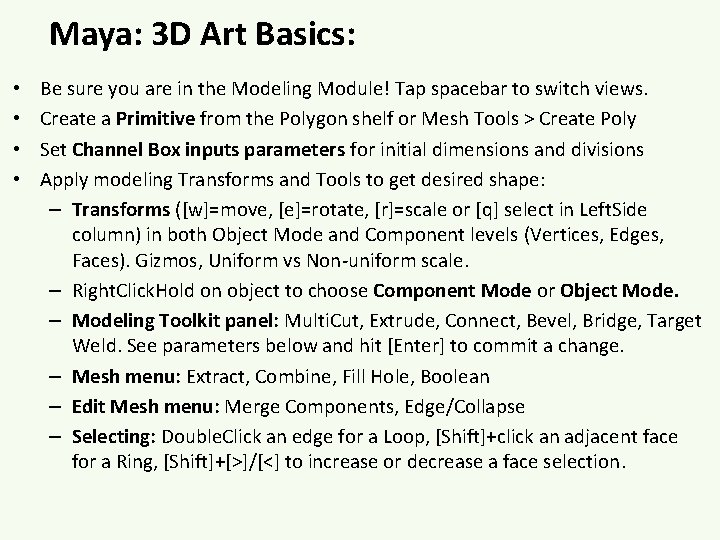
Maya: 3 D Art Basics: • • Be sure you are in the Modeling Module! Tap spacebar to switch views. Create a Primitive from the Polygon shelf or Mesh Tools > Create Poly Set Channel Box inputs parameters for initial dimensions and divisions Apply modeling Transforms and Tools to get desired shape: – Transforms ([w]=move, [e]=rotate, [r]=scale or [q] select in Left. Side column) in both Object Mode and Component levels (Vertices, Edges, Faces). Gizmos, Uniform vs Non-uniform scale. – Right. Click. Hold on object to choose Component Mode or Object Mode. – Modeling Toolkit panel: Multi. Cut, Extrude, Connect, Bevel, Bridge, Target Weld. See parameters below and hit [Enter] to commit a change. – Mesh menu: Extract, Combine, Fill Hole, Boolean – Edit Mesh menu: Merge Components, Edge/Collapse – Selecting: Double. Click an edge for a Loop, [Shift]+click an adjacent face for a Ring, [Shift]+[>]/[<] to increase or decrease a face selection.
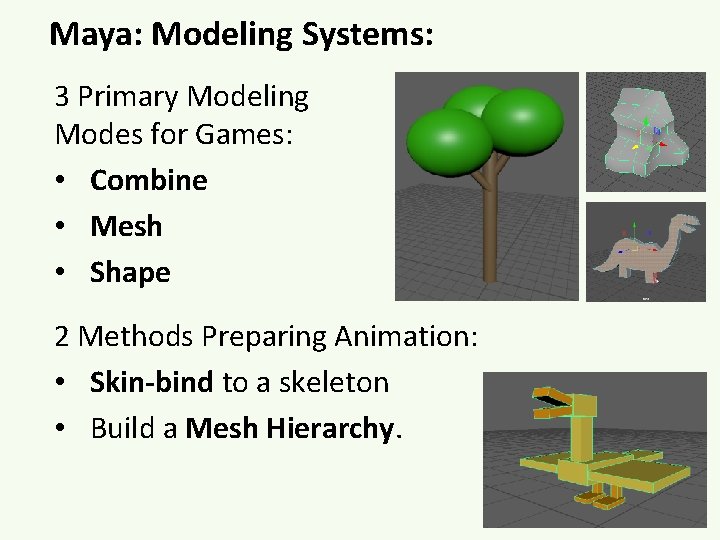
Maya: Modeling Systems: 3 Primary Modeling Modes for Games: • Combine • Mesh • Shape 2 Methods Preparing Animation: • Skin-bind to a skeleton • Build a Mesh Hierarchy.
EXERCISE 1 a: Combine Modeling: Tree [Part 1] SET UNITS: Unity uses Meters. Maya default is cm. Fix: • In the Maya Preferences Panel (lower-right corner running icon) set Settings > Working Units > Linear to Meters. • Set Timeslider > Playback Speed to 24 fps x 1. [Part 2] Create a Cylinder: a) In the Poly Modeling shelf, create a Cylinder. This will be the trunk of the tree. b) In the Channel Box (Right-side panel), under Inputs, set height to 20 and division axis to 8. c) Select the Cylinder and hit [w] to Move it up on the green Yaxis, to above the Persp grid. d) Hit [Cmd]+[d], Move/Scale/Rotate copies for branches. e) Create a Sphere. Set both divisions to 12. Move [w] and Scale [r] to make a big ball of leaves at the top. f) Hit [Cmd]+[d], Move/Scale/Rotate copies for more leaves. NOTE: To give copies Input nodes: Edit > Duplicate Special > Options, choose “copy” and “Duplicate Input Graph”. g) Select all objects, hit Mesh > Combine to make one object. h) Mesh Display > Soften Edges for a smooth result.
EXERCISE 1 b: Combine Modeling: Tree [Part 3] Apply the Texture and adjust UVs: a) Open the Hypershade (blue olive). b) Create a Blinn material from the library. c) In the Property Inspector click Checkered Square next to “Color” to add a File node. d) Click the Manila envelope next to “Image Name” to add the provided tree 3 D. png. e) Middle-Mouse click and drag this material onto the tree mesh, and hit [6] to view it. Note each part of the object now has brown and green parts. f) Open UV menu > UV Editor. With the tree selected we see default UVW coordinates for the cylinder and spheres. g) Right. Click. Hold to choose Face mode. Doubleclick a Face to select the entire shell, Move [w] and Shrink [r] into the correct color. Always drag on the axis. h) Right. Click. Hold the mesh in the Persp view to choose Object mode.
EXERCISE 1 c: Combine Modeling: Tree [Part 4] Clean up and Export: a) Hit [w] and [d] to move the Pivot on Y-axis to tree base. b) Modify > Freeze Transforms c) Edit > Delete by Type > History. d) With object selected: File > Export Selection, choose location, name (tree), set type to (. FBX). NOTE: If FBX is not listed as an option, it must be UNITY Import FBX and PNG: activated in Maya. a) Drag FBX and PNG together into Unity Project Go to Window > Settings / panel to auto-apply the texture (otherwise, if Preferences > Plugin imported separately, must drag the texture Manager. onto the FBX). Can also Right. Click the Project panel and choose Import New Asset Find Maya. FBX. bundle and b) Drag FBX into Hierarchy to add to Scene. turn on both Loaded and c) Note in Inspector options for Transform and Auto. Load. The option for Mesh Renderer. Add a Physics > Box Collider as FBX will now appear when needed, or multiple colliders to fit the form. File > Export Selection is hit.
Combine Modeling: Tree Combine modeling is conceptually the easiest to understand, and is an acceptable method for creating lots of quick assets to populate a 3 D game. BUT it produces lots of wasted geometry with limited control over the design. NOTE: All 3 D objects are made of triangle, Every visible rectangle is actually two triangles. To see polygon counts: Display menu > Heads Up Display > Poly Count. Select an object to see its “tris”. The tree we made is about 1, 000 tris, which is a bit heavy for an object intended to be duplicated a lot.
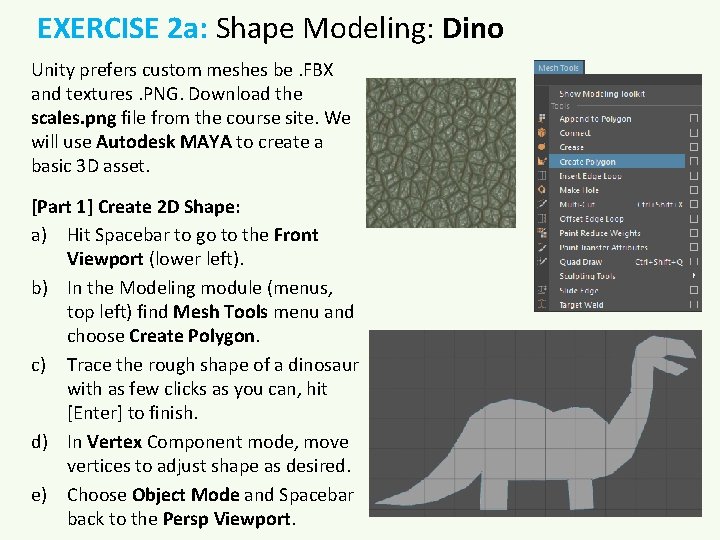
EXERCISE 2 a: Shape Modeling: Dino Unity prefers custom meshes be. FBX and textures. PNG. Download the scales. png file from the course site. We will use Autodesk MAYA to create a basic 3 D asset. [Part 1] Create 2 D Shape: a) Hit Spacebar to go to the Front Viewport (lower left). b) In the Modeling module (menus, top left) find Mesh Tools menu and choose Create Polygon. c) Trace the rough shape of a dinosaur with as few clicks as you can, hit [Enter] to finish. d) In Vertex Component mode, move vertices to adjust shape as desired. e) Choose Object Mode and Spacebar back to the Persp Viewport.
EXERCISE 2 b: Shape Modeling: Dino [Part 2] Extrude into a 3 D object: a) In the Modeling Toolkit (Right panel) choose the Face component Mode (top), select the dino shape face. b) Click the Extrude tool button and pull out the 3 D form (now looks like a wood block of the dino). c) Choose Object Mode (Modeling Toolkit top). d) Hit [W] for the Move tool, move your dino model to the world center, standing on the Persp grid. e) Hit [D] to put pivot at base. NOTE 1: Extrude always needs to be pulled out. Don’t hit Extrude twice. NOTE 2: Extrude must always be applied to a face selection. Be careful to never apply it in Object Mode, or all geometry doubles.
EXERCISE 2 c: Shape Modeling: Dino [Part 3] Apply Texture: a) Open the Hypershade (blue olive). b) Create a Blinn material from the leftside library. c) In the Properties Editor (right side) find Color and click on the checkered square to add a “File” node. d) Click on the File node and click on the manila envelope icon to add the provided scales. png file. e) Middle-mouse drag the Blinn material onto your 3 D Dino mesh and hit [6] to view the texture in the viewport. f) To change the tiling, click on the Place 2 D node and adjust the tiling settings for U (horizontal) and V (vertical). Try 5 x 5.
Notes on Production Expectations: Work fast, work simple, every week submit new content Everyone is responsible for contributing to the weekly build every week. Programmers are expected to have new or improved features, and artists and audio designers are expected to contribute new assets every week. For the first couple of weeks these assets SHOULD be the correct SIZE, but otherwise simple, functional, even crappy. Assets should allow playtesters to understand where they are and what they are doing, but otherwise not distract from whether the gameplay is fun. We call this Greyboxing or Zero Drafting. Get the game FULL of art and audio to text proportions and features, but don’t spend time making assets that are likely to be changed or cut as you continue designing the basic game, and don’t let pretty assets distract your testers from issues with the gameplay. SO, PRODUCTION WEEK #1: 3 D characters can just be cylinders with simple textures. Trees can be green spheres on top of a brown cylinder. Later, you can make more detailed Meshes for the final game.
Due Next Week: • HOMEWORK #5: With your new team, meet outside of class to revise/discuss the Workplace Game design from class. Create and test the tabletop game, and then begin planning a Unity implementation. EACH TEAM WILL TYPE AND SUBMIT 1 WORKPLACE GAME PAPER PROTOTYPE: Description of workplace routines, gameplay rules, board image, photos of initial setup and key moments. • ALSO Read Schell pp 75 -95 (Prototyping chapter)!
Have an Excellent Week! And don’t forget to email with questions: Instructor: JASON WISER Jason. Wiser. Art@gmail. com Available daily.