
Fundamentals of Fractals ITEPC 06 Workshop on Fractal
![Fundamentals of Fractals ITEPC 06 - Workshop on Fractal Creation Main reference: [Hill] Computer](https://slidetodoc.com/presentation_image/440704ad9a2818b2b0cadf9eecf394e4/image-1.jpg "Fundamentals of Fractals ITEPC 06 - Workshop on Fractal Creation Main reference: [Hill] Computer")
![Open. GL Programming Part II Main reference: [D. Mount] Computer Graphics (Lecture 5) http:](https://slidetodoc.com/presentation_image/440704ad9a2818b2b0cadf9eecf394e4/image-16.jpg "Open. GL Programming Part II Main reference: [D. Mount] Computer Graphics (Lecture 5) http:")
- Slides: 36
Fundamentals of Fractals ITEPC 06 - Workshop on Fractal Creation Main reference: [Hill] Computer Graphics uisng Open. GL (p 472 -477)
What are Fractals? Fractal definition from Math. World – A fractal is an object or quantity that displays self-similarity, in a somewhat technical sense, on all scales. – Fractals need not exhibit exactly the same structure at all scales, but the same "type" of structures must appear on all scales. ITEPC 06 - Workshop on Fractal Creation 2
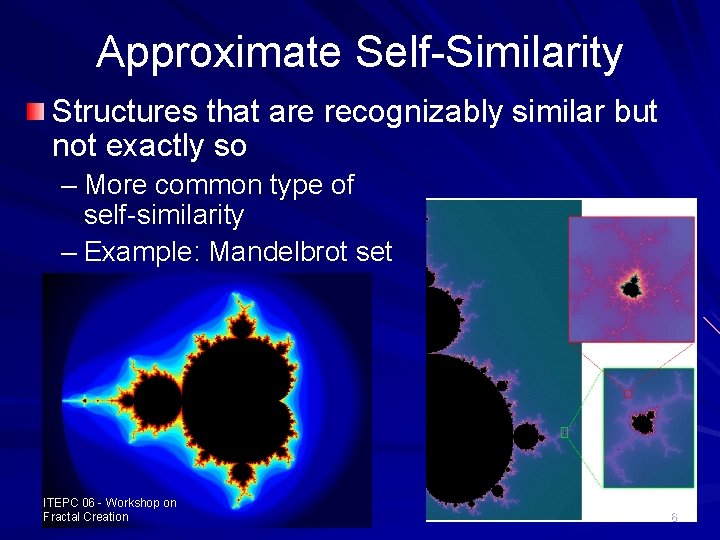
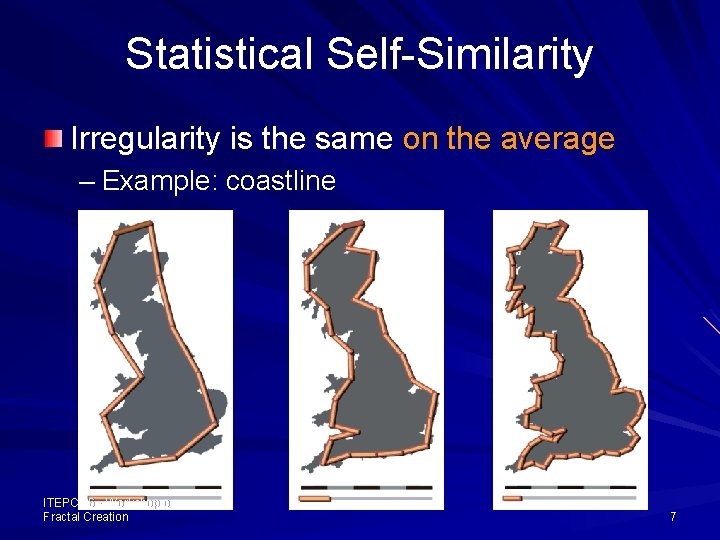
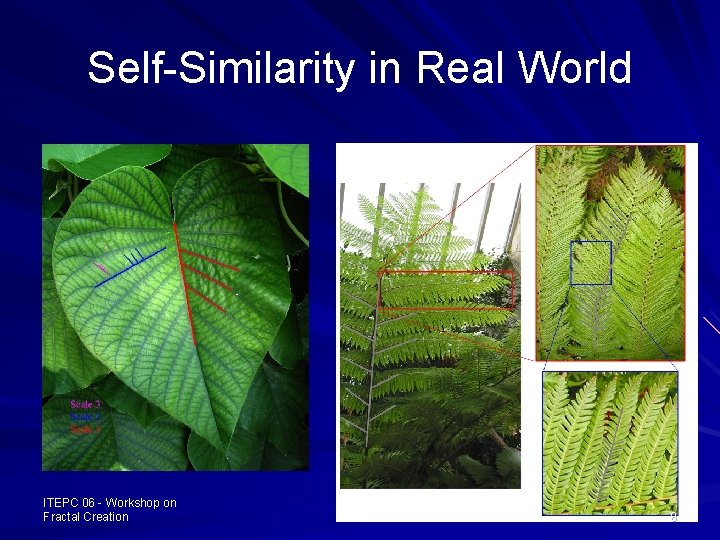
Self-Similarity Property of Fractal Self similarity across scales – As one zooms in or out the geometry/image has a similar (sometimes exact) appearance – Types of self-similarity Exact self similarity Approximate self similarity Statistical self similarity ITEPC 06 - Workshop on Fractal Creation 3
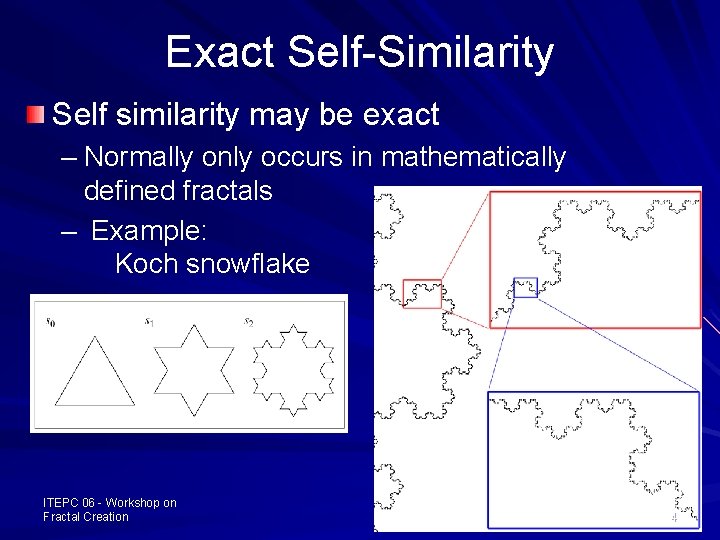
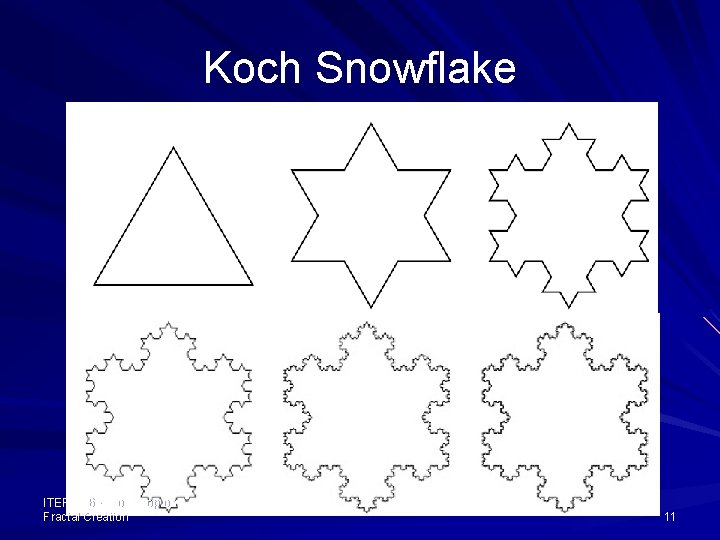
Exact Self-Similarity Self similarity may be exact – Normally only occurs in mathematically defined fractals – Example: Koch snowflake ITEPC 06 - Workshop on Fractal Creation 4
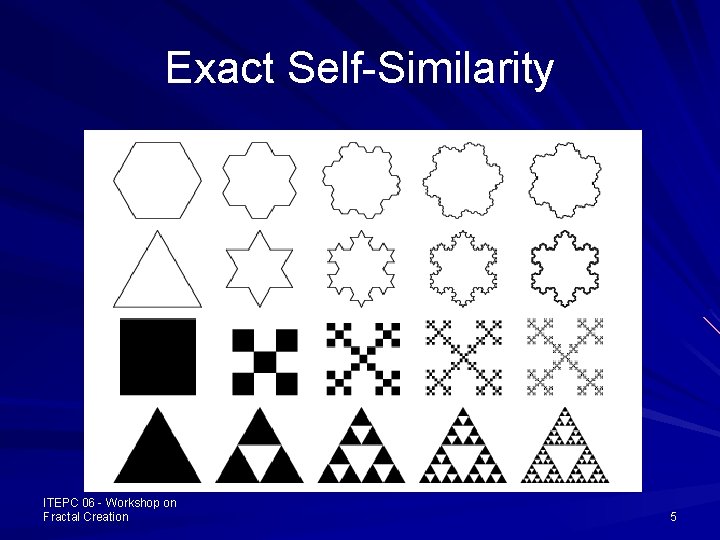
Exact Self-Similarity ITEPC 06 - Workshop on Fractal Creation 5
Approximate Self-Similarity Structures that are recognizably similar but not exactly so – More common type of self-similarity – Example: Mandelbrot set ITEPC 06 - Workshop on Fractal Creation 6
Statistical Self-Similarity Irregularity is the same on the average – Example: coastline ITEPC 06 - Workshop on Fractal Creation 7
Self-Similarity in Real World ITEPC 06 - Workshop on Fractal Creation 8
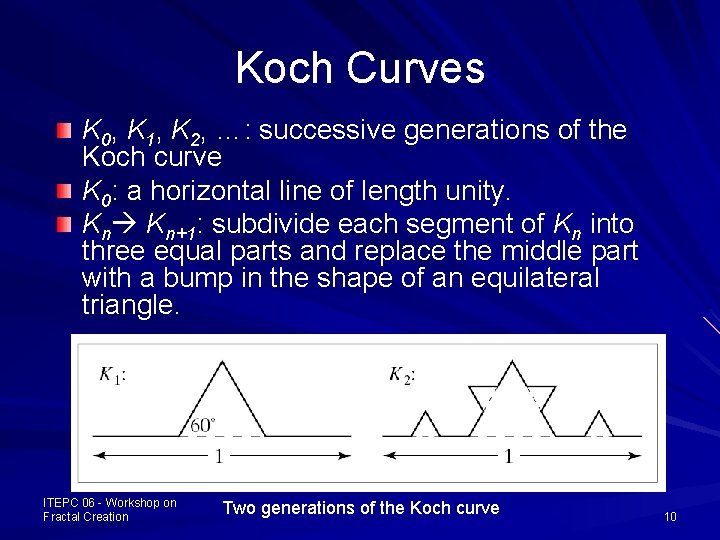
Successive Refinement of Curves Very complex curves can be made by repeatedly refining a simple curve. The simplest example: Koch curve – Discovered in 1904 by Helge von Koch, an Swedish mathematician – Exactly self-similar fractal – Fascinating feature: an infinitely long line within a region of finite area ITEPC 06 - Workshop on Fractal Creation 9
Koch Curves K 0, K 1, K 2, …: successive generations of the Koch curve K 0: a horizontal line of length unity. Kn Kn+1: subdivide each segment of Kn into three equal parts and replace the middle part with a bump in the shape of an equilateral triangle. ITEPC 06 - Workshop on Fractal Creation Two generations of the Koch curve 10
Koch Snowflake ITEPC 06 - Workshop on Fractal Creation 11
Dimension of Koch Curves? A line is one dimensional and a plane is two dimensional, are there “creatures” in between? Koch curves are infinite in length (4/3)n, yet lie inside a finite rectangle – Their dimension lies somewhere between 1 and 2. ITEPC 06 - Workshop on Fractal Creation 12
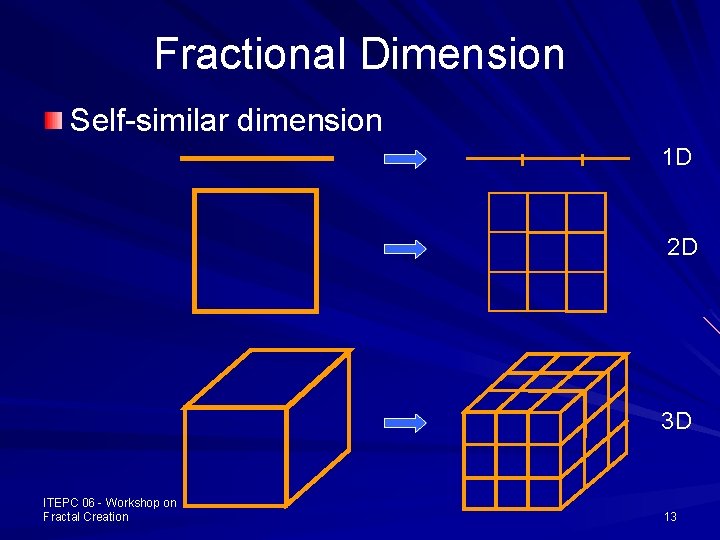
Fractional Dimension Self-similar dimension 1 D 2 D 3 D ITEPC 06 - Workshop on Fractal Creation 13
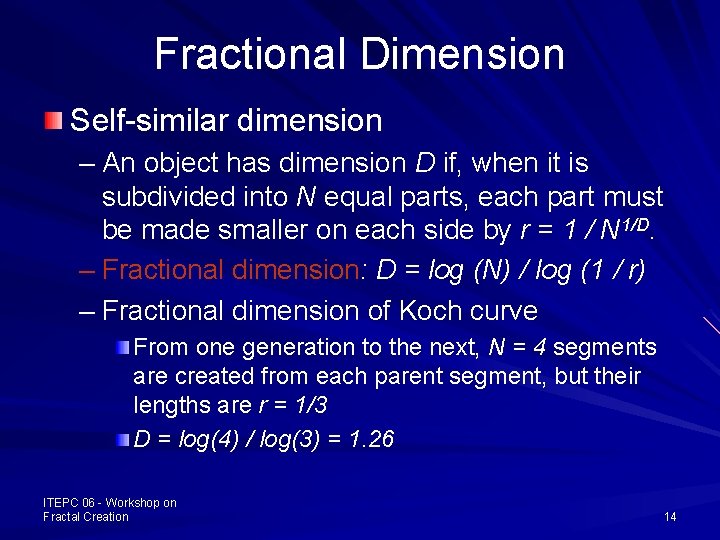
Fractional Dimension Self-similar dimension – An object has dimension D if, when it is subdivided into N equal parts, each part must be made smaller on each side by r = 1 / N 1/D. – Fractional dimension: D = log (N) / log (1 / r) – Fractional dimension of Koch curve From one generation to the next, N = 4 segments are created from each parent segment, but their lengths are r = 1/3 D = log(4) / log(3) = 1. 26 ITEPC 06 - Workshop on Fractal Creation 14
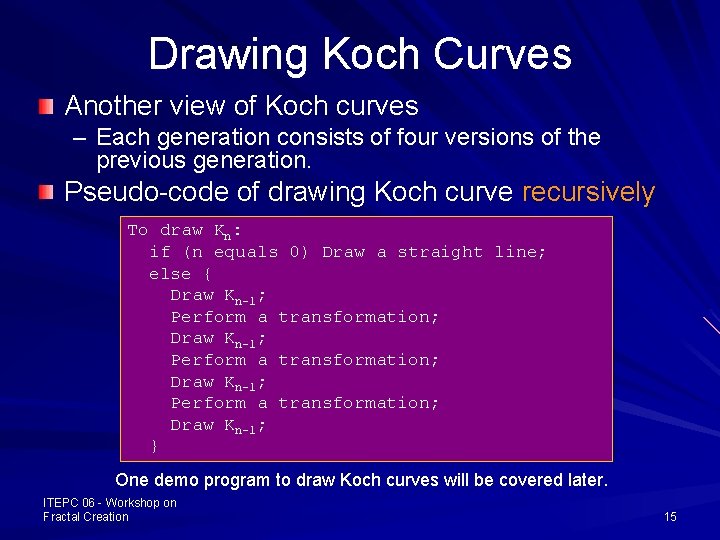
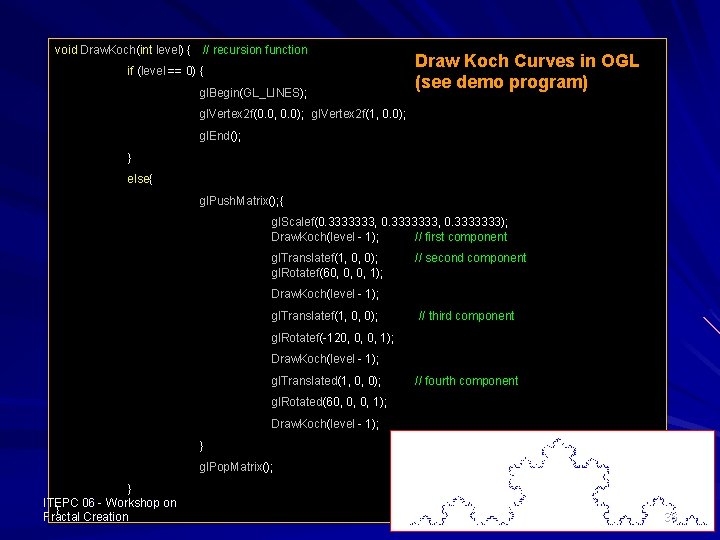
Drawing Koch Curves Another view of Koch curves – Each generation consists of four versions of the previous generation. Pseudo-code of drawing Koch curve recursively To draw Kn: if (n equals 0) Draw a straight line; else { Draw Kn-1; Perform a transformation; Draw Kn-1; } One demo program to draw Koch curves will be covered later. ITEPC 06 - Workshop on Fractal Creation 15
Open. GL Programming Part II Main reference: [D. Mount] Computer Graphics (Lecture 5) http: //www. cs. umd. edu/~mount/427/Lects/427 lects. pdf
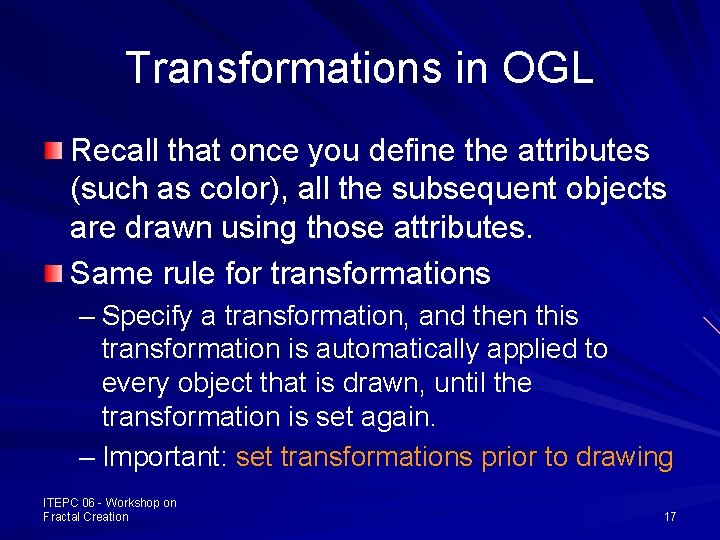
Transformations in OGL Recall that once you define the attributes (such as color), all the subsequent objects are drawn using those attributes. Same rule for transformations – Specify a transformation, and then this transformation is automatically applied to every object that is drawn, until the transformation is set again. – Important: set transformations prior to drawing ITEPC 06 - Workshop on Fractal Creation 17
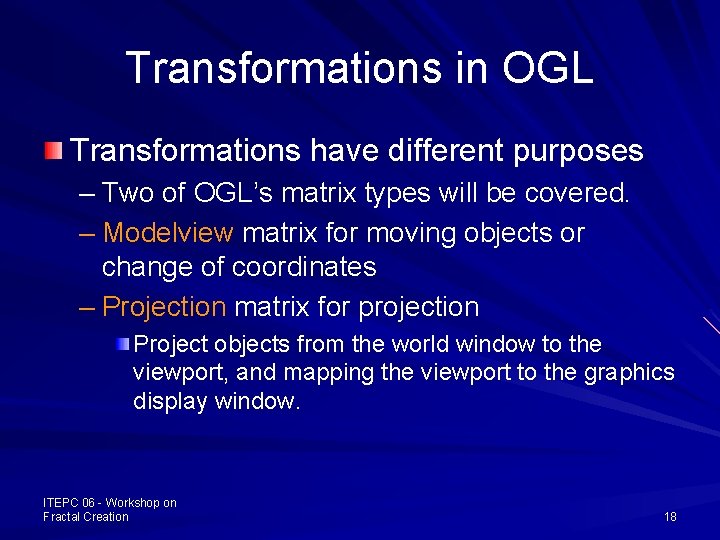
Transformations in OGL Transformations have different purposes – Two of OGL’s matrix types will be covered. – Modelview matrix for moving objects or change of coordinates – Projection matrix for projection Project objects from the world window to the viewport, and mapping the viewport to the graphics display window. ITEPC 06 - Workshop on Fractal Creation 18
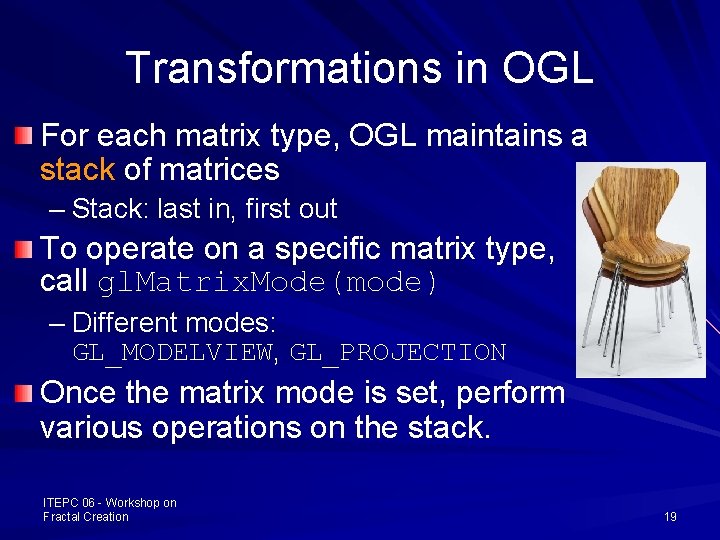
Transformations in OGL For each matrix type, OGL maintains a stack of matrices – Stack: last in, first out To operate on a specific matrix type, call gl. Matrix. Mode(mode) – Different modes: GL_MODELVIEW, GL_PROJECTION Once the matrix mode is set, perform various operations on the stack. ITEPC 06 - Workshop on Fractal Creation 19
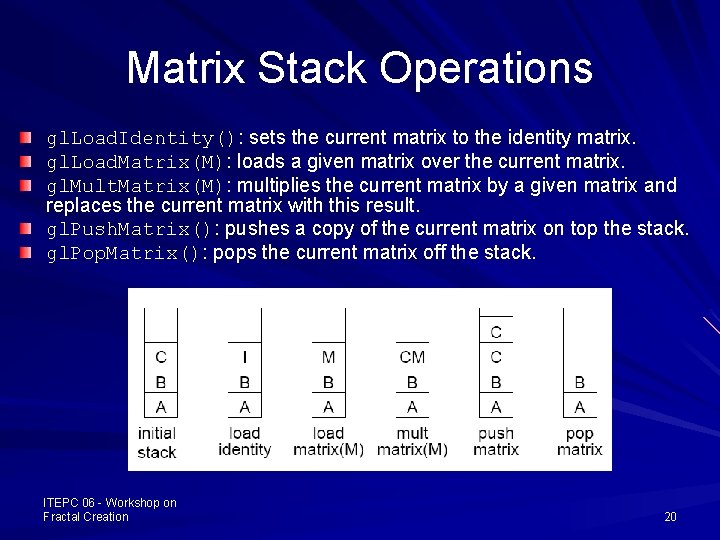
Matrix Stack Operations gl. Load. Identity(): sets the current matrix to the identity matrix. gl. Load. Matrix(M): loads a given matrix over the current matrix. gl. Mult. Matrix(M): multiplies the current matrix by a given matrix and replaces the current matrix with this result. gl. Push. Matrix(): pushes a copy of the current matrix on top the stack. gl. Pop. Matrix(): pops the current matrix off the stack. ITEPC 06 - Workshop on Fractal Creation 20
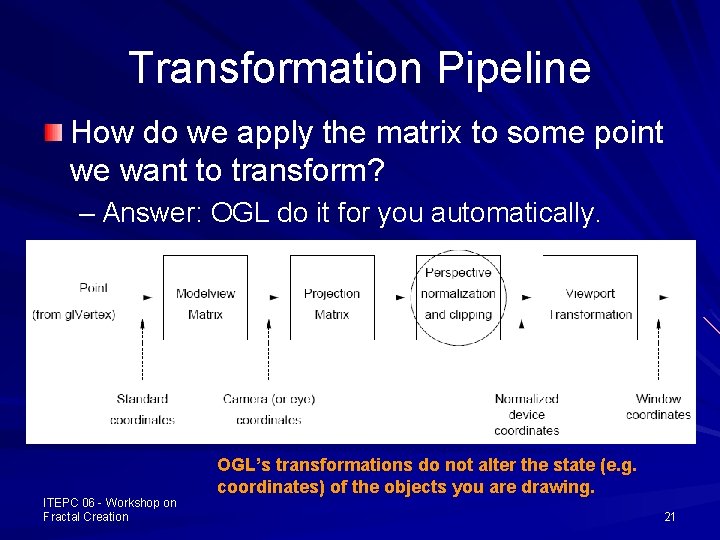
Transformation Pipeline How do we apply the matrix to some point we want to transform? – Answer: OGL do it for you automatically. ITEPC 06 - Workshop on Fractal Creation OGL’s transformations do not alter the state (e. g. coordinates) of the objects you are drawing. 21
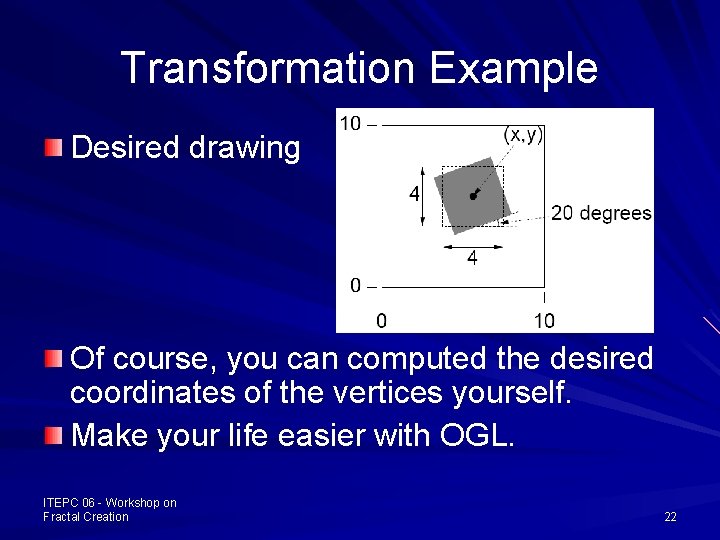
Transformation Example Desired drawing Of course, you can computed the desired coordinates of the vertices yourself. Make your life easier with OGL. ITEPC 06 - Workshop on Fractal Creation 22
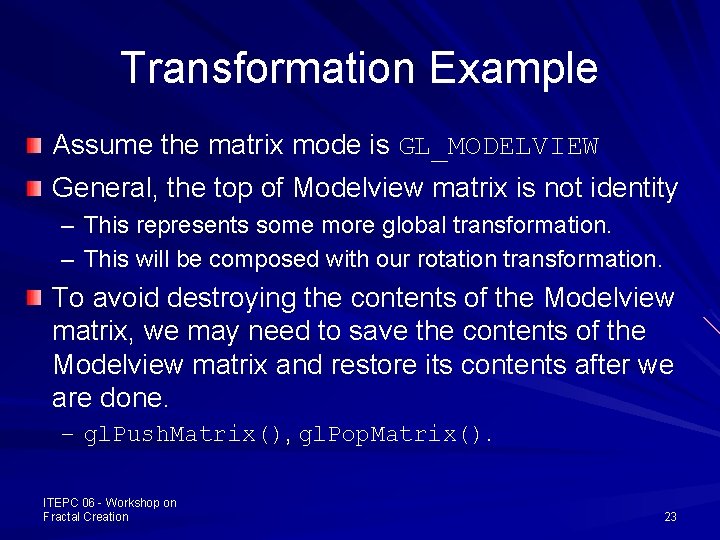
Transformation Example Assume the matrix mode is GL_MODELVIEW General, the top of Modelview matrix is not identity – This represents some more global transformation. – This will be composed with our rotation transformation. To avoid destroying the contents of the Modelview matrix, we may need to save the contents of the Modelview matrix and restore its contents after we are done. – gl. Push. Matrix(), gl. Pop. Matrix(). ITEPC 06 - Workshop on Fractal Creation 23
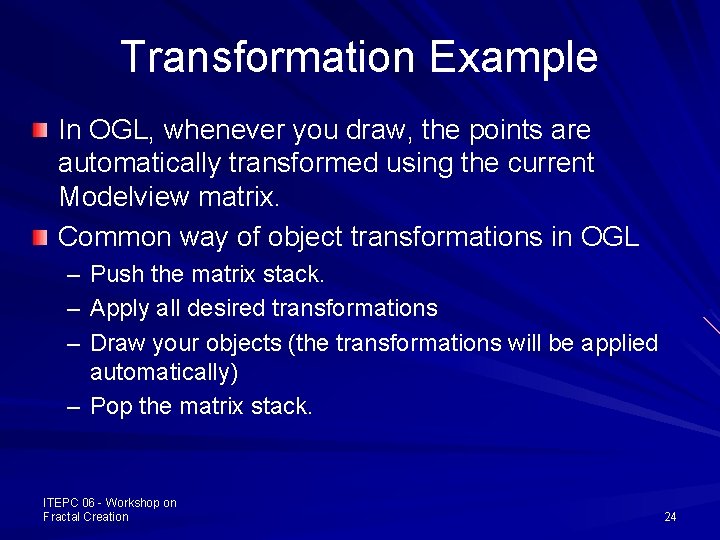
Transformation Example In OGL, whenever you draw, the points are automatically transformed using the current Modelview matrix. Common way of object transformations in OGL – Push the matrix stack. – Apply all desired transformations – Draw your objects (the transformations will be applied automatically) – Pop the matrix stack. ITEPC 06 - Workshop on Fractal Creation 24
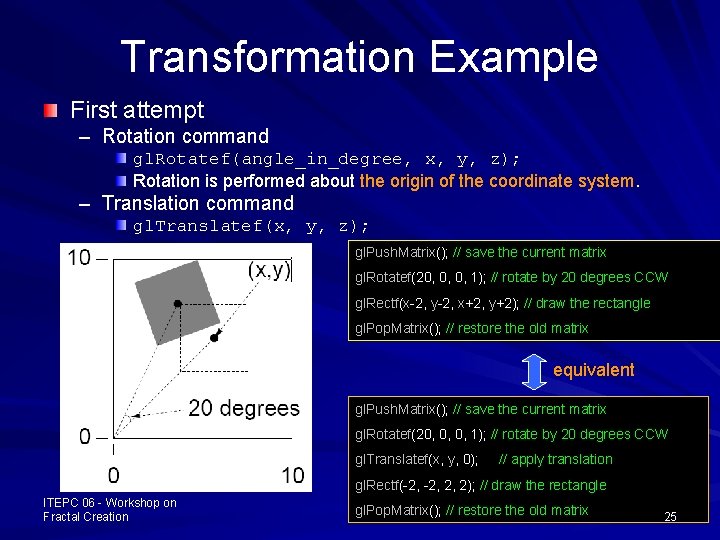
Transformation Example First attempt – Rotation command gl. Rotatef(angle_in_degree, x, y, z); Rotation is performed about the origin of the coordinate system. – Translation command gl. Translatef(x, y, z); gl. Push. Matrix(); // save the current matrix gl. Rotatef(20, 0, 0, 1); // rotate by 20 degrees CCW gl. Rectf(x-2, y-2, x+2, y+2); // draw the rectangle gl. Pop. Matrix(); // restore the old matrix equivalent gl. Push. Matrix(); // save the current matrix gl. Rotatef(20, 0, 0, 1); // rotate by 20 degrees CCW gl. Translatef(x, y, 0); // apply translation gl. Rectf(-2, 2, 2); // draw the rectangle ITEPC 06 - Workshop on Fractal Creation gl. Pop. Matrix(); // restore the old matrix 25
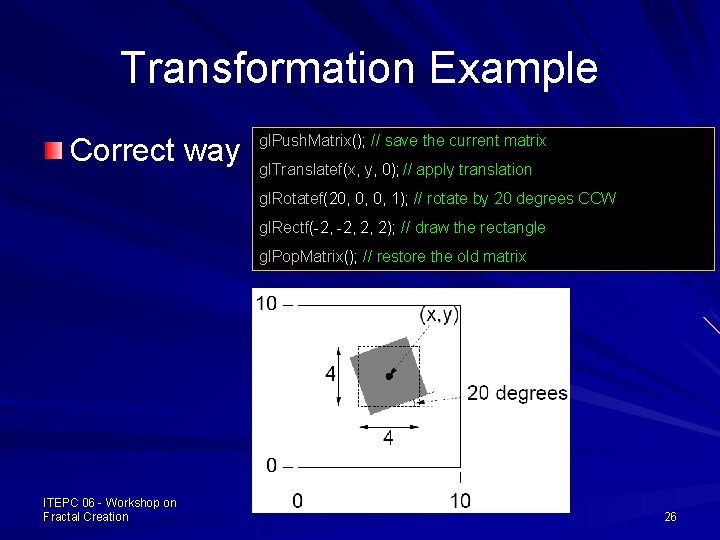
Transformation Example Correct way gl. Push. Matrix(); // save the current matrix gl. Translatef(x, y, 0); // apply translation gl. Rotatef(20, 0, 0, 1); // rotate by 20 degrees CCW gl. Rectf(-2, 2, 2); // draw the rectangle gl. Pop. Matrix(); // restore the old matrix ITEPC 06 - Workshop on Fractal Creation 26
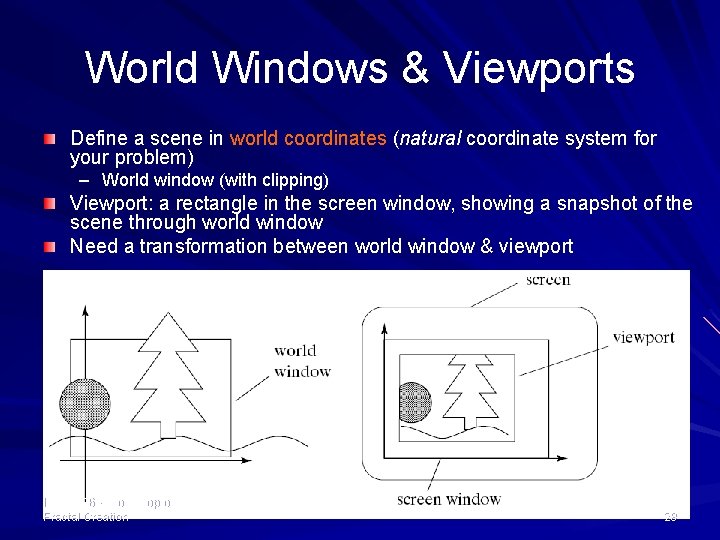
World Windows & Viewports Coordinates in the previous demo examples are essentially in pixels – From 0 to some value screen. Width - 1 in x – From 0 to some value screen. Height - 1 in y If we want to use coordinates not in terms of pixels, say, x varying from [-1, 0. 5], how to do it? Solution: separate the values to describe geometrical objects and the size/position of the pictures of those objects on the display. ITEPC 06 - Workshop on Fractal Creation 27
World Windows & Viewports Define a scene in world coordinates (natural coordinate system for your problem) – World window (with clipping) Viewport: a rectangle in the screen window, showing a snapshot of the scene through world window Need a transformation between world window & viewport ITEPC 06 - Workshop on Fractal Creation 28
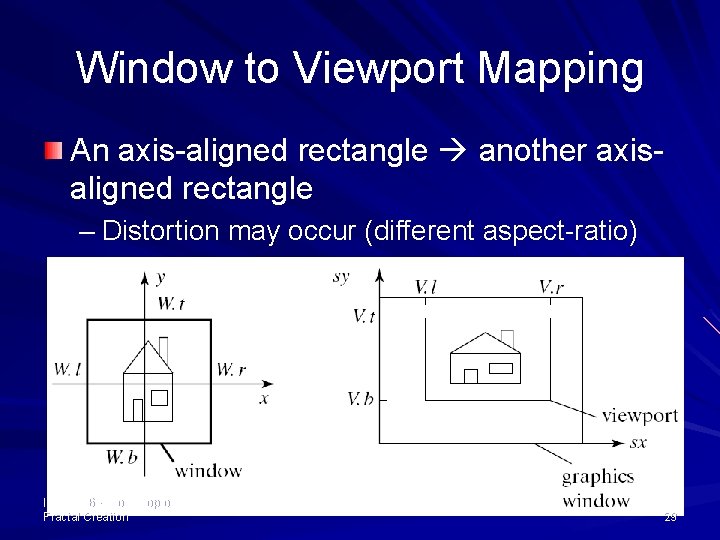
Window to Viewport Mapping An axis-aligned rectangle another axisaligned rectangle – Distortion may occur (different aspect-ratio) ITEPC 06 - Workshop on Fractal Creation 29
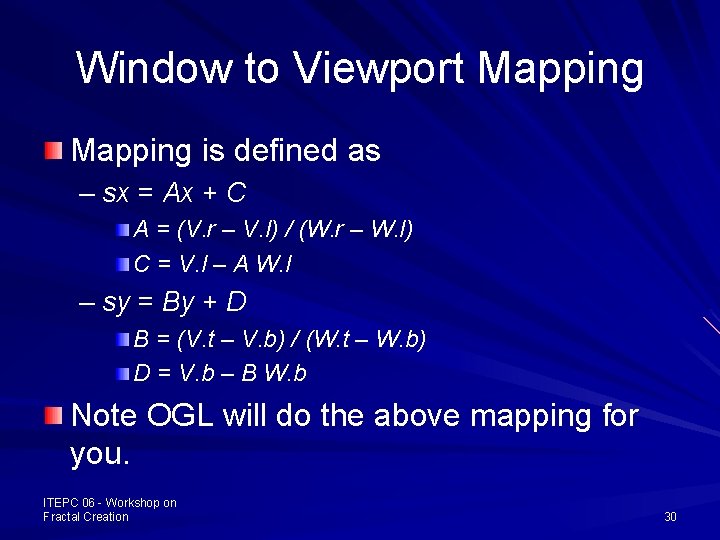
Window to Viewport Mapping is defined as – sx = Ax + C A = (V. r – V. l) / (W. r – W. l) C = V. l – A W. l – sy = By + D B = (V. t – V. b) / (W. t – W. b) D = V. b – B W. b Note OGL will do the above mapping for you. ITEPC 06 - Workshop on Fractal Creation 30
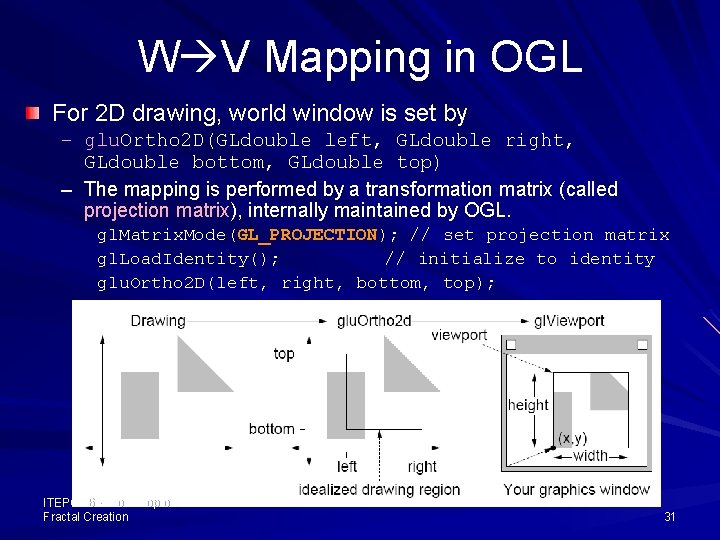
W V Mapping in OGL For 2 D drawing, world window is set by – glu. Ortho 2 D(GLdouble left, GLdouble right, GLdouble bottom, GLdouble top) – The mapping is performed by a transformation matrix (called projection matrix), internally maintained by OGL. gl. Matrix. Mode(GL_PROJECTION); // set projection matrix gl. Load. Identity(); // initialize to identity glu. Ortho 2 D(left, right, bottom, top); ITEPC 06 - Workshop on Fractal Creation 31
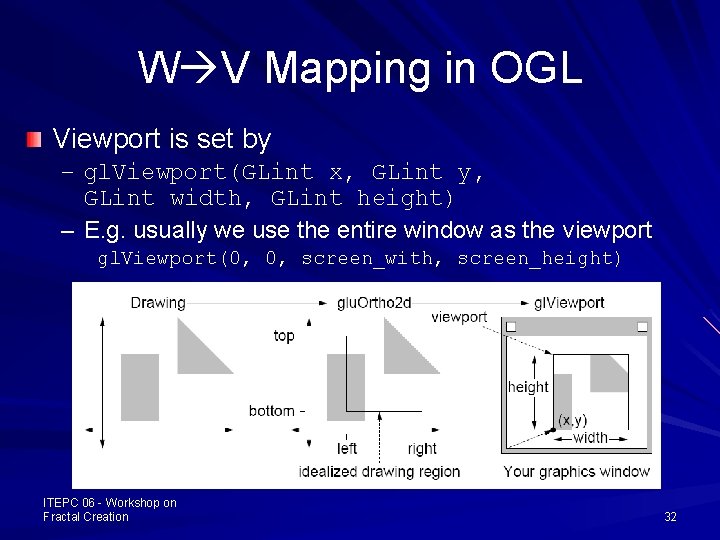
W V Mapping in OGL Viewport is set by – gl. Viewport(GLint x, GLint y, GLint width, GLint height) – E. g. usually we use the entire window as the viewport gl. Viewport(0, 0, screen_with, screen_height) ITEPC 06 - Workshop on Fractal Creation 32
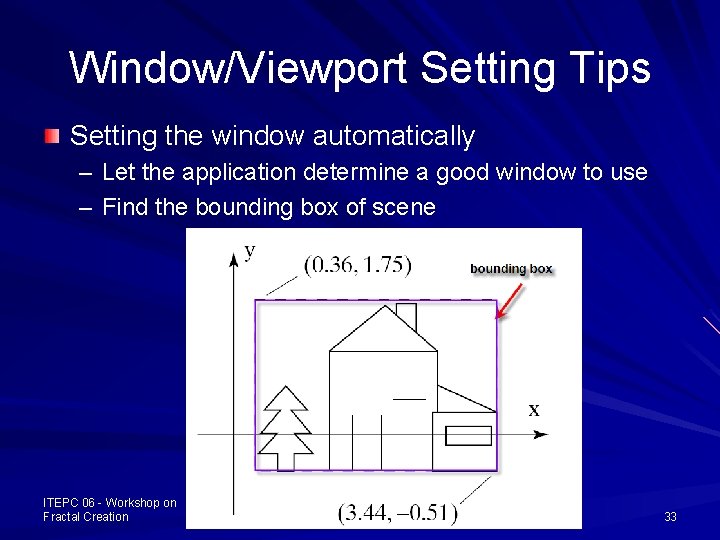
Window/Viewport Setting Tips Setting the window automatically – Let the application determine a good window to use – Find the bounding box of scene ITEPC 06 - Workshop on Fractal Creation 33
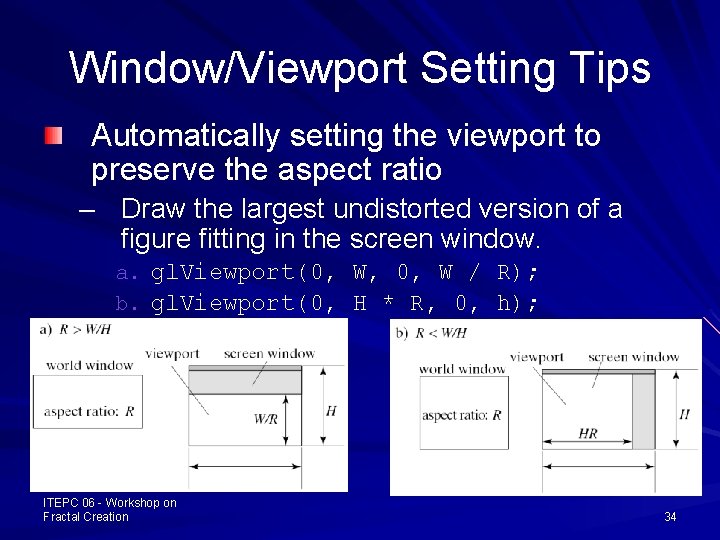
Window/Viewport Setting Tips Automatically setting the viewport to preserve the aspect ratio – Draw the largest undistorted version of a figure fitting in the screen window. a. gl. Viewport(0, W, 0, W / R); b. gl. Viewport(0, H * R, 0, h); ITEPC 06 - Workshop on Fractal Creation 34
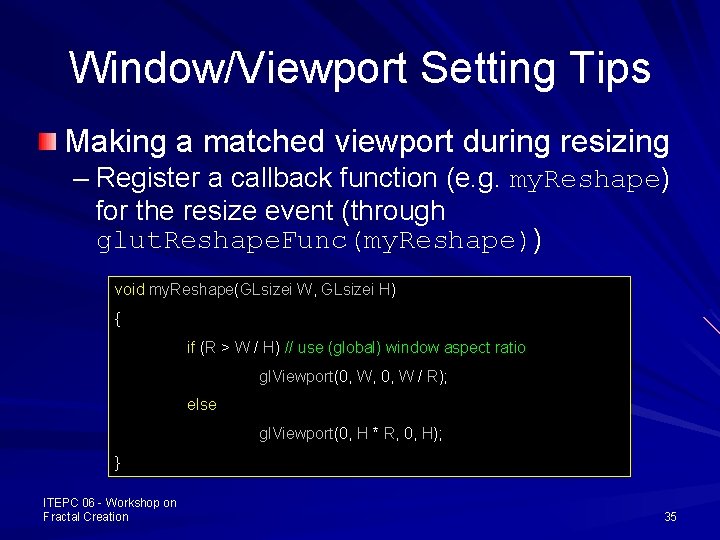
Window/Viewport Setting Tips Making a matched viewport during resizing – Register a callback function (e. g. my. Reshape) for the resize event (through glut. Reshape. Func(my. Reshape)) void my. Reshape(GLsizei W, GLsizei H) { if (R > W / H) // use (global) window aspect ratio gl. Viewport(0, W, 0, W / R); else gl. Viewport(0, H * R, 0, H); } ITEPC 06 - Workshop on Fractal Creation 35
void Draw. Koch(int level) { // recursion function if (level == 0) { gl. Begin(GL_LINES); Draw Koch Curves in OGL (see demo program) gl. Vertex 2 f(0. 0, 0. 0); gl. Vertex 2 f(1, 0. 0); gl. End(); } else{ gl. Push. Matrix(); { gl. Scalef(0. 3333333, 0. 3333333); Draw. Koch(level - 1); // first component gl. Translatef(1, 0, 0); gl. Rotatef(60, 0, 0, 1); // second component Draw. Koch(level - 1); gl. Translatef(1, 0, 0); // third component gl. Rotatef(-120, 0, 0, 1); Draw. Koch(level - 1); gl. Translated(1, 0, 0); // fourth component gl. Rotated(60, 0, 0, 1); Draw. Koch(level - 1); } gl. Pop. Matrix(); } ITEPC 06 - Workshop on } Fractal Creation 36