
Fundamental of Database Systems 1401312 3 By Dr
Fundamental of Database Systems 1401312 -3 By Dr Abdullah Alzahrani ﻋﺒﺪﺍﻟﻠﻪ ﺍﻟﺰﻫﺮﺍﻧﻲ. ﺩ aahzahrani@uqu. edu. sa SQL Queries
Reference ﺍﻟﻜﺘﺎﺏ ﺍﻟﻤﺮﺟﻊ • Fundamentals of Database Systems, 5 th ed. , by Elmasri • and Navathe, Pearson International Edition, 2007. http: //dev. mysql. com/doc/ Dr Abdullah Alzahrani. aahzahrani@uqu. edu. sa Fundamental of Database Systems 1401312 -3 9/20/2016 2
SQL Queries • Outlines: SQL queries: q. Attribute Data Types q. Nulls q 3 -valued logic q. Select q. Ordering q. JOIN q. Aggregate functions q. Grouping q. Sub-queries Some of the materials and examples are taken from: http: //www. w 3 schools. com/ and the reference book Dr Abdullah Alzahrani. aahzahrani@uqu. edu. sa Fundamental of Database Systems 1401312 -3 9/20/2016 3
SQL Queries • Attribute Data Types: 1. 2. Numeric: • includes integer numbers of various sizes (INTEGER or INT, and SMALLINT) and floating-point (real) numbers of various precision (FLOAT or REAL, and DOUBLE PRECISION). Formatted numbers can be declared by using DECIMAL(i, j)—or DEC(i, j) or NUMERIC(i, j)—where i, the precision, is the total number of decimal digits and j, the scale, is the number of digits after the decimal point. The default for scale is zero, and the default for precision is implementationdefined Character-string: • either fixed length {CHAR(n) or CHARACTER(n)}, where n is the number of characters or varying length {VARCHAR(n) or CHAR VARYING(n) or CHARACTER VARYING(n)}, where n is the maximum number of characters. When specifying a literal string value, it is placed between single quotation marks (apostrophes), and it is case sensitive (a distinction is made between uppercase and lowercase). Dr Abdullah Alzahrani. aahzahrani@uqu. edu. sa Fundamental of Database Systems 1401312 -3 9/20/2016 4
SQL Queries • Attribute Data Types: 3. Boolean: • 4. DATE • 5. has the traditional values of TRUE or FALSE. In SQL, because of the presence of NULL values, a three-valued logic is used, so a third possible value for a Boolean data type is UNKNOWN. data type has ten positions, and its components are YEAR, MONTH, and DAY in the form YYYY-MM-DD. Only valid dates and times should be allowed by the SQL implementation. This implies that months should be between 1 and 12 and dates must be between 1 and 31 TIME • The TIME data type has at least eight positions, with the components HOUR, MINUTE, and SECOND in the form HH: MM: SS. Only valid dates and times should be allowed by the SQL implementation. Dr Abdullah Alzahrani. aahzahrani@uqu. edu. sa Fundamental of Database Systems 1401312 -3 9/20/2016 5
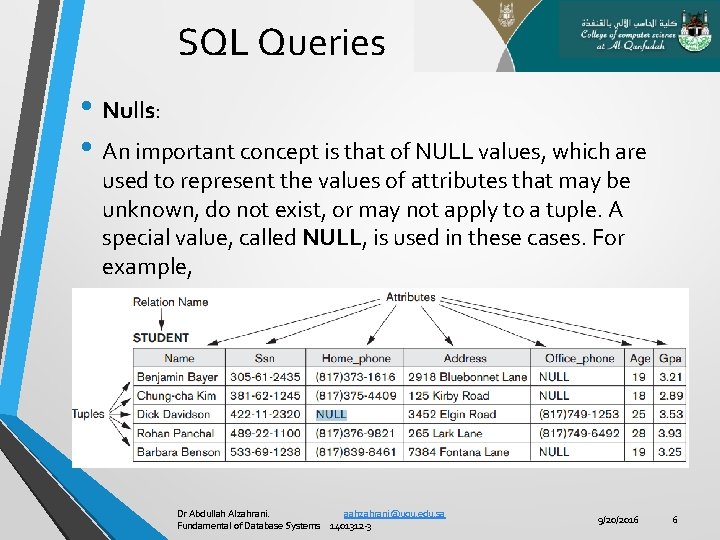
SQL Queries • Nulls: • An important concept is that of NULL values, which are used to represent the values of attributes that may be unknown, do not exist, or may not apply to a tuple. A special value, called NULL, is used in these cases. For example, Dr Abdullah Alzahrani. aahzahrani@uqu. edu. sa Fundamental of Database Systems 1401312 -3 9/20/2016 6
SQL Queries • Three-Valued Logic (3 -Valued ) • SQL has various rules for dealing with NULL values. NULL is used to represent a missing value, but that it usually has one of three different interpretations • • 1. 2. 3. value unknown(exists but is not known), value not available(exists but is purposely withheld), value not applicable(the attribute is undefined for this tuple). Consider the following examples to illustrate each of the meanings of NULL. 1. Unknown value. A person’s date of birth is not known, so it is represented by NULL in the database. 2. Unavailable or withheld value. A person has a home phone but does not want it to be listed, so it is withheld and represented as NULL in the database. 3. Not applicable attribute. An attribute Last. College. Degree would be NULL for a person who has no college degrees because it does not apply to that person. It is often not possible to determine which of the meanings is intended; for example, a NULL for the home phone of a person can have any of the three meanings. Hence, SQL does not distinguish between the different meanings of NULL. Dr Abdullah Alzahrani. aahzahrani@uqu. edu. sa Fundamental of Database Systems 1401312 -3 9/20/2016 7
SQL Queries • • • SELECT is used to retrieve rows selected from one or more tables, and can include UNION statements and subqueries. The basic form of the SELECT statement, sometimes called a mapping or a select-from-where block, is formed of the three clauses SELECT, FROM, and WHERE and has the following form: 1. 2. 3. 4. SELECT <attribute list> FROM <table list> WHERE <condition> ; Where: • • • <attribute list> is a list of attribute names whose values are to be retrieved by the query. <table list> is a list of the relation names required to process the query. <condition> is a conditional (Boolean) expression that identifies the tuples to be retrieved by the query. Dr Abdullah Alzahrani. aahzahrani@uqu. edu. sa Fundamental of Database Systems 1401312 -3 9/20/2016 8
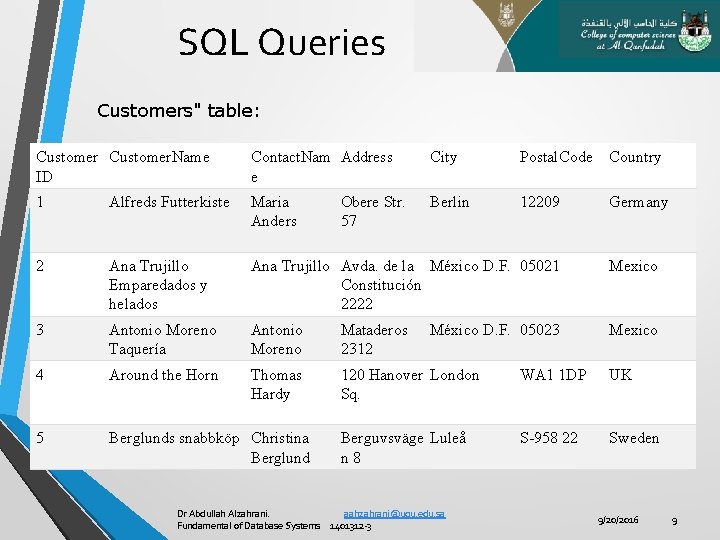
SQL Queries Customers" table: Customer. Name ID Contact. Nam Address e City Postal. Code Country 1 Alfreds Futterkiste Maria Anders Berlin 12209 Germany 2 Ana Trujillo Emparedados y helados Ana Trujillo Avda. de la México D. F. 05021 Constitución 2222 Mexico 3 Antonio Moreno Taquería Antonio Moreno Mataderos 2312 Mexico 4 Around the Horn Thomas Hardy 120 Hanover London Sq. WA 1 1 DP UK 5 Berglunds snabbköp Christina Berglund Berguvsväge Luleå n 8 S-958 22 Sweden Obere Str. 57 México D. F. 05023 Dr Abdullah Alzahrani. aahzahrani@uqu. edu. sa Fundamental of Database Systems 1401312 -3 9/20/2016 9
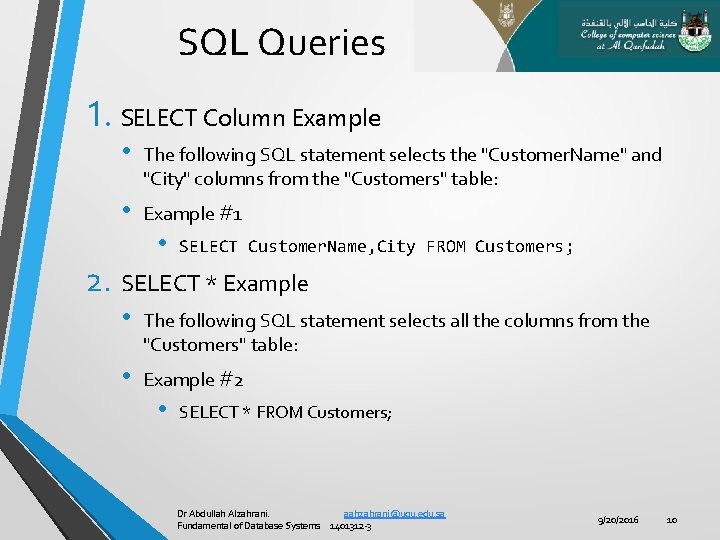
SQL Queries 1. SELECT Column Example • The following SQL statement selects the "Customer. Name" and "City" columns from the "Customers" table: • Example #1 • SELECT Customer. Name, City FROM Customers; 2. SELECT * Example • The following SQL statement selects all the columns from the "Customers" table: • Example #2 • SELECT * FROM Customers; Dr Abdullah Alzahrani. aahzahrani@uqu. edu. sa Fundamental of Database Systems 1401312 -3 9/20/2016 10
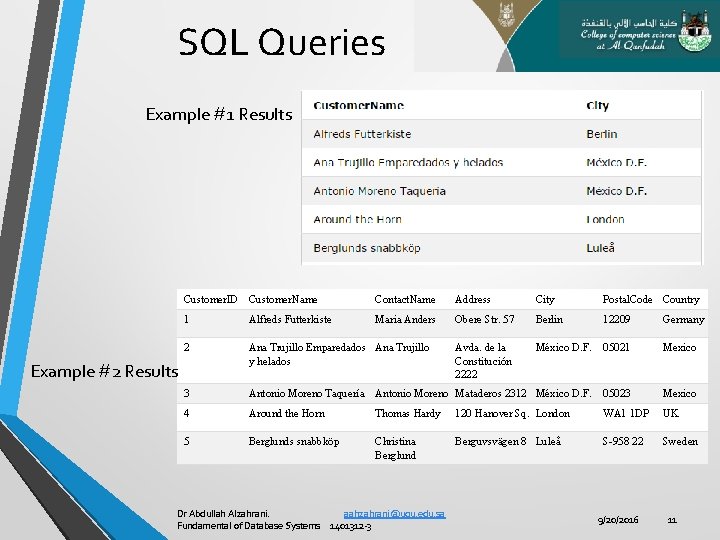
SQL Queries Example #1 Results Customer. ID Customer. Name Contact. Name Address City Postal. Code Country 1 Alfreds Futterkiste Maria Anders Obere Str. 57 Berlin 12209 Germany 2 Ana Trujillo Emparedados Ana Trujillo y helados Avda. de la Constitución 2222 México D. F. 05021 Mexico 3 Antonio Moreno Taquería Antonio Moreno Mataderos 2312 México D. F. 05023 Mexico 4 Around the Horn Thomas Hardy 120 Hanover Sq. London WA 1 1 DP UK 5 Berglunds snabbköp Christina Berglund Berguvsvägen 8 Luleå S-958 22 Sweden Example #2 Results Dr Abdullah Alzahrani. aahzahrani@uqu. edu. sa Fundamental of Database Systems 1401312 -3 9/20/2016 11
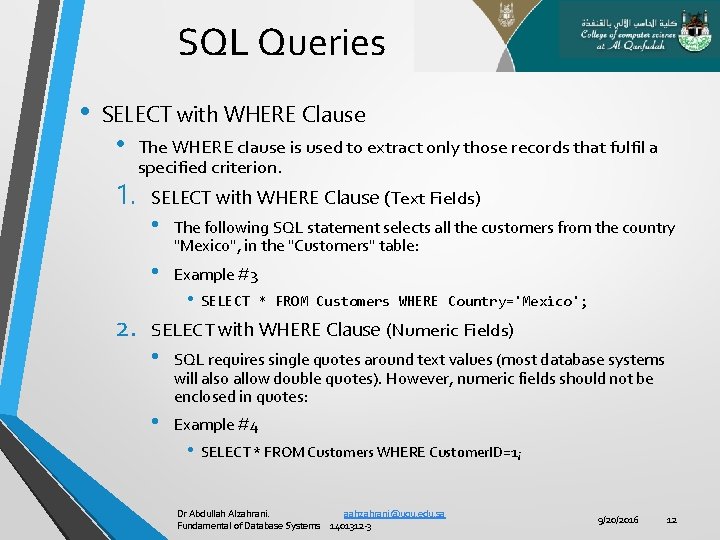
SQL Queries • SELECT with WHERE Clause • 1. 2. The WHERE clause is used to extract only those records that fulfil a specified criterion. SELECT with WHERE Clause (Text Fields) • The following SQL statement selects all the customers from the country "Mexico", in the "Customers" table: • Example #3 • SELECT * FROM Customers WHERE Country='Mexico'; SELECT with WHERE Clause (Numeric Fields) • SQL requires single quotes around text values (most database systems will also allow double quotes). However, numeric fields should not be enclosed in quotes: • Example #4 • SELECT * FROM Customers WHERE Customer. ID=1; Dr Abdullah Alzahrani. aahzahrani@uqu. edu. sa Fundamental of Database Systems 1401312 -3 9/20/2016 12
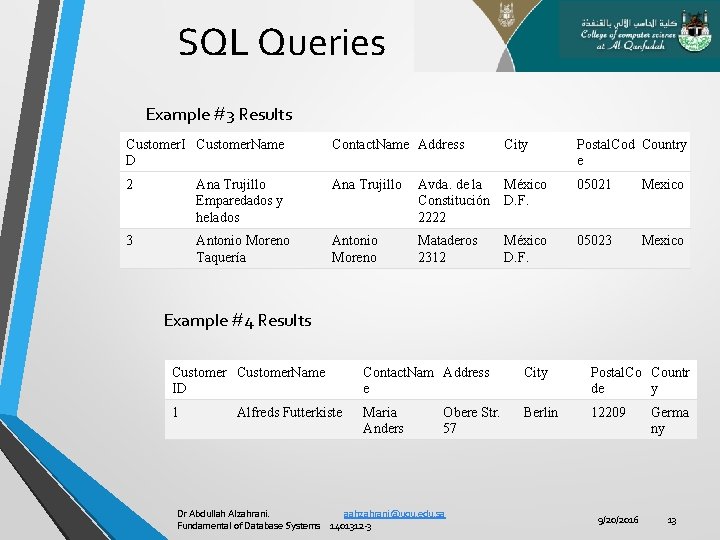
SQL Queries Example #3 Results Customer. I Customer. Name D Contact. Name Address City Postal. Cod Country e 2 Ana Trujillo Emparedados y helados Ana Trujillo Avda. de la Constitución 2222 México D. F. 05021 Mexico 3 Antonio Moreno Taquería Antonio Moreno Mataderos 2312 México D. F. 05023 Mexico Example #4 Results Customer. Name ID Contact. Nam Address e City Postal. Co Countr de y 1 Maria Anders Berlin 12209 Alfreds Futterkiste Obere Str. 57 Dr Abdullah Alzahrani. aahzahrani@uqu. edu. sa Fundamental of Database Systems 1401312 -3 9/20/2016 Germa ny 13
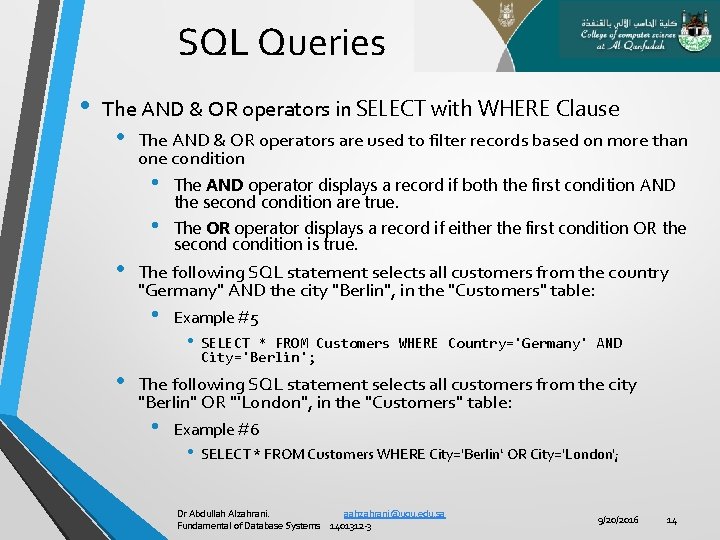
SQL Queries • The AND & OR operators in SELECT with WHERE Clause • The AND & OR operators are used to filter records based on more than one condition • • • The OR operator displays a record if either the first condition OR the secondition is true. The following SQL statement selects all customers from the country "Germany" AND the city "Berlin", in the "Customers" table: • • The AND operator displays a record if both the first condition AND the secondition are true. Example #5 • SELECT * FROM Customers WHERE Country='Germany' AND City='Berlin'; The following SQL statement selects all customers from the city "Berlin" OR "'London", in the "Customers" table: • Example #6 • SELECT * FROM Customers WHERE City='Berlin‘ OR City='London'; Dr Abdullah Alzahrani. aahzahrani@uqu. edu. sa Fundamental of Database Systems 1401312 -3 9/20/2016 14
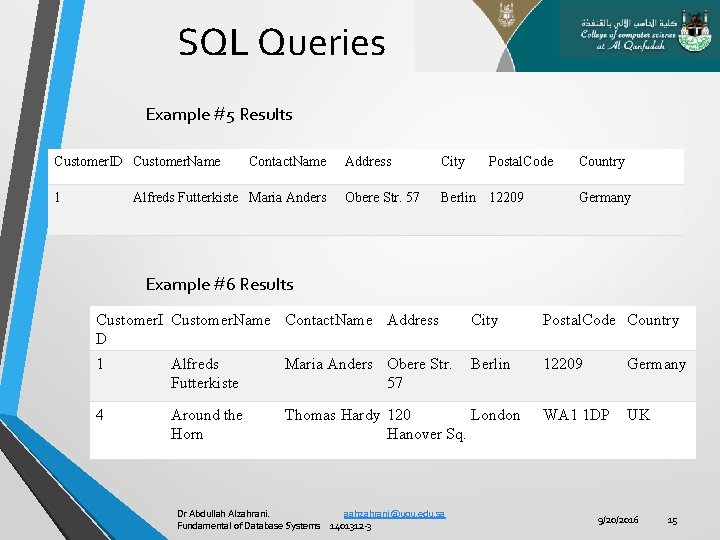
SQL Queries Example #5 Results Customer. ID Customer. Name 1 Contact. Name Alfreds Futterkiste Maria Anders Address City Postal. Code Obere Str. 57 Berlin 12209 Country Germany Example #6 Results Customer. I Customer. Name Contact. Name Address D City Postal. Code Country 1 Alfreds Futterkiste Maria Anders Obere Str. 57 Berlin 12209 Germany 4 Around the Horn Thomas Hardy 120 London Hanover Sq. WA 1 1 DP UK Dr Abdullah Alzahrani. aahzahrani@uqu. edu. sa Fundamental of Database Systems 1401312 -3 9/20/2016 15
SQL Queries Dr Abdullah Alzahrani. aahzahrani@uqu. edu. sa Fundamental of Database Systems 1401312 -3 9/20/2016 16
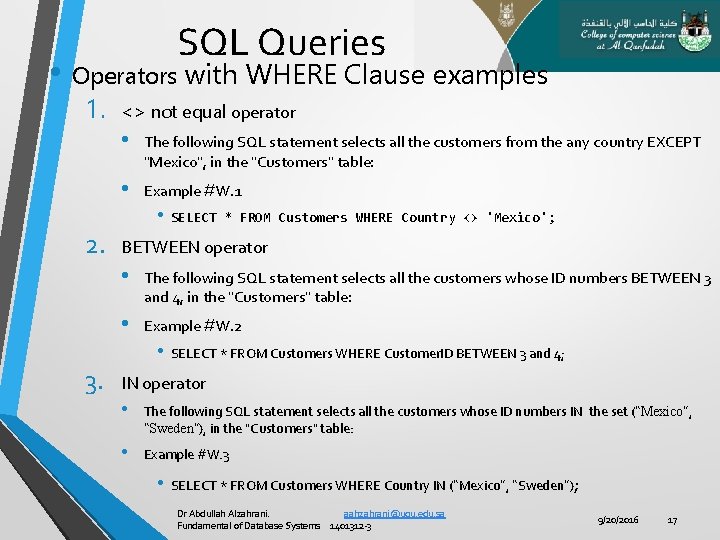
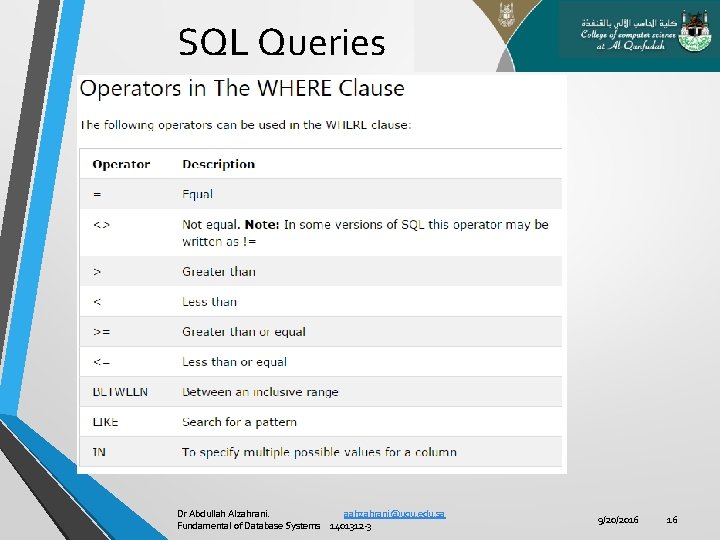
SQL Queries • Operators with WHERE Clause examples 1. <> not equal operator • The following SQL statement selects all the customers from the any country EXCEPT "Mexico", in the "Customers" table: • Example #W. 1 • SELECT 2. * FROM Customers WHERE Country <> 'Mexico'; BETWEEN operator • The following SQL statement selects all the customers whose ID numbers BETWEEN 3 and 4, in the "Customers" table: • Example #W. 2 • SELECT * FROM Customers WHERE Customer. ID BETWEEN 3 and 4; 3. IN operator • The following SQL statement selects all the customers whose ID numbers IN the set (“Mexico”, “Sweden”), in the "Customers" table: • Example #W. 3 • SELECT * FROM Customers WHERE Country IN (“Mexico”, “Sweden”); Dr Abdullah Alzahrani. aahzahrani@uqu. edu. sa Fundamental of Database Systems 1401312 -3 9/20/2016 17
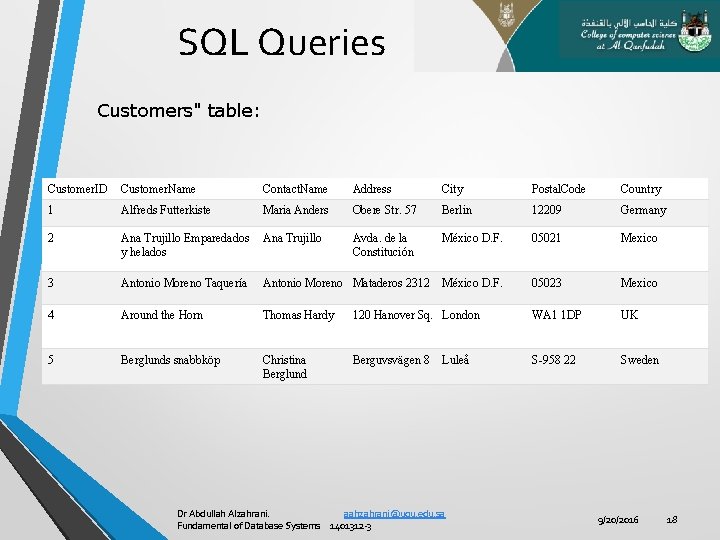
SQL Queries Customers" table: Customer. ID Customer. Name Contact. Name Address City Postal. Code Country 1 Alfreds Futterkiste Maria Anders Obere Str. 57 Berlin 12209 Germany 2 Ana Trujillo Emparedados y helados Ana Trujillo Avda. de la Constitución México D. F. 05021 Mexico 3 Antonio Moreno Taquería Antonio Moreno Mataderos 2312 México D. F. 05023 Mexico 4 Around the Horn Thomas Hardy 120 Hanover Sq. London WA 1 1 DP UK 5 Berglunds snabbköp Christina Berglund Berguvsvägen 8 S-958 22 Sweden Luleå Dr Abdullah Alzahrani. aahzahrani@uqu. edu. sa Fundamental of Database Systems 1401312 -3 9/20/2016 18
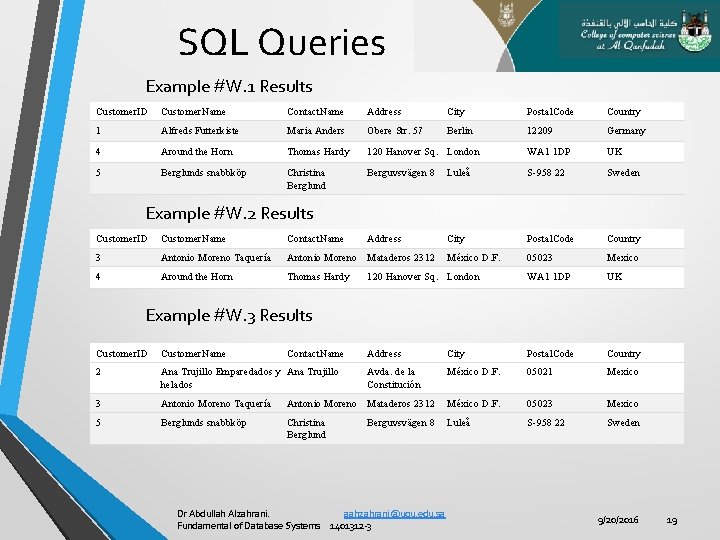
SQL Queries Example #W. 1 Results Customer. ID Customer. Name Contact. Name Address City Postal. Code Country 1 Alfreds Futterkiste Maria Anders Obere Str. 57 Berlin 12209 Germany 4 Around the Horn Thomas Hardy 120 Hanover Sq. London WA 1 1 DP UK 5 Berglunds snabbköp Christina Berglund Berguvsvägen 8 Luleå S-958 22 Sweden Address City Postal. Code Country México D. F. 05023 Mexico 120 Hanover Sq. London WA 1 1 DP UK Address City Postal. Code Country Avda. de la Constitución México D. F. 05021 Mexico Example #W. 2 Results Customer. ID Customer. Name Contact. Name 3 Antonio Moreno Taquería Antonio Moreno Mataderos 2312 4 Around the Horn Thomas Hardy Example #W. 3 Results Customer. ID Customer. Name Contact. Name 2 Ana Trujillo Emparedados y Ana Trujillo helados 3 Antonio Moreno Taquería Antonio Moreno Mataderos 2312 México D. F. 05023 Mexico 5 Berglunds snabbköp Christina Berglund Luleå S-958 22 Sweden Berguvsvägen 8 Dr Abdullah Alzahrani. aahzahrani@uqu. edu. sa Fundamental of Database Systems 1401312 -3 9/20/2016 19
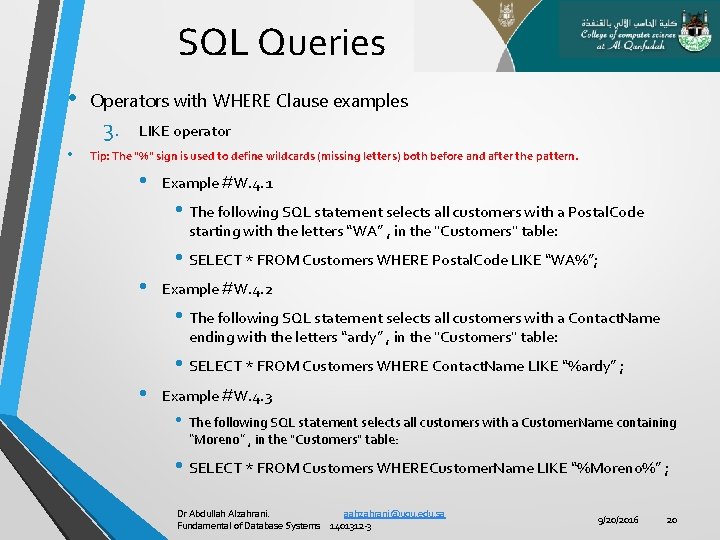
SQL Queries • Operators with WHERE Clause examples 3. • LIKE operator Tip: The "%" sign is used to define wildcards (missing letters) both before and after the pattern. • Example #W. 4. 1 • The following SQL statement selects all customers with a Postal. Code starting with the letters “WA” , in the "Customers" table: • SELECT * FROM Customers WHERE Postal. Code LIKE “WA%”; • Example #W. 4. 2 • The following SQL statement selects all customers with a Contact. Name ending with the letters “ardy” , in the "Customers" table: • SELECT * FROM Customers WHERE Contact. Name LIKE “%ardy” ; • Example #W. 4. 3 • The following SQL statement selects all customers with a Customer. Name containing “Moreno” , in the "Customers" table: • SELECT * FROM Customers WHERECustomer. Name LIKE “%Moreno%” ; Dr Abdullah Alzahrani. aahzahrani@uqu. edu. sa Fundamental of Database Systems 1401312 -3 9/20/2016 20
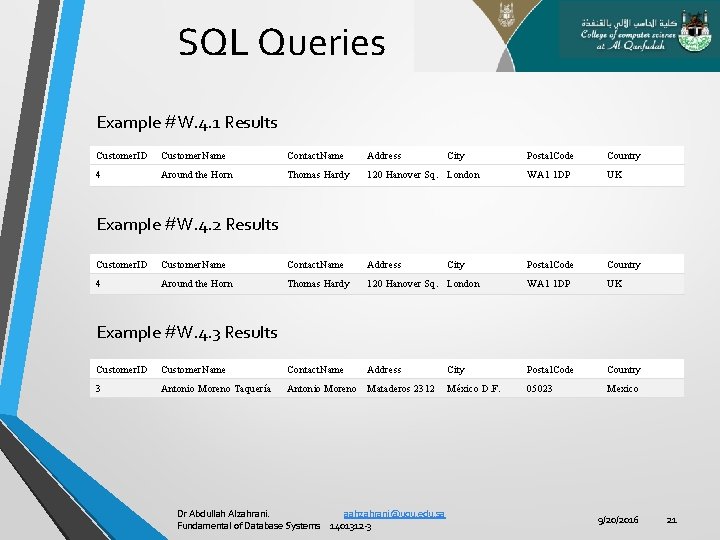
SQL Queries Example #W. 4. 1 Results Customer. ID Customer. Name Contact. Name Address 4 Around the Horn Thomas Hardy City Postal. Code Country 120 Hanover Sq. London WA 1 1 DP UK Postal. Code Country Example #W. 4. 2 Results Customer. ID Customer. Name Contact. Name Address City 4 Around the Horn Thomas Hardy 120 Hanover Sq. London WA 1 1 DP UK Address City Postal. Code Country México D. F. 05023 Mexico Example #W. 4. 3 Results Customer. ID Customer. Name Contact. Name 3 Antonio Moreno Taquería Antonio Moreno Mataderos 2312 Dr Abdullah Alzahrani. aahzahrani@uqu. edu. sa Fundamental of Database Systems 1401312 -3 9/20/2016 21
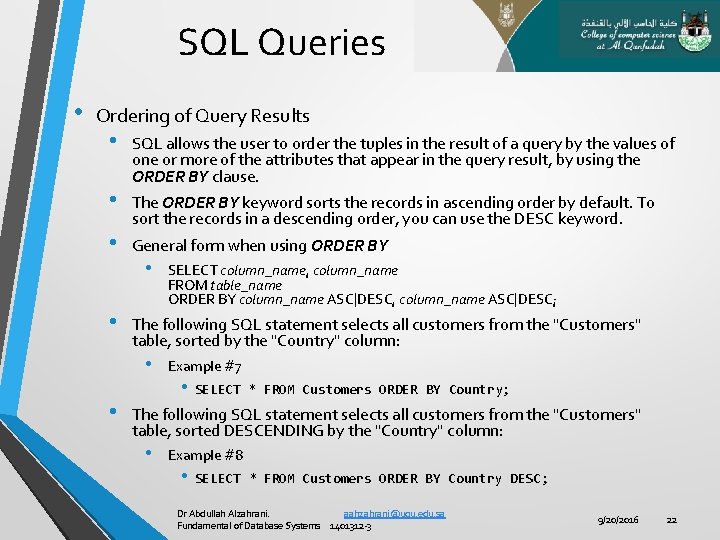
SQL Queries • Ordering of Query Results • • SQL allows the user to order the tuples in the result of a query by the values of one or more of the attributes that appear in the query result, by using the ORDER BY clause. The ORDER BY keyword sorts the records in ascending order by default. To sort the records in a descending order, you can use the DESC keyword. General form when using ORDER BY • The following SQL statement selects all customers from the "Customers" table, sorted by the "Country" column: • • SELECT column_name, column_name FROM table_name ORDER BY column_name ASC|DESC, column_name ASC|DESC; Example #7 • SELECT * FROM Customers ORDER BY Country; The following SQL statement selects all customers from the "Customers" table, sorted DESCENDING by the "Country" column: • Example #8 • SELECT * FROM Customers ORDER BY Country DESC; Dr Abdullah Alzahrani. aahzahrani@uqu. edu. sa Fundamental of Database Systems 1401312 -3 9/20/2016 22
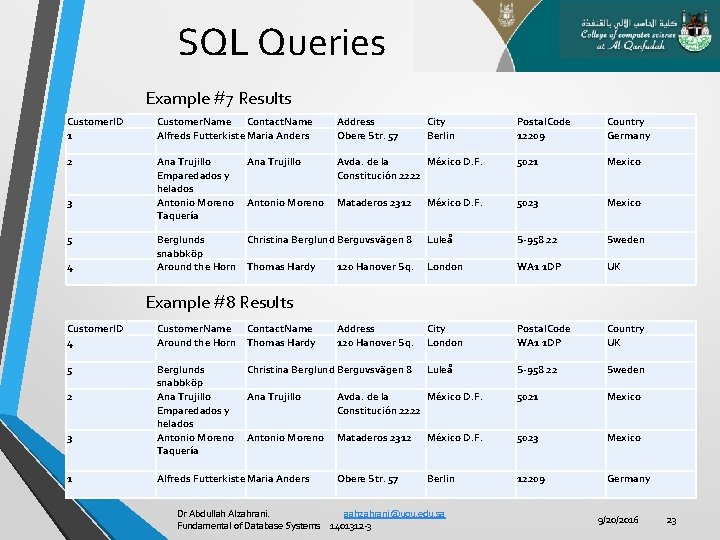
SQL Queries Example #7 Results Customer. ID 1 Customer. Name Contact. Name Alfreds Futterkiste Maria Anders Address Obere Str. 57 2 Ana Trujillo Emparedados y helados Antonio Moreno Taquería Ana Trujillo Antonio Moreno 3 5 4 Postal. Code 12209 Country Germany Avda. de la México D. F. Constitución 2222 5021 Mexico Mataderos 2312 México D. F. 5023 Mexico Luleå S-958 22 Sweden London WA 1 1 DP UK City London Postal. Code WA 1 1 DP Country UK Luleå S-958 22 Sweden Berglunds Christina Berglund Berguvsvägen 8 snabbköp Around the Horn Thomas Hardy 120 Hanover Sq. City Berlin Example #8 Results Customer. ID 4 Customer. Name Contact. Name Around the Horn Thomas Hardy 5 Berglunds snabbköp Ana Trujillo Emparedados y helados Antonio Moreno Taquería 2 3 1 Address 120 Hanover Sq. Christina Berglund Berguvsvägen 8 Ana Trujillo Avda. de la México D. F. Constitución 2222 5021 Mexico Antonio Moreno Mataderos 2312 México D. F. 5023 Mexico Obere Str. 57 Berlin 12209 Germany Alfreds Futterkiste Maria Anders Dr Abdullah Alzahrani. aahzahrani@uqu. edu. sa Fundamental of Database Systems 1401312 -3 9/20/2016 23
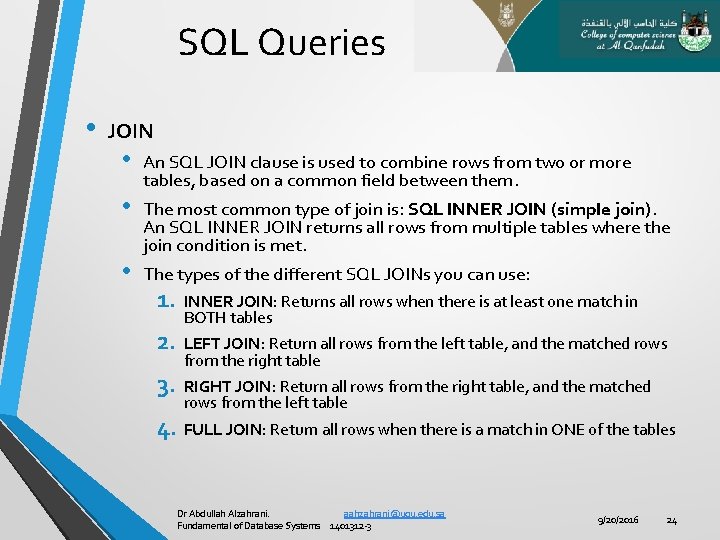
SQL Queries • JOIN • • • An SQL JOIN clause is used to combine rows from two or more tables, based on a common field between them. The most common type of join is: SQL INNER JOIN (simple join). An SQL INNER JOIN returns all rows from multiple tables where the join condition is met. The types of the different SQL JOINs you can use: 1. INNER JOIN: Returns all rows when there is at least one match in BOTH tables 2. LEFT JOIN: Return all rows from the left table, and the matched rows from the right table 3. RIGHT JOIN: Return all rows from the right table, and the matched rows from the left table 4. FULL JOIN: Return all rows when there is a match in ONE of the tables Dr Abdullah Alzahrani. aahzahrani@uqu. edu. sa Fundamental of Database Systems 1401312 -3 9/20/2016 24
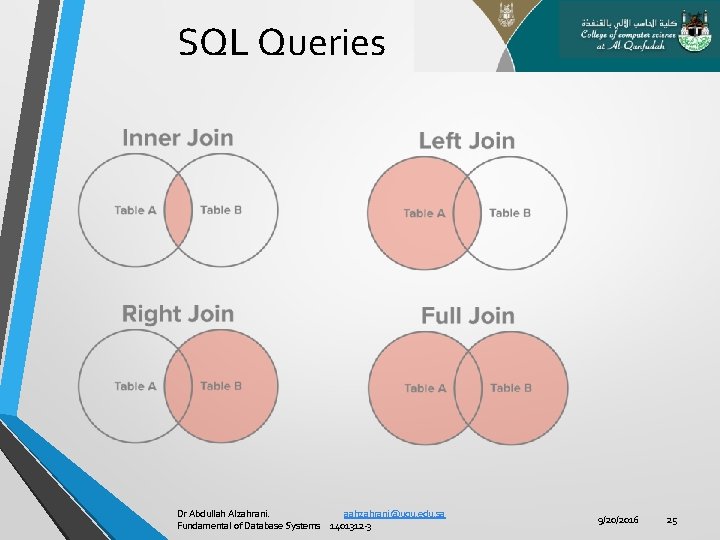
SQL Queries Dr Abdullah Alzahrani. aahzahrani@uqu. edu. sa Fundamental of Database Systems 1401312 -3 9/20/2016 25
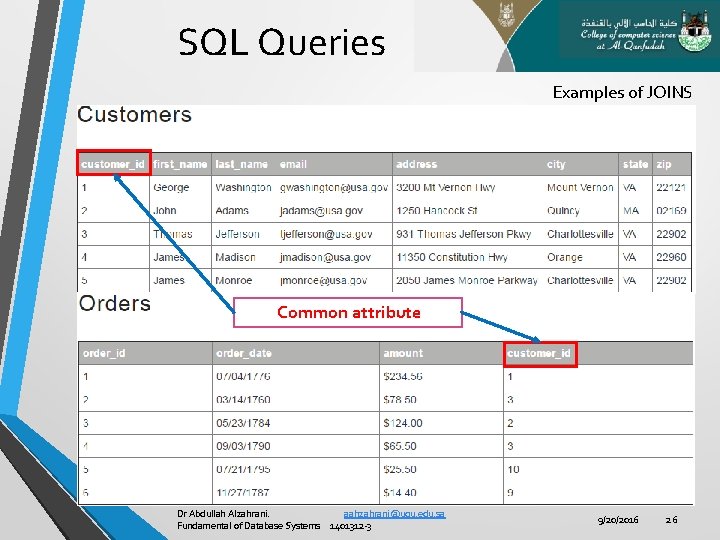
SQL Queries Examples of JOINS Common attribute Dr Abdullah Alzahrani. aahzahrani@uqu. edu. sa Fundamental of Database Systems 1401312 -3 9/20/2016 26
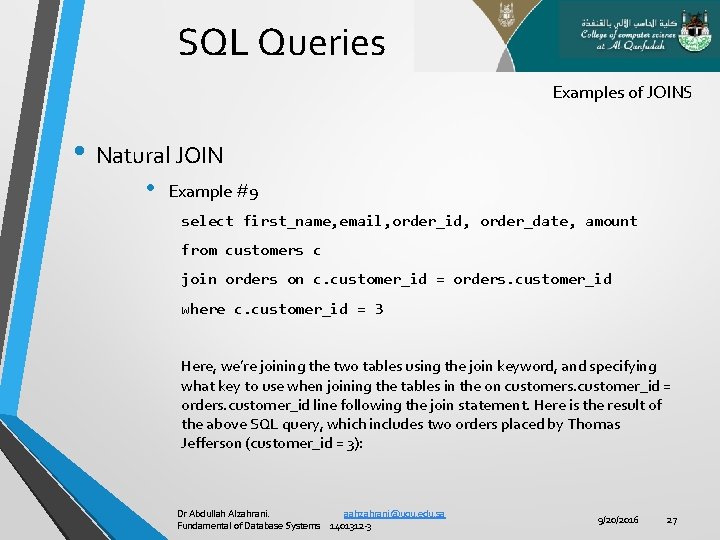
SQL Queries Examples of JOINS • Natural JOIN • Example #9 select first_name, email, order_id, order_date, amount from customers c join orders on c. customer_id = orders. customer_id where c. customer_id = 3 Here, we’re joining the two tables using the join keyword, and specifying what key to use when joining the tables in the on customers. customer_id = orders. customer_id line following the join statement. Here is the result of the above SQL query, which includes two orders placed by Thomas Jefferson (customer_id = 3): Dr Abdullah Alzahrani. aahzahrani@uqu. edu. sa Fundamental of Database Systems 1401312 -3 9/20/2016 27
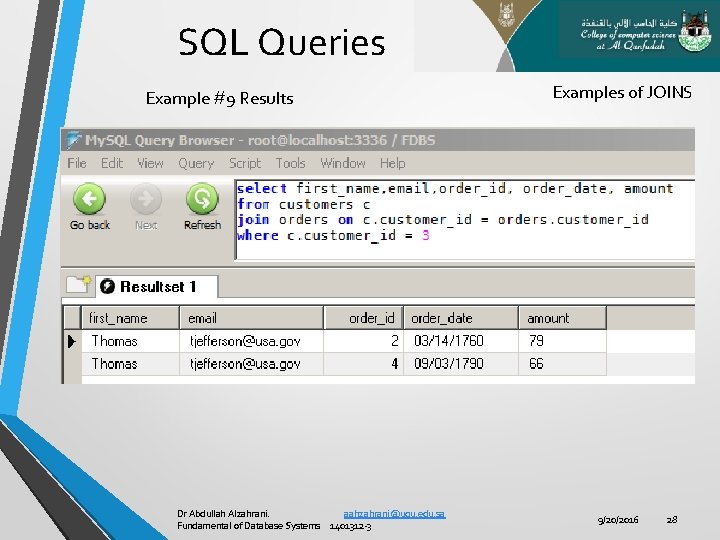
SQL Queries Example #9 Results Dr Abdullah Alzahrani. aahzahrani@uqu. edu. sa Fundamental of Database Systems 1401312 -3 Examples of JOINS 9/20/2016 28
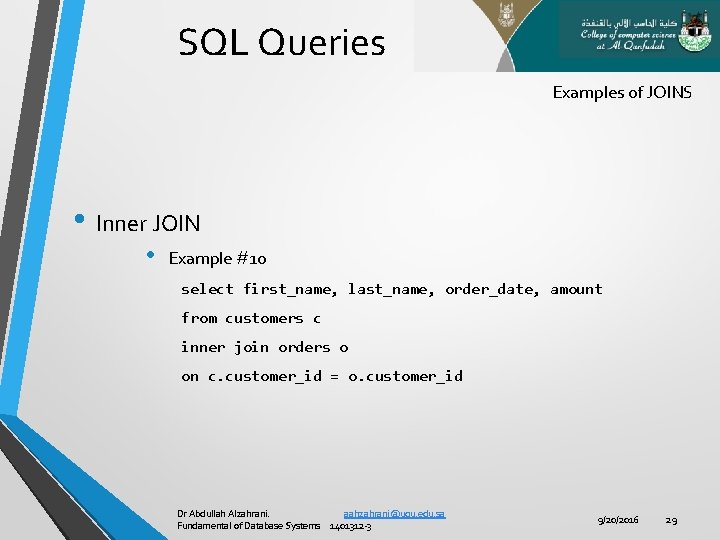
SQL Queries Examples of JOINS • Inner JOIN • Example #10 select first_name, last_name, order_date, amount from customers c inner join orders o on c. customer_id = o. customer_id Dr Abdullah Alzahrani. aahzahrani@uqu. edu. sa Fundamental of Database Systems 1401312 -3 9/20/2016 29
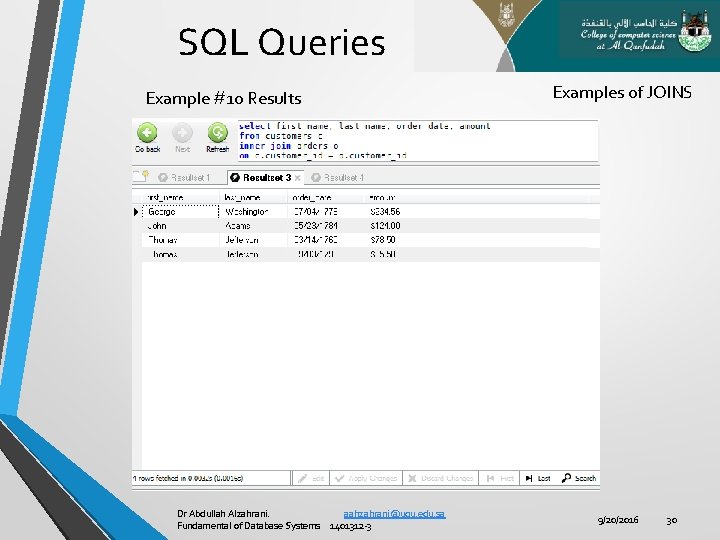
SQL Queries Example #10 Results Dr Abdullah Alzahrani. aahzahrani@uqu. edu. sa Fundamental of Database Systems 1401312 -3 Examples of JOINS 9/20/2016 30
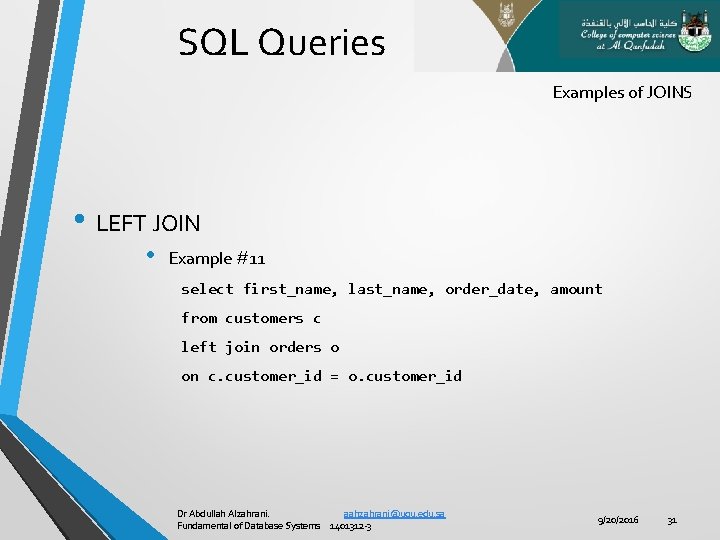
SQL Queries Examples of JOINS • LEFT JOIN • Example #11 select first_name, last_name, order_date, amount from customers c left join orders o on c. customer_id = o. customer_id Dr Abdullah Alzahrani. aahzahrani@uqu. edu. sa Fundamental of Database Systems 1401312 -3 9/20/2016 31
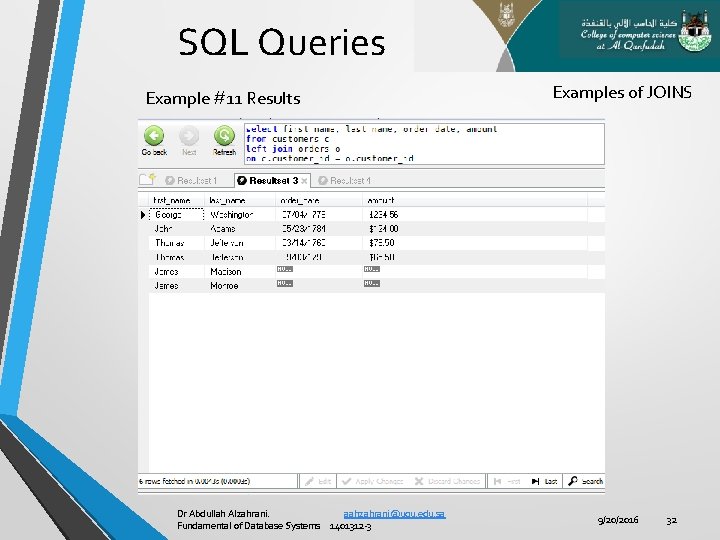
SQL Queries Example #11 Results Dr Abdullah Alzahrani. aahzahrani@uqu. edu. sa Fundamental of Database Systems 1401312 -3 Examples of JOINS 9/20/2016 32
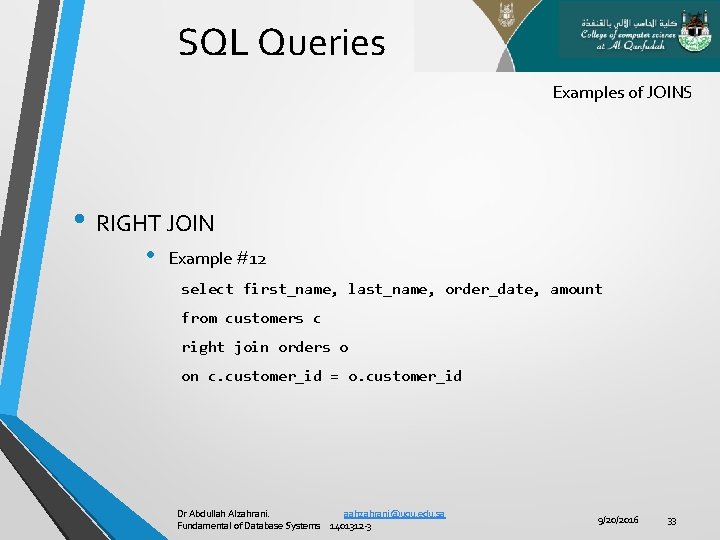
SQL Queries Examples of JOINS • RIGHT JOIN • Example #12 select first_name, last_name, order_date, amount from customers c right join orders o on c. customer_id = o. customer_id Dr Abdullah Alzahrani. aahzahrani@uqu. edu. sa Fundamental of Database Systems 1401312 -3 9/20/2016 33
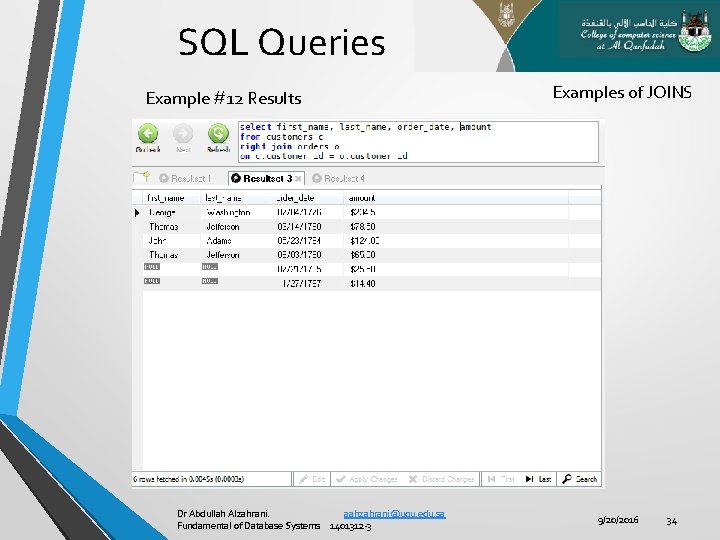
SQL Queries Example #12 Results Dr Abdullah Alzahrani. aahzahrani@uqu. edu. sa Fundamental of Database Systems 1401312 -3 Examples of JOINS 9/20/2016 34
SQL Queries • SQL Aggregate Functions • SQL aggregate functions return a single value, calculated from values in a column. • Useful aggregate functions: 1. AVG() - Returns the average value 2. COUNT() - Returns the number of rows 3. MAX() - Returns the largest value 4. MIN() - Returns the smallest value 5. SUM() - Returns the sum Dr Abdullah Alzahrani. aahzahrani@uqu. edu. sa Fundamental of Database Systems 1401312 -3 9/20/2016 35
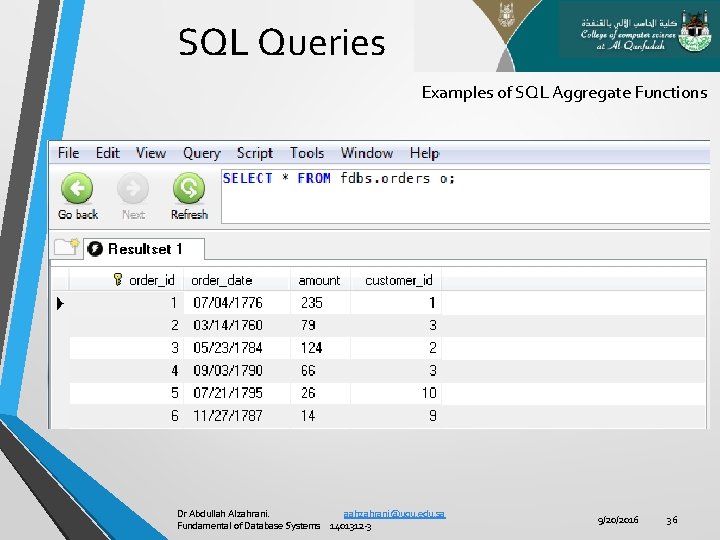
SQL Queries Examples of SQL Aggregate Functions Dr Abdullah Alzahrani. aahzahrani@uqu. edu. sa Fundamental of Database Systems 1401312 -3 9/20/2016 36
SQL Queries • SQL Aggregate Functions 1. AVG() • General form: • SELECT AVG(column_name) FROM table_name • Example #13 • The following SQL statement gets the average value of the “Amount" column from the “Orders" table: • SELECT AVG(Amount) AS Price. Average FROM Orders; Dr Abdullah Alzahrani. aahzahrani@uqu. edu. sa Fundamental of Database Systems 1401312 -3 9/20/2016 37
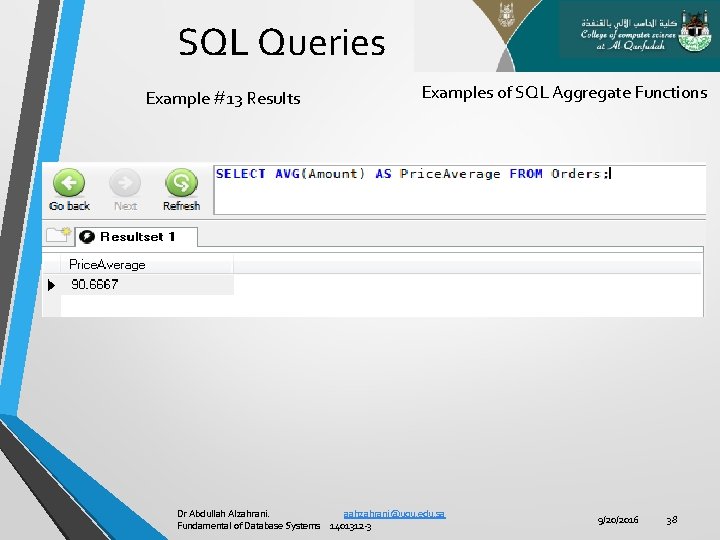
SQL Queries Example #13 Results Examples of SQL Aggregate Functions Dr Abdullah Alzahrani. aahzahrani@uqu. edu. sa Fundamental of Database Systems 1401312 -3 9/20/2016 38
SQL Queries SQL Aggregate Functions 2. COUNT() • General form: 1) SELECT COUNT(column_name) FROM table_name v 2) SELECT COUNT(DISTINCT column_name) FROM table_name; v 3) The COUNT(column_name) function returns the number of values (NULL values will not be counted) of the specified column SELECT COUNT(DISTINCT column_name) FROM table_name; SELECT COUNT(*) FROM table_name; v The COUNT(*) function returns the number of records in a table Dr Abdullah Alzahrani. aahzahrani@uqu. edu. sa Fundamental of Database Systems 1401312 -3 9/20/2016 39
SQL Queries SQL Aggregate Functions 2. COUNT() • Example #14 • • The following SQL statement counts the number of orders for "Customer. ID"=3 from the "Orders" table: SELECT COUNT(Customer_ID) AS Orders. From. Customer. ID 3 FROM Orders WHERE Customer_ID=3; Example #15 • • The following SQL statement counts the total number of orders in the "Orders" table: SELECT COUNT(*) AS Number. Of. Orders FROM Orders; Example #16 • • The following SQL statement counts the number of unique customers in the "Orders" table SELECT COUNT(DISTINCT Customer_ID) AS Number. Of. Customers FROM Orders; Dr Abdullah Alzahrani. aahzahrani@uqu. edu. sa Fundamental of Database Systems 1401312 -3 9/20/2016 40
SQL Queries Examples of SQL Aggregate Functions IMPORTANT NOTE: The DISTINCT keyword can be used to return only distinct (different) values. Dr Abdullah Alzahrani. aahzahrani@uqu. edu. sa Fundamental of Database Systems 1401312 -3 9/20/2016 41
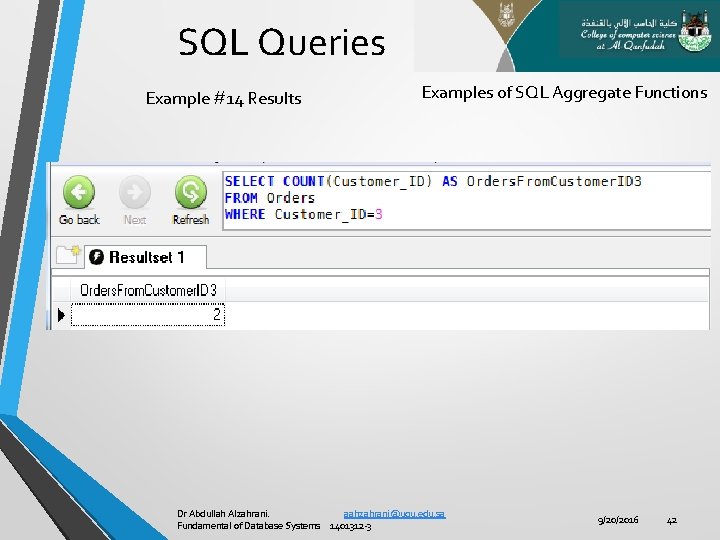
SQL Queries Example #14 Results Examples of SQL Aggregate Functions Dr Abdullah Alzahrani. aahzahrani@uqu. edu. sa Fundamental of Database Systems 1401312 -3 9/20/2016 42
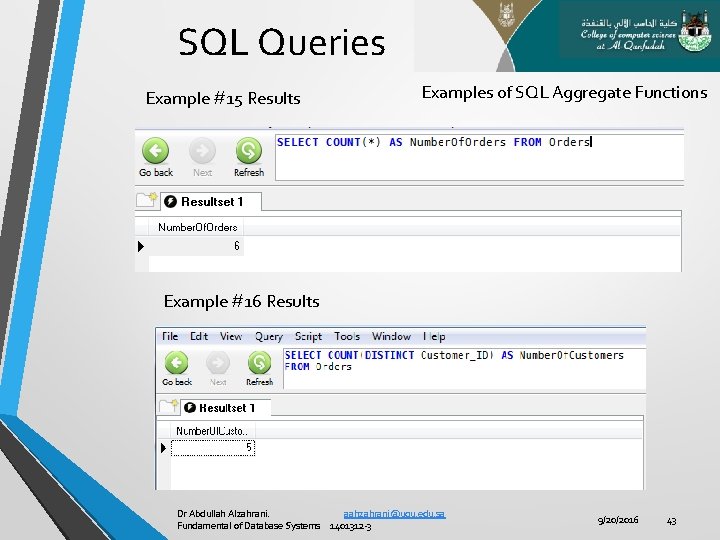
SQL Queries Example #15 Results Examples of SQL Aggregate Functions Example #16 Results Dr Abdullah Alzahrani. aahzahrani@uqu. edu. sa Fundamental of Database Systems 1401312 -3 9/20/2016 43
SQL Queries SQL Aggregate Functions 3. MAX() • General form: • 4. MIN() • General form: • 5. SELECT MAX(column_name) FROM table_name; SELECT MIN(column_name) FROM table_name; SUM() • General form: • SELECT SUM(column_name) FROM table_name; Dr Abdullah Alzahrani. aahzahrani@uqu. edu. sa Fundamental of Database Systems 1401312 -3 9/20/2016 44
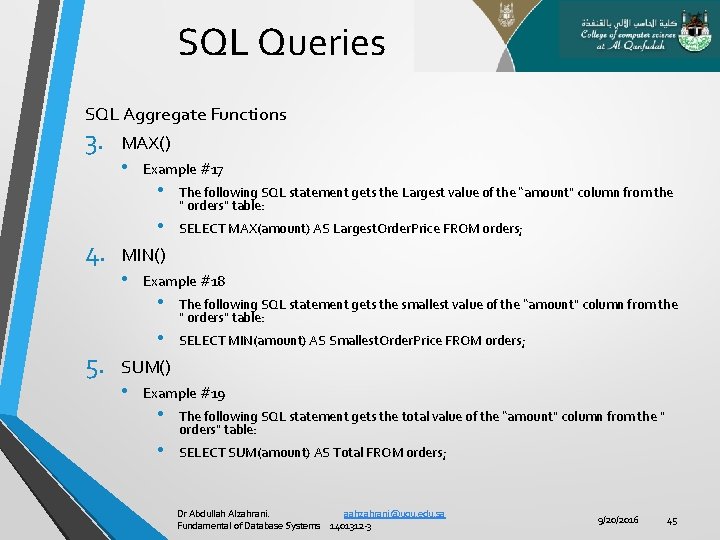
SQL Queries SQL Aggregate Functions 3. 4. 5. MAX() • Example #17 • The following SQL statement gets the Largest value of the “amount" column from the " orders" table: • SELECT MAX(amount) AS Largest. Order. Price FROM orders; MIN() • Example #18 • The following SQL statement gets the smallest value of the “amount" column from the " orders" table: • SELECT MIN(amount) AS Smallest. Order. Price FROM orders; SUM() • Example #19 • The following SQL statement gets the total value of the “amount" column from the " orders" table: • SELECT SUM(amount) AS Total FROM orders; Dr Abdullah Alzahrani. aahzahrani@uqu. edu. sa Fundamental of Database Systems 1401312 -3 9/20/2016 45
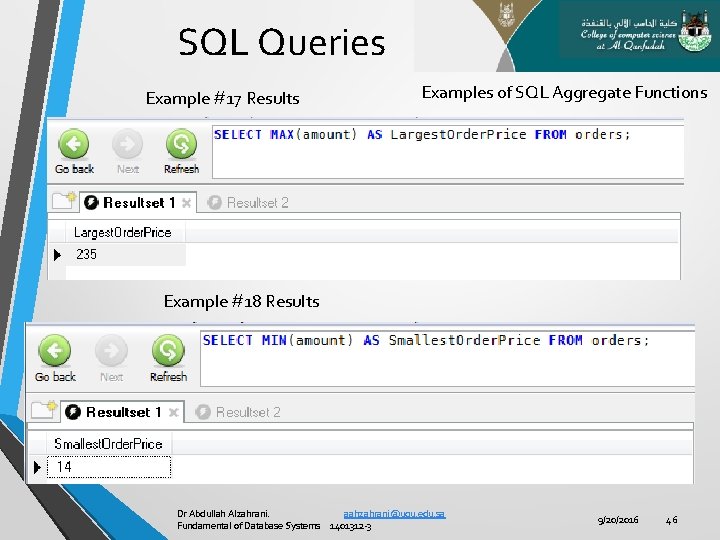
SQL Queries Example #17 Results Examples of SQL Aggregate Functions Example #18 Results Dr Abdullah Alzahrani. aahzahrani@uqu. edu. sa Fundamental of Database Systems 1401312 -3 9/20/2016 46
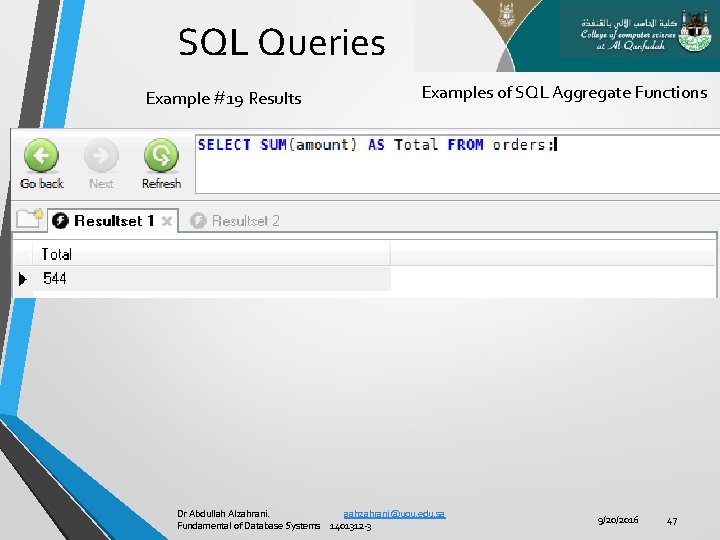
SQL Queries Example #19 Results Examples of SQL Aggregate Functions Dr Abdullah Alzahrani. aahzahrani@uqu. edu. sa Fundamental of Database Systems 1401312 -3 9/20/2016 47
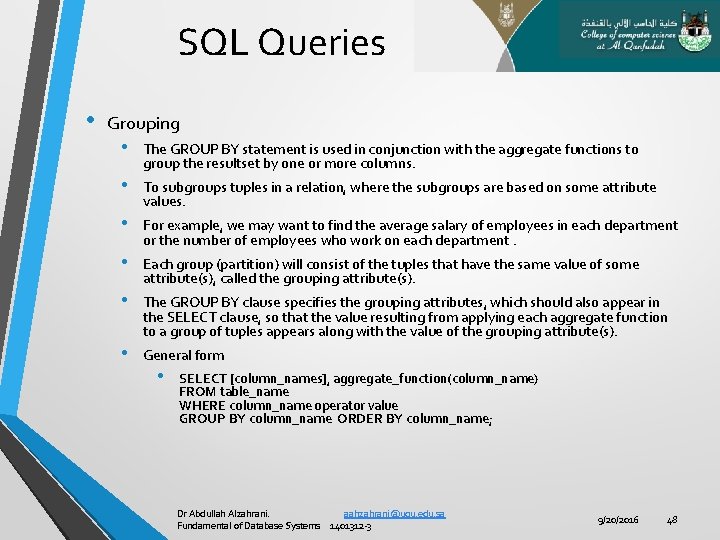
SQL Queries • Grouping • • • The GROUP BY statement is used in conjunction with the aggregate functions to group the resultset by one or more columns. To subgroups tuples in a relation, where the subgroups are based on some attribute values. For example, we may want to find the average salary of employees in each department or the number of employees who work on each department. Each group (partition) will consist of the tuples that have the same value of some attribute(s), called the grouping attribute(s). The GROUP BY clause specifies the grouping attributes, which should also appear in the SELECT clause, so that the value resulting from applying each aggregate function to a group of tuples appears along with the value of the grouping attribute(s). General form • SELECT [column_names], aggregate_function(column_name) FROM table_name WHERE column_name operator value GROUP BY column_name ORDER BY column_name; Dr Abdullah Alzahrani. aahzahrani@uqu. edu. sa Fundamental of Database Systems 1401312 -3 9/20/2016 48
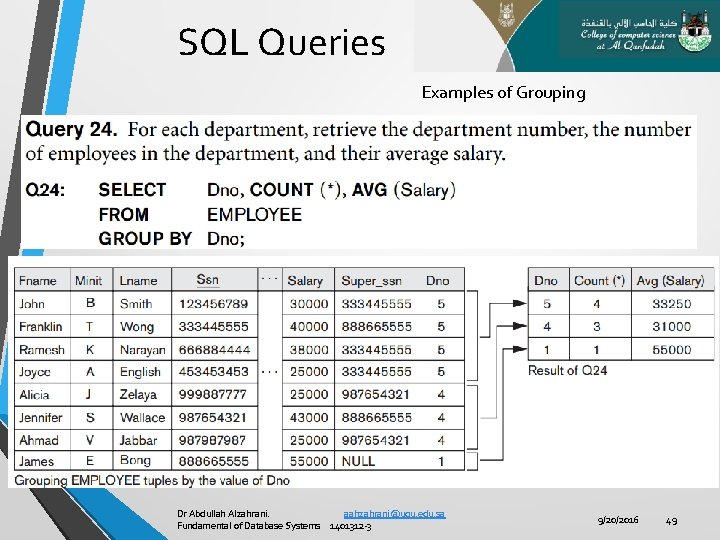
SQL Queries Examples of Grouping Dr Abdullah Alzahrani. aahzahrani@uqu. edu. sa Fundamental of Database Systems 1401312 -3 9/20/2016 49
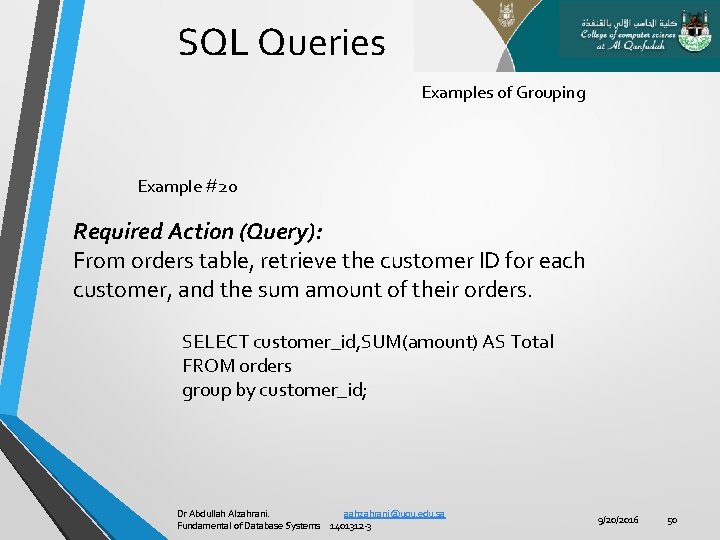
SQL Queries Examples of Grouping Example #20 Required Action (Query): From orders table, retrieve the customer ID for each customer, and the sum amount of their orders. SELECT customer_id, SUM(amount) AS Total FROM orders group by customer_id; Dr Abdullah Alzahrani. aahzahrani@uqu. edu. sa Fundamental of Database Systems 1401312 -3 9/20/2016 50
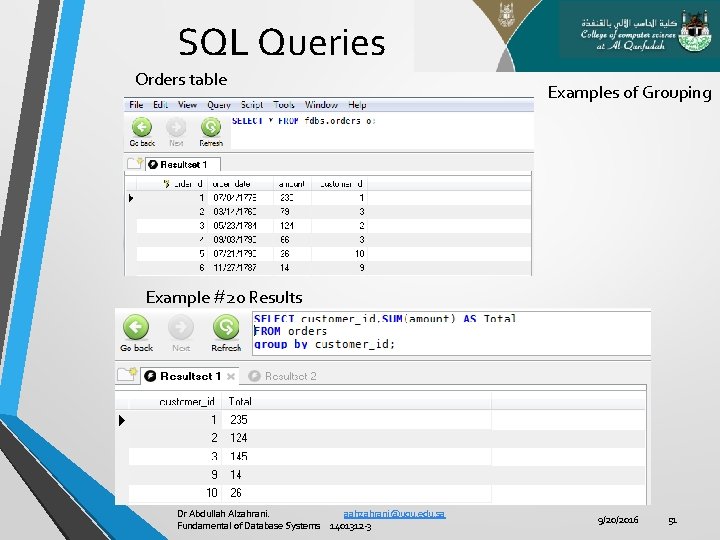
SQL Queries Orders table Examples of Grouping Example #20 Results Dr Abdullah Alzahrani. aahzahrani@uqu. edu. sa Fundamental of Database Systems 1401312 -3 9/20/2016 51
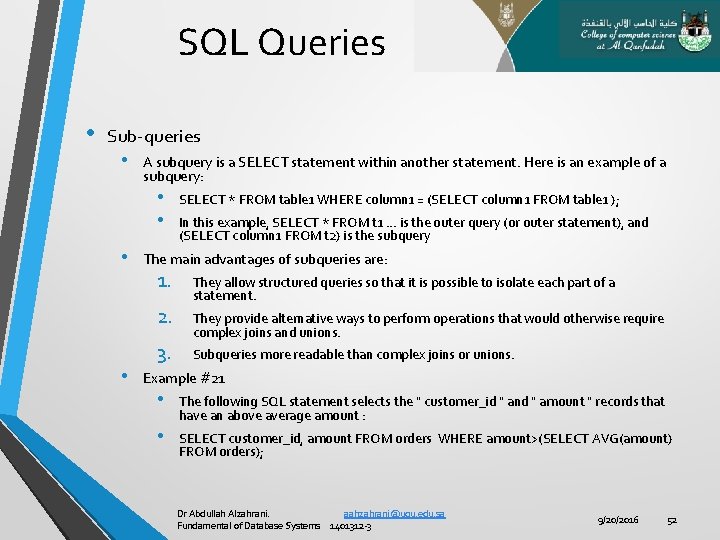
SQL Queries • Sub-queries • A subquery is a SELECT statement within another statement. Here is an example of a subquery: • • • In this example, SELECT * FROM t 1. . . is the outer query (or outer statement), and (SELECT column 1 FROM t 2) is the subquery The main advantages of subqueries are: 1. 2. • SELECT * FROM table 1 WHERE column 1 = (SELECT column 1 FROM table 1 ); 3. They allow structured queries so that it is possible to isolate each part of a statement. They provide alternative ways to perform operations that would otherwise require complex joins and unions. Subqueries more readable than complex joins or unions. Example #21 • The following SQL statement selects the " customer_id " and " amount " records that have an above average amount : • SELECT customer_id, amount FROM orders WHERE amount>(SELECT AVG(amount) FROM orders); Dr Abdullah Alzahrani. aahzahrani@uqu. edu. sa Fundamental of Database Systems 1401312 -3 9/20/2016 52
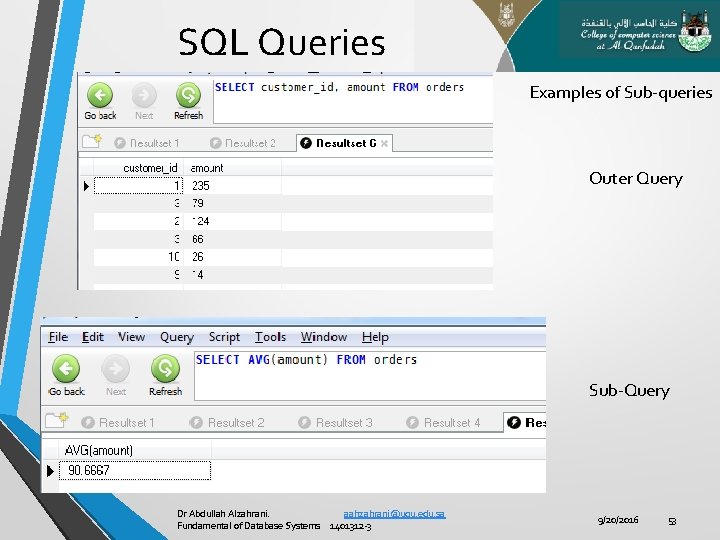
SQL Queries Examples of Sub-queries Outer Query Sub-Query Dr Abdullah Alzahrani. aahzahrani@uqu. edu. sa Fundamental of Database Systems 1401312 -3 9/20/2016 53
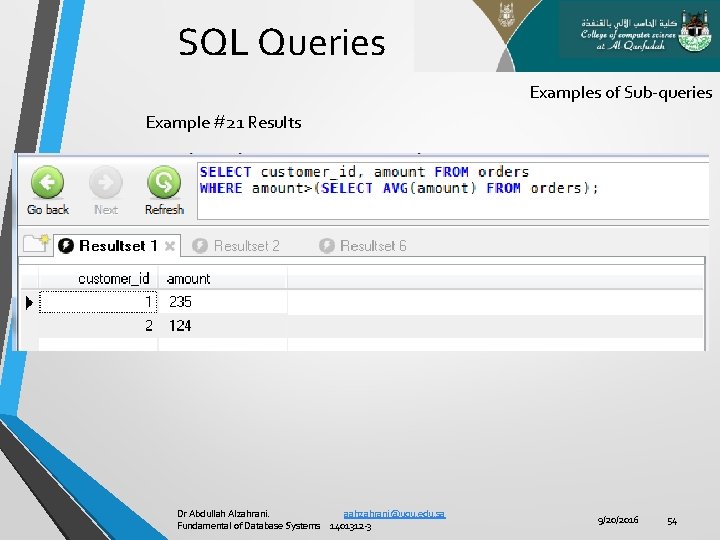
SQL Queries Examples of Sub-queries Example #21 Results Dr Abdullah Alzahrani. aahzahrani@uqu. edu. sa Fundamental of Database Systems 1401312 -3 9/20/2016 54

SQL Queries End Dr Abdullah Alzahrani. aahzahrani@uqu. edu. sa Fundamental of Database Systems 1401312 -3 9/20/2016 55
- Slides: 55