
Functions Part 1 Section 1 Chapter 4 An
- Slides: 31
Functions Part 1 Section 1 Chapter 4 An Introduction to Programming Using Python David I. Schneider © 2016 Pearson Education, Inc. , Hoboken, NJ. All rights reserved.
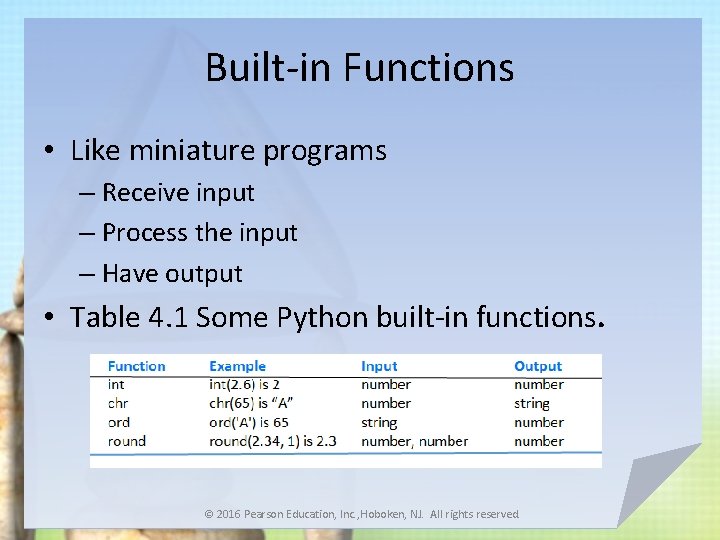
Built-in Functions • Like miniature programs – Receive input – Process the input – Have output • Table 4. 1 Some Python built-in functions. © 2016 Pearson Education, Inc. , Hoboken, NJ. All rights reserved.
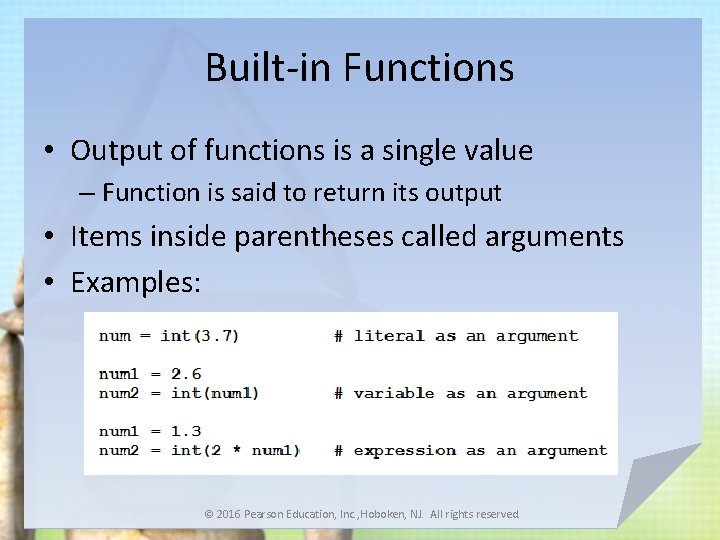
Built-in Functions • Output of functions is a single value – Function is said to return its output • Items inside parentheses called arguments • Examples: © 2016 Pearson Education, Inc. , Hoboken, NJ. All rights reserved.
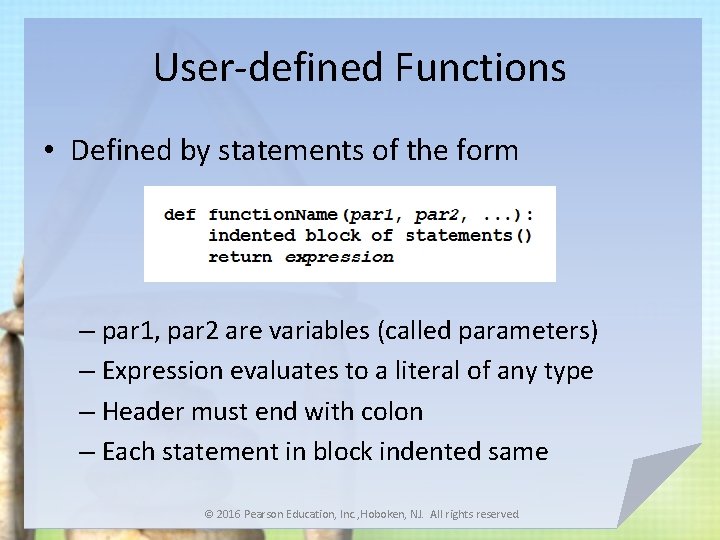
User-defined Functions • Defined by statements of the form – par 1, par 2 are variables (called parameters) – Expression evaluates to a literal of any type – Header must end with colon – Each statement in block indented same © 2016 Pearson Education, Inc. , Hoboken, NJ. All rights reserved.
User-defined Functions • Passing parameters – We consider here pass by position – Arguments in calling statement matched to the parameters in function header based on order • Parameters and return statements optional in function definitions • Function names should describe the role performed © 2016 Pearson Education, Inc. , Hoboken, NJ. All rights reserved.
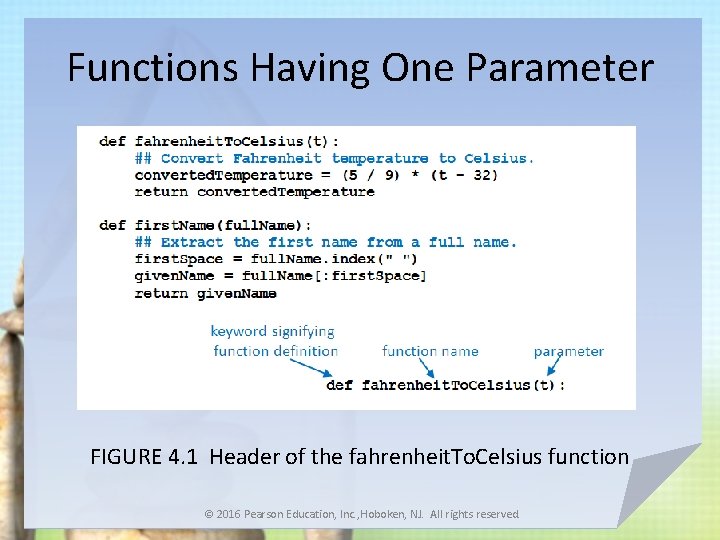
Functions Having One Parameter FIGURE 4. 1 Header of the fahrenheit. To. Celsius function © 2016 Pearson Education, Inc. , Hoboken, NJ. All rights reserved.
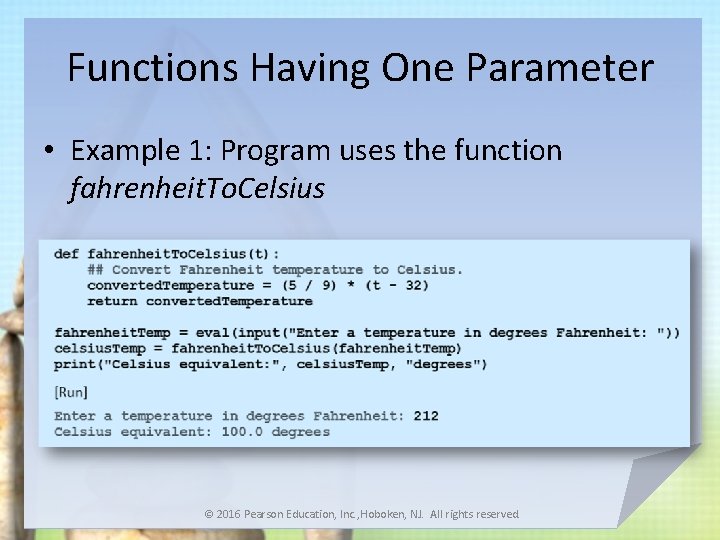
Functions Having One Parameter • Example 1: Program uses the function fahrenheit. To. Celsius © 2016 Pearson Education, Inc. , Hoboken, NJ. All rights reserved.
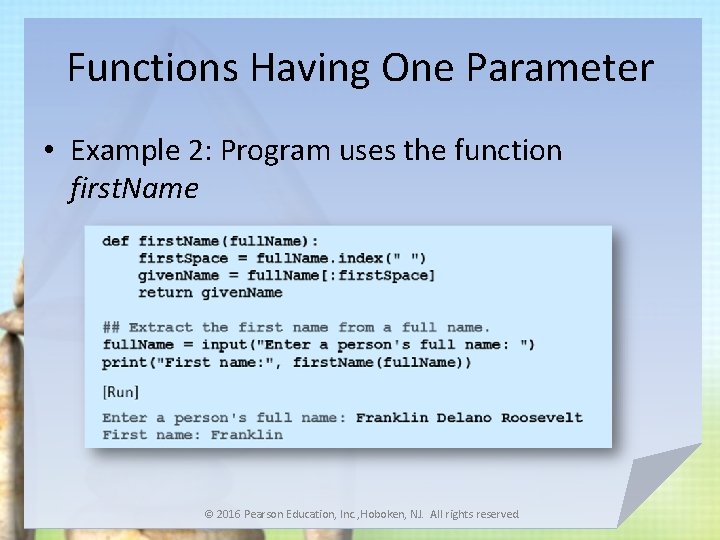
Functions Having One Parameter • Example 2: Program uses the function first. Name © 2016 Pearson Education, Inc. , Hoboken, NJ. All rights reserved.
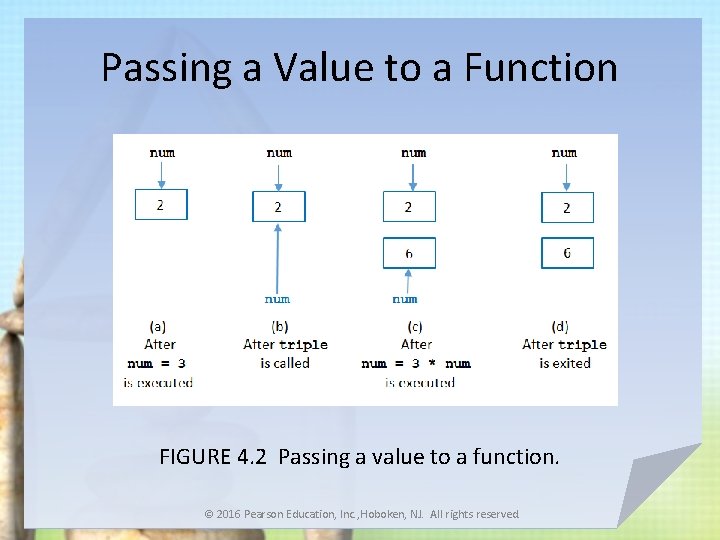
Passing a Value to a Function • If the argument in a function call is a variable – Object pointed to by the argument variable (not the argument variable itself) passed to a parameter variable – Object is immutable, there is no possibility that value of the argument variable will be changed by a function call © 2016 Pearson Education, Inc. , Hoboken, NJ. All rights reserved.
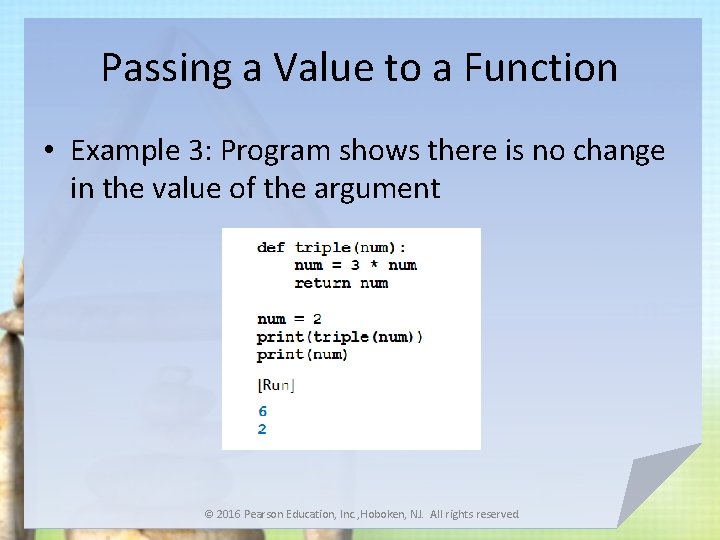
Passing a Value to a Function • Example 3: Program shows there is no change in the value of the argument © 2016 Pearson Education, Inc. , Hoboken, NJ. All rights reserved.
Passing a Value to a Function FIGURE 4. 2 Passing a value to a function. © 2016 Pearson Education, Inc. , Hoboken, NJ. All rights reserved.
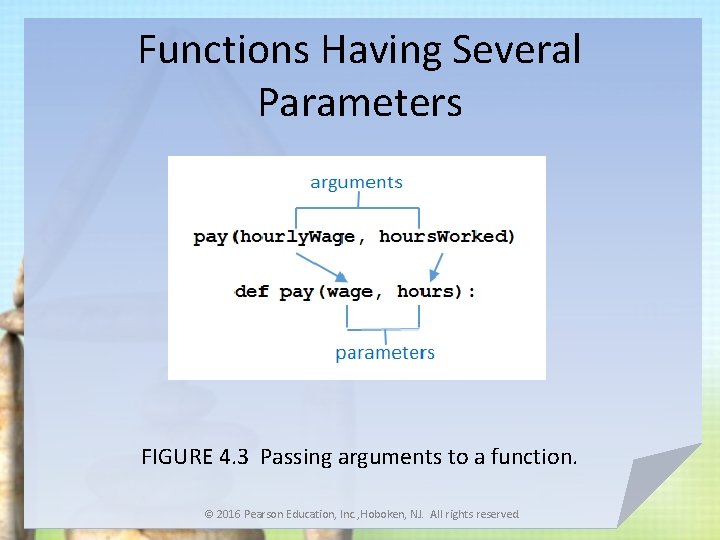
Functions Having Several Parameters • Must be the same number of arguments as parameters in the function • Data types of arguments’ values must be compatible with data types expected by the parameters – Must also be in the same order © 2016 Pearson Education, Inc. , Hoboken, NJ. All rights reserved.
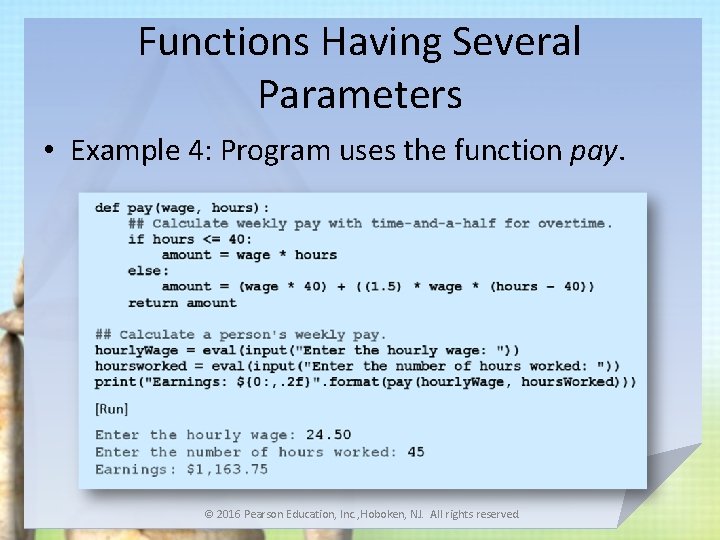
Functions Having Several Parameters • Example 4: Program uses the function pay. © 2016 Pearson Education, Inc. , Hoboken, NJ. All rights reserved.
Functions Having Several Parameters FIGURE 4. 3 Passing arguments to a function. © 2016 Pearson Education, Inc. , Hoboken, NJ. All rights reserved.
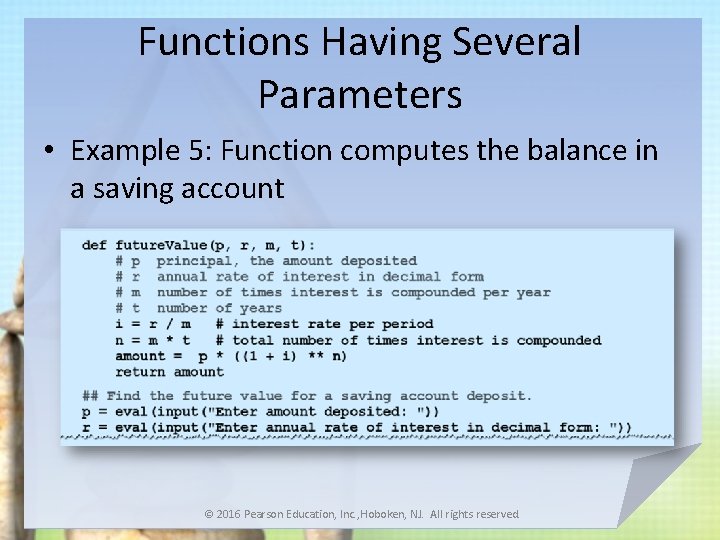
Functions Having Several Parameters • Example 5: Function computes the balance in a saving account © 2016 Pearson Education, Inc. , Hoboken, NJ. All rights reserved.
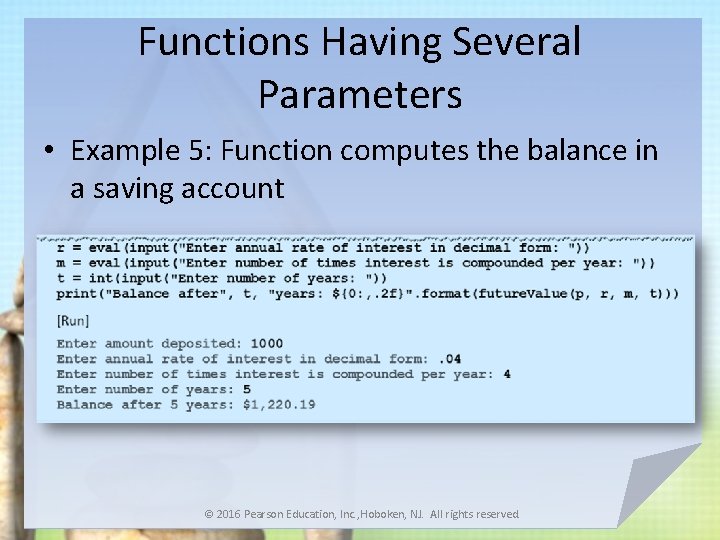
Functions Having Several Parameters • Example 5: Function computes the balance in a saving account © 2016 Pearson Education, Inc. , Hoboken, NJ. All rights reserved.
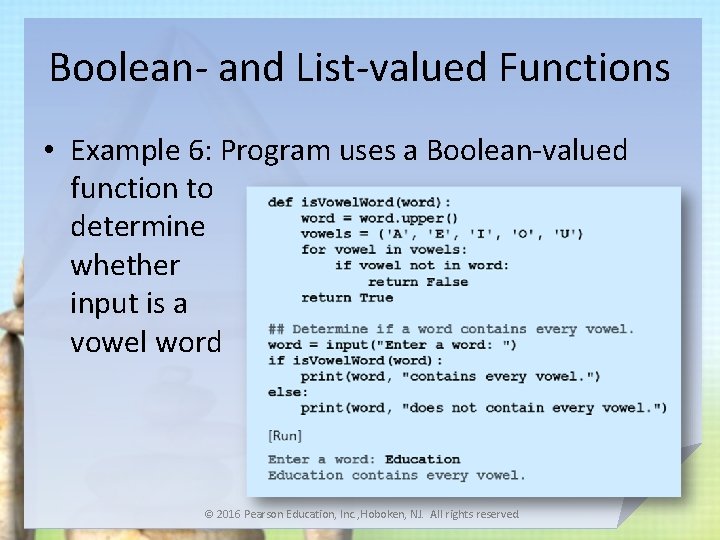
Boolean- and List-valued Functions • Example 6: Program uses a Boolean-valued function to determine whether input is a vowel word © 2016 Pearson Education, Inc. , Hoboken, NJ. All rights reserved.
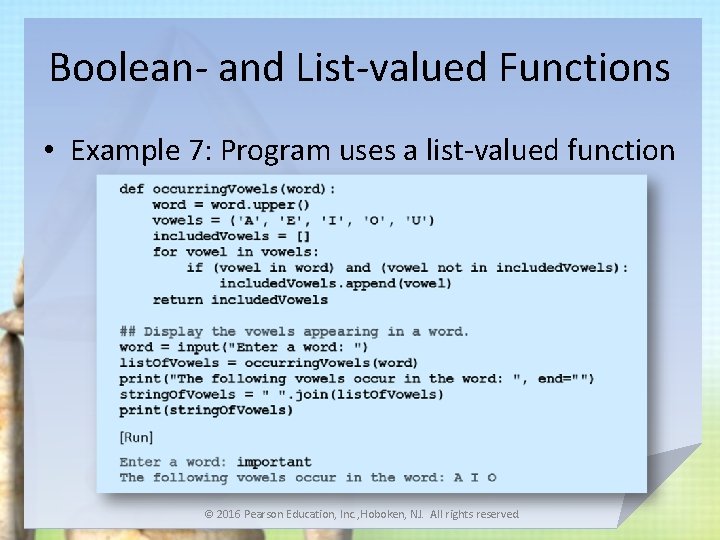
Boolean- and List-valued Functions • Example 7: Program uses a list-valued function © 2016 Pearson Education, Inc. , Hoboken, NJ. All rights reserved.
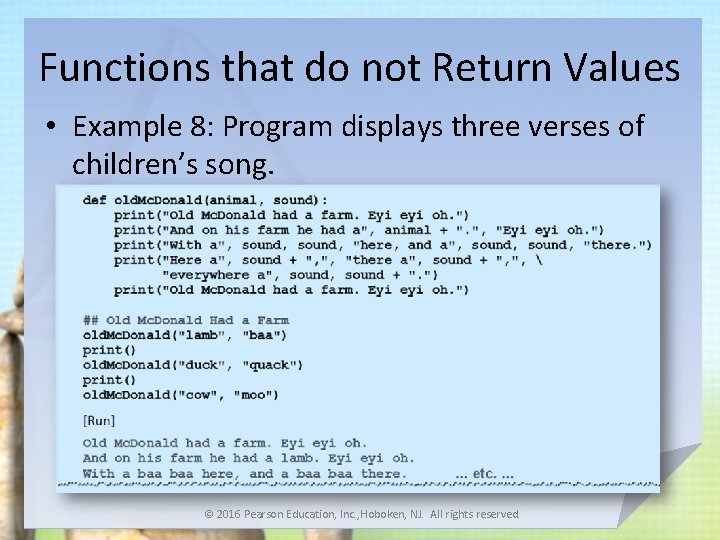
Functions that do not Return Values • Example 8: Program displays three verses of children’s song. © 2016 Pearson Education, Inc. , Hoboken, NJ. All rights reserved.
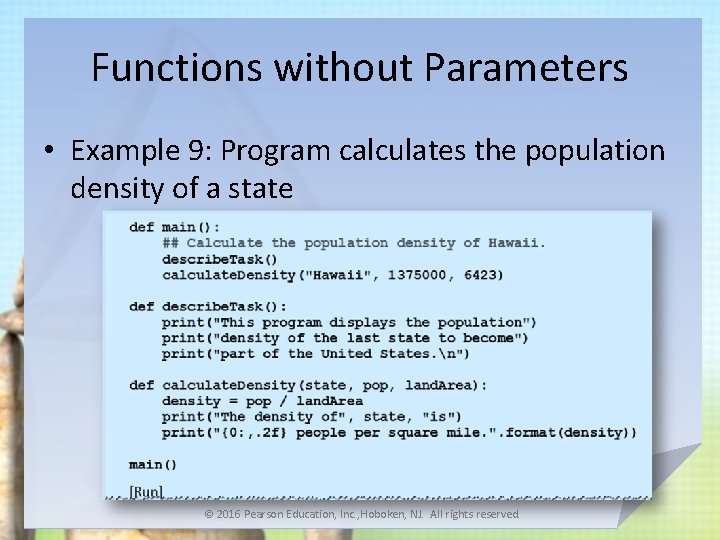
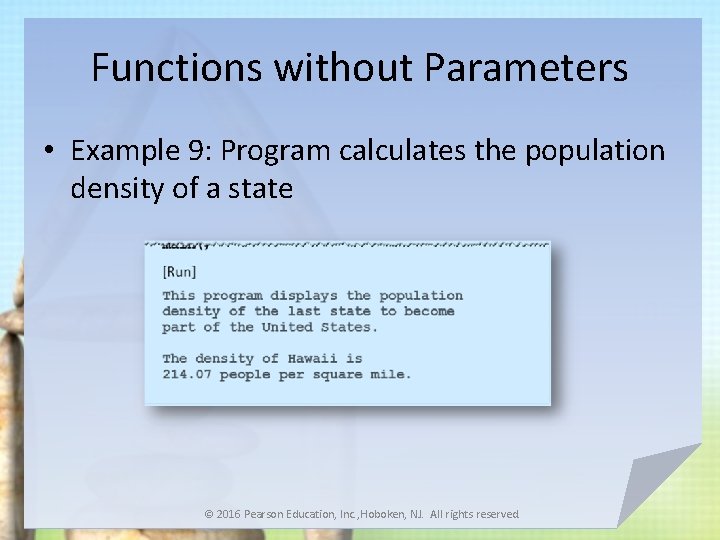
Functions without Parameters • Example 9: Program calculates the population density of a state © 2016 Pearson Education, Inc. , Hoboken, NJ. All rights reserved.
Functions without Parameters • Example 9: Program calculates the population density of a state © 2016 Pearson Education, Inc. , Hoboken, NJ. All rights reserved.
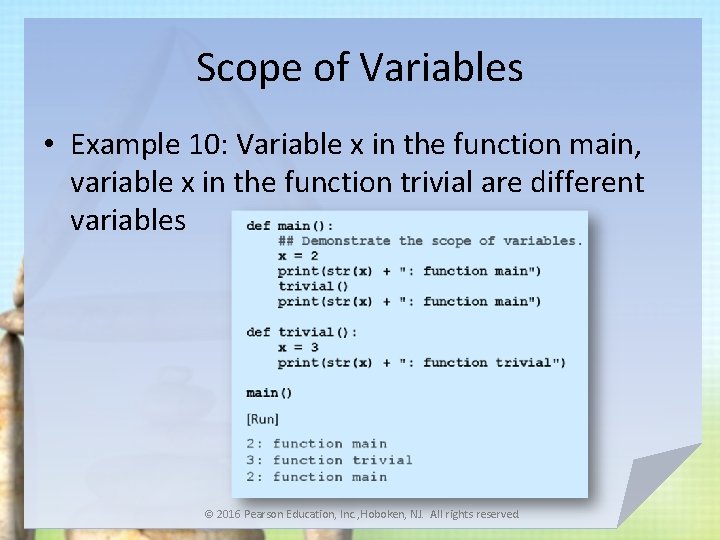
Scope of Variables • Variable created inside a function can only be accessed by statements inside that function – Ceases to exist when the function is exited • Variable is said to be local to function or to have local scope • If variables created in two different functions have the same name – They have no relationship to each other © 2016 Pearson Education, Inc. , Hoboken, NJ. All rights reserved.
Scope of Variables • Example 10: Variable x in the function main, variable x in the function trivial are different variables © 2016 Pearson Education, Inc. , Hoboken, NJ. All rights reserved.
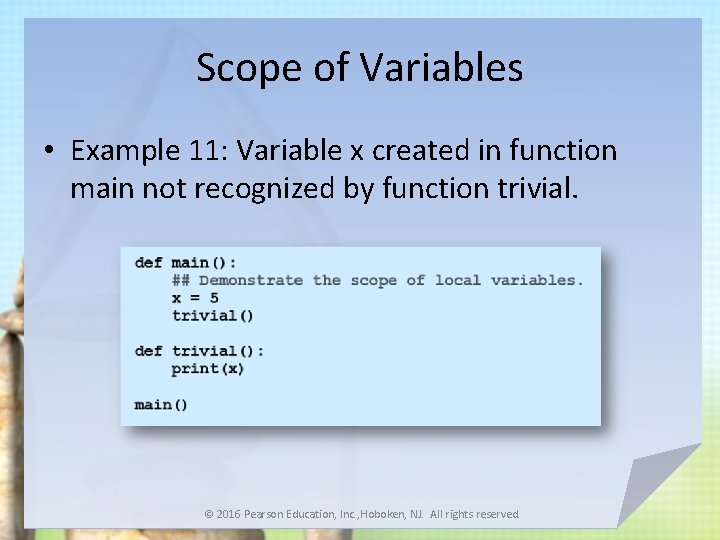
Scope of Variables • Example 11: Variable x created in function main not recognized by function trivial. © 2016 Pearson Education, Inc. , Hoboken, NJ. All rights reserved.
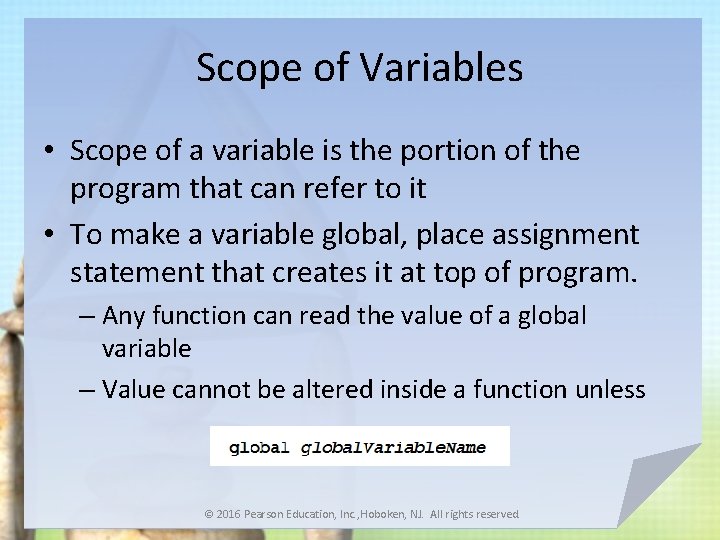
Scope of Variables • Scope of a variable is the portion of the program that can refer to it • To make a variable global, place assignment statement that creates it at top of program. – Any function can read the value of a global variable – Value cannot be altered inside a function unless © 2016 Pearson Education, Inc. , Hoboken, NJ. All rights reserved.
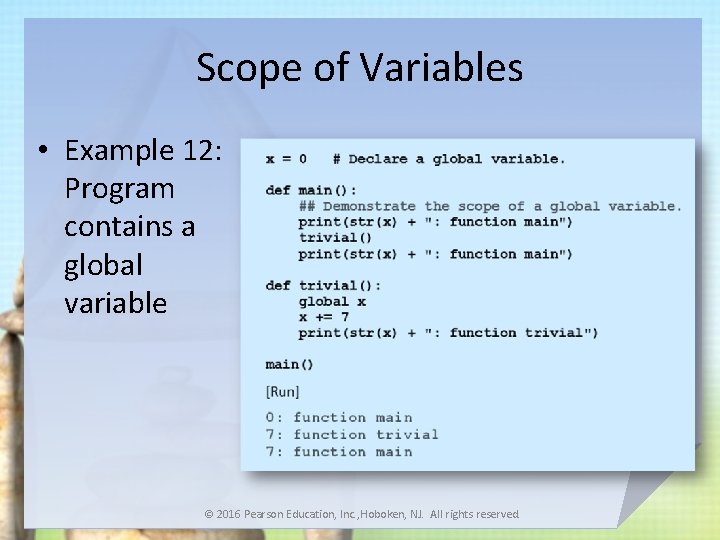
Scope of Variables • Example 12: Program contains a global variable © 2016 Pearson Education, Inc. , Hoboken, NJ. All rights reserved.
Named Constants • Program sometimes employs a special constant used several times in program • Convention programmers use – Create a global variable – Name written in uppercase letters with words separated by underscore • In Python, programmer is responsible for not changing value of the variable © 2016 Pearson Education, Inc. , Hoboken, NJ. All rights reserved.
Library Modules • A library module is a file with extension. py – Contains functions and variables – Can be used (imported) by any program – can be created in IDLE or any text editor – Looks like an ordinary Python program • To gain access to the functions and variables – place a statement of the form import module. Name at the beginning of the program © 2016 Pearson Education, Inc. , Hoboken, NJ. All rights reserved.
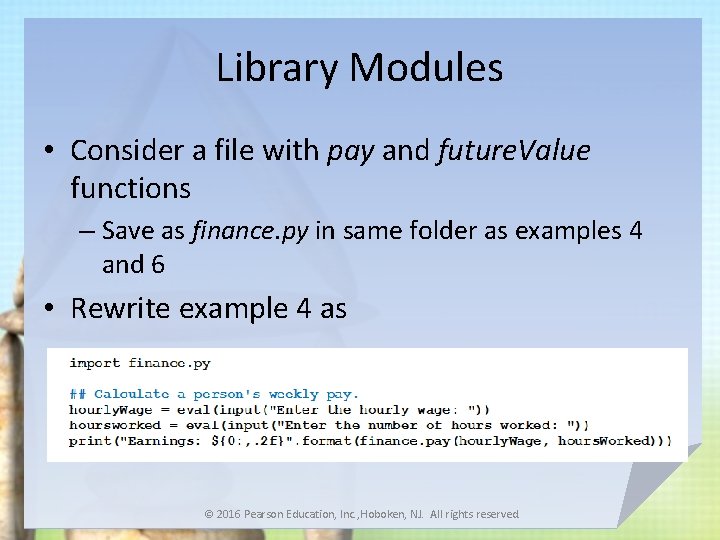
Library Modules • Consider a file with pay and future. Value functions – Save as finance. py in same folder as examples 4 and 6 • Rewrite example 4 as © 2016 Pearson Education, Inc. , Hoboken, NJ. All rights reserved.
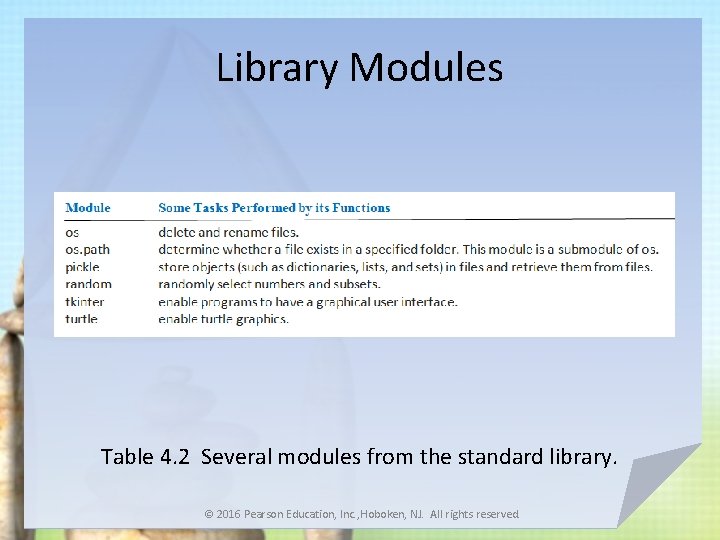
Library Modules Table 4. 2 Several modules from the standard library. © 2016 Pearson Education, Inc. , Hoboken, NJ. All rights reserved.
End Section 1 Chapter 4 An Introduction to Programming Using Python David I. Schneider © 2016 Pearson Education, Inc. , Hoboken, NJ. All rights reserved.