
Functions Basic Functions NOTE There an awful lot
Functions
Basic Functions § NOTE: There an awful lot of synonyms for "function" § "routine, map […], procedure, […], subroutine, […], subprogram, […], function" § From http: //www. synonyms. net/synonym/function: § Also "Method" 2
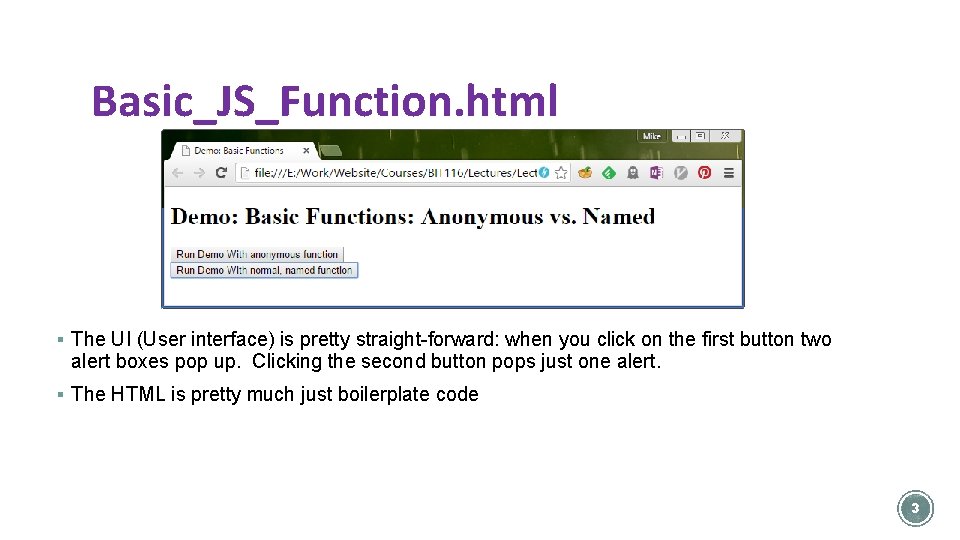
Basic_JS_Function. html § The UI (User interface) is pretty straight-forward: when you click on the first button two alert boxes pop up. Clicking the second button pops just one alert. § The HTML is pretty much just boilerplate code 3
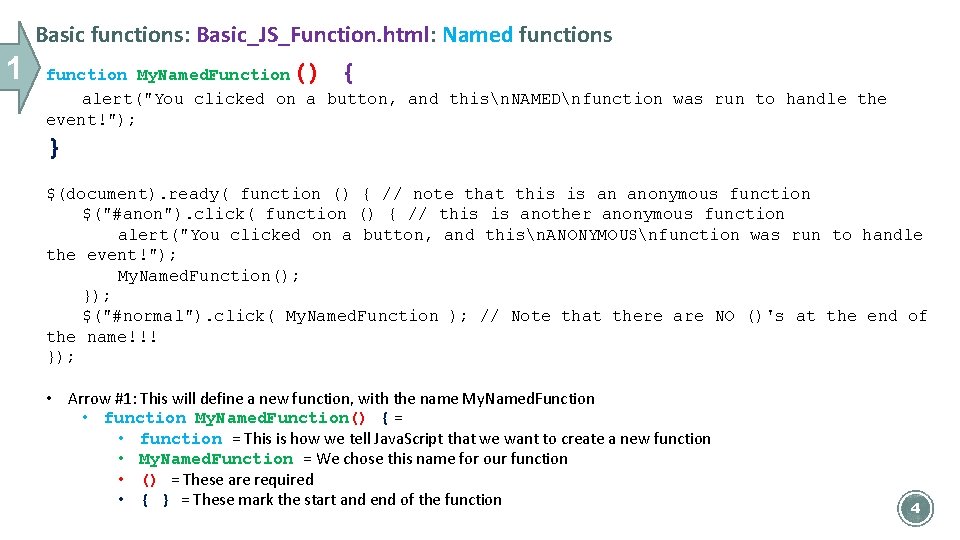
Basic functions: Basic_JS_Function. html: Named functions 1 () { function My. Named. Function alert("You clicked on a button, and thisn. NAMEDnfunction was run to handle the event!"); } $(document). ready( function () { // note that this is an anonymous function $("#anon"). click( function () { // this is another anonymous function alert("You clicked on a button, and thisn. ANONYMOUSnfunction was run to handle the event!"); My. Named. Function(); }); $("#normal"). click( My. Named. Function ); // Note that there are NO ()'s at the end of the name!!! }); • Arrow #1: This will define a new function, with the name My. Named. Function • function My. Named. Function() { = • function = This is how we tell Java. Script that we want to create a new function • My. Named. Function = We chose this name for our function • () = These are required • { } = These mark the start and end of the function 4
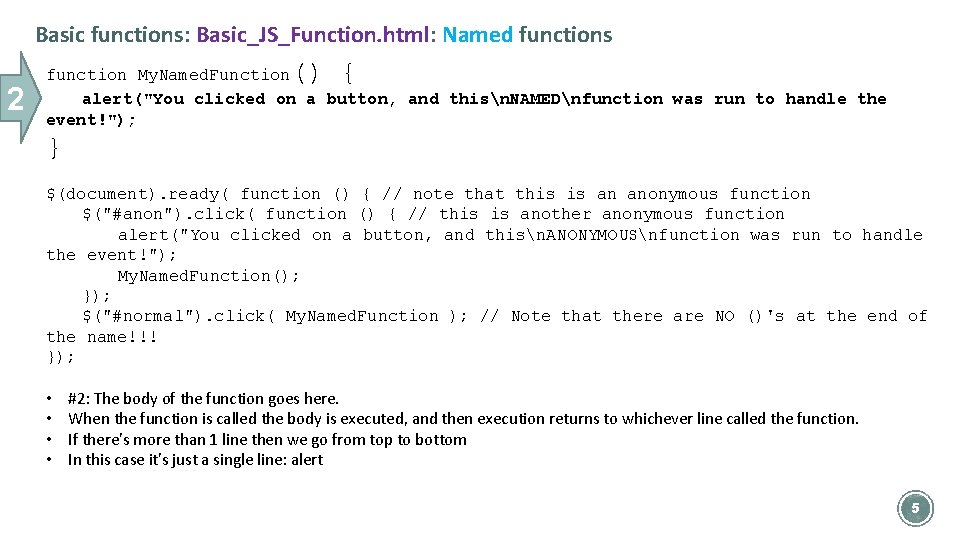
Basic functions: Basic_JS_Function. html: Named functions 2 () { function My. Named. Function alert("You clicked on a button, and thisn. NAMEDnfunction was run to handle the event!"); } $(document). ready( function () { // note that this is an anonymous function $("#anon"). click( function () { // this is another anonymous function alert("You clicked on a button, and thisn. ANONYMOUSnfunction was run to handle the event!"); My. Named. Function(); }); $("#normal"). click( My. Named. Function ); // Note that there are NO ()'s at the end of the name!!! }); • • #2: The body of the function goes here. When the function is called the body is executed, and then execution returns to whichever line called the function. If there's more than 1 line then we go from top to bottom In this case it's just a single line: alert 5
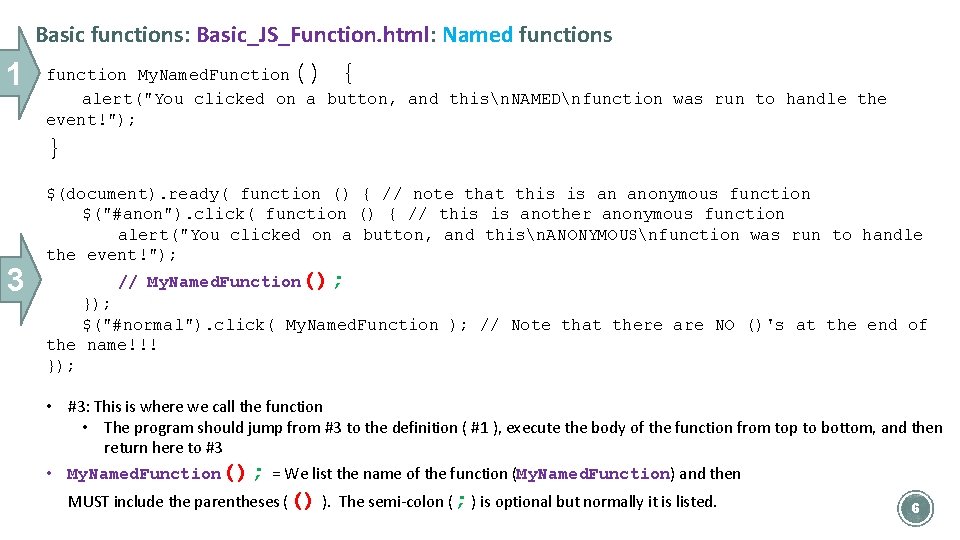
Basic functions: Basic_JS_Function. html: Named functions 1 () { function My. Named. Function alert("You clicked on a button, and thisn. NAMEDnfunction was run to handle the event!"); } 3 $(document). ready( function () { // note that this is an anonymous function $("#anon"). click( function () { // this is another anonymous function alert("You clicked on a button, and thisn. ANONYMOUSnfunction was run to handle the event!"); // My. Named. Function(); }); $("#normal"). click( My. Named. Function ); // Note that there are NO ()'s at the end of the name!!! }); • #3: This is where we call the function • The program should jump from #3 to the definition ( #1 ), execute the body of the function from top to bottom, and then return here to #3 • My. Named. Function(); = We list the name of the function (My. Named. Function) and then MUST include the parentheses (() ). The semi-colon (; ) is optional but normally it is listed. 6

Basic functions: Basic_JS_Function. html: Named functions 1 3 4 function My. Named. Function() { alert("You clicked on a button, and thisn. NAMEDnfunction was run to handle the event!"); } $(document). ready( function () { // note that this is an anonymous function $("#anon"). click( function () { // this is another anonymous function alert("You clicked on a button, and thisn. ANONYMOUSnfunction was run to handle the event!"); My. Named. Function(); }); $("#normal"). click( My. Named. Function ); // Note that there are NO ()'s at the end of the name!!! }); • #4: This is where we tell j. Query to use the function as the event handler • Note that we are NOT calling it here – we're just telling j. Query to use it • $("#normal"). click( … ); = We set up the j. Query event handler for the button being clicked, like you've seen before • My. Named. Function = name of the function to use. • NOTE: We do NOT put parentheses here. • We put parentheses next to the function when defining it ( #1) or calling it (#3) 7
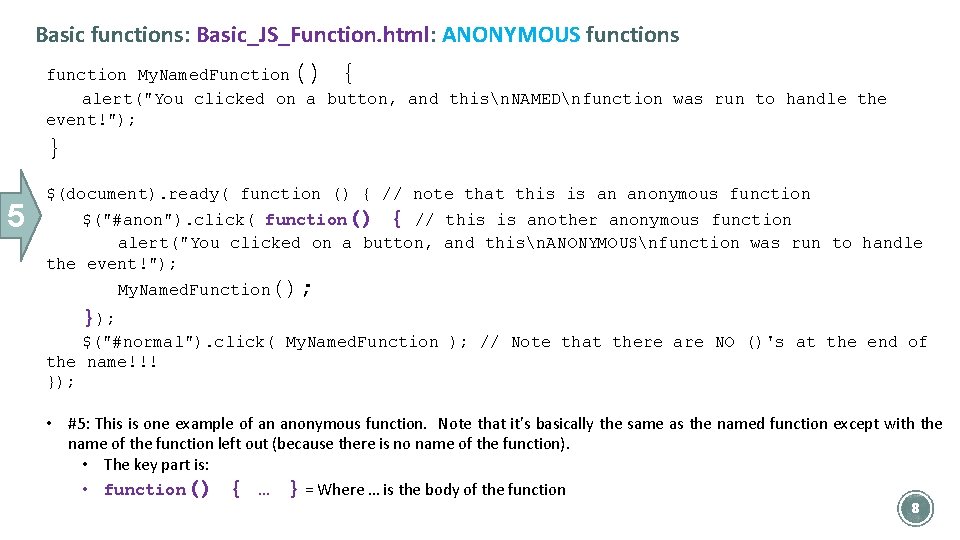
Basic functions: Basic_JS_Function. html: ANONYMOUS functions () { function My. Named. Function alert("You clicked on a button, and thisn. NAMEDnfunction was run to handle the event!"); } 5 $(document). ready( function () { // note that this is an anonymous function $("#anon"). click( function() { // this is another anonymous function alert("You clicked on a button, and thisn. ANONYMOUSnfunction was run to handle the event!"); My. Named. Function(); }); $("#normal"). click( My. Named. Function ); // Note that there are NO ()'s at the end of the name!!! }); • #5: This is one example of an anonymous function. Note that it's basically the same as the named function except with the name of the function left out (because there is no name of the function). • The key part is: • function() { … } = Where … is the body of the function 8
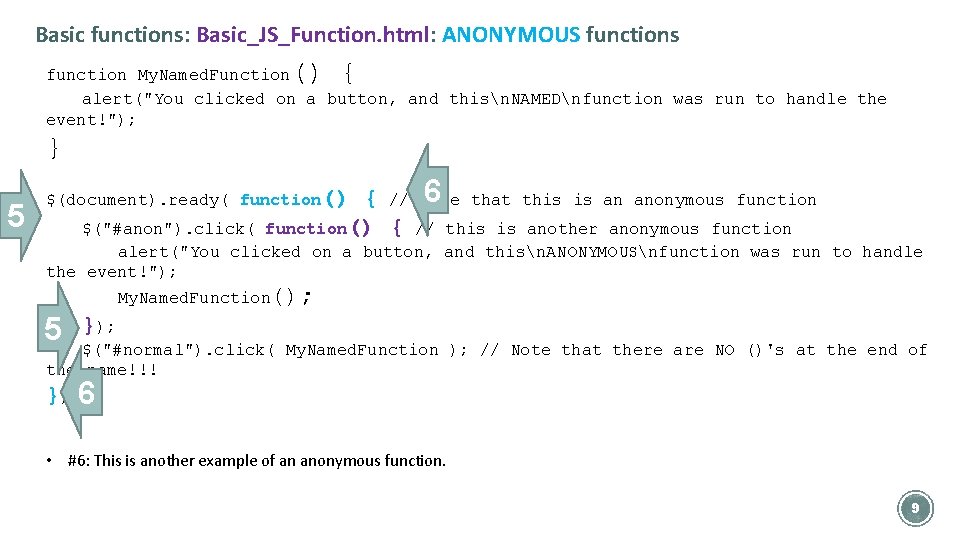
Basic functions: Basic_JS_Function. html: ANONYMOUS functions () { function My. Named. Function alert("You clicked on a button, and thisn. NAMEDnfunction was run to handle the event!"); } 5 6 that this is an anonymous function { // note function() { // this is another anonymous function $(document). ready( function() $("#anon"). click( alert("You clicked on a button, and thisn. ANONYMOUSnfunction was run to handle the event!"); My. Named. Function(); 5 }); $("#normal"). click( My. Named. Function ); // Note that there are NO ()'s at the end of the name!!! }); 6 • #6: This is another example of an anonymous function. 9
§ Work on Exercise #1 for this part of this lecture 10
Functions: Local vs. Global Variables § Let's look at Local_Vs_Global_Vars. html 11
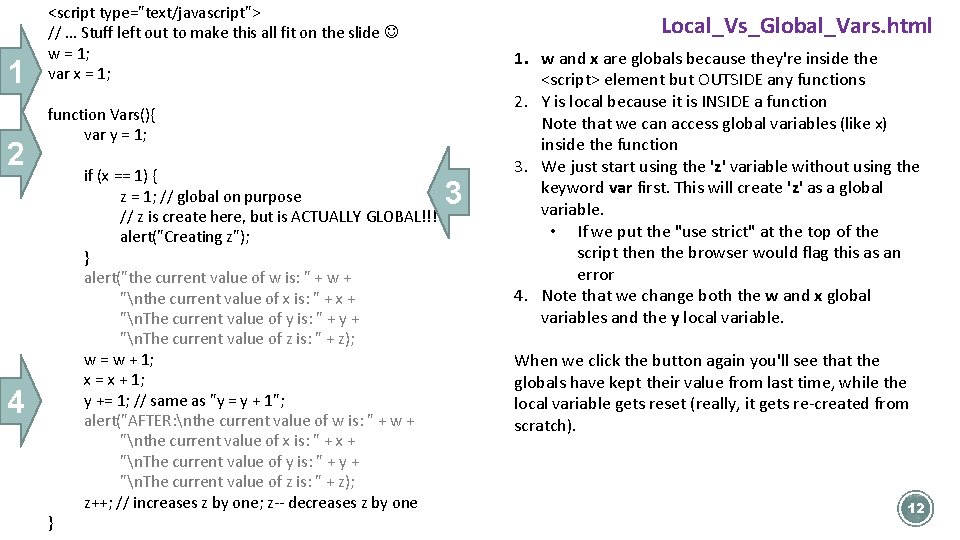
1 2 <script type="text/javascript"> // … Stuff left out to make this all fit on the slide w = 1; var x = 1; Local_Vs_Global_Vars. html function Vars(){ var y = 1; 4 } if (x == 1) { z = 1; // global on purpose // z is create here, but is ACTUALLY GLOBAL!!! alert("Creating z"); } alert("the current value of w is: " + w + "nthe current value of x is: " + x + "n. The current value of y is: " + y + "n. The current value of z is: " + z); w = w + 1; x = x + 1; y += 1; // same as "y = y + 1"; alert("AFTER: nthe current value of w is: " + w + "nthe current value of x is: " + x + "n. The current value of y is: " + y + "n. The current value of z is: " + z); z++; // increases z by one; z-- decreases z by one 3 1. w and x are globals because they're inside the <script> element but OUTSIDE any functions 2. Y is local because it is INSIDE a function Note that we can access global variables (like x) inside the function 3. We just start using the 'z' variable without using the keyword var first. This will create 'z' as a global variable. • If we put the "use strict" at the top of the script then the browser would flag this as an error 4. Note that we change both the w and x global variables and the y local variable. When we click the button again you'll see that the globals have kept their value from last time, while the local variable gets reset (really, it gets re-created from scratch). 12
Functions: Parameters and Return Values 13
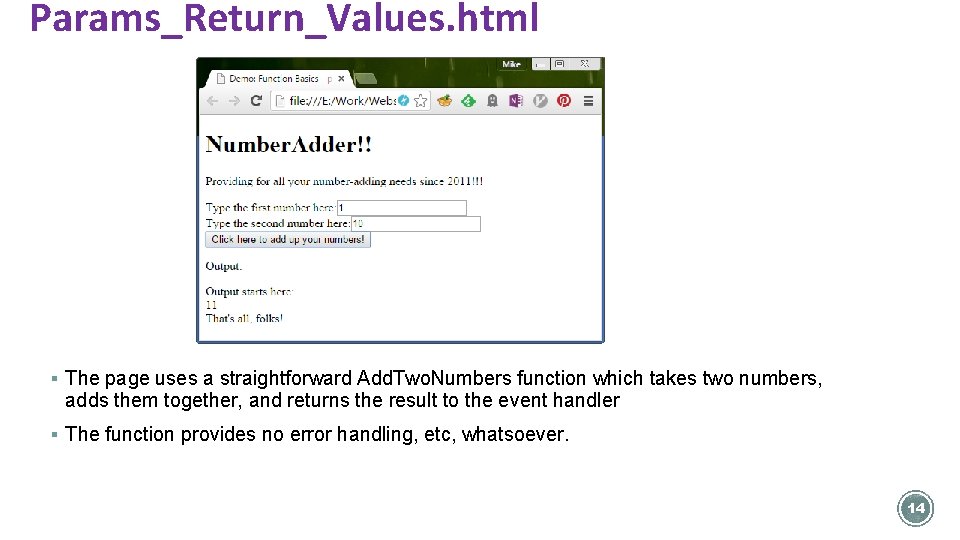
Params_Return_Values. html § The page uses a straightforward Add. Two. Numbers function which takes two numbers, adds them together, and returns the result to the event handler § The function provides no error handling, etc, whatsoever. 14
Params_Return_Values. html: Parameters and return values • The HTML is pretty straightforward • We'll first look at the event handler… • …then look at the new function 15
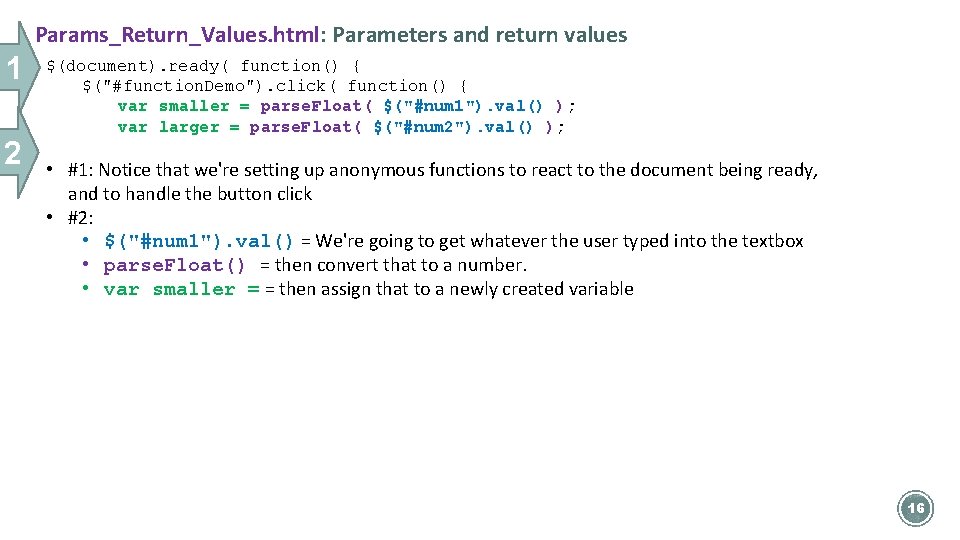
Params_Return_Values. html: Parameters and return values 1 2 $(document). ready( function() { $("#function. Demo"). click( function() { var smaller = parse. Float( $("#num 1"). val() ); var larger = parse. Float( $("#num 2"). val() ); • #1: Notice that we're setting up anonymous functions to react to the document being ready, and to handle the button click • #2: • $("#num 1"). val() = We're going to get whatever the user typed into the textbox • parse. Float() = then convert that to a number. • var smaller = = then assign that to a newly created variable 16
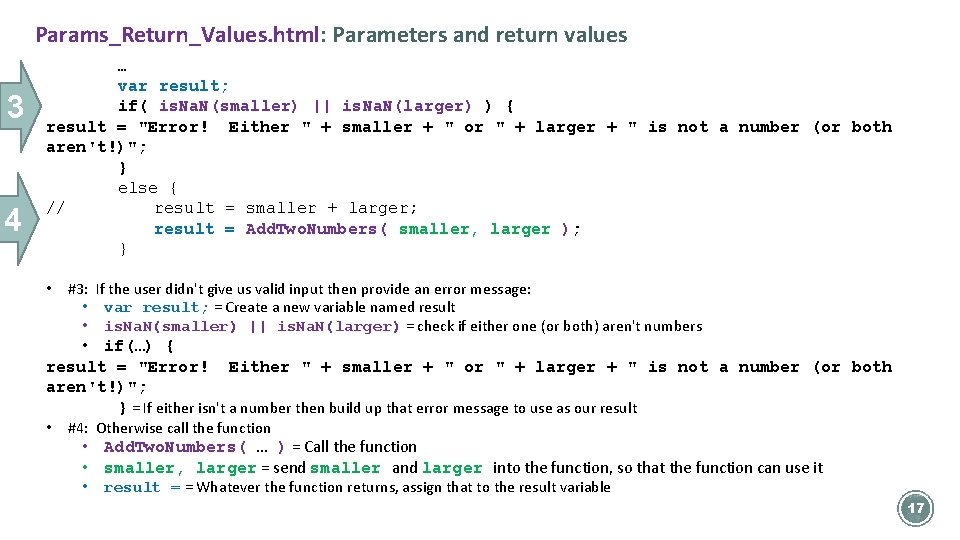
Params_Return_Values. html: Parameters and return values 3 4 … var result; if( is. Na. N(smaller) || is. Na. N(larger) ) { result = "Error! Either " + smaller + " or " + larger + " is not a number (or both aren't!)"; } else { // result = smaller + larger; result = Add. Two. Numbers( smaller, larger ); } • #3: If the user didn't give us valid input then provide an error message: • var result; = Create a new variable named result • is. Na. N(smaller) || is. Na. N(larger) = check if either one (or both) aren't numbers • if(…) { result = "Error! Either " + smaller + " or " + larger + " is not a number (or both aren't!)"; } = If either isn't a number then build up that error message to use as our result • #4: Otherwise call the function • Add. Two. Numbers( … ) = Call the function • smaller, larger = send smaller and larger into the function, so that the function can use it • result = = Whatever the function returns, assign that to the result variable 17
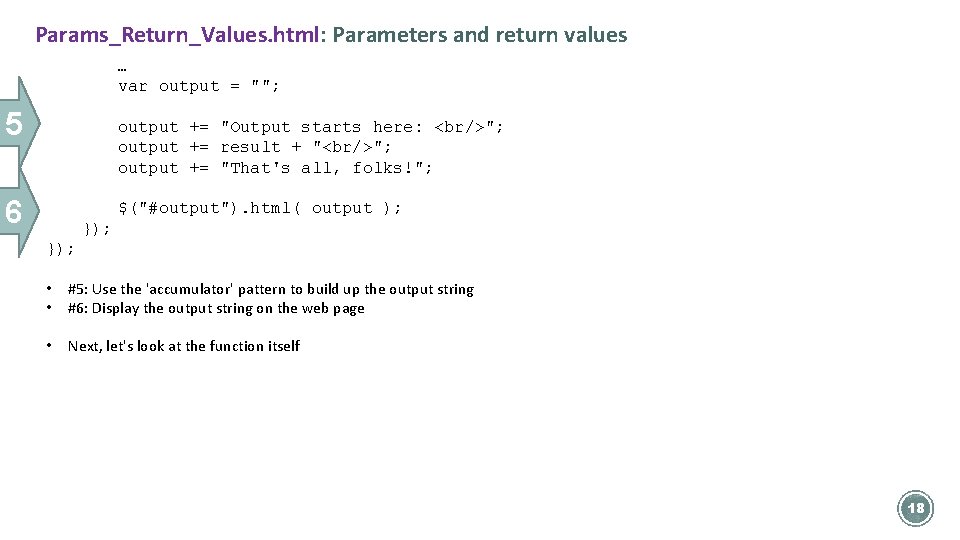
Params_Return_Values. html: Parameters and return values … var output = ""; 5 output += "Output starts here: <br/>"; output += result + "<br/>"; output += "That's all, folks!"; 6 $("#output"). html( output ); }); • • #5: Use the 'accumulator' pattern to build up the output string #6: Display the output string on the web page • Next, let's look at the function itself 18
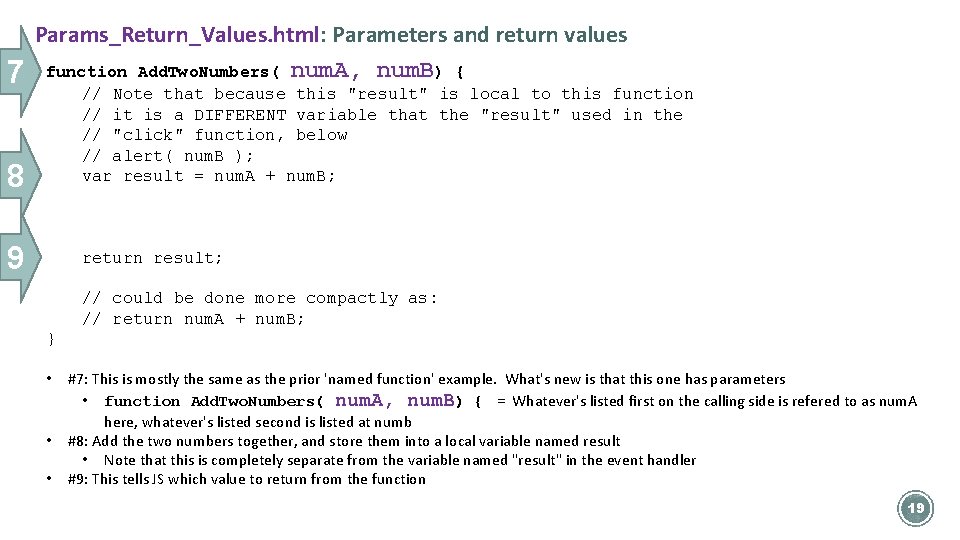
7 Params_Return_Values. html: Parameters and return values function Add. Two. Numbers( num. A, num. B) { 8 // Note that because this "result" is local to this function // it is a DIFFERENT variable that the "result" used in the // "click" function, below // alert( num. B ); var result = num. A + num. B; 9 return result; // could be done more compactly as: // return num. A + num. B; } • • • #7: This is mostly the same as the prior 'named function' example. What's new is that this one has parameters • function Add. Two. Numbers( num. A, num. B) { = Whatever's listed first on the calling side is refered to as num. A here, whatever's listed second is listed at numb #8: Add the two numbers together, and store them into a local variable named result • Note that this is completely separate from the variable named "result" in the event handler #9: This tells JS which value to return from the function 19
Accumulator Pattern 21
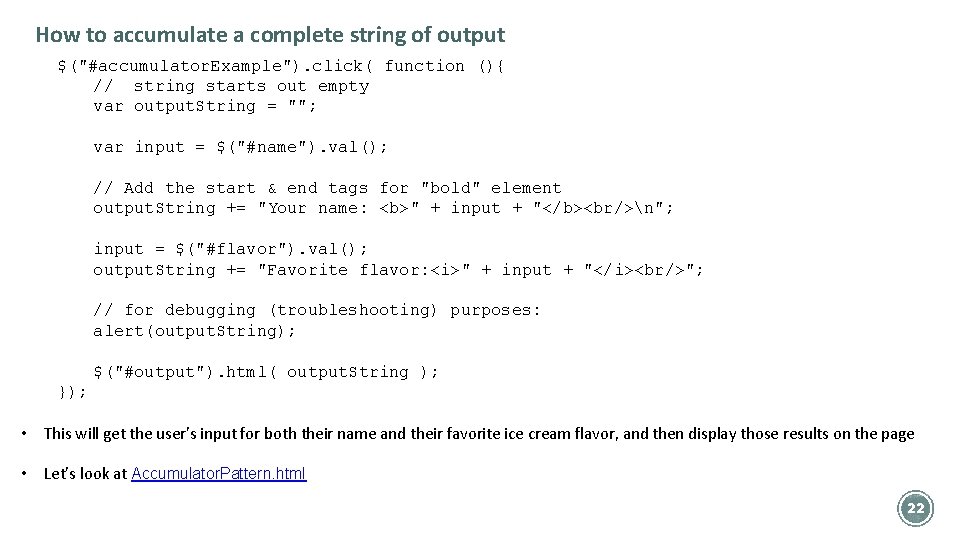
How to accumulate a complete string of output $("#accumulator. Example"). click( function (){ // string starts out empty var output. String = ""; var input = $("#name"). val(); // Add the start & end tags for "bold" element output. String += "Your name: <b>" + input + "</b><br/>n"; input = $("#flavor"). val(); output. String += "Favorite flavor: <i>" + input + "</i><br/>"; // for debugging (troubleshooting) purposes: alert(output. String); $("#output"). html( output. String ); }); • This will get the user's input for both their name and their favorite ice cream flavor, and then display those results on the page • Let’s look at Accumulator. Pattern. html 22
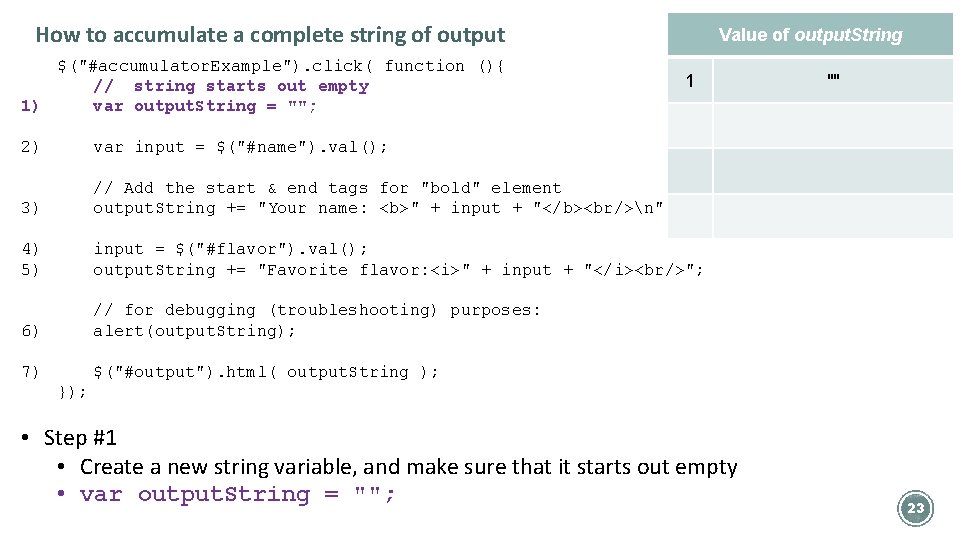
How to accumulate a complete string of output $("#accumulator. Example"). click( function (){ // string starts out empty 1) var output. String = ""; Value of output. String 1 2) var input = $("#name"). val(); 3) // Add the start & end tags for "bold" element output. String += "Your name: <b>" + input + "</b><br/>n"; 4) 5) input = $("#flavor"). val(); output. String += "Favorite flavor: <i>" + input + "</i><br/>"; 6) // for debugging (troubleshooting) purposes: alert(output. String); 7) $("#output"). html( output. String ); "" }); • Step #1 • Create a new string variable, and make sure that it starts out empty • var output. String = ""; 23
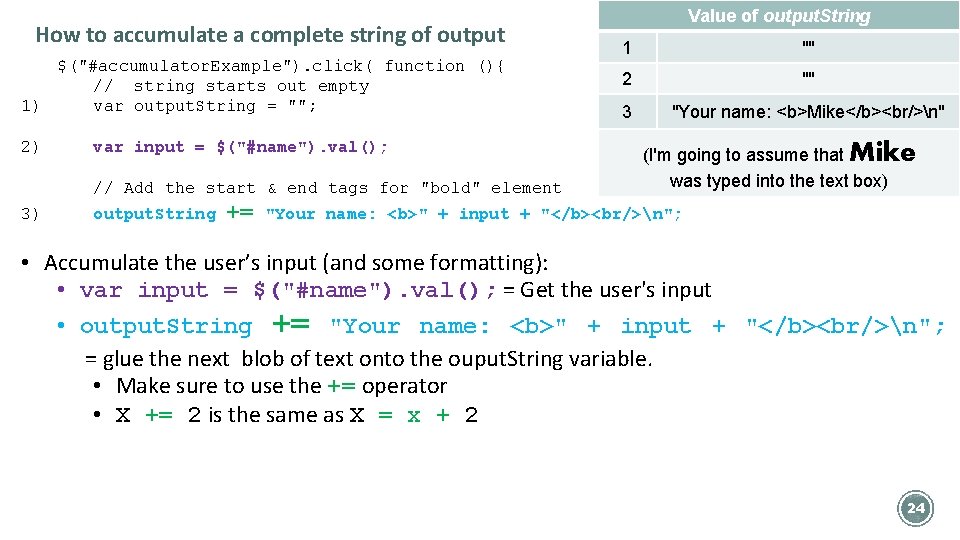
How to accumulate a complete string of output $("#accumulator. Example"). click( function (){ // string starts out empty 1) var output. String = ""; 2) var input = $("#name"). val(); // Add the start & end tags for "bold" element 3) output. String += Value of output. String 1 "" 2 "" 3 "Your name: <b>Mike</b><br/>n" (I'm going to assume that Mike was typed into the text box) "Your name: <b>" + input + "</b><br/>n"; • Accumulate the user’s input (and some formatting): • var input = $("#name"). val(); = Get the user's input • output. String += "Your name: <b>" + input + "</b><br/>n"; = glue the next blob of text onto the ouput. String variable. • Make sure to use the += operator • X += 2 is the same as X = x + 2 24
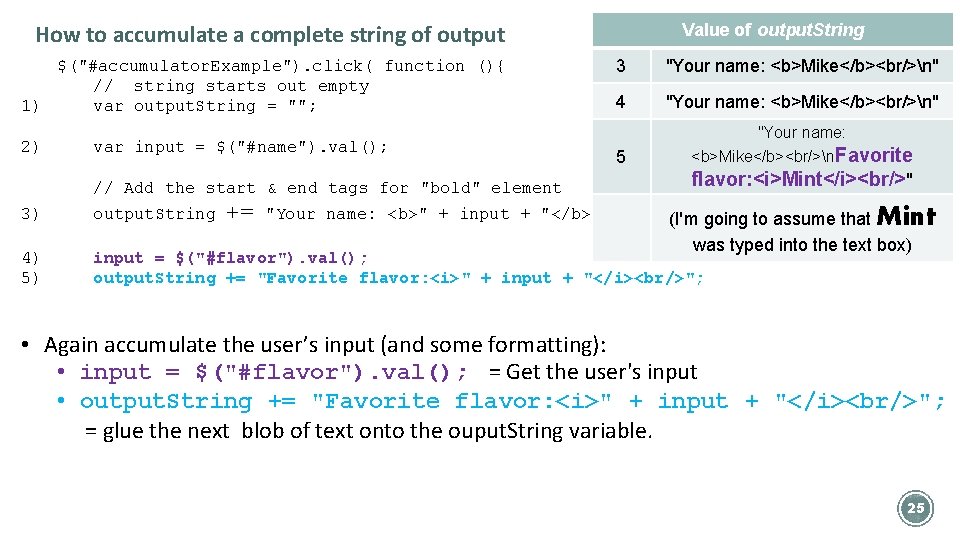
How to accumulate a complete string of output $("#accumulator. Example"). click( function (){ // string starts out empty 1) var output. String = ""; 2) var input = $("#name"). val(); // Add the start & end tags for "bold" element += Value of output. String 3 "Your name: <b>Mike</b><br/>n" 4 "Your name: <b>Mike</b><br/>n" 5 "Your name: <b>Mike</b><br/>n. Favorite flavor: <i>Mint</i><br/>" 3) output. String "Your name: <b>" + input + "</b><br/>n"; (I'm going to assume that 4) 5) input = $("#flavor"). val(); output. String += "Favorite flavor: <i>" + input + "</i><br/>"; Mint was typed into the text box) • Again accumulate the user’s input (and some formatting): • input = $("#flavor"). val(); = Get the user's input • output. String += "Favorite flavor: <i>" + input + "</i><br/>"; = glue the next blob of text onto the ouput. String variable. 25
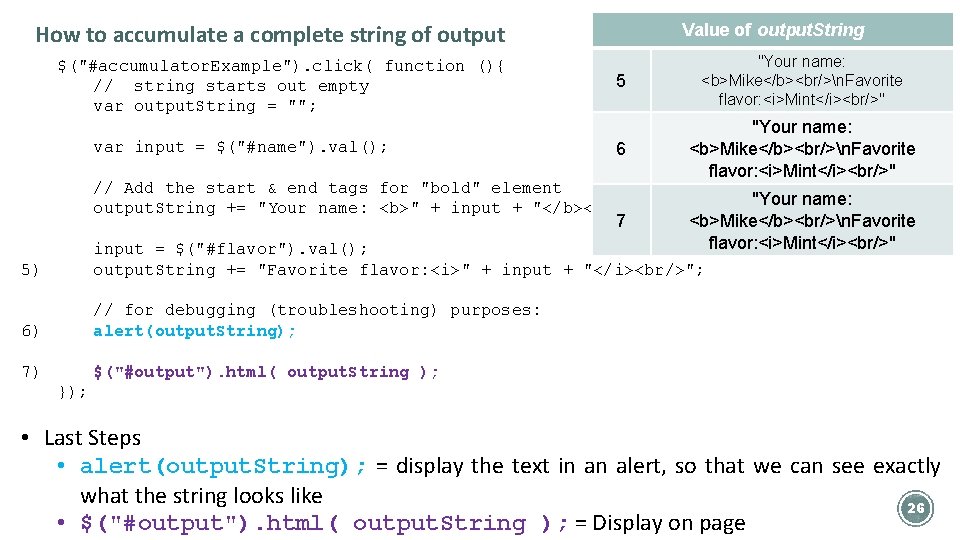
How to accumulate a complete string of output $("#accumulator. Example"). click( function (){ // string starts out empty var output. String = ""; var input = $("#name"). val(); Value of output. String 5 "Your name: <b>Mike</b><br/>n. Favorite flavor: <i>Mint</i><br/>" 6 "Your name: <b>Mike</b><br/>n. Favorite flavor: <i>Mint</i><br/>" // Add the start & end tags for "bold" element output. String += "Your name: <b>" + input + "</b><br/>n"; 7 "Your name: <b>Mike</b><br/>n. Favorite flavor: <i>Mint</i><br/>" 5) input = $("#flavor"). val(); output. String += "Favorite flavor: <i>" + input + "</i><br/>"; 6) // for debugging (troubleshooting) purposes: alert(output. String); 7) $("#output"). html( output. String ); }); • Last Steps • alert(output. String); = display the text in an alert, so that we can see exactly what the string looks like 26 • $("#output"). html( output. String ); = Display on page
§ Work on Exercise #3 for this part of this lecture 27
- Slides: 26