
FUNCTIONAL DATA EXPLORER IN JMP PRO 14 Chris
- Slides: 47
FUNCTIONAL DATA EXPLORER IN JMP® PRO 14 Chris Gotwalt • Director of JMP Statistical R&D • JMP Division, SAS Institute • Copyright © 2013, SAS Institute Inc. All rights reserved.
FUNCTIONAL DATA EXPLORER INTRODUCTION • A lot of data created now is functional in form, as in y=f(x). • This can mean many things from: • Machines output of shear/viscosity curves • Traditional time series data (stock prices, weather) • Sensor data from manufacturing processes • Vibration signals • A wide variety of specific tools and methods have been created to deal with this type of data • Signal Processing (engineering) • ARIMA Time Series (statistics and econometrics) • Partial Least Squares (chemometrics) • Growth Curves via SEM (psychometrics) • Mixed Models (statistics) Copyright © 2013, SAS Institute Inc. All rights reserved.
FUNCTIONAL DATA EXPLORER INTRODUCTION • Functional Data Explorer (FDE) is JMP Pro’s general purpose tool for visualizing, cleaning, transforming, and extracting meaningful features from functional data. • The vision is to follow a model similar to Text Explorer • FDE facilitates data visualization, cleanup, and transformation • FDE has some native analytical capabilities • Extracts scalar features to take into other JMP Pro platforms • Functional data can be of interest in several ways 1) Alone, in its own right (forecasting) 2) As an output (DOEs with shear/viscosity curve as output) 3) As one of many inputs into a predictive model Copyright © 2013, SAS Institute Inc. All rights reserved.
FUNCTIONAL DATA EXPLORER SENSOR DATA FROM BATCH PROCESSES • Many products are made in batches by machines that now have many sensors embedded in them • Sensors record things like temperature, pressure, feed rate, chemical content (ammonia, CO 2, ethanol, sugar), vibration, etc. • Companies care about end results: • Yield: the quantity of product created (yield) • Quality: Measurable properties of the product (flavor, room temperature viscosity, shear strength, chemical composition) • They want to predict these properties as early as possible • To fix ‘bad batches’, or terminate their production early • Reduce occurrence of bad batches (process improvement) Copyright © 2013, SAS Institute Inc. All rights reserved.
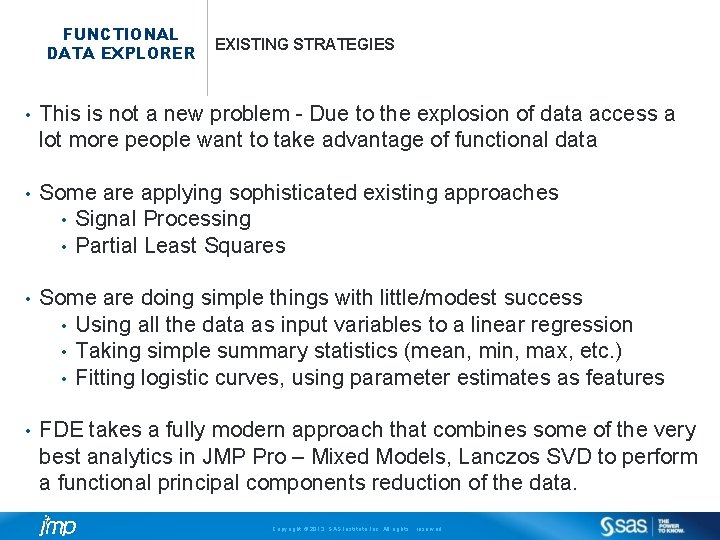
FUNCTIONAL DATA EXPLORER EXISTING STRATEGIES • This is not a new problem - Due to the explosion of data access a lot more people want to take advantage of functional data • Some are applying sophisticated existing approaches • Signal Processing • Partial Least Squares • Some are doing simple things with little/modest success • Using all the data as input variables to a linear regression • Taking simple summary statistics (mean, min, max, etc. ) • Fitting logistic curves, using parameter estimates as features • FDE takes a fully modern approach that combines some of the very best analytics in JMP Pro – Mixed Models, Lanczos SVD to perform a functional principal components reduction of the data. Copyright © 2013, SAS Institute Inc. All rights reserved.
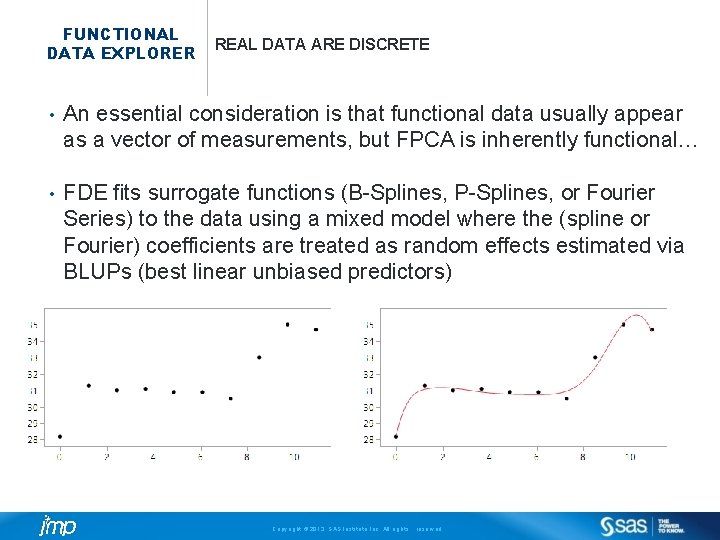
FUNCTIONAL DATA EXPLORER REAL DATA ARE DISCRETE • An essential consideration is that functional data usually appear as a vector of measurements, but FPCA is inherently functional… • FDE fits surrogate functions (B-Splines, P-Splines, or Fourier Series) to the data using a mixed model where the (spline or Fourier) coefficients are treated as random effects estimated via BLUPs (best linear unbiased predictors) Copyright © 2013, SAS Institute Inc. All rights reserved.
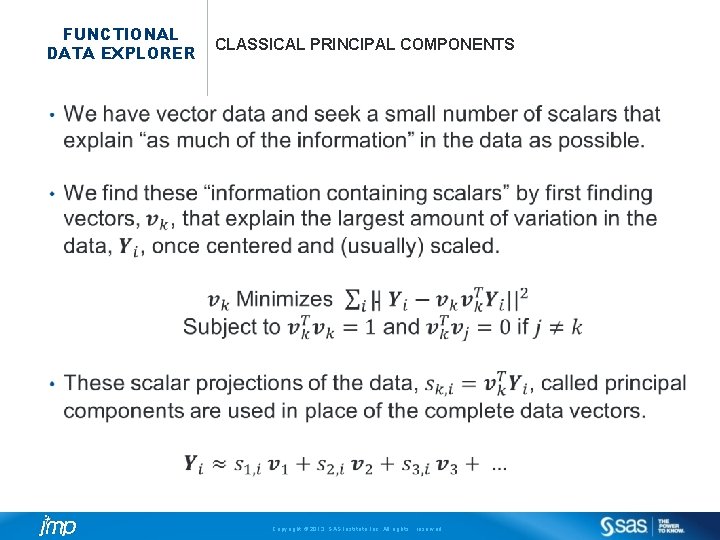
FUNCTIONAL DATA EXPLORER CLASSICAL PRINCIPAL COMPONENTS Copyright © 2013, SAS Institute Inc. All rights reserved.
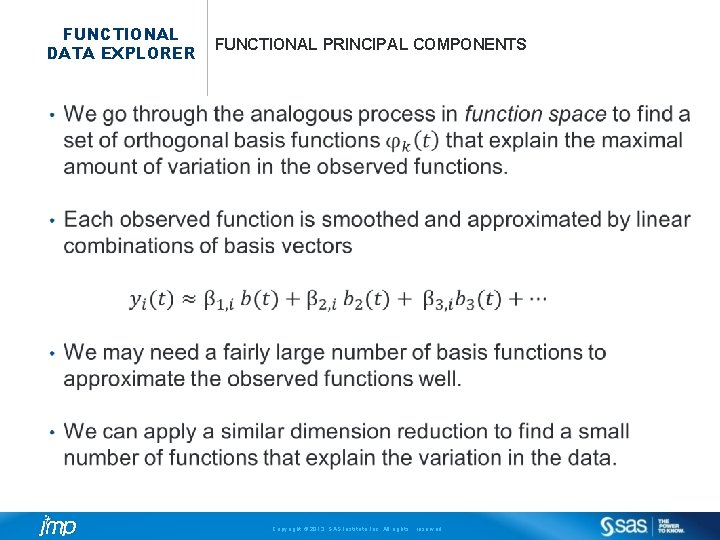
FUNCTIONAL DATA EXPLORER FUNCTIONAL PRINCIPAL COMPONENTS Copyright © 2013, SAS Institute Inc. All rights reserved.
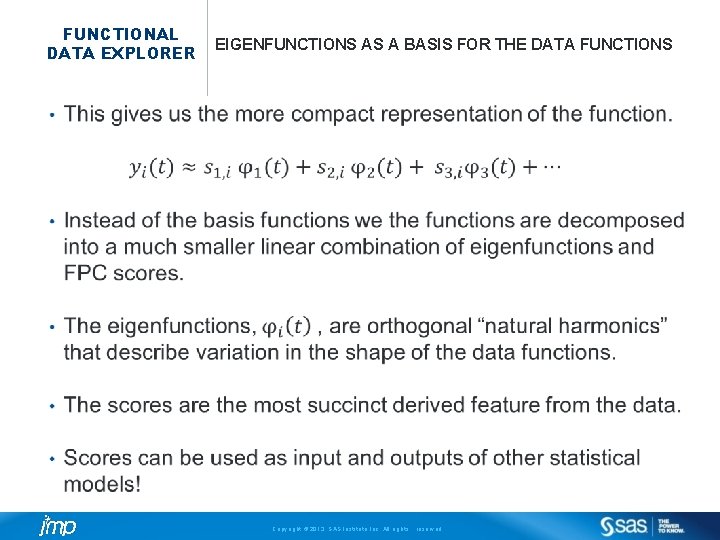
FUNCTIONAL DATA EXPLORER EIGENFUNCTIONS AS A BASIS FOR THE DATA FUNCTIONS Copyright © 2013, SAS Institute Inc. All rights reserved.
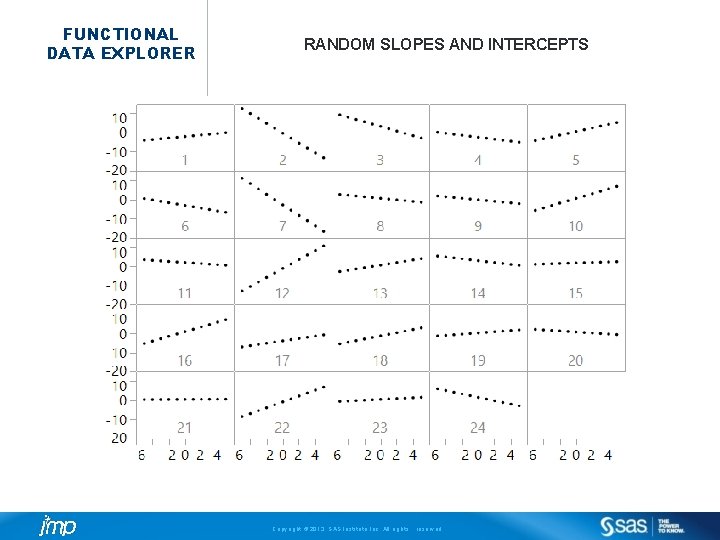
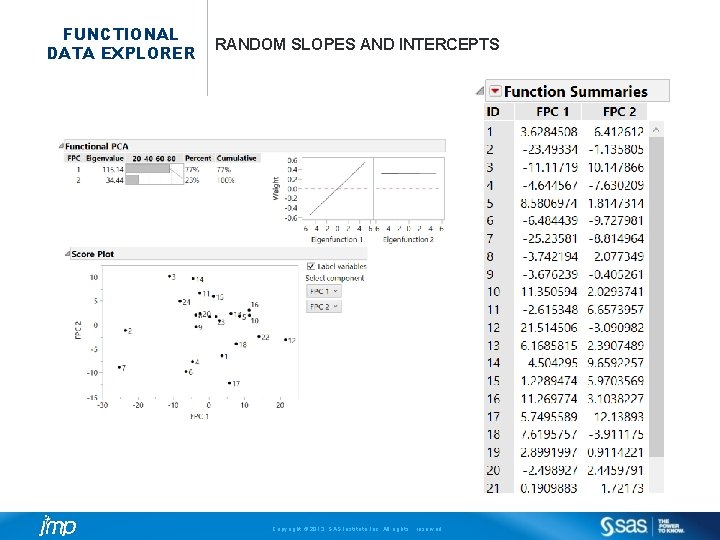
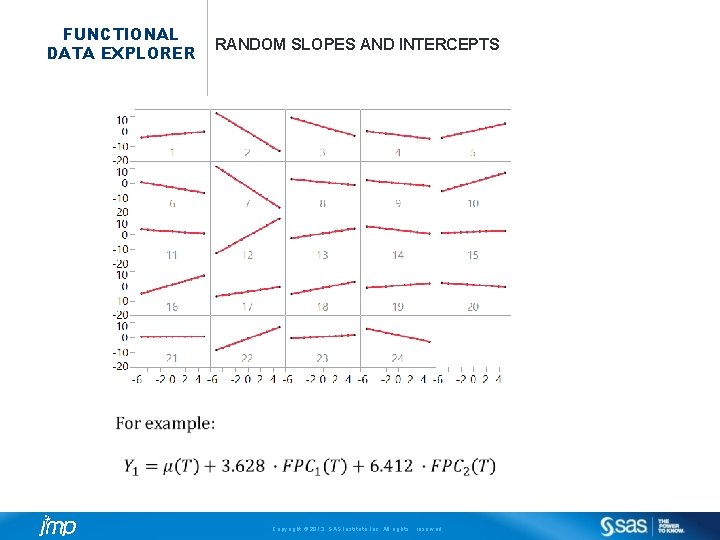
FUNCTIONAL DATA EXPLORER RANDOM SLOPES AND INTERCEPTS Copyright © 2013, SAS Institute Inc. All rights reserved.
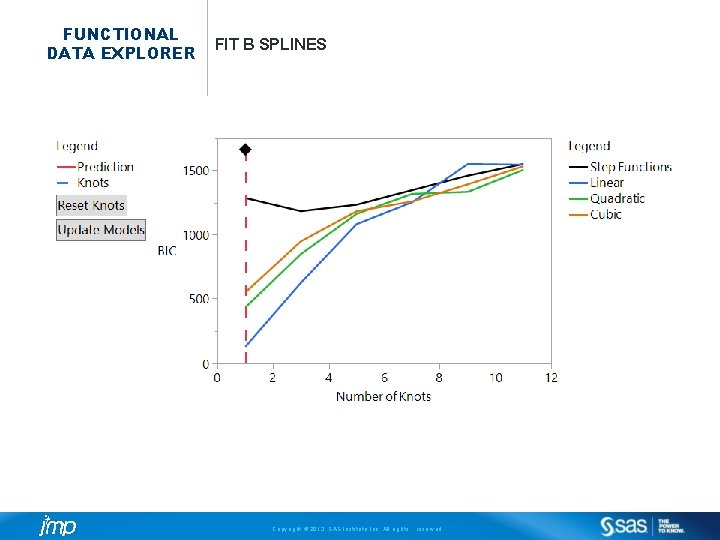
FUNCTIONAL DATA EXPLORER FIT B SPLINES Copyright © 2013, SAS Institute Inc. All rights reserved.
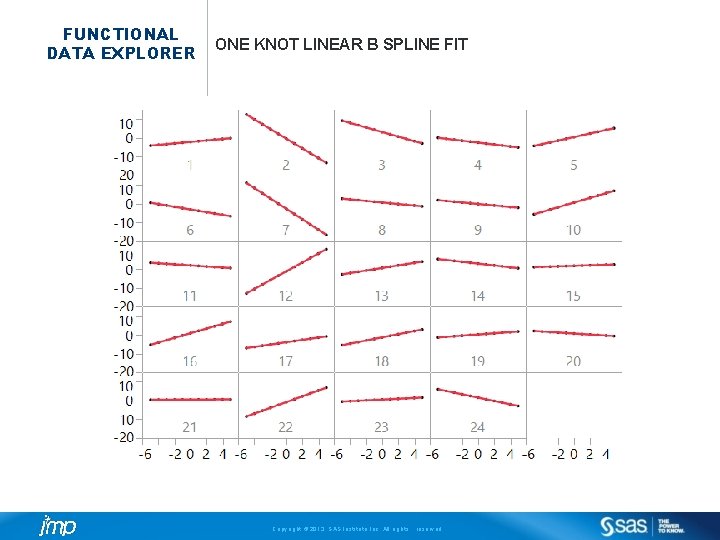
FUNCTIONAL DATA EXPLORER ONE KNOT LINEAR B SPLINE FIT Copyright © 2013, SAS Institute Inc. All rights reserved.
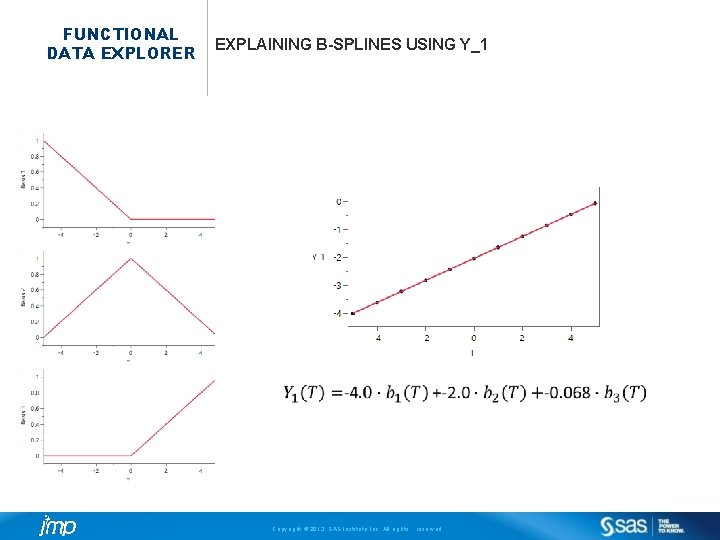
FUNCTIONAL DATA EXPLORER EXPLAINING B-SPLINES USING Y_1 Copyright © 2013, SAS Institute Inc. All rights reserved.
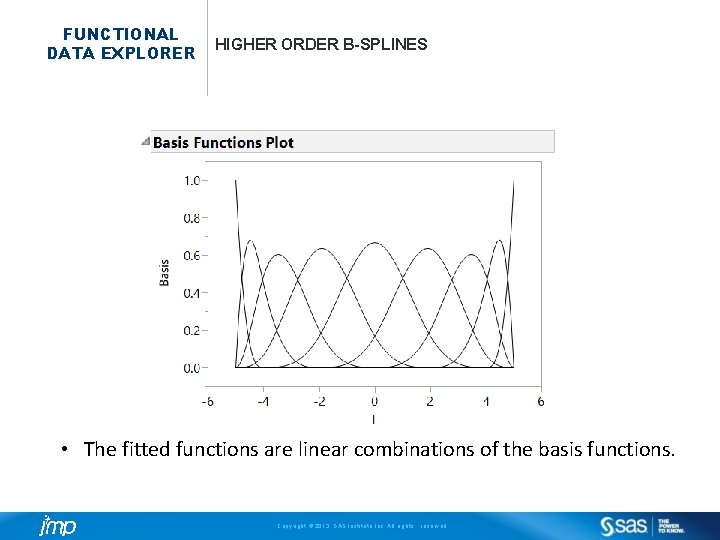
FUNCTIONAL DATA EXPLORER HIGHER ORDER B-SPLINES • The fitted functions are linear combinations of the basis functions. Copyright © 2013, SAS Institute Inc. All rights reserved.
FUNCTIONAL DATA EXPLORER BASIS FUNCTIONS VS FPCs • The basis functions (Fourier, Splines) are just an intermediary step. • We choose combinations of basis/n. Knots/knot locations to get a good functional fit to the original data. • The basis functions/coefficients themselves are too cumbersome to work with in most cases. • Then FDE gets the corresponding FPCs and that is all you work with afterwards. • FPCs are much simpler (lower dimensionality) and easy to work with. Copyright © 2013, SAS Institute Inc. All rights reserved.
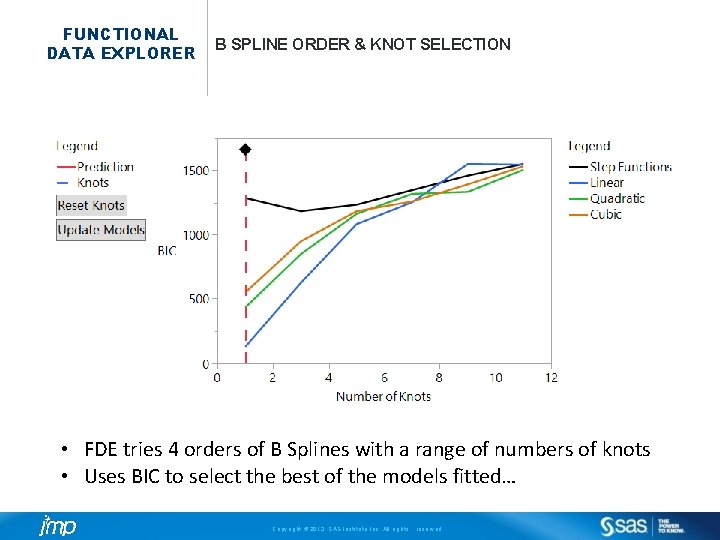
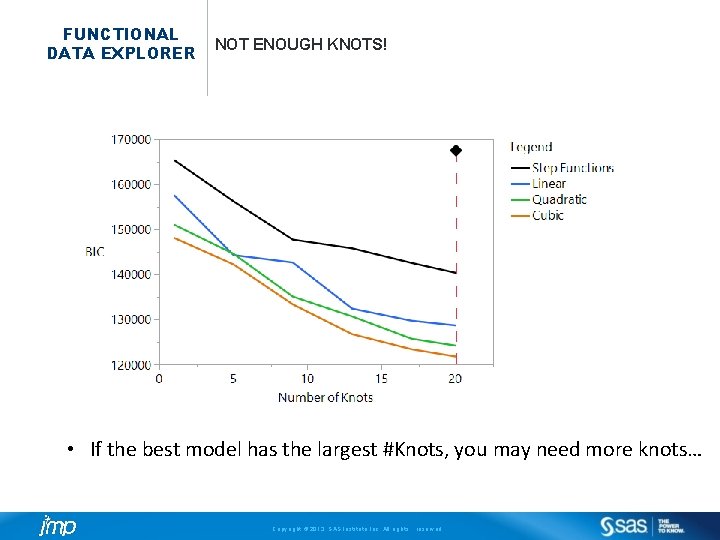
FUNCTIONAL DATA EXPLORER B SPLINE ORDER & KNOT SELECTION • FDE tries 4 orders of B Splines with a range of numbers of knots • Uses BIC to select the best of the models fitted… Copyright © 2013, SAS Institute Inc. All rights reserved.
FUNCTIONAL DATA EXPLORER NOT ENOUGH KNOTS! • If the best model has the largest #Knots, you may need more knots… Copyright © 2013, SAS Institute Inc. All rights reserved.
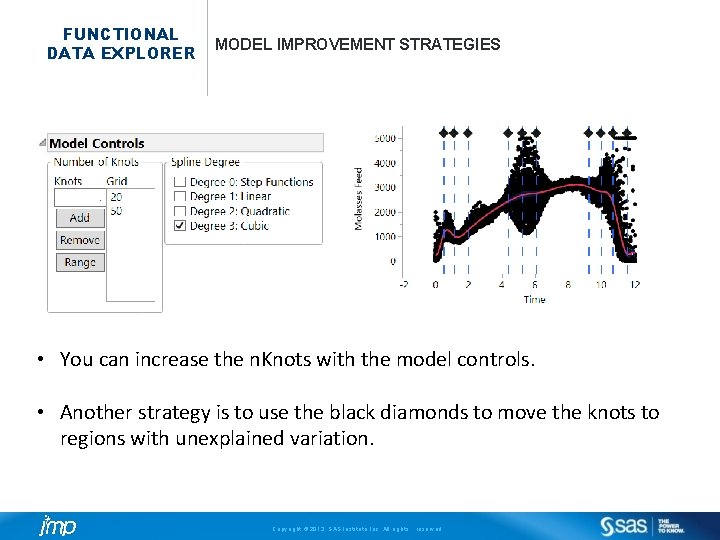
FUNCTIONAL DATA EXPLORER MODEL IMPROVEMENT STRATEGIES • You can increase the n. Knots with the model controls. • Another strategy is to use the black diamonds to move the knots to regions with unexplained variation. Copyright © 2013, SAS Institute Inc. All rights reserved.
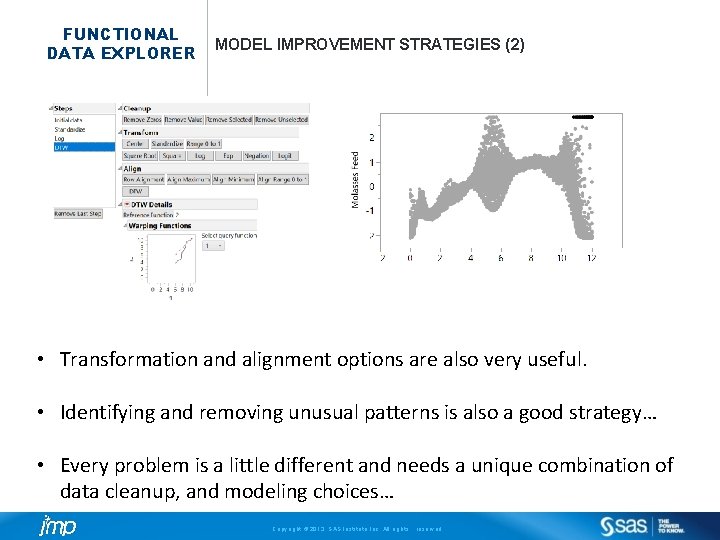
FUNCTIONAL DATA EXPLORER MODEL IMPROVEMENT STRATEGIES (2) • Transformation and alignment options are also very useful. • Identifying and removing unusual patterns is also a good strategy… • Every problem is a little different and needs a unique combination of data cleanup, and modeling choices… Copyright © 2013, SAS Institute Inc. All rights reserved.
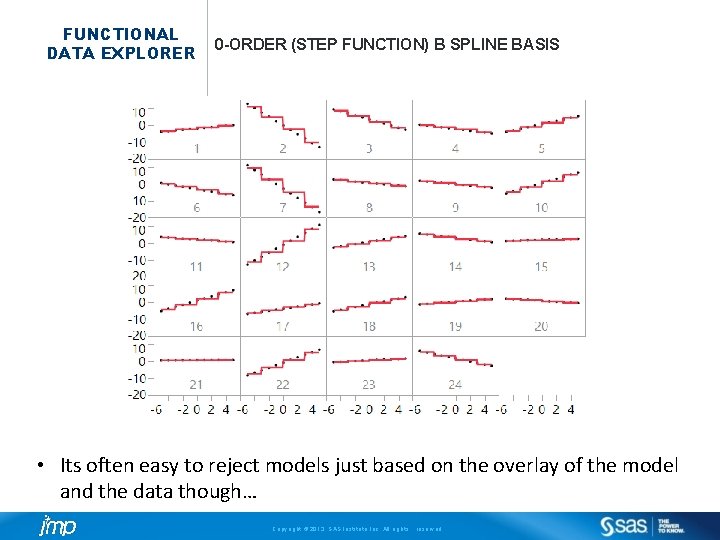
FUNCTIONAL DATA EXPLORER 0 -ORDER (STEP FUNCTION) B SPLINE BASIS • Its often easy to reject models just based on the overlay of the model and the data though… Copyright © 2013, SAS Institute Inc. All rights reserved.
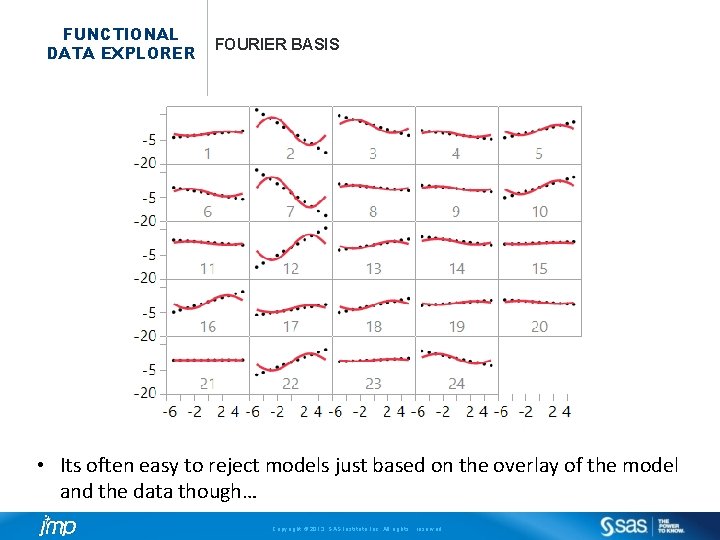
FUNCTIONAL DATA EXPLORER FOURIER BASIS • Its often easy to reject models just based on the overlay of the model and the data though… Copyright © 2013, SAS Institute Inc. All rights reserved.
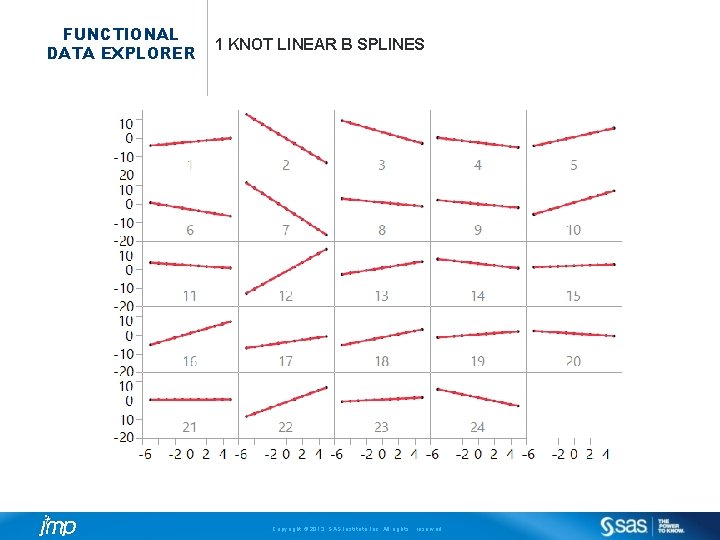
FUNCTIONAL DATA EXPLORER 1 KNOT LINEAR B SPLINES Copyright © 2013, SAS Institute Inc. All rights reserved.
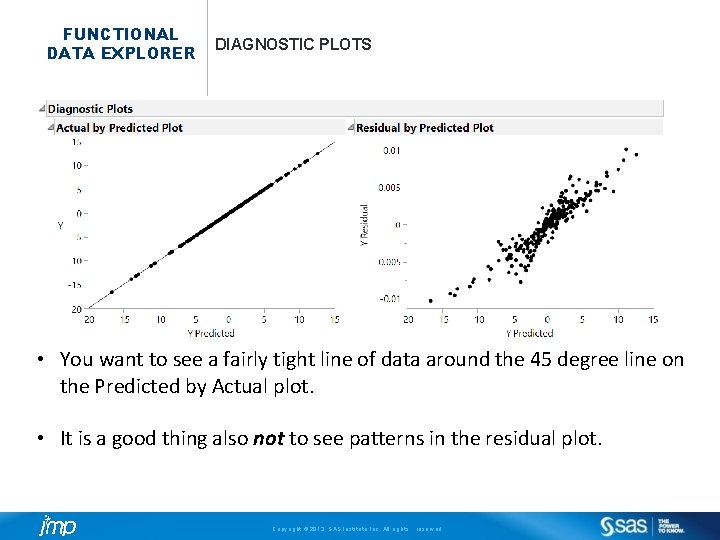
FUNCTIONAL DATA EXPLORER DIAGNOSTIC PLOTS • You want to see a fairly tight line of data around the 45 degree line on the Predicted by Actual plot. • It is a good thing also not to see patterns in the residual plot. Copyright © 2013, SAS Institute Inc. All rights reserved.
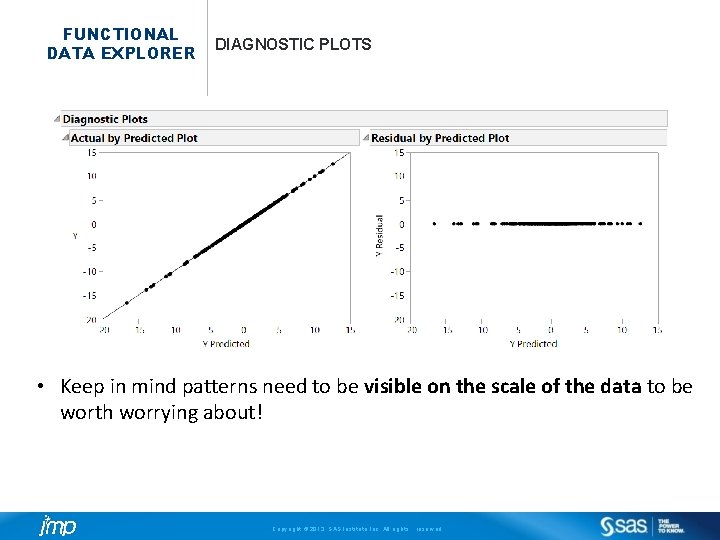
FUNCTIONAL DATA EXPLORER DIAGNOSTIC PLOTS • Keep in mind patterns need to be visible on the scale of the data to be worth worrying about! Copyright © 2013, SAS Institute Inc. All rights reserved.
FUNCTIONAL DATA EXPLORER RANDOM SLOPES AND INTERCEPTS Copyright © 2013, SAS Institute Inc. All rights reserved.
FUNCTIONAL DATA EXPLORER RANDOM SLOPES AND INTERCEPTS Copyright © 2013, SAS Institute Inc. All rights reserved.
FUNCTIONAL DATA EXPLORER BASIS FUNCTION CHOICES • B-Splines • Piecewise polynomials with an underlying mean model and variance components on the spline coefficients. • These often work the best on the examples I have seen. • Try these first and customize the #Knots as needed. • P-Splines • P is for “Penalized”. These tend to have lots of knots and are often slower to fit but similar in properties to B Splines. • Worth trying sometimes if you aren’t happy with the B Spline fit… • Fourier Basis • Uses a sine/cosine expansion as the basis. • Good for periodic data (like vibration/sound signals). • Usually the spline models have worked much better on other types of functional data. In my experience… Copyright © 2013, SAS Institute Inc. All rights reserved.
FUNCTIONAL DATA EXPLORER BASIS FUNCTION CHOICES • Ultimately the combination of basis function type with #Knots and order is really intermediary to obtaining the FPCs and Eigenfunctions. • We will continue to make this as easy and “click-throughable” in future releases… • In the meantime, you have a lot of tools and diagnostics to find a good model. • Keep in mind the motto “All models are wrong, some are useful. ” Copyright © 2013, SAS Institute Inc. All rights reserved.
FUNCTIONAL DATA EXPLORER ANODIC BOND DATA • This is (simulated) data from a step in a semiconductor manufacturing process where there is a step where glass is bonded to the devices (anodic bonding). • The step is problematic and destroys about 11% of the wafers. • The wafers cannot be tested for several weeks, after the rest of the production process steps are applied. Copyright © 2013, SAS Institute Inc. All rights reserved.
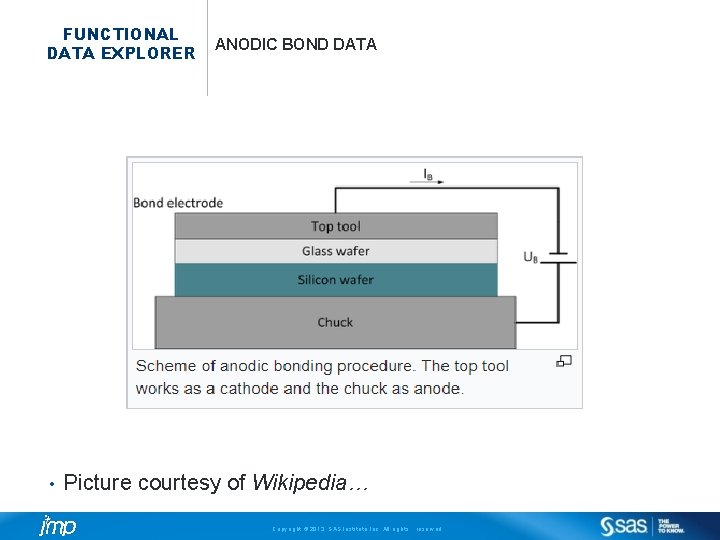
FUNCTIONAL DATA EXPLORER • ANODIC BOND DATA Picture courtesy of Wikipedia… Copyright © 2013, SAS Institute Inc. All rights reserved.
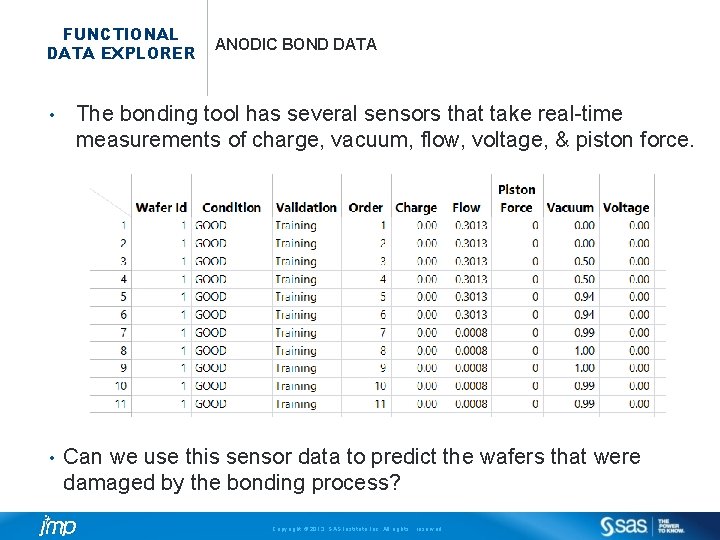
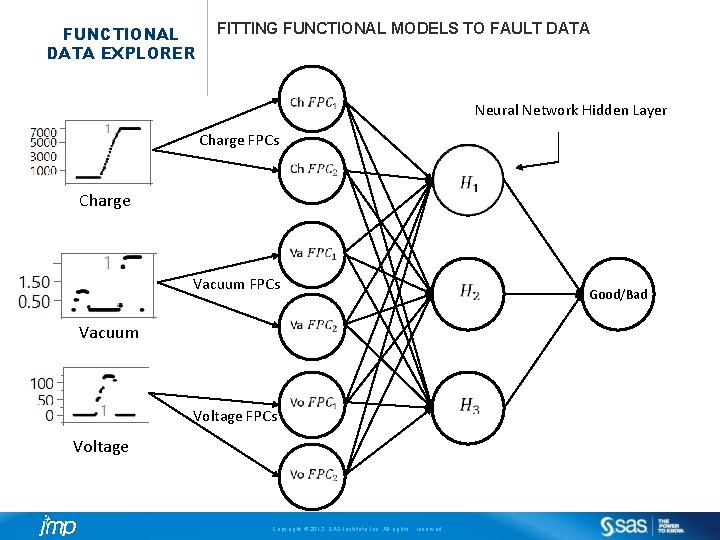
FUNCTIONAL DATA EXPLORER • • ANODIC BOND DATA The bonding tool has several sensors that take real-time measurements of charge, vacuum, flow, voltage, & piston force. Can we use this sensor data to predict the wafers that were damaged by the bonding process? Copyright © 2013, SAS Institute Inc. All rights reserved.
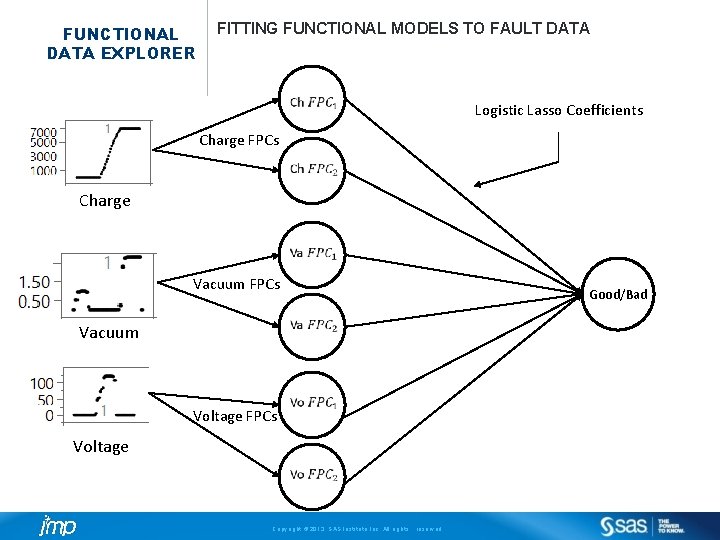
FUNCTIONAL DATA EXPLORER FITTING FUNCTIONAL MODELS TO FAULT DATA Logistic Lasso Coefficients Charge FPCs Charge Vacuum FPCs Good/Bad Vacuum Voltage FPCs Voltage Copyright © 2013, SAS Institute Inc. All rights reserved.
FUNCTIONAL DATA EXPLORER FITTING FUNCTIONAL MODELS TO FAULT DATA Neural Network Hidden Layer Charge FPCs Charge Vacuum FPCs Vacuum Voltage FPCs Voltage Copyright © 2013, SAS Institute Inc. All rights reserved. Good/Bad
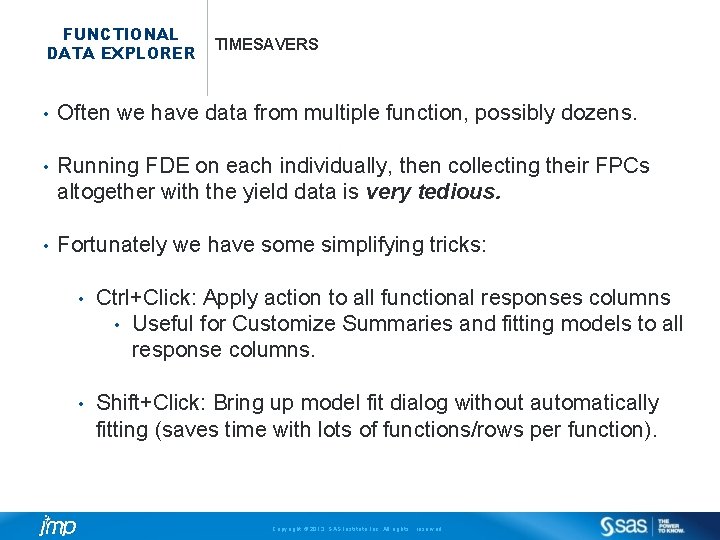
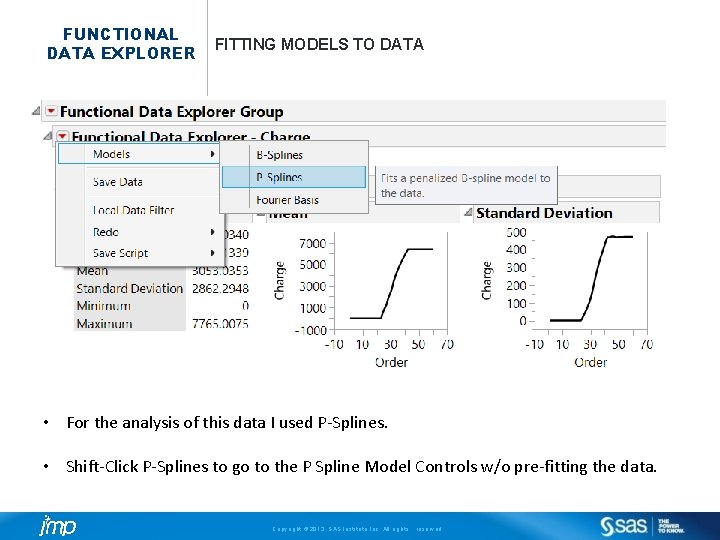
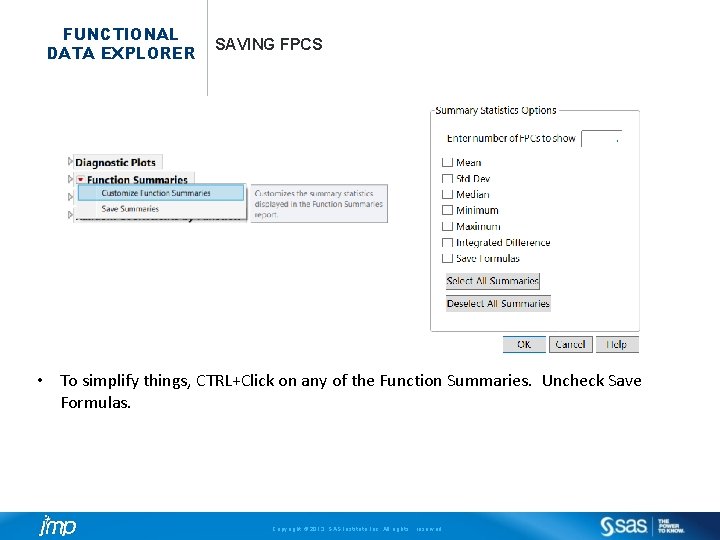
FUNCTIONAL DATA EXPLORER TIMESAVERS • Often we have data from multiple function, possibly dozens. • Running FDE on each individually, then collecting their FPCs altogether with the yield data is very tedious. • Fortunately we have some simplifying tricks: • Ctrl+Click: Apply action to all functional responses columns • Useful for Customize Summaries and fitting models to all response columns. • Shift+Click: Bring up model fit dialog without automatically fitting (saves time with lots of functions/rows per function). Copyright © 2013, SAS Institute Inc. All rights reserved.
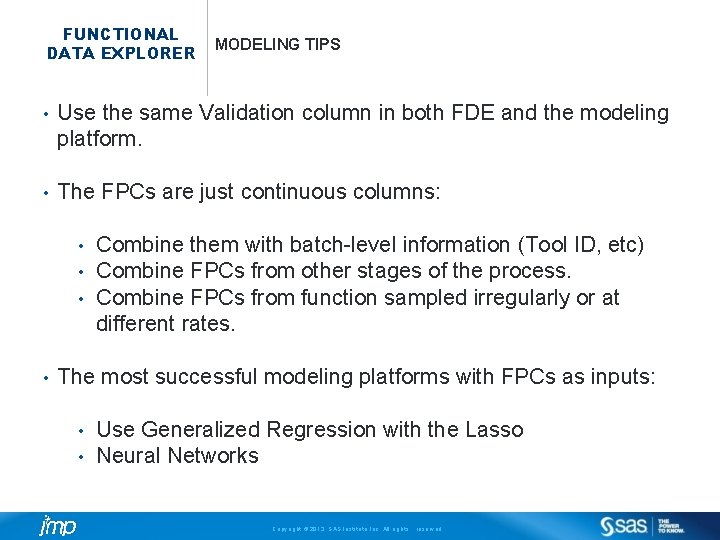
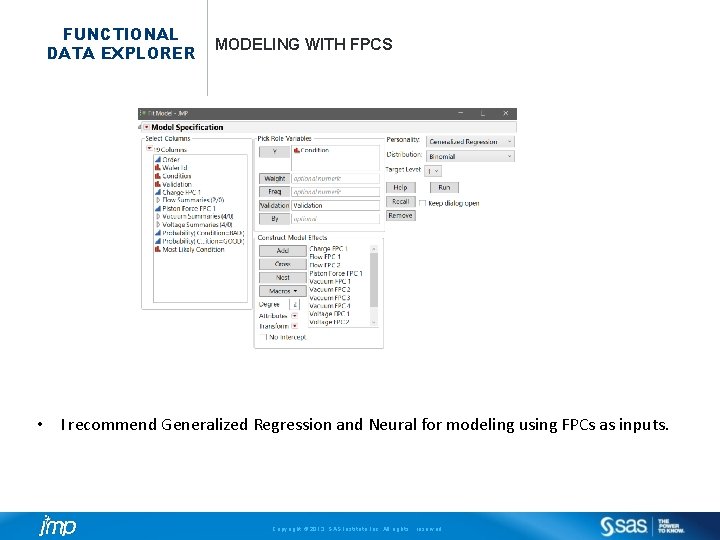
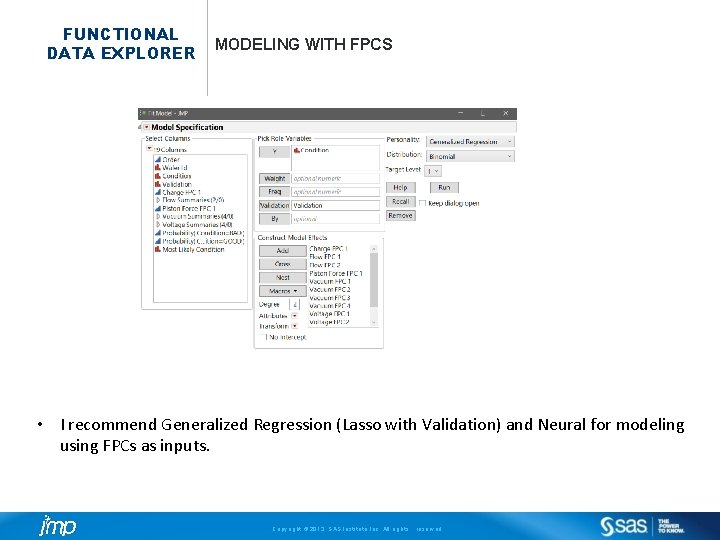
FUNCTIONAL DATA EXPLORER MODELING TIPS • Use the same Validation column in both FDE and the modeling platform. • The FPCs are just continuous columns: • • Combine them with batch-level information (Tool ID, etc) Combine FPCs from other stages of the process. Combine FPCs from function sampled irregularly or at different rates. The most successful modeling platforms with FPCs as inputs: • • Use Generalized Regression with the Lasso Neural Networks Copyright © 2013, SAS Institute Inc. All rights reserved.
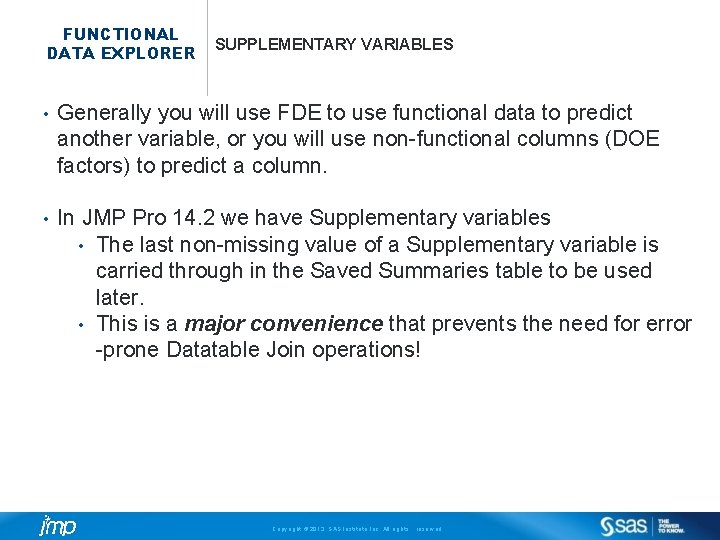
FUNCTIONAL DATA EXPLORER SUPPLEMENTARY VARIABLES • Generally you will use FDE to use functional data to predict another variable, or you will use non-functional columns (DOE factors) to predict a column. • In JMP Pro 14. 2 we have Supplementary variables • The last non-missing value of a Supplementary variable is carried through in the Saved Summaries table to be used later. • This is a major convenience that prevents the need for error -prone Datatable Join operations! Copyright © 2013, SAS Institute Inc. All rights reserved.
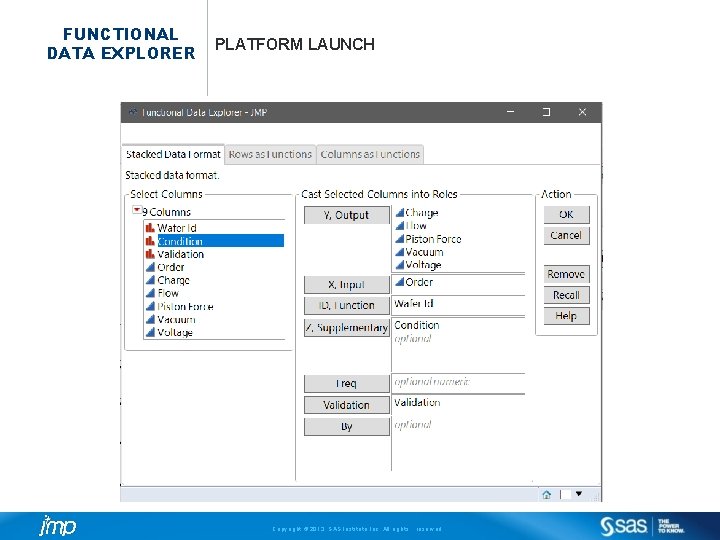
FUNCTIONAL DATA EXPLORER PLATFORM LAUNCH Copyright © 2013, SAS Institute Inc. All rights reserved.
FUNCTIONAL DATA EXPLORER FITTING MODELS TO DATA • For the analysis of this data I used P-Splines. • Shift-Click P-Splines to go to the P Spline Model Controls w/o pre-fitting the data. Copyright © 2013, SAS Institute Inc. All rights reserved.
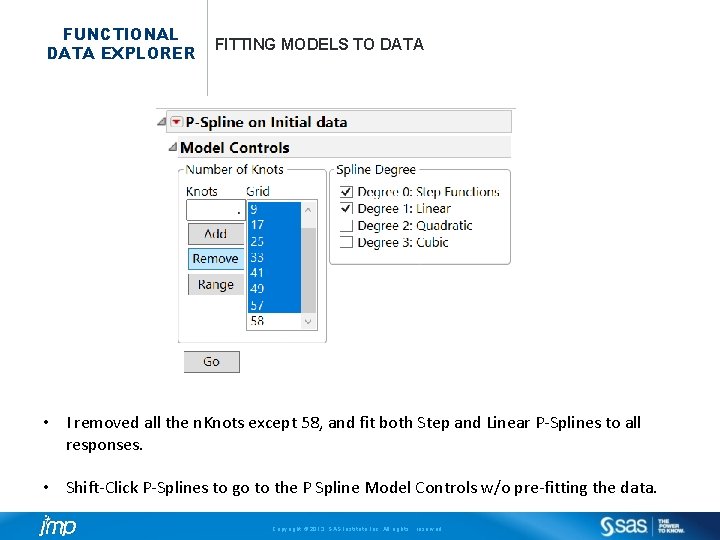
FUNCTIONAL DATA EXPLORER FITTING MODELS TO DATA • I removed all the n. Knots except 58, and fit both Step and Linear P-Splines to all responses. • Shift-Click P-Splines to go to the P Spline Model Controls w/o pre-fitting the data. Copyright © 2013, SAS Institute Inc. All rights reserved.
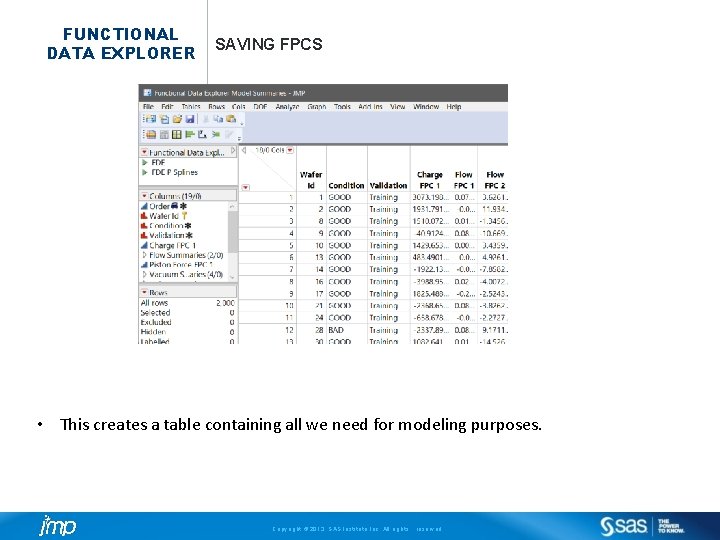
FUNCTIONAL DATA EXPLORER SAVING FPCS • To simplify things, CTRL+Click on any of the Function Summaries. Uncheck Save Formulas. Copyright © 2013, SAS Institute Inc. All rights reserved.
FUNCTIONAL DATA EXPLORER SAVING FPCS • This creates a table containing all we need for modeling purposes. Copyright © 2013, SAS Institute Inc. All rights reserved.
FUNCTIONAL DATA EXPLORER MODELING WITH FPCS • I recommend Generalized Regression and Neural for modeling using FPCs as inputs. Copyright © 2013, SAS Institute Inc. All rights reserved.
FUNCTIONAL DATA EXPLORER MODELING WITH FPCS • I recommend Generalized Regression (Lasso with Validation) and Neural for modeling using FPCs as inputs. Copyright © 2013, SAS Institute Inc. All rights reserved.
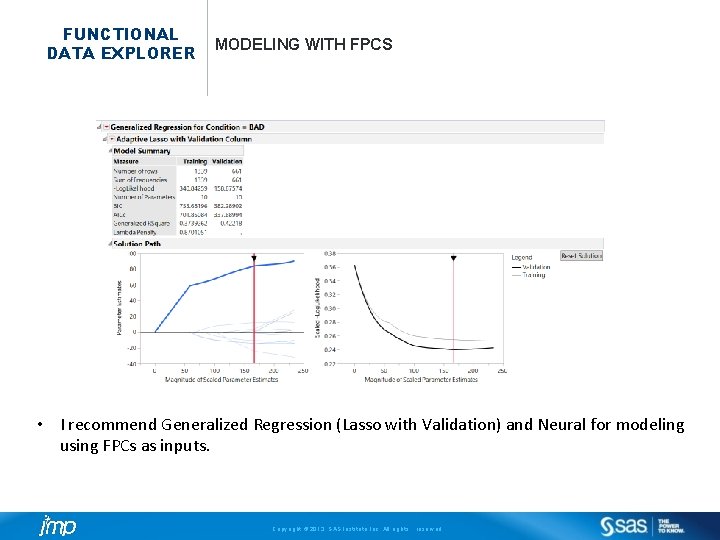
FUNCTIONAL DATA EXPLORER MODELING WITH FPCS • I recommend Generalized Regression (Lasso with Validation) and Neural for modeling using FPCs as inputs. Copyright © 2013, SAS Institute Inc. All rights reserved.
FUNCTIONAL DATA EXPLORER COMMON QUESTIONS Q: Can I build models with data sampled at different frequencies A: Yes. You may have to call the platform several times, and become good at using joining data tables. Q: I need Dynamic Type Warping. When will it be available? A: It came out with JMP Pro 14. 1 Q: FDE is SLOW. What do I do? A: Try fitting a couple dozen functions, and/or use a validation column. If your functions are long (100 s+ measurements) try sampling every 10 th measurement, or averaging. We are working hard to make it faster in every update! Copyright © 2013, SAS Institute Inc. All rights reserved.
FUNCTIONAL DATA EXPLORER COMMON QUESTIONS Q: How does FPCA compare to PCA? A: PCA ignores the sequential ordering of the data. If you do PCA, then permute the columns and do another PCA you get a permuted version of the original PCA. FPCA is inherently function based, so all the ordering information is retained Q: How do FPCA+Lasso models compare to PLS? A: Like PCA, PLS does not capture ordering information. The surrogate model in FDE also de-noises the signal, while PLS transmits error into the model unless some correction is applied. In practice, FPCA and PLS models are both contenders and I would try both. You can even build PLS models using FPCs as inputs. These are tools that can and should be used together. Copyright © 2013, SAS Institute Inc. All rights reserved.
FUNCTIONAL DATA EXPLORER COMMON QUESTIONS Q: I want early warnings during to predict whether a batch will have low yield. How do I build models to do that? • A: Subset models using only the first ¼ or ½ of the series that you have complete data for and predict yield. All scoring of new observations is going to require a validation column. • Keep in mind that you have to emulate the data you will have at the time when a decision is made, not the data you wish you had! Copyright © 2013, SAS Institute Inc. All rights reserved.