
FTP basics FTP is a TCP based service
FTP basics FTP is a TCP based service exclusively. it utilizes two ports, a 'data' port and a 'command' port (also known as the control port). Traditionally these are port 21 for the command port 20 for the data port. The confusion begins however, when we find that depending on the mode, the data port is not always on port 20.
Active FTP In active mode FTP the client connects from a random unprivileged port (N > 1023) to the FTP server's command port, port 21. The sends the FTP command PORT N+1 to the FTP server and client starts listening to port N+1. The server will then connect back to the client's specified data port from its local data port, which is port 20
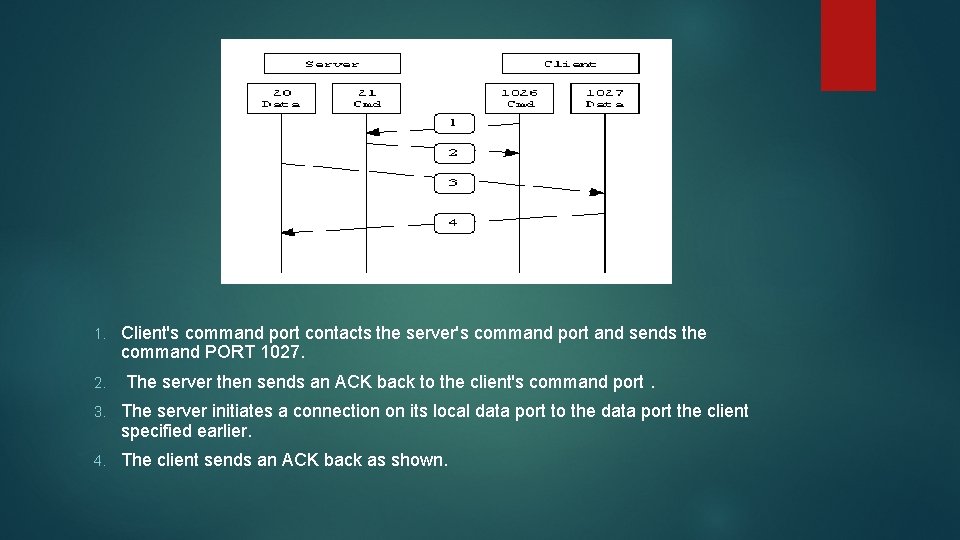
1. 2. Client's command port contacts the server's command port and sends the command PORT 1027. The server then sends an ACK back to the client's command port. 3. The server initiates a connection on its local data port to the data port the client specified earlier. 4. The client sends an ACK back as shown.
Active FTP The problem with active mode FTP actually falls on the client side. The FTP client doesn't make the actual connection to the data port of the server- The server connects back to the specified port on the client. From the client side firewall this appears to be an outside system initiating a connection to an internal client--something that is usually blocked
Passive FTP In order to resolve the issue of the server initiating the connection to the client a different method for FTP connections was developed. This was known as passive mode, or PASV, after the command used by the client to tell the server it is in passive mode.

Passive FTP In passive mode FTP the client initiates both connections to the server, solving the problem of firewalls filtering the incoming data port connection to the client from the server The client opens two random unprivileged ports locally (N > 1023 and N+1). The first port contacts the server on port 21, The client will issue the PASV command. Due to this server opens a random unprivileged port (P > 1023) and sends the PORT P command back to the client. The client then initiates the connection from port N+1 to port P on the server to transfer data
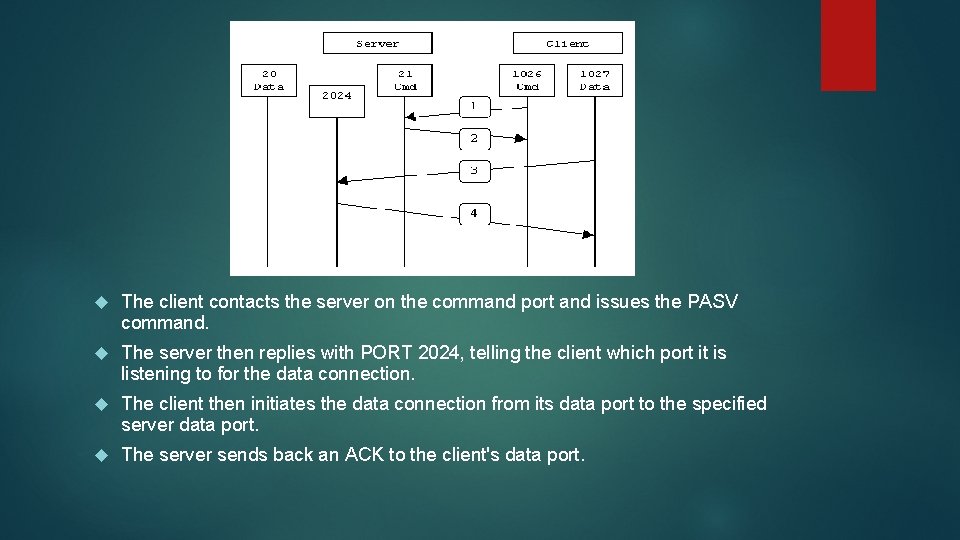
The client contacts the server on the command port and issues the PASV command. The server then replies with PORT 2024, telling the client which port it is listening to for the data connection. The client then initiates the data connection from its data port to the specified server data port. The server sends back an ACK to the client's data port.
- Slides: 7