
From MATLAB and Simulink to Real Time with
From MATLAB® and Simulink® to Real Time with TI DSPs Wavelet Denoising Content developed in partnership with Tel-Aviv University © 2007 Texas Instruments Inc, 0 -
Objectives • To introduce the Discrete Wavelet Transform (DWT) • To show the DWT can be used to remove noise from an audio signal. • To demonstrate wavelet denoising in realtime using the Texas Instruments C 6713 DSK. © 2007 Texas Instruments Inc, Slide 2

The Fourier Transform and Limitations • Multiplies the signal s(t) by an infinite sine wave. • No means of identifying exactly where an event occurs. • Does not cope well with discontinuous, bursts of signals, e. g. video, music, seismic © 2007 Texas Instruments Inc, Slide 3
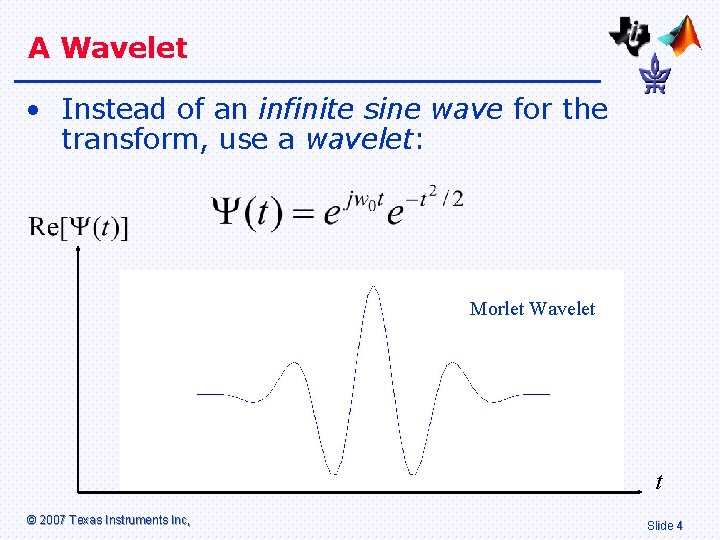
A Wavelet • Instead of an infinite sine wave for the transform, use a wavelet: Morlet Wavelet t © 2007 Texas Instruments Inc, Slide 4

The Continuous Wavelet Transform • The Continuous Wavelet Transform (CWT) is defined as: • This can be interpreted as convolving the signal s(t) with the wavelet. © 2007 Texas Instruments Inc, Slide 5
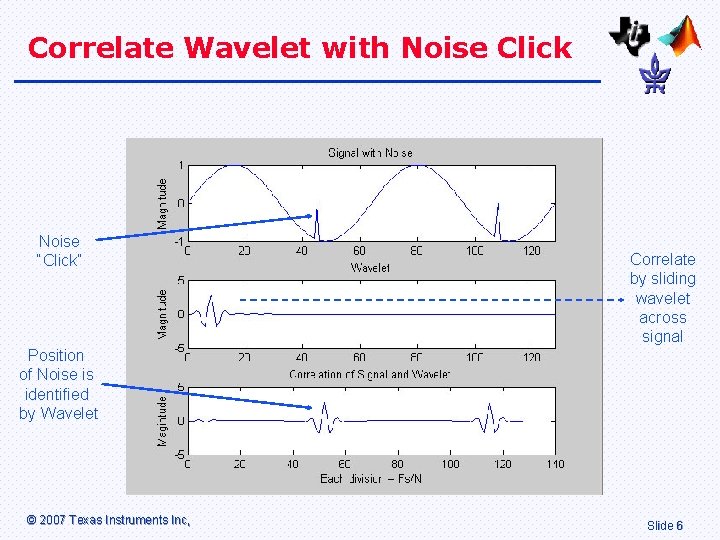
Correlate Wavelet with Noise Click Noise “Click” Correlate by sliding wavelet across signal Position of Noise is identified by Wavelet © 2007 Texas Instruments Inc, Slide 6
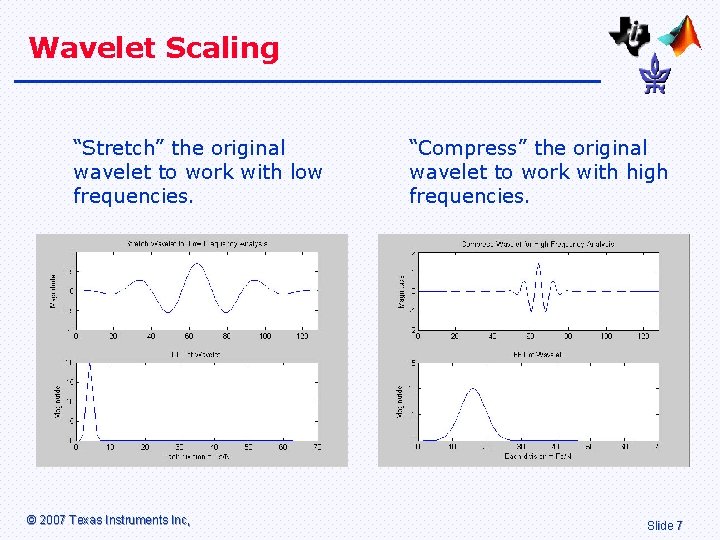
Wavelet Scaling “Stretch” the original wavelet to work with low frequencies. © 2007 Texas Instruments Inc, “Compress” the original wavelet to work with high frequencies. Slide 7
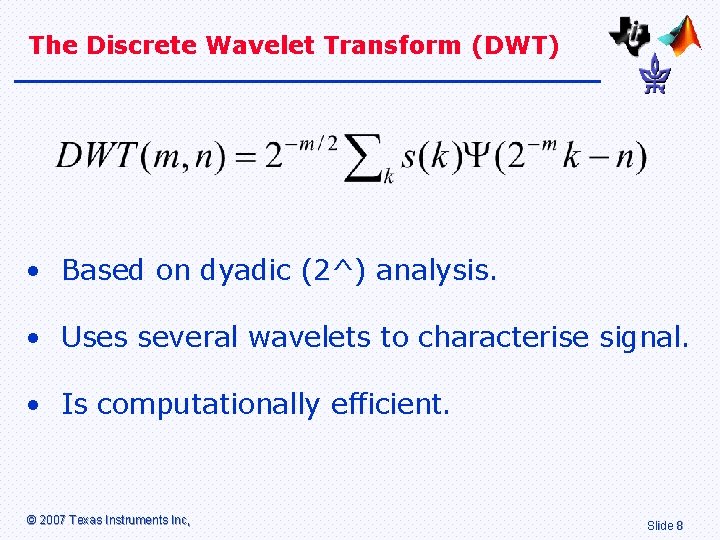
The Discrete Wavelet Transform (DWT) • Based on dyadic (2^) analysis. • Uses several wavelets to characterise signal. • Is computationally efficient. © 2007 Texas Instruments Inc, Slide 8
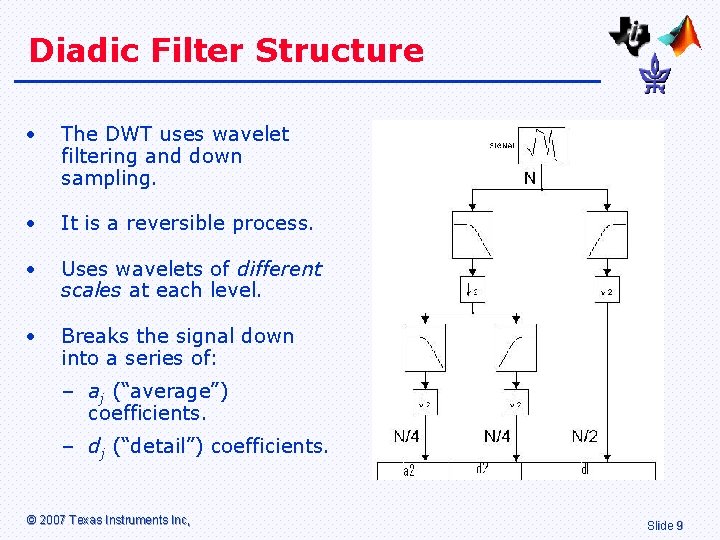
Diadic Filter Structure • The DWT uses wavelet filtering and down sampling. • It is a reversible process. • Uses wavelets of different scales at each level. • Breaks the signal down into a series of: – aj (“average”) coefficients. – dj (“detail”) coefficients. © 2007 Texas Instruments Inc, Slide 9
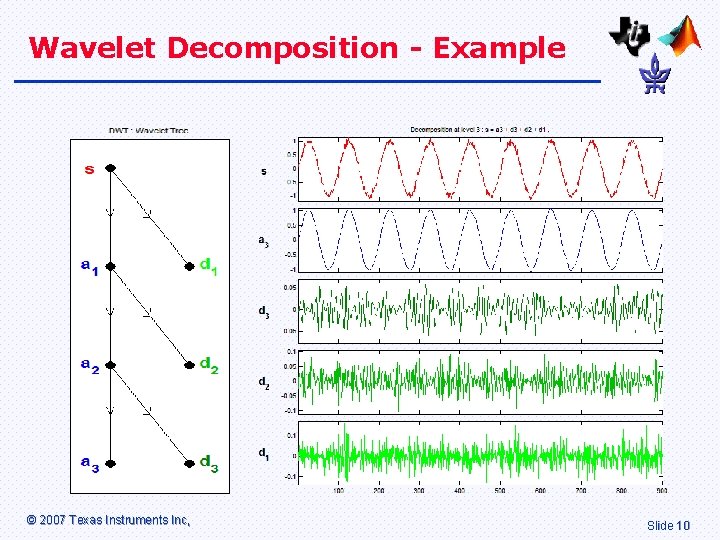
Wavelet Decomposition - Example © 2007 Texas Instruments Inc, Slide 10
Result of Analysis • The DWT has separated the signal from the noise. • Most of the important information is contained at the “a 3” level. Low sampling rate, good for compression. • The high frequency noise is contained at the “d 1” level. This can be discarded to reduce the noise. © 2007 Texas Instruments Inc, Slide 11
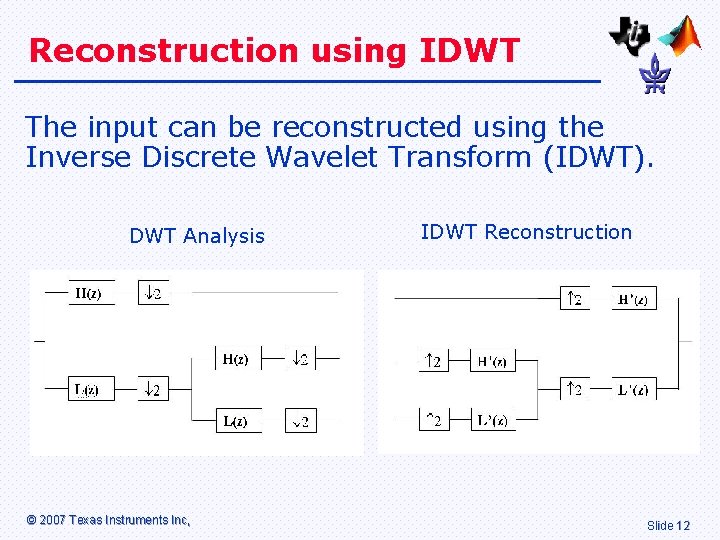
Reconstruction using IDWT The input can be reconstructed using the Inverse Discrete Wavelet Transform (IDWT). DWT Analysis © 2007 Texas Instruments Inc, IDWT Reconstruction Slide 12
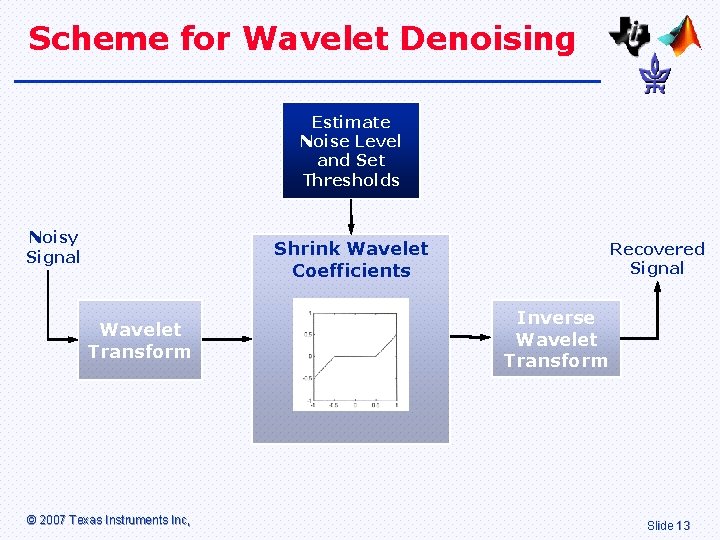
Scheme for Wavelet Denoising Estimate Noise Level and Set Thresholds Noisy Signal Shrink Wavelet Coefficients Wavelet Transform © 2007 Texas Instruments Inc, Recovered Signal Inverse Wavelet Transform Slide 13
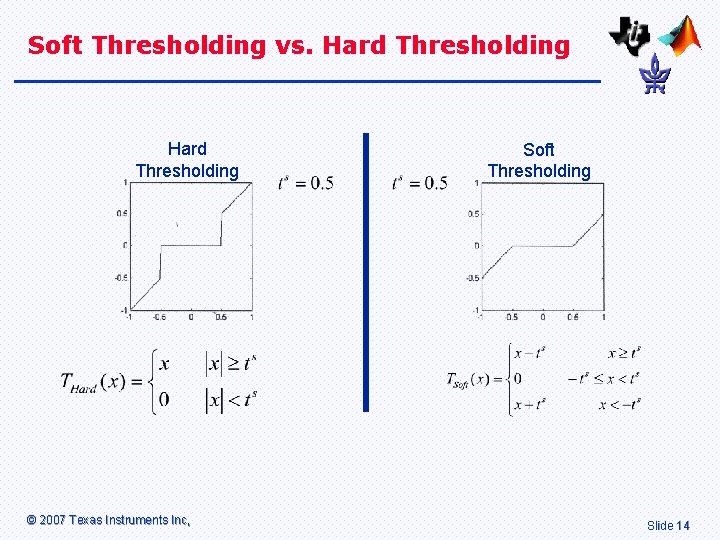
Soft Thresholding vs. Hard Thresholding © 2007 Texas Instruments Inc, Soft Thresholding Slide 14
Hard and Soft Thresholding • Hard Thresholding: – Ignore signals below noise threshold. – Sharp transition from on/off. • Soft Thresholding: – Ignore signals below noise threshold. – Attenuates low-level signals. – Smooth transition between on/off. © 2007 Texas Instruments Inc, Slide 15
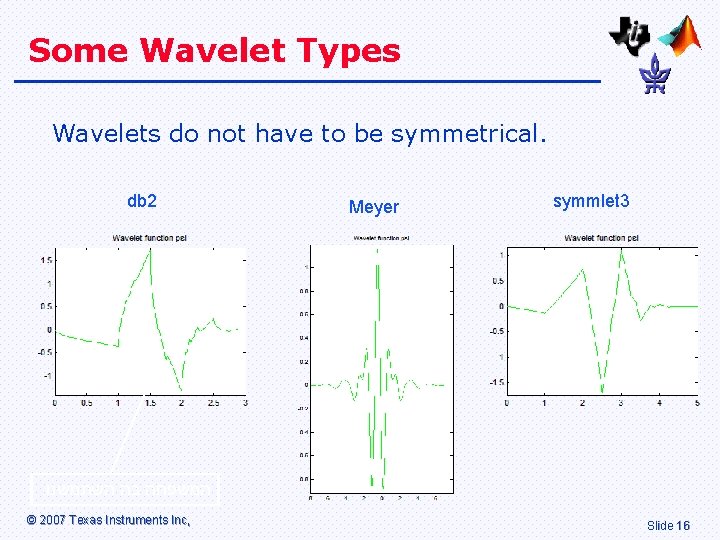
Some Wavelet Types Wavelets do not have to be symmetrical. db 2 Meyer symmlet 3 המשפחה בה השתמשנו © 2007 Texas Instruments Inc, Slide 16
Wavelet Selection • Arbitrary, but some guidelines available. • Wavelets have individual properties: – Local symmetries, e. g. Mexican hat (Morlet). – Orthogonal basis, e. g. Daubechies (db). – Linear phase, e. g. biorthogonal. – Compactly supported, e. g. db 1 vs db 4 for two discontinuities. – Smoothness measured by derivatives or vanishing moments, e. g db 2 vs db 5. © 2007 Texas Instruments Inc, Slide 17
Other Uses of Wavelets • Image / video compression (2 D, 3 D) – DWT(JPEG 2000), fingerprint image compression (FBI) • Data with transients, e. g. financial, seismic, ECG • Pattern matching, e. g. for biometrics, match at different scale. • Feature extraction, e. g. use detail as signature in metallurgy. • Multisensor data, e. g. multi-recording EEG and multi-scale PCA. • Communication systems, raised cosine filter is special case of Meyer. © 2007 Texas Instruments Inc, Slide 18
Simulink © 2007 Texas Instruments Inc, ® Model Slide 19
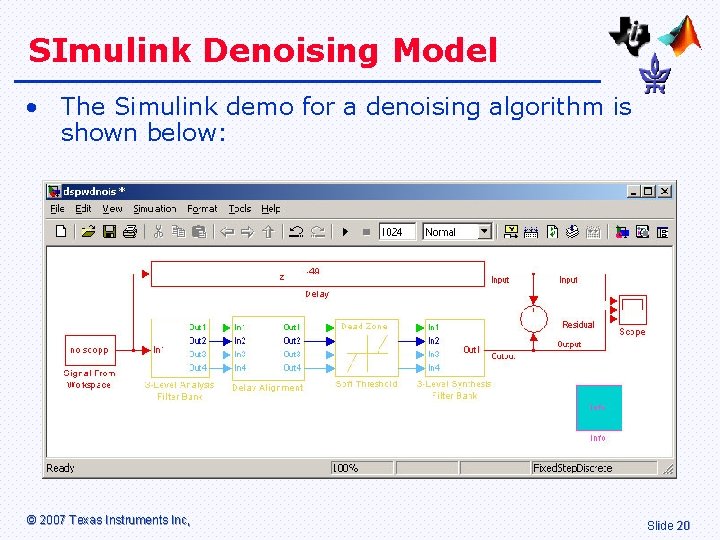
SImulink Denoising Model • The Simulink demo for a denoising algorithm is shown below: © 2007 Texas Instruments Inc, Slide 20
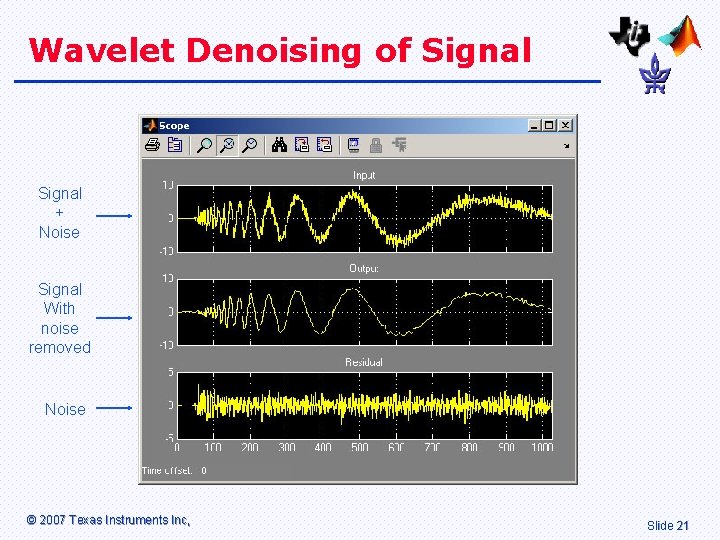
Wavelet Denoising of Signal + Noise Signal With noise removed Noise © 2007 Texas Instruments Inc, Slide 21
Simulink Model Description • The Simulink model contains four stages: 1. Dyadic analysis filter (DWT) 2. Delay alignment 3. Dead zone to set noise thresholds 4. Dyadic Synthesis Filter Bank (IDWT) • Each will be explained in more detail. © 2007 Texas Instruments Inc, Slide 22
1. Dyadic Analysis Filter Bank • In the first stage, the input data block is analysed in terms of the Discrete Wavelet Transform (DWT). • The right type of wavelet needs to be chosen, that is one that can be accurately reconstructed using the IDWT. © 2007 Texas Instruments Inc, Slide 23
2. Delay Alignment • This is a form of phase correction. • Low frequencies take longer time to go through the filter banks than do high frequencies. © 2007 Texas Instruments Inc, Slide 24
3. Dead Zone • This is the actual noise reduction stage. • Set a minimum threshold for each band. Anything below this is ignored. • Downside – low level signals could be lost. • Assumption – there is more high frequency noise than low frequency noise. © 2007 Texas Instruments Inc, Slide 25
4. Dyadic Synthesis Filter Bank • In the final stage, the output signal is reconstructed. • The Inverse Discrete Wavelet Transform (IDWT) is the complementary half of the Discrete Wavelet Transform (DWT). © 2007 Texas Instruments Inc, Slide 26
Introduction to Laboratory © 2007 Texas Instruments Inc, Slide 27
Denoising using the TI C 6713 DSK • The laboratory demonstrates audio noise reduction in real-time using the Texas Instruments C 6713 DSK. • You will speak into a microphone and hear how high frequency noise can be removed. • You can experiment with different types of wavelets and thresholds. © 2007 Texas Instruments Inc, Slide 28
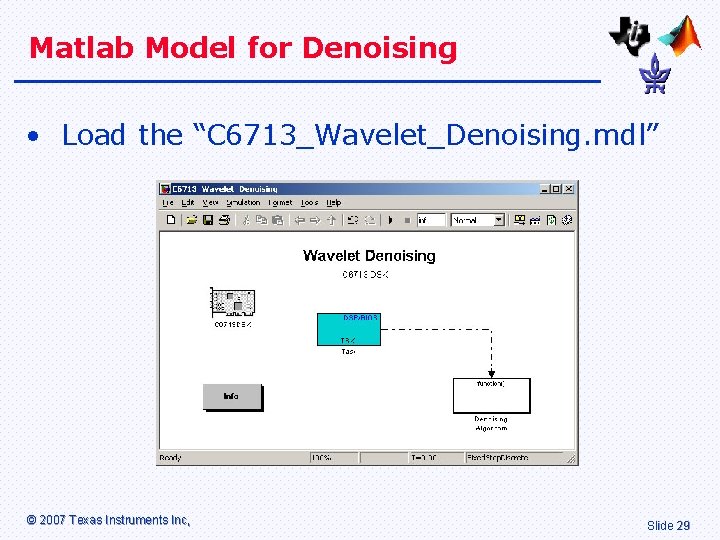
Matlab Model for Denoising • Load the “C 6713_Wavelet_Denoising. mdl” © 2007 Texas Instruments Inc, Slide 29
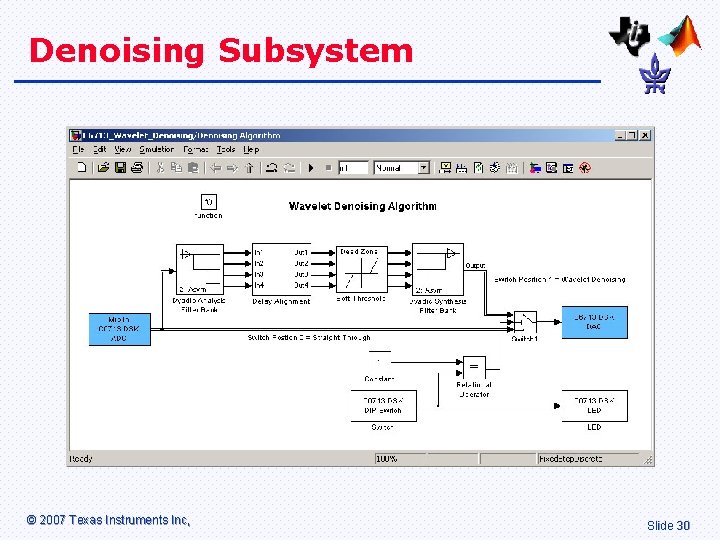
Denoising Subsystem © 2007 Texas Instruments Inc, Slide 30
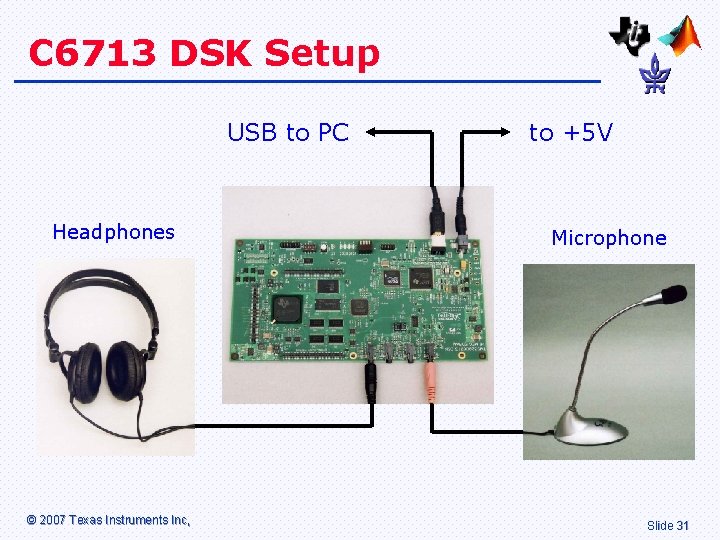
C 6713 DSK Setup USB to PC Headphones © 2007 Texas Instruments Inc, to +5 V Microphone Slide 31
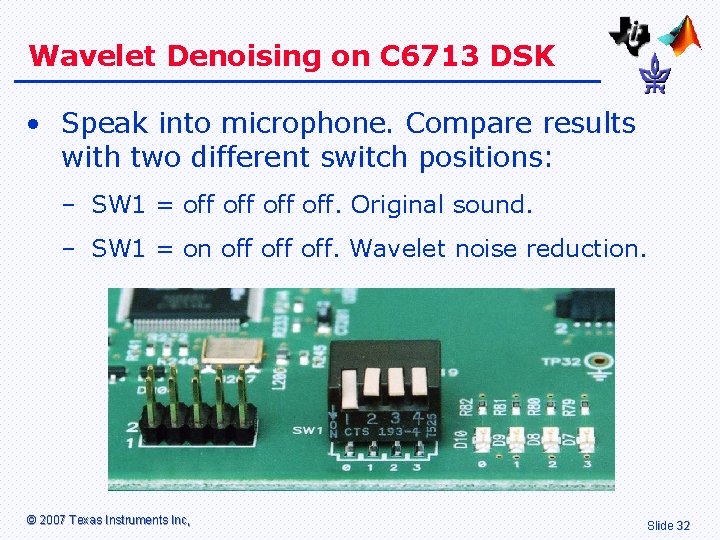
Wavelet Denoising on C 6713 DSK • Speak into microphone. Compare results with two different switch positions: – SW 1 = off off. Original sound. – SW 1 = on off off. Wavelet noise reduction. © 2007 Texas Instruments Inc, Slide 32
References • On World-Wide Web: “The Wavelet Tutorial” by Robi Polikar. Part I to Part IV. • Digital Signal Processing, A Practical Approach by Emmanuel C. Ifeachor and Barrie W. Jervis. ISBN 0201 -59619 -9 © 2007 Texas Instruments Inc, Slide 33
- Slides: 33