
Frequency Domain Filtering CS 474674 Prof Bebis Sections
Frequency Domain Filtering CS 474/674 - Prof. Bebis Sections 4. 7, 4. 8, 4. 9, 4. 10
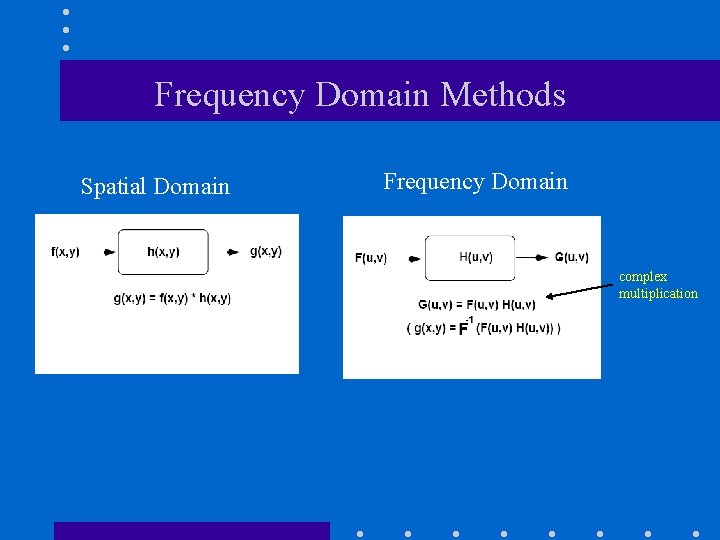
Frequency Domain Methods Spatial Domain Frequency Domain complex multiplication
Major filter categories • Typically, filters are classified based on their properties in the frequency domain: (1) Low-pass (2) High-pass (3) Band-pass (4) Band-stop
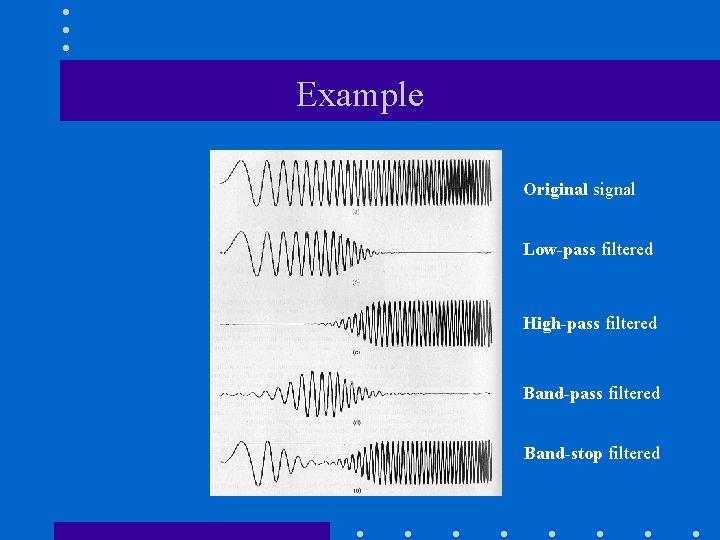
Example Original signal Low-pass filtered High-pass filtered Band-stop filtered
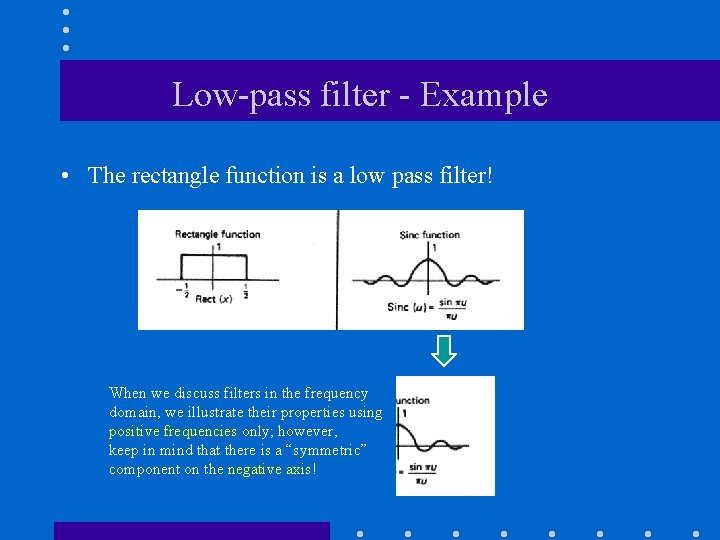
Low-pass filter - Example • The rectangle function is a low pass filter! When we discuss filters in the frequency domain, we illustrate their properties using positive frequencies only; however, keep in mind that there is a “symmetric” component on the negative axis!
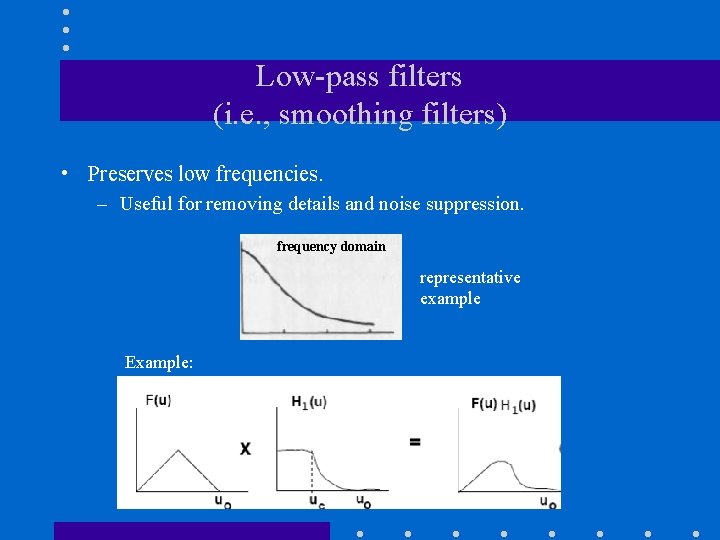
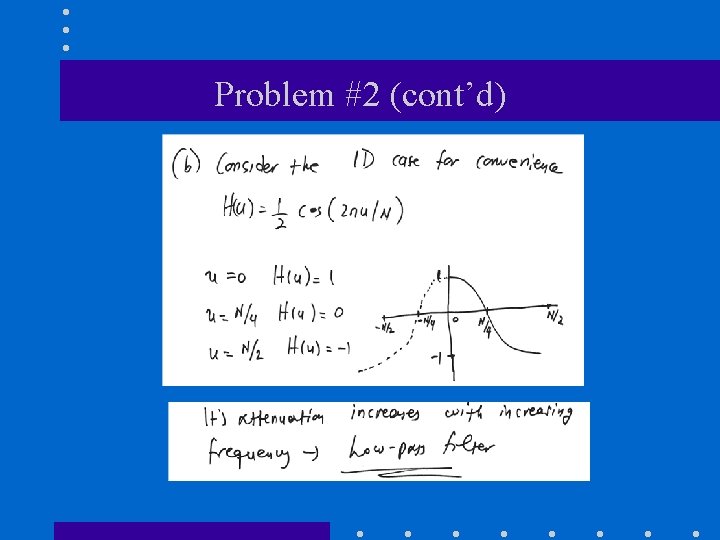
Low-pass filters (i. e. , smoothing filters) • Preserves low frequencies. – Useful for removing details and noise suppression. frequency domain representative example Example:
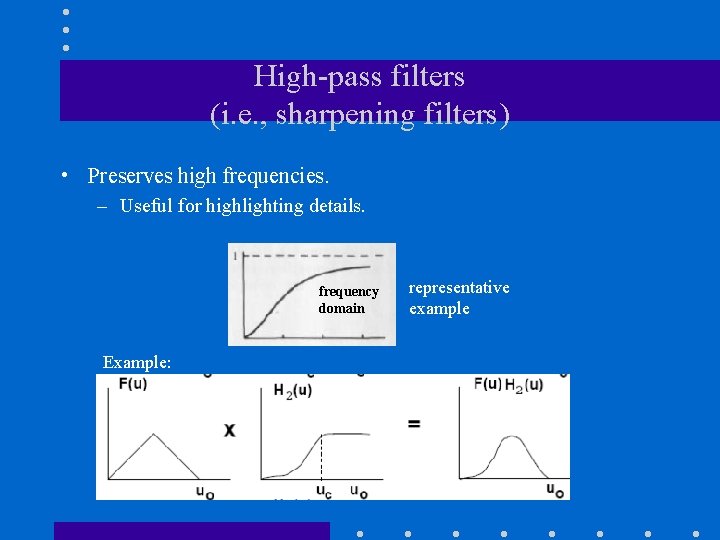
High-pass filters (i. e. , sharpening filters) • Preserves high frequencies. – Useful for highlighting details. frequency domain Example: representative example
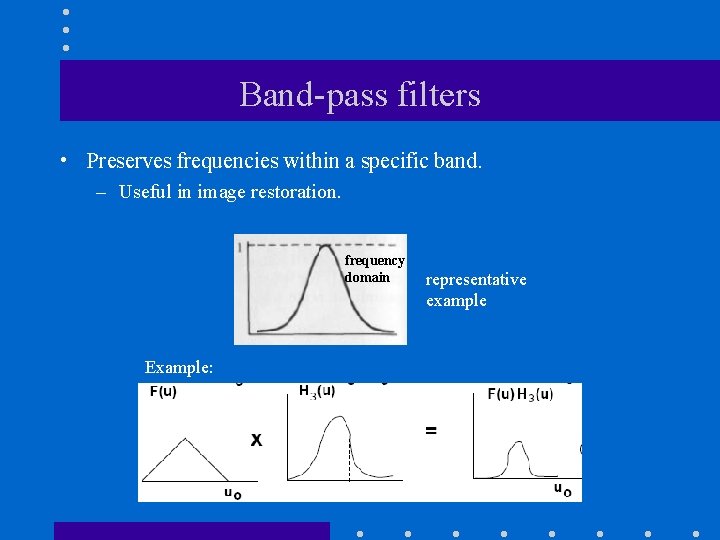
Band-pass filters • Preserves frequencies within a specific band. – Useful in image restoration. frequency domain Example: representative example
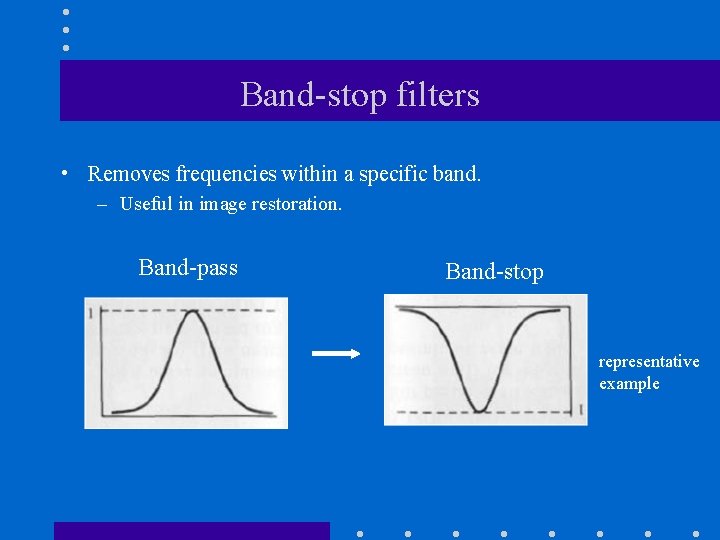
Band-stop filters • Removes frequencies within a specific band. – Useful in image restoration. Band-pass Band-stop representative example

Frequency Domain Methods F(u, v) f(x, y) complex multiplication H(u, v) G(u, v) Case 1: H(u, v) is specified directly in the frequency domain. Case 2: H(u, v) is specified indirectly in the frequency domain by specifying h(x, y) in the spatial domain. g(x, y) Very important: the centers of F(u, v) and H(u, v) must coincide!

Frequency domain filtering: Steps 1. Given an input image f(x, y) of size M x N, set the padding sizes P and Q (note that P and Q must be a power of 2 to use FFT). 2. Form a padded image fp(x, y) of size P x Q 3. Multiply fp(x, y) by (-1)x+y to center its spectrum. 4. Compute the DFT, F(u, v), of the image from Step 3. F(u, v) = R(u, v) + j. I(u, v)

Frequency domain filtering: Steps (cont’d) 5. Create H(u, v) (Case 1), of size Px. Q with center at (P/2, Q/2). This is typically done by specifying and sampling the desired filter function, e. g. , Butterworth lowpass filter 6. Compute the product G(u, v)=H(u, v)F(u, v) using elementwise “complex” multiplication. Assuming that H(u, v) is real (not always true), this is: G(u, v)= F(u, v)H(u, v) = H(u, v) R(u, v) + j. H(u, v)I(u, v) where u=0, 1, . . . , P-1, v=0, 1, …, Q-1 where F(u, v) = R(u, v) + j. I(u, v)

Frequency domain filtering: Steps (cont’d) 7. Obtain the filtered image gp(x, y) by computing the inverse DFT of G(u, v): explicitly disregard the imaginary part “undo” the centering transformation 8. Obtain the final filtered result, g(x, y), of size M x N, by extracting the M x N region from the top, left quadrant of gp(x, y) (i. e. , “undo” padding).

Example fp(x, y) f(x, y) F(u, v) gp(x, y) fp(x, y)(-1)x+y H(u, v) - centered G(u, v)=F(u, v)H(u, v) g(x, y)
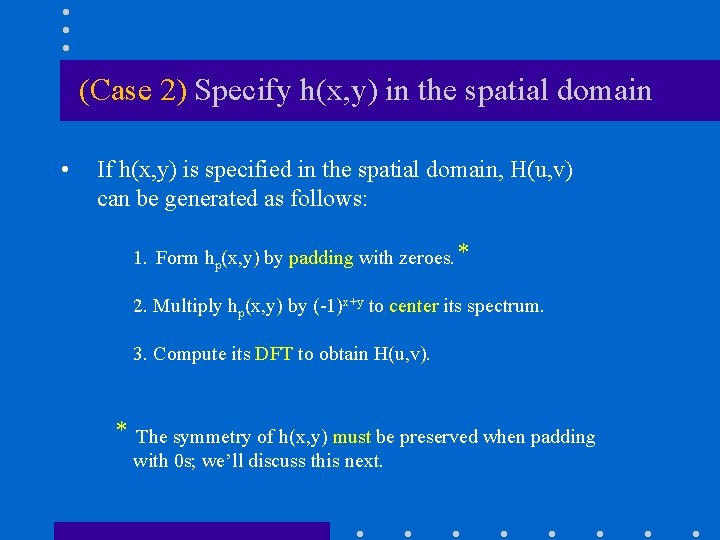
(Case 2) Specify h(x, y) in the spatial domain • If h(x, y) is specified in the spatial domain, H(u, v) can be generated as follows: 1. Form hp(x, y) by padding with zeroes. * 2. Multiply hp(x, y) by (-1)x+y to center its spectrum. 3. Compute its DFT to obtain H(u, v). * The symmetry of h(x, y) must be preserved when padding with 0 s; we’ll discuss this next.

Example: specify h(x, y) in the spatial domain f(x, y) F(u, v) 600 x 600 h(x, y) spatial H(u, v) Sobel frequency 602 x 602 Result of spatial domain filtering: Result of frequency domain filtering: g(x, y)=f(x, y)*h(x, y) g(x, y)=F-1{G(u, v)=F(u, v)H(u, v)}
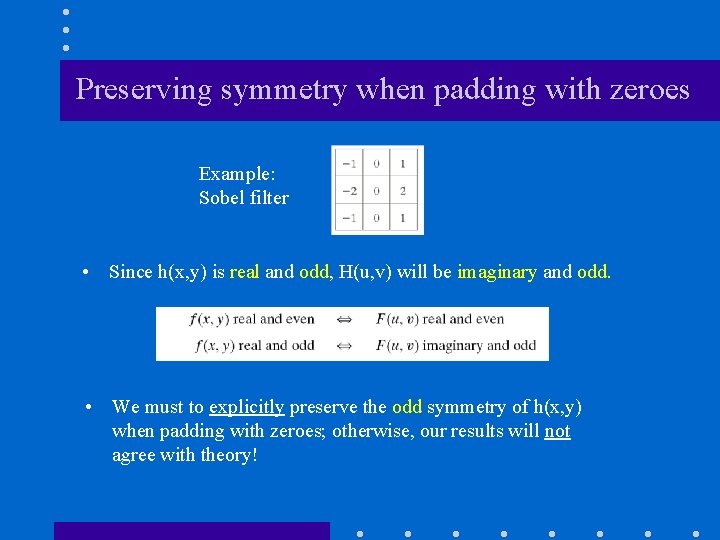
Preserving symmetry when padding with zeroes Example: Sobel filter • Since h(x, y) is real and odd, H(u, v) will be imaginary and odd. • We must to explicitly preserve the odd symmetry of h(x, y) when padding with zeroes; otherwise, our results will not agree with theory!
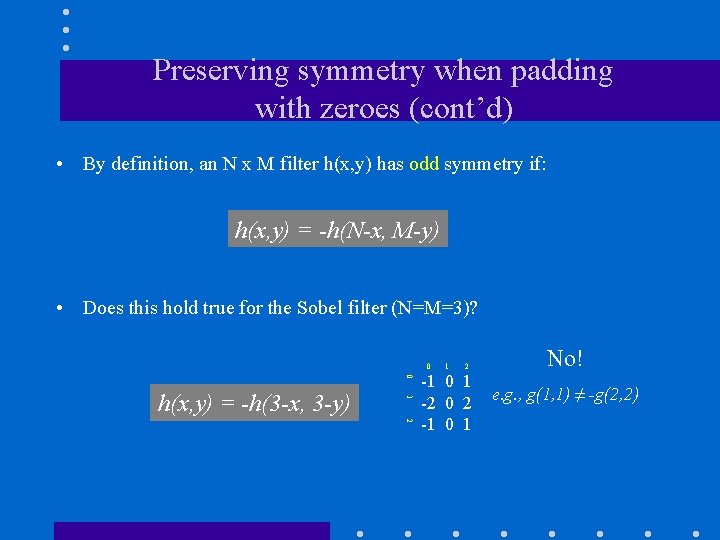
Preserving symmetry when padding with zeroes (cont’d) • By definition, an N x M filter h(x, y) has odd symmetry if: h(x, y) = -h(N-x, M-y) • Does this hold true for the Sobel filter (N=M=3)? 0 0 1 h(x, y) = -h(3 -x, 3 -y) 1 2 2 -1 0 1 -2 0 2 -1 0 1 No! e. g. , g(1, 1) ≠ -g(2, 2)
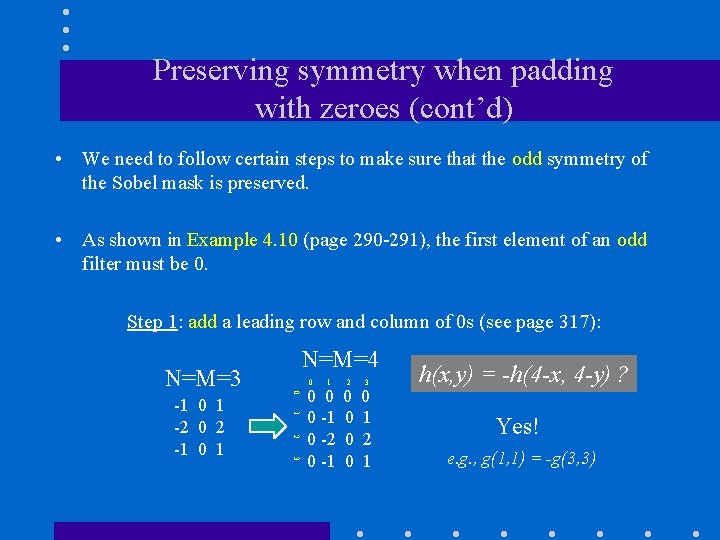
Preserving symmetry when padding with zeroes (cont’d) • We need to follow certain steps to make sure that the odd symmetry of the Sobel mask is preserved. • As shown in Example 4. 10 (page 290 -291), the first element of an odd filter must be 0. Step 1: add a leading row and column of 0 s (see page 317): 1 2 3 -1 0 1 -2 0 2 -1 0 0 N=M=3 N=M=4 1 0 0 0 -1 0 -2 0 -1 2 0 0 3 0 1 2 1 h(x, y) = -h(4 -x, 4 -y) ? Yes! e. g. , g(1, 1) = -g(3, 3)
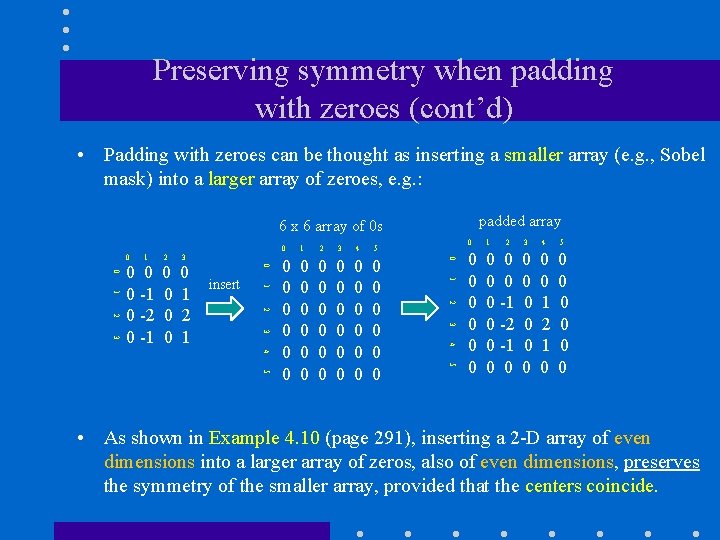
Preserving symmetry when padding with zeroes (cont’d) • Padding with zeroes can be thought as inserting a smaller array (e. g. , Sobel mask) into a larger array of zeroes, e. g. : padded array 6 x 6 array of 0 s 1 4 5 0 0 0 0 0 0 0 0 0 5 3 4 2 3 5 1 2 4 0 1 insert 3 3 0 1 2 2 0 0 1 1 3 0 0 0 -1 0 -2 0 -1 2 0 0 0 0 -1 0 -2 0 -1 0 0 3 4 5 0 0 0 0 1 2 1 0 0 0 0 • As shown in Example 4. 10 (page 291), inserting a 2 -D array of even dimensions into a larger array of zeros, also of even dimensions, preserves the symmetry of the smaller array, provided that the centers coincide.
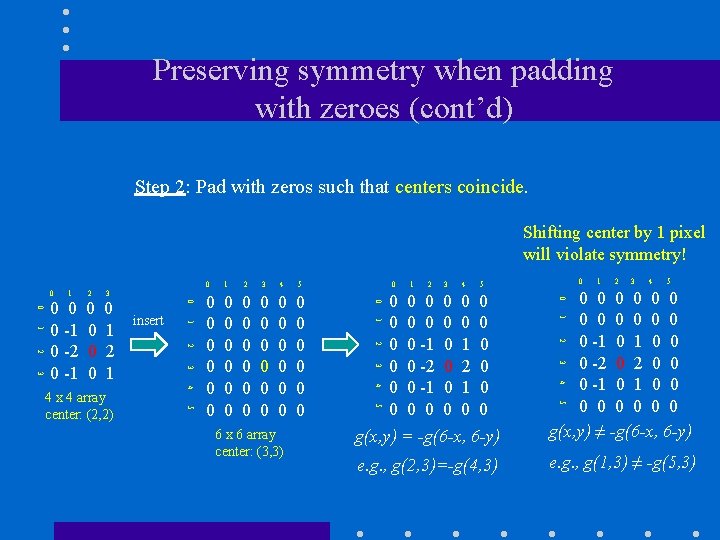
Preserving symmetry when padding with zeroes (cont’d) Step 2: Pad with zeros such that centers coincide. Shifting center by 1 pixel will violate symmetry! 1 1 2 3 4 5 0 0 0 0 0 0 0 0 0 0 0 2 3 4 5 0 0 0 0 1 2 1 0 0 0 0 1 2 3 4 5 g(x, y) = -g(6 -x, 6 -y) e. g. , g(2, 3)=-g(4, 3) e. g. , g(1, 3) ≠ -g(5, 3) 2 3 3 4 4 5 5 0 0 0 -1 0 -2 0 -1 0 0 1 2 6 x 6 array center: (3, 3) 1 0 0 0 0 -1 0 0 0 -2 0 0 0 -1 0 0 0 0 0 g(x, y) ≠ -g(6 -x, 6 -y) 1 5 0 0 4 4 x 4 array center: (2, 2) insert 3 3 0 1 2 2 0 0 1 1 3 0 0 0 -1 0 -2 0 -1 2 0 0
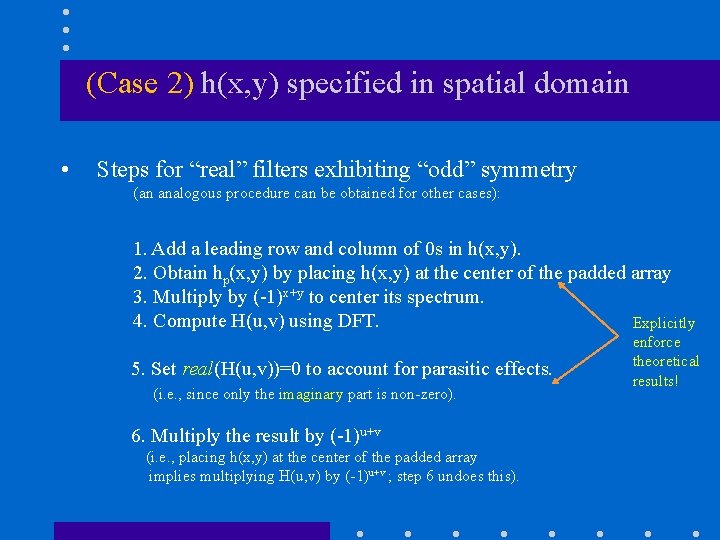
(Case 2) h(x, y) specified in spatial domain • Steps for “real” filters exhibiting “odd” symmetry (an analogous procedure can be obtained for other cases): 1. Add a leading row and column of 0 s in h(x, y). 2. Obtain hp(x, y) by placing h(x, y) at the center of the padded array 3. Multiply by (-1)x+y to center its spectrum. 4. Compute H(u, v) using DFT. Explicitly 5. Set real(H(u, v))=0 to account for parasitic effects. (i. e. , since only the imaginary part is non-zero). 6. Multiply the result by (-1)u+v (i. e. , placing h(x, y) at the center of the padded array implies multiplying H(u, v) by (-1)u+v ; step 6 undoes this). enforce theoretical results!
Low Pass (LP) Filters • Ideal low-pass filter (ILPF) • Butterworth low-pass filter (BLPF) • Gaussian low-pass filter (GLPF)
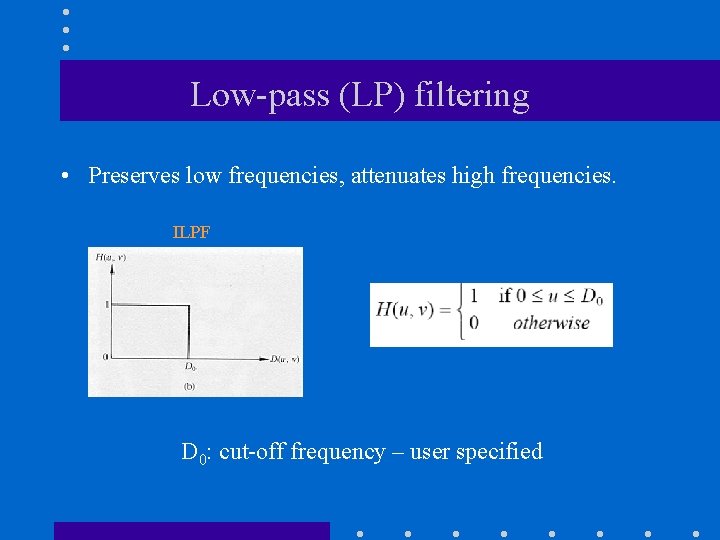
Low-pass (LP) filtering • Preserves low frequencies, attenuates high frequencies. ILPF D 0: cut-off frequency – user specified
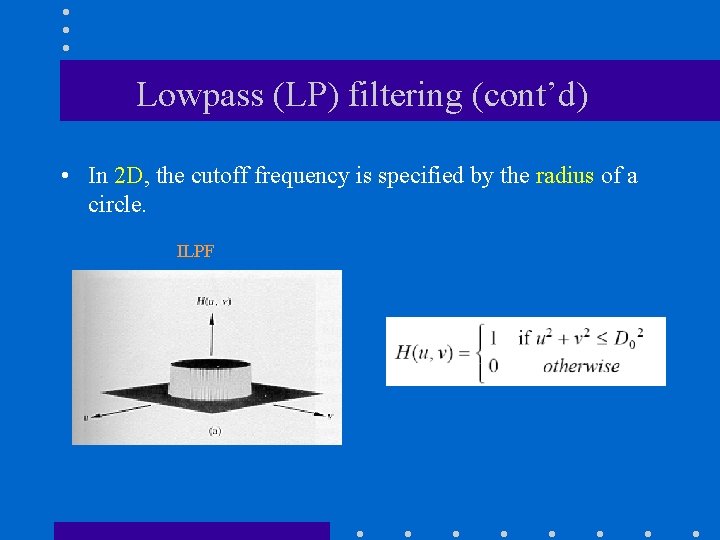
Lowpass (LP) filtering (cont’d) • In 2 D, the cutoff frequency is specified by the radius of a circle. ILPF
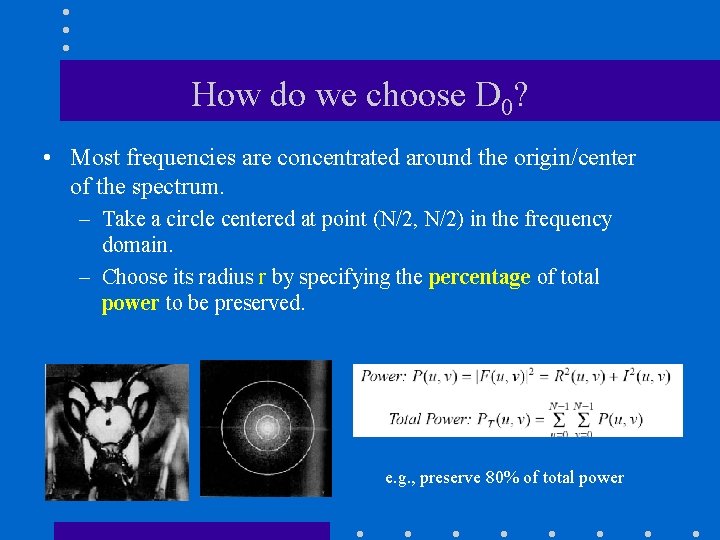
How do we choose D 0? • Most frequencies are concentrated around the origin/center of the spectrum. – Take a circle centered at point (N/2, N/2) in the frequency domain. – Choose its radius r by specifying the percentage of total power to be preserved. e. g. , preserve 80% of total power
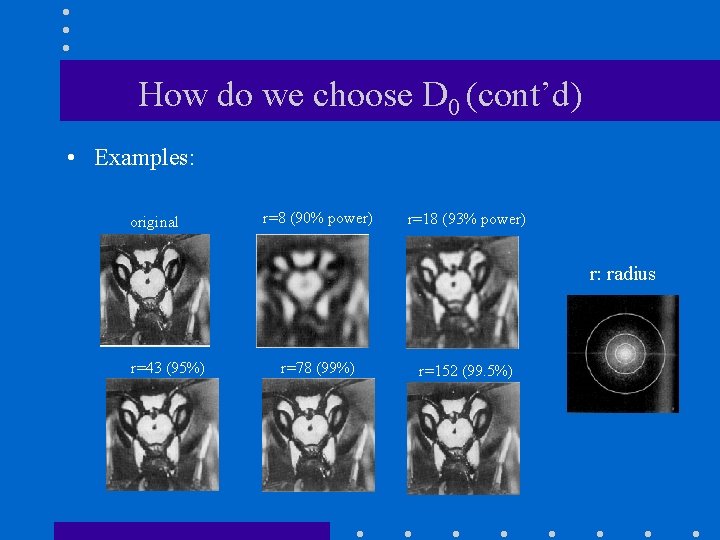
How do we choose D 0 (cont’d) • Examples: original r=8 (90% power) r=18 (93% power) r: radius r=43 (95%) r=78 (99%) r=152 (99. 5%)
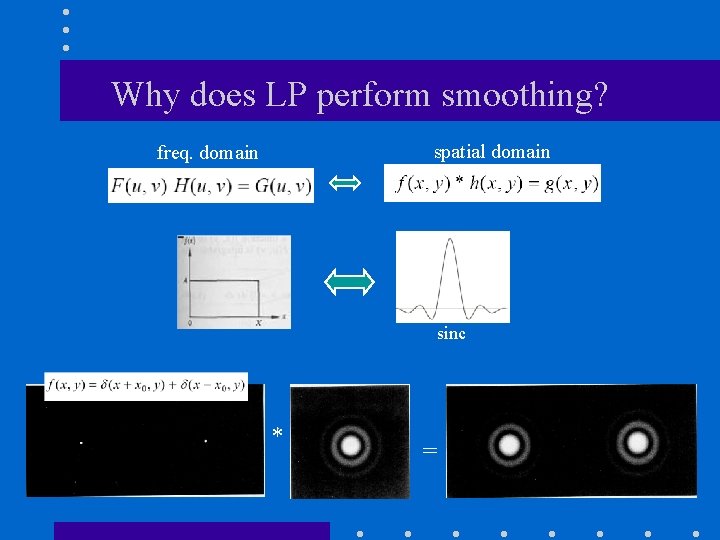
Why does LP perform smoothing? spatial domain freq. domain sinc * =
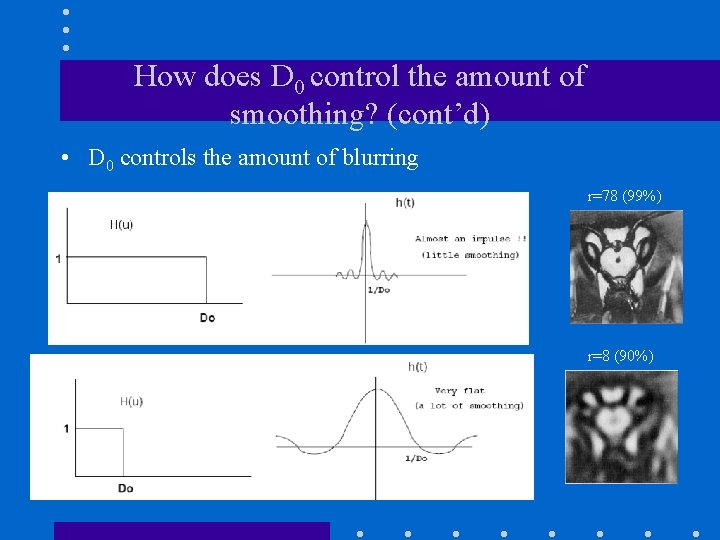
How does D 0 control the amount of smoothing? (cont’d) • D 0 controls the amount of blurring r=78 (99%) r=8 (90%)

Ringing Effect • Very sharp cutoff frequencies produce an overshoot of image features whose frequency is close to the cutoff frequencies (ringing effect). h=f*g
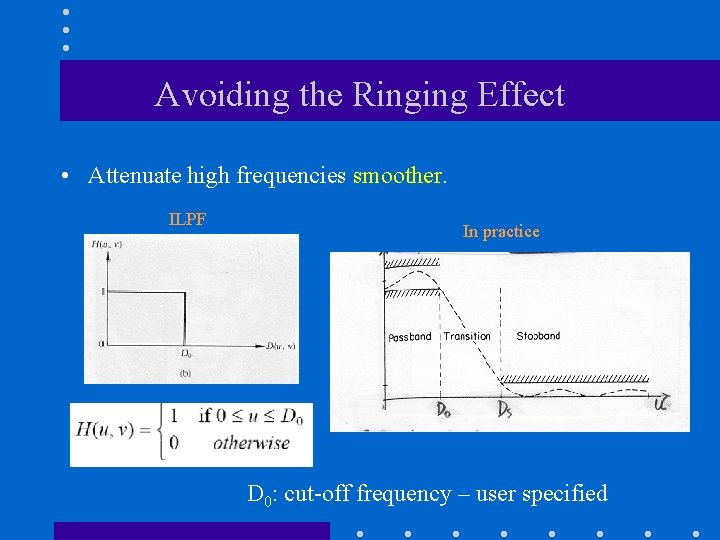
Avoiding the Ringing Effect • Attenuate high frequencies smoother. ILPF In practice D 0: cut-off frequency – user specified
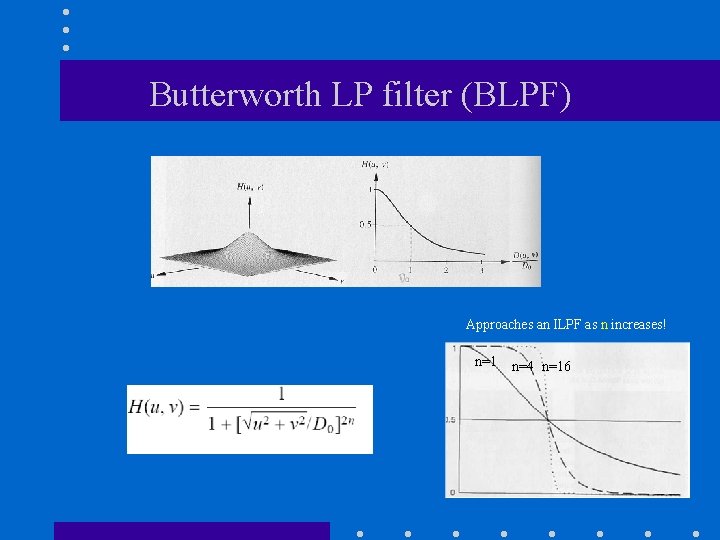
Butterworth LP filter (BLPF) Approaches an ILPF as n increases! n=1 n=4 n=16
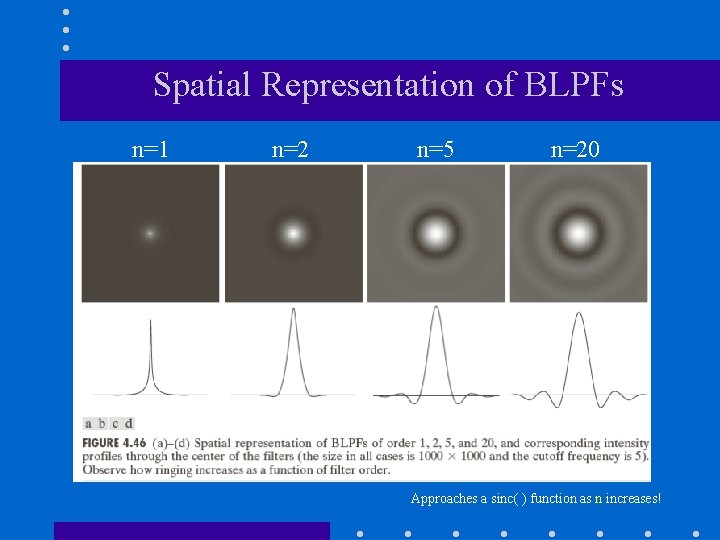
Spatial Representation of BLPFs n=1 n=2 n=5 n=20 Approaches a sinc( ) function as n increases!
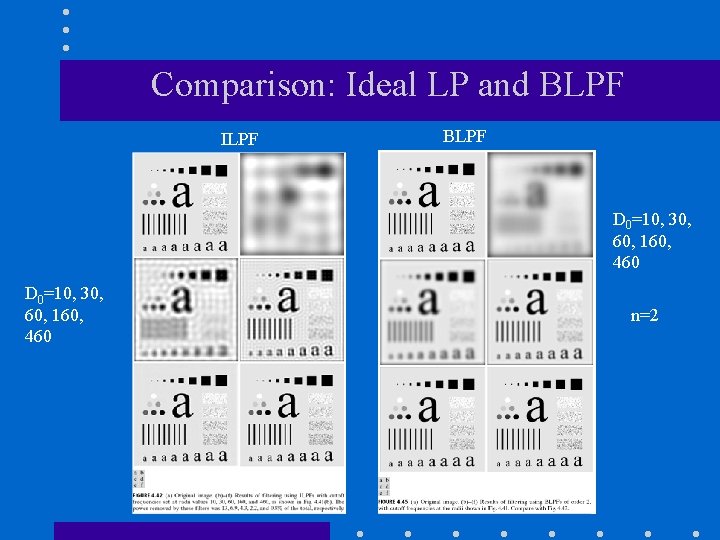
Comparison: Ideal LP and BLPF ILPF BLPF D 0=10, 30, 60, 160, 460 n=2
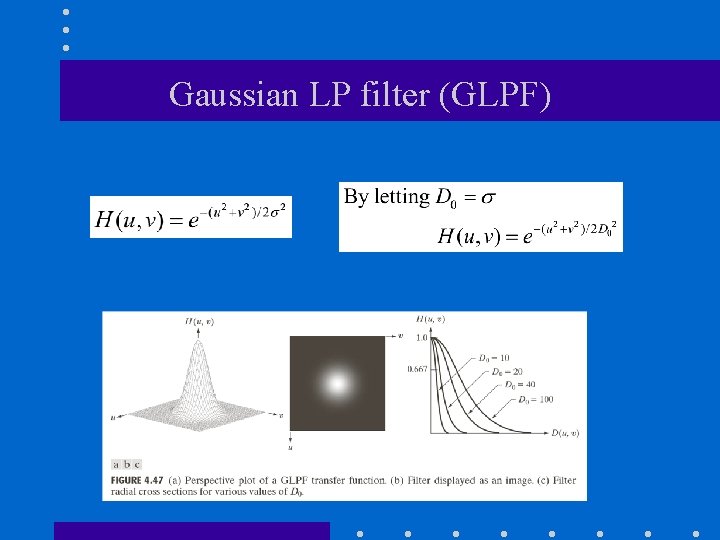
Gaussian LP filter (GLPF)
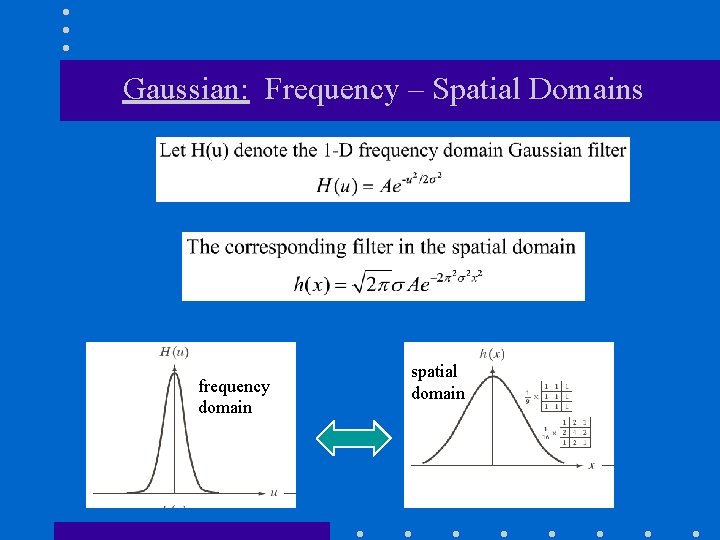
Gaussian: Frequency – Spatial Domains frequency domain spatial domain
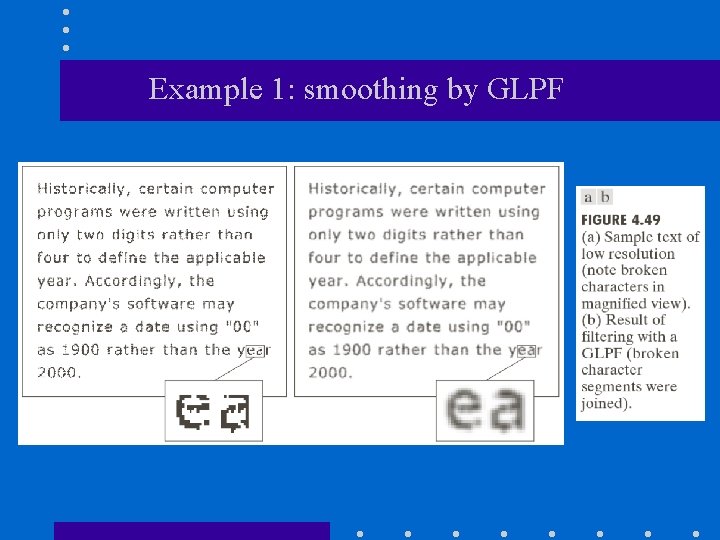
Example 1: smoothing by GLPF
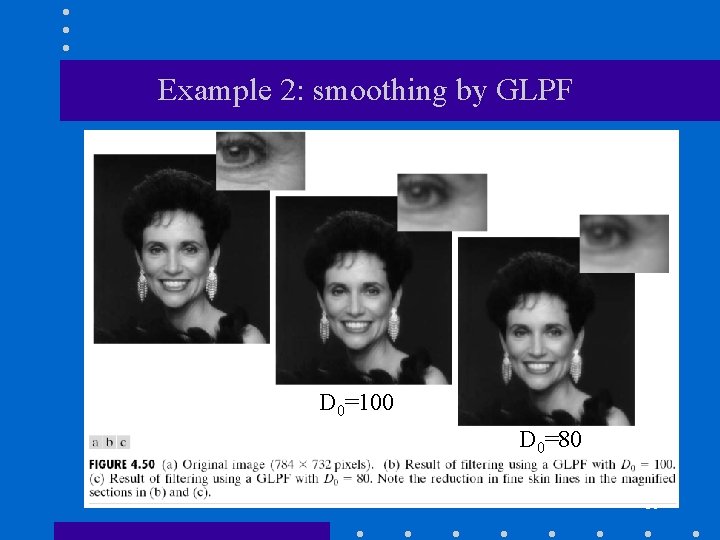
Example 2: smoothing by GLPF D 0=100 D 0=80 38
High Pass (LP) Filters • Ideal high-pass filter (IHPF) • Butterworth high-pass filter (BHPF) • Gaussian high-pass filter (GHPF) • Difference of Gaussians • Unsharp Masking and High Boost filtering
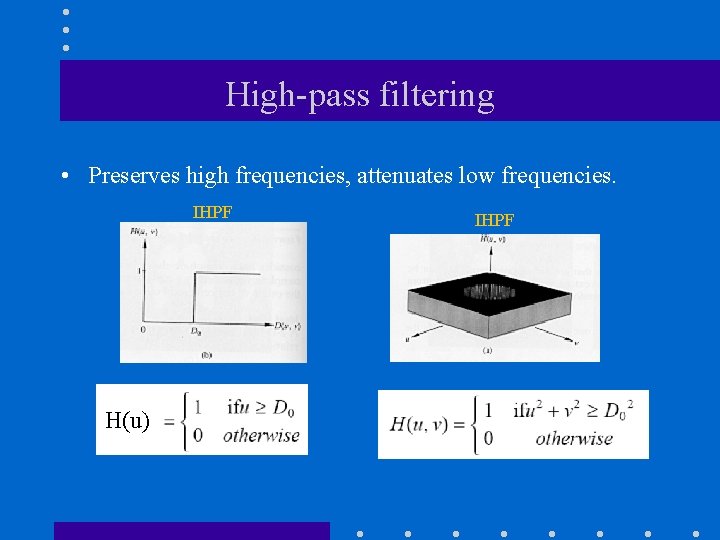
High-pass filtering • Preserves high frequencies, attenuates low frequencies. IHPF H(u) IHPF
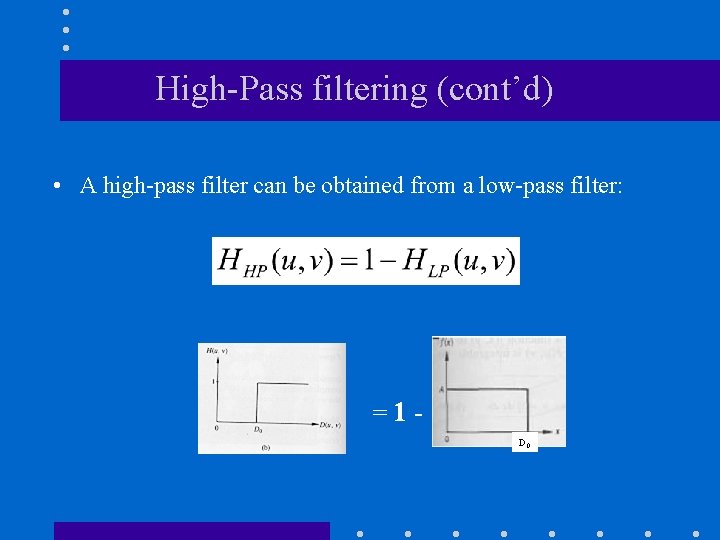
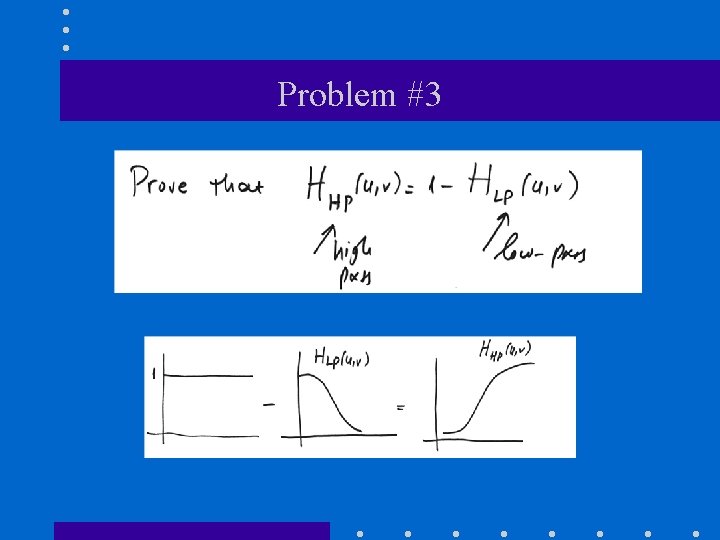
High-Pass filtering (cont’d) • A high-pass filter can be obtained from a low-pass filter: =1 D 0
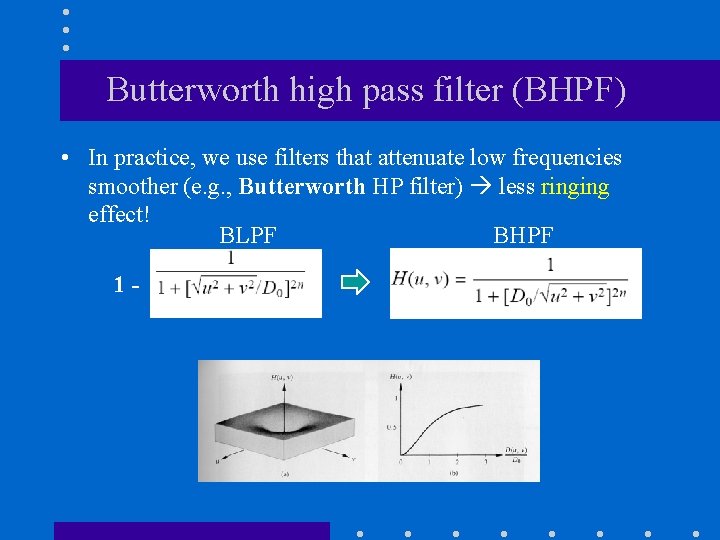
Butterworth high pass filter (BHPF) • In practice, we use filters that attenuate low frequencies smoother (e. g. , Butterworth HP filter) less ringing effect! BLPF BHPF 1 -
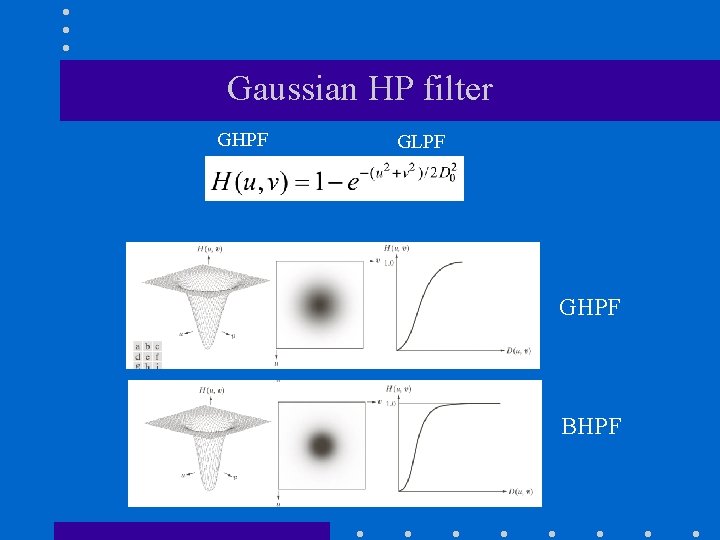
Gaussian HP filter GHPF GLPF GHPF BHPF
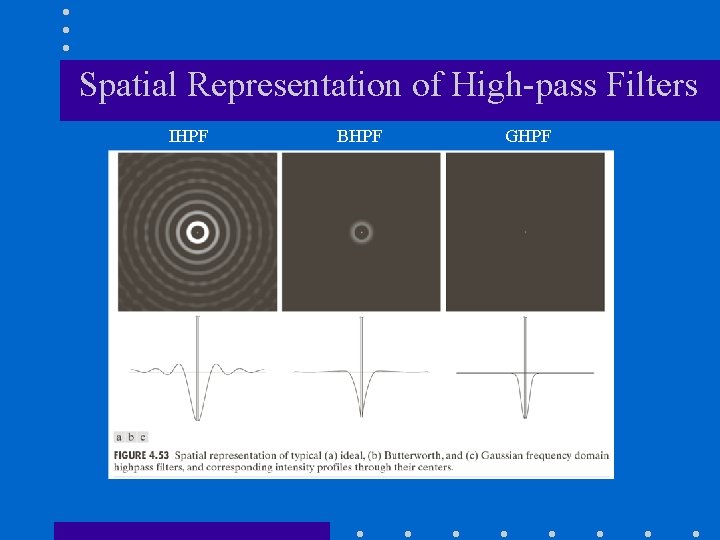
Spatial Representation of High-pass Filters IHPF BHPF GHPF
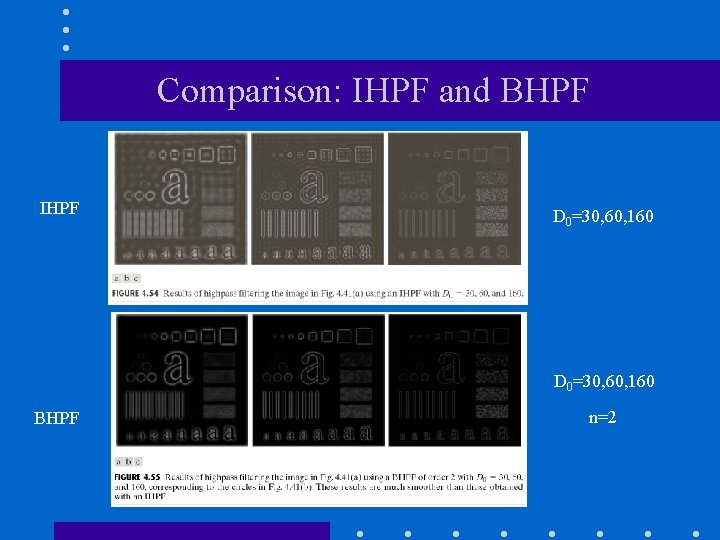
Comparison: IHPF and BHPF IHPF D 0=30, 60, 160 BHPF n=2
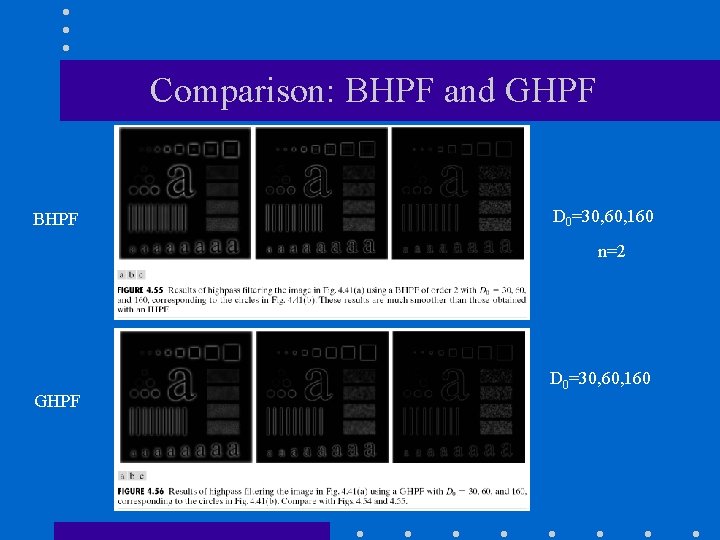
Comparison: BHPF and GHPF BHPF D 0=30, 60, 160 n=2 GHPF D 0=30, 60, 160
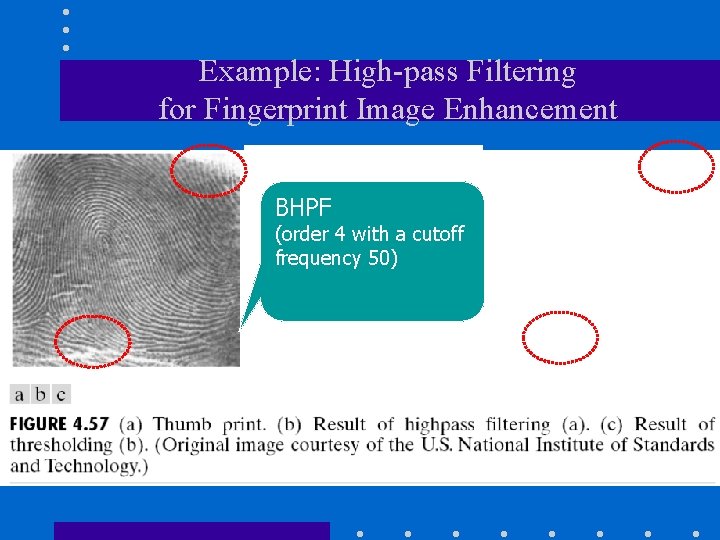
Example: High-pass Filtering for Fingerprint Image Enhancement BHPF (order 4 with a cutoff frequency 50)
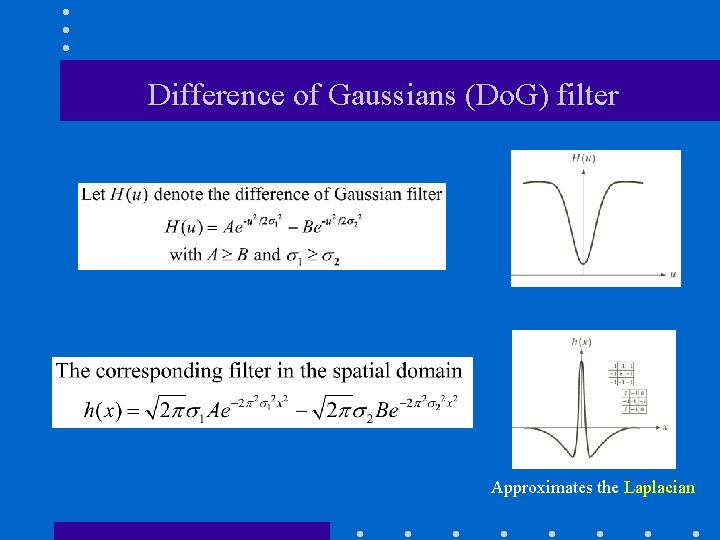
Difference of Gaussians (Do. G) filter Approximates the Laplacian
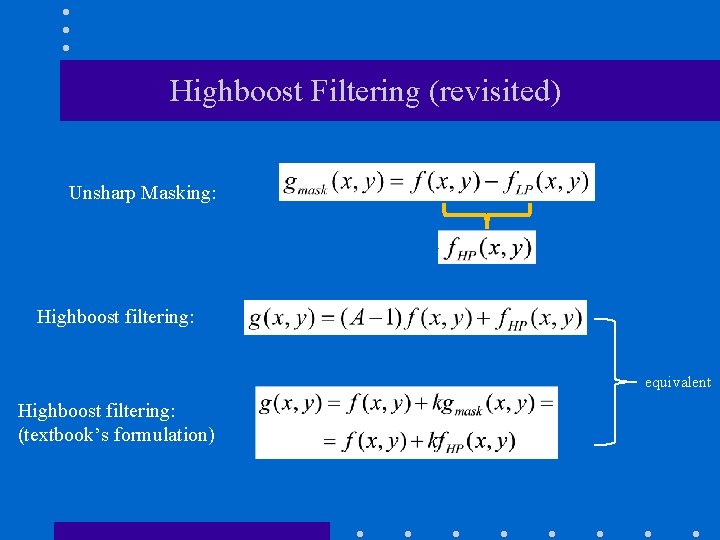
Highboost Filtering (revisited) Unsharp Masking: Highboost filtering: equivalent Highboost filtering: (textbook’s formulation)
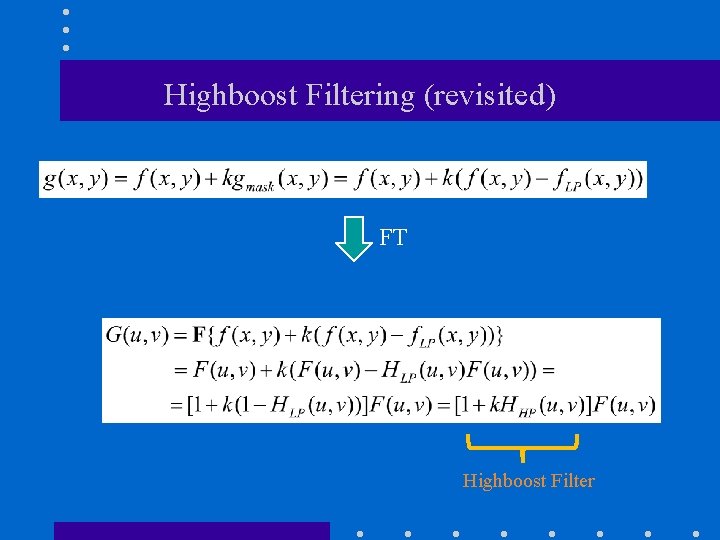
Highboost Filtering (revisited) FT Highboost Filter
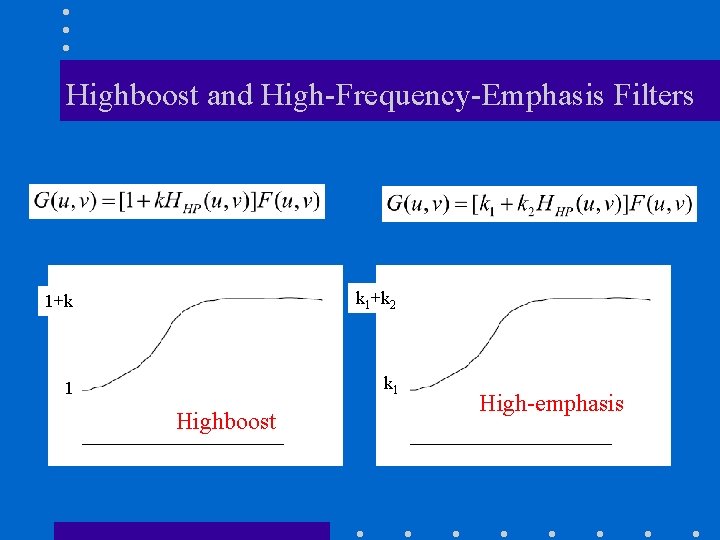
Highboost and High-Frequency-Emphasis Filters 1+k k 1+k 2 1 k 1 Highboost High-emphasis
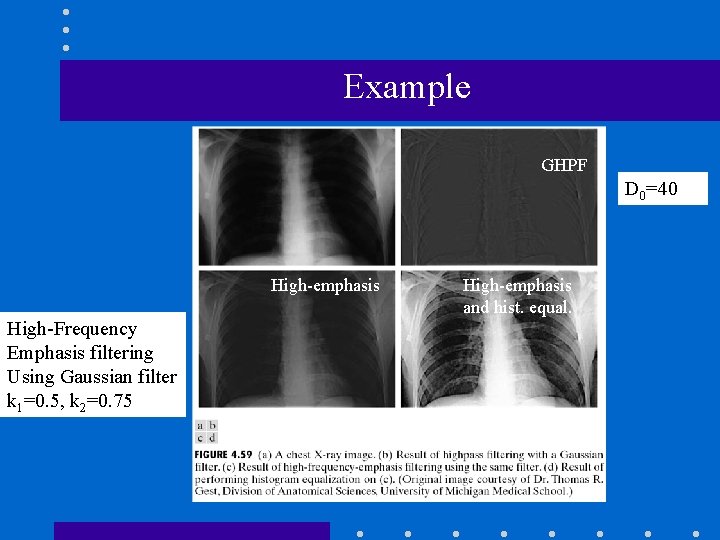
Example GHPF D 0=40 High-emphasis High-Frequency Emphasis filtering Using Gaussian filter k 1=0. 5, k 2=0. 75 High-emphasis and hist. equal.
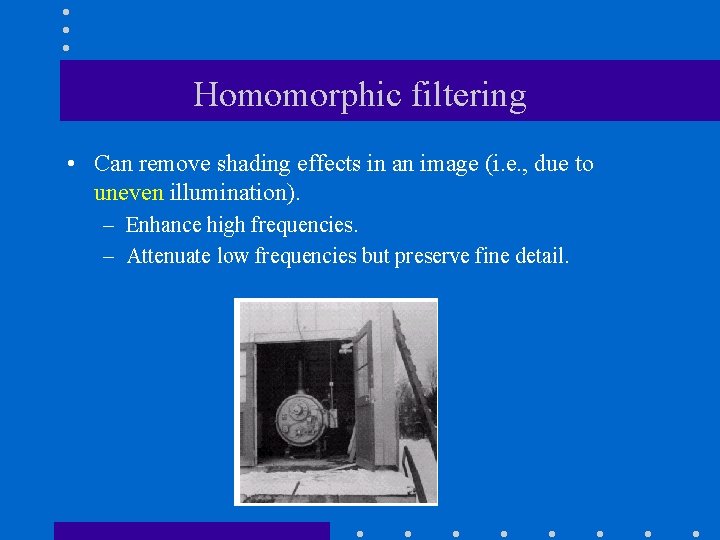
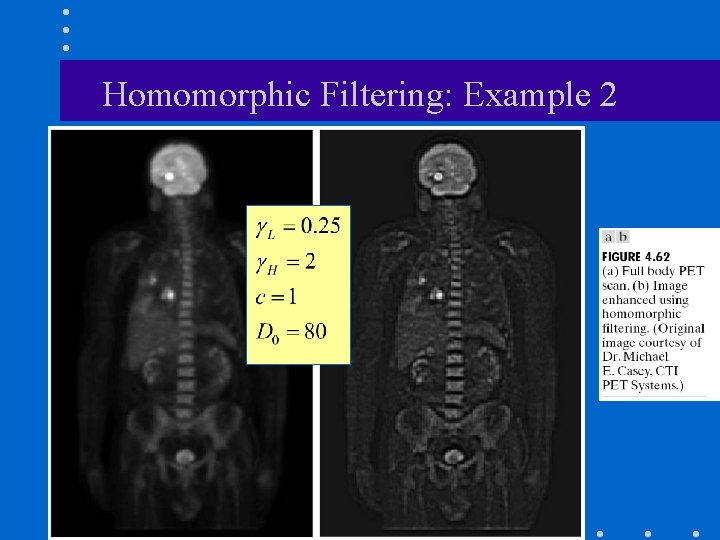
Homomorphic filtering • Can remove shading effects in an image (i. e. , due to uneven illumination). – Enhance high frequencies. – Attenuate low frequencies but preserve fine detail.
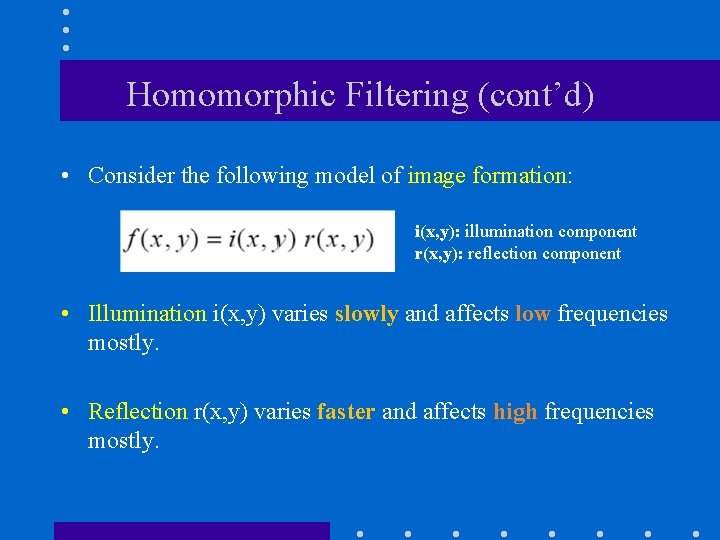
Homomorphic Filtering (cont’d) • Consider the following model of image formation: i(x, y): illumination component r(x, y): reflection component • Illumination i(x, y) varies slowly and affects low frequencies mostly. • Reflection r(x, y) varies faster and affects high frequencies mostly.

How are the frequencies from i(x, y) and r(x, y) intermixed? • Low frequencies from i(x, y) and high frequencies from r(x, y) are convolved together. • When applying filtering, it is impossible to manipulate them separately.
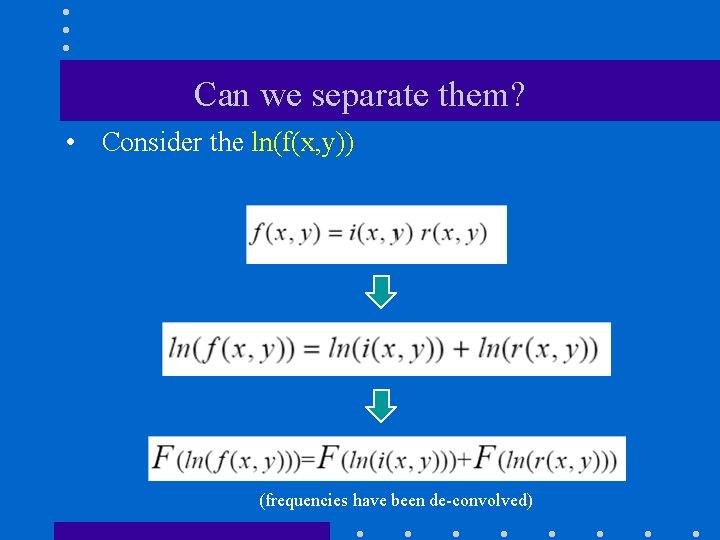
Can we separate them? • Consider the ln(f(x, y)) (frequencies have been de-convolved)
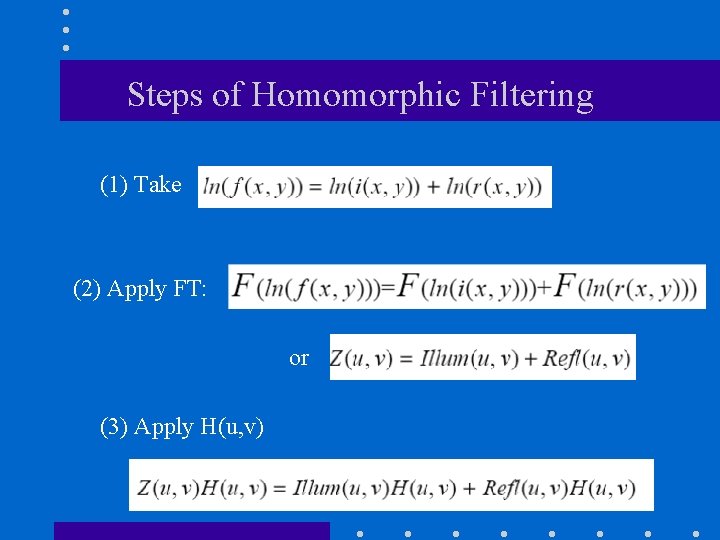
Steps of Homomorphic Filtering (1) Take (2) Apply FT: or (3) Apply H(u, v)
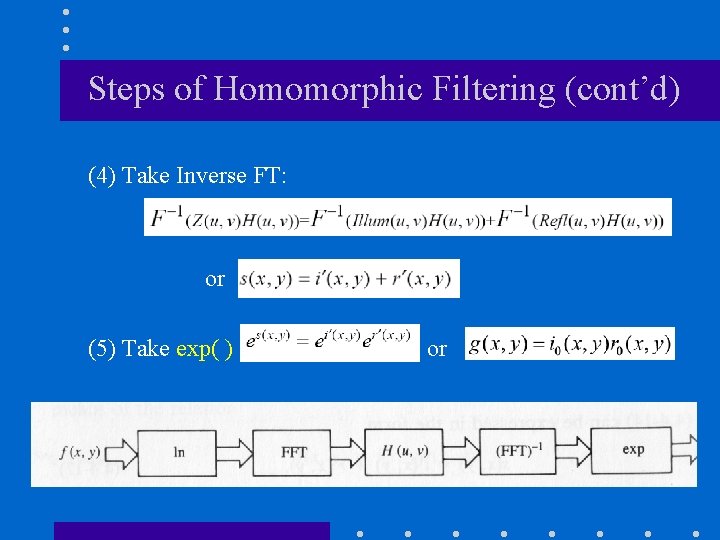
Steps of Homomorphic Filtering (cont’d) (4) Take Inverse FT: or (5) Take exp( ) or
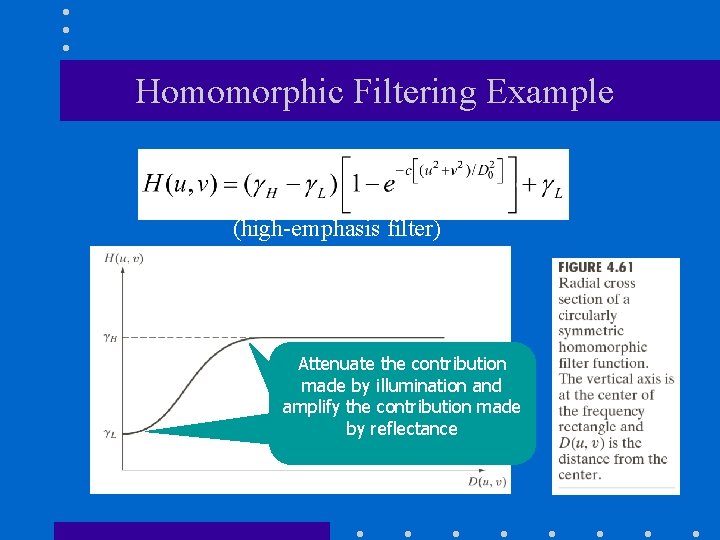
Homomorphic Filtering Example (high-emphasis filter) Attenuate the contribution made by illumination and amplify the contribution made by reflectance
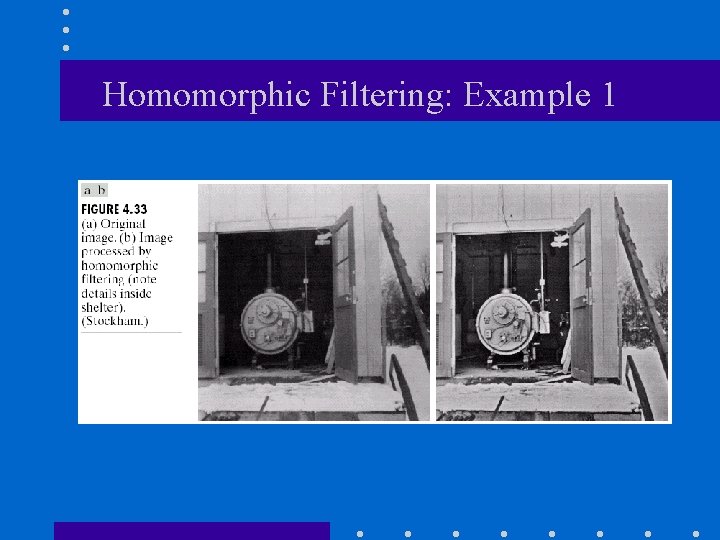
Homomorphic Filtering: Example 1
Homomorphic Filtering: Example 2
Band-reject filters Ideal Butterworth Gaussian
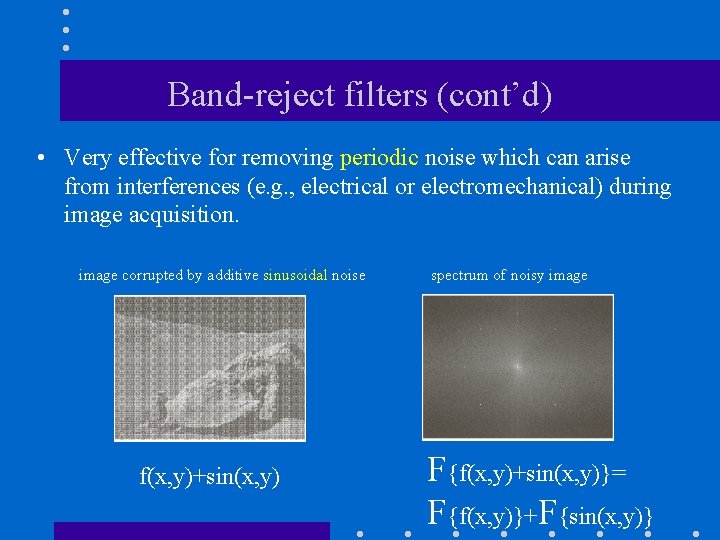
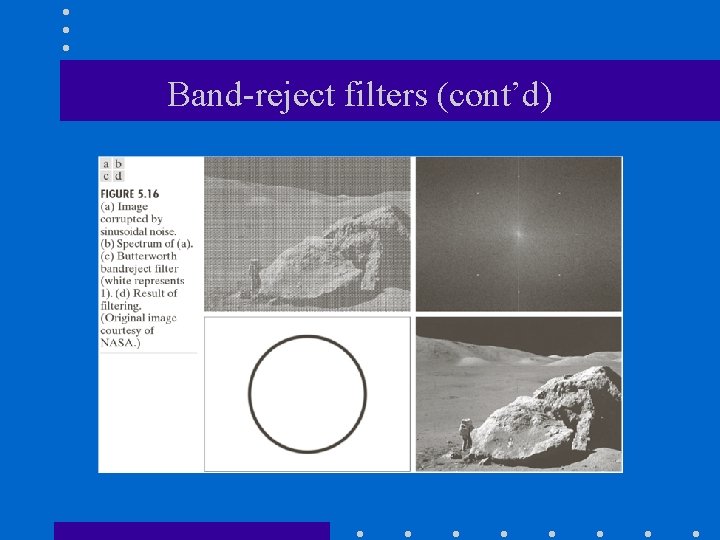
Band-reject filters (cont’d) • Very effective for removing periodic noise which can arise from interferences (e. g. , electrical or electromechanical) during image acquisition. image corrupted by additive sinusoidal noise f(x, y)+sin(x, y) spectrum of noisy image F{f(x, y)+sin(x, y)}= F{f(x, y)}+F{sin(x, y)}
Band-reject filters (cont’d)
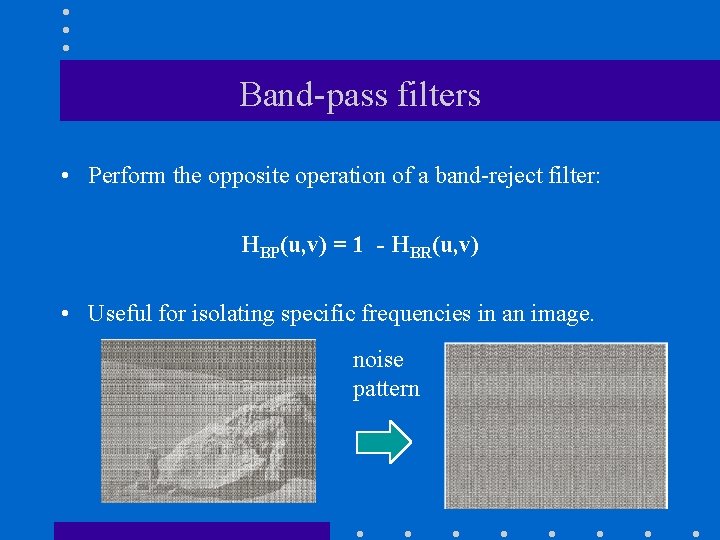
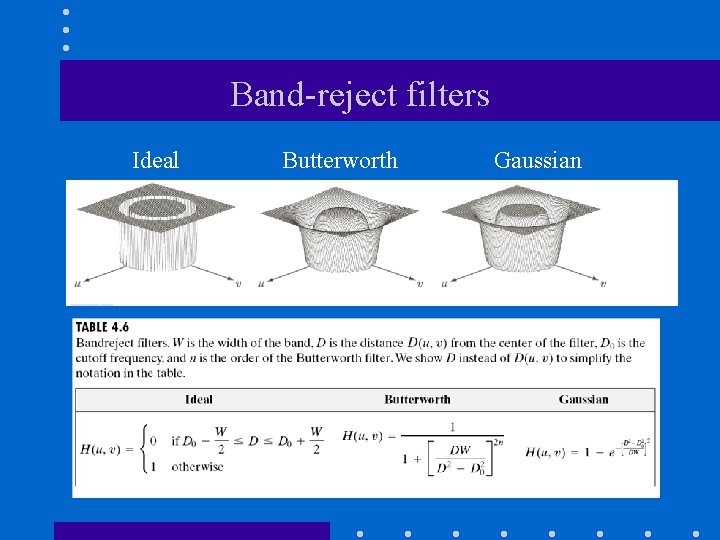
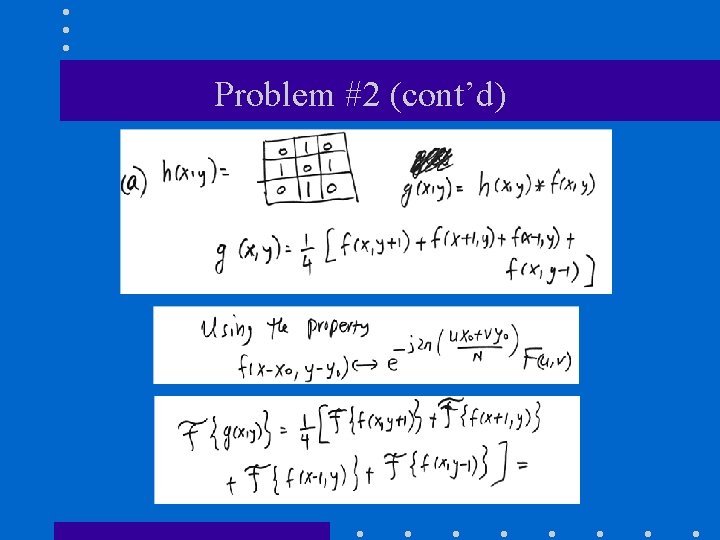
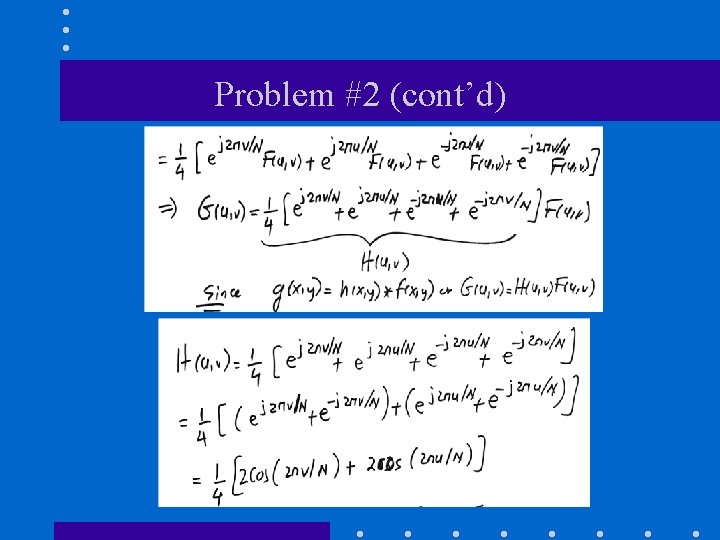
Band-pass filters • Perform the opposite operation of a band-reject filter: HBP(u, v) = 1 - HBR(u, v) • Useful for isolating specific frequencies in an image. noise pattern
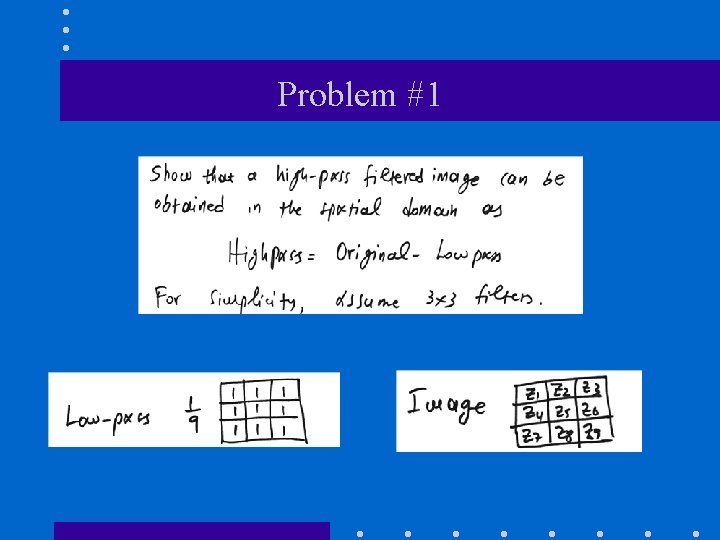
Problem #1
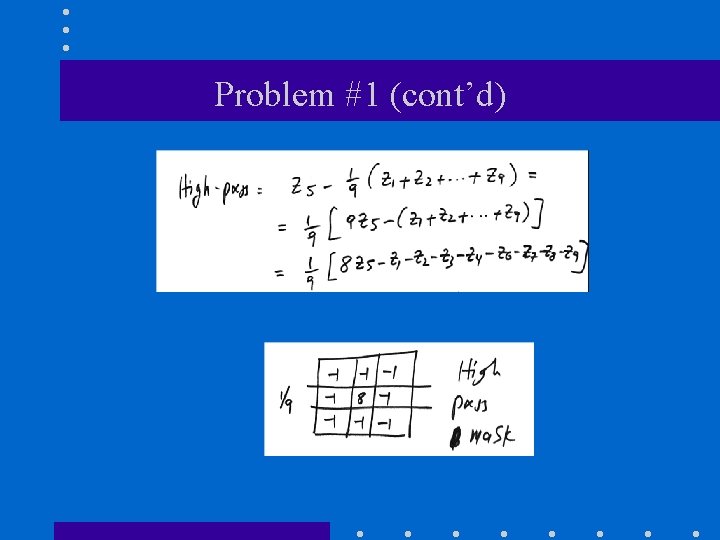
Problem #1 (cont’d)
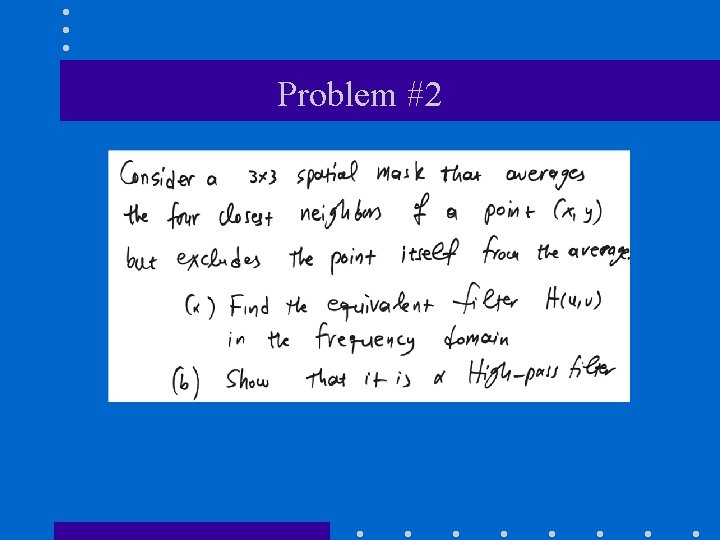
Problem #2
Problem #2 (cont’d)
Problem #2 (cont’d)
Problem #2 (cont’d)
Problem #3
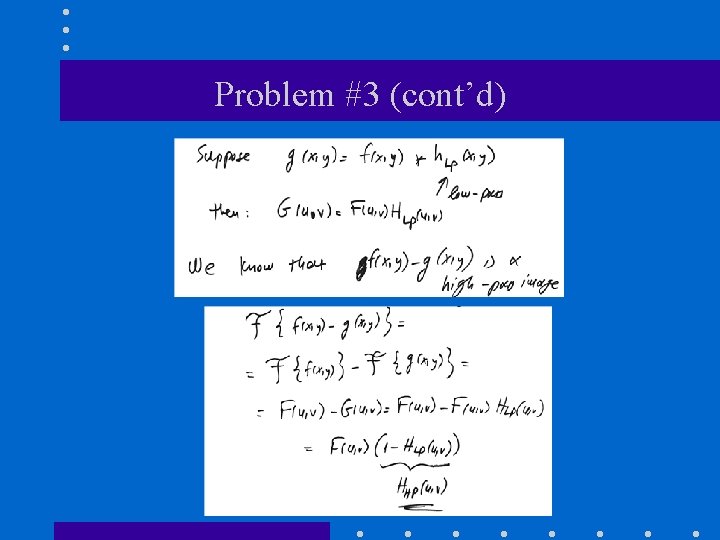
Problem #3 (cont’d)
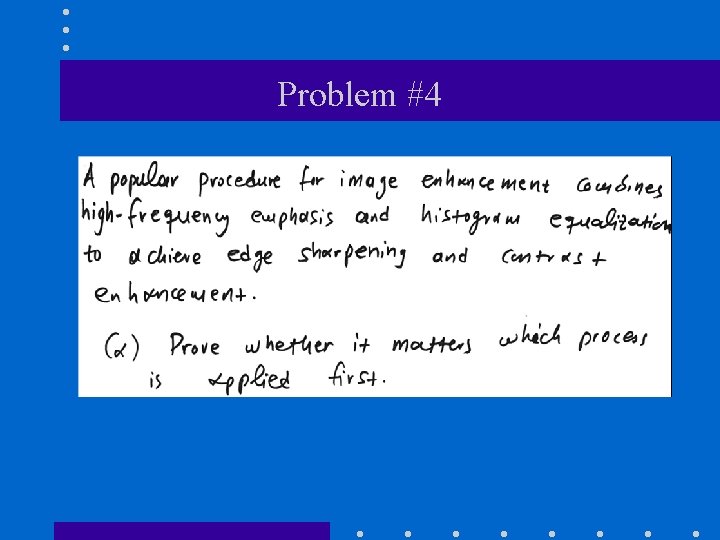
Problem #4
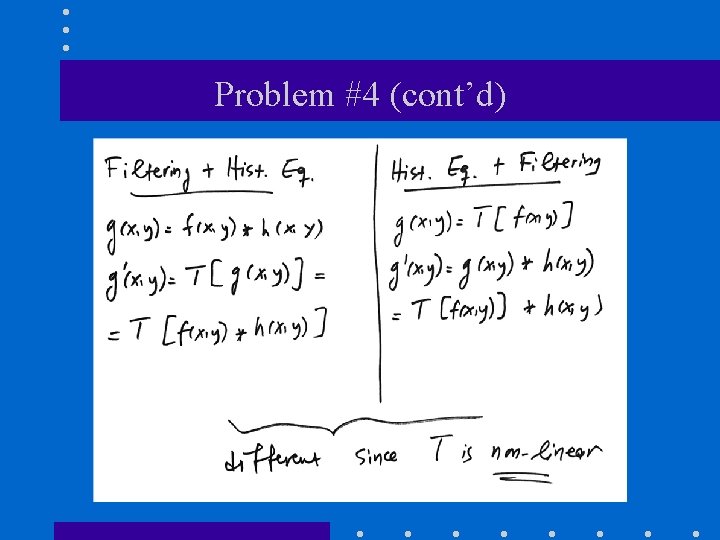
Problem #4 (cont’d)
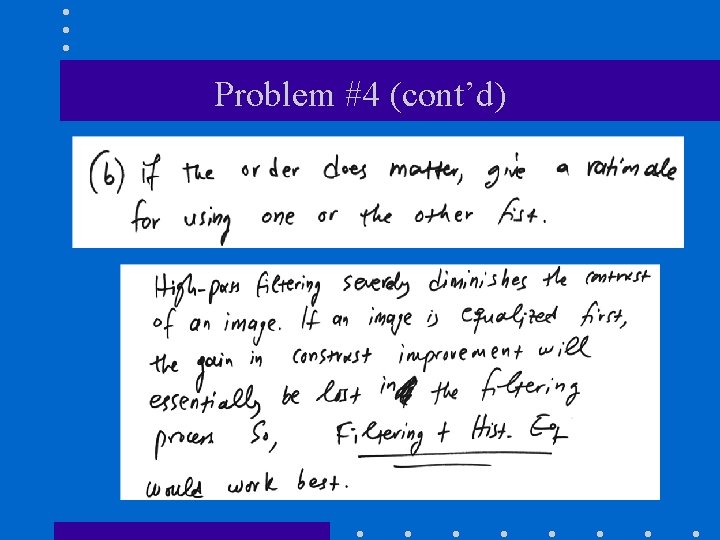
Problem #4 (cont’d)

Quiz #7 • When: Monday (Nov 30 th) at 2 pm • What: Frequency Filtering • Duration – 10 minutes for answering questions – 5 minutes for uploading your answers on Canvas • Suggested Apps – Genius Scan https: //thegrizzlylabs. com/genius-scan/ – Canvas Student https: //apps. apple. com/us/app/canvas-student/id 480883488
- Slides: 77