
FREESURFER RECONSTRUCTING THE NONHUMAN BRAIN Peggy Christidis July
FREESURFER: RECONSTRUCTING THE NONHUMAN BRAIN Peggy Christidis July 14, 2005 National Institutes of Health
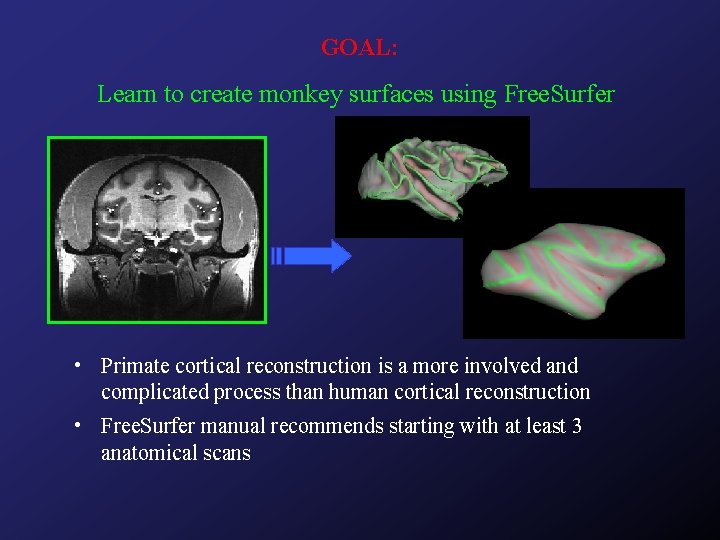
GOAL: Learn to create monkey surfaces using Free. Surfer • Primate cortical reconstruction is a more involved and complicated process than human cortical reconstruction • Free. Surfer manual recommends starting with at least 3 anatomical scans
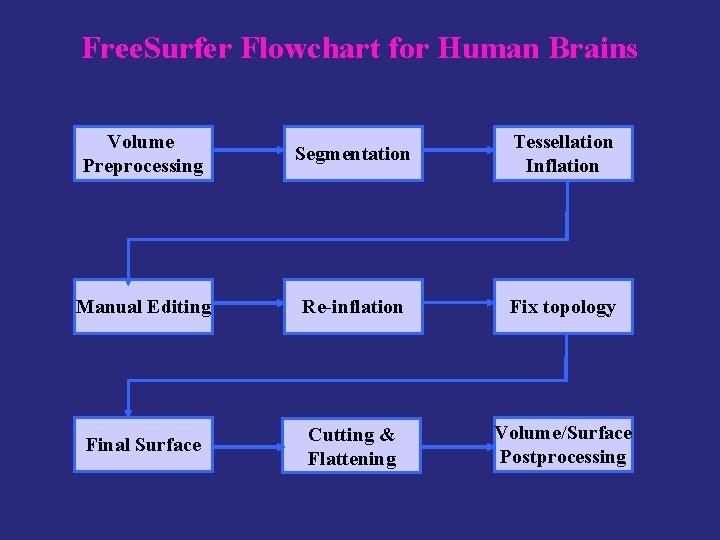
Free. Surfer Flowchart for Human Brains Volume Preprocessing Segmentation Tessellation Inflation Manual Editing Re-inflation Fix topology Final Surface Cutting & Flattening Volume/Surface Postprocessing
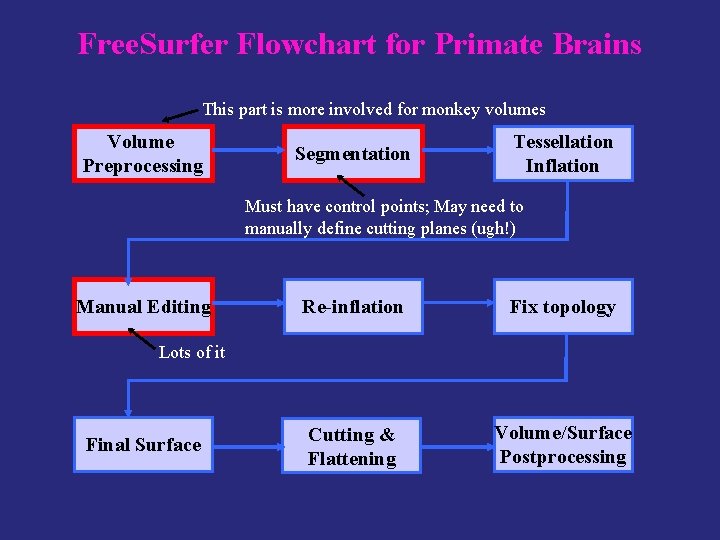
Free. Surfer Flowchart for Primate Brains This part is more involved for monkey volumes Volume Preprocessing Segmentation Tessellation Inflation Must have control points; May need to manually define cutting planes (ugh!) Manual Editing Re-inflation Fix topology Cutting & Flattening Volume/Surface Postprocessing Lots of it Final Surface

Volume Preprocessing: Humans

Volume preprocessing Segmentation Tessellation Inflation Manual Editing Re-inflation Fix topology Cutting & Flattening Final Surface Volume/Surface postprocessing Volume Preprocessing: Humans to 3 d BRIK • Convert I. * files to BRIK using AFNI to 3 d I. * files 3 d. Uniformize • Perform intensity normalization using AFNI 3 d. Uniformize 3 dvolreg • Register multiple volumes using AFNI 3 dvolreg • Average the registered volumes using AFNI 3 d. Mean • Convert to Free. Surfer format using Free. Surfer mri_convert 3 d. Mean mri_convert COR
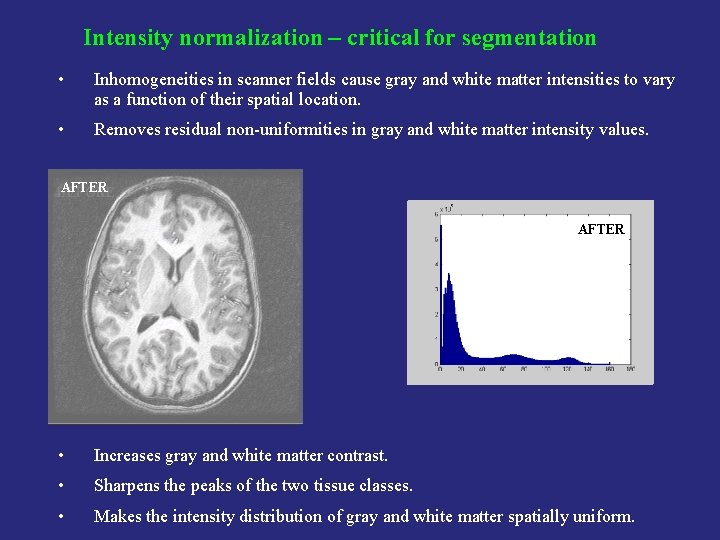
Intensity normalization – critical for segmentation • Inhomogeneities in scanner fields cause gray and white matter intensities to vary as a function of their spatial location. • Removes residual non-uniformities in gray and white matter intensity values. AFTER BEFORE AFTER • Increases gray and white matter contrast. • Sharpens the peaks of the two tissue classes. • Makes the intensity distribution of gray and white matter spatially uniform.
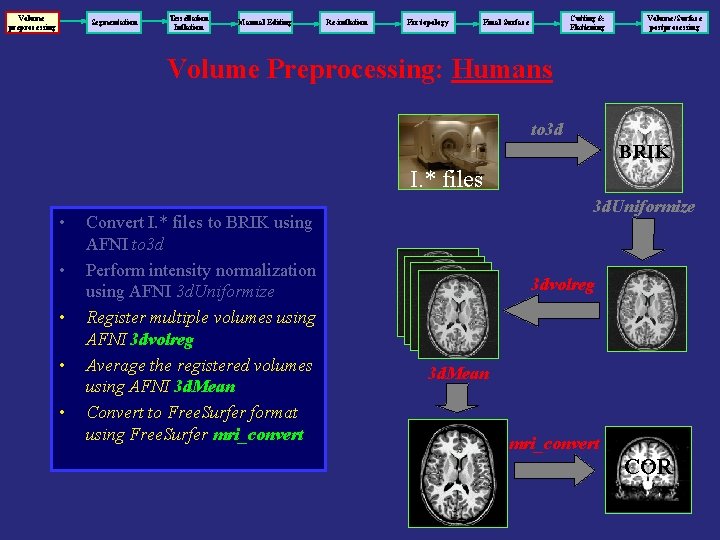
Volume preprocessing Segmentation Tessellation Inflation Manual Editing Re-inflation Fix topology Cutting & Flattening Final Surface Volume/Surface postprocessing Volume Preprocessing: Humans to 3 d BRIK I. * files • • • Convert I. * files to BRIK using AFNI to 3 d Perform intensity normalization using AFNI 3 d. Uniformize Register multiple volumes using AFNI 3 dvolreg Average the registered volumes using AFNI 3 d. Mean Convert to Free. Surfer format using Free. Surfer mri_convert 3 d. Uniformize 3 dvolreg 3 d. Mean mri_convert COR

Volume Preprocessing: Monkeys
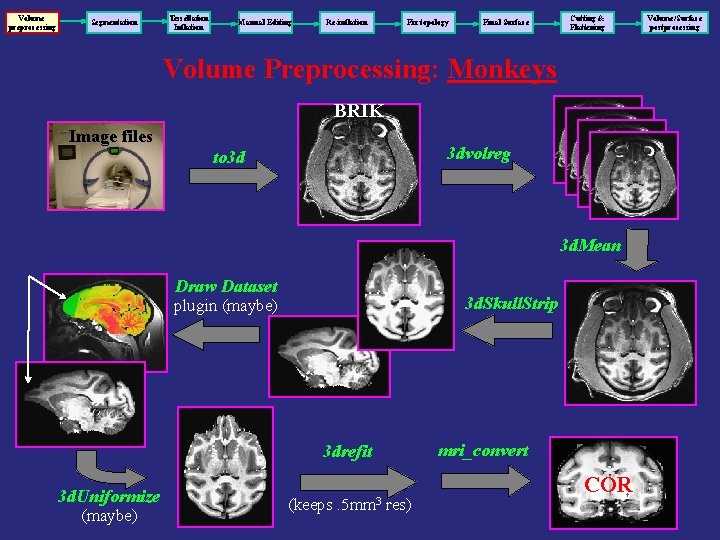
Volume preprocessing Segmentation Tessellation Inflation Manual Editing Re-inflation Fix topology Final Surface Cutting & Flattening Volume Preprocessing: Monkeys BRIK Image files 3 dvolreg to 3 d 3 d. Mean Draw Dataset 3 d. Skull. Strip plugin (maybe) mri_convert 3 drefit 3 d. Uniformize (maybe) (keeps . 5 mm 3 res) COR Volume/Surface postprocessing
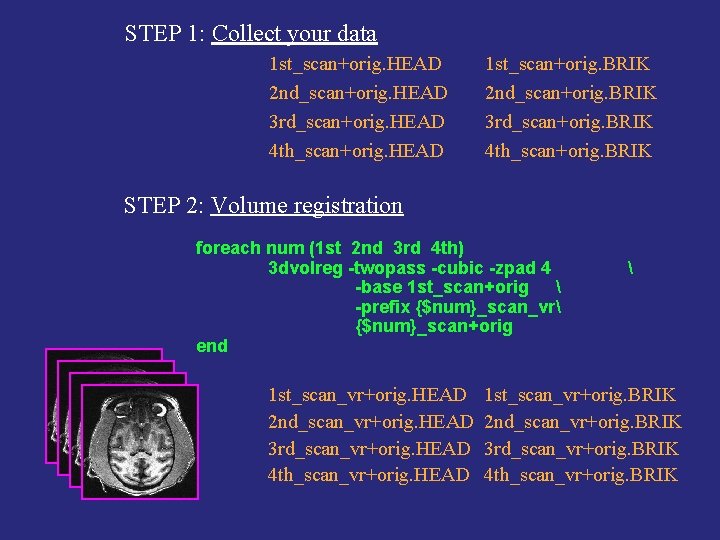
STEP 1: Collect your data 1 st_scan+orig. HEAD 2 nd_scan+orig. HEAD 3 rd_scan+orig. HEAD 4 th_scan+orig. HEAD 1 st_scan+orig. BRIK 2 nd_scan+orig. BRIK 3 rd_scan+orig. BRIK 4 th_scan+orig. BRIK STEP 2: Volume registration foreach num (1 st 2 nd 3 rd 4 th) 3 dvolreg -twopass -cubic -zpad 4 -base 1 st_scan+orig -prefix {$num}_scan_vr {$num}_scan+orig end 1 st_scan_vr+orig. HEAD 2 nd_scan_vr+orig. HEAD 3 rd_scan_vr+orig. HEAD 4 th_scan_vr+orig. HEAD 1 st_scan_vr+orig. BRIK 2 nd_scan_vr+orig. BRIK 3 rd_scan_vr+orig. BRIK 4 th_scan_vr+orig. BRIK
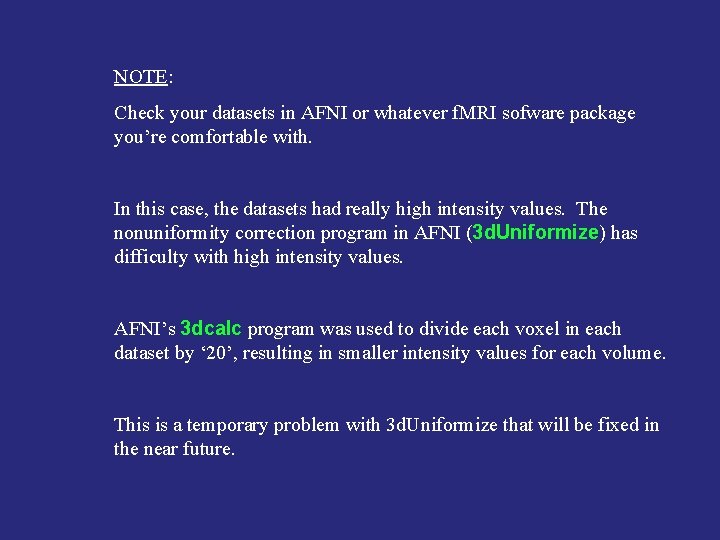
NOTE: Check your datasets in AFNI or whatever f. MRI sofware package you’re comfortable with. In this case, the datasets had really high intensity values. The nonuniformity correction program in AFNI (3 d. Uniformize) has difficulty with high intensity values. AFNI’s 3 dcalc program was used to divide each voxel in each dataset by ‘ 20’, resulting in smaller intensity values for each volume. This is a temporary problem with 3 d. Uniformize that will be fixed in the near future.
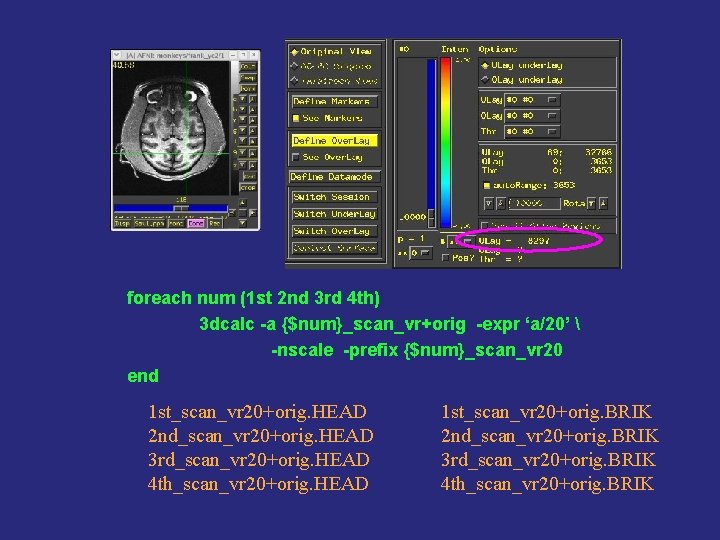
foreach num (1 st 2 nd 3 rd 4 th) 3 dcalc -a {$num}_scan_vr+orig -expr ‘a/20’ -nscale -prefix {$num}_scan_vr 20 end 1 st_scan_vr 20+orig. HEAD 2 nd_scan_vr 20+orig. HEAD 3 rd_scan_vr 20+orig. HEAD 4 th_scan_vr 20+orig. HEAD 1 st_scan_vr 20+orig. BRIK 2 nd_scan_vr 20+orig. BRIK 3 rd_scan_vr 20+orig. BRIK 4 th_scan_vr 20+orig. BRIK
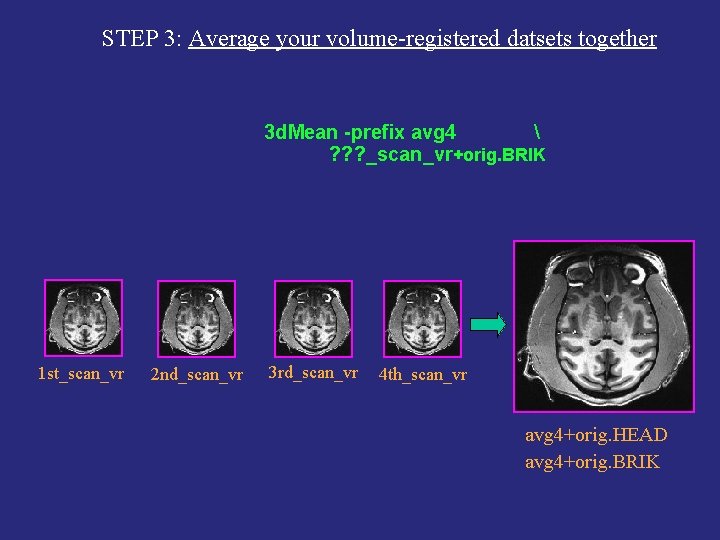
STEP 3: Average your volume-registered datsets together 3 d. Mean -prefix avg 4 ? ? ? _scan_vr+orig. BRIK 1 st_scan_vr 2 nd_scan_vr 3 rd_scan_vr 4 th_scan_vr avg 4+orig. HEAD avg 4+orig. BRIK
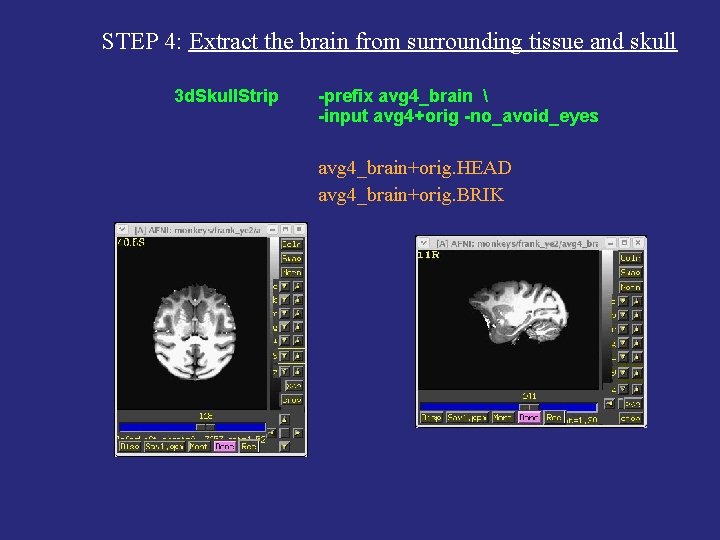
STEP 4: Extract the brain from surrounding tissue and skull 3 d. Skull. Strip -prefix avg 4_brain -input avg 4+orig -no_avoid_eyes avg 4_brain+orig. HEAD avg 4_brain+orig. BRIK
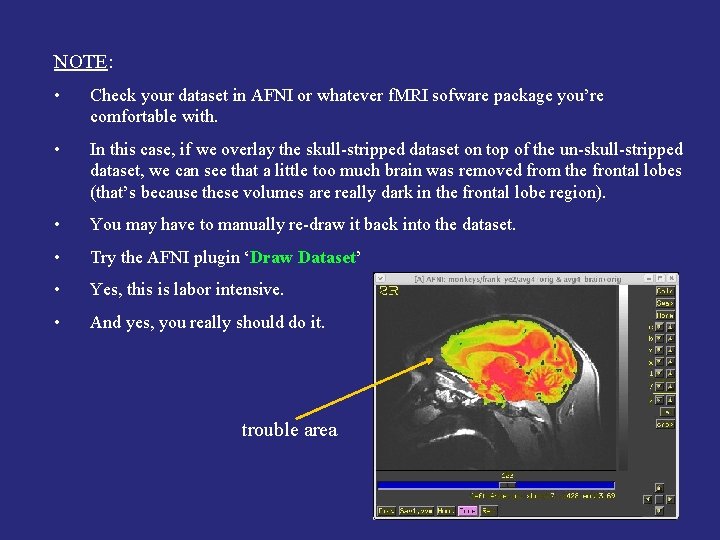
NOTE: • Check your dataset in AFNI or whatever f. MRI sofware package you’re comfortable with. • In this case, if we overlay the skull-stripped dataset on top of the un-skull-stripped dataset, we can see that a little too much brain was removed from the frontal lobes (that’s because these volumes are really dark in the frontal lobe region). • You may have to manually re-draw it back into the dataset. • Try the AFNI plugin ‘Draw Dataset’ • Yes, this is labor intensive. • And yes, you really should do it. trouble area
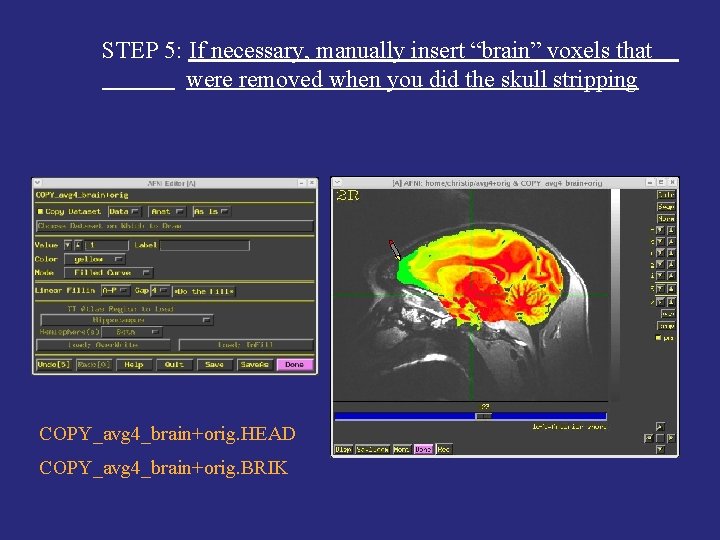
STEP 5: If necessary, manually insert “brain” voxels that were removed when you did the skull stripping COPY_avg 4_brain+orig. HEAD COPY_avg 4_brain+orig. BRIK
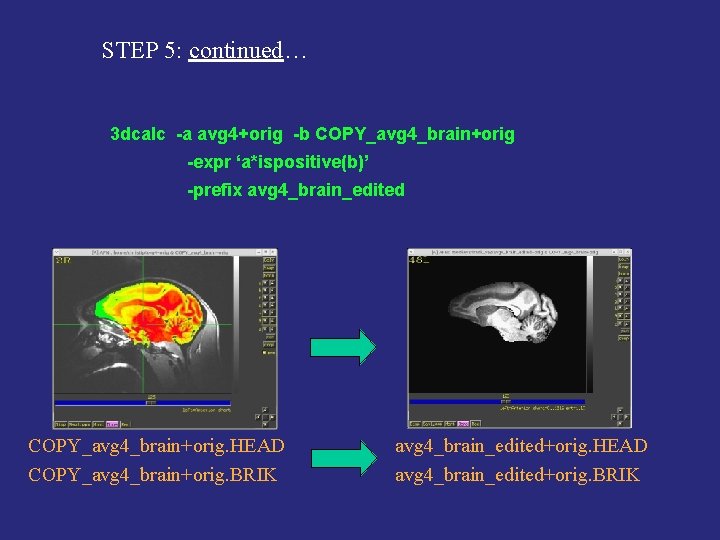
STEP 5: continued… 3 dcalc -a avg 4+orig -b COPY_avg 4_brain+orig -expr ‘a*ispositive(b)’ -prefix avg 4_brain_edited COPY_avg 4_brain+orig. HEAD COPY_avg 4_brain+orig. BRIK avg 4_brain_edited+orig. HEAD avg 4_brain_edited+orig. BRIK
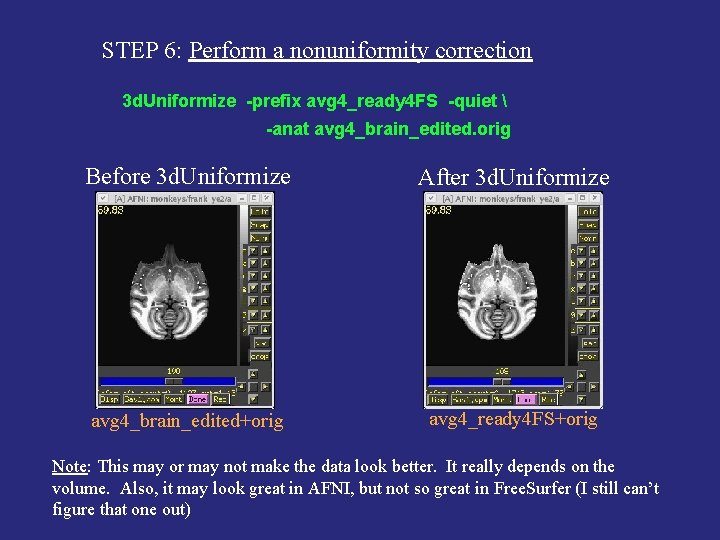
STEP 6: Perform a nonuniformity correction 3 d. Uniformize -prefix avg 4_ready 4 FS -quiet -anat avg 4_brain_edited. orig Before 3 d. Uniformize After 3 d. Uniformize avg 4_brain_edited+orig avg 4_ready 4 FS+orig Note: This may or may not make the data look better. It really depends on the volume. Also, it may look great in AFNI, but not so great in Free. Surfer (I still can’t figure that one out)
STEP 6: Use 3 drefit to make sure Free. Surfer doesn’t resample your high-resolution volume to a lower resolution • When importing your volume into Free. Surfer, the program will resample it to its COR format, which is made up of 256 coronal slices, a 256 x 256 in-plane, and a 1 mm 3 voxel resolution. • For human volumes, this is okay because a voxel resolution of 1 mm 3 is great. For monkey volumes however, the voxel resolution is often better than 1 mm 3. In our example, the voxel resolution is 0. 5 mm 3. • If we allowed Free. Surfer to resample our dataset from a 0. 5 mm 3 voxel resolution to a 1 mm 3 voxel resolution, the COR volume in Free. Surfer would look pixelated. • Pixelated volume = unsuccessful white matter segmentation
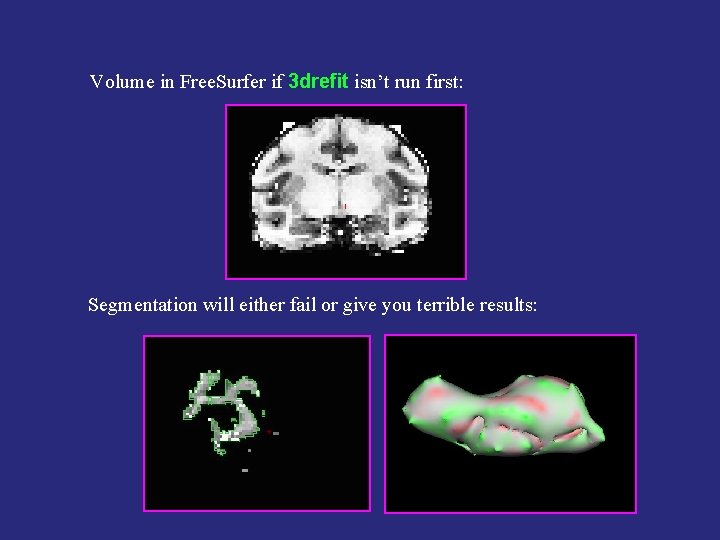
Volume in Free. Surfer if 3 drefit isn’t run first: Segmentation will either fail or give you terrible results:
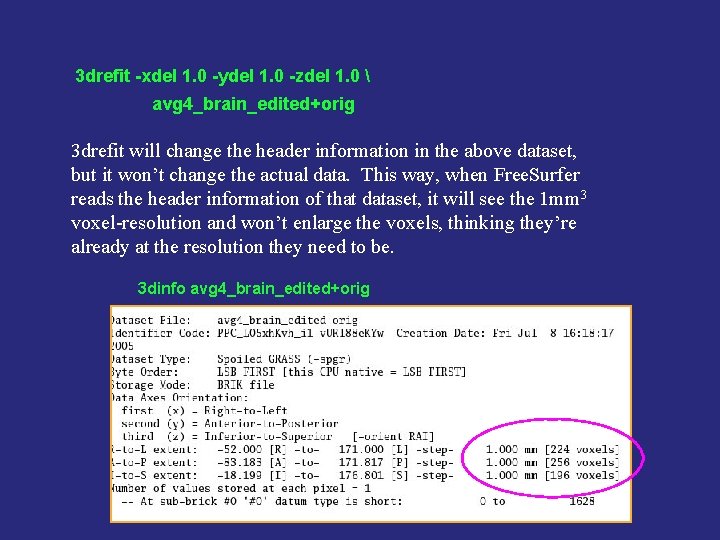
3 drefit -xdel 1. 0 -ydel 1. 0 -zdel 1. 0 avg 4_brain_edited+orig 3 drefit will change the header information in the above dataset, but it won’t change the actual data. This way, when Free. Surfer reads the header information of that dataset, it will see the 1 mm 3 voxel-resolution and won’t enlarge the voxels, thinking they’re already at the resolution they need to be. 3 dinfo avg 4_brain_edited+orig
STEP 7 a: Create Free. Surfer directory tree using mksubjdirs NOTE: Now we’re entering Free. Surfer country, so be sure to source your Free. Surfer login file first. (e. g. , my login file is called. fs_login) source ~/. fs_login Usage: mksubjdirs <subject_name> Example: mksubjdirs avg 4_surf
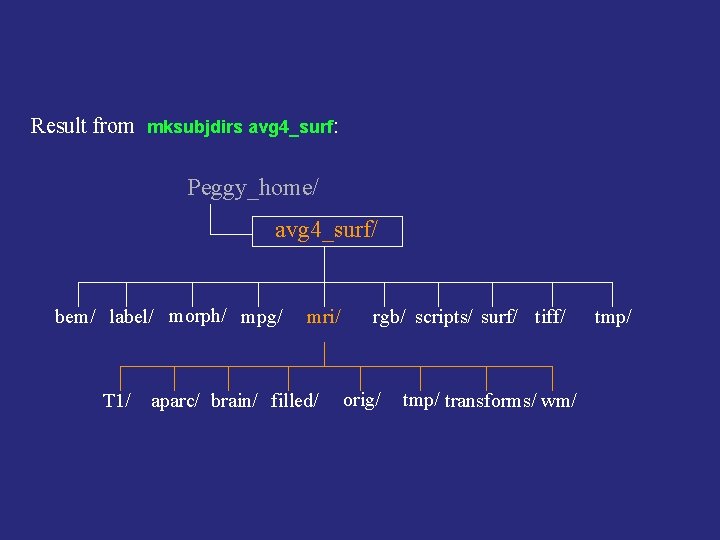
Result from mksubjdirs avg 4_surf: Peggy_home/ avg 4_surf/ bem/ label/ morph/ mpg/ T 1/ mri/ aparc/ brain/ filled/ rgb/ scripts/ surf/ tiff/ orig/ tmp/ transforms/ wm/ tmp/
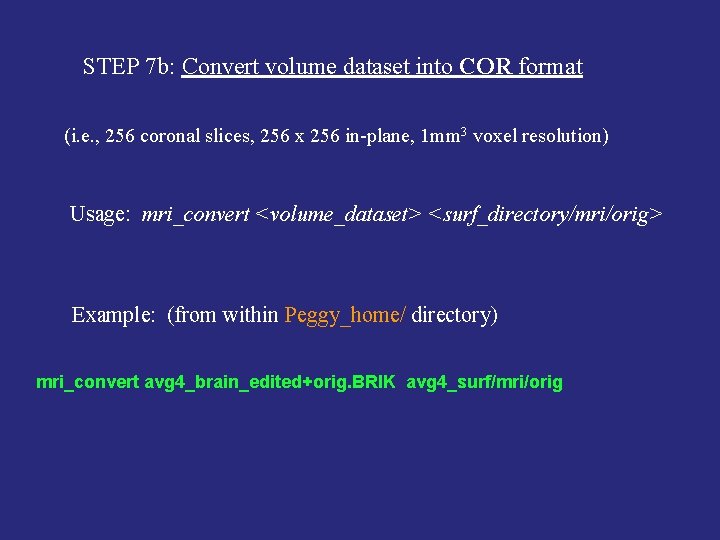
STEP 7 b: Convert volume dataset into COR format (i. e. , 256 coronal slices, 256 x 256 in-plane, 1 mm 3 voxel resolution) Usage: mri_convert <volume_dataset> <surf_directory/mri/orig> Example: (from within Peggy_home/ directory) mri_convert avg 4_brain_edited+orig. BRIK avg 4_surf/mri/orig

VOLUME PRE-PROCESSING DONE. NEXT, SEGMENTING THE WHITE MATTER This step is crucial because the quality of the surface creation is dependent on the quality of the white matter segmentation.

Segmenation Process in Free. Surfer aka “Process Volume” or “segment_subject” or “recon-all -stage 1”
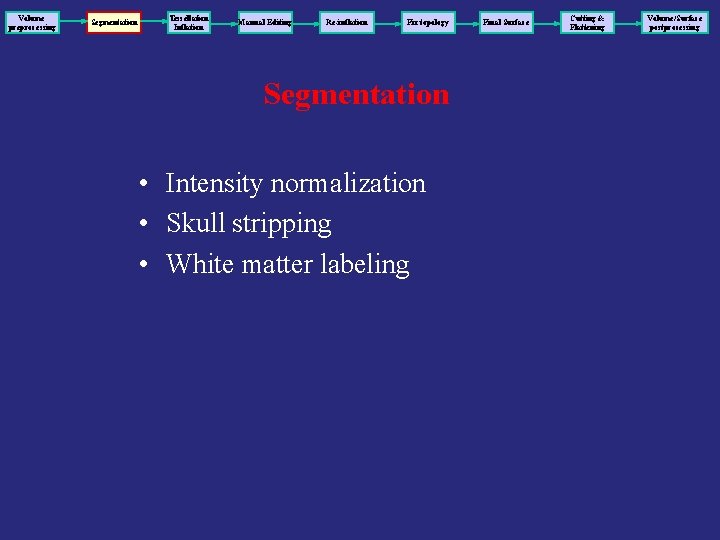
Volume preprocessing Segmentation Tessellation Inflation Manual Editing Re-inflation Fix topology Segmentation • Intensity normalization • Skull stripping • White matter labeling Final Surface Cutting & Flattening Volume/Surface postprocessing
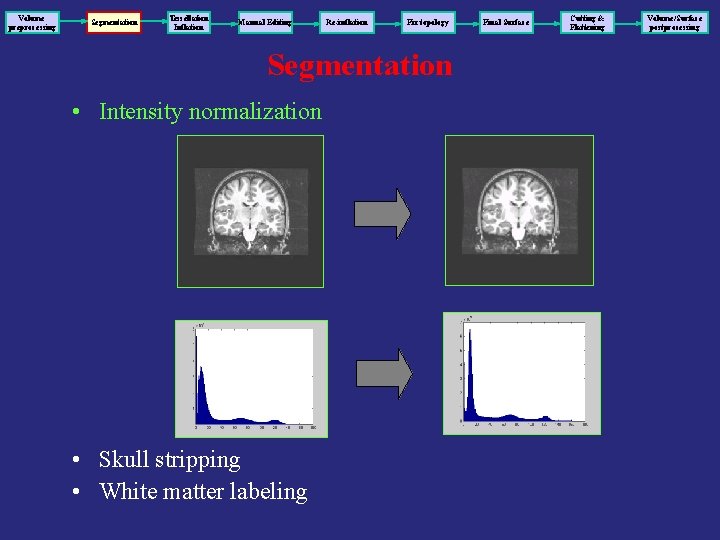
Volume preprocessing Segmentation Tessellation Inflation Manual Editing Re-inflation Fix topology Segmentation • Intensity normalization • Skull stripping • White matter labeling Final Surface Cutting & Flattening Volume/Surface postprocessing
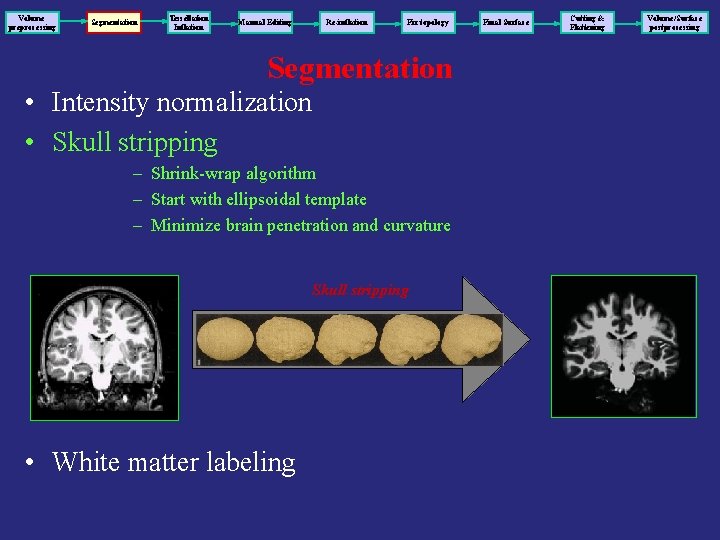
Volume preprocessing Segmentation Tessellation Inflation Manual Editing Re-inflation Fix topology Segmentation • Intensity normalization • Skull stripping – Shrink-wrap algorithm – Start with ellipsoidal template – Minimize brain penetration and curvature Skull stripping • White matter labeling Final Surface Cutting & Flattening Volume/Surface postprocessing

Skull Stripping Courtesy: http: //cogsci. ucsd. edu/~sereno/movies. html
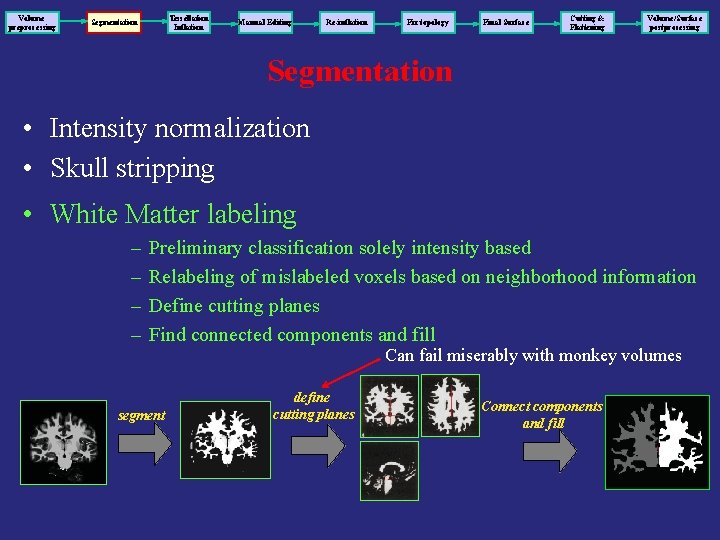
Volume preprocessing Tessellation Inflation Segmentation Manual Editing Re-inflation Fix topology Final Surface Cutting & Flattening Volume/Surface postprocessing Segmentation • Intensity normalization • Skull stripping • White Matter labeling – – Preliminary classification solely intensity based Relabeling of mislabeled voxels based on neighborhood information Define cutting planes Find connected components and fill segment Can fail miserably with monkey volumes define cutting planes Connect components and fill
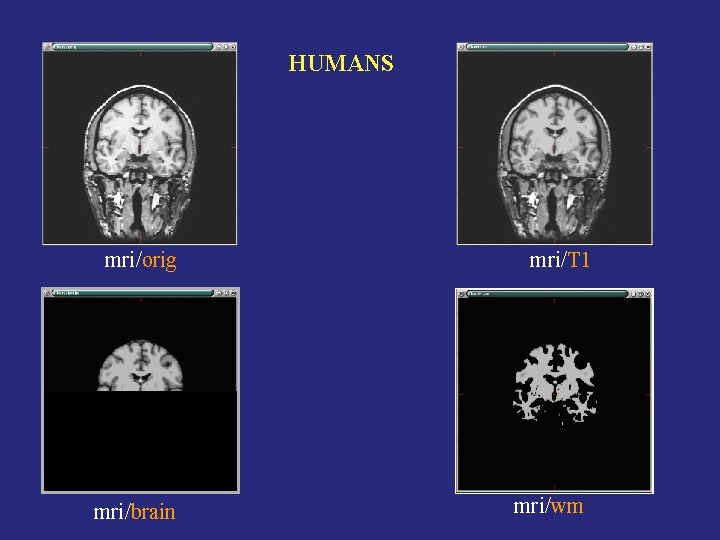
HUMANS mri/orig mri/brain mri/T 1 mri/wm
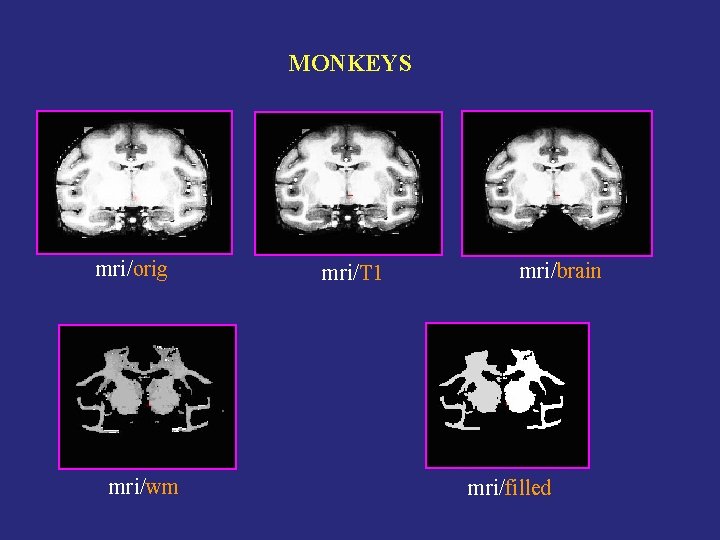
MONKEYS mri/orig mri/wm mri/T 1 mri/brain mri/filled
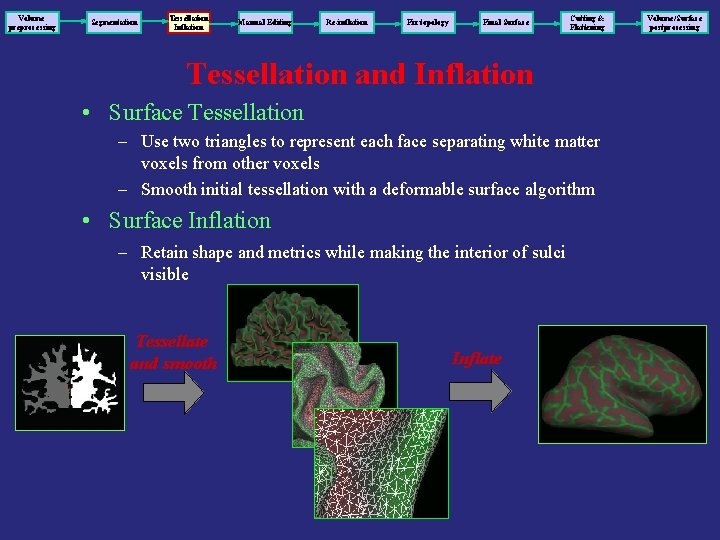
Volume preprocessing Segmentation Tessellation Inflation Manual Editing Re-inflation Fix topology Final Surface Cutting & Flattening Tessellation and Inflation • Surface Tessellation – Use two triangles to represent each face separating white matter voxels from other voxels – Smooth initial tessellation with a deformable surface algorithm • Surface Inflation – Retain shape and metrics while making the interior of sulci visible Tessellate and smooth Inflate Volume/Surface postprocessing

Inflation Courtesy: http: //cogsci. ucsd. edu/~sereno/movies. html
Troubleshooting • OFTEN, things can go terribly wrong when dealing with monkey volumes/surfaces. • Be prepared for this!!! • Luckily, with some patience and skill, you can fix these problems. • If you still can’t fix the problem, join the Free. Surfer mailing list and ask for help!
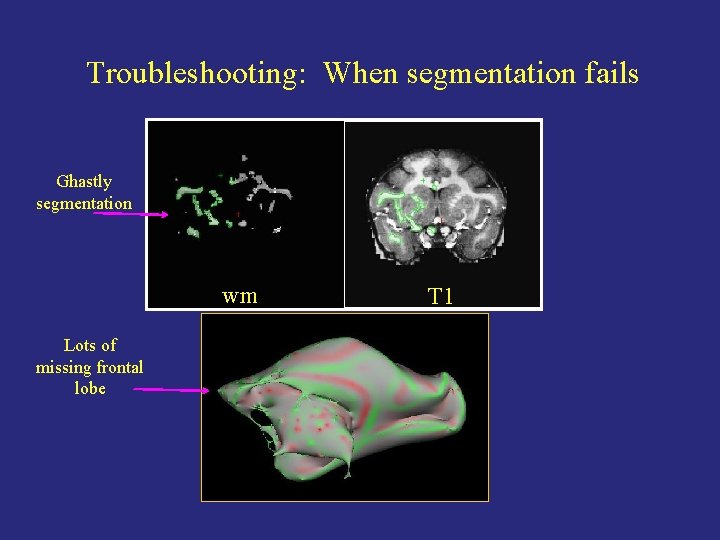
Troubleshooting: When segmentation fails Ghastly segmentation wm Lots of missing frontal lobe T 1
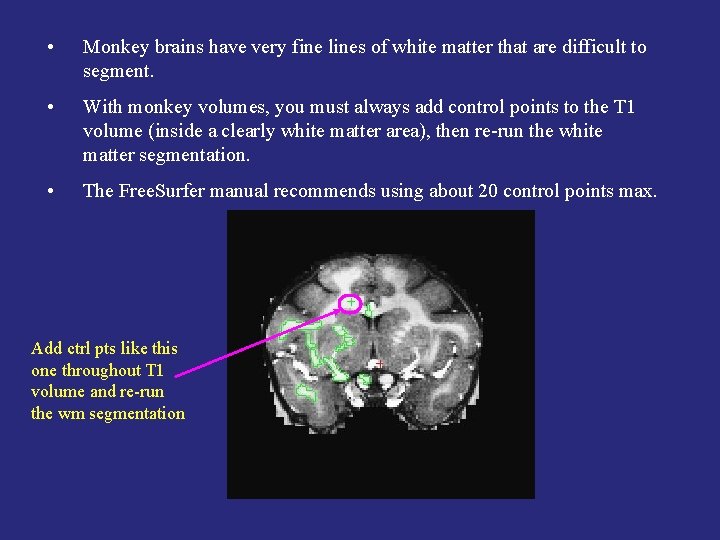
• Monkey brains have very fine lines of white matter that are difficult to segment. • With monkey volumes, you must always add control points to the T 1 volume (inside a clearly white matter area), then re-run the white matter segmentation. • The Free. Surfer manual recommends using about 20 control points max. Add ctrl pts like this one throughout T 1 volume and re-run the wm segmentation
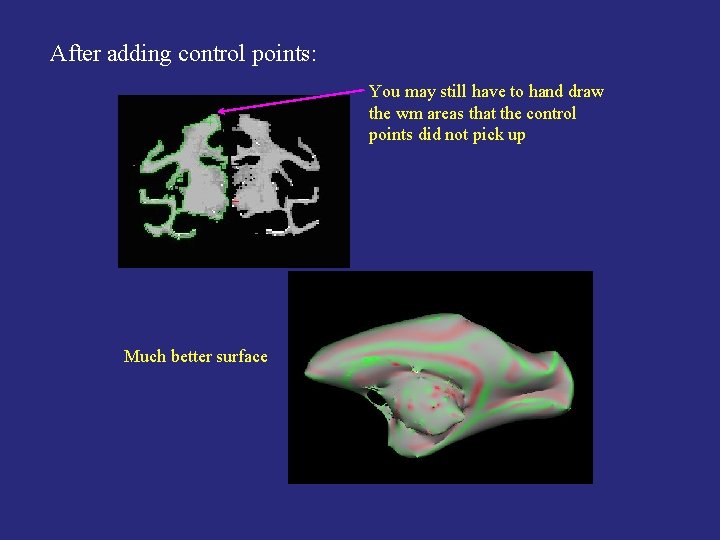
After adding control points: You may still have to hand draw the wm areas that the control points did not pick up Much better surface
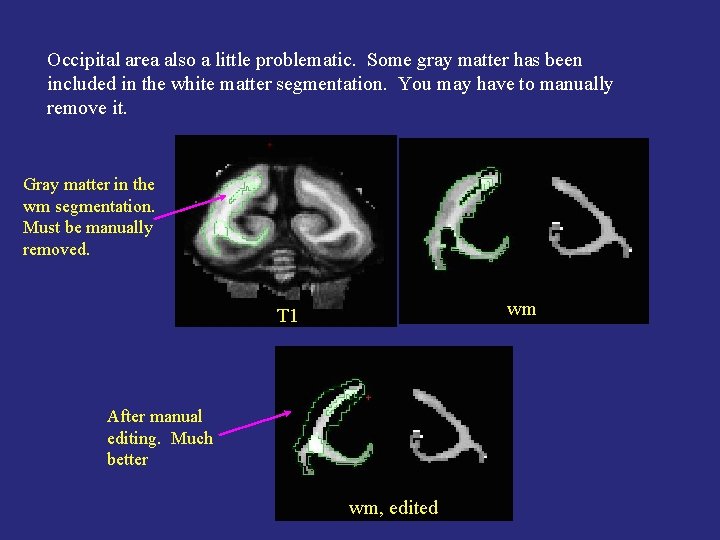
Occipital area also a little problematic. Some gray matter has been included in the white matter segmentation. You may have to manually remove it. Gray matter in the wm segmentation. Must be manually removed. wm T 1 After manual editing. Much better wm, edited
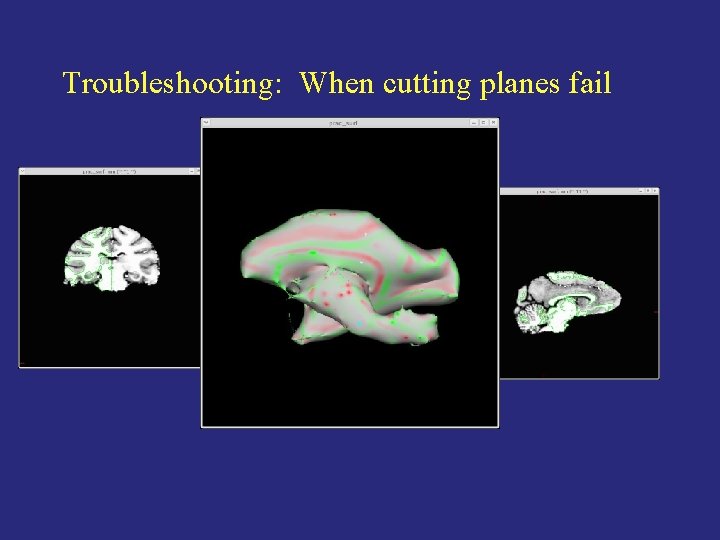
Troubleshooting: When cutting planes fail
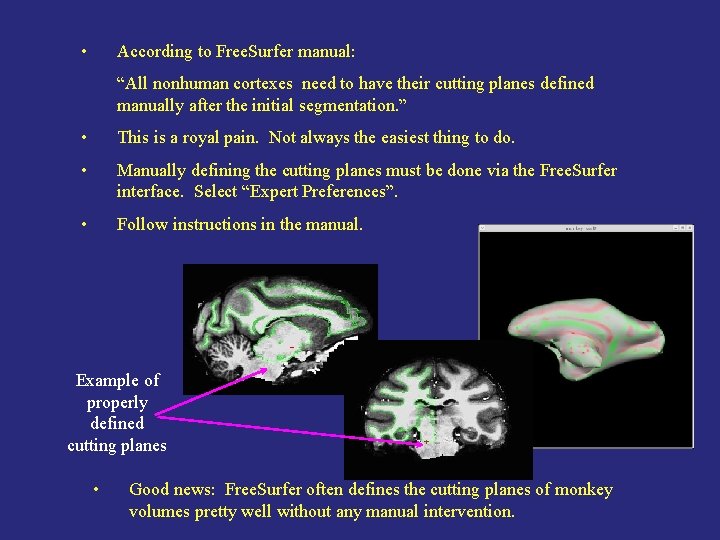
• According to Free. Surfer manual: “All nonhuman cortexes need to have their cutting planes defined manually after the initial segmentation. ” • This is a royal pain. Not always the easiest thing to do. • Manually defining the cutting planes must be done via the Free. Surfer interface. Select “Expert Preferences”. • Follow instructions in the manual. Example of properly defined cutting planes • Good news: Free. Surfer often defines the cutting planes of monkey volumes pretty well without any manual intervention.
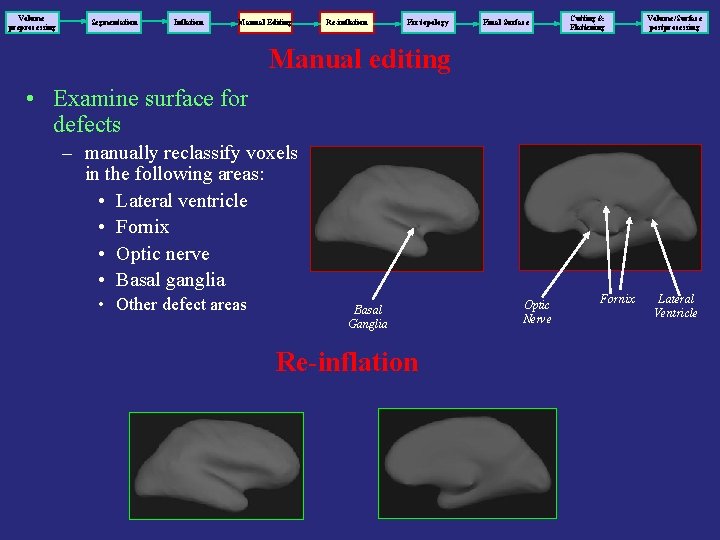
Volume preprocessing Segmentation Inflation Manual Editing Re-inflation Fix topology Final Surface Cutting & Flattening Volume/Surface postprocessing Manual editing • Examine surface for defects – manually reclassify voxels in the following areas: • Lateral ventricle • Fornix • Optic nerve • Basal ganglia • Other defect areas Basal Ganglia Re-inflation Optic Nerve Fornix Lateral Ventricle
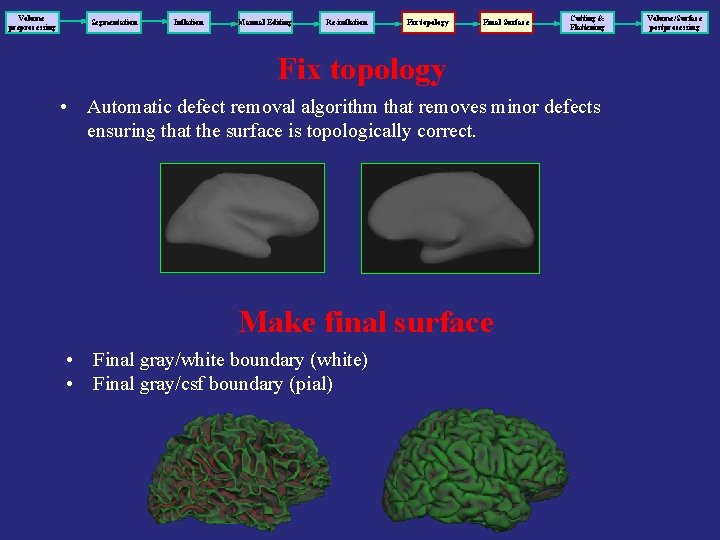
Volume preprocessing Segmentation Inflation Manual Editing Re-inflation Fix topology Final Surface Cutting & Flattening Fix topology • Automatic defect removal algorithm that removes minor defects ensuring that the surface is topologically correct. Make final surface • Final gray/white boundary (white) • Final gray/csf boundary (pial) Volume/Surface postprocessing
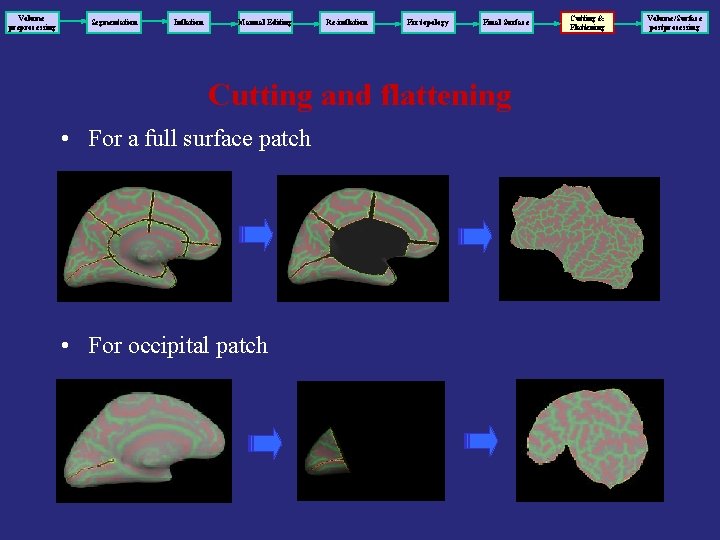
Volume preprocessing Segmentation Inflation Manual Editing Re-inflation Fix topology Final Surface Cutting and flattening • For a full surface patch • For occipital patch Cutting & Flattening Volume/Surface postprocessing
Flattening of occipital patch Flattening of full surface Courtesy: http: //cogsci. ucsd. edu/~sereno/movies. html
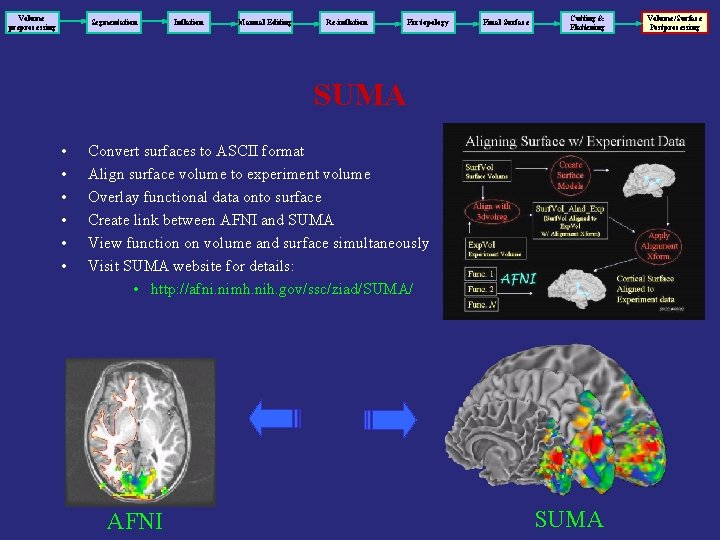
Volume preprocessing Segmentation Inflation Manual Editing Re-inflation Fix topology Final Surface Cutting & Flattening SUMA • • • Convert surfaces to ASCII format Align surface volume to experiment volume Overlay functional data onto surface Create link between AFNI and SUMA View function on volume and surface simultaneously Visit SUMA website for details: • http: //afni. nimh. nih. gov/ssc/ziad/SUMA/ AFNI SUMA Volume/Surface Postprocessing

Free. Surfer Links Free. Surfer Website (articles, download, docs, FAQ): http: //surfer. nmr. mgh. harvard. edu Mail Archives: www. mail-archive. com/freesurfer@mail. nmr. mgh. harvard. edu
- Slides: 49