
Forti Gate IPS operation training 2008 5 8



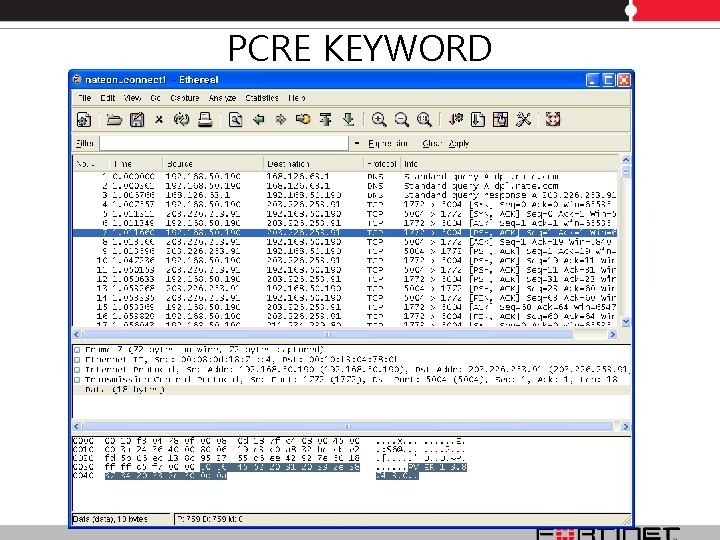
![PCRE KEYWORD F-SBID( --protocol tcp; --pcre "/(^PVERb/s)(b[0 -9]+b)(b[0 -9]+. [0 -9]+)/" --name "Nate. On";](https://slidetodoc.com/presentation_image_h/ea6a528ad03506125deb633c1fe03d86/image-13.jpg "PCRE KEYWORD F-SBID( --protocol tcp; --pcre \"/(^PVERb/s)(b[0 -9]+b)(b[0 -9]+. [0 -9]+)/\" --name \"Nate. On\";")

- Slides: 25
Forti. Gate IPS operation training 2008. 5. 8 Alvin Lee from Korea alvinlee@fortinet. com
Forti. Gate reference site
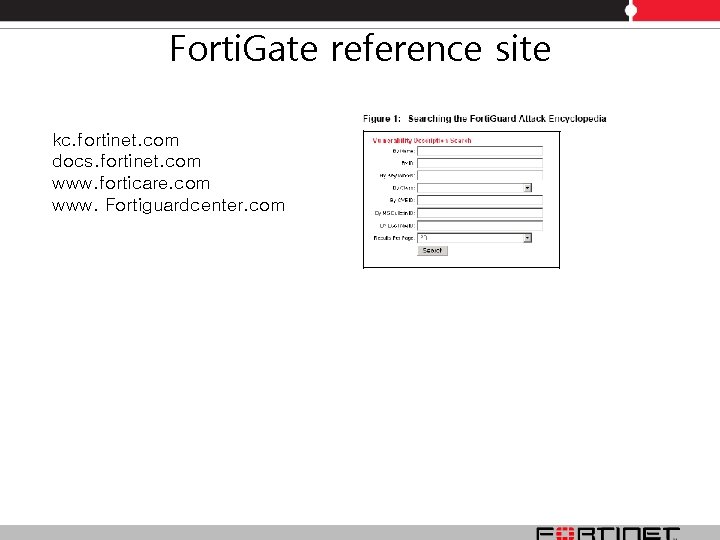
Forti. Gate reference site kc. fortinet. com docs. fortinet. com www. forticare. com www. Fortiguardcenter. com
IPS Signature
Predefined Signature provide over 4300 signatures and 4500 patterns
IPS Performance Tune-up Fine tuning IPS predefined signatures for enhanced system performance In Forti. OS the Forti. Gate unit will have most of the predefined signatures enabled and will log all of them by default. Fine tuning enables you to turn off features that you are not using. By turning off signatures and logs that you do not use. Not all systems require you to scan for all signatures of the IPS suite all the time. Note that in Forti. OS v 2. 80 releases, enabling IM/P 2 P detection can help IPS performance. The reason is that after the Forti. Gate unit detects the IM/P 2 P sessions from the first couple of packets, it will ignore these sessions without scanning, thus improve the overall performance. In Forti. OS v 3. 0 releases, the default is set to get the best performance. • disable not to use signature and log • reduce turn off features that you are not using through IPS Sensor • limit and adjust not to be appropriate signature column through IPS Sensor • limit protection target through firewall 5 tuples rule matching and avoid useless IPS DB scanning
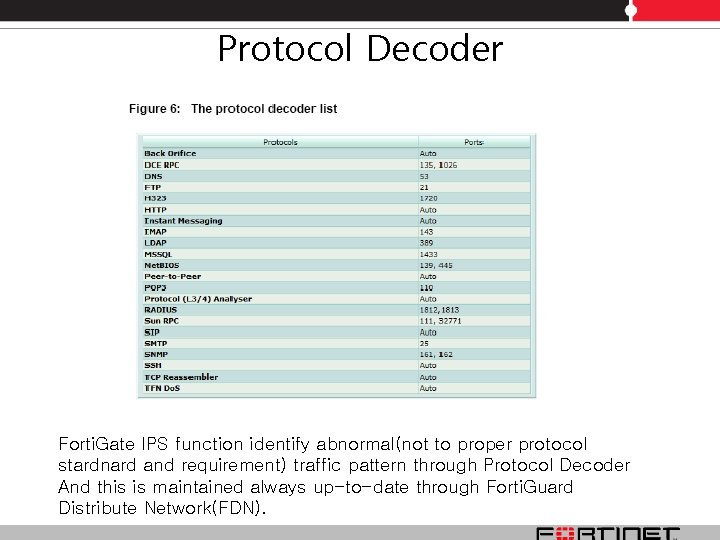
Protocol Decoder Forti. Gate IPS function identify abnormal(not to proper protocol stardnard and requirement) traffic pattern through Protocol Decoder And this is maintained always up-to-date through Forti. Guard Distribute Network(FDN).
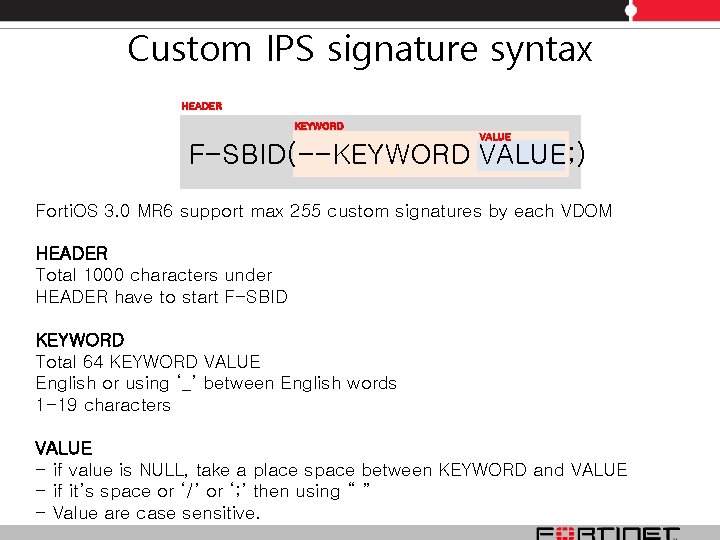
Custom IPS signature syntax HEADER KEYWORD VALUE F-SBID(--KEYWORD VALUE; ) Forti. OS 3. 0 MR 6 support max 255 custom signatures by each VDOM HEADER Total 1000 characters under HEADER have to start F-SBID KEYWORD Total 64 KEYWORD VALUE English or using ‘_’ between English words 1 -19 characters VALUE - if value is NULL, take a place space between KEYWORD and VALUE - if it’s space or ‘/’ or ‘; ’ then using “ ” - Value are case sensitive.
Custom IPS signature syntax • KEYWORD 1. Informational keywords • attack_id • name 2. Session keywords • flow • service 3. Contents keywords • content • uri • pattern • pcre • context • offset • depth • distance • within • no_case • byte_test • byte_jump 4. IP header keywords • ip_tos • ip_id • ip_option • ip_ttl • src_addr • dst_addr • protocol 5. TCP header keywords • src_port • dst_port • tcp_flags • seq • ack • window_size 5. UDP header keywords • src_port • dst_port For more detail, look for the Forti. Gate_IPS_Guide 6. ICMP keywords • icmp_type • icmp_code • icmp_id • icmp_seq 7. Other keywords • same_ip • 겣_num • data_size • data_at
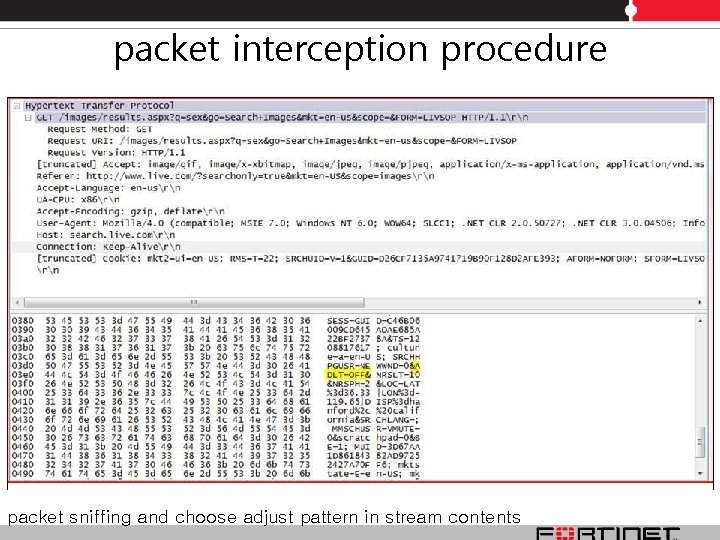
packet interception procedure 프로그램 차단(IM, P 2 P등) To block the special programs first you need to trace the packet and block the unwanted IP address and port because these programs will first connects to some predefined servers. Also you can block those applications using custom IPS signature. packet sniffing and choose adjust pattern in stream contents
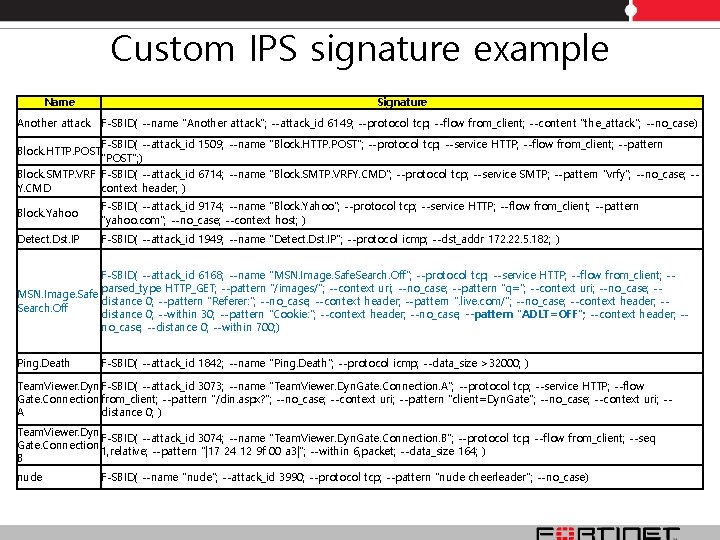
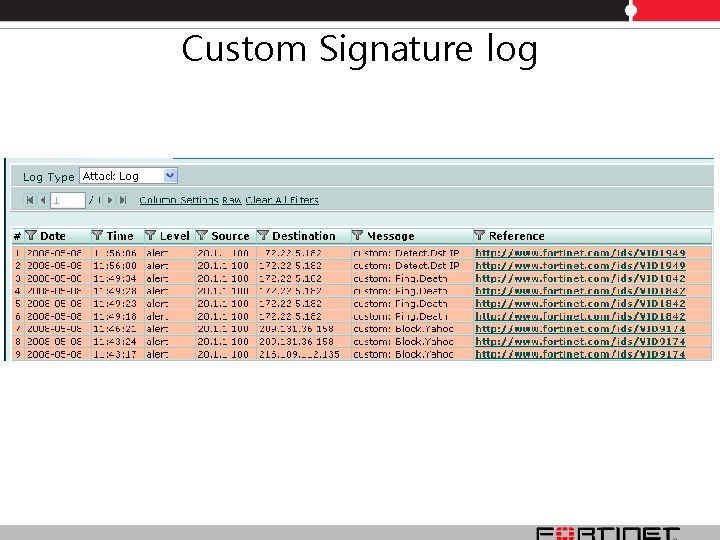
Custom IPS signature example Name Signature Another attack F-SBID( --name "Another attack"; --attack_id 6149; --protocol tcp; --flow from_client; --content "the_attack"; --no_case) Block. HTTP. POST F-SBID( --attack_id 1509; --name "Block. HTTP. POST"; --protocol tcp; --service HTTP; --flow from_client; --pattern "POST"; ) Block. SMTP. VRF F-SBID( --attack_id 6714; --name "Block. SMTP. VRFY. CMD"; --protocol tcp; --service SMTP; --pattern "vrfy"; --no_case; -Y. CMD context header; ) Block. Yahoo F-SBID( --attack_id 9174; --name "Block. Yahoo"; --protocol tcp; --service HTTP; --flow from_client; --pattern "yahoo. com"; --no_case; --context host; ) Detect. Dst. IP F-SBID( --attack_id 1949; --name "Detect. Dst. IP"; --protocol icmp; --dst_addr 172. 22. 5. 182; ) F-SBID( --attack_id 6168; --name "MSN. Image. Safe. Search. Off"; --protocol tcp; --service HTTP; --flow from_client; -parsed_type HTTP_GET; --pattern "/images/"; --context uri; --no_case; --pattern "q="; --context uri; --no_case; -MSN. Image. Safe distance 0; --pattern "Referer: "; --no_case; --context header; --pattern ". live. com/"; --no_case; --context header; -Search. Off distance 0; --within 30; --pattern "Cookie: "; --context header; --no_case; --pattern "ADLT=OFF"; --context header; -no_case; --distance 0; --within 700; ) Ping. Death F-SBID( --attack_id 1842; --name "Ping. Death"; --protocol icmp; --data_size >32000; ) Team. Viewer. Dyn F-SBID( --attack_id 3073; --name "Team. Viewer. Dyn. Gate. Connection. A"; --protocol tcp; --service HTTP; --flow Gate. Connection. from_client; --pattern "/din. aspx? "; --no_case; --context uri; --pattern "client=Dyn. Gate"; --no_case; --context uri; -A distance 0; ) Team. Viewer. Dyn F-SBID( --attack_id 3074; --name "Team. Viewer. Dyn. Gate. Connection. B"; --protocol tcp; --flow from_client; --seq Gate. Connection. 1, relative; --pattern "|17 24 12 9 f 00 a 3|"; --within 6, packet; --data_size 164; ) B nude F-SBID( --name "nude"; --attack_id 3990; --protocol tcp; --pattern "nude cheerleader"; --no_case)
PCRE KEYWORD
PCRE KEYWORD F-SBID( --protocol tcp; --pcre "/(^PVERb/s)(b[0 -9]+b)(b[0 -9]+. [0 -9]+)/" --name "Nate. On"; )' you can test in PC using perl software. echo "PVER 1 3. 874 3. 0" | perl -ane 'if (/PVERs+[0 -9. ]+/) { print "Matchedn" }' 'F-SBID( --protocol tcp; --pcre "/PVERs+[0 -9. ]+/" --name "Nate. On"; )‘ --pcre(perl compatible regular expressions) / : no mean if it’s word not number behind / s : any blank word ^ : first to target PVER : word itself b : boundary of word /s : single line () : group(start and end of sub-pattern) [0 -9] : numbers of 0 -9 (start and end of class definition) ]+ : word is + behind . : . ifself
Custom Signature log
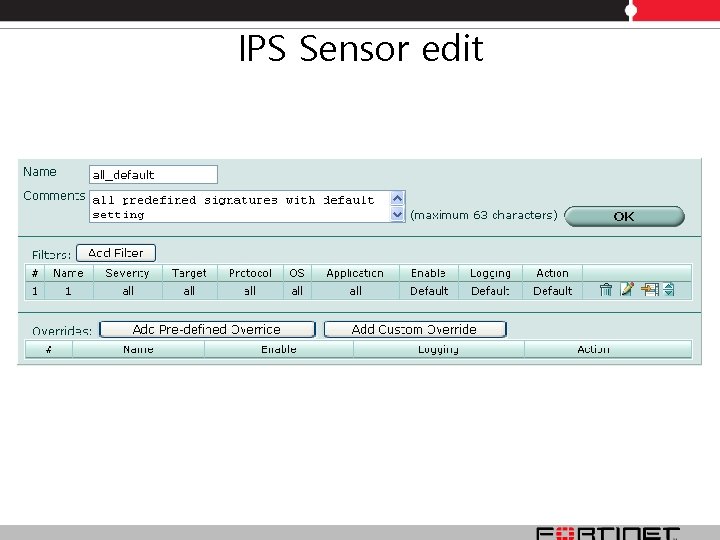
IPS Sensor
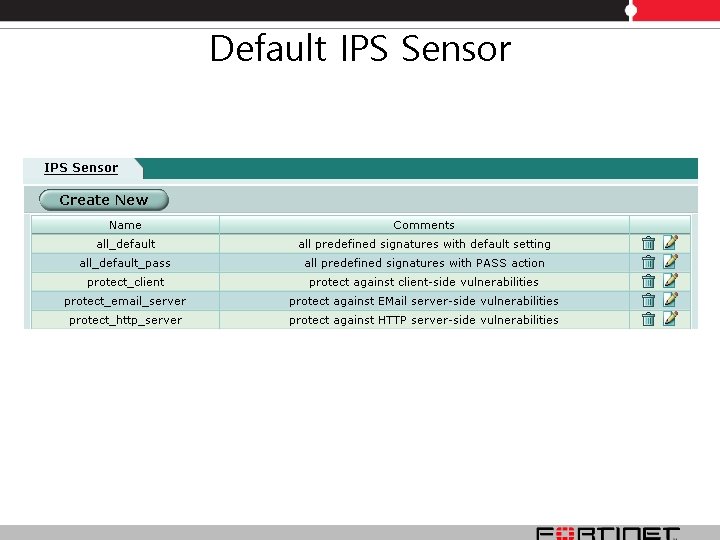
Default IPS Sensor
IPS Sensor edit
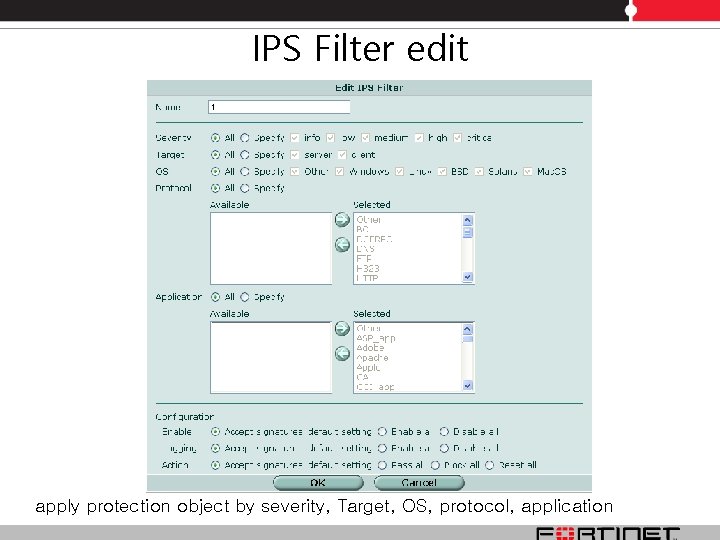
IPS Filter edit apply protection object by severity, Target, OS, protocol, application
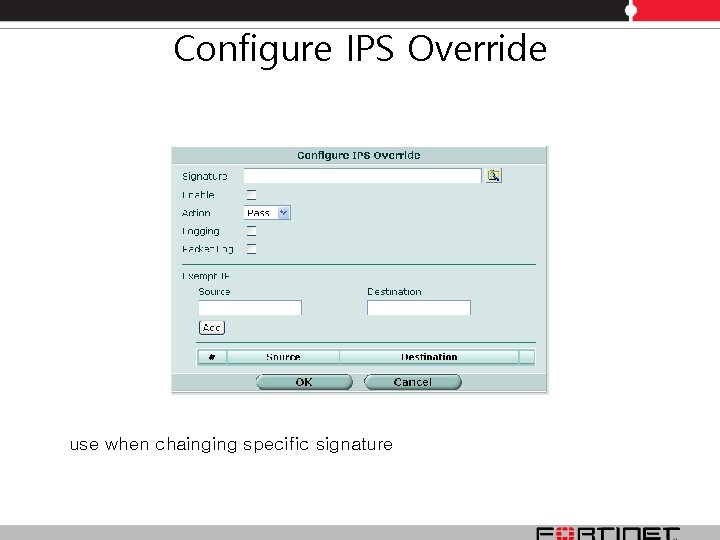
Configure IPS Override use when chainging specific signature
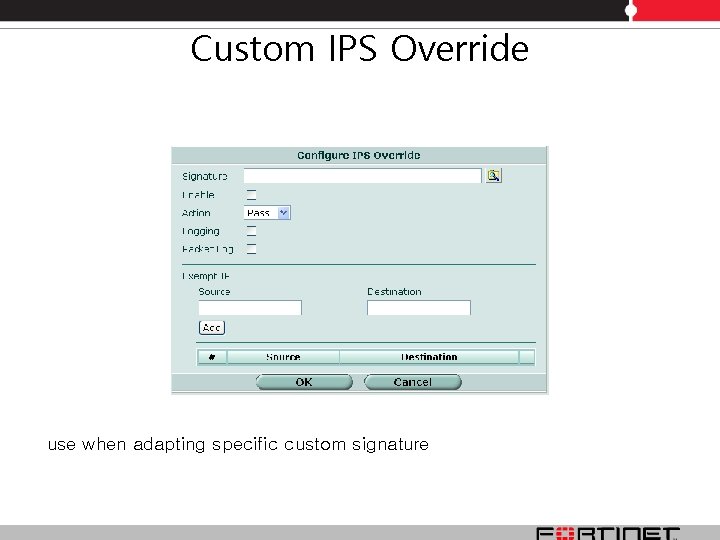
Custom IPS Override use when adapting specific custom signature
Do. S Sensor
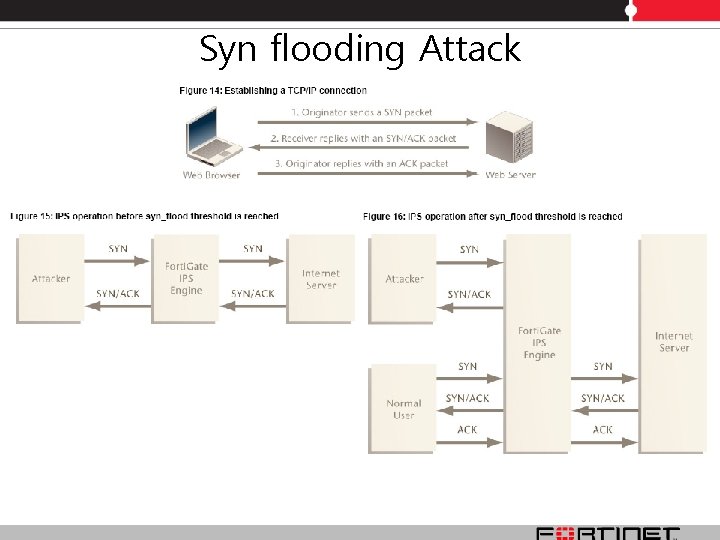
Syn flooding Attack
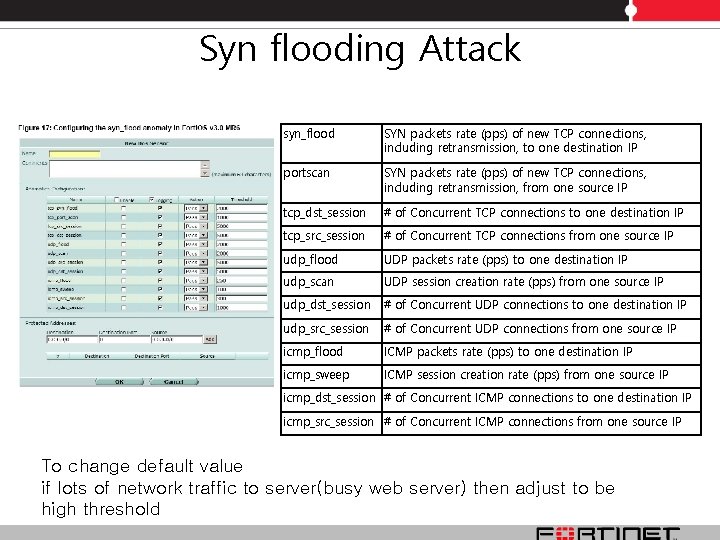
Syn flooding Attack syn_flood SYN packets rate (pps) of new TCP connections, including retransmission, to one destination IP portscan SYN packets rate (pps) of new TCP connections, including retransmission, from one source IP tcp_dst_session # of Concurrent TCP connections to one destination IP tcp_src_session # of Concurrent TCP connections from one source IP udp_flood UDP packets rate (pps) to one destination IP udp_scan UDP session creation rate (pps) from one source IP udp_dst_session # of Concurrent UDP connections to one destination IP udp_src_session # of Concurrent UDP connections from one source IP icmp_flood ICMP packets rate (pps) to one destination IP icmp_sweep ICMP session creation rate (pps) from one source IP icmp_dst_session # of Concurrent ICMP connections to one destination IP icmp_src_session # of Concurrent ICMP connections from one source IP To change default value if lots of network traffic to server(busy web server) then adjust to be high threshold
Reference Document • Forti. Gate_IPS_Guide_01_30006_0080_20080422
Q&A